Posted on Leave a comment

Apple at 50: Paul McCartney sound check and the employee gift bag

Apple’s conclusion to its 50th anniversary celebration at Apple Park is confirmed to include a performance by Paul McCartney, as well as a small selection of employee gifts to mark the occasion.

Apple has been holding a series of events around the world, as part of its 50th anniversary celebrations. The grand finale will take place at Apple Park on Wednesday, while it will be a big party for Apple employees, some more details about the event have been unearthed.

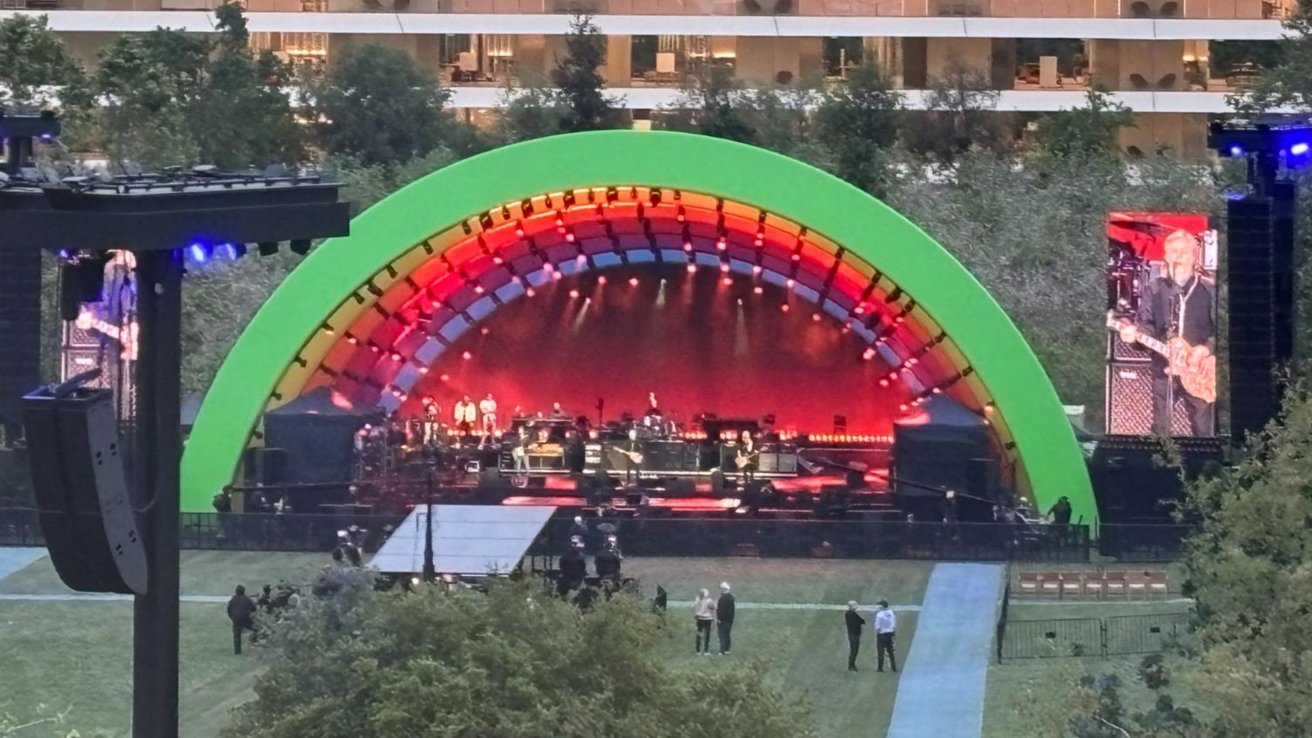
A photograph shared to Reddit by user u/Live_Football2343 shows the soundcheck for Wednesday’s performance within the rainbow arch at the middle of Apple Park.

The shot does confirm something that was hinted at on Sunday about a “British Invasion” singer who Steve Jobs would’ve been happy to see. On large screens on either side of the stage, Sir Paul McCartney is shown playing an electric guitar during a sound check.

Swag bag

Apple isn’t just going to hold a concert at its headquarters to mark the major company anniversary. It’s also going to give its employees some physical treats too.

Images shared by Mr. Macintosh on X on Tuesday shows the contents of a goody bag that will be provided to attendees.

It’s a short list of items, including an Apple-branded t-shirt, complete with a scribbled Apple logo. It’s wrapped in a thin cardboard band, also branded with the Apple logo.

There’s also an enamel pin, which is simply a number 50 springing upward with rainbow layers. The cardboard holder for the badge also shows the date April 1, 1976, as a reminder of when Apple’s journey began.

A poster is also included, again using the scribbled Apple logo, as well as the text “50 Years of Thinking Different.”

The contents of the gift bag are also confirmed by a photograph shared by long-time leaker @L0vetodream. However, Apple may also provide some extra items to some of its more valued employees, aside from the gift bag itself.

Employees are able to pick up their gifts on-site between March 31 and April 30.

Posted on Leave a comment

NASA Artemis II launch getting the Apple Vision Pro immersive video treatment

Cosmic Perspective is filming NASA’s Artemis II Moon mission launch in Apple Immersive Video to create a flagship experience for Apple Vision Pro.

NASA plans to send Artemis II on a roughly 10-day flight around the Moon, marking the first crewed mission in the Artemis program. Cosmic Perspective has set up specialized Blackmagic immersive cameras at the Florida launch site to capture the event.

Apple’s immersive format uses 180-degree stereoscopic video and spatial audio to place viewers inside a scene, unlike traditional video. Recording a rocket launch with this format recreates the scale and intensity of liftoff for viewers.

Cosmic Perspective has focused on filming space launches in 3D and immersive formats. The Artemis II mission stands as its highest-profile project viewable on Apple Vision Pro.

The company has confirmed it’s capturing Apple Immersive Video specifically for Apple Vision Pro.

Apple has been steadily building a library of immersive content across sports, concerts, and nature programming. A NASA Moon mission, even if by a third party, adds a different category entirely.

The choice of Artemis II matters because it carries astronauts, not just instruments, which raises the stakes and emotional weight of the footage. A crewed mission brings human risk and anticipation.

Posted on Leave a comment

Get AirPods 4 from $99, AirPods Pro 3 for $199 during Amazon’s Big Spring Sale

Amazon’s Big Spring Sale delivers sale prices on AirPods starting at just $99.

Kicking off today’s Big Spring Sale, AirPods 4 are marked down to $99.99 without Active Noise Cancellation and $148.99 with ANC.

Buy AirPods 4 from $99.99

Apple AirPods Pro 3, meanwhile, are on sale for $199. That’s a $50 discount off MSRP.

Buy AirPods Pro 3 for $199

Today’s top AirPods offers

Even more Apple deals

Lowest Apple prices

Save on 100s of Apple devices

There are plenty of end-of-quarter sales going on across Apple’s product lines. Here’s a sampling of our top picks, with hundreds of bargains available in the AppleInsider Apple Price Guide.

Posted on Leave a comment

Masimo wins hollow victory over Apple Watch’s blood oxygen sensors

A US appeals court has found in favor of Masimo in its fight against Apple over pulse oximetry patents, but in the court that matters, a ruling makes it clear that there won’t be another ban on the Apple Watch.

In the now six year-long legal battle between medical technology firm Masimo and Apple, this particular appeal concerns a ruling by the International Trade Commission (ITC). The ITC ruled that Apple had stolen trade secrets and violated patents with its blood pulse oximeter in the Apple Watch.

Masimo wanted a ban on the Apple Watch and in October 2023, the ITC issued an order barring Apple from importing the Apple Watch into the US, and in December denied the company’s appeal against it.

Now as first spotted by IP Fray, the US Court of Appeal for the Federal Circuit has backed the original ITC ruling. The text of the court filing is a single sentence saying that the ruling has been affirmed, and gives no explanation for this conclusion.

The listing for this filing says a little more, that the appeal was “terminated on the merits after oral argument.” Apple will be required to pay costs.

However, this ruling on March 19, 2026, followed a ruling by the US International Trade Commission (ITC) the day before. That filing, presumably written knowing the appeals court’s decision, states that Apple does not now have to do anything more to remedy the case.

Listing each of the specific patents named in the various cases, the ITC says it finds that Apple does not infringe any of them. It repeatedly refers to what it calls the “Apple Redesign 2 Watch,” presumably meaning that Apple’s software update removed the claimed infringements.

“We thank the Administrative Law Judge for her careful consideration, and are pleased with the decision,” Apple told AppleInsider and likely other venues as well. “For six years, Masimo has brought dozens of false claims against Apple, nearly all of which have been rejected. We will continue innovating to create industry-leading health, wellness, and life-saving features for our users.”

How we got here

The original lawsuit was filed with the US District Court for the Central District of California by Masimo in 2020. It was then followed in 2021 by Masimo’s complaint to the ITC.

By 2023, the initial lawsuit had ended with a mistrial after jurors could not reach a unanimous verdict. But this separate ITC case was won by Masimo in January 2023.

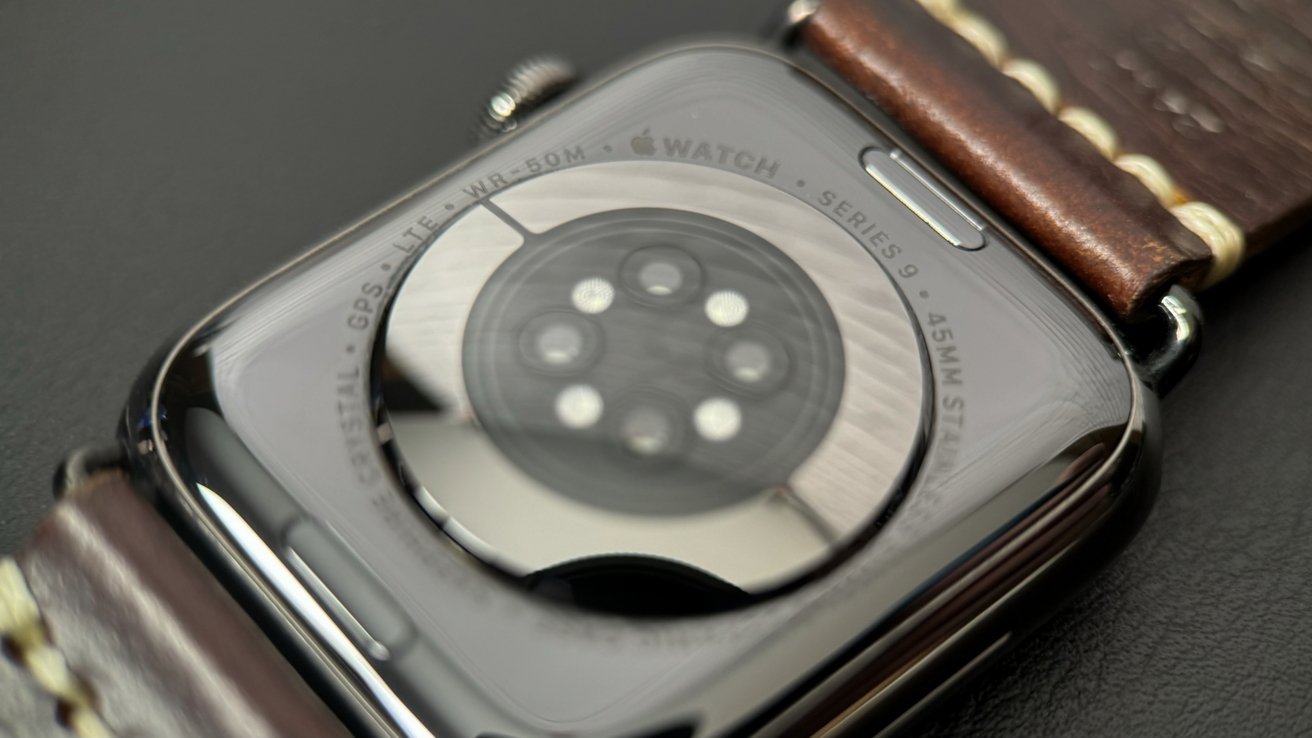
Close-up of a watch's back, showing sensors and a brown leather strap with cream stitching. Text indicates features like GPS and water resistance.

The rear sensor of the Apple Watch Series 9 with its health senors

The ITC recommended a ban on the US import of any Apple Watch models that violated Masimo’s patents. The recommendation triggered a 60-day review period within the White House, which could have decided against the ban — but didn’t.

With the ban then certain to come into affect for the Apple Watch Series 6 and later, Apple stopped importing and selling the affected models ahead of the ban taking place.

At the same time, however, Apple worked on the idea of a software update to circumvent the allegedly patent-violating feature. The update essentially just disabled the blood oxygen feature, which the US Customs and Border Protection agency decided in January 2024 was sufficient.

In November 2025, Masimo won a $634 million verdict in a federal jury trial. That ruling has not been affected by the new filings, and Masimo called it “a significant win in our ongoing efforts to protect our innovations and intellectual property.”

For its part, Apple told AppleInsider that the November 2025 decision was “contrary to the facts.” It claimed that “Masimo is a medical device company that does not sell any products to consumers.”

“We plan to appeal,” concluded Apple.

So regardless of the latest decision regarding the appeal, the legal battle between the two companies is set to continue. However, they have now been in dispute long enough that patents in question may expire within less than three years, allowing Apple to resume using its feature.

Posted on Leave a comment

Family Sharing no longer means sharing a credit card in iOS 26.4

Apple is finally fixing one of Family Sharing’s most awkward limitations in iOS 26.4, letting multiple adults on one family pay for their own purchases without breaking shared access.

For years, Family Sharing forced everyone into a single payment method whenever purchase sharing was enabled. The approach worked for traditional households, but it created friction for anyone sharing with friends, partners, or extended family.

One person effectively became the default payer, even when it made no practical sense. iOS 26.4 changes the structure by letting adult members use their own payment methods while still joining shared purchases.

The old system tied access and payment together, which made sharing restrictive. If you wanted shared apps, music, or subscriptions, you also had to accept one shared payment method.

Apple finally separates sharing from paying

Apple’s update breaks the link between access and payment. Adults can now use their own payment methods while still participating in purchase sharing, so shared access no longer requires a shared wallet.

Children still route purchases through the family organizer, which keeps parental controls intact while giving adults more independence.

The update looks minor, but it fixes a long-standing design problem that constrained how Family Sharing could be used. Apple has spent years expanding its services business, and Family Sharing sits at the center of that ecosystem.

Growing subscription costs and more flexible group dynamics make a single payer model harder to justify. Making payment optional opens the feature to more realistic setups beyond tightly managed households.

The change removes a lot of friction without giving up Apple’s control. Purchase sharing still works the same way, but one person isn’t stuck paying for everyone else by default.

Posted on Leave a comment

Amazon’s M5 MacBook Pro sale delivers deals from just $1,399

Amazon’s M5 MacBook Pro sale delivers steep discounts on multiple configurations, from the standard model for $1,399 to the upgraded 1TB spec for $1,499.

March MacBook Pro deals are in full swing, with the standard M5/16GB/512GB spec discounted to $1,399.99, reflecting a $200 markdown off MSRP.

Buy M5/16GB/512GB MacBook Pro for $1,399.99

Prefer more storage? The 1TB M5 model with 16GB of memory is marked down to $1,499 — also a $200 discount off Apple’s new MSRP of $1,699 (and the lowest price ever).

Buy M5/16GB/1TB MacBook Pro for $1,499.99

You can also pick up a MacBook Air at a discount, with this closeout M4/16GB/512GB spec that’s down to an all-time low price of $1,079 while supplies last.

Posted on Leave a comment

Surprise Alicia Keys concert turns Grand Central Apple Store into a piano stage

Apple shuttered its Grand Central Terminal store on March 13 for a surprise Alicia Keys concert, marking the start of 50th anniversary celebrations.

Apple CEO Tim Cook showed up with several senior executives. They transformed one of Apple’s most iconic retail spots into a temporary live music venue.

The company invited select media members, creators, and guests while keeping the performer secret until Keys appeared on stage.

Preparations began on March 12 with crews installing a stage, lighting, and audio equipment inside the retail space. Keys performed alongside her signature pink piano after the store was temporarily converted into a small concert venue.

Crowded Grand Central Terminal concourse with people gathered beneath the central clock, tall arched windows glowing purple, high ornate ceiling, chandeliers, and a large American flag hanging on the right

Grand Central Station during the Alicia Keys concert – Image Credit: Apple

People inside Grand Central Terminal could catch parts of the performance from outside the store. It’s unusual for Apple to close one of its most famous locations, especially since they usually keep their retail spaces open during business hours.

Tim Cook and Apple executives attend the event

Cook attended the concert alongside Apple marketing chief Greg Joswiak, retail head Deirdre O’Brien, and hardware engineering chief John Ternus. The executives watched the performance inside the Grand Central location with invited guests.

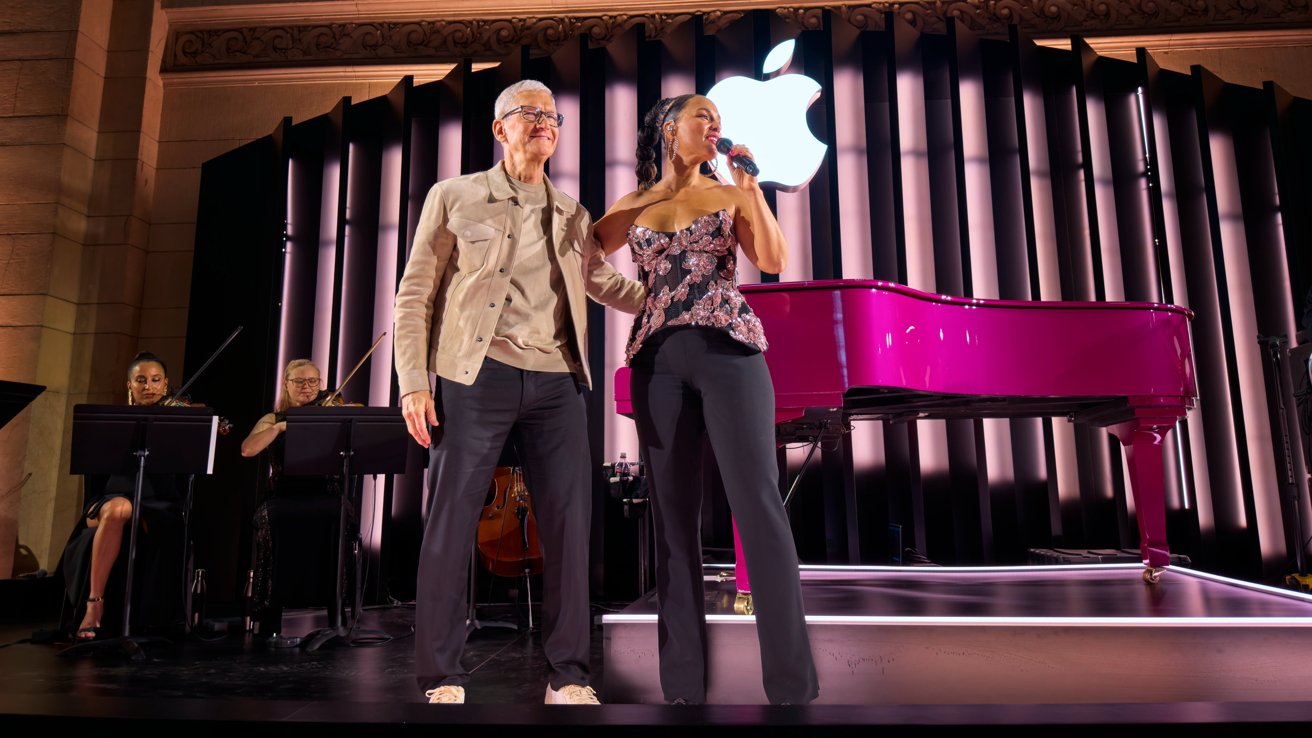
Man and woman stand arm in arm onstage; woman sings into microphone beside bright pink grand piano, orchestra musicians behind them, large glowing Apple logo overhead.

Alicia Keys and Apple CEO Tim Cook at Apple Grand Central – Image Credit: Apple

The Grand Central store sits inside one of New York City’s busiest transit hubs and serves as one of Apple’s most visible retail spaces. The setting allowed Apple to host a private event while drawing attention from commuters and visitors.

Keys has appeared at several Apple-related events over the years. She performed at Apple Music Festival 10 in London in 2016 and later headlined Apple’s NYC Holiday Masquerade Ball in December 2022.

Smiling musician with long braided hair and glasses plays a piano in a recording studio, wearing a bright red jacket, with a microphone and synthesizer nearby and sheet music on the piano

Alicia Keys in her Apple Vision Pro performance

The artist also appeared on Apple Vision Pro through the immersive performance Alicia Keys: Rehearsal Room, one of the early music experiences released for the spatial computing headset.

Part of Apple’s 50th anniversary celebrations

Apple announced that it plans to celebrate the company’s 50th anniversary over the coming weeks. Apple was founded on April 1, 1976, placing the milestone anniversary on April 1, 2026.

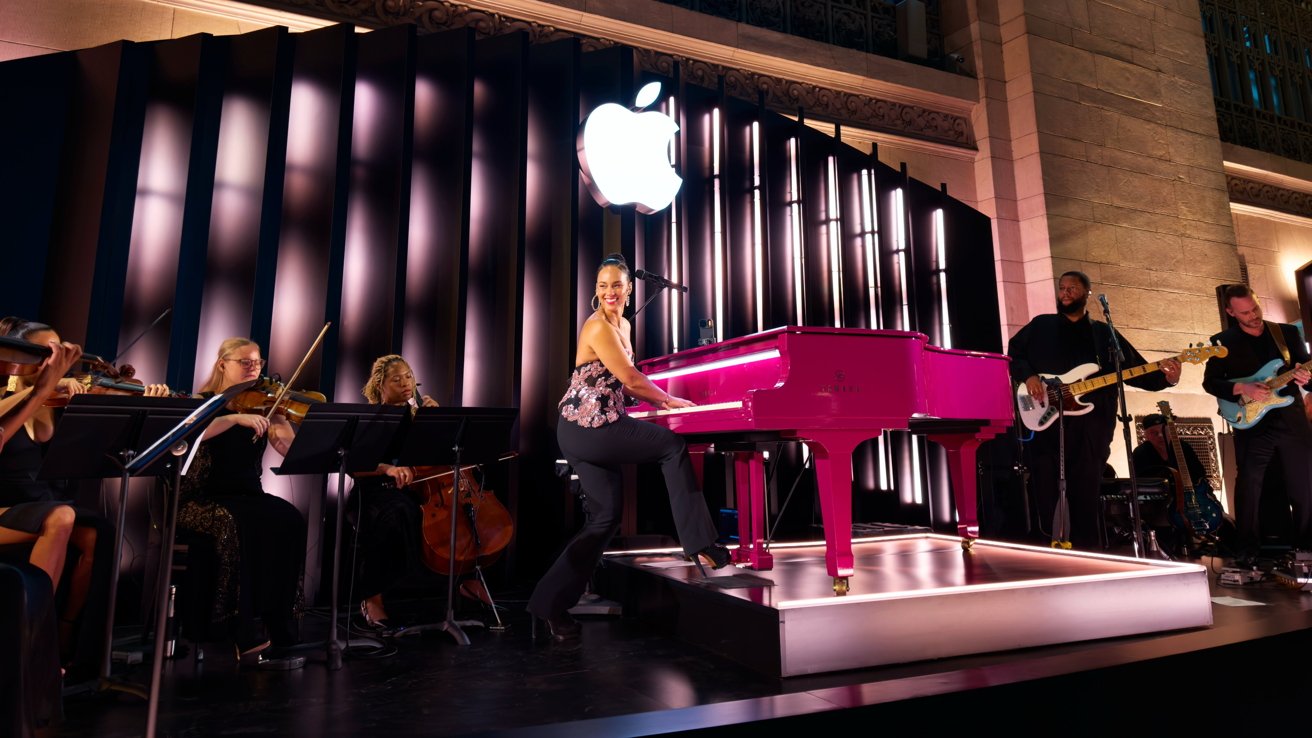
Singer playing a bright pink grand piano onstage with string and guitar musicians, under a glowing Apple logo and dramatic vertical light columns in an elegant hall

Alicia Keys performing at Apple Grand Central – Image Credit: Apple

Cook said the anniversary would recognize the “creativity, innovation, and impact” made possible by Apple’s global community of users and developers.

The Grand Central performance is one of the first public events connected to the anniversary. Apple has not yet detailed additional celebrations tied to the milestone.

Posted on Leave a comment

Adobe begrudgingly admits defeat, agrees to pay $150m over confusing cancellation fees

Adobe has issued a statement agreeing to pay a hefty fine after years of customers complaining about a lack of transparency in its billing agreements — but it still doesn’t think it did anything wrong.

Adobe has announced that it has finalized a settlement agreement with the U.S. Department of Justice. It officially marks the end of the more than two-year long saga surrounding its much maligned cancellation practices.

Of the $150 million Adobe has agreed to pay, $75 million will go directly to affected customers in the form of complimentary services. The remaining $75 will go directly to the Department of Justice to settle the lawsuit.

While Adobe agreed to pay the fee, it hasn’t admitted any wrongdoing. In fact, the company says, “While we disagree with the government’s claims and deny any wrongdoing, we are pleased to resolve this matter.”

To be clear, Adobe isn’t fixing the abhorrent cancellation fees – it’s just now required to be significantly more transparent about them.

To understand why this shook out the way it did, you’ll need to understand how Adobe handles subscriptions. And, if you’ve never seen this before, I apologize ahead of time for how confusing it is.

Starving artists need not subscribe

When a user subscribes to something Adobe offers, they’re given three options to pay: monthly; annual, paid monthly; or annual, paid upfront. Here’s what each of those options means.

None of the subscriptions, by the way, are terribly cheap. If you’re an independent artist who needs Adobe products, that can account for a large portion of your monthly overhead.

Monthly subscription: The most expensive option, Adobe’s monthly subscriptions are often twice the cost of the other subscription options. However, if a user needs to cancel the subscription, Adobe does not charge a fee.

Annual subscription, paid monthly: Typically half the price of the standard monthly subscription, Adobe allows users to subscribe at the yearly price while still paying monthly. The downside is that Adobe will charge 50% of the remaining contract if canceled.

Annual subscription, paid upfront: Users may also choose to pay upfront for a full year of service. While this has advantages, such as preventing surprise billing, Adobe warns users that there are absolutely no refunds on this plan after the first 14 days.

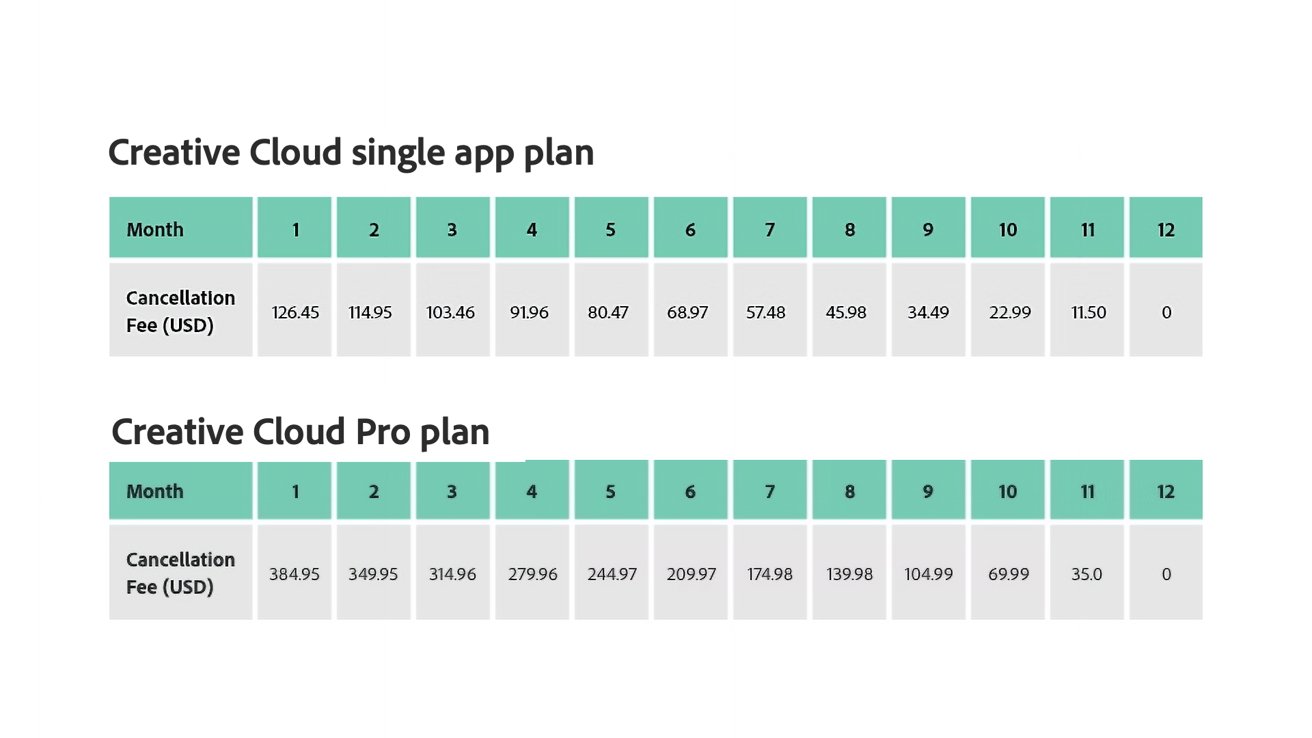
Table comparing Creative Cloud single app and Pro plan cancellation fees in USD for months 1 to 12, showing fees decreasing each month until reaching zero in month 12

Image credit: Adobe

The outcry came when Adobe hid its cancellation terms and conditions in the fine print. This meant that anyone who suddenly couldn’t justify — or afford — paying $69.99 per month for the all apps plan could be hit with up to a $384.95 cancellation fee if they cancelled between day 15 and day 30 of the first month.

Even if a user cancelled in the seventh month, they’d still be forced to pay nearly $175. Which, again, for many individual users isn’t just inconvenient — they might not be able to afford it at all.

So, the high cancellation fees remain, but Adobe at least now discloses them a bit more clearly.

Interestingly enough, if you poke around the Adobe site, you’ll find that this cancellation fee varies from location to location. South Korean users only pay 10 percent of the annual commitment as a cancellation fee.

Adobe subscribers in Brazil only pay 20% if they choose to terminate the contract early.

Posted on Leave a comment

Bad CAPTCHA in the wild tricks Mac users into installing malware through Terminal

Hackers have a new tool called ClickFix. The new attack vector combines fake human-verification prompts with malware, trying to trick users into running Terminal commands that bypass macOS security.

The tactic, known as ClickFix, disguises malware delivery as a routine human verification step. Victims are instructed to open tools like Terminal or a command prompt and paste a command to complete verification.

Running the command installs malicious software on the system. Stolen data can include passwords, browser information, and cryptocurrency wallets.

Security analysts say the technique is spreading quickly through compromised websites, malicious advertisements, and phishing campaigns.

CAPTCHAs are designed to distinguish human users from automated bots and have become a common part of browsing the web. Many sites rely on verification systems such as Cloudflare security checks or Google reCAPTCHA to filter automated traffic.

Attackers exploit users’ familiarity with these security screens. Fake verification pages appear after visiting compromised websites or clicking malicious ads.

Instead of asking users to identify images or check a box, the page instructs visitors to open a system tool and paste a command into it. Running the command downloads malware from a remote server and executes it locally on the victim’s device.

ClickFix fake CAPTCHA attacks are spreading rapidly across the web

Security researchers first identified ClickFix campaigns in 2024 as attackers began experimenting with copy-and-paste malware delivery methods.

Unlike older malware campaigns that relied on downloads or attachments, ClickFix convinces victims to run malicious commands themselves. Eliminating obvious downloads has helped the tactic spread quickly across compromised websites and phishing campaigns.

Cloudflare security check page for rigercloud-nu1-checkin.t3.storage.dev, showing verification steps involving opening Terminal, pasting a command, and clicking a Verify button to prove you are human

A screenshot of the malicious CAPTCHA. Image credit: Reddit

Researchers say detections of ClickFix-style attacks surged by more than 500% between 2024 and 2025. Security analysts now consider it one of the fastest-growing social engineering threats on the internet.

Recent campaigns have become more sophisticated, using countdown timers and video instructions in fake CAPTCHA pages to guide victims. Others use JavaScript to copy malicious commands to a user’s clipboard, increasing the likelihood of infection.

Although early ClickFix campaigns focused on Windows systems, researchers now report variants designed specifically for macOS devices. Some malicious pages detect a visitor’s operating system and display instructions tailored to Mac users.

The prompts commonly instruct victims to press Command-Space to open Spotlight, launch Terminal, and paste a command copied from the web page.

Once executed, the command can install information-stealing malware such as Atomic macOS Stealer. The malware can harvest browser credentials, cookies, and cryptocurrency wallet data from infected Macs.

Macs aren’t immune to attacks because they rely on user behavior rather than software vulnerabilities. While macOS security protections can prevent infection, they won’t stop a user from deliberately running a malicious command.

Why ClickFix fake CAPTCHA scams bypass many security defenses

Traditional malware detection often focuses on blocking suspicious downloads or exploit activity. ClickFix campaigns avoid many of those signals by shifting the final execution step to the user.

Security researchers describe the tactic as a form of social engineering that exploits trust in routine system prompts. Victims end up executing the attacker’s code themselves.

Many attacks rely on legitimate system utilities such as PowerShell or Terminal to run commands, a technique often called “living off the land.” Attackers use those built-in tools instead of custom malware loaders.

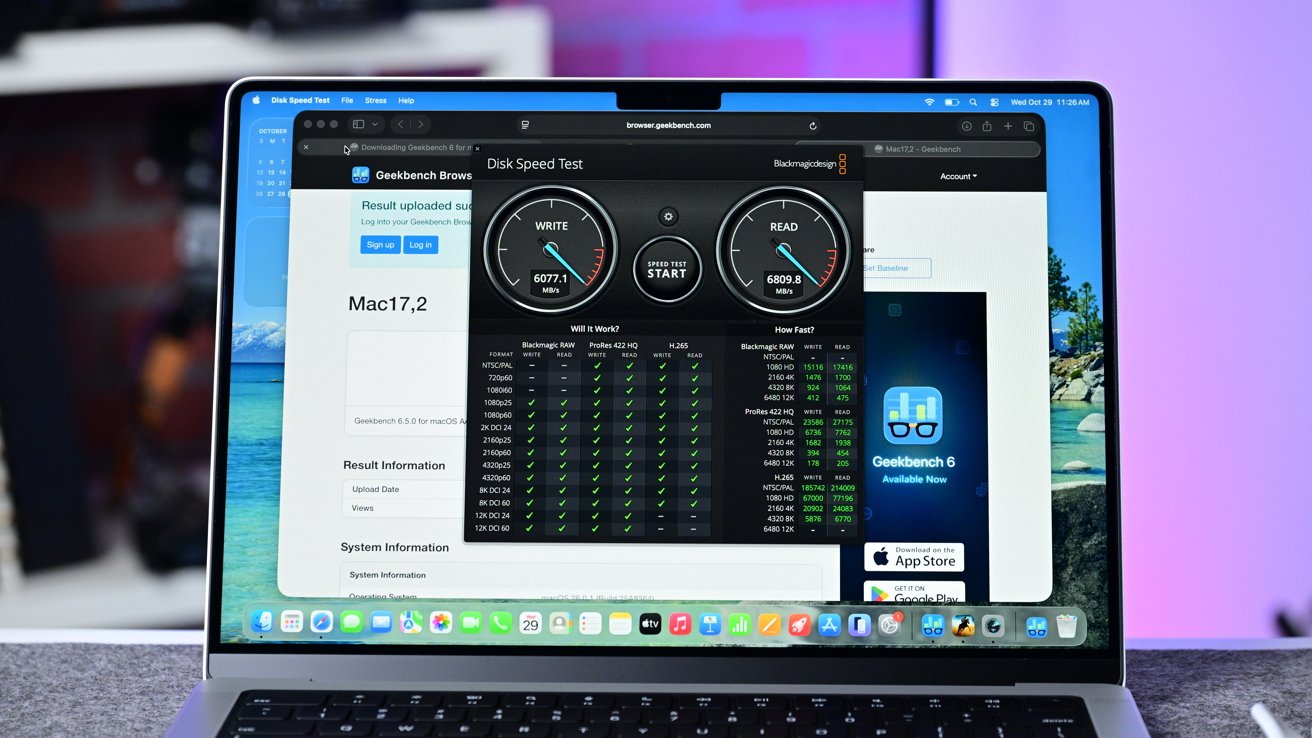
Open MacBook on a desk running a disk speed test and Geekbench benchmark in Safari, showing performance dials and result tables against a blurred purple and blue background

CAPTCHA pages appearing across the web are tricking Mac users

Security software may treat the activity as normal because the commands run inside trusted system utilities.

How to stay safe from fake CAPTCHA malware and ClickFix scams

We know that most AppleInsider users probably won’t fall for this. We guarantee you know somebody that will.

Tell them that the most reliable warning sign is simple. Legitimate CAPTCHA systems never ask users to open Terminal, PowerShell, or any other command interface and paste commands to complete verification.

A verification prompt that instructs you to run commands or paste text into a system tool is almost certainly malicious. Closing the page immediately is the safest response.

Fake CAPTCHA scams often appear on compromised websites, malicious ads, or phishing pages designed to imitate legitimate security checks. Avoid interacting with unexpected verification prompts or suspicious pop-ups.

Updating browsers and operating systems reduces exposure to malicious sites, while modern security tools block known threats. Awareness is the most effective defense, as ClickFix attacks rely on deception rather than software vulnerabilities.

Posted on Leave a comment

This $11K 2019 Intel Mac Pro beats M3 Max MacBook Pro in one specific workflow

It is possible to buy an Intel Mac Pro and give it enough upgrades to beat a more modern M3 Max MacBook Pro in a selected video task. You probably shouldn’t do it.

The last Intel Mac Pro isn’t the workhorse it once was.

At the time of its release, the Intel Mac Pro was the most powerful Mac you could buy. With extensive upgrade options, high-specification configurations, and the ability to add more PCIe cards and memory after purchasing, it was a device with a considerable amount of potential in the right hands.

However, with the influx of Apple Silicon and devices like the Mac Studio taking its place in creative businesses around the world, it’s lost a lot of its attractiveness. The switch over to Apple Silicon and the loss of user-serviceable memory didn’t help matters either.

However, owners of the last Intel Mac Pro can still get a lot of performance out of the now-classic hardware. But, only in specific circumstances and with an absurd amount of work and money to get the job done in 2026.

YouTube channel CircuitBoredd did just this, pushing a 2019 Intel Mac Pro to its limits by adding as many upgrades as possible. The project worked, but also demonstrated how much value you get from modern hardware compared to what was top-of-the-line over six years ago.

The project started with a fairly typical 7,1 Mac Pro, which was upgraded with a better processor than the 16-core chip it initially shipped with. The Mac Pro supported at most a 28-core 2.5GHz Intel Xeon W with 56 threads, which was acquired and installed into the Mac Pro.

Secondhand, today, this processor alone costs around $1,050.

The Mac Pro was also known for having the capacity to max out at 1.5 terabytes using 12 128GB DDR ECC DIMMs. While not the maximum, the project did use an absurdly large 768GB of memory.

Ignoring the current state of memory inflation, second-hand sticks of 128GB ECC DDR4 memory cost about $500 to $800 apiece, which would be a $3,000 to $4,800 upgrade. This is the cheapest way of getting to the figure, as 64GB modules are not much cheaper on eBay individually, and you would still need 12 modules instead of six for the 128GB method.

Continuing the upgrades, the machine was then installed with a pair of Radeon Pro Vega II Duo MPX Modules. Each module had a pair of GPUs, so the upgrade equated to four GPUs in total.

This also gave it 128 gigabytes of video memory to work with, which is an absurd amount to have on hand.

A search of eBay shows second-hand Radeon Pro Vega II Duo MPX modules selling for about $2,900 apiece. At launch, one card had a list price of $4,400.

It also used an Afterburner card, Apple’s add-on that cost $2,000 at the time of launch. Afterburner was a programmable Application-Specific Integrated Circuit (ASIC) designed for video production purposes.

The modern-day second-hand price of Afterburner has also come down, to about $400.

Rounding out the upgrades list are new SSDs. The videos don’t specify what drive is in use, but an M.2 to PCIe adapter card is involved in the process. Assuming that it is a hefty 8TB NVMe SSD to match the rest of the upgrades, that would be another $1,300 to $1,600 brand new, and less than $10 for that adapter card.

The result of all of the upgrades was a close to top-specification Intel Mac Pro, which the videos say cost close to $50,000 to acquire in 2019. The hardware has certainly lost most of its value over the years, though.

The project and its upgrades cost around $5,000, according to the YouTuber. Similar builds could be acquired for double that price, at about $10,000.

Based on the individual upgrade prices, and a barebones Mac Pro being found for $1,000 to start from, the total cost should really be in the region of $11,250 at a minimum. The $5,000 claimed cost is very ambitious and quite low compared to everyday pricing, but it’s plausible that some exceptional deals were made in amassing the parts.

Expensive but kinda fast

To test out the relevance of the now-upgraded Intel Mac Pro, it was put to work encoding a 17-gigabyte video project. This was a commercial project, including various titles, graphics, and effects that would tax most systems.

For the modern-day comparison, it was put against an M3 Max MacBook Pro, though its specifications were not advised in the video.

The result was that the Mac Pro was faster at crunching through the project, at about half a minute to a minute for the M3 Max. A MacBook Pro with M3 Max started from $3,199 or $3,499 at launch, depending on the size, and can be found on eBay from $2,500 and up.

Setting aside nearly every other factor or workflow, this does seem like a big win for the Intel Mac Pro in the wake of the Apple Silicon transition. That big win fades when you consider how much effort and expense went into getting the Mac Pro to this state in the first place.

You can buy a new Mac Studio with the M4 Max and 128GB of memory for $3,499 as a new device, and get pretty similar results. You could also splash out on a Mac Studio with an M3 Ultra chip with 32 cores and 256GB of memory for $7,499, if you need that many cores.

We wouldn’t buy either of these today. Mac Studio upgrades are likely in mid-2026.

Anyway, both are equipped with the Media Engine, onboard successors to the Afterburner card that are designed for video encoding and decoding, without the added accessory.

Also, the test is very much video production-based, so is skewed towards that specific goal. For almost every other task, it’s nowhere near as good as an entry-level Apple Silicon Mac.

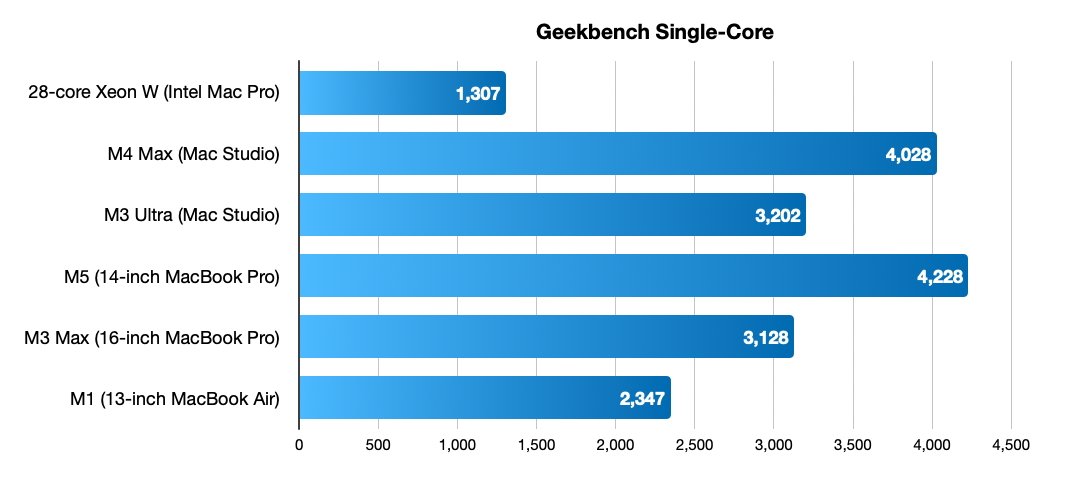
Horizontal bar chart comparing Geekbench single-core scores: M5 MacBook Pro fastest at 4228, followed by M4 Max 4028, M3 Ultra 3202, M3 Max 3128, M1 2347, Xeon W 1307

Single-core Geekbench listings for the last 28-core Intel Mac Pro and a selection of Apple Silicon devices.

Using Geekbench figures, we can also see a considerable difference in performance in general. Results for the 28-core Intel Mac Pro gives it single-core performance at 1,307 and multi-core at 10,795. In this very specific workflow, the Afterburner card, and interconnected video cards are doing nearly all of the heavy lifting.

For reference, the 14-inch MacBook Pro with M5 gets 4,228 for single-core and 17,459 for multi-core tests. An M3 Max 16-inch MacBook Pro can get to 3,128 for single-core and 20,961 for multi-core.

For video editing specifically, going for the M3 Ultra gains double the Media Engine capacity of its M3 Max counterpart. It may not cut the time down to be comparable to the claimed 30 seconds of the upgraded Intel Mac Pro, but it would be very close.

Ultimately, upgrading the Intel Mac Pro as far as possible is a great experiment and demonstrates that there is still some usable performance in pre-Apple Silicon hardware. But at the same time, you could just spend the same amount on brand new hardware for a similar effect.

And when you do, you end up with something more useful for everyday life, outside of the one particular task.