Posted on Leave a comment

Overnight updates to physical Apple Stores could hint at fast post-event product availability

AirPods Pro could get USB-C upgrade

Apple tends to hold its iPhone events on a Tuesday and release products about ten days later, but overnight updates to physical retail stores could mean quick product availability.

Of course, it could just be a simple marketing update. Apple tends to update marketing like posters and displays after an event anyway, so this wouldn’t be unusual.

Posted on Leave a comment

Apple allegedly arguing iMessage isn’t big enough to be EU gatekeeper service

Apple’s iMessage

With just days to go before the European Union’s Digital Markets Act designates gatekeepers, Apple is allegedly arguing iMessage isn’t popular enough to be classified as a gatekeeper service.

The EU’s Digital Markets Act was first proposed in October 2020, but it didn’t get official approval until July 2022. The new law became applicable in April 2023, designates gatekeepers on September 6, then goes into effect in March 2024.

A report from Financial Times sourced from two anonymous individuals says Apple and Microsoft are arguing their “flagship services” are not popular enough to fall under the EU’s definition of gatekeeper services. Apple is specifically arguing iMessage should not be labeled a gatekeeper service.

The EU is expected to reveal which services fall under its gatekeeper banner in the first week of September. The DMA is meant to throttle perceived monopolistic powers of large tech firms, like Apple, Microsoft, and Google.

If Apple’s iMessage does fall under the DMA ruleset, it means Apple will be required to open iMessage to third-party operators. However, how Apple might do that remains to be seen.

To meet the requirements of a gatekeeper service, the EU says it must have at least 45 million monthly active users. The company must also exceed 7.5 billion euros annually or have a market cap that surpasses 75 billion euros.

Apple has confirmed that there are over 1 billion active iPhones in the world. However, the company does not go into detail regarding regions, so it’s unknown if iMessage reaches the 45 million monthly active users in the region.

Apple does meet the monetary requirements. There is some chance the iMessage user base is below the 45 million mark in the EU if only because other chat services dominate the region.

Apple allegedly arguing iMessage does not meet the requirements is a change from July. The company, along with Microsoft and others, confirmed the EU’s new gatekeeper law applied to them in a blanket statement, but didn’t carve out specific services like iMessage before.

Despite Apple’s apparent change of heart, the first list of gatekeeper services should be published in September. If iMessage does avoid the list, it does not mean it won’t be added in the future.

The App Store is likely to also be included in the EU’s gatekeeper services list. Apple has allegedly been working on App Store alternatives for iPhones since 2022.

Posted on Leave a comment

Apple TV+ MLS Season Pass subscription discounted to $29

Soccer fans who’ve yet to sign up for the MLS Season Pass on Apple TV+ now have a good reason to do so, with the price cut down to $29 for the remainder of the 2023 season.

The MLS Season Pass has been a success for Apple TV+, in part thanks to events such as Lionel Messi’s joining of Inter Miami. However, a new promotion may help boost numbers even more.

First reported by TechCrunch, the MLS Season Pass subscription usually costs $99 per season, or $79 per season for Apple TV+ subscribers. Now, long past the halfway point of the February 25 to October 21 season, fans who were tempted to pick up the Season Pass but were put off by the cost can do so at a much cheaper cost.

Sports fans can now pay $29 for access to the Season Pass for the rest of the 2023 season, or for Apple TV+ subscribers, that price goes down to $25. This is a considerable saving compared to the per-month charges, which are $14.99 per month or $12.50 per month for Apple TV+ subscribers.

Under the season pass, subscribers gain access to live coverage of matches, as well as the post-season play-offs, set to run from October 25 through to December 9. There is also a selection of other video content available, including match replays, original programming, and studio programs.

Once bought, the MLS Season Pass can be viewed wherever the Apple TV app is accessible, including the Apple TV set-top boxes, iPhone and iPad, Mac, and selected smart TVs.

Posted on Leave a comment

Apps by Apple promotes first-party apps already on iPhone and Mac

Apps by Apple

Apple has added a new page to its website, with Apps by Apple promoting all of the first-party tools and applications Apple makes for its iPhone and other hardware.

Updated on Saturday, the new Apps by Apple page explains users can “connect, create, and get things done with powerful and intuitive apps designed to be accessible, private, and secure.”

The headline carousel has slides promoting Messages, Safari, Final Cut Pro for iPad, and Logic Pro for iPad. Each listing, along with a small paragraph explaining what the user can get out of using the app, is accompanied by a link for users to find out more.

Further down the page are smaller carousels, organized by Communication, Creativity, Productivity, Exploration, Entertainment & Home, Health & Fitness, and Features. The default All view will show all apps on each carousel, but users can also elect to view apps for the Mac, iPad, iPhone, Apple Watch, or Apple TV, with the lists adjusting to match.

At the bottom, Apple has a large grid of non-interactive app icons, showing all of the smaller feature-like apps its operating systems also provide.

Toward the bottom of the page, Apple reiterates its commitment to privacy and accessibility, and a final part that takes users to the App Store.

The timing of the page’s introduction is curious, as Apple is thought to be bracing itself for the European Union to force the company to allow third-party App Stores to exist on its devices in 2024. It also occurs ahead of the expected fall release of iOS 17 and its other milestone operating systems.

Posted on Leave a comment

Child safety advocacy group launches campaign against Apple

Apple’s abandoned child protection feature

Heat Initiative, a child safety advocacy group, is launching a multi-million dollar campaign against Apple to pressure the company into reinstating iCloud CSAM detection.

Heat Initiative said it would launch the campaign against Apple after pressing the tech giant on why it had abandoned plans for on-device and iCloud Child Sexual Abuse Material (CSAM) detection tools. The launch comes after Apple giving its most detailed response yet as to why it backed off its plans, citing that it would uphold user privacy.

In response to Apple, Heat Initiative has officially launched its campaign website. The advocacy group issues a statement on the front page that reads, “Child sexual abuse is stored on iCloud. Apple allows it.”

“Apple’s landmark announcement to detect child sexual abuse images and videos in 2021 was silently rolled back, impacting the lives of children worldwide,” the statement continues. “With every day that passes, there are kids suffering because of this inaction, which is why we’re calling on Apple to deliver on their commitment.”

The website contains alleged case studies that detail multiple cases where iCloud had been used to store sexual abuse materials, including photos, videos, and explicit messages.

It calls on Apple to “detect, report, and remove sexual abuse images and videos from iCloud,” as well as “create a robust reporting mechanism for users to report child sexual abuse images and videos to Apple.”

The company provides a copy of a letter it sent directly to Tim Cook, saying that it was “shocked and discouraged by your decision to reverse course and not institute” CSAM detection measures.

It also includes a button that allows visitors to send a prewritten email demanding action from Apple to the entire Apple executive team.

Child Sexual Abuse Material is an ongoing severe concern Apple attempted to address with on-device and iCloud detection tools. These controversial tools were ultimately abandoned in December 2022, leaving more controversy in its wake.

The Heat Initiative is not alone in its quest. As spotted by 9to5mac, the Christian Brothers Investment Services, and Degroof Petercam are respectively filing and backing a shareholder resolution about the topic.

Posted on Leave a comment

AirTag helps police track down another car thief

Apple AirTag with key FOB

Police in Nashville were able to use an AirTag to help track down a stolen vehicle.

That continues to be the case in Nashville, Tennessee, as police were able to track down a suspected car thief thanks to an AirTag, as first covered by 9to5Mac. According to WSMV4, the victim informed police their car had been stolen on August 3, but an AirTag was installed inside.

Metropolitan Nashville Police Department tracked the AirTag, which was tucked away inside a Dodge Charger Scat Pack. They corresponded with the Metropolitan Nashville Aviation Unit to follow the vehicle.

The Dodge Charger eventually stopped at a local barbershop, and the suspect, identified as Kevonta Brooks, went inside with a passenger. A police air unit passed along a description of Brooks, and law enforcement on the ground took him into custody.

Once taken into custody, it was discovered Brooks had a vehicle key FOB, a vehicle reprogramming device, and a screwdriver in a brown backpack. He had other items as well, including various paraphernalia.

Brooks remains in custody, with a $28,500 bond. He is facing several charges, including vehicle theft and unauthorized use of a vehicle.

Posted on Leave a comment

Apple is eliminating the social media support roles from Twitter and others

Apple Support app

Apple is reportedly looking to cut back on providing human support on various social media outlets like YouTube and Twitter.

The official @AppleSupport account was launched in 2016, and it’s primarily used to provide tips for Apple products and address customers directly. The account earned an award from Twitter that same year, thanks to its high level of engagement.

However, according to sources speaking to MacRumors, that will be coming to an end. The report states Apple is planning to eliminate its social media support advisor roles available on Twitter/X, YouTube, and the Apple Support Community forum.

The change will start beginning October 1, 2023, when Apple will stop all human replies via direct message on Twitter. Instead, according to the source, customers will receive an automated reply informing them how they can contact Apple to receive assistance.

The paid Community Specialist role that helps customers via the Support Community forum will also be eliminated. And Apple will stop offering technical support through comments posted on YouTube videos.

Reportedly over 150 employees are reportedly impacted by this change, but Apple is offering to transition them to phone support roles. One source said Apple is not allowing the employees to transition to other chat-based support roles, unless medically necessary.

The transition away from social media support is expected to be completed by the end of November. The employees who elect to make the transition to phone support will be provided with the necessary training.

Apple last updated its official Support app in August, providing more information regarding physical Apple Store locations, and more. The app, Apple’s official support website, and phone line are going to be the only official support venues going forward.

AppleInsider is unable to confirm these changes are taking place. The story will be updated with any additional information as it becomes available.

Posted on Leave a comment

This M1 Max MacBook Pro 16-inch with 64GB RAM is in stock for $2,299 ($1,400 off)

The Labor Day blowout deal slashes the price of a loaded M1 Max 16-inch MacBook Pro to $2,299, the lowest price on record, with $1,400 in savings on the laptop and a bonus discount on AppleCare.

Save $1,400 on an M1 Max MacBook Pro

Using promo code APINSIDER at Apple Authorized Reseller Adorama, you can save $200 on top of the $1,200 instant rebate already in place, resulting in a staggering $1,400 off MSRP on the premium model that features Apple’s M1 Max chip with a 24-core GPU.

This laptop in the sleek silver finish also has 64GB of memory, double the amount found in the baseline M1 Max config. Storage comes in at a respectable 1TB, making this high-end configuration a great option for business professionals and students alike.

In addition to the $1,400 markdown on the laptop itself, the same APINSIDER coupon code drops three years of AppleCare down to $319, a discount of $80 off MSRP.

Additional blowout deals

(*) How to redeem the APINSIDER coupon

If you need help activating the APINSIDER promo code at Adorama, here are step-by-step instructions to redeem the discount:

  1. Shop through this pricing link and add the MacBook Pro to your cart.
  2. Proceed to checkout and when you get to step 3 (Payment), look for a link with a gift icon that says: “Do you have a gift card or promo code?”
    How to open Adorama coupon code field
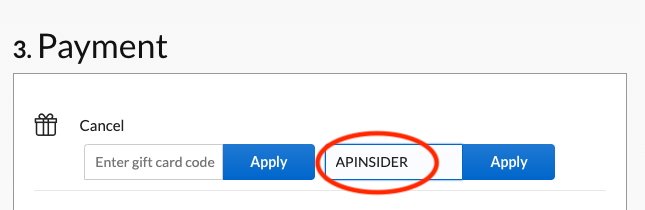
  3. Click that link to bring up the coupon code field and enter APINSIDER. Here’s what it looks like:
    Where to enter Adorama coupon code

More great deals to help you save big

Best Apple prices

There are plenty of additional bargains on hundreds of Apple products in our Price Guide. Find exclusive savings on everything from MacBook Air computers to the Apple Watch Ultra. Here are a few top offers in effect now:

Posted on Leave a comment

Amazon issues month-end deals on AirPods, MacBooks, iPads & Apple accessories, prices from $84

Big-ticket items on sale at Amazon.

Amazon continues to slash prices on Apple items ahead of the long-awaited iPhone refresher next month. That means you can take home some of the hottest items with an incredible deal that saves you big.

These deals include $210 off a 12.9-inch iPad that comes fully loaded with the latest M2 chip and a massive 2TB of storage. Likewise, laptop shoppers have their pick between the latest M2 MacBook Air, a heavily discounted M1 MacBook Air, or a 16-inch MacBook Pro.

Posted on Leave a comment

How to install Apple’s Game Porting Toolkit via a third-party installer

Apple’s Game Porting ToolKit can be a bit tricky to install onto macOS. Now there’s a third-party installer that makes the process much simpler.

At WWDC ’23 Apple introduced the Apple Game Porting Toolkit (AGPT) – a new SDK which allows game developers to port existing Windows-based DirectX games to the Mac via a translation layer.

Our original article on how to install the Game Porting ToolKit showed you how to install the AGPT using the macOS Terminal, but for many users the process is complex and error-prone.

Now InstallAware – traditionally a maker of Windows installer tools – has created a macOS installer for AGPT which allows you to install the software with just a few clicks from a traditional macOS installer.

Below we’ll walk you through how to use InstallAware’s installer for AGPT.

Getting started

This walkthrough assumes you already have the git source code control system installed on your Mac. If not, get the installer from git-scm.com and run it to install git.

First, you’ll want to gather all the pieces for the installer from InstallAware’s GitHub repository: the sources, the .dmg, and the installer which is contained on the .dmg.

To do so, make a local folder to hold all the files on your Mac’s drive where you would normally keep all your downloads and sources. We’ll use the working name “AGPT” for the folder.

Next, open the Terminal app in the Utilities folder on your Mac. Change the directory to the folder you just created using the cd command followed by a space, then drag the new AGPT folder into the Terminal window to add the path.

Press Return. This changes your present working directory in Terminal to the AGPT folder.

Next, go to InstallAware’s AGPT GitHub page and click the Code button, then the small clipboard icon button to copy the URL to clone the repository into the new AGPT folder:

https://github.com/installaware/AGPT.git

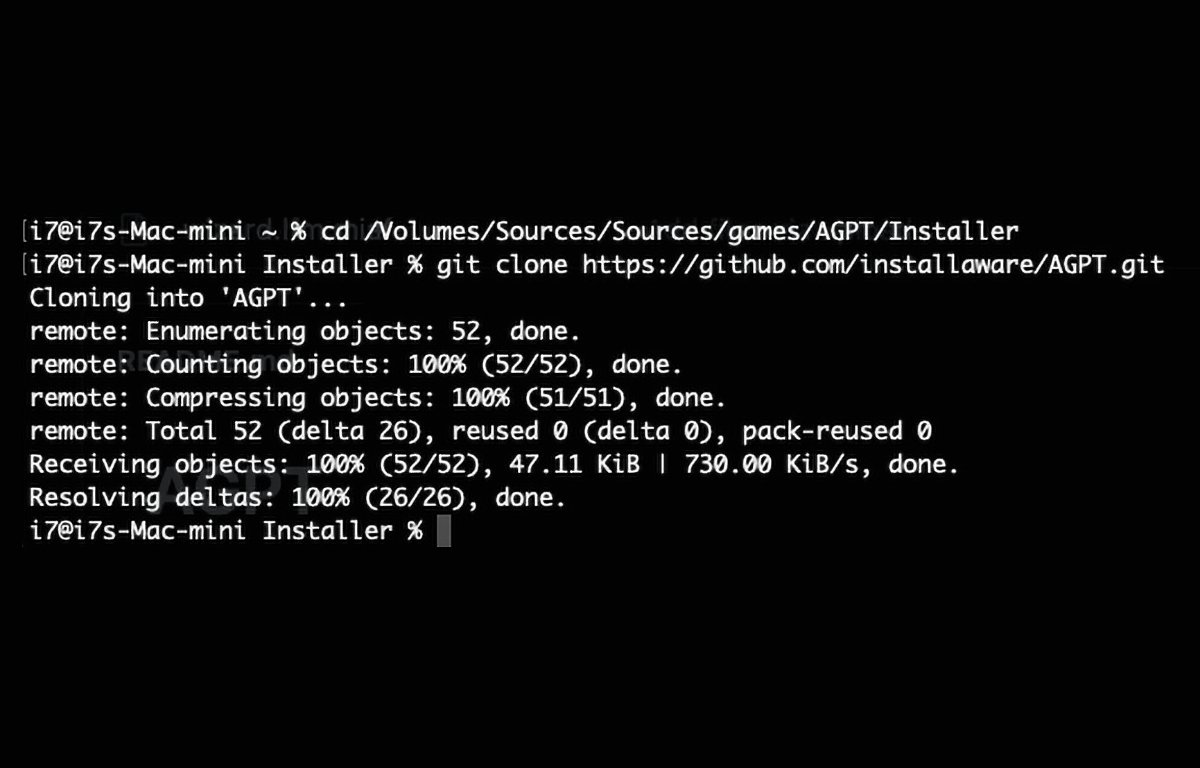
Back in Terminal, on a new line type git clone, a space, then paste in the GitHub repo line you copied above.

Use the git clone command.

Press Return.

If all goes well, git will fetch the AGPT remote repo into your AGPT folder on your Mac’s drive. This leaves you with the contents of the remote repository for the InstallAware installer in the AGPT folder you created.

The git clone command completes.

The git clone command completes.

Get the installer

Next, scroll down the GitHub repo’s page a bit to just above the screenshot and click the link to get the installer’s .dmg file from www.installaware.com/iamp/agpt.dmg

Once downloaded, in Finder manually drag the .dmg file into the AGPT folder you made. Now double-click it in Finder to open the .dmg.

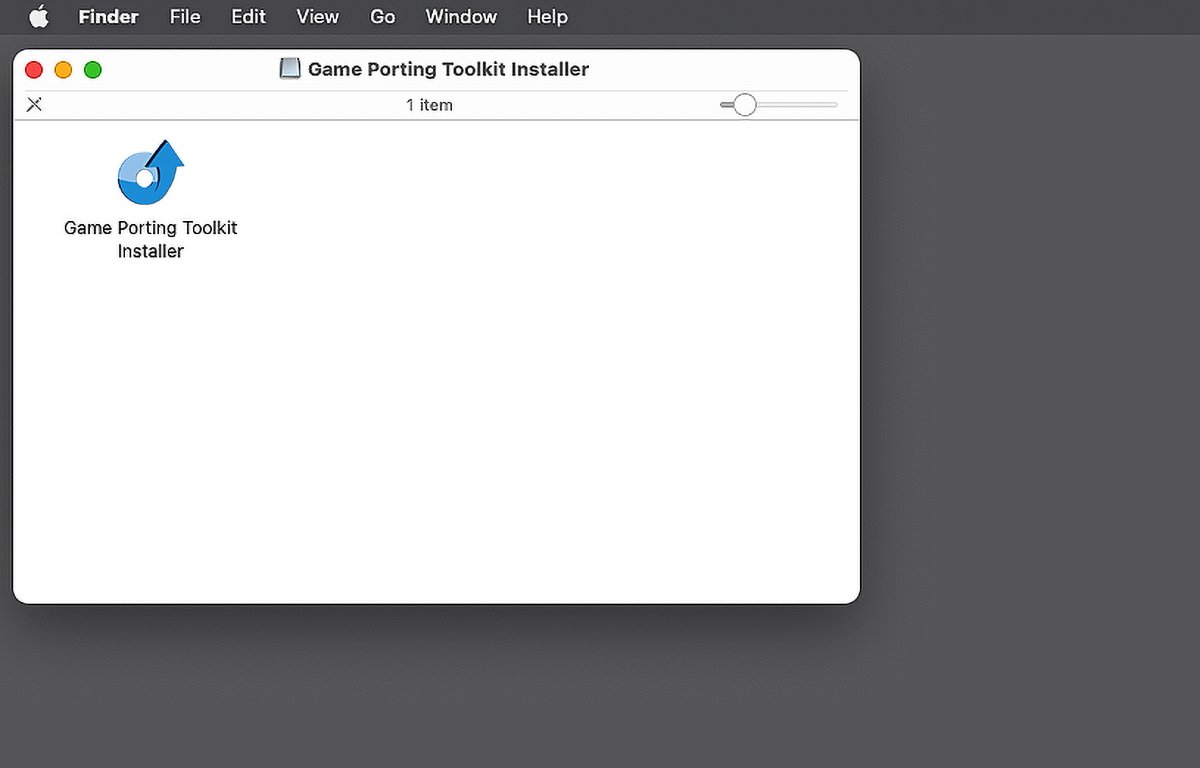
If you like, you can also copy the installer into the AGPT folder to copy it to your Mac’s drive, or just double-click it from the .dmg to open it:

The InstallAware installer.

The InstallAware installer.

If you get a warning about “Game Porting Toolkit Installer” being an app you downloaded from the internet, just click “Open” to open it anyway.

Run the installer

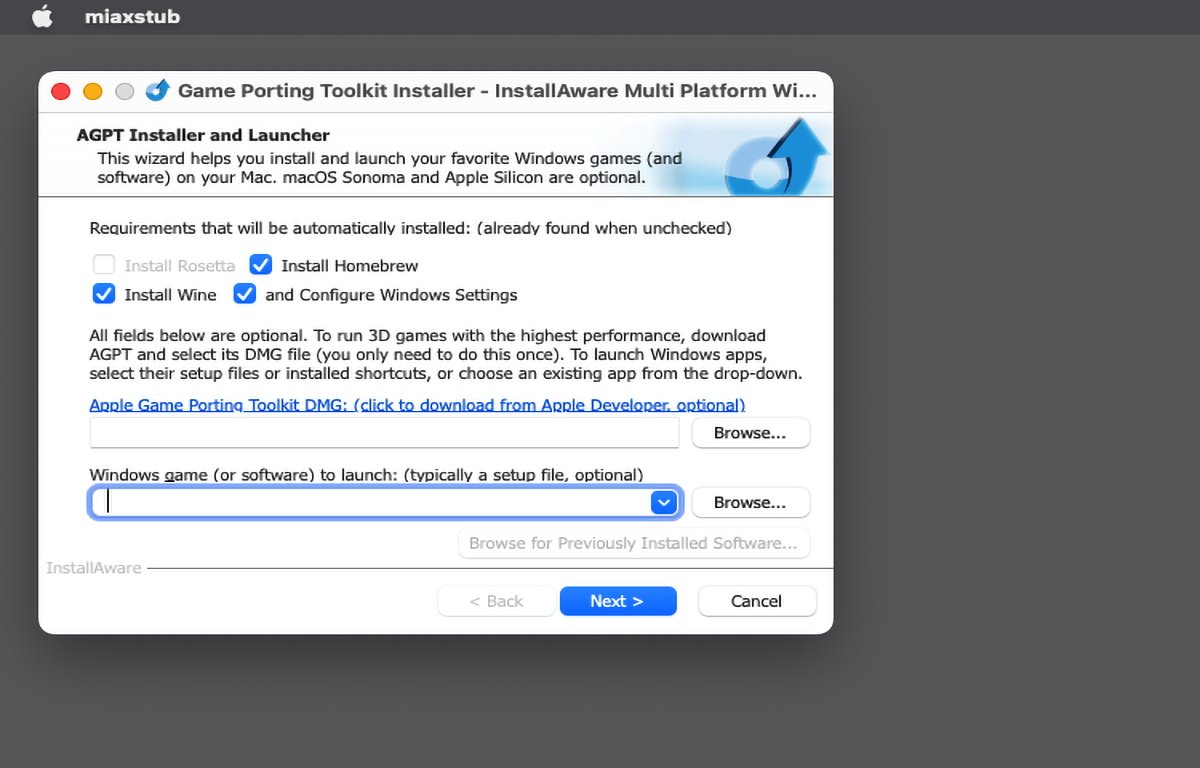
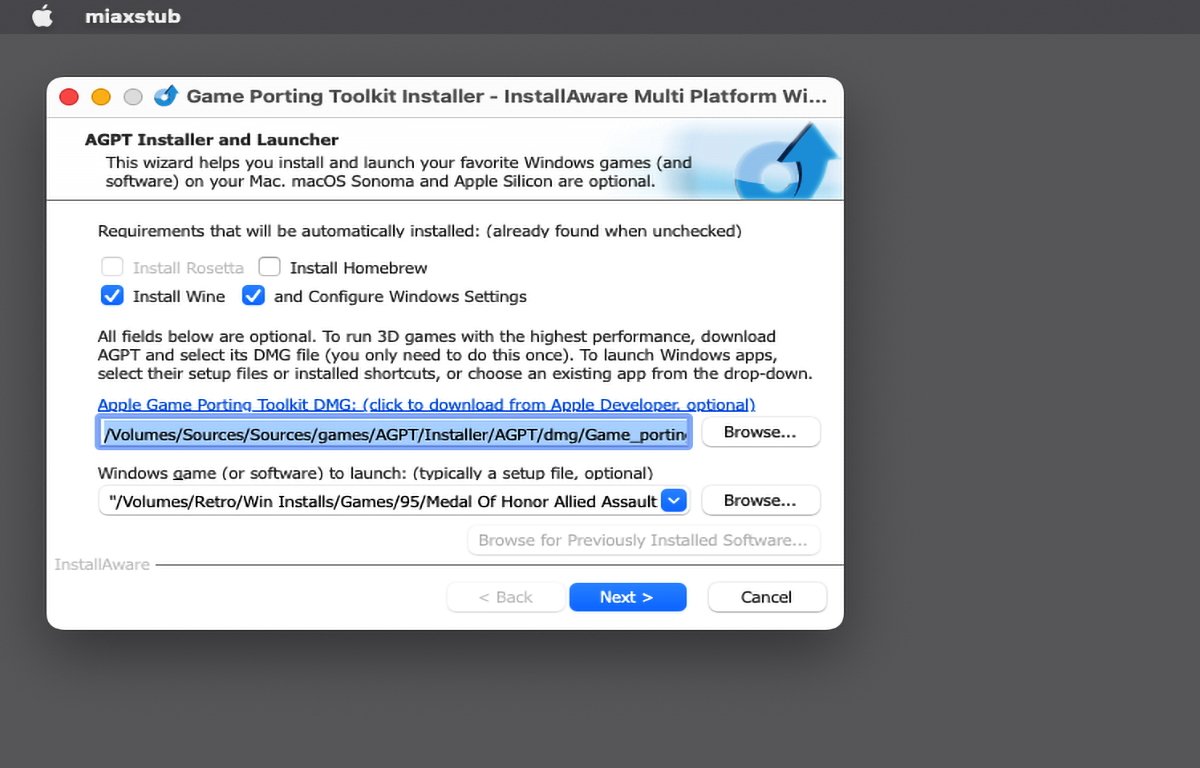
Once you double-click the installer you get a window with several options (several of which the installer says are optional).

At the top are options to install the Homebrew package manager, the Wine translation layer, and configure Windows settings. The installer says it auto-detects if these options are already installed, but on our Mac, it didn’t uncheck the Homebrew option even though we already had it installed.

If this happens, and you already have Homebrew installed, go ahead and uncheck that option.

In the field below, you have the option to select which Apple Game Porting Toolkit .dmg the installer will use by clicking the Browse button – if you’ve already downloaded one from Apple, but this step is optional. The installer knows how to find the Apple Game Porting Toolkit .dmg on the internet on its own.

If you don’t already have the .dmg for the Apple Game Porting Toolkit downloaded to your Mac, click the small link above the top text field to download it:

Click the text link to download Apple's game Porting Toolkit.

Click the text link to download Apple’s game Porting Toolkit.

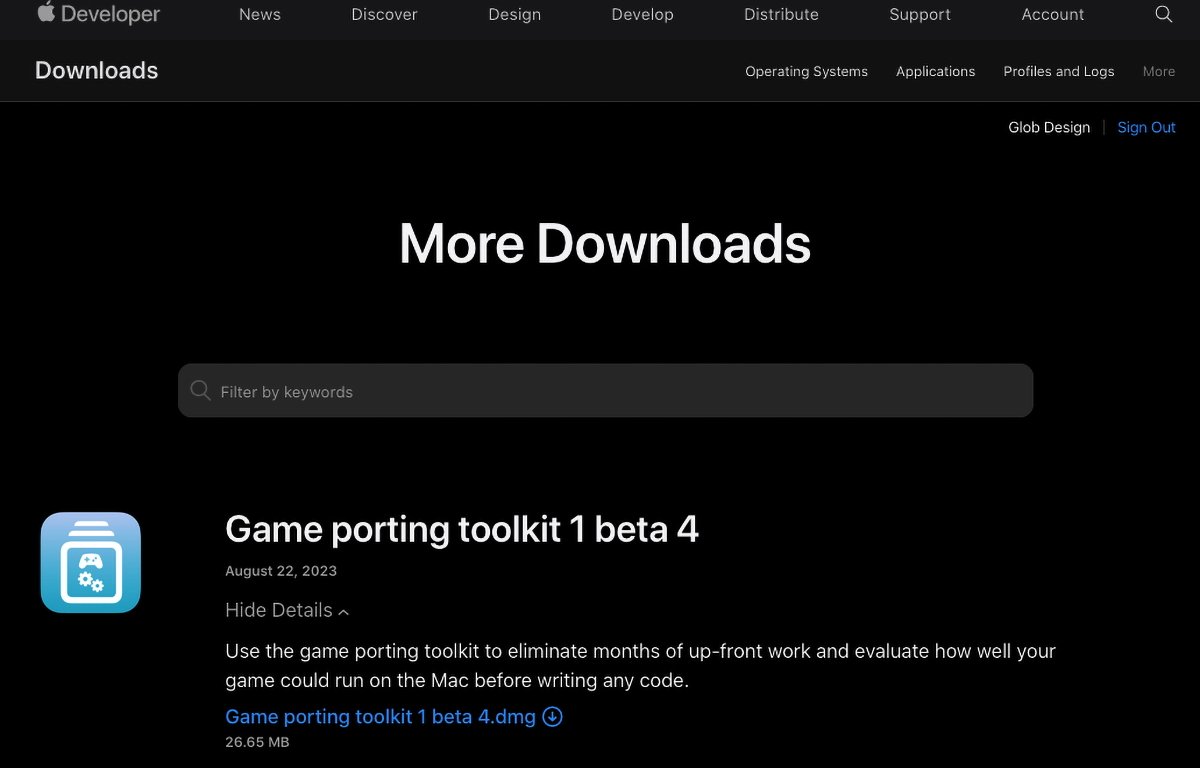
This will open the More Downloads section on Apple’s Developer website, but you’ll first need to sign in with your Apple ID.

Once signed in, expand the Game Porting Toolkit item by clicking the View Details link, then click the .dmg download button. This will download Apple’s Game Porting Toolkit .dmg to your Mac:

Download Game Porting Toolkit from Apple's website.

Download Game Porting Toolkit from Apple’s website.

Once downloaded, the .dmg should auto-mount on your Mac’s desktop, but go ahead and copy it to your AGPT folder for future reference.

Now head back to the InstallAware installer app, which should still be running, and click the Browse button next to the text field. Navigate to Apple’s Game Porting Toolkit .dmg you downloaded and select it by clicking the Open button.

Set a Windows app to install

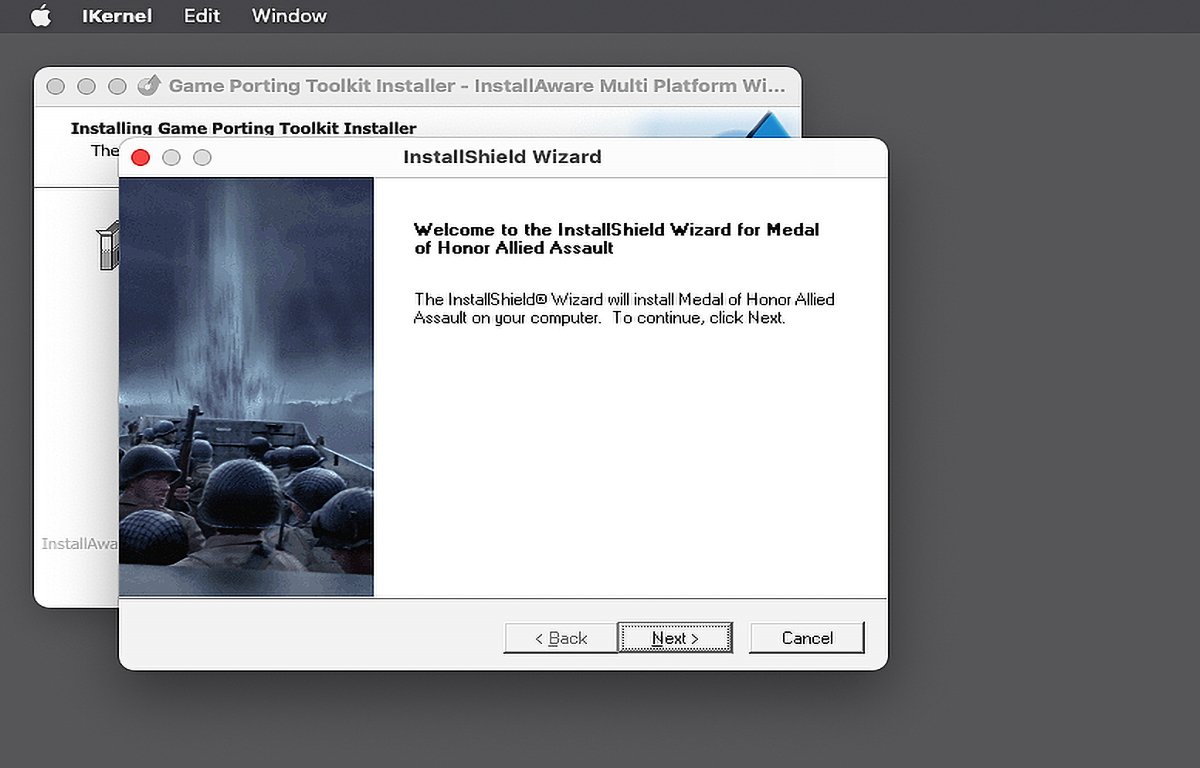
The next step is optional but if you also want to set up a Windows app while installing the Game Porting ToolKit, click the second Browse button below the first one, and select any compatible Windows .exe setup file from disk. In this example we’ll install Medal of Honor: Allied Assault:

Select a third-party app to install.

Select a third-party app to install.

Now you’re finally ready to install everything. Click the Next button to start the installation.

If you get the error “Tapping Apple Homebrew Failed!” with Error code -1, you’ll need to either turn on the Homebrew option at the top of the original installer window or else manually tap the Apple Homebrew formula in Terminal with:

brew tap apple/apple http://github.com/apple/homebrew-apple

And press Return.

But as we stated in our original article, this may take a long time – up to an hour on an Apple Silicon machine. So you may just want to check the Homebrew option in InstallAware’s installer and try again.

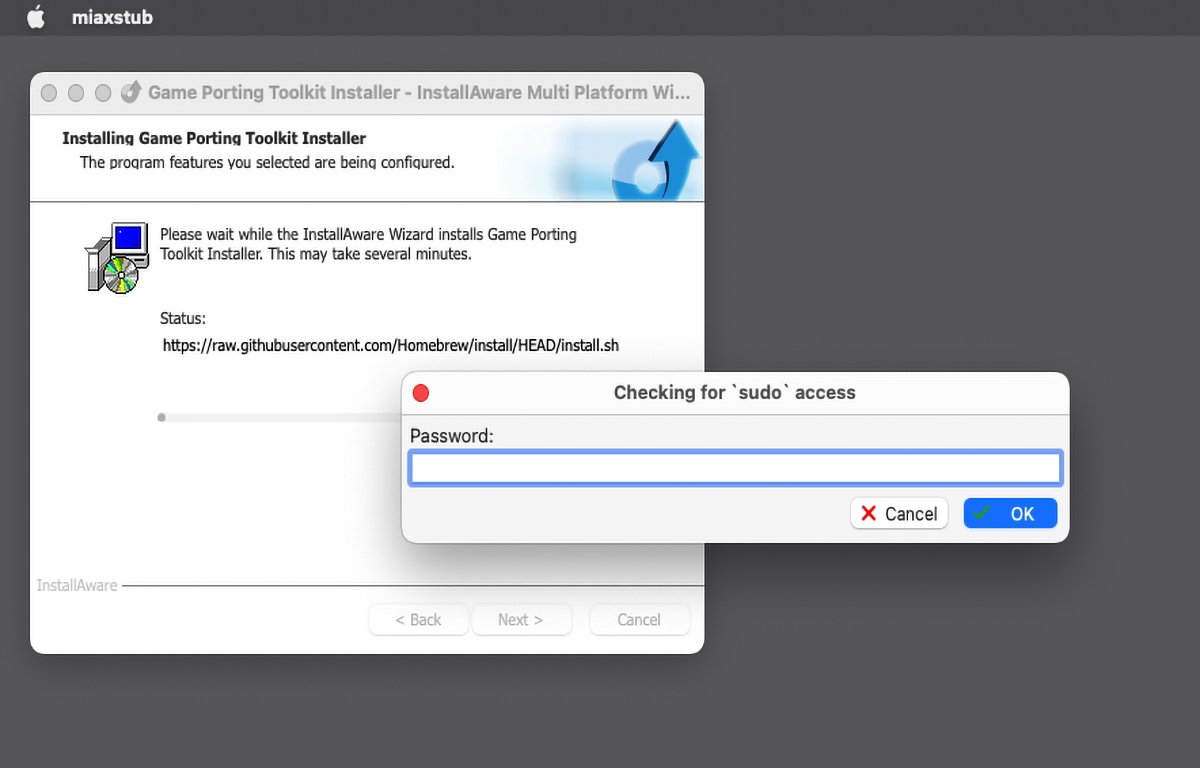
As the installer starts running, it will ask you for your Mac’s admin password with a “Checking for sudo access” prompt. You’ll need to enter an admin password for your Mac to proceed:

Enter an admin password.

Enter an admin password.

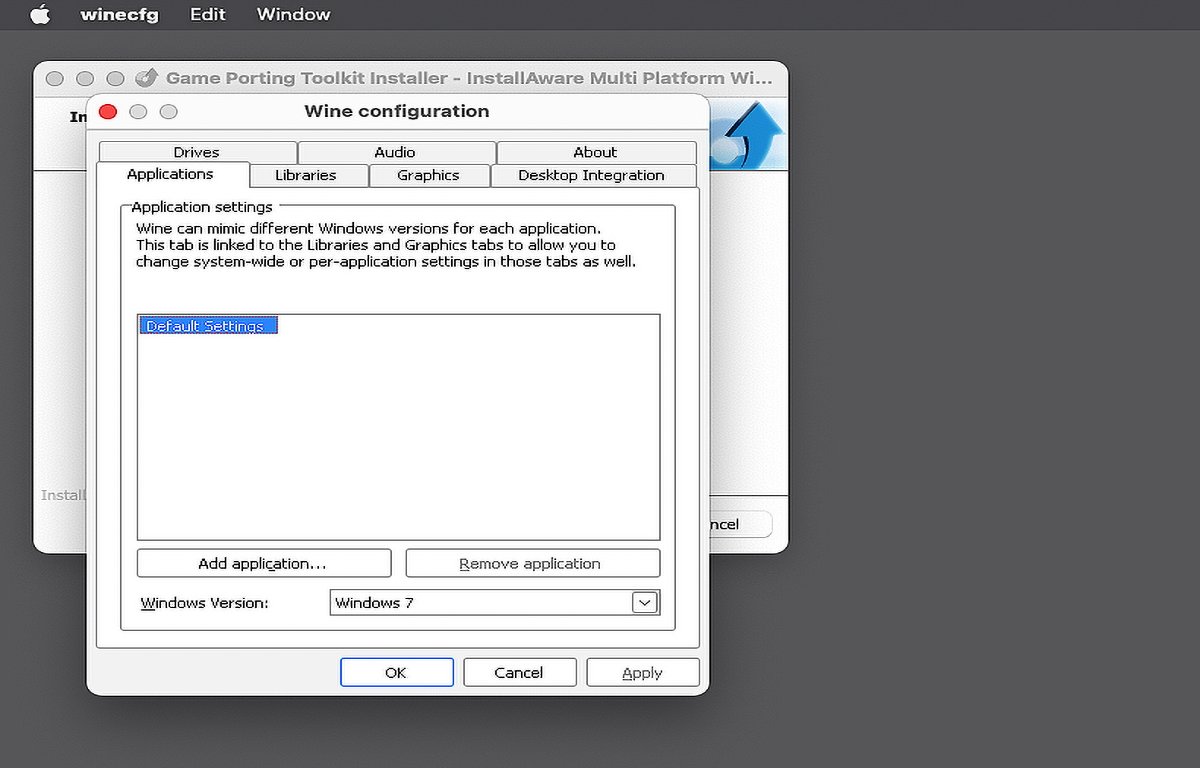
You won’t see any progress indicators, so it’s best just to let the installer run which can take quite a while. When done you’ll be prompted for Wine and other settings. Just use the defaults:

Prompt for optional settings' change.

Prompt for optional settings’ change.

Finally, if you selected any third-party software to install, the installer will run that installer last and you’ll need to step through it. If you’re installing commercial software, you’ll need a serial number for your installer:

Game installer running.

Game installer running.

Once any third-party installer finishes, you’re done. Click the Done or Finish button and you’re finished.

We’ve already covered how to run third-party games in Game Porting Toolkit in our previous article, so check out that article for instructions.

InstallAware’s installer does make installing the Game Porting Toolkit easier with far fewer steps and far fewer commands in the Terminal – even if it does seem to have a few glitches or idiosyncrasies here and there.