Posted on Leave a comment

Image Editor: Move Scale Skew Rotate and Spin with CSS Transform

Last modified on July 22nd, 2020.

Are you interested in creating an image editor tool? If so, this article will help you to get started with it.

An image editor will have a range of tools. It can be very basic with only tools like resize, rotate and crop. Or it can be super extensive like a Photoshop.

Rotate is a basic and essential tool that is part of any image editor. Let us start with something easy and basic like rotate then add some more essential tools.

I will be using CSS transform property as the core and add JavaScript to enrich the tool.

This can become a basic starter toolkit that can be expanded to a full fledged image editor in the future.

Following is a preview of the things to come.

What is inside?

  1. How to edit an image?
  2. A quick glance on CSS transform and image editing
  3. Examples and demo on image editing
  4. Conditions and exceptions on applying transform property
  5. Importance of respecting system preferences

How to edit an image?

Do not underestimate the power of CSS. Gone or those days, where CSS just applies decoration on top of HTML and beautifies the document. CSS3 and beyond, with the combined support of HTML5, advancements in the browser support has change CSS to a powerful UI tool.

It complements well with the JavaScript. When we combine it together, we can create wonders. The divide between thin-client and thick-client has vanished. The CSS is a very good beginner’s tool to start with simple image editor features.

When you work on image editing capabilities with CSS, you must consider browser compatibility. Some browsers will not render as you code. So, we have to be carefully choosing the properties.

I have used CSS keyframesrules to set the core properties.

In an older article, we have see several animation effects with CSS and Javascript.

In this article, you can find the example code of the below items with a demo.

  • Rotation and spin
  • Skew
  • Scale
  • Translation

A quick glance on CSS transform and image editing

CSS transform property can be used to do basic image editing. It supports functions like rotation, skew, scale and translate.

The key functions are rotate()skew()scale(), translate().

The transform functions have classification based on the axis of animation. For example rotateX(), rotateY() and more. This can be used for image animation.

We can apply the transform functions in a combination way for a single UI element’s selector. When we use many transform function, the animation effects happen in a right to left order.

Examples and demo on image editing

Scaling an image

The scaling is a transform function that allows us to scale up or down the element’s dimension. The scaling transform output varies based on the function used and its parameters.

The scale() function can have single or dual parameters. With a single parameter, it applies uniform scaling in both x, y-axis. When we supply separate values for the x, y-axis, then the scaling range will vary.

With three params the scale3d() function allows scaling in x,y,z axis.

We can also apply scaling with respect to single axis by using scaleX(), scaleY() or scaleZ().

The above demo has a slider to scale up and down an image.

Below code has the UI elements to apply scaling transform on an image element. It has a pallet with an image element and animation tools.

image-scale/index.php

<!DOCTYPE html>
<html>
<head>
<meta name="viewport" content="width=device-width, initial-scale=1">
<link href="../assets/css/phppot-style.css" type="text/css" rel="stylesheet" />
<link href="./assets/css/style.css" type="text/css" rel="stylesheet" />
<link href="../vendor/jquery/ui/jquery-ui.min.css" type="text/css" rel="stylesheet" />
<script src='../vendor/jquery/jquery-3.3.1.js' type='text/javascript'></script>
<script src='../vendor/jquery/ui/jquery-ui.min.js' type='text/javascript'></script>
</head> <body> <div class="phppot-container"> <div class="container"> <div class="image-demo-box"> <div id="slider"> <div id="scale-handle" class="ui-slider-handle"></div> </div> <img src='../sweet.jpg' id='image' /> </div> </div> </div> <script src='./assets/js/scale.js'></script>
</body>
</html>

This jQuery script initiates UI slider by setting the min max ranges. The slider handle will show the scaling factor.

On dragging the slider, the script applies scaling transform on the image element. The slider’s step property defines the scaling multiples.

On dragging the slider handle, the script will populate the scaling factor in the handle.

image-scale/assets/js/scale.js

$(document).ready(function() { var scaleX = 2; var handle = $("#scale-handle"); $("#slider").slider({ min : 1, max : 2.5, value: scaleX, step: 0.1, create : function() { handle.text(scaleX+"x"); scale(scaleX); }, slide : function(event, ui) { scaleX = ui.value; handle.text(scaleX + "x"); scale(scaleX); } });
}); function scale(scaleX) { $('#image').css('transform', 'scale(' + scaleX + ')');
}

Translating image element

Like other transform functionality, the translate() function performs 2D, 3D translation.

The translate() function with one or two params results in 2D translation. The two params are to move the image in the x, y-axis of a 2D plane. With single param, the translate() will happen in a horizontal direction.

The translateX() and translateY() are for implementing translation in a particular direction.

The translate3d() with x, y, z factors allows creating 3D animation.

In this demo, there are two sliders in horizontal and vertical directions. On dragging the handle of these sliders, it moves the image on the 2D plane shown above.

This HTML shows the template elements to set the image-translate demo.

image-translate/index.php

<!DOCTYPE html>
<html>
<head>
<meta name="viewport" content="width=device-width, initial-scale=1">
<link href="../assets/css/phppot-style.css" type="text/css" rel="stylesheet" />
<link href="./assets/css/style.css" type="text/css" rel="stylesheet" />
<link href="../vendor/jquery/ui/jquery-ui.min.css" type="text/css" rel="stylesheet" />
<script src='../vendor/jquery/jquery-3.3.1.js' type='text/javascript'></script>
<script src='../vendor/jquery/ui/jquery-ui.min.js' type='text/javascript'></script>
</head> <body> <div class="phppot-container"> <div class="container"> <div class="image-demo-box"> <div id="slider"> <div id="translate-x" class="ui-slider-handle"></div> </div> <div id="v-slider"> <div id="translate-y" class="ui-slider-handle"></div> </div> <img src='../sweet.jpg' id='image' /> </div> </div> </div> <script src='./assets/js/translate.js'></script>
</body>
</html>

This script sets the horizontal and vertical translation slider properties. The horizontal slider has the range between o -160. And, the vertical translation ranges between  0 to 50.

image-translate/assets/js/translate.js

$(document).ready(function() { var translateX; var handle = $("#translate-x"); $("#slider").slider({ range : "min", min : 0, max : 160, create : function() { handle.text($(this).slider("value") + " px"); }, slide : function(event, ui) { translateX = ui.value; handle.text(translateX + " px"); translate(translateX); } }); var translateY; var vhandle = $("#translate-y"); $("#v-slider").slider({ range : "min", min : 0, max : 50, orientation : "vertical", create : function() { vhandle.text($(this).slider("value") + " px"); }, slide : function(event, ui) { translateY = ui.value; vhandle.text(translateY + " px"); translatey(translateY); } }); }); function translate(translateX) { $('#image').css('transform', 'translateX(' + translateX + 'px)');
} function translatey(translateY) { $('#image').css('transform', 'translateY(' + translateY + 'px)');
}

Tools for rotating an image

Ah yes, we have reached the rotate tool. This is a core feature in any image editor. Rotation spins the image or other UI elements based on the angle specified.

With a negative degree, the animation will happen in counter-clockwise rotation.

Like scale and translate, rotate function also has classification based on the axis. Those are,

  • rotate(angle)
  • rotate3d(x, y, z, angle)
  • rotateX(angle)
  • rotateY(angle)
  • rotateZ(angle)

The rotate3d() function needs the angle and the x, y, z co-ordinates of the rotation axis.

A spin will make the image rotate from 0 to 360 degrees. You can stop spinning or refresh the image orientation back to its original.

image-rorate/index.php

<!DOCTYPE html>
<html>
<head>
<meta name="viewport" content="width=device-width, initial-scale=1">
<link href="../assets/css/phppot-style.css" type="text/css" rel="stylesheet" />
<link href="./assets/css/style.css" type="text/css" rel="stylesheet" />
<link href="../vendor/jquery/ui/jquery-ui.min.css" type="text/css" rel="stylesheet" />
<script src='../vendor/jquery/jquery-3.3.1.js' type='text/javascript'></script>
<script src='../vendor/jquery/ui/jquery-ui.min.js' type='text/javascript'></script>
</head> <body> <div class="phppot-container"> <div class="container"> <input type='text' id='txtInputAngle' class="degree" value="10" /> <input type='button' id='btnRotate' value='Rotate' /> <input type='button' id='btnSpin' value='Spin' data-state='off' /> <input type='button' id='btnRefresh' value='Refresh' /> <div class="image-demo-box"> <div id="slider"> <div id="rotation-angle" class="ui-slider-handle"></div> </div> <img src='../sweet.jpg' id='image' /> </div> </div> </div> <script src='./assets/js/rotate.js'></script>
</body>
</html> 

I have used CSS keyframes to allow continuous spinning. Below CSS shows the styles used for the image rotation demo.

image-rorate/assets/css/style.css

.image-demo-box { border: #CCC 1px solid; text-align: center; margin: 15px 0px; } input[type=button] { width: 65px; margin-right: 8px; outline: none; background: #f6f5f6;
} input.degree
{ width: 50px;
} #image { margin: 50px auto; border: #f6f5f6 10px solid; width: 200px;
}
.rotate { animation: rotation 8s infinite linear;
} div#slider { border-bottom: 1px solid #c5c5c5;
} #slider .ui-slider-range { background: #c5c5c5; } #rotation-angle { width: 50px; padding: 3px 5px 1px 5px; font-size: 0.8em; text-align: center; border-radius: 2px; outline: none; } .ui-slider-handle.ui-corner-all.ui-state-default { border: 1px solid #c5c5c5; background: #f6f6f6; font-weight: normal; color: #454545;
} @keyframes rotation { from { transform: rotate(0deg); } to { transform: rotate(359deg); }
}

When you click the rotation tool, a jQuery script rotates the image based on the specified angle.

It changes the images’ transform property using jQuery $.css() function.

The rotation slider ranges from 0 to 360 degrees. I have added the rotation script below. It shows how to turn on a jQuery UI slider to rotate an image element.

image-rorate/assets/js/rotate.js

$(document).ready(function() { var rotationAngle; var handle = $("#rotation-angle"); $("#slider").slider({ range : "min", min : 0, max : 360, create : function() { handle.text($(this).slider("value") + " deg"); }, slide : function(event, ui) { $('#image').removeClass('rotate'); rotationAngle = ui.value; handle.text(rotationAngle + " deg"); rotate(rotationAngle); } }); $('#btnSpin').on('click', function() { if ($(this).data('state') == 'off') { spin($(this)); } else { stopSpin($(this)); } }); $('#btnRotate').on('click', function() { $('#image').removeClass('rotate'); rotationAngle = $('#txtInputAngle').val(); rotate(rotationAngle); }); $('#btnRefresh').on('click', function() { $('#image').removeClass('rotate'); rotate(0); });
}); function spin(buttonElement) { $('#image').addClass('rotate'); $("#image").css("animation-play-state", "running"); $(buttonElement).data('state', 'on'); $(buttonElement).val('Stop');
} function stopSpin(buttonElement) { $("#image").css("animation-play-state", "paused"); $(buttonElement).data('state', 'off'); $(buttonElement).val('Spin');
} function rotate(rotationAngle) { if ($('#btnSpin').data('state') == 'on') { stopSpin($('#btnSpin')); } $('#image').css('transform', 'rotate(' + rotationAngle + 'deg)');
}

Apply skew transform

By changing each point of the element in a fixed direction will skew the element. This change will tilt or skews the elements layout based on the specified angle.

The skew transform functions skewX(), skewY(), skewZ() tilting element boxes along with the X, Y, Z axis.

image-skew/index.php

<!DOCTYPE html>
<html>
<head>
<meta name="viewport" content="width=device-width, initial-scale=1">
<link href="../assets/css/phppot-style.css" type="text/css" rel="stylesheet" />
<link href="./assets/css/style.css" type="text/css" rel="stylesheet" />
<link href="../vendor/jquery/ui/jquery-ui.min.css" type="text/css" rel="stylesheet" />
<script src='../vendor/jquery/jquery-3.3.1.js' type='text/javascript'></script>
<script src='../vendor/jquery/ui/jquery-ui.min.js' type='text/javascript'></script>
</head> <body> <div class="phppot-container"> <div class="container"> <div class="image-demo-box"> <div id="slider"> <div id="skew-angle" class="ui-slider-handle"></div> </div> <img src='../sweet.jpg' id='image' /> </div> </div> </div> <script src='./assets/js/skew.js'></script>
</body>
</html>

image-skew/assets/js/skew.js

$(document).ready(function() { var skewAngle; var handle = $("#skew-angle"); $("#slider").slider({ range : "min", min : 0, max : 40, create : function() { handle.text($(this).slider("value") + " deg"); }, slide : function(event, ui) { skewAngle = ui.value; handle.text(skewAngle + " deg"); skew(skewAngle); } }); });
function skew(skewAngle) { $('#image').css('transform', 'skew(' + skewAngle + 'deg)'); }

Conditions and exceptions on applying transform property

The CSS transform property will not work with some UI elements.

For example, table column element <col>, table column group element <col-group>, and more. Those are non-transformable elements.

What are transformable elements?

Most of the UI elements enclosed with the CSS box model are transformable. The following image shows the HTML element layout enclosed by a CSS box model.
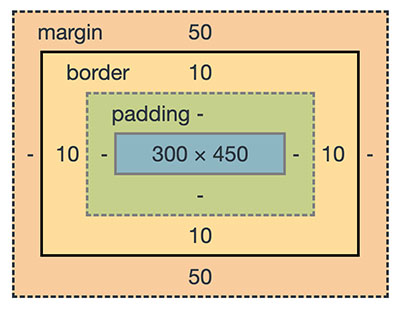
CSS Box Model

Also, renderable graphical elements, clipPath elements are also known as a transformable element.

Importance of respecting system preferences

The system preferences will affect the motion of elements. If your system preferences is set to reduce animation is on, it will omit the animation effect of the above demo.

To respect this settings we have to add a CSS media rule to set the
prefers-reduced-motion. The possible values are no-preferences and reduce.

This media rule with reduce option provides a CSS block to suppress animation.

@media (prefers-reduced-motion: reduce) { .rotate { transform: none; }
}

In the above examples, I have used the media rule to respect the user’s system preferences. You can test this with the demo by enabling the reduced-motion.
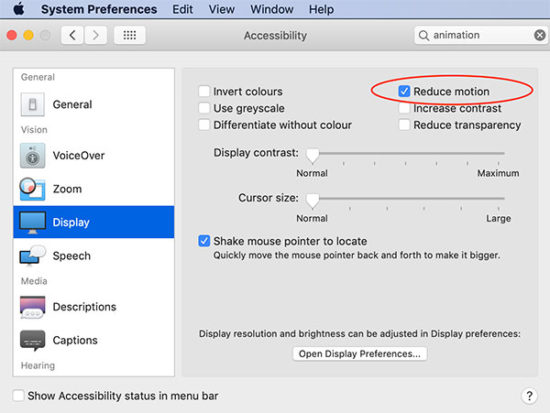
System Preferences to Reduce Animation

Conclusion

We have seen the CSS transform based image editing. This is just a beginning only. This can serve as a bootstrap for building a full fledged image editor.

With CSS transform, we have added JavaScript and enriched the tool. We have also added various motion effects.

I have added most of the template files and the jQuery scripts above. But you can find the complete bundle with the downloadable source code here below.

Download

↑ Back to Top

Posted on Leave a comment

Address Book – Acan

Best-in-class security

Built with security as the prime focus. Safe from SQL injection, CSRF attack, XSS attack and standard security measures in place.

Easy customization

Code is sleek, modular, separated in layers for easy understanding and customization. PSR standard compliant source code with optimum comments. Easy to understand, enhance and maintain.

VCF vCard support

Contacts can be exported as vCard files. It enables interoperability. As it can be imported with other contact management software.

Custom fields

Support for custom fields in the contacts. Everyone has different needs, the fields in the form may not be sufficient for you. But do not worry, there is support for custom fields. On the fly at runtime, users can add custom information. It can be searched too.

Import and export

Contacts form fields are carefully planned by considering standard address books. You can use the template and bulk import contacts to the address book. Also, you can export the contacts and use it in other contact management software.

Posted on Leave a comment

User Management System – Zeus

Best-in-class security

Built with security as the prime focus. Safe from SQL injection, CSRF attack, XSS attack and standard security measures in place.

Easy customization

Code is sleek, modular, separated in layers for easy understanding and customization. PSR standard compliant source code with optimum comments. Easy to understand, enhance and maintain.

User management

Admin can create users via the control panel or allow the users to register and signup on the system. Facebook oAuth login can be enabled. Admin can choose any or all of these via control panel.

Access management

Role based access privilege control authorization. Admin can manage access for users at functionality level with just a click of a button.

Admin control

Admin has complete control over the application. Every aspect of the application behavior can be configured via the admin control panel. Right from tracking user activity to restricting permission, all levels can be done via the control panel.

Multi-language

By default the application comes with English and German languages. You can add a new language in just minutes.

Posted on Leave a comment

Star Rating Script using PHP and MySQL with AJAX

Last modified on February 4th, 2020 by Vincy.

How do you know your readers’ or customers’ thoughts on your website content? How does the star rating feature help to collect customers’ opinions?

Star rating is a feature that is used across different domains in a variety of ways. For example, it is one of the key building blocks in an eCommerce website.

Star rating helps you to know how people rank your content. It not only gives rank on your content. Also, it brings more readers to your page by the gained rating.

When you build a website, if you have got scope for implementing a star rating system and you should definitely experiment with it.

Websites use a variety of ways to allow users to rate content. For example, star rating, up-down rating, emoji rating and more.

jQuery Star Rating Script

We have seen so many examples for star rating, emoji rating and more. I grouped all those in this one single example.

I supported three UI alternatives for the rating section. Those are,

  • Five-star rating
  • Favorite rating
  • Emoji rating

I created a directive in PHP to configure the template for the rating appearance.

What is inside?

  1. Existing plugin to implement a dynamic star rating
  2. Advantages of creating a custom star rating script
  3. Various types of rating options
  4. jQuery star rating example script
  5. The rating example database
  6. UI design to render star rating option
  7. jQuery functions to handle user rating action
  8. Storing user rating to MySQL database from PHP
  9. Output screenshot of different rating options with star, favorite, emoji

Existing plugins to implement a dynamic star rating

There are various plugins available in the market to enable star rating. The ready-made plugins are with enormous features.

For example, Rateit is a jQuery based star rating plugin. It allows embedding a star rating with a list, select and more HTML markup. It supports Font Awesome, Material icons to display rating icons.

The UpvoteJS is a JavaScript package to render a StackExchange-like rating widget.

If you are having a WordPress website, there are built-in rating plugins available. Wp-PostRatings is a popular plugin to implement rating.

Advantages of creating a custom star rating script

With a custom star rating, we can simplify the code logic instead of stuffing a lot.

And thereby, it will make it easy at the time of enhancement or maintenance phase.

It rectifies your overload with a feature-packed built-in. Also, it reduces your effort on managing a thousand lines of code for this simple UI feature.

Various types of rating options

Websites use a different type of rating options to get user’s reviews. The following list shows some of the types.

  • Single or multiple star rating
  • Facebook-like emoji rating
  • Simple up-down voting.
  • Like-unlike rating
  • Bar rating

The types are veries in user’s mindset while rating. For example, the like-unlike and up-down rating expects binary options 0 or 1 from the user. But with the bar rating, it can have a range of points out of some limit.

Star rating example with AJAX

I have created an AJAX-based star rating example code with PHP and jQuery.

This code will show a list of courses with an option to rate each course. The courses are from the database.

The rating element in the UI is configurable. I provided three UI alternatives for the rating section. Star, favorite and emoji ratings are there to collect users’ reviews.

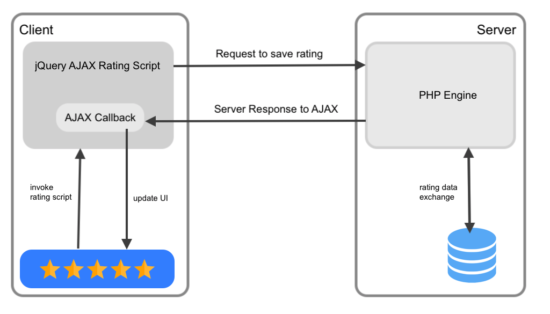
While adding the rating, the code sends it to the PHP via AJAX. Then, it saves the ratings in the MySQL database.

Once rated, the user cannot rerate a course again to avoid duplicate ratings.

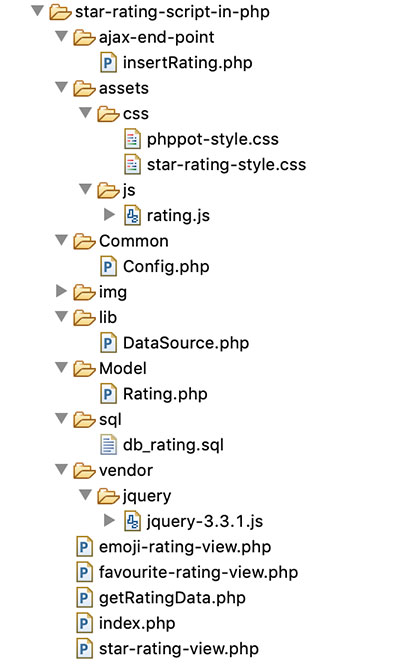
The following figure shows the file strucuture of the example code.

Star Rating Code Example File Structure

The rating example database

This section shows the structure and the SQL of the database used in this example.

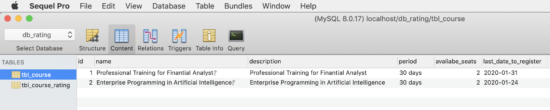
I have created two tables tbl_courses and tbl_course_rating. The tbl_cources database table contains courses on which the user will add ratings.

The tbl_cource_rating table has the mapping with the tbl_cource database. It has a unique rating without duplicates.

Star Rating Example Database

The below script shows the CREATE statement and the data dump for these two tables. By importing this script, you can setup this example in the local environment.

sql/db_rating.sql

--
-- Database: `db_rating`
-- -- -------------------------------------------------------- --
-- Table structure for table `tbl_course`
-- CREATE TABLE `tbl_course` ( `id` int(11) NOT NULL, `name` varchar(255) NOT NULL, `description` varchar(255) NOT NULL, `period` varchar(255) NOT NULL, `availabe_seats` int(11) NOT NULL, `last_date_to_register` date NOT NULL
) ENGINE=InnoDB DEFAULT CHARSET=latin1; --
-- Dumping data for table `tbl_course`
-- INSERT INTO `tbl_course` (`id`, `name`, `description`, `period`, `availabe_seats`, `last_date_to_register`) VALUES
(1, 'Professional Training for Finantial Analyst\r\n', 'Professional Training for Finantial Analyst', '30 days', 2, '2020-01-31'),
(2, 'Enterprise Programming in Artificial Intelligence\r\n', 'Enterprise Programming in Artificial Intelligence', '30 days', 2, '2020-01-24'); -- -------------------------------------------------------- --
-- Table structure for table `tbl_course_rating`
-- CREATE TABLE `tbl_course_rating` ( `id` int(11) NOT NULL, `course_id` int(11) NOT NULL, `member_id` int(11) NOT NULL, `rating` int(11) NOT NULL
) ENGINE=InnoDB DEFAULT CHARSET=latin1; --
-- Indexes for dumped tables
-- --
-- Indexes for table `tbl_course`
--
ALTER TABLE `tbl_course` ADD PRIMARY KEY (`id`); --
-- Indexes for table `tbl_course_rating`
--
ALTER TABLE `tbl_course_rating` ADD PRIMARY KEY (`id`); --
-- AUTO_INCREMENT for dumped tables
-- --
-- AUTO_INCREMENT for table `tbl_course`
--
ALTER TABLE `tbl_course` MODIFY `id` int(11) NOT NULL AUTO_INCREMENT, AUTO_INCREMENT=3; --
-- AUTO_INCREMENT for table `tbl_course_rating`
--
ALTER TABLE `tbl_course_rating` MODIFY `id` int(11) NOT NULL AUTO_INCREMENT, AUTO_INCREMENT=95;
COMMIT;

UI design to render star rating option

In a landing page, it shows the list of courses from the database. The HTML code for this page is below.

It loads the rating element based on the PHP constant defined in a common configuration file.

The rating element will show clickable 5-stars or favorite-icons or emoji icons.

On clicking the rating element, it invokes a jQuery script to send AJAX requests to save ratings.

index.php

<!DOCTYPE html>
<html>
<head>
<meta name="viewport" content="width=device-width, initial-scale=1">
<title>Star Rating Script in PHP</title>
<link href="./assets/css/phppot-style.css" type="text/css" rel="stylesheet" />
<link href="./assets/css/star-rating-style.css" type="text/css" rel="stylesheet" />
<script src="./vendor/jquery/jquery-3.3.1.js" type="text/javascript"></script>
</head> <body> <div class="phppot-container"> <div class="container"> <h2>Star Rating Script in PHP</h2> <div id="course_list"> <?php require_once "getRatingData.php"; ?> </div> </div> </div> <script src="./assets/js/rating.js"></script>
</body>
</html>

I created separate template files to have different types of rating UI. Those are star-rating-view.php, favorite-rating-view.php and emoji_rating_view.php.

The template files show the onClick event handling specification in the markup.

star-rating-view.php

<?php
for ($count = 1; $count <= 5; $count ++) { $starRatingId = $row['id'] . '_' . $count; if ($count <= $userRating) { ?>
<li value="<?php echo $count; ?>" id="<?php echo $starRatingId; ?>" class="star"><img src="./img/<?php echo $apperance; ?>-filled.png"></li>
<?php } else { ?>
<li value="' . $count; ?>" id="<?php echo $starRatingId; ?>" class="star" onclick="addRating(this,<?php echo $row['id']; ?>,<?php echo $count; ?>, 'star');" onMouseOver="mouseOverRating(<?php echo $row['id']; ?>,<?php echo $count; ?>,'<?php echo $apperance; ?>');" onMouseLeave="mouseOutRating(<?php echo $row['id']; ?>,<?php echo $userRating; ?>,'<?php echo $apperance; ?>');"><img src="./img/<?php echo $apperance; ?>-open.png"></li>
<?php }
}
?>

favourite-rating-view.php

<?php
for ($count = 1; $count <= 5; $count ++) { $starRatingId = $row['id'] . '_' . $count; if ($count == $userRating) { ?>
<li value="<?php echo $count; ?>" id="<?php echo $starRatingId; ?>" class="star"><img src="./img/<?php echo $apperance; ?>-filled.png"></li>
<?php } else { ?>
<li value="<?php $count; ?>" id="<?php echo $starRatingId; ?>" class="star" onclick="addRating(this,<?php echo $row['id']; ?>,<?php echo $count; ?>);" onMouseOver="mouseOverRating(<?php echo $row['id']; ?>,<?php echo $count; ?>,'<?php echo $apperance; ?>');" onMouseLeave="mouseOutRating(<?php echo $row['id']; ?>,<?php echo $userRating; ?>,'<?php echo $apperance; ?>');"><img src="./img/<?php echo $apperance; ?>-open.png"></li>
<?php }
}
?>

In the emoji rating template, it shows a range of five emotion icons from very-sad to very-happy.

If you are providing support on the user’s queries, you can use the emoji rating. Embedding the emoji rating will give the customer’s emotional feel on your support.

emoji-rating-view.php

<?php
for ($count = 1; $count <= 5; $count ++) { $starRatingId = $row['id'] . '_' . $count; if ($count == $userRating) { ?> <li value="<?php echo $count; ?>" id="<?php echo $starRatingId; ?>" class="star"><img src="./img/<?php echo $apperance . $count; ?>-filled.png"></li>
<?php } else {
?> <li value="<?php $count; ?>" id="<?php echo $starRatingId; ?>" class="star" onclick="addRating(this,<?php echo $row['id']; ?>,<?php echo $count; ?>);" onMouseOver="mouseOverRating(<?php echo $row['id']; ?>,<?php echo $count; ?>,'<?php echo $apperance; ?>');" onMouseLeave="mouseOutRating(<?php echo $row['id']; ?>,<?php echo $userRating; ?>,'<?php echo $apperance; ?>');"><img src="./img/<?php echo $apperance . $count; ?>-open.png"></li>
<?php } }
?>

CSS Styles created for the star rating UI

assets/css/star-rating-style.php

ul { margin: 0px; padding: 10px 0px 0px 0px; display: inline-flex;
} li.star { list-style: none; display: inline-block; margin-right: 5px; cursor: pointer; color: #9E9E9E;
} .row-title { font-size: 20px; color: #232323;
} .review-note { font-size: 12px; color: #999; font-style: italic;
} .row-item { margin-bottom: 20px; border-bottom: #F0F0F0 1px solid;
} p.text-address { font-size: 12px;
} img { height: 20px; width: 20px;
} .course-detail { font-size: 1em; margin-right: 20px;
} .loader-icon { display: none;
}
.response { display: inline-block; vertical-align: super; margin-left: 10px; color: #FF0000;
}

jQuery functions to handle user rating action

This file contains jQuery functions to prepare AJAX requests to save user ratings.

It also handles the mouse hover events to highlight the rating element. The mouseOverRating() function highlights the star or other rating elements on hovering.

Similarly, mouseOutRating() resets the rating UI back to its original form on mouse out.

The AJAX code in the addRating() prepares the request with PHP endpoint URL and data params.

It receives the server response in the AJAX success callback at which it updates the UI accordingly.

assets/js/rating.js

 function mouseOverRating(courseId, rating, appearance) { if (appearance == "star") { for (var i = 1; i <= rating; i++) { $('#' + courseId + "_" + i + ' img').attr('src', "./img/" + appearance + "-filled.png"); } } else { ratingIconPrefix = "./img/" + appearance; for (var i = 1; i <= rating; i++) { if (appearance == "emoji") { ratingIconPrefix = "./img/" + appearance + "1"; } if (i == rating) { $('#' + courseId + "_" + i + ' img').attr('src', ratingIconPrefix + "-filled.png"); } } } } function mouseOutRating(courseId, userRating, appearance) { var ratingId; if (appearance == "star") { if (userRating != 0) { for (var i = 1; i <= userRating; i++) { $('#' + courseId + "_" + i + ' img').attr('src', "./img/" + appearance + "-filled.png"); } } if (userRating <= 5) { for (var i = (userRating + 1); i <= 5; i++) { $('#' + courseId + "_" + i + ' img').attr('src', "./img/" + appearance + "-open.png"); } } $(".selected img").attr('src', "./img/" + appearance + "-filled.png"); } else { ratingIconPrefix = "./img/" + appearance; if (userRating <= 5) { for (var i = 1; i <= 5; i++) { if (appearance == "emoji") { ratingIconPrefix = "./img/" + appearance + i; } if (userRating == i) { $('#' + courseId + "_" + i + ' img').attr('src', ratingIconPrefix + "-filled.png"); } else { $('#' + courseId + "_" + i + ' img').attr('src', ratingIconPrefix + "-open.png"); } } } var selectedImageSource = $(".selected img").attr('src'); if (selectedImageSource) { selectedImageSource = selectedImageSource.replace('open', "filled"); $(".selected img").attr('src', selectedImageSource); } } } function addRating(currentElement, courseId, ratingValue, appearance) { var loaderIcon = $(currentElement).closest(".row-item"); $.ajax({ url : "ajax-end-point/insertRating.php", data : "index=" + ratingValue + "&course_id=" + courseId, type : "POST", beforeSend : function() { $(loaderIcon).find("#loader-icon").show(); }, success : function(data) { loaderIcon = $(currentElement).closest(".row-item"); $(loaderIcon).find("#loader-icon").hide(); if (data != "") { $('#response-' + courseId).text(data); return false; } if (appearance == 'star') { $('#list-' + courseId + ' li').each( function(index) { $(this).addClass('selected'); if (index == $('#list-' + courseId + ' li').index( currentElement)) { return false; } }); } else { $(currentElement).addClass('selected'); } } }); }

Storing user rating to MySQL database from PHP

When the AJAX script called, it prepares a request to the PHP. In PHP, it receives the chosen rating post data and stores it in the rating database.

Though the UI displays different elements, the rating value ranges from 1 to 5. In the database, it has the mapping between the rating value, course id and member id.

The below configuration is for setting the rating element appearance. The possible values are there with a comment statement.

Common/Config.php

<?php
namespace Phppot; class Config
{ // Possible values: star | favourite | emoji const RATING_APPEARANCE = "favourite";
} 

This is a PHP endpoint called via AJAX. It inserts the user rating to the database.

Before insert, it checks if the user added a rating already for that particular course. If so, then the code will not allow the user to rate again.

ajax-end-point/insertRating.php

<?php
namespace Phppot; use Phppot\Rating;
require_once __DIR__ . "./../Model/Rating.php";
$rating = new Rating();
// Here the user id is harcoded.
// You can integrate your authentication code here to get the logged in user id
$userId = 5; if (isset($_POST["index"], $_POST["course_id"])) { $courseId = $_POST["course_id"]; $ratingIndex = $_POST["index"]; $rowCount = $rating->isUserRatingExist($userId, $courseId); if ($rowCount == 0) { $insertId = $rating->addRating($userId, $courseId, $ratingIndex); if (empty($insertId)) { echo "Problem in adding ratings."; } } else { echo "You have added rating already."; }
}

This code reads courses and corresponding rating from the database. It prepares HTML markup embedded with dynamic data.

This file displays the courses list with the rating option in a landing page.

getRatingData.php

<?php
namespace Phppot; use Phppot\Rating;
require_once "./Common/Config.php";
$config = new Config();
require_once "./Model/Rating.php";
$rating = new Rating();
// Here the user id is harcoded.
// You can integrate your authentication code here to get the logged in user id
$userId = 5; $apperance = $config::RATING_APPEARANCE; $courseResult = $rating->getCourse();
if (! empty($courseResult)) { foreach ($courseResult as $row) { $userRating = $rating->getUserRating($userId, $row['id']); $totalRating = $rating->getTotalRating($row['id']); $date = date_create($row["last_date_to_register"]); ?>
<div class="row-item"> <div class="row-title"><?php echo $row['name']; ?></div> <ul class="list-inline" id="list-<?php echo $row['id']; ?>"> <?php require $apperance . "-rating-view.php"; ?> <img src="img/loader.gif" class="loader-icon" id="loader-icon"> </ul> <div class="response" id="response-<?php echo $row['id']; ?>"></div> <p class="review-note">Total Reviews: <?php echo $totalRating; ?></p> <p class="text-address"> <label class="course-detail">Period: <?php echo $row["period"]; ?></label><label class="course-detail">Available seats: <?php echo $row["availabe_seats"]; ?></label><label class="course-detail">Last Date to Register: <?php echo date_format($date, "d M Y"); ?></label> </p>
</div>
<?php }
}
?>

In the above two PHP files, I have harcoded the user id with a PHP variable $userId. You can plugin user authentication code and get the logged-in user id.

The Rating.php is a PHP model class created for performing the rating actions.

It has functions to read courses and user ratings on them. The getUserRating() and getTotalRating() functions returns data to display the rating statistics.

The isUserRatingExist() checks the uniqueness of the user rating on a particular course.

I used prepared statements with MySQLi for executing the database queries. The source contains a generic DAO class DataSource.php for executing database operations.

Model/Rating.php

<?php
namespace Phppot; use Phppot\DataSource; class Rating
{ private $ds; function __construct() { require_once __DIR__ . './../lib/DataSource.php'; $this->ds = new DataSource(); } function getCourse() { $query = "SELECT * FROM tbl_course ORDER BY id DESC"; $result = $this->ds->select($query); return $result; } function getUserRating($userId, $courseId) { $average = 0; $avgQuery = "SELECT rating FROM tbl_course_rating WHERE member_id = ? and course_id = ?"; $paramType = 'ii'; $paramValue = array( $userId, $courseId ); $result = $this->ds->select($avgQuery, $paramType, $paramValue); if ($result > 0) { foreach ($result as $row) { $average = round($row["rating"]); } // endForeach } // endIf return $average; } function getTotalRating($courseId) { $totalVotesQuery = "SELECT * FROM tbl_course_rating WHERE course_id = ?"; $paramType = 'i'; $paramValue = array( $courseId ); $result = $this->ds->getRecordCount($totalVotesQuery, $paramType, $paramValue); return $result; } function isUserRatingExist($userId, $courseId) { $checkIfExistQuery = "select * from tbl_course_rating where member_id = ? and course_id = ?"; $userId; $courseId; $paramType = 'ii'; $paramValue = array( $userId, $courseId ); $rowCount = $this->ds->getRecordCount($checkIfExistQuery, $paramType, $paramValue); return $rowCount; } function addRating($userId, $courseId, $rating) { $insertQuery = "INSERT INTO tbl_course_rating(member_id,course_id, rating) VALUES (?,?,?) "; $paramType = 'iii'; $paramValue = array( $userId, $courseId, $rating ); $insertId = $this->ds->insert($insertQuery, $paramType, $paramValue); return $insertId; }
}

Output screenshot of different rating options with star, favorite, emoji

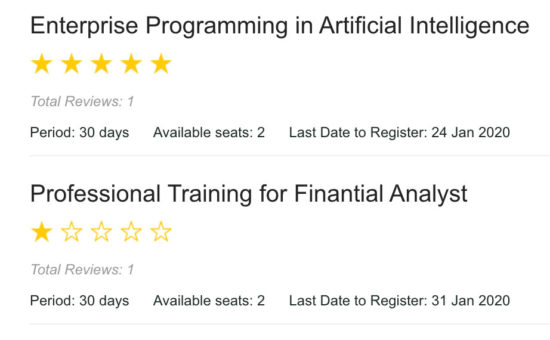
jQuery Five Star Rating Output

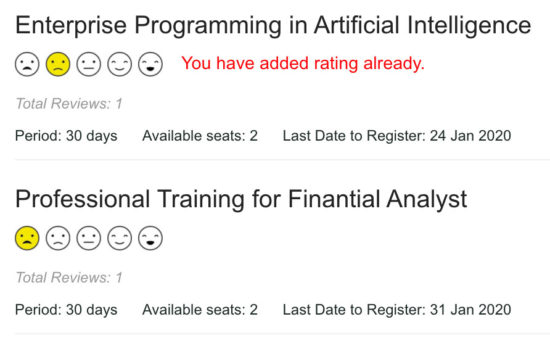
Favorite Rating Template Screenshot

In the following screenshot, it displays a text in red. It is an error message to notify the user if he tries to add rating again.

Emoji Rating Output

Conclusion

We have seen the importance of implementing a rating script in an application. Also, we have seen the types of ratings generally used by the applications.

By supporting 3 types of rating UI components in an example script, I sure it helps you to have options. You can choose and fix one among them on a need basis.

For example, if you manage more applications, then integrate this one in all. The rating configuration allows setting based on the nature of the application.

There is no limit. We can enhance this component by adding more rating options like-unlike, up-down voting, rating with a ranger and more.

Download

↑ Back to Top

Posted on Leave a comment

Shipping API Integration in PHP with Australia Post Example

Last modified on January 22nd, 2020 by Vincy.

In an eCommerce website, we use the shipping API to calculate shipping cost. We calculate based on the items added to the shopping cart.

Integrating Shipping API with an eCommerce website will optimize the logistics cost. It takes care of the shipping needs in an effective way.

Shipping API integration helps eCommerce website by charging the right amount for shipping. Imagine when we add a random fixed cost to each checkout. What will happen is that, we will either overcharge the customer or end up in direct loss.

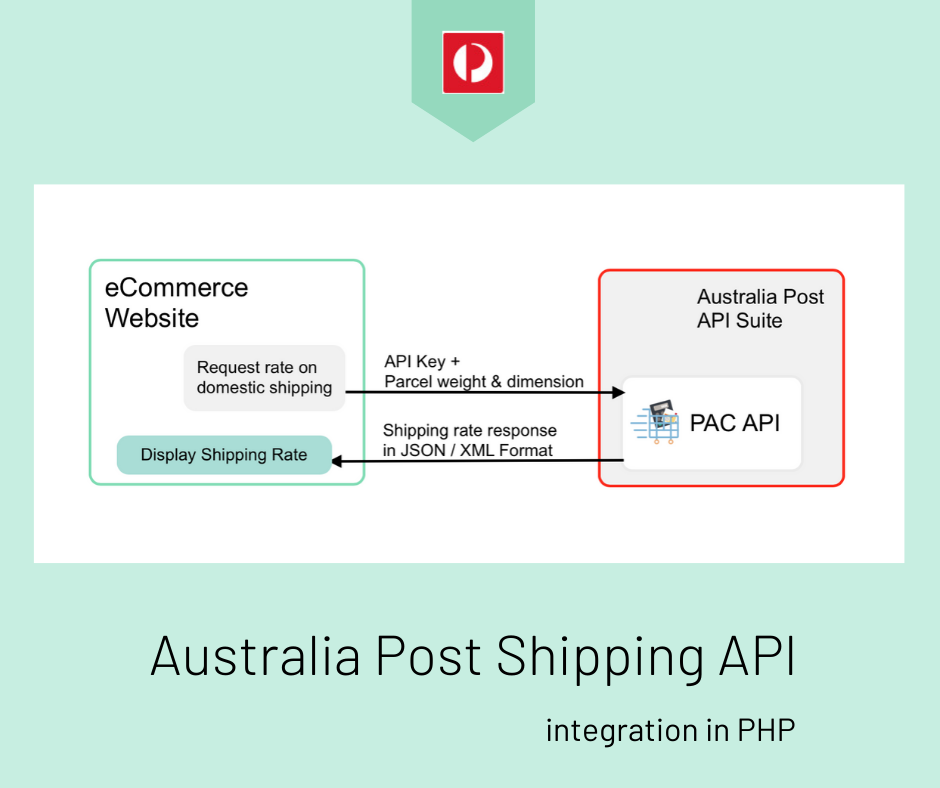
Australia Post Shipping API Integration in PHP

In this article, we will see how to integrate Australia Post shipping API in a PHP application. You can use this code in a shopping cart checkout page to calculate shipping rates.

I have created code to request the Australia Post API to calculate the shipping rates. This rate is for the products on domestic shipping.

What is inside?

  1. What is Shipping API?
  2. Utilities of third-party shipping API
  3. Existing shipping API available
  4. About Australia Post API
  5. About this example
  6. File Structure
  7. Australia Post shipping API integration steps
  8. Web interface to get data to calculate shipping rates
  9. PHP code with Australia Post shipping API request-response handlers
  10. Australia Post shipping API integration output

What is Shipping API?

Shipping API – a digital intermediate as like as other APIs. It resolves eCommerce website shipping needs.

Integratable extern responds to the queries generated by the application.

With the available services and capabilities, it help build the eCommerce website’s shipping needs.

This ready-made solution will smoothen the customer’s buying experience with your online store.

Capabilities of Shipping APIs

For each eCommerce website, the motive to integrate Shipping API differs. This variation depends on the utilities required by the shopping cart. 

In general, the capabilities of Shipping APIs are,

  1. Verifying shipping zone
  2. Multi-carrier support
  3. Tracking the order traces during shipment.

With these capability limit, the Shipping APIs provides ultimate services. And, they are huge in number. For example,

  1. Ensuring the shipping destination and thereby calculate the success probability of the delivery.
  2. Request a quote for the carrier or shipment.
  3. Receiving notification about tracking updates.

The Australia Post shipping API provides services like,

  • Postage assessment calculation
  • Postal code search 
  • SecurePay online payments and more.

Existing shipping API available

Postal carrier APIs like DHL, USPS, Australia Post provides services for the eCommerce website. It offers services like calculating shipping rates, tracking shipped parcel and more.

There are numerous third-party shipping APIs available.  For example Postmen, EasyPost, Shippo and more.

The third-party shipping API has a RESTful interface that connects postal service APIs. It creates a channel to read the API to access its functionalities.

About Australia Post API

Australia Post API suite has the following list APIs. All these APIs help to fulfil the transactional needs of your eCommerce website.

  1. Postage assessment calculator – To get the cost for shipping a document or parcel.
  2. Shipping and tracking – To get service on product dispatch and tracking. 
  3. SecurePay online payments – Payment solutions for an eCommerce website via SecurePay integration.
  4. Delivery choices API – gives the delivery choices to the user to choose location, speed, day, date, time.

For accessing the API, it requires the corresponding API key. As per the Australia Post API access requirements it asks to register with the API  to get the key.

Australia Post provides an interface to explore the APIs. You may generate live API requests via this explorer to see how it works.

About this example

In this example, it uses the Postage assessment calculator API  or PAC of the Australia Post API suite.

This API provides services to calculate the shipping cost. This cost varies based on the parcel weight, dimension, and more parameters.

This API includes various endpoints returning resources data based on the access requests.

I am creating a request for calculating the shipping cost for a domestic parcel. This request needs the corresponding API key. In the next section, we will see how to get the API key for accessing the PAC API.

For this calculation, the API requires the parcel dimension, height, width. And also, it needs the shipping zone’s origin and destination postal codes. These are all common considering any eCommerce website.

I get the parameters from the user via an HTML form and send it with the API request.

This example uses PHP CURL to access the Australia Post Postage assessment calculator API.

File Structure

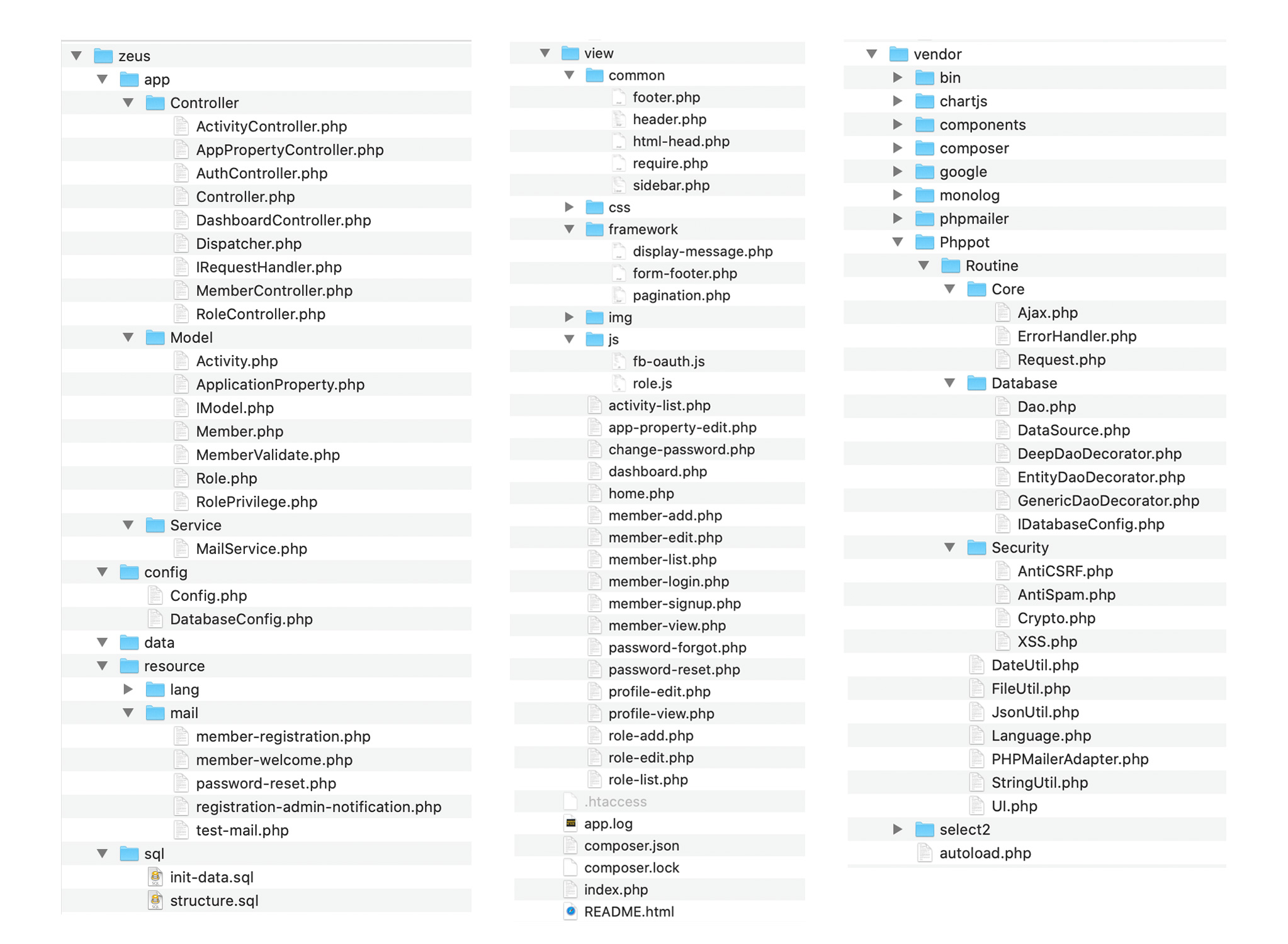
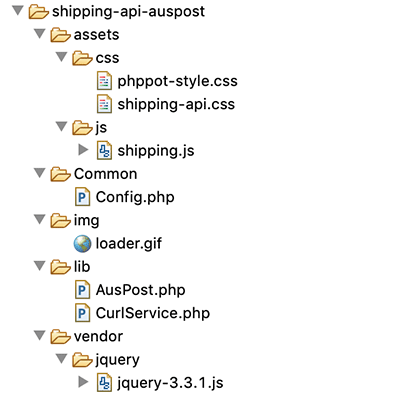
The below screenshot shows the Australia Post shipping rate calculation example files.

Shipping API AusPost Files Structure

Australia Post shipping API integration steps

The steps to integrate Australia Post in an eCommerce website are,

  1. Choose API from the Australia Post API suite.
  2. Create a new account to get the API key.
  3. Choose the postage service and set the endpoint.
  4. Set the API key as the HTTP header AUTH-KEY.
  5. Generate the PAC API request with the header set in step 4.

How to get the Australia Post PAC API key

There are many APIs provided by the Australia Post in API suite. The first step is to choose the API based on the need of your eCommerce website.

As discussed in the last section, I choose PAC API for calculating the shipping cost.

The PAC API access requirements state that it need the API key. This key is for authenticating the service request generated from the application.

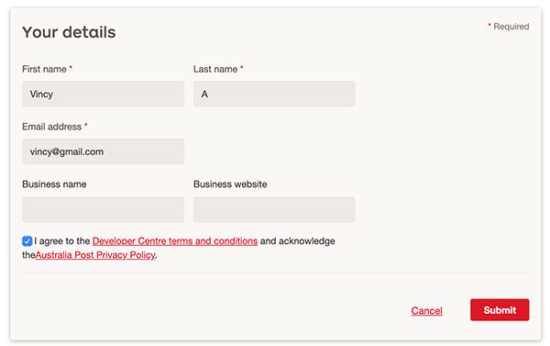
Aus Post PAC API Registration

On submitting valid information, it will send the API key to the registered email address. You can use this API then, to access the PAC API services.

Getting API Key from Auspost

Web interface to enter details to calculate shipping rates

This is the code to show a form to collect the product and shipping details.  

It has the fields to collect the width, height, weight, and length of the parcel. The form will show the units of these parameters to the user.

 Also, it collects the shipping address. This is the shipping destination address. The zip code is a mandatory field among the shipping address fields.

The shipping origin and destination postal codes are mandatory to calculate the rates.

In this example, the postal code of the shipping origin is configurable. You can also move it to the HTML form to let the user enter the data.

index.php

<HTML> <HEAD> <TITLE>Shipping API</TITLE> <link href="./assets/css/phppot-style.css" type="text/css" rel="stylesheet" /> <link href="./assets/css/shipping-api.css" type="text/css" rel="stylesheet" /> <script src="./vendor/jquery/jquery-3.3.1.js" type="text/javascript"></script> </HEAD> <BODY> <div class="phppot-container"> <div class="australian-api"> <div class="page-heading">Australian Shipping API</div> <form name="australian-api" id="australian-api" action="" method="post" onsubmit="return formValidation()"> <div class="sub-heading">Product Details</div> <div class="row"> <div class="inline-block"> <div class="form-label"> Length<span class="units-style">(cm)</span><span class="required error" id="length-info"></span> </div> <input class="input-box-110" type="text" name="length" id="length" value="<?php if(! empty($_POST["length"])){ echo $_POST["length"];}?>"> </div> <div class="inline-block input-right-margin"> <div class="form-label"> Width<span class="units-style">(cm)</span><span class="required error" id="width-info"></span> </div> <input class="input-box-110" type="text" name="width" id="width" value="<?php if(! empty($_POST["width"])){ echo $_POST["width"];}?>"> </div> <div class="inline-block"> <div class="form-label"> Height<span class="units-style">(cm)</span><span class="required error" id="height-info"></span> </div> <input class="input-box-110" type="text" name="height" id="height" value="<?php if(! empty($_POST["height"])){ echo $_POST["height"];}?>"> </div> <div class="inline-block input-right-margin"> <div class="form-label"> Weight<span class="units-style">(kg)</span><span class="required error" id="weight-info"></span> </div> <input class="input-box-110" type="text" name="weight" id="weight" value="<?php if(! empty($_POST["weight"])){ echo $_POST["weight"];}?>"> </div> </div> <div class="row"> <div class="inline-block"> <div class="form-label"> Quantity<span class="required error" id="quantity-info"></span> </div> <input class="input-box-110" type="number" name="quantity" id="quantity" value="<?php if(! empty($_POST["quantity"])){ echo $_POST["quantity"];}else{echo 1;}?>"> </div> </div> <div class="sub-heading">Shipping Address</div> <div class="row"> <div class="inline-block input-right-margin"> <div class="form-label">Address1</div> <input class="input-box-330" type="text" name="address1" id="address1" value="<?php if(! empty($_POST["address1"])){ echo $_POST["address1"];}?>"> </div> <div class="inline-block"> <div class="form-label">Address2</div> <input class="input-box-330" type="text" name="address2" id="address2" value="<?php if(! empty($_POST["address2"])){ echo $_POST["address2"];}?>"> </div> </div> <div class="row"> <div class="inline-block input-right-margin"> <div class="form-label">Country</div> <input class="input-box-330" type="text" name="country" id="country" value="<?php if(! empty($_POST["country"])){ echo $_POST["country"];}?>"> </div> <div class="inline-block"> <div class="form-label">State</div> <input class="input-box-330" type="text" name="state" id="state" value="<?php if(! empty($_POST["state"])){ echo $_POST["state"];}?>"> </div> </div> <div class="row"> <div class="inline-block input-right-margin"> <div class="form-label">City</div> <input class="input-box-330" type="text" name="city" id="city" value="<?php if(! empty($_POST["city"])){ echo $_POST["city"];}?>"> </div> <div class="inline-block"> <div class="form-label"> Zip Code<span class="required error" id="to-postcode-info"></span> </div> <input class="input-box-330" type="text" name="to-postcode" id="to-postcode" value="<?php if(! empty($_POST["to-postcode"])){ echo $_POST["to-postcode"];}?>"> </div> </div> <div class="row"> <div id="inline-block"> <input type="submit" class="submit-button" name="submit-btn" id="submit-btn" value="Get Quote"><span><img src="img/loader.gif" class="loader-ic" id="loader-icon"></span> </div> </div> </form> <?php if (! empty($shippingPrice)) { ?><div> <div class="sub-heading">Shipping Details</div> <div class="row"> <label class="shipping-result">Address1:</label> <?php echo $address1;?></div> <div class="row"> <label class="shipping-result">Address2:</label> <?php echo $address2;?></div> <div class="row"> <label class="shipping-result">Country:</label> <?php echo $country;?></div> <div class="row"> <label class="shipping-result">State:</label> <?php echo $state;?></div> <div class="row"> <label class="shipping-result">City:</label> <?php echo $city;?></div> <div class="row"> <label class="shipping-result">Quantity:</label> <?php echo $quantity;?></div> <div class="row"> <label class="shipping-result">Shipping price:</label> $<?php echo $quantity * $shippingPrice;?></div> </div> <?php }else if(!empty($errorMsg)){?> <div class="error-message"><?php echo $errorMsg;?></div> <?php }?> </div> </div> <script src="./assets/js/shipping.js"></script> </BODY> </HTML> 

CSS created to present the payment form

This CSS includes basic styles to show the shipping form to the user. It has exclusive styles related to this example.

Apart from that, this example contains a generic CSS phppot-styles.css. It contains common template styles with a list of selectors. You can find this generic CSS in the downloadable source.

assets/css/shipping-api.css

.australian-api { background: #fff; border-radius: 4px; padding: 10px; width: 85%; margin: 20px 40px; } .page-heading { font-size: 2em; font-weight: bold; } .sub-heading { font-size: 1.2em; font-weight: bold; margin: 20px 0px; } .inline-block { display: inline-block; } .row { margin: 15px 0px; } .form-label { margin-bottom: 5px; text-align: left; } input.input-box-330 { width: 250px; } input.input-box-110 { width: 120px; margin-right: 5px; } .australian-api .error { color: #ee0000; padding: 0px; background: none; border: #ee0000; } .australian-api .error-field { border: 1px solid #d96557; } .australian-api .error:before { content: '*'; padding: 0 3px; color: #D8000C; } input.submit-button { background-color: #ffb932; border-color: #ffc87a #e2a348 #da9d0a; text-align: center; cursor: pointer; color: #000; width: 100px; } .input-right-margin { margin-right: 30px; } .shipping-result { font-weight: bold; color: #737171; padding: 15px 0px; } .error-message { color: #D8000C; } .units-style { font-size: 0.8em; color: #666; margin-left: 2px; } .loader-ic { display: none; } 

jQuery script to validate the shipping details

The shipping.js file contains the form validation function. It validates the mandatory fields and makes sure that they are not empty.

It returns boolean based on which the form-post carried forward to PHP. While returning false, it highlights what’s wrong with the entered data.

After successful validation, PHP will validate the shipping attributes sent via the form.

assets/js/shipping.js

function formValidation() { var valid = true; $("#length").removeClass("error-field"); $("#width").removeClass("error-field"); $("#height").removeClass("error-field"); $("#weight").removeClass("error-field"); $("#quantity").removeClass("error-field"); $("#to-postcode").removeClass("error-field"); var Length = $("#length").val(); var Width = $("#width").val(); var Height = $("#height").val(); var Weight = $("#weight").val(); var Quantity = $("#quantity").val(); var toPostcode = $("#to-postcode").val(); if (Length.trim() == "") { $("#length-info").html("").css("color", "#ee0000").show(); $("#length").addClass("error-field"); valid = false; } if (Width.trim() == "") { $("#width-info").css("color", "#ee0000").show(); $("#width").addClass("error-field"); valid = false; } if (Height.trim() == "") { $("#height-info").css("color", "#ee0000").show(); $("#height").addClass("error-field"); valid = false; } if (Weight.trim() == "") { $("#weight-info").css("color", "#ee0000").show(); $("#weight").addClass("error-field"); valid = false; } if (Quantity.trim() == "" || Quantity < 1) { $("#quantity-info").css("color", "#ee0000").show(); $("#quantity").addClass("error-field"); valid = false; } if (toPostcode.trim() == "") { $("#to-postcode-info").css("color", "#ee0000").show(); $("#to-postcode").addClass("error-field"); valid = false; } if (valid == false) { $('.error-field').first().focus(); valid = false; } if (valid == true) { $("#submit-btn").hide(); $("#loader-icon").show(); } return valid; } 

PHP code with Australia Post shipping API request-response handlers

This is the configuration file of this example code. It has the constants defined for keeping the API key and shipping origin.

Common/Config.php

<?php namespace Phppot; class Config { const AUSTRALIAN_POST_API_KEY = 'REPLACE_WITH_THE_API_KEY'; const SHIPPING_ORIGION = '1000'; } ?> 

This is an exclusive service class for executing curl script. The execute() function is receiving URL, API KEY as its parameters.

It initiates curl object and set the URL. It sets the header with the API key to call the Australia Post live URL.

The rawBody will receive the API response in JSON format. You can use this as a sample to build an eCommerce website backed by a shopping cart with shipping API integration.

lib/CurlService.php

<?php namespace Phppot; class CurlService { public function execute($url, $apiKey, $ch = null) { if (is_null($ch)) { $ch = curl_init(); } curl_setopt($ch, CURLOPT_URL, $url); curl_setopt($ch, CURLOPT_RETURNTRANSFER, 1); curl_setopt($ch, CURLOPT_SSL_VERIFYHOST, 0); curl_setopt($ch, CURLOPT_SSL_VERIFYPEER, false); curl_setopt($ch, CURLOPT_HTTPHEADER, array( 'AUTH-KEY: ' . $apiKey )); return $rawBody = curl_exec($ch); } } ?> 

The AusPost.php PHP class handles the operation for preparing the API request.

The getShipmentPrice() function set the API key and form data to the PHP variables. It prepares the query parameters with these variables.

The class constructor instantiates the curlService created for this example.

Using the curl instance, it hits the Australia Post live PAC API URL. The API will validate the shipping criteria passed with the query parameters.

The request and response can be of either JSON or XML.

lib/AusPost.php

<?php namespace Phppot; class AusPost { private $curlService; private $api_url = 'https://digitalapi.auspost.com.au/postage/parcel/domestic/calculate?'; public function __construct() { require_once __DIR__ . '/CurlService.php'; $this->curlService = new CurlService(); } public function getShipmentPrice() { require_once __DIR__ . '/../Common/Config.php'; $con = new Config(); $apiKey = $con::AUSTRALIAN_POST_API_KEY; $fromPostcode = $con::SHIPPING_ORIGION; $toPostcode = $_POST["to-postcode"]; $length = $_POST["length"]; $width = $_POST["width"]; $height = $_POST["height"]; $weight = $_POST["weight"]; $queryParams = array( "from_postcode" => $fromPostcode, "to_postcode" => $toPostcode, "length" => $length, "width" => $width, "height" => $height, "weight" => $weight, "service_code" => "AUS_PARCEL_REGULAR" ); // here use $curlService and execute $url = $this->api_url . http_build_query($queryParams); $result = $this->curlService->execute($url, $apiKey); $shippingResult = json_decode($result); return $shippingResult; } } ?> 

index.php (PHP Code)

<?php namespace Phppot; if (! empty($_POST["submit-btn"])) { require_once __DIR__ . '/lib/AusPost.php'; $shippingApi = new AusPost(); $result = $shippingApi->getShipmentPrice(); if (isset($result->postage_result)) { $shippingPrice = $result->postage_result->total_cost; } else { $errorMsg = $result->error->errorMessage; } $quantity = $_POST["quantity"]; $address1 = $_POST["address1"]; $address2 = $_POST["address2"]; $state = $_POST["state"]; $country = $_POST["country"]; $city = $_POST["city"]; } ?> 

Australia Post shipping API integration output

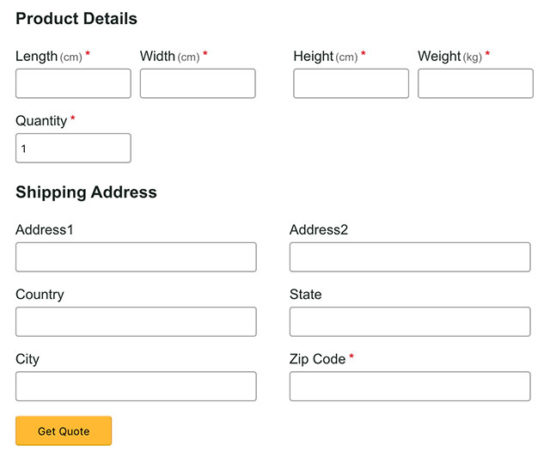
The output screenshot below shows the payment and shipping form. It is to get the shipping details from the user.

It also has the fields to collect parameters like height, width and the dimension of the products.

You can also integrate this form into your shopping cart checkout page to calculate rates. For a shopping cart, it requires only the shipping address.

Because, the height, width, height will be a part of a product entity. And the quantity can be read from the cart session or database. The below form is generic and with little customization can be used for any eCommerce website.

Shipping API Australia Post User Interface

Download

↑ Back to Top

Posted on Leave a comment

Contact Form with Custom Image Captcha Validation like Google reCaptcha

Last modified on January 9th, 2020 by Vincy.

A contact form on a website is a medium to the users to contact the site admin or maintainer. It acts as a medium of communication. For many a websites, it is a critical factor in getting a sale.

The Captcha in a form is a mechanism to prevent bots or malicious users from submitting the form. It protects the site from security abuses.

There are components available in the market to render captcha in a form. Google reCAPTCHA is a popular and unbeatable service to make your form captcha-enabled.

  1. Different websites use different types of captcha.
  2. Displaying random alpha-numeric characters.
  3. Requesting to solve puzzles, Google reCAPTCHA-like image captcha.

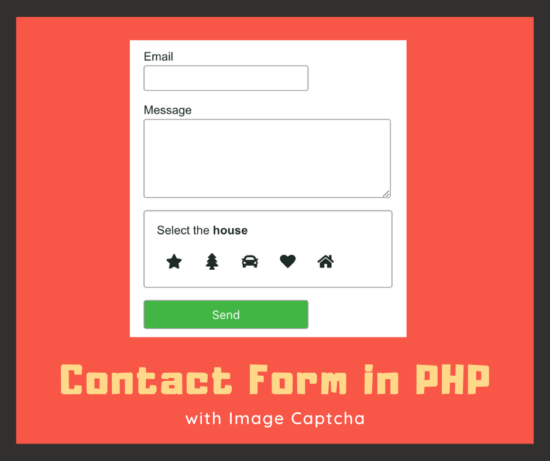
I created an example code for a contact form in PHP with the reCAPTCHA-like image captcha mechanism.

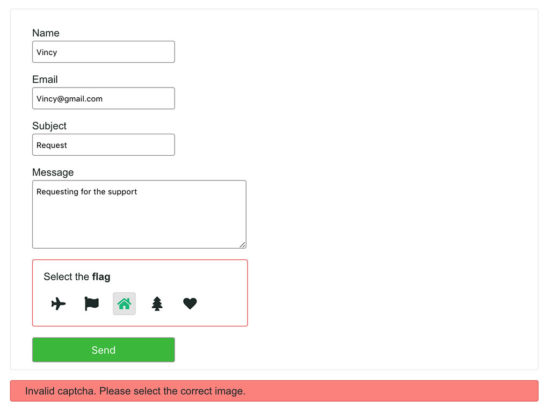
Contact Form In Php With Captcha

What is inside?

  1. Existing contact form component
  2. About this example
  3. File structure
  4. HTML code to show contact form with image captcha
  5. PHP code to validate image captcha and send contact mail
  6. Contact form captcha image database script
  7. Contact form output with custom image captcha

Ready-made contact form components are existing huge in number around the web. If you want to get one among them, then we need to be sure about the security and robustness of the code.

I have created a secure spam-free contact form script, Iris. I coded this component to easily integrate and configure with your application. If you are looking for a contact form that controls spam without using a captcha, then you will like it.

This also component includes Google reCAPTCHA. You can enable or disable this feature on a need basis. In similar ways, it comes with loads of features that is configurable in minutes.

About this example

This example code has the Name, Email, Subject and Message fields. These are some basic fields that we have seen with other PHP contact form example earlier.

Added to these fields, I have added an image captcha section in this code. This section will show five random images and ask to choose one. The random images are from the database.

I used jQuery script to validate the form field data before posting it to the PHP.

In PHP, it validates the captcha image clicked by the user. Based on the server-side captcha validation, the PHP will respond to the user.

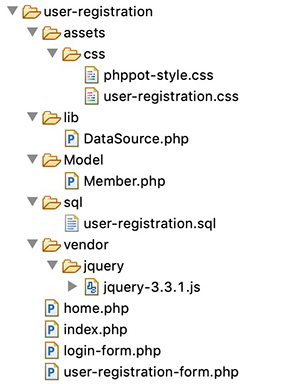
File structure

The PHP contact form with an image captcha example includes less number of files.

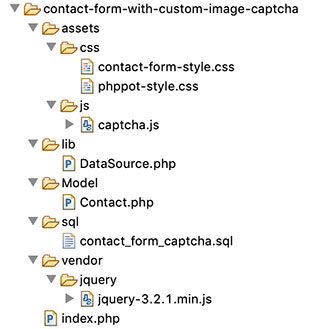
The file structure is in the below screenshot. You can see that it has a systematic code with a conventional structure.

Contact Form with Image Captcha File Structure

This code snippet shows the HTML part of the index.php, the landing page. 

This contact form contains some basic fields with custom captcha in PHP.

The captcha section shows the SVG image markup from the database. It displays five random images and requests the user to select one.

The HTML form has the specification of a jQuery validation handler. The form-submit event will invoke this handler to process the form validation.

This HTML includes the response containers to display notifications to the user. These notifications acknowledge the user about the captcha validation or other responses.

index.php (contact form HTML)

<html> <head> <title>Contact Us Form</title> <link rel="stylesheet" type="text/css" href="assets/css/contact-form-style.css" /> <link rel="stylesheet" type="text/css" href="assets/css/phppot-style.css" /> <script src="vendor/jquery/jquery-3.2.1.min.js"></script> </head> <body> <div class="phppot-container"> <h1>PHP contact form with captcha images</h1> <form name="frmContact" id="captcha-cnt-frm" class="phppot-form" frmContact"" method="post" action="" enctype="multipart/form-data" onsubmit="return validateContactForm()"> <div class="phppot-row"> <div class="label"> Name <span id="userName-info" class="validation-message"></span> </div> <input type="text" class="phppot-input" name="userName" id="userName" value="<?php if(!empty($_POST['userName'])&& $type == 'error'){ echo $_POST['userName'];}?>" /> </div> <div class="phppot-row"> <div class="label"> Email <span id="userEmail-info" class="validation-message"></span> </div> <input type="text" class="phppot-input" name="userEmail" id="userEmail" value="<?php if(!empty($_POST['userEmail'])&& $type == 'error'){ echo $_POST['userEmail'];}?>" /> </div> <div class="phppot-row"> <div class="label"> Subject <span id="subject-info" class="validation-message"></span> </div> <input type="text" class="phppot-input" name="subject" id="subject" value="<?php if(!empty($_POST['subject'])&& $type == 'error'){ echo $_POST['subject'];}?>" /> </div> <div class="phppot-row"> <div class="label"> Message <span id="userMessage-info" class="validation-message"></span> </div> <textarea name="content" id="content" class="phppot-input" cols="60" rows="6"><?php if(!empty($_POST['content'])&& $type == 'error'){ echo $_POST['content'];}?></textarea> </div> <?php if (! empty($result)) { ?> <div class="phppot-row"> <div class="captcha-container <?php if(!empty($border)){ echo $border;} ?>"> <p> Select the <span class="text-color"><?php echo $result[0]['name'];?> </span><span id="captcha-info" class="validation-message"></span> </p> <input type="hidden" name="captcha_code" value="<?php echo $result[0]['name'];?>"> <?php shuffle($captchaOutput); if (! empty($captchaOutput)) { foreach ($captchaOutput as $value) { ?> <div class="svg-padding"> <div class="svg"><?php echo $value['captcha_icon'];?> <input type="hidden" class="icons" value="<?php echo $value['name'];?>"> </div> </div> <?php }}?> </div> </div> <?php }?> <div class="phppot-row"> <input type="submit" name="send" class="send-button" value="Send" /> </div> <input type="hidden" name="captcha_chosen" id="captcha-chosen" value=""> </form> <?php if(!empty($message)) { ?> <div id="phppot-message" class="<?php echo $type; ?>"><?php if(isset($message)){ ?> <?php echo $message; }}?> </div> </div> <script src="assets/js/captcha.js"></script> </body> </html> 

jQuery script to validate contact form and highlight captcha selection

This section shows the jQuery script for validation and captcha selection.

The validateContactForm() function is handling the form validation. All the contact form fields are mandatory. This function is making sure about the non-empty state of the form fields.

On selecting one of the lists of captcha images, the script puts the selected value in a form field. Also, it highlights the selected by adding CSS via script.

If the user selects no captcha, then the validation will return false.

assets/js/captcha.js

function validateContactForm() { var valid = true; $("#userName").removeClass("error-field"); $("#userEmail").removeClass("error-field"); $("#subject").removeClass("error-field"); $("#content").removeClass("error-field"); $("#userName-info").html("").hide(); $("#userEmail-info").html("").hide(); $("#subject-info").html("").hide(); $("#content-info").html("").hide(); $(".validation-message").html(""); $(".phppot-input").css('border', '#e0dfdf 1px solid'); $(".captcha-container").css('border', '#e0dfdf 1px solid'); var userName = $("#userName").val(); var userEmail = $("#userEmail").val(); var subject = $("#subject").val(); var content = $("#content").val(); var captcha = $("#captcha-chosen").val(); if (userName.trim() == "") { $("#userName-info").html("required.").css("color", "#ee0000").show(); $("#userName").css('border', '#e66262 1px solid'); $("#userName").addClass("error-field"); valid = false; } if (userEmail.trim() == "") { $("#userEmail-info").html("required.").css("color", "#ee0000").show(); $("#userEmail").css('border', '#e66262 1px solid'); $("#userEmail").addClass("error-field"); valid = false; } if (!userEmail.match(/^([\w-\.]+@([\w-]+\.)+[\w-]{2,4})?$/)) { $("#userEmail-info").html("invalid email address.").css("color", "#ee0000").show(); $("#userEmail").css('border', '#e66262 1px solid'); $("#userEmail").addClass("error-field"); valid = false; } if (subject == "") { $("#subject-info").html("required.").css("color", "#ee0000").show(); $("#subject").css('border', '#e66262 1px solid'); $("#subject").addClass("error-field"); valid = false; } if (content == "") { $("#userMessage-info").html("required.").css("color", "#ee0000").show(); $("#content").css('border', '#e66262 1px solid'); $("#content").addClass("error-field"); valid = false; } if (captcha == "") { $("#captcha-info").html("required."); $(".captcha-container").css('border', '#e66262 1px solid'); valid = false; } if (valid == false) { $('.error-field').first().focus(); valid = false; } return valid; } $(".svg-padding").on('click', function() { $(".svg").removeClass('captcha-selected'); $(this).find(".svg").addClass('captcha-selected'); var icons = $(this).find(".icons").val(); $("#captcha-chosen").val(icons); }); 

CSS created for contact form example

These are the exclusive styles created to present the contact form. Mostly, it contains styles for the captcha section.

I used a generic CSS template for designing other common form components. You can find this CSS in the downloadable.

assets/css/contact-form-style.css

.svg-padding { display: inline-block; } .svg { cursor: pointer; padding: 5px 5px 5px 5px; border-radius: 3px; margin: 0px 5px 0px 5px; border: 1px solid #FFF; } .text-color { font-weight: bold; } .captcha-container { background: #fff; padding: 15px; border: 1px solid #9a9a9a; width: 270px; border-radius: 3px; padding-top: 0px; } .error-field { border: 1px solid #d96557; } .send-button { cursor: pointer; background: #3cb73c; border: #36a536 1px solid; color: #FFF; font-size: 1em; width: 100px; } .captcha-selected { color: #1cb87b; background-color: #e3e3e3; border: #d7d7d7 1px solid; } .border-error-color { border: 1px solid #e66262; } 

On loading the contact form, the PHP code reads the random captcha images from the database. In PHP, it picks one image from the random results as the captcha code.

The HTML form contains a hidden field to have this code.

When the user selects an image and posts it to the PHP, it will validate the selected captcha.

The user-selected captcha is matched with the pre-loaded code, then the PHP code will return true. Then, it will process the contact email sending script.

index.php (Captcha Validation and Mail sending)

<?php namespace Phppot; require_once ("Model/Contact.php"); $contact = new Contact(); if (! empty($_POST['send'])) { if ($_POST['captcha_code'] == $_POST['captcha_chosen']) { $contact->sendContactMail($_POST); $message = "Hi, we have received your message. Thank you."; $type = "success"; } else { $message = "Invalid captcha. Please select the correct image."; $type = "error"; $border = "border-error-color"; } } $result = $contact->getRecord(); $termId = $result[0]['id']; $captchaResult = $contact->getCaptchaIcons($termId); $randomCaptchaResult = $contact->getRandomCaptchaId($termId); $captchaOutput = array_merge($captchaResult, $randomCaptchaResult); ?> 

In this PHP model class, it has the functions to read random captcha images from the database.

The getRecord() method reads a single random record to load captcha code on the page load.

The sendContactMail() function send the contact mail. I used PHP mail() function for this example. If you want to use SMTP for sending the email, you can see the example in the linked article.

Model/Contact.php

<?php namespace Phppot; use Phppot\DataSource; class Contact { private $ds; function __construct() { require_once __DIR__ . './../lib/DataSource.php'; $this->ds = new DataSource(); } function getRecord() { $query = "SELECT * FROM tbl_term ORDER BY RAND() LIMIT 1"; $result = $this->ds->select($query); return $result; } function getCaptchaIcons($id) { $query = "SELECT tbl_captcha_images.*, tbl_term.name FROM tbl_captcha_images JOIN tbl_term ON tbl_captcha_images.term_id = tbl_term.id WHERE term_id != " . $id . " ORDER BY RAND() LIMIT 4"; $captchaResult = $this->ds->select($query); return $captchaResult; } function getRandomCaptchaId($id) { $query = "SELECT tbl_captcha_images.*, tbl_term.name FROM tbl_captcha_images JOIN tbl_term ON tbl_captcha_images.term_id = tbl_term.id WHERE term_id = " . $id . " ORDER BY RAND() LIMIT 1"; $captcha = $this->ds->select($query); return $captcha; } function sendContactMail($postValues) { $name = $postValues["userName"]; $email = $postValues["userEmail"]; $subject = $postValues["subject"]; $content = $postValues["content"]; $toEmail = "SITE_ADMIN_EMAIL"; // Put in place the recipient email $mailHeaders = "From: " . $name . "<" . $email . ">\r\n"; mail($toEmail, $subject, $content, $mailHeaders); } } 

lib/Datasource.php

<?php namespace Phppot; /** * Generic datasource class for handling DB operations. * Uses MySqli and PreparedStatements. * * @version 2.3 */ class DataSource { // PHP 7.1.0 visibility modifiers are allowed for class constants. // when using above 7.1.0, declare the below constants as private const HOST = 'localhost'; const USERNAME = 'root'; const PASSWORD = ''; const DATABASENAME = 'contact_form_captcha'; private $conn; /** * PHP implicitly takes care of cleanup for default connection types. * So no need to worry about closing the connection. * * Singletons not required in PHP as there is no * concept of shared memory. * Every object lives only for a request. * * Keeping things simple and that works! */ function __construct() { $this->conn = $this->getConnection(); } /** * If connection object is needed use this method and get access to it. * Otherwise, use the below methods for insert / update / etc. * * @return \mysqli */ public function getConnection() { $conn = new \mysqli(self::HOST, self::USERNAME, self::PASSWORD, self::DATABASENAME); if (mysqli_connect_errno()) { trigger_error("Problem with connecting to database."); } $conn->set_charset("utf8"); return $conn; } /** * To get database results * * @param string $query * @param string $paramType * @param array $paramArray * @return array */ public function select($query, $paramType = "", $paramArray = array()) { $stmt = $this->conn->prepare($query); if (! empty($paramType) && ! empty($paramArray)) { $this->bindQueryParams($stmt, $paramType, $paramArray); } $stmt->execute(); $result = $stmt->get_result(); if ($result->num_rows > 0) { while ($row = $result->fetch_assoc()) { $resultset[] = $row; } } if (! empty($resultset)) { return $resultset; } } } 

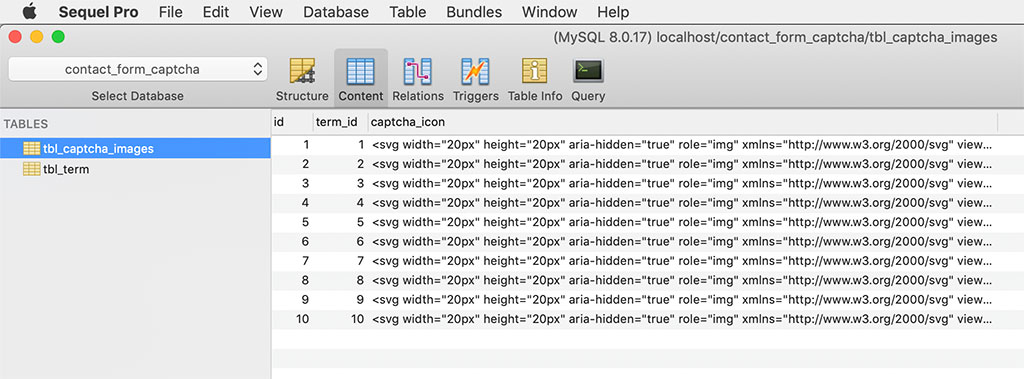
This SQL script includes the structure and data of the tables used to display custom captcha. The tbl_captcha_images table contains the SVG markup of the captcha images.

I have used another table tbl_term to hold the captcha term and title. The captcha term is for stating the user what to select. The captcha title is a slug to add it with a title attribute.

sql/contact_form_captcha.sql

-- -- Database: `contact_form_captcha` -- -- -------------------------------------------------------- -- -- Table structure for table `tbl_captcha_images` -- CREATE TABLE `tbl_captcha_images` ( `id` int(11) NOT NULL, `term_id` int(11) NOT NULL, `captcha_icon` text NOT NULL ) ENGINE=InnoDB DEFAULT CHARSET=latin1; -- -- Dumping data for table `tbl_captcha_images` -- INSERT INTO `tbl_captcha_images` (`id`, `term_id`, `captcha_icon`) VALUES (1, 1, '<svg width=\"25px\" height=\"25px\" aria-hidden=\"true\" role=\"img\" xmlns=\"http://www.w3.org/2000/svg\" viewBox=\"0 0 640 512\"><path fill=\"currentColor\" d=\"M192 384h192c53 0 96-43 96-96h32c70.6 0 128-57.4 128-128S582.6 32 512 32H120c-13.3 0-24 10.7-24 24v232c0 53 43 96 96 96zM512 96c35.3 0 64 28.7 64 64s-28.7 64-64 64h-32V96h32zm47.7 384H48.3c-47.6 0-61-64-36-64h583.3c25 0 11.8 64-35.9 64z\"></path></svg>'), (2, 2, '<svg width=\"25px\" height=\"25px\" aria-hidden=\"true\" role=\"img\" xmlns=\"http://www.w3.org/2000/svg\" viewBox=\"0 0 576 512\"><path fill=\"currentColor\" d=\"M259.3 17.8L194 150.2 47.9 171.5c-26.2 3.8-36.7 36.1-17.7 54.6l105.7 103-25 145.5c-4.5 26.3 23.2 46 46.4 33.7L288 439.6l130.7 68.7c23.2 12.2 50.9-7.4 46.4-33.7l-25-145.5 105.7-103c19-18.5 8.5-50.8-17.7-54.6L382 150.2 316.7 17.8c-11.7-23.6-45.6-23.9-57.4 0z\"></path></svg>'), (3, 3, '<svg width=\"25px\" height=\"25px\" aria-hidden=\"true\" role=\"img\" xmlns=\"http://www.w3.org/2000/svg\" viewBox=\"0 0 384 512\"><path fill=\"currentColor\" d=\"M377.33 375.429L293.906 288H328c21.017 0 31.872-25.207 17.448-40.479L262.79 160H296c20.878 0 31.851-24.969 17.587-40.331l-104-112.003c-9.485-10.214-25.676-10.229-35.174 0l-104 112.003C56.206 134.969 67.037 160 88 160h33.21l-82.659 87.521C24.121 262.801 34.993 288 56 288h34.094L6.665 375.429C-7.869 390.655 2.925 416 24.025 416H144c0 32.781-11.188 49.26-33.995 67.506C98.225 492.93 104.914 512 120 512h144c15.086 0 21.776-19.069 9.995-28.494-19.768-15.814-33.992-31.665-33.995-67.496V416h119.97c21.05 0 31.929-25.309 17.36-40.571z\"></path></svg>'), (4, 4, '<svg width=\"25px\" height=\"25px\" aria-hidden=\"true\" role=\"img\" xmlns=\"http://www.w3.org/2000/svg\" viewBox=\"0 0 640 512\"><path fill=\"currentColor\" d=\"M624 352h-16V243.9c0-12.7-5.1-24.9-14.1-33.9L494 110.1c-9-9-21.2-14.1-33.9-14.1H416V48c0-26.5-21.5-48-48-48H48C21.5 0 0 21.5 0 48v320c0 26.5 21.5 48 48 48h16c0 53 43 96 96 96s96-43 96-96h128c0 53 43 96 96 96s96-43 96-96h48c8.8 0 16-7.2 16-16v-32c0-8.8-7.2-16-16-16zM160 464c-26.5 0-48-21.5-48-48s21.5-48 48-48 48 21.5 48 48-21.5 48-48 48zm320 0c-26.5 0-48-21.5-48-48s21.5-48 48-48 48 21.5 48 48-21.5 48-48 48zm80-208H416V144h44.1l99.9 99.9V256z\"></path></svg>'), (5, 5, '<svg width=\"25px\" height=\"25px\" aria-hidden=\"true\" role=\"img\" xmlns=\"http://www.w3.org/2000/svg\" viewBox=\"0 0 512 512\"><path fill=\"currentColor\" d=\"M512 176.001C512 273.203 433.202 352 336 352c-11.22 0-22.19-1.062-32.827-3.069l-24.012 27.014A23.999 23.999 0 0 1 261.223 384H224v40c0 13.255-10.745 24-24 24h-40v40c0 13.255-10.745 24-24 24H24c-13.255 0-24-10.745-24-24v-78.059c0-6.365 2.529-12.47 7.029-16.971l161.802-161.802C163.108 213.814 160 195.271 160 176 160 78.798 238.797.001 335.999 0 433.488-.001 512 78.511 512 176.001zM336 128c0 26.51 21.49 48 48 48s48-21.49 48-48-21.49-48-48-48-48 21.49-48 48z\"></path></svg>'), (6, 6, '<svg width=\"25px\" height=\"25px\" aria-hidden=\"true\" role=\"img\" xmlns=\"http://www.w3.org/2000/svg\" viewBox=\"0 0 512 512\"><path fill=\"currentColor\" d=\"M499.991 168h-54.815l-7.854-20.944c-9.192-24.513-25.425-45.351-46.942-60.263S343.651 64 317.472 64H194.528c-26.18 0-51.391 7.882-72.908 22.793-21.518 14.912-37.75 35.75-46.942 60.263L66.824 168H12.009c-8.191 0-13.974 8.024-11.384 15.795l8 24A12 12 0 0 0 20.009 216h28.815l-.052.14C29.222 227.093 16 247.997 16 272v48c0 16.225 6.049 31.029 16 42.309V424c0 13.255 10.745 24 24 24h48c13.255 0 24-10.745 24-24v-40h256v40c0 13.255 10.745 24 24 24h48c13.255 0 24-10.745 24-24v-61.691c9.951-11.281 16-26.085 16-42.309v-48c0-24.003-13.222-44.907-32.772-55.86l-.052-.14h28.815a12 12 0 0 0 11.384-8.205l8-24c2.59-7.771-3.193-15.795-11.384-15.795zm-365.388 1.528C143.918 144.689 168 128 194.528 128h122.944c26.528 0 50.61 16.689 59.925 41.528L391.824 208H120.176l14.427-38.472zM88 328c-17.673 0-32-14.327-32-32 0-17.673 14.327-32 32-32s48 30.327 48 48-30.327 16-48 16zm336 0c-17.673 0-48 1.673-48-16 0-17.673 30.327-48 48-48s32 14.327 32 32c0 17.673-14.327 32-32 32z\"></path></svg>'), (7, 7, '<svg width=\"25px\" height=\"25px\" aria-hidden=\"true\" role=\"img\" xmlns=\"http://www.w3.org/2000/svg\" viewBox=\"0 0 576 512\"><path fill=\"currentColor\" d=\"M414.9 24C361.8 24 312 65.7 288 89.3 264 65.7 214.2 24 161.1 24 70.3 24 16 76.9 16 165.5c0 72.6 66.8 133.3 69.2 135.4l187 180.8c8.8 8.5 22.8 8.5 31.6 0l186.7-180.2c2.7-2.7 69.5-63.5 69.5-136C560 76.9 505.7 24 414.9 24z\"></path></svg>'), (8, 8, '<svg width=\"25px\" height=\"25px\" aria-hidden=\"true\" role=\"img\" xmlns=\"http://www.w3.org/2000/svg\" viewBox=\"0 0 576 512\"><path fill=\"currentColor\" d=\"M488 312.7V456c0 13.3-10.7 24-24 24H348c-6.6 0-12-5.4-12-12V356c0-6.6-5.4-12-12-12h-72c-6.6 0-12 5.4-12 12v112c0 6.6-5.4 12-12 12H112c-13.3 0-24-10.7-24-24V312.7c0-3.6 1.6-7 4.4-9.3l188-154.8c4.4-3.6 10.8-3.6 15.3 0l188 154.8c2.7 2.3 4.3 5.7 4.3 9.3zm83.6-60.9L488 182.9V44.4c0-6.6-5.4-12-12-12h-56c-6.6 0-12 5.4-12 12V117l-89.5-73.7c-17.7-14.6-43.3-14.6-61 0L4.4 251.8c-5.1 4.2-5.8 11.8-1.6 16.9l25.5 31c4.2 5.1 11.8 5.8 16.9 1.6l235.2-193.7c4.4-3.6 10.8-3.6 15.3 0l235.2 193.7c5.1 4.2 12.7 3.5 16.9-1.6l25.5-31c4.2-5.2 3.4-12.7-1.7-16.9z\"></path></svg>'), (9, 9, '<svg width=\"25px\" height=\"25px\" aria-hidden=\"true\" role=\"img\" xmlns=\"http://www.w3.org/2000/svg\" viewBox=\"0 0 512 512\"><path fill=\"currentColor\" d=\"M349.565 98.783C295.978 98.783 251.721 64 184.348 64c-24.955 0-47.309 4.384-68.045 12.013a55.947 55.947 0 0 0 3.586-23.562C118.117 24.015 94.806 1.206 66.338.048 34.345-1.254 8 24.296 8 56c0 19.026 9.497 35.825 24 45.945V488c0 13.255 10.745 24 24 24h16c13.255 0 24-10.745 24-24v-94.4c28.311-12.064 63.582-22.122 114.435-22.122 53.588 0 97.844 34.783 165.217 34.783 48.169 0 86.667-16.294 122.505-40.858C506.84 359.452 512 349.571 512 339.045v-243.1c0-23.393-24.269-38.87-45.485-29.016-34.338 15.948-76.454 31.854-116.95 31.854z\"></path></svg>'), (10, 10, '<svg width=\"25px\" height=\"25px\" aria-hidden=\"true\" role=\"img\" xmlns=\"http://www.w3.org/2000/svg\" viewBox=\"0 0 576 512\"><path fill=\"currentColor\" d=\"M472 200H360.211L256.013 5.711A12 12 0 0 0 245.793 0h-57.787c-7.85 0-13.586 7.413-11.616 15.011L209.624 200H99.766l-34.904-58.174A12 12 0 0 0 54.572 136H12.004c-7.572 0-13.252 6.928-11.767 14.353l21.129 105.648L.237 361.646c-1.485 7.426 4.195 14.354 11.768 14.353l42.568-.002c4.215 0 8.121-2.212 10.289-5.826L99.766 312h109.858L176.39 496.989c-1.97 7.599 3.766 15.011 11.616 15.011h57.787a12 12 0 0 0 10.22-5.711L360.212 312H472c57.438 0 104-25.072 104-56s-46.562-56-104-56z\"></path></svg>'); -- -------------------------------------------------------- -- -- Table structure for table `tbl_term` -- CREATE TABLE `tbl_term` ( `id` int(11) NOT NULL, `name` varchar(255) NOT NULL, `slug` varchar(255) NOT NULL ) ENGINE=InnoDB DEFAULT CHARSET=latin1; -- -- Dumping data for table `tbl_term` -- INSERT INTO `tbl_term` (`id`, `name`, `slug`) VALUES (1, 'cup', 'cup-1'), (2, 'star', 'star-2'), (3, 'tree', 'tree-3'), (4, 'truck', 'truck-4'), (5, 'key', 'key-5'), (6, 'car', 'car-6'), (7, 'heart', 'heart-7'), (8, 'house', 'house-8'), (9, 'flag', 'flag-9'), (10, 'plane', 'plane-10'); -- -- Indexes for dumped tables -- -- -- Indexes for table `tbl_captcha_images` -- ALTER TABLE `tbl_captcha_images` ADD PRIMARY KEY (`id`); -- -- Indexes for table `tbl_term` -- ALTER TABLE `tbl_term` ADD PRIMARY KEY (`id`); -- -- AUTO_INCREMENT for dumped tables -- -- -- AUTO_INCREMENT for table `tbl_captcha_images` -- ALTER TABLE `tbl_captcha_images` MODIFY `id` int(11) NOT NULL AUTO_INCREMENT, AUTO_INCREMENT=11; -- -- AUTO_INCREMENT for table `tbl_term` -- ALTER TABLE `tbl_term` MODIFY `id` int(11) NOT NULL AUTO_INCREMENT, AUTO_INCREMENT=11; COMMIT; 

Contact Form Captcha Image Database

This screenshot shows the output of this PHP contact form example. It displays the custom image captcha in the form.

It focuses on the captcha section because of the form submitted with invalid captcha.

Contact Form in PHP with Image Captcha

Download

↑ Back to Top

Posted on Leave a comment

User Registration in PHP with Login: Form with MySQL and Code Download

Last modified on January 3rd, 2020 by Vincy.

Are you looking for code to create user registration in PHP? A lightweight form with MySQL database backend. Read on!

There are lots of PHP components for user registration available on the Internet. But these contain heavy stuff and lots of dependencies.

An appropriate code should be lightweight, secure, feature-packed and customizable. I am going to explain how to code this user registration in PHP with a login.

With this code, you can customize or put any add-ons as per your need and enhance it.

User Registration in PHP with Login Form

What is inside?

  1. Example code for user registration in PHP
  2. Create user registration and login form
  3. Registration and login form validation
  4. Process user registration in PHP
  5. PHP login authentication code
  6. User dashboard
  7. MySQL database script
  8. Screenshot of user registration and login form

Example code for user registration in PHP

In this example, I have created user registration in PHP with the login script. In a previous article, we have seen how to create a login script with PHP session.

On a landing page, it shows a login form with a signup link. The registered user can enter their login details with the login form. Once done, he can get into the dashboard after authentication.

If the user does not have an account, then he can click the signup option to create a new account.

The user registration form requests username, email, password from the user. On submission, PHP code allows registration if the email does not already exist.

This example code has client-side validation for validating the entered user details. And also, it includes contains the server-side uniqueness test. The user email is the base to check uniqueness before adding the users to the MySQL database.

This linked article includes a basic example of implementing user registration in PHP and MySQL.

File structure

User Registration File Structure

Create user registration and login form

I have created three HTML view login form, registration form and the dashboard for this code.

Below HMTL code is for displaying the login form to the user. In this form, it has two inputs to allow the user to enter their username and password.

Without these details, a validation code will not allow the login to proceed. The login form tag’s on-click attribute is with loginValidation(). This function contains the login form validation script.

On submitting this login form, the PHP code will validate the user. If the users clear the authentication, then it will redirect him to the dashboard.

If the user attempts to log in with the wrong data, then the code will display a login error message in the login form. If you want to limit the failed login attempts, the linked article has an example of that.

See also login form with forgot password and remember me.

login-form.php

<div class="sign-up-container"> <div class="login-signup"> <a href="user-registration-form.php">Sign up</a> </div> <div class="signup-align"> <form name="login" action="" method="post" onsubmit="return loginValidation()"> <div class="signup-heading">Login</div> <?php if(!empty($loginResult)){?> <div class="error-msg"><?php echo $loginResult;?></div> <?php }?> <div class="row"> <div class="inline-block"> <div class="form-label"> Username<span class="required error" id="username-info"></span> </div> <input class="input-box-330" type="text" name="username" id="username"> </div> </div> <div class="row"> <div class="inline-block"> <div class="form-label"> Password<span class="required error" id="signup-password-info"></span> </div> <input class="input-box-330" type="password" name="signup-password" id="signup-password"> </div> </div> <div class="row"> <input class="sign-up-btn" type="submit" name="login-btn" id="login-btn" value="Login"> </div> </form> </div> </div> 

This is a user registration form getting minimal user data from the user. All form fields are mandatory.

It will pass-through a JavaScript validation before processing the user registration in PHP.

On submitting the registration form fields, it will invoke the signupValidation() JavaScript method. In this method, it validates with the non-empty check, email format, and the password match.

After validation, the PHP registration will take place with the posted form data. 

user-registration-form.php

<HTML> <HEAD> <TITLE>Registration</TITLE> <link href="./assets/css/phppot-style.css" type="text/css" rel="stylesheet" /> <link href="./assets/css/user-registration.css" type="text/css" rel="stylesheet" /> </HEAD> <BODY> <div class="phppot-container"> <div class="sign-up-container"> <div class="login-signup"> <a href="login-form.php">Login</a> </div> <div class=""> <form name="sign-up" action="" method="post" onsubmit="return signupValidation()"> <div class="signup-heading">Registration</div> <?php if(!empty($registrationResponse["status"])) { ?> <?php if($registrationResponse["status"] == "error") { ?> <div class="server-response error-msg"><?php echo $registrationResponse["message"]; ?></div> <?php } else if($registrationResponse["status"] == "success") { ?> <div class="server-response success-msg"><?php echo $registrationResponse["message"]; ?></div> <?php } ?> <?php } ?> <div class="error-msg" id="error-msg"></div> <div class="row"> <div class="inline-block"> <div class="form-label"> Username<span class="required error" id="username-info"></span> </div> <input class="input-box-330" type="text" name="username" id="username"> </div> </div> <div class="row"> <div class="inline-block"> <div class="form-label"> Email<span class="required error" id="email-info"></span> </div> <input class="input-box-330" type="email" name="email" id="email"> </div> </div> <div class="row"> <div class="inline-block"> <div class="form-label"> Password<span class="required error" id="signup-password-info"></span> </div> <input class="input-box-330" type="password" name="signup-password" id="signup-password"> </div> </div> <div class="row"> <div class="inline-block"> <div class="form-label"> Confirm Password<span class="required error" id="confirm-password-info"></span> </div> <input class="input-box-330" type="password" name="confirm-password" id="confirm-password"> </div> </div> <div class="row"> <input class="sign-up-btn" type="submit" name="signup-btn" id="signup-btn" value="Sign up"> </div> </form> </div> </div> </div> </BODY> </HTML> 

Landing page loads login registration forms

index.php

<?php use Phppot\Member; session_start(); ?> <HTML> <HEAD> <TITLE>user-registration</TITLE> <link href="./assets/css/phppot-style.css" type="text/css" rel="stylesheet" /> <link href="./assets/css/user-registration.css" type="text/css" rel="stylesheet" /> <script src="./vendor/jquery/jquery-3.3.1.js" type="text/javascript"></script> </HEAD> <BODY> <div class="phppot-container"> <?php require_once "login-form.php";?> </div> </BODY> </HTML> 

And the below CSS is for presenting this example of user registration in PHP.

user-registration.css

.sign-up-container { border: 1px solid; border-color: #9a9a9a; background: #fff; border-radius: 4px; padding: 10px; width: 350px; margin: 50px auto; } .page-header { float: right; } .login-signup { margin: 10px; text-decoration: none; float: right; } .login-signup a { text-decoration: none; color: #000; font-weight: 700; } .signup-heading { font-size: 2em; font-weight: bold; padding-top: 60px; text-align: center; } .inline-block { display: inline-block; } .row { margin: 15px 0px; text-align: center; } .form-label { margin-bottom: 5px; text-align: left; } input.input-box-330 { width: 250px; } .sign-up-container .error { color: #ee0000; padding: 0px; background: none; border: #ee0000; } .sign-up-container .error-field { border: 1px solid #d96557; } .sign-up-container .error:before { content: '*'; padding: 0 3px; color: #D8000C; } .error-msg { padding-top: 10px; color: #D8000C; text-align: center; } .success-msg { padding-top: 10px; color: #23a600; text-align: center; } input.sign-up-btn { background-color: #ffb932; border-color: #ffc87a #e2a348 #da9d0a; text-align: center; cursor: pointer; color: #000; width: 250px } .signup-align { margin: 0 auto; } .page-content { font-weight: bold; padding-top: 60px; text-align: center; } 

Registration and login form validation

In this section, we are going to see the code created in JavaScript for form validation.

There are two methods for validating the form fields before sending the data to the PHP code.

On invalid data submission, the code will return a boolean false. It forces the user to enter the required fields by highlighting them.

login-form.php (JavaScript)

function loginValidation() { var valid = true; $("#username").removeClass("error-field"); $("#password").removeClass("error-field"); var UserName = $("#username").val(); var Password = $('#signup-password').val(); $("#username-info").html("").hide(); $("#email-info").html("").hide(); if (UserName.trim() == "") { $("#username-info").html("required.").css("color", "#ee0000").show(); $("#username").addClass("error-field"); valid = false; } if (Password.trim() == "") { $("#signup-password-info").html("required.").css("color", "#ee0000").show(); $("#signup-password").addClass("error-field"); valid = false; } if (valid == false) { $('.error-field').first().focus(); valid = false; } return valid; } 

user-registration-form.php (JavaScript)

function signupValidation() { var valid = true; $("#username").removeClass("error-field"); $("#email").removeClass("error-field"); $("#password").removeClass("error-field"); $("#confirm-password").removeClass("error-field"); var UserName = $("#username").val(); var email = $("#email").val(); var Password = $('#signup-password').val(); var ConfirmPassword = $('#confirm-password').val(); var emailRegex = /^[a-zA-Z0-9.!#$%&'*+/=?^_`{|}~-]+@[a-zA-Z0-9](?:[a-zA-Z0-9-]{0,61}[a-zA-Z0-9])?(?:\.[a-zA-Z0-9](?:[a-zA-Z0-9-]{0,61}[a-zA-Z0-9])?)*$/; $("#username-info").html("").hide(); $("#email-info").html("").hide(); if (UserName.trim() == "") { $("#username-info").html("required.").css("color", "#ee0000").show(); $("#username").addClass("error-field"); valid = false; } if (email == "") { $("#email-info").html("required").css("color", "#ee0000").show(); $("#email").addClass("error-field"); valid = false; } else if (email.trim() == "") { $("#email-info").html("Invalid email address.").css("color", "#ee0000").show(); $("#email").addClass("error-field"); valid = false; } else if (!emailRegex.test(email)) { $("#email-info").html("Invalid email address.").css("color", "#ee0000") .show(); $("#email").addClass("error-field"); valid = false; } if (Password.trim() == "") { $("#signup-password-info").html("required.").css("color", "#ee0000").show(); $("#signup-password").addClass("error-field"); valid = false; } if (ConfirmPassword.trim() == "") { $("#confirm-password-info").html("required.").css("color", "#ee0000").show(); $("#confirm-password").addClass("error-field"); valid = false; } if(Password != ConfirmPassword){ $("#error-msg").html("Both passwords must be same.").show(); valid=false; } if (valid == false) { $('.error-field').first().focus(); valid = false; } return valid; } 

Process user registration in PHP

After submitting the form details, it processes user registration in the PHP code.

This code uses default form submit to post data to the PHP. If you want the user registration code with AJAX, then we have to prevent the default submit with a script.

I have added this code at the beginning of the user-registration-form.php. It checks if the user submitted the form. Then, it invokes the registerMember() method defined in the Member model.

login-form.php (PHP code)

<?php use Phppot\Member; if (! empty($_POST["signup-btn"])) { require_once './Model/Member.php'; $member = new Member(); $registrationResponse = $member->registerMember(); } ?> 

I have shown the Member model class code below. It contains all the functions related to this user registration and login example.
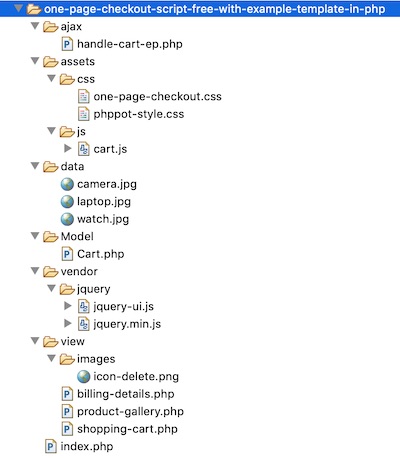
In the registerMember() function, it checks if the posted email already exists. If so, it truncates the registration flow and returns the error. Otherwise, it creates the Insert query to add the member record into the MySQL database.

The loginMember() function checks if there is any match for the entered login details. If the match found, it clears the authentication and allows the user to access the dashboard.

Model/Member.php

<?php namespace Phppot; class Member { private $ds; function __construct() { require_once __DIR__ . './../lib/DataSource.php'; $this->ds = new DataSource(); } public function isMemberExists($email) { $query = 'SELECT * FROM tbl_member where email = ?'; $paramType = 's'; $paramValue = array( $email ); $insertRecord = $this->ds->select($query, $paramType, $paramValue); $count = 0; if (is_array($insertRecord)) { $count = count($insertRecord); } return $count; } public function registerMember() { $result = $this->isMemberExists($_POST["email"]); if ($result < 1) { if (! empty($_POST["signup-password"])) { $hashedPassword = password_hash($_POST["signup-password"], PASSWORD_DEFAULT); } $query = 'INSERT INTO tbl_member (username, password, email) VALUES (?, ?, ?)'; $paramType = 'sss'; $paramValue = array( $_POST["username"], $hashedPassword, $_POST["email"] ); $memberId = $this->ds->insert($query, $paramType, $paramValue); if(!empty($memberId)) { $response = array("status" => "success", "message" => "You have registered successfully."); } } else if ($result == 1) { $response = array("status" => "error", "message" => "Email already exists."); } return $response; } public function getMember($username) { $query = 'SELECT * FROM tbl_member where username = ?'; $paramType = 's'; $paramValue = array( $username ); $loginUser = $this->ds->select($query, $paramType, $paramValue); return $loginUser; } public function loginMember() { $loginUserResult = $this->getMember($_POST["username"]); if (! empty($_POST["signup-password"])) { $password = $_POST["signup-password"]; } $hashedPassword = $loginUserResult[0]["password"]; $loginPassword = 0; if (password_verify($password, $hashedPassword)) { $loginPassword = 1; } if ($loginPassword == 1) { $_SESSION["username"] = $loginUserResult[0]["username"]; $url = "./home.php"; header("Location: $url"); } else if ($loginPassword == 0) { $loginStatus = "Invalid username or password."; return $loginStatus; } } } 

PHP login authentication code

Below PHP code is for invoking the authentication function after login. It is in the login-form.php file above the HTML code.

user-registration-form.php (PHP Code)

<?php if (! empty($_POST["login-btn"])) { require_once './Model/Member.php'; $member = new Member(); $loginResult = $member->loginMember(); } ?> 

User dashboard

This is the user dashboard HTML code. It shows a welcome message with the logged-in member name. It also has an option to logout from the current session.

home.php

<?php session_start(); $username = $_SESSION["username"]; ?> <HTML> <HEAD> <TITLE>Welcome</TITLE> <link href="./assets/css/phppot-style.css" type="text/css" rel="stylesheet" /> <link href="./assets/css/user-registration.css" type="text/css" rel="stylesheet" /> </HEAD> <BODY> <div class="phppot-container"> <div class="page-header"> <span class="login-signup"><a href="login-form.php">Logout</a></span> </div> <div class="page-content">Welcome <?php echo $username;?></div> </div> </BODY> </HTML> 

DataSource.php

<?php /** * Copyright (C) 2019 Phppot * * Distributed under MIT license with an exception that, * you don’t have to include the full MIT License in your code. * In essense, you can use it on commercial software, modify and distribute free. * Though not mandatory, you are requested to attribute this URL in your code or website. */ namespace Phppot; /** * Generic datasource class for handling DB operations. * Uses MySqli and PreparedStatements. * * @version 2.5 - recordCount function added */ class DataSource { // PHP 7.1.0 visibility modifiers are allowed for class constants. // when using above 7.1.0, declare the below constants as private const HOST = 'localhost'; const USERNAME = 'root'; const PASSWORD = 'test'; const DATABASENAME = 'user-registration'; private $conn; /** * PHP implicitly takes care of cleanup for default connection types. * So no need to worry about closing the connection. * * Singletons not required in PHP as there is no * concept of shared memory. * Every object lives only for a request. * * Keeping things simple and that works! */ function __construct() { $this->conn = $this->getConnection(); } /** * If connection object is needed use this method and get access to it. * Otherwise, use the below methods for insert / update / etc. * * @return \mysqli */ public function getConnection() { $conn = new \mysqli(self::HOST, self::USERNAME, self::PASSWORD, self::DATABASENAME); if (mysqli_connect_errno()) { trigger_error("Problem with connecting to database."); } $conn->set_charset("utf8"); return $conn; } /** * To get database results * * @param string $query * @param string $paramType * @param array $paramArray * @return array */ public function select($query, $paramType = "", $paramArray = array()) { $stmt = $this->conn->prepare($query); if (! empty($paramType) && ! empty($paramArray)) { $this->bindQueryParams($stmt, $paramType, $paramArray); } $stmt->execute(); $result = $stmt->get_result(); if ($result->num_rows > 0) { while ($row = $result->fetch_assoc()) { $resultset[] = $row; } } if (! empty($resultset)) { return $resultset; } } /** * To insert * * @param string $query * @param string $paramType * @param array $paramArray * @return int */ public function insert($query, $paramType, $paramArray) { $stmt = $this->conn->prepare($query); $this->bindQueryParams($stmt, $paramType, $paramArray); $stmt->execute(); $insertId = $stmt->insert_id; return $insertId; } /** * To execute query * * @param string $query * @param string $paramType * @param array $paramArray */ public function execute($query, $paramType = "", $paramArray = array()) { $stmt = $this->conn->prepare($query); if (! empty($paramType) && ! empty($paramArray)) { $this->bindQueryParams($stmt, $paramType, $paramArray); } $stmt->execute(); } /** * 1. * Prepares parameter binding * 2. Bind prameters to the sql statement * * @param string $stmt * @param string $paramType * @param array $paramArray */ public function bindQueryParams($stmt, $paramType, $paramArray = array()) { $paramValueReference[] = & $paramType; for ($i = 0; $i < count($paramArray); $i ++) { $paramValueReference[] = & $paramArray[$i]; } call_user_func_array(array( $stmt, 'bind_param' ), $paramValueReference); } /** * To get database results * * @param string $query * @param string $paramType * @param array $paramArray * @return array */ public function getRecordCount($query, $paramType = "", $paramArray = array()) { $stmt = $this->conn->prepare($query); if (! empty($paramType) && ! empty($paramArray)) { $this->bindQueryParams($stmt, $paramType, $paramArray); } $stmt->execute(); $stmt->store_result(); $recordCount = $stmt->num_rows; return $recordCount; } } 

MySQL database script

Below SQL script shows the MySQL database table’s create statement. It also has the specification for the key and indexes.

User registration MySQL schema

Import this script into your PHP development root to execute this example.

sql/user-registration.sql

-- -- Database: `user-registration` -- -- -------------------------------------------------------- -- -- Table structure for table `tbl_member` -- CREATE TABLE `tbl_member` ( `id` int(11) NOT NULL, `username` varchar(255) NOT NULL, `password` varchar(200) NOT NULL, `email` varchar(255) NOT NULL, `create_at` timestamp NOT NULL DEFAULT CURRENT_TIMESTAMP ON UPDATE CURRENT_TIMESTAMP ) ENGINE=InnoDB DEFAULT CHARSET=latin1; -- -- Indexes for dumped tables -- -- -- Indexes for table `tbl_member` -- ALTER TABLE `tbl_member` ADD PRIMARY KEY (`id`); -- -- AUTO_INCREMENT for dumped tables -- -- -- AUTO_INCREMENT for table `tbl_member` -- ALTER TABLE `tbl_member` MODIFY `id` int(11) NOT NULL AUTO_INCREMENT; 

Screenshot of user registration and login form

Login form with validation response:

User Login Form Output

User registration form server-side validation response:

Screenshot User Registration in-php PHP

Download

↑ Back to Top

Posted on Leave a comment

One Page Checkout Script Free with Example Template in PHP

Last modified on December 13th, 2019 by Vincy.

One page checkout reduces friction in the buying process, increases conversion and improves the sales. Do you know the cart abandonment rate of the customers during their purchase? Unnecessary, lengthy checkout process is one of the main reason which increases this rate.

Just by fine-tuning your checkout process, you can increase the sales by a staggering 23%. This could be a game changer for many eCommerce websites. I have cited the Baymard Institute research statistics below. Just check it out.
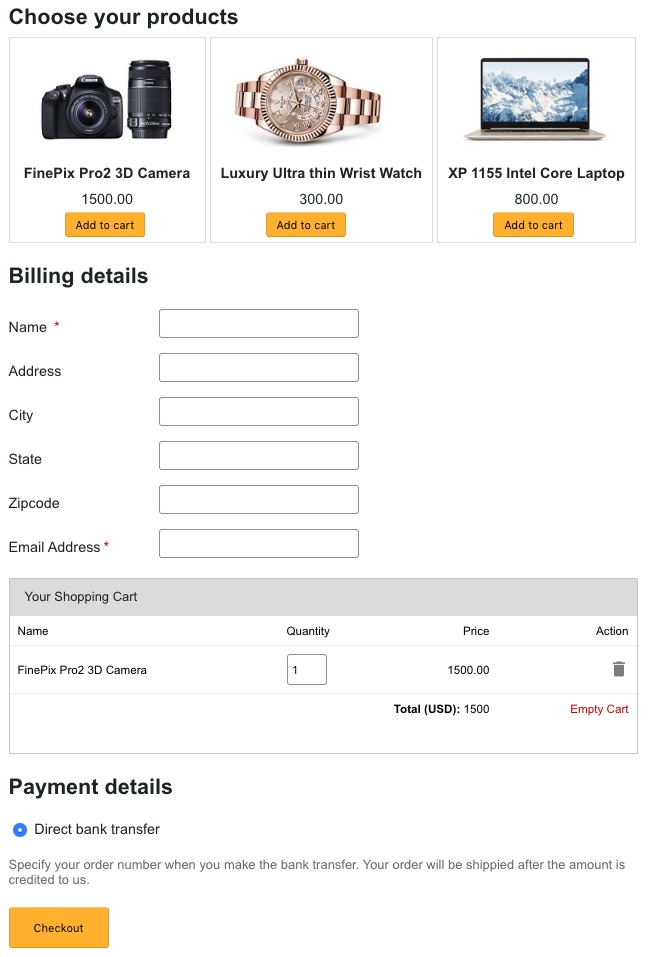
The right ecommerce software and a shopping cart script will definitely have an option for one page checkout. By increasing steps in the checkout flow, you do not have anything to gain. Then why not one page checkout? Not only Baymard Institute’s research, check any parties research statistics in this area and everything points towards a seamless checkout process.

One Page Checkout Script Free with Example Template in PHP

Before going to provide one page checkout for your shopping cart application, we have to know what it is and the significance behind its usage. This article will help you to know about it and its advantages.

Also, I have created an example script in PHP for the implementation of this one page checkout. In a previous article, we have seen a simple PHP shopping cart code and this is its enhanced version.

What is inside?

  1. What is one page checkout?
  2. About this example
  3. One page checkout example demo
  4. PHP checkout example files
  5. Creating one page checkout template
  6. jQuery script to handle cart events and prepare AJAX request
  7. Process checkout in PHP
  8. Enhancements
  9. One page template example output

What is one page checkout?

One page checkout is a way to make the eCommerce checkout process easier. It reduces the navigation effort, page redirects. It gets the job done by retaining the buyer in a single page.

This makes the checkout experience easier with a single checkout click. We will not compromise any feature to implement one page checkout. It may include add-to-cart control, customer’s cart, payment and shipping and more.

Checkout Cart Abandonment Stats

Source: Baymard Institute

About this example

This example is for creating a one page checkout in PHP. On a single page, I have covered the product gallery and the entire cart flow. It is a lightweight script.

The gallery will show the product tiles with an add-to-cart option. Then the added cart items will have options to edit and delete.

I used jQuery AJAX for requesting the server-side code to perform the cart actions. We have already seen how to perform cart edit with AJAX.

The cart detail table will also a preview for confirmation before checkout. The checkout will need the mandatory billing details customer name and email.

A simple JavaScript validates the billing and payment form. Once the validation step got passed then it will allow the continuing process to checkout in PHP.

One page checkout example demo

I have deployed a demo for this one-page checkout example.

The below button link will redirect you to see this demo. It has the following functionality.

  • Add-to-cart
  • Edit cart item quantity
  • Remove a single item
  • Empty cart
  • Checkout

You can try all the above with this demo.

View Demo

PHP checkout example files

This is the complete file structure on this PHP one-page checkout example.

The figure shows the PHP endpoints, CSS and JS assets, images, data and vendor directories. It also shows the home and other HTML views and PHP classes.

In the following sections, we will see the file’s code and its purpose.

One Page Checkout Example Files

Creating one page checkout template

The one-page checkout template includes three major parts. Those are the gallery, cart and the billing & payment form.

I have created separate files for these three display components. Then, I included all into a landing page that is index.php.

index.php

<?php session_start(); if (isset($_POST["checkout-btn"])) { $order_number = rand(100, 999); } ?> <HTML> <HEAD> <TITLE>One Page Checkout Script Free Template</TITLE> <link href="./assets/css/phppot-style.css" type="text/css" rel="stylesheet" /> <link href="./assets/css/one-page-checkout.css" type="text/css" rel="stylesheet" /> <script src="./vendor/jquery/jquery.min.js" type="text/javascript"></script> <script src="./vendor/jquery/jquery-ui.js"></script> </HEAD> <BODY> <div class="phppot-container"> <div class="page-heading">One Page Checkout Script Free Template</div> <form name="one-page-checkout-form" id="one-page-checkout-form" action="" method="post" onsubmit="return checkout()"> <?php if(!empty($order_number)){?> <div class="order-message order-success"> You order number is <?php echo $order_number;?>. <span class="btn-message-close" onclick="this.parentElement.style.display='none';" title="Close">×</span> </div> <?php }?> <div class="section product-gallery"> <?php require_once './view/product-gallery.php'; ?> </div> <div class="billing-details"> <?php require_once './view/billing-details.php'; ?> </div> <div class="cart-error-message" id="cart-error-message">Cart must not be emty to checkout</div> <div id="shopping-cart" tabindex="1"> <div id="tbl-cart"> <div id="txt-heading"> <div id="cart-heading">Your Shopping Cart</div> <div id="close"></div> </div> <div id="cart-item"> <?php require_once './view/shopping-cart.php'; ?> </div> </div> </div> <div class="payment-details"> <div class="payment-details-heading">Payment details</div> <div class="row"> <div class="inline-block"> <div> <input class="bank-transfer" type="radio" checked="checked" value="Direct bank transfer" name="direct-bank-transfer">Direct bank transfer </div> <div class="info-label">Specify your order number when you make the bank transfer. Your order will be shippied after the amount is credited to us.</div> </div> </div> </div> <div class="row"> <div id="inline-block"> <input type="submit" class="checkout" name="checkout-btn" id="checkout-btn" value="Checkout"> </div> </div> </form> </div> <script src="./assets/js/cart.js"></script> <script> function checkout() { var valid = true; $("#first-name").removeClass("error-field"); $("#email").removeClass("error-field"); $("#shopping-cart").removeClass("error-field"); $("#cart-error-message").hide(); var firstName = $("#first-name").val(); var cartItem = $("#cart-item-count").val(); var email = $("#email").val(); var emailRegex = /^[a-zA-Z0-9.!#$%&'*+/=?^_`{|}~-]+@[a-zA-Z0-9](?:[a-zA-Z0-9-]{0,61}[a-zA-Z0-9])?(?:\.[a-zA-Z0-9](?:[a-zA-Z0-9-]{0,61}[a-zA-Z0-9])?)*$/; $("#first-name-info").html("").hide(); $("#email-info").html("").hide(); if (firstName.trim() == "") { $("#first-name-info").html("required.").css("color", "#ee0000").show(); $("#first-name").addClass("error-field"); valid = false; } if (email == "") { $("#email-info").html("required").css("color", "#ee0000").show(); $("#email").addClass("error-field"); valid = false; } else if (email.trim() == "") { $("#email-info").html("Invalid email address.").css("color", "#ee0000").show(); $("#email").addClass("error-field"); valid = false; } else if (!emailRegex.test(email)) { $("#email-info").html("Invalid email address.").css("color", "#ee0000") .show(); $("#email").addClass("error-field"); valid = false; } if(cartItem == 0){ $("#cart-error-message").show(); $("#shopping-cart").addClass("error-field"); valid = false; } if (valid == false) { $('.error-field').first().focus(); valid = false; } return valid; } </script> </BODY> </HTML> 

Product gallery with Add-to-Cart button

This file will show a catalog to display available products in a gallery. I have shown three products in this example gallery.

These products are static from a PHP array. You can also include your database component to make it dynamic.

Each tile contains an add-to-cart button. It calls cartAction() jQuery function on its click event.

product-gallery.php

<div id="product-grid"> <div class="txt-heading">Choose your products</div> <div class="product-item"> <div class="product-image"> <img src="data/camera.jpg" id="<?php echo "3DcAM01";?>" class="product-img"> </div> <div> <strong><?php echo "FinePix Pro2 3D Camera";?></strong> </div> <div class="product-price"><?php echo "1500.00";?></div> <input type="button" id="add_<?php echo "3DcAM01";?>" value="Add to cart" class="btnAddAction" onClick="cartAction('add', '<?php echo "3DcAM01";?>','<?php echo "FinePix Pro2 3D Camera";?>','<?php echo "1500.00";?>')" /> </div> <div class="product-item"> <div class="product-image"> <img src="data/watch.jpg" id="<?php echo "wristWear03";?>" class="product-img"> </div> <div> <strong><?php echo "Luxury Ultra thin Wrist Watch";?></strong> </div> <div class="product-price"><?php echo "300.00";?></div> <input type="button" id="add_<?php echo "wristWear03";?>" value="Add to cart" class="btnAddAction" onClick="cartAction('add', '<?php echo "wristWear03";?>','<?php echo "Luxury Ultra thin Wrist Watch";?>','<?php echo "300.00";?>')" /> </div> <div class="product-item"> <div class="product-image"> <img src="data/laptop.jpg" id="<?php echo "LPN45";?>" class="product-img"> </div> <div> <strong><?php echo "XP 1155 Intel Core Laptop";?></strong> </div> <div class="product-price"><?php echo "800.00";?></div> <input type="button" id="add_<?php echo "LPN45";?>" value="Add to cart" class="btnAddAction" onClick="cartAction('add', '<?php echo "LPN45";?>','<?php echo "XP 1155 Intel Core Laptop";?>','<?php echo "800.00";?>')" /> </div> </div> 

Shopping cart items with edit delete

I used the PHP session for managing the cart items. The below code shows an HTML code by embedding the cart details into it from the session array.

The cart must have at least one item to proceed with checkout. So I stored the total cart item count in a hidden field. I update this field after every successful cart action.

When you submit with an empty cart, then this example will prevent checkout. It will display validation error by focusing on the empty cart section.

shopping-cart.php

<?php use Phppot\Cart; require_once __DIR__ . './../Model/Cart.php'; $cartModel = new Cart(); ?> <input type="hidden" id="cart-item-count" value="<?php echo $cartModel->cartSessionItemCount; ?>"> <?php if ($cartModel->cartSessionItemCount > 0) { ?> <table width="100%" id="cart-table" cellpadding="10" cellspacing="1" border="0"> <tbody> <tr> <th>Name</th> <th>Quantity</th> <th class="text-right">Price</th> <th class="text-right">Action</th> </tr> <?php $item_total = 0; $i = 1; foreach ($_SESSION["cart_item"] as $item) { ?> <tr> <td><?php echo $item["name"]; ?></td> <td><input type="number" name="quantity" class="quantity" value="<?php echo $item['quantity']; ?>" data-code='<?php echo $item["code"]; ?>' size=2 onChange="updatePrice(this)" /> <input type="hidden" class='total' name="total" value="<?php echo $item["price"]; ?>" /></td> <td class="prc text-right" id="price" <?php echo $i;?>><?php echo $item["price"]; ?></td> <?php $i++; ?> <td class="text-right"><a onClick="cartAction('remove','<?php echo $item["code"]; ?>')" class="btnRemoveAction"><img src="./view/images/icon-delete.png" alt="Remove Item" /></a></td> </tr> <?php $item_total += ($item["price"] * $item['quantity']); } ?> <tr id="tot"> <td class="text-right" colspan="3"><strong>Total (USD): </strong> <span id="total"><?php echo $item_total;?></span></td> <td class="text-right"><a id="btnEmpty" onClick="cartAction('empty', '');">Empty Cart</a></td> </tr> </tbody> </table> <?php } else { ?> <div id="empty-cart">Your cart is empty</div> <?php } 

This HTML code is for displaying the billing and payment form to the user. The user has to enter the billing details and select the payment method before checkout.

In this example, I have provided only one payment option, Bank Transfer. At the time of processing payment via direct bank transfer, the users refer to the order number.

billing-details.php

<div class="billing-detail-heading">Billing details</div> <div class="row"> <div class="form-label inline-block"> Name <span class="required error"></span> </div> <div class="inline-block"> <div id="first-name-info"></div> <input class="input-box-330" type="text" name="first-name" id="first-name"> </div> </div> <div class="row"> <div class="form-label">Address</div> <div class="inline-block"> <input class="input-box-330" class="input-box-330" type="text" name="address"> </div> </div> <div class="row"> <div class="form-label">City</div> <div class="inline-block"> <input class="input-box-330" type="text" name="city"> </div> </div> <div class="row"> <div class="form-label">State</div> <div class="inline-block"> <input class="input-box-330" type="text" name="state"> </div> </div> <div class="row"> <div class="form-label">Zipcode</div> <div class="inline-block"> <input class="input-box-330" type="text" name="zipcode"> </div> </div> <div class="row"> <div class="form-label"> Email Address<span class="required error"></span> </div> <div class="inline-block"> <div id="email-info"></div> <input class="input-box-330" type="text" name="email" id="email"> </div> </div> 

jQuery script to handle cart events and prepare AJAX request

The cartAction() method is for handling the add, edit, remove and empty-cart actions. It has a switch case to perform these actions.

It receives the action parameter and sends the control flow to the appropriate case. It also gets the product title, code and price.

I prepare a query string by using the product details and request PHP via AJAX. After performing the cart action, the PHP code will return the response.

In the success block, we can receive this response for updating the cart.

cart.js

function cartAction(action, product_code, productTitle, productPrice) { var queryString = ""; if (action != "") { switch (action) { case "add": queryString = 'action=' + action + '&code=' + product_code + '&quantity=' + 1 + '&productTitle=' + productTitle + '&productPrice=' + productPrice; break; case "remove": queryString = 'action=' + action + '&code=' + product_code; break; case "empty": queryString = 'action=' + action; break; } } jQuery.ajax({ url : "ajax/handle-cart-ep.php", data : queryString, type : "POST", success : function(data) { $("#cart-item").html(data); $("#count").text($("#cart-item-count").val()); }, error : function() { } }); } function updatePrice(obj) { var quantity = $(obj).val(); var code = $(obj).data('code'); queryString = 'action=edit&code=' + code + '&quantity=' + quantity; $.ajax({ type : 'post', url : "ajax/handle-cart-ep.php", data : queryString, success : function(data) { $("#total").text(data); } }); } 

Process checkout in PHP

This is the PHP endpoint called via AJAX. As like as the JavaScript method, this PHP file also contains a switch case to control the cart action.

The Cart.php included in this file is a Model class that executes all the cart operations. 

In this endpoint, I instantiate this model and invoke its methods based on the request.

On each cart action, it iterates the latest cart session to prepare the response.

ajax/handle-cart-ep.php

<?php namespace Phppot; use \Phppot\Cart; require_once __DIR__ . './../Model/Cart.php'; $cartModel = new Cart(); session_start(); if (! empty($_POST["action"])) { switch ($_POST["action"]) { case "add": $cartModel->addToCart(); break; case "edit": $totalPrice = $cartModel->editCart(); print $totalPrice; exit; break; case "remove": $cartModel->removeFromCart(); break; case "empty": $cartModel->emptyCart(); break; } } require_once '../view/shopping-cart.php'; 

The below code shows the Cart class. It handles and updates the cart session on each cart action.

The emptyCart() method wipes out the cart by clearing the current session.

Model/Cart.php

<?php namespace Phppot; class Cart { public $cartSessionItemCount = 0; function __construct() { if (! empty($_SESSION["cart_item"]) && is_array($_SESSION["cart_item"])) { $this->cartSessionItemCount = count($_SESSION["cart_item"]); } } function addToCart() { if (isset($_POST)) { $productCode = $_POST["code"]; $productTitle = $_POST["productTitle"]; $poductQuantity = $_POST["quantity"]; $productPrice = $_POST["productPrice"]; } $cartItem = array( 'code' => $productCode, 'name' => $productTitle, 'quantity' => $poductQuantity, 'price' => $productPrice ); $_SESSION["cart_item"][$productCode] = $cartItem; if (! empty($_SESSION["cart_item"]) && is_array($_SESSION["cart_item"])) { $this->cartSessionItemCount = count($_SESSION["cart_item"]); } } function editCart() { if (! empty($_SESSION["cart_item"])) { $total_price = 0; foreach ($_SESSION["cart_item"] as $k => $v) { if ($_POST["code"] == $k) { $_SESSION["cart_item"][$k]["quantity"] = $_POST["quantity"]; } $total_price = $total_price + ($_SESSION["cart_item"][$k]["quantity"] * $_SESSION["cart_item"][$k]["price"]); } return $total_price; } if (! empty($_SESSION["cart_item"]) && is_array($_SESSION["cart_item"])) { $this->cartSessionItemCount = count($_SESSION["cart_item"]); } } function removeFromCart() { if (! empty($_SESSION["cart_item"])) { foreach ($_SESSION["cart_item"] as $k => $v) { if ($_POST["code"] == $k) unset($_SESSION["cart_item"][$k]); if (empty($_SESSION["cart_item"])) unset($_SESSION["cart_item"]); } } if (! empty($_SESSION["cart_item"]) && is_array($_SESSION["cart_item"])) { $this->cartSessionItemCount = count($_SESSION["cart_item"]); } } function emptyCart() { unset($_SESSION["cart_item"]); $this->cartSessionItemCount = 0; } }

Enhancements

In this example code, there are places to bring the database into the picture. For example, the product gallery and the cart.

I have managed the gallery with a PHP array. And, I handled the cart session with PHP $_SESSION.

If you manage the shopping cart with a database, then it will help you to have a persistent cart. I have already given an example of building a persistent shopping cart in PHP.

You can plugin your database module into this example code to store products. If you want to show your shopping cart products gallery from a database, this link has an example.

One page template example output

See the screenshot shows the product gallery, cart and checkout on one page. The gallery shows three product tiles.

By clicking the Add to cart button, the cart will have a new entry as shown below.

The Checkout button click will place the order for the added cart items.

One Page Checkout Example Output

View DemoDownload

↑ Back to Top

Posted on Leave a comment

PHP Pagination MySQL Database Example Script with Previous Next like Google

Last modified on December 5th, 2019 by Vincy.

Do you want to implement PHP pagination using core PHP with lightweight script? Jump in, this tutorial is all about it.

The pagination functionality is for stacking a list of items on many pages. It helps to fetch and display a huge volume of records in an effective way.

If you want to implement a simple PHP pagination, then it is very easy and straight forward.

PHP Pagination Script with Previous Next

There is just one thing that you should keep in mind when you work on pagination. Do not pull the complete result set and filter it to display to the users.

SELECT only records using LIMIT from database. It can be done via AJAX or on page submit depending on your use case. We will see more about it in the example below. 

There are scenarios to create pagination with AJAX. For example, an online quiz with a paginated question board. We have seen more examples to create PHP pagination with AJAX.

What is inside?

  1. About this example
  2. Plugins to enable pagination feature
  3. File structure
  4. Database script
  5. Design landing page with pagination controls
  6. Php code to get paginated results
  7. PHP AJAX pagination Output

About this example

In this example code, it has two types of control to navigate with the paginated results.

One is the pagination links to redirect us to the corresponding page. The other is an input to enter the page number. By submitting this page number we can jump into the target page from the current page.

I have implemented PHP pagination with a simple page refresh. We have already seen examples for achieving this with AJAX using jQuery.

I have enabled pagination for the list of database results displaying Animal names. The pagination links count varies based on the animal database record count. 

A SELECT query with a specification of start and end limit fetch the page result. The per-page result count is configurable as a Config class constant. 

There are many plugins available to create pagination easily. Pagination.js and jqPaginator are examples of 3-party plugins available in the market.

The Datatables is one of the popular library used for managing tabular data. It has an in-built search, pagination, sort, and more features. In an old article, we had seen how to integrate Datatables to list records with pagination.

Having said all these, better to go with custom code. Because external plugins, libraries will slow down the application.

File structure

The working example code contains the following files in the below hierarchical order.

AJAZ Pagination File Structure

The index.php file is a landing page. It contains the HTML to display pagination links and the current page results.

Two CSS used in this example. The phppot-style.css has generic layout styles. The pagination.css has the exclusive styles created for this example.

Model/Pagination.php includes functions to fetch the MySQL data. It receives parameters to set the limit for the SELECT query.

The file structure includes a SQL script to set up the database for running this example.

Database script

-- -- Database: `pagination` -- -- -------------------------------------------------------- -- -- Table structure for table `tbl_animal` -- CREATE TABLE `tbl_animal` ( `id` int(11) UNSIGNED NOT NULL, `common_name` varchar(255) NOT NULL DEFAULT '', `scientific_name` varchar(255) NOT NULL DEFAULT '' ) ENGINE=InnoDB DEFAULT CHARSET=utf8mb4; -- -- Dumping data for table `tbl_animal` -- INSERT INTO `tbl_animal` (`id`, `common_name`, `scientific_name`) VALUES (1, 'Bison', 'Bos gaurus\r\n'), (2, 'Black buck', 'Antelope cervicapra'), (3, 'Chinkara', 'Gazella bennettii'), (4, 'Nilgai', 'Boselaphus tragocamelus'), (5, 'Wolf', 'Canis lupus'), (6, 'Lion', 'Panthera leo'), (7, 'Elephant', 'Elephas maximus'), (8, 'Wild Ass', 'Equus africanus asinus'), (9, 'Panther', 'Panthera pardus'), (10, 'Kashmir stag', 'Cervus canadensis hanglu'), (11, 'Peacock', 'Pavo cristatus'), (12, 'Siberian crane', 'Grus leucogeranus'), (13, 'Fox', 'Vulpes vulpes'), (14, 'Rhinoceros', 'Rhinoceros unicornis'), (15, 'Tiger', 'Panthera Tigris'), (16, 'Crocodile', 'Crocodylus palustris'), (17, 'Gavial or Gharial', 'Gavialis gangeticus'), (18, 'Horse', 'Equus caballus'), (19, 'Zebra', 'Equus quagga'), (20, 'Buffalow', 'Babalus bubalis'), (21, 'Wild boar', 'Sus scrofa'), (22, 'Arabian camel', 'Camelus dromedaries'), (23, 'Giraffe', 'GiraffaÊcamelopardalis'), (24, 'House wall Lizard', 'Hemidactylus flaviviridis'), (25, 'Hippopotamus', 'Hippopotamus amphibius'), (26, 'Rhesus monkey', 'Macaca mulatta'), (27, 'Dog', 'Canis lupus familiaris'), (28, 'Cat', 'Felis domesticus'), (29, 'Cheetah', 'Acinonyx jubatus'), (30, 'Black rat', 'Rattus rattus'), (31, 'House mouse', 'Mus musculus'), (32, 'Rabbit', 'Oryctolagus cuniculus'), (33, 'Great horned owl', 'Bubo virginianus'), (34, 'House sparrow', 'Passer domesticus'), (35, 'House crow', 'Corvus splendens'), (36, 'Common myna', 'Acridotheres tristis'), (37, 'Indian parrot', 'Psittacula eupatria'), (38, 'Bulbul', 'Molpastes cafer'), (39, 'Koel', 'Eudynamis scolopaccus'), (40, 'Pigeon', 'Columba livia'), (41, 'Indian Cobra', 'Naja naja'), (42, 'King cobra', 'Ophiophagus hannah'), (43, 'Sea snake', 'Hydrophiinae'), (44, 'Indian python', 'Python molurus'), (45, 'Rat snake', 'Rat snake'); -- -- Indexes for dumped tables -- -- -- Indexes for table `tbl_animal` -- ALTER TABLE `tbl_animal` ADD PRIMARY KEY (`id`); -- -- AUTO_INCREMENT for dumped tables -- -- -- AUTO_INCREMENT for table `tbl_animal` -- ALTER TABLE `tbl_animal` MODIFY `id` int(11) UNSIGNED NOT NULL AUTO_INCREMENT, AUTO_INCREMENT=46; 

Designing landing page with pagination controls

The landing page shows the database results with a pagination option. The following HTML has the embedded PHP script to display paginated results.

It contains table rows created in a loop on iterating the data array. Below this table, it shows pagination links with previous next navigation. This navigation allows moving back and forth from the current page.

This example also contains a HMTL form to enter the target page number. If you enter a number within the number of pages, then it will get the appropriate page result.

<!doctype html> <html lang="en"> <head> <title>PHP Pagination MySQL Database Example Script with Previous Next like Google</title> <link rel="stylesheet" type="text/css" href="assets/css/pagination.css"> <link rel="stylesheet" type="text/css" href="assets/css/phppot-style.css"> <script src="vendor/jquery/jquery-3.3.1.js"></script> </head> <body> <div class="phppot-container"> <div class="phppot-form"> <h1>Animal Names</h1> <table> <tr> <th>Id</th> <th>Common Name</th> <th>Scientific Name</th> </tr> <?php if (! empty($pageResult)) { foreach ($pageResult as $page) { ?> <tr> <td><?php echo $page['id'];?></td> <td><?php echo $page['common_name'];?></td> <td><?php echo $page['scientific_name'];?></td> </tr> <?php }} ?> </table> <div class="pagination"> <?php if (($page > 1) && ($pn > 1)) { ?> <a class="previous-page" id="prev-page" href="<?php echo $queryString;?>page=<?php echo (($pn-1));?>" title="Previous Page"><span>❮ Previous</span></a> <?php }?> <?php if (($pn - 1) > 1) { ?> <a href='index.php?page=1'><div class='page-a-link'> 1 </div></a> <div class='page-before-after'>...</div> <?php } for ($i = ($pn - 1); $i <= ($pn + 1); $i ++) { if ($i < 1) continue; if ($i > $totalPages) break; if ($i == $pn) { $class = "active"; } else { $class = "page-a-link"; } ?> <a href='index.php?page=<?php echo $i; ?>'> <div class='<?php echo $class; ?>'><?php echo $i; ?></div> </a> <?php } if (($totalPages - ($pn + 1)) >= 1) { ?> <div class='page-before-after'>...</div> <?php } if (($totalPages - ($pn + 1)) > 0) { if ($pn == $totalPages) { $class = "active"; } else { $class = "page-a-link"; } ?> <a href='index.php?page=<?php echo $totalPages; ?>'><div class='<?php echo $class; ?>'><?php echo $totalPages; ?></div></a> <?php } ?> <?php if (($page > 1) && ($pn < $totalPages)) { ?> <a class="next" id="next-page" href="<?php echo $queryString;?>page=<?php echo (($pn+1));?>" title="Next Page"><span>Next ❯</span></a> <?php } ?> </div> <div class="goto-page"> <form action="" method="GET" onsubmit="return pageValidation()"> <input type="submit" class="goto-button" value="Go to"> <input type="text" class="enter-page-no" name="page" min="1" id="page-no"> <input type="hidden" id="total-page" value="<?php echo $totalPages;?>"> </form> </div> </div> </div> </body> </html> 

The pageValidation() is a JavaScript method to confirm the entered page number. If the page number input contains invalid data, then this script will return false. Then it stops form submit and thereby preventing the page-jump action.

<script> function pageValidation() { var valid=true; var pageNo = $('#page-no').val(); var totalPage = $('#total-page').val(); if(pageNo == ""|| pageNo < 1 || !pageNo.match(/\d+/) || pageNo > parseInt(totalPage)){ $("#page-no").css("border-color","#ee0000").show(); valid=false; } return valid; } </script> 

The following styles are from the pagination.css. It defines the CSS for the table view and the pagination elements.

.pagination { display: inline-flex; } .pagination a { color: #505050; text-decoration: none; } .page-a-link { font-family: arial, verdana; font-size: 12px; border: 1px #afafaf solid; background-color: #fbfbfb; padding: 6px 12px 6px 12px; margin: 6px; text-decoration: none; border-radius: 3px; } .active { font-family: arial, verdana; font-size: 12px; padding: 8px 14px 6px 14px; margin: 3px; background-color: #404040; text-decoration: none; border-radius: 3px; margin: 6px; color: #FFF; } a.previous-page { margin: 10px 10px 10px 0px; } a.prev-next:hover { color: #03a9f4; } a.next { margin: 10px 0px 10px 10px; } input.enter-page-no { width: 42px !important; height: 28px !important; font-size: 12px; padding: 6px 12px 6px 12px !important; margin: 6px; border-radius: 3px !important; text-align: center !important; } input.goto-button { max-width: 80px; font-size: 12px; padding: 6px 12px 6px 12px !important; border: 1px solid #9a9a9a; border-radius: 3px !important; text-align: center !important; background: -webkit-gradient(linear, left top, left bottom, color-stop(0%, #dfdd99), color-stop(100%, #bcbd2b)); background: -webkit-linear-gradient(top, #dfdc99, #b8bd2b); border: 1px solid #97a031; box-shadow: inset 0px 1px 0px rgb(255, 255, 211), 0px 1px 4px rgba(199, 199, 199, 0.9); } .goto-page { float: right; } .page-before-after { font-weight: bold; padding-top: 12px; text-decoration: none; } 

Php code to get paginated results

This PHP script is for reading the database results and get the record count, pages count. The pages count varies based on the record count and the LIMIT_PER_PAGE configuration.

If there are more pages, this example will show only limited pages as like as Google pagination. This feature will help to make the pagination block to fit into the viewport.

On successive page navigation, you will get more pagination links to browse further.

<?php namespace Phppot; require_once __DIR__ . '/Model/Pagination.php'; $paginationModel = new Pagination(); $pageResult = $paginationModel->getPage(); $queryString = "?"; if (isset($_GET["page"])) { $pn = $_GET["page"]; } else { $pn = 1; } $limit = Config::LIMIT_PER_PAGE; $totalRecords = $paginationModel->getAllRecords(); $totalPages = ceil($totalRecords / $limit); ?> 

PHP classes, libraries, configs used in this example

This is a common DataSource library used in most examples. Here, I have shown the functions that are only used in this example. 

You can get the full code by downloading the source added to this article.

Datasource.php

<?php /** * Copyright (C) 2019 Phppot * * Distributed under MIT license with an exception that, * you don’t have to include the full MIT License in your code. * In essense, you can use it on commercial software, modify and distribute free. * Though not mandatory, you are requested to attribute this URL in your code or website. */ namespace Phppot; /** * Generic datasource class for handling DB operations. * Uses MySqli and PreparedStatements. * * @version 2.5 - recordCount function added */ class DataSource { // PHP 7.1.0 visibility modifiers are allowed for class constants. // when using above 7.1.0, declare the below constants as private const HOST = 'localhost'; const USERNAME = 'root'; const PASSWORD = 'test'; const DATABASENAME = 'pagination'; private $conn; /** * PHP implicitly takes care of cleanup for default connection types. * So no need to worry about closing the connection. * * Singletons not required in PHP as there is no * concept of shared memory. * Every object lives only for a request. * * Keeping things simple and that works! */ function __construct() { $this->conn = $this->getConnection(); } /** * If connection object is needed use this method and get access to it. * Otherwise, use the below methods for insert / update / etc. * * @return \mysqli */ public function getConnection() { $conn = new \mysqli(self::HOST, self::USERNAME, self::PASSWORD, self::DATABASENAME); if (mysqli_connect_errno()) { trigger_error("Problem with connecting to database."); } $conn->set_charset("utf8"); return $conn; } /** * To get database results * * @param string $query * @param string $paramType * @param array $paramArray * @return array */ public function select($query, $paramType = "", $paramArray = array()) { $stmt = $this->conn->prepare($query); if (! empty($paramType) && ! empty($paramArray)) { $this->bindQueryParams($stmt, $paramType, $paramArray); } $stmt->execute(); $result = $stmt->get_result(); if ($result->num_rows > 0) { while ($row = $result->fetch_assoc()) { $resultset[] = $row; } } if (! empty($resultset)) { return $resultset; } } /** * To insert * * @param string $query * @param string $paramType * @param array $paramArray * @return int */ public function insert($query, $paramType, $paramArray) { //... } /** * To execute query * * @param string $query * @param string $paramType * @param array $paramArray */ public function execute($query, $paramType = "", $paramArray = array()) { //... } /** * 1. * Prepares parameter binding * 2. Bind prameters to the sql statement * * @param string $stmt * @param string $paramType * @param array $paramArray */ public function bindQueryParams($stmt, $paramType, $paramArray = array()) { $paramValueReference[] = & $paramType; for ($i = 0; $i < count($paramArray); $i ++) { $paramValueReference[] = & $paramArray[$i]; } call_user_func_array(array( $stmt, 'bind_param' ), $paramValueReference); } /** * To get database results * * @param string $query * @param string $paramType * @param array $paramArray * @return array */ public function getRecordCount($query, $paramType = "", $paramArray = array()) { $stmt = $this->conn->prepare($query); if (! empty($paramType) && ! empty($paramArray)) { $this->bindQueryParams($stmt, $paramType, $paramArray); } $stmt->execute(); $stmt->store_result(); $recordCount = $stmt->num_rows; return $recordCount; } } 

Config.php

This is the config file added for this example. I kept the per-page record limit as an application constant. I used this for setting the SELECT query limit.

You can add more constants and fine-tune the PHP pagination script to work based on them. For example, create new constant SHOW_ALL_LINKS. Set it on/off to enable/disable the Google-like feature to show limited links. 

<?php namespace Phppot; class Config { const LIMIT_PER_PAGE = '5'; } 

This screenshot shows the output of the PHP pagination example code. It shows five records per page. 

On the left, it shows usual pagination with previous next and separate page links. On the right side, it is a HMTL form to allow the user to enter the page number.

PHP pagination MySQL Example Output

See Also

These links have a variety of pagination scripts.

  1. PHP CRUD with search and pagination
  2. Pagination with Tabular records
  3. How to create Facebook-link infinite scroll pagination

Conclusion

Thus, we created PHP pagination with Google-like limited links and previous next links. We have seen the interlinking of older PHP pagination script along with this article.

We have discussed the third-party libraries that contain in-built pagination feature. It will be helpful to have a choice if are searching for such plugins.

In this custom PHP pagination example, we have provided an option to jump into a target page directly via a form. Sometimes, it itself is enough with previous next navigation.

Hope this article and the example help you to build a nice simple PHP pagination for your web application.

Download

↑ Back to Top

Posted on Leave a comment

How to Integrate 2Checkout Payment Gateway using PHP

Last modified on November 27th, 2019 by Vincy.

Sales, revenue, ROI are the key metrics to measure a business growth. The payment gateway is a sensitive factor that affects these metrics directly. It is the first and foremost item on the checklist for any eCommerce business.

There are many Payment Gateway providers. PayPal being the popular provider and 2Checkout is catching out fast. Earlier I wrote about how to integrate PayPal checkout in ecommerce website. In this payment gateway integration series, now it is time to see about 2Checkout. 

2Checkout Payment Gateway Integration using-php PHP

2Checkout is one of the best payment gateway provider to support card payments. It works similar to Stripe payment gateway. Card payments has less friction and will enable to increase the conversion rate in your eCommerce business.

2Checkout is growing everyday in popularity. It is available in more than 180 countries and used by 17,000 firms.

To integrate 2Checkout to your ecommerce application there are few simple steps. I have described those steps in this article to make your job easier.

Also, we will see the card validator script, payment request-response handlers and more.

What is inside?

  1. Existing payment gateway methods supporting card payment
  2. Advantages of 2Checkout payment
  3. File structure
  4. Steps to integrate 2Checkout payment gateway using PHP
  5. Database script
  6. Go live
  7. 2Checkout Payment gateway example output

Existing payment gateway methods supporting card payment

I have been writing about payment gateways for a while We have already seen many types of payment gateway integration using PHP. I already written tutorials for CCAvenue, PayPal, Stripe, SagePay and Authorize.Net

2Checkout, Stripe, CCAvenue are some of the examples for the methods supporting card-payments. There are many methods like InstaMojo, Cashfree, EBS and Paytm support card-payments.

Advantages of 2Checkout payment

  • Easy to integrate using payment API libraries in PHP, PYTHON and more languages.
  • It allows customers to opt for a variety of payment methods via PayPal account or debit/credit cards.
  • 2Checkout is a secured fraud-proof for selling products or subscription plans online.
  • It provides a localized buying experience for the customer.
  • It supports many currencies that supports global payments.
  • Integratable with the eCommerce tools like Shopify, Bigcommerce.

File structure

This image shows the file structure of the 2Checkout payment gateway PHP example. The root files index.php, payment.php, return.php are in a sequential flow during the payment.

While running this example, it lands with the index.php to show the payment form. Form targets payment.php that processes payment and redirects to the return page.

The redirect URL will have the payment response status parameter. It helps to create a response HTML on the return page. 

The assets folder has the CSS, JS created for this example. TwoCheckoutService.php contains the library includes to verify card details and process payment.

You can see all the third-party components in the vendor directory.

2Checkout Payment File Structure

Steps to integrate 2Checkout payment gateway using PHP

  1. Download the 2Checkout payment API library in PHP.
  2. Create a 2Checkout account and generate API keys.
  3. Create a payment form to collect the card details from the customer.
  4. Generate payment API token and transfer the card details in a secure way.
  5. Verify card details and process charges with 2Checkout Payment API.

Step 1: Download 2Checkout payment gateway

2Checkout payment API library has many features. It helps to manage purchase flow, orders, invoices, billing and more. It simplifies the integration process and reduces the developer’s effort.

Download the 2Checkout payment API library from GitHub. And then, put it into your application vendor directory.

While integrating Stripe Billing, we saw how to integrate third-party API for payment.

Include the TwoCheckout.php service before verifying card details and process payments. This file includes all other library dependencies. It handles card validation and charges on the server-side.  

In this example, the Checkout.php use this library file to perform the payment operations.

Step 2: Creating 2Checkout sandbox account and generate API keys

2Checkout provides a sandbox environment to check payment flow using the API functions. 

This is a common practice to go with a sandbox mode for testing purposes. Then we can go live after verifying the payment flow with this mode.

Let us create a 2Checkout sandbox account via the developer console. By logging into the console, we can get our API keys.

  1. Register and log in to the 2Checkout sandbox account.
  2. Select the API menu from the header and click the Start Integrating button.
  3. Go to the Settings tab to get the API keys.
  4. Copy the Publishable Key and Private Key in the key generation section of the page.

2Checkout Payment API Keys

Click the Generate button if you are not able to see the API keys.

I have added the keys and seller account id in the application config name Config.php.

After configuring the API keys, use the test data to make the payment in the sandbox mode. You can get the test data from the API page as shown below.
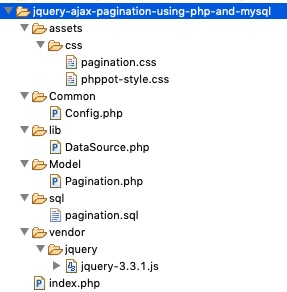
2Checkout Sandbox Card Details

Step 3: Create 2Checkout payment form in HTML

This form contains input fields to get the basic credit card details from the buyer. Those are the cardholder’s name and email, card number, CVC, card expiry tenure.

It will also ask the billing address from the buyer.

In this payment form, it has hidden fields for keeping the seller account id and product price, code.

<?php namespace Phppot; use Phppot\Config; require_once "Config.php"; $productCode = "WWPS235"; ?> <html> <head> <meta name="viewport" content="width=device-width, initial-scale=1"> <link href="./assets/css/style.css" rel="stylesheet" type="text/css"> <title>2checkout-payment-gateway-integration-using-PHP</title> </head> <body> <div id="formContainer"> <?php $productDetail = Config::productDetail(); $itemName = $productDetail[$productCode]["itemName"]; $itemPrice = $productDetail[$productCode]["itemPrice"]; ?> <div class="product-row"> <p class="product"><?php echo $itemName; ?></p> <div class="price float-right"><?php echo $itemPrice; ?> <?php echo Config::CURRENCY; ?> </div> </div> <form id="paymentForm" novalidate method="post" action="payment.php"> <input type="hidden" id="itemNumber" name="itemNumber" value="<?php echo $productCode; ?>" /> <input type="hidden" id="itemPrice" name="itemPrice" value="<?php echo $itemPrice; ?>" /> <input type="hidden" id="seller_id" value="<?php echo Config::SELLER_ID; ?>" /> <input type="hidden" id="publishable_key" value="<?php echo Config::PUBLISHABLE_KEY; ?>" /> <div class="field-row col2 float-left"> <label>Card Holder Name</label> <input type="text" class="demoInputBox required" name="cardHolderName" id="cardHolderName"> </div> <div class="field-row col2 float-right"> <label>Email</label> <input type="email" class="demoInputBox required" name="cardHolderEmail" id="cardHolderEmail"> </div> <div class="field-row"> <label>Card Number</label> <input type="text" class="demoInputBox required" name="cardNumber" id="cardNumber"> </div> <div class="field-row col2 float-left"> <label>Expiry Month / Year</label> <br /> <select name="expiryMonth" id="expiryMonth" class="demoSelectBox required"> <?php $months = Config::monthArray(); $count = count($months); for ($i = 0; $i < $count; $i ++) { $monthValue = $i + 1; if (strlen($i) < 2) { $monthValue = "0" . $monthValue; } ?> <option value="<?php echo $monthValue; ?>"><?php echo $months[$i]; ?></option> <?php } ?> </select> <select name="expiryYear" id="expiryYear" class="demoSelectBox required"> <?php for ($i = date("Y"); $i <= 2030; $i ++) { $yearValue = substr($i, 2); ?> <option value="<?php echo $yearValue; ?>"><?php echo $i; ?></option> <?php } ?> </select> </div> <div class="field-row"> <label>CVV</label><br /> <input type="text" name="cvv" id="cvv" class="demoInputBox cvv-input required"> </div> <p class="sub-head">Billing Address:</p> <div class="field-row col2 float-left"> <label>Address Line1</label> <input type="text" class="demoInputBox required" name="addressLine1" id="addressLine1"> </div> <div class="field-row col2 float-right"> <label>Address Line2</label> <input type="email" class="demoInputBox" name="addressLine2" id="addressLine2"> </div> <div class="field-row col2 float-left"> <label>Country</label> <input type="text" class="demoInputBox required" name="country" id="country"> </div> <div class="field-row col2 float-right"> <label>State</label> <input type="text" class="demoInputBox required" name="state" id="state"> </div> <div class="field-row col2 float-left"> <label>City</label> <input type="text" class="demoInputBox required" name="city" id="city"> </div> <div class="field-row col2 float-right"> <label>Zip</label> <input type="text" class="demoInputBox required" name="zip" id="zip"> </div> <div class="clear-float"> <input id="token" name="token" type="hidden" value=""> <input type="button" id="submit-btn" class="btnAction" value="Send Payment"> <div id="loader"> <img alt="loader" src="./images/LoaderIcon.gif" /> </div> </div><div id="error-message"></div> </form> </div> </body> </html> 

Javascript for credit card validation

Most of the fields are mandatory. The form validation script helps to verify user’s input before payment.

I have used the jQuery CreditCardValidator script to validate the card details. It will check the card number format, CVC, card expiration and more. 

Note: To pass the card validation, any three-digit code for CVC and a future date for card expiry.

function validate() { var valid = true; $(".demoInputBox").css('background-color', ''); var message = ""; var cardHolderNameRegex = /^[a-z ,.'-]+$/i; var cvvRegex = /^[0-9]{3,3}$/; var cardHolderName = $("#cardHolderName").val(); var cardHolderEmail = $("#cardHolderEmail").val(); var cardNumber = $("#cardNumber").val(); var cvv = $("#cvv").val(); $(".required").each(function() { if($(this).val()=='') { $(this).css('background-color', '#FFFFDF'); valid = false; } }); if(!valid) { message += "<div> Highlighted fields are required.</div>"; } if (cardHolderName != "" && !cardHolderNameRegex.test(cardHolderName)) { message += "<div>Card Holder Name is invalid</div>"; $("#cardHolderName").css('background-color', '#FFFFDF'); valid = false; } if (!cardHolderEmail.match( /^([\w-\.]+@([\w-]+\.)+[\w-]{2,4})?$/)) { message += "<div>Email is invalid</div>"; $("#cardHolderEmail").css('background-color', '#FFFFDF'); valid = false; } if (cardNumber != "") { $('#cardNumber').validateCreditCard(function(result) { if (!(result.valid)) { message += "<div>Card Number is Invalid</div>"; $("#card-number").css('background-color', '#FFFFDF'); valid = false; } }); } if (cvv != "" && !cvvRegex.test(cvv)) { message += "<div>CVV is Invalid</div>"; $("#cvv").css('background-color', '#FFFFDF'); valid = false; } if (message != "") { $("#error-message").show(); $("#error-message").html(message); $("#submit-btn").show(); $("#loader").hide(); } return valid; } 

Step 4: 2Checkout JS to request token

This HTML code contains the 2co.js include at the end. This JS script is for getting TCO token by hitting the API’s tokenRequestURL. 

This request requires card details with seller account id, sandbox publishable key. It also specifies the name of the success/error callback functions.

The success callback gets the token and includes it to the HTML form. f anything went wrong, the error-callback handles the case and acknowledge the customer.

This token helps to authenticate the request before processing the payment. Without this token, the payment request will return error by saying unauthorized.

<!-- jQuery library --> <script src="vendor/jquery/jquery-3.2.1.min.js"></script> <script src="vendor/jquery-creditcardvalidator/jquery.creditCardValidator.js"></script> <script src="./assets/js/validation.js"></script> <!-- 2Checkout JavaScript library --> <script src="https://www.2checkout.com/checkout/api/2co.min.js"></script> <script> // A success callback of TCO token request var success = function (data) { // Set the token in the payment form $('#paymentForm #token').val(data.response.token.token); $("#error-message").hide(); $("#error-message").html(""); // Submit the form with TCO token $('#paymentForm').submit(); }; // A Error callback of TCO token request. var error = function (data) { var errorMsg = ""; if (data.errorCode === 200) { tokenRequest(); } else { errorMsg = data.errorMsg; $("#error-message").show(); $("#error-message").html(errorMsg); $("#submit-btn").show(); $("#loader").hide(); } }; function tokenRequest() { var valid = validate(); if (valid == true) { $("#submit-btn").hide(); $("#loader").css("display", "inline-block"); var args = { sellerId: $('#seller_id').val(), publishableKey: $('#publishable_key').val(), ccNo: $("#cardNumber").val(), cvv: $("#cvv").val(), expMonth: $("#expiryMonth").val(), expYear: $("#expiryYear").val() }; // Request 2Checkout token TCO.requestToken(success, error, args); } } $(function () { TCO.loadPubKey('sandbox'); $("#submit-btn").on('click', function (e) { tokenRequest(); return false; }); }); </script> 

Step 5: Verify card details and process charges with 2Checkout payment API

After submitting the tokenized form data, then PHP will handle the payment process. There are two major steps during the payment process authorization and charging card.

The payment.php file is the endpoint that verifies payment and charges the card. The below code states how to receive payment form data and request payment.

Before processing payment, this PHP code inserts order into the database table. In this step, it saves the product, currency, customer and billing data into the database.

After placing the order, the inserOrder method will return a unique reference ID. This refers to the merchantOrderId parameter while charging the card.

With a success response, it will update the transaction id and payment status in the order table.

In case of error, the error message returned by the API will acknowledge the customers.

<?php use Phppot\Config; use Phppot\Model\Checkout; session_start(); require_once 'Config.php'; // Check if token is not empty if (! empty($_POST['token'])) { $token = $_POST['token']; $currency = Config::CURRENCY; // Card information $card_num = $_POST['cardNumber']; $card_cvv = $_POST['cvv']; $card_exp_month = $_POST['expiryMonth']; $card_exp_year = $_POST['expiryYear']; // Customer information $customerDetail['name'] = $_POST['cardHolderName']; $customerDetail['email'] = $_POST['cardHolderEmail']; $billingAddress['addrLine1'] = $_POST['addressLine1']; $billingAddress['addrLine2'] = $_POST['addressLine2']; $billingAddress['city'] = $_POST['city']; $billingAddress['state'] = $_POST['state']; $billingAddress['zipCode'] = $_POST['zip']; $billingAddress['country'] = $_POST['country']; // Product information $product['itemNumber'] = $_POST["itemNumber"]; $product['itemPrice'] = $_POST["itemPrice"]; require_once 'Model/Checkout.php'; $checkout = new Checkout(); $orderID = $checkout->insertOrder($customerDetail, $billingAddress, $product); require_once 'Model/TwoCheckoutService.php'; $twoCheckoutService = new TwoCheckoutService(); $twoCheckoutService->verifyAuthentication(); $successMessage = ""; $errorMessage = ""; $paymentResponse = $twoCheckoutService->chargeCard($orderID, $token, $currency, $customerDetail, $billingAddress, $product['itemPrice']); if (! empty($paymentResponse["charge"])) { $charge = $paymentResponse["charge"]; if ($charge['response']['responseCode'] == 'APPROVED') { $transactionId = $charge['response']['transactionId']; $status = $charge['response']['responseCode']; $checkout->updatePayment($transactionId, $status, $orderID); header("Location: return.php?status=success&itemNumber=".$orderID); } else { $_SESSION["transaction_error"] = "Payment is waiting for approval."; header("Location: return.php?status=transaction_failed"); } } else if($paymentResponse["message"]) { if(!empty($paymentResponse["message"])) { $_SESSION["transaction_error"] = $paymentResponse["message"]; } header("Location: return.php?status=transaction_failed"); } } else { header("Location: return.php?status=invalid_token"); } ?> 

Model/Checkout.php

<?php /** * Copyright (C) 2019 Phppot * * Distributed under MIT license with an exception that, * you don’t have to include the full MIT License in your code. * In essense, you can use it on commercial software, modify and distribute free. * Though not mandatory, you are requested to attribute this URL in your code or website. */ namespace Phppot\Model; use Phppot\DataSource; use Phppot\Config; class Checkout { private $ds; function __construct() { require_once __DIR__ . './../lib/DataSource.php'; $this->ds = new DataSource(); } /** * to get the member record based on the subscription_key * * @param string $subscriptionKey * @return array result record */ public function getOrder($orderId) { $query = 'SELECT * FROM tbl_order where id = ?'; $paramType = 'i'; $paramValue = array( $orderId ); $result = $this->ds->select($query, $paramType, $paramValue); return $result; } public function insertOrder($customerDetail, $billingAddress, $product) { $current_time = date("Y-m-d H:i:s"); $query = 'INSERT INTO tbl_order (name, email, item_code, item_price, currency, address_line_1, address_line_2, country, state, city, zip, create_at) VALUES (?, ?, ?, ?, ?, ?, ?, ?, ?, ?, ?, ?)'; $paramType = 'sssissssssss'; $paramValue = array( $customerDetail["name"], $customerDetail["email"], $product["itemNumber"], $product["itemPrice"], Config::CURRENCY, $billingAddress['addrLine1'], $billingAddress['addrLine2'], $billingAddress['country'], $billingAddress['state'], $billingAddress['city'], $billingAddress['zipCode'], $current_time ); $insertStatus = $this->ds->insert($query, $paramType, $paramValue); return $insertStatus; } public function updatePayment($transactionId, $paymentStatus, $orderID) { $query = "UPDATE tbl_order set txn_id = ?, payment_status = ? WHERE id = ?"; $paramType = 'ssi'; $paramValue = array( $transactionId, $paymentStatus, $orderID ); $this->ds->execute($query, $paramType, $paramValue); } } 

Model/TwoCheckoutService.php

<?php use Phppot\Config; require_once("vendor/2checkout-php-master/lib/Twocheckout.php"); class TwoCheckoutService { function verifyAuthentication() { Twocheckout::verifySSL(false); // Set API key Twocheckout::privateKey(Config::PRIVATE_KEY); // PRIVATE_KEY defined in config.php Twocheckout::sellerId(Config::SELLER_ID); // SELLER_ID defined in config.php Twocheckout::sandbox(true); } function chargeCard($orderID, $token, $currency, $customerDetail, $billingAddress, $itemPrice) { $successMessage = ""; $errorMessage = ""; try { // an array is created with customer sale parameters and passed it in auth() function of Twocheckout_Charge class for authorization. $charge = Twocheckout_Charge::auth(array( "merchantOrderId" => $orderID, "token" => $token, "currency" => $currency, "total" => $itemPrice, "billingAddr" => array( "name" => $customerDetail['name'], "addrLine1" => $billingAddress['addrLine1'], "city" => $billingAddress['city'], "state" => $billingAddress['state'], "zipCode" => $billingAddress['zipCode'], "country" => $billingAddress['country'], "email" => $customerDetail['email'] ) )); $paymentResponse = array( "message" => "", "charge" => $charge ); } catch (Twocheckout_Error $e) { $paymentResponse = array( "message" => $e->getMessage(), "charge" => "" ); } return $paymentResponse; } } 

Config.php

<?php namespace Phppot; class Config { const CURRENCY = 'USD'; const SELLER_ID = ''; const PUBLISHABLE_KEY = ''; const PRIVATE_KEY = ''; public function productDetail() { $product = array( 'WWPS235' => array( "itemName" => 'Kindle Paperwhite (10th gen) - 6" 8GB, WiFi', 'itemPrice' => '130.00' ) ); return $product; } public function monthArray() { $months = array( 'January', 'February', 'March', 'April', 'May', 'June', 'July ', 'August', 'September', 'October', 'November', 'December' ); return $months; } } 

Database script

This is a SQL with the CREATE statement of the tbl_order table. Import this script for your PHP environment to run this example.

-- -- Table structure for table `tbl_order` -- CREATE TABLE `tbl_order` ( `id` int(11) NOT NULL, `name` varchar(25) COLLATE utf8_unicode_ci NOT NULL, `email` varchar(25) COLLATE utf8_unicode_ci NOT NULL, `item_code` varchar(25) COLLATE utf8_unicode_ci NOT NULL, `item_price` float(10,2) NOT NULL, `currency` varchar(10) COLLATE utf8_unicode_ci NOT NULL, `address_line_1` text COLLATE utf8_unicode_ci NOT NULL, `address_line_2` text COLLATE utf8_unicode_ci NOT NULL, `country` varchar(255) COLLATE utf8_unicode_ci NOT NULL, `city` varchar(255) COLLATE utf8_unicode_ci NOT NULL, `state` varchar(255) COLLATE utf8_unicode_ci NOT NULL, `zip` varchar(20) COLLATE utf8_unicode_ci NOT NULL, `txn_id` varchar(50) COLLATE utf8_unicode_ci NOT NULL, `payment_status` varchar(10) COLLATE utf8_unicode_ci NOT NULL, `create_at` datetime NOT NULL, `edit_at` datetime NOT NULL DEFAULT CURRENT_TIMESTAMP ON UPDATE CURRENT_TIMESTAMP ); ALTER TABLE `tbl_order` ADD PRIMARY KEY (`id`); ALTER TABLE `tbl_order` MODIFY `id` int(11) NOT NULL AUTO_INCREMENT, AUTO_INCREMENT=110; 

Go Live

After testing the payment flow in the Sandbox mode, we can move to production mode.

To go live, change the mode from sandbox to production in the following line.

TCO.loadPubKey('production');

Replace all the test API keys with the live keys in the application config. Also, disable the sandbox mode by setting it as false as shown below.
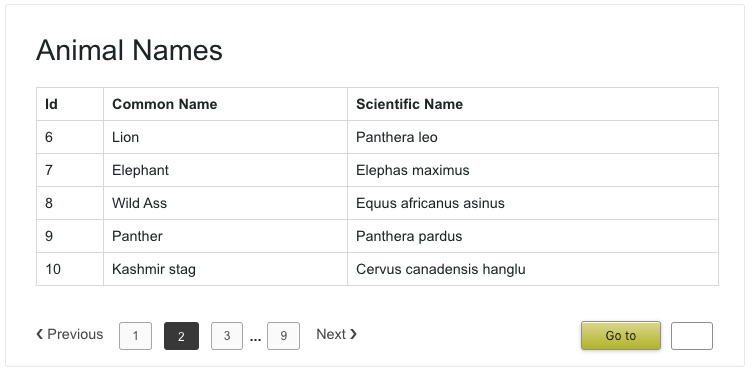
Twocheckout::privateKey('production-private-key'); Twocheckout::sellerId('production-seller-id'); Twocheckout::sandbox(false); 

2Checkout Payment Form Output

The below screenshot shows the 2Checkout payment form. Most of the form fields are mandatory and so validated by JavaScript before payment.
The product name and price above the form are from the config. We can link your product database to display this information.

2Checkout Payment Form Output

This screenshot shows the success response. The table shown in this screenshot has the basic details about the order placed.

2Checkout Success Response

Download

↑ Back to Top