Posted on Leave a comment

Double Opt-In Subscription Form with Secure Hash using PHP

Last modified on September 24th, 2019 by Vincy.

Do you know that the opening rate of emails by double opt-in confirmed subscribers is a staggering 40%? According to CampaignMonitor, email marketing generates $38 in ROI for every $1 spent.

Email marketing delivers the highest among any channel for marketing. Even in comparison with channels like print, TV and social media.

Double Opt-In Subscription Form with Secure Hash using PHP

Email marketing is the way to go. The primary mode to build your list is using a double opt-in subscription form.

What is inside?

  1. Why do we need double opt-in?
  2. What is the role of secure hash?
  3. Double opt-in subscription form in PHP
  4. Sequence flow for double opt-in subscription
  5. Double opt-in Subscription form UI
  6. PHP AJAX for subscription form submission
  7. URL with secure hash
  8. A PHP utility class for you
  9. Store subscription information to database
  10. A database abstraction layer for you
  11. Send confirmation email to users
  12. Subscription confirmation
  13. Conclusion

Use a double opt-in subscription form to signup to a newsletter, blog or a similar service. It has a two-step subscription process.

In the first step, the user will submit his name and email. Then the site will send an email to the user.

In the second step, the user will click the link in the received email. This will confirm his subscription to the site or service.

We call it the double opt-in because the users consent to the subscription twice. First by submitting the information and second by confirming to in by clicking the link in email.

Why do we need double opt-in?

It is the mechanism used to verify if the subscriber owns the input email. You need to do this verification because there is a chance for misuse by submitting emails that they do not own.

Double opt-in vs single opt-in is well debated and results arrived at. Double opt-in wins hands-on in every critical aspect.

What is the role of a secure hash?

In the confirmation email received by the user, there will be a link. This is the second and important step in the opt-in process. The link should be secure.

  • It should be unique for every user and request.
  • It should not be predictable.
  • It should be immune to a brute-force attack.

Double opt-in subscription form in PHP

I will present you a step by step detail on how to build a double opt-in subscription form with a secure hash using PHP.
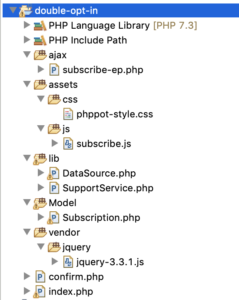
You will get a production-grade code which you can use real-time in your live website. You can use this to manage your newsletter subscription.

I am releasing this code to you under MIT license. You can use it free even in commercial projects.

Sequence flow for double opt-in subscription

  1. Show a subscription form to the user.
  2. On AJAX submit, insert a new record in the database.
  3. Send an email to the user with a secure hash link.
  4. On click, the of the link, update the subscription status.
  5. On every step, there will be appropriate validations in place.

Double opt-in Subscription form UI

This is where developers get it wrong. Keep it simple and unobtrusive. For the high conversion, you must keep in minimal.

One field email is enough for the subscription. To address the user in a personal way, you need their name. That’s it. Do not ask for much information on a subscription form.

<!doctype html> <html lang="en"> <head> <meta charset="utf-8"> <meta name="viewport" content="width=device-width, initial-scale=1, shrink-to-fit=no"> <meta name="author" content="Vincy"> <link rel="stylesheet" type="text/css" href="assets/css/phppot-style.css"> <title>Double Opt-In Subscription Form with Secure Hash using PHP</title> </head> <body> <div class="phppot-container"> <h1>Double Opt-in Subscription</h1> <form class="phppot-form" action="" method="POST"> <div class="phppot-row"> <div class="label"> Name </div> <input type="text" id="pp-name" name="pp-name" class="phppot-input"> </div> <div class="phppot-row"> <div class="label"> Email * <div id="email-info" class="validation-message" data-required-message="required." data-validate-message="Invalid email."></div> </div> <input type="text" id="pp-email" name="pp-email" class="required email phppot-input" onfocusout="return validateEmail();"> </div> <div class="phppot-row"> <button type="Submit" id="phppot-btn-send">Subscribe</button> <div id="phppot-loader-icon">Sending ...</div> <div id="phppot-message"></div> </div> </form> </div> <script src="vendor/jquery/jquery-3.3.1.js"></script> <script src="assets/js/subscribe.js"></script></body> </body> </html> 

If you ask for much information, it will drive your users away. The same principle applies when you build a contact form. More or less these two behave in a similar aspect. Check how to build a contact form to know more on it.
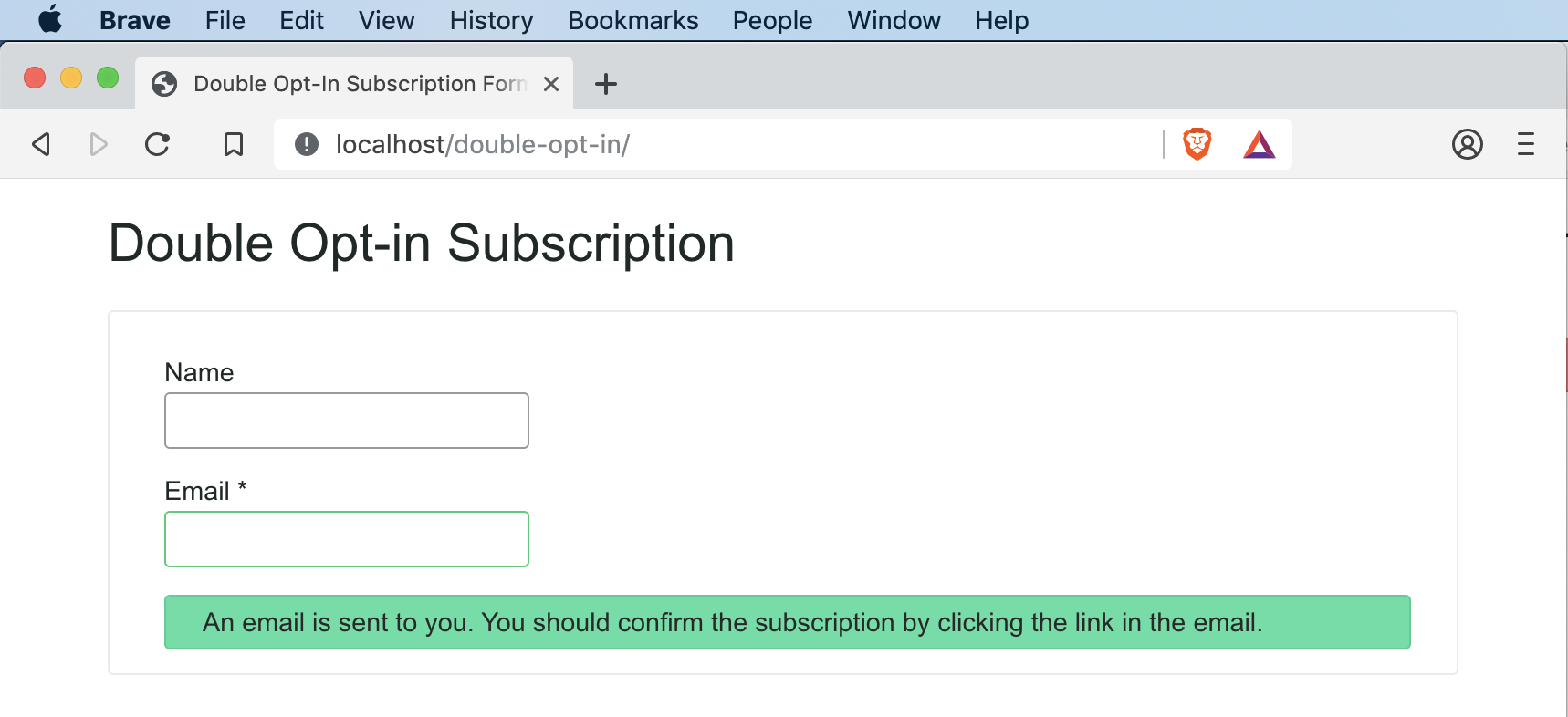
Double Opt-in subscription form UI

You should leave the name field can as optional and only the email field should be as required. This will encourage the user to submit the form and subscribe for the newsletter.

Needless to say, the form should be responsive. Any page or form you build should work in mobile, tablet, laptop and desktop devices. You should optimize to work on any viewport.

Google parses webpages in mobile mode for indexing in the search result. The desktop is an old story and gone are those days. You should always design for the mobile. Make it mobile-first!

PHP AJAX for subscription form submission

I have used AJAX to manage the submission. This will help the user to stay on the page after subscription. You can position this subscription form in a sidebar or the footer.
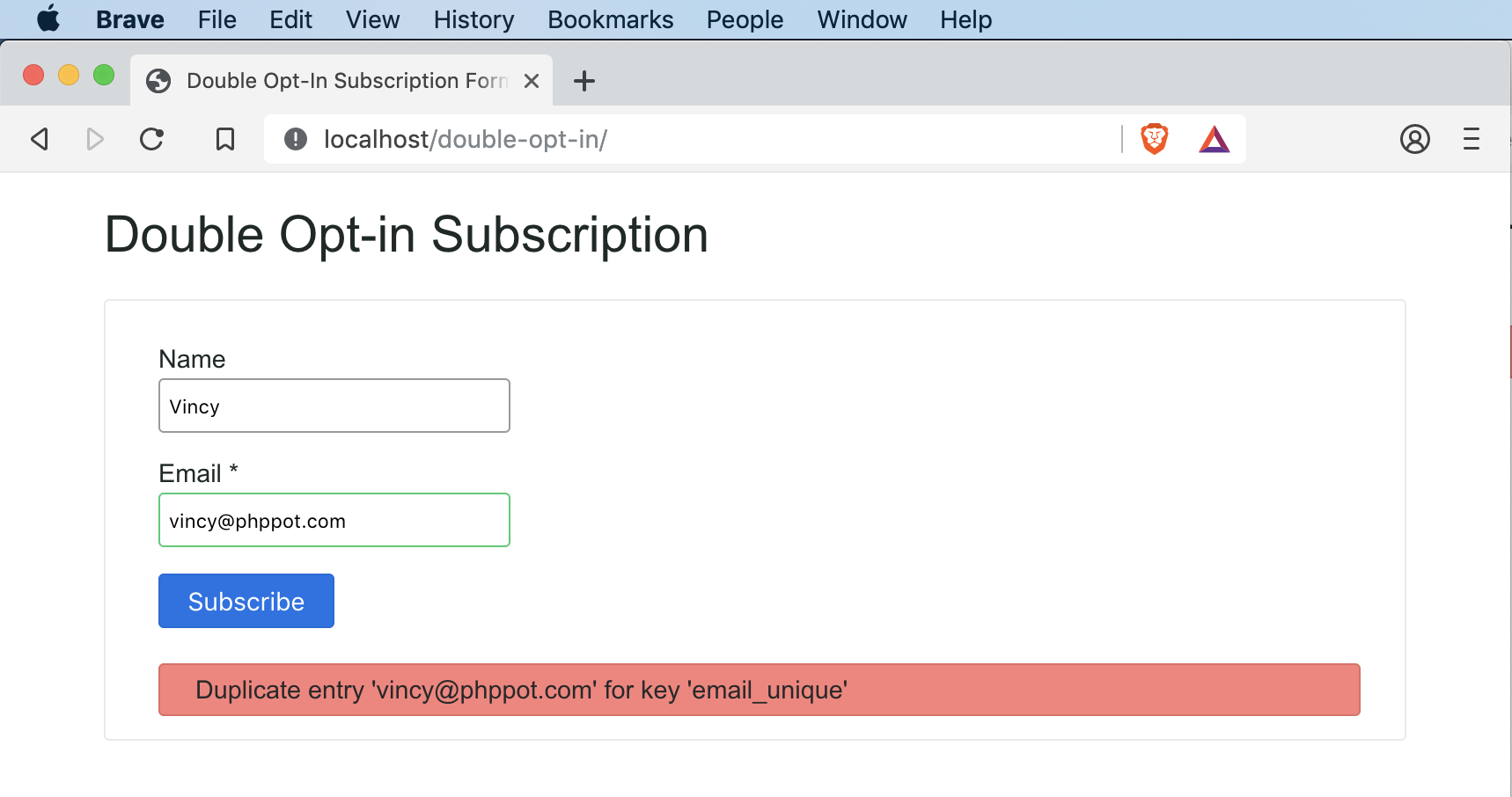
Double Opt-in Subscription Form AJAX Submission

This is a classic example of where you should use the AJAX. I have seen instances where people use AJAX in inappropriate places, for the sake of using it.

Subscription AJAX endpoint

The AJAX endpoint has three major steps:

  1. Verify the user input.
  2. Insert a record in the database.
  3. Send an email with a link for subscription.

subscribe-ep.php is the AJAX endpoint. It starts with an if condition to check if the submit is via the POST method. It is always good to program for POST instead of the GET by default.

<?php use Phppot\Subscription; use Phppot\SupportService; /** * AJAX end point for subscribe action. * 1. validate the user input * 2. store the details in database * 3. send email with link that has secure hash for opt-in confirmation */ session_start(); // to ensure the request via POST if ($_POST) { require_once __DIR__ . './../lib/SupportService.php'; $supportService = new SupportService(); // to Debug set as true $supportService->setDebug(false); // to check if its an ajax request, exit if not $supportService->validateAjaxRequest(); require_once __DIR__ . './../Model/Subscription.php'; $subscription = new Subscription(); // get user input and sanitize if (isset($_POST["pp-email"])) { $userEmail = trim($_POST["pp-email"]); $userEmail = filter_var($userEmail, FILTER_SANITIZE_EMAIL); $subscription->setEmail($userEmail); } else { // server side fallback validation to check if email is empty $output = $supportService->createJsonInstance('Email is empty!'); $supportService->endAction($output); } $memberName = ""; if (isset($_POST["pp-name"])) { $memberName = filter_var($_POST["pp-name"], FILTER_SANITIZE_STRING); } $subscription->setMemberName($memberName); // 1. get a 12 char length random string token $token = $supportService->getToken(12); // 2. make that random token to a secure hash $secureToken = $supportService->getSecureHash($token); // 3. convert that secure hash to a url string $urlSecureToken = $supportService->cleanUrl($secureToken); $subscription->setSubsriptionKey($urlSecureToken); $subscription->setSubsciptionSatus(0); $currentTime = date("Y-m-d H:i:s"); $subscription->setCreateAt($currentTime); $result = $subscription->insert(); // check if the insert is success // if success send email else send message to user $messageType = $supportService->getJsonValue($result, 'type'); if ('error' != $messageType) { $result = $subscription->sendConfirmationMessage($userEmail, $urlSecureToken); } $supportService->endAction($result); } 

I have used the SupportService class to perform common functions.

Input sanitisation is a must. When you collect information using a public website, you should be careful. You could get infected without your knowledge. There are many bots foraging around the Internet and they click on all links and buttons.

To sanitise, do not invent a new function. Use the function provided by PHP and that is safe to use.

URL with secure hash

Generate a unique url for each user subscription. Use this url to confirm the user’s subscription in the second step. Remember, that’s why we call this double opt-in.

I have used a three step process:

  1. Generate a random string token.
  2. Convert the token to secure hash.
  3. Convert the secure hash to safe url.

I have used hexdec, bin2hex and openssl_random_pseudo_bytes to generate random bits. Which forms a random string.

Then to make the random string a secure hash, I have used the PHP’s built-in password_hash function. Never every try to do something on your own. Go with the PHP’s function and it does the job very well.

Before PHP 7, we had the option to supply a user generated salt. Now PHP 7 release has deprecated it. It is a good move because, PHP can generate a better salt than what you will generate. So stick to PHP 7 and use it without supplying your own salt.

The secure hash will contain all sort of special characters. . You can keep those special characters but need to url encode it. But I always wish to keep urls clean and the encoded chars do not look nice.

So no harm in removing them. So I cleanup those and leave only the safe characters. Then as a secondary precaution, I also encode the resultant string.

Thus after going through multi step process, we get a random, hash secure, safe, encoded URL token. Save the user submitted information in database record along with this token.

A PHP utility class for you

This is a utility class which I use in my projects. I am giving it away free for you all. It has functions that I reuse quite often and will be handy in situations. Every method has detailed comments that explain their purpose and usage method.

<?php /** * Copyright (C) 2019 Phppot * * Distributed under MIT license with an exception that, * you don’t have to include the full MIT License in your code. * In essense, you can use it on commercial software, modify and distribute free. * Though not mandatory, you are requested to attribute this URL in your code or website. */ namespace Phppot; class SupportService { /** * Short circuit type function to stop the process flow on validation failure. */ public function validateAjaxRequest() { // to check if its an ajax request, exit if not $http_request = $_SERVER['HTTP_X_REQUESTED_WITH']; if (! isset($http_request) && strtolower($http_request) != 'xmlhttprequest') { $output = $this->createJsonInstance('Not a valid AJAX request!'); $this->endAction($output); } } /** * Last point in the AJAX work flow. * Clearing tokens, handles and resource cleanup can be done here. * * @param string $output * @param boolean $clearToken */ public function endAction($output) { die($output); } public function setDebug($mode) { if ($mode == true) { ini_set('display_errors', 1); set_error_handler(function ($severity, $message, $file, $line) { if (error_reporting() & $severity) { throw new \ErrorException($message, 0, $severity, $file, $line); } }); } } /** * encodes a message string into a json object * * @param string $message * @param string $type * @return \JsonSerializable encoded json object */ public function createJsonInstance($message, $type = 'error') { $messageArray = array( 'type' => $type, 'text' => $message ); $jsonObj = json_encode($messageArray); return $jsonObj; } public function getJsonValue($json, $key) { $jsonArray = json_decode($json, true); return $jsonArray[$key]; } /** * If you are using PHP, this is the best possible secure hash * do not try to implement somthing on your own * * @param string $text * @return string */ public function getSecureHash($text) { $hashedText = password_hash($text, PASSWORD_DEFAULT); return $hashedText; } /** * generates a random token of the length passed * * @param int $length * @return string */ public function getToken($length) { $token = ""; $codeAlphabet = "ABCDEFGHIJKLMNOPQRSTUVWXYZ"; $codeAlphabet .= "abcdefghijklmnopqrstuvwxyz"; $codeAlphabet .= "0123456789"; $max = strlen($codeAlphabet) - 1; for ($i = 0; $i < $length; $i ++) { $token .= $codeAlphabet[$this->cryptoRandSecure(0, $max)]; } return $token; } public function cryptoRandSecure($min, $max) { $range = $max - $min; if ($range < 1) { return $min; // not so random... } $log = ceil(log($range, 2)); $bytes = (int) ($log / 8) + 1; // length in bytes $bits = (int) $log + 1; // length in bits $filter = (int) (1 << $bits) - 1; // set all lower bits to 1 do { $rnd = hexdec(bin2hex(openssl_random_pseudo_bytes($bytes))); $rnd = $rnd & $filter; // discard irrelevant bits } while ($rnd >= $range); return $min + $rnd; } /** * makes the passed string url safe and return encoded url * * @param string $str * @return string */ public function cleanUrl($str, $isEncode = 'true') { $delimiter = "-"; $str = str_replace(' ', $delimiter, $str); // Replaces all spaces with hyphens. $str = preg_replace('/[^A-Za-z0-9\-]/', '', $str); // allows only alphanumeric and - $str = trim($str, $delimiter); // remove delimiter from both ends $regexConseqChars = '/' . $delimiter . $delimiter . '+/'; $str = preg_replace($regexConseqChars, $delimiter, $str); // remove consequtive delimiter $str = mb_strtolower($str, 'UTF-8'); // convert to all lower if ($isEncode) { $str = urldecode($str); // encode to url } return $str; } /** * to mitigate XSS attack */ public function xssafe($data, $encoding = 'UTF-8') { return htmlspecialchars($data, ENT_QUOTES | ENT_HTML401, $encoding); } /** * convenient method to print XSS mitigated text * * @param string $data */ public function xecho($data) { echo $this->xssafe($data); } } 

Store subscription information to the database

Insert a record to the database on submission of the subscription form. We get the user’s name, email, generate a secure hash token, current time, subscription status.

<?php /** * Copyright (C) 2019 Phppot * * Distributed under MIT license with an exception that, * you don’t have to include the full MIT License in your code. * In essense, you can use it on commercial software, modify and distribute free. * Though not mandatory, you are requested to attribute this URL in your code or website. */ namespace Phppot; use Phppot\DataSource; class Subscription { private $ds; private $memberName; private $email; private $subsriptionKey; private $subsciptionSatus; private $createAt; private $supportService; function __construct() { require_once __DIR__ . './../lib/DataSource.php'; $this->ds = new DataSource(); require_once __DIR__ . './../lib/SupportService.php'; $this->supportService = new SupportService(); } public function getMemberName() { return $this->memberName; } public function getEmail() { return $this->email; } public function getSubsriptionKey() { return $this->subsriptionKey; } public function getSubsciptionSatus() { return $this->subsciptionSatus; } public function getCreateAt() { return $this->createAt; } public function setMemberName($memberName) { $this->memberName = $memberName; } public function setEmail($email) { $this->email = $email; } public function setSubsriptionKey($subsriptionKey) { $this->subsriptionKey = $subsriptionKey; } public function setSubsciptionSatus($subsciptionSatus) { $this->subsciptionSatus = $subsciptionSatus; } public function setCreateAt($createAt) { $this->createAt = $createAt; } /** * to get the member record based on the subscription_key * * @param string $subscriptionKey * @return array result record */ public function getMember($subscriptionKey, $subscriptionStatus) { $query = 'SELECT * FROM tbl_subscription where subscription_key = ? and subscription_status = ?'; $paramType = 'si'; $paramValue = array( $subscriptionKey, $subscriptionStatus ); $result = $this->ds->select($query, $paramType, $paramValue); return $result; } public function insert() { $query = 'INSERT INTO tbl_subscription (member_name, email, subscription_key, subscription_status, create_at) VALUES (?, ?, ?, ?, ?)'; $paramType = 'sssis'; $paramValue = array( $this->memberName, $this->email, $this->subsriptionKey, $this->subsciptionSatus, $this->createAt ); $insertStatus = $this->ds->insert($query, $paramType, $paramValue); return $insertStatus; } public function updateStatus($subscriptionKey, $subscriptionStatus) { $query = 'UPDATE tbl_subscription SET subscription_status = ? WHERE subscription_key = ?'; $paramType = 'is'; $paramValue = array( $subscriptionStatus, $subscriptionKey ); $this->ds->execute($query, $paramType, $paramValue); } /** * sends confirmation email, to keep it simple, I am just using the PHP's mail * I reccommend serious users to change it to PHPMailer and set * appropriate headers */ public function sendConfirmationMessage($mailTo, $urlSecureToken) { // following is the opt-in url that will be sent in email to // the subscriber. Replace example.com with your server $confirmOptInUrl = 'http://example.com/confirm.php?q=' . $urlSecureToken; $message = '<p>Howdy!</p> <p>This is an automated message sent for subscription service. You must confirm your request to subscribe to example.com site.</p> <p>Website Name: example</p> <p>Website URL: http://example.com</p> <p>Click the following link to confirm: ' . $confirmOptInUrl . '</p>'; $isSent = mail($mailTo, 'Confirm your subscription', $message); if ($isSent) { $message = "An email is sent to you. You should confirm the subscription by clicking the link in the email."; $result = $this->supportService->createJsonInstance($message, 'message'); } else { $result = $this->supportService->createJsonInstance('Error in sending confirmation email.', 'error'); } return $result; } } 

The reason for storing the current time is to have an expiry for every link. We can set a predefined expiry for the double opt-in process.
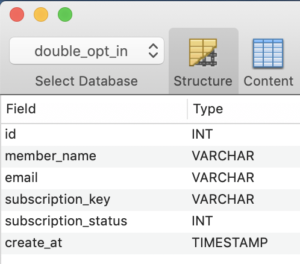
For example, you can set one week as expiry for a link from the moment you generate it. The user has to click and confirm before that expiry period.

Subscription status is by default stored as ‘0’ and on confirmation changed to ‘1’.

A database abstraction layer for you

It is my PHP abstraction for minor projects. This works as a layer between controller, business logic and the database. It has generic methods using which we can to the CRUD operations. I have bundled it with the free project download that is available at the end of this tutorial.

Send confirmation email to users

After you insert the record, send an email will to the user to perform the double opt-in confirmation. The user will have a link in the email which he has to click to confirm.

Keep the email simple. It is okay to have text instead of fancy HTML emails. PHP is capable of generating any email and you can code complex email templates. But the spam engines may not like it.

Subscription information database record with secure hash

If you wish to go with HTML emails, then keep the HTML code ratio to as least as possible. As this is also one factor using which the spam engines flag the emails.

Then remember not to use the spam stop words. There are words like “free”, “win”, “cash”, “promo” and “income”. There is a long list and you can get it on the Internet by searching for “email spam filter word list”.

I have used PHP’s mail() function to send the email. I recommend you to change it to PHPMailer to send SMTP based email if you plan to use this code in production.

Subscription confirmation

Create a public landing page and you may use .htaccess for a neat URL mapping. This URL should map with the URL sent to the user and the PHP file that is going to process the request.

As a first step, GET the token and to verify the user against the database. Check,

  1. if such a token exists,
  2. it is not expired,
  3. the user is not already subscribed
  4. add more validation as you deem fit.
<?php use Phppot\Subscription; use Phppot\SupportService; /** * For confirmation action. * 1. Get the secure has from url * 2. validate it against url * 3. update the subscription status in database accordingly. */ session_start(); // to ensure the request via POST require_once __DIR__ . '/lib/SupportService.php'; $supportService = new SupportService(); // to Debug set as true $supportService->setDebug(true); $subscriptionKey = $_GET['q']; require_once __DIR__ . '/Model/Subscription.php'; $subscription = new Subscription(); $result = $subscription->getMember($subscriptionKey, 0); if (count($result) > 0) { // member found, go ahead and update status $subscription->updateStatus($subscriptionKey, 1); $message = $result[0]['member_name'] . ', your subscription is confirmed.'; $messageType = 'success'; } else { // securiy precaution: do not reveal any information here // play subtle with the reported message $message = 'Invalid URL!'; $messageType = 'error'; } ?> <!doctype html> <html lang="en"> <head> <meta charset="utf-8"> <meta name="viewport" content="width=device-width, initial-scale=1, shrink-to-fit=no"> <meta name="author" content="Vincy"> <link rel="stylesheet" type="text/css" href="assets/css/phppot-style.css"> <title>Double Opt-In Subscription Confirmation</title> </head> <body> <div class="phppot-container"> <h1>Double Opt-in Subscription Confirmation</h1> <div class="phppot-row"> <div id="phppot-message" class="<?php echo $messageType; ?>"><?php echo $message;?></div> </div> </div> </body> </body> </html> 

If validation fails, do not reveal any information to the user. You should only say that it has failed.
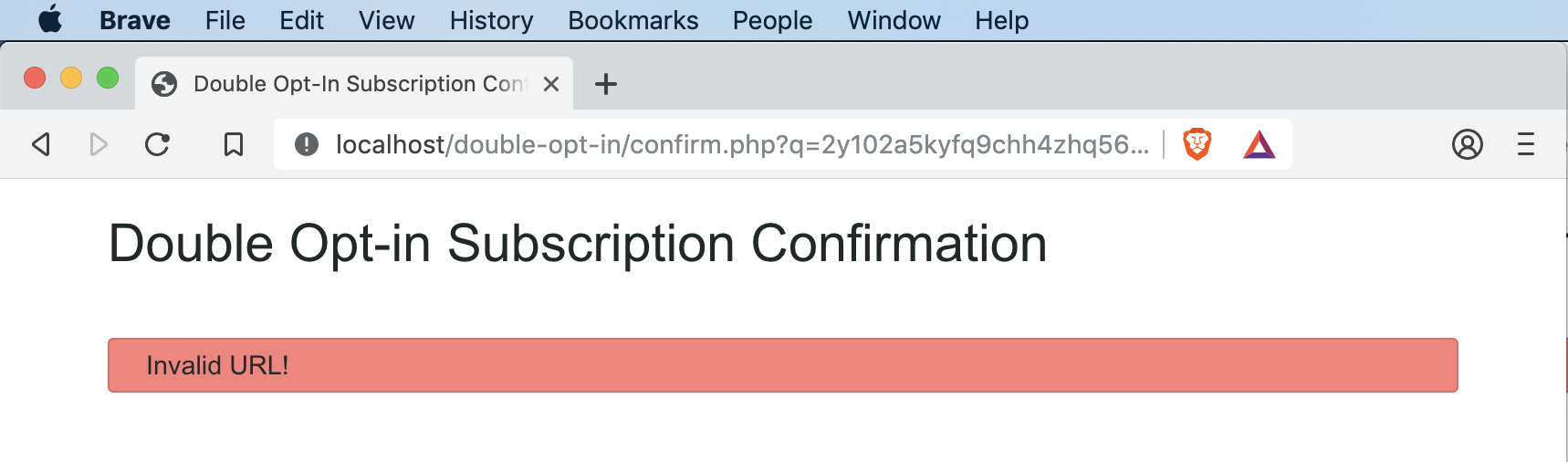
Subscription double opt-in confirmation url verification

More important do not say, not such email found. This will allow finding who has subscribed to your service. Whenever a validation fails, the displayed message should not reveal internal information.

On validation success, update the subscription status. Then show a happy success message to the user.

Conclusion

I have presented you with a production-grade double opt-in subscription form. I have followed a most secure hash generation method for confirmation URL email. I present it to you under the MIT license. The intention is to be the most permissible. You can download it free and change the code. You can even use it in your commercial projects. I have used the most secure code as possible. You can use this in your live site to manage newsletter subscription. In the coming part, I will include unsubscribe and enhance it further. Leave your comments below with what sort of enhancements you are looking for.

Download

↑ Back to Top

Posted on Leave a comment

How to Create Popup Contact Form Dialog using PHP and jQuery

Last modified on September 5th, 2019 by Vincy.

Contact form is an important element in your website. It encourages communication and acts as a bridge between you and your users. It allows users to post their feedback, comments, questions and more.

It helps you to get ideas and opinions that lead your business to growth. It is one among the important aspects that will decide your success.

There are many popup contact form plugins available online. These plugins help to add a contact form in your application with a modern outlook. You should choose them with care.

I have developed a light-weight contact form component named Iris. It is an interactive, integrative component. You can plug-in this component with your application without putting much effort. If you are searching for a secured simple contact form component, then Iris is the one you are looking for.

You should also read through the simple secure spam-free contact form. It details on the critical elements of a contact form and how they should be designed. It is a highly recommended read from me.

How Display PHP Contact Form Dialog using jQuery

View Demo

Developing a PHP contact form is a simple job. We have seen so many examples for creating a contact form in PHP. The simple contact form example has the basic code skeleton. It has minimal fields and a simple mail sending script.

Generally, the contact form has the name, email, message and more fields. The fields may vary based on the application’s nature or its purpose. 

In some application there may be a lengthy contact form with elaborate list of fields phone, fax and more. But, sleek forms with minimal inputs encourage users to interact.

If you want to get more information, then make it via optional custom fields. Contact form with custom fields will help users who have no objection to give extra data.

In this article, we are going how to code for showing a PHP contact form as a popup dialog. I used the jQuery core to display a popup dialog with the contact form HTML.

What is inside?

  1. Purpose of the contact form on a web application
  2. Things to remember while creating a contact form
  3. About this example
  4. File structure
  5. Create HTML interface for the contact form
  6. PHP script to send contact email
  7. PHP contact form popup with jQuery Output
  8. Conclusion

There are various ways to allow users to contact you via your application interface. Contact form is one of a popular component of an application. It lets users contact the website owner or admin.

Generally, contact forms help the users to send their thoughts, doubts. Some of the main purposes of this contact form interface are here as listed below.

  • To collect feedback, comments from the users or customers.
  • For getting the advantages of user interaction with your application.
  • To receive user’s support request.
  • To allow users to send inquiries for paid services or customization.
  • To get biodata, proof and more references as attachments.

While creating a contact form in your application, you have to remember the following. These points will help to create a safe contact for an interface for your application.

IMPORTANT – Read this!

  • Secure your platform from the bots. Yes! Internet is full of automated bots hungry for spreading spam.
  • Prevent abnormal frequent hits which may stress your server.
  • Ensure data sanitization before processing user data
  • Check request origin to prevent automated software to post the form data.
  • Validate on both client and server side.
  • No design is design. Do not thrust the UI upon the users, let its focus be on good communication and ease of use.

As the internet is an open world, it allows anonymous users. So, there is the possibility of malicious access. So, this kind of safety measures will reduce the risk.

It is not only applicable for the contact form but also for all the interfaces that get data from the end-user.

The contact form pops up to collect name, email, subject and message from the users. While running this example, the landing page will not show the popup on page load. Rather, it shows a clickable contact icon.

By clicking this icon, a contact form will popup with the name, email and more fields. For displaying the popup interface, I used jQuery library functions. It will add an overlay on top of the webpage while showing the popup.

In this example, all the contact details are mandatory. I have added a minimal validation script in JavaScript to validate the form data. This script is to check the availability of the contact data before posting it to the server-side.

When the user submits the form, the PHP code will receive the posted form data. Then, it processes the mail function with this contact information.

In this example, I have used the PHP mail function to send the contact email. If you want to send email using SMPT, the linked article has the code for implementing it.

Merits and demerits of a popup contact form dialog

There are both advantages and disadvantages of showing a popup contact form dialog.

The advantage is to let the user stay on his current page with any navigation or page refresh. The popup dialog interface will give a modern outlook for your application

Some web users hate popups. This is the main disadvantages. Also, it is a little bit of effort taking work to make a popup interface mobile friendly.

File Structure

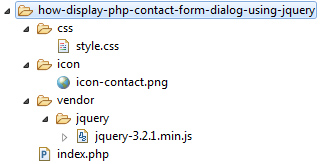
Below screenshot shows the file structure of this PHP contact form example. It shows the custom files and libraries used in this code.

It has a very minimal amount of dynamic code that is for sending the contact email. Other than that, it has more of the HTML, CSS, JavaScript code.

Contact Form Popup File Structure

The index.php is the landing page which contains HTML to display clickable contact icon. It also has a hidden contact form container and a jQuery script to popup the form.

The vendor directory contains the jQuery library source.

This section is to learn how to create HTML to display the contact form interface in a jQuery popup.

It has the code to show the contact icon which popups contact form on its click event. The click event on the outside of the contact form layout will close the popup dialog.

I have added CSS and jQuery script to reflect the appropriate UI changes based on the user’s click action event. It helps to toggle the contact form popup dialog and acknowledge the user accordingly.

<!DOCTYPE html> <html> <head> <title>How to display PHP contact form popup using jQuery</title> <script src="./vendor/jquery/jquery-3.2.1.min.js"></script> <link rel="stylesheet" href="./css/style.css" /> </head> <body> <div id="contact-icon"> <img src="./icon/icon-contact.png" alt="contact" height="50" width="50"> </div> <!--Contact Form--> <div id="contact-popup"> <form class="contact-form" action="" id="contact-form" method="post" enctype="multipart/form-data"> <h1>Contact Us</h1> <div> <div> <label>Name: </label><span id="userName-info" class="info"></span> </div> <div> <input type="text" id="userName" name="userName" class="inputBox" /> </div> </div> <div> <div> <label>Email: </label><span id="userEmail-info" class="info"></span> </div> <div> <input type="text" id="userEmail" name="userEmail" class="inputBox" /> </div> </div> <div> <div> <label>Subject: </label><span id="subject-info" class="info"></span> </div> <div> <input type="text" id="subject" name="subject" class="inputBox" /> </div> </div> <div> <div> <label>Message: </label><span id="userMessage-info" class="info"></span> </div> <div> <textarea id="message" name="message" class="inputBox"></textarea> </div> </div> <div> <input type="submit" id="send" name="send" value="Send" /> </div> </form> </div> </body> </html> 

Below code shows the styles created for this PHP contact form UI. I have used very less CSS for this example to make it generic for any theme. You can override the below style to customize the form design for your website theme.

body { color: #232323; font-size: 0.95em; font-family: arial; } div#success { text-align: center; box-shadow: 1px 1px 5px #455644; background: #bae8ba; padding: 10px; border-radius: 3px; margin: 0 auto; width: 350px; } .inputBox { width: 100%; margin: 5px 0px 15px 0px; border: #dedede 1px solid; box-sizing: border-box; padding: 15px; } #contact-popup { position: absolute; top: 0px; left: 0px; height: 100%; width: 100%; background: rgba(0, 0, 0, 0.5); display: none; color: #676767; } .contact-form { width: 350px; margin: 0px; background-color: white; font-family: Arial; position: relative; left: 50%; top: 50%; margin-left: -210px; margin-top: -255px; box-shadow: 1px 1px 5px #444444; padding: 20px 40px 40px 40px; } #contact-icon { padding: 10px 5px 5px 12px; width: 58px; color: white; box-shadow: 1px 1px 5px grey; border-radius: 3px; cursor: pointer; margin: 60px auto; } .info { color: #d30a0a; letter-spacing: 2px; padding-left: 5px; } #send { background-color: #09F; border: 1px solid #1398f1; font-family: Arial; color: white; width: 100%; padding: 10px; cursor: pointer; } #contact-popup h1 { font-weight: normal; text-align: center; margin: 10px 0px 20px 0px; } .input-error { border: #e66262 1px solid; } 

jQuery Script to show Contact form popup and validate form fields

Below script shows the jQuery callback function added for the document ready event.

It has two event handling functions. One is to show contact form popup dialog on the click event of the contact icon.

The other is to handle the form submit to validate contact data entered by the user.

The validation script focuses on minimalistic filter appliances. It helps to prevent users from sending the form with an empty data or with invalid data (email) format.

<script> $(document).ready(function () { $("#contact-icon").click(function () { $("#contact-popup").show(); }); //Contact Form validation on click event $("#contact-form").on("submit", function () { var valid = true; $(".info").html(""); $("inputBox").removeClass("input-error"); var userName = $("#userName").val(); var userEmail = $("#userEmail").val(); var subject = $("#subject").val(); var message = $("#message").val(); if (userName == "") { $("#userName-info").html("required."); $("#userName").addClass("input-error"); } if (userEmail == "") { $("#userEmail-info").html("required."); $("#userEmail").addClass("input-error"); valid = false; } if (!userEmail.match(/^([\w-\.]+@([\w-]+\.)+[\w-]{2,4})?$/)) { $("#userEmail-info").html("invalid."); $("#userEmail").addClass("input-error"); valid = false; } if (subject == "") { $("#subject-info").html("required."); $("#subject").addClass("input-error"); valid = false; } if (message == "") { $("#userMessage-info").html("required."); $("#message").addClass("input-error"); valid = false; } return valid; }); }); </script> 

There are many ways of sending email in PHP. In this example, I used the in-built mail function to send the contact email.

Before sending the mail, we have to set the header, recipient, and the other parameters.

Below PHP script gets the posted contact form data using $_POST request array. In PHP, it sets the From data with mail header using the name, email posted via the form.

In this code, we can see the PHP filter_var() applied to sanitize the form data before processing.

Once the email sent, the PHP mail() function will return boolean true. If so, it shows a success message to the user.

<?php if (! empty($_POST["send"])) { $name = filter_var($_POST["userName"], FILTER_SANITIZE_STRING); $email = filter_var($_POST["userEmail"], FILTER_SANITIZE_EMAIL); $subject = filter_var($_POST["subject"], FILTER_SANITIZE_STRING); $message = filter_var($_POST["message"], FILTER_SANITIZE_STRING); $toEmail = "[email protected]"; $mailHeaders = "From: " . $name . "<" . $email . ">\r\n"; if (mail($toEmail, $subject, $message, $mailHeaders)) { ?> <div id="success">Your contact information is received successfully!</div> <?php } } ?> 

In a previous article, we have seen an example to send an email with Gmail SMTP using PHPMailer library.

PHP contact form popup with jQuery Output

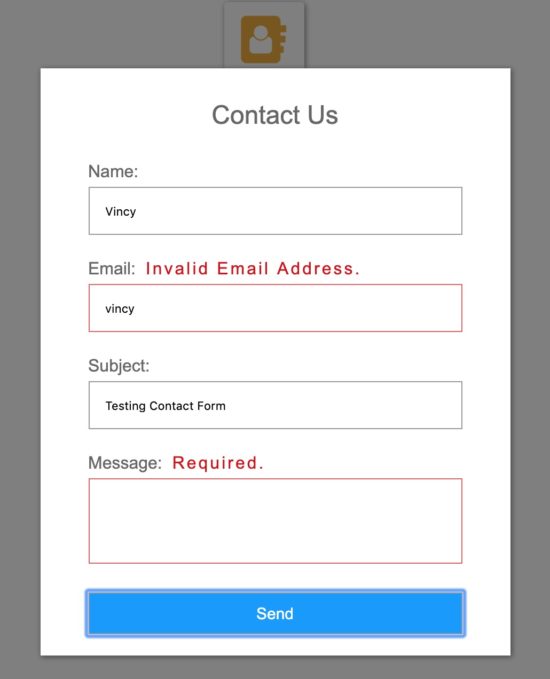
The figure shows the screenshot of the contact form popup dialog. You can see the clickable icon that is behind the overlay.

I have taken this screenshot by sending the form with an empty message and invalid email format. In the following screenshot, you can see the corresponding error message in the popup dialog. This is how this form alerts users about the improper data entered by them.

Contact Form Popup Output

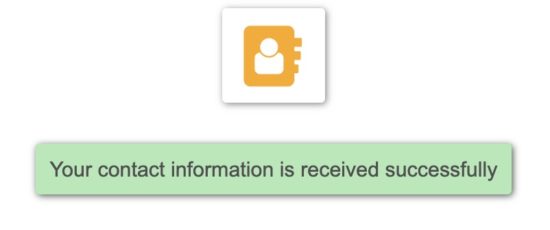
After sending the contact email, this message helps to acknowledge the user. This acknowledgment will toggle off the contact form popup.

Contact Mail Success

Conclusion

Contact form in your application will help to gather information from the user. It will give you valuable feedback, ideas from the end-user to grow your business.

We have seen the advantages and disadvantages of having a popup contact form interface in an application. Also, we have seen lot of information about the purposes, basic need to integrate a contact form in an application.

The example code we have created for this article will reduce your effort to create a contact form for your application. It is a basic solution for the one who wants to deploy a medium to interact with the site users.

View Demo Download

↑ Back to Top

Posted on Leave a comment

Extract images from URL in excel with PHP using PhpSpreadsheet

Last modified on August 7th, 2019 by Vincy.

There are various ways to extract images from a given URL. PHP contains built-in functions for extracting data including the images with a URL.

This article is for PHP code to extract images from URLs existing in an excel file.

I have used PhpSpreadsheet to read the URLs from an Excel file. Then, I created cURL script to extract images from the URL.

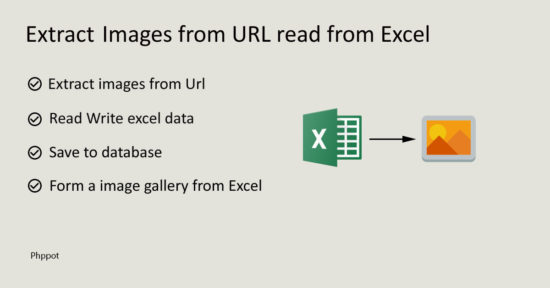
Extract Images from URL Read from Excel

PhpSpreadsheet library supports Excel read-write operations. It provides enormous features like formatting content, manipulating data and more. It has a rich set of built-in classes and thereby makes the development process easy.

Working with spreadsheets is a common need while handling excel data via programming. PhpSpreadsheet library reduces the developer’s effort on building applications with excel data handing.

We have already seen several examples of URL extract using PHP. Also, we have created code for getting video thumbnail from Youtube URL.

What is inside?

  1. Uses of extracting images from URL from Excel
  2. Advantages of PhpSpreadsheet Library
  3. Existing PHP libraries used to import-export
  4. File Structure
  5. About this example
  6. PHP code to load and extract image data
  7. Render extracted images in a gallery
  8. Database script
  9. Extract images from URL in excel using PhpSpreadsheet Output

Extracting of images from URL from an excel file will be helpful in many scenarios. Below list shows some scenarios.

  1. To import a large volume of images into your application’s media library.
  2. To migrate media files from one domain to another.
  3. To restore the Excel backup images into a database.
  4. To create a dynamic photo gallery without a database.

Advantages of PhpSpreadsheet Library

PhpSpreadsheet has many features and thereby has more advantages of using it.

  • It provides methods to prepare reports, charts, plans and more.
  • It has an option the read, write from a specified row, column and sheet of a spreadsheet document.
  • It is suitable for handling a large amount of data.
  • It helps to manage checklists, calendars, timesheets, schedules, proposal plans.
  • It provides security to protect spreadsheet data from editing.
  • It supports encryption to prevent the spreadsheet data from viewing. 

Existing PHP libraries used to import-export

There are many PHP libraries available in the market support spreadsheet data handling.

  • PortPHP supports import-export data between Excel, CSV and database storages. It has readers, writers and converters to process data exchange and manipulation.
  • The Spout is a PHP library used to read write spreadsheets in an efficient way. It supports three types of spreadsheets XLS, CSV, ODS.

File structure

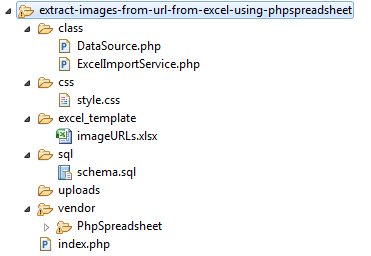
Below screenshot shows the file structure of this example. The ExcelImportService class file is an integral part of this example. It loads PhpSpreadsheet library and covers all the operations related to the excel image extract.

The excel_template folder contains an input Excel file with image URLs. This example code loads this file to extract images from the URL.

Instead of using this fixed excel template, you can also allow users to choose an excel file. By adding a HTML form with a file input option user can choose their excel to explore extract.

Extract Images from URL from the Excel File Structure

About this example

This example loads an input Excel file in an Import service class. This sample excel file will contain image URLs.

In this example, I have used PhpSpreadsheet library to read the excel data. This library method helps to get the URLs and store into an array.

Then I iterate this URL array in a loop to extract the image data. I used PHP cURL script to extract images. In a previous tutorial, we have seen how to run PHP cURL script to extract content from a remote URL.

Finally, this code will store the extracted images into a directory and save the path to the database. In a previous article, we import excel data into a database without images. Also, we have seen examples to import data from CSV to a database.

PHP code to load and extract image data

This PHP code loads the ExcelImportService class to load and import image data from an excel.

This is the main PHP class created for this example. It handles all operations during the excel image extract.

<?php use \Phppot\ExcelImportService; require_once 'Class/ExcelImportService.php'; $excelImportService = new ExcelImportService(); $excelDataArray = $excelImportService->loadExcel(); if (! empty($excelDataArray)) { $isNewData = $excelImportService->importImages($excelDataArray); if ($isNewData) { $message = "Images extracted from excel successfully!"; } else { $message = "No new images found during the excel extract!"; } } $imageResult = $excelImportService->getAllImages(); ?> 

ExcelImportService.php

This class loads the PhpSpreadsheet library. It also has the DataSource instance in the class level.

The database access request from this class uses this instance. It is for saving the extracted image path to the database.

Note: Download PhpSpreadsheet library from Github without dependencies. Then run the get the dependencies via composer by using the following command.

composer require phpoffice/phpspreadsheet 

In this class, the loadExcel() function loads the input excel to read the URLs as an array. It returns this array to extract image blob via cURL request. 

The extractImage() function executes the cURL script. It gets the image resource data from the remote URL read from Excel. Then it writes the file into a target as specified in this example.

After putting the extracted images into a folder, then the code saves the to the image database table. The saveImagePath() method contains the insert query and parameters to invoke DataSource insert.

<?php namespace Phppot; use \Phppot\DataSource; require 'Vendor/PhpSpreadsheet/autoload.php'; class ExcelImportService { private $ds; function __construct() { require_once __DIR__ . './DataSource.php'; $this->ds = new DataSource(); } private function isUrlExist($url) { $query = 'SELECT * FROM tbl_images where remote_url = ?'; $paramType = 's'; $paramValue = array($url); $count = $this->ds->numRows($query, $paramType, $paramValue); return $count; } private function extractImage($url) { $path = pathinfo($url); $imageTargetPath = 'uploads/' . time() . $path['basename']; $ch = curl_init(); curl_setopt($ch, CURLOPT_URL, $url); curl_setopt($ch, CURLOPT_VERBOSE, 1); curl_setopt($ch, CURLOPT_RETURNTRANSFER, 1); curl_setopt($ch, CURLOPT_AUTOREFERER, false); curl_setopt($ch, CURLOPT_HTTP_VERSION, CURL_HTTP_VERSION_1_1); curl_setopt($ch, CURLOPT_HEADER, 0); curl_setopt($ch, CURLOPT_SSL_VERIFYPEER, 0); // <-- important to specify curl_setopt($ch, CURLOPT_SSL_VERIFYHOST, 0); // <-- important to specify $resultImage = curl_exec($ch); curl_close($ch); $fp = fopen($imageTargetPath, 'wb'); fwrite($fp, $resultImage); fclose($fp); $imageInfo["image_name"] = $path['basename']; $imageInfo["image_path"] = $imageTargetPath; return $imageInfo; } private function saveImagePath($imageInfo, $remoteUrl) { $query = "INSERT INTO tbl_images (image_name,image_path, remote_url) VALUES (?, ?, ?)"; $paramType = 'sss'; $paramValue = array($imageInfo["image_name"], $imageInfo["image_path"], $remoteUrl); $this->ds->insert($query, $paramType, $paramValue); } public function loadExcel() { //create directly an object instance of the IOFactory class, and load the xlsx file $xlsFile ='Excel_Template/imageURLs.xlsx'; $spreadsheet = \PhpOffice\PhpSpreadsheet\IOFactory::load($xlsFile); //read excel data and store it into an array $excelData = $spreadsheet->getActiveSheet()->toArray(null, true, true, true); $rowCount = count($excelData); $urlArray = array(); for($i=2;$i<$rowCount;$i++) { $url = $excelData[$i]['A']; if(!empty($url)) { $urlArray[] = $url; } } return $urlArray; } public function importImages($excelDataArray) { $isNewData = false; foreach($excelDataArray as $url) { $isUrlExist = $this->isUrlExist($url); if (empty($isUrlExist)) { $imageInfo = $this->extractImage($url); if(!empty($imageInfo)) { $this->saveImagePath($imageInfo, $url); } $isNewData = true; } } return $isNewData; } public function getAllImages() { $query = 'SELECT * FROM tbl_images'; $result = $this->ds->select($query); return $result; } }

DataSource.php

This is a common PHP class that we have used in many examples. It contains functions to execute the database operations planned for the example code. It establishes the database connection at its constructor.

Model classes used in our PHP examples load this class and instantiate it to access the database.

<?php namespace Phppot; /** * Generic datasource class for handling DB operations. * Uses MySqli and PreparedStatements. * * @version 2.3 */ class DataSource { // PHP 7.1.0 visibility modifiers are allowed for class constants. // when using above 7.1.0, declare the below constants as private const HOST = 'localhost'; const USERNAME = 'root'; const PASSWORD = ''; const DATABASENAME = 'phpsamples'; private $conn; /** * PHP implicitly takes care of cleanup for default connection types. * So no need to worry about closing the connection. * * Singletons not required in PHP as there is no * concept of shared memory. * Every object lives only for a request. * * Keeping things simple and that works! */ function __construct() { $this->conn = $this->getConnection(); } /** * If connection object is needed use this method and get access to it. * Otherwise, use the below methods for insert / update / etc. * * @return \mysqli */ public function getConnection() { $conn = new \mysqli(self::HOST, self::USERNAME, self::PASSWORD, self::DATABASENAME); if (mysqli_connect_errno()) { trigger_error("Problem with connecting to database."); } $conn->set_charset("utf8"); return $conn; } /** * To get database results * @param string $query * @param string $paramType * @param array $paramArray * @return array */ public function select($query, $paramType="", $paramArray=array()) { $stmt = $this->conn->prepare($query); if(!empty($paramType) && !empty($paramArray)) { $this->bindQueryParams($sql, $paramType, $paramArray); } $stmt->execute(); $result = $stmt->get_result(); if ($result->num_rows > 0) { while ($row = $result->fetch_assoc()) { $resultset[] = $row; } } if (! empty($resultset)) { return $resultset; } } /** * To insert * @param string $query * @param string $paramType * @param array $paramArray * @return int */ public function insert($query, $paramType, $paramArray) { $stmt = $this->conn->prepare($query); $this->bindQueryParams($stmt, $paramType, $paramArray); $stmt->execute(); $insertId = $stmt->insert_id; return $insertId; } /** * To execute query * @param string $query * @param string $paramType * @param array $paramArray */ public function execute($query, $paramType="", $paramArray=array()) { $stmt = $this->conn->prepare($query); if(!empty($paramType) && !empty($paramArray)) { $this->bindQueryParams($stmt, $paramType="", $paramArray=array()); } $stmt->execute(); } /** * 1. Prepares parameter binding * 2. Bind prameters to the sql statement * @param string $stmt * @param string $paramType * @param array $paramArray */ public function bindQueryParams($stmt, $paramType, $paramArray=array()) { $paramValueReference[] = & $paramType; for ($i = 0; $i < count($paramArray); $i ++) { $paramValueReference[] = & $paramArray[$i]; } call_user_func_array(array( $stmt, 'bind_param' ), $paramValueReference); } /** * To get database results * @param string $query * @param string $paramType * @param array $paramArray * @return array */ public function numRows($query, $paramType="", $paramArray=array()) { $stmt = $this->conn->prepare($query); if(!empty($paramType) && !empty($paramArray)) { $this->bindQueryParams($stmt, $paramType, $paramArray); } $stmt->execute(); $stmt->store_result(); $recordCount = $stmt->num_rows; return $recordCount; } } 

This is the HTML code to display the extracted images in the UI. I embed PHP code with this HTML to display the image path from the database dynamically.

The getAllImages() method fetches image results from the database. It returns an array of images extracted from the Excel. This array data iteration helps to render images in a gallery view.

<!doctype html> <html> <head> <link rel="stylesheet" type="text/css" href="CSS/style.css"> <title>Extract Images from URL in Excel using PHPSpreadSheet with PHP</title> </head> <body> <div id="gallery"> <div id="image-container"> <h2>Extract Images from URL in Excel using PHPSpreadSheet with PHP</h2> <?php if (! empty($message)) { ?> <div id="txtresponse"><?php echo $message; ?></div> <?php } ?> <ul id="image-list"> <?php if (! empty($imageResult)) { foreach ($imageResult as $k => $v) { ?> <li><img src="<?php echo $imageResult[$k]['image_path']; ?>" class="image-thumb" alt="<?php echo $imageResult[$k]['image_name'];?>"></li> <?php } } ?> </ul> </div> </div> </body> </html> 

After a successful image extract, this UI will acknowledge the user. It shows an appropriate message based on the image extract result.

If you extract an older excel that was already done, then the notification will say “No new images found”.

The following styles are used to present the extracted images in a gallery.

body { font-family: Arial; color: #212121; text-align: center; } #gallery { width: 1057px; margin: 0 auto; } #image-list { list-style-type: none; margin: 0; padding: 0; } #image-list li { margin: 10px 20px 10px 0px; display: inline-block; } #image-list li img { width: 250px; height: 155px; } #image-container { margin-bottom: 14px; } #txtresponse { padding: 10px 40px; border-radius: 3px; margin: 10px 0px 30px 0px; border: #ecdeaa 1px solid; color: #848483; background: #ffefb6; display: inline-block; } .btn-submit { padding: 10px 30px; background: #333; border: #E0E0E0 1px solid; color: #FFF; font-size: 0.9em; width: 100px; border-radius: 0px; cursor: pointer; position: absolute; } .image-thumb { background-color: grey; padding: 10px; } 

Database script

This SQL script is for creating the required database table in your environment. It has the create a statement of the tbl_images database table. This table is the storage the point to store the image local path.

Run this script before executing this example. You can also get the SQL script from the downloadable source code added with this article.

CREATE TABLE IF NOT EXISTS `tbl_images` ( `id` int(11) NOT NULL AUTO_INCREMENT, `image_name` varchar(50) NOT NULL, `image_path` varchar(50) NOT NULL, `date` timestamp NOT NULL DEFAULT CURRENT_TIMESTAMP ON UPDATE CURRENT_TIMESTAMP, PRIMARY KEY (`id`) ) ENGINE=InnoDB DEFAULT CHARSET=utf8 AUTO_INCREMENT=263 ; 

The screenshot below shows the image gallery output. These images are from the uploads folder of this example. This is the local location to store the extracted images from the database.

This screen shows the user acknowledgment message above the gallery view. This acknowledgment varies based on the input excel file data.

Extract Images from URL from the Excel Output

If the input excel is too older and extracted already, then the below message will notify the user.

No New Images

Hope this article helps you to image extract from URLs present in excel. The example presented is the simplest way of demonstrating image extract from Excel.

Download

↑ Back to Top