If you filter Fedora Linux AWS images using a script, you might notice a change in the image names. The Fedora Cloud SIG recently updated the image publishing configuration to use the latest generation storage option and simplify the image listings.
This involves two changes:
Replacing gp2 storage with gp3 storage by default for new images
Removing standard storage from new images
What’s the benefit of these changes?
The gp3 storage type appeared in 2020 and switching to that storage type for Fedora Linux users means more consistent performance for a lower cost. (For more details, read Corey Quinn’s helpful blog post.)
Removing standard storage from new image uploads means we’re creating half the AMIs we created before and it reduces the number of images you need to review when launching an instance. Finding the right Fedora Linux image for your deployment should be a little easier.
What if I really like the other storage types?
When you launch your instance, you can choose any storage type that is compatible with your instance in your preferred region. Although Fedora Linux images will have gp3 set as the default, you can choose from any other storage type at launch time.
How should I adjust my scripts that look for Fedora Linux images on AWS?
The format of the image names remains the same, but you’ll notice a new string in the storage type portion of the image name. As an example, here’s what you would see before the change was made:
The Fedora Cloud SIG wants to make the Fedora Linux cloud experience the best it can possibly be on every public cloud platform. This change gives Fedora Linux a better performing default storage option at a lower cost, reduces the overhead from creating AMIs on AWS, and simplifies the Fedora Linux image listings.
Fedora CoreOS is a lightweight, secure operating system optimized for running containerized workloads. A YAML document is all you need to describe the workload you’d like to run on a Fedora CoreOS server.
This is wonderful for a single server, but how would you describe a fleet of cooperating Fedora CoreOS servers? For example, what if you wanted a set of servers running load balancers, others running a database cluster and others running a web application? How can you get them all configured and provisioned? How can you configure them to communicate with each other? This article looks at how Terraform solves this problem.
Getting started
Before you start, decide whether you need to review the basics of Fedora CoreOS. Check out this previous article on the Fedora Magazine:
Terraform is an open source tool for defining and provisioning infrastructure. Terraform defines infrastructure as code in files. It provisions infrastructure by calculating the difference between the desired state in code and observed state and applying changes to remove the difference.
HashiCorp, the company that created and maintains Terraform, offers an RPM repository to install Terraform.
To get yourself familiar with the tools, start with a simple example. You’re going to create a single Fedora CoreOS server in AWS. To follow along, you need to install awscli and have an AWS account. awscli can be installed from the Fedora repositories and configured using the aws configure command
sudo dnf install -y awscli
aws configure
Please note, AWS is a paid service. If executed correctly, participants should expect less than $1 USD in charges, but mistakes may lead to unexpected charges.
Configuring Terraform
In a new directory, create a file named config.yaml. This file will hold the contents of your Fedore CoreOS configuration. The configuration simply adds an SSH key for the core user. Modify theauthorized_ssh_key section to use your own.
Next, create a file main.tf to contain your Terraform specification. Take a look at the contents section by section. It begins with a block to specify the versions of your providers.
Terraform uses providers to control infrastructure. Here it uses the AWS provider to provision EC2 servers, but it can provision any kind of AWS infrastructure. The ct provider from Poseidon Labs stands for config transpiler. This provider will transpile Fedora CoreOS configurations into Ignition configurations. As a result, you do not need to use fcct to transpile your configurations. Now that your provider versions are specified, initialize them.
provider "aws" { region = "us-west-2"
} provider "ct" {}
The AWS region is set to us-west-2 and the ct provider requires no configuration. With the providers configured, you’re ready to define some infrastructure. Use a data source block to read the configuration.
With this data block defined, you can now access the transpiled Ignition output as data.ct_config.config.rendered. To create an EC2 server, use a resource block, and pass the Ignition output as the user_data attribute.
This configuration hard-codes the virtual machine image (AMI) to the latest stable image of Fedora CoreOS in the us-west-2 region at time of writing. If you would like to use a different region or stream, you can discover the correct AMI on the Fedora CoreOS downloads page.
Finally, you’d like to know the public IP address of the server once it’s created. Use an output block to define the outputs to be displayed once Terraform completes its provisioning.
output "instance_ip_addr" { value = aws_instance.server.public_ip
}
Alright! You’re ready to create some infrastructure. To deploy the server simply run:
terraform init # Installs the provider dependencies
terraform apply # Displays the proposed changes and applies them
Oncecompleted, Terraform prints the public IP address of the server, and you can SSH to the server by running ssh core@{public ip here}. Congratulations — you’ve provisioned your first Fedora CoreOS server using Terraform!
Updates and immutability
At this point you can modify the configuration in config.yaml however you like. To deploy your change simply run terraform apply again. Notice that each time you change the configuration, when you run terraform apply it destroys the server and creates a new one. This aligns well with the Fedora CoreOS philosophy: Configuration can only happen once. Want to change that configuration? Create a new server. This can feel pretty alien if you’re accustomed to provisioning your servers once and continuously re-configuring them with tools like Ansible, Puppet or Chef.
The benefit of always creating new servers is that it is significantly easier to test that newly provisioned servers will act as expected. It can be much more difficult to account for all of the possible ways in which updating a system in place may break. Tooling that adheres to this philosophy typically falls under the heading of Immutable Infrastructure. This approach to infrastructure has some of the same benefits seen in functional programming techniques, namely that mutable state is often a source of error.
Using variables
You can use Terraform input variables to parameterize your infrastructure. In the previous example, you might like to parameterize the AWS region or instance type. This would let you deploy several instances of the same configuration with differing parameters. What if you want to parameterize the Fedora CoreOS configuration? Do so using the templatefile function.
As an example, try parameterizing the username of your user. To do this, add a username variable to the main.tf file:
To deploy with username set to jane, run terraform apply -var=”username=jane”. To verify, try to SSH into the server with ssh jane@{public ip address}.
Leveraging the dependency graph
Passing variables from Terraform into Fedora CoreOS configuration is quite useful. But you can go one step further and pass infrastructure data into the server configuration. This is where Terraform and Fedora CoreOS start to really shine.
Terraform creates a dependency graph to model the state of infrastructure and to plan updates. If the output of one resource (e.g the public IP address of a server) is passed as the input of another service (e.g the destination in a firewall rule), Terraform understands that changes in the former require recreating or modifying the later. If you pass infrastructure data into a Fedora CoreOS configuration, it will participate in the dependency graph. Updates to the inputs will trigger creation of a new server with the new configuration.
Consider a system of one load balancer and three web servers as an example.
The goal is to configure the load balancer with the IP address of each web server so that it can forward traffic to them.
Web server configuration
First, create a file web.yaml and add a simple Nginx configuration with a templated message.
Notice the use of count = 3 and the count.index variable. You can use count to make many copies of a resource. Here, it creates three configurations and three web servers. The count.index variable is used to pass the first configuration to the first web server and so on.
Load balancer configuration
The load balancer will be a basic HAProxy load balancer that forwards to each server. Place the configuration in a file named lb.yaml:
The template expects a map with server names as keys and IP addresses as values. You can create that using the zipmap function. Use the ID of the web servers as keys and the public IP addresses as values.
Finally, add an output block to display the IP address of the load balancer.
output "load_balancer_ip" { value = aws_instance.lb.public_ip
}
All right! Run terraform apply and the IP address of the load balancer displays on completion. You should be able to make requests to the load balancer and get responses from each web server.
$ export LB={{load balancer IP here}}
$ curl $LB
<html> <h1>Hello from Server 0</h1>
</html>
$ curl $LB
<html> <h1>Hello from Server 1</h1>
</html>
$ curl $LB
<html> <h1>Hello from Server 2</h1>
</html>
Now you can modify the configuration of the web servers or load balancer. Any changes can be realized by running terraform apply once again. Note in particular that any change to the web server IP addresses will cause Terraform to recreate the load balancer (changing the count from 3 to 4 is a simple test). Hopefully this emphasizes that the load balancer configuration is indeed a part of the Terraform dependency graph.
Clean up
You can destroy all the infrastructure using the terraform destroy command. Simply navigate to the folder where you created main.tf and run terraform destroy.
Where next?
Code for this tutorial can be found at this GitHub repository. Feel free to play with examples and contribute more if you find something you’d love to share with the world. To learn more about all the amazing things Fedora CoreOS can do, dive into the docs or come chat with the community. To learn more about Terraform, you can rummage through the docs, checkout #terraform on freenode, or contribute on GitHub.
Most free cloud storage is limited to 5GB or less. Even Google Drive is limited to 15GB. While not heavily advertised, IBM offers free accounts with a whopping 25GB of cloud storage for free. This is not a limited time offer, and you don’t have to provide a credit card. It’s absolutely free! Better yet, since it’s S3 compatible, most of the S3 tools available for backups should work fine.
Head over to the IBM cloud services site and follow the steps to sign up for a free account here: https://cloud.ibm.com/registration. You’ll need to verify your account from the email confirmation that IBM sends to you.
This brings up the Configure your resource section.
Next, click on theCreate button to use the default settings.
Under Predefined buckets click on the Standard box:
A unique bucket name is automatically created, but it’s suggested that you change this.
In this example, the bucket name is changed to freecloudstorage.
Click on the Next button after choosing a bucket name:
Continue to click on the Next button until you get the the Summary page:
Scroll down to the Endpoints section.
The information in the Public section is the location of your bucket. This is what you need to specify in restic when you create your backups. In this example, the location is s3.us-south.cloud-object-storage.appdomain.cloud.
Making your credentials
The last thing that you need to do is create an access ID and secret key. To start, click on Service credentials.
Click on the New credential button.
Choose a name for your credential, make sure you check the Include HMAC Credential box and then click on the Add button. In this example I’m using the name resticbackup.
Click on View credentials.
The access_key_id and secret_access_key is what you are looking for. (For obvious reasons, the author’s details here are obscured.)
You will need to export these by calling them with the export alias in the shell, or putting them into a backup script.
Preparing a new repository
Restic refers to your backup as a repository, and can make backups to any bucket on your IBM cloud account. First, setup the following environment variables using your access_key_id and secret_access_key that you retrieved from your IBM cloud bucket. These can also be set in any backup script you may create.
Even though you are using IBM Cloud and not AWS, as previously mentioned, IBM Cloud storage is S3 compatible, and restic uses its interal AWS commands for any S3 compatible storage. So these AWS keys really refer to the keys from your IBM bucket.
Create the repository by initializing it. A prompt appears for you to type a password for the repository. Do not lose this password because your data is irrecoverable without it!
$ restic -r s3:http://s3.us-south.cloud-object-storage.appdomain.cloud/freecloudstorage backup Documents/
Enter password for repository: repository 106a2eb4 opened successfully, password is correct Files: 51 new, 0 changed, 0 unmodified Dirs: 0 new, 0 changed, 0 unmodified Added to the repo: 11.451 MiB processed 51 files, 11.451 MiB in 0:06 snapshot 611e9577 saved
Restoring from backups
Now that you’ve backed up some files, it’s time to make sure you know how to restore them. To get a list of all of your backup snapshots, use this command:
$ restic -r s3:http://s3.us-south.cloud-object-storage.appdomain.cloud/freecloudstorage snapshots
Enter password for repository: ID Date Host Tags Directory ------------------------------------------------------------------- 106a2eb4 2020-01-15 15:20:42 client /home/curt/Documents
To restore an entire snapshot, run a command like this:
$ restic -r s3:http://s3.us-south.cloud-object-storage.appdomain.cloud/freecloudstorage restore 106a2eb4 --target ~
Enter password for repository: repository 106a2eb4 opened successfully, password is correct
restoring <Snapshot 106a2eb4 of [/home/curt/Documents]
If the directory still exists on your system, be sure to specify a different location for the restoreDirectory. For example:
$ restic -r s3:http://s3.us-south.cloud-object-storage.appdomain.cloud/freecloudstorage restore 106a2eb4 --target /tmp --include file1.txt Enter password for repository: restoring <Snapshot 106a2eb4 of [/home/curt/Documents] at 2020-01-16 15:20:42.833131988 -0400 EDT by curt@client> to /tmp
Open Liberty is a lightweight, production-ready Java runtime for containerizing and deploying microservices to the cloud, and is now available as part of a Red Hat Runtimes subscription. If you are a Red Hat Runtimes subscriber, you can write your Eclipse MicroProfile and Jakarta EE apps on Open Liberty and then run them in containers on Red Hat OpenShift, with commercial support from Red Hat and IBM.
Develop cloud-native Java microservices
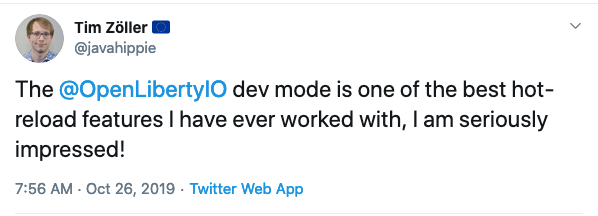
Open Liberty is designed to provide a smooth developer experience with a one-second startup time, a low memory footprint, and our new dev mode:
Open Liberty provides a full implementation of MicroProfile 3 and Jakarta EE 8. MicroProfile is a collaborative project between multiple vendors (including Red Hat and IBM) and the Java community that aims to optimize enterprise Java for writing microservices. With a four-week release schedule, Liberty usually has the latest MicroProfile release available soon after the spec is published.
Also, Open Liberty is supported in common developer tools, including VS Code, Eclipse, Maven, and Gradle. Server configuration (e.g., adding or removing a capability, or “feature,” to your app) is through an XML file. Open Liberty’s zero migration policy means that you can focus on what’s important (writing your app!) and not have to worry about APIs changing under you.
Deploy in containers to any cloud
When you’re ready to deploy your app, you can just containerize it and deploy it to OpenShift. The zero migration principle means that new versions of Open Liberty features will not break your app, and you can control which version of the feature your app uses.
Monitoring live microservices is enabled by MicroProfile Metrics, Health, and OpenTracing, which add observability to your apps. The emitted metrics from your apps and from the Open Liberty runtime can be consolidated using Prometheus and presented in Grafana.
Learn with the Open Liberty developer guides
Our Open Liberty developer guides are available with runnable code and explanations to help you learn how to write microservices with MicroProfile and Jakarta EE, and then to deploy them to Red Hat OpenShift.
Since its inception, the .NET Core configuration provider for Azure App Configuration has provided the capability to monitor changes and sync them to the configuration within a running application. We recently redesigned this functionality to allow for on-demand refresh of the configuration. The new design paves the way for smarter applications that only refresh the configuration when necessary. As a result, inactive applications no longer have to monitor for configuration changes unnecessarily.
Initial design : Timer-based watch
In the initial design, configuration was kept in sync with Azure App Configuration using a watch mechanism which ran on a timer. At the time of initialization of the Azure App Configuration provider, users could specify the configuration settings to be updated and an optional polling interval. In case the polling interval was not specified, a default value of 30 seconds was used.
public static IWebHost BuildWebHost(string[] args)
{ WebHost.CreateDefaultBuilder(args) .ConfigureAppConfiguration((hostingContext, config) => { // Load settings from Azure App Configuration // Set up the provider to listen for changes triggered by a sentinel value var settings = config.Build(); string appConfigurationEndpoint = settings["AzureAppConfigurationEndpoint"]; config.AddAzureAppConfiguration(options => { options.ConnectWithManagedIdentity(appConfigurationEndpoint) .Use(keyFilter: "WebDemo:*") .WatchAndReloadAll(key: "WebDemo:Sentinel", label: LabelFilter.Null); }); settings = config.Build(); }) .UseStartup<Startup>() .Build();
}
For example, in the above code snippet, Azure App Configuration would be pinged every 30 seconds for changes. These calls would be made irrespective of whether the application was active or not. As a result, there would be unnecessary usage of network and CPU resources within inactive applications. Applications needed a way to trigger a refresh of the configuration on demand in order to be able to limit the refreshes to active applications. Then unnecessary checks for changes could be avoided.
This timer-based watch mechanism had the following fundamental design flaws.
It could not be invoked on-demand.
It continued to run in the background even in applications that could be considered inactive.
It promoted constant polling of configuration rather than a more intelligent approach of updating configuration when applications are active or need to ensure freshness.
New design : Activity-based refresh
The new refresh mechanism allows users to keep their configuration updated using a middleware to determine activity. As long as the ASP.NET Core web application continues to receive requests, the configuration settings continue to get updated with the configuration store.
The application can be configured to trigger refresh for each request by adding the Azure App Configuration middleware from package Microsoft.Azure.AppConfiguration.AspNetCore in your application’s startup code.
public void Configure(IApplicationBuilder app, IHostingEnvironment env)
{ app.UseAzureAppConfiguration(); app.UseMvc();
}
At the time of initialization of the configuration provider, the user can use the ConfigureRefresh method to register the configuration settings to be updated with an optional cache expiration time. In case the cache expiration time is not specified, a default value of 30 seconds is used.
public static IWebHost BuildWebHost(string[] args)
{ WebHost.CreateDefaultBuilder(args) .ConfigureAppConfiguration((hostingContext, config) => { // Load settings from Azure App Configuration // Set up the provider to listen for changes triggered by a sentinel value var settings = config.Build(); string appConfigurationEndpoint = settings["AzureAppConfigurationEndpoint"]; config.AddAzureAppConfiguration(options => { options.ConnectWithManagedIdentity(appConfigurationEndpoint) .Use(keyFilter: "WebDemo:*") .ConfigureRefresh((refreshOptions) => { // Indicates that all settings should be refreshed when the given key has changed refreshOptions.Register(key: "WebDemo:Sentinel", label: LabelFilter.Null, refreshAll: true); }); }); settings = config.Build(); }) .UseStartup<Startup>() .Build();
}
In order to keep the settings updated and avoid unnecessary calls to the configuration store, an internal cache is used for each setting. Until the cached value of a setting has expired, the refresh operation does not update the value. This happens even when the value has changed in the configuration store.
Try it now!
For more information about Azure App Configuration, check out the following resources. You can find step-by-step tutorials that would help you get started with dynamic configuration using the new refresh mechanism within minutes. Please let us know what you think by filing issues on GitHub.
Governments exist to improve the lives of citizens, and the right technology is key to bringing that mission into a rapidly changing, digital world. This is nowhere truer than in the case of providing services for citizens who need accessible services. Digital transformation is a pressing issue for most governments, and the imperative to modernize workplaces and services brings with it an opportunity to empower every citizen with technology that is designed with accessibility and inclusiveness in mind.
As most government organizations know, citizen trust is incredibly difficult to build and, in a rapidly changing landscape, even harder to keep. The desire to build that trust is one aspect that is driving digital transformation among governments. There are already inspiring examples of digitally-driven government innovation underway, for instance in Riverside County, where employees are using Microsoft Power BI data analytics to make government spending more efficient and transparent. In fact, citizens are 58 percent more likely to trust a government institution that provides great digital experiences. When most people are accustomed to carrying out their day-to-day tasks in an efficient digital environment, from online banking to making purchases, they expect their experience with governments to be the same. When government organizations meet this demand head-on, providing more efficient, positive digital experiences for citizens, it drives that all-important citizen trust.
For Microsoft, AI is at the forefront of a commitment to developing technology that caters to diverse needs. Using Microsoft Cognitive Services, AI has the potential to break down barriers, particularly in the government space, where people of all abilities need to stay informed and make the most of civic life. Increasingly, citizens are demanding services that are digitally-driven and user-centric, and governments that can meet this demand with intelligent services are well-placed to gain citizen trust and create lasting, positive relationships.
The need to meet citizen demand is clear; that means embracing digital transformation as well as optimizing services for all citizens and making accessibility a top priority. Some cities are already making positive changes. With the help of cloud and AI platforms, people with disabilities in Moscow are using an urban mobility app called Moovit to help navigate public transit and gain independence. Moovit, along with Microsoft, is partnering with cities the world over to help create more accessible transit solutions. Azure Maps underpins these mobility-as-a-service solutions for governments, helping produce more accessible transit apps.
Still, acquiring new technology can take a backseat to merely keeping the lights on, especially in the face of tightening budgets and finite resources. Simply put, governments need to do more with less. Rather than acting as a barrier to digital transformation, the need to streamline processes and conserve resources should be seen as one of the most compelling motives to adopt a more modern, cloud-enabled approach. Digital transformation provides an opportunity to utilize more efficient technologies—doing more with less. The statistics are astonishing: AI and automation in the government space can save up to 96.7 million federal hours a year, amounting to a potential savings of 3.3 billion dollars. By embracing cloud computing and data analytics, governments can increase total revenues by 1 to 3 percent. And, all the benefits of digital transformation include the ability to maximize the accessibility of government offerings.
Creating a robust strategy for digital transformation is one way governments are innovating to meet the unique demands of their industry. These strategies aim to address key issues for governments, such as how to engage and connect with all citizens, how to modernize their workplaces, and how to enhance their services. When these key issues are addressed, a more digitally mature organization emerges, one that is able to provide better, more modern services, boost productivity, and keep citizens of all abilities engaged.
Multiyear collaboration will accelerate AT&T’s “public cloud first” internal transformation and deliver new customer offerings built on AT&T’s network and Microsoft’s cloud
Microsoft CEO Satya Nadella with AT&T Communications CEO John Donovan.
DALLASand REDMOND, Wash. — July 17, 2019— AT&T Communications and Microsoft Corp. are embarking on an extensive, multiyear alliance where the two companies will apply technologies, including cloud, AI, and 5G, to improve how people live and work today and in the future. Microsoft will be the preferred cloud provider for non-network applications, as part of AT&T’s broader public cloud first strategy, and will support AT&T as it consolidates its data center infrastructure and operations.
AT&T is becoming a “public cloud first” company by migrating most non-network workloads to the public cloud by 2024. That initiative will allow AT&T to focus on core network capabilities, accelerate innovation for its customers, and empower its workforce while optimizing costs.
As part of the agreement, AT&T will provide much of its workforce with robust cloud-based productivity and collaboration tools available with Microsoft 365, and plans to migrate non-network infrastructure applications to the Microsoft Azure cloud platform.
AT&T and Microsoft will together help enable a future of ubiquitous computing through edge technologies and 5G. AT&T was the first to introduce mobile 5G in the United States and expects to have nationwide 5G by the first half of 2020. Microsoft will tap into the innovation AT&T is offering on its 5G network, including to design, test, and build edge-computing capabilities. With edge computing and a lower-latency 5G connection enabled through AT&T’s geographically dispersed network infrastructure, devices can process data closer to where decisions are made. Recently, Microsoft and AT&T worked together to test an edge computing-based tracking and detection system for drones. With more connected devices and the growing demand for streaming content from movies to games, businesses and consumers require ever-increasing network capabilities.
The global scale of Microsoft’s Azure cloud and AT&T’s domestic 5G capabilities will enable unique solutions for the companies’ mutual customers. The companies will bring to market integrated industry solutions including in the areas of voice, collaboration and conferencing, intelligent edge and networking, IoT, public safety, and cyber security. The companies already have joint enterprise solutions for networking, IoT, and blockchain in market, and expect to announce additional services later in 2019. The two companies envision scenarios with 5G enabling near-instantaneous communications for a first responder who is using AI-powered live voice translation to quickly communicate with someone in need who speaks a different language.
“AT&T and Microsoft are among the most committed companies to fostering technology that serves people,” said John Donovan, CEO, AT&T Communications. “By working together on common efforts around 5G, the cloud, and AI, we will accelerate the speed of innovation and impact for our customers and our communities.”
“AT&T is at the forefront of defining how advances in technology, including 5G and edge computing, will transform every aspect of work and life,” said Satya Nadella, CEO, Microsoft. “The world’s leading companies run on our cloud, and we are delighted that AT&T chose Microsoft to accelerate its innovation. Together, we will apply the power of Azure and Microsoft 365 to transform the way AT&T’s workforce collaborates and to shape the future of media and communications for people everywhere.”
In addition to their technology collaboration, AT&T and Microsoft will work together on technology-enabled approaches and solutions aimed at social good. Both companies have been focused on addressing sustainability, accessibility, and community challenges such as homelessness and see an opportunity to support each other’s work to address urgent social needs, including Microsoft’s affordable housing initiative and the AT&T Believes campaign.
About AT&T Communications
We help family, friends and neighbors connect in meaningful ways every day. From the first phone call 140+ years ago to mobile video streaming, we innovate to improve lives. We have the nation’s fastest wireless network.* And according to America’s biggest test, we have the nation’s best wireless network.** We’re building FirstNet just for first responders and creating next-generation mobile 5G. With DIRECTV, DIRECTV NOW and WatchTV, we deliver entertainment people love to talk about. Our smart, highly secure solutions serve nearly 3 million global businesses – nearly all of the Fortune 1000. And worldwide, our spirit of service drives employees to give back to their communities.
AT&T products and services are provided or offered by subsidiaries and affiliates of AT&T Inc. under the AT&T brand and not by AT&T Inc. Additional information about AT&T products and services is available at about.att.com. Follow our news on Twitter at @ATT, on Facebook at facebook.com/att and on YouTube at youtube.com/att.
Cautionary Language Concerning Forward-Looking Statements
Information set forth in this news release contains financial estimates and other forward-looking statements that are subject to risks and uncertainties, and actual results might differ materially. A discussion of factors that may affect future results is contained in AT&T’s filings with the Securities and Exchange Commission. AT&T disclaims any obligation to update and revise statements contained in this news release based on new information or otherwise.
This news release may contain certain non-GAAP financial measures. Reconciliations between the non-GAAP financial measures and the GAAP financial measures are available on the company’s website at https://investors.att.com.
*Based on analysis by Ookla® of Speedtest Intelligence® data average download speeds for Q2 2019. **GWS OneScore, September 2018.
About Microsoft
Microsoft (Nasdaq “MSFT” @microsoft) enables digital transformation for the era of an intelligent cloud and an intelligent edge. Its mission is to empower every person and every organization on the planet to achieve more.
For more information, press only:
Microsoft Media Relations, WE Communications for Microsoft, (425) 638-7777, [email protected]
Note to editors: For more information, news and perspectives from Microsoft, please visit the Microsoft News Center at http://news.microsoft.com. Web links, telephone numbers and titles were correct at time of publication, but may have changed. For additional assistance, journalists and analysts may contact Microsoft’s Rapid Response Team or other appropriate contacts listed at http://news.microsoft.com/microsoft-public-relations-contacts.
This week Amazon announced their new A1 arm64 EC2 Instances powered by their arm64 based Graviton Processors and, with a minor delay, the shiny new Fedora 29 for aarch64 (arm64) is now available to run there too!
Details on getting running on AWS is in this good article on using AWS tools on Fedora article and over all using Fedora on the AWS arm64 EC2 is the same as x86_64.
So while a new architecture on AWS is very exciting it’s at the same time old and boring! You’ll get the same versions of kernel, same features like SELinux and the same versions of the toolchain stacks, like the latest gcc, golang, rust etc in Fedora 29 just like all other architectures. You’ll also get all the usual container tools like podman, buildah, skopeo and kubernetes, and orchestration tools like ansible. Basically if you’re using Fedora on AWS you should be able use it in the same way on arm64.
Getting started
The initial launch of A1 aarch64 instances are available in the following four regions: US East (N. Virginia), US East (Ohio), US West (Oregon), Europe (Ireland). Direct links to launch the Fedora aarch64 AMIs directly are available here on the Fedora Cloud site.
Getting help
The Fedora support for aarch64 is very robust. It’s been widely used and tested across a number of platforms but of course with new users and new use cases will pick up issues that we’ve yet to encounter. So what is the best way to get help? If you’re having a crash in a particular application it should be reported in the usual way through RH Bugzilla, we have an ARMTracker tracker alias to block against to help identify Arm issues. For assistance with Arm specific queries and issues the Fedora Arm mailing list and we have the #fedora-arm IRC channel on Freenode.
Known issues
We have one known issue. The instance takes a while to get started, it can be up to 5 minutes. This is due to entropy and has been a general problem in virtual environments, across all architectures. We’re working to speed this up and it should be fixed soon. Once things are up an running though everything runs as expected.
Upcoming features
There will be Fedora 29 Atomic host coming in the next Two Week Atomic release, we unfortunately missed their release this time by a small window but it’ll be available in about 2 weeks with their next release and will appear on the site once released. We can’t let you have all the fun at once
Some people say ‘friends don’t let friends right click publish’ but is that true? If they mean that there are great benefits to setting up a CI/CD workflow, that’s true and we will talk more about these benefits in just a minute. First, let’s remind ourselves that the goal isn’t always coming up with the best long-term solution.
Technology moves fast and as developers we are constantly learning and experimenting with new languages, frameworks and platforms. Sometimes we just need to prototype something rather quickly in order to evaluate its capabilities. That’s a classic scenario where right click publish in Visual Studio provides the right balance between how much time you are going to spend (just a few seconds) and the options that become available to you (quite a few depending on the project type) such as publish to IIS, FTP & Folder (great for xcopy deployments and integration with other tools).
Continuing with the theme of prototyping and experimenting, right click publish is the perfect way for existing Visual Studio customers to evaluate Azure App Service (PAAS). By following the right click publish flow you get the opportunity to provision new instances in Azure and publish your application to them without leaving Visual Studio:
When the right click publish flow has been completed, you immediately have a working application running in the cloud:
Platform evaluations and experiments take time and during that time, right click publish helps you focus on the things that matter. When you are ready and the demand rises for automation, repeatability and traceability that’s when investing into a CI/CD workflow starts making a lot of sense:
Automation: builds are kicked off and tests are executed as soon as you check in your code
Repeatability: it’s impossible to produce binaries without having the source code checked in
Traceability: each build can be traced back to a specific version of the codebase in source control which can then be compared with another build and figure out the differences
The right time to adopt CI/CD typically coincides with a milestone related to maturity; either and application milestone or the team’s that is building it. If you are the only developer working on your application you may feel that setting up CI/CD is overkill, but automation and traceability can be extremely valuable even to a single developer once you start shipping to your customers and you have to support multiple versions in production.
With a CI/CD workflow you are guaranteed that all binaries produced by a build can be linked back to the matching version of the source code. You can go from a customer bug report to looking at the matching source code easily, quickly and with certainty. In addition, the automation aspects of CI/CD save you valuable time performing common tasks like running tests and deploying to testing and pre-production environments, lowering the overhead of good practices that ensure high quality.
As always, we want to see you successful, so if you run into any issues using publish in Visual Studio or setting up your CI/CD workload, let me know in the comment section below and I’ll do my best to get your question answered.
This year at Smart City Expo World Congress 2018, Microsoft will join global leaders to share innovative solutions focused on the digital transformation of cities. This is the second in a series of blogs about how Microsoft provides the intelligent services and trusted platform for partner solutions that empower cities to be more secure, prosperous, and sustainable. Join Microsoft and its partners at SCEWC 2018.
Approximately 55% of the world’s inhabitants currently live in urban areas, and this is expected to increase to 68%—more than 6 billion people—by 2050. In direct correlation, the number of cars on the road is projected to more than double to over 2 billion by 2050, further exacerbating crowding and traffic concerns. As cities grow and become more densely populated, urban planners face the challenge of ensuring citizens have affordable, sustainable transportation options that meet their needs. This will put significant pressures on cities, which already consume about 75% of global primary energy, yet must determine how to keep millions of citizens moving via both public and private transportation.
Fortunately for today’s citizens, the future of urban mobility has never been brighter.
Imagine a world where autonomous vehicles travel the streets and highways. Cities connect citizens to multi-modal forms of transport, such as trains, buses, and ride-sharing, with intuitive journey planning and payment systems. Rich data from smart infrastructure, transportation networks, and connected vehicles will empower city planners, transit agencies, and other urban leaders to make progress in urban mobility for generations to come. Cities will have the capability to adapt in real time to traveler preferences and build dynamic fare models, as well as proactively manage infrastructure and vehicle traffic flow by anticipating issues before they occur and identifying emerging trends.
This smart mobility future is becoming more of a reality as cities and urban leaders turn to digital transformation.
Microsoft’s vision for enhancing urban mobility
Microsoft and its partners are developing cutting-edge technologies that empower cities to establish intelligent transportation networks and optimize urban mobility for citizens—and it all starts with data. Solutions from Microsoft and its partners help cities build smart infrastructure by connecting billions of IoT-supported devices at the edge on a secure platform that extends from the silicon to the cloud.
Once connected, this vast network of devices empowers cities to generate the rich data required to apply artificial intelligence (AI) and uncover insights they can use to take action. By aggregating IoT and location data while utilizing secure cloud technology, cities and transit agencies can use AI to identify congestion and reroute traffic, alert citizens to parking options, ensure consistent transit vehicle operation with predictive maintenance, and develop programs to incentivize transit use. They can even improve smart energy management by optimizing electrical vehicle charging with data gleaned from smart grids.
Microsoft’s Connected Vehicle Platform, supported by industry-leading partners, utilizes data to take cities to a new level of urban mobility. Telematics and predictive services improve the driver experience using telemetry data to deliver predictive maintenance notifications. Consumers can stay connected with in-vehicle conference solutions, productivity tools, and intelligent personal assistant support. Advanced driver assistance systems increase safety and performance by delivering road and environment data to the driver or autonomous driving system in real time, all while utilizing location services and data to navigate, search, route and improve travel time.
Partners are already helping cities reimagine transportation with our powerful technologies
Microsoft partner Cubic Transportation Systems is a leading integrator of payment and information technology that connects more than 38 million commuters and travelers globally every day, processing 24 billion transactions annually. Cubic builds intelligent solutions on a versatile platform for mobility management, with a focus on transportation agencies in cities responsible for managing road networks and public transportation. Cubic works to create the easiest ways for citizens to travel and pay with Microsoft, taps into the cloud to securely manage data, and supports the flexibility and scalability customers need to respond in a constantly changing environment.
Microsoft’s partner PwC is another great example of what the future of smart cities could look like. Their capabilities span the diverse needs of modern cities and their citizens across urban mobility and through infrastructure, data, analytics, as well as collaborative planning and public safety. As a professional services industry leader, PwC worked with the province of Ontario to unite 11 transit agencies via PRESTO, a program that helped citizens travel more efficiently through the system with one payment card. By taking advantage of Microsoft’s powerful, scalable data platform and Power BI visualizations, PwC empowered the province to convert analytics into a decision and action platform and make the changes (like in payments) that customers wanted.
Connect with us at SCEWC 2018 to learn more about enhancing urban mobility in your city