Posted on Leave a comment

Celebrate Dec. 5-11 CSEd Week with Microsoft Education

Computer science (CS) shapes how people live and work. From designing mobile games played by millions to exploring new renewable energy solutions, technology is transforming our world, and to build technology solutions, you need to know computer science. Its prevalence and value make CS an important instructional topic in all K-12 classrooms as well as a potential career opportunity for high school graduates. Research indicates that coding activities result in higher test scores in reading and math, and the number of computer science job openings is expected to grow 15% from 2021 to 2031 according to the U.S. Bureau of Labor Statistics. Realizing the transformative role of computer science begins with K-12 education and increasing student interest at a young age. Microsoft is committed to providing equitable, accessible, and engaging computer science education experiences for all students.

From December 5-11, classrooms around the world will celebrate Computer Science Education Week (CSEdWeek) by participating in an Hour of Code. The goal of this global call-to-action is to inspire K-12 students to explore and learn computer science. Packed with exciting opportunities for students to exercise their creativity, CSEdWeek and Hour of Code are two of the largest education events with millions of participants worldwide.

To celebrate this year’s CSEdWeek and Hour of Code, Microsoft Education is leading the charge with exciting, new learning resources that are guaranteed to energize students and educators. Whether it is building retro-style games in MakeCode’s Code a Carnival or using code to solve mysterious puzzles in Minecraft’s new Hour of Code: Escape Estate, students will have fun, gain valuable skills, and learn through engaging activities. Plus, these resources include embedded training and support so that everyone succeeds. Educators can also develop their own CS skills during collaborative events like Flip’s Creating Equity in Computer Science and this live event with Minecraft gamechangers!

Kick off CSEdWeek and Hour of Code with Microsoft Education!

Use coding to solve puzzles in Minecraft Hour of Code: Escape Estate

Escape from Dr. Breakowski’s mysterious mansion by dawn in an all-new Hour of Code tutorial and free demo lesson from Minecraft: Education Edition. With block-based and Python coding pathways for novice and expert coders alike, Escape Estate invites students to use code to solve puzzles that unlock secret passageways, hidden clues, and trap doors. It’s a fun, easy-to-teach lesson designed to teach anyone the basics of computational thinking in under an hour.

Teach with Hour of Code

Minecraft Hour of Code offers resources for educators including lesson plan and facilitation guides, a free teacher training on Microsoft Learn, solution guide for each coding challenge, and a walkthrough video. You can even download PowerPoint slides to introduce Hour of Code: Escape Estate to your learners and Digital flyers for promoting Hour of Code in your school or organization. Students will receive the Hour of Code completion certificate at the end of the lesson.

  • Educators already licensed to use Minecraft: Education Edition can access the Escape Estate world though the main menu in the newest version of the application (download here). Select “New & Featured” and then choose “Hour of Code (Escape Estate).”
  • Download a free demo to join in the experience if you don’t have a license.

Register for Free Hour of Code Student Workshop

If you’re totally new to Minecraft and coding, sign up for a Live Workshop to have a guest teacher facilitate Hour of Code virtually for your class. These engaging 75-minute, live events are run by expert educators who will provide you and your class with all the necessary knowledge to successfully navigate Escape Estate. Register now to reserve a spot so that you and your class aren’t trapped in the mansion forever. The workshops are happening at multiple times each day during CSEdWeek December 6-8, 2022.

Build CS knowledge and connect with experts during Flip live events
Explore issues like equity in computer science and meet the professionals that make Minecraft a playful learning experience on Flip throughout computer science education week. Informative and insightful, Flip events offer a chance to see how coding and CS can meaningfully impact everyone’s lives. Learn about the scheduled events and join the discussion by registering today.

Build a better world with code

Meet Lydia Winters and Cory Scheviak, who spend their days at Mojang Studios in Stockholm, Sweden, working on Minecraft. They’re both passionate about using the power of play to build a better world and the creativity of code to design features for the bestselling game of all time.

  • Suggested Audience: Educators, parents, and students
  • Date/Time: December 8, 2022 at 10:00 AM PST
  • Registration

Creating equity in computer science

Computer Science should be an integral part of all K-12 student experiences. Join us as we discuss the importance of computer science education with industry professionals, educators, and non-profits who are making this happen every day.

  • Suggested Audience: Educators, clubs, organizations, and professionals
  • Date/Time: December 5, 2022 at 3:00 PM PST
  • Registration

Design exciting games with Code a Carnival and Wakanda Forever from MakeCode

Give students the chance to strengthen their coding skills by designing video games with MakeCode Arcade. Built with both novices and experts in mind, MakeCode Arcade introduces computer science concepts like sequences and loops using blocks that snap together to create code or text-based programming. To celebrate this year’s CSEdWeek and Hour of Code, MakeCode is offering two new free engaging and entertaining experiences which are already available for use in the classroom.

Code a Carnival is MakeCode’s new collection of video game projects. Students will be introduced to game design as they create carnival activities like “Whack-the-Mole” and “Bustin’ Balloons.” They can also build alongside millions of other coders as they create multiplayer versions of games to play with their friends. Plus, Code a Carnival comes with teacher-ready resources like lesson plans and introductory PowerPoint slides.

If there are Black Panther fans in your classroom, give them the opportunity to learn coding fundamentals through an action-packed activity inspired by Marvel Studios’© Black Panther: Wakanda Forever. Letitia Wright, the actress who plays Wakanda’s lead technologist Shuri, introduces why learning how to code is essential for becoming an expert scientist like her character.

Use the new Wakanda Forever tutorial and the corresponding lesson plan to inspire students to help Shuri, Okoye, and Riri Williams escape Namor.

Learn alongside the Code Ninjas

Look for exciting collaborations with Code Ninjas throughout Computer Science Education Week. They will be hosting a Carnival of Code with daily dress themes like “cozy coding in your pajamas” as well as activities from the MakeCode Hour of Code 2022 website. There will even be projects that incorporate Makey Makey so that students can design their own controllers and learn about physical computing with MakeCode.

Microsoft Education has everything necessary to bring Hour of Code 2022 to life during CSEdWeek. From an engaging collection of Hour of Code learning experiences to events that inspire, students will be excited to explore the possibilities that computer science has to offer.

Explore more fun and engaging ways to bring computer science into the classroom in these posts:

Posted on Leave a comment

Microsoft and PMI announce certifications for university students to drive employability

Headshot of article author Ryan Cunningham

Microsoft and the Project Management Institute (PMI) are partnering to announce the Power Platform University Hub. The University Hub teaches students how to solve a wide range of business problems with low-code—one of the fastest growing technologies in the job landscape today.

Technology has become a critical part of almost every element of an organization’s operations. This means huge demand for employees who can innovate to help solve today’s business problems like how to streamline processes, gain efficiencies, improve business intelligence, and ultimately drive digital transformation across the organization. Historically organizations have relied on developers and IT to build the solutions they need; however, the need for developers is growing much faster than the number of new developers entering the workforce. Low-code platforms mean that organizations no longer need to be dependent on professional developer skills for all of their solutions. Gartner® forecasts that by 2025, 70 percent of new enterprise applications will use low-code technologies.1

Low-code student developers create business solutions

The Power Platform University Hub provides students with an integrated curriculum focused on the power of using low-code platforms to accelerate digital transformation. Students in the program are granted access to a learning journey that includes more than a dozen courses. Courses span topics like low-code development and analytics tools. Students who successfully complete the curriculum will receive two certifications: a PMI Citizen Developer™ Practitioner Micro-Credential and a PL-100 Microsoft Power Platform App Maker certification.

Training more students in low-code tools addresses the existing gap that has resulted from a shortage of pro-code developers and the growing need for organizations and companies to be able to create business solutions without relying solely on overstretched IT departments. To date, 28 universities have successfully participated in a pilot program and set more than 1,500 low-code student developers on their path to building applications for their future companies.

o	The courses page of the Power Platform University Hub showing the curriculum of the integrated learning journey across PMI and Microsoft Power Platform content. The left-hand menu also shows the other available pages: certifications and user guide.

“At PMI we are committed to helping equip the next generation of leaders with tools that will enable them to excel in the workforce,” said Sam Sibley, Global Head of Citizen Developer at PMI. “The entire citizen development movement is a catalyst for faster change and is revolutionizing the way we work, as well as the way we are able to create social impact. Which is why we are excited to work with Microsoft to help enable students across the globe with the skills they need to thrive, both in the workplace and when impacting social change.”

The Power Platform University Hub helps educational institutions prepare their students to enter the workforce and make their students more attractive to potential employers by offering a self-guided learning journey across both the managerial aspect of accelerating and managing adoption of low-code solutions with best practices in mind, as well as the technical knowledge needed to build apps, data visualizations, chat bots, websites, and automation with low-code efficiently and effectively. These skills are covered through interactive learning paths paired with hands-on labs and evaluated through a rigorous certification process.

“The Power Platform University Hub provides an excellent training environment with certified courses which leverages Project Management Institute’s citizen development body of knowledge and Microsoft’s Power Platform. This allows non-technical students to create apps, software solutions and even enterprise-grade applications without necessarily having to learn to code,” said Dr. Noel Carroll, Associate Head of Learning and Founder of the Citizen Developer Lab at the University of Galway. “I am extremely passionate about building student confidence in using digital technology and empower them to question, create, experiment, develop, and learn. In this digital world, we need to ensure we are creating an inclusive society and learning environment. Diversity of opinions and experiences are a critical part of digital innovation and therefore empowering students through education is an important enabler for them to play a role in digital transformation across society and business. The Power Platform University Hub supports us to achieve this.”

Sign up to give your students access to the University Hub

Drive employability for your students by using the Power Platform University Hub to help them become certified low-code professionals and their future companies, industries, and communities realize the full potential of digital transformation. Sign up today by having a faculty member complete the onboarding form. Once your form submission has been processed, your school’s Microsoft accounts will be given access to the Power Platform University Hub so your students can embark on their low-code learning journeys.


1Gartner, Harness the Disruptive Powers of Low-Code: A Gartner Trend Insight Report, Jason Wong, Kyle Davis, 18 July 2022

GARTNER is a registered trademark and service mark of Gartner, Inc. and/or its affiliates in the U.S. and internationally and is used herein with permission. All rights reserved.

Posted on Leave a comment

It’s National STEM Day: Explore ways to NOV8 your classroom

November 8th is National STEM Day and Microsoft is excited to help you and your students celebrate! National STEM Day was founded in 2015 to encourage students to pursue careers in the fast-growing fields of science, technology, engineering, and mathematics (STEM). Celebrated on November 8th each year, it is an opportunity to introduce students to passions and careers they might not otherwise know exist. Fun fact: November 8th isn’t a randomly chosen day, Nov8 is a numeronym, pronounced: “innovate.”

Whether you want to explore an immersive learning experience with Minecraft: Education Edition or provide opportunities for students to innovate and solve real issues locally and globally in the Imagine Cup, Microsoft can help you inspire your students to embrace STEM.

Representation and encouragement matter

Historically, women and people of color are vastly underrepresented in STEM careers. Girls Who Code and Logitech found that teachers had the second greatest influence (50%) in helping people pursue a technology career, only after a family member or friend (60%). Incorporating STEM opportunities into classroom instruction and highlighting diversity in STEM fields can make a difference in access for all.   

A fast-growing and ever-changing field

The U.S. Bureau of Labor Statistics projects a 10.8% increase in STEM fields between 2021 and 2031, where non-STEM occupations are only projected to grow by 4.9%. As a result, qualified STEM careers will be in high demand. STEM presents a vast number of exciting opportunities for students to blend their passions with their future careers. Those who love the outdoors may be interested in environmental engineering, working to preserve waterways, or wildlife. If students are interested in the effects of climate on weather patterns they could become meteorologists or storm chasers!

Microsoft can support those future skills now by giving students access to tools they’ll need to pursue these careers. For example, students who love video games can begin their journey in MakeCode Arcade and develop skills to help them pursue a future career in game design.

Embracing STEM in the classroom

STEM is very hands-on, accessible, and engaging. It can be incorporated into any subject or classroom because it’s more than a subject area, it’s an invaluable mindset. Approaching learning from a STEM lens fosters curiosity, creativity, problem-solving, and critical thinking that can be applied to any content area making cross-curricular connections endless.

Educator Opportunities

Microsoft is committed to supporting educators by providing a variety of entry points for embracing STEM regardless of previous experience. The Learn Educator Center offers free learning pathways, modules, and resources to help you grow professionally and innovate your classroom.  

On Learn the Hacking STEM collection is a curated group of standards-based middle school lessons written by educators for educators. They are inquiry and project-based activities that help students visualize data across science, technology, engineering, and math (STEM) curriculum in exciting ways.

Student Opportunities

Engaging in STEM encourages students to explore, collaborate, and innovate their ideas. What is more fun than finding a new solution to a real problem? Students use peer and real-world feedback to improve their process, design, or solution, helping them develop important skills for their futures.

Students can utilize Learn Student Hub to explore STEM careers or learn new skills to support their interest in STEM. They can learn valuable skills for free like GitHub Student Developer, Visual Studio Code or even become a Microsoft Learn Student Ambassador! They can also earn Microsoft Certifications that start with foundational skills, then additional topics are covered ranging from Azure to AI, to data analytics and cybersecurity, preparing them for the future.

Developing sustainable solutions with Minecraft Education Edition

John Dewey High School in Brooklyn, New York, was already incorporating projects that linked students with their local community and the natural environment. So, when the school decided to do a cleanup of Coney Island Creek, they immediately saw an opportunity to create a STEM collaborative. They reached out to the Minecraft Club which were already working on a sustainable urban design challenge.

“We have embraced tools like Minecraft in the classroom that help build the skills needed for young people to thrive: to express their ideas, learn confidently, and explore issues that matter to them and their communities.” – Heather Adelle, Principal, John Dewey High School

Learn how John Dewey HS and the NYCDOE are inspiring sustainability education and building career pathways in the green economy with tools like Minecraft. 

Minecraft Education Edition supports STEM skills like creative problem-solving, collaboration, and critical thinking in an immersive digital environment. Using Minecraft, John Dewey’s students were able to recreate the estuary environment and develop innovative solutions to environmental problems like pollution that threaten the oyster reefs in Brooklyn.

Microsoft makes it easy to get started using Minecraft Education Edition in the classroom. We offer training for educators from the basics of getting started to more focused content, including coding, computer science, and esports. Minecraft also provides over 600 standards-aligned ready-to-use lessons and worlds to explore.

Use these free training modules on Learn to get started.

Solving real-world issues with a global community

Microsoft supports students in their quest to create innovative solutions for impact with their annual global technology and innovation competition for students, the Imagine Cup. Over the past 21 years, more than 2 million student competitors have signed up to build and learn together, make a difference in their communities, and innovate for impact. Last year’s winner, the V Bionic team, created ExoHeal, an exoskeleton aimed at providing rehabilitation to patients with hand paralysis by effectively retraining and recovering their motor functions. Their device is 30% more effective than existing devices and solved the problems lacking in the already existent rehabilitation devices by being more precise, portable, quick, and responsive. 

The goal of Imagine Cup is to empower every student on the planet to achieve more. Young developers are invited to submit their original technology solutions utilizing Microsoft Azure for a chance to win cash, prizes, and mentoring. All students need is a passion for making positive change. Once they form an Imagine cup team, Microsoft provides training on creating a successful project for a hackathon or competition. Microsoft also provides $100 USD cloud credit and free downloadable developer tools for their project with Azure for Students.

When student teams compete in the Imagine Cup, they become part of a worldwide community of like-minded students and mentors. Encourage interested students to register as a team for the 2023 Imagine Cup now until December 2023 or inspire your students while watching the Imagine Cup World Championship in May 2023! 

Integrating STEM into the classroom can be an engaging and easy way to help students develop skills and mindsets for college and career readiness. Innovate the classroom using Microsoft’s exciting resources and opportunities for STEM teaching and learning

Posted on Leave a comment

Research tells us the world needs dyslexic thinking. Here’s what we and our partners are doing about it

The world needs dyslexic thinking, an approach to problem solving, assessing information, and learning. Research tells us that dyslexic thinkers have the exact skills needed for the workplace of today. The Value of Dyslexia report points out that new roles and enhanced tasks will be created across industries that closely match the strengths of dyslexic thinking. These strengths often include:

  • Leadership and social influence
  • Creativity
  • Complex problem-solving
  • Analytical thinking
  • Emotional intelligence

This is why we have partnered with global charity Made By Dyslexia to help every educator identify, support, and empower every learner with dyslexia.

In honor of Dyslexia Awareness Month, alongside our partner Made by Dyslexia, New York City Mayor, Eric Adams, and The NYC Department of Education, we are excited to celebrate dyslexic thinking with some important announcements.

100,000 teachers trained

Thanks to Mayor Eric Adams and his team, New York City (NYC) is leading the world in harnessing the limitless potential of dyslexic thinking in every school. Today they celebrate all their teachers being trained in dyslexia, in less than 6 months. Understanding that dyslexic thinking skills—creativity and inventiveness—are fundamental to the fabric of the future, NYC is the first city in the world to train every educator to spot, support, and empower every learner with dyslexia.

Teachers can learn more about dyslexia awareness and teaching using free and engaging self-paced online training on Microsoft Learn. These training modules, used to train all 100,000 NYC teachers, feature dyslexia experts from world-leading schools and offer tried and true methodologies that work for dyslexic learners. NYC’s program for schools also includes structured literacy, dyslexia screening, and dyslexia specialist support pilots.

“We’ve known how to support dyslexia for decades, and we’ve known that without support these children enter a spiral of failure, but nothing has been done. There, however, is a very simple solution to this big problem; we need to train all teachers to spot, support and empower dyslexic students who are in every classroom, around the world. And we need to do it at speed… just like New York City.” -Kate Griggs, CEO & Founder of Made By Dyslexia

Learn Dyslexia campaign

There are more than 7 billion people on earth and 1 in 5 of them are dyslexic. While their skills are recognized by the World Economic Forum as the skills every workplace needs, many of these skills are not spotted or supported in schools. Findings in Made By Dyslexia’s new report, “The School Report”  reveal that over half of schools globally fail to understand dyslexic challenges. Also, only 1 in 10 teachers has a good understanding of dyslexic strengths, leaving 80% of learners with dyslexia with support that is average, poor, or non-existent. This is why Made by Dyslexia is launching their Learn Dyslexia campaign.

Following the success of NYC, this campaign calls for every school globally to give teachers a “day for dyslexia”—time to skill-up using the free dyslexia training on Microsoft Learn. This online training is comprised of multiple modules which cover dyslexia awareness, dyslexia teaching, and most recently added dyslexia and technology.

In the Dyslexia Awareness training module, learn how to spot, support, and empower learners with dyslexia in the classroom:

The Dyslexia Teaching training module provides strategies to transform teaching and learning:

And finally, the newest module Dyslexia and Technology offers opportunities to explore tech tools to support learners through building on their strengths, as well as supportive technology to mitigate challenges learners with dyslexia often face.

See what teachers are saying about the dyslexia training available on Microsoft Learn:

  • “It is so outstanding! Ticks all the boxes—keeps your attention, factually strong, easy to digest and most importantly incredibly effective.”
  • “The training opened my eyes to a whole new way of teaching. It’s also opened our eyes to those children who potentially may have been struggling but we haven’t yet noticed.”
  • “It’s really deepened my understanding of dyslexia. How many intertwining elements there are—it’s not just the reading and the writing.”
  • “The Dyslexia Awareness training is great for all teachers, whether they are newly qualified, nearly qualified or highly experienced.”

Read our customer stories to learn more about how Microsoft Education solutions support and help learners with dyslexia thrive.

The World Dyslexia Assembly 2023

The World Dyslexia Assembly 2023, a global celebration of Dyslexic Thinking, will take place at New York City’s David Geffen Hall, Lincoln Center on April 3, 2023. This Assembly will feature engaging programming and speakers across industries including spies, space scientists, star athletes, and other special guests.  

“New York is where creative legacies are made. It’s where big ideas come together and synthesize into something unstoppable. So where better to stage our next World Dyslexia Assembly – our unparalleled social movement and event series, which is building the ultimate alliance of game-changers across the globe.” -Kate Griggs, CEO & Founder of Made By Dyslexia

Begin your Learn Dyslexia journey today

Join us and Made By Dyslexia in creating a more inclusive world that embraces those who think differently.

Start your Learn Dyslexia journey with the free, online dyslexia training on Microsoft Learn and exploring Made By Dyslexia’s resources for teachers.

Posted on Leave a comment

LatinExplorers: Learning Hispanic heritage in Minecraft

With challenges facing classrooms worldwide, it’s essential to find new ways to engage and inspire young people to take an active role in developing leadership skills. Educators and families can support students as they learn how to make a positive change in their communities. In celebration of Hispanic Heritage Month, Minecraft: Education Edition offers a chance to have some fun along the way.

“Minecraft is one of the games that we encourage our kids to play because they can explore, learn, and collaborate with other friends. We saw the opportunity to showcase real-world Hispanic heroes utilizing one of the world’s most popular games—and one in which my children love to play—to reach a new generation of leaders.” – Antonio Tijerino, President and CEO of the Hispanic Heritage Foundation

Minecraft Education has partnered with the Hispanic Heritage Foundation to create LatinExplorers: A Hispanic Heritage Journey! We have turned Latino leaders into Minecraft characters to inspire, guide, and equip young people to become changemakers in an immersive learning experience.

Helping students understand the importance of humanitarianism  

Players will explore the actions of impactful Latino leaders through three powerful game narratives about climate, community, and creativity. Taking what they’ve learned into the outside world, students can build leadership skills, becoming bolder and more innovative problem solvers.

With the recent hurricanes that have devastated communities in Puerto Rico and Florida, the learning experience takes on an especially critical opportunity to connect passion to action. In the Culture and Care section, young learners explore a community that has been decimated by a hurricane and needs help. Players work together with a Minecraft character based on real-life Dr. Joe Greer, a Cuban physician and advocate for health equity, to help the citizens build temporary shelters to help protect against the sun and rain. Players will then deliver supplies and basic necessities to the local community. Humanitarian aid is important because it provides life-saving assistance to people affected by conflicts, disasters, and poverty. Teachers can connect current events and gameplay to help students better understand humanitarianism efforts and to think about how they can help those in need today.

In-game Hispanic representation  

The game will also share the Hispanic culture with the entire world to create a more understanding, collaborative, and unified global community by embracing diversity, identity, and inclusion. One of the most important drivers in LatinExplorers is creating an opportunity within Minecraft for players to see themselves in the game. Parents and teachers have shared the pride that students feel when seeing their culture in the game and NPCs that share their language and customs. Other parents have identified the topics raised in the game as critical to the Hispanic community.

“When a video game addresses social determinants of health and other challenges that Latinos face in this country, you know that a lot of thought was put into it.” – Lucia Zegarra, healthcare provider and parent

Meet the game characters based on real-life Latino leaders  

In the game, players meet characters based on Latino leaders who are doing extraordinary things in climate science, community services, and the creative arts. Through their effort and commitment, they are inspiring a new generation of leaders in the Hispanic community.

Dr. Eligio Garcia Serrano works to preserve the monarch butterfly and address climate change. Students can celebrate the Day of the Dead in Michoacán, Mexico, helping to create an ofrenda. Players can follow Dr. Serrano to explore the local Monarch Butterfly Biosphere Reserve, and to learn why the monarchs are so important to the local culture and what actions are being taken to preserve them.

Dr. Pedro Jose Greer is a physician who helps the homeless and demonstrates care and humanitarianism. Players work to deliver critical supplies and basic necessities alongside Dr. Greer to a town recently hit by a hurricane. Students can also help build a temporary shelter and coordinate the community’s emergency response.

Yehimi Cambron is a muralist/artists/activist focusing on social justice through creativity. Yehimi will introduce the art area of the in-game learning hub so students can explore available activities. Players can use their journey and observations to creatively explore their feelings and find their own voice.

Expand your lessons with game-based learning with Minecraft  

LatinExplorers is available for free in both Minecraft: Education Edition and Bedrock via the Minecraft Marketplace in 29 languages. If you don’t have Minecraft Education Edition, download a free trial today. You can also learn about licensing options that are available.

To help teachers create a lesson plan, LatinExplorers comes with an educator guide. It includes other activities for workforce development, a slide deck, a family toolkit to make sure everyone can participate, and a facilitator guide. Young learners will also learn about pathways to tech fields! Find everything you need to teach with LatinExplorers here

To get started, check out the new 1-hour Microsoft Learn Minecraft 101 training to learn the basics.

Posted on Leave a comment

Introducing Microsoft’s 2022-2023 Showcase Schools

In the last few years, schools around the world have experienced an incredible pace of change. As challenging as this time has been, it has also opened the door to an unprecedented opportunity to transform education programs. Institutions are now shifting their focus to a truly learner-centered approach using technology and new learning tools.

Today we recognize the achievements of those institutions that make up the new and returning cohort of the 2022-2023 Microsoft Showcase School program. This program represents a global community of K-12 schools that harness digital transformation to create immersive and inclusive experiences that inspire lifelong learning and empower students to achieve more.

These Showcase Schools are distinguished by their commitment to education transformation and have leveraged Microsoft’s Education Transformation Framework to drive a culture of learning, innovation, and continuous improvement. Their hard work is reflected in improved learning outcomes for their students and an increased focus on future-ready skills.

Listen to the podcast “Leading Innovation: What school leaders are thinking, saying, and doing today” to hear from Showcase School leaders about challenges they faced and how they overcome them.

The vibrant online communities of Showcase Schools come together to tackle challenges, celebrate successes, share learnings, and try new solutions using Microsoft Teams. These communities are also supported by Microsoft and our partners through capacity building, transformation guidance, amplification opportunities, and early access to research and solutions.

This year, we would also like to congratulate the following education systems for their visionary leadership; they leveraged the Showcase School program to build internal capacity and enable organic growth

  • Philippines Department of Education
  • Ministry of Education Bahrain
  • Ministry of Education Oman
  • Madeira Region
  • Broward County Public Schools
  • Millennium Education Management
  • Discovery Schools Academy Trust
  • Greenwood Academies Trust
  • IGC Group

Congratulations to this year’s Showcase Schools and Showcase Systems!

We would like to also welcome our new and returning cohort of schools joining the incubator path of the Showcase School program. A big welcome to them and congratulations on starting this journey! View all the schools in the incubator path.

Join the Microsoft Showcase School program today

If you are a school leader who is interested in joining the Showcase School program, please follow these steps:

All schools joining the program start on the incubator path to begin or expand their transformation journey. When a school reaches the Showcase School criteria, they can then apply to become a Showcase School.

Please stay in touch with us by:

Posted on Leave a comment

2022 Microsoft Student Summit starts Oct. 7: Join us at the student event of the year

Student_Developer_Team_0-1664214073103.png

The 2022 Microsoft Student Summit starts on October 7!

At this one-day virtual event, higher education students have the opportunity to:

  • Discover and connect virtually with their local Microsoft student developer community
  • Build new tech skills and apply them in fun challenges and activities
  • Get inspired to start innovating!


Scott Hanselman, Partner Program Manager at Microsoft, and Khushboo Verma, Software Engineer at Microsoft and former Microsoft Learn Student Ambassador, will kick off the summit which will be held throughout October in eight regions across the globe. Local hosts and speakers will cover career advice, introductions to cloud-enabled developer tools, a kickoff for the Imagine Cup, project ideation and brainstorming, and !  And depending on the location, different languages are available–English, Spanish, Brazilian Portuguese, Mandarin, and Hebrew!


Don’t miss out on the student event of the year!  Join us in your region for free by registering now.  All students are welcome and encouraged to attend!  


Before the event
Can’t wait for the event to start?  Here’s some great content to check out beforehand so you can get started early!

In order to come ready to learn and have fun during the Student Summit, we highly recommend that you activate your Azure for Students offer and create a GitHub account.  While you’re at it, consider registering for the 2023 Imagine Cup in order to showcase what you end up building!


After the event

Continue to build your skills at Reactor events and on Microsoft Learn, then get certified for free to prove your technical know-how and stand out from the crowd!

Posted on Leave a comment

Using Microsoft Teams to improve educator well-being and engagement

Now that the school year has begun, it’s important to have the right tools that can help you create a quality learning environment for students as well as educators. With these new Microsoft Teams features, you can better understand the well-being of educators, connect with parents and guardians to help manage student learning progress, and use various tools from the integration with our partner app, Kami.

Create Reflect check-ins in staff teams

Social and emotional learning is not only important for students, but for educators as well. Teachers that have higher levels of social emotional knowledge may have a better chance of creating effective learning strategies and keeping their students engaged. However, very little training is provided to support teacher’s social emotional learning growth.

Recently, we’ve updated Reflect in Microsoft Teams to appear as a featured tab in each of your classes, and now you can create Reflect check-ins for staff teams. By providing educators opportunities to check-in with themselves and take the temperature of your school ecosystem, school leaders can build a culture of trust and growth so voices can be heard.

How to create a staff check-in

To create a Reflect staff check-in you must be a team owner. Simply click on Reflect in the general channel of your staff team, select a question from the gallery based on CASEL core competencies, and create space for personal and community growth through reflection.

Explore the check-in questions using the categories, then select a question.

This new feature is available now, so take the time to learn how to create your first staff check-in or Class Notebook check-in today.

Parent Connection for Teams mobile is now available

We understand the importance of keeping parents/guardians involved with their child’s school progress. This not only helps motivate the student to do better in school, but also allows teachers and parents to understand areas of improvement and cater to the students’ best interests. To keep this line of parent-teacher communication open wherever you are, Parent Connection is now available in the Microsoft Teams mobile app. You can find the Parent Connection app within an individual class team along with the other apps enabled for your class (Assignments and grades, Class Notebook, and Insights).

You can use the Teams desktop or mobile app to send messages to parents/guardians for any status updates of their child.

Reach out to parents/guardians with Teams chat in mobile.

Learn more information about Parent Connection in Microsoft Teams so you can stay informed about your child’s school performance.

Introducing a new partner app in Teams: Kami

We’re excited to announce Kami’s new Microsoft Teams integration allowing teachers to gain access to more than 40 tools and features in addition to their existing learning resources and curriculum.

With this integration, you’ll be able to do these tasks in Teams:

  • Create Kami assignments
  • Create a shared Kami file inside of a team
  • Provide rich feedback for your students
  • Effortlessly grade and return assignments
  • Sync your feedback or grading annotations in real-time
  • Auto-save files with your OneDrive

Annotate, collaborate, and asses with Kami—the-all-in-one learning platform. Learn how to use Kami with Microsoft Teams today. 

Watch the video to learn how to create and work with Kami assignments in Microsoft Teams. 

Who can use Kami’s Microsoft Teams integration?

This feature is available to users with a Kami Teacher, School, or District Plan. Schools or districts using Microsoft Teams can request a free domain-wide Kami trial to see if these tools fit your school environment.

Want to know what Teams can do for your classroom?

To get an interactive demo of how Teams can work in your classroom or to watch videos to help you and your students get started using Teams, visit the Educator Center to find Microsoft Teams product guides. This digital learning hub provides educators with a wide selection of learning paths and training modules to help you grow and better manage your classrooms.

Posted on Leave a comment

How education tools like Reflect in Microsoft Teams can support students’ well-being

In these challenging times, closing learning gaps and helping students catch up are top of mind for educators working to accelerate learning. But where does student well-being fit in with this? There’s a strong case to be made for focusing more heavily on assessing and addressing student emotional wellness. After all, helping students build confidence and gain self-awareness skills can drive positive learning outcomes and benefit them throughout their lives.

The latest accelerate learning paper, “Prioritizing and Supporting Student Well-being,” calls attention to the importance of well-being and highlights the built-in capabilities of the Reflect tool in Microsoft Teams. This tool can help build students’ emotional vocabulary to deepen their empathy, provide teachers with the opportunity to gauge their students’ well-being, and give schools more thorough data to identify and address student needs at scale.  

Before diving into how edtech tools like Reflect can support well-being, it’s important to understand the relationship between emotions and learning. In the booklet “The Nature of Learning, Using Research to Inspire Practice,” which is part of a project from the Organisation for Economic Co-operation and Development (OECD), the authors state that one of the seven fundamentals of learning is that emotions are the gatekeepers of learning1. The reason for this is that emotion and cognition work together in the brain to guide learning. Positive emotions encourage recall and understanding, and negative emotions can disrupt it. That’s why it’s more important now than ever to focus on students’ social and emotional development and wellness.

“If we really want all students to leave school having developed certain academic, social, personal, and cultural capacities, we need to think really carefully about whether we as educators are creating the types of experiences that we know from research will help develop those capacities.”— Dr. Dave Paunesku, Senior Behavioral Scientist at Stanford University

Many factors have contributed to students feeling negative emotions over the past few years, and there is much discussion among educators about how to best support students and create positive learning environments. In Houghton Mifflin Harcourt’s annual Educator Confidence Report, 72% of educators reported that accommodating students’ well-being needs was their largest concern, and 82% said they believed that an integrated, detailed well-being program would positively impact students2. Additionally, according to a 2021 report from the Thomas B. Fordham Institute, more than 90% of parents support programs that encourage students to acquire and practice life skills such as goal setting, problem solving, and self-confidence3—all elements that contribute to positive well-being. Perhaps the most compelling evidence to integrate social-emotional skills and well-being checks into learning environments is that the nonprofit Collaborative for Academic, Social, and Emotional Learning (CASEL)—a longtime leader in the social emotional learning (SEL) movement—reports that students who’ve completed SEL programs gain 11 percentile points in core academic areas4.

This data makes it clear that embedding social emotional education into curricula, while regularly evaluating students’ progress and emotional state, has significant wide-ranging benefits for students.  

Integrating well-being checks into daily routines 

There are many everyday moments that can be transformational for students. This includes moments when they have the opportunity to self-reflect, build and demonstrate empathy skills for their peers, and to learn to engage with the world meaningfully. Building check-ins into regular routines can help students recognize and name emotions, becoming “reflectors” of their own emotional lives and developing their capacity to learn and grow with intention. Regular check-ins can also help teachers assess their class’s comfort with subject matter, to see where students may need more support. And since things can change quickly, it’s a good idea for teachers to use opportunities as they arise throughout a school day to “take the temperature” of their students.

Of course, for such check-ins to be effective and fit naturally into the day, it’s helpful to have a clear, easy way to send and receive communications. Ideally integrated directly into learning tools that students and teachers already use. It’s important for students to be able to see how their responses change over time so they can track their own growth, and for educators to be able to evaluate where additional support or intervention might be needed to help students grow.

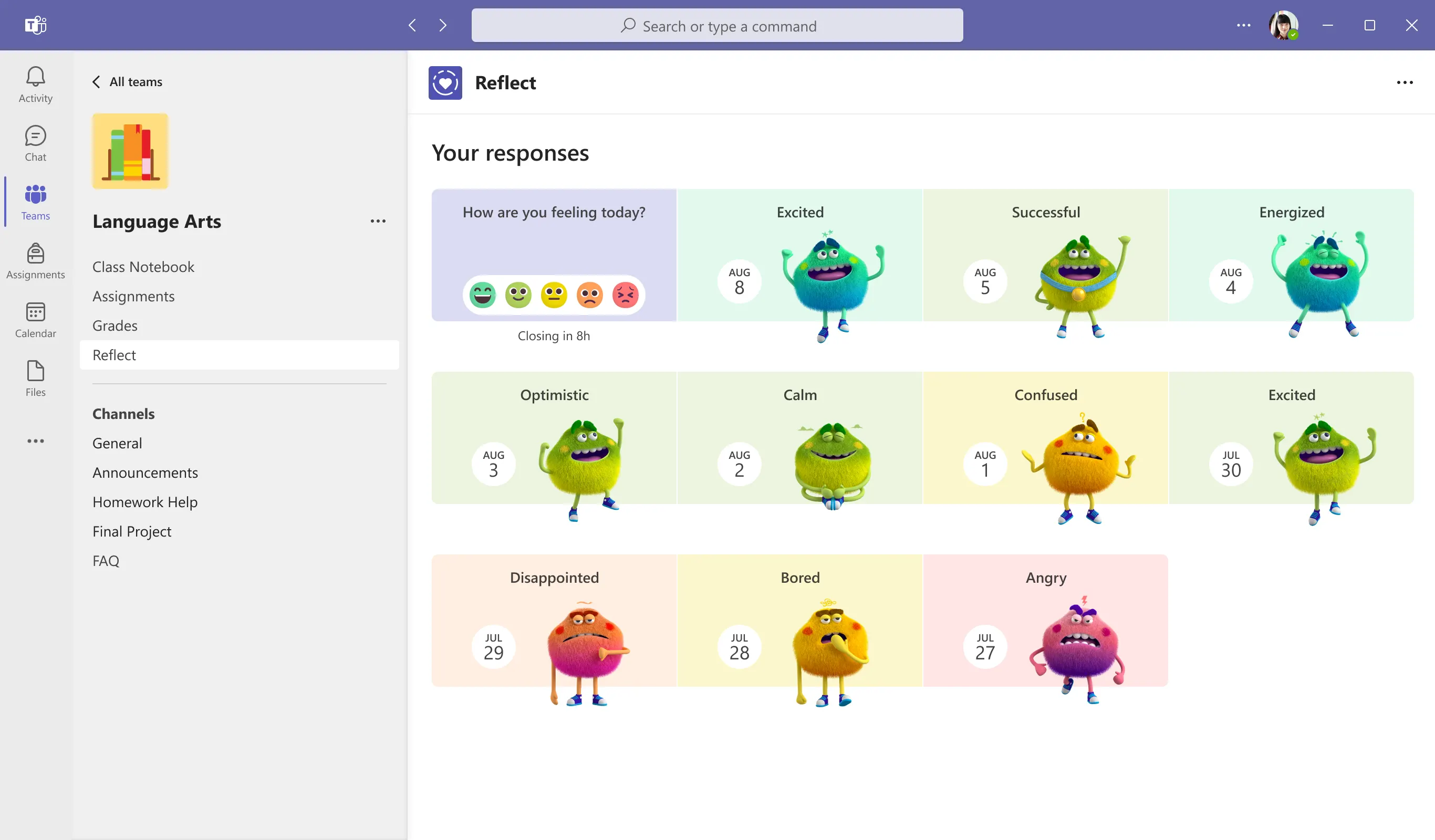
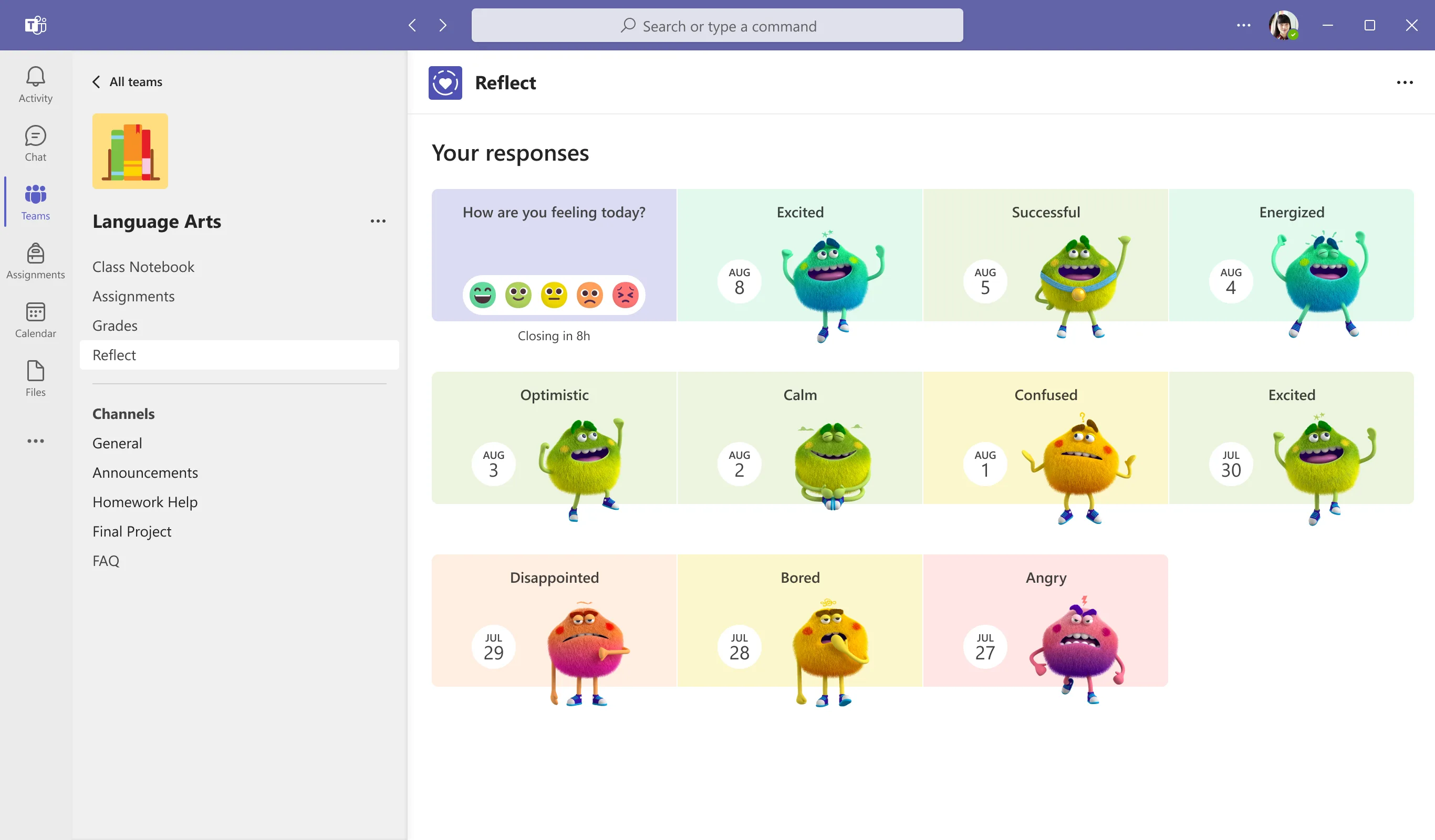
Reflect in Microsoft Teams for Education is built directly into the digital learning hub that unites assessments, communication, and collaboration. To help students visualize their feelings, there are “Feelings Monsters” that depict more than 50 emotions. Students can use these to understand their emotions and communicate with their teachers. And in addition to helping students name different moods, these visualizations also help start conversations about what causes pleasant and unpleasant feelings, how they affect learning, and how to navigate them. 

Individual emotions can be infectious and can drive the tone in a classroom, which can change as moods shift, similar to an ever-changing “thermostat.” Educators can use Reflect to gain information that helps them guide the tone of their class, and turn the energy up or down. With regular check-ins, teachers can respect and respond to the unique emotional lives of their students. Helping young people have insights into their emotional state can lead to increases in student leadership skills, student voice, and greater agency.5

Comparing well-being check-in tools 

To evaluate the ease-of-use and effectiveness of Reflect check-ins, the authors of “Prioritizing and Supporting Student Well-being” reviewed the process for educators to create a Reflect check-in. The authors also reviewed the process for students to respond, and for either students or educators to review responses in Teams. Next, they evaluated the equivalent Google Classroom solutions. And since Google does not have a built-in well-being tool similar to Reflect, the authors reviewed the process over two applications: Google Forms and Google Classroom. (Note: Google does not have a comparable tool that provides well-being data to educators or students as Reflect and Insights does.)

The results of the review were clear. They showed that Microsoft Reflect was more effective, easier to use, and a more comprehensive tool for checking in on student well-being, helping students understand and express their emotions and providing educators with clear and actionable analysis of aggregated results. With built-in applications like Reflect, educators can better understand the needs of all students, review data to inform decision-making, and help students improve their academic performance.

Want to learn more about how Microsoft 365 Education solutions can assist educators with understanding students’ well-being? Read “Prioritizing and Supporting Student Well-being” and be sure to check out the other papers in the series so far:

The next paper in the series will highlight read-aloud applications that support literacy, so look for that coming soon!


1 The Nature of Learning, Using Research to Inspire Practice | OECD

2 7th Annual Educator Confidence Report | Houghton Mifflin Harcourt

3 How to Sell SEL | Thomas B. Fordham Institute

4 What Does the Research Say? | CASEL

5 When Social Emotional Learning is Misused | Education Week

Posted on Leave a comment

New Teams features help improve students’ well-being

Listening to and empathizing with students through ongoing dialogue is vital to their current and future success. And with the right tools educators can foster an environment where students feel heard and help keep a pulse on their emotional well-being.

That’s why we’re excited to tell you about new Microsoft Teams features that help educators recognize students’ needs and foster more classroom communication.

Reflect helps students build their emotional skills

Reflect—a feature in Microsoft Teams—can help learners broaden their emotional vocabulary, recognize and navigate their emotions better, and deepen empathy for their peers. It does this in part by providing regular opportunities for students to share and be heard.

Reflect also benefits educators by providing them valuable feedback and helping build a healthy classroom community that makes social emotional learning routine. Research has demonstrated that explicit teaching of social and emotional skills improves student academic and behavioral performance and has lifelong positive effects.

At Microsoft, we know that self-awareness and self-management are critical skills for lifelong learning, so Reflect provides opportunities for students to reflect on their learning. This helps educators better understand how students receive their curriculum and work with students to increase the agency they have in their own learning process. The benefit is helping students develop a growth mindset by honestly evaluating their own effort, motivation, and progress.

Reflect also provides a safe space for students to practice asking for help in areas where they feel challenged. Students can do check-ins using emojis and characters, which allows them to express themselves and develop emotional awareness. Only educators can see their students’ reflections, so students never have to worry about privacy. Together view, another part of Reflect, allows students to build empathy for others by viewing the Feelings Monsters their classmates share (the Monsters are character representations of a person’s own feelings). 

Reflect also allows teachers to create custom questions for check-ins and view improved data visualizations of previous check-ins in Teams and Class Notebook. And using the OneNote Class Notebook toolbar, educators can easily insert a Reflect for learning poll that is contextualized on the Class Notebook page. These can be used as quick and easy pre- and post-assignment assessments, or as “exit slips” to help inform the next lesson.

Use Reflect to enhance your SEL routine

These are some quick ideas for how to use Reflect to either enhance your existing social and emotional learning (SEL) routine, or begin a new SEL routine:

  • Reach out one-on-one to students who are experiencing a pattern of difficult emotions.
  • Host conversations about the new emotional vocabulary that Reflect introduces to students. For example: Why is “excited” different than “motivated”? Or why does being able to express yourself matter?
  • Discuss empathy with students by asking: Did you notice there are others in class who are also in the same feelings range today? Did you notice people who are having a different experience than you? Why might they be feeling different?
  • Do some self-reflection of your own. What responses, feelings, and challenges do you have the power to impact through your teaching methods?
  • Expand social emotional learning or introduce the Feelings Monster with ready-to-play games and activities on Kahoot! and Flip.
  • Print a Feelings Monster poster with PowerPoint.

Learn how to create your SEL routine using Reflect today.

New home page provides one place to communicate

We’ve been listening to feedback from educators and students using Microsoft Teams, and one thing is clear: educators are looking for one place to catch up on all things. So, we’re thrilled to introduce the new home page feature rolling out this week to all class teams just in time for back to school.

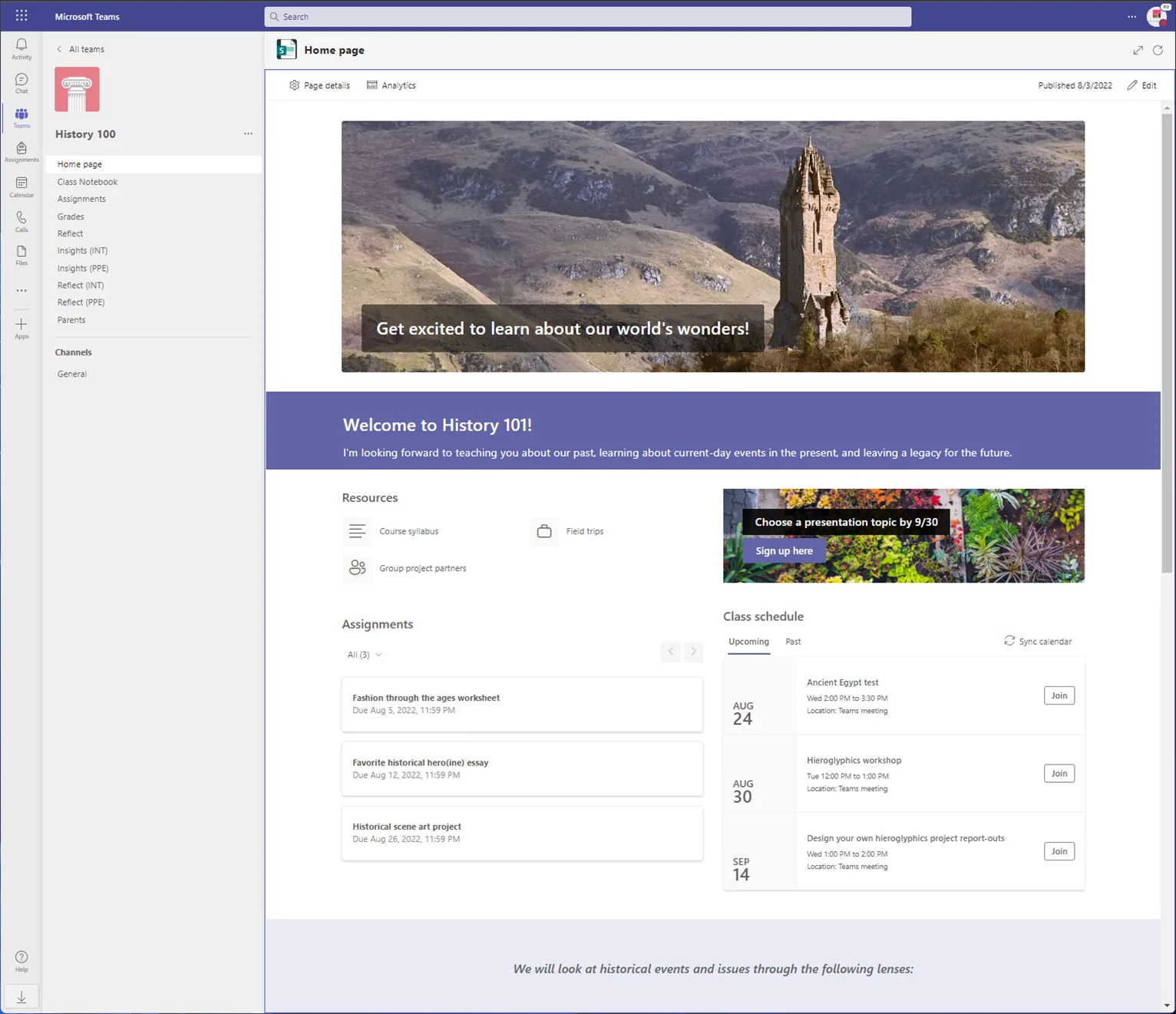
Home page provides a central location to check the latest announcements, pinned class resources, upcoming assignments, recently edited class files, and more! It will be included automatically for all classes using Teams.

To get started, educators simply select Home page to launch it. Teams will pull in any assignments, virtual class meetings, or files you’ve already started adding. The rest can be customized by selecting Edit before you publish. Add fun images, additional sections, or key information about you and your class.

Only educators can make changes to the class home page, so you have control over what’s shared. And because it’s all customizable, you can set it up to your liking before admitting students to Teams at the start of the school year.

We’re excited to bring this new feature to you and your students, and we look forward to learning about how you use home pages for each of your classrooms.

Create and review assignments on iPad and Android tablets

In the past, educators have been able to create and review Reading Progress assignments on Teams using a Desktop PC, Mac and Web Browser, but not using an iPad or Android tablets. We’ve fixed that to make sure everyone has access no matter what kind of device they have. Teams now supports assignment creation and review on these two mobile platforms.

Get to know these new tools today

Want to learn more about how to get started with Reflect in Microsoft Teams, how to create Reflect check-ins or how to create an SEL routine to help students build self-awareness? Download the tools today and modify teaching methods based on the needs of students. Or check out other new Microsoft Teams features to help manage classrooms and workload.