Posted on Leave a comment

Review: ‘Sky – Children of the Light’ has arrived on the iPhone and iPad

The much anticipated Sky: Children of the Light has finally made it to the iPhone and iPad. Here’s our look into the whimsical, beautiful, and playful puzzle-adventure game.

Sky: Children of the Light

I was one of the people who was waiting for Sky: Children of the Light to release. Now that it has, I’ve decided to take a look into what the game has to offer.

I had sort of known what to expect, as I’d played some other games by thatgamecompany, the studio who brought Sky to life. I was expecting a polished game that looked good and bypassed difficulty for an immersive experience and some new twists on gameplay.

I was not disappointed.

I didn’t have as much time to play Sky as I had wanted, but the appeal of the game is that it’s very much a “pick up and play for a while” title. I hope to play more Sky in the near future, though I do have some concern about the longevity of the game.

Sky is a truly beautiful game.

A real looker

Sky is probably one of the best looking games I’ve seen in a long time. Not “best looking game on a cell phone” but “best looking game, period.” It’s hard to believe that the game is running on iOS.

Thatgamecompany, the studio that made Sky, has long been lauded for games that look genuinely beautiful, and that’s no different here.

Everything from the colors to the character design, the environment to the cut scenes definitely feels as though some serious thought and care went into making it.

In fact, I am extremely impressed with the character design in this game. The player characters, which can be customized by unlocking items via “quests” of sorts, are impish and lively. The non-player characters are full of character and move with emotion and purpose.

Sky, walking among the dunes

Controls

The controls for Sky are… okay. It’s not a game that requires a lot of fine motor control by any means—it’s pretty forgiving, even if you’re having as much difficulty as I did. I do think that the game will be better served in iPadOS 13, when players will be able to pair a Bluetooth gamepad, like a PS4 or XBox One controller, with their iPad.

You see, I had originally started playing Sky on an iPhone 8 plus, and I found the controls manageable. However, I wanted to take big, beautiful screenshots of the game, so I switched over to an 12.9-inch iPad Pro. I do not recommend the dual-stick style controls for larger screens. I found the screen much too large to easily control the character, and often found myself tumbling and falling or running into walls when I’d try to fly.

The one-button play works better on larger screens, but I still recommend a two-button layout on something the size of an iPhone or iPad Mini. Then again, your mileage may vary.

Meeting up with other players to complete puzzles

A strange sort of social

So, the selling point of Sky is that you’ll be able to play with other characters, which I find interesting. The game doesn’t allow for a lot of communication, so most of it will be done through emotes, or tapping on your character to make them make a noise. The noise, by the way, is vaguely saxophone honk-like—but in a cute way. The emotes cover a wide range of actions, but the ones I saw being used most often were high-fiving, holding hands, and hugging.

You can communicate via text to characters if you both sit on a stone bench together. However, there aren’t a lot of benches in-world.

Of course, you can invite people you know to play with you, through a sort of weird QR-code system that I didn’t get a chance to test out.

However, there’s something to be said for the lack of verbal —or textual —communication in Sky. It adds to the fun, and it certainly compliments the theme. It also makes the game all-ages friendly, which is great, because Sky is a casual game, after all, and should be enjoyed by all players, regardless of skill.

Completing puzzles to unlock cutscenes

Gameplay

Without spoiling anything, Sky is a game that requires players to solve puzzles, but in a “almost like Spyro” sort of way. A lot of it involves exploration, some of it involves teamwork, and most of it involves being able to accurately respond to the environment the game is putting you in. Find a candle? Light it. Find a locked door? Figure out how to unlock it. Do these things, and you’ll be rewarded with character upgrades, in-game currency, and cosmetics.

Again, this isn’t a hard game, and it’s not going to let you fail miserably. Sky isn’t that kind of a game.

On the issue of longevity

If you’re looking to play Sky, I highly suggest hopping into it now. Sky comes equipped with a fair amount of puzzles that must be completed with multiple players, so I’m a little concerned that the total lifespan of the game may be a bit short. It’s a beautiful game, and it’s free, so if you’ve been holding out I absolutely recommend that you grab a couple of friends and hop in now.

Take on challenges together

And IAP…

Sky isn’t exactly free free. It’s free-to-play. This means it comes with some sort of system that is designed to extract money out of you. However, in Sky, the IAP feels less aggressive than others.

In Sky, you can purchase candle charges in the event that you don’t have enough to perform certain tasks —like adding a stranger to your friends list, upgrade your character, and purchase the game’s second currency: hearts. However, you can also find these candles in the wild. The hearts are the main currency that players are after, as they allow you to purchase cosmetic items, including masks, wings, instruments, and more. However, you can get hearts from other players, if you’re lucky.

Overall takeaway

Sky is an impossibly cute game that gives equal consideration to both the social aspects of playing a game as well as the importance of exploration. I think that, if you were able to wrangle in two or three additional friends to play with you, the experience would be even better. I recommend checking it out, even if just to play for a short amount of time.

Posted on Leave a comment

Fixed iMessage bug bricked iPhones using malformed message


Details of a now-patched bug in iMessage have been revealed by a Google Project Zero researcher, a problem that could have forced users to wipe and restore their iPhones to get them working again, if they received a malformed message.

Released by Google Project Zero, the search company’s bug and vulnerability-discovery team, the issue relates to a specific type of malformed message that is sent out to a victim device. As per usual disclosure rules, the bug was held from public view until either 90 days had elapsed or a patch had been made broadly available to the public, with Apple’s release in an iOS 12.3 update fixing the bug and allowing for it to be revealed.

Specifically, the message contains a property with a key value that is not a string, despite one being expected. Calling a method titled IMBalloonPluginDataSource _summaryText, the method assumes the key in question is a string, but does not verify it is the case.

The subsequent call for IMBalloonPluginDataSource replaceHandlewithContactNameInString calls for im_handleIdentifiers for the supposed string, which in turn results in a thrown exception.

While the message can affect both Mac and iPhone, they do so in different ways. For macOS, the error causes “soagent” to crash and respawn, making it a relatively brief issue where, at worst, the Messages app stops working.

On iPhone, the code is in Springboard, and will repeatedly load, crash, and reload itself to a point that the UI cannot be displayed and the iPhone ceases to respond to input by the user. As the problem survives a hard reset, and starts occurring again after unlocking the iPhone, the only known solution is to reboot into recovery mode and restore the device.

As part of the disclosure, Google Project Zero has also released instructions to reproduce the issue.

AppleInsider recommends users keep their iPhones up to date where possible, and to retain backups of their devices and stored data.

Malformed messages have been the source of some issues for iMessage users in the past. One major example is the “Black Dot” Unicode bug from 2018 that abused invisible characters to crash the app on iPhones and iPads running iOS 11.3.

Another 2018 “text bomb” exploited unoptimized rendering processes for OpenGraph page titles to create excessively long tags, again causing crashes. Another from 2015 used a single line of Arabic script to consume iOS resources when rendering, but only when it appeared as a notification.

Posted on Leave a comment

Everything new in iOS 12.3 beta 2


Video

AppleInsider is going hands-on with the latest beta of iOS 12.3 which includes the newly revamped TV app and several other smaller tweaks.

iOS 12.3 TV app with EPIX

iOS 12.3 TV app with EPIX channel

The first beta of iOS 12.3 contained the first iteration of the brand new TV app, future home of Apple’s original content. The second beta we saw the app get a new, though sparse, intro screen that signifies the TV app as the home to all of your content.

Apple also added Epix as an Apple TV channel alongside Showtime, Starz, Tastemade, and the Smithsonian. Apple TV channels are services you can subscribe to right from the TV app, though during the beta period they still kick you out to the third-party apps to watch anything. Once launched, this content will be available to watch right from within the TV app.

[youtube https://www.youtube.com/watch?v=TR4FPMFLMUI&w=560&h=315]

We’ve been using the TV app quite extensively since it launched in the first beta and were pleased to see how much more stable the app is here in beta two. In beta one, it would freeze constantly, making usage difficult.

The second beta also has more tweaks to the Wallet app in preparation for Apple Card’s launch. The empty icons to the left of your transactions has now been removed in this beta, with just the text available to designate where a purchase was made. This applies to third-party cards. On the Apple Pay Cash card —and forthcoming Apple Card —each transaction has an icon to the left that lines up with the person, business, or category a purchase falls into.

iOS 12.3 beta 2

iOS 12.3 beta 2

Lastly, the palm rejection bug on iPad has been corrected. Prior, the screen would jump around at the detection of your palm while using Apple Pencil. This has been fixed and it works as you’d expect in this latest beta.

Be sure to catch up with everything that changed in the first beta of iOS 12.3 on iPhone, iPad and Apple TV.

Find any changes or features we didn’t mention? Shoot me an email at [email protected] or reach out to me on Twitter at @Andrew_OSU.

Posted on Leave a comment

Review: Kingston Bolt is an easy way to add extra storage to your iPhone or iPad

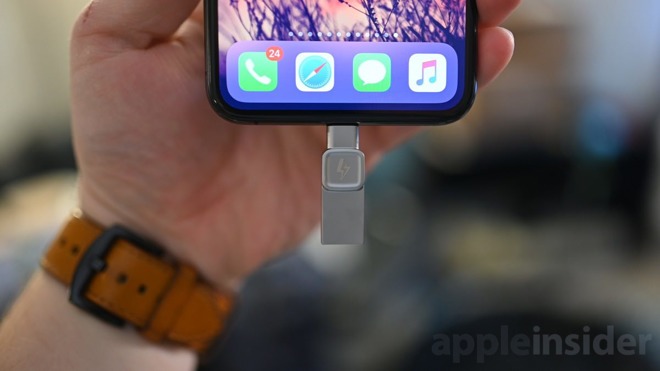
Kingston Bolt is a dual-purpose Lightning/USB drive that effortlessly allows you to store or backup photos and videos from a compatible iOS device.

Kingston Bolt

Kingston Bolt flash drive

An all-too-common problem

Apple has taken some flak for its decision not to include much storage on entry level devices, often requiring users to make tough decisions on what to keep and what to delete.

Also a factor is the fact that many users don’t necessarily trust cloud storage with their precious photos, which means they need some form of physical backup for safe keeping. Manually backing up to your Mac is an option, but that requires proximity to a desktop which isn’t always convenient.

The situation has given rise to accessories like Bolt, which have started to crop up as users look to aftermarket storage alternatives.

Metal doohickey

Kingston Bolt

Kingston Bolt Lightning and USB-A

Bolt is a minute, metal device with an Apple-certified Lightning connector on one end and a USB-A port on the other. Going from your computer to iPhone or iPad is easy — assuming your Mac or PC still has USB-A hanging around.

There’s no USB-C here, which means the new iPad Pros aren’t invited to play, and neither are the latest Macs (at least without an adapter).

The native app

When first plugged into your iPhone, an alert appears asking you to download the Bolt app. Unfortunately, iOS can’t handle drives directly, hence the third-party app requirement.

After launching the app, and making sure Bolt is connected, a pleasant-looking dashboard is presented, complete with a pair of graphs highlighting the amount of remaining storage on the local device and the connected Bolt.

Kingston gives you three actions to take: shooting footage straight to Bolt, moving files to Bolt or viewing the files on Bolt.

Moving photos and videos over is as easy as you would imagine; simply choose a folder or album and select the assets you would like to store on Bolt. You can then delete the local files or keep them as a backup.

Alternatively, you can film or shoot pictures directly to Bolt, cutting out the intermediate step of storing them — even temporarily — on your iPhone. This is a great feature, especially if you plan on shooting a ton of footage.

The downside of shooting directly to Bolt is that you are limited to 4K at 18fps, 1080p at 30fps, or 720p at 30fps. Natively, there are many better filming options.

Wanting more

Kingston Bolt

Kingston Bolt

Using the Kingston Bolt app is easy and painless, but does highlight the needs within iOS for direct-interfacing with external storage. You can’t, for instance, access the Bolt’s storage directly from the Files app.

This shortcoming isn’t Kingston’s fault, who is trying to make the best of a bad situation. That said, the Bolt app is a well implemented solution working with iOS’s walled garden.

Rating: 3.5 out of 5

Where to buy

If you find yourself bumping against the storage limits of your iPhone and could use Kingston’s help, you can find the Bolt on Amazon starting at $34.99 for the 32GB version, with 64GB and 128GB capacities available.

Posted on Leave a comment

What’s new in iOS 12 beta 9! Is this the final beta?


Video

Here we are, less than a week following iOS 12 beta eight with the ninth. This build has barely changed from what we’ve seen before, begging the question —will this be the final beta?

[embedded content]

This build —16A5362a —is only a couple removed from the last beta we received in the middle of last week.

That explains why there were no noticable visual changes and extremely similar performance to the last time around. In our tinkering, we saw buttery smooth animations and not a single dropped frame. With performance like this, and a small increment from the last, we would not be surprised if this was the last beta preceding the GM.

Check out what changed last time in betas 7 and 8.

Find any other changes? Reach out to us on Twitter @AppleInsider or @Andrew_OSU.

Posted on Leave a comment

Here’s how Apple protects your privacy in Safari with Intelligent Tracking Protection 2.0


Apple released a new Safari Tech Preview on Wednesday, and it includes the Intelligent Tracking Protection 2.0 that was promised at WWDC. AppleInsider looks at what Apple is doing to insure your protection and privacy as you go about your business on the web.

Safari Tech Preview

The new version of Intelligent Tracking Protection kills the old 24-hour window that Safari used to keep tracking cookies from sites you visit. Instead, a website can request tracking privileges, but the user has to specifically opt in.

If the user allows the cookie, it is deleted after the user stops visiting the site after 30 days of Safari use. If you go on vacation and don’t use Safari at all, those days aren’t counted.

Users can also opt in to permanent tracking, without a 30-day cookie purge. For example, if you subscribe to YouTube Music, the cookies won’t be purged —assuming you stay logged into the service and keep using it by actively clicking on a link, using the service, or making an entry in a form on the site.

The timeline of the new Intelligent Tracking Protection

The new Safari also isn’t fooled by a “first party bounce tracker” across multiple browser redirects. The quick redirects won’t be allowed to deposit cookies at all, and Safari won’t log them as having user interaction, nor will it reset any day counter.

Widgets or embeds in a website have independent tracking of the site visited. For example, if you watched one of our videos embedded in the corresponding article on AppleInsider, you’d have to grant YouTube permission to deposit a tracking cookie independently if you haven’t already.

As a result of all this, “federated logins” from social media sites will be less able, or prevented entirely, from tracking a user across the web. With the new Safari, the user can only be identified and request tracking authorization when the user actually interacts with the social media content, like writing a comment or playing a video.

So, if you’ve shopped on Amazon for something, you’ll only see related ads if you’ve granted FaceBook the permission to do so in Safari explicitly.

And, if you have regrets after granting one website or another tracking access, the new Safari will retract all granted permissions when the user clears Safari history.

Intelligent Tracking Protection 2.0 debuted on stage at WWDC earlier in June, and didn’t roll out to Safari Tech Preview testers until Wednesday. It will come to all users on macOS Mojave and iOS 12 in the fall on all devices that support the new operating systems.