Posted on Leave a comment

Fedora Linux 43 is here!

I’m excited to announce my very first Fedora Linux release as the new Fedora Project Leader. Fedora Linux 43 is here! 43 releases! Wow that’s a lot. I was thinking about proposing special tetracontakaitrigon stickers to celebrate this release, but I’m not sure anyone would notice they weren’t circles.

Thank you and congrats to everyone who has contributed to Fedora to this release, and in all the releases leading up to this one. I’m grateful to be back with a chance to take stewardship of the collaboration as the Fedora Project leader. I’ve been getting my feet under me as much as I can in these first few months. I’m looking forward to writing up some longer missives about where I want to steer this ship, but for right now I just want to highlight some of the changes you should expect to encounter in the latest release of Fedora Linux. Read the highlights below to find out more. Or if you are ready just jump right in!

Upgrade

If you have an existing system, Upgrading Fedora Linux to a New Release is easy. In most cases, it’s not very different from just rebooting for regular updates, except you’ll have a little more time to grab a coffee.

Fresh Install

If this is your first time running Fedora Linux, or if you just want to start fresh with Fedora, download the install media for our flagship Editions (Workstation, KDE Plasma Desktop, Cloud, Server, CoreOS, IoT),  for one of our Atomic Desktops (Silverblue, Kinoite, Cosmic, Budgie, Sway), or for alternate desktop options (like Cinnamon, Xfce, Sway, or others).

What’s new?

As usual, with Fedora, there are just too many individual changes and improvements to go over in detail. You’ll want to take a look at the release notes for that.

Notable User Visible Changes

There are, however, a few notable user visible changes in this release. For those of you installing fresh Fedora Linux 43 Spins, you may be greeted with the new Anaconda WebUI. This was the default installer interface for Fedora Workstation 42, and now it’s the default installer UI for the Spins as well.

If you are a GNOME desktop user, you’ll also notice that the GNOME is now Wayland-only in Fedora Linux 43. GNOME upstream has deprecated X11 support, and has disabled it as a compile time default in GNOME 49. Upstream GNOME plans to fully remove X11 support in GNOME 50.

Plumbing Upgrades

Beyond the user-visible changes, there are a couple of significant bits of plumbing that should go unnoticed for most users but are a big deal, nonetheless.

Fedora Linux 43 will be the first release with RPM 6.0. Like I said, this should go unnoticed to end-users, but it is a significant change. RPM 6.0 provides some interesting security enhancements, like multiple key signing of packages. This should help future-proof package signing as we transition to post-quantum-crypto OpenPGP keys in future releases.

We’re also moving forward with our bootc enablement story. Fedora CoreOS is now buildable from a Fedora base bootc image using a Containerfile, instead of needing to be composed with a custom tool. That means anyone with podman can build the Fedora CoreOS image, whether manually or via CI/CD automation.

Fedora CoreOS (FCOS) is also changing how it’s issuing updates to users in Fedora 43. Instead of using an OSTree repository, FCOS updates will be delivered exclusively as OCI images. FCOS 42 provided both OSTree repository and OCI registry as a transition for users. In FCOS 43, the OSTree updates are disabled entirely.

Save the Date: Fedora Linux 43 Release Party!

To celebrate all this incredible community work, we’ll be hosting a virtual Fedora Linux 43 Release Party! Please save the date for Friday, 21 November. We’re still finalizing the schedule and speakers, so registration isn’t open just yet, but more details will be shared soon. You can keep an eye on the Fedora Linux 43 Release Party Schedule wiki page for the latest updates!

If you hit a snag

If you run into a problem, visit our Ask Fedora user support forum. This forum includes a category where we collect common issues and solutions or work-arounds.

Just drop by and say “hello”

Drop by our “virtual watercooler” on Fedora Discussion and join a conversation, share something interesting, and introduce yourself. We’re always glad to see new people!

Posted on Leave a comment

Coming soon: Fedora for Apple Silicon Macs!

Today at Flock, we announced that Fedora Linux will soon be available on Apple Silicon Macs. Developed in close collaboration with the Fedora Asahi SIG and the Asahi Linux project, the Fedora Asahi Remix will provide a polished experience for Workstation and Server usecases on Apple Silicon systems. The Asahi Linux project has also announced that the new Asahi Linux flagship distribution will be Fedora Asahi Remix.

We are using a Remix as opposed to delivering this support in Fedora Linux proper because this ecosystem is still very fast moving and we believe a Remix will offer the best user experience for the time being. Also, the Remix will allow us to integrate hardware support as it becomes available. Nonetheless, as much of this work as possible is being conducted upstream, with several key components being developed, maintained and packaged in Fedora Linux upstream. Ultimately, we expect Apple Silicon support to be integrated in Fedora Workstation and Fedora Server in a future release, and are working towards this goal. This approach is in line with the overarching goal of the Asahi project itself to integrate support for these systems in the relevant upstream projects.

The first official release of Fedora Asahi Remix is slated to be available by the end of August 2023. Development builds are already available for testing at https://fedora-asahi-remix.org/, though they should be considered unsupported and likely to break until the official release.

Posted on Leave a comment

How to rebase to Fedora Linux 38 on Silverblue

Fedora Silverblue is an operating system for your desktop built on Fedora Linux. It’s excellent for daily use, development, and container-based workflows. It offers numerous advantages such as being able to roll back in case of any problems. If you want to update or rebase to Fedora Linux 38 on your Fedora Silverblue system (these instructions are similar for Fedora Kinoite), this article tells you how. It not only shows you what to do, but also how to revert things if something unforeseen happens.

Update your existing system

Prior to actually doing the rebase to Fedora Linux 38, you should apply any pending updates. Enter the following in the terminal:

$ rpm-ostree update

or install updates through GNOME Software and reboot.

Rebasing using GNOME Software

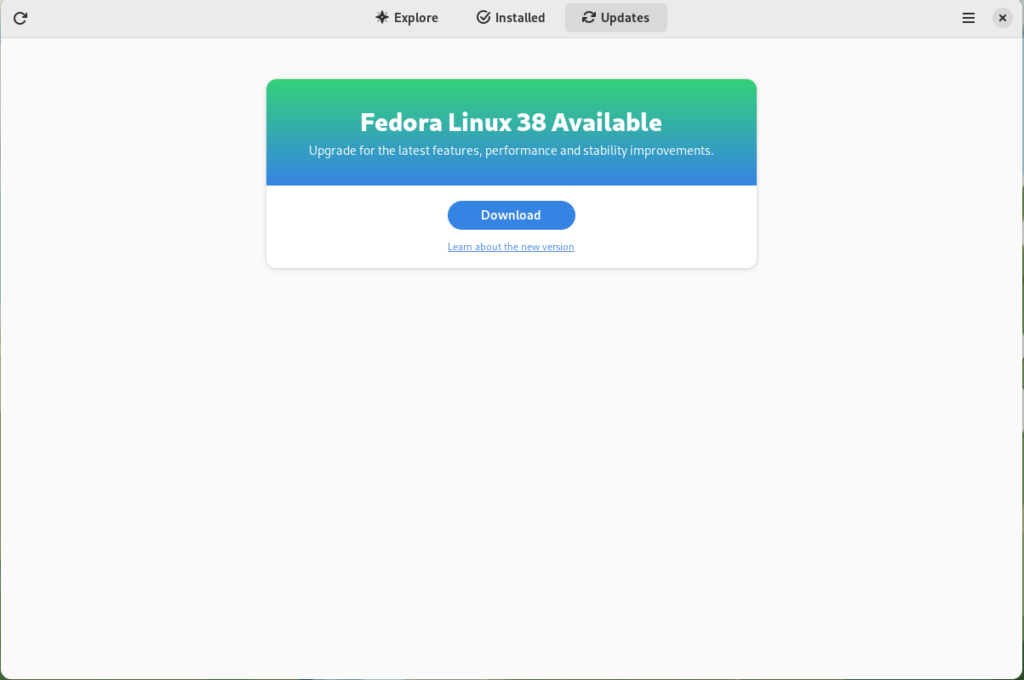
GNOME Software shows you that there is new version of Fedora Linux available on the Updates screen.

Fedora 38 update available

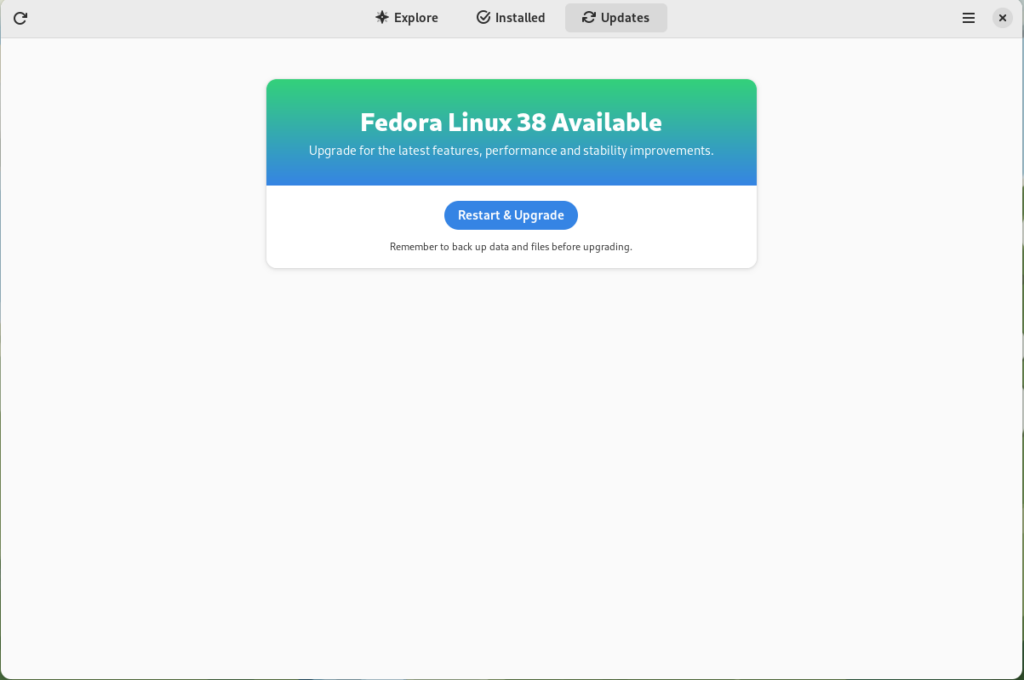
First thing you need to do is download the new image, so click on the Download button. This will take some time. When it’s done you will see that the update is ready to install.

Fedora 38 update ready to install

Click on the Restart & Upgrade button. This step will take only a few moments and the computer will be restarted when the update is completed. After the restart you will end up in new and shiny release of Fedora Linux 38. Easy, isn’t it?

Rebasing using terminal

If you prefer to do everything in a terminal, then this part of the guide is for you.

Rebasing to Fedora Linux 38 using the terminal is easy. First, check if the 38 branch is available:

$ ostree remote refs fedora

You should see the following in the output:

fedora:fedora/38/x86_64/silverblue

If you want to pin the current deployment (meaning that this deployment will stay as an option in GRUB until you remove it), you can do it by running:

# 0 is entry position in rpm-ostree status
$ sudo ostree admin pin 0

To remove the pinned deployment use the following command:

# 2 is entry position in rpm-ostree status
$ sudo ostree admin pin --unpin 2

Next, rebase your system to the Fedora Linux 38 branch.

$ rpm-ostree rebase fedora:fedora/38/x86_64/silverblue

Finally, the last thing to do is restart your computer and boot to Fedora Linux 38.

How to roll back

If anything bad happens—for instance, if you can’t boot to Fedora Linux 38 at all—it’s easy to go back. At boot time, pick the entry in the GRUB menu for the version prior to Fedora Linux 38 and your system will start in that previous version rather than Fedora Linux 38. If you don’t see the GRUB menu, try to press ESC during boot. To make the change to the previous version permanent, use the following command:

$ rpm-ostree rollback

That’s it. Now you know how to rebase Fedora Silverblue to Fedora Linux 38 and roll back. So why not do it today?

FAQ

Because there are similar questions in comments for each article about rebasing to newer version of Silverblue I will try to answer them in this section.

Question: Can I skip versions during rebase of Fedora? For example from Fedora 36 Silverblue to Fedora 38 Silverblue?

Answer: Although it could be sometimes possible to skip versions during rebase, it is not recommended. You should always update to one version above (37->38 for example) to avoid unnecessary errors.

Question: I have rpm-fusion layered and I got errors during rebase. How should I do the rebase?

Answer: If you have rpm-fusion layered on your Silverblue installation, you should do the following before rebase:

rpm-ostree update –uninstall rpmfusion-free-release –uninstall rpmfusion-nonfree-release –install rpmfusion-free-release –install rpmfusion-nonfree-release
Posted on Leave a comment

Announcing Fedora Linux 38

Today I’m excited to share the results of the hard work of thousands of Fedora Project contributors: the Fedora Linux 38 release is here! With this release, we’re starting a new on-time streak. In fact, we’re ready a week early!

As always, you should make sure your system is fully up-to-date before upgrading from a previous release. Can’t wait to get started? Download while you read!

New website

Did you click the download link above? You may have noticed that the website looks different. This is the result of over a year of work by our Websites & Apps Team, in partnership with the Design and Infrastructure team, as well as the community at large. Right now, you’ll see pages for each of our five Editions, but this is only a start. The Spins and Labs websites will be updated in the future. Eventually, this will provide a foundation for bringing more of our websites together. I’m very excited about the visual refresh and the fact that this will make our websites more self-service for teams within Fedora — and very proud of the amazing community team that came together to create this.

New Spins

Fedora Linux 38 introduces several new Spins ­— variants that showcase different desktop environments. The popular Budgie Desktop environment, first packaged for Fedora in F37, now has its own Spin. The Fedora Budgie Spin aims to provide the premiere Budgie Desktop experience on top of Fedora Linux, the leading edge platform for developers and users alike.

For fans of tiling window managers, we now offer the Sway window manager in a Spin and in an rpm-ostree version we call “Sericea”. Sway uses the modern Wayland protocol and aims to be a drop-in replacement for the i3 window manager.

If you want to use Fedora Linux on your mobile device, F38 introduces a Phosh image. Phosh is a Wayland shell for mobile devices based on Gnome. This is an early effort from our Mobility SIG. If your device isn’t supported yet, we welcome your contributions!

Desktop improvements

Fedora Workstation focuses on the desktop experience. As usual, Fedora Workstation features the latest GNOME release. GNOME 44 includes a lot of great improvements, including a new lock screen, a “background apps” section on the quick menu, and improvements to accessibility settings. In addition, enabling third-party repositories now enables an unfiltered view of applications on Flathub. 

With this release, we’ve shortened the default timeout when services shut down. This helps your system power off faster — important when you need to grab your laptop and go. 

Of course, we produce more than just the Editions. Fedora Spins and Labs target a variety of audiences and use cases, including Fedora Comp Neuro, which provides tools for computational neuroscience, and desktop environments like Fedora LXQt, which provides a lightweight desktop environment. And, don’t forget our alternate architectures: ARM AArch64, Power, and S390x.

Sysadmin improvements

Microdnf — the lighter-weight version of the default package manager — is replaced by dnf5. dnf5 brings performance improvements, a smaller memory footprint, and a new daemon that can provide an alternative to PackageKit. You can start testing dnf5 now before it becomes the default in a future Fedora Linux release.

For mainframe admins, we increased the minimal architecture level for IBM Z hardware to z13. This enables you to benefit from the new features of that platform and get better CPU performance.

We always strive to bring new security features to users quickly. Packages are now built with stricter compiler flags that protect against buffer overflows. The rpm package manager uses a Sequoia-based OpenPGP parser instead of its own implementation.

Other updates

If you’re profiling applications, you’ll appreciate the framer pointers now built into official packages. This makes Fedora Linux a great platform for developers looking to improve Linux application performance.

Following our “First” foundation, we’ve updated key programming language and system library packages, including gcc 13, Golang 1.20, LLVM 16, Ruby 3.2, TeXLive2022, PHP 8.2, and many more.

We’re excited for you to try out the new release! Go to https://fedoraproject.org/ and download it now. Or if you’re already running Fedora Linux, follow the easy upgrade instructions. For more information on the new features in Fedora Linux 38, see the release notes.

In the unlikely event of a problem…

If you run into a problem, visit our Ask Fedora user support forum. This includes a category for common issues.

Thank you everyone

Thanks to the thousands of people who contributed to the Fedora Project in this release cycle. We love having you in the Fedora community. I hope to see you in Cork this August for the return of Flock to Fedora.

Posted on Leave a comment

Use rpmautospec in Fedora Linux

Use the %autorelease and %autochangelog tags simplify package maintenance and make it easier to contribute packages to the Fedora Project. These rpmautospec tags cause no noticeable difference in the packages from the end user’s perspective. As of the Fedora Linux 38 release, package maintainers should use these new tags.

Information about package history

Every package in a distribution carries identifying information. For example, the latest version of Firefox is available as firefox-110.0-3.fc38.x86_64. This can be unpacked as:

  • a name (firefox),
  • a version (110.0),
  • a “release tag”, consisting of a packaging release version + a distribution marker + an architecture tag (3.fc38.x86_64).

In modern practice, the name and the version are supplied directly by the project upstream and unambiguously identify what was built. The release tag describes the downstream distro build (where, which distro, build count). This may sound natural, but in the past packagers would split parts of the upstream version into the release tag according to some rather complicated rules.

A package also contains useful information in its changelog.

Continuing with the Firefox example:

$ rpm -q --changelog firefox-110.0-3.fc38.x86_64 | head -n5
* Tue Feb 14 2023 Martin Stránský <[email protected]>- 110.0-3
- Updated to 110.0 build 3 * Mon Feb 13 2023 Martin Stránský <[email protected]>- 110.0-2
- Added fix for orca

The changelog is created by package maintainers. It describes changes to the package that are relevant to a user. New software versions, modified file paths, and important bugfixs are examples of things that would be mentioned in the changelog. Whitespace changes in packaging scripts and other cleanups are examples of things that would not be mentioned in the changelog. When things go well, users generally do not look at the changelog. However, the changelog is useful when a bug is found and people need to track down what changed, when, and why.

All this changelog information must be provided by the maintainer. When the maintainer builds a rpm package, they must provide this information in the appropriate fields of the package’s spec file.

For example, the firefox.spec might look like this:

Name: firefox
Version: 110.0
Release: 3%{dist}
...
%changelog
* Tue Feb 14 2023 Martin Stránský <[email protected]>- 110.0-3
- Updated to 110.0 build 3 * Mon Feb 13 2023 Martin Stránský <[email protected]>- 110.0-2
- Added fix for orca
...

This is the traditional way. Every time the maintainer makes a new build, they update the number in the Release field and add a corresponding entry in the %changelog section. For example, for the 110.0-3.fc38 build, Martin would have changed Release: 2%{dist} → Release: 3%{dist} and added the first paragraph under %changelog.

Packages in Fedora are maintained using git. This means that after making changes to the package, and adding some text to the changelog, the maintainer would also write a description of the changes in the git commit message. Often this is exactly the same text as the changelog. For example, for the 110.0-3.fc38 build, Martin wrote “Updated to latest 110.0 upstream build” in the git commit message. It should be noted that every commit in git also contains a name, the email address of the author, and a timestamp for the change. If this sounds a bit repetitive, that’s because it is. Thankfully, some of this can now be automated.

rpmautospec

The rpmautospec method takes advantage of the fact that the spec file is maintained in a git repository:

Name: firefox
Version: 110.0
Release: %autorelease
...
%changelog
%autochangelog

The purpose of the Release field is to identify the distro build number for a specific upstream Version. The Release field should be set to %autorelease and never changed again. The %autorelease macro provides a count of commits since the last commit that changed the Version field. This is nifty. Every time the packager changes the spec file, they have to make a commit to “save” the changes and do a build and the number in %autorelease will be incremented. When the Version is changed, the autorelease number is reset to 1.

The purpose of the git commit message is to summarize changes to the contents of the repository. The purpose of the %changelog section is to summarize changes to the package. The %autochangelog macro takes a git commit message, the author name, and the commit timestamp, and formats them in a way that is suitable for the %changelog section.

If Martin were to do another build, let’s say with a patch added, he would adjust the spec file adding a Patch line, and create a commit with:

$ git commit -a -m 'Add patch to fix rhbz#1000002'

The %autorelease field would be automatically increased by one, and the %autochangelog text would now start with:

* Thu Mar 23 2023 Martin Stránský <[email protected]>- 110.0-4
- Add patch to fix rhbz#1000002

What are the effects of the new workflow?

It is easiest to consider the effect for the users: no change. %autorelease and %autochangelog get replaced by “real” content before the package is built, and the binary package downloaded by users looks exactly the same.

For the packager, there is less busywork. The Release field is constant and the git commit text is reused for the changelog. I’ve glossed over the details here, but the git commit text can contain parts which are not included in the changelog text. It can even have commits that are completely elided from the changelog.

This automation also makes some mistakes less likely. For example:

  • The maintainer makes changes, but forgets to bump Release, and the build fails because a previous build with the same version-release already exists.
  • The maintainer makes changes, but forgets to describe them in %changelog, and users don’t know what changed.
  • The maintainer makes a changelog entry, but writes Tue instead of Thu, and rpm complains about an invalid date.

On the other hand, the packager has to be more disciplined. The text in the git commit message ends up visible to users. So it must be formatted accordingly. Every commit in git bumps the number in the release tag. The changelog is now formatted in the same specific style in all packages. Arguably, those are not huge limitations, but some adjustment of packager habits is required.

Using rpmautospec has a positive effect for external contributors. In Fedora, anyone who wants to contribute a change to the package is encouraged to open a pull request.

Unfortunately, for changes that touch the spec file, with traditional Release and %changelog, we have a conundrum. If the contributor does not update those in their commit, the maintainer has to do this before the build, and effectively the contribution is incomplete. If the contributor does update those in their commit, and the pull request is not merged immediately, it is likely that by the time it is merged
the Release number will be out of date, the date in the %changelog will be in the past, and the spec file may even already have entries with later dates, and git will always show a merge conflict in the %changelog section.

With rpmautospec, all these problems go away. The release number is counted automatically. The date in the changelog is derived from the timestamp of when the patch was merged. And the changelog is generated from the stream of commits so there is no conflict to be had.

A specific variant of this contributor workflow occurs when the maintainer wants to copy (cherry-pick in git parlance) a commit to another branch. For example, because the important bugfix that was necessary in F38 also needs to be applied in F37, it is likely that, with rpmautospec, the commit can be applied without any changes to a different packaging branch.

Wrap-up

%autorelease and %autochangelog have been available for a while, but have now reached a level where they work nicely for common maintenance patterns and a great majority of packages; even if some some complicated corner cases are not yet supported. With Fedora 38, rpmautospec is now the recommended method. Hopefully, we will have happier maintainers and contributors with no negative changes noted by the users.

For more information, see: Changes/Rpmautospec_by_Default and Rpmautospec documentation. For an example package that uses rpmautospec, see python-sphinxcontrib-programoutput.

Posted on Leave a comment

Announcing Fedora Linux 38 Beta

The Fedora Project is pleased to announce the immediate availability of Fedora Linux 38 Beta, the next step towards our planned Fedora Linux 38 release at the end of April.

Download this prerelease from our Get Fedora site:

Or, check out one of our popular variants, including KDE Plasma, Xfce, and other desktop environments, as well as images for ARM devices like the Raspberry Pi:

Beta Release Highlights

Fedora Workstation

Fedora 38 Workstation Beta includes GNOME 44. It’s currently in beta, with a final release expected at the end of March. GNOME 44 includes a lot of great improvements, including a new lock screen, a “background apps” section on the quick menu, and improvements to accessibility settings . In addition, enabling third-party repositories now enables an unfiltered view of applications on Flathub. 

Other updates

We always strive to bring new security features to users quickly. Packages are now built with stricter compiler flags that protect against buffer overflows. The rpm package manager uses a Sequoia-based OpenPGP parser instead of its own implementation.

If you’re profiling applications, you’ll appreciate the frame pointers now built into official packages. This makes Fedora Linux a great platform for developers looking to improve Linux application performance.

Of course, there’s the usual update of programming languages and libraries: Ruby 3.2, gcc 13, LLVM 16, Golang 1.20, PHP 8.2, and much more!

Testing needed

Since this is a Beta release, we expect that you may encounter bugs or missing features. To report issues encountered during testing, contact the Fedora QA team via the test mailing list or in the #quality channel on Fedora Chat. As testing progresses, common issues are tracked in the “Common Issues” category on Ask Fedora.

For tips on reporting a bug effectively, read how to file a bug.

What is the Beta Release?

A Beta release is code-complete and bears a very strong resemblance to the final release. If you take the time to download and try out the Beta, you can check and make sure the things that are important to you are working. Every bug you find and report doesn’t just help you, it improves the experience of millions of Fedora Linux users worldwide! Together, we can make Fedora rock-solid. We have a culture of coordinating new features and pushing fixes upstream as much as we can. Your feedback improves not only Fedora Linux, but the Linux ecosystem and free software as a whole.

More information

For more detailed information about what’s new on Fedora Linux 38 Beta release, you can consult the Fedora Linux 38 Change set. It contains more technical information about the new packages and improvements shipped with this release.

Posted on Leave a comment

Anaconda Web UI preview image now public!

We are excited to announce the first public preview image of the new Anaconda web interface!  Our vision is to reimagine and modernize our installer’s user experience (see our blog post “Anaconda is getting a new suit”). We are doing this by redesigning the user experience on all fronts to make it more easy and approachable for everyone to use.

Today, we would like to introduce our plans for the public preview release, as our new project has already reached a point where core code functionality is already developed and the new interface can be used for real installations. 

So, we’re giving you something to play with! 🙂

Installation progress of the preview image

Why public preview image?

By giving you a working ISO as soon as we can, you have the opportunity to help us to define this new UI. This task allows us to rethink what we have and find new ways to overcome the challenges of the UI instead of re-creating what we had already. Please take this opportunity and reach us with your feedback to help us to create the best OS installer ever!

Please let us know what you require from Anaconda. What features are important to you and why are these important? That will allow us to prioritize our focus on development and design. See below for how to contact us.

How to get public preview image?

Download the Anaconda preview image here

Thanks a lot to the Image Builder team for providing us with a way to build ISO with the Fedora 37 Workstation GA content. We are planning to provide additional images with an updated installer to give you the newest features and fixes with the link above. There are no updates to the installation payload (installed system data) yet. We will announce important updates of the ISO image by sending mail to [email protected] with CC to [email protected]. Please subscribe to either of these to get information about the news. This way we will be able to iterate on your feedback.

What you will get with the preview ISO

The ISO will allow you to install the system and let you get a taste of the new UI, so you can provide us early feedback. However, it is pretty early in the development cycle. We advise you to not use this ISO to install critical infrastructure or machines where you have important data.

Let’s go to the more interesting part of what you can do with the ISO:

  • Choose installation language
  • Select your disks
  • Automatically partition the disks. BEWARE! This will erase everything on the selected disks.
  • Automatically install Fedora 37 GA Workstation system
  • Basic review screen of your selections
  • Installation progress screen
  • Built-in help (on Installation destination screen only)

Known issues:

  • In the bootloader menu you’ll see “Install Fedora 38”, it’s expected because the installation environment is from Rawhide. However, the content installed will be Fedora 37 GA, so don’t worry.
  • Virtual Box on Mac might have resolution issues. We are working on resolving this issue.
  • Aspect ratio and window handling. We know we need to solve this better, feedback is welcome.

How to provide feedback?

Your feedback is critical to have a project which you and we can be proud of, so please share it with us. To give us feedback:

Please take your time to play with the UI and tell us what you think. What works great, what is not working and what you would like to have. Ideally, follow future updates and tell us if the situation is better or worse. 

We are really counting on your feedback and we are thankful to have you all supporting us in this journey!

Posted on Leave a comment

How to rebase to Fedora Linux 37 on Silverblue

Fedora Silverblue is an operating system for your desktop built on Fedora Linux. It’s excellent for daily use, development, and container-based workflows. It offers numerous advantages such as being able to roll back in case of any problems. If you want to update or rebase to Fedora Linux 37 on your Fedora Silverblue system (these instructions are similar for Fedora Kinoite), this article tells you how. It not only shows you what to do, but also how to revert things if something unforeseen happens.

Prior to actually doing the rebase to Fedora Linux 37, you should apply any pending updates. Enter the following in the terminal:

$ rpm-ostree update

or install updates through GNOME Software and reboot.

Rebasing using GNOME Software

GNOME Software shows you that there is new version of Fedora Linux available on the Updates screen.

Fedora 37 update available

First thing you need to do is download the new image, so click on the Download button. This will take some time. When it’s done you will see that the update is ready to install.

Fedora 37 update ready to install

Click on the Restart & Upgrade button. This step will take only a few moments and the computer will be restarted at the end. After restart you will end up in new and shiny release of Fedora Linux 37. Easy, isn’t it?

Rebasing using terminal

If you prefer to do everything in a terminal, then this part of the guide is for you.

Rebasing to Fedora Linux 37 using the terminal is easy. First, check if the 37 branch is available:

$ ostree remote refs fedora

You should see the following in the output:

fedora:fedora/37/x86_64/silverblue

If you want to pin the current deployment (this deployment will stay as option in GRUB until you remove it), you can do it by running:

# 0 is entry position in rpm-ostree status
$ sudo ostree admin pin 0

To remove the pinned deployment use the following command:

# 2 is entry position in rpm-ostree status
$ sudo ostree admin pin --unpin 2

where 2 is the position in the rpm-ostree status.

Next, rebase your system to the Fedora Linux 37 branch.

$ rpm-ostree rebase fedora:fedora/37/x86_64/silverblue

Finally, the last thing to do is restart your computer and boot to Fedora Linux 37.

How to roll back

If anything bad happens—for instance, if you can’t boot to Fedora Linux 37 at all—it’s easy to go back. Pick the previous entry in the GRUB menu at boot (if you don’t see it, try to press ESC during boot), and your system will start in its previous state before switching to Fedora Linux 37. To make this change permanent, use the following command:

$ rpm-ostree rollback

That’s it. Now you know how to rebase Fedora Silverblue to Fedora Linux 37 and roll back. So why not do it today?

Posted on Leave a comment

Announcing Fedora Linux 37

Today I’m excited to share the results of the hard work of thousands of Fedora Project contributors: the Fedora Linux 37 release is here! Let’s see what the latest release brings you. As always, you should make sure your system is fully up-to-date before upgrading from a previous release. Can’t wait to get started? Download while you read!

New editions

Fedora Editions are flagship offerings targeted at a particular “market”. With Fedora Linux 37, we’re adding two new Editions. Fedora CoreOS is the successor to what you may remember as Atomic Host. Drawing from Project Atomic and the original CoreOS work, it provides an automatic update mechanism geared toward hosting container-based workloads. With atomic updates and easy rollback, it adds peace of mind to your infrastructure.

Fedora Cloud is also back as an Edition. The Cloud Working Group has seen a resurgence in activity. Cloud provides a great Fedora base to run in your favorite public or private cloud. AMIs will be available in the AWS Marketplace later this week and community channels are available now. Check the website for images in other cloud providers or for your own cloud!

Desktop improvements

Fedora Workstation focuses on the desktop experience. As usual, Fedora Workstation features the latest GNOME release. GNOME 43 includes a new device security panel in Settings, providing the user with information about the security of hardware and firmware on the system. Building on the previous release, more core GNOME apps have been ported to the latest version of the GTK toolkit, providing improved performance and a modern look. 

With this release, we’ve made a few changes to allow you to slim down your installation a bit. We split the language packs for the Firefox browser into subpackages. This means you can remove the “firefox-langpacks” package if you don’t need the localization. The runtime packages for gettext — the tools that help other packages produce multilingual text — are split into a separate, optional subpackage.

Of course, we produce more than just the Editions. Fedora Spins and Labs target a variety of audiences and use cases, including Fedora Comp Neuro, which provides tools for computational neuroscience, and desktop environments like Fedora LXQt, which provides a lightweight desktop environment. And, don’t forget our alternate architectures: ARM AArch64, Power, and S390x.

Sysadmin improvements

Fedora Server now produces a KVM disk image to make running Server in a virtual machine easier. If you’ve disabled SELinux (it’s okay — we still love you!), you can turn it back on with less impact. The autorelabel now runs in parallel, making the “fixfiles” operation much faster.

In order to keep up with advances in cryptography, this release introduces a TEST-FEDORA39 policy that previews changes planned for future releases. The new policy includes a move away from SHA-1 signatures. Researchers have long known that this hash (like MD5 before it) is not safe to use for many security purposes.

In the future, we are likely to remove SHA-1 from the list of acceptable security algorithms in Fedora Linux. (As the name TEST-FEDORA39 implies, perhaps as soon as next year.) We know there are still SHA-1 hashes in use today, however. The new policy helps you test your critical applications now so that you’ll be ready. Please try it out, and let us know where you encounter problems.

Speaking of cryptography, the openssl1.1 package is now deprecated. It will remain available, but we recommend you update your code to work with openssl 3.

Other updates

The Raspberry Pi 4 is now officially supported in Fedora Linux, including accelerated graphics. In other ARM news, Fedora Linux 37 drops support for the ARMv7 architecture (also known as arm32 or armhfp).

Following our “First” foundation, we’ve updated key programming language and system library packages, including Python 3.11, Golang 1.19, glibc 2.36, and LLVM 15.

We’re excited for you to try out the new release! Go to https://getfedora.org/ and download it now. Or if you’re already running Fedora Linux, follow the easy upgrade instructions. For more information on the new features in Fedora Linux 37, see the release notes.

In the unlikely event of a problem…

If you run into a problem, visit our Ask Fedora user-support forum. This includes a category for common issues.

Thank you everyone

Thanks to the thousands of people who contributed to the Fedora Project in this release cycle. We love having you in the Fedora community.

Posted on Leave a comment

Fedora Linux 37 update

Fedora Linux 37 is going to be late; very late. Here’s why. As you may have heard, the OpenSSL project announced a version due to be released on Tuesday. It will include a fix for a critical-severity bug. We won’t know the specifics of the issue until Tuesday’s release, but it could be significant. As a result, we decided to delay the release of Fedora Linux 37. We are now targeting a release day of 15 November.

Imperfect information

Most decisions happen with imperfect information. This one is particularly imperfect. If you’re not familiar with the embargo process, you might not understand why. When a security issue is discovered, this information is often shared with the project confidentially. This allows the developers to fix the issue before more people know about it and can exploit it. Projects then share information with downstreams so they can be ready.

Ironically, Fedora’s openness means we can’t start preparing ahead of time. All of our build pipelines and artifacts are open. If we were to start building updates, this would disclose the vulnerability before the embargo lifts. As a result, we only know that OpenSSL considers this the highest level of severity and Red Hat’s Product Security team strongly recommended we wait for a fix before releasing Fedora Linux 37.

Balancing time and quality

As the Fedora Program Manager, our release schedule is my responsibility. I take pride in the on-time release streak I inherited from my predecessor. We kept it going through Fedora Linux 34 in April 2021. In that time, we made big technical changes (like switching to Btrfs as the default for most variants) and kept each other going through a pandemic. I’m proud of what the community was able to accomplish under difficult circumstances.

But being on time isn’t the only factor. We know that you rely on Fedora Linux for work and for play, so quality is always a consideration. Knowing that we were going to delay for the OpenSSL vulnerability, the question became “how long”?

We make the “go/no-go” decision on Thursdays for a release the following Tuesday. This gives time for the images to update to the mirrors. The OpenSSL project team plans to publish the security fix about 48 hours before we’d make the go/no-go decision for an 8 November target. Factoring in time to build the updated openssl package and generate a release candidate, that gives us about a day and a half to do testing. That’s not enough time to be comfortable with a change to such an important package.

As a result, we’re giving ourselves an extra week so that we can be confident that Fedora Linux 37 has the same level of quality you’ve come to expect.

Was it the right decision?

Time will tell if we made the right decision or not. Today’s Go/No-Go meeting was lively and not everyone agrees that we should delay the release because of this. Like I said, we have little information to go on. It’s important to note that the decision was made as a team, and not the dictate of a single person. Fedora values collaborative decision making, and this is a good example.

When the details are released Tuesday, it may turn out we go “wow, that was not worth delaying the release.” But I think we made the best decision we could with the information we have available.

In the meantime, please join us November 4–5 for the Fedora Linux 37 Release Party. It will be a lot of fun, even if the release isn’t quite out yet.