Posted on Leave a comment

Matplotlib 3D Plot – A Helpful Illustrated Guide

Are you tired with the same old 2D plots? Do you want to take your plots to the next level? Well look no further, it’s time to learn how to make 3D plots in matplotlib.

In addition to import matplotlib.pyplot as plt and calling plt.show(), to create a 3D plot in matplotlib, you need to:

  1. Import the Axes3D object
  2. Initialize your Figure and Axes3D objects
  3. Get some 3D data
  4. Plot it using Axes notation and standard function calls
# Standard import
import matplotlib.pyplot as plt # Import 3D Axes from mpl_toolkits.mplot3d import axes3d # Set up Figure and 3D Axes fig = plt.figure()
ax = fig.add_subplot(111, projection='3d') # Get some 3D data
X = [0, 1, 2, 3, 4, 5, 6, 7, 8, 9]
Y = [2, 5, 8, 2, 10, 1, 10, 5, 7, 8]
Z = [6, 3, 9, 6, 3, 2, 3, 10, 2, 4] # Plot using Axes notation and standard function calls
ax.plot(X, Y, Z)
plt.show()
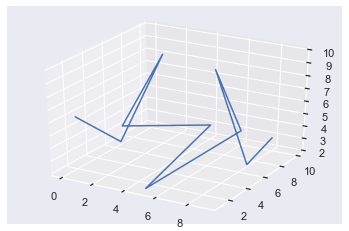
Awesome! You’ve just created your first 3D plot! Don’t worry if that was a bit fast, let’s dive into a more detailed example.

Try it yourself with our interactive Python shell. Just execute the code and look at the generated “plot.png” file:

Related article:

Matplotlib 3D Plot Example

If you are used to plotting with Figure and Axes notation, making 3D plots in matplotlib is almost identical to creating 2D ones. If you are not comfortable with Figure and Axes plotting notation, check out this article to help you.

Besides the standard import matplotlib.pyplot as plt, you must alsofrom mpl_toolkits.mplot3d import axes3d. This imports a 3D Axes object on which a) you can plot 3D data and b) you will make all your plot calls with respect to.

You set up your Figure in the standard way

fig = plt.figure()

And add a subplots to that figure using the standard fig.add_subplot() method. If you just want a single Axes, pass 111 to indicate it’s 1 row, 1 column and you are selecting the 1st one. Then you need to pass projection='3d' which tells matplotlib it is a 3D plot.

From now on everything is (almost) the same as 2D plotting. All the functions you know and love such as ax.plot() and ax.scatter() accept the same keyword arguments but they now also accept three positional arguments – X,Y and Z.

In some ways 3D plots are more natural for us to work with since we live in a 3D world. On the other hand, they are more complicated since we are so used to 2D plots. One amazing feature of Jupyter Notebooks is the magic command %matplotlib notebook which, if ran at the top of your notebook, draws all your plots in an interactive window. You can change the orientation by clicking and dragging (right click and drag to zoom in) which can really help to understand your data.

As this is a static blog post, all of my plots will be static but I encourage you to play around in your own Jupyter or IPython environment.

Related article:

Matplotlib 3D Plot Line Plot

Here’s an example of the power of 3D line plots utilizing all the info above.

# Standard imports
import matplotlib.pyplot as plt
import numpy as np # Import 3D Axes from mpl_toolkits.mplot3d import axes3d # Set up Figure and 3D Axes fig = plt.figure()
ax = fig.add_subplot(111, projection='3d') # Create space of numbers for cos and sin to be applied to
theta = np.linspace(-12, 12, 200)
x = np.sin(theta)
y = np.cos(theta) # Create z space the same size as theta z = np.linspace(-2, 2, 200) ax.plot(x, y, z)
plt.show()
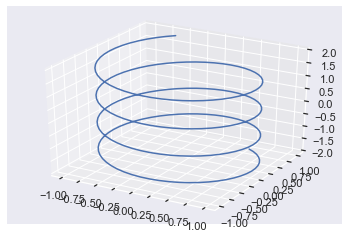
To avoid repetition, I won’t explain the points I have already made above about imports and setting up the Figure and Axes objects.

I created the variable theta using np.linspace which returns an array of 200 numbers between -12 and 12 that are equally spaced out i.e. there is a linear distance between them all. I passed this to np.sin() and np.cos() and saved them in variables x and y.

If you just plotted x and y now, you would get a circle. To get some up/down movement, you need to modify the z-axis. So, I used np.linspace again to create a list of 200 numbers equally spaced out between -2 and 2 which can be seen by looking at the z-axis (the vertical one).

Note: if you choose a smaller number of values for np.linspace the plot is not as smooth.
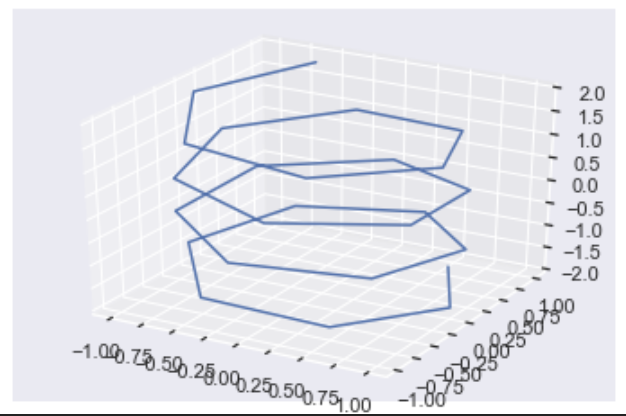
For this plot, I set the third argument of np.linspace to 25 instead of 200. Clearly, this plot is much less smooth than the original and hopefully gives you an understanding of what is happening under the hood with these plots. 3D plots can seem daunting at first so my best advice is to go through the code line by line.

Matplotlib 3D Plot Scatter

Creating a scatter plot is exactly the same as making a line plot but you call ax.scatter instead.

Here’s a cool plot that I adapted from this video. If you sample a normal distribution and create a 3D plot from it, you get a ball of points with the majority focused around the center and less and less the further from the center you go.

import random
random.seed(1) # Create 3 samples from normal distribution with mean and standard deviation of 1
x = [random.normalvariate(1, 1) for _ in range(400)]
y = [random.normalvariate(1, 1) for _ in range(400)]
z = [random.normalvariate(1, 1) for _ in range(400)] # Set up Figure and Axes
fig = plt.figure()
ax = fig.add_subplot(111, projection='3d') # Plot
ax.scatter(x, y, z)
plt.show()
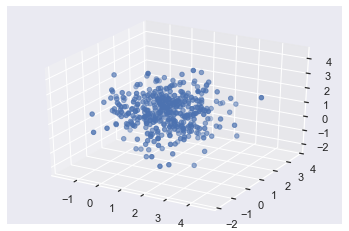
First, I imported the python random module and set the seed so that you can reproduce my results. Next, I used three list comprehensions to create 3 x 400 samples of a normal distribution using the random.normalvariate() function. Then I set up the Figure and Axes as normal and made my plot by calling ax.scatter().

fig = plt.figure()
ax = fig.add_subplot(111, projection='3d')
ax.scatter(X, Y, Z)
plt.show()
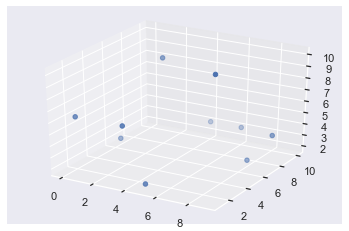
In this example, I plotted the same X, Y and Z lists as in the very first example. I want to highlight to you that some of the points are darker and some are more transparent – this indicates depth. The ones that are darker in color are in the foreground and those further back are more see-through.

If you plot this in IPython or an interactive Jupyter Notebook window and you rotate the plot, you will see that the transparency of each point changes as you rotate.

Matplotlib 3D Plot Rotate

The easiest way to rotate 3D plots is to have them appear in an interactive window by using the Jupyter magic command %matplotlib notebook or using IPython (which always displays plots in interactive windows). This lets you manually rotate them by clicking and dragging. If you right-click and move the mouse, you will zoom in and out of the plot. To save a static version of the plot, click the save icon.

It is possible to rotate plots and even create animations via code but that is out of the scope of this article.

Matplotlib 3D Plot Axis Labels

Setting axis labels for 3D plots is identical for 2D plots except now there is a third axis – the z-axis – you can label.

You have 2 options:

  1. Use the ax.set_xlabel(), ax.set_ylabel() and ax.set_zlabel() methods, or
  2. Use the ax.set() method and pass it the keyword arguments xlabel, ylabel and zlabel.

Here is an example using the first method.

fig = plt.figure()
ax = fig.add_subplot(111, projection='3d')
ax.scatter(X, Y, Z) # Method 1
ax.set_xlabel('X axis')
ax.set_ylabel('Y axis')
ax.set_zlabel('Z axis') plt.show()
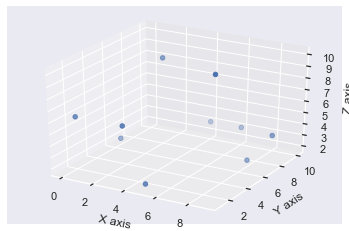
Now each axis is labeled as expected.

You may notice that the axis labels are not particularly visible using the default settings. You can solve this by manually increasing the size of the Figure with the figsize argument in your plt.figure() call.

One thing I don’t like about method 1 is that it takes up 3 lines of code and they are boring to type. So, I much prefer method 2.

# Set Figure to be 8 inches wide and 6 inches tall
fig = plt.figure(figsize=(8, 6))
ax = fig.add_subplot(111, projection='3d')
ax.scatter(X, Y, Z) # Method 2 - set all labels in one line of code!
ax.set(xlabel='X axis', ylabel='Y axis', zlabel='Z axis') plt.show()
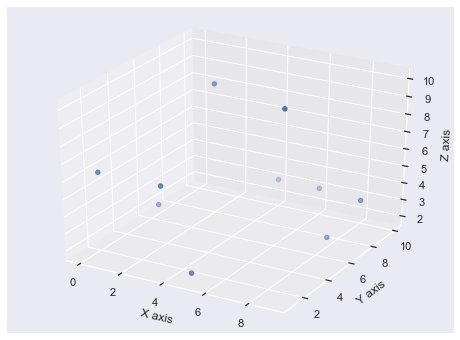
Much better! Firstly, because you increased the size of the Figure, all the axis labels are clearly visible. Plus, it only took you one line of code to label them all. In general, if you ever use a ax.set_<something>() method in matplotlib, it can be written as ax.set(<something>=) instead. This saves you space and is nicer to type, especially if you want to make numerous modifications to the graph such as also adding a title.

Matplotlib 3D Plot Legend

You add legends to 3D plots in the exact same way you add legends to any other plots. Use the label keyword argument and then call ax.legend() at the end.

import random random.seed(1)
fig = plt.figure()
ax = fig.add_subplot(111, projection='3d') # Plot and label original data
ax.scatter(X, Y, Z, label='First Plot') # Randomly re-order the data
for data in [X, Y, Z]: random.shuffle(data) # Plot and label re-ordered data
ax.scatter(X, Y, Z, label='Second Plot') ax.legend(loc='upper left')
plt.show()
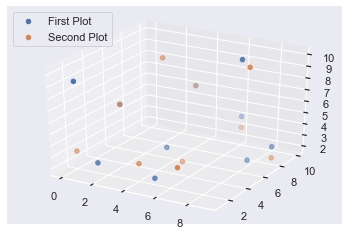
In this example, I first set the random seed to 1 so that you can reproduce the same results as me. I set up the Figure and Axes as expected, made my first 3D plot using X, Y and Z and labeled it with the label keyword argument and an appropriate string.

To save me from manually creating a brand new dataset, I thought it would be a good idea to make use of the data I already had. So, I applied the random.shuffle() function to each of X, Y and Z which mixes the values of the lists in place. So, calling ax.plot() the second time, plotted the same numbers but in a different order, thus producing a different looking plot. Finally, I labeled the second plot and called ax.legend(loc='upper left') to display a legend in the upper left corner of the plot.

All the usual things you can do with legends are still possible for 3D plots. If you want to learn more than these basic steps, check out my comprehensive guide to legends in matplotlib.

Note: If you run the above code again, you will get a different looking plot. This is because you will start with the shuffled X, Y and Z lists rather than the originals you created further up inb the post.

Matplotlib 3D Plot Background Color

There are two backgrounds you can modify in matplotlib – the Figure and the Axes background. Both can be set using either the .set_facecolor('color') or the .set(facecolor='color') methods. Hopefully, you know by now that I much prefer the second method over the first!

Here’s an example where I set the Figure background color to green and the Axes background color to red.

fig = plt.figure(figsize=(8, 6))
ax = fig.add_subplot(111, projection='3d')
ax.plot(X, Y, Z) # Axes color is red
ax.set(facecolor='r')
# Figure color is green
fig.set(facecolor='g')
plt.show()
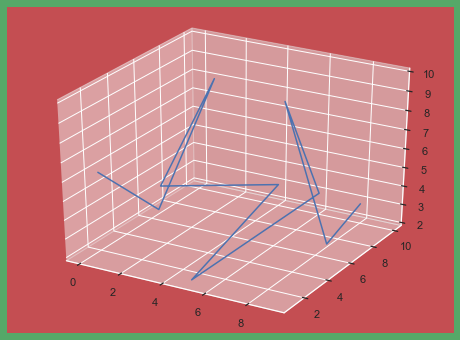
The first three lines are the same as a simple line plot. Then I called ax.set(facecolor='r') to set the Axes color to red and fig.set(facecolor='g') to set the Figure color to green.

In an example with one Axes, it looks a bit odd to set the Figure and Axes colors separately. If you have more than one Axes object, it looks much better.

# Set up Figure and Axes in one function call
fig, axes = plt.subplots(nrows=2, ncols=2, figsize=(8, 6), subplot_kw=dict(projection='3d')) colors = ['r', 'g', 'y', 'b'] # iterate over colors and all Axes objects
for c, ax in zip(colors, axes.flat): ax.plot(X, Y, Z) # Set Axes color ax.set(facecolor=c) # Set Figure color
fig.set(facecolor='pink')
plt.show()
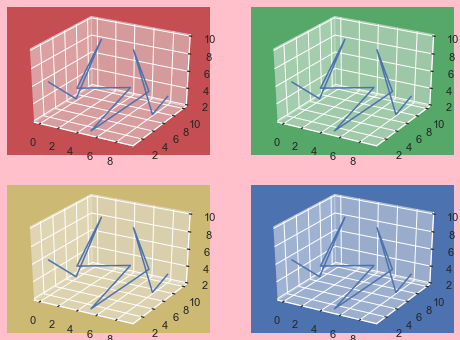
In this example, I used plt.subplots() to set up an 8×6 inch Figure containing four 3D Axes objects in a 2×2 grid. The subplot_kw argument accepts a dictionary of values and these are passed to add_subplot to make each Axes object. For more info on using plt.subplots() check out my article.

Then I created the list colors containing 4 matplotlib color strings. After that, I used a for loop to iterate over colors and axes.flat. In order to iterate over colors and axes together, they need to be the same shape. There are several ways to do this but using the .flat attribute works well in this case.

Finally, I made the same plot on each Axes and set the facecolors. It is clear now why setting a Figure color can be more useful if you create subplots – there is more space for the color to shine through.

Conclusion

That’s it, you now know the basics of creating 3D plots in matplotlib!

You’ve learned the necessary imports you need and also how to set up your Figure and Axes objects to be 3D. You’ve looked at examples of line and scatter plots. Plus, you can modify these by rotating them, adding axis labels, adding legends and changing the background color.

There is still more to be learned about 3D plots such as surface plots, wireframe plots, animating them and changing the aspect ratio but I’ll leave those for another article.

Where To Go From Here?

Do you wish you could be a programmer full-time but don’t know how to start?

Check out the pure value-packed webinar where Chris – creator of Finxter.com – teaches you to become a Python freelancer in 60 days or your money back!

https://tinyurl.com/become-a-python-freelancer

It doesn’t matter if you’re a Python novice or Python pro. If you are not making six figures/year with Python right now, you will learn something from this webinar.

These are proven, no-BS methods that get you results fast.

This webinar won’t be online forever. Click the link below before the seats fill up and learn how to become a Python freelancer, guaranteed.

https://tinyurl.com/become-a-python-freelancer

Posted on Leave a comment

How to Read All Lines of a File in a Python One-Liner?

Say your file is stored in file ‘code.py’. Now, you can open the file, read all lines, get rid of leading and trailing whitespace characters, and store the result in a Python list in a single line of code. Here’s the code:

print([line.strip() for line in open("code.py")])

Python is beautiful! 😍

Try it Yourself:

Where to Go From Here?

If you keep struggling with those basic Python commands and you feel stuck in your learning progress, I’ve got something for you: Python One-Liners (Amazon Link).

In the book, I’ll give you a thorough overview of critical computer science topics such as machine learning, regular expression, data science, NumPy, and Python basics—all in a single line of Python code!

Get the book from Amazon!

OFFICIAL BOOK DESCRIPTION: Python One-Liners will show readers how to perform useful tasks with one line of Python code. Following a brief Python refresher, the book covers essential advanced topics like slicing, list comprehension, broadcasting, lambda functions, algorithms, regular expressions, neural networks, logistic regression and more. Each of the 50 book sections introduces a problem to solve, walks the reader through the skills necessary to solve that problem, then provides a concise one-liner Python solution with a detailed explanation.

Posted on Leave a comment

How to Sort a List Alphabetically in Python?

Problem: Given a list of strings. Sort the list of strings in alphabetical order.

Example:

['Frank', 'Alice', 'Bob'] --> ['Alice', 'Bob', 'Frank']

Solution: Use the list.sort() method without argument to solve the list in lexicographical order which is a generalization of alphabetical order (also applies to the second, third, … characters).

lst = ['Frank', 'Alice', 'Bob']
lst.sort()
print(lst)
# ['Alice', 'Bob', 'Frank']

Try It Yourself:

Python List Sort Alphabetically Case Insensitive

The problem with the default list.sort() or sorted(list) method is that they consider capitalization. This way, it can lead to strange sortings like this:

lst = ['ab', 'Ac', 'ad']
lst.sort()
print(lst)
# ['Ac', 'ab', 'ad']

Intuitively, you would expect the string 'ab' to occur before 'Ac', right?

To ignore the capitalization, you can simply call the x.lower() method on each element x before sorting the list.

However, my preferred method is to use the key argument to accomplish the same thing in a single line of code:

lst = ['ab', 'Ac', 'ad']
lst.sort(key=lambda x: x.lower())
print(lst)
# ['ab', 'Ac', 'ad']

If you like one-liners, you’ll love my new book “Python One-Liners” with NoStarch Press (Amazon Link).

Python List Sort Alphabetically Reverse

You can reverse the order of the list by using the reverse keyword. Set reverse=False to sort in ascending order and set reverse=True to sort in descending order.

lst = ['Frank', 'Alice', 'Bob'] lst.sort(reverse=False)
print(lst)
# ['Alice', 'Bob', 'Frank'] lst.sort(reverse=True)
print(lst)
# ['Frank', 'Bob', 'Alice']

Python List Sort Alphabetically and Numerically

Problem: You’ve got a list of strings. Each strings contains a number. You want the numbers to sort numerically (e.g. 100 comes after 20, not before) but the characters to sort alphabetically (e.g., 'c' comes before 'd').

Example:

['alice 100', 'alice 20', 'bob 99'] --> ['alice 20', 'alice 100', 'bob 99'

Naive Solution (doesn’t work): Use the list.sort() method to sort the list alphabetically:

lst = ['alice 100', 'alice 20', 'bob 99']
lst.sort()
print(lst)
# ['alice 100', 'alice 20', 'bob 99']

Because the number 100 comes before 20 in an alphabetical order, the string 'alice 100' is placed before 'alice 20'.

Solution: I found this code on StackOverflow that nicely demonstrates how to do this:

import re def sorted_nicely(l): """ Sort the given iterable in the way that humans expect.""" convert = lambda text: int(text) if text.isdigit() else text alphanum_key = lambda key: [convert(c) for c in re.split('([0-9]+)', key)] l.sort(key = alphanum_key) lst = ['alice 100', 'alice 20', 'bob 99']
sorted_nicely(lst)
print(lst)
# ['alice 20', 'alice 100', 'bob 99']

The idea is to differentiate characters and numbers and use them as the basis of comparison for the sort routine.

Where to Go From Here?

The list.sort() method sorts the list elements in place in an ascending manner. To customize the default sorting behavior, use the optional key argument by passing a function that returns a comparable value for each element in the list. With the optional Boolean reverse argument, you can switch from ascending (reverse=False) to descending order (reverse=True).

If you keep struggling with those basic Python commands and you feel stuck in your learning progress, I’ve got something for you: Python One-Liners (Amazon Link).

In the book, I’ll give you a thorough overview of critical computer science topics such as machine learning, regular expression, data science, NumPy, and Python basics—all in a single line of Python code!

Get the book from Amazon!

OFFICIAL BOOK DESCRIPTION: Python One-Liners will show readers how to perform useful tasks with one line of Python code. Following a brief Python refresher, the book covers essential advanced topics like slicing, list comprehension, broadcasting, lambda functions, algorithms, regular expressions, neural networks, logistic regression and more. Each of the 50 book sections introduces a problem to solve, walks the reader through the skills necessary to solve that problem, then provides a concise one-liner Python solution with a detailed explanation.

Posted on Leave a comment

Python: How to Count Elements in a List Matching a Condition?

I stumbled across this question when browsing through StackOverflow and it got me thinking: what’s the best way to count the number of elements in a list that match a certain condition? Can you generalize this way to both general conditions (e.g. x>3) and regular expressions (e.g. 'a.*')?

Short answer: you can count the number of elements x that match a certain condition(x) by using the one-liner expression sum(condition(x) for x in lst). This creates a generator expression that returns True for each element that satisfies the condition and False otherwise. Since the True and False values are represented by integer 1 and 0 values, you get the number of matching elements by summing over the iterable.

Try it yourself with the interactive code shell:

In case, the browser interpreter doesn’t show up in your browser, here’s the raw Python code:

## FRAMEWORK FOR CONDITIONAL COUNT ## # Define any condition here
def condition(x): return x > 10 # Create the list
lst = [10, 11, 42, 1, 2, 3] # Count the number of matching elements
print(sum(condition(x) for x in lst))
# What's the output?

Related articles:

Python List Count With Condition

How can you count elements under a certain condition in Python? For example, what if you want to count all even values in a list? Or all prime numbers? Or all strings that start with a certain character? There are multiple ways to accomplish this, let’s discuss them one by one.

Say, you have a condition for each element x. Let’s make it a function with the name condition(x). You can define any condition you want—just put it in your function. For example this condition returns True for all elements that are greater than the integer 10:

def condition(x): return x > 10 print(condition(10))
# False print(condition(2))
# False print(condition(11))
# True

But you can also define more complicated conditions such as checking if they are prime numbers.

Python List Count If

How can you count the elements of the list IF the condition is met?

The answer is to use a simple generator expression sum(condition(x) for x in lst):

>>> def condition(x): return x>10 >>> lst = [10, 11, 42, 1, 2, 3]
>>> sum(condition(x) for x in lst)
2

The result indicates that there are two elements that are larger than 10. You used a generator expression that returns an iterator of Booleans. Note that the Boolean True is represented by the integer value 1 and the Boolean False is represented by the integer value 0. That’s why you can simply calculate the sum over all Booleans to obtain the number of elements for which the condition holds.

Python List Count Greater / Smaller Than

If you want to determine the number of elements that are greater than or smaller than a specified value, just modify the condition in this example:

>>> def condition(x): return x>10 >>> lst = [10, 11, 42, 1, 2, 3]
>>> sum(condition(x) for x in lst)
2

For example, to find the number of elements smaller than 5, use the condition x<5 in the generator expression:

>>> lst = [10, 11, 42, 1, 2, 3]
>>> sum(x<5 for x in lst)
3

Python List Count Zero / Non-Zero

To count the number of zeros in a given list, use the list.count(0) method call.

To count the number of non-zeros in a given list, you should use conditional counting as discussed before:

def condition(x): return x!=0 lst = [10, 11, 42, 1, 2, 0, 0, 0]
print(sum(condition(x) for x in lst))
# 5

Python List Count Lambda + Map

An alternative is to use a combination of the map and the lambda function.

Related articles:

Here’s the code:

>>> sum(map(lambda x: x%2==0, [1, 2, 3, 4, 5]))
2

You count the number of even integers in the list.

  • The lambda function returns a truth value for a given element x.
  • The map function transforms each list element into a Boolean value (1 or 0).
  • The sum function sums up the “1”s.

The result is the number of elements for which the condition evaluates to True.

Python List Count Regex / Count Matches

Given a list of strings. How can you check how many list elements match a certain regex pattern? (If you need a refresher on Python regular expressions, check out my ultimate guide on this blog – it’s really ultimate!)

  • List lst of string elements
  • Pattern p to be matched against the strings in the list.

Solution: Use the concept of generator expressions with the ternary operator.

Related articles:

Here’s the code:

>>> import re
>>> p = 'a...e'
>>> lst = ['annie', 'alice', 'apex']
>>> sum(1 if re.match(p, x) else 0 for x in lst)
2

Python List Count Wildcard

Do you want to count all string occurrences of a given prefix (e.g. prefix "Sus" for strings "Susie", "Susy", "Susi")?

Solution: Again you can use the concept of generator expressions with the ternary operator.

Related articles:

Here’s the code for this one using the wildcard operator in a pattern to count all occurrences of this pattern in the list.

>>> import re
>>> lst = ['Susi', 'Ann', 'Susanne', 'Susy']
>>> pattern = 'Sus.*'
>>> frequency = sum(1 if re.match(pattern, x) else 0 for x in lst)
>>> print(frequency)
3

The generator expression produces a bunch of 1s and 0s—the former if the list element starts with prefix 'Sus' and the latter if it doesn’t. By summing over all elements, you get the number of matches of the wildcard operator.

Where to Go From Here?

You’ve learned how you can get the number of elements that match a certain condition. It can be a Boolean condition or even a regular expression—the framework stays the same.

Do you want to accelerate your learning efficiency? Do you want to work from the comfort of your own home? Do you want to make a comfortable living by coding 3-5 hours for clients online?

Then join my Python freelancer program and take your first steps towards six figures and attainment of your practical code projects in no time!

Are you still unsure? Watch the free software dev online webinar first. It’s fun and you don’t have to have any preknowledge! 😊

Posted on Leave a comment

Python One-Liners – The Ultimate Collection

This resource is meant to be the ultimate collection of Python One-Liners. If you have an idea for a one-liner to be published here, send me a message at chris (at) finxter.com.

Find All Indices of an Element in a List

Say, you want to do the same as the list.index(element) method but return all indices of the element in the list rather than only a single one.

In this one-liner, you’re looking for element 'Alice' in the list [1, 2, 3] so it even works if the element is not in the list (unlike the list.index() method).

lst = [1, 2, 3]
indices = [i for i in range(len(lst)) if lst[i]=='Alice']
index = indices[0] if indices else None
print(index)

Posted on Leave a comment

Python List index()

This tutorial shows you everything you need to know to help you master the essential index() method of the most fundamental container data type in the Python programming language.

Definition and Usage: The list.index(value) method returns the index of the value argument in the list. You can use optional start and stop arguments to limit the index range where to search for the value in the list. If the value is not in the list, the method throws a ValueError.

Here’s a short example:

>>> lst = ["Alice", 42, "Bob", 99]
>>> lst.index("Alice")
0
>>> lst.index(99)
3
>>> lst.index(99, 1, 3) Traceback (most recent call last): File "<pyshell#9>", line 1, in <module> lst.index(99, 1, 3)
ValueError: 99 is not in list

In the first line of the example, you create the list lst. You then look up the index of the elements "Alice" and 99. If you use start=1 and stop=3, the value 99 is not found anymore and Python throws a ValueError.

Code Puzzle — Try It Yourself:

Now you know the basics. Let’s deepen your understanding with a short code puzzle—can you solve it?

You can also solve this puzzle and track your Python skills on our interactive Finxter app.

Syntax: You can call this method on each list object in Python (Python versions 2.x and 3.x). Here’s the syntax:

list.index(value, start=0, stop=9223372036854775807)

Arguments:

Argument Description
value Returns the index of value in the list. A value appears in the list if the == operator returns True. If the value doesn’t exist in the list, the return value is -1.
start (Optional.) The index of where you want to start searching in the list. All list elements in front of this position are ignored. This is a positional argument, not a keyword argument.
stop (Optional.) The index of where you want to stop searching in the list. All list elements after this position are ignored. This is a positional argument, not a keyword argument.

Return value: The method list.index(value) returns an integer value representing the index where the argument value appears in the list. If the value does not appear in the list, the method throws a ValueError.

Related article: Python Regex Superpower – The Ultimate Guide

Python List Index Implementation

Python List Index Time Complexity

Python List Index Out of Range

Python List Index Without Exception

Python List Index Try Catch

Python List Index Multiple

Python List Index Range

Python List Index of Max / Min

Python List Index From End (Reverse)

Python List Index Regex

Python List Index Wildcard

Python List Index Enumerate

Python List Index Exclude

Python List Index Tuple

Python List Index True False

Python List Index Zero / Non-Zero

Python List Index Pop

Python List Index Delete

Python List Index Slice / Substring

Python List Index By Value / Key / Array / Tuple

Python List Index Multidimensional

Related articles:

Python List Count Runtime Complexity

The time complexity of the count(value) method is O(n) for a list with n elements. The standard Python implementation cPython “touches” all elements in the original list to check if they are equal to the value.

Again, have a look at the reference implementation where you can see these comparison operations element == value in the code:

def count(lst, value): count = 0 for element in lst: count += element == value return count

Thus, the time complexity is linear in the number of list elements.

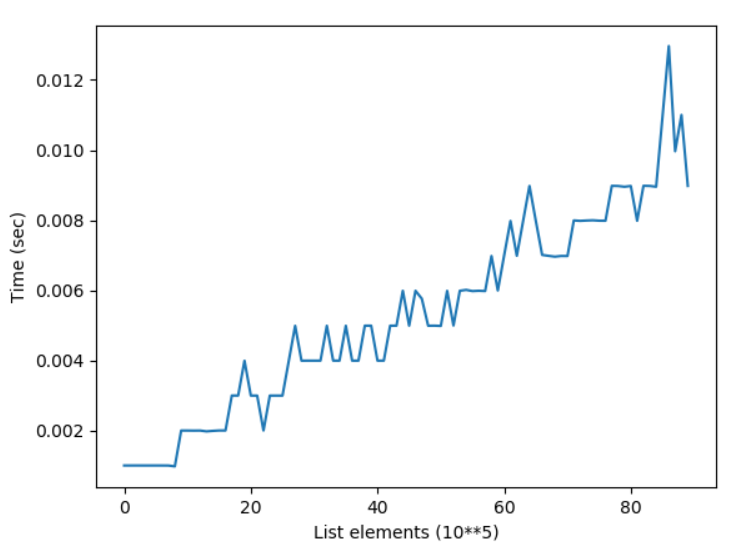
You can see a plot of the time complexity of the count() method for growing list size here:

The figure shows how the elapsed time of counting a dummy element -99 in lists with growing number of elements grows linear to the number of elements.

If you’re interested in the code I used to generate this plot with Matplotlib, this is it:

import matplotlib.pyplot as plt
import time y = []
for i in [100000 * j for j in range(10,100)]: lst = list(range(i)) t0 = time.time() x = lst.count(-99) t1 = time.time() y.append(t1-t0) plt.plot(y)
plt.xlabel("List elements (10**5)")
plt.ylabel("Time (sec)")
plt.show()

Python List Count Duplicates

How can you count the number of duplicates in a given list?

Problem: Let’s consider an element a duplicate if it appears at least two times in the list. For example, the list [1, 1, 1, 2, 2, 3] has two duplicates 1 and 2.

Solution: You create an empty set duplicates. Then you iterate over the original list and add each element to the set that has a count value of at least 2.

Here’s the code:

def find_dups(lst): dups = set() for el in lst: if lst.count(el)>1: dups.add(el) return dups print(find_dups([1, 1, 1, 2, 2, 3]))
# {1, 2} print(find_dups(["Alice", "Bob", "Alice"]))
# {'Alice'} print(find_dups([1, 2, 3]))
# set()

Note that this algorithm has quadratic time complexity because for each element in the list, you need to count the number of times it appears in the list—each of those count operations has linear time complexity.

Related article:

Python List Count Unique Values and Strings

How can you count the number of unique values (or strings) in a given list?

Problem: A value is considered unique if it appears only once in the list.

Solution: You count each element in the list and take only those with list.count(element) == 1.

Here’s the code:

def find_uniques(lst): uniques = set() for el in lst: if lst.count(el) == 1: uniques.add(el) return uniques print(find_uniques([1, 1, 2, 3, 3]))
# {2} print(find_uniques(["Alice", "Bob", "Alice"]))
# {'Bob'}

This algorithm has quadratic time complexity because for each element in the list, you need to count the number of times it appears in the list—each of those count operations has linear time complexity.

Python List Count All Elements (Count to Dict)

How can you count all elements in a list and store the result in a dictionary?

Problem: Given is a list. You want to count each element in the list. Then, you want to store the result in a dictionary mapping the elements to their frequencies of appearance (counts). For example, the list [1, 1, 2, 2, 3] should lead to the dictionary {1:2, 2:2, 3:1}.

Solution: You solve this problem using dictionary comprehension. The key is the list element and the value is the frequency of this element in the list. You use the count() method to do this.

Here’s the code:

def count_to_dict(lst): return {k:lst.count(k) for k in lst} print(count_to_dict(["Alice", "Bob", "Ann", "Alice", "Charles"]))
# {'Alice': 2, 'Bob': 1, 'Ann': 1, 'Charles': 1} print(count_to_dict([1, 1, 1, 2, 2, 3]))
# {1: 3, 2: 2, 3: 1}

This algorithm has quadratic time complexity because for each element in the list, you need to count the number of times it appears in the list—each of those count operations has linear time complexity.

Related article:

Python List Count With Condition

How can you count elements under a certain condition in Python? For example, what if you want to count all even values in a list? Or all prime numbers? Or all strings that start with a certain character? There are multiple ways to accomplish this, let’s discuss them one by one.

Say, you have a condition for each element x. Let’s make it a function with the name condition(x). You can define any condition you want—just put it in your function. For example this condition returns True for all elements that are greater than the integer 10:

def condition(x): return x > 10 print(condition(10))
# False print(condition(2))
# False print(condition(11))
# True

But you can also define more complicated conditions such as checking if they are prime numbers.

Python List Count If

How can you count the elements of the list IF the condition is met?

The answer is to use a simple generator expression sum(condition(x) for x in lst):

>>> def condition(x): return x>10 >>> lst = [10, 11, 42, 1, 2, 3]
>>> sum(condition(x) for x in lst)
2

The result indicates that there are two elements that are larger than 10. You used a generator expression that returns an iterator of Booleans. Note that the Boolean True is represented by the integer value 1 and the Boolean False is represented by the integer value 0. That’s why you can simply calculate the sum over all Booleans to obtain the number of elements for which the condition holds.

Python List Count Greater / Smaller Than

If you want to determine the number of elements that are greater than or smaller than a specified value, just modify the condition in this example:

>>> def condition(x): return x>10 >>> lst = [10, 11, 42, 1, 2, 3]
>>> sum(condition(x) for x in lst)
2

For example, to find the number of elements smaller than 5, use the condition x<5 in the generator expression:

>>> lst = [10, 11, 42, 1, 2, 3]
>>> sum(x<5 for x in lst)
3

Python List Count Zero / Non-Zero

To count the number of zeros in a given list, use the list.count(0) method call.

To count the number of non-zeros in a given list, you should use conditional counting as discussed before:

def condition(x): return x!=0 lst = [10, 11, 42, 1, 2, 0, 0, 0]
print(sum(condition(x) for x in lst))
# 5

Python List Count Lambda + Map

An alternative is to use a combination of the map and the lambda function.

Related articles:

Here’s the code:

>>> sum(map(lambda x: x%2==0, [1, 2, 3, 4, 5]))
2

You count the number of even integers in the list.

  • The lambda function returns a truth value for a given element x.
  • The map function transforms each list element into a Boolean value (1 or 0).
  • The sum function sums up the “1”s.

The result is the number of elements for which the condition evaluates to True.

Python List Count Regex / Count Matches

Given a list of strings. How can you check how many list elements match a certain regex pattern? (If you need a refresher on Python regular expressions, check out my ultimate guide on this blog – it’s really ultimate!)

  • List lst of string elements
  • Pattern p to be matched against the strings in the list.

Solution: Use the concept of generator expressions with the ternary operator.

Related articles:

Here’s the code:

>>> import re
>>> p = 'a...e'
>>> lst = ['annie', 'alice', 'apex']
>>> sum(1 if re.match(p, x) else 0 for x in lst)
2

Python List Count Wildcard

Do you want to count all string occurrences of a given prefix (e.g. prefix "Sus" for strings "Susie", "Susy", "Susi")?

Solution: Again you can use the concept of generator expressions with the ternary operator.

Related articles:

Here’s the code for this one using the wildcard operator in a pattern to count all occurrences of this pattern in the list.

>>> import re
>>> lst = ['Susi', 'Ann', 'Susanne', 'Susy']
>>> pattern = 'Sus.*'
>>> frequency = sum(1 if re.match(pattern, x) else 0 for x in lst)
>>> print(frequency)
3

The generator expression produces a bunch of 1s and 0s—the former if the list element starts with prefix 'Sus' and the latter if it doesn’t. By summing over all elements, you get the number of matches of the wildcard operator.

Python List Count Not Working

The list.count(value) method is very hard to break. Look what I tried to get an error:

>>> lst = [1, 1, 1, 2, 2, 3]
>>> lst.count(1)
3
>>> lst.count(2, 2)
Traceback (most recent call last): File "<pyshell#19>", line 1, in <module> lst.count(2, 2)
TypeError: count() takes exactly one argument (2 given)
>>> lst.count(4)
0
>>> lst.count("1")
0
>>> count(lst)
Traceback (most recent call last): File "<pyshell#22>", line 1, in <module> count(lst)
NameError: name 'count' is not defined
>>> 

You have to try really hard to break it. Just consider these tips:

  • The list.count(value) method takes exactly one argument: the value you want to count. If you define more or less arguments, there will be an error.
  • The list.count(value) method is just that: a method of a list object. You need to call it on a list object. If you try to call it on another object, it will probably fail. If you try to use it just like that (without the list prefix, i.e., count(value)), it will also fail.
  • The list.count(value) will return 0 if you put in any object as an argument that does not evaluate to True when compared to the list elements using the == comparison operator. So make sure that the object you want to count really evaluates to True if you compare it against some list elements. You may assume this but it could easily fail to do so.

Python List Reference Count

The Python garbage collector keeps track of the number of times each object in memory is referenced. You call this “reference counting”. All objects that have reference count of zero cannot be reached by your code and, thus, can be safely removed by the garbage collector.

It’s unrelated to Python lists with the one exception: each list element increases the reference count by one because a list really is an array of pointers to the list objects in memory in the cPython implementation.

Python List Count Tuples

How can you count the number of times a given tuple appears in a list?

Simply use the tuple as the input argument value for the list.count(value) method. Here’s an example:

>>> lst = [(1, 2), (1, 1), 99, "Alice", True, (1, 1)]
>>> lst.count((1, 1))
2

How can you count the number of tuples in a given list?

Use the type(x) method to check the type of a given variable x. Then compare the result with your desired data type (e.g. tuple).

Here’s an example:

>>> sum(type(x)==tuple for x in lst)
3

Related articles:

Python List Count and Sort

Given: list lst.

Problem: You want to count the number of occurrences of all values in the list and sort them by their frequency.

Example: for list elements [1, 1, 1, 1, 0, 0, 3, 1, 1, 3, 3, 3] you want to obtain their frequencies in a sorted manner:

6 times --> element 1
4 times --> element 3
2 times --> element 0

Solution: Use the collections.Counter(lst).most_common() method that does exactly that. You can find the documentation here.

import collections lst = [3, 2, 1, 1, 1, 2, 2, 3]
print(collections.Counter(lst).most_common())

Generates output:

[(2, 3), (1, 3), (3, 2)]

Python List Count Slow

Do you want to improve performance of the list.count(value) method? It’s not easy because the runtime complexity is O(n) with n list elements.

There’s not much you can do about it. Of course, if you need to count the same element multiple times, you can use a cache dictionary to store its result. But this works only if the list has not changed.

You can also sort the list once which takes O(n log n) for n list elements. After that, you can call the implement a count method based on binary search with O(log n) runtime complexity. But if you need to count only a single element, this is not effective.

Interestingly, counting all elements in a list also has O(n) runtime complexity. Why? Because you’ll go over each element and add it to a dictionary if it doesn’t exist already (mapping the element to its counter value, initially 1). If it exists, you simply increment the counter by one.

In this excellent benchmark, you can find the performance of different counting methods. The Counter class seems to have best performance.

Python List Count vs Len

What’s the difference?

  • The list.count(x) method counts the number of occurrences of the element x in the list.
  • The len(list) method returns the total number of elements in the list.

Here’s a minimal example:

>>> lst = [1, 2, 2, 2, 2]
>>> lst.count(2)
4
>>> len(lst)
5

Python List count() Thread Safe

Do you have multiple threads that access your list at the same time? Then you need to be sure that the list operations (such as count()) are actually thread safe.

In other words: can you call the count() operation in two threads on the same list at the same time? (And can you be sure that the result is meaningful?)

The answer is yes (if you use the cPython implementation). The reason is Python’s global interpreter lock that ensures that a thread that’s currently working on its code will first finish its current basic Python operation as defined by the cPython implementation. Only if it terminates with this operation will the next thread be able to access the computational resource. This is ensured with a sophisticated locking scheme by the cPython implementation.

The only thing you need to know is that each basic operation in the cPython implementation is atomic. It’s executed wholly and at once before any other thread has the chance to run on the same virtual engine. Therefore, there are no race conditions. An example of such a race condition would be the following: the first thread reads a value from the list, the second thread overwrites the value, and the first thread overwrites the value again invalidating the second thread’s operation.

All cPython operations are thread-safe. But if you combine those operations into higher-level functions, those are not generally thread safe as they consist of many (possibly interleaving) operations.

Where to Go From Here?

The list.count(x) method counts the number of times the element x appears in the list.

You’ve learned the ins and outs of this important Python list method.

If you keep struggling with those basic Python commands and you feel stuck in your learning progress, I’ve got something for you: Python One-Liners (Amazon Link).

In the book, I’ll give you a thorough overview of critical computer science topics such as machine learning, regular expression, data science, NumPy, and Python basics—all in a single line of Python code!

Get the book from Amazon!

OFFICIAL BOOK DESCRIPTION: Python One-Liners will show readers how to perform useful tasks with one line of Python code. Following a brief Python refresher, the book covers essential advanced topics like slicing, list comprehension, broadcasting, lambda functions, algorithms, regular expressions, neural networks, logistic regression and more. Each of the 50 book sections introduces a problem to solve, walks the reader through the skills necessary to solve that problem, then provides a concise one-liner Python solution with a detailed explanation.

Posted on Leave a comment

Matplotlib Boxplot – A Helpful Illustrated Guide

Do you want to plot numerical data? And do it in a beautiful, engaging, and scientifically sound way? And do all of this in a few simple lines of code? You’re in the right place!

A great way to plot numerical data is the matplotlib boxplot. It displays the median, the interquartile range, and outliers of the data.

How can you visualize your data with the boxplot?

  1. Get that data into an array-like object – list, NumPy array, pandas series, etc.
  2. Pass it to plt.boxplot().
  3. Call plt.show().

As a result, matplotlib will draw a lovely boxplot for you.

import matplotlib.pyplot as plt plt.boxplot(data)
plt.show()

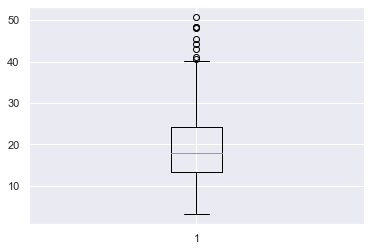
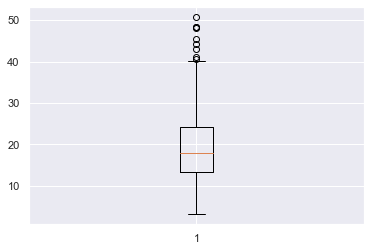
The boxplot clearly shows the median of the data (orange line), the upper and lower quartiles (top and bottom parts of the box) and outliers (the circles at the top and/or bottom of the ‘whiskers’ of the plot).

There are quite a few things we can do to improve this plot – we don’t even know what the data represents! – so let’s dive into a more detailed example.

Try It Yourself:

You can play with a simple example here in our interactive Python shell online. The resulting plot will be stored in a .png file in the online project (just click on “files”):

Matplotlib Boxplot Example

The boxplot is an essential tool you should use when when exploring datasets. The matplotlib boxplot function accepts a lot of keyword arguments and so can seem quite intimidating if you look at the docs. So, I’ll cover the most essential ones that you will use most often.

Boxplots show the distribution of numerical data, in particular they show if it is skewed and whether there are unusual observations/outliers. They are very helpful if you are dealing with a large amount of data and want to see a visual summary – in this way, they are similar to histograms. They give you ability to compare multiple distributions at the same time because you can plot many boxplots on one Figure. This is not really possible with histograms – any more than 3 and it starts to look crowded.

As this is an article about how to best work with boxplots, I will not go into detail about how I generated the datasets. However, if you want to follow along, I am using Seaborn’s tips dataset and you can find more info here.

Let’s assume you are a waiter/waitress at a restaurant and you have recorded the total bill in USD for each table you waited from Thursday – Sunday last week. You want to visualize this data to understand which days, if any, are the best to work. The total bill for all the days is stored in total_bill and the total bill for each day is stored in the variables thu, fri, sat and sun respectively.

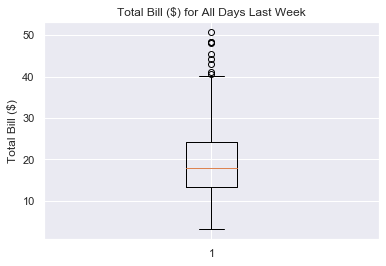
Let’s plot total bill and add some info to the axes and a title.

plt.boxplot(total_bill)
plt.title('Total Bill ($) for All Days Last Week')
plt.ylabel('Total Bill ($)')
plt.show()

This looks much better and it is now easy to understand what the boxplot is showing. We can see that the median bill for each table is about 17 USD and that the interquartile range (upper quartile – lower quartile) is from 24 – 14 = 10 USD. There are about 8 outliers where the bill was more than 40 USD and the lowest bill was about 3 USD.

Matplotlib Boxplot Multiple

Boxplots let you compare the distributions of different datasets. So, you will almost always want to plot more than one boxplot on a figure. To do this, pass the data you want to plot to plt.boxplot() as a list of lists.

# Create list of lists
all_days = [thu, fri, sat, sun] # Pass to plt.boxplot()
plt.boxplot(all_days)
plt.show()

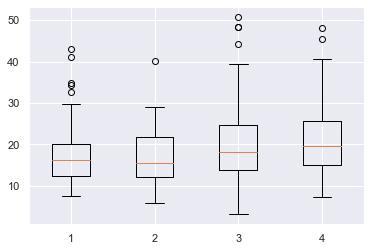
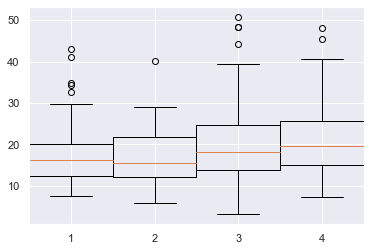
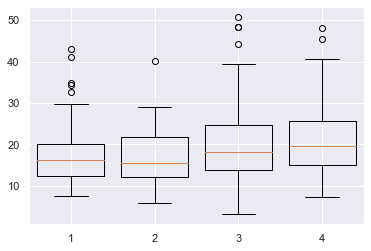
Here I combined all the individual datasets into a list of lists all_days and passed that to plt.boxplot(). Matplotlib automatically places the four boxplots a nice distance apart but does not label the x-axis for us. Let’s do that now.

Matplotlib Boxplot Labels

To label each boxplot, pass a list of strings to the labels keyword argument. If you have several labels, I recommend you create this first before passing it to plt.boxplot().

# Create data and labels first
all_days = [thu, fri, sat, sun]
labels = ['Thu', 'Fri', 'Sat', 'Sun'] # Plot data and labels
plt.boxplot(all_days, labels=labels)
plt.ylabel('Total Bill ($)')
plt.show()

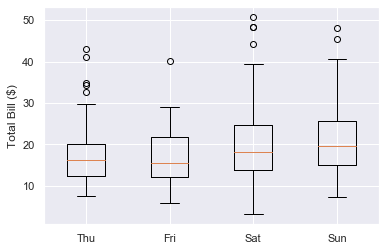
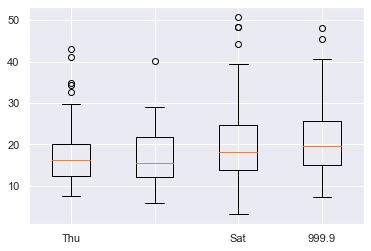
Great, now we can see that each boxplot represents the total bill for each day of the week and which day is which.

Make sure your list of labels is the same length as the number of boxplots and that you pass them in the order you want them to appear. If you don’t want to label a particular boxplot, pass an empty string ''. Finally, you can also pass ints and floats if you desire.

all_days = [thu, fri, sat, sun] # Second label is an empty string, fourth is a float
labels = ['Thu', '', 'Sat', 999.9] plt.boxplot(all_days, labels=labels)
plt.show()

Your boxplots look much better now but the matplotlib default settings are quite boring. It’s important to make your visualizations engaging and one of the best ways to do this is to add some color.

Matplotlib Boxplot Fill Color

To just fill the color of the box, you first need to set patch_artist=True. Why is this?

Under the hood, plt.boxplot() returns a dictionary containing each part of the boxplot and these parts are Line2D objects. However, by definition, these do not have an edgecolor or facecolor – lines just have one color.

To color inside the box, you must turn it into a Patch object which, by definition, has a facecolor.

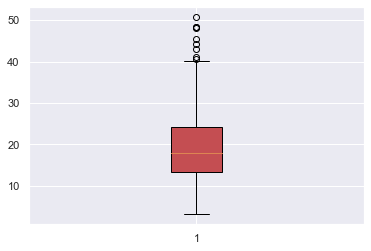
To modify the box, use the boxprops (box properties) keyword argument. It accepts a dictionary and the key-value pair you need is 'facecolor' plus a color.

# Turn box into a Patch so that it has a facecolor property
plt.boxplot(total_bill, patch_artist=True, # Set facecolor to red boxprops=dict(facecolor='r'))
plt.show()

Note that if you don’t set patch_artist=True, you will get an error.

# Not setting patch_artist=True gives an error
plt.boxplot(total_bill, # Set facecolor to red boxprops=dict(facecolor='r'))
plt.show()
---------------------------------------------------------------------------
AttributeError Traceback (most recent call last)
<ipython-input-97-d28bb5a14c71> in <module> 2 plt.boxplot(total_bill, 3 # Set facecolor to red
----> 4 boxprops=dict(facecolor='r')) 5 plt.show() AttributeError: 'Line2D' object has no property 'facecolor'

If you also want to change the color of the line surrounding the box, pass the additional argument color=c for some color c to boxprops.

# Turn box into a Patch so that it has a facecolor property
plt.boxplot(total_bill, patch_artist=True, # Set facecolor and surrounding line to red boxprops=dict(facecolor='r', color='r'))
plt.show()

Perfect, now you know how to change the box’s color, let’s look at changing the other parts.

Matplotlib Boxplot Color

You can change any part of a boxplot to any color you want.

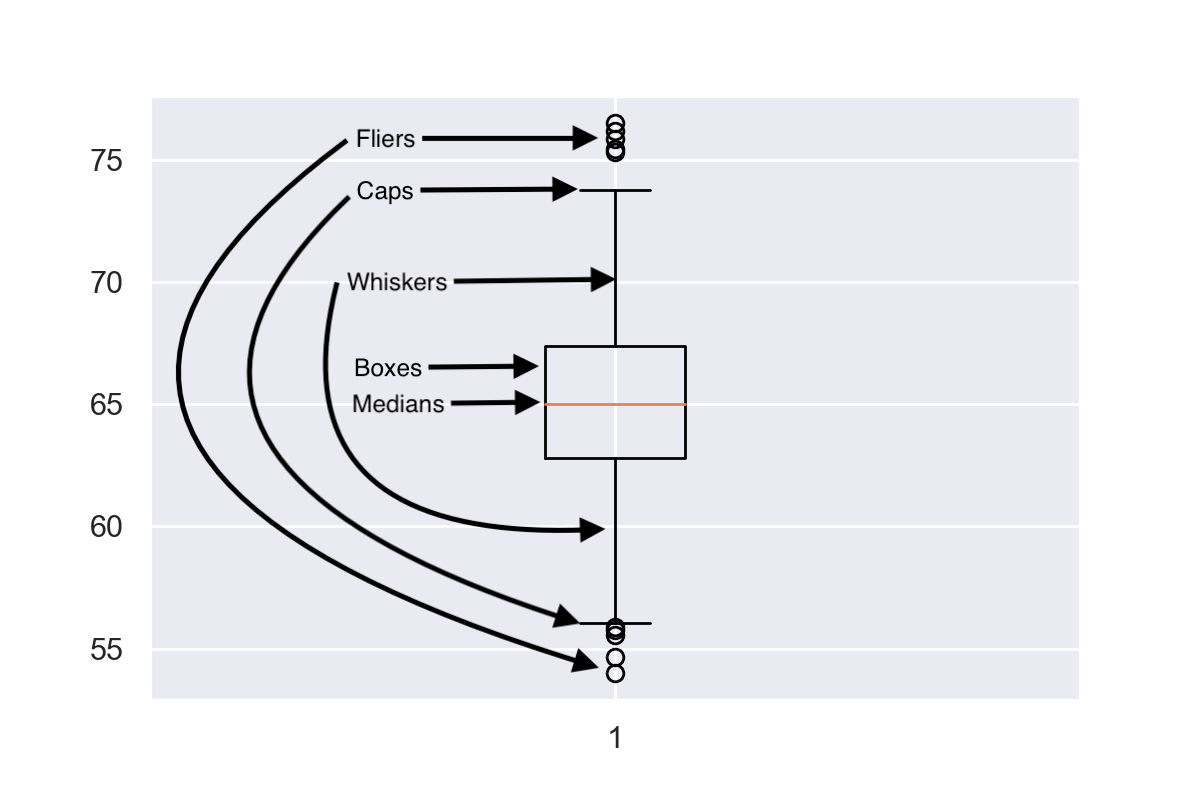
There are a 6 parts you can color:

  1. box – the main body of the boxplot
  2. median – horizontal line illustrating the median of the distribution
  3. whiskers – vertical lines extending to the most extreme (non-outlier) data points
  4. caps – horizontal lines at the ends of the whiskers
  5. fliers – points above/below the caps representing outliers
  6. mean – horizontal line illustrating the mean of the distributions (by default not included)

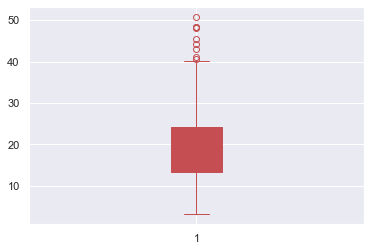
In the above image, I’ve labelled the first 5 parts but have not included the mean as it is not often used with boxplots.

Each of the parts can be modified by a <part>props keyword argument, similar to the boxprops one above.

The available keyword arguments are:

boxprops, medianprops, whisperprops, capprops, flierprops, meanprops

For example, write this to set the color of the median line to red

medianprops=dict(color='red')

They all accept the color keyword argument and the value can be any matplotlib color string. The only different one is flierprops which also accepts markeredgecolor to color the line around the outliers.

Finally, remember to set patch_artist=True if you want to change the fill color of the box.

Let’s look at an example where I turn the entire boxplot red. Since there are so many keyword arguments to pass, I will first create a dictionary and use the ** operator to unpack it in my plt.boxplot() call.

# Set color to red
c = 'r' # Create dictionary of keyword aruments to pass to plt.boxplot
red_dict = {'patch_artist': True, 'boxprops': dict(color=c, facecolor=c), 'capprops': dict(color=c), 'flierprops': dict(color=c, markeredgecolor=c), 'medianprops': dict(color=c), 'whiskerprops': dict(color=c)} # Pass dictionary to boxplot using ** operator to unpack it
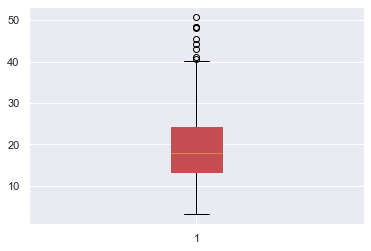
plt.boxplot(total_bill, **red_dict)
plt.show()

First I created a variable c to hold the color string in. This means that if I want to change the color to green, I only have to change one line of code – c = 'g' – and it will change the color everywhere.

Then I created red_dict where the key-value pairs is a string and dictionary. The first key is patch_artists=True and the other keys are the <part>props keyword argument. Finally, I created a boxplot of total_bill and colored it red by unpacking red_dict with the ** operator.

If you want to brush up on your dictionary knowledge, check out my article the ultimate guide to dictionaries.

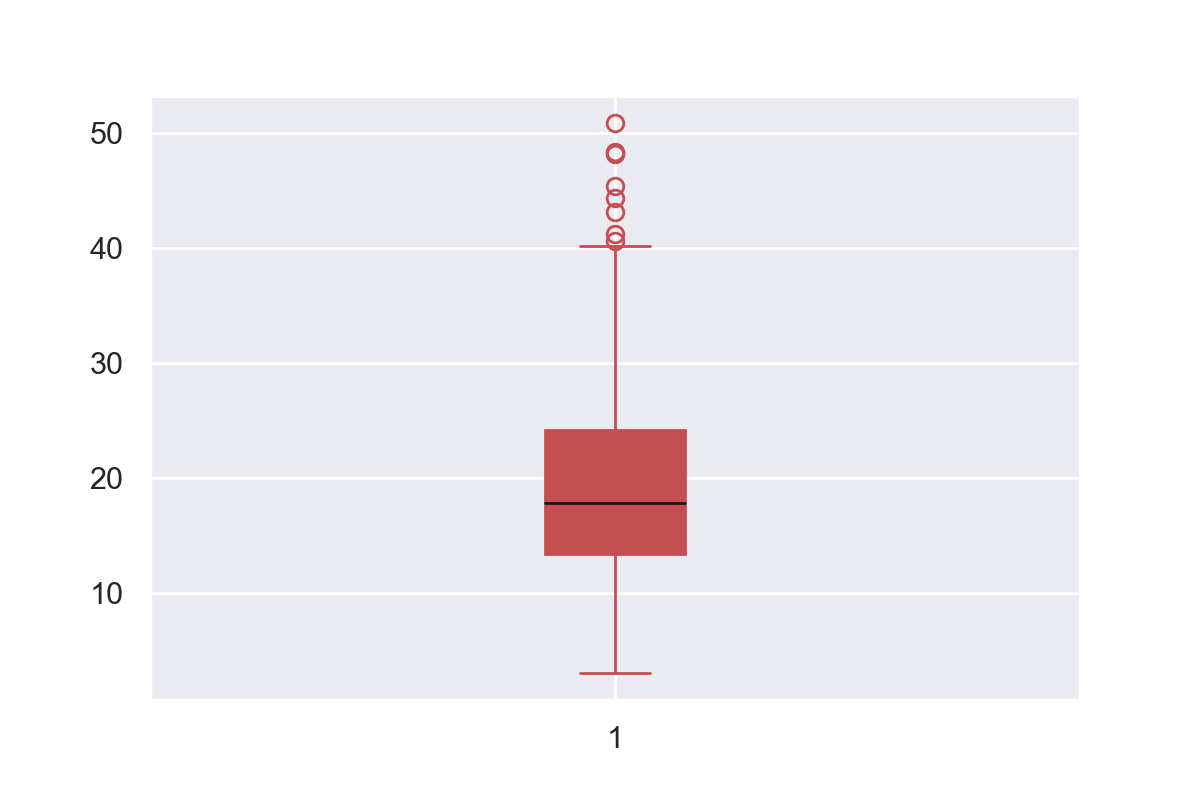
The red plot is much more engaging than the standard matplotlib colors. But, because the median line was the same color as everything else, you lost some information it was showing. One way to rectify this is to set to median line to black with'medianprops': dict(color='k') in red_dict. The result is shown above.

Matplotlib Boxplot Width

To change the width of a boxplot, pass a float to to the widths keyword argument in plt.boxplot(). It represents the fraction of space the box takes up on the figure.

If you have one boxplot, the scalar represents the percentage of the plot the box takes up.

plt.boxplot(total_bill, widths=1)
plt.show()

Here the box takes up 100% of the width as widths=1.

plt.boxplot(total_bill, widths=0.1)
plt.show()

Here the box only takes up 10% of the space as widths=0.1.

If you plot multiple boxplots on the same figure and pass a float to widths, all boxes will be resized to take up that fraction of space in their area of the plot.

# Boxes take up 100% of their allocated space
plt.boxplot(all_days, widths=1)
plt.show()

Here each boxplot takes up 100% of the space allocated as widths=1.

# Boxes take up 80% of their allocated space
plt.boxplot(all_days, widths=0.8)
plt.show()

Here each boxplot takes up 80% of the space allocated to them as widths=0.8.

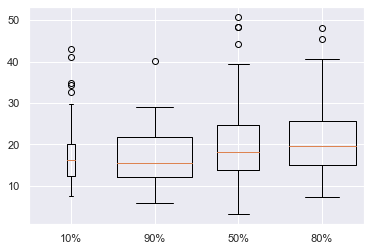
You can set the width of each boxplot individually by passing a list to widths instead of a scalar. In [83]:

plt.boxplot(all_days, widths=[0.1, 0.9, 0.5, 0.8], labels=['10%', '90%', '50%', '80%'])
plt.show()

Here I have labelled the amount of horizontal space each box takes up. Although it is possible to do this, I do not recommend it. It adds another dimension to your boxplot but isn’t showing any new information. I personally think that widths=0.8 looks best, but you are free to choose any size you want. Just make sure that your boxplots are the same width so as not to confuse your reader.

Matplotlib Boxplot Horizontal

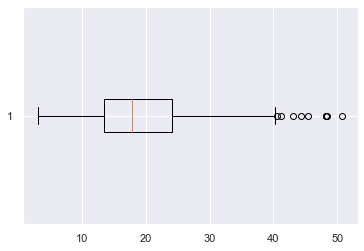
To create a horizonal boxplot in matplotlib, set the vert keyword argument to False.

plt.boxplot(total_bill, vert=False)
plt.show()

Conclusion

That’s it, you now know all the basics of boxplots in matplotlib!

You’ve learned how to plot single and multiple boxplots on one figure. You can label them whatever you want and change the color of any of the 6 parts to anything you can imagine. Finally, you’ve learned to customize the width of your plots and plot horizontal ones as well.

There is still more to be learned about boxplots such as changing the outlier marker, adding legends, sorting them by groups and even working with them and the pandas library. But I’ll leave that for another article.

Where To Go From Here?

Do you wish you could be a programmer full-time but don’t know how to start?

Check out the pure value-packed webinar where Chris – creator of Finxter.com – teaches you to become a Python freelancer in 60 days or your money back!

https://tinyurl.com/become-a-python-freelancer

It doesn’t matter if you’re a Python novice or Python pro. If you are not making six figures/year with Python right now, you will learn something from this webinar.

These are proven, no-BS methods that get you results fast.

This webinar won’t be online forever. Click the link below before the seats fill up and learn how to become a Python freelancer, guaranteed.

https://tinyurl.com/become-a-python-freelancer

Posted on Leave a comment

Python List count()

This tutorial shows you everything you need to know to help you master the essential count() method of the most fundamental container data type in the Python programming language.

Definition and Usage:

The list.count(x) method counts the number of occurrences of the element x in the list.

Here’s a short example:

>>> lst = [1, 2, 42, 2, 1, 42, 42]
>>> lst.count(42)
3
>>> lst.count(2)
2

In the first line of the example, you create the list lst. You then count the number of times the integer values 42 and 2 appear in the list.

Code Puzzle — Try It Yourself:

Now you know the basics. Let’s deepen your understanding with a short code puzzle—can you solve it?

You can also solve this puzzle and track your Python skills on our interactive Finxter app.

Syntax: You can call this method on each list object in Python. Here’s the syntax:

list.count(value)

Arguments:

Argument Description
value Counts the number of occurrences of value in list. A value appears in the list if the == operator returns True.

Return value: The method list.count(value) returns an integer value set to the number of times the argument value appears in the list. If the value does not appear in the list, the return value is 0.

Python List Count Values

Python List Count Duplicates

Python List Count Unique Values and Strings

Python List Count All Elements

Python List Count Lambda

Python List Count With Condition

Python List Count If

Python List Count Greater Than

Python List Count Smaller Than

Python List Count Regex

Python List Count Matches

Python List Count Wildcard

Python List Count Not Working

Python List Count Runtime Complexity

Python List Reference Count

Python List Count to Dict

Python List Count Tuples

Python List Count Zero / Non-Zero

Python List Count and Sort

Python List Count Slow

Python List Count Group By

Python List Count vs Len

Python List reverse() Time Complexity

The time complexity of the reverse() operation is O(n) for a list with n elements. The standard Python implementation cPython “touches” all elements in the original list to move them to another position. Thus, the time complexity is linear in the number of list elements.

You can see a plot of the time complexity of the reverse() method for growing list size here:

Time complexity of Python List reverse()

The figure shows how the elapsed time of reversing lists with growing number of elements grows linear to the number of elements.

If you’re interested in the code I used to generate this plot with Matplotlib, this is it:

import matplotlib.pyplot as plt
import time y = []
for i in [100000 * j for j in range(10,100)]: lst = list(range(i)) t0 = time.time() x = lst.reverse() t1 = time.time() y.append(t1-t0) plt.plot(y)
plt.xlabel("List elements (10**5)")
plt.ylabel("Time (sec)")
plt.show()

Python List reverse() In Place

If you call the list.reverse() method on any list object in Python, it reverses the list elements of this particular list object. You say that the reverse method happens in place.

This is a common mistake of many Python beginners. They assume that the reverse() method creates a new list with the elements in reversed order. This is not the case: the reverse() method modifies only the existing list object.

You can see this in the following example:

>>> lst = [1, 2, 3]
>>> lst.reverse()
>>> lst
[3, 2, 1]

In the example, you only reversed the existing list lst. But you didn’t create a new list!

Python List reverse() None

The return value of the list.reverse() method is None. Why? Because the method reverses the list in place. This means that no new list is created. Instead, the method modifies the old list object.

You’ve seen an example of this in the previous section.

Python List Reverse List Without reverse()

You can also reverse a list without using the reverse() method. Let’s have a look at the following table that shows all reverse() alternatives:

Method Description
lst.reverse() Reverses the order of the elements of list lst in place.
list(reversed(lst)) The built-in reversed(lst) method creates a new list object with reversed list elements.
lst[::-1] Slicing with negative indexing is the most concise way of reversing the order of a list. It creates a new list object.
[lst[i] for i in range(len(lst)-1,-1,-1)] Just for fun—one-liner solution to reverse a list using list comprehension and the negative range function.

There is a fifth solution using recursion. But it’s highly inefficient and you shouldn’t use it in practice. If you want to learn about it anyways, read on. But don’t tell me you haven’t been warned!

Python List Reverse Recursive

You can create a recursive function to reverse any list. I’ll give you the code first and explain it later:

>>> reverse = lambda lst: reverse(lst[1:]) + [lst[0]] if lst else []

Let’s check if it does what it’s supposed to do (reversing the list):

>>> reverse([1, 2, 3])
[3, 2, 1]
>>> reverse(["Ann", 1, 42, 0])
[0, 42, 1, 'Ann']
>>> reverse([])
[]
>>> reverse([1])
[1]

Okay, it works!

The recursive one-liner solution uses several Python features you have to understand before you can understand it entirely:

Phew! Quite some information to digest! But that’s not all. If you’ve understood all of the above, you also need to understand recursion. That’s too much to teach in a single paragraph so I’d send you over to my blog article about recursion.

I’ll say only that much: to understand recursion, you first need to understand recursion! 😉

Python List Reverse Slice

Slicing is the easiest way to reverse a list.

To reverse the list lst, you simply use slicing operation lst[::-1] with default start and stop indices (not given) and negative step size -1 (given).

There’s only one case where you shouldn’t use slicing to reverse the list and this is if you don’t want to create a new list. In this case, stick to the lst.reverse() method which reverses the list in place.

Here’s an example of slicing to reverse a given list:

>>> friends = ["Ann", "Carsten", "Bob", "Alice"]
>>> r_friends = friends[::-1]
>>> friends
['Ann', 'Carsten', 'Bob', 'Alice']
>>> r_friends
['Alice', 'Bob', 'Carsten', 'Ann']

You see that the two lists friends and r_friends are independent objects in memory because the slicing operation creates a new list.

Related articles:

Python List Reverse Copy

There are two ways to copy a list and reverse the order of its elements:

  • Use slicing list[::-1], or
  • Call the reversed(list) method and convert the result to a list using the list(...) constructor.

Here are both in action:

>>> lst_1 = ['Alice', 'Bob', 'Ann']
>>> lst_2 = lst_1[::-1]
>>> lst_3 = list(reversed(lst_1))
>>> lst_1
['Alice', 'Bob', 'Ann']
>>> lst_2
['Ann', 'Bob', 'Alice']
>>> lst_3
['Ann', 'Bob', 'Alice']

Python List Partial Reverse

To partially reverse a list lst, use slicing with negative step size: lst[start:stop:-1]. The start and stop values define the part of the list to be reversed and the step size -1 means that you go through the list in reversed order.

Here’s an example of some partial list reversals:

>>> lst = ['a', 'b', 'c', 'd', 'e']
>>> lst[5:2:-1]
['e', 'd']
>>> lst[:1:-1]
['e', 'd', 'c']
>>> lst[3:2:-1]
['d']

All of those slicing operations reversed a subsequence of the original list. Note that the start index must be larger or equal than the stop index because you traverse the list in negative order (well, if you don’t want to have an empty slice object).

Python List Reverse List Comprehension

You can reverse a list with Python’s powerful list comprehension method. (Although I cannot imagine a scenario where this would actually make sense.)

Related article:

List comprehension is a compact way of creating lists. The simple formula is [ expression + context ].

  • Expression: What to do with each list element?
  • Context: What list elements to select? It consists of an arbitrary number of for and if statements.

For example, the expression [x for x in range(3)] creates the list [0, 1, 2].

Here’s how you’d use list comprehension to reverse a list:

[lst[i] for i in range(len(lst)-1,-1,-1)]

You go over all indices in negative order—starting with the last list index len(lst)-1 and ending in the first list index 0. Note that the stop index is not included in the index sequence so I used the value -1 as the stop index for the range() built-in function.

Python List reverse() vs reversed()

What’s the difference between the method list.reverse() and the built-in function reversed(list)?

  • list.reverse() modifies an existing list in place and reverses the order of elements in this list object. No new list object is created.
  • reversed(list) creates a new iterable object by reversing the order of elements of the original list.

So you should use the former if you don’t want to create a new list and the latter if you want to create a new iterable without modifying the existing list.

An example is the following:

>>> lst_1 = [1, 2, 3]
>>> lst_1.reverse()
>>> lst_1
[3, 2, 1]
>>> reversed(lst_1)
<list_reverseiterator object at 0x0000025B58FEC9B0>

The output is not very intuitive but it only means that the reversed() function returns an iterable object.

Python List Deep Reverse

What if you want not only to reverse a list but running a deep reverse where all nested lists are also reversed in a recursive manner?

Here’s how you can do it:

def deep_reverse(lst): ''' Reverses a nested list in place''' # Reverse top-level list lst.reverse() # Recursively reverse all nested lists for element in lst: if isinstance(element, list): deep_reverse(element) lst = [1, 2, 3, [4, 5, 6]]
deep_reverse(lst)
print(lst)

This generates the output:

# OUTPUT: [[6, 5, 4], 3, 2, 1]

Not only the first-level list is reversed but also the second-level list. The code is loosely inspired from this article.

Python List Reverse Enumerate

The enumerate(list) built-in function returns a list of tuples with the first tuple value being the list index and the second tuple value being the list element.

You can reverse the order of enumerated tuples by stacking together the enumerate() function and the list.reverse() method as follows:

>>> for i, el in enumerate(list(reversed([1, 2, 3]))): print(i, el) 0 3
1 2
2 1

This way, you first reverse the list which creates an iterator. You then transform it into a list. The result can be enumerated.

If you want to reverse the order of the indices as well, simply switch the order of both functions:

>>> for i, el in reversed(list(enumerate([1, 2, 3]))): print(i, el) 2 3
1 2
0 1

By first enumerating, you calculate the indices based on the original list. Then you reverse them in the outer function.

Python List Reverse Iterator

The reversed(list) method returns an iterator, not a new list. This is different: an iterator is more efficient than a list. You can easily convert the iterator object into a list by using the list(...) built-in function.

Here’s an example:

>>> reversed([1, 2, 3])
<list_reverseiterator object at 0x0000021735E070B8>
>>> for i in reversed([1, 2, 3]): print(i) 3
2
1

The iterator object doesn’t look pretty in the shell but it’s a more efficient way to iterate over a sequence of values than using lists. Why? Because lists need to maintain all values in memory. Iterators don’t.

Python List Reverse Sort

Do you want to sort a list in descending order? Use the reverse=True argument of the sorted() method. Here’s an example:

>>> sorted([42, 1, 99])
[1, 42, 99]
>>> sorted([42, 1, 99], reverse=True)
[99, 42, 1]

Python List reverse() Index

Rather than just using positive list indices, you can use reverse indexing in Python lists, too. The negative integer index -1 accesses the last element. The negative integer index -2 accesses the second last element and so on. Here’s an example:

>>> lst = ["Alice", "Bob", "Ann"]
>>> lst[-1] 'Ann'
>>> lst[-2] 'Bob'
>>> lst[-3] 'Alice'

Python List Reverse range()

Do you want to iterate over a range of integer values in reverse order? Say, you want to iterate over the numbers from 10 to 0 in reverse order: 10, 9, 8, 7, 6, 5, 4, 3, 2, 1, 0. You can simply achieve this by specifying the start, stop, and step arguments of the range(start, stop, step) method:

>>> for i in range(10, -1, -1): print(i) 10
9
8
7
6
5
4
3
2
1
0

Note that the start argument is included in the range but the stop argument isn’t.

Python List reverse() Doesn’t Work

What if the reverse() method doesn’t work? Chances are that you assume the list.reverse() method has a return value—that is the reversed list. This is not the case! The list.reverse() method returns None because it reverses the list in place. It doesn’t return a new reversed list.

Here’s an example what you’re probably doing:

>>> lst = [1, 2, 3]
>>> print(lst)
[1, 2, 3]
>>> print(lst.reverse())
None

If you really want to have a new list with elements in reversed order, use the Python built-in reversed(list) method:

>>> print(list(reversed([1, 2, 3])))
[3, 2, 1]

The reversed() method reverses the list and returns the reversed list as an iterator object. You need to convert it to a list first before printing it to the shell (and receiving a meaningful output).

Python Reverse List NumPy

To reverse a NumPy array (or even a Python list), you can simply use slicing with negative step size a[::-1]. Here’s an example:

>>> import numpy as np
>>> a = np.array([1, 2, 3])
>>> a[::-1]
array([3, 2, 1])

Python List reverse() Thread Safe

Do you have a multiple threads that access your list at the same time? Then you need to be sure that the list operations (such as reverse()) are actually thread safe.

In other words: can you call the reverse() operation in two threads on the same list at the same time? (And can you be sure that the result is meaningful?)

The answer is yes (if you use the cPython implementation). The reason is Python’s global interpreter lock that ensures that a thread that’s currently working on it’s code will first finish its current basic Python operation as defined by the cPython implementation. Only if it terminates with this operation will the next thread be able to access the computational resource. This is ensured with a sophisticated locking scheme by the cPython implementation.

The only thing you need to know is that each basic operation in the cPython implementation is atomic. It’s executed wholly and at once before any other thread has the chance to run on the same virtual engine. Therefore, there are no race conditions. An example for such a race condition would be the following: the first thread reads a value from the list, the second threads overwrites the value, and the first thread overwrites the value again invalidating the second thread’s operation.

All cPython operations are thread-safe. But if you combine those operations into higher-level functions, those are not generally thread safe as they consist of many (possibly interleaving) operations.

Where to Go From Here?

The list.reverse() method reverses the order of the list elements.

You’ve learned the ins and outs of this important Python list method.

If you keep struggling with those basic Python commands and you feel stuck in your learning progress, I’ve got something for you: Python One-Liners (Amazon Link).

In the book, I’ll give you a thorough overview of critical computer science topics such as machine learning, regular expression, data science, NumPy, and Python basics—all in a single line of Python code!

Get the book from Amazon!

OFFICIAL BOOK DESCRIPTION: Python One-Liners will show readers how to perform useful tasks with one line of Python code. Following a brief Python refresher, the book covers essential advanced topics like slicing, list comprehension, broadcasting, lambda functions, algorithms, regular expressions, neural networks, logistic regression and more. Each of the 50 book sections introduces a problem to solve, walks the reader through the skills necessary to solve that problem, then provides a concise one-liner Python solution with a detailed explanation.

Posted on Leave a comment

How to Get the Key with Maximum Value in a Python Dictionary?

I have spent my morning hours on an important mission. What is the cleanest, fastest, and most concise answer to the following question: How do you find the key with the maximum value in a Python dictionary?  Most answers on the web say you need to use a library but this is not true!

Simply use the max function with the key argument set to dict.get:

income = {'Anne' : 1111, 'Bert' : 2222, 'Cara' : 9999999} print(max(income, key=income.get))
# Cara

The max function goes over all keys, k, in the dictionary income and takes the one that has maximum value after applying the income.get(k) method. The get() method returns the value specified for key, k, in the dictionary.

Play with it yourself in our interactive code shell:

Now, read the 4-min article or watch the short video to fully understand this concept.

What’s the Max Function in Python?

Most likely, you already know Python’s max(…) function. You can use it to find the maximum value of any iterable or any number of values. Here are a few examples using the max function without specifying any optional arguments.

# Key that starts with 'largest' letter of the alphabet
print(max(income))
# Mary # Largest value in the dictionary income
print(max(income.values()))
# 878000 # Largest value in the given list
print(max([1,4,7,5,3,99,3]))
# 99 # Compare lists element wise, max is first list to have a larger
# element print(max([1,2,3],[5,6,4]))
# [5, 6, 4] # Largest value in the given sequence of numbers
print(max(5,7,99,88,123))
# 123

So far so good. The max function is very flexible. It works not only for numbers but also for strings, lists, and any other object you can compare against other objects.

Now, let’s look at the optional arguments of the max function. One of them is 'key'. Let’s find out what it does.

How Does the Key Argument of Python’s max() Function Work?

The last examples show the intuitive workings of the max function: you pass one or more iterables as positional arguments.


Intermezzo: What are iterables? An iterable is an object from which you can get an iterator. An iterator is an object on which you can call the next() method. Each time you call next(), you get the ‘next’ element until you’ve got all the elements from the iterator. For example, Python uses iterators in for loops to go over all elements of a list, all characters of a string, or all keys in a dictionary.


When you specify the key argument, define a function that returns a value for each element of the iterable. Then each element is compared based on the return value of this function, not the iterable element (the default behavior).

Here is an example:

lst = [2, 4, 8, 16] def inverse(val): return -val print(max(lst))
# 16 print(max(lst, key=inverse))
# 2

We define a function inverse() that returns the value multiplied by -1. Now, we print two executions of the max() function. The first is the default execution: the maximum of the list [2, 4, 8, 16] is 16. The second uses key. We specify ‘inverse’ as the key function. Python applies this function to all values of [2, 4, 8, 16]. It compares these new values with each other and returns the max. Using the inverse function Python does the following mappings:

Original Value  Value after inverse() applied (basis for max())
2 -2
4 -4
8 -8
16 -16

Python calculates the maximum based on these mappings. In this case, the value 2 (with mapping -2) is the maximum value because -2 > -4 > -8 > -16. 

Now let’s come back to the initial question:

How to Get the Key with the Maximum Value in a Dictionary?

We use the same example as above. The dictionary stores the income of three persons John, Mary, and Alice. Suppose you want to find the person with the highest income. In other words, what is the key with the maximum value in the dictionary?

Now don’t confuse the dictionary key with the optional key argument of the max() function. They have nothing in common – it’s just an unfortunate coincidence that they have the same name!

From the problem, we know the result is a dictionary key. So, we call max() on the keys of the dictionary. Note that max(income.keys()) is the same as max(income). To learn more about dictionaries, check out our article Python Dictionary – The Ultimate Guide.

However, we want to compare dictionary values, not keys. We’ll use the key argument of max() to do this. We must pass it a function but which? 

To get the value of 'Anne', we can use bracket notation – income['Anne']. But bracket notation is not a function, so that doesn’t work. Fortunately, income.get(‘Anne’) does (almost) the same as income['Anne'] and it is a function! The only difference is that it returns None if they key is not in the dictionary. So we’ll pass that to the key argument of max().

income = {'Anne' : 1111, 'Bert' : 2222, 'Cara' : 9999999} print(max(income, key=income.get))
# Cara

How to Get the Key with the Minimum Value in a Dictionary?

If you understood the previous code snippet, this one will be easy. To find the key with minimum value in the dictionary we use the min() function.

income = {'Anne' : 1111, 'Bert' : 2222, 'Cara' : 9999999} print(min(income, key=income.get))
# Anne

The only difference is that we use the built-in min() function instead of the built-in max() function. That’s it.

Find the Key with the Max Value in a Dictionary – Alternative Methods

There are lots of different ways to solve this problem. They are not as beautiful or clean as the above method. But, for completeness, let’s explore some more ways of achieving the same thing.

In a StackOverflow answer, a user compared nine (!) different methods to find the key with the maximum value in a dictionary. Here they are:

# Convert to lists and use .index(max())
def f1(): v=list(income.values()) k=list(income.keys()) return k[v.index(max(v))] # Dictionary comprehension to swap keys and values
def f2(): d3={v:k for k,v in income.items()} return d3[max(d3)] # Use filter() and a lambda function
def f3(): return list(filter(lambda t: t[1]==max(income.values()), income.items()))[0][0] # Same as f3() but more explicit
def f4(): m=max(income.values()) return list(filter(lambda t: t[1]==m, income.items()))[0][0] # List comprehension
def f5(): return [k for k,v in income.items() if v==max(income.values())][0] # same as f5 but remove the max from the comprehension
def f6(): m=max(income.values()) return [k for k,v in income.items() if v==m][0] # Method used in this article
def f7(): return max(income,key=income.get) # Similar to f1() but shortened to 2 lines
def f8(): v=list(income.values()) return list(income.keys())[v.index(max(v))] # Similar to f7() but use a lambda function
def f9(): return max(income, key=lambda k: income[k]) print(f1())
print(f2())
print(f3())
print(f4())
print(f5())
print(f6())
print(f7())
print(f8())
print(f9())
# Cara (all outputs)

In a benchmark performed on a large dictionary by the StackOverflow user, f1() turned out to be the fastest one.

So the second best way to get the key with the maximum value from a dictionary is:

income = {'Anne' : 1111, 'Bert' : 2222, 'Cara' : 9999999} v=list(income.values())
k=list(income.keys())
print(k[v.index(max(v))])
# Cara

Find Key with Longest Value in Dictionary

We know how to find the maximum value if the values are numbers. What about if they are lists or strings?

Let’s say we have a dictionary that records the number of days each person worked this month. If they worked a day, we append 1 to that person’s list. If they didn’t work, we don’t do anything.  At the end of the month, our dictionary looks like this.

days_worked = {'Anne': [1, 1, 1, 1], 'Bert': [1, 1, 1, 1, 1, 1], 'Cara': [1, 1, 1, 1, 1, 1, 1, 1]}

The total number of days worked each month is the length of each list. If all elements of two lists are the same (as is the case here), they are compared based on their length.

# Length 2 is less than length 4
>>> [1, 1] < [1, 1, 1, 1]
True

So we can use the same code we’ve been using in the article to find the key with the maximum value.

>>> max(days_worked, key=days_worked.get) 'Cara'

If we update our dictionary so that Bert has worked the most days and apply max() again, Python returns ‘Bert’.

>>> days_worked = {'Anne': [1, 1, 1, 1], 'Bert': [1, 1, 1, 1, 1, 1, 1, 1, 1, 1, 1], 'Cara': [1, 1, 1, 1, 1, 1, 1, 1]} # Bert has now worked the most
>>> max(days_worked, key=days_worked.get)

Find Key With Max Value in a List of Dictionaries

Let’s say we have 3 dictionaries containing income information. We want to find the key with the max value from all 3 dictionaries. 

income1 = {'Anne': 1111, 'Bert': 2222, 'Cara': 3333} income2 = {'Dani': 4444, 'Ella': 5555, 'Fred': 6666} income3 = {'Greg': 7777, 'Hope': 8888, 'Igor': 999999999999} list_of_dicts = [income1, income2, income3]

We can see that ‘Igor’ has the highest income so we expect that to be returned.

There are several ways to do this. The simplest is to put all key-value pairs into one dictionary using a for loop. Then we call max() as usual.

# Initialise empty dict
>>> big_dict = {} # Use for loop and .update() method to add the key-value pairs
>>> for dic in list_of_dicts: big_dict.update(dic) # Check the result is as expected
>>> big_dict
{'Anne': 1111, 'Bert': 2222, 'Cara': 3333, 'Dani': 4444, 'Ella': 5555, 'Fred': 6666, 'Greg': 7777, 'Hope': 8888, 'Igor': 999999999999} # Call max() and specify key argument
>>> max(big_dict, key=big_dict.get) 'Igor' 

Where to Go From Here?

Every Python master must know the basics. Improving your basic code understanding skills by 20% will improve your productivity by much more than anything else. Why? Because everything else builds upon the basics.

But most material online is tedious and boring. That’s why I’ve written a new and exciting way of learning Python, while measuring and comparing your skills against other coders. Check out the book “Coffee Break Python”. It’s LeanPub 2019 bestseller in the category Python!

Posted on Leave a comment

Coding Doctor Against COVID-19

COVID-19 is everywhere. In this article, I want to express my deep gratitude for the doctors, nurses, and medical personnel working 70-hours or more per week to mitigate the adverse effects of the virus.

Here’s a pic of Finxter user Albrecht, a “retired” medical doctor supporting a COVID-19 test station in Germany:

Image

I asked the Finxter community to show Albrecht some support and encourage him in his fight against COVID-19.

Encouragements

Because the response has been huge, I decided to write this short blog article to collect some of the responses.

God Bless You

Dear Albrecht,
This is Anugraha from India. I really appreciate what you are doing for us. I will pray to my Lord and Saviour Jesus Christ that you be protected from the virus and that the people under your care and the care of doctors worldwide recover. I salute you and respect you. Men like you are the reason I want to become a doctor. God will honour you and bless you.

Anugraha

High Fives

HIGH Fives to all the people giving time to help their community! 😀

The Southland’s News Leader

Thanks

Thanks to Albrecht from our side!

Wajid

Desire to Help

Hello Doctor,
I do believe that no amount of money would drive you to offer this service. It can only be in the desire to help humanity. I wish I could do the same, but I surely can’t.
Bravo!
Halliday Johnson
Finxter user

Medicine to Immunity

If you want to take my suggestion then first make the medicine to increase high immunity power of people then only the search for the Corona treatment…… thanks for taking advice from me …

Charchit

Thanks for Fighting

Dear Albrecht,

Thank you for being there to help us fight CoronaVirus.I am from India and appreciate your support.

Kind regards,

Anil Rajpal

Real Hero

Hey Albrecht,

Thank You very much. People like you are the real heroes of our world. We are very grateful and thankful of you all the doctors who are helping us to fight back this Virus. I know we are from continents still this feeling to fight and win over this virus is mutual. We are all praying for you. Thank you again, stay safe and stay strong. GOD Bless YOU

Praju

You Rock

To Albrecht –  I am so appreciative of your work. You rock!! Karen Calhoun.

Danke

Danke dir Albrecht 👁👄👁

Joan

Stay Strong

Thank you for fighting against this covid-19 and risking your lives for others. Thank you for all the doctors and people who are contributing to save us thank you all… 
Stay safe. Stay strong.. Thank you.👏👏👏

Rutika

Thanks 4 All

Thanks Albrecht for all that you are doing!!!

Jim

Respect

Dear Albrecht
With great due respect, all the very best and may God bless you with the health and happiness and long life. Bravo to your friends and family. 
Regards, Rajender 

Go

Go Albrecht go!

Pierre

UK Should Do More

Hi from the UK,

my wishes go to Albrecht’s medical team. They are in luck—at least they have PPE (clothing) unlike NHS in UK who don’t as it is conveniently held up in a logistics mess up.
Meanwhile celebs in UK have been busy buying testing equipment at £385 each whereas our front line nurses and doctors don’t have access to such tests.
Other than that we are hoping that our UK government is mysteriously taken ill with some unknown illness as they are behaving in an appalling way to British Public.
Finally our schools are closing BUT not until next Monday
Wishing Europe all the best 
Oh we were once a part of that amazing place until a corrupt band took over our government and highjacked our press with such  wonderful newspapers full of intelligent writings such as Mail and Sun!!!
Keep up Pythoning!!
Regards Nigel

Hats Off

My heartfelt thanks and regards to all the Doctors. We are very grateful for your contributions especially during these unprecedented events.
May God bless You. 
Hats off to you all. 
Many Thanks.
Gia

With such a great support, I’m sure Albrecht is not going to stop soon. 😉

Albrecht’s Response

Here’s an idea from Albrecht:


Great! I thank you so much!  

Interesting site dealing with the math structure of epidemy:   https://www.washingtonpost.com/graphics/2020/health/corona-simulator-german/?utm_source=pocket-newtab  

How could we reproduce this in Python code?    

Albrecht


So how can you help fighting COVID-19?

  • Participate in hackathons! Here’s an example from the German government initiated: https://wirvsvirushackathon.org/. Those hackathons start all over the world.
  • Be creative with your Python skills! Consider Albrecht’s question: How could we reproduce [the mathematical side of the outbreak] in Python code? Start your new coding projects now that solve real-world problems that arise because of COVID-19.
  • Code from home! (And reduce your physical contacts by half.) This mitigates the spread of the disease, keeps the health system intact, and helps the environment too.