Posted on Leave a comment

What’s New in Fedora Workstation 43

Below are a few noteworthy changes in the latest release of Fedora Workstation that we think you will love. Upgrade today from the official website, or upgrade your existing install using GNOME Software or through the terminal with dnf system-upgrade.

GNOME 49

Fedora Linux 43 Workstation also ships with the brand-new GNOME 49 release, bringing a host of refinements to your desktop. This update introduces significant enhancements for multiple display setups, an improved and streamlined workflow for taking screenshots and screen recordings, and a new “Focus Mode” to help you minimize distractions. Under the hood, resource-smart background throttling improves performance and battery life, while the Settings app has been polished with a refined UI. These are just the highlights. Check out the official GNOME 49 release notes to find more information about all the new features.

Wayland-only GNOME

One significant change we want to forewarn you about is that Fedora Linux 43 is removing the GNOME X11 packages from the Fedora repositories. All users of the GNOME X11 session will be migrated to the GNOME Wayland session with the upgrade to Fedora Workstation 43.

The transition to the GNOME Wayland session in Fedora Workstation 43 has been in the works for nearly a decade. There have been several prior steps toward this goal, such as the work in Fedora Linux 41 to remove legacy X11 dependencies from core media components.

Wayland has been the default GNOME session on Fedora Workstation for many years, but this release completes the change. The legacy gnome-session-xsession packages have been removed from the Fedora Linux 43 repositories.

This change will unlock a new level of performance and hardware compatibility. You’ll immediately notice smoother, cleaner visuals thanks to triple buffering, which dramatically reduces screen tearing. This change also improves support for a range of hardware, including enhanced drivers for Intel Xe graphics and improvements for systems using NVIDIA Optimus and Hybrid Mode.

A new default video player — Showtime

The default video player has been changed from Totem to Showtime. Showtime is built on the newer GTK 4 and Libadwaita libraries.

Use COLR for Noto Color Emoji

The Noto Color Emoji fonts have released some new files with the COLRv1 format. The COLRv1 format is a color scalable font compared with the previous color bitmap fonts. This new scalable font format should have better or similar rendering results compared to the old bitmap font format. See the change notes for more details.

Peas 2.0

If you are an app developer, you might be interested in the upgrade to Peas 2. Peas is a gobject-based plugins engine that is used by several GNOME applications.

Wrap-up

Be sure to check out the Fedora Linux 43 Change Set wiki for even more details about all the features and changes that went into Fedora Linux 43. Use the Fedora Discussion forum or Fedora’s Matrix chat server if you want to converse with the Fedora community about this new release!

Posted on Leave a comment

What’s new in Fedora Workstation 38

Fedora Workstation 38 is the latest version of the leading-edge Linux desktop OS, made by a worldwide community, including you! This article describes some of the user-facing changes in this new version of Fedora Workstation. Upgrade today from GNOME Software, or use dnf system-upgrade in a terminal emulator!

GNOME 44

Fedora Workstation 38 features the newest version of the GNOME desktop environment. GNOME 44 features subtle tweaks and revamps all throughout, most notably in the Quick Settings menu and the Settings app. More details about can be found in the GNOME 44 release notes.

File chooser

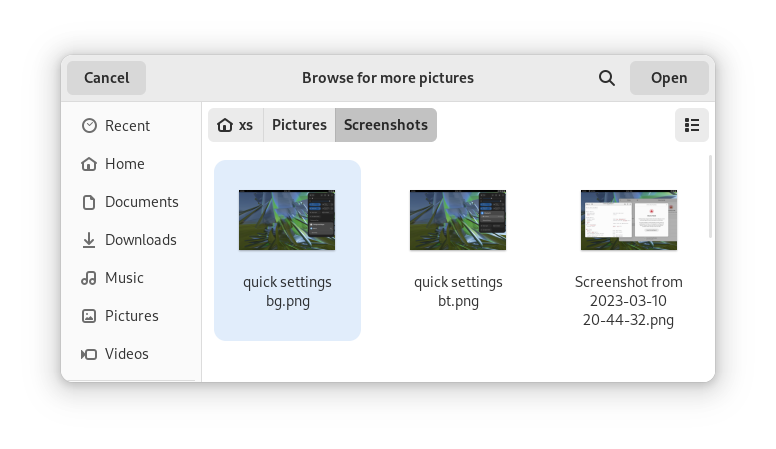
Most of the GNOME applications are built on GTK 4.10. This introduces a revamped file chooser with an icon view and image previews.

GTK 4.10's new file chooser, showing the icon view with image previews.
Icon view with image previews, new in GTK 4.10

Quick Settings tweaks

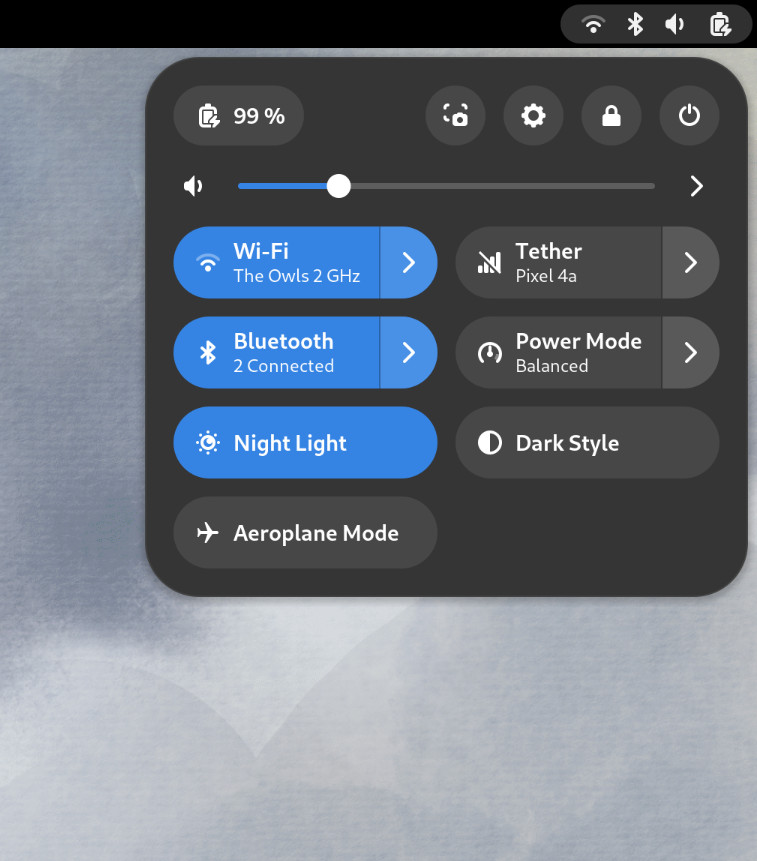
For GNOME 44 There have been a number of improvements to the Quick Settings menu. The new version includes a new Bluetooth menu, which introduces the ability to quickly connect and disconnect known Bluetooth devices. Additional information is available in each quick settings button, thanks to new subtitles.

The Bluetooth menu can now be used to connect to known devices

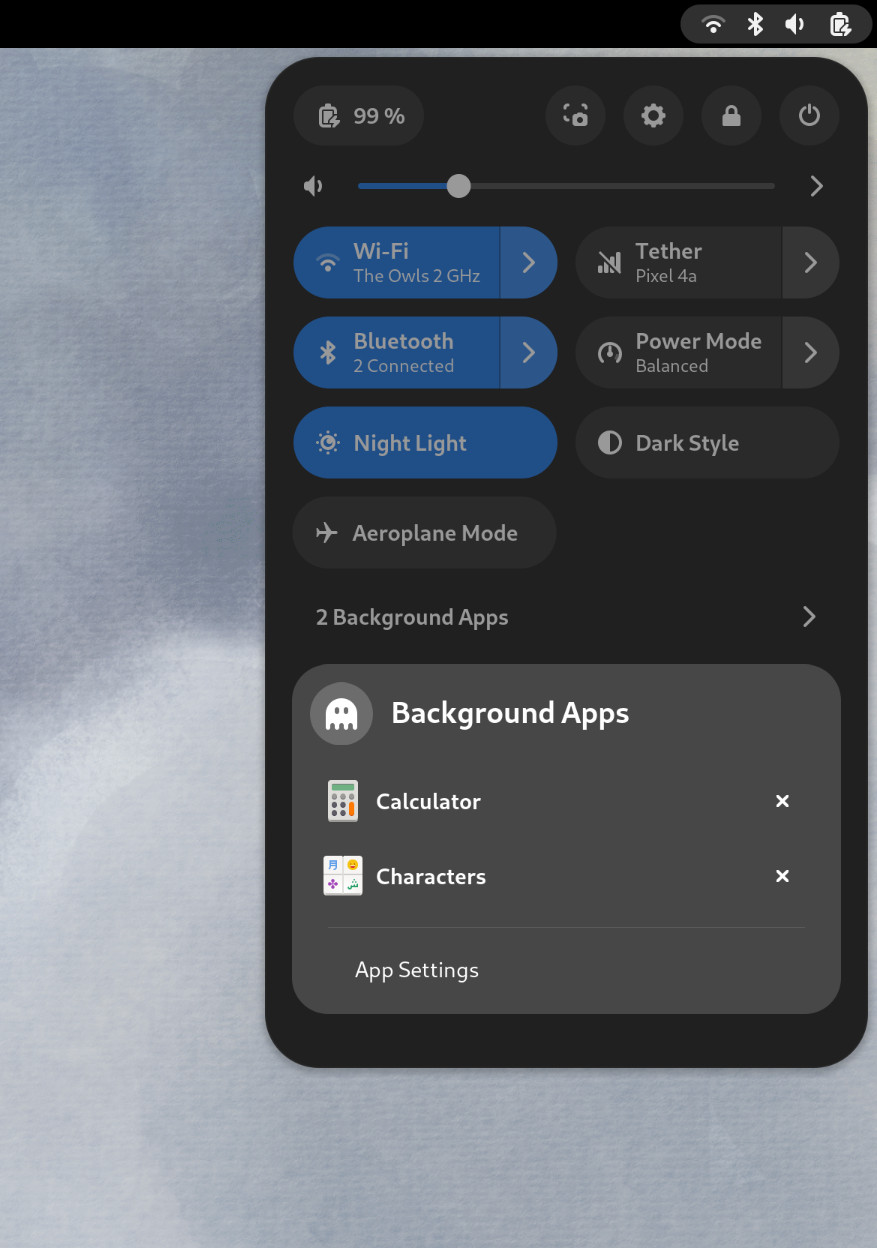
Also in the quick settings menu, a new background apps feature lists Flatpak apps which are running without a visible window.

Background Apps lets you see sandboxed apps running without a visible window and close them

Core applications

GNOME’s core applications have received significant improvements in the new version.

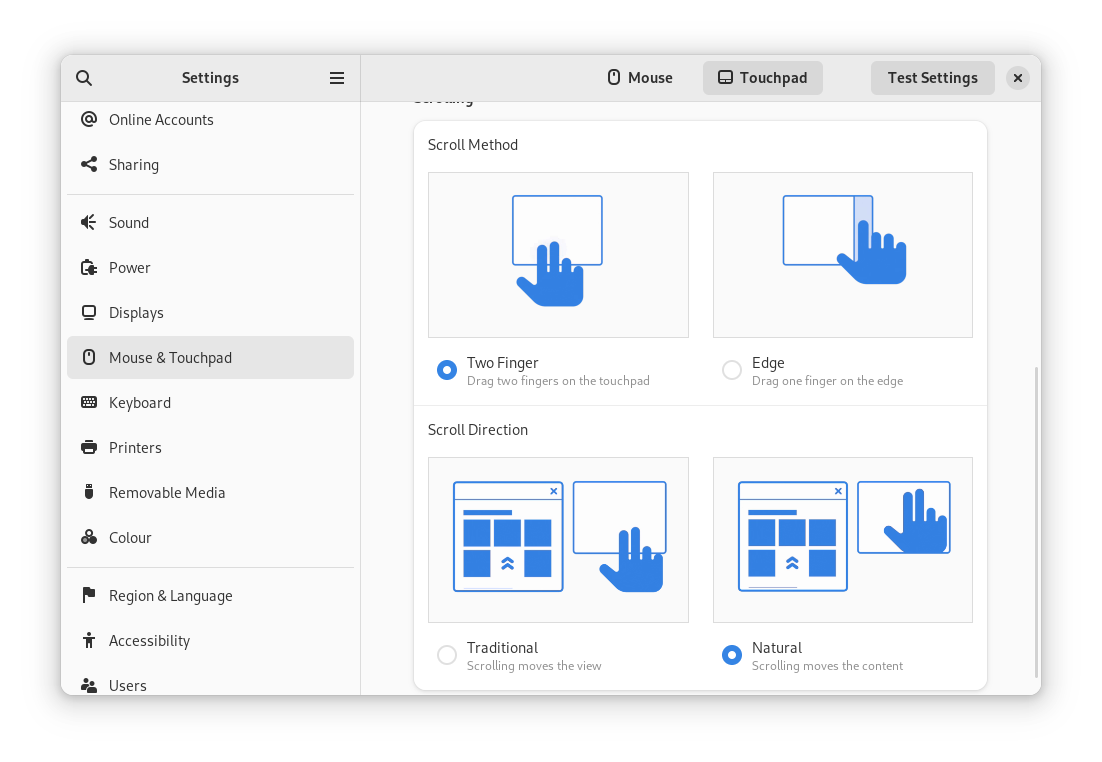
Settings has seen a round of updates, focused on improving the experience in each of the settings panels. Here are some notable changes:

  • Major redesigns of Mouse & Touchpad and Accessibility significantly improves usability.
  • Updated Device Security now uses clearer language.
  • Redesigned sound now includes new windows for the volume mixer and alert sound.
  • You can now share your Wi-Fi credentials to another device through a QR code.
The Mouse & Touchpad panel in the GNOME Settings app, showing the Touchpad settings.
The revamped Mouse & Touchpad panel in Settings

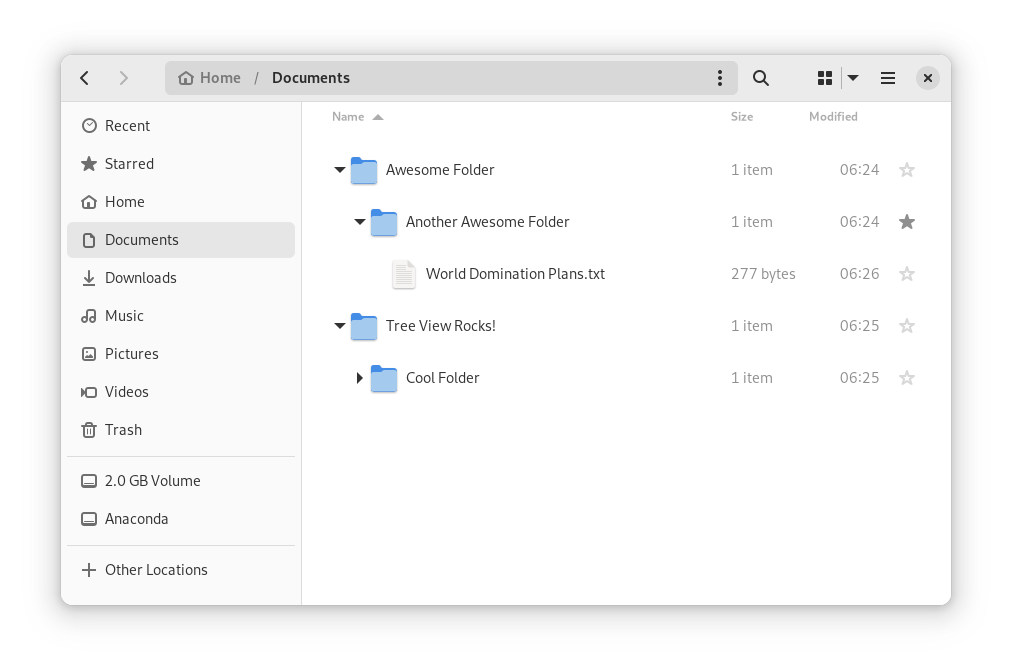
In Files, there is now an option to expand folders in the list view.

The tree view can be turned on in Files’ settings

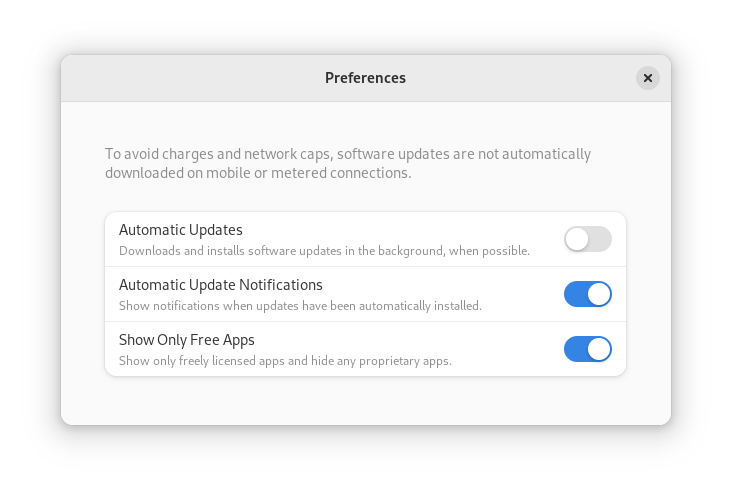
GNOME Software now automatically checks for unused Flatpak runtimes and removes them, saving disk space. You can also choose to only allow open source apps in search results.

In Contacts, you can now share a contact through a QR code, making it super easy to share a contact from your desktop to your phone!

Third-party repositories

Fedora’s third-party repositories feature makes it easy to enable a selection of additional software repos. Previous versions included a filtered version of Flathub, which included a small number of apps. For Fedora 38, filtering of Flathub content no longer occurs. This means that the third party repos now provide full access to all of Flathub.

The third party repos must still be manually enabled, and individual repositories may be disabled from the GNOME Software settings. If you want to keep proprietary apps from showing up in your search results, you can also do that in GNOME Software’s preferences menu.

You are in control.

Under-the-hood changes throughout Fedora Linux 38

Fedora Linux 38 features many under the hood changes. Here are some notable ones:

  • The latest Linux kernel, version 6.2, brings extended hardware support, bug fixes and performance improvements.
  • The length of time that system services may block shutdown has been reduced. This means that, if a service delays your machine from powering off, it will be much less disruptive than in the past.
  • RPM now uses the Rust-written Sequoia OpenGPG parser for better security.
  • The Noto fonts are now the default for Khmer and Thai. The variable versions of the Noto CJK fonts are now used for Chinese, Japanese, and Korean. This reduces disk usage.
  • Profiling will be easier from Fedora 38, thanks to changes in its default build configuration. The expectation is that this will result in performance improvements in future versions.

Also check out…

Official spins for the Budgie desktop environment and Sway tiling Wayland compositor are now available!

Posted on Leave a comment

Announcing Fedora Linux 38 Beta

The Fedora Project is pleased to announce the immediate availability of Fedora Linux 38 Beta, the next step towards our planned Fedora Linux 38 release at the end of April.

Download this prerelease from our Get Fedora site:

Or, check out one of our popular variants, including KDE Plasma, Xfce, and other desktop environments, as well as images for ARM devices like the Raspberry Pi:

Beta Release Highlights

Fedora Workstation

Fedora 38 Workstation Beta includes GNOME 44. It’s currently in beta, with a final release expected at the end of March. GNOME 44 includes a lot of great improvements, including a new lock screen, a “background apps” section on the quick menu, and improvements to accessibility settings . In addition, enabling third-party repositories now enables an unfiltered view of applications on Flathub. 

Other updates

We always strive to bring new security features to users quickly. Packages are now built with stricter compiler flags that protect against buffer overflows. The rpm package manager uses a Sequoia-based OpenPGP parser instead of its own implementation.

If you’re profiling applications, you’ll appreciate the frame pointers now built into official packages. This makes Fedora Linux a great platform for developers looking to improve Linux application performance.

Of course, there’s the usual update of programming languages and libraries: Ruby 3.2, gcc 13, LLVM 16, Golang 1.20, PHP 8.2, and much more!

Testing needed

Since this is a Beta release, we expect that you may encounter bugs or missing features. To report issues encountered during testing, contact the Fedora QA team via the test mailing list or in the #quality channel on Fedora Chat. As testing progresses, common issues are tracked in the “Common Issues” category on Ask Fedora.

For tips on reporting a bug effectively, read how to file a bug.

What is the Beta Release?

A Beta release is code-complete and bears a very strong resemblance to the final release. If you take the time to download and try out the Beta, you can check and make sure the things that are important to you are working. Every bug you find and report doesn’t just help you, it improves the experience of millions of Fedora Linux users worldwide! Together, we can make Fedora rock-solid. We have a culture of coordinating new features and pushing fixes upstream as much as we can. Your feedback improves not only Fedora Linux, but the Linux ecosystem and free software as a whole.

More information

For more detailed information about what’s new on Fedora Linux 38 Beta release, you can consult the Fedora Linux 38 Change set. It contains more technical information about the new packages and improvements shipped with this release.

Posted on Leave a comment

Announcing the release of Fedora Linux 37 Beta

The Fedora Project is pleased to announce the immediate availability of Fedora Linux 37 Beta, the next step towards our planned Fedora Linux 37 release at the end of October.

Download the prerelease from our Get Fedora site:

Or, check out one of our popular variants, including KDE Plasma, Xfce, and other desktop environments, as well as images for specific use cases like Computational Neuroscience

Beta Release Highlights

Fedora Workstation

Fedora 37 Workstation Beta includes a beta release of GNOME 43. (We expect the final GNOME 43 release in a few weeks.) GNOME 43 includes a new device security panel in Settings, providing the user with information about the security of hardware and firmware on the system. Building on the previous release, more core GNOME apps have been ported to the latest version of the GTK toolkit, providing improved performance and a modern look. 

Other updates

The Raspberry Pi 4 is now officially supported in Fedora Linux, including accelerated graphics. In other ARM news, Fedora Linux 37 Beta drops support for the ARMv7 architecture (also known as arm32 or armhfp).

We are preparing to promote two of our most popular variants: Fedora CoreOS and Fedora Cloud Base to Editions. Fedora Editions are our flagship offerings targeting specific use cases. 

In order to keep up with advances in cryptography, this release introduces a TEST-FEDORA39 policy that previews changes planned for Fedora Linux 39. The new policy includes a move away from SHA-1 signatures.

Of course, there’s the usual update of programming languages and libraries: Python 3.11, Perl 5.36, Golang 1.19, and more!

Testing needed

Since this is a Beta release, we expect that you may encounter bugs or missing features. To report issues encountered during testing, contact the Fedora QA team via the test mailing list or in the #quality channel on Matrix (bridged to #fedora-qa on Libera.chat). As testing progresses, we track common issues on Ask Fedora.

For tips on reporting a bug effectively, read how to file a bug.

What is the Beta Release?

A Beta release is code-complete and bears a very strong resemblance to the final release. If you take the time to download and try out the Beta, you can check and make sure the things that are important to you are working. Every bug you find and report doesn’t just help you, it improves the experience of millions of Fedora Linux users worldwide! Together, we can make Fedora rock-solid. We have a culture of coordinating new features and pushing fixes upstream as much as we can. Your feedback improves not only Fedora Linux, but the Linux ecosystem and free software as a whole.

More information

For more detailed information about what’s new on Fedora Linux 37 Beta release, you can consult the Fedora Linux 37 Change set. It contains more technical information about the new packages and improvements shipped with this release.

Posted on Leave a comment

Announcing Fedora Linux 36

Today, I’m excited to share the results of the hard work of thousands of Fedora Project contributors: our latest release, Fedora Linux 36, is here!

By the community, for the community

Normally when I write these announcements, I talk about some of the great technical changes in the release. This time, I wanted to put the focus on the community that makes those changes happen. Fedora isn’t just a group of people toiling away in isolation — we’re friends. In fact, that’s one of our Four Foundations.

One of our newest Fedora Friends, Juan Carlos Araujo said it beautifully in a Fedora Discussion post:

Besides functionality, stability, features, how it works under the hood, and how cutting-edge it is, I think what makes or breaks a distro are those intangibles, like documentation and the community. And Fedora has it all… especially the intangibles.

We’ve worked hard over the years to make Fedora an inclusive and welcoming community. We want to be a place where experienced contributors and newcomers alike can work together. Just like we want Fedora Linux to be a distribution that appeals to both long-time and novice Linux users.

Speaking of Fedora Linux, let’s take a look at some of the highlights this time around. As always, you should make sure your system is fully up-to-date before upgrading from a previous release. This time especially, because we’ve squashed some very important upgrade-related bugs in F34/F35 updates. Your system upgrade to Fedora Linux 36 could fail if those updates aren’t applied first.

Desktop improvements

Fedora Workstation focuses on the desktop, and in particular, it’s geared toward users who want a “just works” Linux operating system experience. As usual, Fedora Workstation features the latest GNOME release: GNOME 42. While it doesn’t completely provide the answer to life, the universe, and everything, GNOME 42 brings a lot of improvements. Many applications have been ported to GTK 4 for improved style and performance. And two new applications come in GNOME 42: Text Editor and Console. They’re aptly named, so you can guess what they do. Text Editor is the new default text editor and Console is available in the repos.

If you use NVIDIA’s proprietary graphics driver, your desktop sessions will now default to using the Wayland protocol. This allows you to take advantage of hardware acceleration while using the modern desktop compositor.

Of course, we produce more than just the Editions. Fedora Spins and Labs target a variety of audiences and use cases, including Fedora Comp Neuro, which provides tools for computational neuroscience, and desktop environments like Fedora LXQt, which provides a lightweight desktop environment. And don’t forget our alternate architectures: ARM AArch64, Power, and S390x.

Sysadmin improvements

Fedora Linux 36 includes the latest release of Ansible. Ansible 5 splits the “engine” into an ansible-core package and collections packages. This makes maintenance easier and allows you to download only the collections you need. See the Ansible 5 Porting Guide to learn how to update your playbooks.

Beginning in Fedora Server 36, Cockpit provides a module for provisioning and ongoing administration of NFS and Samba shares. This allows administrators to manage network file shares through the Cockpit web interface used to configure other server attributes.

Other updates

No matter what variant of Fedora Linux you use, you’re getting the latest the open source world has to offer. Podman 4.0 will be fully released for the first time in Fedora Linux 36. Podman 4.0 has a huge number of changes and a brand new network stack. It also brings backwards-incompatible API changes, so read the upstream documentation carefully.

Following our “First” foundation, we’ve updated key programming language and system library packages, including Ruby 3.1, Golang 1.18 and PHP 8.1. 

We’re excited for you to try out the new release! Go to https://getfedora.org/ and download it now. Or if you’re already running Fedora Linux, follow the easy upgrade instructions. For more information on the new features in Fedora Linux 36, see the release notes.

In the unlikely event of a problem…

If you run into a problem, visit our Ask Fedora user-support forum. This includes a category for common issues.

Thank you everyone

Thanks to the thousands of people who contributed to the Fedora Project in this release cycle. We love having you in the Fedora community. Be sure to join us May 13 – 14 for a virtual release party!

Posted on Leave a comment

Announcing the release of Fedora Linux 36 Beta

The Fedora Project is pleased to announce the immediate availability of Fedora Linux 36 Beta, the next step towards our planned Fedora Linux 36 release at the end of April.

Download the prerelease from our Get Fedora site:

Or, check out one of our popular variants, including KDE Plasma, Xfce, and other desktop environments, as well as images for ARM devices like the Raspberry Pi 2 and 3:

Beta Release Highlights

Fedora Workstation

Fedora 36 Workstation Beta includes GNOME 42, the newest release of the GNOME desktop environment. GNOME 42 includes a global dark style UI setting. It also has a redesigned screenshot tool. And many core GNOME apps have been ported to the latest version of the GTK toolkit, providing improved performance and a modern look. 

Other updates

Fedora Silverblue and Kinoite now have /var on a separate subvolume for new installs, which makes handling snapshots of dynamic data easier to manage independently from the system snapshots.

Fans of the lightweight LXQt desktop environment will be glad to see the upstream 1.0 release in Fedora Linux 36. You can install the LXQt Spin directly or install LXQt alongside your existing desktop environment.

If you use the proprietary NVIDIA driver, GDM sessions will now use Wayland by default.

Sometimes it’s the small changes that make the biggest improvements. Along that line, systemd now includes the unit names in the output so you can more easily understand what services are starting and stopping.

Of course, there’s the usual update of programming languages and libraries: Golang 1.18, Ruby 3.1, and more!

Testing needed

Since this is a Beta release, we expect that you may encounter bugs or missing features. To report issues encountered during testing, contact the Fedora QA team via the test mailing list or in the #fedora-qa channel on Libera.chat. As testing progresses, common issues are tracked on the Common F36 Bugs page.

For tips on reporting a bug effectively, read how to file a bug.

What is the Beta Release?

A Beta release is code-complete and bears a very strong resemblance to the final release. If you take the time to download and try out the Beta, you can check and make sure the things that are important to you are working. Every bug you find and report doesn’t just help you, it improves the experience of millions of Fedora Linux users worldwide! Together, we can make Fedora rock-solid. We have a culture of coordinating new features and pushing fixes upstream as much as we can. Your feedback improves not only Fedora Linux, but the Linux ecosystem and free software as a whole.

More information

For more detailed information about what’s new on Fedora Linux 36 Beta release, you can consult the Fedora Linux 36 Change set. It contains more technical information about the new packages and improvements shipped with this release.

Posted on Leave a comment

Blender in 2021

The Blender Foundation have just announced their “Big Projects” list for Blender in 2021. It is hard to argue that 2020 wasn’t a banner year for Blender development, with three major releases as well as the first ever LTS release. Through 2020 we saw improvements to the Blender UI/UX, sculpting tools, modeling, EEVEE, Cycles and so much more. We also saw a record number of massive companies coming on board the Blender development fund. With the release today of the projects list, we get insight into the Blender priorities in 2021, including priorities such as:

  • launch of a new open movie called Sprite Fight
  • the everything nodes project, where everything in Blender will be able to be driven procedurally using nodes (see Geometry Nodes in action here)
  • all new Asset Browsers editor window for better content management
  • massive improvements to the VSE or Video Sequence Editor
  • EEVEE real-time rendering improvements including Vulkan support, motion blur, depth of field and possibly raytracing
  • VR improvements including the ability to use VR controllers and author content in virtual reality
  • Cycles rendering improvements especially related to perfromance
  • Animation 22 (previously Animation 2020), an effort to improve animation tools in Blender, sponsored by AWS
  • improved pipeline and USD support, Pixar’s open interchange format

You can learn more about the Blender’s accomplishments in 2020, as well as the new projects in 2021 in the video below.

Posted on Leave a comment

Raylib 3.5 Released

Eight months after the release of Raylib 3.0, Raylib 3.5 was just released. Raylib is an open source cross platform C/C++ game framework. Raylib runs on a ton of different platforms and has bindings available for more than 50 different programming languages. The Raylib 3.5 release brings the following new features.

  • NEW Platform supported: Raspberry Pi 4 native mode (no X11 windows) through DRM subsystem and GBM API. Actually this is a really interesting improvement because it opens the door to raylib to support other embedded platforms (Odroid, GameShell, NanoPi…). Also worth mentioning the un-official homebrew ports of raylib for PS4 and PSVita.
  • NEW configuration options exposed: For custom raylib builds, config.h now exposes more than 150 flags and defines to build raylib with only the desired features, for example, it allows to build a minimal raylib library in just some KB removing all external data filetypes supported, very useful to generate small executables or embedded devices.
  • NEW automatic GIF recording feature: Actually, automatic GIF recording (CTRL+F12) for any raylib application has been available for some versions but this feature was really slow and low-performant using an old gif library with many file-accesses. It has been replaced by a high-performant alternative (msf_gif.h) that operates directly on memory… and actually works very well! Try it out!
  • NEW RenderBatch system: rlgl module has been redesigned to support custom render batches to allow grouping draw calls as desired, previous implementation just had one default render batch. This feature has not been exposed to raylib API yet but it can be used by advance users dealing with rlgl directly. For example, multiple RenderBatch can be created for 2D sprites and 3D geometry independently.
  • NEW Framebuffer system: rlgl module now exposes an API for custom Framebuffer attachments (including cubemaps!). raylib RenderTexture is a basic use-case, just allowing color and depth textures, but this new API allows the creation of more advance Framebuffers with multiple attachments, like the G-BuffersGenTexture*() functions have been redesigned to use this new API.
  • Improved software rendering: raylib Image*() API is intended for software rendering, for those cases when no GPU or no Window is available. Those functions operate directly with multi-format pixel data on RAM and they have been completely redesigned to be way faster, specially for small resolutions and retro-gaming. Low-end embedded devices like microcontrollers with custom displays could benefit of this raylib functionality!
  • File loading from memory: Multiple functions have been redesigned to load data from memory buffers instead of directly accessing the files, now all raylib file loading/saving goes through a couple of functions that load data into memory. This feature allows custom virtual-file-systems and it gives more control to the user to access data already loaded in memory (i.e. images, fonts, sounds…).
  • NEW Window states management system: raylib core module has been redesigned to support Window state check and setup more easily and also before/after Window initializationSetConfigFlags() has been reviewed and SetWindowState() has been added to control Window minification, maximization, hidding, focusing, topmost and more.
  • NEW GitHub Actions CI/CD system: Previous CI implementation has been reviewed and improved a lot to support multiple build configurations (platforms, compilers, static/shared build) and also an automatic deploy system has been implemented to automatically attach the diferent generated artifacts to every new release. As the system seems to work very good, previous CI platforms (AppVeyor/TravisCI) have been removed.

Release notes are available here and a complete change log is available here. Binary versions of Raylib are available on Raylib.com while the source code is hosted under the ZLib license on GitHub. If you are interested in learning Raylib you can check out their community on Discord. You can also download Raylib via vcpkg on Visual Studio with step by step instructions available here. You can learn more about Raylib and the 3.5 release in the video below.

Posted on Leave a comment

Flax Engine Released

The Flax Engine game engine has just seen it’s 1.0 release. We’ve had our eyes on this engine since it’s first public beta in 2018, which was then followed by a few years of radio silence. The in July of 2020 we got the 0.7 release which added several new features including C++ live scripting support. With today’s release the Flax Engine is now available to everyone.

Key features include:

  • Seamless C# and C++ scripting
  • Automatic draw calls batching and instancing
  • Every asset is using async content streaming by default
  • Cross-platform support (Windows, Linux, Android, PS4. Xbox One, Xbox Series X/S, UWP…)
  • GPU Lightmaps Baking
  • Visual Scripting
  • VFX tools
  • Nested prefabs
  • Gameplay Globals for technical artists
  • Open World Tools (terrain, foliage, fog, levels streaming)
  • Hot-reloading C#/C++ in Editor
  • Full source-code available
  • Direct communication and help from engine devs
  • Lightweight development (full repo clone + compilation in less than 3 min)

Flax is available for Windows and Linux developers with the source code available on GitHub. Flax is a commercial game engine, but under fairly liberal terms. Commercial license terms are:

Use Flax for free, pay 4% when you release (above first $25k per quarter). Flax Engine and all related tools, all features, all supported platforms, all source code, all complete projects and Flax Samples with regular updates can be used for free.

If you want to learn more about Flax Engine, be sure to check out the following links:

You can learn more about the game engine and see it in action in the video below. Stay tuned for a more in-depth technical video on Flax Engine in the future.

Posted on Leave a comment

Phaser 3.50 Released

The open source cross platform HTML5 game framework just got a major update, Phaser 3.50. We’ve long been a fan of Phaser, going back to Phaser 2 with our Complete Phaser Game tutorial as well as our Phaser 3 tutorial video. The Phaser 3.50 release is called the single biggest Phaser release yet.

Details from the Phaser blog:

After 13 beta releases, over 200 resolved issues, thousands of lines of new code and the culmination of over 6 months incredibly hard work, Phaser 3.50 is finally here.

It’s not hyperbole or exaggeration when I say that Phaser 3.50 is the single biggest point release ever in the history of Phaser. There are quite literally hundreds of new features to explore, updates to key areas and of course bug fixes. I did actually try counting all the changes, but gave up after I’d reached 900 of them! Thankfully, they are, as always, meticulously detailed in the Change Log. The changes for 3.50 actually grew so large that I had to split them out from the main Change Log and put them into their own file.

However, don’t let this overwhelm you. A massive number of the changes are purely internal and while there are absolutely some API breaking changes in this release (hence the large version number jump), we’ve kept them as sensible as possible. We already know of lots of devs who have upgraded with minimal, or no, changes to their actual game code. We cannot guarantee that for everyone, of course, but depending on how complex your game is, the chances are good.

This release comes with several new examples and all of the existing examples have been audited to guarantee they are compatible with version 3.50. Major new features from Phaser 3.50 include an improved post processing effect pipeline, 3D Mesh game objects, multi texture support, isometric and hexagonal maps directly from Tiled support, Aseprite export support with animations, point lighting game objects and much much more.

Full details of the hundreds of changes in this release can be found in the release notes. Phaser is an open source project under the MIT source license and is available on GitHub. You can learn more about the Phaser 3.50 release in the video below.