To solve the “IndexError: tuple index out of range”, avoid do not access a non-existing tuple index. For example, my_tuple[5] causes an error for a tuple with three elements.
If you access tuple elements in a loop, keep in mind that Python uses zero-based indexing: For a tuple with n elements, the first element has index 0 and the last index n-1.
A common cause of the error is trying to access indices 1, 2, ..., n instead of using the correct indices 0,1, ..., (n-1).
The following video shows how I fixed a similar error on a list instead of a tuple:
If you’re like me, you try things first in your code and fix the bugs as they come.
One frequent bug in Python is the IndexError: tuple index out of range. So, what does this error message mean?
The error “tuple index out of range” arises if you access invalid indices in your Python tuple. For example, if you try to access the tuple element with index 100 but your tuple consist only of three elements, Python will throw an IndexError telling you that the tuple index is out of range.
Minimal Example
Here’s a screenshot of this happening on my Windows machine:
Let’s have a look at an example where this error arises:
The element with index 3 doesn’t exist in the tuple with three elements. Why is that?
The following graphic shows that the maximal index in your tuple is 2. The call my_tuple[2] would retrieve the third tuple element 'Carl'.
my_tuple[0] --> Alice
my_tuple[1] --> Bob
my_tuple[2] --> Carl
my_tuple[3] --> ??? Error ???
Did you try to access the third element with index 3?
It’s a common mistake: The index of the third element is 2 because the index of the first tuple element is 0.
How to Fix the IndexError in a For Loop? [General Strategy]
So, how can you fix the code? Python tells you in which line and on which tuple the error occurs.
To pin down the exact problem, check the value of the index just before the error occurs.
To achieve this, you can print the index that causes the error before you use it on the tuple. This way, you’ll have your wrong index in the shell right before the error message.
Here’s an example of wrong code that will cause the error to appear:
# WRONG CODE
my_tuple = ('Alice', 'Bob', 'Ann', 'Carl') for i in range(len(my_tuple)+1): my_tuple[i] ''' OUTPUT
Traceback (most recent call last): File "C:\Users\xcent\Desktop\code.py", line 5, in <module> my_tuple[i]
IndexError: tuple index out of range '''
The error message tells you that the error appears in line 5.
So, let’s insert a print statement before that line:
my_tuple = ('Alice', 'Bob', 'Ann', 'Carl') for i in range(len(my_tuple)+1): print(i) my_tuple[i]
The result of this code snippet is still an error.
But there’s more:
0
1
2
3
4
Traceback (most recent call last): File "C:\Users\xcent\Desktop\code.py", line 6, in <module> my_tuple[i]
IndexError: tuple index out of range
You can now see all indices used to retrieve an element.
The final one is the index i=4 which points to the fifth element in the tuple (remember zero-based indexing: Python starts indexing at index 0!).
But the tuple has only four elements, so you need to reduce the number of indices you’re iterating over.
The correct code is, therefore:
# CORRECT CODE
my_tuple = ('Alice', 'Bob', 'Ann', 'Carl') for i in range(len(my_tuple)): my_tuple[i]
Note that this is a minimal example and it doesn’t make a lot of sense. But the general debugging strategy remains even for advanced code projects:
Figure out the faulty index just before the error is thrown.
Eliminate the source of the faulty index.
Programmer Humor
“Real programmers set the universal constants at the start such that the universe evolves to contain the disk with the data they want.” — xkcd
Where to Go From Here?
Enough theory. Let’s get some practice!
Coders get paid six figures and more because they can solve problems more effectively using machine intelligence and automation.
To become more successful in coding, solve more real problems for real people. That’s how you polish the skills you really need in practice. After all, what’s the use of learning theory that nobody ever needs?
You build high-value coding skills by working on practical coding projects!
Do you want to stop learning with toy projects and focus on practical code projects that earn you money and solve real problems for people?
If your answer is YES!, consider becoming a Python freelance developer! It’s the best way of approaching the task of improving your Python skills—even if you are a complete beginner.
If you just want to learn about the freelancing opportunity, feel free to watch my free webinar “How to Build Your High-Income Skill Python” and learn how I grew my coding business online and how you can, too—from the comfort of your own home.
Python tuples are similar to lists, but with a key difference: they are immutable, meaning their elements cannot be changed after creation.
Tuple concatenation means joining multiple tuples into a single tuple. This process maintains the immutability of the tuples, providing a secure and efficient way to combine data. There are several methods for concatenating tuples in Python, such as using the + operator, the * operator, or built-in functions like itertools.chain().
# Using the + operator to concatenate two tuples
tuple1 = (1, 2, 3)
tuple2 = (4, 5, 6)
concatenated_tuple = tuple1 + tuple2
print("Using +:", concatenated_tuple) # Output: (1, 2, 3, 4, 5, 6) # Using the * operator to repeat a tuple
repeated_tuple = tuple1 * 3
print("Using *:", repeated_tuple) # Output: (1, 2, 3, 1, 2, 3, 1, 2, 3) # Using itertools.chain() to concatenate multiple tuples
import itertools
tuple3 = (7, 8, 9)
chained_tuple = tuple(itertools.chain(tuple1, tuple2, tuple3))
print("Using itertools.chain():", chained_tuple)
# Output: (1, 2, 3, 4, 5, 6, 7, 8, 9)
The + operator is used to join two tuples, the * operator is used to repeat a tuple, and the itertools.chain() function is used to concatenate multiple tuples. All these methods maintain the immutability of the tuples
Understanding Tuples
Python tuple is a fundamental data type, serving as a collection of ordered, immutable elements. Tuples are used to group multiple data items together. Tuples are created using parentheses () and elements within the tuple are separated by commas.
For example, you can create a tuple as follows:
my_tuple = (1, 2, 3, 4, 'example')
In this case, the tuple my_tuple has five elements, including integers and a string. Python allows you to store values of different data types within a tuple.
Immutable means that tuples cannot be changed once defined, unlike lists. This immutability makes tuples faster and more memory-efficient compared to lists, as they require less overhead to store and maintain element values.
Being an ordered data type means that the elements within a tuple have a definite position or order in which they appear, and this order is preserved throughout the tuple’s lifetime.
One common operation performed on tuples is tuple concatenation, which involves combining two or more tuples into a single tuple. This section will discuss the basics of tuple concatenation using the + operator and provide examples to demonstrate the concept.
Using the + Operator
The + operator is a simple and straightforward way to concatenate two tuples. When using the + operator, the two tuples are combined into a single tuple without modifying the original tuples. This is particularly useful when you need to merge values from different sources or create a larger tuple from smaller ones.
Here’s the basic syntax for using the + operator:
new_tuple = tuple1 + tuple2
new_tuple will be a tuple containing all elements of tuple1 followed by elements of tuple2. It’s essential to note that since tuples are immutable, the original tuple1 and tuple2 remain unchanged after the concatenation.
Examples of Tuple Concatenation
Let’s take a look at a few examples to better understand tuple concatenation using the + operator:
In this example, we concatenated tuple1 and tuple2 to create a new tuple called tuple3. Notice that the elements are ordered, and tuple3 contains all the elements from tuple1 followed by the elements of tuple2.
Here’s another example with tuples containing different data types:
In this case, we combined a tuple containing strings with a tuple containing an integer and a string, resulting in a new tuple containing all elements in the correct order.
Using the * Operator
The * operator can be used for replicating a tuple a specified number of times and then concatenating the results. This method can be particularly useful when you need to create a new tuple by repeating an existing one.
In the example above, the original tuple is repeated three times and then concatenated to create the replicated_tuple. Note that using the * operator with non-integer values will result in a TypeError.
Using itertools.chain()
The itertools.chain() function from the itertools module provides another way to concatenate tuples. This function takes multiple tuples as input and returns an iterator that sequentially combines the elements of the input tuples.
Here’s an illustration of using itertools.chain():
In this example, the itertools.chain() function is used to combine tuple1 and tuple2. The resulting iterator is then explicitly converted back to a tuple using the tuple() constructor.
It’s important to note that itertools.chain() can handle an arbitrary number of input tuples, making it a flexible option for concatenating multiple tuples:
Both the * operator and itertools.chain() offer efficient ways to concatenate tuples in Python.
Manipulating Tuples
Tuples are immutable data structures in Python, which means their content cannot be changed once created. However, there are still ways to manipulate and extract information from them.
Slicing Tuples
Slicing is a technique for extracting a range of elements from a tuple. It uses brackets and colons to specify the start, end, and step if needed. The start index is inclusive, while the end index is exclusive.
my_tuple = (0, 1, 2, 3, 4)
sliced_tuple = my_tuple[1:4] # This will return (1, 2, 3)
You can also use negative indexes, which count backward from the end of the tuple:
sliced_tuple = my_tuple[-3:-1] # This will return (2, 3)
Tuple Indexing
Tuple indexing allows you to access a specific element in the tuple using its position (index).
my_tuple = ('apple', 'banana', 'cherry')
item = my_tuple[1] # This will return 'banana'
An IndexError will be raised if you attempt to access an index that does not exist within the tuple.
Adding and Deleting Elements
Since tuples are immutable, you cannot directly add or delete elements. However, you can work around this limitation by:
Concatenating tuples: You can merge two tuples by using the + operator.
Converting to a list: If you need to perform several operations that involve adding or removing elements, you can convert the tuple to a list. Once the operations are completed, you can convert the list back to a tuple.
my_tuple = (1, 2, 3)
my_list = list(my_tuple)
my_list.append(4) # Adding an element
my_list.remove(2) # Removing an element
new_tuple = tuple(my_list) # This will return (1, 3, 4)
Remember that manipulating tuples in these ways creates new tuples and does not change the original ones.
Common Errors and Solutions
One common error that users might encounter while working with tuple concatenation in Python is the TypeError. This error can occur when attempting to concatenate a tuple with a different data type, such as an integer or a list.
>>> (1, 2, 3) + 1
Traceback (most recent call last): File "<pyshell#2>", line 1, in <module> (1, 2, 3) + 1
TypeError: can only concatenate tuple (not "int") to tuple
To overcome this issue, make sure to convert the non-tuple object into a tuple before performing the concatenation.
For example, if you’re trying to concatenate a tuple with a list, you can use the tuple() function to convert the list into a tuple:
Another common error related to tuple concatenation is the AttributeError. This error might arise when attempting to call a non-existent method or attribute on a tuple. Since tuples are immutable, they don’t have methods like append() or extend() that allow addition of elements.
Instead, you can concatenate two tuples directly using the + operator:
When working with nested tuples, ensure proper syntax and data structure handling to avoid errors like ValueError and TypeError. To efficiently concatenate nested tuples, consider using the itertools.chain() function provided by the itertools module.
This function helps to flatten the nested tuples before concatenation:
The result variable now contains the concatenated tuple (1, 2, 3, 4, 5, 6).
What is the syntax for tuple concatenation?
The syntax for concatenating tuples is straightforward. Just use the + operator between the two tuples you want to concatenate.
concatenated_tuples = first_tuple + second_tuple
How to concatenate a tuple and a string?
To concatenate a tuple and a string, first convert the string into a tuple containing a single element, and then concatenate the tuples. Here’s an example:
The concatenated_result will be (1, 2, 3, 'hello').
Is it possible to modify a tuple after creation?
Tuples are immutable, which means they cannot be modified after creation (source). If you need to modify the contents of a collection, consider using a list instead.
How can I combine multiple lists of tuples?
To combine multiple lists of tuples, use a combination of list comprehensions and tuple concatenation. Here is an example:
lists_of_tuples = [ [(1, 2), (3, 4)], [(5, 6), (7, 8)]
] combined_list = [t1 + t2 for lst in lists_of_tuples for t1, t2 in lst]
The combined_list variable will contain [(1, 2, 3, 4), (5, 6, 7, 8)].
Can tuple concatenation be extended to more than two tuples?
Yes, tuple concatenation can be extended to more than two tuples by using the + operator multiple times. For example:
The timeit module is a tool in the Python standard library, designed to measure the execution time of small code snippets. It makes it simple for developers to analyze the performance of their code, allowing them to find areas for optimization.
The timeit module averages out various factors that affect the execution time, such as the system load and fluctuations in CPU performance. By running the code snippet multiple times and calculating an average execution time, it provides a more reliable measure of your code’s performance.
To get started using timeit, simply import the module and use the timeit() method. This method accepts a code snippet as a string and measures its execution time. Optionally, you can also pass the number parameter to specify how many times the code snippet should be executed.
Sometimes, you might want to evaluate a code snippet that requires additional imports or setup code. For this purpose, the timeit() method accepts a setup parameter where you can provide any necessary preparation code.
For instance, if we adjust the previous example to include a required import:
Keep in mind that timeit is primarily intended for small code snippets and may not be suitable for benchmarking large-scale applications.
Measuring Execution Time
The primary method of measuring execution time with timeit is the timeit() function. This method runs the provided code repeatedly and returns the total time taken. By default, it repeats the code one million times! Be careful when measuring time-consuming code, as it may take a considerable duration.
When using the timeit() method, the setup time is excluded from execution time. This way, the measurement is more accurate and focuses on the evaluated code’s performance, without including the time taken to configure the testing environment.
Another useful method in the timeit module is repeat(), which calls the timeit() function multiple times and returns a list of results.
Sometimes it’s necessary to compare the execution speeds of different code snippets to identify the most efficient implementation. With the time.time() function, measuring the execution time of multiple code sections is simplified.
In conclusion, using the timeit module and the time.time() function allows you to accurately measure and compare execution times in Python.
The Timeit Module
To start using the timeit module, simply import it:
import timeit
The core method in the timeit module is the timeit() method used to run a specific code snippet a given number of times, returning the total time taken.
import timeit code_to_test = """
squared_numbers = [x**2 for x in range(10)] """ elapsed_time = timeit.timeit(code_to_test, number=1000)
print("Time taken:", elapsed_time)
If you are using Jupyter Notebook, you can take advantage of the %timeit magic function to conveniently measure the execution time of a single line of code:
%timeit squared_numbers = [x**2 for x in range(10)]
In addition to the timeit() method, the timeit module provides repeat() and autorange() methods.
The repeat() method allows you to run the timeit() method multiple times and returns a list of execution times, while
the autorange() method automatically determines the number of loops needed for a stable measurement.
Here’s an example using the repeat() method:
import timeit code_to_test = """
squared_numbers = [x**2 for x in range(10)] """ elapsed_times = timeit.repeat(code_to_test, number=1000, repeat=5)
print("Time taken for each run:", elapsed_times)
Using Timeit Function
To measure the execution time of a function, you can use the timeit.timeit() method. This method accepts two main arguments: the stmt and setup. The stmt is a string representing the code snippet that you want to time, while the setup is an optional string that can contain any necessary imports and setup steps. Both default to 'pass' if not provided.
Let’s say you have a function called square() that calculates the square of a given number:
def square(x): return x ** 2
To measure the execution time of square() using timeit, you can do the following:
Here, we’re asking timeit to execute the square(10) function 1000 times and return the total execution time in seconds. You can adjust the number parameter to run the function for a different number of iterations.
Another way to use timeit, especially for testing a callable function, is to use the timeit.Timer class. You can pass the callable function directly as the stmt parameter without the need for a setup string:
In the example above, we measure the time it takes to execute sum(range(100)) 1000 times. The number parameter controls how many repetitions of the code snippet are performed. By default, number=1000000, but you can set it to any value you find suitable.
The timeit module in Python allows you to accurately measure the execution time of small code snippets. It provides two essential functions: timeit.timeit() and timeit.repeat().
The timeit.timeit() function measures the execution time of a given statement. You can pass the stmt argument as a string containing the code snippet you want to time. By default, timeit.timeit() will execute the statement 1,000,000 times and return the average time taken to run it.
However, you can adjust the number parameter to specify a different number of iterations.
The timeit.repeat() function is a convenient way to call timeit.timeit() multiple times. It returns a list of timings for each repetition, allowing you to analyze the results more thoroughly. You can use the repeat parameter to specify the number of repetitions.
In some cases, you might need to include additional setup code to prepare your test environment. You can do this using the setup parameter, which allows you to define the necessary setup code as a string. The execution time of the setup code will not be included in the overall timed execution.
The timeit module provides a straightforward interface for measuring the execution time of small code snippets. You can use this module to measure the time taken by a particular code block in your program.
Here’s a brief example:
import timeit def some_function(): # Your code block here time_taken = timeit.timeit(some_function, number=1)
print(f"Time taken: {time_taken} seconds")
In this example, the timeit.timeit() function measures the time taken to execute the some_function function. The number parameter specifies the number of times the function will be executed, which is set to 1 in this case.
For more accurate results, you can use the timeit.repeat() function, which measures the time taken by the code block execution for multiple iterations.
Here’s an example:
import timeit def some_function(): # Your code block here repeat_count = 5
time_taken = timeit.repeat(some_function, number=1, repeat=repeat_count)
average_time = sum(time_taken) / repeat_count
print(f"Average time taken: {average_time} seconds")
In this example, the some_function function is executed five times, and the average execution time is calculated.
Besides measuring time for standalone functions, you can also measure the time taken by individual code blocks inside a function. Here’s an example:
import timeit def some_function(): # Some code here start_time = timeit.default_timer() # Code block to be measured end_time = timeit.default_timer() print(f"Time taken for code block: {end_time - start_time} seconds")
In this example, the timeit.default_timer() function captures the start and end times of the specified code block.
Using Timeit with Jupyter Notebook
Jupyter Notebook provides an excellent environment for running and testing Python code. To measure the execution time of your code snippets in Jupyter Notebook, you can use the %timeit and %%timeit magic commands, which are built into the IPython kernel.
The %timeit command is used to measure the execution time of a single line of code. When using it, simply prefix your line of code with %timeit.
For example:
%timeit sum(range(100))
This command will run the code multiple times and provide you with detailed statistics like the average time and standard deviation.
To measure the execution time of a code block spanning multiple lines, you can use the %%timeit magic command. Place this command at the beginning of a cell in Jupyter Notebook, and it will measure the execution time for the entire cell.
For example:
%%timeit
total = 0
for i in range(100): total += i
Managing Garbage Collection and Overhead
When using timeit in Python to measure code execution time, it is essential to be aware of the impact of garbage collection and overhead.
Garbage collection is the process of automatically freeing up memory occupied by objects that are no longer in use. This can potentially impact the accuracy of timeit measurements if left unmanaged.
By default, timeit disables garbage collection to avoid interference with the elapsed time calculations. However, you may want to include garbage collection in your measurements if it is a significant part of your code’s execution, or if you want to minimize the overhead and get more realistic results.
To include garbage collection in timeit executions, you can use the gc.enable() function from the gc module and customize your timeit setup.
Keep in mind that including garbage collection will likely increase the measured execution time. Manage this overhead by balancing the need for accurate measurements with the need to see the impact of garbage collection on your code.
Additionally, you can use the timeit.repeat() and timeit.autorange() methods to measure execution time of your code snippets multiple times, which can help you capture the variability introduced by garbage collection and other factors.
Choosing the Best Timer for Performance Measurements
Measuring the execution time of your Python code is essential for optimization, and the timeit module offers multiple ways to achieve this. This section will focus on selecting the best timer for measuring performance.
When using the timeit module, it is crucial to choose the right timer function. Different functions may provide various levels of accuracy and be suitable for different use cases. The two main timer functions are time.process_time() and time.perf_counter().
time.process_time() measures the total CPU time used by your code, excluding any time spent during the sleep or wait state. This is useful for focusing on the computational efficiency of your code. This function is platform-independent and has a higher resolution on some operating systems.
Here is an example code snippet:
import time
import timeit start = time.process_time() # Your code here end = time.process_time()
elapsed = end - start
print(f"Execution time: {elapsed} seconds")
On the other hand, time.perf_counter() measures the total elapsed time, including sleep or wait states. This function provides a more accurate measurement of the total time required by your code to execute. This can help in understanding the real-world performance of your code.
Here’s an example using time.perf_counter():
import time
import timeit start = time.perf_counter() # Your code here end = time.perf_counter()
elapsed = end - start
print(f"Execution time: {elapsed} seconds")
In addition to measuring execution time directly, you can also calculate the time difference using the datetime module. This module provides a more human-readable representation of time data.
Here’s an example code snippet that calculates the time difference using datetime:
from datetime import datetime start = datetime.now() # Your code here end = datetime.now()
elapsed = end - start
print(f"Execution time: {elapsed}")
Frequently Asked Questions
How to measure function execution time using timeit?
To measure the execution time of a function using the timeit module, you can use the timeit.timeit() method. First, import the timeit module, and then create a function you want to measure. You can call the timeit.timeit() method with the function’s code and the number of executions as arguments.
For example:
import timeit def my_function(): # Your code here execution_time = timeit.timeit(my_function, number=1000)
print("Execution time:", execution_time)
What is the proper way to use the timeit module in Python?
The proper way to use the timeit module is by following these steps:
Import the timeit module.
Define the code or function to be timed.
Use the timeit.timeit() method to measure the execution time, and optionally specify the number of times the code should be executed.
Print or store the results for further analysis.
How to time Python functions with arguments using timeit?
To time a Python function that takes arguments using timeit, you can use a lambda function or functools.partial(). For example:
import timeit
from functools import partial def my_function(arg1, arg2): # Your code here # Using a lambda function
time_with_lambda = timeit.timeit(lambda: my_function("arg1", "arg2"), number=1000) # Using functools.partial()
my_function_partial = partial(my_function, "arg1", "arg2")
time_with_partial = timeit.timeit(my_function_partial, number=1000)
What are the differences between timeit and time modules?
The timeit module is specifically designed for measuring small code snippets’ execution time, while the time module is more generic for working with time-related functions. The timeit module provides more accurate and consistent results for timing code execution, as it disables the garbage collector and uses an internal loop, reducing the impact of external factors.
How to use timeit in a Jupyter Notebook?
In a Jupyter Notebook, use the %%timeit cell magic command to measure the execution time of a code cell:
%%timeit
# Your code here
This will run the code multiple times and provide the average execution time and standard deviation.
What is the best practice for measuring execution time with timeit.repeat()?
The timeit.repeat() method is useful when you want to measure the execution time multiple times and then analyze the results. The best practice is to specify the number of repeats, the number of loops per repeat, and analyze the results to find the fastest, slowest, or average time. For example:
Using timeit.repeat() allows you to better understand the function’s performance in different situations and analyze the variability in execution time.
divmod() is a useful built-in function in Python that takes two arguments and returns a tuple containing the quotient and the remainder. The function’s syntax is quite simple: divmod(x, y), where x is the dividend, and y is the divisor.
The divmod() function is particularly handy when you need both the quotient and the remainder for two numbers. In Python, you can typically compute the quotient using the // operator and the remainder using the % operator. Using divmod() is more concise and efficient because it avoids redundant work.
Here’s a basic example to illustrate how divmod() works:
x, y = 10, 3
result = divmod(x, y)
print(result) # Output: (3, 1)
In this example, divmod() returns a tuple (3, 1) – the quotient is 3, and the remainder is 1.
divmod() can be particularly useful in various applications, such as solving mathematical problems or performing operations on date and time values. Note that the function will only work with non-complex numbers as input.
Here’s another example demonstrating divmod() with larger numbers:
x, y = 2050, 100
result = divmod(x, y)
print(result) # Output: (20, 50)
In this case, the quotient is 20, and the remainder is 50.
To summarize, the divmod() function in Python is an efficient way to obtain both the quotient and the remainder when dividing two non-complex numbers.
I created an explainer video on the function here:
Divmod’s Parameters and Syntax
The divmod() function in Python is a helpful built-in method used to obtain the quotient and remainder of two numbers. To fully understand its use, let’s discuss the function’s parameters and syntax.
This function accepts two non-complex parameters, number1 and number2.
The first parameter, number1, represents the dividend (the number being divided), while
the second parameter, number2, denotes the divisor (the number dividing) or the denominator.
The syntax for using divmod() is straightforward:
divmod(number1, number2)
Note that both parameters must be non-complex numbers. When the function is executed, it returns a tuple containing two values – the quotient and the remainder.
Here’s an example to make it clear:
result = divmod(8, 3)
print("Quotient and Remainder =", result)
This code snippet would output:
Quotient and Remainder = (2, 2)
This indicates that when 8 is divided by 3, the quotient is 2 and the remainder is 2. Similarly, you can apply divmod() with different numbers or variables representing numbers.
Return Value of Divmod
The divmod() function in Python is a convenient way to calculate both the quotient and remainder of two numbers simultaneously. This function accepts two arguments, which are the numerator and denominator, and returns a tuple containing the quotient and remainder as its elements.
The syntax for divmod() is as follows:
quotient, remainder = divmod(number1, number2)
Here is an example of how divmod() can be used:
result = divmod(8, 3)
print('Quotient and Remainder =', result)
In this example, divmod() returns the tuple (2, 2) representing the quotient (8 // 3 = 2) and the remainder (8 % 3 = 2). The function is useful in situations where you need to calculate both values at once, as it can save computation time by avoiding redundant work.
When working with arrays, you can use NumPy’s divmod() function to perform element-wise quotient and remainder calculations.
Here is an example using NumPy:
import numpy as np x = np.array([10, 20, 30])
y = np.array([3, 5, 7]) quotient, remainder = np.divmod(x, y)
print('Quotient:', quotient)
print('Remainder:', remainder)
In this case, the output will be two arrays, one for the quotients and one for the remainders of the element-wise divisions.
Working with Numbers
In Python, working with numbers, specifically integers, is a common task that every programmer will encounter. The divmod() function is a built-in method that simplifies the process of obtaining both the quotient and the remainder when dividing two numbers. This function is especially useful when working with large datasets or complex calculations that involve integers.
The divmod() function takes two arguments, the dividend and the divisor, and returns a tuple containing the quotient and remainder. The syntax for using this function is as follows:
result = divmod(number1, number2)
Here’s a simple example that demonstrates how to use divmod():
In this example, we divide 10 by 3, and the function returns the tuple (3, 1), representing the quotient and remainder, respectively.
An alternative approach to finding the quotient and remainder without using divmod() is to employ the floor division // and modulus % operators. Here’s how you can do that:
While both methods yield the same result, the divmod() function offers the advantage of calculating the quotient and remainder simultaneously, which can be more efficient in certain situations.
When working with floating-point numbers, the divmod() function can still be applied. However, keep in mind that the results may be less precise due to inherent limitations in representing floating-point values in computers:
The divmod() function in Python makes it easy to simultaneously obtain the quotient and remainder when dividing two numbers. It returns a tuple that includes both values. Let’s dive into several examples to see how it works.
Consider dividing 25 by 7. Using divmod(), we can quickly obtain the quotient and remainder:
result = divmod(25, 7)
print(result) # Output: (3, 4)
In this case, the quotient is 3, and the remainder is 4.
Now, let’s look at a scenario involving floating-point numbers. The divmod() function can also handle them:
result = divmod(8.5, 2.5)
print(result) # Output: (3.0, 0.5)
Here, we can see that the quotient is 3.0, and the remainder is 0.5.
Another example would be dividing a negative number by a positive number:
result = divmod(-15, 4)
print(result) # Output: (-4, 1)
The quotient is -4, and the remainder is 1.
It’s essential to remember that divmod() does not support complex numbers as input:
result = divmod(3+2j, 2)
# Output: TypeError: can't take floor or mod of complex number.
The Division and Modulo Operators
In Python programming, division and modulo operators are commonly used to perform arithmetic operations on numbers. The division operator (//) calculates the quotient, while the modulo operator (%) computes the remainder of a division operation. Both these operators are an essential part of Python’s numeric toolkit and are often used in mathematical calculations and problem-solving.
The division operator is represented by // and can be used as follows:
quotient = a // b
Here, a is the dividend, and b is the divisor. This operation will return the quotient obtained after dividing a by b.
On the other hand, the modulo operator is represented by % and helps in determining the remainder when a number is divided by another:
remainder = a % b
Here, a is the dividend, and b is the divisor. This operation will return the remainder obtained after dividing a by b.
Let’s take a look at an example:
a = 10
b = 3
quotient = a // b # Result: 3
remainder = a % b # Result: 1
print("Quotient:", quotient, "Remainder:", remainder)
This code snippet computes the quotient and remainder when 10 is divided by 3. The output of this code will be:
Quotient: 3 Remainder: 1
Python also provides a built-in function divmod() for simultaneously computing the quotient and remainder. The divmod() function takes two arguments – the dividend and the divisor – and returns a tuple containing the quotient and the remainder:
result = divmod(10, 3)
print(result) # Output: (3, 1)
Alternative Methods to Divmod
In Python, the divmod() method allows you to easily compute the quotient and remainder of a division operation. However, it’s also worth knowing a few alternatives to the divmod() method for computing these values.
One of the simplest ways to find the quotient and remainder of a division operation without using divmod() is by using the floor division (//) and modulus (%) operators. Here’s an example:
If you want to avoid using the floor division and modulus operators and only use basic arithmetic operations, such as addition and subtraction, you can achieve the quotient and remainder through a while loop. Here’s an example:
For finding the quotient and remainder of non-integer values, you may consider using the math module, which provides math.floor() and math.fmod() functions that work with floating-point numbers:
The divmod() function in Python is a convenient way to obtain both the quotient and the remainder of two numbers. It takes two numbers as arguments and returns a tuple containing the quotient and the remainder.
Here’s a basic example that demonstrates how to use the divmod() function:
In this example, the divmod() function receives two arguments, numerator and denominator, and returns the tuple (quotient, remainder). The output will be:
Quotient: 3
Remainder: 1
You can also use divmod() in a program that iterates through a range of numbers. For example, if you want to find the quotient and remainder of dividing each number in a range by a specific denominator, you can do the following:
denominator = 3
for num in range(1, 11): quotient, remainder = divmod(num, denominator) print(f"{num} // {denominator} = {quotient}, {num} % {denominator} = {remainder}")
This program will print the quotient and remainder for each number in the range 1 to 10 inclusive, when divided by 3.
When writing functions that require a variable number of arguments, you can use the *args syntax to pass a tuple of numbers to divmod().
In this example, the custom_divmod() function receives a variable number of arguments. The zip() function is used to create pairs of numerators and denominators by slicing the input arguments. The resulting list of quotient-remainder tuples is then returned.
By utilizing the divmod() function in your programs, you can efficiently obtain both the quotient and remainder of two numbers in a single call, making your code more concise and easier to read.
Frequently Asked Questions
How to use divmod function in Python?
The divmod() function in Python is a built-in function that takes two numbers as arguments and returns a tuple containing the quotient and the remainder of the division operation. Here’s an example:
result = divmod(10, 3)
print(result) # Output: (3, 1)
How to find quotient and remainder using divmod?
To find the quotient and remainder of two numbers using divmod(), simply pass the dividend and divisor as arguments to the function. The function will return a tuple where the first element is the quotient and the second element is the remainder:
q, r = divmod(10, 3)
print("Quotient:", q) # Output: 3
print("Remainder:", r) # Output: 1
How does divmod work with negative numbers?
When using divmod() with negative numbers, the function will return the quotient and remainder following the same rules as for positive numbers. However, if either the dividend or the divisor is negative, the result’s remainder will have the same sign as the divisor:
result = divmod(-10, 3)
print(result) # Output: (-4, 2)
How to perform division and modulo operations simultaneously?
By using the divmod() function, you can perform both division and modulo operations in a single step, as it returns a tuple containing the quotient and the remainder:
result = divmod(10, 3)
print("Quotient and Remainder:", result) # Output: (3, 1)
Is there a divmod equivalent in other languages?
While not all programming languages have a function named “divmod,” most languages provide a way to perform integer division and modulo operations. For example, in JavaScript, you can use the following code to obtain similar results:
let dividend = 10;
let divisor = 3; let quotient = Math.floor(dividend / divisor);
let remainder = dividend % divisor;
console.log(`Quotient: ${quotient}, Remainder: ${remainder}`); // Output: Quotient: 3, Remainder: 1
What are the differences between divmod and using // and %?
Using divmod() is more efficient when you need both the quotient and remainder, as it performs the calculation in a single step. However, if you only need the quotient or the remainder, you can use the floor division // operator for the quotient and the modulo % operator for the remainder:
The collections module in Python contains various high-performance container datatypes that extend the functionality of built-in types such as list, dict, and tuple. These datatypes offer more specialized tools to efficiently handle data in memory. One of the useful data structures from this module is Counter.
Counter Class in Collections
Counter is a subclass of the dictionary that allows you to count the frequency of elements in an iterable. Its primary purpose is to track the number of occurrences of each element in the iterable. This class simplifies the process of counting items in tuples, lists, dictionaries, sets, strings, and more.
Here’s a basic example of using the Counter class:
from collections import Counter count = Counter("hello")
print(count)
This example would output:
Counter({'l': 2, 'h': 1, 'e': 1, 'o': 1})
The Counter class provides a clear and pythonic way to perform element counting tasks. You can easily access the count of any element using the standard dictionary syntax:
print(count['l'])
This would return:
2
In conclusion, the collections.Counter class is an invaluable tool for handling and analyzing data in Python. It offers a straightforward and efficient solution to count elements within iterables, enhancing the standard functionality provided by the base library.
Working with Collections.Counter
The collections.Counter class helps maintain a dictionary-like structure that keeps track of the frequency of items in a list, tuple, or string. In this section, we will discuss how to create and update a collections.Counter object.
Creating a Counter
To get started with collections.Counter, you need to import the class from the collections module. You can create a counter object by passing an iterable as an argument:
In this example, the Counter object, counter, counts the occurrences of each element in my_list. The result is a dict-like structure where the keys represent the elements and the values represent their counts.
Updating a Counter
You can update the counts in a Counter object by using the update() method. This method accepts an iterable or a dictionary as its argument:
counter.update(['a', 'c', 'd'])
print(counter)
Output:
Counter({'a': 4, 'b': 2, 'c': 2, 'd': 1})
In the above example, we updated the existing Counter object with a new list of elements. The resulting counts now include the updated elements.
You can also update a Counter with a dictionary whose keys are elements and values are the desired updated counts:
counter.update({'a': 1, 'd': 5})
print(counter)
Output:
Counter({'a': 5, 'd': 6, 'b': 2, 'c': 2})
In this case, we provided a dictionary to the update() method, and the counts for the ‘a’ and ‘d’ elements were increased accordingly.
Working with collections.Counter is efficient and convenient for counting items in an iterable while maintaining a clear and concise code structure. By leveraging the methods to create and update Counter objects, you can effectively manage frequencies in a dict-like format for various data processing tasks.
Counting Elements in a List
There are several ways to count the occurrences of elements in a list. One of the most efficient approaches is to use the collections.Counter class from the collections module. This section will explore two main methods: using list comprehensions and utilizing Counter class methods.
List Comprehensions
List comprehensions offer a concise and readable way to count elements in a list. For example, let’s assume we have a list of numbers and want to count how many times each number appears in the list:
numbers = [1, 2, 3, 2, 1, 3, 1, 1, 2, 3]
unique_numbers = set(numbers)
count_dict = {num: numbers.count(num) for num in unique_numbers}
print(count_dict)
The output would be: {1: 4, 2: 3, 3: 3}
In this example, we first create a set of unique numbers and then use a list comprehension to create a dictionary with the counts of each unique element in the list.
Using Counter Class Methods
The collections.Counter class provides an even more efficient way to count elements in a list. The Counter class has a constructor that accepts an iterable and returns a dictionary-like object containing the counts of each element.
In addition to the constructor, the Counter class also provides other methods to work with counts, such as most_common() which returns a list of the n most common elements and their counts:
In summary, counting elements in a list can be achieved using list comprehensions or by employing the collections.Counter class methods. Both techniques can provide efficient and concise solutions to count elements in a Python list.
Counter Methods and Usage
In this section, we will explore the various methods and usage of the collections.Counter class in Python. This class is a versatile tool for counting the occurrences of elements in an iterable, such as lists, strings, and tuples.
Keys and Values
Counter class in Python is a subclass of the built-in dict class, which means it provides methods like keys() and values() to access the elements and their counts. To obtain the keys (unique elements) and their respective values (counts), use the keys() and values() methods, respectively.
The most_common() method returns a list of tuples containing the elements and their counts in descending order. This is useful when you need to identify the most frequent elements in your data.
from collections import Counter my_list = ['a', 'b', 'a', 'c', 'c', 'c']
counter = Counter(my_list) # Get most common elements
print(counter.most_common()) # Output: [('c', 3), ('a', 2), ('b', 1)]
You can also pass an argument to most_common() to return only a specific number of top elements.
The subtract() method allows you to subtract the counts of elements in another iterable from the current Counter. This can be helpful in comparing and analyzing different datasets.
In this example, the counts of elements in my_list2 are subtracted from the counts of elements in my_list1. The counter1 object is updated to reflect the new counts after subtraction.
Working with Different DataTypes
In this section, we’ll explore how to use Python’s collections.Counter to count elements in various data types, such as strings and tuples.
Counting Words in a String
Using collections.Counter, we can easily count the occurrence of words in a given string. First, we need to split the string into words, and then pass the list of words to the Counter object.
Here’s an example:
from collections import Counter text = "This is a sample text. This text is just a sample."
words = text.split() word_count = Counter(words)
print(word_count)
This would output a Counter object showing the frequency of each word in the input string:
This code would output a Counter object showing the count of each element in the tuple:
Counter({3: 5, 1: 4, 2: 3, 5: 2})
As you can see, using collections.Counter makes it easy to count elements in different data types like strings and tuples in Python. Remember to import the Counter class from the collections module.
Advanced Topics and Additional Functions
Negative Values in Counter
The collections.Counter can handle negative values as well. It means that the count of elements can be negative, zero, or positive integers.
As you can see, the Counter object shows negative, zero, and non-negative occurrences of elements. Remember that negative counts do not affect the total number of elements.
Working with Unordered Collections
When you use collections.Counter to count elements in a list, tuple, or string, you don’t need to worry about the order of the elements. With Counter, you can count the occurrences of elements in any iterable without considering the sequence of the contained items.
Here’s an example for counting elements in an unordered collection:
As demonstrated, the Counter function efficiently calculates element occurrences, regardless of the input order. This behavior makes it a practical tool when working with unordered collections, thus simplifying element frequency analysis.
Frequently Asked Questions
How do you use Collections.Counter to count elements in a list?
To use collections.Counter to count elements in a list, you first need to import the Counter class from the collections module. Then, create a Counter object by passing the list as an argument to the Counter() function. Here’s an example:
From a technical standpoint, a large language model (LLM) can be seen as a massive file on a computer, containing billions or even trillions of numerical values, known as parameters. These parameters are fine-tuned through extensive training on diverse datasets, capturing the statistical properties of human language.
However, such a dry description hardly does justice to the magic of LLMs. From another perspective, they function almost like an oracle. You call upon them with a query, such as llm("What is the purpose of life"), and they may respond with something witty, insightful, or enigmatic, like "42" (a humorous nod to Douglas Adams’ The Hitchhiker’s Guide to the Galaxy).
By the way, you can check out my article on using LLMs like this in the command line here:
Isn’t it wild to think about how Large Language Models (LLMs) can turn math into something almost magical? It’s like they’re blending computer smarts with human creativity, and the possibilities are just getting started.
Now, here’s where it gets really cool.
These LLMs take all kinds of complex patterns and knowledge and pack them into binary files full of numbers. We don’t really understand what these numbers represent but together they encode a deep understanding of the world. LLMs are densely compressed human wisdom, knowledge, and intelligence. Now imagine having these files and being able to copy them millions of times, running them all at once.
It’s like having a huge team of super-smart people, but they’re all in your computer.
So picture this: Millions of brainy helpers in your pocket, working day and night on anything you want.
You know how doctors are always trying to figure out the best way to treat illnesses? Imagine having millions of super-smart helpers to quickly find the answers.
Or think about your savings and investments; what if you had a team of top financial experts guiding you 24/7 to make the smartest choices with your money?
And for kids in school, picture having a personal tutor for every subject, making sure they understand everything perfectly. LLMs is like having an army of geniuses at your service for anything you need.
LLMs, what Willison calls alien technology, have brought us closer to solving the riddle of intelligence itself, turning what was once the exclusive domain of human cognition into something that can be copied, transferred, and harnessed like never before.
I’d go as far as to say that the age-old process of reproducing human intelligence has been transcended. Intelligence is solved. LLMs will only become smarter from now on. Like the Internet, LLMs will stay and proliferate and penetrate every single sector of our economy.
How Do LLMs Work?
The underlying mechanism of Large Language Models (LLMs) might seem almost counterintuitive when you delve into how they operate. At their core, LLMs are essentially word-prediction machines, fine-tuned to anticipate the most likely next word (more precisely: token) in a sequence.
For example consider ChatGPT’s LLM chat interface that has reached product market fit and is used by hundreds of millions of users. The ingenious “hack” that allows LLMs to participate in a chat interface is all about how the input is framed. In essence, the model isn’t inherently conversing with a user; it’s continuing a text, based on a conversational pattern it has learned from vast amounts of data.
Consider this simplified example:
You are a helpful assistant User: What is the purpose of life?
Assistant: 42
User: Can you elaborate?
Assistant:
Here’s what’s happening under the hood:
Setting the Scene: The introductory line, "You are a helpful assistant" sets a context for the LLM. It provides an instruction to guide its responses, influencing its persona.
User Input: The following lines are framed as a dialogue, but to the LLM, it’s all part of a text it’s trying to continue. When the user asks, "What is the purpose of life?" the LLM looks at this as the next part of a story, or a scene in a play, and attempts to predict the next word or phrase that makes the most sense.
Assistant Response: The assistant’s response, "42" is the model’s guess for the next word, given the text it has seen so far. It’s a clever completion, reflecting the model’s training on diverse and creative texts. In the second run, however, the whole conversation is used as input and the LLM just completes the conversation.
Continuing the Conversation: When the user follows up with "Can you elaborate?" the LLM is once again seeking to continue the text. It’s not consciously leading a conversation but following the statistical patterns it has learned, which, in this context, would typically lead to an elaboration.
The magic is in how all these elements come together to create an illusion of a conversation. In reality, the LLM doesn’t understand the conversation or its participants. It’s merely predicting the next word, based on an intricately crafted pattern.
This “dirty little hack” transforms a word-prediction engine into something that feels interactive and engaging, demonstrating the creative application of technology and the power of large-scale pattern recognition. It’s a testament to human ingenuity in leveraging statistical learning to craft experiences that resonate on a very human level.
Prompt Engineering is a clever technique used to guide the behavior of Large Language Models (LLMs) by crafting specific inputs, or prompts, that steer the model’s responses. It’s akin to creatively “hacking” the model to generate desired outputs.
For example, if you want the LLM to act like a Shakespearean character, you might begin with a prompt like "Thou art a poet from the Elizabethan era". The model, recognizing the pattern and language style, will respond in kind, embracing a Shakespearean tone.
This trickery through carefully designed prompts transforms a word-prediction machine into a versatile and interactive tool that can mimic various styles and tones, all based on how you engineer the initial prompt.
The secret to the magical capabilities of Large Language Models (LLMs) seems to lie in a simple and perhaps surprising element: scale.
The colossal nature of these models is both their defining characteristic and the key to their unprecedented performance.
Tech giants like Meta, Google, and Microsoft have dedicated immense resources to developing LLMs. How immense? We’re talking about millions of dollars spent on cutting-edge computing power and terabytes of textual data to train these models. It’s a gargantuan effort that converges in a matrix of numbers — the model’s parameters — that represent the learned patterns of human language.
The scale here isn’t just large; it’s virtually unprecedented in computational history. These models consist of billions or even trillions of parameters, fine-tuned across diverse and extensive textual datasets. By throwing such vast computational resources at the problem, these corporations have been able to capture intricate nuances and create models that understand and generate human-like text.
However, this scale comes with challenges, including the enormous energy consumption of training such models, the potential biases embedded in large-scale data, and the barrier to entry for smaller players who can’t match the mega corporations’ resources.
The story of LLMs is a testament to the “bigger is better” philosophy in the world of artificial intelligence. It’s a strategy that seems almost brute-force in nature but has led to a qualitative leap in machine understanding of human language. It illustrates the power of scale, paired with ingenuity and extensive resources, to transform a concept into a reality that pushes the boundaries of what machines can achieve.
Attention Is All You Need
The 2017 paper by Google “Attention is All You Need” marked a significant turning point in the world of artificial intelligence. It introduced the concept of transformers, a novel architecture that is uniquely scalable, allowing training to be run across many computers in parallel both efficiently and easily.
This was not just a theoretical breakthrough but a practical realization that the model could continually improve with more and more compute and data.
Key Insight: By using unprecedented amount of compute on unprecedented amount of data on a simple neural network architecture (transformers), intelligence seems to emerge as a natural phenomenon.
Unlike other algorithms that may plateau in performance, transformers seemed to exhibit emerging properties that nobody fully understood at the time. They could understand intricate language patterns, even developing coding-like abilities. The more data and computational power thrown at them, the better they seemed to perform. They didn’t converge or flatten out in effectiveness with increased scale, a behavior that was both fascinating and mysterious.
OpenAI, under the guidance of Sam Altman, recognized the immense potential in this architecture and decided to push it farther than anyone else. The result was a series of models, culminating in state-of-the-art transformers, trained on an unprecedented scale. By investing in massive computational resources and extensive data training, OpenAI helped usher in a new era where large language models could perform tasks once thought to be exclusively human domains.
This story highlights the surprising and yet profound nature of innovation in AI.
A simple concept, scaled to extraordinary levels, led to unexpected and groundbreaking capabilities. It’s a reminder that sometimes, the path to technological advancement isn’t about complexity but about embracing a fundamental idea and scaling it beyond conventional boundaries. In the case of transformers, scale was not just a means to an end but a continually unfolding frontier, opening doors to capabilities that continue to astonish and inspire.
Ten Tips to Use LLMs Effectively
As powerful and versatile as Large Language Models (LLMs) are, harnessing their full potential can be a complex endeavor.
Here’s a series of tricks and insights to help tech enthusiasts like you use them effectively:
Accept that No Manual Exists: There’s no step-by-step guide to mastering LLMs. The field is still relatively new, and best practices are continually evolving. Flexibility and a willingness to experiment are essential.
Iterate and Refine: Don’t reject the model’s output too early. Your first output might not be perfect, but keep iterating. Anyone can get an answer from an LLM, but extracting good answers requires persistence and refinement. You can join our prompt engineering beginner and expert courses to push your own understanding to the next level.
Leverage Your Domain Knowledge: If you know coding, use LLMs to assist with coding tasks. If you’re a marketer, apply them for content generation. Your expertise in a particular area will allow you to maximize the model’s capabilities.
Understand How the Model Works: A rough understanding of the underlying mechanics can be immensely beneficial. Following tech news, like our daily Finxter emails, can keep you informed and enhance your ability to work with LLMs.
Gain Intuition by Experimenting: Play around with different prompts and settings. Daily hands-on practice can lead to an intuitive feel for what works and what doesn’t.
Know the Training Cut-off Date: Different models have different cut-off dates. For example, OpenAI’s GPT-3.5 models were trained until September 2021, while Claude 2 Anthropic and Google PaLM 2 are more recent. This can affect the accuracy and relevance of the information they provide.
Understand Context Length: Models have limitations on the number of tokens (words, characters, spaces) they can handle. It’s 4000 tokens for GPT-3, 8000 for GPT-4, and 100k for Claude 2. Tailoring your input to these constraints will yield better results.
Develop a “Sixth Sense” for Hallucinations: Sometimes, LLMs may generate information that seems plausible but is incorrect or hallucinated. Developing an intuition for recognizing and avoiding these instances is key to reliable usage.
Stay Engaged with the Community: Collaborate with others, join forums, and stay abreast of the latest developments. The collective wisdom of the community is a powerful asset in mastering these technologies.
Be Creative: Prompt the model for creative ideas (e.g., "Give me 20 ideas on X"). The first answers might be obvious, but further down the list, you might find a spark of brilliance.
Retrieval Augmented Generation
Retrieval Augmented Generation (RAG) represents an intriguing intersection between the vast capabilities of Large Language Models (LLMs) and the power of information retrieval. It’s a technique that marries the best of both worlds, offering a compelling approach to generating information and insights.
Here’s how it works and why it’s making waves in the tech community:
What is Retrieval Augmented Generation?
RAG is a method that, instead of directly training a model on specific data or documents, leverages the vast information already available on the internet. By searching for relevant content, it pulls this information together and uses it as a foundation for asking an LLM to generate an answer.
Figure: Example of a simple RAG procedure pasting Wikipedia data into the context of a ChatGPT LLM prompt to extract useful information.
How Does RAG Work?
Search for Information: First, a search is conducted for content relevant to the query or task at hand. This could involve scouring databases, the web, or specialized repositories.
Prepend the Retrieved Data: The content found is then prepended to the original query or prompt. Essentially, it’s added to the beginning of the question or task you’re posing to the LLM.
Ask the Model to Answer: With this combined prompt, the LLM is then asked to generate an answer or complete the task. The prepended information guides the model’s response, grounding it in the specific content retrieved.
Why is RAG Valuable?
Customization: It allows for tailored responses based on real-world data, not just the general patterns an LLM has learned from its training corpus.
Efficiency: Rather than training a specialized model, which can be costly and time-consuming, RAG leverages existing models and augments them with relevant information.
Flexibility: It can be applied to various domains, from coding to medical inquiries, by merely adapting the retrieval component to the area of interest.
Quality: By guiding the model with actual content related to the query, it often results in more precise and contextually accurate responses.
Retrieval Augmented Generation represents an elegant solution to some of the challenges in working with LLMs. It acknowledges that no model, no matter how large, can encapsulate the entirety of human knowledge. By dynamically integrating real-time information retrieval, RAG opens new horizons for LLMs, making them even more versatile and responsive to specific and nuanced inquiries.
In a world awash with information, the fusion of search and generation through RAG offers a sophisticated tool for navigating and extracting value. Here’s my simple formula for RAG:
USEFULNESS ~ LLM_CAPABILITY * CONTEXT_DATAor more simply: USEFULNESS ~ Intelligence * Information
Let’s examine an advanced and extremely powerful technique to provide helpful context to LLMs and, thereby, get the most out of it:
Embeddings and Vector Search: A Special Case of Retrieval Augmented Generation (RAG)
In the broader context of RAG, a specialized technique called “Embeddings and Vector Search” takes text-based exploration to a new level, allowing for the construction of semantic search engines that leverage the capabilities of LLMs.
Here’s how it works:
Transforming Text into Embeddings
Text to Vector Conversion: Any string of text, be it a sentence, paragraph, or document, can be transformed into an array of floating-point numbers, or an “embedding”. This embedding encapsulates the semantic meaning of the text based on the LLM’s mathematical model of human language.
Dimensionality: These embeddings are positioned in a high-dimensional space, e.g., 1,536 dimensions. Each dimension represents a specific aspect of the text’s semantic content, allowing for a nuanced representation.
Example: Building a Semantic Search Engine
Cosine Similarity Distance: To find the closest matches to a given query, the cosine similarity distance between vectors is calculated. This metric measures how closely the semantic meanings align between the query and the existing embeddings.
Combining the Brain (LLM) with Application Data (Embedding): By pairing the vast understanding of language embedded in LLMs with specific application data through embeddings, you create a bridge between generalized knowledge and specific contexts.
Retrieval and Augmentation: The closest matching embeddings are retrieved, and the corresponding text data is prepended to the original query. This process guides the LLM’s response, just as in standard RAG.
Why is this Technique Important?
You can use embeddings as input to LLM prompts to provide context in a highly condensed and efficient form. This solves one half of the problem of using LLMs effectively!
Precision: It offers a finely-tuned mechanism for retrieving content that semantically resonates with a given query.
Scalability: The method can be applied to vast collections of text, enabling large-scale semantic search engines.
Customization: By building embeddings from specific data sources, the search process can be tailored to the unique needs and contexts of different applications.
Embeddings are a powerful extension of the RAG paradigm, enabling a deep, semantic understanding of text. By translating text into numerical vectors and leveraging cosine similarity, this technique builds bridges between the abstract mathematical understanding of language within LLMs and the real-world applications that demand precise, context-aware responses.
Using embeddings in OpenAI is as simple as running the following code:
OpenAI has recently announced the initial support for plugins in ChatGPT. As part of the gradual rollout of these tools, the intention is to augment language models with capabilities that extend far beyond their existing functionalities.
ChatGPT plugins are tools specifically designed for language models to access up-to-date information, run computations, or use third-party services such as Expedia, Instacart, Shopify, Slack, Wolfram, and more.
The implementation of plugins opens up a vast range of possible use cases. From giving parents superpowers with Milo Family AI to enabling restaurant bookings through OpenTable, the potential applications are expansive. Examples like searching for flights with KAYAK or ordering groceries from local stores via Instacart highlight the practical and innovative utilization of these plugins.
OpenAI is also hosting two plugins, a web browser and a code interpreter (see below) to broaden the model’s reach and increase its functionality. An experimental browsing model will allow ChatGPT to access recent information from the internet, further expanding the content it can discuss with users.
ChatGPT Code Interpreter: What Is It and How Does It Work?
The ChatGPT Code Interpreter is a revolutionary feature added to OpenAI’s GPT-4 model, enabling users to execute Python code within the ChatGPT environment.
It functions as a sandboxed Python environment where tasks ranging from PDF conversion using OCR to video trimming and mathematical problem-solving can be carried out.
Users can upload local files in various formats, including TXT, PDF, JPEG, and more, as the Code Interpreter offers temporary disk space and supports over 300 preinstalled Python packages.
Whether it’s data analysis, visualization, or simple file manipulations, the Code Interpreter facilitates these actions within a secure, firewalled environment, transforming the chatbot into a versatile computing interface.
Accessible to ChatGPT Plus subscribers, this feature amplifies the range of possibilities for both coders and general users, blending natural language interaction with direct code execution.
Here’s a list of tasks that can be solved by Code Interpreter that were previously solved by specialized data scientists:
Explore Your Data: You can upload various data files and look into them. It’s a handy way to see what’s going on with your numbers.
Clean Up Your Data: If your data’s a little messy, you can tidy it up by removing duplicates or filling in missing parts.
Create Charts and Graphs: Visualize your data by making different types of charts or graphs. It’s a straightforward way to make sense of complex information.
Try Out Machine Learning: Build your own machine learning models to predict outcomes or categorize information. It’s a step into the more advanced side of data handling.
Work with Text: Analyze texts to find out what’s being said or how it’s being expressed. It’s an interesting dive into natural language processing.
Convert and Edit Files: Whether it’s PDFs, images, or videos, you can convert or modify them as needed. It’s quite a practical feature.
Gather Data from Websites: You can pull data directly from web pages, saving time on collecting information manually.
Solve Mathematical Problems: If you have mathematical equations or problems, you can solve them here. It’s like having a calculator that can handle more complex tasks.
Experiment with Algorithms: Write and test your algorithms for various purposes. It’s a useful way to develop custom solutions.
Automate Tasks: If you have repetitive or routine tasks, you can write scripts to handle them automatically.
Edit Images and Videos: Basic editing of images and videos is possible, allowing for some creative applications.
Analyze IoT Device Data: If you’re working with Internet of Things (IoT) devices, you can analyze their data in this environment.
Here’s an example run in my ChatGPT environment:
Yay you can now run Python code and plot scripts in your ChatGPT environment!
If you click on the “Show work” button above, it toggles the code that was executed:
A simple feature but powerful — using ChatGPT has now become even more convincing for coders like you and me.
To keep learning about OpenAI and Python, you can download our cheat sheet here:
To create and manage multiline strings in Python, you can use triple quotes and backslashes, while more advanced options involve string literals, parentheses, the + operator, f-strings, the textwrap module, and join() method to handle long strings within collections like dictionaries and lists.
Let’s get started with the simple techniques first:
Basic Multiline Strings
In Python, there are multiple ways to create multiline strings. This section will cover two primary methods of writing multiline strings: using triple quotes and backslashes.
Triple Quotes
Triple quotes are one of the most common ways to create multiline strings in Python. This method allows you to include line breaks and special characters like newline characters directly in the string without using escape sequences. You can use triple single quotes (''') or triple double quotes (""") to define a multiline string.
Here is an example:
multiline_string = '''This is an example
of a multiline string
in Python using triple quotes.''' print(multiline_string)
This will print:
This is an example
of a multiline string
in Python using triple quotes.
Backslash
Another way to create a multiline string is by using backslashes (\). The backslash at the end of a line helps in splitting a long string without inserting a newline character. When the backslash is used, the line break is ignored, allowing the string to continue across multiple lines.
Here is an example:
multiline_string = "This is an example " \ "of a multiline string " \ "in Python using backslashes." print(multiline_string)
This will print:
This is an example of a multiline string in Python using backslashes.
In this example, even though the string is split into three separate lines in the code, it will be treated as a single line when printed, as the backslashes effectively join the lines together.
Advanced Multiline Strings
In this section, we will explore advanced techniques for creating multiline strings in Python. These techniques not only improve code readability but also make it easier to manipulate long strings with different variables and formatting options.
String Literals
String literals are one way to create multiline strings in Python. You can use triple quotes (''' or """) to define a multiline string:
multiline_string = """This is a multiline string
that spans multiple lines."""
This method is convenient for preserving text formatting, as it retains the original line breaks and indentation.
Another approach to create multiline strings is using parentheses. By enclosing multiple strings within parentheses, Python will automatically concatenate them into a single string, even across different lines:
multiline_string = ("This is a long string that spans " "multiple lines and is combined using " "the parentheses technique.")
This technique improves readability while adhering to Python’s PEP 8 guidelines for line length.
+ Operator
You can also create multiline strings using the + operator to concatenate strings across different lines:
multiline_string = "This is a long string that is " + \ "concatenated using the + operator."
While this method is straightforward, it can become cluttered when dealing with very long strings or multiple variables.
F-Strings
F-Strings, introduced in Python 3.6, provide a concise and flexible way to embed expressions and variables within strings. They can be combined with the aforementioned techniques to create multiline strings. To create an F-String, simply add an f or F prefix to the string and enclose expressions or variables within curly braces ({}):
name = "Alice"
age = 30
multiline_string = (f"This is an example of a multiline string " f"with variables, like {name} who is {age} years old.")
F-Strings offer a powerful and readable solution for handling multiline strings with complex formatting and variable interpolation.
In Python, there are several ways to create multiline strings, but sometimes it is necessary to split a long string over multiple lines without including newline characters. Two useful methods to achieve this are the join() method and the textwrap module.
Join() Method
The join() method is a built-in method in Python used to concatenate list elements into a single string. To create a multiline string using the join() method, you can split the long string into a list of shorter strings and use the method to concatenate the list elements without newline characters.
Here is an example:
multiline_string = ''.join([ "This is an example of a long string ", "that is split into multiple lines ", "using the join() method."
])
print(multiline_string)
This code would print the following concatenated string:
This is an example of a long string that is split into multiple lines using the join() method.
Notice that the list elements were concatenated without any newline characters added.
Textwrap Module
The textwrap module in Python provides tools to format text strings for displaying in a limited-width environment. It’s particularly useful when you want to wrap a long string into multiple lines at specific column widths.
To use the textwrap module, you’ll need to import it first:
import textwrap
To wrap a long string into multiple lines without adding newline characters, you can use the textwrap.fill() function. This function takes a string and an optional width parameter, and returns a single string formatted to have line breaks at the specified width.
Here is an example:
long_string = ( "This is an example of a long string that is " "split into multiple lines using the textwrap module."
)
formatted_string = textwrap.fill(long_string, width=30)
print(formatted_string)
This code would print the following wrapped string:
This is an example of a long
string that is split into
multiple lines using the
textwrap module.
The textwrap module provides additional functions and options to handle text formatting and wrapping, allowing you to create more complex multiline strings when needed.
Code Style and PEP8
Line Continuation
In Python, readability is important, and PEP8 is the widely-accepted code style guide. When working with long strings, it is essential to maintain readability by using multiline strings. One common approach to achieve line continuation is using parentheses:
long_string = ("This is a very long string that " "needs to be split across multiple lines " "to follow PEP8 guidelines.")
Another option is using the line continuation character, the backslash \:
long_string = "This is a very long string that " \ "needs to be split across multiple lines " \ "to follow PEP8 guidelines."
Flake8
Flake8 is a popular code checker that ensures your code adheres to PEP8 guidelines. It checks for syntax errors, coding style issues, and other potential problems. By using Flake8, you can maintain a consistent code format across your project, improving readability and reducing errors.
To install and run Flake8, use the following commands:
pip install flake8
flake8 your_script.py
E501
When using PEP8 code checkers like Flake8, an E501 error is raised when a line exceeds 80 characters. This is to ensure that your code remains readable and easy to maintain. By splitting long strings across multiple lines using line continuation techniques, as shown above, you can avoid E501 errors and maintain a clean and readable codebase.
Working with Collections
In Python, working with collections like dictionaries and lists is an important aspect of dealing with long strings spanning multiple lines. Breaking down these collections into shorter, more manageable strings is often necessary for readability and organization.
Dictionaries
A dictionary is a key-value pair collection, and in Python, you can define and manage long strings within dictionaries by using multiple lines. The syntax for creating a dictionary is with {} brackets:
my_dict = { "key1": "This is a very long string in Python that " "spans multiple lines in a dictionary value.", "key2": "Another lengthy string can be written " "here using the same technique."
}
In the example above, the strings are spread across multiple lines without including newline characters. This helps keep the code clean and readable.
Brackets
For lists, you can use [] brackets to create a collection of long strings or other variables:
my_list = [ "This is a long string split over", "multiple lines in a Python list."
] another_list = [ "Sometimes, it is important to use", "newline characters to separate lines.",
]
In this example, the first list stores the chunks of a long string as separate elements. The second list showcases the usage of a newline character (\n) embedded within the string to further organize the text.
Frequently Asked Questions
How can I create a multiline string in Python?
There are multiple ways to create a multiline string in Python. One common approach is using triple quotes, either with single quotes (''') or double quotes ("""). For example:
multiline_string = ''' This is a multiline string '''
How to break a long string into multiple lines without adding newlines?
One way to break a long string into multiple lines without including newlines is by enclosing the string portions within parentheses. For example:
long_string = ('This is a very long string ' 'that spans multiple lines in the code ' 'but remains a single line when printed.')
What is the best way to include variables in a multiline string?
The best way to include variables in a multiline string is by using f-strings (formatted string literals) introduced in Python 3.6. For example:
name = 'John'
age = 30 multiline_string = f''' My name is {name} and I am {age} years old. ''' print(multiline_string)
How to manage long string length in Python?
To manage long string length in Python and adhere to the PEP8 recommendation of keeping lines under 80 characters, you can split the string over multiple lines. This can be done using parentheses as shown in a previous example or through string concatenation:
long_string = 'This is a very long string ' + \ 'that will be split over multiple lines ' + \ 'in the code but remain a single line when printed.'
What are the ways to write a multi-line statement in Python?
To create multiline statements in Python, you can use line continuation characters \, parentheses (), or triple quotes ''' or """ for strings. For example:
result = (1 + 2 + 3 + 4 + 5) multiline_string = """ This is a multiline string """
How to use f-string for multiline formatting?
To use f-strings for multiline formatting, you can create a multiline string using triple quotes and include expressions inside curly braces {}. For example:
Python One-Liners Book: Master the Single Line First!
Python programmers will improve their computer science skills with these useful one-liners.
Python One-Linerswill teach you how to read and write “one-liners”: concise statements of useful functionality packed into a single line of code. You’ll learn how to systematically unpack and understand any line of Python code, and write eloquent, powerfully compressed Python like an expert.
The book’s five chapters cover (1) tips and tricks, (2) regular expressions, (3) machine learning, (4) core data science topics, and (5) useful algorithms.
Detailed explanations of one-liners introduce key computer science concepts and boost your coding and analytical skills. You’ll learn about advanced Python features such as list comprehension, slicing, lambda functions, regular expressions, map and reduce functions, and slice assignments.
You’ll also learn how to:
Leverage data structures to solve real-world problems, like using Boolean indexing to find cities with above-average pollution
Use NumPy basics such as array, shape, axis, type, broadcasting, advanced indexing, slicing, sorting, searching, aggregating, and statistics
Calculate basic statistics of multidimensional data arrays and the K-Means algorithms for unsupervised learning
Create more advanced regular expressions using grouping and named groups, negative lookaheads, escaped characters, whitespaces, character sets (and negative characters sets), and greedy/nongreedy operators
Understand a wide range of computer science topics, including anagrams, palindromes, supersets, permutations, factorials, prime numbers, Fibonacci numbers, obfuscation, searching, and algorithmic sorting
By the end of the book, you’ll know how to write Python at its most refined, and create concise, beautiful pieces of “Python art” in merely a single line.
Sorting a list of string numbers numerically in Python can lead to unexpected issues.
For example, using the naive approach to sort the list lst = ["1", "10", "3", "22", "23", "4", "2", "200"] using lst.sort() will result in the incorrect order as it sorts the list of strings lexicographically, not numerically.
In this short article, my goal is to present the five best methods to correctly sort this list numerically. My recommended approach is the fifth one, see below.
Method 1: Convert Strings to Integers and Sort
This method involves converting each string in the list to an integer and then sorting them. It’s a direct and simple approach to ensure numerical ordering.
This method uses the key parameter with the int function to sort the strings as integers. It allows for numerical comparison without altering the original strings.
The natsort module provides a natural sorting algorithm, useful for sorting strings that represent numbers. This method can handle more complex string sorting scenarios.
from natsort import natsorted
lst = natsorted(lst)
Using regular expressions, this method can sort strings containing both letters and numbers. It converts the numeric parts into floats for comparison, handling mixed content.
import re def sort_human(l): convert = lambda text: float(text) if text.isdigit() else text alphanum = lambda key: [convert(c) for c in re.split('([-+]?[0-9]*\.?[0-9]*)', key)] l.sort(key=alphanum) return l lst = sort_human(lst)
Method 5: Using sorted() with key Parameter (Recommended)
This method combines the simplicity of using the key parameter with the benefit of creating a new sorted list, leaving the original untouched. It’s concise and effective.
Method 1: Converts strings to integers, then sorts. Simple but alters the original list.
Method 2: Uses the key parameter with int for sorting. Preserves the original strings.
Method 3: Utilizes the natsort module. Handles complex scenarios.
Method 4: Employs regular expressions for sorting alphanumeric strings.
Method 5 (Recommended): Combines the simplicity of using key with sorted(). Preserves the original list and offers concise code.
Python One-Liners Book: Master the Single Line First!
Python programmers will improve their computer science skills with these useful one-liners.
Python One-Linerswill teach you how to read and write “one-liners”: concise statements of useful functionality packed into a single line of code. You’ll learn how to systematically unpack and understand any line of Python code, and write eloquent, powerfully compressed Python like an expert.
The book’s five chapters cover (1) tips and tricks, (2) regular expressions, (3) machine learning, (4) core data science topics, and (5) useful algorithms.
Detailed explanations of one-liners introduce key computer science concepts and boost your coding and analytical skills. You’ll learn about advanced Python features such as list comprehension, slicing, lambda functions, regular expressions, map and reduce functions, and slice assignments.
You’ll also learn how to:
Leverage data structures to solve real-world problems, like using Boolean indexing to find cities with above-average pollution
Use NumPy basics such as array, shape, axis, type, broadcasting, advanced indexing, slicing, sorting, searching, aggregating, and statistics
Calculate basic statistics of multidimensional data arrays and the K-Means algorithms for unsupervised learning
Create more advanced regular expressions using grouping and named groups, negative lookaheads, escaped characters, whitespaces, character sets (and negative characters sets), and greedy/nongreedy operators
Understand a wide range of computer science topics, including anagrams, palindromes, supersets, permutations, factorials, prime numbers, Fibonacci numbers, obfuscation, searching, and algorithmic sorting
By the end of the book, you’ll know how to write Python at its most refined, and create concise, beautiful pieces of “Python art” in merely a single line.
In Python, sorting data structures like lists, strings, and tuples can be achieved using built-in functions like sort() and sorted(). These functions enable you to arrange the data in ascending or descending order. This section will provide an overview of how to use these functions.
The sorted() function is primarily used when you want to create a new sorted list from an iterable, without modifying the original data. This function can be used with a variety of data types, such as lists, strings, and tuples.
On the other hand, the sort() method is used when you want to modify the original list in-place. One key point to note is that the sort() method can only be called on lists and not on strings or tuples.
To sort a list using the sort() method, simply call this method on the list object:
Using the sorted() function and the sort() method, you can easily sort various data structures in Python, such as lists, strings, and tuples, in ascending or descending order.
In Python, sorting a list is a common operation that can be performed using either the sort() method or the sorted() function. Both these approaches can sort a list in ascending or descending order.
Using .sort() Method
The sort() method is a built-in method of the list object in Python. It sorts the elements of the list in-place, meaning it modifies the original list without creating a new one. By default, the sort() method sorts the list in ascending order.
Here’s an example of how to use the sort() method to sort a list of numbers:
The sorted() function is another way of sorting a list in Python. Unlike the sort() method, the sorted() function returns a new sorted list without modifying the original one.
Here’s an example showing how to use the sorted() function:
Both the sort() method and sorted() function allow for sorting lists as per specified sorting criteria. Use them as appropriate depending on whether you want to modify the original list or get a new sorted list.
Tuples are immutable data structures in Python, similar to lists, but they are enclosed within parentheses and cannot be modified once created. Sorting tuples can be achieved using the built-in sorted() function.
Ascending and Descending Order
To sort a tuple or a list of tuples in ascending order, simply pass the tuple to the sorted() function.
When sorting a list of tuples, Python sorts them by the first elements in the tuples, then the second elements, and so on. To effectively sort nested tuples, you can provide a custom sorting key using the key argument in the sorted() function.
Here’s an example of sorting a list of tuples in ascending order by the second element in each tuple:
As shown, you can manipulate the sorted() function through its arguments to sort tuples and lists of tuples with ease. Remember, tuples are immutable, and the sorted() function returns a new sorted list rather than modifying the original tuple.
Sorting Strings
In Python, sorting strings can be done using the sorted() function. This function is versatile and can be used to sort strings (str) in ascending (alphabetical) or descending (reverse alphabetical) order.
In this section, we’ll explore sorting individual characters in a string and sorting a list of words alphabetically.
Sorting Characters
To sort the characters of a string, you can pass the string to the sorted() function, which will return a list of characters in alphabetical order. Here’s an example:
text = "python"
sorted_chars = sorted(text)
print(sorted_chars)
Output:
['h', 'n', 'o', 'p', 't', 'y']
If you want to obtain the sorted string instead of the list of characters, you can use the join() function to concatenate them:
The key parameter in Python’s sort() and sorted() functions allows you to customize the sorting process by specifying a callable to be applied to each element of the list or iterable.
Sorting with Lambda
Using lambda functions as the key argument is a concise way to sort complex data structures. For example, if you have a list of tuples representing names and ages, you can sort by age using a lambda function:
An alternative to using lambda functions is the itemgetter() function from the operator module. The itemgetter() function can be used as the key parameter to sort by a specific index in complex data structures:
In some cases, you might need to sort based on a custom comparison function. The cmp_to_key() function from the functools module can be used to achieve this. For instance, you could create a custom comparison function to sort strings based on their lengths:
In Python, you can easily sort lists, strings, and tuples using the built-in functions sort() and sorted(). One notable feature of these functions is the reverse parameter, which allows you to control the sorting order – either in ascending or descending order.
By default, the sort() and sorted() functions will sort the elements in ascending order. To sort them in descending order, you simply need to set the reverse parameter to True. Let’s explore this with some examples.
Suppose you have a list of numbers and you want to sort it in descending order. You can use the sort() method for lists:
numbers = [4, 1, 7, 3, 9]
numbers.sort(reverse=True) # sorts the list in place in descending order
print(numbers) # Output: [9, 7, 4, 3, 1]
If you have a string or a tuple and want to sort in descending order, use the sorted() function:
Keep in mind that the sort() method works only on lists, while the sorted() function works on any iterable, returning a new sorted list without modifying the original iterable.
When it comes to sorting with custom rules, such as sorting a list of tuples based on a specific element, you can use the key parameter in combination with the reverse parameter. For example, to sort a list of tuples by the second element in descending order:
So the reverse parameter in Python’s sorting functions provides you with the flexibility to sort data in either ascending or descending order. By combining it with other parameters such as key, you can achieve powerful and customized sorting for a variety of data structures.
Sorting in Locale-Specific Order
Sorting lists, strings, and tuples in Python is a common task, and it often requires locale-awareness to account for language-specific rules. You can sort a list, string or tuple using the built-in sorted() function or the sort() method of a list. But to sort it in a locale-specific order, you must take into account the locale’s sorting rules and character encoding.
We can achieve locale-specific sorting using the locale module in Python. First, you need to import the locale library and set the locale using the setlocale() function, which takes two arguments, the category and the locale name.
import locale
locale.setlocale(locale.LC_ALL, 'en_US.UTF-8') # Set the locale to English (US)
Next, use the locale.strxfrm() function as the key for the sorted() function or the sort() method. The strxfrm() function transforms a string into a form suitable for locale-aware comparisons, allowing the sorting function to order the strings according to the locale’s rules.
The sorted_strings list will now be sorted according to the English (US) locale, with case-insensitive and accent-aware ordering.
Keep in mind that it’s essential to set the correct locale before sorting, as different locales may have different sorting rules. For example, the German locale would handle umlauts differently from English, so setting the locale to de_DE.UTF-8 would produce a different sorting order.
Sorting Sets
In Python, sets are unordered collections of unique elements. To sort a set, we must first convert it to a list or tuple, since the sorted() function does not work directly on sets. The sorted() function returns a new sorted list from the specified iterable, which can be a list, tuple, or set.
In this example, we begin with a set named sample_set containing four integers. We then use the sorted() function to obtain a sorted list named sorted_list_from_set. The output will be:
[1, 2, 4, 9]
The sorted() function can also accept a reverse parameter, which determines whether to sort the output in ascending or descending order. By default, reverse is set to False, meaning that the output will be sorted in ascending order. To sort the set in descending order, we can set reverse=True.
It’s essential to note that sorting a set using the sorted() function does not modify the original set. Instead, it returns a new sorted list, leaving the original set unaltered.
Sorting by Group and Nested Data Structures
Sorting nested data structures in Python can be achieved using the built-in sorted() function or the .sort() method. You can sort a list of lists or tuples based on the value of a particular element in the inner item, making it useful for organizing data in groups.
To sort nested data, you can use a key argument along with a lambda function or the itemgetter() method from the operator module. This allows you to specify the criteria based on which the list will be sorted.
For instance, suppose you have a list of tuples representing student records, where each tuple contains the student’s name and score:
students = [("Alice", 85), ("Bob", 78), ("Charlie", 91), ("Diana", 92)]
To sort the list by the students’ scores, you can use the sorted() function with a lambda function as the key:
Alternatively, you can use the itemgetter() method:
from operator import itemgetter sorted_students = sorted(students, key=itemgetter(1))
This will produce the same result as using the lambda function.
When sorting lists containing nested data structures, consider the following tips:
Use the lambda function or itemgetter() for specifying the sorting criteria.
Remember that sorted() creates a new sorted list, while the .sort() method modifies the original list in-place.
You can add the reverse=True argument if you want to sort the list in descending order.
Handling Sorting Errors
When working with sorting functions in Python, you might encounter some common errors such as TypeError. In this section, we’ll discuss how to handle such errors and provide solutions to avoid them while sorting lists, strings, and tuples using the sort() and sorted() functions.
TypeError can occur when you’re trying to sort a list that contains elements of different data types. For example, when sorting an unordered list that contains both integers and strings, Python would raise a TypeError: '<' not supported between instances of 'str' and 'int' as it cannot compare the two different data types.
Consider this example:
mixed_list = [3, 'apple', 1, 'banana']
mixed_list.sort()
# Raises: TypeError: '<' not supported between instances of 'str' and 'int'
To handle the TypeError in this case, you can use error handling techniques such as a try-except block. Alternatively, you could also preprocess the list to ensure all elements have a compatible data type before sorting. Here’s an example using a try-except block:
mixed_list = [3, 'apple', 1, 'banana']
try: mixed_list.sort()
except TypeError: print("Sorting error occurred due to incompatible data types")
Another approach is to sort the list using a custom sorting key in the sorted() function that can handle mixed data types. For instance, you can convert all the elements to strings before comparison:
With these techniques, you can efficiently handle sorting errors that arise due to different data types within a list, string, or tuple when using the sort() and sorted() functions in Python.
Sorting Algorithm Stability
Stability in sorting algorithms refers to the preservation of the relative order of items with equal keys. In other words, when two elements have the same key, their original order in the list should be maintained after sorting. Python offers several sorting techniques, with the most common being sort() for lists and sorted() for strings, lists, and tuples.
Python’s sorting algorithms are stable, which means that equal keys will have their initial order preserved in the sorted output. For example, consider a list of tuples containing student scores and their names:
students = [(90, "Alice"), (80, "Bob"), (90, "Carla"), (85, "Diana")]
Sorted by scores, the list should maintain the order of students with equal scores as in the original list:
Notice that Alice and Carla both have a score of 90 but since Alice appeared earlier in the original list, she comes before Carla in the sorted list as well.
To take full advantage of stability in sorting, the key parameter can be used with both sort() and sorted(). The key parameter allows you to specify a custom function or callable to be applied to each element for comparison. For instance, when sorting a list of strings, you can provide a custom function to perform a case-insensitive sort:
How to sort a list of tuples in descending order in Python?
To sort a list of tuples in descending order, you can use the sorted() function with the reverse=True parameter. For example, for a list of tuples tuples_list, you can sort them in descending order like this:
sorted_tuples = sorted(tuples_list, reverse=True)
What is the best way to sort a string alphabetically in Python?
The best way to sort a string alphabetically in Python is to use the sorted() function, which returns a sorted list of characters. You can then join them using the join() method like this:
What are the differences between sort() and sorted() in Python?
sort() is a method available for lists, and it sorts the list in-place, meaning it modifies the original list. sorted() is a built-in function that works with any iterable, returns a new sorted list of elements, and doesn’t modify the original iterable.
Keep in mind that this will create a new list. If you want to create a new tuple instead, you can convert the sorted list back to a tuple like this:
sorted_tuple = tuple(sorted_tuple)
How do you sort a string in Python without using the sort function?
You can sort a string without using the sort() function by converting the string to a list of characters, using a list comprehension to sort the characters, and then using the join() method to create the sorted string:
string = "hello"
sorted_list = [char for char in sorted(string)]
sorted_string = "".join(sorted_list)
What is the method to sort a list of strings with numbers in Python?
If you have a list of strings containing numbers and want to sort them based on the numeric value, you can use the sorted() function with a custom key parameter. For example, to sort a list of strings like ["5", "2", "10", "1"], you can do:
This will sort the list based on the integer values of the strings: ["1", "2", "5", "10"].
Python One-Liners Book: Master the Single Line First!
Python programmers will improve their computer science skills with these useful one-liners.
Python One-Linerswill teach you how to read and write “one-liners”: concise statements of useful functionality packed into a single line of code. You’ll learn how to systematically unpack and understand any line of Python code, and write eloquent, powerfully compressed Python like an expert.
The book’s five chapters cover (1) tips and tricks, (2) regular expressions, (3) machine learning, (4) core data science topics, and (5) useful algorithms.
Detailed explanations of one-liners introduce key computer science concepts and boost your coding and analytical skills. You’ll learn about advanced Python features such as list comprehension, slicing, lambda functions, regular expressions, map and reduce functions, and slice assignments.
You’ll also learn how to:
Leverage data structures to solve real-world problems, like using Boolean indexing to find cities with above-average pollution
Use NumPy basics such as array, shape, axis, type, broadcasting, advanced indexing, slicing, sorting, searching, aggregating, and statistics
Calculate basic statistics of multidimensional data arrays and the K-Means algorithms for unsupervised learning
Create more advanced regular expressions using grouping and named groups, negative lookaheads, escaped characters, whitespaces, character sets (and negative characters sets), and greedy/nongreedy operators
Understand a wide range of computer science topics, including anagrams, palindromes, supersets, permutations, factorials, prime numbers, Fibonacci numbers, obfuscation, searching, and algorithmic sorting
By the end of the book, you’ll know how to write Python at its most refined, and create concise, beautiful pieces of “Python art” in merely a single line.
Installing Auto-GPT is not simple, especially if you’re not a coder, because you need to set up Docker and do all the tech stuff. And even if you’re a coder you may not want to go through the hassle. In this article, I’ll show you some easy Auto-GPT web interfaces that’ll make the job easier!
Tool #1 – Auto-GPT on Hugging Face
Hugging Face user aliabid94 created an Auto-GPT web interface (100% browser-based) where you can put in your OpenAI API key and try out Auto-GPT in seconds.
The example shows the Auto-GPT run of an Entrepreneur-GPT that is designed to grow your Twitter account.
Tool #2 – AutoGPTJS.com
I haven’t tried autogptjs.com but the user interface looks really compelling and easy to use. Again, you need to enter your OpenAI API key and you should create a new one and revoke it after use. Who knows where the keys are really stored?
Well, this project looks trustworthy as it’s also available on GitHub.
Tool #3 – AgentGPT
AgentGPT is an easy-to-use browser based autonomous agent based on GPT-3.5 and GPT-4. It is similar to Auto-GPT but uses its own repository and code base.
AutoGPT UI, built with Nuxt.js, is a user-friendly web tool for managing AutoGPT workspaces. Users can easily upload AI settings and supporting files, adjust AutoGPT settings, and initiate the process via our intuitive GUI. It supports both individual and multi-user workspaces. Its workspace management interface enables easy file handling, allowing drag-and-drop features and seamless interaction with source or generated content.
Some More Comments…
Before you go, here are a few additional notes.
Token Usage and Revoking Keys
To access Auto-GPT, you need to use the OpenAI API key, which is essential for authenticating your requests. The token usage depends on the API calls you make for various tasks.
You should set a spending limit and revoke your API keys after putting them in any browser-based Auto-GPT tool. After all, you don’t know where your API keys will end up so I use a strict one-key-for-one-use policy and revoke all keys directly after use.
3 More Tools
The possibilities with Auto-GPT innovation are vast and ever-expanding.
For instance, researchers and developers are creating new AI tools such as Godmode (I think it’s based on BabyAGI) to easily deploy AI agents directly in the web browser.
With its potential to grow and adapt, Auto-GPT is poised to make an impact on numerous industries, driving further innovation and advancements in AI applications.
AutoGPT Chrome extension is another notable add-on, providing an easily accessible interface for users.
Yesterday I found a new tool called JARVIS (HuggingGPT), named after the J.A.R.V.I.S. artificial intelligence from Ironman, that is an Auto-GPT alternative created by Microsoft research that uses not only GPT-3.5 and GPT-4 but other LLMs as well and is able to generate multimedia output such as audio and images (DALL-E). Truly mindblowing times we’re living in.


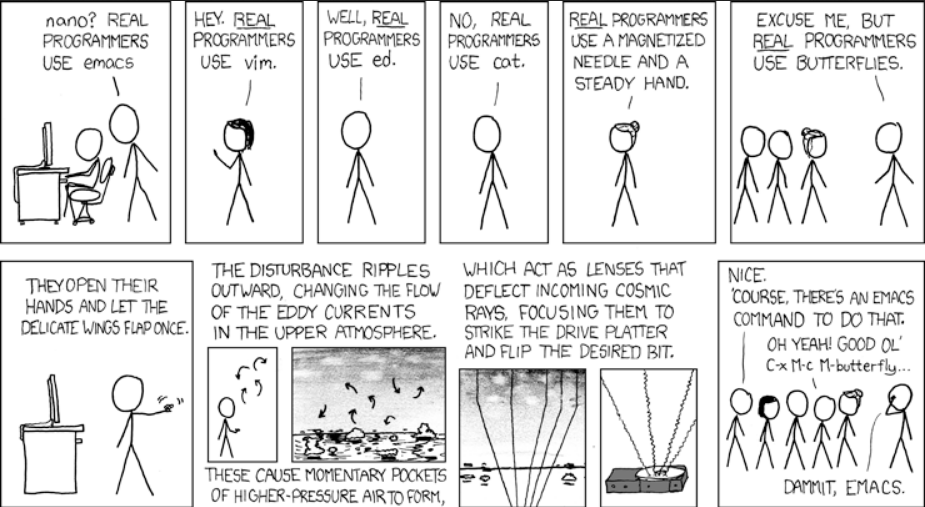
 If your answer is YES!, consider becoming a Python freelance developer! It’s the best way of approaching the task of improving your Python skills—even if you are a complete beginner.
 Python tuple is a fundamental data type, serving as a collection of ordered, immutable elements. Tuples are used to group multiple data items together. Tuples are created using parentheses



 The
The 


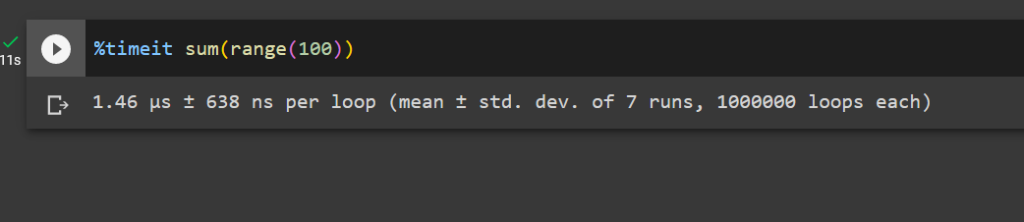






 You know how doctors are always trying to figure out the best way to treat illnesses? Imagine having millions of super-smart helpers to quickly find the answers.
  Or think about your savings and investments; what if you had a team of top financial experts guiding you 24/7 to make the smartest choices with your money?
  And for kids in school, picture having a personal tutor for every subject, making sure they understand everything perfectly. LLMs is like having an army of geniuses at your service for anything you need.

 Academy:


 Recommended:


 Image Source:


 Recommended: