A profound understanding of Python lists is fundamental to your Python education. Today, I wondered: what’s the difference between two of the most-frequently used list methods: append() vs. extend()?
I shot a small video explaining the difference and which method is faster—you can play it as you read over this tutorial:
Here’s the short answer — append() vs extend():
The method list.append(x) adds element x to the end of the list.
The method list.extend(iter) adds all elements in iter to the end of the list.
The difference between append() and extend() is that the former adds only one element and the latter adds a collection of elements to the list.
You can see this in the following example:
>>> l = []

>>> l.append(1)

>>> l.append(2)

>>> l

[1, 2]

>>> l.extend([3, 4, 5])

>>> l

[1, 2, 3, 4, 5]
Then, you use the extend method to add the three elements 3, 4, and 5 in a single call of the extend() method.
Which Method is Faster — extend() or append()?
To answer this question, I’ve written a short script that tests the runtime performance of creating large lists of increasing sizes using the extend() and the append() methods.
My thesis is that the extend() method should be faster for larger list sizes because Python can append elements to a list in a batch rather than by calling the same method again and again.
I used my notebook with an Intel® Core™ i7-8565U 1.8GHz processor (with Turbo Boost up to 4.6 GHz) and 8 GB of RAM.
Then, I created 100 lists with both methods, extend() and append(), with sizes ranging from 10,000 elements to 1,000,000 elements. As elements, I simply incremented integer numbers by one starting from 0.
Here’s the code I used to measure and plot the results: which method is faster—append() or extend()?
import time def list_by_append(n): '''Creates a list & appends n elements''' lst = [] for i in range(n): lst.append(n) return lst def list_by_extend(n): '''Creates a list & extends it with n elements''' lst = [] lst.extend(range(n)) return lst # Compare runtime of both methods

list_sizes = [i * 10000 for i in range(100)]

append_runtimes = []

extend_runtimes = [] for size in list_sizes: # Get time stamps time_0 = time.time() list_by_append(size) time_1 = time.time() list_by_extend(size) time_2 = time.time() # Calculate runtimes append_runtimes.append((size, time_1 - time_0)) extend_runtimes.append((size, time_2 - time_1)) # Plot everything

import matplotlib.pyplot as plt

import numpy as np append_runtimes = np.array(append_runtimes)

extend_runtimes = np.array(extend_runtimes) print(append_runtimes)

print(extend_runtimes) plt.plot(append_runtimes[:,0], append_runtimes[:,1], label='append()')

plt.plot(extend_runtimes[:,0], extend_runtimes[:,1], label='extend()') plt.xlabel('list size')

plt.ylabel('runtime (seconds)') plt.legend()

plt.savefig('append_vs_extend.jpg')

plt.show()
The code consists of three high-level parts:
In the first part, you define two functions list_by_append(n) and list_by_extend(n) that take as input argument an integer list size n and create lists of successively increasing integer elements using the append() and extend() methods, respectively.
In the second part, you compare the runtime of both functions using 100 different values for the list size n.
In the third part of, you plot everything using the Python matplotlib library.
Here’s the resulting plot that compares the runtime of the two methods append() vs extend(). On the x axis, you can see the list size from 0 to 1,000,000 elements. On the y axis, you can see the runtime in seconds needed to execute the respective functions.
The resulting plot shows that both methods are extremely fast for a few tens of thousands of elements. In fact, they are so fast that the time() function of the time module cannot capture the elapsed time.
But as you increase the size of the lists to hundreds of thousands of elements, the extend() method starts to win:
For large lists with one million elements, the runtime of the extend() method is 60% faster than the runtime of the append() method.
The reason is the already mentioned batching of individual append operations.
However, the effect only plays out for very large lists. For small lists, you can choose either method. Well, for clarity of your code, it would still make sense to prefer extend() over append() if you need to add a bunch of elements rather than only a single element.
Your Coding Skills – What’s the Next Level?
If you love coding and you want to do this full-time from the comfort of your own home, you’re in luck:
I’ve created a free webinar that shows you how I started as a Python freelancer after my computer science studies working from home (and seeing my kids grow up) while earning a full-time income working only part-time hours.
With the massive recent releases of Blender 2.8x it is time to start looking towards the future and that is exactly what the Blender Foundation have been done. With a pair of posts to their developer blog addressing the upcoming future of Blender.
First is the announcement of LTS versions and with Blender 3, adopting a more standard numbering convention:
The first proposal is to do one Long Term Support (LTS) release every year. This release would be supported for two years with important bug fixes and updates for new hardware, while strictly maintaining compatibility.
A good reason to do an LTS now is the focus on fixes and patches of the past months. The next release (2.83) although big, will be relatively less experimental, thus a good candidate to keep supporting for a while.
LTS versions also will help to ensure that a project that started with an LTS version can be completed with the same version in a reasonable amount of time. Nice for studios with large projects, but also for add-on maintenance.
As well as details on the new versioning:
Along with this, I also propose to accelerate a bit our release numbers this decade.
This summer we’ll do Blender 2.90 (new particle nodes), and in summer 2021 the Blender 3.0 series begins! By then we will implement a more conventional release numbering.
I suggest to do minor releases (3.0, 3.1, 3.2, … 3.7) for two-year periods, and then move to a new major release. Blender 4.0 could be there in 2023 already!
Additionally there was some discussion on the “biggest projects” over the next year, the type of features you can expect to see in the next few releases of Blender. There was also some tentative discussions on upcoming User Interface changes from their User Interface Workshop.
Finally there is some unfortunate news about Blender founder Ton Roosendaal who is taking a bit of a break due to help issues:
Last week Monday night I was hospitalized with an acute immune system failure. It was critical and severe but quickly fixed up and diagnosed to be excellently treatable with common medicines. Because of my weak immune system I’m confined to a special over pressured area in the hospital, to prevent germs or viruses from reaching me. Basically it’s the safest place in Amsterdam now!
Last week I migrated all Blender Foundation/Institute operational tasks to Francesco Siddi. He will take over ongoing projects and communication for me until I’m back in April. I would appreciate it if everyone would respect my rest for this month. I can’t handle thousands of good health mails or personal messages now! Social media will do fine ? I know you care!
Wishing you a quick recovery Ton! To learn more about all of the above be sure to check out the video below.
Like most games made by Nintendo, the story of Animal Crossing – Nintendo’s charming social life-sim series – begins in Japan, with a man named Katsuya Eguchi. After he nabbed a job at Nintendo in 1986 he was forced to move away from his hometown of Chiba and relocate to Kyoto, the city where Nintendo was (and still is) based. Eguchi worked on several projects hither and thither, notably as a level designer for Super Mario Bros. 3, but the move to Kyoto stuck with him even after he had settled in, and it was a primary influence upon the creation of Animal Crossing.
Eguchi elaborated on the main themes of the original game in an interview with Edge Magazine:
Animal Crossing features three themes: family, friendship, and community, but the reason I wanted to investigate them was a result of being so lonely when I arrived in Kyoto […] when I moved there I left my family and friends behind. In doing so, I realised that being close to them – being able to spend time with them, talk to them, play with them – was such a great, important thing. I wondered for a long time if there would be a way to recreate that feeling, and that was the impetus behind the original Animal Crossing.
Joining forces with the ever-excellent Takashi Tezuka, Eguchi began the series with Dōbutsu no Mori, a Japan-exclusive game for the N64 which roughly translates to ‘Animal Forest’ in English. The game was originally planned to be released for the 64DD, an add-on which sat under the N64 and took advantage of rewritable, whizzy, spinny discs that could hold a lot more data than a cartridge. Unfortunately, the expansion was a commercial disaster and after countless delays and other problems, Nintendo decided to slap it in a cartridge instead.
There was an issue with this however, as the game relies heavily on a real-time clock, which the 64DD offered but the N64 lacked. Therefore, Nintendo did the only sensible thing and stuck a clock inside the game cartridge. Whilst it worked for the most part, relying on such a solution meant that should the battery run out there’d be no way for the game to track the time when you weren’t playing, which is a significant issue given that that was one of the biggest features.
From N64 to GameCube
This initial release on N64 launched in Japan on the 14th April 2001, but it wasn’t long until a new and improved version called Dōbutsu no Mori+ released for GameCube in December of the same year. The fact that the GameCube actually had a clock in it made fabricating discs easier (and cheaper) than producing more cartridges for the ageing, older Nintendo 64, even if the upgraded game still looked very much like an N64 title.
The GameCube version also came with a selection of new stuff as well, much of which has remained throughout the entire series, including Tortimer, Kapp’n, the Able Sisters, and the Museum. Suffice it to say if you bought the N64 original and then saw this less than 9 months later, you’d probably feel a bit miffed. Still, it’s hard to stay mad while playing Animal Crossing.
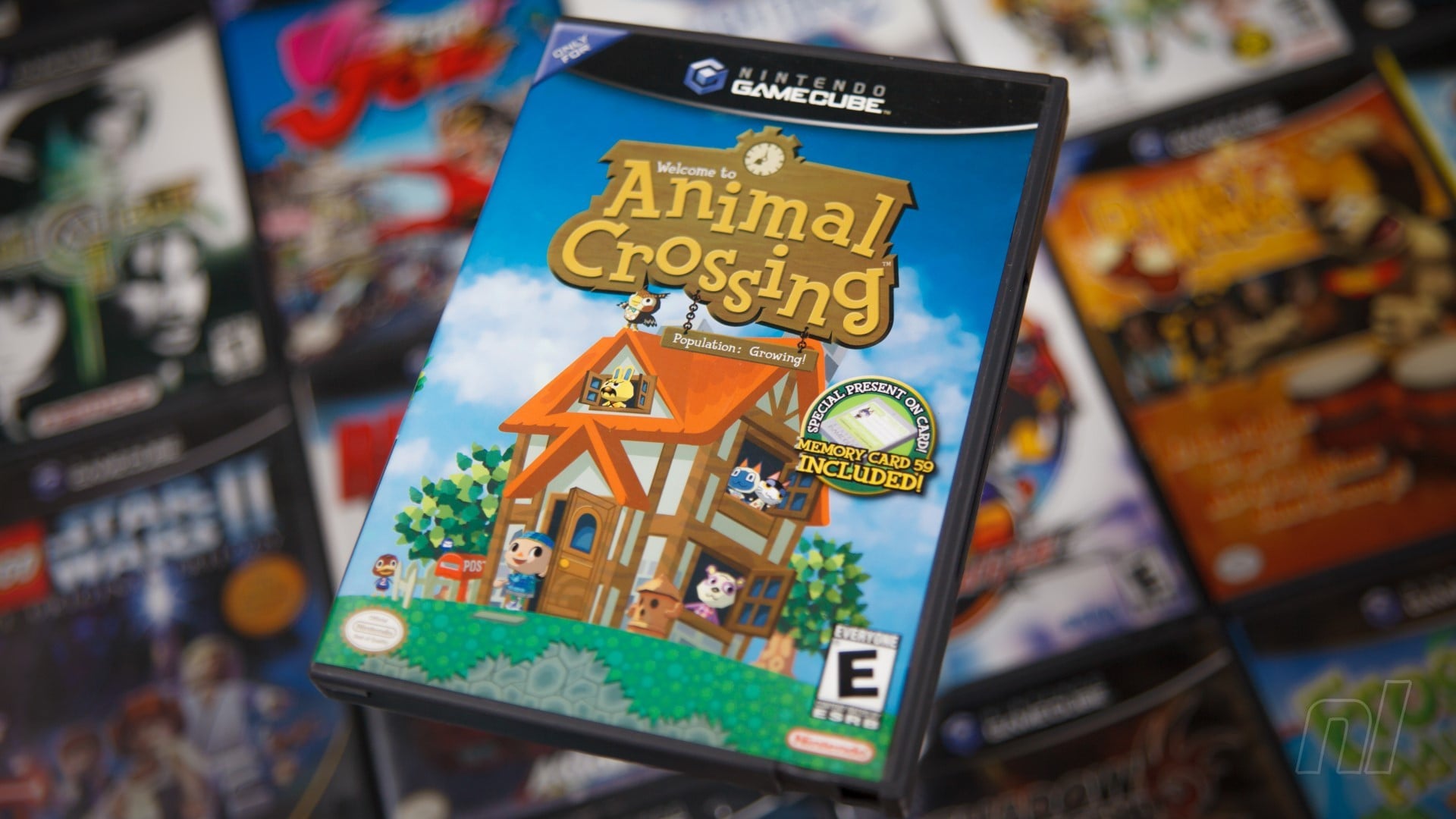
The success of the game caught the interest of some other Nintendo employees outside Japan, and despite the mountains of dialogue and text that had to be localised, Nintendo of America set about making what most of you reading will recognise as Animal Crossing for the GameCube, with its classic tagline ‘Population: Growing!’ that still gets ignored to this day. Not only did they translate everything, but they also decided to add in other things such as new holidays. The original game was very Japan-centric when it came to annual festivals, but adding in things like Toy Day (Christmas) and Halloween (Halloween) helped to make the game more recognisable and relatable to a western audience.
Animal Crossing launched in North America less than a year following its Japanese counterpart on the 16th September 2002, although Europeans had to wait a further two years to get their first taste of animal-forest life. The game was well received, but more interestingly the Japanese portion of Nintendo were so impressed with Nintendo of America’s additions that they decided to take all the new content from the western release (plus a bit extra) and release yet another version of the game called Dōbutsu no Mori e+ a year before the European release. The game was even released on the iQue Player in China in 2006, so perhaps Europeans should count themselves they didn’t have to wait until after that launch to play.
The game was a hit, and dominance over the debt simulator genre had been established, so it was time for a proper sequel.
Ooo, baby baby it’s a Wild World
Even though the game had started small and local, Animal Crossing’s success was global, so when it came time to make a sequel Eguchi made sure to change things around for as broad a demographic as possible. Everything from fish, to bugs, to fossils, to holidays were re-designed with an international, multicultural market in mind. The platform choice was a bold move as well, as even though the GameCube had sold a respectable number of units, this new game would be shrunk down onto the tiny Nintendo DS instead.
Despite its size, the DS packed quite a punch features-wise including in-built features that the GameCube didn’t possess, like a microphone that you could use to scream at other villagers to find out where they were. Parents loved that. Animal Crossing: Wild World also had the major advantage of not having to rely on being plugged into the wall at all times, meaning you could take your village with you wherever you went. The DS also technically had Wi-Fi capabilities, so you could visit other people’s villages locally or non-locally using the patented Friend Code system and even send them charming or rude messages.
The game was a smash hit, and thanks to the overwhelming success of the DS in all its ‘third pillar’ glory, superseded the original release financially, and critically. Taking the winning formula and improving on almost every aspect in a handy portable package was a no-brainer to consumers, and the series’ relaxing gameplay appealed to the same broad demographic of players attracted to the Nintendo DS by games like Brain Training and Nintendogs; players who might never have sat down to play something on GameCube but were willing to try something new on DS.
There were a few issues however. With the introduction of the new whizz-bang internet Nintendo had the ability to distribute letters containing gifts to people fancy enough to have a connection, and they did so. One gift called ‘Red Tulips’ came with a blank letter and after placing the mysterious object in your home, not only would it be invisible, but the game still thought there was something there, so you couldn’t move through it. Whatever was there couldn’t be touched or moved, so you weren’t able to pick it back up either, meaning you now had an invisible blockade in your home. Nintendo’s response was swift, and its solution to the problem simple: don’t open the letter and just throw the item away. Genius.
Wild World was a marvel back in the day, a handheld jewel that married the charm of the series with the convenience of portability. The Wii U Virtual Console version neutered that convenience somewhat, but this entry sucked hundreds of wonderful hours from us back on DS.
Nuts to parochial backwaters: Let’s go to the city!
Portable play is all well and good, but what if you had a real hankering for that classic big screen experience on your 12-inch CRT with only one working speaker? With the 2006 launch of the Wii came a two year wait before the series returned to home consoles with Animal Crossing: Let’s Go To The City!. Or at least that’s what it was called in Europe. In North America it went by Animal Crossing: City Folk because Nintendo of America refuse to publish any game with more than five words in the title. To be honest, we endorse such practices and wish they were still employed; it would avoid multi-syllable embarrassments like Cadence of Hyrule: Crypt of the Necrodancer Featuring The Legend of Zelda or that Dragon Quest XI: The Longest Title In The History Of The World…Ever! – Definitive Edition.
If the name didn’t give it away at all, Let’s Go To The City allows you to venture outside the peaceful tranquillity of your town and, yes, go to a city. That was about the only major difference between this and Wild World, though, and the game was criticised for being too similar to its predecessor. Part of that may be because it’s based on exactly the same game engine as the DS version. You could have more villagers, your own home rather than sharing one with anyone else who had a character in the game, but much of City Folk was subject to only very minor changes.
One area touted as an improvement over Wild World was the Wii Speak peripheral released alongside this new Wii game. This was essentially a big microphone that you could place near your TV and talk to people as though they were in the room with you. That was Nintendo’s plan at least. In reality it was a largely disappointing, low-quality microphone that forced you to shout at your TV rather than just whisper delicately into a headset (not that people don’t shout into headsets). The Wii Speak only ever supported 13 games, and it’s not hard to see why.
But what about the headlining trip to the city? That must be exciting, right? Well, you could buy clothes, change your hairstyle or fashion yourself a Mii mask, talk to special characters… the city area basically freed up your town to be more focused on your villagers rather than cluttering it all up with shops. As an idea it works well enough, but it also feels strangely disconnected to your actual town, and left it feeling somewhat empty at times. It’s certainly not the bustling MMO metropolis you might have hoped for.
Consequently, Animal Crossing: Let’s Go To The City ends up as one of the lesser games in the series as it didn’t really push any boundaries beyond what had already been done before. That’s not to say Nintendo didn’t put work into the Wii entry (according to the game’s Iwata Asks interview it features the equivalent of 4000 pages-worth of text), but in a series of slow and steady iteration, City Folk was the slowest and steadiest of Animal Crossings. If it was your only Animal Crossing game at the time you would probably have been more than happy with what you had, though. Still, it wouldn’t be long before you could start over again.
Turning over a New Leaf
Whether or not Let’s Go to the City’s lukewarm reception was a reason or not, the next game in the series returned to a handheld, specifically the Nintendo 3DS. Animal Crossing: New Leaf took even more inspiration from around the world and squeezed it all onto a diminutive cartridge once again. The autostereoscopic 3D display of the console meant the designers had to take extra care to make sure the new perspectives didn’t reveal any behind-the-scenes graphical nastiness that we were never meant to see. The game launched in 2012 in Japan and the following year everywhere else due to another monumental localisation job.
This time around you’re not just some schmuck selling seashells and fallen fruit in an already flooded market, but instead upon arrival at your new town you’re greeted as the new mayor of this rural backwater, with the power to mould and shape the town (and its inhabitants) according to your whims. Being the mayor means you have the ability to change more of your town than ever before, and even dictate people’s bedtimes to suit your own unhealthy schedule. Despite this being such an integral part of what made New Leaf New Leaf, this idea was only decided on a year after the game had started development, as revealed in an Iwata Asks interview on the subject. In fact, it was an impending presentation to a couple of Nintendo honchos that birthed the idea of giving the player more control this time around:
Kyogoku: … we were preparing to make a presentation to Shigeru Miyamoto-san and Takashi Tezuka-san, and we started to wonder how we could possibly sum up the idea behind the new Animal Crossing in a single key word or concept.
Iwata: And this ended up being: “The player is the mayor.”
Kyogoku: Yes. The player becomes the mayor, so he or she can put up bridges and install various items and objects. This makes the whole feature similar to public works projects in the real world.
And with Tortimer booted from office the next chapter of Animal Crossing had its Unique Selling Point.
The game was very well received, and in 2016 – a full three years after its initial release – an updated version called Animal Crossing: New Leaf – Welcome amiibo landed on store shelves. As the new title suggested, this was a revised version of the game that boasted new amiibo functionality and extra modes including an expanded camp site, but those with the base game were able to simply update their original copy to include all the new features for free thanks to the mysterious magic of the internet. Shortly before this updated version released, though, we saw the very first spin-off in the series.
Posted by: xSicKxBot - 03-12-2020, 08:09 AM - Forum: Lounge
- No Replies
Devolver Digital Teases Direct-Style E3 2020 Press Conference
Devolver Digital may be "bummed" that E3 2020 is canceled due to the novel coronavirus (COVID-19), but that isn't stopping the independent publisher from doing something this June in lieu of a big presentation.
The company hasn't clarified its exact plans as there is "lots to juggle" at the moment, but Devolver does intend to do a Nintendo Direct-style livestream or press conference of some kind in the absence of E3. Devolver also notes that "possibly more" could be coming from the company but nothing is set in stone right now.
Whatever is coming this June will probably be digital as the Entertainment Software Association (ESA), the organization responsible for the annual trade show, said E3 2020 may continue as an "online experience."
Rumour: Two Nintendo Presentations Expected To Air Before The End Of March
The UK-based retailer GAME may have lifted the lid on a Nintendo Direct presentation ahead of schedule. Now, to add to this, VentureBeat staff writer, reporter and verified Twitter user Jeff Grubb has published an article claiming a Nintendo Indie World video will “likely” be broadcast on 18th March, and a proper Nintendo Direct is expected to follow it on 26th March.
it’s in the final stages of putting the video presentation together. That’s based on what we’re hearing as well as some other indicators.
So, just to make it clear, not one – but two – video presentations are expected to air before the end of this month. While Jeff says he “can’t confirm” the first-party titles that will be shown, he does say the next presentation will take a much “broader” look at Nintendo’s upcoming software line-up.
The company is also expected to continue to rely “heavily on remasters and ports” and will bring in more support from third-party publishers and developers. He goes onto state that it’s “definitely happening” and thinks we’ll hear more about it early next week.
Nintendo is deep into the process of putting the event together based on what I’ve heard. It has decided many of the third-party games it will include in the event. So it’s definitely happening — and almost certainly before the end of March.
What do you make of this? Can you see an Indie World presentation and Nintendo Direct taking place before the end of this month? Let us know in the comments.
Right now, there are reports all over the internet that E3 2020 is going to be axed. Indie publisher Devolver Digital – responsible for titles like Hotline Miami and My Friend Pedro – seemingly started it, when it told everyone (via Twitter) to cancel their E3 flights and hotels.
Kotaku News Editor Jason Schreier added to this, stating how he had heard “secondhand whispers” from several publishers and developers that the annual expo had been cancelled. He followed it up with this tweet:
Heard from two people that E3 cancellation will be announced tomorrow AM (both secondhand), and one person w/ ESA ties who insists that it won’t be. Normally I sit on conflicting info until I sort out what’s true, but with E3 rumors now everywhere, figured I’d be transparent here
My day started with investigating some E3 stuff. Ended with multiple (and I mean MULTIPLE) sources coming my way. E3 cancelation announcement scheduled for tmw AM. I don’t think it will hold the night. Many of us have been engaged by sources this evening. Cancel your plans.
Update – Wed 11th Mar, 2020 06:45 GMT:Bloomberg seems to have narrowed down the exact time this will take place.
The cancellation is planned to be announced at 9:30 am Los Angeles time on March 11 by the Entertainment Software Association, according to a person familiar with the matter.
If you’re wondering why this event is being cancelled, it’s believed to be linked to the coronavirus outbreak – officially known as COVID-19. There’s also speculation that it’s tied to companies pulling out and industry faces like Geoff Keighley going separate ways, due to the event’s “fan, media, and influencer” overhaul.
When we find out more, we’ll be sure to let you know.
Posted by: xSicKxBot - 03-12-2020, 01:29 AM - Forum: Lounge
- No Replies
Joe Hill Compares Hill House Comics To Going To The Video Store
DC Comics has started to really develop its own brand of horror comics with Hill House Comics. Curating this new label is the writer behind Locke & Key and N0S4A2, Joe Hill--who is doing a Sandman/Locke & Key crossover this fall. While he writes two of the books at the label--Basketful of Heads and The Plunge--he's also helping others bring unique horror stories to DC.
Hill was inspired by early horror comics, before the Comics Code Authority forced censorship within the industry back in 1954. But what exactly is Hill House Comics and what can readers expect? "I've described Hill House Comics a couple of ways," Hill explained to GameSpot at C2E2. "One of the things I say a lot is that it's sort of Blumhouse for comics. Actually, the best comparison for Hill House Comics is when I was a kid, my favorite pastime was to go to the local mom & pop video store, and I'd go to the sleazy old horror section, and I'd groove in the sleazy horror section for an hour hunting down straight-to-video schlock horror to watch over the weekend. And every once in a while you'd find one, you'd find some schlocky piece of garbage horror. [One] that was actually brilliant, like Reanimator. I mean, without Reanimator there was, there was no Basketful of Heads.
"I look at Hill House Comics, I sort of like this video store of the mind. It's what's in the horror section in this impossible video store that exists outside of time. So you can dip in and find that horror film that you always hoped you would see."
Posted by: xSicKxBot - 03-11-2020, 09:54 PM - Forum: Windows
- No Replies
Helping teachers and students make the switch to remote learning
Over the past two weeks, we’ve published a series of blog posts aimed at helping our customers during the COVID-19 outbreak. In one of them, I shared a letter from Lily Zheng, our friend and coworker in Shanghai. Lily’s letter included lessonsshe’d gathered from China-based Education customers who moved to 100 percent remote learning back in February.Faced with delaying the term, these schools sprung into action, quickly migrating their entire curriculum online. And as countries around the world are impacted by the outbreak, many more educational organizations will need to do the same.
We want to help.My colleague Barbara Holzapfel and her team focus on creating technology for schools and universities, and they count a number of remote-learning educators among their customers. She has asked some of theseexperts to share the remote-learning tips that they’ve gathered over the years. From preserving student-teacher 1:1s to bringing lessons to life in the virtual classroom, it’s rich with useful advice for any educational organization that may soon be moving online. Take it away, Barbara.
Making remote learning effective and engaging with Microsoft for Education
In the weeks since the COVID-19 outbreak first hit China, our Education customers in the region have done amazing things to keep students learning while they transition to learning remotely. From e-learning innovations to keeping students’ spirits high with photo and cooking challenges, teachers and students have shown extraordinary resilience during this difficult time.
Now, as countries around the world take steps to contain the virus, many schools and universities globally are moving classes online. Teaching and learning from home is a big change for most students and educators. Without a physical classroom, how can you check that students are engaged and progressing? How do educators and faculty stay connected?
We want to help ease the transition, so we have asked experienced online educators—including Catholic Education Western Australia (CEWA) and O’Dea High School here in Seattle—to share the tips they’ve gathered over years in remote education.
But we also want to do more. Microsoft Teams is available for free to educational institutions through the Office 365 A1 offer. In addition, as schools in the U.S., Italy, Japan, and South Korea transition to remote learning, we’re providing faculty and staff a six-month subscription of Office 365 A5. This gives them free access to live events and audio conferencing and helps them expand their reach by hosting meetings for up to 10,000 attendees and help ensure access for students in low bandwidth areas by including public telephone network dial-in information for their online classes.
Moving to a virtual classroom
As schools move to a remote learning environment, Teams can provide an online classroom that brings together virtual face-to-face connections, assignments, files, and conversations into a single platform accessible on a mobile device, tablet, PC, or browser.
To help make this process as simple as possible, we have created a best practices guide for school leaders and IT to get up and running quickly, so their students and staff to begin communicating remotely.
Once Teams is set up, educators and staff have the ability to create their own class in Teams, add selected students, share lessons, create assignments, collaborate virtually in real-time, and do grading and provide personalized feedback all in one hub.
A few quick tips from expert educators to help you get started:
Have interactive discussions with your class by sharing your screen to present your lesson and encourage students to ask questions using the chat feature.
During a lesson, you can moderate the class discussion by muting students, making them presenters, or if needed, removing them from the meeting. Finally, record the lesson so students can review it on their own time.
Record a class session in case some students can’t join during the live session.
For assessments, you can easily create and grade quizzes in Teams using Microsoft Forms.
Let your students know your office hours and when they can reach you for questions.
Encourage students to use Immersive Reader in Teams to help them read messages and understand assignment prompts, enabling them to follow along and contribute.
Create a Fun Channel. Have a virtual science fair or poetry reading group. This will go a long way with students of all ages.
Getting support and training for educators and staff
We want to help support educators with practical guides, professional development, and how-to information that will help empower them and their students to stay motivated and engaged with learning. We have created a series of webinars that can be accessed on-demand for educators to get started on Teams, and resources in our Microsoft Educator Center to help new and existing users get up and running. We also invite you to join our newly launched Remote Learning Community where educators launching distance learning programs from around the globe are sharing best practices, and our Microsoft Education team is answering questions in real-time.
Continuing to drive student engagement and focused learning while outside of the classroom can be a challenge, especially for those moving to remote learning for the first time. Both educators and parents need support from their schools to help make this work. To help parents and guardians support their children, we have created a Remote Learning Guide for students and parents. For educators, tools like Flipgrid, Skype in the Classroom, and Minecraft: Education Edition can also help mix up the day and give students ways to communicate and demonstrate learning in new ways.
In addition, here are some tips we have heard from educators who have helped create healthy and effective learning environments that allow students to thrive in this new virtual setting.
Stay healthy and charged: Learning from home can be a new experience for students. Encourage them to take breaks between lessons to stretch, hydrate, or just unplug.
Stay focused: Find a quiet place where they can focus on the lesson with minimal distractions.
Stay connected: School is important from a social perspective. Not seeing their friends face-to-face every day can be hard for students. Help them adjust to this new reality by encouraging them to schedule a lunch session for classmates to stay connected. If they are out sick or can’t join class because of an appointment, remind them to change their status or set a status message so their classmates are also aware.
Motivate your class: Use Teams to encourage joyful challenges throughout the week by creating a Fun Activities channel. For example, hold a cooking contest and have students share their creations in the channel. Recognize your students by sending them Praise in the channel, inspiring more students to participate.
Bring lessons to life: Make a lesson interactive by enabling Whiteboard in Teams during a live lesson. Have students come up to the whiteboard and solve a math problem or demonstrate their art skills, just like they would in a physical classroom.
Connect with students individually: It can be difficult to gauge how students are faring without seeing them in person, so connecting individually is very important. You can support students 1:1 in a chat, creating a safe space for students to ask their questions and get the extra help they need.
I hope these tips from our educator community help you create an engaging remote learning environment in which both students and educators can stay connected.
We recognize navigating this new way of learning presents a set of challenges that are new to everyone impacted. Our team is available to answer questions you have around remote learning in our new Remote Learning Community. We hope to help make this transition as easy on you as possible.
Posted by: xSicKxBot - 03-11-2020, 09:54 PM - Forum: Windows
- No Replies
Staying productive while working remotely with Microsoft Teams
How do you move tens of thousands of employees to remote work overnight? With the COVID-19 outbreak spreading around the world, that was the big question on our minds at Microsoft last week. Then, last Wednesday, we just did it—sending out an email that asked approximately 50,000 Microsoft employees in the Seattle area to work from home if they could. We were already heavy Teams users, but in our first fully remote days usage among Microsoft employees in the U.S. went up significantly. By the end of the day Thursday, chat was up 50 percent week over week and meetings were up 37 percent. And we’re seeing usage upticks among customers, too, as workers everywhere adjust to meeting, chatting, and collaborating exclusively online. We want to help everyone meet this challenge. As the team behind Teams, we have spent a lot of time learning about the best ways to make working from home productive and healthy. So I thought I’d share our top tips below.
A quick note before you read on: These tips are part of our ongoing effort to help everyone stay connected and productive during this challenging time. Last week, I shared how individuals and organizations can get Teams for free, along with our comprehensive plan for keeping services running smoothly through this crisis. We’ve also shared incredible stories from customers and employees around the world, including teachers and students in Hong Kong using technology for amazing e-learning innovations and customers in and around China who’ve found smart ways to keep work moving as well. But our customers are also asking for guidance on switching to remote work. We’ll continue to provide tips, information, and inspiring customer stories throughout the outbreak, so check back here for those in the days to come.
Getting started
As you move to remote work, a few key habits will set you up for success.
Set up your workspace
If you don’t have a home office, don’t worry. You can still work from home productively. In fact, we designed Teams as a virtual office you can take anywhere you go. While you may not have a printer, physical files, or a desk phone at home, you can pull up documents directly in Teams, securely store files where the right people can access them, and quickly jump into calls and meetings. That said, it’s important to have a dedicated home workspace where you can be productive and signal that you’re in do-not-disturb mode. A breakfast nook, a quiet corner of the bedroom, an underused game table in the rec room—any focus-friendly area can double as a workspace. And don’t worry if it gets a little messy throughout the day, you can always use background blur during video meetings so your teammates focus only on you.
Communicate, communicate, communicate
While many of us work from home at least part of the time, we still rely on rhythms and core hours that are built around our physical presence at the office. When working from home, your daily rhythm may change. This is especially true for those of us balancing work and childcare. Clearly communicate your working hours with your teammates and collaborators so that they know when to reach you. You can also set a status message in Teams to share this information proactively.
Also, make it a habit to offer frequent progress reports to your teammates. Fully remote companies tend to emphasize documentation, since it’s a key way to stay connected when you work apart. We recommend posting updates, insights, and helpful resources you’ve discovered in Teams channels, so your teammates can stay connected with what you’re up to even without the benefit of a chance hallway conversation. Later, they can search within the channel for ideas or content when they need them.
Maintain healthy boundaries
Without the usual workday signals—a walk to grab lunch, for instance, or a commute—unplugging can be a challenge. Remote workers sometimes find themselves working for long stretches without breaks for exercise, socializing, or a proper meal. This will quickly lead to stress and burnout. Remember: your health comes first. Make time for meals, drink plenty of water, and remind yourself to mentally “clock out” from remote work at the end of the day. These behaviors won’t just keep you healthy, they will also help you be more productive in the long run.
Running effective meetings
Embrace online meetings
In the absence of a physical conference room, bringing everyone together can feel like the biggest remote-work challenge of all. As you move meetings to Teams, make sure all meetings have a virtual “join” option to create an online conference room. Also, we suggest that all participants turn on video if they are comfortable doing so. The face-to-face interaction goes a long way to help everyone feel connected. Teams has a wide selection of certified cameras to choose from, as well as devices like headsets and speakerphones to make sure you and your coworkers can always communicate clearly.
Be mindful and inclusive
Moving to online meetings may remove some of the visual cues we rely on to see if a colleague has something to say in a meeting. And overcrowded conference calls can make it difficult for people to share their opinions. Meeting organizer should pause frequently to invite questions and remind attendees that they can also use the meeting chat window to share their thoughts.
Record your meetings
To compensate for lack of face time, some remote workers schedule extra meetings in order to stay connected with customers, partners, and coworkers. Double-bookings can be hard to avoid. If your organization allows it, record meetings in Teams so coworkers can catch up later. If you can’t attend yourself, remind the organizer to record in your absence. The automatically generated transcript is also super-useful when you’re trying to remember information covered in a meeting you attended. Want to learn more about Teams Meetings? Learn more tips here.
Staying connected
Make up for missing hallway talk
A lot of remote workers find the thing they miss the most about the office is casual conversations. Chats at the watercooler or snack shelf not only keep us connected, they often surface important information or insights we wouldn’t have guessed. Be deliberate about reaching out and connecting with your co-workers. Think of chat messages as your virtual watercooler and set yourself a reminder to check in with people regularly. Emojis, GIFs, and stickers are a fun way to keep the chatter fun and light.
Bring the team together
Working remotely can feel isolating. As a leader, it’s important to create opportunities for the whole team to get together virtually. Maintain your regular team meeting cadence or team lunches, just make them online. Use the “General” channel in Teams for discussions that might be of interest to everyone. For large brainstorms you can use the Microsoft Whiteboard app, which provides an infinite digital canvas for meeting participants to ideate and collaborate directly in Teams. We also suggest team leaders download the Crisis Communication Power App. You can use this customizable app to inform yourself and your team on everything they need to know throughout this outbreak.
Have fun!
With all the changes that come with moving to remote work, it’s important to foster and maintain team morale. There are many things you can do within Teams to keep people feeling positive and engaged. Share news and stories in your team chat, or hold a photo contest. One of our education customers in China hosted a cooking challenge for students that proved particularly popular.
I understand that every individual and team works differently. But I hope the tips from our team helps you stay productive and connected as you adjust to a new way of working. And remember, you can start using Teams today by signing in or signing up for free.
Be remote-work ready! Download our remote work checklist and share with your teammates.