Posted by: xSicKxBot - 04-06-2019, 11:11 AM - Forum: Lounge
- No Replies
Borderlands: The Handsome Collection Free To Play On Xbox One, PC This Weekend
It's been a week full of Borderlands announcements, so it's no huge surprise that Borderlands: The Handsome Collection is free to play on Xbox One (Gold members only) and Steam this weekend. The bundle is also discounted in the PlayStation and Microsoft stores, Steam, and Best Buy, where you can currently buy it for $15.
The free-to-play weekend deal has already begun and will end Sunday, April 7 at 10 AM PT / 1 PM ET for Steam and Monday, April 8 at 12 AM PT / 3 AM ET for Xbox.
Borderlands: The Handsome Collection is Free to Play now through Sunday on Xbox One and Steam! Gather your fellow Vault Hunters and kick some Ultra-HD badonkadonk! XBOX ONE: Apr 4 at 12am PT - Apr 7 at 11:59pm PT STEAM: Apr 4 at 10am PT - Apr 7 at 10am PT pic.twitter.com/aPyX7o7mV5
Borderlands: The Handsome Collection includes Borderlands 2, Borderlands: The Pre-Sequel, and all DLC. It also allows for online co-op gameplay for up to four players.
Xbox's free-to-play weekend deals, which are exclusive to Xbox Live Gold members, also include WWE 2K19 and Dead By Daylight: Special Edition in addition to Borderlands: Handsome Collection. You can install those here. To download and play for free on console, navigate to the Gold member area of your Xbox One dashboard, where you'll find the games.
In addition, free Ultra HD texture packs were just released for both games in the Handsome Collection on PC, Xbox One X, and PS4 Pro, so it's a great time to dive into these games and check out the new enhancements. These graphical improvements include 4K and HDR support for console players and remastered environments, characters, and vehicles. The enhanced PC version doesn't provide HDR support but comes with many other improvements.
Posted by: xSicKxBot - 04-06-2019, 11:11 AM - Forum: Lounge
- No Replies
How Fallout almost didn’t ship with its key SPECIAL system
“We were all working together to go in the same direction. There was very little clash of egos or desire to pull the game in a different direction. That is rare in development.”
– Interplay’s Brian Fargo disussing the development of Fallout.
There’s no mistaking the brutality of 1997’s Fallout. The game was unforgiving, painting a bleak picture of life post-nuclear war. There was a lingering sense of uneasiness, knowing that one wrong move could result in death– and there were plenty of ways to die.
Devs interested in learning more about its origins should check out an interview PC Gamer published last year (only now making its online debut) in which a few developers across the various Fallout games discussed the early days of development, and how the game evolved into what it is today.
Fallout was developed by Interplay back in 1997. Brian Fargo, executive producer on the game and founder of the company, described how Wasteland (a science fiction role-playing-game developed by interplay in 1988) served as initial inspiration.
“I had been a post-apocalyptic fiction fan since I was a kid,” Fargo explained. “Wasteland was my first attempt at bringing something to the genre. Shortly after finishing the game, Interplay became a publisher and we no longer created games for other people.”
“I tried to get EA to license me the rights back, but I was unable to succeed despite trying for many years. I finally decided we’d do our own post-apocalyptic game and call it Fallout.”
And so Fargo got some developers together to sit and analyze what made Wasteland tick. “It was a matter of getting a small team to start bringing the project to life,” he continued.
“We created a sensibilities document that spoke to points such as moral ambiguity, tactical combat, a skills based system and the attributes system. After we nailed down what was important, development went off and began working on ideas that hit the touch points.”
Tim Cain, who is credited as being the creator of Fallout, created the engine used to build the game and went through several design ideas– one of which was a GURPS (Steve Jackson Games’ “Generic Universal Role-Playing System”) ruleset that was implemented but later abandoned.
“Fallout was originally a GURPS game,” said Chris Taylor, lead designer on Fallout.
GURPS was a tabletop system made to be used across all forms of role-playing, but Interplay’s attempt to license it didn’t work out, and Fargo needed a replacement ruleset.
“I wrote my own RPG system on the back of three-by-five cards, in notebooks and on scraps of grid paper. My game was called MediEvil. It was not good. So [my friend and I] played D&D instead,” Taylor said.
“But I kept those notes and would work on the game every now and then for a decade—when it came time to replace GURPS, I had something to work with.”
“The team took the system and made it work. We took it and adapted it; it had the statistics and skills we needed, but Perks were created specifically for Fallout to replace the GURPS advantage/disadvantage traits.”
For more dev insight and historical perspective on the Fallout franchise, be sure to read the entire piece over at PC Gamer.
Octopath Traveler’s Switch Exclusivity Might Be Coming To An End
Ever since it launched last summer, Octopath Traveler has been exclusive to the Nintendo Switch. It would appear that this is about to change, however, as a new Korean game rating has been spotted which suggests a PC release is on the way (thanks, Gematsu).
The rating refers to a PC version of the game which is to be published by Bandai Namco, which does regularly publish Square Enix games in the region. Assuming the release finds its way to the public soon, this will be the first time the game has appeared on any other system.
Of course, the Octopath Traveler brand has already been confirmed to be branching out to other platforms, with a prequel to the Switch release – called Octopath Traveler: Champions of the Continent – heading to smartphone devices in Japan this year.
Do you think it’s a good idea to port the game to PC, and maybe other consoles in the future? Or are you sad to hear that it might not be exclusive to Switch going forward? Share your thoughts with us below.
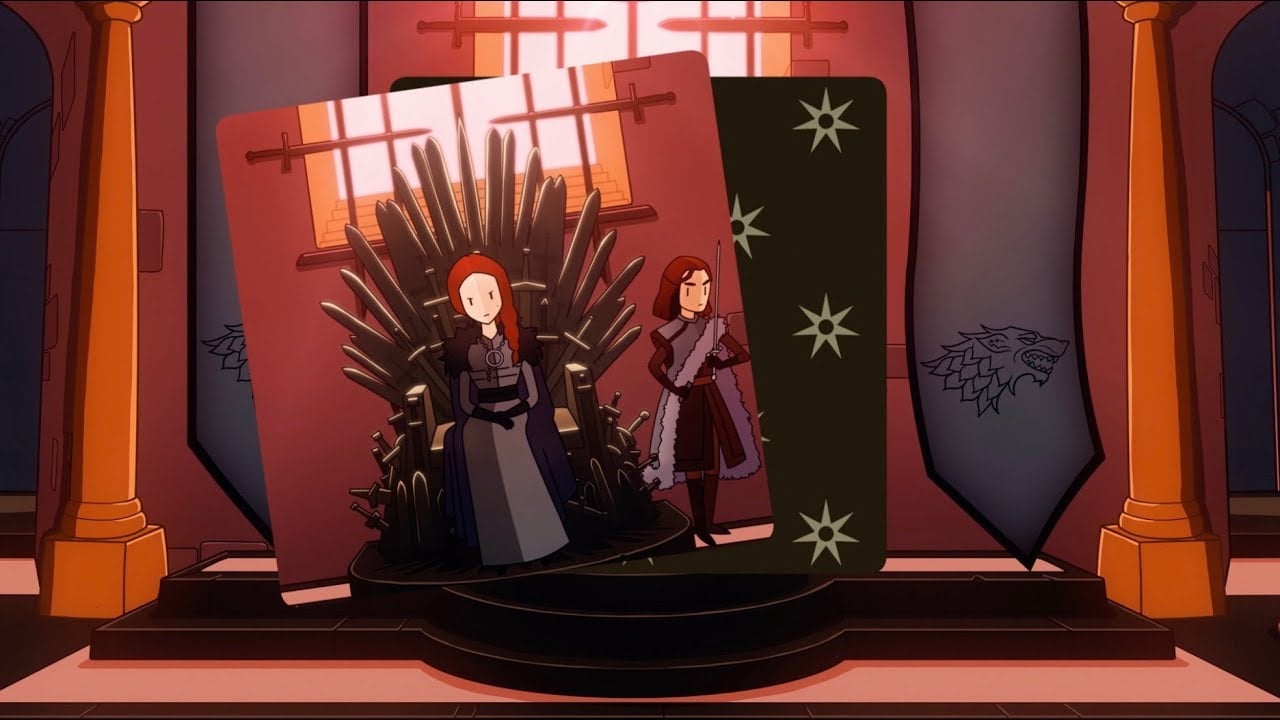
A Tinder-Like Game Of Thrones Game Is Launching On Switch Next Week
Devolver Digital has revealed that Reigns: Game of Thrones is heading to Nintendo Switch next week. You’ll be able to get your hands on it from 11th April.
Developed in partnership with the TV show’s network HBO, the game is a spin-off in the Reigns strategy game series. You’ll be doing everything in your power to claim the Iron Throne as Cersei Lannister, Jon Snow, Daenerys Targaryen, and more favourites from the show, carefully navigating the complex relationships of the Seven Kingdoms.
The first two games in the Reign series have actually already been released on Switch in a double pack called Reigns: Kings & Queens. We thought that the games were already like a weird blend of Game of Thrones and Tinder when we reviewed them last year, so perhaps this is a perfect fit?
If you want to learn a little more about it, we’ll leave you with this lengthy description from the Nintendo store. The game will be available from 11th April for $3.99 / £3.59.
A Formidable Cast: Rule from the Iron Throne as Cersei Lannister, Jon Snow, Daenerys Targaryen, Tyrion Lannister, Sansa Stark, and more. Change between each king and queen you unlock to face challenges and mysteries unique to their story.
Impose Your Will: Swipe left or right to change the fate of the Seven Kingdoms forever as you hear the impassioned pleas and unpredictable demands from the people of Westeros. If a particular character becomes bothersome, tear their card in half to unburden Your Majesty with their concerns – but at what cost?
Reenvision Westeros: Melisandre’s visions are your playing field and extend beyond the TV series to imagine the many fates of those that would sit upon the Iron Throne. Rebuild the Great Sept of Baelor as Cersei or discover the path of the Seven Kingdoms if Sansa Stark had married Jaime Lannister.
Regal Mini Games: Even the most powerful rulers need to set aside their worries and partake in more trivial matters now and then. From jousting to tavern brawls, these distractions aren’t without consequence!
A Grander Reigns: Fans of the Reigns series will be delighted with the biggest, deepest entry in the series that does not simply retell the stories you know but rather lets you create new adventures at your whim.
Iconic Soundtrack: Decide the fate of Westeros and those that reside in your land to the soaring score of the HBO series by Ramin Djawadi.
Today’s Deal: Save big on bunch of games with the RE-PLAY 2019 Sale, in support of War Child UK! Partners participating in this sale have pledged a portion of their proceeds from the sale to War Child UK. *
War Child UK returns with RE-PLAY, the unique fundraising campaign that shines a light on the giants of old and reconnects gamers with favourite titles from their formative years, supporting the right to play for some of the world’s most vulnerable children.
The RE-PLAY sale celebrates all things retro; from classics to modern pixel-art titles running from April 4th at 5pm Pacific to April 11th at 5pm Pacific.
Look for the deals each day on the front page of Steam. Or follow us on twitter or Facebook for instant notifications wherever you are!
Posted by: xSicKxBot - 04-06-2019, 11:11 AM - Forum: Lounge
- No Replies
This Week At Bungie – 4/4/2019
This week at Bungie, we’re getting ready for some high voltage.
A storm is brewing. Next week, we’ll kick off what we’ve been calling Arc Week. Our goal for this happening has been to take the element that makes our sandbox crackle and put it under the microscope. The most noticeable update is that we improved many Arc subclass paths from the time before Forsaken. The week will also feature Arc Singe and Arc Bounties to synergize with your updated abilities. To provide a proving grounds for all this new energy, Mayhem will be available in the Crucible to let you experiment with your enhanced Arc abilities using shockingly short cooldowns.
Arc Week will also feature one of the most powerful Arc weapons ever created, the Thunderlord Exotic Machine Gun. If you weren’t able to complete the quest to obtain Thunderlord last year, you will have from April 9 to April 23 to revisit the Cosmodrome and add it your collection.
A Spark Can Give Life… or Take It
Arc Week buffs up several Arc subclasses. Designer Dan Gniady has all the details on what changes you can expect.
Dan: After the release of Forsaken, the sandbox team wanted to revisit some older subclass paths and freshen them up a bit. This entailed tuning for balance as well as quality-of-life fixes. We’ve also added new functionality to a couple of subclasses. In update 2.2.1, we’re focusing on Arc subclasses for Titans, Hunters, and Warlocks to kick off Arc Week. That said, we also made a couple needed changes to non-Arc abilities. Let’s get into it.
Striker Code of the Juggernaut (Bottom Path)
Notes: This path is all about punching enemies to get better at shooting them and shooting enemies to get better at punching them. We want to further incentivize engaging in this loop and make doing so move visible and flashy. Shooting an enemy should make you feel like you are primed to strike with melee. Punching an enemy and releasing your rage will make you feel like a more focused shot.
Frontal Assault:
Now increases all weapon damage for the duration of the buff
25% against combatants
20% against players
Duration increased from 10 to 16 seconds
Buff timer is now displayed on the HUD
Knockout:
Melee damage bonus increased from 25% to 60%
Now also triggers once you have dealt 60% damage to a target
Any damage done after 60% will refresh the timer
Still also triggers off shield pop
No longer consumed after 1 melee attack
Duration increased from 3 to 5 seconds
Arcstrider Way of the Warrior (Top Path)
Notes: This path thrives on striking with precision and timing and is heavily melee focused. To enhance this loop, we are giving it a bit more nuance with a higher potential payout. We want to allow for more room to execute and engage with both the path to success and the benefits once you do succeed.
Combination Blow
Bonus melee damage can now be stacked 3 times (requires a melee ability kill for each stack)
Buff increases melee damage by 60% per stack in PvE
Buff increases melee damage by 22.7% per stack in PvP
For comparison, this ability used to be 1 stack and increased melee damage by 50%
Kills with this ability now heal 40 health in addition to starting health regen
Deadly Reach:
Increased buff duration from 6 to 8 seconds
Buff is no longer consumed by a melee hit
Arcstrider Way of the Wind (Bottom Path)
Notes: This path is about quick movement and thriving under pressure. We want to increase your ability to survive while at low health and enhance your elusiveness so you can be more confident when in danger. This way, you don’t just get a bonus when you’re injured, you have more control over what state you are in, and you can make more risk/reward choices.
Disorienting Blow:
Increased the disorient distance by 50%
Increased duration of disorient on players from 1.5 to 2 seconds
Focused Breathing:
Increased dodge recharge bonus while sprinting by 100%
Combat Meditation:
Increased bonus grenade and melee regeneration while bloodied by 25%
Lightning Reflexes:
Increased damage resistance while dodging from 25% to 40% in PvP
Increased damage resistance while dodging from 63% to 70% In PvE
Stormcaller Stormtrance Super (Top and Bottom Path)
Damage scales up to 150% over 5 seconds of continuous use of the attack
Updated FX and audio to support this functionality
Stormcaller Attunement of Conduction (Top Path)
Notes: This path focuses prominently on chain lightning, but we also want to better sell the fantasy of being a god of erratic and dangerous energy. We want you to be delighted and surprised by the chaos you cause. On top of that, we should make the choice of using your abilities something to better strategize around, and reward you for doing so.
Chain Lightning Melee
Can now chain up to 5 times, up from 1, and each individual target can be hit twice
Chain damage decreased from 50 to 31 damage per chain hit
Arc Web
Can now chain to many (many) more targets, and back and forth between targets
The amount of chaining varies based on use, and I will leave it to you all to discover!
Increase chain range from 10 meters to 12 meters
Chaining Arc damage now reduces the cooldown of your grenade
Works with Arc Web chains and chains from Chain Lightning Melee
Earn 3% energy per instance of chain damage in PvE
Earn 10% energy per instance of chain damage in PvP
Stormcaller Attunement of the Elements (Bottom Path)
Notes: Currently this path focuses on creating drone buddies for allies and staying close to them to dish out more Rifts and the buddies therein. Generally, Arc drone is short-lived, and you need to stay close to your Rift to keep it around. Now you will be able to take your pal further and, if you stick with friends, will be able to have it around much more often, making this path more potent as support.
Electrostatic Surge:
Increased bonus regeneration rate of Rift by 600% per nearby friendly Guardian
This sounds insane, and it’s a big boost you will definitely feel, but it was previously very low.
Extends Rift duration from 15 to 20 seconds
Added a UI notification for when the buff is active
Arc Soul:
Extended duration by 50%.
Now let’s talk about some non-Arc Changes, as well…
Voidwalker Nova Warp Super
Notes: Clearly we swung a bit hard when we hit this previously. This should serve as a nice middle ground to settle into.
Reduced initial charged detonation energy cost by 20%
Reduced energy cost of holding the charged detonation by 7%
Reduced time required to fully charge the charged detonation from 0.9 seconds to 0.7 seconds
Reduced Dark Blink cost by 20%
Increased base Super duration from 18 seconds to 22 seconds
Dawnblade Everlasting Fire Perk
Notes: Similar to the Striker, we wanted to make sure this perk didn’t allow for infinite Supers in certain activities. We’ve increased the amount you get back upfront but put diminishing returns on it so you can’t go forever. This will still be a Super you can extend much longer with skill.
Tuned the amount of Super gained from Everlasting Fire
Initial return increased from 10% to 13% Super energy
Return then decays linearly over the course of 30 kills from 13% to 0.75% returned per kill
You may be asking “What about Spectral blades???”
We know it’s out of bounds and are working right now on a few tweaks to bring it back in line. We’ll let you know the details once we’ve finished play testing and tuning to lock in on what the changes will be.
That’s all for me this time. As always, we look forward to you getting your hands on these changes and letting us know what you think. Happy electrocuting everyone!
Patch Note Preview
Next week, Update 2.2.1 will be deploying on April 9. Here is a preview of some changes you can look forward to along with the Arc Week rollout.
Catalysts
Four new Exotic weapon catalysts will be available to drop in Nightfall, strikes, and the Crucible
Prospector (Nightfall, strikes)
Rat King (Nightfall, strikes)
Hard Light (Nightfall, strikes)
SUROS Regime (Crucible)
Warlock Bloom Ability
Fixing an issue where the Bloom ability would not deal damage
Xûr
Xûr’s inventory will now offer random-rolled perks for armor
Infusion
Fixing an issue where the Vow could not be infused above 650
Fixing an issue where the BrayTech RWP Mk. II could not be infused above 600
Gambit Prime Weapons
Most Gambit Prime weapons will now have a chance to drop as match completion rewards from Gambit Prime
Increasing drop rates for Gambit Prime weapons from the Reckoning
Both Gambit Prime and the Reckoning will have increased drop rates for weapons after each completion without a drop until players are guaranteed a reward
Gambit Prime
An invasion kill will heal 8% of the Primeval’s health, down from 12%
The invasion portal cooldown time during the Primeval phase will be increased to 40 seconds, up from 30 seconds
This cooldown triggers after a player has been killed or successfully returns from an invasion
Gambit Prime will now count to unlock the Weekly Gambit Clan Engram
Quests and Bounties
Power Surge Bounties that have been deleted or expired will now be available on the Drifter
Each bounty can still be completed only once per character
Yes Sir, I’m a Closer Weekly Gambit Prime bounty will now award 4 points for a win and 2 points for a loss, with a completion value of 20 points
All 4 weekly role bounties for Gambit Prime now grant powerful helmet rewards
Strong Resolves
Our Player Support team is keeping track of all known issues in the game. If you see something they aren’t tracking, make a post on the Help forum letting them know.
This is their report.
Destiny 2 Update 2.2.1
Next Tuesday, on April 9, Destiny 2 will undergo maintenance and Update 2.2.1 is scheduled to go live. No downtime is expected during this maintenance; however, players who have not yet updated to version 2.2.1 by 1 PM PDT will be returned to the title screen.
Please see below for the timeline of this deployment window:
9 AM PDT (1600 UTC):
Destiny 2 service maintenance is scheduled to begin with no expected downtime.
Update 2.2.1 will begin rolling out across all platforms and regions.
Destiny Companion features will be unavailable on web, mobile, and third-party apps.
1 PM PDT (2000 UTC):
Destiny 2 service maintenance is scheduled to conclude.
Players who have not yet installed Update 2.2.1 will be removed from activities and returned to the title screen.
1:15 PM PDT (2015 UTC):
Destiny Companion features will be re-enabled on web, mobile, and third-party apps.
Console players who encounter issues updating to 2.2.1 should reset their console and try downloading the update.
Destiny 2 Update 2.2.1 Resolved Issues Preview
With the upcoming launch of Destiny 2 Update 2.2.1, we’d like to take the opportunity to follow up on a sampling of player-impacting issues that have emerged in Destiny2 over the past several months. The following known issues are expected to be resolved after the launch of Destiny 2 Update 2.2.1 on Tuesday, April 9.
Like a Diamond Triumph: Players who became eligible for the “Like a Diamond” Triumph during the window when it was not available will have this Triumph unlocked retroactively following the 2.2.1 update. Impacted players will receive a notice in game when this fix begins rolling out to their accounts.
Acting Bad, Looking Good Pursuit: The “Acting Bad, Looking Good” pursuit is not completing for players using a full set of Ancient Apocalypse armor.
Obsidian Crystal: The Obsidian Crystal doesn’t always drop for players on the Unidentified Frame quest step for Izanagi’s Burden.
Wish-Ender: Players cannot see behind walls with Wish-Ender while invisible.
The Vow Infusion: The Vow cannot be infused above 650 Power.
BrayTech RWP Mk. II Infusion: BrayTech RWP Mk. II cannot be infused above 600 Power.
Stronghold Power Ammo: Stronghold consumes Power ammo when blocking with Black Talon.
The Weight of Guilt: The Weight of Guilt emblem does not display its purchase price after it has been unlocked for purchase from Lord Saladin.
For the complete list of resolved issues and patch notes, please keep an eye on our Updates page once 2.2.1 is live.
Movies
Here are some movies. You like movies, don’t you? Well, of course you do. Everyone likes movies. That’s why people make them. We like movies so much, we watch a lot of them. These were our favorites from this past week. In fact, we liked them so much, we’re adding emblems to the collections of the filmmakers. People will see those emblems and say, “Where did you get that?” They say, “I made a bad-ass movie. Who are you?”
Movie of the Week: Intro
Honorable Mention: Let me Die
If you’re excited for ShArc Week and you want everyone to know, there is one more way you can express your electric personality. Three emotes will be available in bundles for direct purchase, one for each class. Now you can show off your mastery of the Arc arts even when your Super is on cooldown.
Hunter Emote
Titan Emote
Warlock Emote
One more thing before we close This Week out. There have been a lot of questions about the future of the Crucible in Destiny, and what plans we have to support PvP going forward. Yesterday, we let you know during a stream that we have no plans to remove PVP from the Destiny franchise.
A lot of feedback on Crucible and how it could improve comes in the form of suggested sandbox changes that would impact the flow of combat in PvP. As you can see from the section above, we are still committed to updating the sandbox as frequently as we can, and we have an update going out next week.
We have bigger Crucible changes being planned for later this year, but we aren’t ready to talk about those plans just yet. We hope to share more with you sometime this summer. In the meantime, we will continue to provide updates to matchmaking, QOL fixes, Sandbox balance, and Glory changes.
Command line quick tips: Cutting content out of files
The Fedora distribution is a full featured operating system with an excellent graphical desktop environment. A user can point and click their way through just about any typical task easily. All of this wonderful ease of use masks the details of a powerful command line under the hood. This article is part of a series that shows you some common command line utilities. So let’s drop into the shell, and have a look at cut.
Often when you work in the command line, you are working with text files. Sometimes these files may be quite long. Reading them in their entirety, while feasible, can be time consuming and prone to errors. In this installment you’ll learn how to extract content from text files, and get the information you want from them.
It’s important to recognize that there are many ways to accomplish similar command line tasks in Fedora. The Fedora repositories include entire language systems for parsing and working with text, as an example. Also, there are multiple command line utilities available for just about any purpose conceivable in the shell. This article will only focus on using a few of those utility choices, to extract some information from a file and present it in a readable format.
Making the cut
To illustrate this example use a standard sizable file on the system like /etc/passwd. As seen in a prior article in this series, you can execute the cat command to view an entire file:
Imagine that you want to simply have a list of all the account names on the system. If you could only cut out the name value from each line. This is where the cut command comes in handy! This command treats any input one line at a time, and extracts a specific part of the line.
The cut command provides options for selecting parts of a line differently, and in this example two of them are needed, -d which is an option to specify a delimiter type to use, and -f which is an option to specify which field of the line to cut. The -d option lets you declare the delimiter that separates values in a line. In this case a colon (:) is used to separate values. The -f option lets you choose which field value or values to extract. So for this example the command entered would be:
$ cut -d: -f1 /etc/passwd
root
bin
daemon
adm
...
That’s great, it worked! But you get the printout to the standard output, which in a terminal session at least means the screen. What if you needed the information for another task to be done later? It would be really nice if there was a way to put the output of the cut command into a text file to save it. There is an easy builtin shell function for such a task, the redirect function (>).
$ cut -d: -f1 /etc/passwd > names.txt
This will place the output of cut into a file called names.txt and you can check the contents with cat:
$ cat names.txt
root
bin
daemon
adm
...
With two commands and one shell function, it was easy to identify using cat, extract using cut, and redirect the extracted information from one file, saving it to another file for later use.
How to Authenticate a Linux Desktop to Your OpenLDAP Server
In this final part of our three-part series, we reach the conclusion everyone has been waiting for. The ultimate goal of using LDAP (in many cases) is enabling desktop authentication. With this setup, admins are better able to manage and control user accounts and logins. After all, Active Directory admins shouldn’t have all the fun, right?
WIth OpenLDAP, you can manage your users on a centralized directory server and connect the authentication of every Linux desktop on your network to that server. And since you already have OpenLDAP and the LDAP Authentication Manager setup and running, the hard work is out of the way. At this point, there is just a few quick steps to enabling those Linux desktops to authentication with that server.
I’m going to walk you through this process, using the Ubuntu Desktop 18.04 to demonstrate. If your desktop distribution is different, you’ll only have to modify the installation steps, as the configurations should be similar.
What You’ll Need
Obviously you’ll need the OpenLDAP server up and running. You’ll also need user accounts created on the LDAP directory tree, and a user account on the client machines with sudo privileges. With those pieces out of the way, let’s get those desktops authenticating.
Installation
The first thing we must do is install the necessary client software. This will be done on all the desktop machines that require authentication with the LDAP server. Open a terminal window on one of the desktop machines and issue the following command:
During the installation, you will be asked to enter the LDAP server URI (Figure 1).
The LDAP URI is the address of the OpenLDAP server, in the form ldap://SERVER_IP (Where SERVER_IP is the IP address of the OpenLDAP server). Type that address, tab to OK, and press Enter on your keyboard.
In the next window (Figure 2), you are required to enter the Distinguished Name of the OpenLDAP server. This will be in the form dc=example,dc=com.
If you’re unsure of what your OpenLDAP DN is, log into the LDAP Account Manager, click Tree View, and you’ll see the DN listed in the left pane (Figure 3).
The next few configuration windows, will require the following information:
Specify LDAP version (select 3)
Make local root Database admin (select Yes)
Does the LDAP database require login (select No)
Specify LDAP admin account suffice (this will be in the form cn=admin,dc=example,dc=com)
Specify password for LDAP admin account (this will be the password for the LDAP admin user)
Once you’ve answered the above questions, the installation of the necessary bits is complete.
Configuring the LDAP Client
Now it’s time to configure the client to authenticate against the OpenLDAP server. This is not nearly as hard as you might think.
First, we must configure nsswitch. Open the configuration file with the command:
sudo nano /etc/nsswitch.conf
In that file, add ldap at the end of the following line:
The above line will create the default home directory (upon first login), on the Linux desktop, for any LDAP user that doesn’t have a local account on the machine. Save and close that file.
Logging In
Reboot the client machine. When the login is presented, attempt to log in with a user on your OpenLDAP server. The user account should authenticate and present you with a desktop. You are good to go.
Make sure to configure every single Linux desktop on your network in the same fashion, so they too can authenticate against the OpenLDAP directory tree. By doing this, any user in the tree will be able to log into any configured Linux desktop machine on your network.
You now have an OpenLDAP server running, with the LDAP Account Manager installed for easy account management, and your Linux clients authenticating against that LDAP server.
Posted by: xSicKxBot - 04-06-2019, 11:11 AM - Forum: Windows
- No Replies
Present more inclusively with live captions and subtitles in PowerPoint
Live presentations can be thought-provoking, inspirational, and powerful. A great presentation can inspire us to think about something in an entirely different way or bring a group together around a common idea or project. But not everyone experiences presentations in the same way. We may speak a different language from the presenter, or be a native speaker in another language, and some of us are deaf and hard of hearing. So, what if speakers could make their presentations better understood by everyone in the room? Now they can with live captions & subtitles in PowerPoint.
In honor of the United Nations International Day of Persons with Disabilities, we’re announcing this new feature—powered by artificial intelligence (AI)—which provides captions and subtitles for presentations in real-time. Live captions & subtitles in PowerPoint supports the deaf and hard of hearing community by giving them the ability to read what is being spoken in real-time. In addition, captions and subtitles can be displayed in the same language or in a different one, allowing non-native speakers to get a translation of a presentation. At launch, live captions & subtitles will support 12 spoken languages and display on-screen captions or subtitles in one of 60+ languages.
Live captions & subtitles in PowerPoint brings:
The power of AI to presenters, so they can convey simple and complex information across subjects and topics.
Speech recognition that automatically adapts based on the presented content for more accurate recognition of names and specialized terminology.
The ability for presenters to easily customize the size, position, and appearance of subtitles. Customizations may vary by platform.
A peace of mind with security and compliance knowing that the feature meets many industry standards for compliance certifications.
The feature joins other accessible features in Office 365, like automatic suggestions for alt-text in Word and PowerPoint, expanded availability of automatic closed captions and searchable transcripts for videos in Microsoft Stream, enhancements to the Office 365 Accessibility Checker, and more.
Here’s what one of our customers had to say:
“We are constantly looking for new ways of ensuring that the Government of Canada sets the highest possible standards as an accessible and inclusive workplace. We welcome such positive advances in technology, like this feature, that allows everyone, and notably those with disabilities, to better communicate ideas. They help break down barriers and lead to greater inclusiveness to the benefit of individuals and society as a whole.” —Yazmine Laroche, deputy minister responsible for Public Service Accessibility
Live captions & subtitles in PowerPoint will begin rolling out in late January 2019 and will be available for Office 365 subscribers worldwide for PowerPoint on Windows 10, PowerPoint for Mac, and PowerPoint Online.
I thoroughly enjoyed going through one of Owen’s old articles earlier in the week – a side-benefit of taking over a site with a wonderful legacy like Pocket Tactics is that from time to time you get to see glimpses of a bygone era. Things that Owen, Dave and the community of the day cared about or were looking forward to and being able to contrast that to where we are now.
It’s the same kind of satisfaction I get from reading about history, and it was especially illuminating to get a peak as to what digital board games were like five years ago. As I said in the update, we looked at that article because a reader asked us too – if anyone else remembers any past features that they want us to look at again, feel free to drop me a line. Happy to do it again.
Meanwhile, in the world of mobile gaming…
Out Now
Cultist Simulator (iOS & Android) – Full review coming soon!
The indie PC cult classic has finally made its way to both mobile platforms. This is self-described as a ‘roguelike narrative card game’ where you must seek out unholy mysteries in a Lovecraftian 1920’s setting. You’ve got to recruit or indoctrinate new followers, craft items and summon spirits.
Cultist Simulator doesn’t have a tutorial as the developers feel part of the fun is learning how to play the game on your own terms, and the roguelike legacy system ensures your experimentation isn’t wasted. Michael’s already hard at work on our review, so look to next week for this thoughts. If you’d rather nor wait, the game is currently running a 30% launch discount!
We’ve been waiting for Tower Defence RTS Dungeon Warfare 2since last year, and we’re finally glad to see it’s been released. The original game launched in August 2016, although we didn’t review it at the time. Tower-defence games are often associated with Free-to-Play trappings, but Dungeon Warfare’s premium price-point means it’s managed to escape the stigmatism.
The sequel boasts 33 unique traps, over 30 enemies with special traits, 60+ levels along with at least five boss battles and lots of progression systems, loot and mode variants.
Update 1.0.5 is mainly a quality of life improvement, so no new content so to speak. It adds support for iPhone X screens, as well as rewarding players to stick around in matchmade games to the very end if all other human players leave. There’s also been some tweaking as to the nature of Matchmade games.
This is an iOS-only discount, Kalypso have discounted their building-simulator to just a couple of dollars. It’s a pretty decent, engaging management sim if you’re looking for something new in this genre.
One of our favourite Roguelikes is also discounted to just a dollar, although again only on iOS. If it’s any consolation though, the game is naturally cheaper on Android anyway.
Intriguing garden-themed puzzler Evergarden is now its cheapest price since launch, so if you’ve been sitting on the fence now might be a great time. The discount is only on iOS because the Android version is still in ‘beta’ and is currently available for free.
Seen anything else you liked? Played any of the above? Let us know in the comments!