| Welcome, Guest |
You have to register before you can post on our site.
|
| Online Users |
There are currently 1210 online users.
» 0 Member(s) | 1203 Guest(s)
Applebot, Baidu, Bing, Facebook, Google, Twitter, Yandex
|
|
|
| News - Battlefield 5 Open Beta: Dates And Early Access Details |
|
Posted by: xSicKxBot - 08-28-2018, 08:30 AM - Forum: Lounge
- No Replies
|
 |
Battlefield 5 Open Beta: Dates And Early Access Details
Fans eager to test the historical accuracy of Battlefield V won't have to wait much longer, as EA's announced the game's open beta start date. Battlefield V's open beta is scheduled to start at the beginning of September, with those who pre-order or are members of Origin Access Premier, Origin Access Basic, or EA Access getting two whole days to play before everyone else. Battlefield V's open beta will kick off on September 4 for those who pre-order and/or are subscribers of EA's services, while everyone else will get access to it on September 6 on all platforms. The open beta will feature the new Rotterdam map for Conquest, as well as the Arctic Fjord map for both Conquest and Grand Operations. Pre-loading the open beta starts on September 3. According to the press release, the Rotterdam map will put players in "a battle fought throughout the streets of Holland where the game's dynamic physicality and destruction will be on full display." Grand Operations makes its Battlefield V debut and is "a multiplayer experience across multiple maps and modes that takes players through a powerful narrative journey inspired by historical events," as stated in the press release. In addition to the new map and mode, a five-part Tides of War chapter--an ever-evolving journey through World War II featuring a new story every few months--will be available during the open beta, and those that complete it will receive an exclusive in-game Dog Tag when the game launches. EA DICE recently dropped a new trailer for Battlefield V ahead of Gamescom 2018. The trailer, called Devastation of Rotterdam, shows an amalgam of cutscenes and gameplay footage. Toward the end of the trailer, we get a potential tease of Battlefield V's new Battle Royale mode, which was announced during E3 2018. We expect to see more Battlefield V footage during Gamescom and hopefully learn more about this new Battle Royale mode. Nvidia also partnered with EA DICE and used Battlefield V to showcase the newly-announced RTX video cards. Those who pre-order Battlefield V will not only get early access to the open beta but will also be able to play the full game three days ahead of its release, on October 16. Origin Access Premier members on PC can play the full game on October 11, while Origin Access Basic members on PC and EA Access members on Xbox One get access to the Play First Trial on the same day. Battlefield V will be available for PC, PlayStation 4, and Xbox One on October 19, 2018.
|

|
|
| Fedora - 4 tips for better tmux sessions |
|
Posted by: xSicKxBot - 08-28-2018, 02:29 AM - Forum: Linux, FreeBSD, and Unix types
- No Replies
|
|
4 tips for better tmux sessions
 The tmux utility, a terminal multiplexer, lets you treat your terminal as a multi-paned window into your system. You can arrange the configuration, run different processes in each, and generally make better use of your screen. We introduced some readers to this powerful tool in this earlier article. Here are some tips that will help you get more out of tmux if you’re getting started.
This article assumes your current prefix key is Ctrl+b. If you’ve remapped that prefix, simply substitute your prefix in its place.
Set your terminal to automatically use tmux
One of the biggest benefits of tmux is being able to disconnect and reconnect to sesions at wilI. This makes remote login sessions more powerful. Have you ever lost a connection and wished you could get back the work you were doing on the remote system? With tmux this problem is solved.
However, you may sometimes find yourself doing work on a remote system, and realize you didn’t start a session. One way to avoid this is to have tmux start or attach every time you login to a system with in interactive shell.
Add this to your remote system’s ~/.bash_profile file:
if [ -z "$TMUX" ]; then tmux attach -t default || tmux new -s default fi
Then logout of the remote system, and log back in with SSH. You’ll find you’re in a tmux session named default. This session will be regenerated at next login if you exit it. But more importantly, if you detach from it as normal, your work is waiting for you next time you login — especially useful if your connection is interrupted.
Of course you can add this to your local system as well. Note that terminals inside most GUIs won’t use the default session automatically, because they aren’t login shells. While you can change that behavior, it may result in nesting that makes the session less usable, so proceed with caution.
Use zoom to focus on a single process
While the point of tmux is to offer multiple windows, panes, and processes in a single session, sometimes you need to focus. If you’re in a process and need more space, or to focus on a single task, the zoom command works well. It expands the current pane to take up the entire current window space.
Zoom can be useful in other situations too. For instance, imagine you’re using a terminal window in a graphical desktop. Panes can make it harder to copy and paste multiple lines from inside your tmux session. If you zoom the pane, you can do a clean copy/paste of multiple lines of data with ease.
To zoom into the current pane, hit Ctrl+b, z. When you’re finished with the zoom function, hit the same key combo to unzoom the pane.
Bind some useful commands
By default tmux has numerous commands available. But it’s helpful to have some of the more common operations bound to keys you can easily remember. Here are some examples you can add to your ~/.tmux.conf file to make sessions more enjoyable:
bind r source-file ~/.tmux.conf \; display "Reloaded config"
This command rereads the commands and bindings in your config file. Once you add this binding, exit any tmux sessions and then restart one. Now after you make any other future changes, simply run Ctrl+b, r and the changes will be part of your existing session.
bind V split-window -h bind H split-window
These commands make it easier to split the current window across a vertical axis (note that’s Shift+V) or across a horizontal axis (Shift+H).
If you want to see how all keys are bound, use Ctrl+B, ? to see a list. You may see keys bound in copy-mode first, for when you’re working with copy and paste inside tmux. The prefix mode bindings are where you’ll see ones you’ve added above. Feel free to experiment with your own!
Use powerline for great justice
As reported in a previous Fedora Magazine article, the powerline utility is a fantastic addition to your shell. But it also has capabilities when used with tmux. Because tmux takes over the entire terminal space, the powerline window can provide more than just a better shell prompt.
If you haven’t already, follow the instructions in the Magazine’s powerline article to install that utility. Then, install the addon using sudo:
sudo dnf install tmux-powerline
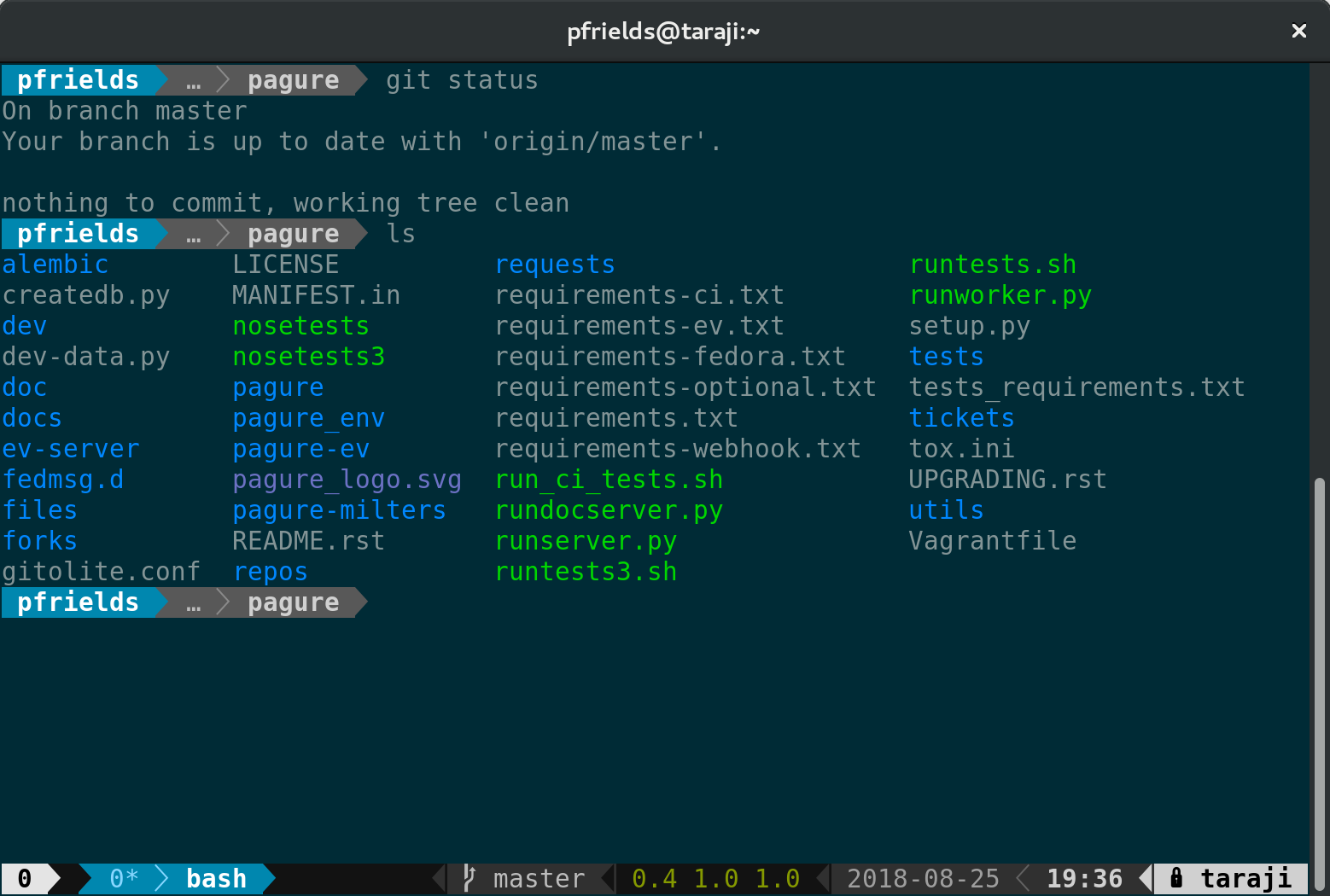
Now restart your session, and you’ll see a spiffy new status line at the bottom. Depending on the terminal width, the default status line now shows your current session ID, open windows, system information, date and time, and hostname. If you change directory into a git-controlled project, you’ll see the branch and color-coded status as well.
Of course, this status bar is highly configurable as well. Enjoy your new supercharged tmux session, and have fun experimenting with it.
Photo by Pamela Saunders on Unsplash.
|
|
|
|
| Microsoft - What’s next in your smart city evolution? |
|
Posted by: xSicKxBot - 08-28-2018, 02:29 AM - Forum: Windows
- No Replies
|
|
What’s next in your smart city evolution?

For most cities, becoming a smart city is no longer a question. It’s an imperative. Your city is likely well underway on its digital transformation journey. You’ve been investing in IT for years. And you’re looking to get the most out of those investments. So what’s next in your smart city evolution?
For many of the municipalities our CityNext team works with, it’s connecting everything. City leaders are looking to weave the fabric of a connected society. Ultimately, they want to bring together local and national governments with commercial businesses so that all systems are working together to improve urban experiences and citizens’ quality of life.
And they’re getting there step by step. Together with our partners, we help them navigate those steps in the context of their technology continuum.
That continuum often started sometime in the 80s, when individual city departments purchased their own on-premises, siloed solutions. Then came the 90s and the internet, which enabled cities to use webpages and portals that could present data from across departments in a singular view. But the data wasn’t really connected—it was just a presentation layer over those myriad, siloed systems.
The 2000s first brought the cloud, which made it easier to connect systems and data. Then it brought the Internet of Things (IoT) with sensors and devices—generally referred to as “the edge”—for everything from detecting water quality, to tracking hyper-local weather patterns, to enabling self-driving cars.
Now, with the intelligent cloud and intelligent edge, cities can enable connections not just centrally through the cloud, but on the edge. By that, I mean rather than data having to go to the cloud to be processed and then sent back out to an edge device, data can be connected and analyzed on and between edge devices.
In other words, rather than an autonomous car having to send a message to the cloud and wait for a response to acknowledge a red light and stop, the car and the traffic light can communicate with each other directly.
So for many cities, using the intelligent cloud and intelligent edge to start connecting everything is how they’re taking that next step in their smart city evolution. That way, they can enable cohesive experiences and computing capabilities wherever data exists. It’s also vital to helping them get the most out of advanced analytics and emerging technologies such as artificial intelligence (AI).
In fact, connecting data across departments and organizations’ systems and edge devices is one of the key recommendations in Gartner’s report: “Three Rules When Using AI to Add Value to Your IoT Smart Cities.”
Read the report to learn the three rules and six action items Gartner recommends for your city to get the most out of IoT and AI. Gartner’s research includes real-world use cases that illustrate how the synergy of IoT and AI can help cities better serve their citizens and achieve their desired outcomes.
If you would like to learn more about smart cities, meet with Microsoft at Smart City Expo World Congress in Barcelona. Learn more about Microsoft CityNext at Smart City Expo World Congress 2018.
|
|
|
|
| Microsoft - Windows 10 Tip: Find out how to get HDR video on your PC |
|
Posted by: xSicKxBot - 08-28-2018, 02:29 AM - Forum: Windows
- No Replies
|
|
Windows 10 Tip: Find out how to get HDR video on your PC

When you’re watching high dynamic range (HDR) video on your PC, colors are more vivid. You find more details in the darkest and brightest parts of a scene, such as dimly lit rooms or a blazing fire. You notice more contrast, with a pronounced difference between lights and shadows.
To see how HDR video compares to traditional content (SDR), look at the images below. The SDR version, in general, is more flat and washed out. With an actual video on an HDR-capable PC, the difference is like night and day – literally.
HDR video still

SDR video still
Simulation of HDR content vs. SDR content
Windows HD Color is a set of features bringing HDR content to Windows PCs. Our team works hard to improve the quality of every pixel on your display, including better colors and more vivid scenes. The goal is to help you get ultra-realistic movie, gaming and creative experiences in Windows 10.
To enjoy HDR video, you need the right content, hardware and software. As more HDR hardware and content come to market, we’re committed to giving you the best HDR experiences.

In settings, you’ll be able to choose “Stream HDR Video” in the Video Playback if your display supports HDR video
HDR is a dramatic improvement over traditional SDR (standard dynamic range) content in two ways: light and color.
When it comes to light, HDR video takes advantage of new hardware that can show much higher contrast between the brightest whites and the darkest blacks on your screen. HDR video encodes additional information into your content (and allows for a much higher peak brightness) so you can see much more detail across the entire spectrum of display capabilities. For example, in a single frame of HDR video, the sun will appear distinctly brighter, details on the brightest surfaces will be sharper, and the darkest shadows will appear with terrific detail.
With respect to color, HDR video also improves over traditional content in two ways. First, it typically uses wider color gamut (WCG) when encoding information, meaning that it shows a wider range of colors compared to traditional SDR content. This results in, for example, increasingly saturated hues of color. Second, color is more precise with HDR. This is because it can represent many more unique shades even within the same range of color. On new HDR-capable hardware, these two color-related improvements result in much deeper and more vivid reds, greens, and blues, and allows for more gradations of color in-between.
How can I get HDR video?
With Windows HD Color, our goal is to make HDR video look as good as possible using the fullest extent of your PC’s capabilities. Since fully HDR-capable, built-in displays aren’t on laptops today, our efforts are focused on:
1. Playing HDR video on external HDR10 displays
In the Windows 10 Fall Creators update, Windows supports external HDR TVs and monitors. Among other features, this allows Windows to consume HDR video and show full HDR quality (i.e., HDR features described above like higher peak brightness, wider color gamut, and more accurate color). You will also need a modern graphics card and updated drivers.
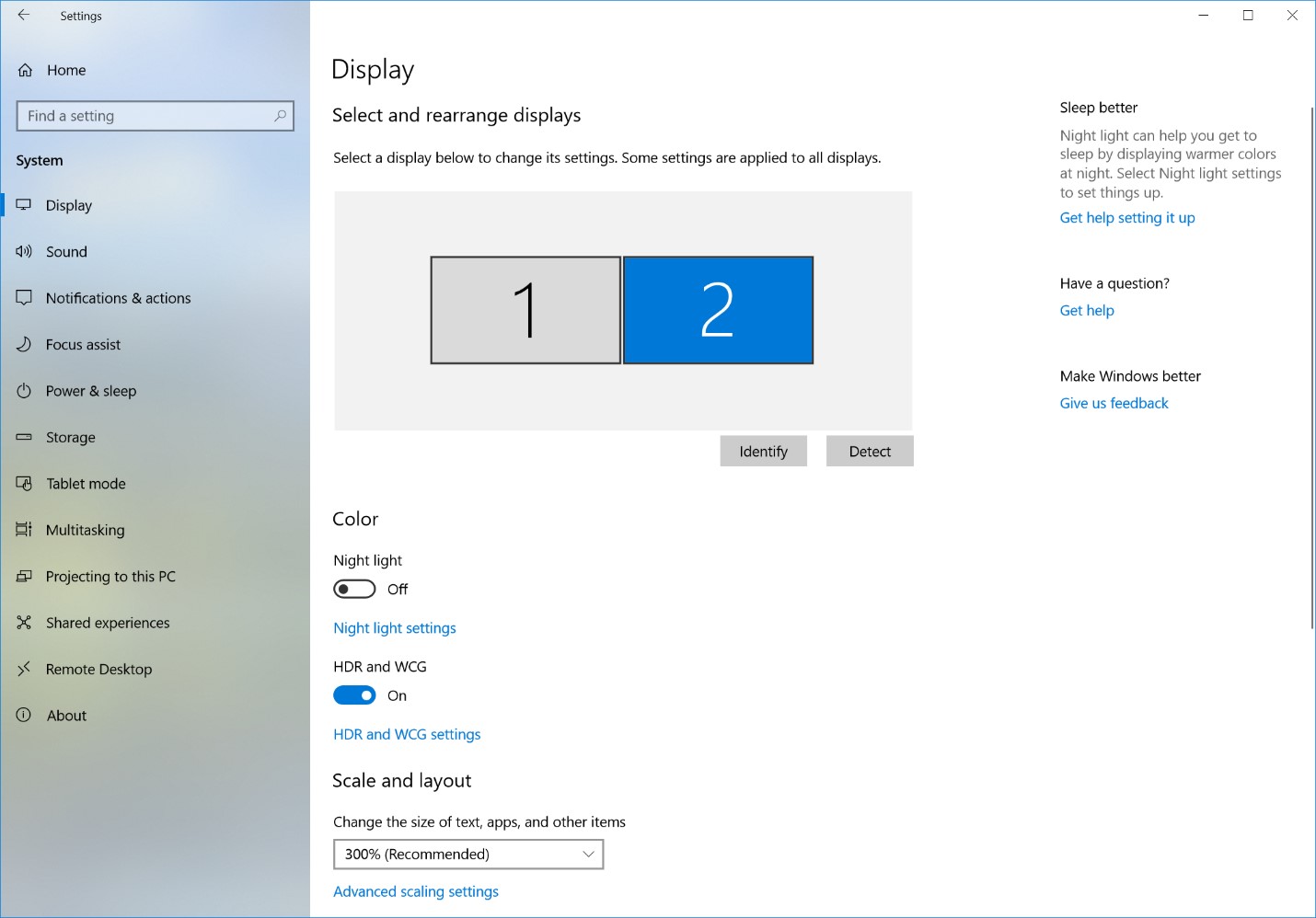
To get HDR, go to Settings > System > Display, and turn on “HDR and WCG.”

Display settings for HDR-capable external monitor
For more info on HDR on external monitors, see Display requirements for HDR video in Windows 10.
2. Improving video on current generation built-in displays (i.e., laptops)
Currently, most laptop displays don’t truly support HDR content, particularly when it comes to color (they do not have wider color gamuts nor higher color precision). Nevertheless, medium- to high-end models tend to have bright screens. We can combine these bright screens with the expanded range of brightness information available in HDR video formats so that Windows plays HDR video at its best for that display.
Playback quality of HDR content on these devices is noticeably better than the SDR version of the same content. This is particularly apparent in scenes where movie creators have mastered their content to fully exploit new HDR technologies.
While this update for built-in displays focused on the better brightness of HDR content, in the future we are working on bringing you better color.
Only devices that meet certain hardware requirements will be capable of playing HDR video.
FAQ
Does my Windows device support HDR?
See our help articles Display requirements for HDR video in Windows 10 and Stream HDR video on Windows 10
How can I set up my laptop display for HDR video?
See our help article Calibrate your built-in display for HDR content in Windows 10
What HDR content can I watch?
There is a lot of free HDR content available online. You can find some good examples if you open Microsoft Edge on your Windows 10 PC, go to YouTube, and then search for “HDR.”
Netflix has HDR content as well, but you need to be on the “Premium” tier plan to have access. If you are on this plan, either download the Netflix app from the Store or go to Netflix.com in Microsoft Edge and search for “HDR.” Check out “Chef’s Table: France.”
(Side effects of this last show in HDR include uncontrollable hunger and impulse-purchase plane tickets to Paris.)
We are working with other content providers to expand the scope of HDR content on Windows.
|
|
|
|
| AppleInsider - GlobalFoundries drops push for next-gen 7nm semiconductor tech |
|
Posted by: xSicKxBot - 08-28-2018, 02:29 AM - Forum: Apples Mac and OS X
- No Replies
|
|
GlobalFoundries drops push for next-gen 7nm semiconductor tech

By Stephen Silver
Monday, August 27, 2018, 04:12 pm PT (07:12 pm ET)
California chip firm announces a halt to its development of 7-nanometer fabrication technology, leaving Apple partner TSMC and rival Samsung as the only remaining players in the space.
GlobalFoundries announced Monday that it is backing away from its ambitious plans to develop next-generation semiconductor technology, and will instead refocus its investment on existing technologies.
According to AnandTech, the shift means GlobalFoundries will drop five percent of its staff. The move also means the only remaining players in the next-generation semiconductor space are a pair of current and former Apple suppliers, TSMC and Samsung, respectively, and that the consumer electronics industry as a whole whole may very well find itself more dependent on those companies.
“Demand for semiconductors has never been higher, and clients are asking us to play an ever-increasing role in enabling tomorrow’s technology innovations,” GlobalFoundries CEO Tom Caulfield said in a statement released by the company. “The vast majority of today’s fabless customers are looking to get more value out of each technology generation to leverage the substantial investments required to design into each technology node. Essentially, these nodes are transitioning to design platforms serving multiple waves of applications, giving each node greater longevity. This industry dynamic has resulted in fewer fabless clients designing into the outer limits of Moore’s Law. We are shifting our resources and focus by doubling down on our investments in differentiated technologies across our entire portfolio that are most relevant to our clients in growing market segments.”
GlobalFoundries and Samsung have a joint technology agreement, though it appears the deal will not extend to the fabrication of 7nm chips.
While a difficult feat, shrinking die size increases the density of a given chip to fit more transistors into a smaller space, thereby presenting a number of performance and efficiency improvements. For consumers, benefits typically include a reduction in power usage that can help increase battery life, lower heat production, and a boost to processing capacity.
AMD announced that it would move its 7nm production to TSMC, Reuters reported Monday.
In 2013, Apple reportedly tapped GlobalFoundries to fabricate what would become its A9 system-on-chip for iPhone and iPad, but backed away from doing so at the last minute, in favor of TSMC.
GlobalFoundries’ decision comes months after TSMC ramped up production of its own 7nm chips, a healthy portion of which are likely bound for iPhone and iPad. As a fabless manufacturer, Apple designs its A-series silicon and outsources production to firms with foundries, such as TSMC.
Samsung was an original fab partner, but lost exclusivity starting with the A8, which for reference was built using a 20nm process. TSMC has been Apple’s lone A-series chip fabricator from the 16nm A10 Fusion forward.
|
|
|
|
| ASP.NET Core 2.2.0-preview1: Endpoint Routing |
|
Posted by: xSicKxBot - 08-28-2018, 02:29 AM - Forum: C#, Visual Basic, & .Net Frameworks
- No Replies
|
|
ASP.NET Core 2.2.0-preview1: Endpoint Routing
 What is it?
We’re making a big investment in routing starting in 2.2 to make it interoperate more seamlessly with middleware. For 2.2 this will start with us making a few changes to the routing model, and adding some minor features. In 3.0 the plan is to introduce a model where routing and middleware operate together naturally. This post will focus on the 2.2 improvements, we’ll discuss 3.0 a bit further in the future.
So, without further ado, here are some changes coming to routing in 2.2.
How to use it?
The new routing features will be on by default for 2.2 applications using MVC. UseMvc and related methods with the 2.2 compatibility version will enable the new ‘Endpoint Routing’ feature set. Existing conventional routes (using MapRoute) or attribute routes will be mapped into the new system.
public void ConfigureServices(IServiceProvider services)

{

 ...


 services.AddMvc().SetCompatibilityVersion(CompatibilityVersion.Version_2_2);

}


public void Configure(IApplicationBuilder app)

{

 ....


 app.UseMvc();

}
If you need to specifically revert the new routing features, this can be done by setting an option. We’ve tried to make the new endpoint routing system as backwards compatible as is feasible. Please log issues at https://github.com/aspnet/Routing if you encounter problems.
We don’t plan to provide an experience in 2.2 for using the new features without MVC – our focus for right now is to make sure we can successfully shift MVC applications to the new infrastructure.
Link Generator Service
We’re introducing a new singleton service that will support generating a URL. This new service can be used from middleware, and does not require an HttpContext. For right now the set of things you can link to is limited to MVC actions, but this will expand in 3.0.
public class MyMiddleware

{

 public MyMiddleware(RequestDelegate next, LinkGenerator linkGenerator) { ... }


 public async Task Invoke(HttpContext httpContext)

 {

 var url = _linkGenerator.GenerateLink(new { controller = "Store",
 action = "ListProducts" });


 httpContext.Response.ContentType = "text/plain";

 return httpContext.Response.WriteAsync($"Go to {url} to see some cool stuff.");

 }

}
This looks a lot like MVC’s link generation support (IUrlHelper) for now — but it’s usable anywhere in your application. We plan to expand the set of things that are possible during 2.2.
Performance Improvements
One of the biggest reasons for us to revisit routing in 2.2 is to improve the performance of routing and MVC’s action selection.
We still have more work to, but the results so far are promising:
This chart shows the trend of Requests per Second (RPS) of our MVC implementation of the TechEmpower plaintext benchmark. We’ve improved the RPS of this benchmark about 10% from 445kRPS to 515kRPS.
To test more involved scenarios, we’ve used the Swagger/OpenAPI files published by Azure and Github to build code-generated routing benchmarks. The Azure API benchmark has 5160 distinct HTTP endpoints, and the Github benchmark has 243. The new routing system is significantly faster at processing the route table of these real world APIs than anything we’ve had before. In particular MVC’s features that select actions such as matching on HTTP methods and [Consumes(...)] are significantly less costly.
Improvements to link generation behavior for attribute routing
We’re also using this opportunity to revisit some of the behaviors that users find confusing when using attribute routing. Razor Pages is based on MVC’s attribute routing infrastructure and so many new users have become familiar with these problems lately. Inside the team, we refer to this feature as ‘route value invalidation’.
Without getting into too many details, conventional routing always invalidates extra route values when linking to another action. Attribute routing didn’t have this behavior in the past. This can lead to mistakes when linking to another action that uses the same route parameter names. Now both forms of routing invalidate values when linking to another action.
A conceptual understanding
The new routing system is called ‘Endpoint Routing’ because it represents the route table as a set of Endpoints that can be selected by the the routing system. If you’ve ever thought about how attribute routing might work in MVC, the above description should not be surprising. The new part is that a bunch of concerns traditionally handled by MVC have been pushed down to a very low level of the routing system. Endpoint routing now processes HTTP methods, [Consumes(...)], versioning, and other policies that used to be part of MVC’s action selection process.
In contrast to this, the existing routing system models the application is a list of ‘Routes’ that need to be processed in order. What each route does is a black-box to the routing system – you have to run the route to see if it will match.
To make MVC’s conventional routing work, we flatten the list of actions multiplied by the number of routes into a list of endpoints. This flattening allows us to process all of MVC’s requirements very efficiently inside the routing system.
The list of endpoints gets compiled into a tree that’s easy for us to walk efficiently. This is similar to what attribute routing does today but using a different algorithm and much lower complexity. Since routing builds a graph based on the endpoints, this means that the complexity of the tree scales very directly with your usage of features. We’re confident that we can scale up this design nicely while retaining the pay-for-play characteristics.
New round-tripping route parameter syntax
We are introducing a new catch-all parameter syntax {**myparametername}. During link generation, the routing system will encode all the content in the value captured by this parameter except the forward slashes.
Note that the old parameter syntax {*myparametername} will continue to work as it did before. Examples:
- For a route defined using the old parameter syntax :
/search/{*page},
a call to Url.Action(new { category = "admin/products" }) would generate a link /search/admin%2Fproducts (notice that the forward slash is encoded)
- For a route defined using the new parameter syntax :
/search/{**page},
a call to Url.Action(new { category = "admin/products" }) would generate a link /search/admin/products
What is coming next?
Expect more refinement and polish on the LinkGenerator API in the next preview. We want to make sure that this new API will support a variety of scenarios for the foreseeable future.
How can you help?
There are a few areas where you can provide useful feedback during this preview. We’re interested in any thoughts you have of course, these are a few specific things we’d like opinions on. The best place to provide feedback is by opening issues at https://github.com/aspnet/Routing
What are you using IRouter for? The ‘Endpoint Routing’ system doesn’t support IRouter-based extensibility, including inheriting from Route. We want what you’re using IRouter for today so we can figure out how to accomplish those things in the future.
What are you using IActionConstraint for? ‘Endpoint Routing’ supports IActionConstraint-based extensibility from MVC, but we’re trying to find better ways to accomplish these tasks.
What are your ‘most wanted’ issues from Routing? We’ve revisited a bunch of old closed bugs and brought back a few for reconsideration. If you feel like there are missing details or bugs in routing that we should consider please let us know.
Caveats and notes
We’ve worked to make the new routing system backwards compatible where possible. If you run into issues we’d love for you to report them at https://github.com/aspnet/Routing.
DataTokens are not supported in 2.2.0-preview1. We plan to address this for the next preview.
By nature the new routing system does not support IRouter based extensibility.
Generating links inside MVC to conventionally routed actions that don’t yet exist will fail (resulting in the empty string). This is in contrast to the current MVC behavior where linking usually succeeds even if the action being linked hasn’t been defined yet.
We know that the performance of link generation will be bad in 2.2.0-preview1. We worked hard to get the API definitions in so that you could try it out, and ignored performance. Expect the performance of URL generation to improve significantly for the next preview.
Endpoint routing does not support WebApiCompatShim. You must use the 2.1 compatibility switch to continue using the compat shim.
|
|
|
|
| Mobile - The Best Sports Manager Games on iOS and Android |
|
Posted by: xSicKxBot - 08-28-2018, 02:29 AM - Forum: New Game Releases
- No Replies
|
|
The Best Sports Manager Games on iOS and Android
 The summer of sport may be drawing to a close, but for many of us the season will start anew on our favourite handheld device. There seems to be no better time to check out the best sports manager games that mobile gaming has to offer.
Not a sports person? Perhaps you’ll enjoy this list of great puzzle games instead!
Better still, armchair sports fans can chill out and enjoy this cerebral selection of sporting simulations without breaking into a sweat. Whether you’r on iOS or Android, a Soccer sycophantic or a Motorsport maniac, we’ve got you covered.
Football Manager Touch 2018 (Review)
Developer: SEGA
Platforms: iPad, Android
Price: $19.99
There is no shortage of mobile football management games clamouring for attention, but the pedigree of the Football Manager series is difficult to argue with. The games predate Arsène Wenger’s appointment as Arsenal manager and have even been recognised by professional football clubs as a valuable source for scouting new players. The Touch games offer a more accessible take on the PC version, with an interface specially designed for tablet devices.
However, this is still a rich and complex simulation with masses of information and options at your fingertips. If you find this just too overwhelming then you can delegate duties, such as training, to your assistant. As well as the obligatory player roster updates, the latest version has further refined the interface to ensure that information is presented in a more streamlined fashion. There is also a cheaper and even more pared down mobile version for those that prefer to play on their phone rather than tablet.
Motorsport Manager Mobile 3 (Review)
Developer: Playsport Games
Platforms: iOS Universal, Android
Price: $3.99

This series scores an easy pole position in the motorsport management genre, and the latest instalment is the best looking and most feature-rich yet. For a sport game on mobile devices, this is achingly beautiful, especially the dioramic race tracks which are just so pretty. But the game has lots of substance as well as style with plenty to keep you busy as the principal of a motorsport team, including recruiting drivers, developing the best cars and investing in your facilities. Once the action switches to the track during qualifying and races you’ll still have plenty of decisions to make on race strategy, car set-up and tyres.
For the third game in the series Playsport Games has added six new championships across GT and endurance races, making it deeper than ever before. As our four-star review suggested, MM3 does a great job of getting players emotionally invested in their teams, with a fine line between winning and losing “A game made up of so many small decisions and menus allows for a surprising amount of excitement. Watching those small dots speed around the screen may not give the surge of pleasure a standard racing game would, but watching your team secure a win, leading to a championship is genuinely wonderful.”
Cricket Captain 2018
Developer: Childish Things Ltd
Platforms: iOS Universal, Android
Price: £8.99

This series has been around on mobile devices for several years, but without much fanfare, despite being well received by players. Perhaps cricket is more of a niche interest than other sports, particularly among European or American gamers, but this is a must-buy if you are fan of hearing leather on willow.
Cricket management is a very narrow genre, but this game is unrivalled in it with its deep, accurate and comprehensive simulation. Very much the Football Manager of cricket games with its attention to detail, this is packed with features, stats and tactical options that should keep virtual cricket captains happy for many hours.
Football Chairman Pro
Developer: Underground Creative
Platforms: iOS Universal, Android
Price: £2.99

Not so much Championship Manager as Chairmanship Manager. This simple but satisfying simulation puts you at the head of the table in the boardroom rather than being in the manager’s office or dugout. Instead of being the football manager going to the chairman asking for extra funds or more time to build you squad, you are the chairman who makes the decision on the hiring and firing of your club’s manager. If you get that decision right, along with sponsorship deals, stadium development, transfers, contracts and more, you’ll be able to turn your little non-league football team into a major force.
It’s a more basic, quick-playing game than, say, Football Manager but its fast pace allows you to whizz through seasons in minutes and hours rather than days and months, making it great for short sessions on the commute. Despite the simplicity and less detail, it’s still got plenty of choices for you to make as the big boss, and enough addictive power to keep you coming back.
Baseball Highlights 2045
Developer: Peter Kossits
Platforms: iOS Universal, Android
Price: $3.99

As its name suggests this clever card came condenses baseball matches into short bite-sized 10-minute matches. If you are looking for realism then I suggest you move on as this futuristic take on America’s favourite sport has a player roster that includes robotic and cybernetic players. An entire game consists of each player only playing a total six cards, but it still manages to pack in a lot of tough decisions and tension. On your way to the World Series you get to draft new players into your hand, which gives the whole experience a pleasing bubble-gum card collecting nostalgia.
Punch Club
Developer: tinyBuild
Platforms: iOS Universal, Android
Price: $4.99

This may not be a sports sim in the strictest sense of the word, but if you are interested in a boxing-themed game with lashings of 1980’s nostalgia then Punch Club rings all the right bells. You embark on a Rocky-style quest of vengeance by setting up fights, whilst juggling your work and social life. It is a game that takes more than its graphical sensibilities from the 1980’s, being tougher than Apollo Creed. This means that you will be doing more grinding than a dirty dancing barista. However, it is still a fine game that is well worth checking out.
New Star Cricket
Developer: New Star Games
Platforms: iOS Universal, Android
Price: Free, Offers In-App Purchases

A cricketing themed follow up to New Star Football that is perfect for those who prefer the thwack of willow on leather. You begin your career with a lowly club in your favourite cricketing nation. Each season you will compete in both 20 and 50 over competitions. Perform well and famous clubs will be queuing up for your signature, you may even get an international call-up. The game does not stray too far from the winning formula of its forbearer. A series of mini-games enable you to improve your skills and have an impact on matches at key points. Gameplay is as equally satisfying in bite-sized spells as it is in marathon sessions, which makes for an ideal mobile game that will have you padding up and heading out to the middle time and time again.
MLB Manager 2018
Developer: OOTP Developments
Platforms: iOS Universal, Android
Price: $4.99

A realistic management simulation that is based on the well–established Out of The Park Baseball Series. You can choose to either guide your favourite team through the 2018 season onwards, play in a fictional baseball world, populated with fresh players and clubs or even re-enact an historical season from days gone by. Management options are extensive; you set line-ups and call the shots as the game unfolds, negotiate contract, trades and drafts. The mobile version is not as complex as its big brother but still rather demanding. The latest version includes updated rosters and improved AI.
While we realise our recent review may throw into doubt MLB’s place on this list, to be honest there aren’t many decent Baseball apps out there, so for now at least MLB Manager retains its place here. OOTP’s main sin seems to be releasing the same game every time with little innovation, so make sure you do your research before deciding whether or not to buy this.
1st & Goal
Developer: R&R Games
Platforms: iOS Universal
Price: $4.99

Based on a popular board game, 1st & Goal uses a combination of dice and cards to simulate the rough and tumble of American football. Opponents play cards to determine their offensive and defensive strategies and then dice are rolled to determine the outcome. The dice used will depend on the strategies selected. For instance, if the offensive team chooses a rushing play and their opponents choose a passing defence, then the offensive team will have a big advantage. You can play a one-off exhibition match, compete in the play-offs or embark on a full season. Whatever you decide you will get a game that sticks closely to its board game roots, with straightforward rules, together with tense bluff and double bluff gameplay.
Pro Strategy Football 2018
Developer: Kerry Batts
Platforms: iOS Universal
Price: £4.99

Considering its popularity, football of the American variety feels very under-represented in games. There are a few arcade-y options and of course EA is present with the usual free-to-play butchering of a great game in the absurdly titled Madden NFL Overdrive Football, but quality management games are few and far between.
The one serious choice is the Pro Strategy Football series, which once again delivered a very solid offering in its 2018 edition and is about to evolve into PSF 2019. It’s a fun and playable coaching game but also accurate and realistic depending how deep you want to dive in. One of the best things about PSF is how flexible it is, so you can have a quick single match or a multi-season career and then on the field you play in beginner mode just choosing the type of play or expert mode in which you can micromanage every player’s role.
It’s a great game for novices who want to learn more about the complexities of gridiron and hardcore players who want to control every aspect of their team.
What would your list of the best sports strategy/management games on mobile look like? Let us know in the comments!
|
|
|
|
| PS4 - Donut County |
|
Posted by: xSicKxBot - 08-27-2018, 10:43 PM - Forum: New Game Releases
- No Replies
|
|
Donut County
Donut County is a physics adventure game where you control a hole in the ground. Every time you swallow something, the hole grows a little bit bigger. You play as a raccoon named BK, a new hire at a startup that uses remote-controlled holes to steal people's trash - along with everything else. When BK falls into a hole himself, he must answer to his best friend Mira and the residents of Donut County who are now stuck 999 feet below their homes.
Publisher: Annapurna Interactive Release Date: Aug 28, 2018
|
|
|
|
| PS4 - Strange Brigade |
|
Posted by: xSicKxBot - 08-27-2018, 10:43 PM - Forum: New Game Releases
- No Replies
|
|
Strange Brigade
Egypt, the 1930's. Erased from ancient history and buried in a nameless tomb for 4,000 years, Seteki the Witch Queen has risen once again. Only one troop of daring heroes can stand against the fearsome power of Seteki and her army of mummified monstrosities: The Strange Brigade!
Explore remarkable ruins, solve perilous puzzles and uncover tantalising treasure while blasting your way through an array of undead enemies in thrilling third-person action that's certain to bring out your inner adventurer! Publisher: Rebellion Release Date: Aug 28, 2018
|
|
|
|
| PC - Tanglewood |
|
Posted by: xSicKxBot - 08-27-2018, 10:43 PM - Forum: New Game Releases
- No Replies
|
|
Tanglewood
TANGLEWOOD. is a brand new and original puzzle-platforming game originally released for the SEGA Mega Drive and Genesis, coming soon to Windows, Mac, and Linux. A true 16-bit, challenging platforming experience that will make fans of the golden gaming era feel warm and fuzzy.
Publisher: Big Evil Corporation Release Date: Aug 14, 2018
|
|
|
|
|
|
|