| Welcome, Guest |
You have to register before you can post on our site.
|
| Online Users |
There are currently 647 online users.
» 0 Member(s) | 642 Guest(s)
Applebot, Baidu, Bing, Google, Yandex
|
|
|
| News - Pokémon Quest Mobile Version Rakes In $8 Million After First Month |
|
Posted by: xSicKxBot - 08-13-2018, 10:49 AM - Forum: Nintendo Discussion
- No Replies
|
 |
Pokémon Quest Mobile Version Rakes In $8 Million After First Month
When the free-to-download title Pokémon Quest was launched on mobile at the end of June, it generated $3 million in revenue in its first week, with a total of 3.5 million downloads.
It’s now been a month since the game’s release and Sensor Tower is reporting players have spent more than $8 million on the mobile title during this period. The largest source of revenue is from players in Japan, who make up 34 percent of spending in total. The US places second at 24 percent and interestingly South Korea has contributed an additional 12 percent.
According to Sensor Tower, the majority of revenue has come from iOS players – making up “66 percent of spending versus Google Play’s 44 percent”. Spending has slowed overall since the launch of the game, with daily gross revenue coming in at around $30,000 on both mobile platforms. The best day for the game on mobile was apparently on 30th June – grossing more than $580,000. The download total is now around the 8 million mark.
Have you made a monetary transaction in Pokémon Quest on mobile? Are you playing the Switch version? Tell us below.
|

|
|
| News - FlyHigh Works Live Broadcast Reveals A Handful Of New Games Coming To Switch |
|
Posted by: xSicKxBot - 08-13-2018, 10:49 AM - Forum: Nintendo Discussion
- No Replies
|
|
FlyHigh Works Live Broadcast Reveals A Handful Of New Games Coming To Switch
FlyHigh Works held a live broadcast on YouTube announcing multiple Switch games for Japan and also revealing entirely new titles coming to Nintendo’s hybrid system in the near future.
New games included mobile clicker sequel Captain StarOne (out this October), 2D action-adventure TRANSIRUBY (a 2019 release from the developer of Fairune and Kamiko), puzzle side-scroller Obakena Fune to Takaramono (scheduled for Fall 2018 – no confirmation on platform) and the shooter, Solstice Chronicles M.I.A. (on target for November). The previously announced role-playing game with lifestyle and crafting elements – Pictonier – will also be made available on the Switch and 3DS in the near future, with a release date not yet announced.
Other games that got some screen time during the presentation included:
If you’re curious, you can view footage of the new games in the FlyHigh Express YouTube presentation above. These titles are revealed around the fifty-minute mark.
Are you a fan of FlyHigh Works? Did you like the look of any of these games in the broadcast? Tell us below.
[via japanesenintendo.com]
|
|
|
|
| Steam - Dota 2 Update – August 3rd, 2018 |
|
Posted by: xSicKxBot - 08-13-2018, 10:49 AM - Forum: PC Discussion
- No Replies
|
|
Dota 2 Update – August 3rd, 2018
* Fixed various charged abilities not consistently being affected by cooldown reduction properly
* Fixed a bug where non-stun interrupts did not reliably cancel channeled abilities if cast an instant before the end of the channel; for example Vengeful Spirit’s Nether Swap cast on a target at the last tick of channeling a Town Portal scroll.
* Hero voice lines for picking up bounty runes no longer play in the first 30 seconds of game time.
* Fixed an uncommon client crash with Morphling’s Morph ability.
* Fixed a bug in the interaction of Lycan’s Howl and units with low max HP, which sometimes created uncontrollable and unkillable units.
|
|
|
|
| AppleInsider - Review: Apple and Blackmagic’s eGPU with Thunderbolt 3 connectivity |
|
Posted by: xSicKxBot - 08-13-2018, 02:56 AM - Forum: Apples Mac and OS X
- No Replies
|
|
Review: Apple and Blackmagic’s eGPU with Thunderbolt 3 connectivity
 AppleInsider takes an in-depth look at Apple and Blackmagic’s Thunderbolt-enabled eGPU, testing the MacBook-accelerating hardware with a gamut of tests from 5K gaming to video editing. We show you everything that sets this eGPU apart from the pack.
[embedded content]
The Blackmagic eGPU, built in cooperation with Apple, might seem pricey at $699, but it comes packing a Radeon Pro 580 GPU, the same chip that comes in the top-spec 2017 5K iMac. By itself, the silicon is worth just under $300, and you can now get it bundled with some other eGPU’s for around $500.
So why would anyone want to pay extra for this particular unit from Blackmagic and Apple?
For one, the Blackmagic is the first eGPU to support Thunderbolt 3 and USB-C monitors like LG’s 4K and 5K UltraFine displays, meaning well-heeled MacBook Pro owners can turn their portable rig into something closer to a desktop.
If you don’t have or don’t plan on buying an LG UltraFine display, the Blackmagic also works with any USB-C or HDMI monitor. DisplayPort screens are also supported with the help of a separate adapter.
In addition to the two Thunderbolt 3 ports, the Blackmagic packs in four USB 3.1 ports and an HDMI 2 slot, besting a number of competing eGPU boxes. The extra inputs and outputs can be used to connect external storage drives, keyboards, mice, or simply charge an iPhone.
The Blackmagic works with any Thunderbolt 3-equipped Mac, and it provides 85 watts of charging for your MacBooks. For now, the setup is a macOS-only affair, as the eGPU does not yet support Windows 10.
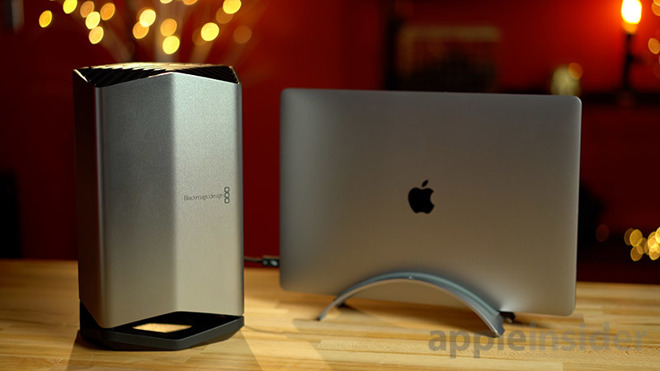
From a design standpoint, it’s undoubtedly the best-looking eGPU we’ve ever seen, and it’s built with high-quality materials.
This leads us to one of the biggest reasons why you would choose this eGPU over another model: incredibly quiet fan noise and low temperatures. It features a large fan that sucks air through the bottom and pushes it out of the top, just like the late 2013 Mac Pro.
It’s incredibly quiet, even at full load, a major upgrade from competing hardware that gets increasingly loud as operating temperatures heat up. In fact, the Blackmagic is so quiet that we forgot it was on while playing a demanding session of Fortnite at 5K resolutions.
Performance
The eGPU drastically improved the gaming performance of a base model 2018 13-inch MacBook Pro with Touch Bar. With the MacBook’s internal Intel Iris Plus Graphics 655 running at maxed-out resolution and high video quality settings, we were able to achieve around 15 frames per second while playing Fortnite. Those speeds dropped down to 7fps at times and the laptop’s fans were on full blast.
We turned the settings down to around 1080p at medium graphics settings and saw frame rates rise to around 40 to 45fps, but we still experienced frame drops that made the game unplayable.
Connecting the Blackmagic eGPU and LG’s 5K display, we set the game’s resolution to 5K, or 5,120-by-2,880 pixels. Graphics quality (obviously) improved and frame rates were hovering at around 30fps. Unlike the MacBook Pro’s integrated graphics chip, the eGPU was able to keep things much more consistent, with no frame drops that ruined gameplay.
Dropping graphics settings to medium boosted frame rates to about 40fps, and everything still looked great.
We also hooked it up to a regular 4K display using a Thunderbolt 3-to-DisplayPort cable and saw around the same 35fps at 4K “Epic” settings.
Throughout testing, both the Blackmagic eGPU and the MacBook Pro were whisper quiet.
Photo & Video Editing
If you’re a photo editor, an eGPU won’t really make a difference, since apps like Adobe Photoshop and Lightroom mostly rely on Mac’s CPU for heavy lifting. We were hoping to see an improvement while editing 42MP RAW images in Lightroom, but the lag is still there despite some assistance from the eGPU.
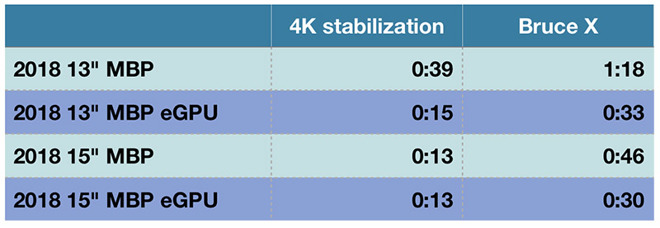
Video editing, however, is a different story. In Final Cut Pro X, the Blackmagic eGPU allows the 13-inch MacBook Pro to export a five minute 4K h.264 clip with added effects in less than half the time of the integrated GPU. That puts the smaller MacBook Pro’s performance nearly on par with the base 15-inch MacBook Pro. Interestingly, in some cases the 15-inch MacBook Pro gets slower when using the eGPU.
For example, when attached to the 13-inch MacBook Pro, the eGPU cut processing time in half for a one minute 4.5K Red RAW clip with added effects. However, the 15-inch MacBook Pro was almost twice as slow when combined with the eGPU.
Stabilizing a 4K clip on the 13-inch with eGPU was basically just as fast as the base 15-inch MacBook Pro, both with and without the eGPU. To our surprise, the 13-inch MacBook Pro with the eGPU was faster in the Bruce X 5K benchmark, finishing almost three times faster than the 15-inch MacBook Pro’s discrete GPU.
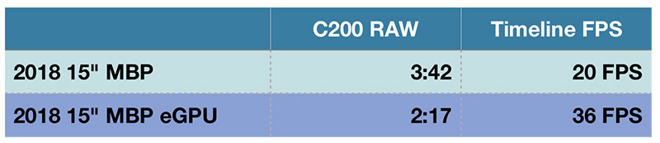
We tested 4K 60fps Canon Cinema RAW Lite footage in a one minute project with color corrections and a LUT applied on the 15-inch MacBook Pro, with and without the eGPU. We saw a vast improvement not only in export speeds, but timeline smoothness as well. We went from not being able to play back the footage in full resolution to smooth playback in 4K, in both 24fps and 30fps.
Benchmarks
We performed benchmarks by attaching the Blackmagic to a base model 2018 13-inch MacBook Pro and a top-of-the-line 2018 15-inch MacBook Pro with 2.9GHz i9 CPU, 4GB Radeon Pro 560X graphics, and 32GB of DDR4 memory.
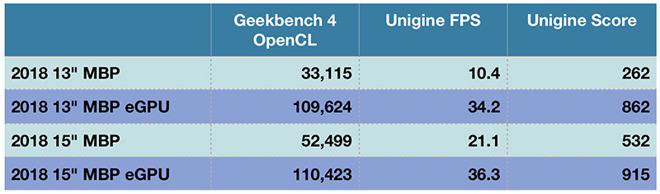
Geekbench 4’s OpenCL test shows us the raw graphics performance of each GPU, and as you can see, it’s a massive improvement over the 15-inch MacBook Pro’s GPU.
We also ran the Unigine Heaven gaming benchmark and the 13-inch MacBook Pro with the Blackmagic eGPU greatly outperformed the 15-inch MacBook Pro. The 13-inch model fell behind by a couple of frames when compared to the 15-inch with the eGPU.
Conclusion
Our testing shows the Blackmagic eGPU is not really worth the extra money if you already own a 15-inch MacBook Pro, are not a video editor and intend to use the hardware without an external monitor.
On the other hand, if you own an LG UltraFine display or a 2018 13-inch MacBook Pro, the solution is definitely appealing. With the 13-inch MacBook Pro, you get added portability when on the go and a quad-core, 8GB Radeon Pro 580 workstation in the home or office, nearing the performance levels of a 15-inch Macbook Pro with i9 CPU.
Overall, the Blackmagic eGPU is a specialty product that makes a lot of sense for a smaller group of people. It’s more expensive than other solutions using the same GPU, and it’s not upgradable. If you need Thunderbolt 3 support and would like a near silent experience, however, there’s nothing else like it.
Score: 4 out of 5
Where to buy
Blackmagic’s eGPU sells for $699 and is available through the company’s website and Apple.com.
|
|
|
|
| Mobile - Nomad Games bringing Quartermaster General to digital |
|
Posted by: xSicKxBot - 08-13-2018, 02:56 AM - Forum: New Game Releases
- No Replies
|
|
Nomad Games bringing Quartermaster General to digital

By Joe Robinson 09 Aug 2018
Guys. GUYS. Nomad Games have snagged another excellent board-game license to port to digital platforms. The Quartermaster General series are fascinating ‘lite’ board wargames that use cards to fuel the action, and revolve around strategic decisions and operations.
Even more important is the concept of supply – all of your armies and navies have to be able to trace an unbroken line of supply through units back to either their home territory, or another space that’s become a valid supply point (these quite often get brought into the game via events).
Quartermaster General itself is a WW2 game, where up to six players split between the Axis and Allies. Each player will have their own dedicated deck of action cards to draw from – you can build/muster armies and navies, prepare response cards to react to enemy actions, or play a card from your own dedicated staple of historically themed and powerful events.
Other games in the QMG series include a WW1 version, and an upcoming release set during the Cold War – hopefully Nomad can adapt them as well at some point!
Nomad Games have been very sparse on details – other than offering up a general description of the game all we know is that it’s coming in 2019. We don’t officially know which platforms either, but plenty of their games end up on mobile so we’re reasonably confident this should do as well. It’d be a perfect fit for it.
We’ll bring you more news as it comes.
|
|
|
|
| News - QuakeCon 2018: Quake Champions Is Permanently Free-To-Play Now |
|
Posted by: xSicKxBot - 08-12-2018, 05:56 PM - Forum: Lounge
- No Replies
|
|
QuakeCon 2018: Quake Champions Is Permanently Free-To-Play Now
At QuakeCon 2018, Bethesda announced that Quake Champions would permanently remain a free-to-play title. Originally, anyone who downloaded the early access game within a limited time window got Quake Champions for free. Bethesda has just extended that deal indefinitely. Announced in 2017, Quake Champions is the long-awaited sequel to 2005's Quake 4. A class-based first-person shooter, Quake Champions features heated firefights across an assortment of battlefields and arenas. The game is one of our most anticipated exclusives coming to PC in 2018, launching sometime later this year. The announcement that Quake Champions is now free-to-play was accompanied by a new trailer. At the end of the trailer, players got a more in-depth look at Death Knight, one of the champions, and his gameplay. The trailer reveals that Death Knight is now available in Quake Champions. Even though Quake Champions is free, downloading the game won't net you its entire roster of diverse champions. If you want to start Quake Champions with everyone unlocked, you'll have to buy the Champions Pack. Also during QuakeCon, Bethesda showcased new gameplay trailers for Doom: Eternal and Rage 2. The Doom: Eternal trailer displayed new weapons and abilities, as well as exceptionally visceral combat. The Rage 2 trailer offers a more in-depth look at convoy takedowns.
|
|
|
|
| News - QuakeCon 2018: Doom And Rage Join Xbox Game Pass |
|
Posted by: xSicKxBot - 08-12-2018, 09:13 AM - Forum: Lounge
- No Replies
|
|
QuakeCon 2018: Doom And Rage Join Xbox Game Pass
During QuakeCon, Xbox tweeted out that both Rage and 2016's Doom are now live on Xbox Game Pass. So if you have Game Pass and you're looking to play through both Rage and Doom before Rage 2 and Doom: Eternal release, now you can do so for free. Considering Xbox Game Pass is only $10 a month, it's also cheaper to just buy the subscription instead of buying each game separately. In our Doom review, Peter Brown wrote, "Many shooters chase the thrill Doom delivers, but few are as potent in their execution. It captures the essence of what made the classic Doom games touchstones of their day, and translates it to suit modern palates with impressively rendered hellscapes and a steady influx of tantalizing upgrades. Doom is the product of a tradition as old as shooters, and while it's not the model to follow in every case, modern shooters could learn a thing or two from Doom's honed and unadulterated identity." In our Rage review, Chris Watters wrote, "Though the story gets a bit too cliched, there is a robust amount of adventuring to be done in a world that rewards you for your attention. It's a shame that your explorations are marred by Rage's technical shortcomings, and only time will tell how much patches will be able to fix these problems. Rage is better enjoyed on an Xbox 360 or PlayStation 3, but regardless of which platform you play on, it still offers a rich and rewarding adventure." During QuakeCon's keynote, Bethesda made numerous announcements and showed off a few new gameplay trailers for upcoming titles. Both Doom: Eternal and Rage 2 stole the spotlight. The former got its first gameplay trailer, which was insanely brutal. For Rage 2, we got an extended look at convoy takedowns.
|
|
|
|
| News - A legendary masterpiece returns |
|
Posted by: xSicKxBot - 08-12-2018, 09:13 AM - Forum: Lounge
- No Replies
|
|
A legendary masterpiece returns
A legendary masterpiece returns
Take the role of Amaterasu, the Japanese sun goddess who inhabits the form of a legendary white wolf Shiranui. Use magical abilities, attacks, and Celestial Brush techniques to restore the land of Nippon to its previous glory full of life and color!
Features
• Deep Folklore Story: Fight against the legendary monster Orochi’s curse—only the godly power of Amaterasu’s Celestial Brush can bring life back to a barren land. With the help of a mysterious fairy sprite, Issun, Amaterasu must regain the 13 powers of the Celestial Brush and defeat Orochi once and for all!
• Overhauled Visuals: Experience this acclaimed adventure with its renowned Sumi-e ink art style in breathtaking high resolution.
• Celestial Brush Gameplay: Exclusively on Nintendo Switch, take advantage of touchscreen and Joy-Con controller brush controls.
If you would like to purchase the game, please visit https://www.nintendo.com/games/detail/okami-hd-switch.

Blood and Gore
Crude Humor
Partial Nudity
Suggestive Themes
Use of Alcohol and Tobacco
Violence
|
|
|
|
| News - Fortnite on Android: Everything You Need to Know |
|
Posted by: xSicKxBot - 08-12-2018, 09:13 AM - Forum: Lounge
- No Replies
|
|
Fortnite on Android: Everything You Need to Know
 Android users are finally able to find out what all this fuss is about regarding Fortnite. Or you play it on PC and are finally looking forward to being able to play a match on the go. Either way, your time has come!
Beta invites will be rolling out to people over the weekend, with anyone owning a Samsung device (S7 or higher) getting priority access for the moment. The list of supported devices is modest, but they’re being very strict about it. If you’re new to Fortnite and not sure what the hell is going on, we’ve put together this handy guide to get you started…
Installation
Fortnite on Android is by-passing the Google Play store completely, requiring users to download an apk file directly from Epic. This is what is sometimes referred to as ‘side-loading’, and usually requires you to change a security setting to allow app installations from ‘unknown sources’.
On a Samsung Galaxy S6 (Our Editor tried testing to see if he could get in the beta despite not having a supported device. Spoiler: he couldn’t) for example, you can start running the install and it will automatically take you to relevant setting. It will also allow you to check a box that creates an exception only for that specific install, leaving your device protected.
It’s worth noting that what you’re actually downloading is an app called ‘Fortnite Installer’, which then checks to see if your device is supported. If it is, you can then pre-load the game on your device and start playing whenever you get given access, which will be via a separate email.
 With the technical bits out of the way, let’s talk gameplay tips & tricks… With the technical bits out of the way, let’s talk gameplay tips & tricks…
SMGs Are Your Best Friend
With the recent nerf to the ‘double pump’ shotgun tactic, SMGs have risen as the dominant force in Fortnite. Even though assault rifles can output a healthy amount of damage, accurately aiming with them on a phone is very tricky.
Given you are restricted to a smaller screen, trying to land headshots can be a frustrating experience. Fortnite’s touch controls aren’t that intuitive, especially if you have bigger fingers. SMGs, on the other hand, are still quite useful when fired from the hip and don’t require a ton of precision. A lot of this is thanks to the high fire rate of the guns and their ability to quickly dispatch targets.

Additionally, the Drum Gun – despite the recent nerf – is still /very/ powerful on mobile. Always bring a Drum Gun with you if you have the chance. It shreds buildings, which is extra effective on mobile since people cannot place walls down as quickly. This weapon also offers a good amount of damage, so you should be able to rapidly eliminate opponents. Finally, remember to always carry a shotgun with you because they are still very useful when playing on mobile. The new double barrel is quite dangerous given the sheer damage potential it offers.
The only weapons we advise on avoiding – at least until you’re familiar with the controls – are sniper rifles. While they are really good for taking out players, hitting someone at a distance can prove difficult.
BE AGGRESSIVE
One of the biggest mistakes new mobile players make is they are too passive when it comes to engaging enemies. We strongly discourage this behaviour since you can easily be overwhelmed by a player willing to fight. When you get into a battle with enemies, be aggressive and attack their position. Weapons like the Compact SMG, Drum Gun and LMG are great for ripping apart structures. Since “spam building” is less of a tactic on phones, most users will be left out in the open for easy pickings.

Once you get a handle on the controls, work on quickly assembling ramps over your enemies position. This not only gives you a height advantage but renders your foe’s cover useless. The only time we don’t recommend rushing into a fight is if you’re both in the same building. It’s very easy to safely peek around corners, so enemies can just wait for you before springing their trap. In this case, take your time and methodically check the building so you don’t get ambushed.
DON’T BE AFRAID TO BUILD
The single most important mechanic to master in Fortnite is building. Whether you’re on console or Android devices, constructing cover is critical to your survival. There are a lot of people who don’t build and simply try to use the environment for protection. Using hills and buildings as cover can save your life, but eventually, you’ll need to build some walls.

To build, select the tool icon in the bottom right corner at the end of your item bar. This will swap to your build menu, where you have to manually tap which tile you want to use. Once selected, you can tap the screen to place your structure of choice. However, if you hold your finger down and turn, you can assemble a box around you. After this is done, add a ramp so you can look over at your foe.
It’s vital to go into the mobile version of Fortnite accepting that you can’t build. The speed and general feeling of building are wildly different than on a PC. Because of this, it may take a few hours before you’ve obtained a strong understanding of how to quickly make cover. Start small and work on just rapidly building a small box for cover. Getting fancy is an easy way to get killed, especially if your opponent knows what they are doing. If you’re looking for more tips, we have a dedicated building guide you should check out – the mobile meta is pretty consistent across iOS and Android.
MOVING WILL BE AWKWARD AT FIRST
As mentioned above, there are a lot of icons that crowd your screen, which can be quite awkward for those of us with big thumbs. This means the positioning of your fingers will factor into your overall combat effectiveness. Try to always keep your right thumb in the bottom corner so you don’t accidentally tap the jump or crouch button. Only move this thumb when you want to jump, crouch, swap items, or fire at foes.

You’re going to have stilted movements – especially if you’re just starting – so save yourself some trouble by using the Auto-Run feature. To enable this, double tap on the virtual joystick to force your character to run in a straight path. This is great for evading the storm and scanning the horizon when moving between locations.
ATKs are also really useful on mobile since they can quickly get you from place to place. Since players have slower reaction times on mobile, it’s completely possible to drive up to someone, get out, mow them down, and drive off. If you see an ATK, make sure to grab as soon as possible.
USE PLAYGROUND MODE
Playground Mode is a special game type that lets you run around an empty island and freely build without concern. Make sure to take advantage of this mode and use it as a way to train yourself. Playing on mobile is quite different, so having an island to yourself is fantastic for learning how to build, move and shoot. Before you even hop into a game, make sure to jump into the Playground.

Since materials and weapons are plentiful, you can quickly begin understanding how Fortnite’s mobile version works. This mode is also wonderful for finding the right sensitivity and learning how to use the Turbo Build functionality. Playground is typically available for a month or two, so don’t put off getting some practice in!
If you do get into the Android beta, let us know how you’re finding it!
|
|
|
|
| Xbox Wire - New Preview Beta & Delta Ring 1806 System Update – 8/2/18 |
|
Posted by: xSicKxBot - 08-12-2018, 09:13 AM - Forum: Xbox Discussion
- No Replies
|
|
New Preview Beta & Delta Ring 1806 System Update – 8/2/18
Starting at 6:00 p.m. PDT today, members of the Xbox One Preview Beta and Delta Rings will begin receiving the latest Xbox One system update (1806.180801-0341). Read on for more about the fixes and known issues in the latest 1806 system update.
New Features:
Avatar Editor
The new Xbox Avatar Editor, which has previously been available only to Alpha and Alpha – Skip Ahead rings, is coming the Beta Insiders today! Xbox Insiders in the Beta ring can now access the new Xbox Avatar Editor app through Insider Hub. Go check it out, and be sure to leave feedback via the Quest!
Fixes:
My Games and Apps
- Additional enhancements to the fixes for Users that experienced issues with launching titles that had been crashing on the console.
Networking
- New Wi-Fi drivers with Stability improvements to fix the issue with some users encountering a missing Wi-Fi network upon coming out of Instant on.
Known Issues:
Groups
- You may see issues with Groups if you frequently switch between your non-Preview console and your Preview console. Workaround: Reset your Groups locally on the Preview console through “My games & apps” > Groups, then using the “Delete all groups” button at the bottom of the page to resync from the service.
Profile Color
- Sometimes users may encounter an incorrect Profile color when powering on the console.
|
|
|
|
|
|
|