Arc System Works' Kill La Kill Game: New Story, Gameplay Details Revealed
At Anime Expo 2018, Arc System Works and Studio Trigger have revealed more details about the Kill la Kill fighting game. Called Kill la Kill The Game: IF, it's a 3D fighter filled with the acclaimed anime series' trademark flashiness and over-the-top action. The team also debuted a new trailer, which shows off main characters Ryuko Matoi and Satsuki Kiryuin in detail. You can watch the trailer above.
During the panel, representatives from publisher Arc System Works, developer APLUS, and Kill la Kill anime studio Trigger all discussed what the game will be like. While the trailer shows Ryuko and Satsuki fighting one-on-one, the team hinted that the game might not adhere to that format entirely, because some of the characters fight hordes of enemies at once in the anime. They did not, however, confirm which other characters from the show will appear in the game.
Writer Kazuki Nakashima, who worked on Kill la Kill among other acclaimed anime series, is returning to create an entirely new story for the game. While the anime stars Ryuko with Satsuki as the antagonist, the game tells an alternate story from Satsuki's perspective--the kanji for the "IF" portion of the game's name means "alternate thread" or "cloth," a pun on the show's thread and clothing motifs. Studio Trigger considers the game's story canon to the Kill la Kill universe, like "another episode" of the show.
Kill la Kill first aired in 2013 and consists of 24 episodes. It's known for its absurd yet gripping story, visual comedy, and extreme but lighthearted fanservice. While it's not clear if you'll need to have watched the anime to enjoy the game, you should probably watch it anyway.
Kill la Kill The Game: IF is coming to PS4 and PC in 2019. Its developer, APLUS, previously worked on Little Witch Academia: Chamber of Time, another game based on a Trigger anime. Studio Trigger is closely involved in development, including character design. While not directly responsible for development, publisher Arc System Works (BlazBlue, Guilty Gear) also seems to be working closely with APLUS on the game.
Boost your typing with emoji in Fedora 28 Workstation
Fedora 28 Workstation ships with a feature that allows you to quickly search, select and input emoji using your keyboard. Emoji, cute ideograms that are part of Unicode, are used fairly widely in messaging and especially on mobile devices. You may have heard the idiom “A picture is worth a thousand words.” This is exactly what emoji provide: simple images for you to use in communication. Each release of Unicode adds more, with over 200 new ones added in past releases of Unicode. This article shows you how to make them easy to use in your Fedora system.
It’s great to see emoji numbers growing. But at the same time it brings the challenge of how to input them in a computing device. Many people already use these symbols for input in mobile devices or social networking sites.
[Editors’ note: This article is an update to a previously published piece on this topic.]
Enabling Emoji input on Fedora 28 Workstation
The new emoji input method ships by default in Fedora 28 Workstation. To use it, you must enable it using the Region and Language settings dialog. Open the Region and Language dialog from the main Fedora Workstation settings, or search for it in the Overview.
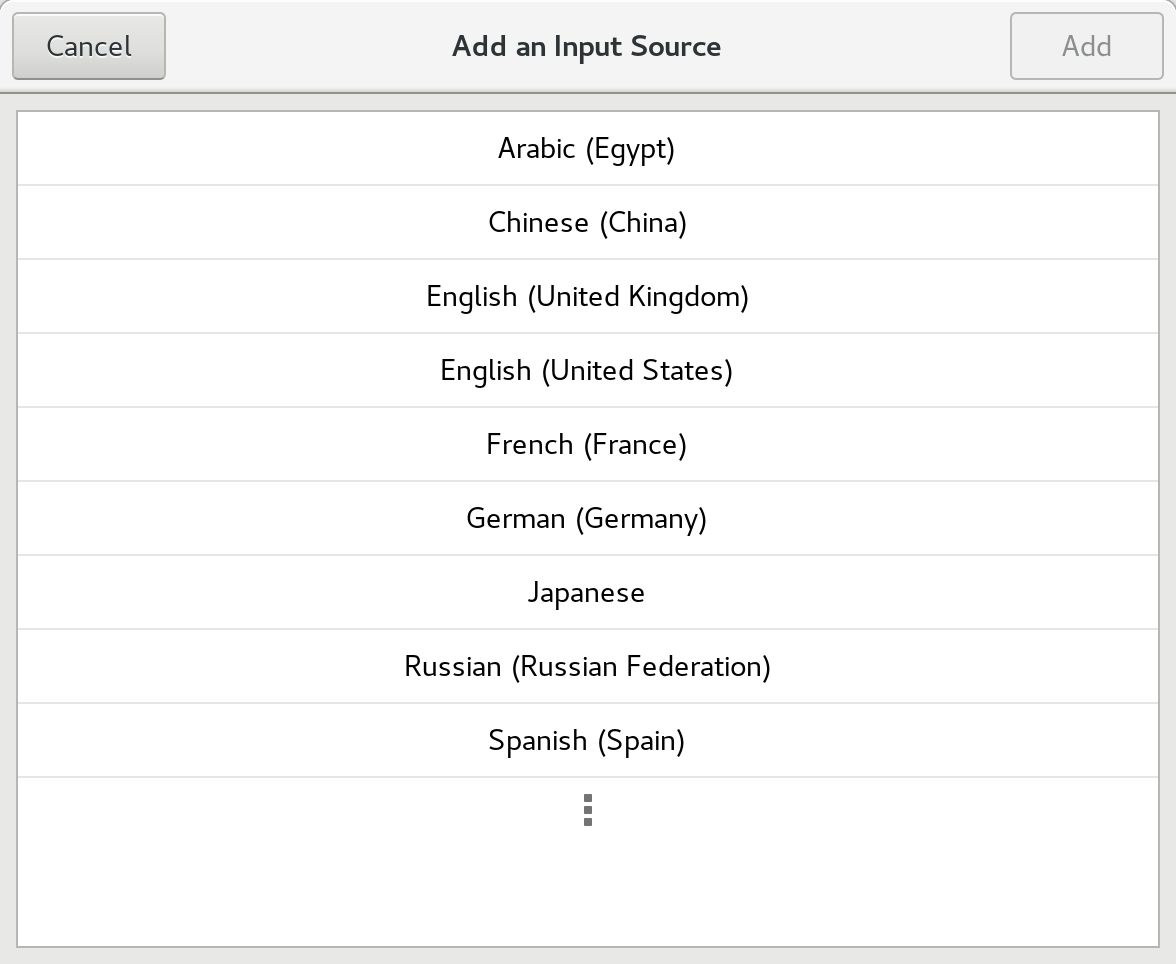
Choose the + control to add an input source. The following dialog appears:
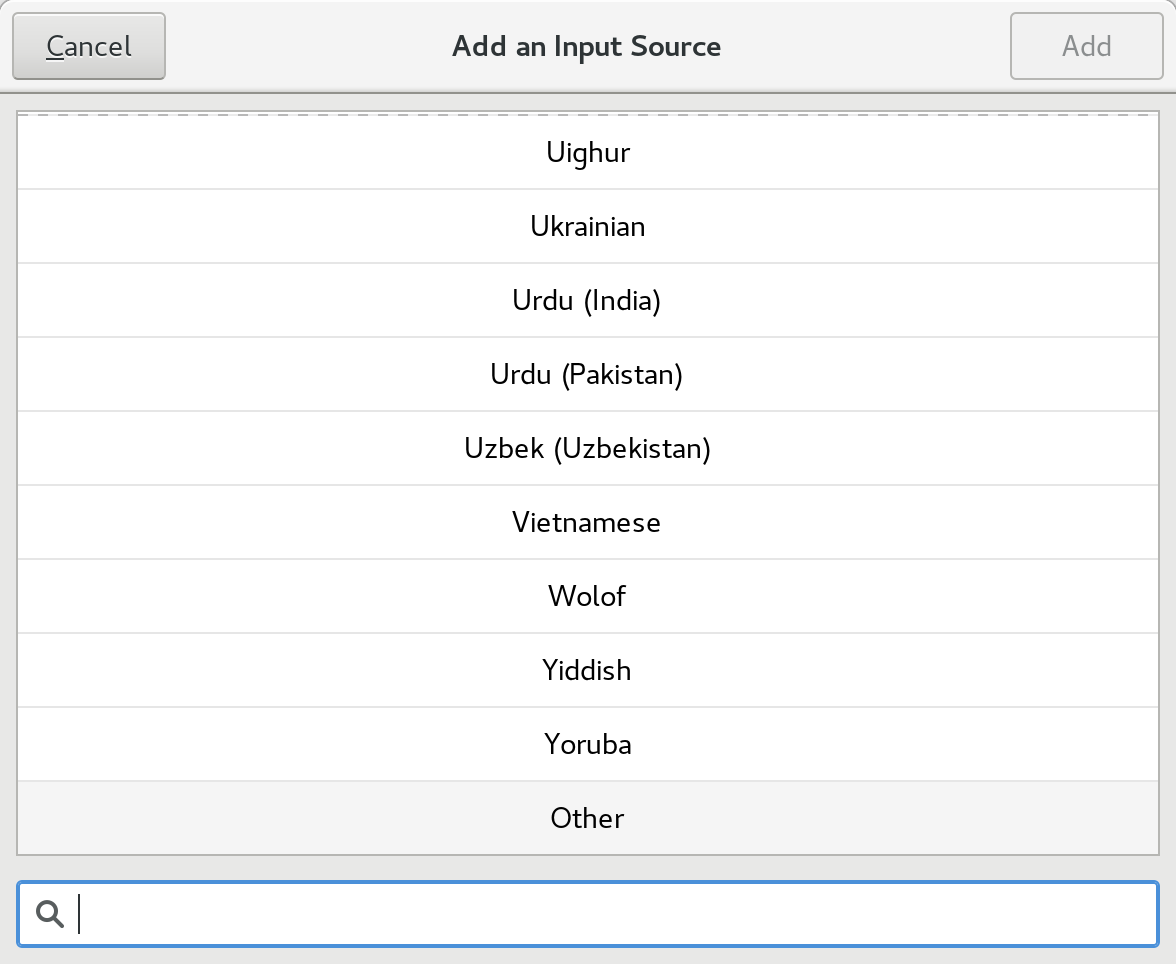
Choose the final option (three dots) to expand the selections fully. Then, find Other at the bottom of the list and select it:
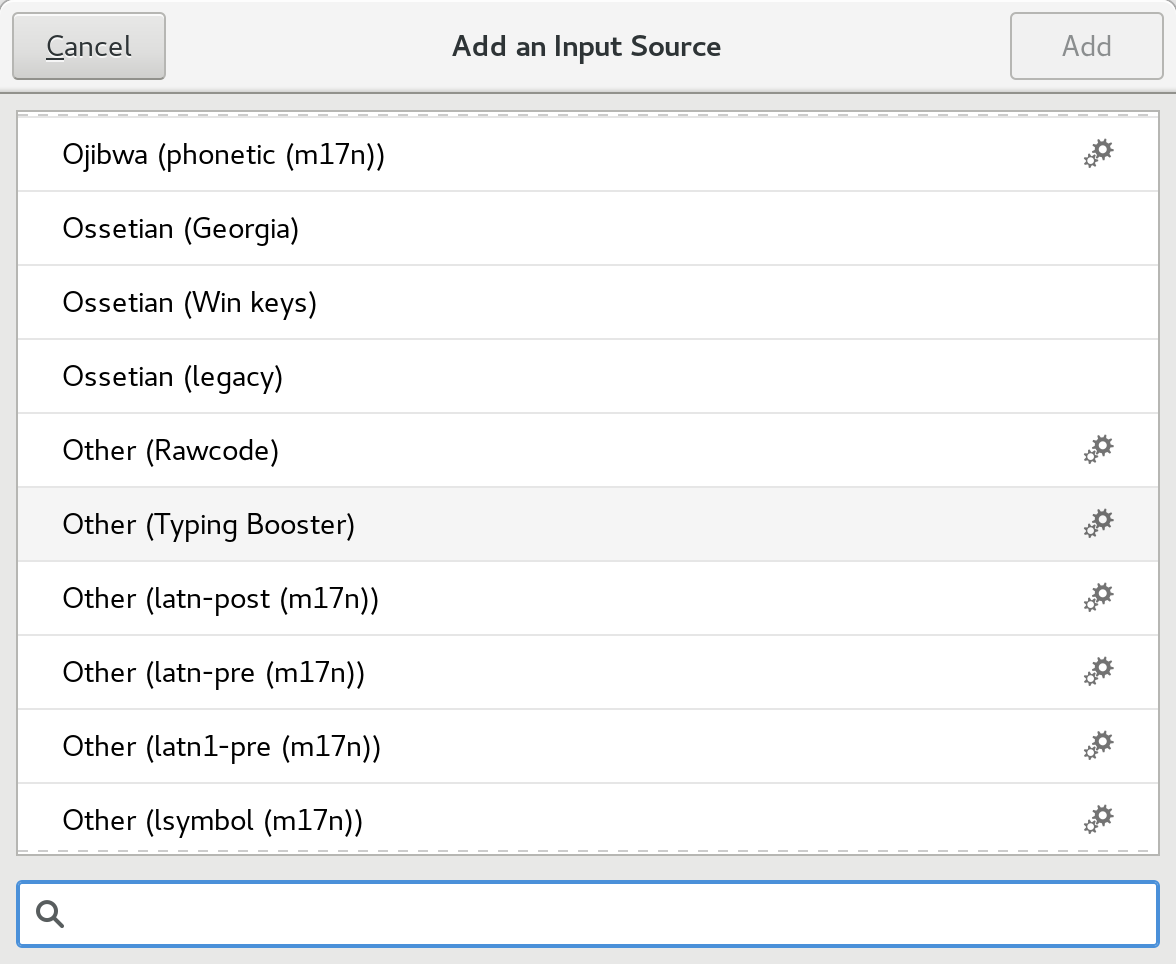
In the next dialog, find the Typing booster choice and select it:
This advanced input method is powered behind the scenes by iBus. The advanced input methods are identifiable in the list by the cogs icon on the right of the list.
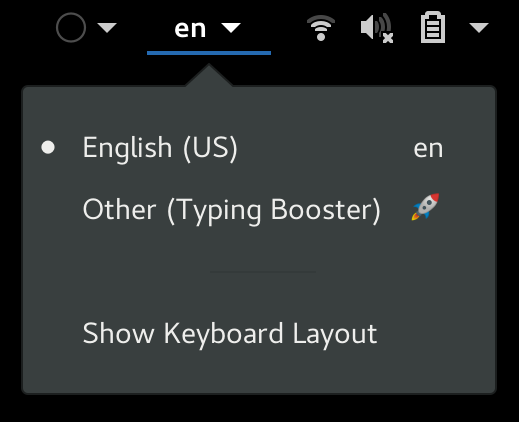
The Input Method drop-down automatically appears in the GNOME Shell top bar. Ensure your default method — in this example, English (US) — is selected as the current method, and you’ll be ready to input.
Using the new Emoji input method
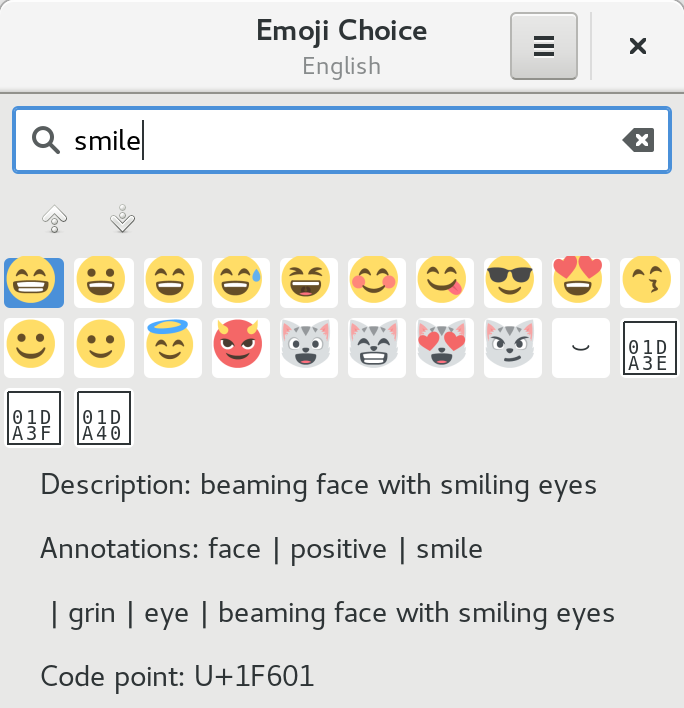
Now the Emoji input method is enabled, search for emoji by pressing the keyboard shortcut Ctrl+Shift+E. A pop-over dialog appears where you can type a search term, such as smile, to find matching symbols.
Use the arrow keys to navigate the list. Then, hit Enter to make your selection, and the glyph will be placed as input.
Make off like a bandit: Steamworld Heist is on sale for a fiver
By Ian Boudreau09 Jul 2018
There’s no time like the present to pick up the turn-based tactical robot shooter Steamworld Heist. It’s currently on sale in the App Store for 50 percent off, at £4.99/$4.99.
We’ve talked up Steamworld Heist here before, and that’s because it’s one of the most enjoyable XCOM spinoffs to emerge since Enemy Unknown showed up way back in 2012. Here, the action is side-scrolling 2D, but the turns play out just like XCOM’s – you control a party, and each one has two moves to spend each turn. You can move, take cover, perform an action, and fire as you move your steampunk robot crew through ships controlled by greedy raiders.
[embedded content]
Steamworld Heist’s biggest joy, however, is in pulling off trick shots that knock hats off your robot cowboy enemies (or pull your squadmates out of sticky situations). Instead of dice rolls, you do the aiming yourself, and you can arrange it so that bullets ricochet off ceilings and walls in order to hit targets behind cover. It’s all very charming and surprisingly deep, and you can read more in JP Marr’s four-star review.
Open Collaboration in Practice at Open Source Summit
A key goal in my career is growing the understanding and best practice of how communities, and open source communities in particular, can work well together. There is a lot of nuance to this work, and the best way to build a corpus of best practice is to bring people together to share ideas and experience.
In service of this, last year I reached out to The Linux Foundation about putting together an event focused on these “people” elements of Open Source such as community management, collaborative workflow, governance, managing conflict, and more. It was called the Open Community Conference, which took place at the Open Source Summit events in Los Angeles and Prague, and everything went swimmingly.
This train though, has to keep moving, and we realized that the scope of the event needed broadening. What about legal, compliance, standards, and other similar topics? They needed a home, and this event seemed like a logical place to house them. So, in a roaring display of rebranding, we renamed the event to the Open Collaboration Conference. It happens again at the Open Source Summit, this year in Vancouver from August 29-31 and then in Edinburgh from October 22-24, 2018.
The upcoming event in Vancouver is looking fantastic. Just like last year, we had a raft of submissions, so thanks everyone for making my job (rightly) difficult for choosing the final set of talks.
Featured Talks
Unsurprisingly, we have some really remarkable speakers, from a raft of different organizations, backgrounds, and disciplines. This includes:
Oh, and I will be speaking, too, delivering a new presentation called “Building Effective Community Leaders: A Guide.” It will cover key principles of leadership and how to bake them into your community, company, or other organization.
In addition to this, don’t forget the fantastic networking, evening events, and other goodness that will be jammed into an exciting few days. As usual, this all takes place at the Open Source Summit, and you view the whole schedule and learn more about how to join us at https://events.linuxfoundation.org/events/open-source-summit-north-america-2018/.
Finally, I will be there for the full event. If you want to have a meeting, drop me an email to jono@jonobacon.com.
Sign up to receive updates on Open Source Summit North America:
Assume the role of Yuma Ilvern and stop the Empire from exploiting the power of the ancient dragons, including the soul of the Shining Dragon within you. With the help of your friends, realize your destiny, save Astoria, and unleash the strength you?ve always had locked away.
Warhammer 40,000: Gladius ? Relics of War brings you to a world of terror and violence. Four factions will engage in a brutal war for dominance over the planet?s resources. In the first 4X turn-based strategy game set in Warhammer 40,000 you will lead one of four unique factions.
Posted by: xSicKxBot - 07-09-2018, 06:44 AM - Forum: Lounge
- No Replies
Review: Marvel's Ant-Man And The Wasp -- What Infinity War?
There's a recurring source of tension in Ant-Man and the Wasp thanks to Scott Lang's sentence of two years under house arrest for his actions in Captain America: Civil War. No matter how many zany adventures Paul Rudd's character has in this sequel, he has to periodically race back to his San Francisco apartment and re-don his ankle bracelet whenever hapless FBI agent Jimmy Woo (the funny Randall Park) decides to check in on him. It's a fun bit, and it harks back to an earlier age in the MCU, when a Marvel hero's biggest concern could be staying out of trouble with the law.
We've yet to see what a post-Infinity War world looks like in the Marvel Cinematic Universe. Regardless of how it eventually gets undone, what effect will Thanos's finger snap have in the short term? How will the tone shift in Avengers 4? Those questions are irrelevant in Ant-Man and the Wasp, which quickly places itself before the events of Infinity War. That may be a knock against it for those hoping for some answers, but this movie's tone is much lighter as a result, perfectly in line with the original Ant-Man's.
The first Ant-Man introduced Scott Lang (Rudd) along with Hank Pym (Michael Douglas) and his daughter Hope van Dyne (Evangeline Lilly). Ant-Man and the Wasp directly picks up their story following Scott's involvement in Civil War: Scott's two years of house arrest are almost up, but Hope drags him back into a life of illegal heroism in a plot to save her mother, Michelle Pfeiffer's Janet van Dyne, from the "quantum realm" in which she's been stranded for 30 years.
How can Janet be alive down there after all this time? How could Hank and Hope possibly find her? This movie is brimming with pseudo-scientific mumbo jumbo about things like "entanglement" and "quantum tunnels." It gets a little exhausting, but the movie is self aware about its own ridiculousness; at one point, Scott asks Hank and his colleague Bill Foster (Laurence Fishburne) whether they just stick the word "quantum" in front of everything to make it sound more scientific. Good question, Scott!
Ant-Man and the Wasp introduces a couple of new villains in the forms of Hannah John-Kamen's Ghost, who stalks the heroes in hopes of stealing their secret lab, and Walton Goggins' Sonny Burch, a black market merchant who decides he wants the quantum tech for himself. Goggins is his typical hilariously sleazy self, while John-Kamen's more overtly dramatic performance fits her character.
But most important is the Wasp herself, Evangeline Lilly's Hope van Dyne, who completely owns this movie. Hope proves--unsurprisingly--to be a much more capable Ant-Man than Ant-Man himself, with confidence and skill that are thrilling to watch. It makes the entire plot of the first movie--that Hank had to enlist the deadbeat Scott in the first place instead of just trusting his daughter to do the job--seem even more ludicrous in retrospect. Hopefully Lilly decides to stick around the MCU for a while, as her presence would be much appreciated in future installments.
Like the first Ant-Man, this movie has great fight choreography that sees both heroes frequently changing from normal to small to massive and back again in creative ways. Some of the most fun sequences are car chases where one or more vehicles are constantly shrinking down to Hot Wheels size and back to normal, throwing off pursuers and causing general zany chaos.
There's an added dash of humor from the fact that Scott's suit for much of the movie is malfunctioning, leaving him unable to control when he changes size. That leads to an especially funny sequence where Scott is running around his daughter's middle school at about 3 feet tall, trying to remain undetected. Cassie herself is still played by the ridiculously charismatic Abby Ryder Fortson, who gives Paul Rudd tit-for-tat in every scene they're in together.
Michael Peña's Luis returns with a vengeance too, with his voice-overed montage gag from the first--in which he tells a story while the characters he's describing act it out--is funnier than ever. This time around he gets injected with a sort of truth serum, causing his rapid fire rambling to span topics ranging from Scott's psychiatric health to his family's love of Morrissey. He's more actively involved in the story, as well, which is pure wish fulfillment for viewers who loved his character in the first movie.
Like the original Ant-Man, Ant-Man and the Wasp is primarily a palette cleanser in the MCU as a whole (the first movie was sandwiched in between the dense Age of Ultron and the dour Civil War). Ant-Man and the Wasp is hilarious, fun, silly, self aware, and creative. Filled with pseudo-science gobbledigook, crazy action, and multiple villains all vying for screen time, it's one of the most comic-booky MCU movies yet. The fates of all our favorite heroes after Avengers: Infinity War may still be up in the air, but in the meantime, Ant-Man and the Wasp is a welcome distraction.
The Good
The Bad
Lighthearted and funny
Pseudo-science mumbo jumbo gets ridiculous
Evangeline Lilly phenomenal as the Wasp
No answers for Infinity War fans
Multiple fun new villains
Creative shrinking-and-growing action
Self aware about its sillier aspects
Much-needed palette cleanser following Infinity War
The UK was the second most lucrative region for the free-to-play title, but it was some distance behind the States with only 8 percent of player spending taking place on British soil.
Despite being the new kid on the block, The Sims Mobile is still being outshone by its predecessor The Sims FreePlay, which brought in twice as much revenue as Mobile during June.
Of course, FreePlay does have something of a head start on its younger sibling, having launched all the way back in 2012.
Posted by: xSicKxBot - 07-09-2018, 12:44 AM - Forum: Lounge
- No Replies
Blog: How to use C# Events in Unity
The following blog post, unless otherwise noted, was written by a member of Gamasutra’s community. The thoughts and opinions expressed are those of the writer and not Gamasutra or its parent company.
Objective
The main objective of this blog post is to give you an idea about how to use C# Events in Unity.
What is problem with Delegates?
What is an Event?
Why Events are used?
How to declare an Event?
You may have all these questions in your mind.
Don’t worry, you are at the right place.
Let’s start, Do you remember the problem of Delegates?
If we use a single delegate after the use of multicast delegates then it will reset the existing invocation list.
This situation is very difficult to track if multiple classes subscribe to the same delegate.
This is the reason why we have Events.
Let’s see how they work.
Events are a type of special delegates which are used when you want to notify other classes when something happens. Like, on GameStart, on Gameover.
Let’s take a look on declaration and use of an Events.
1. Declare a Delegate
public delegate void OnGameStart();
2.Create an Event
public static event OnGameStart onGameStart;
3. Point to method
onGameStart += Move;
4. Invoke an Event
onGameStart ();
Let’s, create a simple game using Event Delegate.
Step 1
Create an empty GameObject name it as you like.
Step 2
Create C# script name it EventManager.
Write following code in EventManager.cs
public class EventManager : MonoBehaviour {
public delegate void OnButtonClick();
public static event OnButtonClick onButtonClick;
public void RaiseOnButtonClick() {
if (onButtonClick != null) {
onButtonClick();
}
}
}
Step 3
Assign it to an empty GameObject.
Step 4
Create a 2d object and assign knob as sprite in SpriteRenderer.
Step 5
Create C# script name PlayerTransformAndColor.
Write following code in PlayerTransformAndColor.cs
public class PlayerTransformAndColor : MonoBehaviour {
public SpriteRenderer spriteRenderer;
public Color color1, color2;
private void OnEnable()
{
EventManager.onButtonClick += ChangePosition;
EventManager.onButtonClick += ChangeColor;
}
public void ChangePosition() {
transform.position += Vector3.one * 2;
}
public void ChangeColor() {
spriteRenderer.color = color2;
}
}
Step 6
Assign it to empty GameObject.
Now let’s do some changes in PlayerTransformAndColor.cs
public class PlayerTransformAndColor : MonoBehaviour {
public SpriteRenderer spriteRenderer;
public Color color1, color2;
private void OnEnable()
{
EventManager.onButtonClick += ChangePosition;
EventManager.onButtonClick += ChangeColor;
EventManager.onButtonClick = ChangeRotation;
}
public void ChangePosition() {
transform.position += Vector3.one * 2;
}
public void ChangeColor() {
spriteRenderer.color = color2;
}
public void ChangeRotation() {
transform.Rotate(0, 90, 0);
}
}
You may find the error. Like shown in below,
Got the idea, How Events overcome the problem of Delegates.??
Events adds a layer of abstraction and protection on delegate, this protection prevents client of the delegate from resetting the delegate and invocation list.
Now let’s take one more practical example. That gives you more clear idea about how event handle multiple event listeners by only one event Invocation.
For this, we’ll follow these steps.
Step 1
Create an empty GameObject name it EventManager.
Step 2
Create C# scrip and name it Eventmanager.
Write following code in EventManager.cs
public class EventManager : MonoBehaviour {
 public delegate void OnRest(); //Declare a Delegate
 public static event OnRest onReset; //Create an Event
 public delegate void OnReStart(); //Declare a Delegate
 public static event OnReStart onReStart; //Create an Event
 public static void RaiseOnReset()
 {
 if (onReset != null)
 {
 onReset(); //Invoke an Event
 }
 }
 public static void RaiseOnReStart()
 {
 if (onReStart != null)
 {
 onReStart(); //Invoke an Event
 }
 }

}
Step 3
Assign it to an empty GameObject(EventManager).
Step 4
Create an empty GameObject name it EventHandler.
Step 5
Create C# script name it EventHandler
Write following code in EventHandler.cs
public class EventHandler : MonoBehaviour

{
 void Update()
 {
 if (Input.GetKeyDown(KeyCode.P))
 {
 EventManager.RaiseOnReset(); // Function call to invoke an Event
 }
 else if (Input.GetKeyDown(KeyCode.S))
 {
 EventManager.RaiseOnReStart(); // Function call to invoke an Event
 }
 }

}