Call Of Duty: Black Ops 4 Pre-Order And Release Date Guide For The US
Activision has revealed this year's installment of the annual Call of Duty franchise. It's Call of Duty: Black Ops 4, and it's coming to PS4, Xbox One, and PC on October 12. While it won't feature a traditional campaign like previous installments, it will come with single-player missions, plus loads of multiplayer content--including a battle royale-style mode--plus, of course, Zombies.
If you're ready to lock in your pre-order for Call of Duty: Black Ops 4, you've come to the right place. Below, you'll find all the information you need about pre-order bonuses, what editions are available, and which retailers are offering per-orders for what prices.
Pre-Order Bonus
Pre-order Call of Duty: Black Ops 4 and you'll receive access to a beta Activision plans to run in August. That's all the info we have about the beta so far. Keep an eye out for details in the coming months.
Call of Duty: Black Ops 4 Standard Edition
Activision hasn't announced any special editions for Call of Duty: Black Ops 4, so at least for now your only pre-order option is for the standard edition.
In the meantime, here's where you can pre-order the game and for how much. Note that Newegg is offering it for $10 less than everyone else (unless you're an Amazon Prime member). Also note that digital copies from Battle.net, Microsoft Store, and Sony Store all come with 1,100 Call of Duty Points.
Amazon -- $60 ($48 with Amazon Prime) -- PS4 | Xbox One | PC
This edition is exclusive to GameStop. It comes with the game, the Black Ops Pass (which may or may not include all DLC eventually released), Steelbook, Pop Socket, 10 Specialist Patches, 3 Zombies Inspired Collectible Art Cards, 1,100 Call of Duty Points, and a Call of Duty Endowment (C.O.D.E.) Calling Card.
The following blog post, unless otherwise noted, was written by a member of Gamasutra’s community. The thoughts and opinions expressed are those of the writer and not Gamasutra or its parent company.
Prefabs are not a new topic to game developers. These will be referenced in future articles of mine, so here’s an overview to a concept for mastering massive content.
If you’ve ever had to deal with tons of objects across multiple scenes, you’ll inevitably wish you could group similar or exact copies together for quicker management. If you’ve added a desk lamp to 30 different office rooms in 15 different scenes, wouldn’t it be nice to turn up the that light’s intensity once instead of 450 times?
That’s the power of prefabs.
So, what exactly is a prefab? It’s a collection of game objects used in multiple places across the game. It’s a concept I’ve made sure to use across past projects like Six Days in Fallujah, Prey 2, and Mafia 3.
A Prefab should be a Scene. The only thing that should make a prefab different than a scene (a level, map, environment, etc.) is it exists inside a scene. A large city scene can have several small prefab neighborhoods and those in turn can have repeatable prefab houses inside of each.
Some game engines develop prefabs as a unique feature, separate from a scene’s format. By developing a prefab as an extension of a classic scene means they inherit all features and power scene editing has!
Any feature that exists for a scene should exist for a prefab:
A collection of models (a bench, a bus stop sign, a garbage can).
A building with AI navigation and interaction nodes.
An enemy with a unique change (BadGuy_Type_4 with dual pistols).
A complex script sequence (depending on project’s script file handling).
A skybox with all associated FX and animation.
A Security Door (a door model & logic, security palm switch & logic, emergency lighting & logic, surrounded by cover nodes & path volumes).
Advantages
Repeat occurrences only have to be created once. When the original prefab is modified, all instances are updated.
Multiple people can work on the same scene by partitioning the scene into prefabs. Each user works on their individual prefab, testing their work in the master scene.
Game Usage
Prefabs should be created in the editor as a new scene or from a selection within an existing scene. The most common type is a Static Prefab. They can be saved to the game library for reuse later. When the game is built and run, all static prefabs are ungrouped (sometimes called exploded). All parts should have their name prefixed to the prefab’s unique name for reference. All game logic now points to unique items maintaining unique scripting.
In the editor they can also be exploded into an existing scene to creating unique, free roaming objects, no longer connected to its source.
Aside from static prefabs, Dynamic Prefabs are another option. These are used to stream in content. If done right, prefabs can be the primary means all content is contained and streamed into the game.
With procedural systems like Houdini, you could even extend prefabs into becoming Smart Prefabs. These feature a set of rules to decide what, where, and when to place a variety objects at different times. This article is only about the core prefab concept though.
Every scene can be made with a number of prefabs. Take a look at the following diagram as an example:
Now let’s see how prefabs let several people work on the scene:
The Art Team works on the Ground Terrain A location:
Artist 1 models Building D with indoor lighting to be used in 2 locations.
Artist 2 models Building C to be used in 4 locations.
Artist 3 models Building B to be used in 3 locations.
Artist 4 models Building A with indoor lighting to be used in 4 locations.
Artist 5 is lighting the whole scene. Some lighting features on-off logic with Gameplay.
The Audio department is working on ambient Sound for the scene, mixed with Gameplay.
The Design Team is providing gameplay to the Ground Terrain B location:
Designer 3 is creating a generic prefab for assigning AI and stats for a Train Event.
Designer 2 is creating City Tower logic to be used in 4 separate places in Ground B.
And lastly, Designer 1 is providing gameplay for the overall scene in the Master Scene.
When any person is finished, they check their prefab into Source Control to share with the rest of the team. When the master scene is opened again, any existing prefab is updated with the latest changes. When new content ready, the user should be able to pick them from the Resource Browser to add to the scene without restarting the editor.
Example Scene
Let’s group areas in a scene into prefabs, allowing several people to work on each area:
A Designer takes a city block and creates a series of prefabs from it:
Each building is named appropriately and saved as a prefab.
A city block of prefabs is saved as one sector (optional).
The master scene is now a framework of roads, game logic, prefabs, and sectors.
Original Scene
Scene cut into 3 Game Sectors
Artists individually open each prefab building to edit it:
They can replace the stand-in model with a final version.
They can even add new objects like doors, windows, lamps, lights, etc.
They can open the sector to understand relations between each building prefab.
When a Designer re-opens the scene, all prefabs are updated with changes the Artists have made.
Artist 2 works on an Apartment
within Game Sector 1
Artist 3 working on individual Motel Prefab
How do you set up scenes to use sectors? How do you work on them? How should logic be arranged in them? Before we talk about sectors, we need to understand how the scene played in the game (the Master, Main, or Persistent scene) is organized. Each scene consists of four basic components:
Applying this concept to sectors, we can create a framework for maximum flexibility to add (or remove) parts of the master scene without impacting the master scene itself. Each component can become a prefab for each sector.
Some prefabs don’t have to be exclusive to a sector; they can span several sectors. This allows one person to check out a prefab to have access to the whole scene. The disadvantage is when sectors are move around in the master scene requiring contents to be moved manually to their new position.
Editing Prefabs
Two methods of prefab editing should exist:
Edit the prefab in a new scene.
Edit the prefab in the current scene.
Editing prefab “A” in a new scene isolated from original scene.
Editing prefab “A” within the scene for instant feedback how it affects the scene.
(The fences will need to be modified.)
By editing the prefab within the current scene, it removes switching back and forth between scenes to see your changes.
By their nature, prefabs placed in scenes are instances of the original prefab. If changes are made to the prefab, those changes propagate to all copies in every scene. This can be helpful for example, if you want to change a texture or a light across a hundred copies. You might however only want one small change. You need a way to remember those individual changes, instead of creating a new prefab for each change, exponentially increasing the number in the game library.
This can be solved by tagging any differences and re-applying those differences after changes to the original is made. Technically speaking, values unique to any type of object are stored in the parent prefab or scene file to override its original values. When a change to the original is made, all copies reflect that change unless the value has been overridden on the instance.
An “Allow Deltas” action provides a way to maintain these overrides. With a prefab selected and “Allow Deltas” on (set to true), unique values will be accepted and maintained. If “Allow Deltas” is turned off, all values are reset to their default.
Without Deltas, editing one prefab edits all of them.
With Deltas, unique edits remain while
any unchanged values inherit changes.
To prevent the need to open prefabs, another option is enabling Child-picking. This ignores prefab containers and directly picks any object in view, no matter how deep they’re nested. Normal editing of prefabs should be outlined in red to indicate changing this one instance will change all instances of it. With Deltas on, objects inside prefabs should be outlined in cyan, letting you know any changes will only be applied to the selected object.
Today’s games involve thousands, if not millions, of objects. Managing all that content, making quick changes, and sharing team efforts, becomes a massive burden without a prefab system in place. If you want to spend more time discovering what’s exciting about your game and less time playing 52,000 card pickup, then take the time to invest in a proper prefab feature.
Is single-player dead? Take-Two CEO Strauss Zelnick ‘doesn’t buy it’
Take-Two CEO Strauss Zelnick has scoffed at the notion that single-player titles are dead in the water.
In a recent interview with VentureBeat, the chief exec was quizzed about the state of Red Dead Redemption 2 (Take-Two being the publisher behind Rockstar’s open-world western), and was asked what he makes of the perceived shift away from story-driven, single-player efforts.
His response was decidedly candid, and while Zelnick admitted there are some who believe multiplayer, free-to-play titles are the only sensible way forward, he claims they are very, very wrong.
“There are people [today] saying that a game won’t work if it’s not a free-to-play battle royale. People really are saying that, and not even tongue-in-cheek. I don’t buy that,” explained Zelnick.
“Single-player, in my opinion, is not dead, not even close. Companies that feel like they’ll just avoid the hard work of building a story and characters and go right to where the money is in multiplayer, I don’t think that’s going to work. I’d be surprised.”
Although Take-Two and Rockstar have experienced long-term success with Grant Theft Auto Online, the online multiplayer portion of Grand Theft Auto V, Zelnick says there’s “no evidence” to suggest people don’t want a single-player experience.
In fact, he agrees with the assertion that players only became so invested in GTA Online after buying into the single-player offering, and believes those narrative-driven, lone wolf experiences aren’t going anywhere.
Daily Deal – Tomorrow Corporation Collection – 55% Off
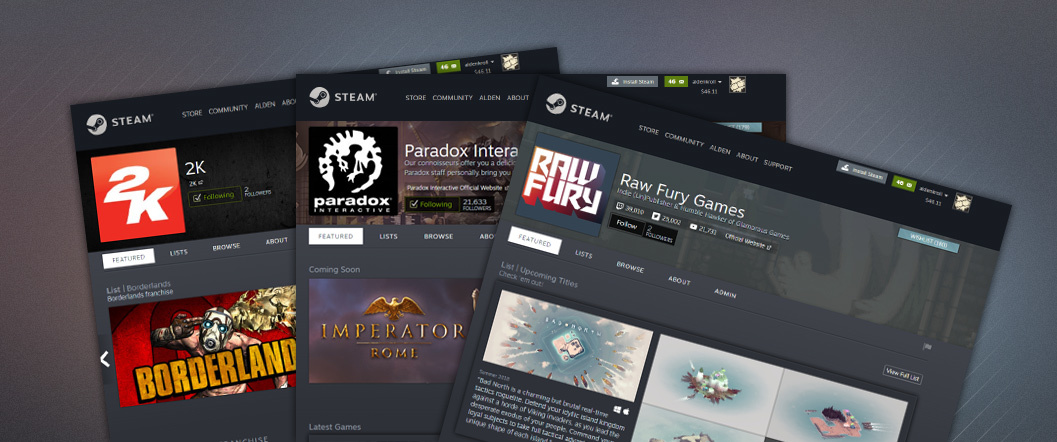
We’ve just launched an open beta for Creator Homepages, a new part of the Steam store designed to help players discover and connect with the developers and publishers behind their favorite games. With this feature, you can explore the full catalog of games created by the developers and publishers of games you enjoy and you can choose to follow those creators to be automatically notified when they release their next title.
How does it work?
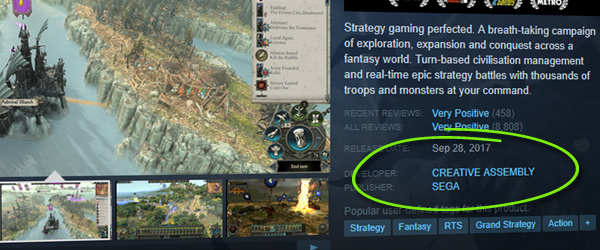
Any developer or publisher on the platform can now set up a customized homepage to showcase their full catalog of titles and content. Once set up, these homepages can be found by clicking on the developer or publisher name from the store page of your favorite games.
Check out the official Creator Homepage Announcement Page, which includes a list of all the homepages so far. This will quickly become an overwhelming and unusable list as more developers create their homepages, so at the top of the page we’ve also specifically highlighted the developers and publishers behind games that you’ve recently played.
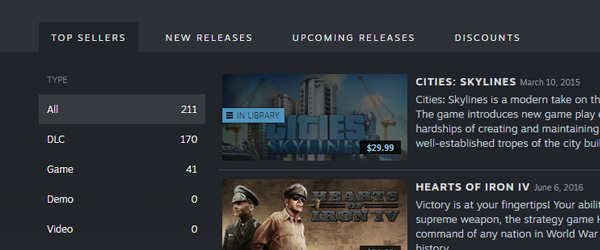
On these homepages, you’ll find standard lists of top-selling or new released titles from that developer or publisher.
You’ll also find collections that the developer or publisher has created to best highlight their portfolio of games and content available on Steam.
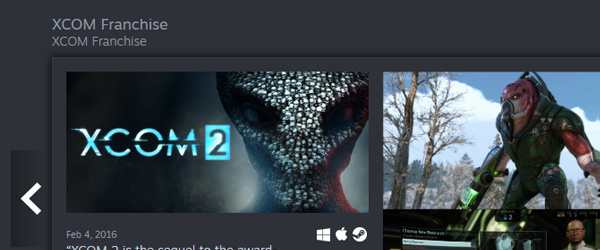
A studio might divide its games into collections by genre or franchise, or could choose to highlight their fan-favorite or top-selling games. A developer of only a single game might primarily dedicate their homepage to announcements of new projects.
Regardless of how each developer or publisher chooses to customize their homepage, you can easily follow them to be notified when they release their next title or post an announcement. Newly released titles from developers or publishers that you follow will show up at the top of your Steam homepage and we’ll send you an e-mail to let you know that they’ve released something new (as with other Steam e-mail notifications, you can opt out at any time by visiting your e-mail preferences page).
Creators can also set up unique URLs within Steam for easy reference to their homepage. You can see an example by following this customized URL for the Valve developer homepage: http://store.steampowered.com/dev/valve
Why Beta?
We’re pretty excited to get the core functionality into the hands of players and give developers the opportunity to set up their presence on Steam. While we haven’t worked out all of the smaller bugs or finished adding every feature we’d like to, we decided that the basic set of functionality is worth putting into the hands of players and creators. We still have a number of features that we are considering adding and there are still a few rough edges that need smoothing out, so opening this system up as a beta to players and developers will help us gather feedback and suggestions that inform the direction of those features.
Over the previous few weeks, we’ve worked with a number of developers and publishers on Steam to get their pages set up and help us work out as many of the bugs as we can. As a player, you’ll find that many of your favorite game makers probably already have a spiffy homepage created and customized. But there are still quite a few developers that have not yet had a chance to set up their pages and will do so during this open beta period.
For game developers, check out the Creator Homepages Steamworks documentation for more details and information on how the system works, the features that are included, and necessary permissions for game creators.
Reporting bugs and feedback
As always, we’ll keep an eye out for your feedback and suggestions as to what you’d like to see added or changed about this system.
Google’s Fuchsia Adds Emulator for Running Linux Apps
Google has added a Guest app to its emergent and currently open source Fuchsia OS to enable Linux apps to run within Fuchsia as a virtual machine (VM). The Guest app makes use of a library called Machina that permits closer integration with the OS than is available with typical emulators, according to a recent 9to5Google story.
Last month, Google announced a Project Crostini technology that will soon let Chromebook users more easily run mainstream Linux applications within a Chrome OS VM. This week, Acer’s Chromebook Flip C101 joined the short list of Chromebooks that will offer Linux support later this year.
While it’s encouraging that Chrome OS will soon support Linux apps is addition to Android, it’s not entirely surprising — since Android and Chrome OS are based on Linux. Yet, one of the first things Google emphasized when it revealed Fuchsia in 2016 was that it’s not based on the Linux kernel.
To some, Fuchsia seemed to be something of a betrayal considering how Linux not only forms the basis for Android and Chrome OS but also the Google enterprise platforms. Why add another Windows or iOS when we were getting so close to everyone sharing a common Linux foundation?
No doubt, Google has some very good reasons for avoiding Linux. One reason may be the age and complexity of Linux. By starting from scratch, Google can escape that aspect and deliver more elegant, up-to-date code with fewer targets for hackers. Google is also baking secure updates deeply into the OS, and unlike Linux, is isolating applications from having direct kernel access.
Open for now
Back in 2016, we thought Google might be skipping over Linux to shift to a proprietary OS that it could control the way Apple dictates all things iOS. That may still happen, but for now Fuchsia is an open source project.
Some also speculated at time that considering the trim little microkernel, Google was bypassing Linux due to its inability to scale downward into the MCU realm. Yet, MCU-based IoT does not appear to be the current focus of Fuchsia. Several reports, including a TechRadar post last week, have said that Fuchsia is intended to replace both Android and Chrome OS, and the combined platform will eventually be called Google Andromeda.
Earlier this year, 9to5Google reported that Fuchsia would include separate UIs — an Armadillo UI for phones and a Capybara UI for desktops — and like Android Things and other new Android variants, would tightly integrate Google Assistant voice technology. Essentially, this is the same idea that was behind Microsoft’s failed plan to offer a common Windows for phones and laptops, or Canonical’s defunct “convergence” version of Ubuntu.
Guest ex Machina
Whatever Fuchsia’s destiny, Google needs to attract mature applications, as well as developers, and the best way to do that is to add Linux app compatibility. The new Guest app, which initially supports Linux-based platforms including Debian, works with the Machina library to accomplish this in a way that goes beyond what you can get from QEMU, suggests 9to5Google.
Google describes Fuchsia’s Machinaas “a library that builds on top of the Zircon hypervisor to provide virtualized peripherals that integrate with a garnet system.” Zircon is the Fuchsia microkernel, based on Little Kernel (LK), and formerly called Magenta. Garnet is the layer that sits directly atop Zircon and offers device drivers, the Escher graphics renderer, Fuchsia’s Amber updater, and the Xi Core engine for the Xi text and code editor. Other layers include Peridot for app design, and on top, Topaz, a Flutter-supported app layer.
Machina adopts the Virtio virtualization standard, which is also used by the Linux Kernel-based Virtual Machine (KVM). It makes use of Virtio’s vsock virtual socket, “which can open direct channels between a host operating system and its guest, to allow for conveniences that would be otherwise impossible,” says 9to5Google.
This extra effort will likely enable enable fast mouse performance, automatically adjusted screen resolution, and support for multiple displays, file transfers, and copy and paste, says the story. This appears to be much like the allegedly superior emulation that is expected with Google’s Project Crostini for running Linux apps on Chrome OS. The news of the Guest app follows earlier reports that suggested that Google is building an Android Runtime into Fuchsia rather than depending on emulation to run Android apps.
App emulators should be viewed with some skepticism. Most of the mobile Linux OS contenders promised some sort of Android app compatibility, but they have generally failed to deliver. Still, by building emulation deeply into the stack from the start rather than adding an emulator on later, Fuchsia may well offer Linux developers an emulator that they can live with.
Never Fear, El Presidente is Here! Tropico is coming to iPad
By Joe Robinson20 Jun 2018
Tropico is a really fun and interesting twist on the typical city builder/management genre. As the head of the Banana Republic/Dictatorship, your job is to exploit your people and your islands’ resources for wealth & power, often with hilarious results.
Depending on which version you played (Tropico 4 was the sweet spot, I feel), you’d also be jostling against the big superpowers of the world, potentially pitting them against each other while trying to avoid losing control through revolution, or invasion.
[embedded content]
Now, thanks to Feral Interactive we’ll be able to sun it up on our iPads. These guys are known for bringing PC games to mobile with quality ports, the most recent of which was Rome: Total War (the iPhone version is still incoming).
Coming “later this year”, Tropico will be releasing for iPad and according to TouchArcade will be a premium game. If you’re interested, this mobile port is actually a heavily modified version of Tropico 3. So while it’ll be missing some of the fun things they introduced in 4, Tropico 3 was still a great game so we’re very excited for this one.
These days it seems most game engines have an integrated marketplace that make it easy for their users to acquire assets such as models, levels and scripts. The Leadwerks game engine just launched a store of their own. The Leadwerks Marketplace launched with over 50GB of assets with categories of Models, Materials, Scripts, Shaders and Sounds. There are a few free assets available, but oddly no ability to sort by price. You can browse the contents of the marketplace using the link above. The Leadwerks Marketplace is intended as a replacement for the Steam Workshop that didn’t work out as hoped.
Easy download of zip files that are ready to use with Leadwerks. You can use File > Import menu item to extract them to the current project, or just unzip them yourself.
All content is curated. Items are checked for compatibility and quality.
Clear technical specifications for every file, so you know exactly what you are getting.
Cheap and reliable storage forever with Amazon S3.
Any DLCs or Workshop Store items you purchased can be downloaded from Leadwerks Marketplace by linking your Steam account to your profile.
Easy publishing of your items with our web-based uploader.
We’re launching with over 50 gigabytes of game assets, and more will be added continuously. To kick off the launch we’re offering some items at major discounts during the Summer Game Tournament.
Be sure to read the blog for a great deal more details as well as information on how to link to your Steam account.
Posted by: xSicKxBot - 06-20-2018, 06:26 AM - Forum: Lounge
- No Replies
GameStop Expects "Feeding Frenzy" For PS5 And Next Xbox
Microsoft confirmed during its E3 2018 briefing that it's working on at least one new Xbox console. And before that, rumours were circulating about a new PlayStation. Those consoles have yet to be announced, but they are expected eventually, of course, considering it's been more than four years since the launch of the PlayStation 4 and Xbox One in November 2013. Gamers are eagerly awaiting new consoles, and retailers are too. We spoke with GameStop merchandising boss Eric Bright at E3 2018 and he told us that hardware transition years are huge for GameStop, and he expects the next shift to be no different.
"When is always the big question," Bright said about when the new consoles might launch. "Phil Spencer announced they are working on a new Xbox, which I think everybody expects. When, I don't know. I honestly don't. But like every hardware transition that occurs--and GameStop has gone through many of them in the past--it's a tremendous time for us."
As an example, Bright pointed out that the Nintendo Switch launch in March 2017 was a huge success for GameStop. That success was driven in part by The Legend of Zelda: Breath of the Wild being a can't-miss launch title. "We were selling more than we could get in," Bright said.
The executive added that he expects a similar situation for the PlayStation 5 and next Xbox console, saying he anticipates a "feeding frenzy" for the new systems. Beyond the hardware sales along, Bright said GameStop expects to be a market-leader in terms of "attach" rates for games and accessories.
"It's going to be a feeding frenzy that I expect to drive tremendous traffic into our stores," Bright said. "And we'll attach better than anybody else accessories, software to that."
Bright went on to say that GameStop's trademark buy/sell/trade model will also pay dividends during the next console transition. The retailer historically offers nice trade-in offers for people who are looking to trade in their older systems to get cash or store credit to buy new ones, and Bright said you can expect this to continue when the next consoles launch.
Importantly, new consoles from Microsoft and Sony have not been announced. However, as mentioned, evidence for their existence is mounting. Recently, Sony management said the PlayStation 4 was entering the final phase of its lifecycle, while Microsoft is already openly talking about working on new hardware.
Yves Guillemot, the CEO of Assassin's Creed publisher Ubisoft, said in an interview recently that he expects the next wave of consoles from Microsoft and Sony to be the last. He told Variety that the industry will instead move towards a streaming model that doesn't require expensive hardware.
GameSpot's interview with Bright covered a number of topics, including how Fortnite's immense popularity has helped the developer, the state of PlayStation VR sales at the retailer, and more. Keep checking back for more on these topics and others from E3 2018.
Posted by: xSicKxBot - 06-20-2018, 06:26 AM - Forum: Windows
- No Replies
Announcing the winners of the 2018 Microsoft Research Dissertation Grants
Research shows that diverse teams are more productive teams. Diversity, particularly in the area of computing research, means including unique perspectives that otherwise might not have a voice, fueling innovation. These are some of the key reasons that Microsoft is committed to diversity. One aspect of demonstrating that commitment is that, for the second year in a row, we are awarding Microsoft Research Dissertation Grants to talented PhD candidates from groups that are under-represented in computing. The goal of these awards (up to $25,000 each) are to widen the narrow pipeline of women, African-Americans, American Indians, Latinos, Pacific Islanders, and those with disabilities who earn PhDs in computer science or related fields. These awards are given to students in the “last mile” of their PhDs, where a little money can push them over the finish line by helping them to complete their dissertation research.
I am pleased to announce the winners of the 2018 Microsoft Research Dissertation Grants:
Cynthia Bennett, University of Washington, “Toward Disability-Informed Human-Centered Design”
Eric Corbett, Georgia Institute of Technology, “Trust, Technology and Community Engagement”
Ryan M. Corey, University of Illinois at Urbana-Champaign, “Array Signal Processing for Augmented Listening”
Maria De-Arteaga, Carnegie Mellon University, “Quantifying and Mitigating Risks of Algorithmic Decision Support”
Jane E, Stanford University, “Artistic Vision: Providing Context for Capture-Time Decisions”
Sahar Hashemgeloogerdi, University of Rochester, “Computationally Efficient Modeling and Audio Enhancement Algorithms for Reverberant Acoustic Systems Using Orthonormal Basis Functions”
Francesco Pittaluga, University of Florida, “Privacy Preserving Computational Cameras”
Ramya Ramakrishnan, Massachusetts Institute of Technology, “Human-Guided Reinforcement Learning in Real-World Environments”
João Sedoc, University of Pennsylvania, “Hierarchical Approaches to Improve the Flow, Style, and Coherence of Conversational Agents”
Mina Tahmasbi Arashloo, Princeton University, “Programmable Network Monitoring and Control”
Sarah Tan, Cornell University, “Methods in Interpretability and Causal Inference for Better Understanding of Machine Learning Models”
From the almost 200 research projects submitted, these PhD candidates were selected as grant recipients based on review by scientists at Microsoft Research of the quality of the students’ dissertation research, the potential impact of their research, and the uses toward which they would put the grant monies awarded.
For example, Ryan Corey’s grant proposal included funds for purchasing high-quality recording equipment to capture and separate sources of audio to prototype products that augment people’s ability to hear, and also to fund outreach efforts for him to go into community schools to demonstrate his research. Ramya Ramakrishnan will use her grant to hire undergraduate women as research assistants, so she can further amplify the mentoring she receives from this award. Cynthia Bennett, who has a visual disability, is using her grant to increase the ability of people with disabilities to design products that other people with disabilities will use.
There were interesting themes running across this year’s set of awardees, including the ethics and sociological impact of their research. Eric Corbett’s research on using technology to increase public trust and Maria De-Arteaga’s research on mitigating risks of algorithmic decision support in the criminal justice system are two such examples.
In addition to monetary grants, each award comes with an all-expense paid trip to a two-day Microsoft Research workshop in Redmond, Washington, in the autumn of 2018. There, the awardees will present their research, meet with researchers in their field, and receive career coaching.
Open Source Skills Soar In Demand According to 2018 Jobs Report
Linux expertise is again in the top spot as the most sought after open source skill, says the latest Open Source Jobs Reportfrom Dice and The Linux Foundation. The seventh annual report shows rapidly growing demand for open source skills, particularly in areas of cloud technology.
Key findings of the report include:
Linux tops the list as the most in-demand open source skill, making it mandatory for most entry-level open source careers. This is due in part to the growth of cloud and container technologies, as well as DevOps practices, all of which are typically built on Linux.
Container technology is rapidly growing in popularity and importance, with 57% of hiring managers seeking those skills, up from 27% last year.
Hiring open source talent is a priority for 83% of hiring managers, up from 76% in 2017.
Hiring managers are increasingly opting to train existing employees on new open source technologies and help them gain certifications.
Many organizations are getting involved in open source with the express purpose of attracting developers.
Career Building
In terms of job seeking and job hiring, the report shows high demand for open source skills and a strong career benefit from open source experience.
87% of open source professionals say knowing open source has advanced their career.
87% of hiring managers experience difficulties in recruiting open source talent.
Hiring managers say they are specifically looking to recruit in the following areas:
Diversity
This year’s survey included optional questions about companies’ initiatives to increase diversity in open source hiring, which has become a hot topic throughout the tech industry. The responses showed a significant difference between the views of hiring managers and those of open source pros — with only 52% of employees seeing those diversity efforts as effective compared with 70% of employers.
Overall, the 2018 Open Source Jobs Report indicates a strong market for open source talent, driven in part by the growth of cloud-based technologies. This market provides a wealth of opportunities for professionals with open source skills, as companies increasingly recognize the value of open source.
The 2018 Open Source Jobs Survey and Report, sponsored by Dice and The Linux Foundation, provides an overview of the latest trends for open source careers. Download the complete Open Source Jobs Report now.