| Welcome, Guest |
You have to register before you can post on our site.
|
| Online Users |
There are currently 1052 online users.
» 0 Member(s) | 1049 Guest(s)
Applebot, Bing, Google
|
|
|
| News - Video: The visual development of Metal Gear Solid V: Ground Zeroes |
|
Posted by: xSicKxBot - 05-20-2018, 03:06 PM - Forum: Lounge
- No Replies
|
 |
Video: The visual development of Metal Gear Solid V: Ground Zeroes
 In this GDC 2013 sponsored session, Hideo Kojima is joined by fellow Kojima Productions staff Hideki Sasaki, Masayuki Suzuki and Junji Tago to demonstrate and discuss the workflow and development process behind Metal Gear Solid V: Ground Zeroes using the Fox Engine.
The talk goes over the key components and methods Kojima Productions utilized in the graphics arena to create the visuals for Ground Zeroes, including an overview of how assets were created and what kind of rendering techniques were used.
Developers interested in learning about the production of Ground Zeroes can now watch the talk for free over on the official GDC YouTube channel!
In addition to this presentation, the GDC Vault and its new YouTube channel offers numerous other free videos, audio recordings, and slides from many of the recent Game Developers Conference events, and the service offers even more members-only content for GDC Vault subscribers.
Those who purchased All Access passes to recent events like GDC, GDC Europe, and GDC Next already have full access to GDC Vault, and interested parties can apply for the individual subscription via a GDC Vault subscription page. Group subscriptions are also available: game-related schools and development studios who sign up for GDC Vault Studio Subscriptions can receive access for their entire office or company by contacting staff via the GDC Vault group subscription page. Finally, current subscribers with access issues can contact GDC Vault technical support.
Gamasutra and GDC are sibling organizations under parent UBM Americas
|

|
|
| News - Confront your childhood fears in Little Nightmares: Complete Edition |
|
Posted by: xSicKxBot - 05-20-2018, 03:06 PM - Forum: Lounge
- No Replies
|
|
Confront your childhood fears in Little Nightmares: Complete Edition
Confront your childhood fears in Little Nightmares: Complete Edition
Do you remember your childhood fears? Immerse yourself in this dark whimsical tale and help Six & The Kid escape The Maw – a vast, mysterious vessel inhabited by corrupted souls looking for their next meal!
Features
- THE ALL-IN-ONE EDITION FOR NINTENDO SWITCH – Embark on a delectably dangerous journey with Six and The Kid in two parallel escape stories that will put your cool to the test.
- A SPOOKY PUZZLE PLATFORMER – Trapped in an oversized dollhouse inhabited by monstrous residents, light your way through darkness, hide & sneak to avoid danger and run for your life to find a way out.
- REKINDLE YOUR CHILDLIKE JOYS – Find your inner child and bend your imagination to solve complex 3D puzzles and find your way out. Each room is a cell, each resident a threat, and both are puzzles to untangle.
- TAILORED TO THE DEVICE – Undock your Nintendo Switch and continue your journey everywhere, anytime with full HD rumble support for the Joy-Con controllers.
Please visit https://www.nintendo.com/games/detail/little-nightmares-complete-edition-switch if you would like to purchase the digital version.
Game Shown:

Blood
Violence
|
|
|
|
| News - Welcome To Jurassic Pinball, Launching 25th May On Nintendo Switch |
|
Posted by: xSicKxBot - 05-20-2018, 03:06 PM - Forum: Nintendo Discussion
- No Replies
|
|
Welcome To Jurassic Pinball, Launching 25th May On Nintendo Switch
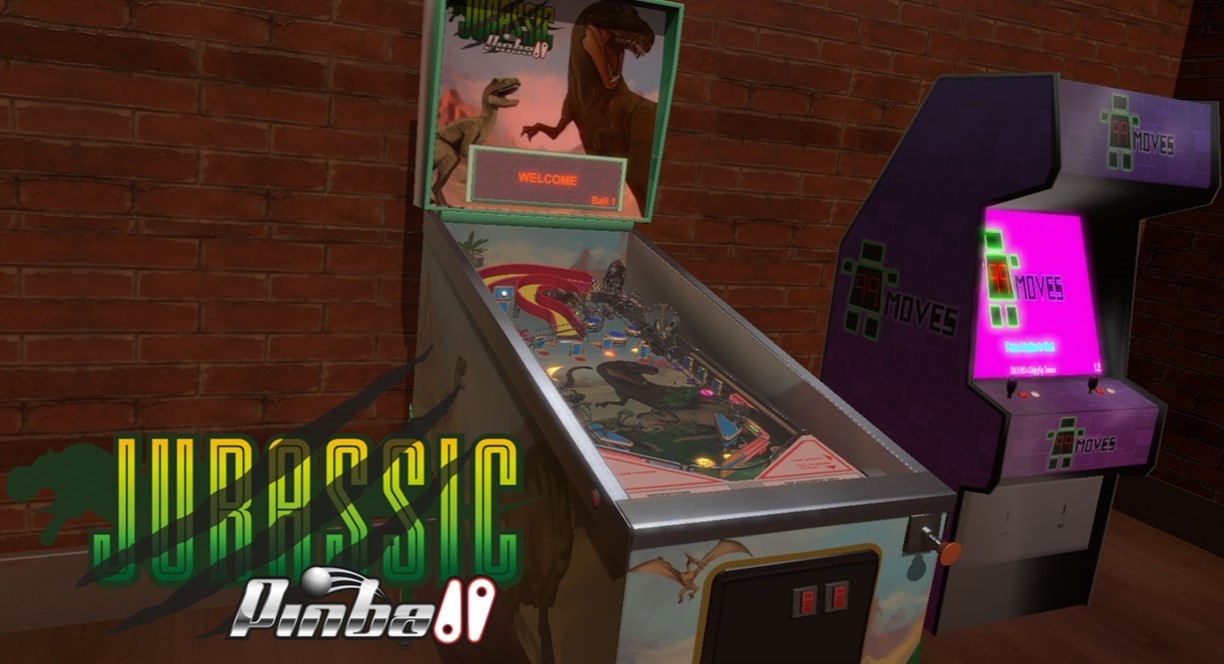
Do you love dinosaurs? Do you posses an undying penchant for pinball? Well, worlds are about to collide yet again as EnjoyUp Games and Super Power Up brings Jurassic Pinball to the Nintendo Switch eShop on 25th May.
This reproduction of a real pinball machine – complete with all the usual graphic details and sounds you’d expect from a cabinet sim – comes with plenty of missions to complete and an online leaderboard to climb with your pinball flipping prowess. It comes with plenty of features including Multiball, Extraball, Skillshot and Jackpots, as well as four different cameras to choose from (should that be the kind of thing that sells you on a pinball game).
Are you a pinball wizard? Will you be adding this cute little dino-friendly pinball title to your collection? Share your thoughts with the rest of the community below…
|
|
|
|
| News - The Stylised RPG Battles Of Shadows Of Adam Is Heading To Nintendo Switch |
|
Posted by: xSicKxBot - 05-20-2018, 03:06 PM - Forum: Nintendo Discussion
- No Replies
|
|
The Stylised RPG Battles Of Shadows Of Adam Is Heading To Nintendo Switch
Circle Entertainment and developer Something Classic Games have revealed SNES-esque RPG Shadows of Adam will be making its way onto Nintendo Switch. Previously released on PC, Mac and Linux, the game will make its console debut on Switch, featuring, “a compelling story, a unique fast-paced battle system and modernized visuals for a beloved genre.”
You’ll get to play as four main characters (Asrael, Kellan, Curtis and Talon) in a deep, story-driven experience, with combat built around a compelling strategic AP management battle system. The cool selling point here is how you can actively restore AP between rounds of battle automatically and by defeating enemies.
With its SNES-era visuals, and a soundtrack featuring 44 tracks from composer Tyler Mire, you’ll be getting a modern battler with a real JRPG vibe. Will you be picking this one up when it eventually hits Nintendo Switch? Share your thoughts below…
|
|
|
|
| Steam - Now Available on Steam – Forgotton Anne, 10% off! |
|
Posted by: xSicKxBot - 05-20-2018, 03:06 PM - Forum: PC Discussion
- No Replies
|
|
Now Available on Steam – Forgotton Anne, 10% off!
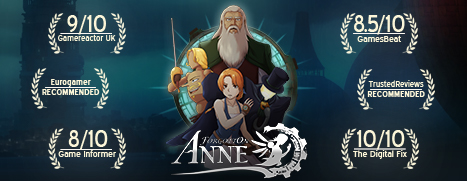
Forgotton Anne is Now Available on Steam and is 10% off!*
Step into a hand-animated realm of wonder in which everyday objects take on a life of their own. Uncover the Forgotlings’ mysteries & harness magical forces as you embark upon a quest to return home.
*Offer ends May 22 at 10AM Pacific Time
|
|
|
|
| PS4 - Defender's Quest: Valley of the Forgotten DX Edition |
|
Posted by: xSicKxBot - 05-19-2018, 08:11 PM - Forum: New Game Releases
- No Replies
|
|
Defender's Quest: Valley of the Forgotten DX Edition
Defender?s Quest is a tower-defense RPG hybrid which focuses on tactical depth, customization, and story. That means no random encounters, no spikey-haired emo kids, no forced time sinks, and no tedious, repetitive battles. Publisher: Level Up Labs Release Date: May 24, 2018
|
|
|
|
| How to Rename Multiple Files on Linux |
|
Posted by: xSicKx - 05-19-2018, 07:01 PM - Forum: Linux, FreeBSD, and Unix types
- No Replies
|
 |
Debian-based Operating Systems - Renaming Multiple Files on Linux
Debian and similar distributions such as Ubuntu and Linux Mint have a built in command line tool for batch renaming files. ‘rename’, offered on some Debian-based OSes, is one of the most powerful renaming tools on Linux. Rename works very similar to the way ‘sed’ works – it is essentially the sed utility for filenames. It can also use Perl expressions, so if you have some knowledge of Perl, this utility will work wonders for you.
Important: Some Debian-based operating systems that have ‘rename’ installed might actually have a version of ‘rename’ from the ‘util-linux’ package. This util-linux variant is a much simpler version of ‘rename’ which doesn’t have nearly as many features as the version that comes on Debian and Ubuntu.
Basic File Renaming
You can find and replace text in filenames by executing the following command. Make sure to change the values of ‘search’ and ‘replace’ to the strings of text you wish to affect. Keep in mind that wildcards are available inside of the search field. Note: You can use the -n option to perform a ‘dry run’ first, which does not affect your file names. The -v option makes all operations verbose.
Example:
Code: rename -v 's/search/replace/' *
Changing filetypes
You can also rename the filetype of certain files by using this method – just replace ‘search’ and ‘replace’ with the current and new filetype. Note: Don’t forget to add a backslash before your filetype, or else the command won’t work.
Example:
Code: rename -v 's/\.search/\.replace/' *
More Advanced Commands
If you would like to rename files and have a number incrementing at the end of the filename, this can be done as well with some Perl:
Code: rename -v 's/search/our $i; sprintf("replace%03d.txt", 1+$i++)/e' *
The reason for the ‘%03d’ in this command is to describe how many zeroes we want in front of our numbers. This is used to keep files in order when sorting files alphabetically. ‘sprintf’ is actually a function from Perl, used to format the name. This shows one of the strengths of this version of rename. Here is an example.
Files:
file1
file2
Command:
Code: rename -v 's/file*/our $i; sprintf("name%03d.txt", 1+$i++)/e' *
Output:
name001
name002
And in case you need a specific format for your filenames, there are plenty of Perl scripts available online for renaming files in all sorts of formats.
The
syntax looks like this:
rename (option) 's/oldname/newname' file1.ext file24.ext
The letter “s” stands for “substitute” and it’s the main part of the regular expression. Single quotes around it are obligatory. Available options are:-
-v
- (verbose; prints the list of renamed files along with their new names)
-n
- (“no action”; a test mode or simulation which only shows the files that will be changed without touching them)
-f
- (a forced overwrite of the original files)
The
command also accepts wildcards to rename multiple files of the same type, and it works on file extensions as well. For example, this would change all files with the extension .jpeg to .jpg:
rename 's\.jpeg/\.jpg/' *
The wildcard symbol (*) means that all files in the folder will be affected.
The regular expression also has its own options (modifiers): “g” (global; affects all occurrences of the expression) and “i” (performs case-insensitive substitution). They are written at the end of the expression, just before the closing single quote, and can be combined:
rename -n 's/DSC/photo/gi' *.jpg
This would apply to all .jpg files that contain “DSC”, “dSC”, “dsc”… and change that part of the filename to “photo”. However, because of the “-n” option, the command wouldn’t actually rename the files but just print them in the console window.
Substitution is not the only thing that this regular expression can do. There’s also translation – marked by the letter “y” – which can transform the filenames on a more complex level. It is most often used to change the filename case:
rename 'y/a-z/A-Z/' *.jpg
This would change the names of all .jpg files from lowercase to uppercase. To do it vice-versa, just switch the “oldname” and “newname” parts of the regular expression.
Using the
command boils down to mixing a few basic patterns to achieve the desired result. Thanks to the “-n” option the users will never have to put their files at risk (or their nerves at stake), since it offers a safe and useful preview of what the renamed files will look like.
Another quick one i found that works a little differently.
Code: ls | cat -n | while read n f; do mv "$f" "file-$n.jpg"; done
ls lists the files in the current directory and cat -n adds line numbers. The while loop reads the resulting numbered list of files line by line, stores the line number in the variable n and the filename in the variable f and performs the rename.
|
|
|
|
| Xbox Wire - Conan Exiles Launches From Xbox Game Preview Today |
|
Posted by: xSicKxBot - 05-19-2018, 03:05 PM - Forum: Xbox Discussion
- No Replies
|
|
Conan Exiles Launches From Xbox Game Preview Today
And so it begins anew!
Today Conan Exiles finally shed its Game Preview wings and launched in full on Xbox One. The open world survival game set in the universe of “Conan the Barbarian” is finally ready for the masses.
Conan Exiles Xbox Game Preview started on the August 16, 2017 and with today’s launch, the game has been massively expanded with lots of new content and features.

We have listened closely to the community during the Xbox Game Preview process and kept on improving and expanding the game before launch.
In Conan Exiles you must survive in a vast and seamless world, build a home and kingdom, dominate your enemies in single and multiplayer. Do battle against savage monsters and tribes of humans, the harsh climate, sandstorms which can rip the flesh from your body and enemy players to survive in the Exiled Lands.

Choose between hundreds of building pieces and build a strong base to defend yourself. Capture human NPCs and break their will on the wheel of pain so they can become your thralls. Strengthen your base with thrall archers and fighters to defend against the purge, where the creatures of the Exiled Lands rise to drive you from their home.
We have completely revamped the combat system during Xbox Game Preview. Combat is now combo-based, brutal, and very tactical. Many new weapon types have been introduced and each weapon has gotten its own set of unique attacks and animations.

Conan Exiles offers a vast open world, filled with unique locations, ancient ruins, deep caves and challenging dungeons. Explore the world, from the deserts of the south to the swamps of the east and the highlands in the frozen north.
You can play the game in either single or multiplayer. Play on official servers or rent a private server where you can set the rules yourself and play with the friends you invite.

We are proud to have gone through the Xbox Game Preview period with the great Conan Exiles community and we hope everyone will love all the new content which has come in for launch.
Your cross awaits, Exile. Time to explore the brand new swamp and volcano, try out the new combat system and face off against the purge!
See you in Hyboria!
|
|
|
|
|
|
|