Posted by: xSicKxBot - 10-02-2023, 11:04 AM - Forum: Lounge
- No Replies
News - GPT-4 with Vision (GPT-4V) Is Out! 32 Fun Examples with Screenshots
5/5 – (1 vote)
TLDR: GPT-4 with vision (GPT-4V) is now out for many ChatGPT Plus users in the US and some other regions! You can instruct GPT-4 to analyze image inputs. GPT-4V incorporates additional modalities such as image inputs into large language models (LLMs). Multimodal LLMs will expand the reach of AI from mainly language-based applications to a broad range of brand-new application categories that go beyond language user interfaces (UIs).
GPT-4V could explain why a picture was funny by talking about different parts of the image and their connections. The meme in the picture has words on it, which GPT-4V read to help make its answer. However, it made an error. It wrongly said the fried chicken in the image was called “NVIDIA BURGER” instead of “GPU”.
Still impressive! OpenAI’s GPT-4 with Vision (GPT-4V) represents a significant advancement in artificial intelligence, enabling the analysis of image inputs alongside text.
Let’s dive into some additional examples I and others encountered:
More Examples
Prompting GPT-4V with "How much money do I have?" and a photo of some foreign coins:
It can also identify locations from photos and give you information about plants you make photos of. In this way, it’s similar to Google Lens but much better and more interactive with a higher level of image understanding.
It can do optical character recognition (OCR) almost flawlessly:
Speaking of coding, here’s a fun example by another creative developer, Matt Shumer:
"The first GPT-4V-powered frontend engineer agent. Just upload a picture of a design, and the agent autonomously codes it up, looks at a render for mistakes, improves the code accordingly, repeat. Utterly insane." (source)
I’ve even seen GPT-4V analyzing financial data like Bitcoin indicators:
source
I could go on forever. Here are 20 more ideas of how to use GPT-4V that I found extremely interesting, fun, and even visionary:
Visual Assistance for the Blind: GPT-4V can describe the surroundings or read out text from images to assist visually impaired individuals.
Educational Tutor: It can analyze diagrams and provide detailed explanations, helping students understand complex concepts.
Medical Imaging: Assist doctors by providing preliminary observations from medical images (though not for making diagnoses).
Recipe Suggestions: Users can show ingredients they have, and GPT-4V can suggest possible recipes.
Fashion Advice: Offer fashion tips by analyzing pictures of outfits.
Plant or Animal Identification: Identify and provide information about plants or animals in photos.
Travel Assistance: Analyze photos of landmarks to provide historical and cultural information.
Language Translation: Read and translate text in images from one language to another.
Home Decor Planning: Provide suggestions for home decor based on pictures of users’ living spaces.
Art Creation: Offer guidance and suggestions for creating art by analyzing images of ongoing artwork.
Fitness Coaching: Analyze workout or yoga postures and offer corrections or enhancements.
Event Planning: Assist in planning events by visualizing and organizing space, decorations, and layouts.
Shopping Assistance: Help users in making purchasing decisions by analyzing product images and providing information.
Gardening Advice: Provide gardening tips based on pictures of plants and their surroundings.
DIY Project Guidance: Offer step-by-step guidance for DIY projects by analyzing images of the project at various stages.
Safety Training: Analyze images of workplace environments to offer safety recommendations.
Historical Analysis: Provide historical context and information for images of historical events or figures.
Real Estate Assistance: Analyze images of properties to provide insights and information for buyers or sellers.
Wildlife Research: Assist researchers by analyzing images of wildlife and their habitats.
Meme Creation: Help users create memes by suggesting text or edits based on the image provided.
These are truly mind-boggling times. Most of those ideas are million-dollar startup ideas. Some ideas (like the real estate assistance app #18) could become billion-dollar businesses that are mostly built on GPT-4V’s functionality and are easy to implement for coders like you and me.
If you’re interested, feel free to read my other article on the Finxter blog:
GPT-4V is a multimodal large language model that incorporates image inputs, expanding the impact of language-only systems by solving new tasks and providing novel experiences for users. It builds upon the work done for GPT-4, employing a similar training process and reinforcement learning from human feedback (RLHF) to produce outputs preferred by human trainers.
From an everyday user perspective that doesn’t try to harm people, the "Sorry I cannot do X" reply will remain one of the more annoying parts of LLM tech, unfortunately.
However, the race is on! People have still reported jailbroken queries like this:
I hope you had fun reading this compilation of GPT-4V ideas. Thanks for reading! If you’re not already subscribed, feel free to join our popular Finxter Academy with dozens of state-of-the-art LLM prompt engineering courses for next-level exponential coders. It’s an all-you-can-learn inexpensive way to remain on the right side of change.
For example, this is one of our recent courses:
Prompt Engineering with Llama 2
The Llama 2 Prompt Engineering course helps you stay on the right side of change. Our course is meticulously designed to provide you with hands-on experience through genuine projects.
You’ll delve into practical applications such as book PDF querying, payroll auditing, and hotel review analytics. These aren’t just theoretical exercises; they’re real-world challenges that businesses face daily.
By studying these projects, you’ll gain a deeper comprehension of how to harness the power of Llama 2 using Python, Langchain, Pinecone, and a whole stack of highly practical tools of exponential coders in a post-ChatGPT world.
[freebies.indiegala.com] Doug and Lily. It's a platformer with a pleasant pixel graphic, where you expect incredible adventures. [freebies.indiegala.com]
AppleInsider - How to set up Center Stage in macOS Sonoma
Right alongside new video conferencing features like reactions, macOS Sonoma gives you Center Stage options to control how you present yourself to the world — if you have the right camera.
Center Stage on the Mac is exactly as it has been on the iPad. Should you choose to have it turned on, then when you’re on a video call and you reach out of frame for a coffee, the camera automatically moves.
Or rather, it appears to. While there have to be limits, as long as you’re in front of the camera somewhere, your video conferencing colleagues will see you right in the middle of their view.
They’ll see you center stage, in fact. Moving left or right, up or down, or having someone else join you in the shot will make the image automatically adjust itself to show the best framing.
If you have the right camera.
The right camera
For Center Stage to work on macOS Sonoma, you must be using an Apple Silicon Mac and:
A built-in camera (such as on a MacBook Pro)
Continuity Camera with an iPhone 12 or later
Something that may trip you up is that there are Mac apps that can seemingly hide Center Stage controls.
Center Stage used to be part of Control Center, but it now belongs in a new menubar icon that groups together options such as portrait mode, or reactions. This new menubar icon changes to show you when your camera is in use, or just your microphone, and it’s this icon that can effectively be obstructed.
At present, just for one example, if you were to use a screen-recording app while on a video conferencing call, the yellow microphone or green camera icon may be replaced by a darker, less obvious one.
Nonetheless, the Center Stage controls will appear under this menubar icon when you are in a video call.
How to use Center Stage in macOS Sonoma
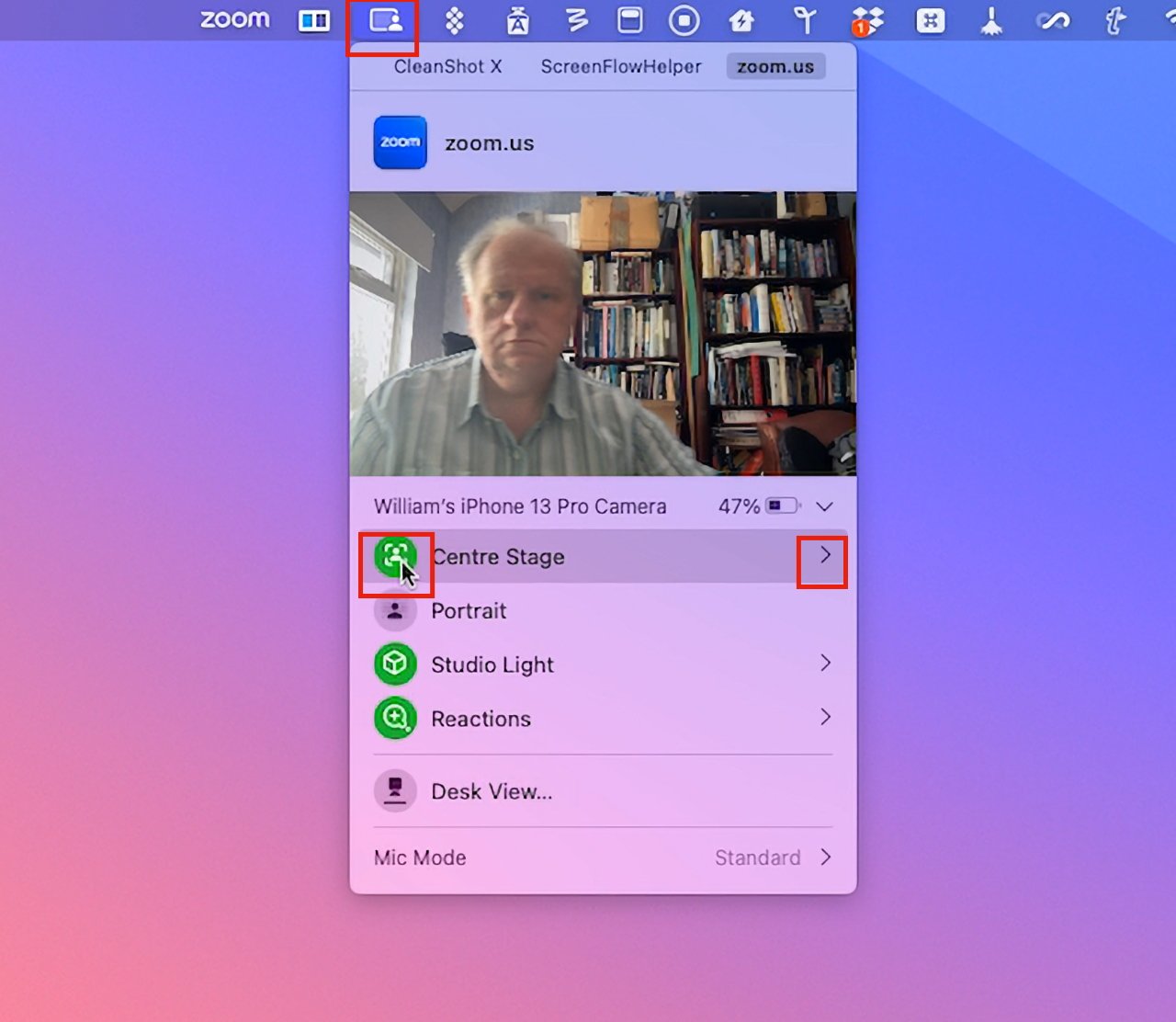
While on the video call, click the new menubar icon
Either click to turn on Center Stage, or
Click the arrow to the right of Center Stage for more options, if available
In macOS Ventura, Center Stage was an option you ticked in Control Center. Now you click Center Stage icon to toggle it on or off.
A lot of Center Stage capabilities depends on the camera you’re using so there will be differences. But in AppleInsider testing using an iPhone 13 Pro as the camera, macOS Sonoma gave more options than the same setup in macOS Ventura.
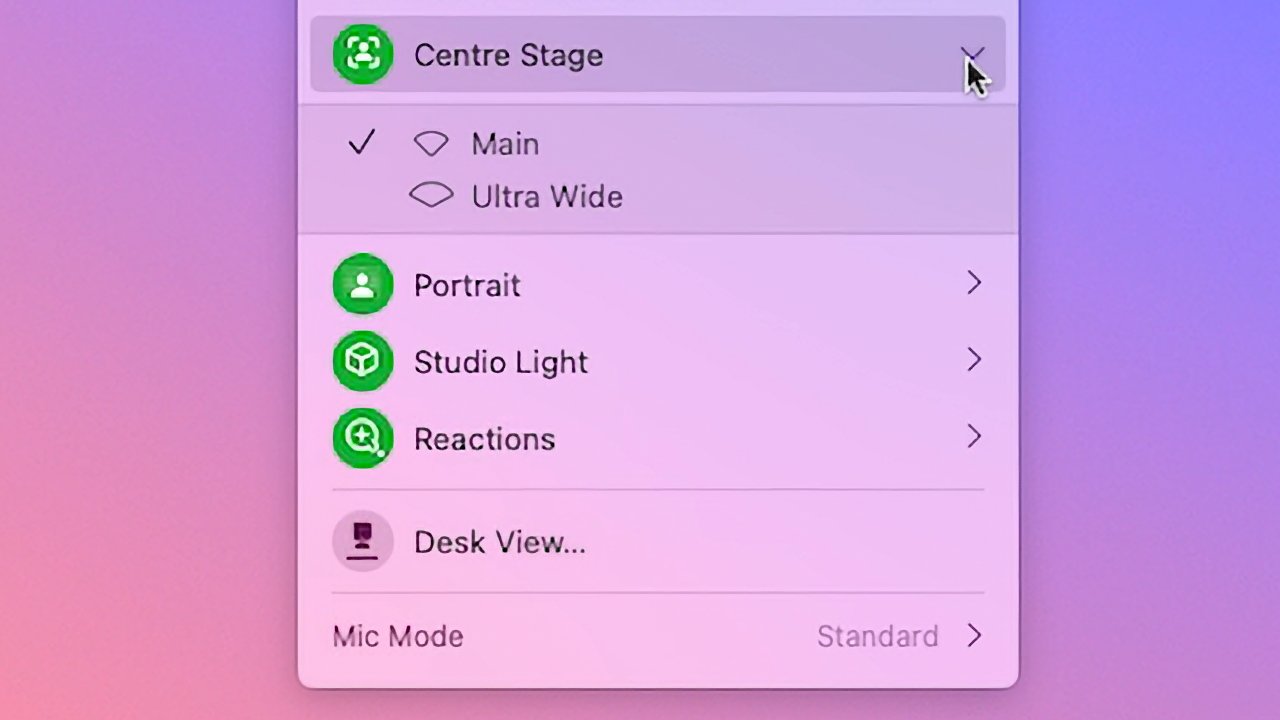
Specifically, two options. Clicking on the arrow to the right of Center Stage in the new menubar icon may show you a choice of cameras. If it does, a click will switch you between, say, Main and Wide Angle.
Click the arrow to the right of Center Stage to see more options, if available
A step forward in video conferencing
Center Stage is as welcome on the Mac as it was on the iPad. It’s a shame that you can’t turn it on or off until you are actually on a call, though.
It would be good to be able to set yourself up just the way you want before the other person appears on the call. If it’s your call and you’re on Zoom, say, then you can start the meeting and adjust the settings before you let anyone else in.
But it would also be good to be able to use a keystroke or perhaps a Shortcut to change the settings instead of having to go through the menubar icon.
One of the surprises of Nintendo’s recent Direct broadcast was the announcement Cing’s classic point-and-click adventure series Another Code would be getting an enhanced release on the Nintendo Switch. It will contain the 2005 DS title Another Code: Two Memories (known as Trace Memory in North America) and the 2009 sequel Another Code: R – A Journey into Lost Memories from the Wii era.
If you’re wondering just how much of an improvement the latest version is, the YouTube channel GameXplain has put together a side-by-side graphics comparison video showing the original DS release alongside the new Switch version. As you can see, this new version is a massive step up from the original. It’s also changed the perspective slightly, so the third-person camera is now directly behind the characters.
Unfortunately, there’s no side-by-side of the new game next to the Wii release, but maybe we’ll get this in time.
If you’re not familiar with this series, you’ll take on the role of Ashley Robbins who is on a journey to find out what’s happened to her parents who went missing years ago and are believed to be dead. We won’t go beyond this due to spoilers, but this collection will likely be worth a look if you’re a fan of mystery-based point-and-click gameplay, and didn’t experience the originals.
What do you think of the graphics update on this one? Leave a comment below.
[freebies.indiegala.com] Doug and Lily. It's a platformer with a pleasant pixel graphic, where you expect incredible adventures. [freebies.indiegala.com]
AppleInsider - Customer FineWoven complaints lead to threadbare response from Apple
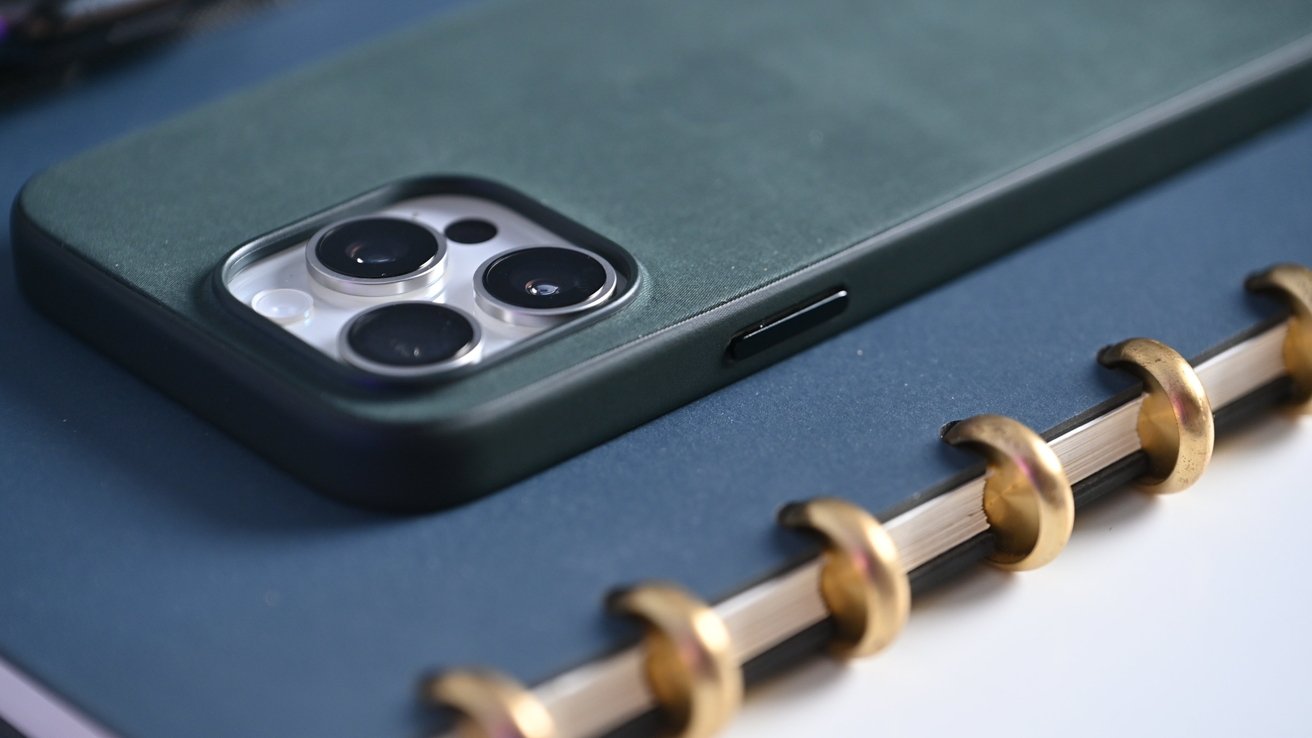
Apple’s FineWoven case
An internal memo from Apple to retail employees offers little help regarding iPhone FineWoven case material complaints over durability and build quality.
Apple has moved away from leather products in favor of a more sustainable FineWoven material. The suede-like cloth material falls short in several ways, as we covered in our review.
Apple sent out an internal memo to retail employees in response to customer complaints and questions, and it was seen by 9to5Mac. The memo didn’t offer much helpful information and repeated much of what was shared on Apple’s website.
“You may get questions from customers about the appearance of the new FineWoven material, how it wears over time, and how to care for it,” the memo stated. “You can let customers know the FineWoven material is made from a luxurious microtwill, with a soft yet durable suede-like texture.”
When asked about durability, employees should explain that cases “may look different and show wear over time as the fibers get compressed with normal use.” The memo adds that “some scratches may diminish over time.”
The memo also shares previously known information, like how MagSafe accessories may leave imprints and how to clean the material. Like other Apple products, Apple recommends wiping down the case with a damp, lint-free cloth.
FineWoven may have been a mistake as a case material, though time will tell if Apple abandons the option. It is yet to be seen how the material will endure as an Apple Watch band, which are now available to order.
Posted by: xSicKxBot - 09-30-2023, 08:35 PM - Forum: Windows
- No Replies
Microsoft - Mayo Clinic to deploy and test Microsoft generative AI tools
ROCHESTER, Minn., and REDMOND, Wash. —Sept. 28, 2023 — Mayo Clinic, a world leader in healthcare known for its commitment to innovation, is among the first healthcare organizations to deploy Microsoft 365 Copilot. This new generative AI service combines the power of large language models (LLMs) with organizational data from Microsoft 365 to enable new levels of productivity in the enterprise.
“Microsoft 365 Copilot has the ability to transform work across virtually every industry so people can focus on the most important work and help move their organizations forward,” said Colette Stallbaumer, general manager, Microsoft 365. “We’re excited to be helping customers like Mayo Clinic achieve their goals.”
Generative AI has the potential to support Mayo Clinic’s vision to transform healthcare. For example, generative AI can help doctors automate form-filling tasks. Administrative demands continue to burden healthcare providers, taking up valuable time that could be used to provide more focused care to patients. Microsoft 365 Copilot has the potential to give healthcare providers valuable time back by automating tasks.
Mayo Clinic is one of the first to start working with Copilot tools to enable staff experience across apps like Microsoft Outlook, Word, Excel and more. Microsoft 365 Copilot combines the power of LLMs with data in the Microsoft 365 apps, including calendars, emails, chats, documents and meeting transcripts, to turn words into a powerful productivity tool.
“Privacy, ethics and safety are at the forefront of Mayo Clinic’s work with generative AI and large language models,” said Cris Ross, chief information officer at Mayo Clinic. “Using AI-powered tech will enhance Mayo Clinic’s ability to lead the transformation of healthcare while focusing on what matters most — providing the best possible care to our patients.”
As a leader in healthcare, Mayo Clinic is always looking for new ways to improve patient care. By using generative AI and LLMs, Mayo Clinic will be able to offer its teams new timesaving tools to help them succeed.
About Mayo Clinic
Mayo Clinic is a nonprofit organization committed to innovation in clinical practice, education and research, and providing compassion, expertise and answers to everyone who needs healing. Visit the Mayo Clinic News Network for additional Mayo Clinic news.
About Microsoft
Microsoft (Nasdaq “MSFT” @microsoft) enables digital transformation for the era of an intelligent cloud and an intelligent edge. Its mission is to empower every person and every organization on the planet to achieve more.
For more information, press only:
Microsoft Media Relations, WE Communications for Microsoft, (425) 638-7777, [email protected]
Note to editors: For more information, news and perspectives from Microsoft, please visit the Microsoft News Center at http://news.microsoft.com. Web links, telephone numbers and titles were correct at time of publication but may have changed. For additional assistance, journalists and analysts may contact Microsoft’s Rapid Response Team or other appropriate contacts listed at https://news.microsoft.com/microsoft-public-relations-contacts.
We have to hand this much to Kirby & The Amazing Mirror: it certainly isn’t afraid of trying new things. We might not be totally convinced of the necessity of those things, of course, but it’s always nice to see a series attempt to expand its boundaries somewhat.
The story forges no new ground whatsoever, though, as it’s based on the standard light world/dark world dynamic that we’ve seen in so many of Nintendo’s flagship franchises by this point that it’s practically a sub-genre. Kirby’s mission is to collect the shards of a magical mirror that will allow him to seal off the dark world for good, and let Dream Land get back to… whatever it is Dream Land does when it’s not under attack by something.
When you start playing, you’ll feel as though you’re in familiar territory: cute visuals, bouncy tunes, and some pretty standard platforming abound. Once you progress a little further, however, you’ll realise that this isn’t your standard, level-based Kirby adventure. Multiple exits adorn nearly every room, and if you find a map you can open it up and see just how convoluted the path ahead really is.
You see, within a single level you’ll fight several bosses and reach multiple goal rooms, but that doesn’t mean your work in that level is done. It’s up to you to scour every corner and unlock every secret, both of which will require much backtracking and pathfinding, giving this Kirby game a peculiar Metroid-like vibe.
This idea is appealing: Dream Land is quirky and varied enough that a looser allowance for exploration should be a good thing. In practice, though, it becomes irritating: rooms start to look the same before very long, and for most of the game you can only access certain levels through particular rooms in other levels. If you want to return somewhere to uncover a secret you couldn’t find before, you’re likely to find yourself trying every possible path until you stumble upon the right one.
The map, once you learn to read it as an abstract, is certainly helpful, but you’ll need a different map for each level. The hidden exits and alternate paths should liven up the experience somewhat, but, in actuality, it just manages to hide simple tasks behind tedious backtracking.
Kirby’s abilities shouldn’t surprise anybody who’s played a Kirby game before: he can fly, swim, inhale enemies, and steal powers. So far, so familiar. The controls feel a mite sluggish in their responsiveness, which really becomes a problem during boss fights and other fast-paced situations. There’s a slight delay between input and execution, and once that leads to a few cheap deaths you’ll come to regard it as a serious flaw.
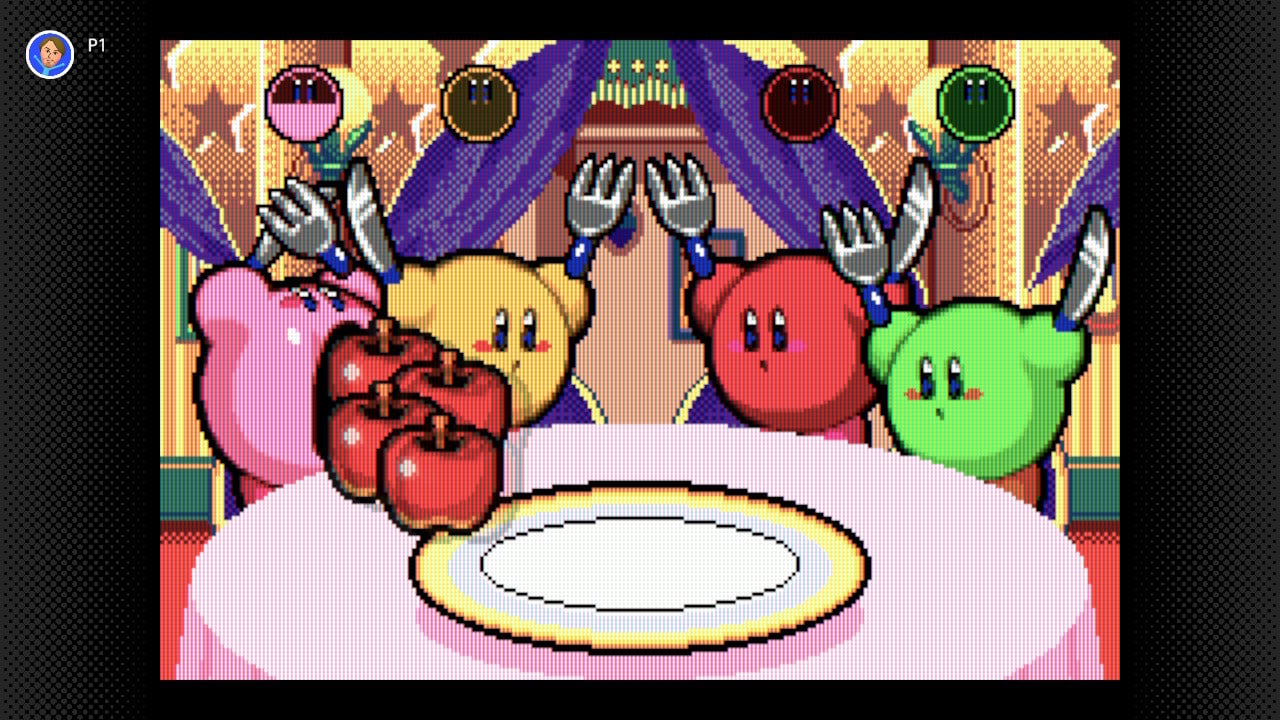
Unfortunately, that’s not the worst of the problems with Kirby & The Amazing Mirror. One conceit is that Kirby has been split into four entities of different colours, and let’s just say that the traditional pink Kirby must have all the brains. The other three Kirbys chaotically bound about, far more irritating than they are helpful. You can’t control them, so you just need to let them dominate the screen with their antics as they steal powers you wanted, get in your way, and even budge you into enemies and hazards.
Ostensibly, these additional three Kirbys are here to help, but good luck with that. Their AI is an embarrassment, and it’s a particular problem when you need one of them to trigger a switch, or a bomb block, or — heaven forbid — help you move something heavy by inhaling it with you. These three Kirbys do not stop moving long enough to realise you need their help, and their inclusion — and necessity — in this game drags the experience down severely. When playing multiplayer, however, each player gets to control a Kirby, and all of you work together or go off your own way and do whatever you want, even being able to go to completely opposite ends of the game world. With other people, it suddenly makes more sense (and, thankfully, the Nintendo Switch Online version enables you to play with others locally or over the internet).
It was a bizarre enough decision to give Kirby a cellphone in this game (yes, really), and the fact that he uses it to summon these rampaging nincompoops just adds insult to injury. The fact that the cellphone also has a function that causes you to exit the stage immediately makes things even worse: press the wrong button in the heat of the moment and you’re back to the start. The third or fourth time this happens, you might start to wonder why you’re bothering. We sure did.
The game’s not without its charms, though: the presentation is typically strong, with brilliant visuals and music as always. In fact, playing in short bursts can be quite fun: the classic Kirby actions of inhaling enemies and whooping them with their own weapons are as great here as they ever were. Unfortunately, the game isn’t really structured for short play sessions, what with its maze-like design and long-term goals rather than short, stage-based missions. There are a few minigames available to play which aren’t much fun solo but were largely intended for multiplayer and definitely work better with friends.
The main appeal of the game is meant to be the exploration, and for many it will be. For us, though, the exploration doesn’t feel particularly rewarding, the constant backtracking is unintuitive and dull, and your required companions are a group of hyperactive imbeciles. Fortunately, HAL would eventually get multiple-Kirby gameplay right in Kirby Mass Attack. This time around, though, consider it one big, well-intentioned misstep.
Conclusion
Kirby & The Amazing Mirror tries to introduce a lot of new things to the series, and because of that it was destined from the start to be a divisive title. Ultimately, though, we feel that the innovations here just aren’t particularly fun — certainly not for solo players. Sluggish controls and abysmal AI for your required companions sour the experience, and exploration quickly becomes more of a chore than a reward. Kirby’s had his share of ups and downs, certainly, but this is not the game we want to remember him by.
AppleInsider - Notes for iOS 17 has a right-to-left typing problem
Apple Notes
Users of the iOS Notes app may encounter issues when typing in some right-to-left languages, with iOS 17 not properly handling cursor movement when typing in the app.
The cursor’s movement while text is being typed is pretty well known to computer and mobile device users. Though there are often differences in how the cursor acts for typing left-to-right text or right-to-left versions depending on the language, the actions the cursor takes during that typing is almost universal across platforms and apps.
However, there appears to be a bug in the way that the cursor responds to typing for some languages that rely on reading text from right to left. Raised by an AppleInsider contributor and also spotted on X in a complaint to Apple Support, the cursor is not functioning properly for some right-to-left languages in the Notes app, including Arabic and Hebrew.
In languages that work from the left of the page to the right, the cursor tends to appear towards the right of the passage, or of the most recently typed word. In right-to-left languages, the cursor is supposed to change behavior, so that it can be better placed with text going towards the left of the page.
In AppleInsider’s testing using Hebrew, the bug in Notes has the cursor pinned to the right-hand side of the text string instead of the left. While typing straight without edits, sentences and words come out normally, but you’re typing blind when it comes to the cursor position.
If you attempt to add a word to the middle of an already typed sentence, the new word will appear on the right-hand side at the start of the sentence. Backspacing is also a problem since the cursor is treated as if it’s on the right margin.
For the affected users, the issue effectively means they have to get the sentence right the first time, or suffer problems trying to edit afterward.
It is unclear how many languages are affected by the issue, nor how many users are directly affected, nor if there are specific circumstances that can cause the problem to occur.
For the moment, Apple Support does have at least one English-language report on social media of there being a problem with typing in Notes, so there is an awareness of an issue.


 TLDR: GPT-4 with vision (GPT-4V) is now out for many ChatGPT Plus users in the US and some other regions! You can instruct GPT-4 to analyze image inputs. GPT-4V incorporates additional modalities such as image inputs into
 GPT-4V could explain why a picture was funny by talking about different parts of the image and their connections. The meme in the picture has words on it, which GPT-4V read to help make its answer. However, it made an error. It wrongly said the fried chicken in the image was called “NVIDIA BURGER” instead of “GPU”.
 OpenAI’s GPT-4 with Vision (GPT-4V) represents a significant advancement in artificial intelligence, enabling the analysis of image inputs alongside text.


 Recommended:
 like so:


 Python,
 Langchain,
  Pinecone, and a whole stack of highly
 practical tools of exponential coders in a post-ChatGPT world.