Johnny Turbo needs to clean up Paradise, a cyber city overrun by augmented minions under the cult control of the world's most advanced AI, Syn, who's looking to expand to world domination if not stopped here and now. Wall-running, Hero-Time, chain saw leg augments, flying cars and lots of booms.
Posted by: xSicKxBot - 08-29-2023, 04:17 AM - Forum: Python
- No Replies
[Tut] Prompt Engineers Use This ChatGPT Prompting Formula
5/5 – (1 vote)
In this article, we will delve into the art of crafting effective queries (i.e., prompts) for AI language models like ChatGPT, Bard, and Bing.
A well-formed prompt can make a significant difference in the quality of the responses you receive, saving you time and effort in refining your questions. We will unveil a simple, adaptable formula applicable to various situations, ensuring that you maximize the benefits of these incredible language technologies — and stay on the right side of change.
After grasping the underlying principles of prompt engineering and exploring real-life examples, you’ll be able to harness the full potential of AI-supported language systems.
7 General Prompting Tips
Before giving you the perfect prompting formula, let’s recap some basic prompting tips you may have already considered, but that may not be on your mind.
Be specific: Offer as much detail as possible to ensure the answer is relevant and tailored to your needs. Sounds simple but many people actually skip this step. It’s like talking to your friend; if you don’t share the details of your problems, you’ll get generic “fluff” advice.
State your intentions: Clarifying your intentions helps the AI tailor its response to your specific requirements. For example, if you’re helping a child with homework, specify the need for a simple explanation suitable for their age.
Ensure correct spelling and grammar: Though the AI might figure out most mistakes, addressing any errors in your prompt steers it in the right direction.
Direct the output format: For instance, asking the AI to provide information as a numbered list or a paragraph helps you receive answers in the desired layout.
Follow up with questions: Sometimes, even the perfect prompt might need clarification or additional input to achieve the desired results. Iterative prompting is a powerful technique and many beginners stop the iterative refinement too early.
Experiment with phrasing: If the AI doesn’t understand your query, change or rephrase your prompt for better comprehension. Sometimes a single word can make all the difference. Here’s where prompting is more an art than a science.
Fact-check when necessary: Feed the AI’s output back into the system to verify statements and ensure accuracy. You can even ask ChatGPT to grade its own output and edit or rewrite according to its own grading.
With this out of the way, here’s …
The Perfect Prompting Formula
The formula to achieve this is Context + Specific Information + Intent + Response Format. Use this formula, adapt it to fit your unique inquiries, and you’ll receive valuable results from your AI tools.
Here’s an example prompt that adheres to this formula:
Prompt Example: "I'm a teacher preparing a lesson on the solar system for my 5th-grade students. I want to focus on the planet Mars. Can you provide a brief overview? Please present it in a simple, bullet-point format suitable for 10-year-olds."
Let’s examine how this prompt adheres to our perfect prompting formula:
Context: “I’m a teacher preparing a lesson on the solar system for my 5th-grade students.”
Specific Information: “I want to focus on the planet Mars.”
Intent: “Can you provide a brief overview?”
Response Format: “Please present it in a simple, bullet-point format suitable for 10-year-olds.”
It provides a beautiful output that can be used right away:
When using AI platforms like ChatGPT, Bard, or Bing, providing the proper context is crucial. By introducing yourself or your specific situation, you help the AI better understand your needs and deliver a more relevant answer.
Examples:
Medical Research Context: “I’m a medical researcher studying the effects of prolonged screen time on children’s eyesight. Given the rise in virtual learning and increased screen usage, I’m keen to understand the long-term implications.”
Historical Analysis Context: “I’m a history teacher preparing a lesson on the Renaissance period for high school students. I want to emphasize the influence of this era on modern art, science, and philosophy.”
Entrepreneurial Context: “I’m an entrepreneur in the early stages of developing a sustainable fashion brand. With the growing concern about fast fashion’s environmental impact, I’m looking for insights into sustainable materials and ethical manufacturing processes.”
(2) Specific Information
Be as precise as possible in your request to receive more relevant answers. Instead of simply asking about different dog breeds, for example, narrow down the focus by asking about small breeds suitable for apartment living.
Examples:
Medical Research Specific Information: “I’m focusing on children in the age range of 6-12 years old and the effects of screen exposure on their eyesight.”
Historical Analysis Specific Information: “I’m particularly interested in Leonardo da Vinci’s contributions during the Renaissance, especially his innovations in both art and science.”
Entrepreneurial Specific Information: “I’m considering organic cotton and recycled polyester as potential materials for my fashion brand.”
(3) Intent
Always make your goals clear in the prompt. This could involve explaining the purpose behind your request, such as needing a simple explanation of quantum physics for your son’s science homework. With your intention clearly stated, the AI will generate a response tailored to your needs.
Examples:
Medical Research Intent: “I want to understand the recommended guidelines for screen time for this age group to ensure their eye health.”
Historical Analysis Intent: “I aim to create a lesson plan that highlights da Vinci’s influence on modern disciplines. Can you help me outline his major achievements?”
Entrepreneurial Intent: “I’m looking to make an informed decision on which material to prioritize for my brand. Can you provide insights on their sustainability and market demand?”
(4) Response Format
Guide the output format to receive the information the way you want it. For instance, if you need a step-by-step guide, ask for a list of steps. If you prefer a concise explanation, request that the information be provided in a paragraph. By specifying the format, you ensure that the AI’s response is organized and easy to comprehend.
Examples:
Medical Research Response Format: “Please provide the guidelines in a bullet-point list so I can easily share them with parents.”
Historical Analysis Response Format: “Could you present da Vinci’s achievements in a timeline format, highlighting the years and his corresponding innovations?”
Entrepreneurial Response Format: “I’d appreciate a side-by-side comparison table of the two materials, detailing their sustainability metrics and market demand.”
Let’s try these three full prompts to check the quality of the output with GPT-4 (ChatGPT):
Practical Examples
Example 1: Medical Research Prompt
Prompt Example: "I'm a medical researcher studying the effects of prolonged screen time on children's eyesight, focusing on children in the age range of 6-12 years old and the effects of screen exposure on their eyesight. I want to understand the recommended guidelines for screen time for this age group to ensure their eye health. Please provide the guidelines in a bullet-point list so I can easily share them with parents."
Example 2: Historical Analysis Prompt
Prompt Example: "I'm a history teacher preparing a lesson on the Renaissance period for high school students. I'm particularly interested in Leonardo da Vinci's contributions during the Renaissance, especially his innovations in both art and science. I aim to create a lesson plan that highlights da Vinci's influence on modern disciplines. Could you present da Vinci's achievements in a timeline format, highlighting the years and his corresponding innovations?"
Example 3: Entrepreneurial Prompt
Prompt Example: "I'm an entrepreneur in the early stages of developing a sustainable fashion brand. I'm considering organic cotton and recycled polyester as potential materials for my fashion brand. I'm looking to make an informed decision on which material to prioritize for my brand. Can you provide insights on their sustainability and market demand? I'd appreciate a side-by-side comparison table of the two materials, detailing their sustainability metrics and market demand."
Bonus Example: Python Developer
Prompt Example: "I'm a Python developer working on a web application using the Flask framework. I've encountered an issue where my application isn't connecting to my PostgreSQL database correctly. I need help troubleshooting this connection problem. Could you provide a step-by-step guide to ensure proper database connectivity using Flask and PostgreSQL?"
TLDR & Next Steps
Let’s recap our simple formula: The perfect prompting formula consists of
context,
specific information,
intent, and
response format.
Applying this approach to ChatGPT, Bard, and Bing will significantly improve your results and save time.
Feel free to check out our other Finxter article on Alien technology, aka LLMs, and how they work:
(Indie Deal) Vorax at Gamescom with Open Alpha Ready to Play
HUGE Progress Update on our newest game
[freebies.indiegala.com] We know we usually don't post about this that often, sorry for the long post, but this is a special occasion that we wanted to share with all the community, thank you for your patience. More surprises are coming soon. You can try the updated Open Alpha[freebies.indiegala.com] or Demo for FREE today.
In just a few days we will be present at Gamescom 2023, in Germany. You will be able to find us in hall 10.1 booth B-093 and hall 02.1 stand A-0007.
But for those at home, who can't make it, we also have something HUGE for you. Gain access to a 10 times bigger map (10 square kilometers), vehicles, new weapons and zones. Find out more.
An updated Steam demo and an updated full build. Also exclusive open alpha opportunity for the most loyal fans.
We are talking about new weapons, an expanded map, new enemies and a whole lot more.
If you do not own it yet on Steam, it's fine. You can play the Updated Demo on Steam right now. It's free, it has most of the new elements added to it, you can get a taste of what's to come at Gamescom. Even if on a smaller map (only 1km2), the horror and survival will be the same, just in a smaller dose.
[freebies.indiegala.com]
If you are interested to spice the experience, you can try the Open Alpha on our website[freebies.indiegala.com]. Which, it brings all of the above mentioned plus two exclusive weapons: SAP-6 and the AK-47. With these bad boys at your side your survival chances will exponentially grow...if you find the ammo for them. Find them somewhere well hidden on the map.
[freebies.indiegala.com]
Something HUGE for those who got Full Game Early
Not only you will get access to everything mentioned earlier, but also the possibility to explore the full map. Nearly 10 times bigger (10 square kilometers), with vehicles, new weapons, new enemies and a lot more. Your experience will be close to similar to those from Gamescom.
[vorax.indiegala.com]
If you haven't bought it already, you can get it directly, early and cheaper from our website[vorax.indiegala.com] and support our development progress. If you did, you can already head to your profile library and download the new updated build right now. Keep in mind it does get updated regularly, so you can check back again later for something new.
[vorax.indiegala.com]
And yes, of course, you will also get a Steam Key as soon as it releases on Steam, you will not be forgotten. But in the meantime, make sure you wishlist it, if you haven't already. And if you will be in Cologne next week, see you there, let's meet.
(Free Game Key) Hero of the Kingdom II - Free GOG Game
How to grab Hero of the Kingdom II - Go to the home page of https://www.gog.com/#giveaway - Login and Register - Go to the home page again - Wait for 10 seconds then start searching for Hero of the Kingdom II - on the home page look for "Deal of the Day" (there should be a banner below or above it) - on the banner there is a button "Add to Library" click it - That's it
Gods. Romance. Murder. Musical Numbers?! Play as Grace in a world where Greek Gods live in hiding among us. Change your fate as you draw friends, foes & lovers into song using your powers of musical persuasion to unravel the mystery of the Last Muse's death.
Posted by: xSicKxBot - 08-28-2023, 09:35 AM - Forum: Python
- No Replies
[Tut] Use enumerate() and zip() Together in Python
5/5 – (1 vote)
Understanding enumerate() in Python
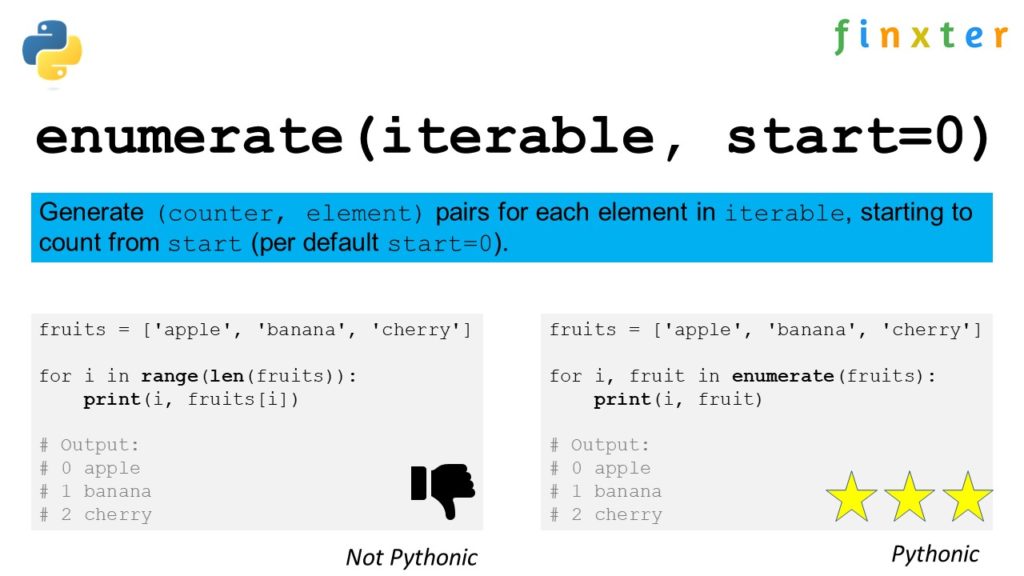
enumerate() is a built-in Python function that allows you to iterate over an iterable (such as a list, tuple, or string) while also accessing the index of each element. In other words, it provides a counter alongside the elements of the iterable, making it possible to keep track of both the index and the value simultaneously.
Here’s a basic example of how the enumerate() function works:
fruits = ['apple', 'banana', 'cherry']

for index, value in enumerate(fruits): print(index, value)
This will output:
0 apple

1 banana

2 cherry
In the example above, the enumerate() function accepts the fruits list as input and returns a tuple containing the index and its corresponding value. The for loop then iterates through these tuples, unpacking them into the variables index and value.
By default, the enumerate() function starts counting the indices from 0. However, you can also specify an optional start argument to change the starting point. For instance, if you want to start counting from 1, you can use the following code:
fruits = ['apple', 'banana', 'cherry']

for index, value in enumerate(fruits, start=1): print(index, value)
This will result in:
1 apple

2 banana

3 cherry
The enumerate() function is particularly useful when you need to modify elements in-place or when working with data that requires you to track the index of elements. It offers a more Pythonic approach to iteration, allowing for cleaner and more concise code compared to using a manual counter variable.
Exploring zip() in Python
The zip() function in Python is a powerful tool for parallel iteration. It takes two or more iterables as arguments and returns an iterator of tuples, each containing elements from the input iterables that share the same index. The size of the resulting zip object depends on the shortest of the input iterables.
Let’s dive into the workings of this useful function. To begin with, consider the following example:
Here, the zip() function combines the given lists names and ages element-wise, with the elements retaining their corresponding positions, creating an iterator of tuples.
Another useful feature of zip() is the ability to unpack the zipped iterator back into the original iterables using the asterisk * operator. For instance:
unzipped = zip(*zipped)

names, ages = unzipped
Keep in mind that zip() works with any iterable, not just lists. This includes tuples, strings, and dictionaries (although the latter requires some additional handling).
Use zip() and enumerate() Together
When combining zip() with enumerate(), you can iterate through multiple lists and access both index and value pairs.
The following code snippet demonstrates this usage:
for index, (name, age) in enumerate(zip(names, ages)): print(f"{index}: {name} is {age} years old.")
This results in the output:
0: Alice is 25 years old.

1: Bob is 30 years old.

2: Charlie is 35 years old.
In this example, the enumerate() function wraps around the zip() function, providing the index as well as the tuple containing the elements from the zipped iterator. This makes it easier to loop through and process the data simultaneously from multiple iterables.
To summarize, the zip() function in Python enables you to efficiently iterate through multiple iterables in parallel, creating a zip object of tuples. When used alongside enumerate(), it provides both index and value pairs, making it an invaluable tool for handling complex data structures.
Using For Loops with Enumerate
In Python, you often encounter situations where you’d like to iterate over a list, tuple, or other iterable objects and at the same time, keep track of the index of the current item in the loop. This can be easily achieved by using the enumerate() function in combination with a for loop.
The enumerate() function takes an iterable as its input and returns an iterator that produces pairs of the form (index, element) for each item in the list. By default, it starts counting the index from 0, but you can also specify a different starting index using the optional start parameter.
Here’s a simple example demonstrating the use of enumerate() with a for loop:
fruits = ['apple', 'banana', 'cherry']

for index, fruit in enumerate(fruits): print(f"{index}: {fruit}")
In the code above, the enumerate(fruits) function creates a list of tuples, where each tuple contains the index and the corresponding element from the fruits list. The for loop iterates through the output of enumerate(), allowing you to access the index and element simultaneously.
The output would be:
0: apple

1: banana

2: cherry
The use of enumerate() can be extended to cases when you want to iterate over multiple lists in parallel. One way to achieve this is by using the zip() function. The zip() function combines multiple iterables (like lists or tuples) element-wise and returns a new iterator that produces tuples containing the corresponding elements from all input iterables.
Here’s an example showing how to use enumerate() and zip() together:
In this code snippet, the zip(fruits, prices) function creates a new iterable containing tuples with corresponding elements from the fruits and prices lists. The enumerate() function is then used to generate index-element tuples, where the element is now a tuple itself, consisting of a fruit and its price.
The output of the code would be:
0: apple - $1.2

1: banana - $0.5

2: cherry - $2.5
Combining enumerate() and zip()
In Python, both enumerate() and zip() are built-in functions that can be used to work with iterables, such as lists or tuples. Combining them allows you to iterate over multiple iterables simultaneously while keeping track of the index for each element. This can be quite useful when you need to process data from multiple sources or maintain the element’s order across different data structures.
The enumerate() function attaches an index to each item in an iterable, starting from 0 by default, or from a specified starting number. Its syntax is as follows:
enumerate(iterable, start=0)
On the other hand, the zip() function merges multiple iterables together by pairing their respective elements based on their positions. Here is the syntax for zip():
zip(iterable1, iterable2, ...)
To combine enumerate() and zip() in Python, you need to enclose the elements of zip() in parentheses and iterate over them using enumerate(). The following code snippet demonstrates how to do this:
list1 = [1, 2, 3]

list2 = ['a', 'b', 'c'] for index, (value1, value2) in enumerate(zip(list1, list2)): print(index, value1, value2)
The output will be:
0 1 a

1 2 b

2 3 c
In this example, zip() pairs the elements from list1 and list2, while enumerate() adds an index to each pair. This enables you to access both the index and the corresponding elements from the two lists simultaneously, making it easier to manipulate or compare the data.
You can also work with more than two iterables by adding them as arguments to the zip() function. Make sure to add extra variables in the loop to accommodate these additional values:
In conclusion, combining enumerate() and zip() in Python provides a powerful way to iterate over multiple iterables while maintaining the index of each element. This technique can be beneficial when working with complex data structures or when order and positionality are essential.
Iterating Through Multiple Iterables
When working with Python, it is common to encounter situations where you need to iterate through multiple iterables simultaneously. Two essential tools to accomplish this task efficiently are the enumerate() and zip() functions.
To iterate through multiple iterables using both enumerate() and zip() at the same time, you can use the following syntax:
list1 = [1, 2, 3]

list2 = ['a', 'b', 'c']

for index, (elem1, elem2) in enumerate(zip(list1, list2)): print(index, elem1, elem2)
In this example, the zip() function creates tuples of corresponding elements from list1 and list2. The enumerate() function then adds the index to each tuple, allowing you to efficiently loop through both lists while keeping track of the current iteration.
Using enumerate() and zip() together, you can confidently and clearly write concise Python code to iterate through multiple iterables in parallel, making your programming tasks more efficient and readable.
Mapping by Index Using enumerate() and zip()
In Python, enumerate() and zip() are powerful functions that can be used together to iterate over multiple lists while keeping track of the index positions of the items. This can be particularly useful when you need to process and map related data like names and ages in separate lists.
enumerate() is a built-in function in Python that allows you to iterate through a list while generating an index number for each element. The function takes an iterable and an optional start parameter for the index, returning pairs of index and value:
names = ['Alice', 'Bob', 'Charlie']

for index, name in enumerate(names): print(index, name)
Output:
0 Alice

1 Bob

2 Charlie
On the other hand, zip() is used to combine multiple iterables. It returns an iterator that generates tuples containing elements from the input iterables, where the first elements in each iterable form the first tuple, followed by the second elements forming the second tuple, and so on:
names = ['Alice', 'Bob', 'Charlie']

ages = [30, 25, 35]

for name, age in zip(names, ages): print(name, age)
Output:
Alice 30

Bob 25

Charlie 35
By using both enumerate() and zip() together, we can efficiently map and process data from multiple lists based on their index positions. Here’s an example that demonstrates how to use them in combination:
names = ['Alice', 'Bob', 'Charlie']

ages = [30, 25, 35] for index, (name, age) in enumerate(zip(names, ages)): print(index, name, age)
Output:
0 Alice 30

1 Bob 25

2 Charlie 35
In this example, we’ve combined enumerate() with zip() to iterate through both the names and ages lists simultaneously, capturing the index, name, and age in variables. This flexible approach allows you to process and map data from multiple lists based on index positions efficiently, using a clear and concise syntax.
Error Handling and Edge Cases
When using enumerate() and zip() together in Python, it’s essential to be aware of error handling and possible edge cases. Both functions provide a way to iterate over multiple iterables, with enumerate() attaching an index to each item and zip() combining the elements of the iterables. However, issues may arise when not used appropriately.
One common issue when using zip() is mismatched iterable lengths. If you try to zip two lists with different lengths, zip() will truncate the output to the shortest list, potentially leading to unintended results:
In the case of enumerate(), it’s essential to ensure that the function is used with parentheses when combining with zip(). This is because enumerate() returns a tuple with the index first and the element second, as shown in this example:
When combining enumerate() and zip(), proper use of parentheses ensures correct functionality:
list1 = [1, 2, 3]

list2 = ['a', 'b', 'c']

combined = [(i, *t) for i, t in enumerate(zip(list1, list2))]

print(combined)

# Output: [(0, 1, 'a'), (1, 2, 'b'), (2, 3, 'c')]
Frequently Asked Questions
How to use enumerate() and zip() together for iterating multiple lists in Python?
You can use enumerate() and zip() together in Python by combining them within a for loop. enumerate() adds an index to each item, while zip() merges the iterables together by pairing items from each list. Here’s an example:
list1 = [1, 2, 3]

list2 = [4, 5, 6] for i, (a, b) in enumerate(zip(list1, list2)): print(i, a, b)
What is the difference between using enumerate() and zip() individually and together?
enumerate() is designed to add an index to the items in an iterable, while zip() is intended to combine items from two or more iterables. When used together, they allow you to access the index, as well as elements from multiple lists simultaneously. You can achieve this by using them in a for loop.
How can I access both index and elements of two lists simultaneously using enumerate() and zip()?
By combining enumerate() and zip() in a for loop, you can access the index, as well as elements from both lists simultaneously. Here’s an example:
list1 = [1, 2, 3]

list2 = [4, 5, 6] for i, (a, b) in enumerate(zip(list1, list2)): print(i, a, b)
Is there any alternative way to use enumerate() and zip() together?
Yes, you may use a different looping structure, like a list comprehension, to use enumerate() and zip() together:
list1 = [1, 2, 3]

list2 = [4, 5, 6] combined = [(i, a, b) for i, (a, b) in enumerate(zip(list1, list2))]

print(combined)
How can I customize the starting index when using enumerate() and zip() together in Python?
You can customize the starting index in enumerate() by using the start parameter. For example:
list1 = [1, 2, 3]

list2 = [4, 5, 6] for i, (a, b) in enumerate(zip(list1, list2), start=1): print(i, a, b)
What are the performance implications of using enumerate() and zip() together?
Using enumerate() and zip() together is generally efficient, as both functions are built-in and designed for performance. However, for large data sets or nested loops, you may experience some performance reduction. It is essential to consider the performance implications based on your specific use case and the size of the data being processed.
[www.indiegala.com] The Lovecraftian cosmic entity has blessed this indie game bundle with utter and indescribable chaotic energies. [www.indiegala.com]
Boolean operators in Python help you create conditional statements to control the flow of your program. Python provides three basic Boolean operators: and, or, and not. These operators help you construct sophisticated expressions to evaluate the truth or falsity of different conditions.
And Operator
The and operator returns True if both of its operands are true, and False otherwise. You can use it to check multiple conditions at once.
Here is a simple example involving the and operator:
age = 25

income = 50000 if age >= 18 and income >= 30000: print("Eligible for loan")

else: print("Not eligible for loan")
In this example, the condition age >= 18 and income >= 30000 must be True for the program to print "Eligible for loan". If either age is less than 18 or income is less than 30,000, the condition evaluates to False, and the program will print "Not eligible for loan".
Or Operator
The or operator returns True as long as at least one of its operands is true. You can use it to specify alternatives in your code.
In this case, if the student_score is 90 or higher, or if the student has completed 10 or more extra credit, the program will print “Student grade: A”. Otherwise, it will print "Student grade: B".
Not Operator
The not operator inverts the truth value of the expression that follows it. It takes only one operand and returns True if the operand is False, and vice versa. The not operator can be used to check if a certain condition is not met.
Here is an example:
message = "Hello, World!" if not message.startswith("Hi"): print("Message does not start with 'Hi'")

else: print("Message starts with 'Hi'")
In this example, the program checks whether the messagedoes not start with the string "Hi". If it doesn’t, the condition not message.startswith("Hi") evaluates to True, and the program prints "Message does not start with 'Hi'". If the condition is False, the program prints "Message starts with 'Hi'".
Boolean Values in Python
In Python, Boolean values represent one of two states: True or False. These values are essential for making decisions and controlling the flow of your program. This section covers the basics of Boolean values, the None value, and how to convert different data types into Boolean values.
True and False Values
Boolean values in Python can be represented using the keywords True and False. They are instances of the bool class and can be used with various types of operators such as logical, comparison, and equality operators.
Here’s an example using Boolean values with the logical and operator:
x = True

y = False

result = x and y

print(result) # Output: False
None Value
In addition to True and False, Python provides a special value called None. None is used to represent the absence of a value or a null value. While it’s not a Boolean value, it is considered falsy when used in a Boolean context:
if None: print("This won't be printed.")
Converting to Boolean Type
In Python, various data types such as numbers, strings, sets, lists, and tuples can also be converted to Boolean values using the bool() function. When converted, these data types will yield a Truthy or Falsy value:
Numbers: Any non-zero number will be True, whereas 0 will be False.
Strings: Non-empty strings will be True, and an empty string '' will be False.
Sets, Lists, and Tuples: Non-empty collections will be True, and empty collections will be False.
Here are a few examples of converting different data types into Boolean values:
In Python, Boolean operators (and, or, not) allow you to create and manipulate Boolean expressions to control the flow of your code. This section will cover creating Boolean expressions and using them in if statements.
Creating Boolean Expressions
A Boolean expression is a statement that yields a truth value, either True or False. You can create Boolean expressions by combining conditions using the and, or, and not operators, along with comparison operators such as ==, !=, >, <, >=, and <=.
Here are some examples:
a = 10

b = 20 # Expression with "and" operator

expr1 = a > 5 and b > 30 # Expression with "or" operator

expr2 = a > 5 or b > 15 # Expression with "not" operator

expr3 = not (a == b)
In the above code snippet, expr1 evaluates to True, expr2 evaluates to True, and expr3 evaluates to True. You can also create complex expressions by combining multiple operators:
expr4 = (a > 5 and b < 30) or not (a == b)
This expression yields True, since both (a > 5 and b < 30) and not (a == b) evaluate to True.
Using Boolean Expressions in If Statements
Boolean expressions are commonly used in if statements to control the execution path of your code. You can use a single expression or combine multiple expressions to check various conditions before executing a particular block of code.
Here’s an example:
x = 10

y = 20 if x > 5 and y > 30: print("Both conditions are met.")

elif x > 5 or y > 15: print("At least one condition is met.")

else: print("Neither condition is met.")
In this example, the if statement checks if both conditions are met (x > 5 and y < 30); if true, it prints "Both conditions are met". If that expression is false, it checks the elif statement (x > 5 or y > 15); if true, it prints "At least one condition is met." If both expressions are false, it prints "Neither condition is met."
Logical Operators and Precedence
In Python, there are three main logical operators: and, or, and not. These operators are used to perform logical operations, such as comparing values and testing conditions in your code.
Operator Precedence
Operator precedence determines the order in which these logical operators are evaluated in a complex expression. Python follows a specific order for logical operators:
not
and
or
Here is an example to illustrate precedence:
result = True and False or True
In this case, and has a higher precedence than or, so it is evaluated first. The result would be:
result = (True and False) or True
After the and operation, it becomes:
result = False or True
Finally, the result will be True after evaluating the or operation.
Applying Parentheses
You can use parentheses to change the order of evaluation or make your expressions more readable. When using parentheses, operations enclosed within them are evaluated first, regardless of precedence rules.
Let’s modify our previous example:
result = True and (False or True)
Now the or operation is performed first, resulting in:
result = True and True
And the final result is True.
Truthy and Falsy Values
Tip: In Python, values can be considered either “truthy” or “falsy” when they are used in a boolean context, such as in an if statement or a while loop. Truthy values evaluate to True, while falsy values evaluate to False. Various data types, like numerics, strings, lists, tuples, dictionaries, sets, and other sequences, can have truthy or falsy values.
Determining Truthy and Falsy Values
When determining the truth value of an object in Python, the following rules apply:
Numeric types (int, float, complex): Zero values are falsy, while non-zero values are truthy.
Strings: Empty strings are falsy, whereas non-empty strings are truthy.
Lists, tuples, dictionaries, sets, and other sequences: Empty sequences are falsy, while non-empty sequences are truthy.
Here are some examples:
if 42: # truthy (non-zero integer) pass if "hello": # truthy (non-empty string) pass if [1, 2, 3]: # truthy (non-empty list) pass if (None,): # truthy (non-empty tuple) pass if {}: # falsy (empty dictionary) pass
Using __bool__() and __len__()
Python classes can control their truth value by implementing the __bool__() or __len__() methods.
Expert Knowledge: If a class defines the __bool__() method, it should return a boolean value representing the object’s truth value. If the class does not define __bool__(), Python uses the __len__() method to determine the truth value: if the length of an object is nonzero, the object is truthy; otherwise, it is falsy.
Here’s an example of a custom class implementing both __bool__() and __len__():
class CustomClass: def __init__(self, data): self.data = data def __bool__(self): return bool(self.data) # custom truth value based on data def __len__(self): return len(self.data) # custom length based on data custom_obj = CustomClass([1, 2, 3]) if custom_obj: # truthy because custom_obj.data is a non-empty list pass
Comparisons and Boolean Expressions
In Python, boolean expressions are formed using comparison operators such as greater than, less than, and equality. Understanding these operators can help you write more efficient and logical code. In this section, we will dive into the different comparison operators and how they work with various expressions in Python.
To combine multiple comparisons, you can use logical operators like and, or, and not. These operators can be used to create more complex conditions with multiple operands.
Here’s an example:
x = 5

y = 10

z = 15 if x > y and y < z: print("All conditions are true")
In this example, the and operator checks if both conditions are True. If so, it prints the message. We can also use the or operator, which checks if any one of the conditions is True:
if x > y or y < z: print("At least one condition is true")
Short-Circuit Evaluation
Python uses short-circuit evaluation for boolean expressions, meaning that it will stop evaluating further expressions as soon as it finds one that determines the final result. This can help improve the efficiency of your code.
For instance, when using the and operator, if the first operand is False, Python will not evaluate the second operand, because it knows the entire condition will be False:
if False and expensive_function(): # This won't execute because the first operand is False pass
Similarly, when using the or operator, if the first operand is True, Python will not evaluate the second operand because it knows the entire condition will be True:
if True or expensive_function(): # This will execute because the first operand is True pass
Common Applications of Boolean Operations
In Python, Boolean operations are an essential part of programming, with and, or, not being the most common operators. They play a crucial role in decision-making processes like determining the execution paths that your program will follow. In this section, we will explore two major applications of Boolean operations – Conditional Statements and While Loops.
Conditional Statements
Conditional statements in Python, like if, elif, and else, are often used along with Boolean operators to compare values and determine which block of code will be executed. For example:
x = 5

y = 10 if x > 0 and y > 0: print("Both x and y are positive")

elif x < 0 or y < 0: print("Either x or y is negative (or both)")

else: print("Both x and y are zero or one is positive and the other is negative")
Here, the and operator checks if both x and y are positive, while the or operator checks if either x or y is negative. These operations allow your code to make complex decisions based on multiple conditions.
While Loops
While loops in Python are often paired with Boolean operations to carry out a specific task until a condition is met. The loop continues as long as the test condition remains True. For example:
count = 0 while count < 10: if count % 2 == 0: print(f"{count} is an even number") else: print(f"{count} is an odd number") count += 1
In this case, the while loop iterates through the numbers 0 to 9, using the not operator to check if the number is even or odd. The loop stops when the variable count reaches 10.
Frequently Asked Questions
How do you use ‘and’, ‘or’, ‘not’ in Python boolean expressions?
In Python, and, or, and not are used to combine or modify boolean expressions.
and: Returns True if both operands are True, otherwise returns False.
or: Returns True if at least one of the operands is True, otherwise returns False.
not: Negates the boolean value.
Example:
a = True

b = False print(a and b) # False

print(a or b) # True

print(not a) # False
How are boolean values assigned in Python?
In Python, boolean values can be assigned using the keywords True and False. They are both instances of the bool type. For example:
is_true = True

is_false = False
What are the differences between ‘and’, ‘or’, and ‘and-not’ operators in Python?
and and or are both binary operators that work with two boolean expressions, while and-not is not a single operator but a combination of and and not. Examples:
a = True

b = False print(a and b) # False

print(a or b) # True

print(a and not b) # True (since 'not b' is True)
How do I use the ‘not equal’ relational operator in Python?
In Python, the not equal relational operator is represented by the symbol !=. It returns True if the two operands are different and False if they are equal. Example:
x = 5

y = 7 print(x != y) # True
What are the common mistakes with Python’s boolean and operator usage?
Common mistakes include misunderstanding operator precedence and mixing and, or, and not without proper grouping using parentheses.
Example:
a = True

b = False

c = True print(a and b or c) # True (because 'and' is evaluated before 'or')

print(a and (b or c)) # False (using parentheses to change precedence)
How is the ‘//’ floor division operator related to boolean operators in Python?
The // floor division operator is not directly related to boolean operators. It’s an arithmetic operator that performs division and rounds the result down to the nearest integer. However, you can use it in boolean expressions as part of a condition, like any other operator.
Example:
x = 9

y = 4 is_divisible = x // y == 2

print(is_divisible) # True
[www.indiegala.com] The Lovecraftian cosmic entity has blessed this indie game bundle with utter and indescribable chaotic energies. [www.indiegala.com]
The AI scaling laws could be the biggest finding in computer science since Moore’s Law was introduced. In my opinion, these laws haven’t gotten the attention they deserve (yet), even though they could show a clear way to make considerable improvements in artificial intelligence. This could change every industry in the world, and it’s a big deal.
ChatGPT Is Only The Beginning
In recent years, AI research has focused on increasing compute power, which has led to impressive improvements in model performance. In 2020, OpenAI demonstrated that bigger models with more parameters could yield better returns than simply adding more data with their paper on Scaling Laws for Neural Language Models.
This research paper explores how the performance of language models changes as we increase the model’s size, the amount of data used to train it, and the computing power used in training.
The authors found that the performance of these models, measured by their ability to predict the next word in a sentence, improves in a predictable way as we increase these factors, with some trends continuing over a wide range of values.
For example, a model that’s 10 times larger or trained on 10 times more data will perform better, but the exact improvement can be predicted by a simple formula.
Interestingly, other factors like how many layers the model has or how wide each layer is don’t have a big impact within a certain range. The paper also provides guidelines for training these models efficiently.
For instance, it’s often better to train a very large model on a moderate amount of data and stop before it fully adapts to the data, rather than using a smaller model or more data.
In fact, I’d argue that transformers, the technology behind large language models are the real deal as they just don’t converge:
This development sparked a race among companies to create models with more and more parameters, such as GPT-3 with its astonishing 175 billion parameters. Microsoft even released DeepSpeed, a tool designed to handle (in theory) trillions of parameters!
However, findings from DeepMind’s 2022 paper Training Compute – Optimal Large Language Models indicate that it’s not just about model size – the number of training tokens (data) also plays a crucial role. Until recently, many large models were trained using about 300 billion tokens, mainly because that’s what GPT-3 used.
DeepMind decided to experiment with a more balanced approach and created Chinchilla, a Large Language Model (LLM) with fewer parameters—only 70 billion—but a much larger dataset of 1.4 trillion training tokens. Surprisingly, Chinchilla outperformed other models trained on only 300 billion tokens, regardless of their parameter count (whether 300 billion, 500 billion, or 1 trillion).
What Does This Mean for You?
First, it means that AI models are likely to significantly improve as we throw more data and more compute on them. We are nowhere near the upper ceiling of AI performance by simply scaling up the training process without needing to invent anything new.
This is a simple and straightforward exercise and it will happen quickly and help scale these models to incredible performance levels.
Soon we’ll see significant improvements of the already impressive AI models.
How the AI Scaling Laws May Be as Important as Moore’s Law
Accelerating Technological Advancements: Just as Moore’s Law predicted a rapid increase in the power and efficiency of computer chips, the scaling laws in AI could lead to a similar acceleration in the development of AI technologies. As AI models become larger and more powerful, they could enable breakthroughs in fields such as natural language processing, computer vision, and robotics. This could lead to the creation of more advanced and capable AI systems, which could in turn drive further technological advancements.
Economic Growth and Disruption: Moore’s Law has been a key driver of economic growth and innovation in the tech industry. Similarly, the scaling laws in AI could lead to significant economic growth and disruption across various industries. As AI technologies become more powerful and efficient, they could be used to automate tasks, optimize processes, and create new business models. This could lead to increased productivity, reduced costs, and the creation of new markets and industries.
Societal Impact: Moore’s Law has had a profound impact on society, enabling the development of technologies such as smartphones, the internet, and social media. The scaling laws in AI could have a similar societal impact, as AI technologies become more integrated into our daily lives. AI systems could be used to improve healthcare, education, transportation, and other areas of society. This could lead to improved quality of life, increased access to resources, and new opportunities for individuals and communities.
Frequently Asked Questions
How can neural language models benefit from scaling laws?
Scaling laws can help predict the performance of neural language models based on their size, training data, and computational resources. By understanding these relationships, you can optimize model training and improve overall efficiency.
What’s the connection between DeepMind’s work and scaling laws?
DeepMind has conducted extensive research on scaling laws, particularly in the context of artificial intelligence and deep learning. Their findings have contributed to a better understanding of how model performance scales with various factors, such as size and computational resources. OpenAI has then pushed the boundary and scaled aggressively to reach significant performance improvements with GPT-3.5 and GPT-4.
How do autoregressive generative models follow scaling laws?
Autoregressive generative models, like other neural networks, can exhibit scaling laws in their performance. For example, as these models grow in size or are trained on more data, their ability to generate high-quality output may improve in a predictable way based on scaling laws.
Can you explain the mathematical representation of scaling laws in deep learning?
A scaling law in deep learning typically takes the form of a power-law relationship, where one variable (e.g., model performance) is proportional to another variable (e.g., model size) raised to a certain power. This can be represented as: Y = K * X^a, where Y is the dependent variable, K is a constant, X is the independent variable, and a is the scaling exponent.
Which publication first discussed neural scaling laws in detail?
The concept of neural scaling laws was first introduced and explored in depth by researchers at OpenAI in a paper titled “Language Models are Few-Shot Learners”. This publication has been instrumental in guiding further research on scaling laws in AI.
Here’s a short excerpt from the paper:
OpenAI Paper:
“Here we show that scaling up language models greatly improves task-agnostic, few-shot performance, sometimes even reaching competitiveness with prior state-of-the-art fine-tuning approaches.
Specifically, we train GPT-3, an autoregressive language model with 175 billion parameters, 10x more than any previous non-sparse language model, and test its performance in the few-shot setting.
[…]
GPT-3 achieves strong performance on many NLP datasets, including translation, question-answering, and cloze tasks, as well as several tasks that require on-the-fly reasoning or domain adaptation, such as unscrambling words, using a novel word in a sentence, or performing 3-digit arithmetic.”
Is there an example of a neural scaling law that doesn’t hold true?
While scaling laws can often provide valuable insights into AI model performance, they are not always universally applicable. For instance, if a model’s architecture or training methodology differs substantially from others in its class, the scaling relationship may break down, and predictions based on scaling laws might not hold true.



 Prompt Example:


 Academy:








 Recommended:


 Tip: In Python, values can be considered either “truthy” or “falsy” when they are used in a boolean context, such as in an
  Expert Knowledge: If a class defines the


 In my opinion, these laws haven’t gotten the attention they deserve (yet), even though they could show a clear way to make considerable improvements in artificial intelligence. This could change every industry in the world, and it’s a big deal.


