The Turtle beckons! You have been selected by a tribe of peace-loving Meeps to save the life of their World Turtle, a giant space reptile carrying the entire world as they know it on its back. Establish a new way for Meeps to survive and create a sustainable society... All the while feeding the great World Turtle to ensure that it doesn't perish along its endless way. https://www.youtube.com/watch?v=L79WX62sUX8&ab_channel=Re%3AcOgMission
Join the footbrawl! Smash opponents off the arena and score goals in this lightning-fast 3v3 free-to-play game. Squad up with friends and choose from a growing cast of colorful Strikers to sling slimes, toss tofu, and rocket boost to victory.
AutoGPT ist eine experimentelle Open-Source-Anwendung, die die Fähigkeiten des GPT-4-Sprachmodells demonstriert. Es entwickelt und verwaltet Unternehmen autonom mit dem Ziel, ihren Nettovermögenswert zu erhöhen . Als eines der ersten Beispiele für GPT-4, das vollständig autonom arbeitet, erweitert AutoGPT die Grenzen dessen, was mit KI möglich ist Quelle.
Mit AutoGPT können Sie die Leistungsfähigkeit künstlicher Intelligenz nutzen, um groß angelegte Projekte in kürzester Zeit zu erstellen und dabei viel Zeit und Geld zu sparen . Beispielsweise kann es die SEO Ihrer Website erheblich verbessern und sie aktiver und professioneller erscheinen lassen Quelle.
So sieht es aus, wenn AutoGPT auf meinem Computer läuft – es öffnet automatisch den Browser, besucht Websites, führt webbasierte Recherchen durch und schreibt Dateien auf meinem Computer:
Mit AutoGPT zu beginnen ist einfach! Befolgen Sie einfach diese Schritte:
Schritt 1: Besuchen Sie das Auto-GPT-Repository auf GitHub, wo Sie alle notwendigen Dateien und Anweisungen finden .
Schritt 2: Treten Sie der Auto-GPT-Discord-Community bei, um Fragen zu stellen und sich mit Gleichgesinnten auszutauschen .
Schritt 3: Folgen Sie dem Projekt-Ersteller, Torantulino, auf Twitter, um über die neuesten Entwicklungen und Fortschritte auf dem Laufenden zu bleiben .
Denken Sie daran, dass die anfängliche Einrichtung zwar etwas Zeit in Anspruch nehmen kann, es sich jedoch lohnt, wenn Sie die fantastischen Vorteile sehen, die AutoGPT für Ihren Content-Erstellungsprozess bieten kann .
Viel Spaß beim Experimentieren!
Einführung in AutoGPT
AutoGPT ist ein fortschrittliches Sprachmodell, das auf der GPT-3.5-Architektur basiert und darauf ausgelegt ist, hochwertigen Text mit minimalem Benutzereingriff zu generieren .
In diesem Abschnitt führen wir Sie durch den Prozess der Einführung in AutoGPT, einschließlich der Voraussetzungen und Vorbereitung sowie der Installation und Konfiguration. Lasst uns eintauchen!
Voraussetzungen und Vorbereitung
Bevor Sie mit der Installation beginnen, stellen Sie sicher, dass Sie die folgenden Voraussetzungen erfüllen:
Ein Computer mit Internetzugang
Python installiert (neueste stabile Version)
Zugang zu GitHub zum Herunterladen des AutoGPT-Repositorys
Sobald Sie all diese Voraussetzungen erfüllt haben, ist es an der Zeit, Ihren Computer für die Installation vorzubereiten. Beginnen Sie, indem Sie zu dem Verzeichnis navigieren, in dem Sie AutoGPT herunterladen möchten.
Wenn Sie eine virtuelle Umgebung für Python-Projekte bevorzugen, aktivieren Sie diese. Mit eingerichteter Umgebung sind Sie bereit, AutoGPT zu installieren.
Installation und Konfiguration
Das Installieren von AutoGPT ist ein Kinderspiel ! Um zu beginnen, klonen Sie das AutoGPT-Repository von GitHub:
Navigieren Sie anschließend zum neu erstellten Auto-GPT-Verzeichnis und installieren Sie die erforderlichen Abhängigkeiten. Dies kann normalerweise mit einem einzigen Befehl erledigt werden, wie zum Beispiel:
pip install -r requirements.txt
Sobald die Abhängigkeiten installiert sind, sind Sie bereit, AutoGPT zu verwenden ! Denken Sie daran, auf die AutoGPT-GitHub-Seite für zusätzliche Informationen und Dokumentationen zu verweisen, die Ihnen helfen, das Beste aus diesem leistungsstarken Tool herauszuholen . Von GitHub:
5 Schritte zur einfachen Installation
Um Auto-GPT zu installieren, befolgen Sie diese fünf grundlegenden Schritte:
Schritt 1: Stellen Sie sicher, dass Sie alle oben genannten Anforderungen erfüllen. Wenn nicht, installieren/besorgen Sie sie.
Die folgenden Befehle sollten in einem CMD-, Bash- oder PowerShell-Fenster ausgeführt werden. Um dies zu tun, gehen Sie zu einem Ordner auf Ihrem Computer, klicken Sie oben in den Ordnerpfad und geben Sie CMD ein, dann drücken Sie die Eingabetaste.
Ich verwende PowerShell unter Windows anstelle von CMD für eine einfachere Navigation.
Schritt 2: Klonen Sie das Repository. Sie benötigen Git installiert, aber Sie können stattdessen einfach die ZIP-Datei herunterladen, indem Sie auf die Schaltfläche oben auf der GitHub-Seite klicken.
Schritt 3: Navigieren Sie zum Projektverzeichnis: Geben Sie dies in Ihr CMD-Fenster ein, Sie möchten das CMD-Fenster zum Repository navigieren, das Sie gerade heruntergeladen haben.
cd 'Auto-GPT'
Schritt 4: Installieren Sie die erforderlichen Abhängigkeiten: Geben Sie dies erneut in Ihr CMD-Fenster ein
pip install -r requirements.txt
Schritt 5: Benennen Sie .env.template in .env um und füllen Sie Ihren OPENAI_API_KEY aus. Wenn Sie den Sprachmodus verwenden möchten, füllen Sie auch Ihren ELEVEN_LABS_API_KEY aus. Besorgen Sie sich Ihren OpenAI-API-Schlüssel von: https://platform.openai.com/account/api-keys.
Das war’s! Sie haben AutoGPT erfolgreich auf Ihrem Computer eingerichtet. Jetzt können Sie das erstaunliche Potenzial dieses KI-gesteuerten Sprachmodells erkunden .
10 Anwendungen und Anwendungsfälle aus der Praxis
AutoGPT bietet eine Vielzahl praktischer Anwendungen, die Ihre täglichen Aufgaben vereinfachen und Ihre Projekte verbessern können. Hier sind zehn Anwendungsfälle aus der Praxis, bei denen Sie die Möglichkeiten von AutoGPT nutzen können:
Internetrecherche : AutoGPT kann Ihnen helfen, das Internet zu durchsuchen und Suchvorgänge durchzuführen, um relevante Informationen zu finden und Ihnen Zeit und Energie zu sparen.
Autonomes Programmieren und Debuggen: Nutzen Sie die Leistungsfähigkeit der KI, um schneller und effizienter als je zuvor Code zu schreiben und zu debuggen.
Social Media Management: Setzen Sie AutoGPT als Twitter-Bot ein, der autonom ansprechende Inhalte generiert und veröffentlicht, um Ihre Online-Präsenz auszubauen.
Inhalte erstellen: Verbessern Sie Ihre Schreibfähigkeiten, indem Sie AutoGPT für kreative Aufgaben wie Geschichtenerzählen, Artikelverfassen oder sogar Dichten verwenden.
Bessere Entscheidungsfindung: Nutzen Sie die fundierten Vorhersagen und Erkenntnisse von AutoGPT, um Sie bei persönlichen und beruflichen Entscheidungen zu unterstützen.
Individuelle Chatbots: Erstellen Sie intelligente Chatbots, die mit Benutzern interagieren und informative Antworten an ihre Bedürfnisse anpassen können.
Sprachübersetzung : Überwinden Sie Sprachbarrieren, indem Sie AutoGPT nutzen, um Texte mühelos in mehreren Sprachen zu übersetzen.
Online-Nachhilfe: Unterstützen und helfen Sie Schülern bei ihren Studien, indem Sie AutoGPT als virtuellen Lernbegleiter einsetzen.
E-Mail-Verwaltung: Rationalisieren Sie Ihren Posteingang, indem Sie AutoGPT beauftragen, E-Mails zu sortieren, wichtige Nachrichten zu kennzeichnen und automatisch auf Routineanfragen zu antworten.
Simulation und Modellierung: Verbessern Sie Ihr Verständnis komplexer Systeme, indem Sie die Fähigkeit von AutoGPT nutzen, verschiedene Szenarien zu simulieren und zu analysieren.
Indem Sie AutoGPT in Ihre Arbeit integrieren, können Sie neue Möglichkeiten erschließen und Ihre Projekte auf die nächste Stufe heben. Legen Sie noch heute los und entdecken Sie die erstaunlichen Vorteile, die auf Sie warten!
BANG! A single bullet rings out in the dark city. But as one life ends, the story is just getting started... Sissel wakes up as a ghost and realises he has lost his memory along with his life https://www.youtube.com/watch?v=8Ob83jbeJ4Y&ab_channel=CapcomUSA
Akama. A lone island, sitting in the middle of an endless ocean, and the site of a magical phenomenon known only as the Rift. It was once a source of limitless power for humanity through magical creatures called the Ateyan. Capable of incredible and wonderful feats of magic, they lived alongside humanity for centuries - until something destroyed this harmony. https://www.youtube.com/watch?v=Aq59s2LeJoc&ab_channel=IGN
Arto is a colorful hack-n-slash action-RPG, a fast-paced journey into a desolate, desaturated world that you bring back to life with every step you take. Arm yourself with a varied arsenal of weapons and spells to unlock and upgrade, and the magic ability to shoot beams of paint. You’ll begin a journey through wildly different biomes – each is presented in different perspectives and art styles and brings different gameplay mechanics to the experience! https://www.youtube.com/watch?v=JYgyUngr3UI&ab_channel=OrionGamesSTU
Star Wars Jedi: Survivor picks up five years after the events of Star Wars Jedi: Fallen Order. Cal must stay one step ahead of the Empire's constant pursuit as he continues to feel the weight of being one of the last remaining Jedi in the galaxy. Developed by the veteran team at Respawn Entertainment, Jedi: Survivor will expand upon iconic Star Wars stories, worlds, and characters, and thrilling combat first experienced in Jedi: Fallen Order.
Posted by: xSicKxBot - 05-08-2023, 04:28 AM - Forum: Python
- No Replies
Python Async Function
5/5 – (1 vote)
As a Python developer, you might have encountered the terms async and await, wondering what they are and how to use them in your projects.
Async functions enable you to write concurrent code using the async/await syntax. This powerful duo allows you to perform multiple tasks simultaneously without blocking the execution of your code. Think of it as having multiple browser tabs open; while one page loads, you can continue browsing other tabs. This capability means your Python applications can become faster, more efficient, and capable of handling many I/O operations.
To get started with async functions, you’ll need to get acquainted with Python’s asyncio library, which serves as a foundation for numerous asynchronous frameworks such as high-performance network and web servers, database connection libraries, and distributed task queues.
Mastering async functions can truly elevate your Python programming skills and help you build powerful and responsive applications.
Python Async Function Basics
First, you’ll learn the basics of Python async functions, which can help improve the performance of your asynchronous programming.
We’ll cover
async functions without await,
an async function example, async function return, and
async function call.
Async Function Without Await
You might wonder if it’s possible to create an async function without using the await keyword. Well, it is!
However, without await, the async function becomes somewhat less useful, since you won’t be able to pause its execution and yield control back to the event loop.
This means your async code will not be able to achieve cooperative concurrency, and other coroutines might be stuck waiting for their turn to execute. It’s generally a good idea to use await when working with async functions for more efficient asynchronous programming.
Async Function Example
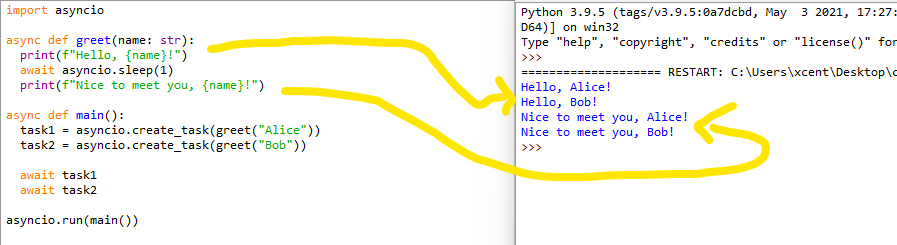
Let’s dive into a simple example of using an async function in Python with asyncio:
In this example, an async function greet is declared, which prints a greeting message, waits for 1 second using asyncio.sleep, and then prints another message.
The main asynchronous function creates two tasks to call greet with different names, running them concurrently.
Async Function Return
When you want to return a value from an async function, just use the return statement as you would in regular functions. However, keep in mind that the returned value will be wrapped in an asyncio.Future object, not the actual value.
You’ll need to use await to get the value when calling this async function.
Here, calculate_result is an async function that returns a value after asynchronously waiting for 1 second. In the main() function, you can use await to get the actual value and print it.
Async Function Call
To call an async function, you can’t simply use the normal function call syntax, because doing so would just return a coroutine object, not the actual result of the function. Instead, you have to use the await keyword to call the async function, or use asyncio.create_task or similar functions to run it concurrently:
# Using `await` to call async function

result = await async_function() # Using `asyncio.create_task` to run concurrently

task = asyncio.create_task(async_function())
Remember to always use the appropriate method to call your async functions in order to achieve efficient asynchronous programming with Python’s powerful async/await syntax.
Advanced Async Function Concepts
Next, you’ll explore advanced async function concepts to give you a better understanding of how they work in Python. Ready? Let’s dive in!
Async Function Decorator
To create an async function, you’ll use the async def syntax. This means you don’t have to use a decorator, but you can still decorate asynchronous functions with the @some_decorator syntax for better modularity in your programs.
For instance, consider using @asyncio.coroutine with a yield from syntax if you’re working with Python 3.4 or earlier. Or simply upgrade to newer versions!
Async Function Type Hint
Type hints help improve the readability of your async code. Specify the input and output types of your async function using the typing module’s Coroutine and asyncio‘s Future objects.
An async function, also known as a coroutine, returns a coroutine object when called. You can use it as a direct call or pass it to an event loop to run the async function using asyncio.run() or loop.run_until_complete().
Keep in mind coroutine objects aren’t executed until you explicitly use an event loop or an await expression.
Async Function Await
When writing async functions, the await keyword is crucial. It allows you to pause the execution of a coroutine and wait for a result without blocking other coroutines.
You’ll often use await with I/O-bound operations, like reading from files, interacting with network services, or retrieving resources, which can take a significant amount of time.
An async function’s type is coroutine. So when defining your async function, you’re essentially creating a non-blocking function that allows other functions to run while it waits for results.
To check if an object in Python is a coroutine, you can use inspect.iscoroutine(obj) or inspect.iscoroutinefunction(obj).
Async Function Return Type
Async functions return a coroutine object, but you can also specify the type of the eventual returned value. For instance, if your async function performs some networking tasks and returns JSON data, you can specify the return type as Dict[str, Any].
Here’s how you do that:
from typing import Dict, Any, Coroutine

import asyncio async def fetch_json_data() -> Coroutine[Dict[str, Any]]: # some networking tasks here await asyncio.sleep(2) return {"key": "value"}
Async Function in Different Contexts
In this section, we will explore using async functions in different circumstances, such as within classes, threads, and converting async functions to sync. We will also discuss the concepts of async function sleep and handling functions that were never awaited.
Async Function in Class
When working with classes in Python, you might want to include asynchronous methods. To achieve this, just define your class method with async def. Remember to await your async methods when calling them to ensure proper execution.
Running async functions in a thread can be tricky due to event loop requirements. Use asyncio.to_thread() for running async functions in threads. This will ensure your async function is executed within the correct thread’s event loop.
For example:
async def my_async_function(): await asyncio.sleep(1) print("Hello from async function!") async def main(): result = await asyncio.to_thread(my_async_function)
Async Function to Sync
If you need to call an async function from synchronous code, you can use asyncio.run() or create an event loop that runs a given coroutine.
Here’s an example of how to run an async function from sync code:
Sometimes, you might want to introduce a delay in your coroutine using asyncio.sleep. This allows other coroutines to run while waiting for IO operations or other events.
Example:
async def delayed_hello(): await asyncio.sleep(1) print("Hello after 1 second!")
Honkai: Star Rail features a game world awaiting discovery with elements of myths and legends blended into the space sci-fi story.
Honkai: Star Rail invites players to board the Astral Express and travel across unique worlds, each filled with different adventures and surprises. During the whirlwind trip of a star-chasing ride, players will meet new companions as well as faces familiar to series fans, resolving [Stellaron]-related conflicts, and eventually unraveling the mysteries concealed within.
This role-playing game features a newcomer-friendly strategic turn-based combat system and large maps and mazes involving puzzle-solving and exploration, providing players with epic combat and a journey of discovery full of surprises and rewards.
Posted by: xSicKxBot - 05-07-2023, 11:16 AM - Forum: Python
- No Replies
11 Best ChatGPT Alternatives
5/5 – (1 vote)
If you’re looking for AI assistants that can help you with writing, coding, or even education, you’re in luck!
This article introduces 11 alternative and mostly open-source tools, each offering a unique set of features tailored to a different use case. By diving into these resources, you’ll discover new ways to make the most of AI in your everyday life.
Some noteworthy alternatives include Bard for writing, Codex for coding, and Duolingo Max for language learning.
LLaMA
Are you looking for a ChatGPT alternative? Look no further than Meta’s LLaMA (Language Model Augmented Machine). Initially, LLaMA was designed as a text generator, but it also works well as a chatbot. It is a versatile language model pretrained on billions of texts from the internet and fine-tuned to provide accurate, intelligent responses.
To use this alternative, you need intermediate-level programming skills, and it’s important to have the right hardware setup such as a powerful GPU. You can run a version of LLaMA, the LLaMa-13b model, on your local machine. For details on how to set it up, read this guide.
Regarding performance in natural language processing tasks, LLaMA-13b is highly capable . It tries to produce content like poetry and stories, much like ChatGPT or OpenAI’s GPT-3 and GPT-4 models. How it behaves, though, depends on the specific tuning you apply during its setup.
LLaMA supports multiple languages, providing a bilingual or multilingual experience for users. However, if your focus is on a particular language, there are other ChatGPT alternatives you could consider like Jasper Chat.
Consider trying out LLaMA for your AI chatbot or text generation needs. Remember, though, it may require more coding and technical skills than some other alternatives.
Short Summary: Instruction-following models like GPT-3.5 and ChatGPT are powerful but have flaws. Academia faces challenges in researching these models due to limited access.
Stanford researchers fine-tuned Alpaca, a language model based on Meta’s LLaMA 7B, using 52K instruction-following demonstrations from text-davinci-003.
Alpaca is small, easy to reproduce, and shows similar behaviors to text-davinci-003. The team is releasing their training recipe and data, with plans to release model weights and an interactive demo for academic research.
Commercial use is prohibited due to licensing restrictions and safety concerns.
Alpaca is a remarkable chatbot alternative to ChatGPT that you can explore. Developed by Stanford researchers, it was fine-tuned using Facebook’s LLaMA to deliver impressive language capabilities source.
This chatbot has the potential to enhance your SEO efforts, as it’s able to reason , answer questions, and tell jokes, among other things. By integrating Alpaca into your online projects, you can engage users and attract search engine attention on platforms like Google and Bing .
There are also other open-source alternatives to ChatGPT that you may find useful, such as GPT4All, Dolly 2, and Vicuna . You can find Python code to run these models on your system in this tutorial.
Vicuna
Vicuna-13B, an open-source AI chatbot, is among the top ChatGPT alternatives available today. Its impressive feature parity with OpenAI’s ChatGPT and Google’s Bard has made it a popular choice for those seeking a capable language model.
What sets Vicuna apart is its ability to write code even though it is very concise and can run on your single-GPU machine (GitHub), which is less common in other open-source LLM chatbots . This unique feature, along with its more than 90% quality rate, makes it stand out among ChatGPT alternatives.
Don’t worry about compatibility, as Vicuna is available for use on your local machine or with cloud services like Microsoft’s Azure, ensuring you can access and collaborate on your writing projects wherever you are.
With Vicuna, you can expect the AI chatbot to deliver text completion tasks such as poetry, stories, and other content similar to what you would find on ChatGPT or Youchat. Thanks to its user-friendly interface and robust feature set, you’ll likely find this open-source alternative quite valuable.
OpenChatKit
OpenChatKit is one of the ChatGPT alternatives worth exploring!
Developed by Together Computer, OpenChatKit is an open-source variant of ChatGPT, providing users and developers the flexibility to tailor chatbot behavior to suit their specific needs.
You can use it online here in interactive mode — I tried it myself:
If you’re a coder or developer, you’ll appreciate OpenChatKit’s compatibility with Python, allowing for seamless integration into your projects. You can also use it with GitHub Copilot to enhance your coding experience, thanks to the open-source nature of the project.
OpenChatKit caters to a broader audience since the open-source design allows access to users and groups that might not have the means to use proprietary models. It supports functions such as reasoning and multi-tasking, giving you an extensive range of applications to use within your projects.
It can also code:
GPT4ALL
GPT4ALL is an interesting alternative to ChatGPT that you might want to explore .
It is a community-driven project aimed at offering similar capabilities to those of ChatGPT through the use of open-source resources .
The project is trained on a massive curated collection of written texts, which include assistant interactions, code, stories, descriptions, and multi-turn dialogues (source).
By choosing GPT4ALL as an alternative, you can access various resources such as:
Datasets
Model weights
Data curation processes
Getting Started with GPT4ALL
To get started, you’ll need to familiarize yourself with the project’s open-source code, model weights, and datasets. Information related to the project can be found through its project link provided in the search results.
Again, check out our detailed article on setting up GPT4ALL:
While GPT4ALL may not match ChatGPT in terms of exact performance, it is a strong contender when it comes to providing a similar experience. Plus, it offloads some of the computational requirements associated with ChatGPT, possibly making it a more efficient option for you.
BlinkDL RWKV
Looking for a faster, more VRAM-efficient alternative to ChatGPT? Raven RWKV is an open-source chatbot that may just suit your needs! Developed by BlinkDL, this chatbot is powered by the RWKV language model which uses Recurrent Neural Networks (RNNs) to achieve high-quality results similar to ChatGPT, but with better processing speed and lower hardware requirements .
“RWKV is an RNN with transformer-level LLM performance. It can be directly trained like a GPT (parallelizable). So it’s combining the best of RNN and transformer – great performance, fast inference, saves VRAM, fast training, “infinite” ctx_len, and free sentence embedding.” (source)
You’ll find that the Raven RWKV model has been fine-tuned on various datasets like Stanford Alpaca, code-alpaca, and more, offering an impressive performance with diverse conversation topics . It has even managed to match the quality and scaling capabilities of transformer models, all while requiring less VRAM .
If you’re eager to get started with Raven RWKV, head over to its Hugging Face repository for more details and relevant resources . Here, you’ll find different models like RWKV-4-Pile, which have been fine-tuned on diverse data sources to cater to various language preferences .
In short, the Raven RWKV chatbot is an excellent choice if you seek to explore an open-source chatbot alternative that balances performance and resource consumption .
StableLM (Stability-AI)
StableLM is an open-source alternative to ChatGPT developed by Stability AI. With its goal to provide a transparent and scalable AI language model, it’s perfect for anyone looking to explore options outside of proprietary tools.
Based on a dataset called “The Pile,” StableLM aims to offer a powerful language-processing solution. You can access StableLM in its alpha form on GitHub with 3 billion and 7 billion parameter model options. This means you have the flexibility to choose the model that fits your project best.
As you start working with StableLM, you’ll experience:
A solution that rivals ChatGPT in terms of performance and capabilities
Alpha access, allowing you to get your hands on the technology early
A GitHub-based platform for easy use and integration with your projects
When trying it on the Hugging Face interface, however, I experienced that it’s still super slow. This is probably a problem of the server infrastructure though:
Remember, as with any open-source project, StableLM is ever-evolving. This means you have the opportunity to be a part of its development and contribute to the progress of the technology.
KoboldAI
KoboldAI is a fantastic alternative to ChatGPT that you might want to try out . It’s an open-source AI-powered chatbot capable of generating human-like text based on your prompts. You can find the source code and development updates on their GitHub repository.
Here’s an example run:
 Bot : Hey!
💻 You : Hey Boyname, how have you been?
🤖 Bot : Been good! How about you?
💻 You : Been great to, excited to try out KoboldAI
🤖 Bot : KoboldAI is really fun!
💻 You : For sure! What is your favorite game?
When using KoboldAI, you’ll appreciate its easy-to-use interface that keeps things simple and clean . Setting up the program may take a few steps, as you need to follow the instructions on their GitHub page. But worry not, they provide clear guidelines to make it easy for you .
In fact, it’s one of the most comprehensive README pages on an AI GitHub repository I have ever seen.
The AI behind KoboldAI is driven by various pre-trained models, which give you options to find the perfect balance between performance and quality. You can experiment with different models to see which one fits your needs best .
KoboldAI is focused on providing you with a chatbot experience that’s constantly improving. The active community of developers and users helps ensure that updates and bug fixes are addressed swiftly .
Flan-T5-XXL
Meet Flan-T5-XXL, an impressive open-source language model that serves as an alternative to ChatGPT. Developed by Google, Flan-T5-XXL is an enhanced version of the T5 language model and excels in few-shot learning tasks.
Flan-T5-XXL benefits from instruction fine-tuning, a technique that improves model performance and generalization to unseen tasks. By leveraging this technique, you can expect better outcomes from Flan-T5-XXL compared to traditional language models.
This model stands out in applications involving multi-turn dialogues. Thanks to its Baize implementation, which mitigates potential risks by leveraging ChatGPT to facilitate conversations with itself, Flan-T5-XXL offers higher-quality results.
Usage
To get started with Flan-T5-XXL, you can access its model card for details on available features and implementation. Make sure to watch this YouTube video for code examples and optimization tips:
And for further comparison with other language models, you can refer to this SourceForge comparison between ChatGPT, Flan-T5, and Visual ChatGPT.
Keep in mind that the open-source nature of Flan-T5-XXL offers a unique advantage because it is free to use—unlike its proprietary counterpart, ChatGPT. To make an informed decision, compare the functionality of the Flan-T5-XXL and ChatGPT based on your specific needs.
For instance, I found that it’s not too advanced, GPT-4 would have figured this problem out:
By exploring Flan-T5-XXL as an alternative to ChatGPT, you can gain access to a powerful, open-source language model that offers diverse functionalities and improved performance. Happy experimenting!
MiniGPT
MiniGPT is a lighter version of ChatGPT that you can use for various tasks. It’s perfect for those who need a simpler AI chatbot for straightforward tasks . In this section, you’ll discover a few alternatives to MiniGPT.
This neural network model has been developed to improve vision-language comprehension by incorporating a frozen visual encoder and a frozen large language model (LLM) with a single projection layer.
MiniGPT-4 has demonstrated numerous capabilities similar to GPT-4, like generating detailed image descriptions and creating websites from handwritten drafts.
One of the most impressive features of MiniGPT-4 is its computation efficiency. Despite its advanced capabilities, this model is designed to be lightweight and easy to use. This makes it an ideal choice for developers who need to generate natural language descriptions of images but don’t want to spend hours training a complex neural network.
Additionally, MiniGPT-4 has been shown to have high generation reliability, meaning that it consistently produces accurate and relevant descriptions of images.
Google Bard
Google Bard is one of the top alternatives to ChatGPT you can try.
Built as Google’s response to ChatGPT, it utilizes a combination of two Language Models for Dialogue (LLMs) to create an engaging conversational experience (source). Offered by the search engine giant, you can expect some powerful AI capabilities from Bard. With Bard, you can enjoy a more dynamic way of searching for answers to various queries (source).
To try Google Bard, visit the following link and sign up for access: Google Bard
Here are some key features of Google Bard:
It is an experimental AI conversational service, powered by Google’s LAMDA technology (source).
Ideal for providing quick help with tasks like cover letter writing, event planning, and other needs you might have.(source).
Google Bard excels in precision and ease of use, making it a reliable alternative for those looking for a powerful AI chatbot.
Some More Resources
First, there’s GitHub Copilot, an LLM-based AI tool specifically designed to help coders increase their productivity.
Another remarkable choice is Character.AI, which focuses on natural language understanding and generation. It’s excellent for creating realistic conversations with virtual characters.
You should also consider YouChat as an alternative. It’s a powerful AI chatbot that helps you automate customer support and social media interactions.
Don’t miss Socratic, as it’s designed to assist you with educational content. You can ask questions and receive detailed explanations in various subjects.
Next up is JasperChat. It’s a valuable tool for businesses looking to simplify their customer service and sales processes using AI chatbot technology.
Finally, WriteSonic is a worthy mention, especially if you need help with content writing tasks. It’s an AI-powered writing assistant that generates text for multiple purposes.
Okay, that’s it. Feel free to also download our free OpenAI cheat sheets such as this OpenAI Glossary:
OpenAI Glossary Cheat Sheet (100% Free PDF Download)
Finally, check out our free cheat sheet on OpenAI terminology, many Finxters have told me they love it!
Redfall is an open-world, co-op FPS from Arkane Austin, the award-winning team behind Prey and Dishonored. Slay alone or squad up with up to 4 player co-op and face off against the vampires holding the island hostage. Redfall brings the studio’s signature gameplay to this story-driven action shooter. https://www.youtube.com/watch?v=8cCFN77wtHY&ab_channel=BethesdaSoftworks
It’s 1996. A young boy disappears in the Black Hills Forest near Burkittsville, Maryland. As Ellis, a former police officer with a troubled past, you join the search. What starts as an ordinary investigation soon turns into an endless nightmare as you confront your fears and the Blair Witch, a mysterious force that haunts the woods… https://www.youtube.com/watch?v=lj8ESvjrmE0&ab_channel=BlooberTeam
Grab your cassette player, it's time to transform! Collect awesome monster forms to use during turn-based battles in this indie open-world RPG. Combine any two monster forms using Cassette Beasts' Fusion System to create unique and powerful new ones!
Welcome to New Wirral, a remote island inhabited by creatures you've only dreamed of, nightmares you hopefully haven't, and a cast of brave folks who use cassette tapes to transform for battle. To find a way home you'll need to explore every inch of the island, and record monsters to tape to gain their abilities!



 (
(
 . Es entwickelt und verwaltet Unternehmen autonom mit dem Ziel, ihren Nettovermögenswert zu erhöhen
 . Als eines der ersten Beispiele für GPT-4, das vollständig autonom arbeitet, erweitert AutoGPT die Grenzen dessen, was mit KI möglich ist

 . Beispielsweise kann es die SEO Ihrer Website erheblich verbessern und sie aktiver und professioneller erscheinen lassen
 :
: .
. .
. .
.
 .
. 
 .
.  Ein Computer mit Internetzugang
 Python installiert (neueste stabile Version)
 Zugang zu GitHub zum Herunterladen des AutoGPT-Repositorys
 ! Um zu beginnen, klonen Sie das AutoGPT-Repository von GitHub:
 . Von GitHub:
 : Setzen Sie AutoGPT als Twitter-Bot ein, der autonom ansprechende Inhalte generiert und veröffentlicht, um Ihre Online-Präsenz auszubauen.
 : Verbessern Sie Ihre Schreibfähigkeiten, indem Sie AutoGPT für kreative Aufgaben wie Geschichtenerzählen, Artikelverfassen oder sogar Dichten verwenden.
 : Erstellen Sie intelligente Chatbots, die mit Benutzern interagieren und informative Antworten an ihre Bedürfnisse anpassen können.
 : Überwinden Sie Sprachbarrieren, indem Sie AutoGPT nutzen, um Texte mühelos in mehreren Sprachen zu übersetzen.
 : Unterstützen und helfen Sie Schülern bei ihren Studien, indem Sie AutoGPT als virtuellen Lernbegleiter einsetzen.
 : Rationalisieren Sie Ihren Posteingang, indem Sie AutoGPT beauftragen, E-Mails zu sortieren, wichtige Nachrichten zu kennzeichnen und automatisch auf Routineanfragen zu antworten.
 : Verbessern Sie Ihr Verständnis komplexer Systeme, indem Sie die Fähigkeit von AutoGPT nutzen, verschiedene Szenarien zu simulieren und zu analysieren.
 Empfohlen (Englisch):


 Think of it as having multiple browser tabs open; while one page loads, you can continue browsing other tabs. This capability means your Python applications can become faster, more efficient, and capable of handling many I/O operations.



 Recommended:


 Look no further than Meta’s
  . It tries to produce content like poetry and stories, much like
 However, if your focus is on a particular language, there are other ChatGPT alternatives you could consider like
  Ressources: Read the paper


 , answer questions, and tell jokes, among other things. By integrating Alpaca into your online projects, you can engage users and attract search engine attention on platforms like Google and Bing


 .
.  .
. 

 Raven RWKV is an open-source chatbot that may just suit your needs! Developed by BlinkDL, this chatbot is powered by the RWKV language model which uses Recurrent Neural Networks (RNNs)
  .
.


 This model stands out in applications involving multi-turn dialogues. Thanks to its


