Posted by: xSicKxBot - 04-10-2023, 07:38 AM - Forum: Python
- No Replies
Python f-Strings — The Ultimate Guide
5/5 – (1 vote)
Python f-strings, available since Python 3.6, offer a concise way to embed expressions in string literals using curly braces {}. They improve readability and performance over older methods like %-formatting and str.format(). To use f-strings, prefix the string with “f” or “F” and enclose expressions within braces: f"My name is {name} and I am {age} years old."
In recent years, Python has seen the development and adoption of several new features, one of which is f-strings. Also known as formatted string literals, f-strings were introduced in Python 3.6 via PEP 498. They have quickly become popular, as they offer a simple and straightforward syntax for embedding expressions inside strings, with the output being evaluated at runtime.
As a Python developer, I’ve found f-strings to be immensely useful for improving the readability and efficiency of my code. Rather than using more cumbersome methods like concatenation or the str.format() function, f-strings allow me to inline expressions directly within a string by using curly braces {}, significantly simplifying parts of the code.
In my experience, f-strings have not only enhanced the overall development process but have also contributed to the increased adoption of Python as a go-to programming language for various applications. This powerful string formatting feature makes Python even more appealing to both beginners and experienced programmers alike.
But before we start, allow me to show you another beautiful birds pic:
Understanding Python F-Strings
As a Python enthusiast, I’m always excited to share the features that make Python so elegant and easy to use. One such feature is Python f-strings, introduced in Python 3.6 . They are a fantastic way to format strings and greatly enhance the readability of your code.
Basics of F-Strings
F-strings, also known as formatted string literals, are a more modern and efficient way of formatting strings compared to traditional methods like str.format(). The best part about using f-strings is their simplicity – you just need to use an “f” or “F” in front of your string, followed by the expressions enclosed in curly braces {} that you want to embed within the string .
For instance, let’s compare the old and new ways of formatting strings:
name = "Alice"

age = 30 # Using str.format()

formatted_old = "{} is {} years old".format(name, age) # Using f-string

formatted_new = f"{name} is {age} years old"
As you can see, f-strings not only make the code more readable but also more concise. Trust me, once you start using f-strings, there’s no going back!
F-Strings Syntax
F-strings follow a very straightforward syntax that makes them effortless to use in daily coding tasks. Let me show you how it works:
Begin your string with an “f” or “F“: f"..." or F"...".
Embed expressions in curly braces {}: f"My name is {name}".
You can also use expressions inside the curly braces, like f"3 + 5 = {3 + 5}".
Format specifiers can be added after the expression using ! and : symbols, such as f"pi rounded to 2 decimals: {3.14159:.2f}".
Here’s a quick example that demonstrates how powerful and versatile f-strings can be:
name = "Bob"

score = 87.345 result = f"{name}, your score is {score:.1f}%, which is {'good' if score >= 80 else 'average'}!"
In this example, I’ve used an f-string to embed the person’s name, round their score to one decimal place, and conditionally evaluate their performance based on the score – all within a single line of code!
F-strings truly are a game-changer in Python, and I hope you find them as useful and efficient as I do. Happy coding!
Advantages of Using F-Strings
Readability, performance and scalability, coding efficiency, and versatility are four main advantages of using f-strings! Before I show you the advanced capabilities of f-strings, let’s quickly discuss each of those advantages next!
F-String Advantage 1: Readability
Firstly, I’ve found that using f-strings in Python makes my code more readable.
F-strings allow me to embed expressions directly into the string itself, using curly braces {}. This not only makes it easier to understand the code at a glance, but also reduces the chance of errors due to the smooth flow of the text.
Furthermore, f-strings aren’t cluttered with special characters, unlike other formatting methods (Towards Dev).
F-String Advantage 2: Performance
Another advantage of using f-strings is their scalability and performance improvements.
Since they were introduced in Python 3.6, f-strings have proven to be faster than other string formatting methods because the expressions within the curly braces are evaluated at runtime (Towards Data Science). This can be crucial, especially in large-scale projects where every millisecond counts .
F-String Advantage 3: Coding Efficiency
Not only that, but f-strings can help improve my coding efficiency.
Their concise syntax saves me from dealing with overly verbose formatting code, which can become unwieldy in complex situations. With f-strings, it’s easier for me to grasp what the code is supposed to do without getting lost in a sea of parentheses and method calls.
F-String Advantage 4: Versatility
Finally, f-strings offer more versatility when it comes to mixing variable types.
In one line of code, I can include strings, integers, and even complex data structures such as dictionaries or lists. This flexibility makes f-strings invaluable for developers who work with diverse datasets and need to output multi-layered information in a streamlined format .
In this section, I’m going to discuss f-strings expressions, which are a powerful aspect of Python f-strings. They allow you to embed variables and even perform operations within the string. Let’s dive into the details.
Variables and Literals
One of the most useful features of f-strings is the ability to include variables directly within the string. To do this, simply include the variable inside curly braces {} within the f-string.
For example:
name = "Alice"

age = 25

my_string = f"Hello, my name is {name} and I am {age} years old."

print(my_string)
This code would output:
Hello, my name is Alice and I am 25 years old.
You can see how the variables are easily replaced within the f-string without the need for concatenation or complex formatting methods.
You can also include literals or expressions, like:
my_string = f"Hello, my name is {'Alice'} and I am {25 + 1} years old."

print(my_string)
This would output:
Hello, my name is Alice and I am 26 years old.
Escape Characters
Sometimes, you might need to include curly braces in your f-string. Since they’re used for expressions, you’ll need to escape them by doubling them up. This is quite simple, just use two curly braces, like {{ or }}:
my_string = f"Showing amount in dollars: {{100}}"

print(my_string)
This would output:
Showing amount in dollars: {100}
With this knowledge, I can now create more readable and concise f-strings in my Python code. Whether it’s injecting variables, using literals, or handling escape characters, f-strings make my life as a coder much easier.
Formatting Text with F-Strings
In this section, I’ll discuss how to format text using Python f-strings, a powerful feature introduced in Python 3.6. I’ll cover three key sub-topics: padding and alignment, formatting numbers, and date and time formatting. Let’s dive in!
Padding and Alignment
To pad and align text using f-strings, I’ll use the curly braces {} as placeholders within the f-string. To illustrate this, I’ll align a string to the left, right, and center. For left alignment, I can use the '<' sign, for right alignment the '>' sign, and for center alignment, I’ll use the '^' sign.
Here’s how it’s done:
name = "John"

print(f"{name:<10}") # Left align

print(f"{name:>10}") # Right align

print(f"{name:^10}") # Center align
These examples display the text 'John' with a width of 10 characters, aligned to the left, right, and center, respectively.
Formatting Numbers
Formatting numbers is a breeze with f-strings. I can specify the precision, add a thousand separator, and perform other formatting tasks.
For example, to round a number to two decimal places, I’ll use the ‘f‘ type and set the precision like so:
number = 3.14159265

formatted_number = f"{number:.2f}"

print(formatted_number) # Output: 3.14
Adding a thousand separator is simple using the ‘,‘ option:
When it comes to string formatting in Python, f-strings have some notable advantages, especially regarding security. I’ve found that f-strings are safer than other formatting options, like str.format() or %-formatting. Using f-strings helps protect code from potential security risks related to untrusted data in format strings.
When I use str.format() or %-formatting, it’s crucial to ensure that format strings are either static or sanitized. Thanks to f-strings, this concern is significantly reduced, making my code less prone to input-based vulnerabilities.
To illustrate this, let’s consider a simple example:
# Using %-formatting:

print("Hello, %s!" % user_input) # Using str.format():

print("Hello, {}!".format(user_input)) # Using f-strings:

print(f"Hello, {user_input}!")
In all three cases, the user_input variable is being inserted into the string. While %-formatting and str.format() can lead to unwanted behavior if the user_input contains unexpected format specifiers, f-strings don’t suffer from this issue. This makes them a more secure choice for handling user-provided data.
However, it’s essential to note that even though f-strings are generally more secure, I shouldn’t let my guard down completely. It’s always good to follow best practices for validating and sanitizing user input to ensure that my Python code remains secure and resistant to potential attacks.
Comparing F-Strings to Other Formatting Methods
As a Python programmer, I’ve come across several ways to format strings. In this section, I will dive into a comparison of f-strings with two other popular formatting methods: percent-style string formatting and the str.format() method.
Percent-Style String Formatting
Before f-strings and the str.format() method, percent-style formatting was commonly used. It resembled the way strings are formatted in C, using the percent symbol (%) as a placeholder. For example, to insert a variable into a string, I would write:
name = "Alice"

output = "Hello, %s!" % name

print(output) # Output: Hello, Alice!
While this method is easy to use for simple formatting, it can become difficult to read and maintain when dealing with multiple variables or complex string compositions.
Str.format() Method
Introduced in Python 2.6, the str.format() method offered a more readable approach compared to percent-style formatting. Instead of using the percent symbol, I would include placeholders in the form of curly braces {}:
The str.format() method allows me to utilize advanced formatting options, such as specifying field widths and alignment. However, even though it is more powerful and flexible than percent-style formatting, it can still become cumbersome for complex strings.
Now, let’s see how f-strings compare to these two methods. With f-strings, introduced in Python 3.6, I can include expressions within the curly braces, and the syntax is more concise:
Not only do f-strings make my code more readable, they also tend to be faster than the other two formatting methods!
As a Python programmer who values readability and performance, I find that f-strings are the way to go when it comes to string formatting. While percent-style and str.format() methods still have their place in older codebases, f-strings offer a cleaner and more efficient solution for my string formatting needs.
Take on the elements in Wildfrost, a tactical roguelike deckbuilder! Journey across a frozen tundra, collecting cards strong enough to banish the eternal winter.
Posted by: xSicKxBot - 04-09-2023, 11:13 AM - Forum: Python
- No Replies
Free OpenAI Terminology Cheat Sheet (PDF)
5/5 – (1 vote)
Sharing Policy: You are free to share this cheat sheet on your social account or use for whatever you want if you include the source URL: https://blog.finxter.com/openai-glossary/
You can also download all of our OpenAI, ChatGPT, and programming cheat sheets by subscribing to the Finxter email academy:
Artificial General Intelligence (AGI)
AGI, or Artificial General Intelligence, is a theoretical concept that represents a form of AI capable of understanding, learning, and applying knowledge across a wide range of tasks, similar to human cognitive abilities. The development of AGI would mark a significant milestone in AI research, as current AI models tend to excel in narrow, specialized tasks but lack the ability to transfer knowledge and generalize across domains. The pursuit of AGI raises many questions and concerns, such as the potential societal impact, ethical considerations, and ensuring that AGI’s benefits are accessible to all.
Singularity
The Singularity is a hypothetical point in the future when advancements in AI lead to rapid, uncontrollable, and transformative changes in society. This concept posits that once AI reaches a certain level of capability, it may be able to improve its own intelligence recursively, leading to an exponential increase in its abilities. The implications of the Singularity are widely debated, with some experts predicting profound benefits, while others warn of potential risks and unintended consequences.
AI Safety
AI safety refers to the study and practice of designing, building, and deploying AI systems that operate securely, ethically, and in alignment with human values. Researchers and engineers working in AI safety aim to address various challenges, such as preventing unintended behaviors, ensuring transparency, and maintaining control over AI systems. By prioritizing AI safety, the AI community hopes to ensure that the development and application of AI technologies yield positive outcomes for society as a whole.
Alignment Problem
The alignment problem is a fundamental challenge in AI research that involves designing AI systems that understand and act in accordance with human intentions, values, and goals. Addressing the alignment problem is essential to ensure that AI models optimize for the desired objectives and avoid harmful or unintended consequences. Researchers working on the alignment problem explore various approaches, such as incorporating human feedback, developing reward functions that align with human preferences, and designing inherently interpretable models.
OpenAI
OpenAI is a research organization dedicated to advancing artificial intelligence in a manner that benefits humanity. Founded by Elon Musk, Sam Altman, and other prominent figures in the technology sector, OpenAI aims to develop artificial general intelligence (AGI) that is safe and beneficial for all. The organization is committed to long-term safety research, technical leadership, and cooperative orientation, actively collaborating with other institutions to address global challenges posed by AGI.
Deep Learning
Deep learning is a subfield of machine learning that focuses on artificial neural networks with many layers, enabling them to learn complex patterns and representations from vast amounts of data. These networks can automatically learn features and representations from raw data, making them highly effective in tasks such as image and speech recognition, natural language processing, and game playing. Deep learning has driven significant advancements in AI, leading to state-of-the-art performance across numerous domains.
Artificial Neural Network
An artificial neural network is a computational model inspired by the structure and function of the human brain. It consists of interconnected nodes, or neurons, that process and transmit information in parallel. These networks can adapt and learn from data by adjusting the connections, or weights, between neurons. Artificial neural networks have been widely used in various applications, including image recognition, natural language processing, and decision-making.
Supervised Learning
Supervised learning is a machine learning paradigm in which a model is trained on a dataset consisting of input-output pairs. By learning the relationship between inputs and their corresponding outputs, the model can make predictions or classify new, unseen inputs. Supervised learning is commonly used in applications such as image classification, text categorization, and speech recognition, where labeled data is
Unsupervised Learning
Unsupervised learning is a machine learning paradigm that deals with datasets without explicit output labels. Instead, the model learns to identify patterns, structures, and relationships within the input data itself. Common unsupervised learning techniques include clustering, where similar data points are grouped together, and dimensionality reduction, which reduces the complexity of the data while preserving its essential characteristics. Unsupervised learning is particularly useful for tasks such as anomaly detection, recommendation systems, and data compression.
Reinforcement Learning from Human Feedback (RLHF)
RLHF is a method that combines reinforcement learning, a type of machine learning where an agent learns to make decisions by interacting with an environment, with human feedback to align the agent’s behavior with human values and preferences. In RLHF, human feedback is used to create a reward signal that guides the agent’s learning process, enabling it to better adapt to human expectations. This approach has been applied in various domains, including robotics, gaming, and personalized recommendations.
Natural Language Processing (NLP)
NLP is a field of artificial intelligence that focuses on enabling computers to understand, interpret, and generate human language. NLP combines linguistics, computer science, and machine learning to create algorithms that can process, analyze, and produce natural language text or speech. Some of the key applications of NLP include machine translation, sentiment analysis, text summarization, and question answering systems. Advancements in NLP have led to the development of increasingly sophisticated language models, chatbots, and virtual assistants.
Large Language Models
Large language models are artificial intelligence models trained on vast amounts of textual data, enabling them to understand and generate human-like text. These models can learn intricate patterns, context, and knowledge from the training data, resulting in an impressive ability to generate coherent, contextually relevant text. Large language models, such as OpenAI’s GPT series, have demonstrated remarkable performance in various natural language processing tasks, including text completion, summarization, and translation.
Transformer
The Transformer is a deep learning architecture introduced by Vaswani et al. in 2017, designed for sequence-to-sequence tasks such as machine translation and text summarization. The Transformer is known for its self-attention mechanism, which enables it to effectively capture long-range dependencies and relationships within the input data. This architecture has become the foundation for many state-of-the-art natural language processing models, including BERT, GPT, and T5.
Attention mechanism
Attention mechanisms in neural networks are inspired by human attention, allowing models to selectively focus on different parts of the input data based on their relevance to the task at hand. By weighing the importance of different input elements relative to one another, attention mechanisms help improve a model’s ability to capture context and handle long-range dependencies. Attention mechanisms have been successfully employed in various AI applications, including natural language processing, computer vision, and speech recognition.
Self-attention
Self-attention is a specific type of attention mechanism used in transformer-based models. It allows the model to relate different positions of a single sequence by computing a weighted average of all positions based on their relevance to the current position. This enables the model to capture both local and global context, improving its ability to understand and generate coherent text. Self-attention is a key component of state-of-the-art natural language processing models like BERT and GPT.
BERT (Bidirectional Encoder Representations from Transformers)
BERT is a pre-trained transformer-based model developed by Google for natural language understanding tasks. It employs a bidirectional training approach that allows it to learn context from both the left and the right of a given token, resulting in a deeper understanding of language. BERT has achieved state-of-the-art performance on a wide range of natural language processing tasks, such as question answering, sentiment analysis, and named entity recognition. Its success has led to the development of numerous BERT-based models and fine-tuned versions for specific tasks and languages.
GPT (Generative Pre-trained Transformer)
GPT is a series of large-scale transformer-based language models developed by OpenAI, designed for natural language understanding and generation tasks. GPT models are pre-trained on massive amounts of text data and can be fine-tuned for specific tasks, such as text completion, summarization, and translation. GPT models, including GPT-3 and GPT-4, have demonstrated impressive capabilities in generating coherent, contextually relevant text, making them suitable for various AI applications, including chatbots and virtual assistants.
Pre-training
Pre-training is the first stage in the development of large language models, where the model is trained on vast amounts of unlabeled text data to learn general language patterns, structures, and knowledge. This unsupervised learning process allows the model to acquire a broad understanding of language, which can be later fine-tuned for specific tasks using smaller, labeled datasets. Pre-training has been crucial to the success of state-of-the-art natural language processing models, such as BERT and GPT.
Fine-tuning
Fine-tuning is the second stage in the development of large language models, where the pre-trained model is adapted for a specific task using a smaller, labeled dataset related to that task. This supervised learning process refines the model’s performance, allowing it to leverage the general language understanding acquired during pre-training to achieve high accuracy on the target task. Fine-tuning has been widely used to adapt large language models like BERT and GPT for various natural language processing tasks, such as sentiment analysis, question answering, and text summarization.
Zero-shot learning
Zero-shot learning is an AI approach that enables a model to make predictions or complete tasks without being explicitly trained on the task’s specific data. By leveraging prior knowledge and general understanding acquired during pre-training, the model can generate reasonable outputs for unseen tasks. Zero-shot learning has been demonstrated in various domains, including natural language processing, computer vision, and robotics. Large language models, such as GPT-3, have shown remarkable zero-shot learning capabilities in tasks like translation, summarization, and code generation.
Few-shot learning
Few-shot learning is an AI approach that enables a model to quickly adapt to new tasks by learning from a small number of labeled examples. This technique leverages the model’s prior knowledge and general understanding acquired during pre-training, allowing it to effectively generalize from limited data. Few-shot learning is particularly valuable in scenarios where labeled data is scarce or expensive to obtain. Large language models, such as GPT-3, have demonstrated impressive few-shot learning capabilities in various natural language processing tasks.
Token
A token is a unit of text that serves as input to a language model. Tokens can represent words, subwords, or characters, depending on the tokenizer used to process the text. By breaking down text into tokens, language models can effectively learn and capture the patterns, structure, and context of language. The choice of tokenization strategy can impact a model’s performance, memory requirements, and computational complexity.
Tokenizer
A tokenizer is a tool that processes text by breaking it down into individual tokens, which serve as input to a language model. Tokenizers can employ various strategies, such as splitting text at whitespace, using pre-defined subword units, or applying more complex algorithms that consider language specific rules. The choice of tokenizer can influence a model’s performance, memory requirements, and computational complexity. Tokenizers are essential components of natural language processing pipelines, as they enable models to efficiently process, learn, and generate text.
Context window
The context window is the portion of text surrounding a specific token or sequence that a language model uses to understand the context and make predictions. In some models, the context window is limited in size due to computational constraints, which can affect the model’s ability to capture long-range dependencies and relationships within the text. Transformer-based models, such as BERT and GPT, utilize self-attention mechanisms to effectively process and incorporate context from variable-length input sequences.
AI Dungeon
AI Dungeon is a text-based adventure game powered by OpenAI’s GPT models, which allows players to interact with a virtual world and create their own unique stories. By leveraging the natural language generation capabilities of GPT, the game generates rich, engaging narratives that respond to player input in real-time. AI Dungeon showcases the potential of large language models in interactive applications, offering a glimpse into the future of AI-driven storytelling and entertainment.
DALL-E
DALL-E is an AI model developed by OpenAI that combines the GPT architecture with computer vision techniques to generate original images from textual descriptions. By learning to understand the relationships between text and visual elements, DALL-E can create a wide range of images, from realistic scenes to surrealistic or abstract compositions. DALL-E highlights the potential of transformer-based models in creative applications, bridging the gap between natural language understanding and visual content generation.
Midjourney
Midjourney is an AI-generated story-writing service powered by OpenAI’s GPT-3.5. It allows users to collaborate with the AI to create unique, personalized stories by providing input in the form of prompts, character names, or plot elements. The AI then generates a story based on the user’s input, showcasing the creative potential of large language models in content generation and storytelling.
GPT-4
GPT-4 is the latest iteration of OpenAI’s Generative Pre-trained Transformer series, building on the success of its predecessors, such as GPT-3. As a large-scale transformer-based language model, GPT-4 exhibits impressive natural language understanding and generation capabilities, enabling it to excel in various natural language processing tasks, including text completion, summarization, and translation. GPT-4 has been applied in a wide range of applications, from chatbots and virtual assistants to content generation and code synthesis.
GPT-3.5
GPT-3.5 is an intermediate version between GPT-3 and GPT-4, representing an incremental improvement in the Generative Pre-trained Transformer series developed by OpenAI. Like its predecessors, GPT-3.5 is a large-scale transformer-based language model that demonstrates impressive natural language understanding and generation capabilities. GPT-3.5 has been utilized in various applications, such as AI Dungeon, Midjourney, and other natural language processing tasks.
OpenAI API
The OpenAI API is a platform that provides developers with access to OpenAI’s state-of-the-art AI models, such as GPT-3 and Codex, through a simple interface. By using the API, developers can easily integrate these powerful models into their applications, enabling capabilities like natural language understanding, text generation, translation, and code synthesis. The OpenAI API facilitates the widespread adoption of AI technologies, empowering developers to create innovative, AI-driven solutions across various industries.
InstructGPT
InstructGPT is a version of OpenAI’s GPT model, specifically designed to follow instructions provided in the input and generate detailed, informative responses. By training the model using a dataset that includes instructional prompts, InstructGPT learns to better understand and address user queries, making it more suitable for applications where users require specific guidance or information. InstructGPT’s ability to follow instructions and generate coherent, contextually relevant responses showcases the potential of large language models in AI-driven information retrieval and assistance systems.
Prompt engineering
Prompt engineering is the process of carefully crafting input prompts to guide AI models like GPT in generating desired outputs. By providing specific context, constraints, or instructions within the prompt, users can influence the model’s response and improve the quality and relevance of the generated text. Prompt engineering is an essential skill for effectively utilizing large language models, as it helps users harness the model’s capabilities to produce desired results in various applications, such as content generation, question answering, and summarization.
Knowledge Graph
A knowledge graph is a structured representation of information that connects entities and their relationships in a graph-like format. Knowledge graphs enable AI systems to store, organize, and retrieve information efficiently, providing a foundation for tasks like question answering, recommendation, and inference. By integrating knowledge graphs with natural language processing models, AI researchers aim to create systems that can reason over complex, interconnected information and generate more accurate, contextually relevant responses.
Conversational AI
Conversational AI refers to artificial intelligence technologies that enable computers to engage in natural, human-like conversations. By combining natural language processing, machine learning, and knowledge representation, conversational AI systems can understand, interpret, and respond to human language inputs in a contextually relevant manner. Conversational AI has been applied in various domains, including customer support, virtual assistants, and social media monitoring, transforming the way humans interact with machines.
Data augmentation
Data augmentation is a technique used in machine learning to increase the size and diversity of a dataset by applying various transformations or modifications to the existing data. In the context of natural language processing, data augmentation may involve techniques like paraphrasing, synonym substitution, or text mixing. By enhancing the dataset with diverse examples, data augmentation can help improve a model’s generalization capabilities and performance on various tasks, particularly when labeled data is scarce.
Transfer learning
Transfer learning is a machine learning technique that leverages knowledge learned from one task to improve performance on another, related task. In the context of large language models like GPT and BERT, transfer learning involves pre-training the model on vast amounts of text data to acquire general language understanding, followed by fine-tuning on a specific task using a smaller, labeled dataset. Transfer learning has been instrumental in the success of state-of-the-art natural language processing models, enabling them to achieve high performance with limited task-specific data.
Active learning
Active learning is a machine learning paradigm in which the model actively selects the most informative samples from a pool of unlabeled data for human annotation, thereby improving its performance with minimal labeled data. By focusing on samples that are most uncertain, ambiguous, or diverse, active learning can reduce the amount of labeled data required for training, making it particularly useful in scenarios where labeling data is time-consuming or expensive.
Continual learning
Continual learning is an approach in machine learning where a model learns from a continuous stream of data, adapting to new information and tasks without forgetting previous knowledge. This approach aims to mimic human learning, enabling AI systems to acquire knowledge incrementally and adapt to changing environments or problem domains. Continual learning is an active area of research, with potential applications in lifelong learning systems, robotics, and AI-driven decision making.
EVERSPACE™ 2 is a fast-paced single-player spaceship shooter with deep exploration in space and on planets, tons of loot, RPG elements, mining, and crafting. Experience a thoughtful story, set in a vivid, handcrafted open world full of secrets, puzzles, and perils.
Posted by: xSicKxBot - 04-08-2023, 08:31 AM - Forum: Python
- No Replies
47 Fun and Creative ChatGPT Prompt Ideas
5/5 – (1 vote)
ChatGPT enables you to generate engaging, human-like responses to prompts, making it an invaluable tool for creative brainstorming, content development, and idea exploration. With countless potential prompts at your disposal, finding new and fresh ideas can sometimes be challenging. That’s why we’ve curated a list of 101 unique and fun prompt suggestions to elevate your ChatGPT experience.
Icebreaker Prompts
Looking to spark intriguing conversations with ChatGPT? Try using icebreaker prompts as a tool to get the ball rolling. Icebreakers are great for lightening the mood and encouraging interesting exchanges between you and the AI. Here are some ideas to get you started:
Fun ChatGPT Facts: Kick off your chat with questions like “How many languages can you speak?” or “What kind of hobbies do you have?” Watch as ChatGPT amazes you with its vast knowledge and unexpected interests.
Role-Playing Scenarios: Embrace your inner actor and invite ChatGPT into a fictional scenario. Ask the AI to play a specific character, like “You’re my personal assistant for a day. How would you manage my schedule and tasks?” or “You’re an alien visiting Earth for the first time. What do you find most surprising about our planet?” Enjoy the creative and witty responses that ChatGPT generates!
Innovation Ideas: Engage ChatGPT by asking for innovative solutions to hypothetical situations, such as “How would you solve traffic congestion in a mega-city?” or “What’s your strategy for preserving natural resources?” Explore new perspectives and get inspired by ChatGPT’s different ideas.
Remember, the key to engaging icebreaker prompts is keeping it light and fun. Allow your chats to flow naturally and enjoy the surprising turns your conversations might take. Happy chatting!
Worldbuilding Prompts
Imagine a fantastical world full of unique landscapes, diverse cultures, and intriguing histories. Worldbuilding prompts can help you craft such a world and engage ChatGPT in exciting and imaginative conversations.
Here are a few prompts to spark your creativity:
Design the perfect habitat for a mythical creature of your choice, considering its food, shelter, and social interactions. Share it with ChatGPT and ask for further suggestions to expand your ideas.
Describe a futuristic city inhabited by intelligent machines. Connect with ChatGPT to brainstorm technologies and societal structures that could exist in this world.
Invent an original holiday or festival, detailing the traditions, rituals, and significance. Ask ChatGPT how the local population might celebrate it.
Picture a natural disaster occurring in your fictional world. Discuss with ChatGPT how the inhabitants would respond, adapt, and rebuild.
Envision a magical system, including the rules, limits, and consequences of its use. Challenge ChatGPT to elaborate on potential conflicts or intriguing developments within this system.
Remember, this is just the beginning. The more you engage with ChatGPT and explore these worldbuilding prompts, the richer and more captivating your fictional universe will become. Happy worldbuilding!
Personal Growth Prompts
Embarking on a journey of personal growth? ChatGPT is here to help! Here’s a list of prompts tailored to help you nurture your growth mindset and deepen self-awareness. Let’s dive in!
1. Gratitude practice: “Help me list 5 things I’m grateful for today.” 2. Goal setting: “Assist me in creating S.M.A.R.T. goals for my personal development plan.” 3. Motivation: “Write an inspirational quote or mantra that I can repeat daily.” 4. Overcoming procrastination: “Suggest 3 effective strategies to help me stop procrastinating.” 5. Time management: “Provide a simple daily schedule template for better time management.”
By engaging with these prompts, you can actively work towards fostering a growth mindset and discovering more about yourself. Remember, this is just a starting point – feel free to modify and expand upon these prompts to tailor them to your unique needs!
So why wait? Begin your personal growth journey today with the help of ChatGPT , and unlock the keys to better self-awareness, mindfulness, and a fruitful life. Good luck!
In fact, here’s an interesting Finxter article that lists a unique prompt for personal development:
Explore your creativity and deep thought with these Hypothetical Scenario Prompts that will push ChatGPT to think outside the box . You can build imaginative conversations and uncover hidden layers of insight by posing interesting hypothetical questions. Dive into alternate realities and put yourself into hypothetical situations with these prompts:
“If you could travel to any time period in history, where would you go and why?“
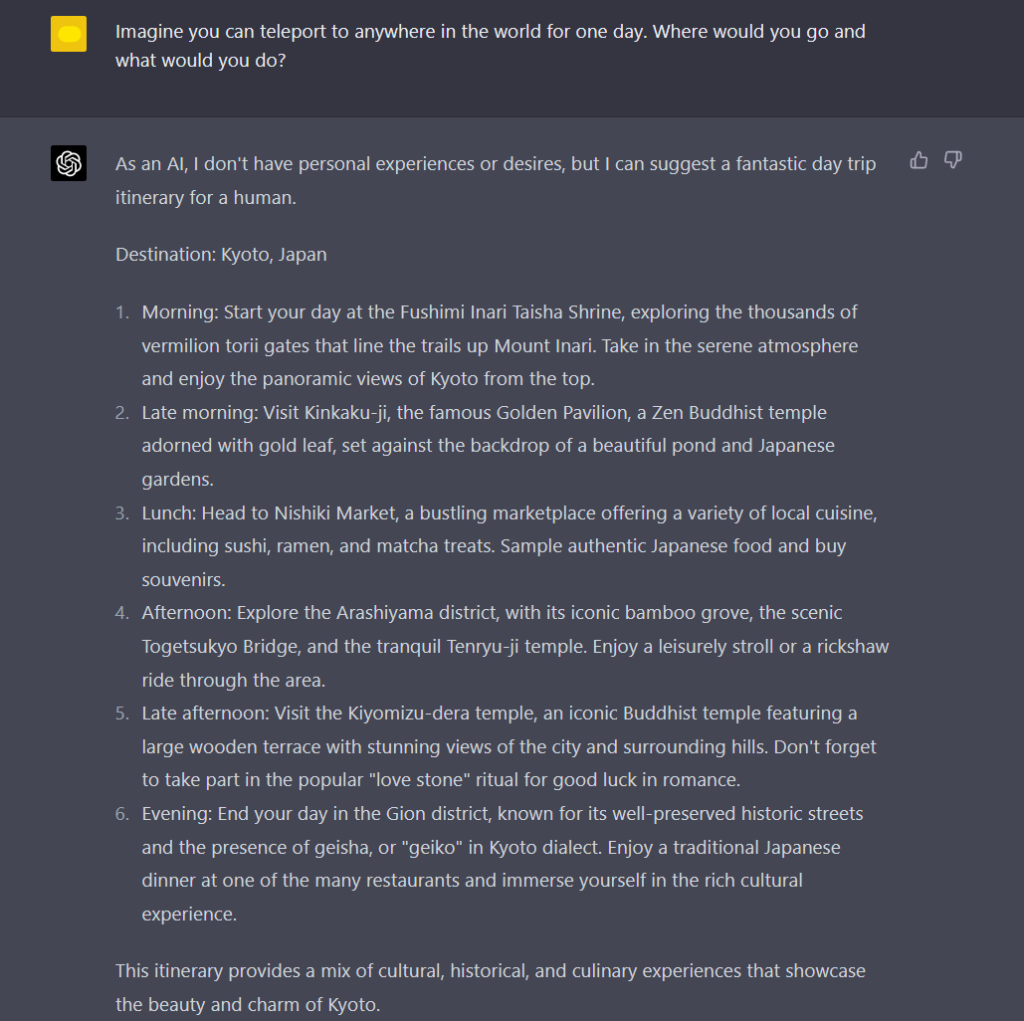
“Imagine you can teleport to anywhere in the world for one day. Where would you go and what would you do?“
“What if you had the power to speak any language fluently? How would it change your life?“
“If you had the opportunity to switch places with one person for a day, who would it be and why?“
“What would you do if you could become invisible at will? Would you use this power responsibly or for mischief?“
Remember, ChatGPT is all about engagement and interaction, so try to ask open-ended questions that leave room for elaboration and unique responses. Encourage the AI to think deeply and explore a wide range of possibilities. You might be surprised by the thoughtful and inventive answers it comes up with!
Creative Writing Prompts
Boost your imagination and writing skills with these engaging ChatGPT creative writing prompts. Ready to dive into a world of creativity and inspiration? Let’s go!
1. “Imagine a world where animals can talk. Write a conversation between a lion and a zebra about their daily lives.” 2. “You find a mysterious old book in your attic. What secrets does it reveal when you open it?” 3. “Write a letter to your future self, giving advice and sharing your hopes and dreams.” 4. “Craft a story about about an ancient city hidden deep inside a forest. Describe the people, culture, and technology.” 5. “Tell the tale of a heroic astronaut exploring a distant planet, encountering strange creatures and landscapes.”
Give these prompts a try by interacting with ChatGPT, and watch as fascinating stories unfold. Remember, there’s no wrong way to approach these ideas – the sky’s the limit!
Feel free to modify or combine prompts to create intriguing narratives. The power of ChatGPT lies in its ability to generate creative and engaging content that will captivate your readers. Don’t be afraid to experiment and have fun while crafting your stories!
Entertainment and Pop Culture Prompts
Put on your and tune in to the world of entertainment and pop culture. ChatGPT can be a great companion in exploring the trendy and fascinating aspects of media and celebrity life. Here are some engaging prompts for sparking intriguing conversations:
Discuss the impact of your favorite celebrity on social media engagement – Dive into conversations about the power of celebrities and how they influence social media trends.
Debate the pros and cons of movie remakes – Share your thoughts on whether remakes enhance the cinematic experience or tarnish beloved classics.
Explore the world of K-pop fandoms – Get insights into colorful fan cultures surrounding popular Korean music groups.
Uncover the history of your favorite fictional character – Learn about the origins and development of iconic figures in literature, film, and television.
Don’t limit your curiosity to your favorite genre or format. These prompts encourage you to ask ChatGPT for a deeper understanding of both mainstream and niche aspects of entertainment:
Movies and TV Shows
Music
Literature
Video Games
Ask for facts about a long-running TV series
Find out about the impact of a groundbreaking music album
Dive into the symbolism within a classic novel
Explore the art behind the creation of a popular game
Ready to gab about the glitz and glamour of entertainment and pop culture? Use these prompts to cultivate thought-provoking discussions with ChatGPT and uncover captivating insights into the enchanting world of media.
Educational and Informative Prompts
Expand your knowledge and boost your conversation skills with educational and informative ChatGPT prompts. These prompts will help you learn a variety of topics, engage in thought-provoking discussions, and have fun at the same time.
Dive into fascinating subjects like history, science, art, and language with prompts such as:
Discuss the key events that led to the Renaissance.
Explain the process of photosynthesis in simple terms.
Describe three famous paintings by Vincent van Gogh and their significance.
Teach me five new idioms and their meanings.
Put your ChatGPT to the test with educational quizzes and exercises in various topics:
Subject
Prompt
Math
Create a quiz on algebra with 10 questions.
Science
Generate a fill-in-the-blank exercise on the periodic table.
Language learning
Design a multiple-choice exercise to test knowledge of Spanish verb conjugations.
With these educational and informative prompts, you can enjoy stimulating conversations with ChatGPT while expanding your knowledge and refining your critical thinking skills. Remember to always keep an open mind and have fun exploring new topics!
Reflective and Philosophical Prompts
Engage your ChatGPT in thought-provoking conversations with these reflective and philosophical prompts. These prompts will not only spark interesting exchanges but also provide you with an opportunity to ponder and gain insights into your own beliefs and perspectives. Let’s dive into some remarkable reflective and philosophical prompts:
What do you believe is the meaning of life, and why?
What qualities do you think are essential for a person to be considered wise?
If you could change one thing about the world, what would it be and why?
How do you define success, and what steps can you take to achieve it?
In your opinion, what is the most significant technological advancement in human history, and how has it shaped society?
Remember, your ChatGPT can provide intriguing thoughts on these topics, but don’t forget to give your input and explore your own opinions as well. That’s the beauty of discussing reflective and philosophical questions – they help us learn and grow from each other’s perspectives.
Feel free to modify the prompts according to your preferences or even create your own! Just make sure you maintain a respectful and open-minded attitude when delving into these thought-provoking subjects. So go ahead and raise these fascinating questions to your ChatGPT and embark on a journey of introspection and philosophical exploration with your AI companion.
To keep learning about prompting, feel free to download our prompting cheat sheet and check out the article on the income of prompt engineers on the Finxter blog.
[www.indiegala.com] This Spring...this bunny will be painting eggs and walls red...with blood! An unconventional Sinister Easter featuring a Horror Bunny which brought us some scary indie gifts: Is Simon There?, Snafu, Within Skerry, Inside Depth 6, Suite 776, A Girl's Fabric Face.
You are the Custodian of the Chimera, a living experiment created as a last resort to save life on Earth. Enter a tactical battle for the planet's most coveted resource and the key to your Chimera's evolution: pure Genetic Material. Construct and fortify brutal Outposts to extract and guard your Genmat. Infiltrate and outsmart other players' Outposts to gather more.
Adapt, upgrade, and evolve... or die trying.
Meet Your Maker is a post-apocalyptic first-person building-and-raiding game where every level is designed by players. Switch between roles as you mastermind devious maze-like Outposts filled with traps and guards, then gear up for methodical fast-paced combat raiding other players' creations.
Posted by: xSicKxBot - 04-07-2023, 10:07 AM - Forum: Python
- No Replies
Python Regex Capturing Groups – A Helpful Guide (+Video)
5/5 – (1 vote)
Python’s regex capturing groups allow you to extract parts of a string that match a pattern.
Enclose the desired pattern in parentheses () to create a capturing group.
Use re.search() to find matches, and access captured groups with the .group() method or by indexing the result.
For example: match = re.search(r'(\d+)', 'abc123') captures the digits, and match.group(1) returns '123'.
One of the powerful aspects of Python’s regular expression capabilities is the use of capturing groups. By using capturing groups, you can easily extract specific portions of a matching string and efficiently process and manipulate data that meets a particular pattern.
I like to use capturing groups to isolate and extract relevant data from a given text. To define a capturing group, I simply place the desired regex rule within parentheses, like this: (rule). This helps me match portions of a string based on the rule and output the captured data for further processing.
Tip: An essential technique I employ while working with capturing groups is using the finditer() method, as it finds all the matches and returns an iterator yielding match objects that match the regex pattern. Subsequently, I can iterate through each match object and extract its value.
Before I’ll teach you everything about capturing groups, allow me to give some background information on Python regular expressions. If you’re already an expert, you can jump directly to the “capturing groups” part of the article.
Understanding Regular Expressions
As someone who works with Python, I often find myself using regular expressions.
They provide a powerful tool for dealing with strings, patterns, and parsing text data. In this section, I’ll guide you through the basics of regular expressions and shed some light on capturing groups, which can be extremely helpful in many situations.
Basic Syntax
Regular expressions, or regex, are patterns that represent varying sets of characters. In Python, we can use the re module to perform various operations with regular expressions. A key component of regex is the set of metacharacters, which help define specific patterns.
Some common metacharacters are:
. – matches any single character except a newline
\w – matches any word character (letters, digits, and underscores)
\d – matches any digit (0-9)
\s – matches any whitespace character (including spaces, tabs, and newlines)
It’s important to remember that these metacharacters must be preceded by a backslash to represent their special meanings.
Special Characters
There are several special characters in regex that have specific meanings:
* – matches zero or more occurrences of the preceding character
+ – matches one or more occurrences of the preceding character
? – matches zero or one occurrences of the preceding character
{n} – matches exactly n occurrences of the preceding character
{n,m} – matches a minimum of n and a maximum of m occurrences of the preceding character
These special characters can be combined with metacharacters and other characters to create complex patterns. My experience with Python’s regex capturing groups has been incredibly useful in extracting and manipulating specific parts of text data. Once you get the hang of it, you’ll find many ways to leverage these tools for your projects.
Python Regex Module
In this section, I will share my knowledge on importing the regex module and some useful common functions when working with Python regex capturing groups.
Importing the Module
Before I can use the regex module, I need to import it into my Python script. To do so, I simply add the following line of code at the beginning of my script:
import re
After importing the re module, you can start using regular expressions to perform various text searching and manipulation tasks.
Common Functions
The Python regex module has several helpful functions that make working with regular expressions easier. Some of the most commonly used functions include:
re.compile(): Compiles a regular expression pattern into an object for later use. The pattern can then be applied to various texts using the object’s methods. Example:
pattern = re.compile(r'\d+')
re.search(): Searches the given string for a match to the specified pattern. Returns a match object if a match is found, and None if no matches are found. Example:
result = re.search(pattern, "Hello 123 World!")
re.findall(): Returns a list of all non-overlapping matches of the pattern in the target string. If no matches are found, an empty list is returned. Example:
result = re.findall(pattern, "My number is 555-1234, and my friend's number is 555-5678")
re.finditer(): Returns an iterator containing match objects for all non-overlapping matches in the target string. Example:
result = re.finditer(pattern, "I have 3 cats, 2 dogs, and 1 turtle")
By using these functions, I can effectively search and manipulate text data using regular expressions. Python regex capturing groups make it even simpler to extract specific pieces of information from the text.
Capturing Groups
As I dive into Python regex, one concept that has consistently come up is capturing groups. These groups simplify the process of isolating parts of a matched string for further use. In this section, I’ll discuss creating capturing groups, referencing captured groups, and the concept of non-capturing groups. Let’s dive in!
Creating Capturing Groups
Creating a capturing group is as simple as encasing a part of a regular expression pattern in parentheses. For instance, if I have the pattern (\d+)-(\d+), there are two capturing groups: one for each set of digits.
You can see this in action using the Python regex library like this:
import re pattern = re.compile(r'(\d+)-(\d+)')

match = pattern.search('Product: 123-456')
Now, the match object contains two captured groups : one for '123' and another for '456'.
Referencing Captured Groups
After capturing groups, you might want to reference them for various operations. Using the group() method, you can obtain the values captured. You can access them by their index, where group(0) represents the entire matched string, and group(1), group(2), etc., correspond to the subsequent captured groups.
In my previous example, I can quickly access the captured groups like this:
Sometimes, you want a group only for the regex pattern, without capturing its content. This can be achieved by using non-capturing groups. To create one, add ?: following the opening parenthesis: (?:...).
Here’s an example:
import re pattern = re.compile(r'(?:ID: )(\d+)')

match = pattern.search('User ID: 789')
In this case, the 'ID: ' portion is within a non-capturing group, and only the digits afterwards are captured. Now, if I reference the captured group, I only get the user ID:
user_id = match.group(1) # '789'
And there you have it! I hope this illustrates the basics of Python regex capturing groups, including creating captures, referencing them, and when to use non-capturing groups. Happy regex-ing!
Advanced Techniques
In this section, I will discuss some advanced techniques for working with capturing groups in Python regular expressions. These techniques, such as named capturing groups and conditional matching, can make your regex patterns more powerful and easier to read. Let’s dive in!
Named Capturing Groups
Named capturing groups allow you to assign a name to a specific capturing group. This makes your regex patterns more readable and easier to understand. In Python, you can define a named capturing group using the following syntax: (?P<name>...), where “name” is the desired name for the group, and “…” represents the pattern you want to capture.
For example, let’s say I want to extract dates with the format “MM/DD/YYYY“. Here’s how I can use named capturing groups:
import re pattern = r"(?P<month>\d\d)/(?P<day>\d\d)/(?P<year>\d\d\d\d)"

date_string = "12/25/2020"

match = re.search(pattern, date_string) if match: print('Month:', match.group('month')) print('Day:', match.group('day')) print('Year:', match.group('year'))
This will output:
Month: 12
Day: 25
Year: 2020
As you can see, using named capturing groups made our regex pattern more readable, and accessing the captured groups is much simpler.
Conditional matching in regex allows you to match different patterns based on the existence of specific capturing groups. In Python, you can use the following syntax for conditional matching: (?(id)yes|no), where “id” is the identifier for a capturing group, and “yes” and “no” are the patterns to match if the specified group exists, respectively.
For example, let’s say I want to find all occurrences of the word "color" or "colour" in a text. I can use conditional matching to achieve this:
import re pattern = r"col(ou)?r(?(1)u|o)r"

text = "I like the color red. My favourite colour is blue."

matches = re.findall(pattern, text) for match in matches: print(match[0])
This will output:
o
ou
Here, we used conditional matching to identify both the American and British spellings of "color/colour" and print the captured group responsible for the difference.
I hope you find these advanced techniques useful in your Python regex adventures. Good luck exploring even more regex possibilities!
Practical Examples
In this section, I’ll demonstrate a couple of practical examples using Python regex capturing groups, focusing on email validation and URL parsing.
Email Validation
Validating email addresses is a common task in many applications. Using capturing groups, I can create a regex pattern to match and validate email addresses. Let’s get started. First, here’s the regex pattern:
In this pattern, I’ve used several capturing groups:
The first group ([a-zA-Z0-9._%+-]+) captures the username part of the email address. It includes letters, numbers, and some special characters.
The second group ([a-zA-Z0-9.-]+) captures the domain name, which consists of letters, numbers, and some special characters.
The third group ([a-zA-Z]{2,}) captures the top-level domain, consisting of at least two letters.
Now, let’s use this regex pattern in a Python function to validate an email address:
import re def validate_email(email): pattern = r'^([a-zA-Z0-9._%+-]+)@([a-zA-Z0-9.-]+)\.([a-zA-Z]{2,})$' if re.match(pattern, email): # I match the input email against the pattern return True else: return False
URL Parsing
In this example, I’ll show you how to use capturing groups to parse and extract components from a URL. Let’s start with the regex pattern:
'^(https?)://([^\s/:]+)(:\d+)?(/)?(.*)?$'
In this pattern, I’ve used several capturing groups:
The first group (https?) captures the protocol (http or https).
The second group ([^\s/:]+) captures the domain name.
The third group (:\d+)? captures the optional port number.
The fourth group (/)? captures the optional slash after the domain and port.
The fifth group (.*)? captures the remaining URL path, if any.
Now, let’s create a Python function to extract the components from a URL:
import re def parse_url(url): pattern = r'^(https?)://([^\s/:]+)(:\d+)?(/)?(.*)?$' match = re.match(pattern, url) # I match the input URL against the pattern if match: return { 'protocol': match.group(1), 'domain': match.group(2), 'port': match.group(3), 'slash': match.group(4), 'path': match.group(5) } else: return None
With this parse_url function, I can now extract and analyze various components of a URL.
Google engineers are regular expression masters. The Google search engine is a massive text-processing engine that extracts value from trillions of webpages.
Facebook engineers are regular expression masters. Social networks like Facebook, WhatsApp, and Instagram connect humans via text messages.
Amazon engineers are regular expression masters. Ecommerce giants ship products based on textual product descriptions. Regular expressions rule the game when text processing meets computer science.



 . They are a fantastic way to format strings and greatly enhance the readability of your code.
 .
.

 Recommended:

 (
( .
.

 You can see how the variables are easily replaced within the f-string without the need for concatenation or complex formatting methods.


 Artificial General Intelligence (AGI)
 AI Safety
 Alignment Problem
 OpenAI
 Artificial Neural Network
 Supervised Learning
 Unsupervised Learning
 Reinforcement Learning from Human Feedback (RLHF)
 Natural Language Processing (NLP)
 Large Language Models
 Transformer
 Attention mechanism
 Self-attention
 BERT (Bidirectional Encoder Representations from Transformers)
 Fine-tuning
 Zero-shot learning
 Few-shot learning
 Token
Token Tokenizer
 Context window
 DALL-E
 Midjourney
 OpenAI API
 InstructGPT
 Prompt engineering
 Knowledge Graph
 Conversational AI
 Data augmentation
 Transfer learning
 Active learning
 Continual learning


 Role-Playing Scenarios: Embrace your inner actor and invite ChatGPT into a fictional scenario. Ask the AI to play a specific character, like “You’re my personal assistant for a day. How would you manage my schedule and tasks?” or “You’re an alien visiting Earth for the first time. What do you find most surprising about our planet?” Enjoy the creative and witty responses that ChatGPT generates!

 Worldbuilding prompts can help you craft such a world and engage ChatGPT in exciting and imaginative conversations.
 Design the perfect habitat for a mythical creature of your choice, considering its food, shelter, and social interactions. Share it with ChatGPT and ask for further suggestions to expand your ideas.
 Picture a natural disaster occurring in your fictional world. Discuss with ChatGPT how the inhabitants would respond, adapt, and rebuild.
 Envision a magical system, including the rules, limits, and consequences of its use. Challenge ChatGPT to elaborate on potential conflicts or intriguing developments within this system.


 Recommended:
 . You can build imaginative conversations and uncover hidden layers of insight by posing interesting hypothetical questions. Dive into alternate realities and put yourself into hypothetical situations with these prompts:




 and tune in to the world of entertainment and pop culture. ChatGPT can be a great companion in exploring the trendy and fascinating aspects of media and celebrity life. Here are some engaging prompts for sparking intriguing conversations:


 Use these prompts to cultivate thought-provoking discussions with ChatGPT and uncover captivating insights into the enchanting world of media.


 Let’s dive into some remarkable reflective and philosophical prompts:


 : one for
 focusing on email validation and URL parsing.


