“Flex is a powerful, open source application framework that allows you to easily build mobile applications for iOS, Android, and BlackBerry® Tablet OS devices, as well as traditional applications for browser and desktop using the same programming model, tool, and codebase.
You can use the Flex SDK to create a wide range of highly interactive, expressive applications. For example, a data visualization application built in Flex can pull data from multiple back-end sources and display it visually. Business users can drill down into the data for deeper insight and even change the data and have it automatically updated on the back end. A product configuration application can help customers navigate the process of selecting or customizing products online. And a self-service application can guide customers through an address change or help employees complete an otherwise complicated multi-step benefits enrollment.”
Now that you know about what it is, let’s have a look at what it earns next!
Annual Income
How much does a Flex Developer make per year?
The average annual income of a Flex Developer in the United States is $99,000 per year according to PayScale. Top earners make $141,000 and more in the US!
If you decide to go the route as a freelance Flex Developer, you can expect to make between $30 and $40 per hour on Upwork (source). Assuming an annual workload of 2000 hours, you can expect to make between $60,000 and $80,000 per year.
Note: Do you want to create your own thriving coding business online? Feel free to check out our freelance developer course — the world’s #1 best-selling freelance developer course that specifically shows you how to succeed on Upwork and Fiverr!
But is there enough demand? Let’s have a look at Google trends to find out how interest evolves over time (source):
Work Description
So, you may wonder: Flex Developer – what’s the definition?
Flex Developer Definition: A Flex Developer creates, edits, analyzes, debugs, and supervises the development of software written in the Flex programming framework. (Source)
Learning Path, Skills, and Education Requirements
Do you want to become a Flex Developer? Here’s a step-by-step learning path I’d propose to get started with Flex:
But don’t wait too long to acquire practical experience!
Even if you have little skills, it’s best to get started as a freelance developer and learn as you work on real projects for clients — earning income as you learn and gaining motivation through real-world feedback.
Tip: An excellent start to turbo-charge your freelancing career (earning more in less time) is our Finxter Freelancer Course. The goal of the course is to pay for itself!
Related Video
You can find more job descriptions for coders, programmers, and computer scientists in our detailed overview guide:
The following statistic shows the self-reported income from 9,649 US-based professional developers (source).
The average annual income of professional developers in the US is between $70,000 and $177,500 for various programming languages.
Question: What is your current total compensation (salary, bonuses, and perks, before taxes and deductions)? Please enter a whole number in the box below, without any punctuation. If you are paid hourly, please estimate an equivalent weekly, monthly, or yearly salary. (source)
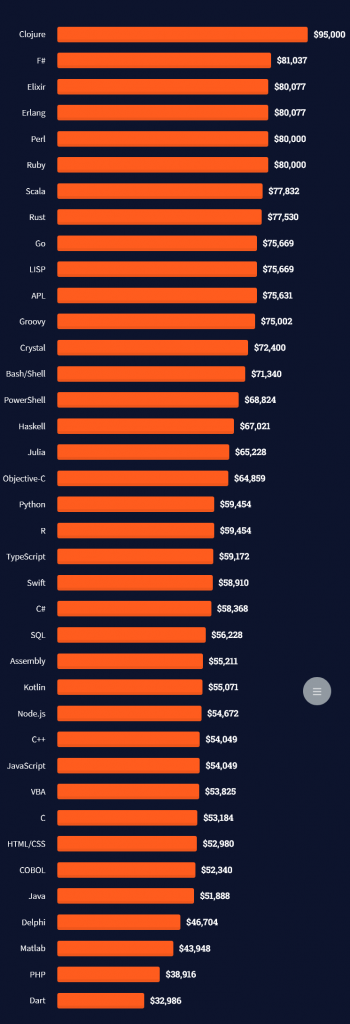
The following statistic compares the self-reported income from 46,693 professional programmers as conducted by StackOverflow.
The average annual income of professional developers worldwide (US and non-US) is between $33,000 and $95,000 for various programming languages.
Here’s a screenshot of a more detailed overview of each programming language considered in the report:
Here’s what different database professionals earn:
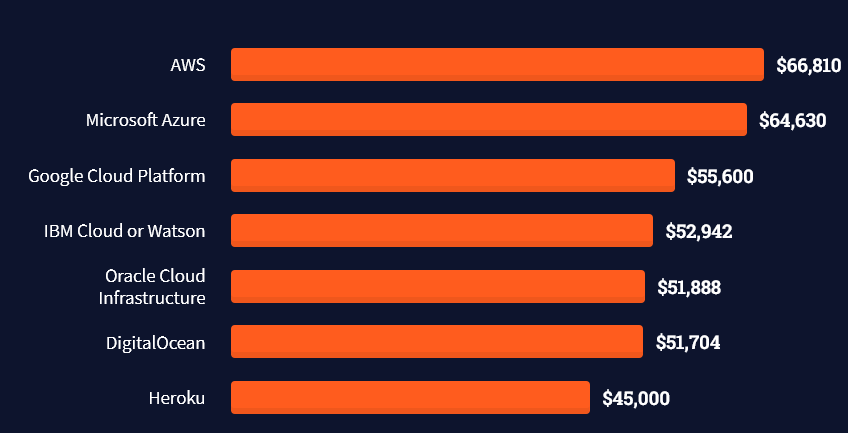
Here’s an overview of different cloud solutions experts:
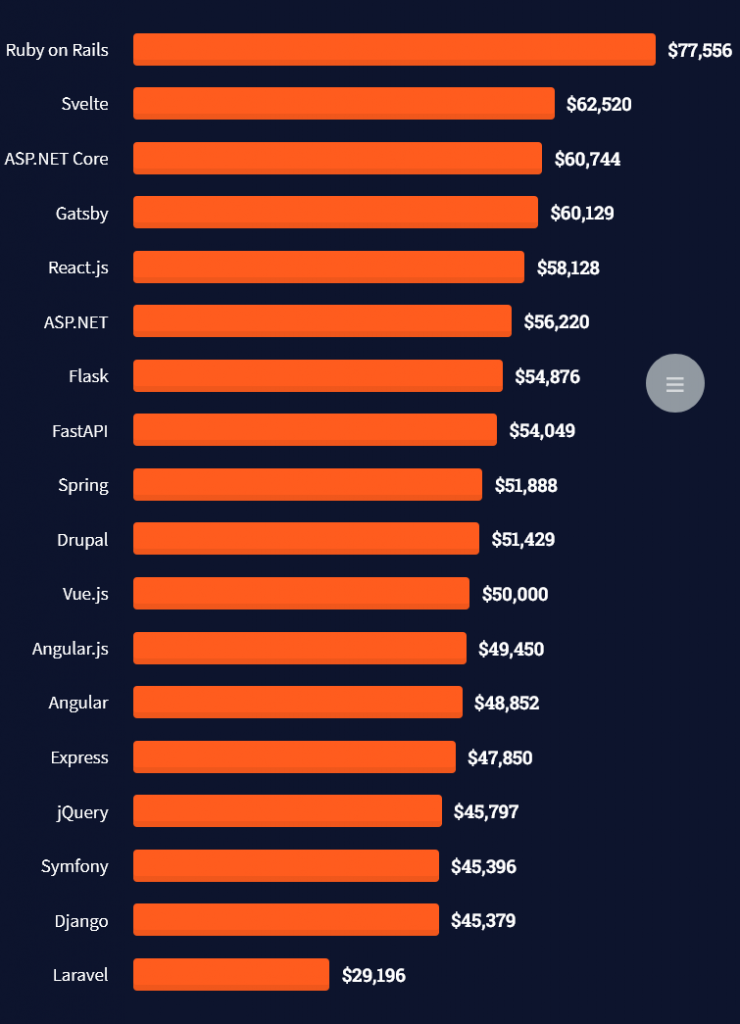
Here’s what professionals in web frameworks earn:
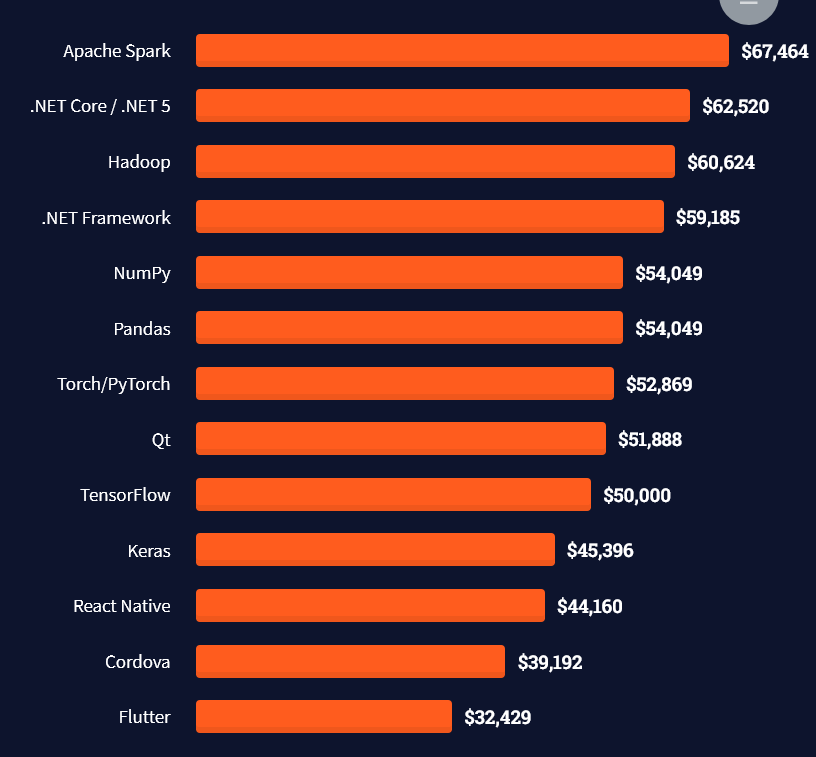
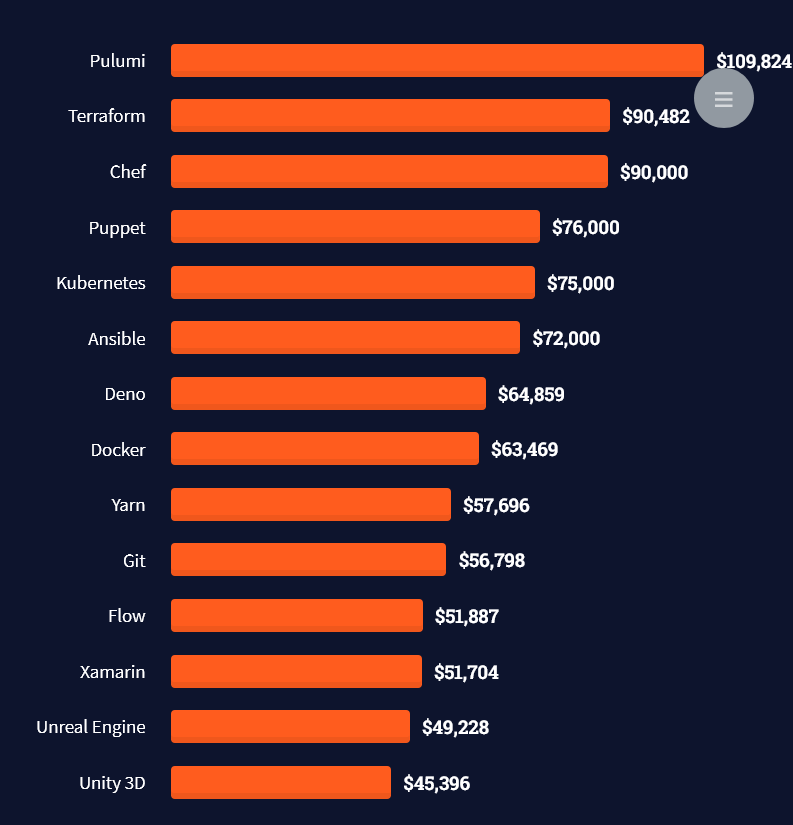
There are many other interesting frameworks—that pay well!
Look at those tools:
Okay, but what do you need to do to get there? What are the skill requirements and qualifications to make you become a professional developer in the area you desire?
Let’s find out next!
General Qualifications of Professionals
StackOverflow performs an annual survey asking professionals, coders, developers, researchers, and engineers various questions about their background and job satisfaction on their website.
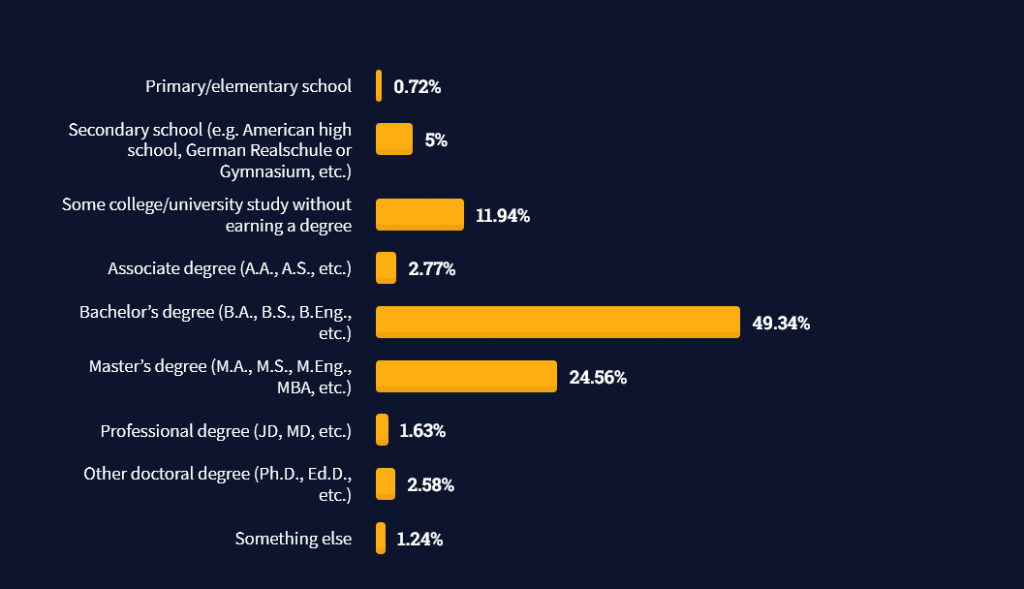
Interestingly, when aggregating the data of the developers’ educational background, a good three quarters have an academic background.
Here’s the question asked by StackOverflow (source):
Which of the following best describes the highest level of formal education that you’ve completed?
However, if you don’t have a formal degree, don’t fear! Many of the respondents with degrees don’t have a degree in their field—so it may not be of much value for their coding careers anyways.
Also, about one out of four don’t have a formal degree and still succeeds in their field! You certainly don’t need a degree if you’re committed to your own success!
Freelancing vs Employment Status
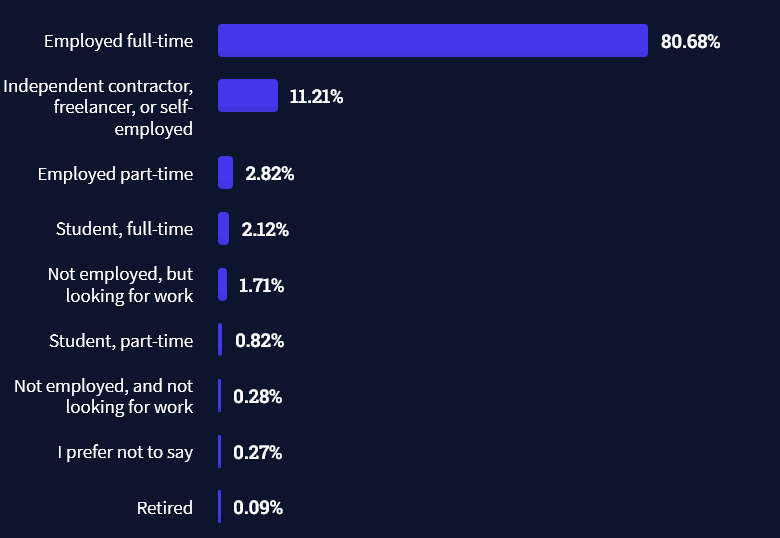
The percentage of freelance developers increases steadily. The fraction of freelance developers has already reached 11.21%!
This indicates that more and more work will be done in a more flexible work environment—and fewer and fewer companies and clients want to hire inflexible talent.
Here are the stats from the StackOverflow developer survey (source):
Do you want to become a professional freelance developer and earn some money on the side or as your primary source of income?
Resource: Check out our freelance developer course—it’s the best freelance developer course in the world with the highest student success rate in the industry!
Other Programming Languages Used by Professional Developers
The StackOverflow developer survey collected 58000 responses about the following question (source):
Which programming, scripting, and markup languages have you done extensive development work in over the past year, and which do you want to work in over the next year?
These are the languages you want to focus on when starting out as a coder:
And don’t worry—if you feel stuck or struggle with a nasty bug. We all go through it. Here’s what SO survey respondents and professional developers do when they’re stuck:
What do you do when you get stuck on a problem? Select all that apply. (source)
Related Tutorials
To get started with some of the fundamentals and industry concepts, feel free to check out these articles:
Coders get paid six figures and more because they can solve problems more effectively using machine intelligence and automation.
To become more successful in coding, solve more real problems for real people. That’s how you polish the skills you really need in practice. After all, what’s the use of learning theory that nobody ever needs?
You build high-value coding skills by working on practical coding projects!
Do you want to stop learning with toy projects and focus on practical code projects that earn you money and solve real problems for people?
If your answer is YES!, consider becoming a Python freelance developer! It’s the best way of approaching the task of improving your Python skills—even if you are a complete beginner.
If you just want to learn about the freelancing opportunity, feel free to watch my free webinar “How to Build Your High-Income Skill Python” and learn how I grew my coding business online and how you can, too—from the comfort of your own home.
Humanity Trashed the Earth and left for Mars. Only few people remained. Clean the Environment and gather resources. Find new fluffy friends and robot allies. Rebuild your village and environment and run your own post apo farm as there is No Place Like Home!
Java Magazine New Edition: Java Present and Future
There is a lot happening in Java, and in this issue we do our best to make the state of Java as clear as possible. We begin with a survey (page 15) of Java developers. The survey covers JDK, tools in use, processes, and finally a profile of Java developers. We follow that up with a look at Java 11 (...
Posted by: xSicKxBot - 04-10-2022, 12:15 AM - Forum: Python
- No Replies
The Ultimate Guide to Installing Ghostscript
In this article we explore how to install Ghostscript on numerous different platforms and operating systems.
What is Ghostcript? Why install it?
What is Ghostscript, and why would we want to install it? To understand this we should first learn about Postscript.
Postscript
Postscript is a page description language geared towards desktop publishing documents.
If you want really professional-looking typesetting, layout, and graphics in your documents, desktop publishing software is what you use.
It was first created at Adobe Systems starting in 1982. As a language, it is similar to Python in that documents contain human-readable and writable commands in the language that can be parsed by an interpreter to get something done.
In the case of Python, text files containing Python commands can be parsed by the Python interpreter to create any kind of program imaginable.
In the case of Postscript, files containing Postscript commands can be parsed by a Postscript interpreter to render professional-looking documents, either to the screen or to a printer.
In addition, the PDF format is an extension of the Postscript language which adds more functionality and is now one of the most commonly used document formats.
Ghostscript
Ghostscript is a free open-source interpreter to render Postscript and PDF documents.
One of the reasons you might want to install it is to use a program that requires it.
Even without a program that needs it, installing Ghostscript can be useful:
Ghostscript can be used to modify PDF documents, such as converting PDF to images, or extracting text, among other things.
Even better, since Ghostscript provides a language-binding API, Ghostscript functions can be implemented in other languages, allowing us to write our own programs for modifying PDF documents. Supported languages are C#, Java, and Python.
Checking if Ghostscript is Already Installed
You may already have Ghostscript installed – your system may have come with it, or it may have been installed in support of a program you have installed. So save yourself some effort and check first.
Checking for Ghostscript on Windows
Press Windows+R to open the “Run” box.
In the “Run” box type “cmd”.
A command line window opens.
In the command line window type “GSWIN64 -h” if your system is 64 bit (most machines these days), or “GSWIN32 -h” if your system is 32 bit (older machines). If Ghostscript is installed you will see Ghostscript help information. If you see an error then Ghostscript is not installed.
Type “exit” to close the command line window.
Checking for Ghostscript on Mac
In the Finder, open the /Applications/Utilities folder, then double-click Terminal.
In the terminal window type “gs -h”. If Ghostscript is installed you will see Ghostscript help information. If you see an error then Ghostscript is not installed.
In the Terminal app on your Mac, choose Terminal > Quit Terminal.
Checking for Ghostscript on Linux
Open a terminal window. How to do this varies depending on which distribution of Linux you are using.
In the terminal window type “gs -h”. If Ghostscript is installed you will see Ghostscript help information. If you see an error then Ghostscript is not installed.
There are two license versions available: Affero GPL (AGPL), and commercial. Review the license information at https://artifex.com/licensing/. For casual use most users will chose AGPL.
Choose 64 bit or 32 bit depending on your system.
Download your choice by clicking on the chosen link.
The installer program will download.
The downloaded program will be gsxxxxw64.exe or gsxxxxw32.exe. The ‘xxxx’ will be numbers indicating the release version. The most current version as of this writing is 9.55.0, so the installer program would be gs9550w64.exe for the 64 bit version.
Double-click the downloaded installer program.
Follow the prompts to do the installation.
Installing Ghostscript on Unix
Use this for any UNIX-based machine, so this should work for Mac or Linux.
Most UNIX systems have much easier ways of installing Ghostscript, so you will almost certainly not need to do this.
However, if you have trouble with those easier approaches you might try this as a backup.
This method usually works, but sometimes it does not, and then you need to do some troubleshooting to figure out why (the configure file might not be configured properly for your system, for example).
Also note that you will need to make sure that compiling software for Linux or Mac is installed on your system, which is beyond the scope of this article. So choose this approach as a last resort.
Go to the Ghostscript download page and download the source code version. As of this writing this file is ghostscript-9.55.0.tar.gz
Move this file to some folder where you want to work.
Unarchive the downloaded file. Usually your system will be configured to do so by double-clicking the file. If not, you can unarchive using this command in the terminal: tar -xzf ghostscript-9.55.0.tar.gz. The file will unpack into sub-directories and files.
In the terminal go to the top unpacked sub-directory.
Run the configure file by typing ./configure in your terminal. This will review your system and get ready to compile the code.
Compile the code by typing make in your terminal.
Install the compiled code by typing this: sudo make install
Here are the commands for ease of copy&paste:
tar -xzf ghostscript-9.55.0.tar.gz

./configure

make

sudo make install
Installing Ghostscript on Mac
The easiest way to install Ghostscript on Mac is to use the Homebrew or Macports systems. These are package management systems for Mac that make available to the Mac the wide world of Unix open-source software.
In these systems, much of the configuring is done for you by others so that downloading and installing software is as easy as a single command, just like downloading an app for the Mac is as simple as clicking an icon in the Mac App Store.
What programs are available depends on what has been prepared by others for the system.
Fortunately, Ghostscript is available for these systems.
Setting up these systems is beyond the scope of this article. This page has a nice summary of those systems (and of the Fink system, another package management system). Follow their respective links to learn more about each system.
Install Ghostscript using Homebrew using the following command:
brew install ghostscript
Install Ghostscript using Macports using the following command:
sudo port install ghostscript
Installing Ghostscript on Ubuntu
It is often most intuitive to install software on Ubuntu using the GUI-based software application.
This accesses the repositories of extensive software available for Ubuntu.
However, it is often the fastest to do a command line install. Do so for Ghostscript as follows:
sudo apt install ghostscript
Installing Ghostscript on Other Debian-based Distributions
There are many distributions that, like Ubuntu, are based on Debian.
Many also have GUI applications for installing software, and often these can be used to install Ghostscript. But like Ubuntu, it is often the fastest to use the command line install.
The command is still the same:
sudo apt install ghostscript
Installing Ghostscript on Centos 7, and Other Red Hat/ Fedora-based Distributions
Centos 7 is a free version of the Red Hat Linux distribution, without Red Hat branding or technical support from Red Hat.
Fedora is the “bleeding-edge” freely available distribution in the Red Hat family of distributions that serves as the development foundation for the more robust and stable Red Hat distribution.
Since these are all in the same distribution family, they are all most quickly updated by the same command. The many other distributions in this family are also most quickly updated by the same command.
The command is:
sudo yum install ghostscript
Installing Ghostscript for Anaconda
If you are a data scientist more comfortable with data analysis in Anaconda than you are comfortable with OS management, you can still make sure you have ghostscript through Anaconda.
Open the Anaconda command line interface and enter the following command to install Ghostscript:
conda install -c conda-forge ghostscript
Installing Ghostscript in Google Colab
Ghostscript can even be installed in Google Colab.
Cells in Colab are in-effect like the Python shell. Therefore users can use the exclamation mark to submit OS shell commands, then enter the command to install Ghostscript.
The OS behind Colab operates like Ubuntu, so the installation command mirrors that of Ubuntu. Therefore, to install Ghostscript enter the following command in a Colab cell:
!apt get install ghostscript
Conclusion
Ghostscript is a free open-source interpreter that renders Postscript and PDF documents either to the screen or to a printer.
Ghostscript can also be used to process or modify such documents.
Even better, because Ghostscript includes a language-binding API, programmers can use it to write programs in other languages to modify PDF documents.
As you can see, Ghostscript is available on many different platforms and operating systems. We have exhibited commands to install Ghostscript on many of these various platforms.
We hope you have found this helpful, and we wish you happy coding!
Free Super Cars? Shaman's Fool Bundle, Death Stranding DC
Super Toy Cars FREEbie
[freebies.indiegala.com] Well, these fast and cool looking super cars are also tabletop toys and part of the unexpected April Fool's Surprise FREEbie video game.
[www.indiegala.com] You would be a fool to miss out on such a magical deal, for nearly a dollar you'll get a premium bundle featuring a collection of 9 Steam Games.
Starpoint Gemini Warlords Franchise Sale, up to 80% OFF
Posted by: xSicKxBot - 04-10-2022, 12:15 AM - Forum: Lounge
- No Replies
Metroid Dread Adds Boss Rush Mode In Latest Free Update
Metroid Dread has added a Boss Rush mode in its latest free update, which has gone live according to Nintendo.
The mode allows you to take on a gauntlet of bosses, and while missile stock will be refreshed between each battle, Samus Aran will carry any damage with her into the next battle. For every boss that is defeated, Samus can upgrade her stats and arsenal.
Time to put your skills to the test again, bounty hunters. The new Boss Rush mode is available now in #MetroidDread! Fight Samus’ most formidable foes one-after-another & go for the best time possible! The mode is available once you’ve completed the game.https://t.co/Lyb3rLjdVspic.twitter.com/MP1NlUIgwO
— Nintendo of America (@NintendoAmerica) April 8, 2022
Survival Rush has also been added, although this differs from Boss Rush mode as you'll have limited time to destroy as many enemies as possible. Missiles and health will not be replenished between rounds, but each successful boss encounter will add more time to your clock.
ANNO: Mutationem is an action-adventure game with RPG elements set in a cyberpunk world, featuring a unique mix of pixelated 2D & 3D graphic style with a rich, dark and bizarre plot.
Posted by: xSicKxBot - 04-09-2022, 06:56 AM - Forum: Python
- No Replies
Check for NaN Values in Python
Overview
Problem: How to check if a given value is NaN?
Here’s a quick look at the solutions to follow:
import math

import numpy as np

import pandas as pd x = float('nan')

print(math.isnan(x))

print(x != x)

print(np.isnan(x))

print(pd.isna(x))

print(not(float('-inf') < x < float('inf')))
So, what is a NaN value?
NaN is a constant value that indicates that the given value is Not a Number. It’s a floating-point value, hence cannot be converted to any other type other than float. We should know that NaN and Null are two different things in Python. The Null values indicate something which does not exist, i.e. is empty. But that is not the case with NaN.
We have to deal with NaN values frequently in Python especially when we deal with array objects or DataFrames. So, without further delay, let us dive into our mission critical question and have a look at the different methods to solve our problem.
Method 1: Using math.isnan()
The simplest solution to check for NaN values in Python is to use the mathematical function math.isnan().
math.isnan() is a function of the math module in Python that checks for NaN constants in float objects and returns True for every NaN value encountered and returns False otherwise.
Example:
# Importing the math module

import math # Function to check for NaN values

def isNaN(a): # Using math.isnan() if math.isnan(a): print("NaN value encountered!") else: print("Type of Given Value: ", type(a)) # NaN value

x = float('NaN')

isNaN(x)

# Floating value

y = float("5.78")

isNaN(y)
Output:
NaN value encountered!
Type of Given Value: <class 'float'>
In the above example, since x represents a NaN value, hence, the isNaN method returns True but in case of y , isNan returns False and prints the type of the variable y as an output.
Method 2: Hack NaN Using != Operator
The most unique thing about NaN values is that they are constantly shapeshifting. This means we cannot compare the NaN value even against itself. Hence, we can use the != (not equal to) operator to check for the NaN values. Thus, the idea is to check if the given variable is equal to itself. If we consider any object other than NaN, the expression (x == x) will always return True. If it’s not equal, then it is a NaN value.
# Function to check for NaN values

def not_a_number(x): # Using != operator if x != x: print("Not a Number!") else: print(f'Type of {x} is {type(x)}') # Floating value

x = float("7.8")

not_a_number(x)

# NaN value

y = float("NaN")

not_a_number(y)
We can also use the NumPy library to check whether the given value is NaN or not. We just need to ensure that we import the library at the start of the program and then use its np.isnan(x) method.
The np.isnan(number) function checks whether the element in a Numpy array is NaN or not. It then returns the result as a boolean array.
Example: In the following example we have a Numpy Array and then we will check the type of each value. We will also check if it is a NaN value or not.
import numpy as np arr = np.array([10, 20, np.nan, 40, np.nan])

for x in arr: if np.isnan(x): print("Not a Number!") else: print(x, ":", type(x))
Output:
10.0 : <class 'numpy.float64'>
20.0 : <class 'numpy.float64'>
Not a Number!
40.0 : <class 'numpy.float64'>
Not a Number!
TRIVIA
Let us try to perform some basic functions on an numpy array that involves NaN values and find out what happens to it.
Now this can be a problem in many cases. So, do we have a way to eliminate the NaN values from our array object and then perform the mathematical operations upon the array elements? Yes! Numpy facilitates us with methods like np.nansum() and np.nanmax() that help us to calculate the sum and maximum values in the array by ignoring the presence of NaN values in the array.
Another way to solve our problem is to use the isna() method of the Pandas module. pandas.isna() is a function that detects missing values in an array-like object. It returns True if any NaN value is encountered.
Example 1:
import pandas as pd x = float("nan")

y = 25.75

print(pd.isna(x))

print(pd.isna(y))
Output:
True
False
Example 2: In the following example we will have a look at a Pandas DataFrame and detect the presence of NaN values in the DataFrame.
We can check for the NaN values by using another NaN special property: limited range. The range of all the floating-point values falls within negative infinity to infinity. However, NaN values do not fall within this range.
Hence, the idea is to check whether a given value lies within the range of -inf and inf. If yes , then it is not a NaN value else it is a NaN value.
Example:
li = [25.87, float('nan')]

for i in li: if float('-inf') < float(i) < float('inf'): print(i) else: print("Not a Number!")
In this article, we learned how we can use the various methods and modules (pandas, NumPy, and math) in Python to check for the NaN values. I hope this article was able to answer your queries. Please stay tuned and subscribe for more such articles.
Authors: SHUBHAM SAYON and RASHI AGARWAL
Do you want to become a NumPy master? Check out our interactive puzzle book Coffee Break NumPy and boost your data science skills! (Amazon link opens in new tab.)
In keeping with its 16-year history, the 2018 Duke's Choice Award winners were announced at the Groundbreakers Hub at Code One. The winners include JPoint, a self-driving car; community winners BgJUG (the Bulgarian JUG) . Among the winners announced were also tools from ClassGraph, Twitter4J, Apache...


 , and BlackBerry® Tablet OS devices, as well as traditional applications for browser and desktop using the same programming model, tool, and codebase.
 Note: Do you want to create your own thriving coding business online? Feel free to check out our
 Tip: An excellent start to turbo-charge your freelancing career (earning more in less time) is our
  The average annual income of professional developers in the US is between $70,000 and $177,500 for various programming languages.





 Ghostscript can be used to modify PDF documents, such as converting PDF to images, or extracting text, among other things.


