Create an account


Welcome, Guest
You have to register before you can post on our site.

Username
  

Password


Search Forums

(Advanced Search)

Forum Statistics
» Members: 20,226
» Latest member: gvbcfvsx
» Forum threads: 21,732
» Forum posts: 22,629

Full Statistics

Online Users
There are currently 736 online users.
» 0 Member(s) | 732 Guest(s)
Applebot, Baidu, Bing, Google

 
  News - Oddworld: New 'N Tasty Coming To Switch In October
Posted by: xSicKxBot - 08-12-2020, 03:43 PM - Forum: Lounge - No Replies

Oddworld: New 'N Tasty Coming To Switch In October

Oddworld: Abe's Odysee - New 'n' Tasty is coming to Nintendo Switch soon. The game, a full remake of the original Oddworld: Abe's Odysee, will launch for the Nintendo hybrid system in October. A specific date has not been announced yet.

Oddworld Inhabitants released a trailer alongside the announcement, although because of the visual effects used it perhaps doesn't give the best look at how the game will actually look and run on the system. You can watch it below.

The game has previously been released on PC, Wii U, PS3, PS4, PS Vita, Xbox One, iOS, and Android. The first release was back in 2014, and the original Abe's Odysee came out in 1997. New 'n Tasty is the third Oddworld title on the system, following the earlier releases of Stranger's Wrath and Munch's Odysee.

Continue Reading at GameSpot

https://www.gamespot.com/articles/oddwor...01-10abi2f

Print this item

  Fedora - Create a wifi hotspot with Raspberry Pi 3 and Fedora
Posted by: xSicKxBot - 08-12-2020, 09:36 AM - Forum: Linux, FreeBSD, and Unix types - No Replies

Create a wifi hotspot with Raspberry Pi 3 and Fedora

If you’re already running Fedora on your Pi, you’re already most of the way to a wifi hotspot. A Raspberry Pi has a wifi interface that’s usually set up to join an existing wifi network. This interface can be reconfigured to provide a new wifi network. If a room has a good network cable and a bad wifi signal (a brick wall, foil-backed plasterboard, and even a window with a metal oxide coating are all obstacles), fix it with your Pi.

This article describes the procedure for setting up the hotspot. It was tested on third generation Pis – a Model B v1.2, and a Model B+ (the older 2 and the new 4 weren’t tested). These are the credit-card size Pis that have been around a few years.

This article also delves a little way into the network concepts behind the scenes. For instance, “hotspot” is the term that’s caught on in public places around the world, but it’s more accurate to use the term WLAN AP (Wireless Local Area Network Access Point).In fact, if you want to annoy your friendly neighborhood network administrator, call a hotspot a “wifi router”. The inaccuracy will make their eyes cross.

A few nmcli commands configure the Raspberry Pi as a wifi AP. The nmcli command-line tool controls the NetworkManager daemon. It’s not the only network configuration system available. More complex solutions are available for the adventurous. Check out the hostapd RPM package and the OpenWRT distro. Have a look at Internet connection sharing with NetworkManager for more ideas.

A dive into network administration


The hotspot is a routed AP (Access Point). It sits between two networks, the current wired network and its new wireless network, and takes care of the post-office-style forwarding of IP packets between them.

Routing and interfaces


The wireless interface on the Raspberry Pi is named wlan0 and the wired one is eth0. The new wireless network uses one range of IP addresses and the current wired network uses another. In this example, the current network range is 192.168.0.0/24 and the new network range is 10.42.0.0/24. If these numbers make no sense, that’s OK. You can carry on without getting to grips with IP subnets and netmasks. The Raspberry Pi’s two interfaces have IP addresses from these ranges.

Packets are sent to local computers or remote destinations based on their IP addresses. This is routing work, and it’s where the routed part of routed AP name comes from. If you’d like to build a more complex router with DHCP and DNS, pick up some tips from the article How to use Fedora Server to create a router / gateway.

It’s not a bridged AP


Netowrk bridging is another way of extending a network, but it’s not how this Pi is set up. This routed AP is not a bridged AP. To understand the difference between routing and bridging, you have to know a little about the networking layers of the OSI network model. A good place to start is the beginner’s guide to network troubleshooting in Linux. Here’s the short answer.

  • layer 3, network ← Yes, our routed AP is here.
  • layer 2, data link ← No, it’s not a bridged AP.
  • layer 1, physical ← Radio transmission is covered here.

A bridge works at a lower layer of the network stack – it uses ethernet MAC addresses to send data. If this was a bridged AP, it wouldn’t have two sets of IP addresses; the new wireless network and the current wired network would use the same IP subnet.

IP masquerading


You won’t find an IP address starting with 10. anywhere on the Internet. It’s a private address, not a public address. To get an IP packet routed out of the wifi network and back in again, packet addresses have to be changed. IP masquerading is a way of making this routing work. The masquerade name is used because the packets’ real addresses are hidden. the wired network doesn’t see any addresses from the wireless network.

IP masquerading is set up automatically by NetworkManager. NetworkManager adds nftables rules to handle IP masquerading.

The Pi’s network stack


A stack of network hardware and software makes wifi work.

  • Network hardware
  • Kernel space software
  • User space software

You can see the network hardware. The Raspberry Pi has two main hardware components – a tiny antenna and Broadcom wifi chip. MagPi magazine has some great photos.

Kernel software provides the plumbing. There’s no need to work on these directly – it’s all good to go in the Fedora distribution.

  • Broadcom driver modules talk to the hardware. List these with the command lsmod | grep brcm.
  • A TCP/IP stack handles protocols.
  • The netfilter framework filters packets.
  • A network system ties these all together.

User space software customizes the system. It’s full of utilities that either help the user, talk to the kernel, or connect other utilities together. For instance, the firewall-cmd tool talks to the firewalld service, firewalld talks to the nftables tool, and nftables talks to the netfilter framework in the kernel. The nmcli commands talk to NetworkManager. And NetworkManager talks to pretty much everything.

Create the AP


That’s enough theory — let’s get practical. Fire up your Raspberry Pi running Fedora and run these commands.

Install software


Nearly all the required software is included with the Fedora Minimal image. The only thing missing is the dnsmasq package. This handles the DHCP and IP address part of the new wifi network, automatically. Run this command using sudo:

$ sudo dnf install dnsmasq

Create a new NetworkManager connection


NetworkManager sets up one network connection automatically, Wired connection 1. Use the nmcli tool to tell NetworkManager how to add a wifi connection. NetworkManager saves these settings, and a bunch more, in a new config file.

The new configuration file is created in the directory /etc/sysconfig/network-scripts/. At first, it’s empty; the image has no configuration files for network interfaces. If you want to find out more about how NetworkManager uses the network-scripts directory, the gory details are in the nm-settings-ifcfg-rh man page.

[nick@raspi ~]$ ls /etc/sysconfig/network-scripts/
[nick@raspi ~]$

The first nmcli command, to create a network connection, looks like this. There’s more to do — the Pi won’t work as a hotspot after running this.

nmcli con add \ type wifi \ ifname wlan0 \ con-name 'raspi hotspot' \ autoconnect yes \ ssid 'raspi wifi'

The following commands complete several more steps:

  • Create a new connection.
  • List the connections.
  • Take another look at the network-scripts folder. NetworkManager added a config file.
  • List available APs to connect to.

This requires running several commands as root using sudo:

$ sudo nmcli con add type wifi ifname wlan0 con-name 'raspi hotspot' autoconnect yes ssid 'raspi wifi'
Connection 'raspi wifi' (13ea67a7-a8e6-480c-8a46-3171d9f96554) successfully added.
$ sudo nmcli connection show
NAME UUID TYPE DEVICE
Wired connection 1 59b7f1b5-04e1-3ad8-bde8-386a97e5195d ethernet eth0
raspi wifi 13ea67a7-a8e6-480c-8a46-3171d9f96554 wifi wlan0
$ ls /etc/sysconfig/network-scripts/
ifcfg-raspi_wifi
$ sudo nmcli device wifi list
IN-USE BSSID SSID MODE CHAN RATE SIGNAL BARS SECURITY 01:0B:03:04:C6:50 APrivateAP Infra 6 195 Mbit/s 52 ▂▄__ WPA2 02:B3:54:05:C8:51 SomePublicAP Infra 6 195 Mbit/s 52 ▂▄__ --

You can remove the new config and start again with this command:

$ sudo nmcli con delete 'raspi hotspot'

Change the connection mode


A NetworkManager connection has many configuration settings. You can see these with the command nmcli con show ‘raspi hotspot’. Some of these settings start with the label 802-11-wireless. This is to do with industry standards that make wifi work – the IEEE organization specified many protocols for wifi, named 802.11. This new wifi connection is in infrastructure mode, ready to connect to a wifi access point. The Pi isn’t supposed to connect to another AP; it’s supposed to be the AP that others connect to.

This command changes the mode from infrastructure to AP. It also sets a few other wireless properties. The bg value tells NetworkManager to follow two old IEEE standards – 802.11b and 802.11g. Basically it configures the radio to use the 2.4GHz frequency band, not the 5GHz band. ipv4.method shared means this connection will be shared with others.

  • Change the connection to a hotspot by changing the mode to ap.
sudo nmcli connection \ modify "raspi hotspot" \ 802-11-wireless.mode ap \ 802-11-wireless.band bg \ ipv4.method shared

The connection starts automatically. The dnsmasq application gives the wlan0 interface an IP address of 10.42.0.1. The manual commands to start and stop the hotspot are:

$ sudo nmcli con up "raspi hotspot"
$ sudo nmcli con down "raspi hotspot"

Connect a device


The next steps are to:

  • Watch the log.
  • Connect a smartphone.
  • When you’ve seen enough, type
    ^C

    ([control][c]) to stop watching the log.

$ journalctl --follow
-- Logs begin at Wed 2020-04-01 18:23:45 BST. --
...

Use a wifi-enabled device, like your phone. The phone can find the new raspi wifi network.

Messages about an associating client appear in the activity log:

Jun 10 18:08:05 raspi wpa_supplicant[662]: wlan0: AP-STA-CONNECTED 94:b0:1f:2e:d2:bd
Jun 10 18:08:05 raspi wpa_supplicant[662]: wlan0: CTRL-EVENT-SUBNET-STATUS-UPDATE status=0
Jun 10 18:08:05 raspi dnsmasq-dhcp[713]: DHCPREQUEST(wlan0) 10.42.0.125 94:b0:1f:2e:d2:bd
Jun 10 18:08:05 raspi dnsmasq-dhcp[713]: DHCPACK(wlan0) 10.42.0.125 94:b0:1f:2e:d2:bd nick

Examine the firewall


A new security zone named nm-shared has appeared. This is stopping some wifi access.

$ sudo firewall-cmd --get-active-zones
[sudo] password for nick:
nm-shared interfaces: wlan0
public interfaces: eth0

The new zone is set up to accept everything because the target is ACCEPT. Clients are able to use web, mail and SSH to get to the Internet.

$ sudo firewall-cmd --zone=nm-shared --list-all
nm-shared (active) target: ACCEPT icmp-block-inversion: no interfaces: wlan0 sources: services: dhcp dns ssh ports: protocols: icmp ipv6-icmp masquerade: no forward-ports: source-ports: icmp-blocks: rich rules: rule priority="32767" reject

This big list of config settings takes a little examination.

The first line, the innocent-until-proven-guilty option target: ACCEPT says all traffic is allowed through, unless a rule says otherwise. It’s the same as saying these types of traffic are all OK.

  • inbound packets – requests sent from wifi clients to the Raspberry Pi
  • forwarded packets – requests from wifi clients to the Internet
  • outbound packets – requests sent by the PI to wifi clients

However, there’s a hidden gotcha: requests from wifi clients (like your workstation) to the Raspberry Pi may be rejected. The final line — the mysterious rule in the rich rules section — refers to the routing policy database. The rule stops you from connecting from your workstation to your Pi with a command like this: ssh 10.42.0.1. This rule only affects traffic sent to to the Raspberry Pi, not traffic sent to the Internet, so browsing the web works fine.

If an inbound packet matches something in the services and protocols lists, it’s allowed through. NetworkManager automatically adds ICMP, DHCP and DNS (Internet infrastructure services and protocols). An SSH packet doesn’t match, gets as far as the post-processing stage, and is rejected — priority=”32767″ translates as “do this after all the processing is done.”

If you want to know what’s happening behind the scenes, that rich rule creates an nftables rule. The nftables rule looks like this.

$ sudo nft list chain inet firewalld filter_IN_nm-shared_post
table inet firewalld { chain filter_IN_nm-shared_post { reject }
}

Fix SSH login


Connect from your workstation to the Raspberry Pi using SSH.This won’t work because of the rich rule. A protocol that’s not on the list gets instantly rejected.

Check that SSH is blocked:

$ ssh 10.42.0.1
ssh: connect to host 10.42.0.1 port 22: Connection refused

Next, add SSH to the list of allowed services. If you don’t remember what services are defined, list them all with firewall-cmd ‐‐get-services. For SSH, use option ‐‐add-service ssh or ‐‐remove-service ssh. Don’t forget to make the change permanent.

$ sudo firewall-cmd --add-service ssh --permanent --zone=nm-shared
success

Now test with SSH again.

$ ssh 10.42.0.1
The authenticity of host '10.42.0.1 (10.42.0.1)' can't be established.
ECDSA key fingerprint is SHA256:dDdgJpDSMNKR5h0cnpiegyFGAwGD24Dgjg82/NUC3Bc.
Are you sure you want to continue connecting (yes/no/[fingerprint])? yes
Warning: Permanently added '10.42.0.1' (ECDSA) to the list of known hosts.
Last login: Tue Jun 9 18:58:36 2020 from 10.0.1.35
nick@10.42.0.1's password:

SSH access is no longer blocked.

Test as a headless computer


The raspberry pi runs fine as a headless computer. From here on, you can use SSH to work on your Pi.

  • Power off.
  • Remove keyboard and video monitor.
  • Power on.
  • Wait a couple minutes.
  • Connect from your workstation to the Raspberry Pi using SSH. Use either the wired interface or the wireless one; both work.

Increase security with WPA-PSK


The WPA-PSK (Wifi Protected Access with Pre-Shared Key) system is designed for home users and small offices. It is password protected. Use nmcli again to add WPA-PSK:

$ sudo nmcli con modify "raspi hotspot" wifi-sec.key-mgmt wpa-psk
$ sudo nmcli con modify "raspi hotspot" wifi-sec.psk "hotspot-password"

Troubleshooting


Here are a couple recommendations:

The bad news is, there are no troubleshooting tips here. There are so many things that can go wrong, there’s no way of covering them.

Troubleshooting a network stack is tricky. If one component goes wrong, it may all go wrong. And making changes like reloading firewall rules can upset services like NetworkManager and sshd. You know you’re in the weeds when you find yourself running nftables commands like nft list ruleset and firewalld commands like firewall-cmd ‐‐set-log-denied=all.

Play with your new platform


Add value to your new AP. Since you’re running a Pi, there are many hardware add-ons. Since it’s running Fedora, you have thousands of packages available. Try turning it into a mini-NAS, or adding battery back-up, or perhaps a music player.


Photo by Uriel SC on Unsplash.



https://www.sickgaming.net/blog/2020/08/...nd-fedora/

Print this item

  (Indie Deal) Kerbal Space Program & Risen Franchise Sale
Posted by: xSicKxBot - 08-12-2020, 02:32 AM - Forum: Deals or Specials - No Replies

Kerbal Space Program & Risen Franchise Sale

Kerbal Space Program at a historical 83% OFF
[www.indiegala.com]
NASA's Perseverance rover is headed to Mars! This might be the ideal moment for you to build your very own spaceship in Kerbal Space Program, the physics-based Space Flight Simulation, and aim for the stars.
https://youtu.be/-qM7XFx12I4
Risen Franchise Sale, all titles -75%
[www.indiegala.com]
NEW DEALS
Ageless[www.indiegala.com]
https://youtu.be/6aZetFc9PeI
Paper Beast[www.indiegala.com]
https://youtu.be/KNf00fV0xZc
Stay Inside, Stay Safe and Enjoy Good Games.
Check out IndieGala on Twitter, YouTube & Facebook[www.facebook.com]


https://steamcommunity.com/groups/indieg...4801160441

Print this item

  News - Smite's 7.8 Update Introduces The God Of The Moon
Posted by: xSicKxBot - 08-12-2020, 02:32 AM - Forum: Lounge - No Replies

Smite's 7.8 Update Introduces The God Of The Moon

Smite's newest hero, The God of the Moon Tsukuyomi, arrives today in the game's 7.8 update. This Assassin class character was revealed this past July in a brief cinematic trailer, and is both the MOBA's 111th playable character and the seventh god hailing from the Japanese pantheon.

While Tsukuyomi's IRL lore is a bit scant, the Smite devs have focused their energy on keeping his personality in line with how he was depicted in mythology. Tsukuyomi is a proponent of proper etiquette, obeying authority, and maintaining order, and he takes slights very seriously. He is imperious, and his dispensing of swift and extreme punishment for perceived disrespect is a core part of his character. Him killing food goddess Uke Mochi over a perceived slight even contributed to his falling out with his sun goddess sister, Amaterasu.

Continue Reading at GameSpot

https://www.gamespot.com/articles/smites...01-10abi2f

Print this item

  News - Java Edition: Snapshots 20w29a, 20w30a, Pre-Release 1, 2, 3
Posted by: xSicKxBot - 08-11-2020, 10:53 PM - Forum: Minecraft - No Replies

Java Edition: Snapshots 20w29a, 20w30a, Pre-Release 1, 2, 3

Its been a bit since we’ve updated you all on what’s to come with Mojang Studio’s next update for Java Edition, this is the first part of a three-part news dump to catch up with the latest news.

  • Tools are now sorted based on material in the creative inventory

SPAWNPOINT & SETWORLDSPAWN


Added angle parameter for setting the default facing angle of a respawning player.
Syntax: spawnpoint [targets] [pos] [angle]
Syntax: setworldspawn [pos] [angle]
New parameters:

  • angle – Floating point angle in degrees. Supports the relative ~ modifier


  • worldgen/noise_settings can now contain noise configurations
  • MC-194464 – “large_oak_foliage_placer” incorrectly serializes to “blob_foliage_placer”
  • MC-194298 – Bone meal can’t create flowers
  • MC-194257 – Several instances of “snowy” being spelled as “snovy” in the vanilla_worldgen configuration
  • MC-194220 – Totems of Undying give you Fire Resistance II instead of the maximum Fire Resistance I
  • MC-194200 – Birch trees are not generated correctly in the Birch Forest and Birch Forest Hills biomes
  • MC-194173 – Hitboxes are rendered offset while picking up items or experience on graphics settings Fast and Fancy
  • MC-193662 – Player flying in creative slightly above blocks while sneaking and jumping are restrained to that block
  • MC-193560 – Enchantment Glint doesn’t render on elytra in specific circumstances
  • MC-192021 – Enchantment Glint effect on transparent blocks not properly rendered on Fabulous graphic
  • MC-191623 – Ender dragon battle music does not stop after ender dragon has been defeated
  • MC-191031 – Players in spectator mode can interact with boats
  • MC-190559 – Baby Striders don’t die when it’s raining and they are in lava
  • MC-189788 – Certain mobs in boats sometimes take drowning damage while the boat is moving
  • MC-185019 – Worldgen settings with the empty structures parameter causes all structures to generate extremely frequently
  • MC-176836 – Unarmed vindicators raise their arm in offensive way when attacking
  • MC-176778 – Camera is reset when a block reappears due to high server latency
  • MC-166718 – Mobs no longer suffocate inside of soul sand, farmland or grass paths
  • MC-158735 – Pillagers without crossbows hold their arm up in an offensive way
  • MC-153230 – Players in spectator mode can stop minecarts

  • Modified how respawn positions are chosen for beds and respawn anchors
  • Lanterns can now be waterlogged
  • Soul Lanterns can now be waterlogged
  • Tweaked the Bastion Remnant chest loot
  • Chests in Bastion Remnants are now more likely to be located on top of gilded blackstone

RESPAWN BLOCK POSITIONS


  • Respawn anchors will prioritize cardinal directions over corners
  • Beds will prioritize the side of the bed the player entered from and then spaces circling around the foot of the bed up to the head of the bed
  • Respawning players will now face the block that they respawned at
  • Placing players onto dangerous blocks is now avoided when possible
  • The sign edit screen will now initialize from existing sign text (should have no noticeable impact on vanilla)
  • Tags can now have optional entries

OPTIONAL TAG ENTRIES


Entries in tags can now be marked as optional. Failure to resolve optional entries does not prevent the whole tag from loading.

Example:

{
  “replace”: false,
  “values”: [
    “#minecraft:beds”, // existing syntax
    { “id”:”#missing:tag”, “required”: false }, // optional sub-tag entry

    “minecraft:anvil”, // existing syntax
    { “id”:”minecraft:stone_button”, “required”: true }, // new syntax for required tags
    { “id”:”missing:block”, “required”: false } // optional single-element entry
  ]
}

  • MC-35765 – Viewing text in Right-to-Left language while in another language renders backward and non-connected
  • MC-57869 – Some item tooltips use § for coloring, rendering them incorrect in right-to-left languages
  • MC-116857 – Advancement descriptions use unnecessary capitalization on generic resource names
  • MC-148447 – Villagers often get stuck while trying to go through a door at the same time
  • MC-149060 – Villagers “spam” doors by opening and closing them really fast
  • MC-153195 – Mobs can drop items with duplicate enchantments
  • MC-181925 – Unarmed vexes raise their arms in an offensive way when attacking
  • MC-187344 – Fast graphics tooltip has incorrect ‘tree-leaves’ spelling
  • MC-187379 – Text for pack.incompatible.confirm.new makes no sense
  • MC-187380 – Incorrect grammar in en_us translation of pack.dropConfirm
  • MC-188389 – Several minor errors in datapackFailure.title
  • MC-188390 – Comma splices in four strings
  • MC-188392 – Death message for getting shot by a skull is not grammatically correct in all situations
  • MC-188621 – Mojang “Production Manager” credit is indented further than other credits
  • MC-188880 – Baby zombified Piglins riding on chickens aren’t positioned properly
  • MC-189918 – Multiplayer warning uses “Mojang” instead of “Mojang Studios”
  • MC-190102 – Some UI strings are not consistently capitalized
  • MC-190288 – Fabulous and Fancy graphics tooltips have missing commas
  • MC-191441 – Right-to-left text is rendered bottom-up in some cases
  • MC-191562 – “Cancel” button overlaps “Done” button when uploading a world to Realms, making users unable to upload world
  • MC-192296 – Spider Jockey from a spawner minecart crashes with”java.lang.IllegalStateException: Entity is already tracked”
  • MC-193276 – Player floats slightly above strider while riding it
  • MC-193339 – NullPointerException during shutdown when rcon enabled with no password
  • MC-194263 – Large End Cities do not generate correctly/get cut off
  • MC-194273 – Save data of new Nether biomes is lost when upgrading a world to 20w28a or above
  • MC-194350 – Some feature configurations don’t load in a datapack (java.lang.IllegalArgumentException: value already present: [email protected])
  • MC-195052 – “angle” argument in spawnpoint command doesn’t use “minecraft:rotation” parser
  • MC-195582 – Typing a colon twice or after a slash in chat when specifying a function/item/block/etc. in a command crashes the game

  • New accessibility settings have been added to help with visual comfort


  • Distortion effects such as nausea and the Nether portal overlay can now be reduced
  • At lower values, the nausea effect is replaced with a green overlay as an alternative visualization
  • Field of view effects shown after speed modifiers are applied can now be reduced
  • Chains can now be placed in all orientations
  • Endermen will no longer place their held blocks onto bedrock blocks
  • Piglins now become angry with players who open or destroy a Chest Minecart
  • Villagers now lose their job sites when changing dimension
  • Chat delay has been added to the Chat Settings screen
  • Custom world generation and dimension settings now use the same folder pattern in data packs as other resources (namespace/<type>/resource.json)
  • MC-73884 – Throwable projectiles get destroyed on contact with non-solid blocks
  • MC-125758 – Bubble column does not affect egg, snowball, ender pearl, splash potion, lingering potion, fireball, and shulker bullet
  • MC-158987 – Raid still continues after a villager turns into a witch
  • MC-163767 – Villagers get ejected from a minecart when converted to a zombie villager
  • MC-167045 – Banners are rendered too dark in the inventory
  • MC-170900 – New Nether plants can be picked up without shears/silk touch
  • MC-174574 – Soul speed doesn’t work when slabs and blocks of similar height are placed above the soul sand block
  • MC-176015 – Strider suffocates when player is saddled on and looking up with Warped Fungus on a Stick
  • MC-176034 – You can walk on striders
  • MC-177651 – Despite being cold outside of lava, striders don’t try to stay in lava
  • MC-178061 – Chat Delay option doesn’t exist in Chat settings
  • MC-182330 – Crossbow-wielding Piglins behave weirdly when they try to pursue invisible players
  • MC-185490 – Separated trader llamas on leads cause TPS hit
  • MC-187398 – Smithing table and stonecutter recipes are not unlocked when used
  • MC-187904 – Data packs cannot replace settings of vanilla dimensions during world creation
  • MC-189414 – Smithing table doesn’t calculate amount of output items correctly
  • MC-189797 – Hoglins, Zoglins, melee Piglins, and Piglin Brutes do not properly attack invisible entities within normal range
  • MC-191168 – Piglins that convert into Zombified Piglins while sitting on a minecart sometimes sink into blocks
  • MC-192032 – Villagers don’t always try to claim the closest workstation and are sometimes focused on a non-existent one or one out of their reach
  • MC-193213 – Leads are positioned incorrectly on players and wandering traders
  • MC-194263 – Large End Cities do not generate correctly / get cut off
  • MC-194299 – Template pools fail to load via datapack
  • MC-194845 – Subspace Bubble advancement cannot be completed with 7 km distance
  • MC-195062 – Raids often will not end in defeat when all villagers are dead if there are job sites in the village
  • MC-195544 – Game crashes after killing a mob that is being ridden by a guardian while it is being ridden by a wither skeleton

  • Crimson and Warped Roots no longer require shears when mined

EXECUTE COMMAND


  • execute in now respects dimension scaling
  • MC-69876 – Pistons at Y=1 do not push downwards / at Y=254 do not push upwards
  • MC-124320 – Endermen can pick up and place snowless snowy grass blocks
  • MC-130558 – Item frames cannot be emptied if gamerule doEntityDrops is set to false
  • MC-134084 – If gamerule sendCommandFeedback is disabled, /msg or /tell don’t display the message to the sender
  • MC-136553 – Dyes in creative inventory are in reverse order
  • MC-152037 – Powered, activator and detector rails are deleted when pushed/pulled onto a block they cannot be placed on
  • MC-187357 – Strongholds will not generate in floating_islands or caves preset
  • MC-189736 – “distance” within predicate no longer works
  • MC-190552 – Demo mode resets position and inventory upon launch
  • MC-190859 – floating_islands or caves buffet worlds no longer generate strongholds and ender eyes do not locate previously generated strongholds after upgrading to 1.16
  • MC-192136 – Lava damage works differently than in previous versions
  • MC-192236 – Endermen can place blocks on top of item frames on the floor
  • MC-192371 – Paintings in the same block space pop off when chunk loads
  • MC-192845 – Block Event Lag in 1.16 is excessive
  • MC-194217 – Lava sets nether vegetation on fire despite it being fire resistant
  • MC-194867 – Minecarts come out the wrong side of a nether portal and lose momentum when coming back to overworld
  • MC-194953 – Custom Biomes are not useable in Predicates
  • MC-195803 – Mob kill statistics are formatted in reverse: “N killed you <mob> times”
  • MC-195851 – “Hat” layer on helmets detaches from Piglins’ heads while bartering
  • MC-196245 – Charged creeper does not always drop skull if zombie variants are nearby
  • MC-196441 – Stonecutter/Smithing Table recipes are not given after crafting a stack of more than one
  • MC-196469 – F1 hides the nausea green tint
  • MC-196473 – Pufferfish gives Nausea II instead of the maximum of Nausea I
  • MC-196653 – Creating multiple datapack dimensions which reference the same dimension_type string causes “unregistered dimension” crash
  • MC-196743 – Custom/modified biomes don’t work in the overworld

  • MC-105248 Wet wolves become nearly black in dark areas
  • MC-107529 Marker:1 Armor Stands render themself and their equipment dark if inside solid blocks
  • MC-167756 Wolf is rendered too dark when not directly affected by skylight
  • MC-190103 Crash when using a nether portal: java.lang.IndexOutOfBoundsException: fromIndex < 0: -2368549
  • MC-191388 “No key position_predicate in MapLike” console spam
  • MC-197053 Pressing F3+D clears the pending lines message, but doesn’t clear the pending messages
  • MC-197152 Ghost Blocks can be generated in some piston setups
  • MC-197218 Piston arm appears twice during retraction in some mechanisms


https://www.sickgaming.net/blog/2020/08/...ase-1-2-3/

Print this item

  News - Blog: The value trap of free-to-play design
Posted by: xSicKxBot - 08-11-2020, 10:53 PM - Forum: Lounge - No Replies

Blog: The value trap of free-to-play design

The following blog post, unless otherwise noted, was written by a member of Gamasutra’s community.
The thoughts and opinions expressed are those of the writer and not Gamasutra or its parent company.


In my last post on free to play and mobile design, I talked about gacha and lootbox design. I also mentioned trying the game Arknights and how I was still in the honeymoon period…well, that is over, and it did not end well. For today, we are going to discuss the real wall of playing free to play games.

What Free to Play Values


As everyone knows, the lack of a paywall to get into a free to play game is a major attraction for people to try them out. Without it, designers need to find a way to generate revenue through the player base itself. Even though many mobile games will use ads, that is not the same as gacha and lootbox design as a way of keeping someone invested in playing.

The more addictive games know that if you want to keep someone playing (and hopefully turn them into whale) you need to get them invested, and to do that, you need to create value. A free to play game is not the same as a retail title whose initial paywall covers the investment on the player’s part. Obviously, we are ignoring retail games that have microtransactions for this discussion.

There are only two areas that are left to create investment in free to play games: Time and Money. Many years ago, Valve gave a talk at GDC about the two aspects when it came to Team Fortress 2 and how the game went free to play and generated revenue via the Mann Co store.

In that presentation, they spoke about the concepts of time and money, and how every player values them differently. For one person, they could play a game for hundreds of hours and will rebuke spending even one dollar to buy something; just as someone will happily spend hundreds of dollars if it means accomplishing months of tasks within minutes.

F2P designers have been courting both personalities for years. You can see similar elements across mobile titles: a massive in-game store and banners for people who value time; designing progress around repetitive tasks and grinding for those who value money.

There is nothing “stupid” or “lazy” as gamers have said about developers who make use of these tactics, they know what they are doing, and it is about generating the sunk cost fallacy.

Sunk Cost Fallacy


The sunk cost fallacy is a term used to describe that tendency for someone to keep investing in something due to already having done it before, hence the sunk cost. Free to play designers know that the goal is to get someone to spend money one time—even if it is just a dollar. Once someone has invested into a free to play game, they are more willing to do it again, and more importantly, keep playing.

When we usually talk about the sunk cost fallacy it has to do with spending money, as that is the popular interpretation, but this can also apply to time. For someone who does not want to spend money, there is always the option of spending time. Resources can be earned by repeating content already done, or constantly logging in to repeat a task.

In Arknights, characters require multiple resources to upgrade their various traits. If you do not spend money, you are going to have to repeat missions again and again for those items. Even putting the game at 2X speed, you are still waiting anywhere from one to four minutes watching a map on autopilot to collect said resources. Even though that does not sound like a long time, all those minutes do add up. Again, you are going to be doing this constantly, as said resources are not guaranteed drops, and you have at minimum 11 characters to do this for.

Every F2P game starts out easy to progress, but then puts up this wall as kind of a test to see if the player is invested in continuing to play (or pay). As we talked about in the piece on gacha design, it never truly ends.

From One Wall to the Next


Supporters of F2P design will often say that skilled players do not need to spend money or are good enough at the game to make progress. Another aspect of F2P design not often discussed are the multiple walls of progress. Once you have spent enough money or time on a game to get past that initial wall, many basic tasks or challenges become easier.

During my time in Marvel Strike Force, I routinely earned free materials because my team was high enough to complete special challenges. Arknights features a similar philosophy with daily events whose reward goes up the harder the version you clear.

Breaking through that first wall of progress is like getting a massive weight off your shoulders, and is often that point where players become committed to a game. The sunk cost fallacy is in full effect: “I can’t stop playing, look at how far I’ve come.” And when the player gets committed to one aspect of a game, chances are they are going to commit to everything.

Providing free players with an early power boost is an effective way to start getting them invested in the game

Unfortunately, here is the dirty secret around monetized F2P design—there is always another wall. To keep making progress, you are going to need more resources and higher up characters, which, you guessed it, means more grinding or spending money.

A F2P game that runs out of grinding to do is a dead game, and why they are designed around long-term play and continued updates.

The beauty about scaling content is that there is no such thing as running out of numbers. Every free to play game imaginable has some system that could be extended indefinitely. In Marvel Strike Force, during my time playing the developers kept the rarity system, but raised the max level of characters to 75 instead of 70. Those five additional levels would cost about a million in terms of in-game currency to make that jump.

Not only that but for character-driven games there can be further grinding to unlock a character, and then restarting the grind for each new character the player unlocks.

Gameplay Hostage


What frustrates me as someone who understands game design is how many of the F2P games I’ve looked at have legitimately great systems to them, but as I said in my last post: A game that lives by its gacha design, can also die because of it.

The elements that I complain about: the grind, the repetitive nature, the lack of evolving game systems, those are intentional by the designers. With Arknights, I really like the idea of a character-driven tower defense game, but the elements surrounding that lead to frustration. What hurts the most is that these games are so tethered to their monetization systems, there is no way to make a “retail version” without requiring an entire redesign.

As I said in the previous piece that game titles that are tied to gacha or heavy monetization can live or die because of it. Somewhere, there must be a middle ground between a retail experience and the traditional monetized mobile games. After catching the developers of Arknights in a lie with how they give out premium currency, I have no intention of ever spending money in the game, and possibly just deleting it.

Before the pandemic scuttled all plans in 2020, there were talks about governments cracking down on F2P games in terms of their addictive nature. I have made a promise to myself that I outright refuse to play any videogame that demands my constant time or money to enjoy it. Personally, I think it is a matter of when, not if, for governments to talk about this again, and when that day comes, a lot of games (and their consumers) are going to be left scrambling.

If you enjoyed my post, consider joining the Game-Wisdom discord channel open to everyone.


https://www.sickgaming.net/blog/2020/08/...ay-design/

Print this item

  News - Mobile developer Big Run Studios nets $5.25 million to expand operations
Posted by: xSicKxBot - 08-11-2020, 10:53 PM - Forum: Lounge - No Replies

Mobile developer Big Run Studios nets $5.25 million to expand operations

Mobile developer-publisher Big Run Studios has netted $5.25 million in seed funding, meaning it has raised a total of $6.6 million to date.

The funding round was led by early stage venture capital company Transcend Fund and joined by Galaxy Interactive, which previously invested $1.4 million into Big Run back in March.

The cash will allow Big Run to expand operations as it prepares to launch its next mobile title, Big Cooking, which will join a roster than includes other mobile games like Farm Sweeper, Blackout Blitz, Big Hearts, and Big Run Solitaire.

“The additional investment expands our capabilities and accelerates the exciting games we’re cooking up for players,” said company co-founder and CEO, Andrew Bell.


https://www.sickgaming.net/blog/2020/08/...perations/

Print this item

  News - Hori Reveals Three New Colours For Its Split Pad Pro Switch Controller
Posted by: xSicKxBot - 08-11-2020, 08:04 PM - Forum: Nintendo Discussion - No Replies

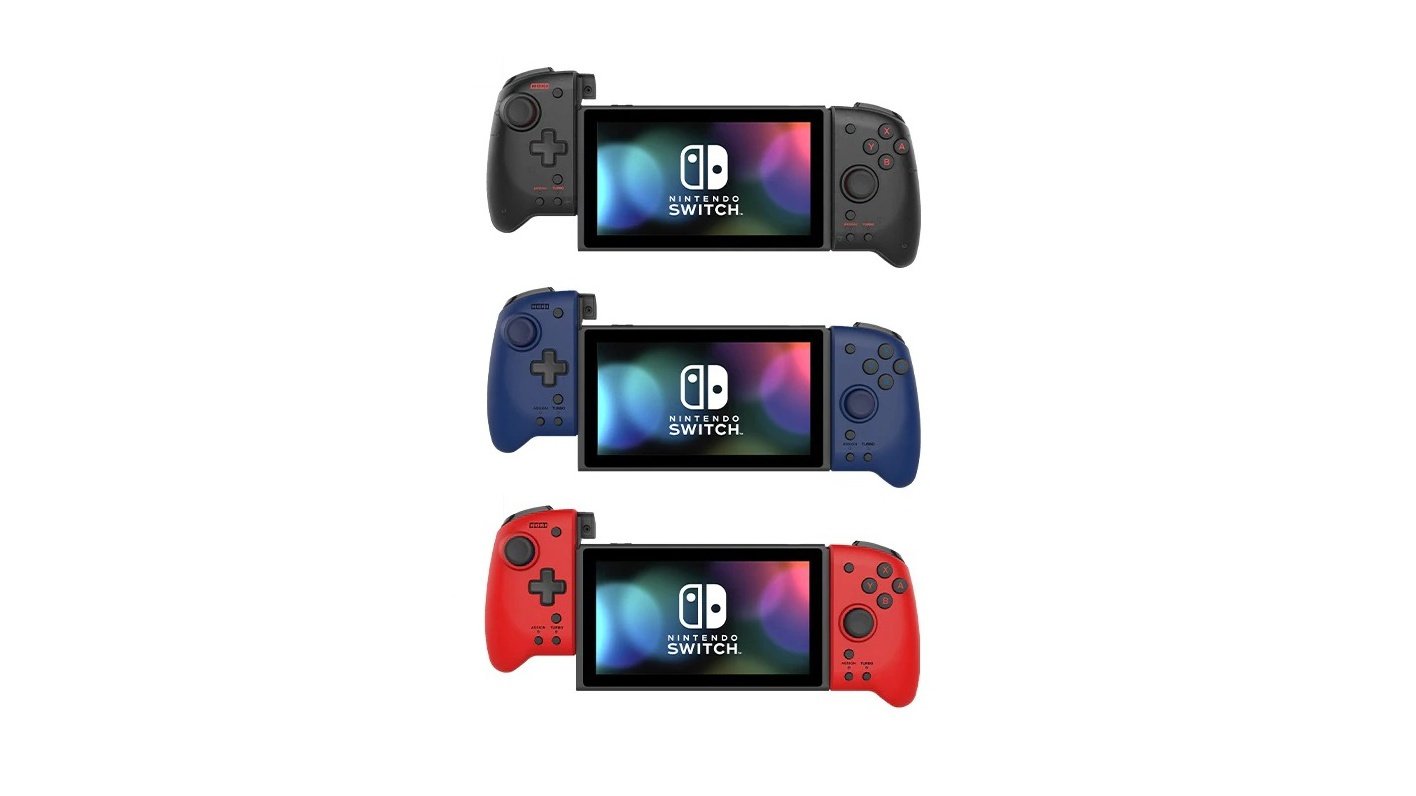
Hori Reveals Three New Colours For Its Split Pad Pro Switch Controller

Nintendo Switch

As fantastic as it is to play the Switch in handheld mode, the Joy-Con setup can become a little cramped from time to time. If you’re seeking a more ergonomic gaming experience while you play Animal Crossing, Mario Kart or Zelda for hours on end, you can’t go past the Split Pad Pro by peripheral maker Hori.

It was originally made available in one colour last October, got a special PAC-MAN design last month, and on 7th September will receive three more colours: Transparent Black, Midnight Blue and Volcanic Red (priced at $49.99 USD each). Take a look:


As noted by Hori, preorders are coming soon – keep in mind this controller only works in handheld mode. Here’s what else we had to say about the Split Pad Pro in our hardware review last year:

Hori has come back with a new controller, catering once again to the Switch’s Handheld player market: the Split Pad Pro. A larger, more ergonomic Joy-Con style controller that intends to give you the feeling of playing with a Pro Controller, but in handheld mode.

Please note that some links on this page are affiliate links, which means if you click them and make a purchase we may receive a small percentage of the sale. Please read our FTC Disclosure for more information.

What do you think of this controller and the three new colours? Leave a comment down below.


https://www.sickgaming.net/blog/2020/08/...ontroller/

Print this item

  News - Watch This Impressive Fall Guys Hex-A-Gone Finish
Posted by: xSicKxBot - 08-11-2020, 08:04 PM - Forum: Lounge - No Replies

Watch This Impressive Fall Guys Hex-A-Gone Finish

If you are one of the 2 million people now playing Fall Guys: Ultimate Knockout on Steam, you might be looking for ways to up your game and take home the coveted crown. This Hex-A-Gone gameplay proves that, despite its cute and cuddly aesthetic, Fall Guys winners are just as likely to be stone-cold killers as you might find in Call of Duty: Warzone.

Posted by Twitch streamer Barret Courtney, the video shows that a flawless victory in Hex-A-Gone isn't just about staying alive--it's about eliminating the competition. Have a watch for yourself.

Fall Guys has seen a record-breaking, and sometimes server-breaking, surge of interest since it first released on August 4. This includes game streaming, with Fall Guys taking out the top spot on Twitch more often than not, even while it was still in beta. The kind of gameplay showcased above shows exactly why Fall Guys is just as addictive to watch as it is to play.

Continue Reading at GameSpot

https://www.gamespot.com/articles/watch-...01-10abi2f

Print this item

  News - Poll: What’s The Best Paper Mario Game?
Posted by: xSicKxBot - 08-11-2020, 01:58 PM - Forum: Nintendo Discussion - No Replies

Poll: What’s The Best Paper Mario Game?

Paper Mario Color Splash

With the recent release of Paper Mario: The Origami King, the Paper Mario series now stands at a sizeable six entries.

It all began with the original Paper Mario on Nintendo 64, before moving onto the GameCube with the celebrated Paper Mario: The Thousand-Year Door. That was followed by Super Paper Mario on Wii before the series took a quick handheld detour on 3DS with Paper Mario: Sticker Star. Finally, Color Splash brought a dash of pigment to the Wii U, which brings us up-to-date with the latest game on Switch. With the impending 20th anniversary of the series, we thought it the perfect time to ask you lovely people to rate the Paper Mario games to find out where The Origami King stands and which one you think is the absolute best.

Below you’ll find all six of the Paper Mario games, plus the Mario & Luigi crossover Mario & Luigi: Paper Jam. Registered Nintendo Life users can click on the stars and rate any (or all) of the games out of 10. If you’ve previously rated these games–excellent!–you can just put your feet up. You shouldn’t need to use the search bar with just seven games, but it’s there if you really, really detest scrolling.

Much like our Top 50 platform polls, the resulting ranking (which we’ll publish very soon) will be created from the database of NL User Ratings and is therefore fluid and subject to change even after publication. So, if you’re in the middle of a Paper Mario game and don’t want to rate it yet, no sweat – you can add your score at any time in the future and it will still count and potentially influence the order.

Enough talk! We recently took a more in-depth look at the series which we recommend you check out. For now, simply click on the stars below to rate the games you’ve played…

Rate each Paper Mario game:


Click the stars below to rate out of 10 each Paper Mario game you’ve played:


Thanks for rating! We’ll be finding out the results very soon, but remember: much like our platform Top 50s, the list here is fluid, so even if you miss out on voting before the results are revealed, you can still influence the ranking after publication.


https://www.sickgaming.net/blog/2020/08/...ario-game/

Print this item

 
Latest Threads
Black Ops (BO1, T5) DLC's...
Last Post: Throwaway5326
2 hours ago
Black Ops (BO1, T5) DLC's...
Last Post: Skalvok
3 hours ago
(Indie Deal) FREE Brocco,...
Last Post: xSicKxBot
4 hours ago
(Free Game Key) Steam | P...
Last Post: xSicKxBot
4 hours ago
News - World Of Warcraft’...
Last Post: xSicKxBot
4 hours ago
◆ New Zealand Temu CoupoN...
Last Post: hdye7477
4 hours ago
◆ Netherlands Temu CoupoN...
Last Post: hdye7477
4 hours ago
IGGM: WoW TBC Classic Fal...
Last Post: FeWafa148
9 hours ago
Shopping on Shein? Use Co...
Last Post: james02351
10 hours ago
First Time Shopping on Sh...
Last Post: james02351
10 hours ago

Forum software by © MyBB Theme © iAndrew 2016