Pokémon Masters will soon let you pick your partner Pokémon
You’ll soon be able to select your own partner Pokémon in Pokémon Masters, thanks to the brand new eggs feature coming soon. When it arrives, you’ll be able to select from one of three gen one monsters: Bulbasaur, Charmander, or Squirtle, at which point your chosen monster will hatch from its egg and you can form a sync pair with them.
Developer DeNA has also revealed three more eggs planned for a future date, which appear to feature Meowth, Scyther, and Tauros. Even more eggs will arrive in future updates too, so it seems like you’ll soon have a huge list of Pokémon you can partner up with.
In other news, DeNA has also revealed that the next legendary event will feature Ho-Oh, and will debut a brand new feature: the prize box. This allows you to collect prize coins by participating in the event, which will allow you to progress further in the event. This event will also see the introduction of the reward boost ticket, an item that boosts the rewards of a battle of your choosing.
DeNA has also detailed plans to make sync orbs easier to obtain by introducing the following measures:
You’ll no longer have a chance to get sync orbs from single-player and co-op battles
Sync orbs can now drop from supercourses
The chance of sync-orb drops from events has been increased
In short, you’ll now be able to get a fixed number of sync orbs for specific sync pairs from supercourses, and you’ll get more from events too.
[embedded content]
Looking forward, a legendary arena mode is coming soon, though we likely won’t hear about it until mid-May, when DeNA will provide the next message.
If you’d like to get back into Pokémon Masters, you can grab it right now on iOS or Android via the App Store and Google Play respectively.
New York executive order makes marriages over FaceTime legal
By Malcolm Owen Saturday, April 18, 2020, 12:06 pm PT (03:06 pm ET)
The state of New York is now allowing marriage ceremonies to take place on video conferencing platforms like FaceTime, with an executive order enabling couples to get married via a video link while maintaining social distancing during the coronavirus pandemic.
The ongoing effects of the coronavirus on everyday life has led to business closures and major changes to everyday life, as companies, individuals, and governments attempt to curtail its spread. In one effort to work around the need for social distancing, the state of New York is enabling a major life event to officially take place via a video conferencing service, such as by FaceTime.
Announced on Saturday as part of a wider COVID-19 press conference, New York Governor Andrew Cuomo confirmed the start of the special arrangement for marriage ceremonies, reportsCNET. “We are today signing an executive order allowing people to get their marriage licenses remotely and also allowing clerks to perform ceremonies over video, Cuomo aide Melissa DeRosa advised during the press conference.
NEW: I am issuing an Executive Order allowing New Yorkers to obtain a marriage license remotely and allowing clerks to perform ceremonies via video conference.
Under the new executive order, couples will be able to perform all of the usual tasks with clerks that would normally be carried out in person by doing so digitally, with regard to obtaining a marriage license. As part of the same measure, clerks are also able to perform marriage ceremonies over a video link.
“Video marriage ceremonies – there’s now no excuse when the question comes up,” said Cuomo. “You can do it by Zoom.”
It is likely that a range of video services will be usable, including Zoom and FaceTime, though what ultimately gets used could be limited by a number of factors, such as if other family members or wedding guests would be allowed to watch the marriage ceremony live.
New York City is among one of the areas hardest hit by the coronavirus, with approximately 131,000 confirmed cases as of April 18, as well as approximately 8,900 deaths attributed to the virus. The state has ordered schools and nonessential businesses to remain closed until May 15, and that all people need to wear masks or face coverings in public, among other measures.
Warhammer: Chaosbane takes the long-running strategy franchise and turns it into a Diablo-esque experience viewed from an isometric perspective. So if you're looking for a hack-and-slash RPG to play online with friends, Chaosbane is worth checking out. Set in the dreary and foreboding setting of Old World, Chaosbane has five differentiated classes, each of which gel together when playing cooperatively. Chaosbane is also discounted to $16 (was $40) right now, too, a great price if you wind up enjoying the loop.
F1 2019 is the latest entry in the official Formula One racing series from Codemasters. Racing fans shouldn't miss this one, as it earned a 9/10 in GameSpot's F1 2019 review. The 2019 racer is on sale for just $15 (was $60), a steal for an excellent racing game like F1 2019.
Posted by: xSicKxBot - 04-18-2020, 11:12 AM - Forum: Lounge
- No Replies
Community Focus: Destiny Trials Report
Our focus this week is a on a site providing valuable intel on opponents you face in Trials of Osiris. This team of developers harnessed the magic of the Destiny API and used it to create a tool that shows you what you’re up against on your way to the Lighthouse.
Please meet Destiny Trials Report.
Tell us a little bit about yourself and what your role is in the Destiny community.
DTR: Hello! We’re Vlad and Mark, the two developers behind Destiny Trials Report. We aim to build the ultimate companion for Guardians trying to reach the Lighthouse. Primarily this means that you can look up your opponents to have an idea on how they will play and how good they are. Among other things you see their loadout, kill/death-ratio, and how they did so far this week.
We spoke before back in the Destiny 1 days. What have you all been up to since then?
DTR: Judging by the header image of our previous Community Focus we’ve definitely improved our visual style since then. Besides that we have been busy rebuilding the site a couple of times, most notably for Trials of the Nine.
While Trials was away we managed to fill the deep void with a Guardian Theater inspired the PUBG site which shows you the reaction of every streamer you killed or were killed by. It felt dirty working for a different game though, so we were very happy when the return of Trials was finally announced. We started from scratch one final time and that resulted in the site that is live today.
Glad to have you back. I assume your team has probably changed up over the years. Want to introduce everyone and have them share their favorite subclass and weapons?
DTR: Vlad takes care of everything server-side, crunching all the numbers to make sure everyone has a flawless count and headshot ratio to show off with. He still misses the days when No Land Beyond used to rule the Crucible, a gun that fit perfectly with his Gunslinger.
Mark (Marruk) takes all that data, combines it with stats from the Bungie API and tries to make it look as pretty as possible. He finally got the Mountaintop last week (thanks Momentum Control) and feels like it isn’t overpowered at all and needs absolutely no nerf whatsoever for sure. The “linear-rocket-concept” matches great with his middle-tree Striker.
We also receive a lot of help from Dan (cowgod77) and Joel (LeBrometheus) in the form of advice and perfect Twitter-GIF-replies.
Choosing the proper GIF reply is an art. What have been some of the biggest changes you’ve made to the site since we last talked?
DTR: While the core of the site is still pretty much the same as it was four years ago, we’ve definitely improved on making it a way smoother experience. With every iteration, and we’ve had a few, we used a bunch of experience that we gained from building the previous one. The stats haven’t really changed over the years, but the amount of loading indicators and subtle animations have.
But all our users really cared about was dark mode, so we added that as well.
I too love a good dark mode. What were your biggest challenges while building your latest version?
DTR: Dealing with cross-save functionalities was quite the challenge. We put a lot of work into making sure our autocomplete reflects the in-game name for cross-save accounts. It also complicated the way we previously obtained platform-specific stats since a single account can be used on every single platform on a single week of Trials. These are only a few of the issues preventing us from releasing weekly and platform-specific stats on the front page but we are extremely close to shipping those features.
Another big challenge for us was displaying the Armor 2.0 mods. We couldn’t simply show all of them, that would clutter the interface too much with irrelevant mods that might not even be active. Instead, we have some complicated (and ugly) code that categorizes all armor mods to match them with a subclass or weapon type that needs to be equipped. If both the mod and the item they work on are equipped we display them together, including a way to find out more in case you somehow manage to forget the difference between “Invigoration,” “Recuperation,” and “Innervation.”
Yea. Cross save has introduced a lot of fun challenges, but definitely worth it. Any other future plans you’re working on you want to share?
DTR: At the moment we are working on improving the “home” section of the site, showing more stats on every Trials week that passes. Once that is finished we want to reintroduce some fan favorites from Destiny 1, like in-depth leaderboards and opponent history. Maybe even Variks will make a comeback to challenge Guardians in the ways of old…
We’re also secretly working on a spin-off site called Guardian Report, a lookup site that also works with other Crucible modes as well as Gambit and raids. Don’t tell anyone yet though.
Your secret is safe with us and our readers. Where can we find you on the internet?
Anything else you’d like to add before we let you go?
DTR: We’ve been doing this for five years now and the response has always been very positive from the community, thanks a lot to everyone for that.
Stay positive, safe, and at home everyone! Go play Trials or something.
Thanks for stepping into the spotlight of a Community Focus again and we really appreciate you offering up a badge to help support the charity effort!
Whether you’re a pro at Trials of Osiris or just starting to dip your toe in the water. Destiny Trials Report is a great resource to see what you’re going up against.
We’re already looking for someone to feature next. If you have someone you think should be in the spotlight, share them with us on Twitter or our forums.
Posted by: xSicKxBot - 04-18-2020, 11:11 AM - Forum: Minecraft
- No Replies
BETA: BEDROCK 1.16.0.57 (XBOX ONE / WINDOWS 10 / ANDROID)
Remember that only those on Xbox One / Windows 10 / and Android may participate in the Beta builds. You will not be able to join Realms or non-beta players worlds and you will not be able to open worlds opened in the Beta in earlier/current stable builds of Bedrock.
Basalt Deltas
Basalt Deltas can now be found in the Nether!
Remnants of volcanic eruptions, this biome sports a high concentration of Basalt columns and lava deltas
Walking through, you will be surrounded by flakes of flowing white ash
Magma Cubes finally have a place to call home, spawning very frequently
A new block, Blackstone, can be found in large patches here
Twisting Vines and fungi grow from the cave floor
Ruined Portals
Remains of ancient nether portals can now be found in the Nether and Overworld!
May contain blocks of Crying Obsidian
Bastion Remnants
What’s made of Blackstone and full of Piglins and Hoglins? Bastion Remnants!
Added 4 separate Bastion Remnant types: Bridge, Hoglin Stable, Housing Units, and Treasure Room
You can find these sizable structures in all biomes in the Nether, except for the ashy cliffs of Basalt Deltas
Explore, loot, and conquer a Bastion Remnant to call it your home…but beware, Piglins don’t take kindly to intruders stealing their things
Added a new music disc from Lena Reine titled ‘Pigstep’ which can only be found in Bastion chests
Added chain blocks
World Generation
Added patches of Blackstone and Gravel to all Nether biomes at and below lava level
Added patches of Soul Sand to Soulsand Valleys at and below lava level
Twisting Vines that grow from the top of a block upwards!
Twisting vines now climbable!
Nether gold ore can now spawn in the nether!
Blackstone
The only stone whose color is almost as dark as the humor of Mojang’s former writer and friend, Tom Stone!
Added a new set of stone blocks with regular, polished, and polished brick variants!
Added Gilded Blackstone – Blackstone which has been imbued with gold and has a chance of dropping gold nuggets when broken
You can find these new blocks in Bastions
Blackstone can be used to craft a Furnace
Blackstone can be used to craft stone tools
Lodestone (Experimental)
A new block that can help you get your bearings!
Crafted from a Netherite ingot and Chiseled Stone Bricks
Use a compass on a Lodestone to create a Lodestone compass pointing to that Lodestone
Respawn Anchor
Added the Respawn Anchor that can set your respawn point in the Nether. Use while holding Glowstone to charge to a maximum of four charges – each respawn depletes one charge
You can charge the Respawn Anchor using a Dispenser
Strider
Striders are neutral mobs that stride the Nether, preferably through lava
They are not hostile
They spawn in lava and are fire immune
When they are not in lava, they freeze and shiver and move slower
You can breed striders by feeding them warped fungus
Striders can be mounted if they first get a saddle placed on them
Similar to pigs, they can be controlled by the player using mushroom-on-a-stick!
Baby Striders follow their parents
Zoglins
Zoglins are zombified Hoglins – the result of bringing a Hoglin into the overworld
Unlike Hoglins they can’t be bred or fed, and they don’t care about warped fungus
Beware – these beasts are raving mad and attack just about everything they see!
How to make Netherite tools and armor
Add one of your Diamond tools or armor pieces into a Smithing Table, with a Netherite Ingot
The Smithing Table will preview your new Netherite item on the right slot. Take it out to craft!
Soul Speed
Never suffer again drudging through Soul Sand Valleys – Soul Speed has you covered!
Shine your boots of choice with this soul-sucking enchantment to speed around on Soul Sand and Soul Soil!
There’s a downside, however: Enchantments will slowly degrade your boots each Soul block you walk on
Can only be obtained by bartering with those pesky Piglins
Blocks
Hyphae of Crimson and Warped Stems, included their stripped versions, can be crafted. Similar to Wood from the Overworld
Nether gold ore can be mined with any pickaxe and will drop gold nuggets
Added the Soul Campfire – A campfire with blue flames craftable with Soul Soil or Soul Sand
We’re happy to announce that we’ve added three new tracks for the upcoming Nether Update, all composed by the very talented Lena Raine
Rubedo will be played in the Nether Wastes
Chrysopoeia will be played in Crimson Forests
So Below will be played in Soulsand Valleys
Added moody sounds to Crimson Forest, Warped Forest, and Soulsand Valley
General
Oak and Birch saplings grown within 2 block radius of a flower now have a 5% chance to grow a tree with a Beehive
Villager trade values have been changed to closely match Java Edition (MCPE-47141)
Added new sounds for Honey block and Honeycomb block
Hoe is now a digger-item and can dig Netherwart Block, Warpedwart Block, Hay Block, Dried Kelp Block, Target Block and Shroomlight Block. Hoes can be enchanted like other diggable items
Mobs that panic now do so for all damage types
Creepers now deal damage when in a boat on the water
Parity
Added ambient cave sounds
Added Update Aquatic underwater music
New Server Window
Created a new server tab play screen layout to provide more information about third-party servers
Added new information sections about third party servers: Description, screenshots, available games, and news/updates
Removed colors from third party server messages for accessibility purposes
Fixed ping latency clarity for users, now provides latency value separate from user count
Added messaging to explain what adding a server does
Kicking and Banning Changes
Kicking
Problem players can be now be removed from your world by pausing and going to the Player Permissions screen
Anyone with Operator permissions will be able to kick players. Trusted players can help moderate your world
Kicked players will not be able to rejoin LAN games while the world is open
Kick Command
Problem players can also be kicked with the new /kick command, optionally including a reason for kicking
The kick command can use target selectors, such as /kick @a[team=Red]
Banning and Realms Permissions
Realm owners can also ban problem players by pausing and going to the Player Permissions screen
Realm owners can now change permissions of players in their Realm from the Player Permissions screen
The name of the Realm is now shown on the pause screen
Spawnpoint Command
The spawnpoint command can now be used in the Nether
Crashes and Stability
Fixed a crash related to exploding beds in the nether
Fixed a crash that could occur when typing a character into chat that we don’t have a font sheet for
Using the /fill command with Soul Fire no longer causes the game to crash (MCPE-65672)
General
Light propagation now works correctly, fixing hostile mob spawning (MCPE-49616)
Typing in the inventory Search field no longer creates lag (MCPE-64584)
The smooth camera option (from full keyboard gameplay) is no longer jittery, and is smooth again (MCPE-54969)
Fixed an issue with the Marketplace not always loading in correctly
Fixed an issue with notifications not showing in iOS
The hay blocks in the town centre in the Abandoned Village seed are now generated correctly
The screen reader now only reads the generating world message once when converting worlds to Bedrock
Ender Dragon’s fireball lingering particles are no longer invisible
Activator rails now dismount players and other mobs at the correct position (MCPE-30744)
The Wither’s spawning explosion no longer breaks obsidian (MCPE-59502)
Obfuscated text color code works on signs placed in the world (MCPE-33780)
Bamboo has been changed to be unpathable by mobs to prevent them getting stuck (MCPE-46805)
Target block redstone signal duration is based on projectile type – Long for trident and arrows, short for other projectiles (MCPE-65413)
Armor stands no longer shift and fall through blocks when a world is reloaded (MCPE-29170)
Gameplay
Giant spruce trees once again generate podzol underneath (MCPE-65046)
Fixed an issue with player experience being lost when reloading a world
Minecarts no longer collide with other minecarts on parallel tracks (MCPE-59302)
Falling top snow can no longer break solid blocks (MCPE-63214)
Fixed a bug that sometimes allowed Villagers and players to respawn inside blocks when getting out of bed (MCPE-46064)
The XP cost is now readable in the Anvil UI screen (MCPE-51908)
Bamboo can now be placed on top of bamboo saplings without Experimental Gameplay being enabled (MCPE-50088)
Mobs
The Iron Golem’s legs don’t swing as far anymore
Reduced the melee attack range of mounted mobs (MCPE-48539)
Fixed a bug that sometimes prevented mobs from burning on bottom-half slabs (MCPE-32822)
Guardians can now spawn in bubble columns (MCPE-37671)
Fixed a bug that caused Vex mobs to move too slowly when moving on X and Z axes (MCPE-41879)
Blocks
Smooth Quartz now uses the correct texture (MCPE-42276)
Using Silk Touch on Giant Mushrooms now drops the correct blocks (MCPE-34114)
Scripting and Add-ons Fixes and Changes
Implemented AvoidMobTypeDefinition and converted hardcoded properties to be data-driven
A content error will now show up if you provide an invalid item name to minecraft:interact in the transform_to_item field
Add documentation for minecraft:density_limit (MCPE-61126)
Adding a new subject to filters so damage sensors can filter on projectiles
Fixed an issue with custom brewing recipes
Admire Item Component
Mobs can now admire items they pick up or receive during an interaction. For a mob to admire an item they need to have both the admire_item goal and the admire_item component, and the relevant configuration need to be done in the interact component and/or the shareables component
Component Variables
duration – Specifies for how long the admire animation should last, the default value is 10
cooldown_after_being_attacked – Specifies for how long the goal will be unavailable after the mob is attacked, the default value is 0
Goal Variables
priority – Specifies how the mob should prioritize this goal
admire_item_sound – The sound event to play when the mob is avoiding another mob
sound_interval – The range of time in seconds to randomly wait before playing the sound again
Angry Component
Several new variables have been introduced to the angry component
Goal Variables
broadcast_anger_on_attack – If true the mob will send a pulse of brodcast anger whenever it attacks, broadcast_anger must also be true for this to work
broadcast_anger_on_being_attacked – If true the mob will send a pulse of brodcast anger whenever it is attacked, broadcast_anger must also be true for this to work
angry_sound – The sound event to play when the mob is angry
sound_interval – The range of time in seconds to randomly wait before playing the sound again
Avoid Mob Type Goal
Several new variables have been introduced to the avoid_mob_type goal
Goal Variables
avoid_mob_sound – The sound event to play when the mob is angry
sound_interval – The range of time in seconds to randomly wait before playing the sound again
Barter Component
Mobs can now barter when they pick up items, or when they receive an item during an interaction. For a mob to barter they need to have both the barter goal and the barter component, and the relevant configuration need to be done in the interact component and/or the shareables component
Component Variables
barter_table – A path to a loot table, which is used to determine what items the mob gives out during barter
cooldown_after_being_attacked – Specifies for how long the goal will be unavailable after the mob is attacked, the default value is 0
Barter Goal
Mobs can now barter when they pick up items, or when they receive an item during an interaction. For a mob to barter they need to have both the barter goal and the barter component, and the relevant configuration need to be done in the interact component and/or the shareables component
Goal Variables
priority – Specifies how the mob should prioritize this goal
Celebrate Hunt Component
Specifies that the mob should have the hunt celebration behavior
Component Variables
broadcast – If true, celebration will be broadcasted to other entities in the radius. Default value is true
radius – If broadcast is enabled, specifies the radius in which it will notify other entities for celebration. Default value is 16
duration – Duration, in seconds, of celebration. Default value is 4
celeberation_targets – The list of conditions that target of hunt must satisfy to initiate celebration
celebrate_sound – The sound event to play when the mob is celebrating
sound_interval – The range of time in seconds to randomly wait before playing the sound again
Equip Item Component
Mobs can now equip armor and weapons that they pick up
Equip Item Goal
Mobs can now equip armor and weapons that they pick up
Interact Component
Component Variables
barter – If true the mob will try to activate the barter goal after the interaction, default value is false
admire – If true the mob will try to activate the admire goal after the interaction, default value is false
MoveToLavaGoal
Added the MoveToLava goal, similar to MoveToWater goal. Mob tries to find and move to lava
Navigation component
Navigationcomponent now has can_path_over_lava and can_walk_in_lava parameters, allowing mobs (like the strider) to traverse lava
PanicGoal
Changed the priority from the damage type to the “ignore_mob_damage” flag (if that flag is set and a mob attacks the mob with the Panic Goal, they will not panic even if the damage type matches one in their “damage_sources” list)
Changed damage types from being hard-coded to being data-driven using the existing “Entity Damage Sources”
Changed the default from “fire, fire_tick, magma” (old hardcoded behavior) to “all” Pre-1.16 mobs will default to “fire, fire_tick, magma”
Pickup Items Goal
The PickupItemsGoal only considers items that the mob can reach
When determining whether the goal can be used we now check whether the mob can reach an item it’s interested in, before committing to it as the target of the goal. This is to avoid mobs getting stuck in this goal after deciding to pick up an item they cannot reach
PickupBasedOnChance variable
This new variable was added to be used for monsters that can pickup items sometimes but also preserve mobs that used this goal in the past like Villagers. If this variable is true, the mob will have a calculation done (based on things like time played by the player, game difficulty, and moon brightness) to determine if this is a mob that is allowed to pickup items. That value is only calculated on the mob’s first spawn, which means it is forever saved on that mob and doesn’t change. If the variable is false (which it is by default), the mob will always be able to pickup items using the goal
CanPickupAnyItem variable
The PickupItemsGoal is dependent on the ShareableComponent and the items that are added to its items list. This new variable overrides that list and tells the component that this mob can pickup any item even if it isn’t in the list. Items picked up because of this variable still honor the priority set to items in the list of items however. This means that any items with a set priority in the list will still be picked up over any item that may be picked up because of this variable. By default it is set to false
CooldownAfterBeingAttacked variable
The variable cooldown_after_being_attacked has been added to the goal, specifying for how many seconds after being attacked the goal should be unavailable. The default value is 0
CanPickupToHandOrEquipment variable
Specifying if the mob can equip items that it picks up or put items in its hand, or if it belongs in the inventory
Shareable Component
Component Variables
item/barter – If true the mob will try to activate the barter goal after picking up the item, default value is false
item/admire – If true the mob will try to activate the admire goal after picking up the item, default value is false
item/consume_item – Specifies if an item should be consumed, for instance, Piglins consume (eat) porkchop. Default value is false
item/stored_in_inventory – Specifies if the item is desired to be picked up and stored in the mobs inventory. Default value is false
Tweaked a number of in-game sounds
A large amount of sounds have had their volume and pitch slightly changed in order to get close to Java parity when it comes to sound, and come closer to how these sounds where intended to sound
This change has gone into all slices – because previous behavior has been wrong and should not be used by content creators. Creator that relied on the previous volume and pitch need to override that in their content from now on
Splash Text
The Splash Text loading code has been augmented to allow splash text JSON files to be additive, rather than replacing them completely, and to allow some conditional statements to disable splash text entries. Use a field called “canMerge” that sits next to the “splashes” field, it is a bool that defaults to ‘false’. Also, another sibling of “splashes” is “conditional”, which is an array of objects. Those objects contain a “requires” field and a “splashes” field. The “splashes” field is an array of strings like the original “splashes” field, and the “requires” field contains three fields – “platforms”, “treatments”, and “stores”, each of which is an array of strings that is compared with the relevant data
Roblox’s Egg Hunt Event is Back in Action on Xbox One
Roblox’s annual Egg Hunt event is here on Xbox One, and this time, you’ve been assigned to an international agency of spies known as E.G.G. (Extract, Gather, Guard). Link up with your fellow agents and take on top-secret missions to unlock exclusive rewards through April 28!
Our agents on the field have reported there are over 40 elusive eggs scrambled across the Roblox universe. We need you to secure the eggs before they’re poached. Be sure to check the dossier on roblox.com/egghunt to help you track which games hold which eggs.
For every egg you find, you’ll be rewarded with an exclusive hat for your avatar. And if you find all 49 eggs, you’ll earn the legendary FabergEgg for your efforts. Keep your eyes open — a few of our top agents (Roblox Admins, Video Stars, and Developers) have been armed with special in-game launchers that can grant you one-of-a-kind eggs you can’t find anywhere else. You won’t need them to earn the FabergEgg, but they are highly classified and highly collectible.
Good luck and happy hunting, agents!
Introducing the Xbox One S Roblox Bundle
In case you haven’t already heard the news, there’s a new Xbox One S Roblox bundle available now at Microsoft Store, near you and online, and participating retailers worldwide, for $299.99 USD. It comes with three exclusive Roblox avatar bundles and accessories, plus 2,500 Robux to splurge on even more customization options or special perks in some of your favorite games.
With one of our biggest events of the year now underway and a new Xbox One S bundle out in the wild, now’s the perfect time to jump in and explore the ever-expanding universe of Roblox.
Roblox is a free to play title that you can download today from the Microsoft Store on Xbox One.
ROBLOX
ROBLOX
☆☆☆☆☆1955
★★★★★
Roblox is the ultimate virtual universe that lets you play, create, and be anything you can imagine. Join millions of players and discover an infinite variety of immersive worlds created by a global community! Already have an account? Log in with your existing Roblox account and play now! MILLIONS OF WORLDS TO EXPLORE In the mood for an epic role-playing adventure? Want to compete against rivals worldwide? Or do you just want to hang out and chat with your friends online? A growing library of worlds created by the community means there’s always something new and exciting for you to play every day. PLAY TOGETHER ANYTIME, ANYWHERE Roblox features full cross-platform support, meaning you can play with your friends and millions of other people on their computers, mobile devices, Xbox One, or VR headsets. BE ANYTHING YOU CAN IMAGINE Be creative and show off your unique style! Customize your avatar with tons of hats, shirts, faces, gear, and more. The Xbox One version of Roblox also includes exclusive avatar outfits. CHAT WITH FRIENDS Connect with your friends online by chatting with them via Xbox Live’s integrated voice chat or party chat. An active Xbox Live Gold subscription is required. CREATE YOUR OWN WORLDS: https://www.roblox.com/develop SUPPORT: https://en.help.roblox.com/hc/en-us CONTACT: https://corp.roblox.com/contact/ PRIVACY POLICY: https://www.roblox.com/info/privacy PARENT’S GUIDE: https://corp.roblox.com/parents/ PLEASE NOTE: Xbox Live Gold and an internet connection of 192 Kbps or higher required to play. THE ROBLOX GAME RATING APPLIES ONLY TO THE ROBLOX APP, NOT TO ANY USER GENERATED CONTENT INCLUDED WITHIN THE APP, WHICH IS UNRATED.
Hypixel is the studio behind Hytale, a community-powered block game that “combines the scope of a creative sandbox with the depth of a roleplaying game.”
The title is due out in 2021, but over 2.5 million people have already signed-up for an upcoming beta.
The acquisition marks the evolution of an existing partnership between the pair, with Riot having supported Hypixel as an angel investor when the studio was founded back in 2018.
“Over the last 18 months, we’ve been fortunate to advise Hypixel Studios as they build toward their vision for evolving a game genre that reaches an incredibly diverse range of players around the globe,” said Dylan Jadeja, president of Riot Games.
“Now, as they prepare to enter the next chapter, we’re thrilled to take our partnership to the next level through this acquisition. We look forward to supporting Hypixel Studios’ journey through the development process, helping them grow, and learning from them as well.”
The purchase will allow Hypixel to leverage Riot’s experience in development and publishing, although the company will retain its current structure while continuing to operate as an independent entity.
The studio will also move to establish a permanent office in Northern Ireland, which will act as a base for back-office functions and quality assurance.
“We’ll continue to operate in the same way as we have before, but Riot will become our parent company and we’ll gain access to their expertise and resources,” reads a Hypixel statement.
“This means a bigger budget for Hytale, more security for our team, and advisory support from a company that knows how to launch and operate successful, long-running games.
Remedy Entertainment, the creator of Control, Quantum Break, Max Payne, Alan Wake and Death Rally and one of the leading independent game studios in the world is looking for an Audio Designer for a key role working on Remedy’s projects.
Join the team behind action-packed and story-driven gaming experiences that have acclaimed several best audio nominations in DICE, Develop and G.A.N.G. awards. As an Audio Designer, you will be creating compelling and immersive content for all our projects together with rest of the audio team and creative stakeholders.
Responsibilities
Design, edit and implement high quality in-game sound effects (cinematics, gameplay, environment and level ambience, UI, foley etc.) for our projects and marketing purposes.
Participate in outsourcing development for cinematics, levels and music.
Assist with polishing and bug fixing efforts.
Work in systematic and problem-solving manner under tight schedules.
Work as an active member of the audio team and participate in planning and meetings.
Requirements and qualifications
Proven track record on quality audio design and implementation skills.
Experience on studio-based and outsourced sound effects production work.
Experience with standard audio creation software – REAPER, Izotope RX etc.
Positive and solution-oriented approach to work.
Excellent verbal and written communication skills (in English).
The ideal candidate will also have
Experience in AAA game development.
Experience in cinematic storytelling and FPS games.
Experience in shipping AAA projects.
Demonstrated passion for entertainment products.
Knowledge of scripting or programming.
Formal education in a relevant field, e.g. audio engineering, game design etc.
What’s in it for you?
Yes, you get to move to Finland where the quality of life is exceptional and cost of living is affordable.
Moving to a new country can be intimidating, but our relocation service is there every step of the way to take care of you. You can concentrate on work, while we’ll take care of everything else.
You will be offered competitive compensation with a bonus system.
We work hard, but at Remedy we believe in a great work life balance. Happy people work better. In Finland you get up to 5 weeks of paid vacation every year. This is on top of public holidays and other special occasions.
Above all, you get to work on awesome, unique video games that the global audience is interested in at a studio where your input is valued. We try our hardest to keep our team sizes and the work load sensible, so your contributions feel valuable.
To apply, please fill in the application form with your portfolio, CV and other information relevant to the position. Please note that for us to be able to evaluate your application a portfolio (or link to your portfolio) needs to be attached to the application.
The position will be filled as soon as a suitable applicant is found.
Whether you’re just starting out, looking for something new, or just seeing what’s out there, the Gamasutra Job Board is the place where game developers move ahead in their careers.
Gamasutra’s Job Board is the most diverse, most active, and most established board of its kind in the video game industry, serving companies of all sizes, from indie to triple-A.
Posted by: xSicKxBot - 04-18-2020, 03:32 AM - Forum: Python
- No Replies
Python Lists filter() vs List Comprehension – Which is Faster?
[Spoiler] Which function filters a list faster: filter() vs list comprehension? For large lists with one million elements, filtering lists with list comprehension is 40% faster than the built-in filter() method.
To answer this question, I’ve written a short script that tests the runtime performance of filtering large lists of increasing sizes using the filter() and the list comprehension methods.
My thesis is that the list comprehension method should be slightly faster for larger list sizes because it leverages the efficient cPython implementation of list comprehension and doesn’t need to call an extra function.
I used my notebook with an Intel® Core™ i7-8565U 1.8GHz processor (with Turbo Boost up to 4.6 GHz) and 8 GB of RAM.
Try It Yourself:
import time # Compare runtime of both methods

list_sizes = [i * 10000 for i in range(100)]

filter_runtimes = []

list_comp_runtimes = [] for size in list_sizes: lst = list(range(size)) # Get time stamps time_0 = time.time() list(filter(lambda x: x%2, lst)) time_1 = time.time() [x for x in lst if x%2] time_2 = time.time() # Calculate runtimes filter_runtimes.append((size, time_1 - time_0)) list_comp_runtimes.append((size, time_2 - time_1)) # Plot everything

import matplotlib.pyplot as plt

import numpy as np f_r = np.array(filter_runtimes)

l_r = np.array(list_comp_runtimes) print(filter_runtimes)

print(list_comp_runtimes) plt.plot(f_r[:,0], f_r[:,1], label='filter()')

plt.plot(l_r[:,0], l_r[:,1], label='list comprehension') plt.xlabel('list size')

plt.ylabel('runtime (seconds)') plt.legend()

plt.savefig('filter_list_comp.jpg')

plt.show()
The code compares the runtimes of the filter() function and the list comprehension variant to filter a list. Note that the filter() function returns a filter object, so you need to convert it to a list using the list() constructor.
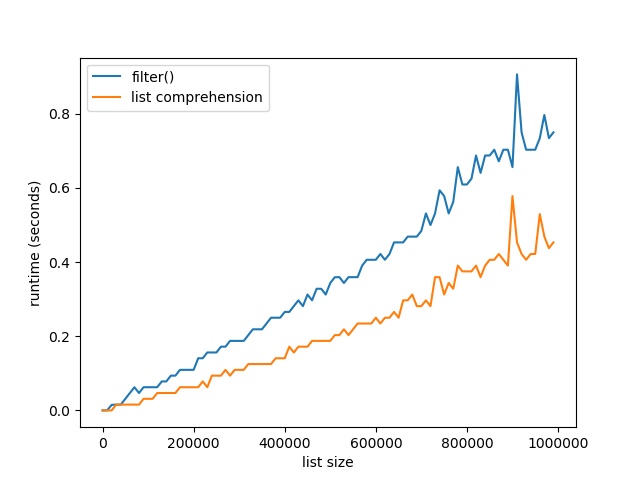
Here’s the resulting plot that compares the runtime of the two methods. On the x axis, you can see the list size from 0 to 1,000,000 elements. On the y axis, you can see the runtime in seconds needed to execute the respective functions.
The resulting plot shows that both methods are extremely fast for a few tens of thousands of elements. In fact, they are so fast that the time() function of the time module cannot capture the elapsed time.
But as you increase the size of the lists to hundreds of thousands of elements, the list comprehension method starts to win:
For large lists with one million elements, filtering lists with list comprehension is 40% faster than the built-in filter() method.
The reason is the efficient implementation of the list comprehension statement. An interesting observation is the following though. If you don’t convert the filter function to a list, you get the following result:
Suddenly the filter() function has constant runtime of close to 0 seconds—no matter how many elements are in the list. Why is this happening?
The explanation is simple: the filter function returns an iterator, not a list. The iterator doesn’t need to compute a single element until it is requested to compute the next() element. So, the filter() function computes the next element only if it is required to do so. Only if you convert it to a list, it must compute all values. Otherwise, it doesn’t actually compute a single value beforehand.
Where to Go From Here
This tutorial has shown you the filter() function in Python and compared it against the list comprehension way of filtering: [x for x in list if condition]. You’ve seen that the latter is not only more readable and more Pythonic, but also faster. So take the list comprehension approach to filter lists!
If you love coding and you want to do this full-time from the comfort of your own home, you’re in luck:
I’ve created a free webinar that shows you how I started as a Python freelancer after my computer science studies working from home (and seeing my kids grow up) while earning a full-time income working only part-time hours.
Scratchy Spring Sale Day 3: Curve Digtial Spring Sale, up to -90%
[www.indiegala.com]The Massive Gameplay Giveaway has been reinvigorated with fresh new updates and even more chances to earn your own Steam keys. [www.indiegala.com]Be on the look-out for some huge discounts on your favorite games + a Scratch Card with a FREE secret Steam game for every store purchase.