Splatoon 2 Version 5.2.0 Update Arrives On Switch Next Week
Nintendo has revealed that Splatoon 2‘s next update will arrive next week, with changes set to go live from 22nd April.
The update, which was seemingly accidentally mentioned by Nintendo on social media ahead of time last week, will be distributed at 10am on on 22nd April in Japan (so that’s 2am BST / 3am CEST in Europe, and 6pm PDT / 9pm EDT the day before in North America).
Patch notes for this update haven’t been released in English at the time of writing, although the official Japanese notes mention a number of minor adjustments to main, sub and special weapons. The update before this – Version 5.1.0 – arrived in January, also making a number of weapon adjustments.
Do you still find time to play regular matches of Splatoon 2? Tell us below.
Pokémon Rumble Rush To Shut Down This Summer, Just One Year Since Launch
Smartphone game Pokémon Rumble Rush is set to shut down this July, just over a year since it first launched.
The app, which always runs online, will see its service terminated from 22nd July at 01:59 UTC. This means that fans will no longer be able to download, update or even play the game (thanks, Serebii). In addition, it has been revealed that you’ll no longer be able to purchase the game’s Poké Diamonds, and a refund for unused Poké Diamonds will be available starting from the app’s closure date.
A number of events are still planned to go ahead within the app before that date arrives, but it’s pretty sad – and no doubt annoying for players – to see the game close down entirely after such a short amount of time. Arguments both for and against digital and online-centric games have been done to death, but this sure does serve as a pretty major ‘con’ for online-only experiences. As of 22nd July, we’ll never be able to play the game ever again.
Are you sad to see it go? Does this leave you with any concerns for other online games going forward? Feel free to share your thoughts with us down below.
Phantasy Star Online 2 Is Now Available On Xbox One
It's been eight years since the trailer for the Western release of Phantasy Star Online 2 dropped. Back then, Sega announced that it was due out in 2013, but it's only now that the long-awaited online RPG is available to download on Xbox One. There are two special editions priced at $30 and $60 respectively, but the base game is free-to-play--you just need an Xbox Live Gold subscription in order to play online.
Although Sega dropped the trailer eight years ago, it wasn't until last year, when PSO 2 was announced during Microsoft's E3 2019 presentation, that a Western release started looking like a reality. PSO 2 initially launched in Japan in 2012 and continues the original game's formula of mixing futuristic tech and magic in combat. As the name implies, it's a multiplayer-focused variant of the fantasy RPG series, with players able to meet in lobbies, speak through text chat, and engage in raid quests with up to 12 players. The original Phantasy Star Online is widely regarded as one of the most influential games of all time for what it did for online console play in Japan, pushing the feature in the East when no other games were.
PSO 2 is enhanced for Xbox One X with 4K support and an expanded user interface display size. Game Pass Ultimate subscribers in the US and Canada will also receive some special PSO 2 DLC as part of the service's new Perks. These include a special content bundle, which includes unique emotes, in-game cosmetics including an Xbox jacket, a gold ticket Mission Pass and in-game currency with a Meseta Crystal.
In this article, you’ll learn the ins and outs of the sorting function in Python. In particular, you’re going to learn how to filter a list of dictionaries. So let’s get started!
Short answer: The list comprehension statement [x for x in lst if condition(x)] creates a new list of dictionaries that meet the condition. All dictionaries in lst that don’t meet the condition are filtered out. You can define your own condition on list element x.
Here’s a quick and minimal example:
l = [{'key':10}, {'key':4}, {'key':8}] def condition(dic): ''' Define your own condition here''' return dic['key'] > 7 filtered = [d for d in l if condition(d)] print(filtered)

# [{'key': 10}, {'key': 8}]
Try it yourself in the interactive Python shell (in your browser):
You’ll now get the step-by-step solution of this solution. I tried to keep it as simple as possible. So keep reading!
Filter a List of Dictionaries By Value
Problem: Given a list of dictionaries. Each dictionary consists of one or more (key, value) pairs. You want to filter them by value of a particular dictionary key (attribute). How do you do this?
Minimal Example: Consider the following example where you’ve three user dictionaries with username, age, and play_time keys. You want to get a list of all users that meet a certain condition such as play_time>100. Here’s what you try to accomplish:
Solution: Use list comprehension[x for x in lst if condition(x)] to create a new list of dictionaries that meet the condition. All dictionaries in lst that don’t meet the condition are filtered out. You can define your own condition on list element x.
Here’s the code that shows you how to filter out all user dictionaries that don’t meet the condition of having played at least 100 hours.
users = [{'username': 'alice', 'age': 23, 'play_time': 101}, {'username': 'bob', 'age': 31, 'play_time': 88}, {'username': 'ann', 'age': 25, 'play_time': 121},] superplayers = [user for user in users if user['play_time']>100] print(superplayers)
The output is the filtered list of dictionaries that meet the condition:
Problem: Given a list of dictionaries. Each dictionary consists of one or more (key, value) pairs. You want to filter them by key (attribute). All dictionaries that don’t have this key (attribute) should be filtered out. How do you do this?
Minimal Example: Consider the following example again where you’ve three user dictionaries with username, age, and play_time keys. You want to get a list of all users for which the key play_time exists. Here’s what you try to accomplish:
The output should look like this where the play_time attribute determines whether a dictionary passes the filter or not (as long as it exists, it shall pass the filter).
Solution: Use list comprehension[x for x in lst if condition(x)] to create a new list of dictionaries that meet the condition. All dictionaries in lst that don’t meet the condition are filtered out. You can define your own condition on list element x.
Here’s the code that shows you how to filter out all user dictionaries that don’t meet the condition of having a key play_time.
users = [{'username': 'alice', 'age': 23, 'play_time': 101}, {'username': 'bob', 'age': 31, 'play_time': 88}, {'username': 'ann', 'age': 25},] superplayers = [user for user in users if 'play_time' in user] print(superplayers)
The output is the filtered list of dictionaries that meet the condition:
Problem: Given a list of dictionaries. Each dictionary consists of multiple (key, value) pairs. You want to sort them by value of a particular dictionary key (attribute). How do you sort this dictionary?
Minimal Example: Consider the following example where you want to sort a list of salary dictionaries by value of the key 'Alice'.
Solution: You have two main ways to do this—both are based on defining the key function of Python’s sorting methods. The key function maps each list element (in our case a dictionary) to a single value that can be used as the basis of comparison.
Use a lambda function as key function to sort the list of dictionaries.
Use the itemgetter function as key function to sort the list of dictionaries.
Here’s the code of the first option using a lambda function that returns the value of the key 'Alice' from each dictionary:
# Create the dictionary of Bob's and Alice's salary data

salaries = [{'Alice': 100000, 'Bob': 24000}, {'Alice': 121000, 'Bob': 48000}, {'Alice': 12000, 'Bob': 66000}] # Use the sorted() function with key argument to create a new dic.

# Each dictionary list element is "reduced" to the value stored for key 'Alice'

sorted_salaries = sorted(salaries, key=lambda d: d['Alice']) # Print everything to the shell

print(sorted_salaries)
The output is the sorted dictionary. Note that the first dictionary has the smallest salary of Alice and the third dictionary has the largest salary of Alice.
In this article, you’ve learned how to filter a list of dictionaries easily with a simple list comprehension statement. That’s far more efficient than using the filter() method proposed in many other blog tutorials. Guido, the creator of Python, hated the filter() function!
I’ve realized that professional coders tend to use dictionaries more often than beginners due to their superior understanding of the benefits of dictionaries. If you want to learn about those, check out my in-depth tutorial of Python dictionaries.
If you want to stop learning and start earning with Python, check out my free webinar “How to Become a Python Freelance Developer?”. It’s a great way of starting your thriving coding business online.
Poll: Does Resident Evil 4 Really Need The REmake Treatment?
Following whispers last week that the next numbered Resident Evil game was in the works, further rumours surfaced over the weekend of an incoming remake of Resident Evil 4, a game originally developed as a GameCube exclusive as part of the fabled ‘Capcom 5’.
Of course, RE4 wouldn’t remain a Nintendo exclusive for long. A PlayStation 2 port released just 9 months after its January 2005 GameCube debut. The game represented a pivot for the zombie franchise away from survival horror towards survival action, and it had a lasting influence on over-the-shoulder third-person shooters for years to come. It’s a masterpiece that has since appeared on most every platform, including Nintendo’s. The Wii Edition added optional (and excellent) pointer controls, and last year Capcom brought it to Switch along with several other series entries.
A lick of paint is arguably all RE4 needs
With the success (on other platforms) of the remade version of Resident Evil 2 and the recent (less well-received) Resident Evil 3, RE4 is the next numerical entry on this production line of REmakes, but is it the most logical next step?
Resident Evil Code: Veronica and Resident Evil Zero, for example, would arguably benefit more from the remake treatment, and presumably it’s only a matter of time before Capcom revisits the original game (again). It would make for an entirely different experience to the tense tank controls of the PlayStation classic, but REmake 2 proved that the developer can craft a fresh and engaging modern take on hallowed, vintage material. If Capcom wants to redo its entire back catalogue and produce games of RE2’s quality, we’ll play each and every one.
The thing is, RE4 still plays brilliantly. As noted in our review of the Switch release, the base experience may take some getting used to control-wise, but after you’ve stopped pushing the right-stick and trying to play it as a dual-stick shooter, it’s the same brilliantly tense and atmospheric action game it ever was, even if it’s showing its age from a visual perspective. Where the original ‘tank’ controlled games might be tougher to return to these days (especially if you weren’t there at the beginning), RE4 holds up. With a little more effort on Capcom’s part (specifically with regards to improving textures and adding gyro controls – something the company did patch in to the Switch versions of RE5 and RE6), last year’s re-release could have been the ultimate version.
A lick of paint is arguably all RE4 needs; a ‘REm4ster’ over a ‘REm4ke’, if you will. Capcom is all or nothing, it seems. The company has form with bare-bones ports (the GameCube versions of RE2 and 3, for example), and it’s not shy about charging top dollar for them. But then it really pushes the boat out with games like the original REmake (again on GameCube) or the recent reimaginings of 2 and 3.
on the evidence of brilliant Switch ports from other studios, we refuse to believe that [bringing these remakes to Switch] isn’t possible
Which brings us to the elephant in the room: Will we ever see these remakes on Switch? Despite a flurry of Resident Evil releases, the remakes of 2 and 3 aren’t available on Nintendo’s console. Indeed, the second and third numbered entries are the only mainline games not available in any form on Switch (if we count the Japan-only streaming version of Resident Evil VII: Biohazard).
Granted, bringing those technically taxing games to Switch would be a challenge, but on the evidence of brilliant Switch ports from other studios, we refuse to believe that it isn’t possible. There are currently no plans to bring them to Nintendo’s console, though. Capcom is making a choice here, and it’s a confounding one to the millions of Switch gamers who would jump at the chance to play these remakes.
Would you play this on Switch? Chance’d be a fine thing.
When it comes to RE4 specifically, the old “if it ain’t broke…” adage springs to mind, but given Capcom’s approach to remaking these games, we find ourselves torn. For example, if the rumours of Nintendo remastering a selection of 3D Marios on Switch for the plumber’s 35th anniversary are true, how would we feel if Super Mario 64 were to be ‘remade’ rather than ‘remastered’? A cheeky up-rez would certainly be welcome, but anything beyond the subtlest tweaks to gameplay would be instantly noticed by players who have played and replayed the game to death. At what point should a classic game be left alone?
Offering an ‘alternate’ version for a new audience appears to have worked well for Capcom, especially for old-school games built with outmoded mechanics or controls which nowadays may turn some players off. Things get much murkier when the original game is still arguably as accessible and brilliant as it ever was, though. Part of us wants Resident Evil 4 to be lavished with the very best treatment. As an all-time favourite of so many, it certainly deserves it and you don’t need to be a genius to understand why the IP owners would choose to update such a celebrated title ahead of games more desperately in need of a ground-up retooling. That’s not to say that there aren’t elements of RE4 that could do with a nip here and a tuck there, but a full-on reimagining feels superfluous in a way that 2 and 3 didn’t.
Do you think Resident Evil 4 needs a remake? Would you play it if Capcom decided to make a Switch port? Feel free to let us know by answering out poll below.
Thanks for voting. Let us know your thoughts and feelings on these remakes and their continued absence on Switch below, and feel free to cram as many superfluous ‘RE’s into your comments as possible.
The Outer Worlds Dev Reveals The Content It Cut From The Game And Explains Why
Developer Obsidian has spoken about the numerous cuts it made to the award-winning RPG The Outer Worlds, labelling some of the cuts "painful" and how they limited the story the studio wanted to tell.
In a new Noclip documentary, which you can watch below, game director Leonard Boyarsky said the team "had to make one cut too many." Specifically, the studio decided to axe some content that would have shed more light on some of the companion characters, while the company also removed some main story chunks.
Despite these cuts, Obsidian remains proud of The Outer Worlds because if people are calling for more content, that means they like the game, Boyarsky said.
Random: Finally, You Can Play Dark Souls On Switch The Way Nature Intended
If you cast your mind back to 2018 and the release of the excellent Dark Souls: Remastered for Switch, you might remember a tiny issue we (and many other players) had with the game. Oh, for the most part the Switch port of FromSoftware’s inscrutable masterpiece was just fine and dandy, but beyond any frame rate hiccups or minor visual disappointments, one issue blighted the game’s good name and has continued to do so to this very day.
We’re talking, of course, about the use of ‘B’ to confirm and ‘A’ to cancel in menu screens. The issue stems from the fact that on PlayStation and Xbox the ‘confirm’ button (‘X’ or ‘A’ on those consoles’ respective pads – in the West, at least) sits where Nintendo’s ‘B’ resides at the bottom of the diamond button formation. This has caused headaches in a few games, but none where quite so vexing as the Dark Souls example. The fact that the option to change the confirm and cancel buttons was visible in the menu but inexplicably greyed out made the issue all the worse!
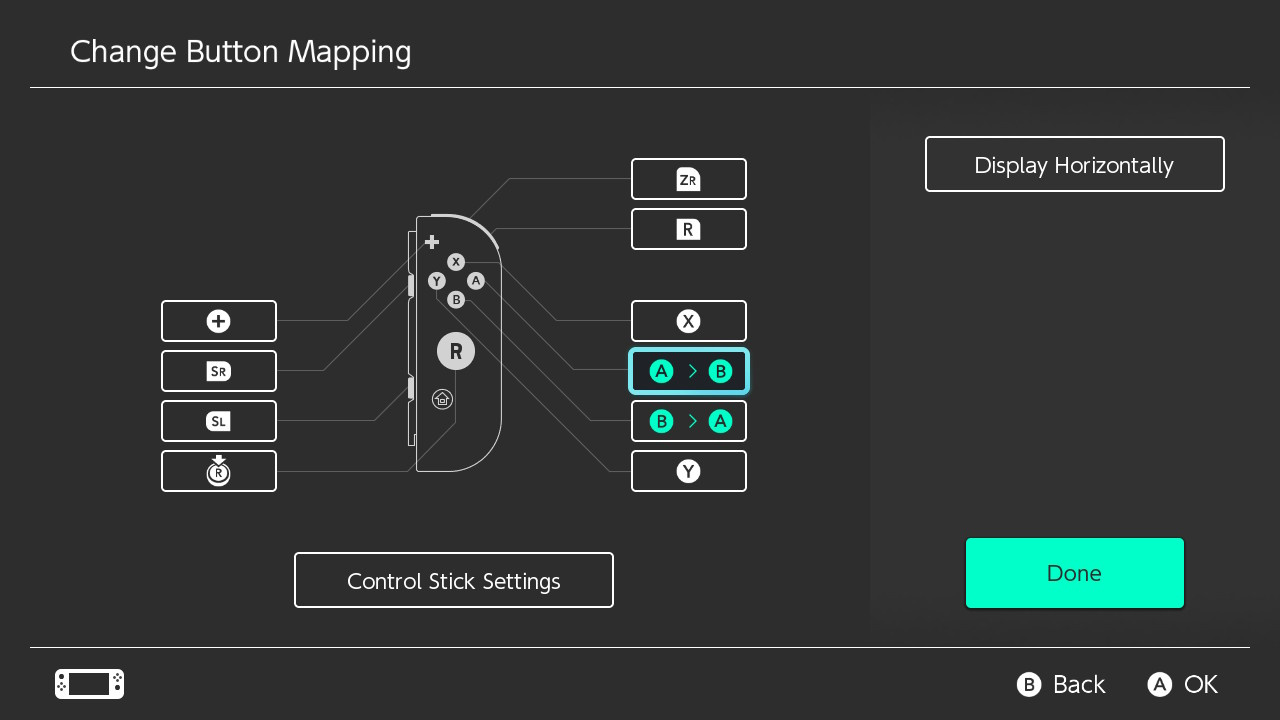
Fortunately, the latest firmware update for your Nintendo Switch has introduced the option to remap any button on your pad and finally gives us the option to play Dark Souls, or more precisely, navigate the game’s menus, the way they were meant to be navigated on a Nintendo console, with the ‘A’ button confirming and the ‘B’ button cancelling.
If like us you fancy swapping ‘A’ and ‘B’, all you have to do is head into the console’s settings, scroll down to Controllers and Sensors and select the minty fresh ‘Change Button Mapping’ option. Here you can remap any of the buttons on your controllers on a per-controller basis. This is particularly handy, as if you have more than one right Joy-Con you’ll be able to designate it your Dark Souls Joy-Con and crack it out when you’re heading back to Lordran. You’re also able to save up to 5 presets, so it’s as simple a process as you could reasonably expect.
It should be noted that there are some issues to think about when doing this, though. Firstly, once you’ve changed the buttons, you’ll have reversed their functions for the console’s menus, too. This you’ll have to navigate back to the game with care or (and we recommend this in handheld mode) simply use the touchscreen. When returning to your Switch’s system menu a prompt informs you that user-defined button mapping is in use and gives you the option to disable it without going through menus again. Handy!
Secondly, swapping these buttons for the in-game menus also swaps them for gameplay. Assuming you’ve committed the default control layout to memory, you can address this by swapping their functions again (in the game’s menus this time) and returning the gameplay buttons to their usual configuration. Ta-da!
The in-game prompts will still be labelled incorrectly, but ignore them and you can imagine that Bandai Namco itself patched in the tiniest of updates and improved your Soulsian experience by a factor of at least 10,000. Our resident Video Producer, the lovely Alex, will certainly be pleased with this new option. Hopefully it’s not too late for him…
Yay for accessibility and optional loveliness! It’s not ideal, but it’s now possible. Will you be using this feature to swap the buttons for Dark Souls on Switch? What other games might benefit from this new feature? Gonna switch ‘X’ and ‘B’ for jumping in Splatoon 2? Gonna rejig it to play Animal Crossing one-handed? Let us know below.
Just as a quick reminder, new Switch firmware updates often bring controller updates, too. With Switch’s Version 10.0.0 firmware update now available to download, you’ll find that your Joy-Con can also be updated.
After updating to Version 10.0.0. ourselves, we’ve noticed that all of our Joy-Con needed an update but our Pro Controllers were seemingly fine. Nintendo doesn’t provide information on what changes are made to any controller updates, but it goes without saying that it’s worth keeping them up to date to avoid any unnecessary issues later down the line.
If you need a bit of help, follow the steps below:
How To Update Your Nintendo Switch Joy-Con
1) Make sure the Joy-Con you wish to update are attached to the console.
2) From the Home menu, choose ‘System Settings’. Then choose ‘Controllers and Sensors’ from the left-hand side.
3) Scroll down to ‘Update Controllers’, press it, and let the console do its thing. Make sure to repeat all steps for all of your Joy-Con.
Version 10.0.0 has brought a couple of new welcome features, including the option to change button mapping.
The 171st GalaQuiz will be LIVE soon, win up to $75 in GalaCredit!
[www.indiegala.com] The GalaQuiz will take place in less than 15 minutes from this announcement Today's GalaQuiz[www.indiegala.com] hints are up. The theme will be Emoji Animals Redux.
Scratchy Spring Sale Day 1: Idea Factory Spring Sale, up to -80%

















 in GalaCredit!


