Create an account


Welcome, Guest
You have to register before you can post on our site.

Username
  

Password


Search Forums

(Advanced Search)

Forum Statistics
» Members: 20,195
» Latest member: Pilajone
» Forum threads: 22,122
» Forum posts: 23,010

Full Statistics

Online Users
There are currently 821 online users.
» 0 Member(s) | 817 Guest(s)
Applebot, Baidu, Bing, Google

 
  (Indie Deal) Erotic Energy Bundle | Resident Evil 3 is out! | Microids Sale
Posted by: xSicKxBot - 04-11-2020, 08:04 AM - Forum: Deals or Specials - No Replies

Erotic Energy Bundle | Resident Evil 3 is out! | Microids Sale

RESIDENT EVIL 3 NOW AVAILABLE!
https://youtu.be/32LSdT0dqxc Resident Evil 3[www.indiegala.com] stars Jill Valentine—one of video games’ most iconic heroines—as she escapes from a doomed Raccoon City while being pursued by the unrelenting bioweapon Nemesis.

Erotic Energy Bundle | 9 Steamy Games | 92% OFF
[www.indiegala.com]
During troubling times we could all use a healthy energy recharge.

Quarantine Sale Day 18: Microids Publisher Sale, up to -90%
[www.indiegala.com]
Get a FREE Steam copy of Men of War: Assault Squad[www.indiegala.com] with a minimum spend of $8/€7/£6 in the IndieGala Store (while stocks last). Check out the FULL Microids list here.

Happy Hour: Pandemic Shield Bundle
[www.indiegala.com]

Stay Inside, Stay Safe and Enjoy Good Games.
Check out IndieGala on Twitter, YouTube & Facebook[www.facebook.com]


https://steamcommunity.com/groups/indieg...8115678545

Print this item

  News - Essential Things Final Fantasy 7 Remake Doesn't Tell You Straight Away
Posted by: xSicKxBot - 04-11-2020, 08:03 AM - Forum: Lounge - No Replies

Essential Things Final Fantasy 7 Remake Doesn't Tell You Straight Away

Final Fantasy 7 Remake has a lot of moving parts and, as such, carefully dishes out information as and when it's necessary. But if you're familiar with the franchise, or RPGs as a whole, there may be specific things you're looking for from the outset. As a result, you'll probably be asking a lot of questions long before the game is ready to give you answers. We don't want you sweating the small stuff instead of enjoying FF7, so here's a bunch of spoiler-free heads-ups that'll save you a bit of stress.

For more guides, check out our feature highlighting some essential tips to know as you play the game, as well as our PSA on why you shouldn't skip side missions. Otherwise, you can read our FF7 Remake review.

What Moogle Medals Are For

No Caption Provided

Around Midgar you'll often find destructible boxes, and you should make a point of smashing them. Firstly, because they're puny and pathetic little wooden constructs that deserve to be crushed under the might of Cloud's buster sword, but also because they can sometimes recover your MP and drop potions or antidotes. More importantly, they reward you with an item called Moogle Medals.

Continue Reading at GameSpot

https://www.gamespot.com/articles/essent...01-10abi2f

Print this item

  Microsoft - How research can enable more effective remote work
Posted by: xSicKxBot - 04-11-2020, 12:49 AM - Forum: Windows - No Replies

How research can enable more effective remote work


women sits on green couch looking at a tablet on the coffee table in front of her

Due to recent events, millions of office workers have needed to rapidly adjust to working from home—learning new collaboration tools and best practices, re-thinking how to stay connected with colleagues outside the office, and adapting to new social norms around meetings. Working remotely presents both technical and social challenges, and researchers at Microsoft have been working across disciplines to understand and support both aspects of this challenge for decades.

Below is just a small sample of the work researchers at Microsoft and their colleagues have produced to improve the remote work experience. For those seeking to build better remote work products and services—or for anyone who wants to be more productive at home—we hope this research can provide some guidance, insight, and inspiration.

Although these are truly challenging times, we can benefit from a strong foundation of interdisciplinary research that can help us all stay productive and connected—with the hope of emerging from this crisis better-equipped to work together.

  • Paying attention can be harder in remote meetings. Sean Rintel at Microsoft Research Cambridge recently published two papers that can inform the design of features to support remote participants’ attention. One paper models how we ‘see’ attention in meetings. It suggests that machine perception may help us gather, signal, and follow attention when remote. The second paper suggests that low engagement in meetings may not always be a problem. Not every meeting requires our full engagement, but until we develop technological support for more nuanced roles, it is good practice to be up front about your engagement level. Together, these papers suggest that AI supported attention personalization could make future remote meetings more inclusive and effective by helping us overcome constraints and assumptions.
  • One benefit to everyone attending a meeting virtually is that it can be easier to review missed content if you show up to a meeting late or have to step out for a moment. For instance, Kori Inkpen, Sasa Junuzovic, and John Tang from Microsoft Research Redmond have explored using “accelerated instant replay” (AIR) to help people catch up quickly and then jump (back) into the real-time meeting.
  • In a world without business travel, negotiating time zone constraints becomes even more important. John Tang at Microsoft Research Redmond and Kori Inkpen at the Microsoft Research AI Lab have catalogued strategies for mitigating time zone-related obstacles to productivity and provided guidelines to help overcome these obstacles. Tang and Inkpen also worked with Asta Roseway, Mary Czerwinski, and Paul Johns from Microsoft Research Redmond to explore novel uses of asynchronous video to support collaboration across time zones and developed two prototype systems, Time Travel Proxy and Video Threads.
  • Some features in Microsoft Teams were inspired by work at Microsoft Research Cambridge on utilizing multiple devices to support better presentation and collaboration over video; researchers’ participation in an internal hackathon led to close collaboration on development of the product. Their previous research into ad hoc adaptability in video calling, wireless smartphone mirroring in video calls, and shared slideware control helped enhance users’ ability to join meetings on multiple devices and use a phone as a companion device. Learn the inside story of the hackathon and product collaboration in this article on companion experiences for Microsoft Teams.

Looking forward, there will be an unprecedented opportunity for researchers to learn from the current situation to figure out not only how to manage future disruption, but also to incorporate new ways of working at home or in the office. Microsoft is committed to investing in research internally and externally to make this happen. For example, in more typical times, remote work often involves meetings with both remote and co-located colleagues. Better understanding and supporting productivity in these hybrid meetings is the subject of one of the academic projects Microsoft funds through the Microsoft Productivity Research program in collaboration with Dr. Mirjam Augstein and Dr. Thomas Neumayr at the University of Applied Sciences Upper Austria.

If you’d like to do a deeper dive into the literature on remote work, below is a selection of additional papers from Microsoft researchers on the subject.

Researchers at Microsoft have been working across disciplines to address the unique and complex challenges of meeting remotely, such as improving the quality, fidelity, and utility of meetings; addressing design issues; merging physical and virtual collaboration; and exploring the use of avatars:

“Hybrid meetings” (meetings with remote and co-located participants)

Spatialized audio and video for video calling

“Accelerated instant replay” during a video call

Avatars in remote meetings

Remotely collaborating when completing tasks in the physical world

Researchers are also addressing the challenges of remote team building by helping people maintain connections across time zones, welcome new remote team members, and e engage in shared experiences:

Working across time zones

Remote employee onboarding

Co-watching video

Long before remote work became a way of life, researchers at Microsoft exploring the social and technical aspects of collaborating remotely. Below is a selection of work on the subject dating back nearly thirty years:

Microsoft researchers have also made substantial contributions to researcher areas adjacent to remote work that are increasingly relevant in today’s context—in how remote work technologies can support family life and play. For instance:

Connecting family across distance

Remote Play

Video Communication for First Responders

Thanks to Kori Inkpen, Sean Rintel, Abi Sellen, and John Tang, who also contributed to this post.


https://www.sickgaming.net/blog/2020/04/...mote-work/

Print this item

  News - Community Focus: Niris
Posted by: xSicKxBot - 04-11-2020, 12:49 AM - Forum: Lounge - No Replies

Community Focus: Niris

 Tuesdays. You know them well. The days where your pursuit of loot and power begins anew. Depending on the status of Daylight Saving, our internal alarm clocks go off around 10 AM Pacific, sending us on a search for what’s going on in Destiny. Without fail, the subject of this week’s Community Focus has been quick on the draw, providing infographics with pinpoint accuracy.

You may have heard the legends about this Guardian. Today, we’ll spend a little time getting to know them. Join me in welcoming Niris to center stage.

So, Niris, tell us a bit about yourself. Who are you, where did you come from, and what do you do out there in the “real world?”

Niris: Hello everyone! The name is Nic, but you can call me Niris. Or Nic. Whichever you like. Some of you may already know me as “the Destiny infographic guy.” Out here in the “real world” I design user interfaces and experiences, which is kind of what led me to creating all of the infographics I’ve designed for Destiny.

My story starts out a little sad, but I promise it has a happy ending. When Destiny 2 launched in 2017, I was taking care of my mother in hospice. It was an incredibly emotional and tough time and video games with friends were the only thing keeping me together. I needed something consistent to keep me busy during that time in my life. Something that I could count on doing every day or week without fail. Based on my experience with Destiny 1, I knew I wanted to do something within the community, I just didn’t know what yet. I knew I was good at presenting a lot of information in an easily digestible format, so in October 2017 I designed my first Weekly Reset infographic. If I’m being honest, the graphics started as a coping mechanism for myself, but grew into something much more along the way.

Since then, I’ve gone on to design an infographic for just about anything you can imagine in Destiny. Heroic public event activations? I got you. Need a refresher on how the Gambit UI and strategy works? Got you there too. Oh, you don’t know what times to shoot for in Master Nightmare Hunt Time Trials? Look no further. I love being able to gather detailed information surrounding specific activities in-game and make them super easy for players to understand.

Now, in the two and a half years since starting, the infographics have been featured in Forbes, Kotaku, and Gamerant. We built a Discord Bot (Servant of Niris) that services 2,500+ servers with the infographics and I haven’t missed a Weekly Reset since October 3rd, 2017. Needless to say, Mom would be proud. =)

(P.S. “Consistency kills competition.” To anyone out there who needs to hear this: if you find yourself going through a tough time, find something that you can do consistently to feel good about yourself. Keep doing it. Keep moving forward no matter what. You’ve got this.)

It’s inspiring to look back at the choices you made to get you to where you are today. Let’s dive deeper, what got you into Graphic Design?

Niris: I started doing graphic design about 12 years ago when I was a turntablist/DJ and putting out mixtapes left and right. It wasn’t very cost viable for me to keep paying to have artwork done for every single cover on everything I put out, so I decided that I’d give it a shot myself. Shortly after that I began to create posters, flyers, and all sorts of things which then led me to a marketing job. These days however, I’ve found my love and passion in UI/UX design and I’m hoping to maybe lend those skills to the Bungie team someday.

I’ve always had a bit of jealousy towards those who have an artistic touch. Twelve years of progress really shows in your work! How about Destiny? What led you here?

Niris: I’ve always been a fan of Bungie. Sometimes without even knowing it. I have memories of playing Oni on one of my very first PC builds after high school. The time I spent huddled around an Xbox with three of my friends playing Halo into the wee hours of the morning is something I’ll never forget either. So when a friend hit me up in the summer of 2014 talking about a beta for Bungie’s next project (shoutout to you Pebey!), I knew I had to get in on it.

Let’s be honest… There’s no better shooter than Destiny. The guns and the space magic really fulfilled that power fantasy for me that other games couldn’t. I played the ever-loving crap out of D1, but for some reason, I never got into the lore much or even “building” up my Guardian to its max potential. I mean, I never even raided in D1. It was a really cool shooter that I got to play with my friends and that’s all I really cared about at the time.

Fast forward to now and I’m completely enveloped in everything. I’m obsessed with other creators’ content. I watch lore videos, read all of the books, and farm activities for hours looking for that one perfect roll on a gun. I’ve even done three day-one raids at this point and I don’t see it stopping any time soon.

Let’s get down to business. This is one of the most important questions you could ever answer while having the spotlight on you. What class do you call home, and why is it a Hunter?

Niris: ‘Lock life all day, baby!

For me, it’s the utility and diversity that a Warlock brings to a fireteam. I love that I can throw down a Well of Radiance or switch it up and chuck a Nova Bomb whenever I feel like it. Pair that with some of my favorite class Exotics in the game and it’s a recipe for fun. Who doesn’t love running around with Devour, a Recluse, and Nezarec’s Sin?

I’m also a Hunter on my days off and am warming back up to my Titan after we’ve had some time away from each other.

Alright, I’ll give you a pass. Without Warlocks, space magic wouldn’t feel as… magical. Anyway, thanks for stopping by! It’s always fun getting to know our community a bit better. Want to give a shout-out to the community before we wrap up?

Niris: I would just like to send a resounding “thank you!” to the entire community. I’ve made so many friendships and shared experiences I never would’ve imagined all because of this game. The Destiny community truly is the best community. <3

Lastly, please be kind to yourself and each other. Patience is a rare currency we could all use a little more of right now as we navigate through these ultra-weird times.

That’s a wrap! Thanks for stopping by. If you have any recommendations for our next Community Focus, feel free to drop us a line. Cozmo and I are always on the lookout for the next Guardian to spotlight.

Enjoy the weekend, and we’ll see you next week.

-dmg04


https://www.sickgaming.net/blog/2020/04/...cus-niris/

Print this item

  News - BETA: BEDROCK 1.16.0.55 (XBOX ONE / WINDOWS 10 / ANDROID)
Posted by: xSicKxBot - 04-11-2020, 12:48 AM - Forum: Minecraft - No Replies

BETA: BEDROCK 1.16.0.55 (XBOX ONE / WINDOWS 10 / ANDROID)

Remember that only those on Xbox One / Windows 10 / and Android may participate in the Beta builds.  You will not be able to join Realms or non-beta players worlds and you will not be able to open worlds opened in the Beta in earlier/current stable builds of Bedrock.

Crashes and Stability

  • Fixed several crashes that could occur during gameplay
  • Fixed a crash that could occur when creating a new world on iOS
  • Fixed a crash that could occur when exiting a world with particles present
  • Fixed several crash issues related to the player entering water
  • Fixed a crash that could happen when a mob’s state changed

General

  • Light propagation now works correctly, fixing hostile mob spawning (MCPE-49616)
  • Chunks should no longer fail to load properly in +250MB worlds (MCPE-58514)
  • Fixed a bug with light persisting after a block change
  • Ticking areas can no longer be removed on the same tick they are created (MCPE-36769)
  • Lighting now propagates correctly through chunk/subchunk borders (MCPE-58182)
  • Fixed an issue that could cause areas to show lighting errors on servers
  • Added new overload for /replaceitem with an option for destroy (the old behavior) or keep (the command will return an error if an item occupies that slot)
  • The smooth camera option (from full keyboard gameplay) is no longer jittery, and is smooth again (MCPE-54969)
  • The screen no longer twitches when the player dies in the Nether or End

Gameplay

  • Water can now be collected from bubble columns using a bucket (MCPE-37571)
  • Casting a fishing rod will no longer attach itself to a Parrot mounted on the player’s shoulder (MCPE-60361)
  • Fully grown Sweet Berry bushes can now be harvested when holding bone meal (MCPE-54206)
  • Parity: Carrot on a stick, shield, and shovel now lose durability consistently in Bedrock
  • Fire charges are now consumed after lighting a tnt block (MCPE-42938)
  • Player icons no longer appear as white square on locator maps

Blocks

  • Wall signs attached to doors are no longer left floating after the bottom half of the door is broken (MCPE-43748)

Mobs

  • Creepers no longer lose aggro immediately after losing sight of its target (MCPE-32815)
  • Ghast hitbox now matches its rendering (MCPE-44326)
  • Fixed the “MeleeAttackGoal” to allow entities to hit target entities beneath them
  • The Iron Golem’s legs don’t swing as far anymore

Graphics and Rendering

  • Experience Orbs have been data driven
  • Fireballs have been data driven
  • NPC geometry and animations have been data driven
  • Items no longer flash green when being removed from a furnace
  • Fixed a bug where glass and water could be drawn incorrectly when close to each other
  • Fixed the custom glint texture issue when added to compasses

Scripting and Add-ons

  • Removed type property from “minecraft:shooter” as it was never used
  • Updated “minecraft:spawn_entity” to have an internal entities object or array
  • Updated the “minecraft:behavior.circle_around_anchor”behaviour
  • Added “attack_chance” to the “minecraft:behavior.defend_village_target” goal
  • Fixed removed or destroyed entities querying as valid in script
  • Invalid items in the “spawn_item” field of a “minecraft:spawn_entity” now display an error
  • “StompEggGoal” no longer uses “search_count” as it now searches all blocks in the specified area
  • Fixed “navigation.walk” to handle the case where it is used on a flying entity, so that the flying entity will not cause lag while it is touching the ground
  • The “minecraft:density_limit” component is now documented in the Spawn Rules documentation section (MCPE-61126)
  • A content error will now show up if you provide an invalid item name to “minecraft:interact” in the “transform_to_item” field

  • Thumbnail icons in the Marketplace are currently not loading in correctly


https://www.sickgaming.net/blog/2020/04/...0-android/

Print this item

  Xbox Wire - Microsoft Joins with Intel to Optimize Gears Tactics for PC
Posted by: xSicKxBot - 04-11-2020, 12:47 AM - Forum: Xbox Discussion - No Replies

Microsoft Joins with Intel to Optimize Gears Tactics for PC

Summary


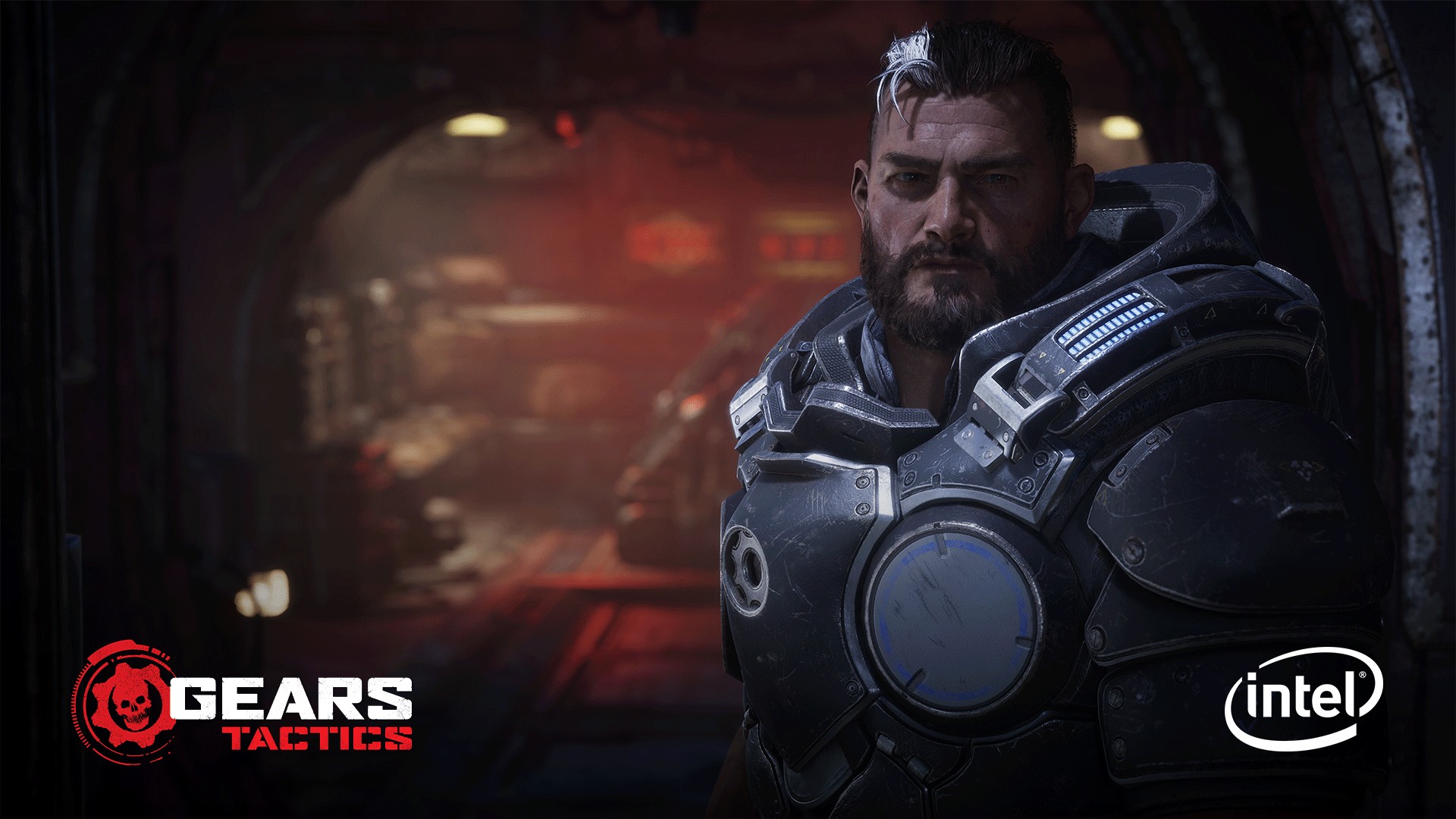
  • Throughout the development of Gears Tactics, The Coalition worked with Intel and the Xe-LP architecture to optimize the game.
  • Gears Tactics will look amazing on high-end PCs and runs perfectly on laptops and lower-spec machines to help bring the franchise to a broad new audience of PC gamers.
  • Gears Tactics will be available with Xbox Game Pass for PC (Beta), Windows 10 PC, and Steam on April 28.

Soon, you can experience the next chapter of the acclaimed Gears
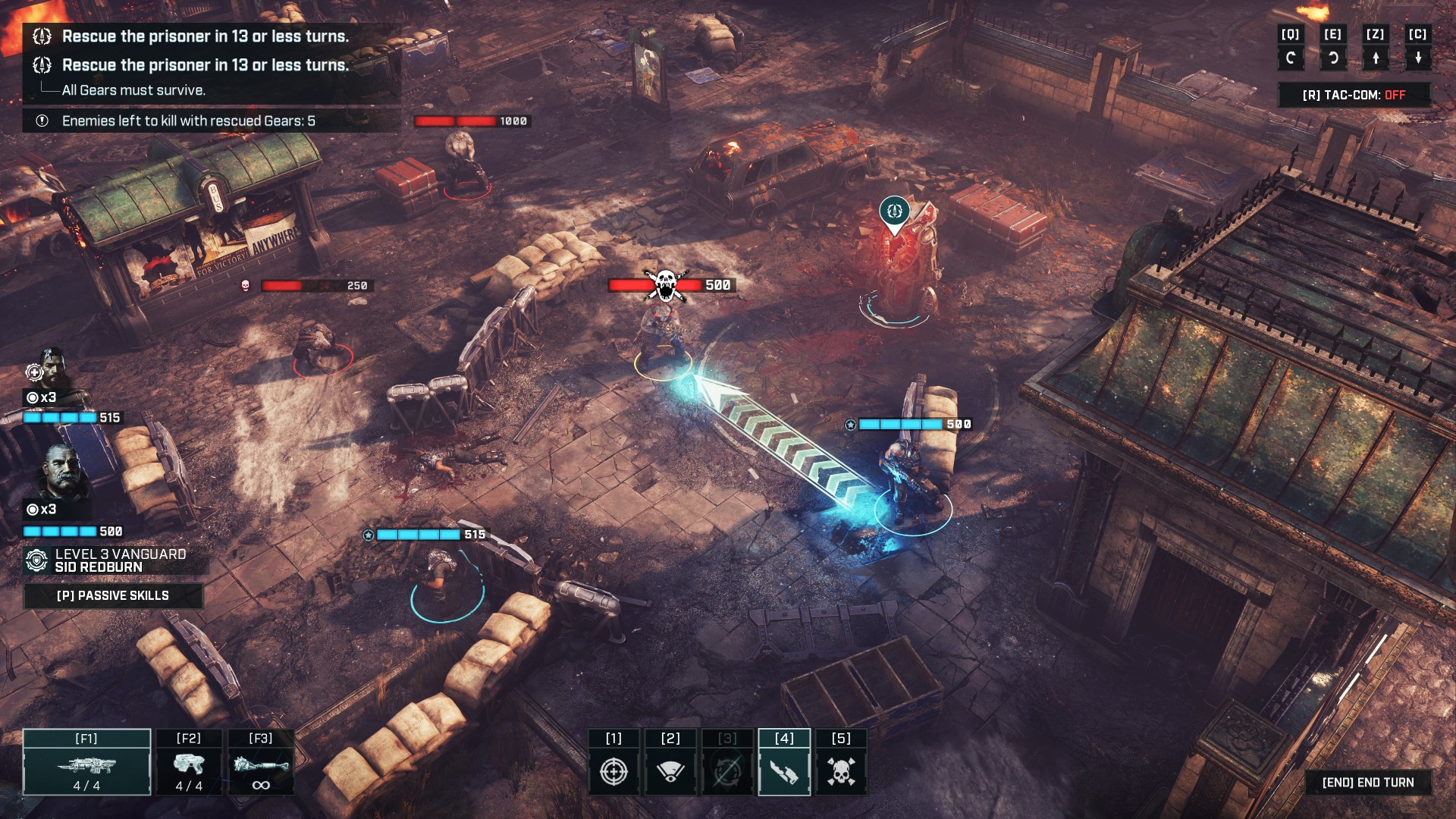
of War series built from the ground up for PC. Combining deep, tactical
turned-based gameplay and a powerful story of leadership and sacrifice, Gears
Tactics
will send you back to the front lines at
the dawn of the Locust War.

In Gears Tactics, you’ll step into the boots of Gabe Diaz
as he recruits, equips, and commands his squad on a desperate mission to hunt
down the relentless and powerful leader of the Locust army: Ukkon. Against all
odds and fighting for survival, you must outsmart the enemy in brutal,
turn-based tactical combat in an immersive and character-driven story.
Experience the intensity of one of the most-acclaimed gaming sagas in an
exciting new way when it comes to Xbox Game Pass for PC, Windows 10 PC, and
Steam on April 28.

Gears Tactics

While previous Gears games started with the console as a
fixed reference point, the development teams at The Coalition and Splash Damage
had to consider an incredibly wide range of processors for Gears Tactics.
Not only did the game have to live up to series expectations as a graphics
showcase, it had to seamlessly scale across thin and light notebooks,
ultra-powerful desktops and device configurations yet-to-come, including those
featuring the Xe graphics architecture debuting this year.

Throughout the development of Gears
Tactics
, The Coalition worked with Intel and the Xe-LP architecture to
optimize the game. New to Gears on PC is support for Variable Rate Shading
(VRS). Async Compute capabilities have been improved, and content has been
built to scale across a wide range of devices. VRS, a relatively new
technique, reduces the pixel complexity of a scene to effectively give Gears Tactics a performance boost
without sacrificing visual fidelity. Async Compute allows for certain graphics
workloads to be run in parallel, allowing the game to perform more back-end graphics
processes to keep your session running smooth. And with new Intel hardware
compatibility, that translates to fantastic performance across the upcoming Intel
Xe architecture.

In short, Gears Tactics will look amazing on high-end PCs
and runs perfectly on laptops and lower-spec machines to help bring the
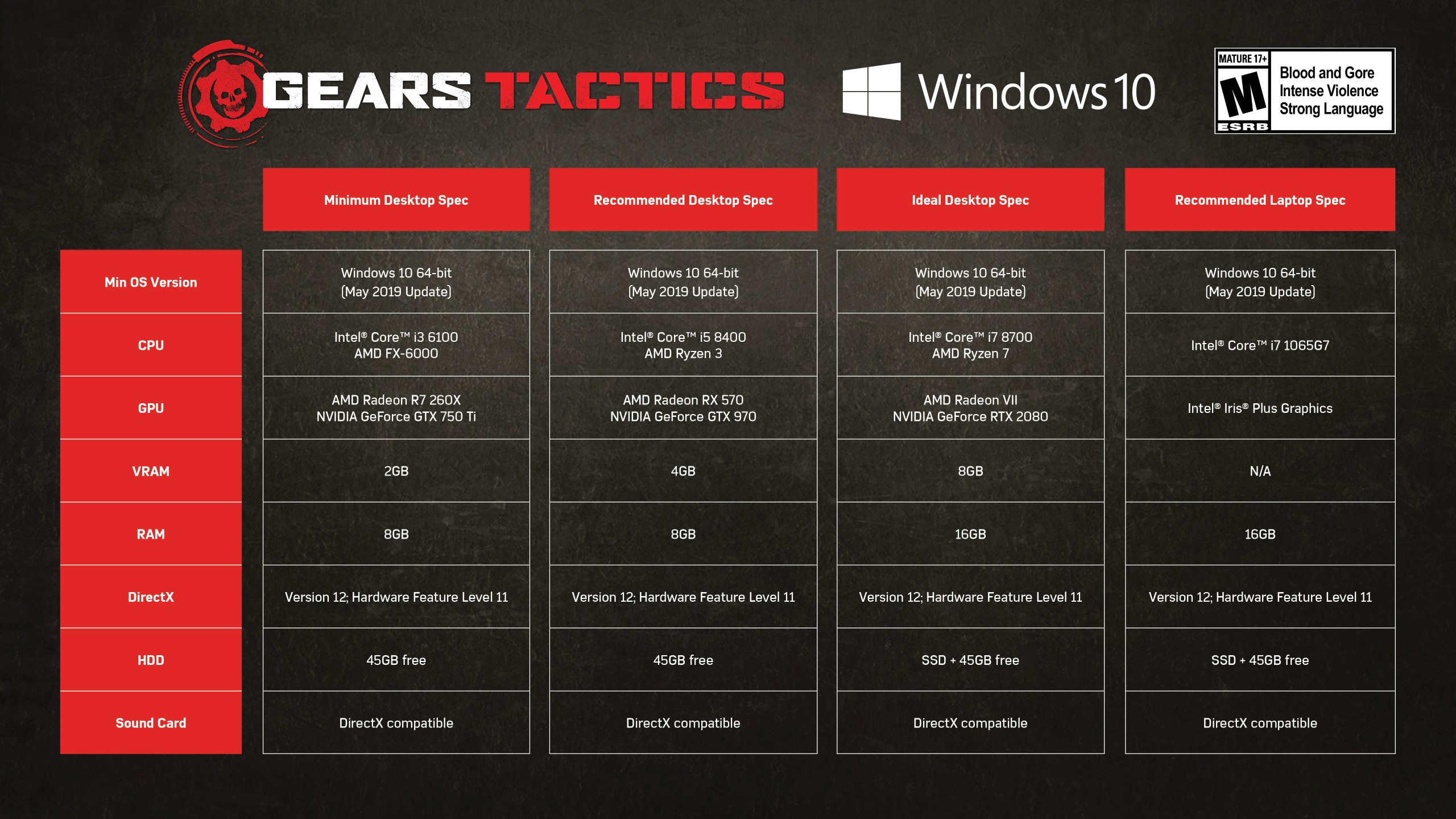
franchise to a broad new audience of PC gamers. You can see this represented
across the official hardware spec requirements outlined below:

Gears Tactics

Gears Tactics will be available with Xbox Game Pass for PC (Beta), Windows 10 PC, and Steam on April 28, and with select Intel hardware bundles later this year. Pre-order customers and Xbox Game Pass for PC (Beta) members who play before May 4 will receive the Thrashball Cole Character Pack which includes Augustus Cole as a recruit in addition to the Thrashball Armor Set complete with rare abilities.

For even more details on Gears Tactics, check out our recent hands-on preview here on Xbox Wire. And Gears fans will want to check out “Gears of War: Bloodlines,” the official prequel novel by New York Times bestselling author Jason Hough available on April 21. 

Xbox LiveXbox Live

Gears Tactics Pre-Order


Xbox Game Studios

Pre-order Gears Tactics or play Gears Tactics on Xbox Game Pass for PC (Beta) before May 4, 2020 and receive the Thrashball Cole Character Pack.* * Offer available with (1) pre-orders/purchases of Gears Tactics digital game made by April 28, 2020 OR (2) play Gears Tactics with an active Xbox Game Pass for PC (Beta) membership by May 4, 2020. Content requires internet to download. May take up to two weeks to receive content in-game. Gears Tactics is the fast-paced, turn-based strategy game set 12 years before the first Gears of War. Cities on the planet Sera are beginning to fall to the monstrous threat rising from underground – the Locust Horde. With the government in disarray, a squad of survivors emerge as humanity’s last hope. Play as Gabe Diaz, recruiting, equipping and commanding your squads on a desperate mission to hunt down the relentless and powerful leader of the Locust army: Ukkon, the evil mastermind who makes monsters. Against all odds and fighting for survival, outsmart your enemy in uniquely brutal, turn-based tactical combat. Experience the intensity of one of the most-acclaimed video game sagas in an exciting new way. Immersive and character-driven story: Play as the defiant soldier Gabe Diaz, rescuing and building your troops in a journey of leadership, survival and sacrifice. Customizable squad and equipment: Prepare your troops to face tough enemies, upgrading their skills and outfitting them with loot collected in challenging missions. Aggressive gameplay: Command your squad in fast paced, turn-based battles, advancing and surviving intense and visceral encounters with the unstoppable, swarming enemy. Massive boss battles: Defeat towering deadly bosses that defy your strategies and completely change the scale of the battle.


https://www.sickgaming.net/blog/2020/03/...cs-for-pc/

Print this item

  News - Video: Lessons learned about matchmaking for engagement in Halo 5
Posted by: xSicKxBot - 04-11-2020, 12:47 AM - Forum: Lounge - No Replies

Video: Lessons learned about matchmaking for engagement in Halo 5

In this 2020 GDC virtual talk, 343 Industries’ Josh Menke shows how to effectively test matchmaking approaches using real examples and data from a popular first-person shooter.

It was a great talk in which Menke offered an in-depth look at several commonly held best practices on how to matchmake for engagement across the industry, some of which contradict each other, with little to no data-driven evidence to support them.

If you missed seeing it live last month, now’s your chance to watch it at your convenience via the official GDC YouTube channel!

In addition to this presentation, the GDC Vault and its accompanying YouTube channel offers numerous other free videos, audio recordings, and slides from many of the recent Game Developers Conference events, and the service offers even more members-only content for GDC Vault subscribers.

Those who purchased All Access passes to recent events like GDC or VRDC already have full access to GDC Vault, and interested parties can apply for the individual subscription via a GDC Vault subscription page. Group subscriptions are also available: game-related schools and development studios who sign up for GDC Vault Studio Subscriptions can receive access for their entire office or company by contacting staff via the GDC Vault group subscription page.


https://www.sickgaming.net/blog/2020/04/...in-halo-5/

Print this item

  News - Blog: A postmortem of my rope-swinging action title Hang Line
Posted by: xSicKxBot - 04-11-2020, 12:47 AM - Forum: Lounge - No Replies

Blog: A postmortem of my rope-swinging action title Hang Line

The following blog post, unless otherwise noted, was written by a member of Gamasutra’s community.
The thoughts and opinions expressed are those of the writer and not Gamasutra or its parent company.


Hang Line Logo

Spoiler: I was successful with my first indie game because it got pirated.

But before we get into that, let me introduce myself. Hi! I’m Ed, and I survived making my first indie game by myself! Now that the shock of achieving this miracle has worn off, I’d like to give something back.

I have so much to share that I had to split the article into 3 parts:

  1. The story of the game’s development and how I made it.
  2. The key lessons I learned.
  3. Facts and data about the development process and the tools/plugins used.

Before reading this you will probably want to familiarise yourself with my game so you have some context. Hang Line is an extreme-physics climbing game where you swing up dangerous mountain peaks and rescue stranded survivors from avalanches and angry goats. You can watch the trailer below.

You can also download it here for free:

Download on Apple App Store:
https://itunes.apple.com/us/app/hang-line-mountain-climber/id1372005090?mt=8

Download on Google Play:
https://play.google.com/store/apps/details?id=com.yodo1.hanglinerescue&hl=en_US

So with that out the way, let’s get started! This first part covers the emotionally turbulent and surprisingly unconventional journey of Hang Line’s development. It’s about how to find guidance through the near impossible challenge of launching your own indie game but also how to ignore advice and follow your own personal journey to success. And also how piracy can sometimes not be a bad thing…

The main reason I decided to quit my job and become an indie developer was because I read an article written by a fake robot dinosaur.

No, really.

“SMART  PEOPLE HATE  DUMB IDEAS. ONLY  THINK OF WAYS IDEA  CAN’T WIN.”

The article basically explains how people turn down their own ideas because they think of all the reasons they won’t work. This is a huge reason why some people never start their own business.

“BE TOO STUPID FOR FEAR. TOO STUPID TO STOP. TOO STUPID TO FAIL.”

This really resonated with me. I was basically an expert at finding reasons that something was a dumb idea!

Also I was getting a bit fed up of the AAA console industry. I had worked at about 10 different game companies at this point, and in almost half those roles I had lost my job due to layoffs. Studios were collapsing left, right and centre, projects were getting bigger and bigger and everything was becoming sequels, prequels, remakes, reimaginings etc. This was a big motivation to get out and do my own thing.

So I had decided to take the plunge, but I was not in an ideal situation. At this point I had:

  • No team
  • No funding
  • No money for contractors
  • No art skills
  • Limited programming ability

I had spent the last 15 years working as a game design or design lead. The last thing I programmed was some crappy special effects for a football game in my first gamedev job. The memory leaking skid marks left by those football players still haunt me today…

And not only was I lacking in skills and resources, there was also the little matter of the Indiepocalypse. 


Too many games being released, impossible discoverability etc… Every single article I read on Gamasutra was telling me I was doomed. It seemed like the worst possible time to ‘go indie’. But then I remembered the important words of that robot dinosaur:

“TOO STUPID FOR FEAR. TOO STUPID TO STOP. TOO STUPID TO FAIL.”

So I went about trying to figure out how this could actually work.

I didn’t know anyone at the time that was dumb enough to take a chance working with me despite how many times I kept going on about wise robot dinosaurs. So I decided my only option was to keep my job for now and learn what I didn’t know in my free time.

I went and downloaded Blender and started an online tutorial. I mean how hard could it be to make 3D art?

Er.. yeah. Turns out it’s pretty hard. That’s the first thing I built in Blender. It’s supposed to be a submarine…

But I stuck at it, a few hours every evening, and gradually, bit by bit, I started to improve…

Eventually I felt confident enough that I could make something in 3D, so the next thing I did was to get back into programming and try and build a super simple prototype in Unity. I ended up dedicating my evenings for the next few months to build a car parking game. Yep, it was about as exciting as it sounds. 

Turns out that parking cars in a video game is pretty similar to parking them in real life – boring.

Anyway, it did what I needed. I felt confident enough to quit my job and get started.

This was my initial plan:

  • Make a game in 3-6 months
  • Fail miserably
  • Do another one and make it way better

….. PROFIT!

This plan did not go to plan. At all. You see there was one fundamental flaw – I’m a perfectionist. No matter how much I would love to finish a game in 6 months, it just wasn’t going to happen. But I didn’t realise this yet…

The first big decision I made was to target mobile. This was mostly because it just felt more achievable. Every Thursday I would religiously download and play the latest free games on the Apple iOS Store that had got a front page feature. I felt like I had some chance of making something of similar quality.

So I decided to set some goals for the project:

  • Keep it small/achievable
  • Free to play with ads
  • Relatable theme, no fantasy/sci-fi
  • Simple one-handed controls (so you can play stood up on the metro)
  • Potential to look beautiful (helps with getting a feature)

I then went through a load of ideas that I’d been writing down for months, and I scored them based on a bunch of criteria that were important to me for making a mobile game.

The one that scored highest was a climbing game. I initially had this idea of making an ‘infinite climber’ rock climbing game. I thought climbing controls could be really cool on mobile with the touch screen. I did some competitive research and found out I was actually completely wrong! There were actually quite a few mobile climbing games that were attempting something very similar, and the controls were just utterly awful.

But then I thought – why not just tap on the screen to swing the guy where you want to go … on a grappling hook?

And at that moment, Hang Line was born. 

My first thoughts on creating a prototype were:

“Swinging rope physics… that sounds a bit complicated.”

Like I said before, I am not an advanced programmer. If someone has already solved a problem before, I will happily go and seek out that code. So I searched on the Unity asset store just in case, and lo and behold there it was – ‘Easy 2D Grappling Hook’!

Very rapidly I was able to get a basic prototype up and running.

I told you it was basic!

So the first things I needed to get in to tell whether this was fun were:

  • Barriers in the environment to navigate
  • Hazards to avoid
  • Some ‘springyness’ to the grapple


Already this prototype was giving me a lot of useful information. It was already kind of fun to swing around, but it was really hard to be precise with the physics. This meant that swinging into something that instantly killed you was a really BAD idea!

So I started to come up with dangers in the environment that could cause you difficulty but still give you a chance to recover.

Things were coming together, but once I got the build onto mobile and started showing people it was pretty clear that there was a big problem. Even though there weren’t any hazards that would instantly kill the player, people still smashed into things by accident constantly. The problem was because of the portrait aspect ratio, when you were moving left and right, there just wasn’t enough of a view of what was coming up.

I wanted to keep portrait on the phone because it meant you could play the game with one hand. So what I needed to do was make the levels have more upwards traversal. But not just straight up because that was boring, I needed diagonals. But not just diagonals, curvy diagonals ?


At this point I was making the levels out of Unity cubes. So making curves wasn’t particularly easy. But I also realised that I needed to start thinking about art anyway. What was the environment actually going to look like? 

I decided to do a few tests by exporting my whitebox Unity cube level and importing it into Blender to try and make it look more pretty.


The results were ok but it was just insanely time consuming to model everything in 3D. How was I supposed to make a game with 50+ levels using this method?

So I went back to the Unity asset store again to find a solution! At the time nothing on there did what I needed, but I did find a useful tool called PolyMesh 2D on github.

This tool allows you to create simple 2D shapes in the editor, and generate simple 2D colliders for them. It can also extrude the meshes outwards.

Through some fiddling around with the mesh code, I managed to re-purposed this tool so I could start creating more organic shaped levels and the game really started to come together.

But it didn’t solve my art problem entirely – it still looked very flat and boring. How was I going to change this into something pretty?

And then I had a slightly crazy idea…. What if I could generate the art …. automatically?!?

Now the reason this was a crazy idea was that my programming skills were still pretty basic at this point. But since I didn’t have a producer telling me to stop, I decided to dive in headfirst…

After many weeks of tearing my hair out I finally came up with a solution that did what I needed. It was basically a frankenstein combination of multiple different chunks of code that I’d found on the depths of the internet that I bashed together to form a process that would convert a simple 2D shape into ….a sexy angular low-poly 3D rock!

I built this into the editor so that I could generate the meshes as I went along editing the level.


This made a huuuuuge difference. It now actually felt like you were climbing something that looked like a mountain! It also meant I could create a level from start to finish in about 3-4 hours.

The other most important technical decision that helped make the game was using behaviour inheritance. This probably seems completely obvious to the programmers out there, but to me it was something quite revolutionary.

What I wanted to achieve as a designer was to have every entity in the game interact with every other entity. To begin with, this meant having every single entity a physical object so they could all collide and bounce around, but it also meant creating interactions between each entity. For instance, what should a goat do if a cat leaps on it?

The answer was to create an object hierarchy and have each entity inherit behaviours from its parent. Looking at the diagram below, if we allow a goat to kick a ‘destructible object’, then all entities inheriting from ‘destructible object’ will be kickable by a goat. 

So what should a goat do if a cat leaps on it? Obvious – it should kick the cat!

(research shows that if you want your game to sell more copies, put goats in it).

This inheriting of behaviours allowed for a crazy amount of cool chain reactions and emergent gameplay. It’s really the core of what makes the game unique. There’s still things that happen in the game to this day that I’ve never seen before and I’m the programmer!

So you’re probably thinking at this point that things are looking good. I was about 6 months in and I had final environment art, a level editor and all the game mechanics. Must be about time to ship right? Well yes, that’s what I thought too. And boy was I wrong!

Turns out that creating a UI and progression system, putting in Ads/Monetisation, doing a tutorial, creating marketing materials…. all this stuff is insanely time consuming. And not just that, it’s also soul consuming.

During this period I hit a real low. The loneliness of working on a project entirely by myself was really starting to affect me, and I was also very anxious because everything was taking so long. Negative thoughts kept popping into my head – will I finish before I run out of money? Will it be successful? Am I wasting my time?

I covered these emotional struggles in another article I wrote a while back, which you can checkout here if you’re interested.

During this period I asked a lot of very experienced developers for advice. Probably the most common thing I heard was:

“Just get the game out as soon as you can, it’ll probably fail anyway.”

Although this wasn’t exactly what I wanted to hear, it was actually pretty solid advice, and statistically very accurate. But regardless, I chose to completely ignore it. Rushing things just wasn’t me.

So I battled on. And on. Slowly slipping deeper into the pit of anxiety.

Until one day I was chatting to a games journalist friend of mine over dinner who was telling me how they’d spent a long time earlier in their career working completely alone. They said it was painful but there was one really big advantage that you gain. He basically said:

“Working your ass off by yourself for ages makes you really flipping good at your job”

When you’re working alone, there’s no meetings, no at the desk discussions, no casual chit-chat, no email conversations – you’re 100% focussed on work all day. You are dedicating 100% all of your time to honing your craft. This gave me a big motivational boost. Mostly because I suddenly had the realisation that even if I fail, at least I’ll be a lot better at making games. And that was what I needed to instill in my brain in order to finish – failure is ok.

Finally I got it to the finish line. But I wasn’t confident enough to go out all guns blazing straight off, so I decided to do a soft launch.

I was helped initially by the fantastic chaps at RoundZero. They work with mobile developers through soft launch to see if they want to create a publishing partnership. They provide you with a bunch of users for free initially via advertising, to see if your game has potential.

So I hit the launch button and waited eagerly to see what happened. After a week, on Unity analytics, the graph I was looking at was something like this:

About 300 users in India, which was the country where we soft launched. Not bad, but not quite enough to get any really useful data. Then one evening I had a look just before bed, and suddenly the graph looked like this:

For some reason there was a giant spike in downloads. Cool. But then I noticed the number of official users in the google dashboard was actually still about 300. What the…?

I then filtered the users by country on Unity Analytics just to make sure they were from India. And what did I find? Most of the users were actually from Russia! But I hadn’t released the game in Russia yet.

Wait a minute….


Pirates!!!

But wait – the game was a free to play mobile game, what does it actually mean for a free game to be pirated?! It means the ad monetisation doesn’t really work as you probably don’t have the correct ad networks installed for the country, and IAPs won’t function at all. Not only that, but the game itself is likely hacked, meaning users might not even have to watch any ads at all. So yeah, it’s kinda bad.

But before I even had time to grasp what was happening, the next day the stats changed again…

Suddenly I wasn’t looking at 300 users, or even 3000, I was looking at 500,000!!!

But it wasn’t Russia that was making up the bulk of it, it was China! The game was posted on some dodgy app site in China and they just went nuts over it.

So at this point I was staring at the numbers in shock, wondering what I was going to do. People must obviously like the game because they’re downloading it, this was a good thing. But how was I going to get any money out of this if they were all pirates?

A few days later I suddenly get an email from a Chinese publisher called Yodo1. I knew who they were because they’d worked on Crossy Road and Rodeo Stampede. They tell me they want to do a deal with me to publish my game world wide. They say they think it can be as big as Rodeo Stampede. I google rodeo Stampede and find out it has over 100 million downloads. They tell me Hang Line has the potential to make millions.

Millions!


This was just insane. But instead of just leaping forward with excitement into the unknown, I decided to take a step back and seek advice. I spoke to a lot of developer friends to get their perspective. The key thing was that I already had a game, one that was already proved to be popular. I didn’t need a publisher to fund the game’s development, there had to be a big benefit to a partnership.

So after a lot of negotiating, we shook on a deal that removed a ton of risk from me and ensured both sides had skin in the game. 

So, ready for worldwide release right? Well, er… no. Not exactly. Yodo1 wanted to spend some time working with me to rework the game’s metagame to improve retention and monetisation. How long did this take? Almost a whole year! But that’s ok, I got to go to China lots and eat a ton of delicious dumplings and noodle soups.

Eventually, a whole two and a half years since I started developing the game, it was released in Jan 2019. 

And… it did ok. Not earth shatteringly amazing, but pretty respectable. It was featured several times by both Apple and Google, and to date has about 2 million downloads on Apple App Store and 2 million on Google Play. And it’s still earning new players. So for a solo indie developer, it’s been amazing.

So you might be wondering what am I working on next? And you’re probably thinking Hang Line 2 right? Or another mobile game using a similar style/mechanics?

Nope. This probably would be the sensible thing to do, but I’m actually working on an experimental twin stick shooter about angry viral triangles that spread across the screen in fractal patterns to consume the space around you.


Why? Because I’m not following the obvious route that everyone would advise me too, I’m following my own journey and working on something I’m passionate about that I think I can hopefully do an amazing job of.

The way I found success was by playing to my strengths and finding my own voice.

To sum up, the most important things I learnt were:

  • Listen to others but be yourself.
  • Be true to yourself and your abilities.
  • Follow your own unique path to success.

The journey to creating your own game is long and hard. The anxiety of whether you’ll actually make any money is very real, and there were many times during development where I was at a real low point. But the reward of being your own boss and the ability to bring your own creative vision into the world is beyond amazing. I hope this article can at least prepare you a little if you’re thinking of going down this route.

This is just part 1 of a 3 part article – the second part is the key lessons I learnt, which I will upload next week. To be notified when it’s online, or if you are at all curious about what I’m working on next, you can sign up to my newsletter:

DinoBoss Newsletter

If there’s anything else that you’d like to ask, feel free to reach out to me on twitter @edform.

All the best!

Ed


Ed Kay is an independent game developer and owner of one man game studio DinoBoss, responsible for goat grappling action game Hang Line.


References


Fake Grimlock “Win Like Stupid” Article:
https://readwrite.com/2013/03/19/fake-grimlock-win-like-stupid/

Blender tutorials that I used (in order of most basic first):

  1. https://cgcookie.com/course/blender-basics/
  2. http://gryllus.net/Blender/3D.html
  3. https://www.blender.org/support/tutorials/

PolyMesh tool download

A simple editor tool that allows you to build simple 2D shapes directly in the editor. I used it to create my level editing tool:   https://github.com/UnityPatterns/PolyMesh

I’ll post a full list of tools that I used in the 3rd part of this article.



https://www.sickgaming.net/blog/2020/04/...hang-line/

Print this item

  News - Call Of Duty: Warzone Brings Back Trios
Posted by: xSicKxBot - 04-11-2020, 12:47 AM - Forum: Lounge - No Replies

Call Of Duty: Warzone Brings Back Trios

Call of Duty Warzone, the free-to-play battle royale as part of Modern Warfare, got rid of Trios mode when it launched Season 3, introducing Quads instead. That only lasted a couple of days, because Infinity Ward has now added Trios back into the game, alongside Quads so you can take your pick.

Infinity Ward tweeted out the announcement that Trios was back. At first the return of Trios was using older, pre-Season 3 loot pools, but Infinity Ward quickly issued a fix for that as well.

Other recent changes include a price increase for the Loadout Drop to $10,000, marking another price change to the powerful ability following feedback that it was still overpowered. It lets you call in an airdrop that comes with a loadout of weapons, so the ability to pick your weaponry beforehand can be a big advantage. The update also shows a distance counter between yourself and teammates to help squads stick together.

Continue Reading at GameSpot

https://www.gamespot.com/articles/call-o...01-10abi2f

Print this item

  [Tut] Python List Average
Posted by: xSicKxBot - 04-10-2020, 05:06 PM - Forum: Python - No Replies

Python List Average

Don’t Be Mean, Be Median.

This article shows you how to calculate the average of a given list of numerical inputs in Python.

In case you’ve attended your last statistics course a few years ago, let’s quickly recap the definition of the average: sum over all values and divide them by the number of values.

So, how to calculate the average of a given list in Python?

Python 3.x doesn’t have a built-in method to calculate the average. Instead, simply divide the sum of list values through the number of list elements using the two built-in functions sum() and len(). You calculate the average of a given list in Python as sum(list)/len(list). The return value is of type float.

Here’s a short example that calculates the average income of income data $80000, $90000, and $100000:

income = [80000, 90000, 100000]
average = sum(income) / len(income)
print(average)
# 90000.0

You can see that the return value is of type float, even though the list data is of type integer. The reason is that the default division operator in Python performs floating point arithmetic, even if you divide two integers.

Puzzle: Try to modify the elements in the list income so that the average is 80000.0 instead of 90000.0 in our interactive shell:

<iframe height="700px" width="100%" src="https://repl.it/@finxter/averagepython?lite=true" scrolling="no" frameborder="no" allowtransparency="true" allowfullscreen="true" sandbox="allow-forms allow-pointer-lock allow-popups allow-same-origin allow-scripts allow-modals"></iframe>

If you cannot see the interactive shell, here’s the non-interactive version:

# Define the list data
income = [80000, 90000, 100000] # Calculate the average as the sum divided
# by the length of the list (float division)
average = sum(income) / len(income) # Print the result to the shell
print(average) # Puzzle: modify the income list so that
# the result is 80000.0

This is the absolute minimum you need to know about calculating basic statistics such as the average in Python. But there’s far more to it and studying the other ways and alternatives will actually make you a better coder. So, let’s dive into some related questions and topics you may want to learn!

Python List Average Median


What’s the median of a Python list? Formally, the median is “the value separating the higher half from the lower half of a data sample” (wiki).


How to calculate the median of a Python list?

  • Sort the list of elements using the sorted() built-in function in Python.
  • Calculate the index of the middle element (see graphic) by dividing the length of the list by 2 using integer division.
  • Return the middle element.

Together, you can simply get the median by executing the expression median = sorted(income)[len(income)//2].

Here’s the concrete code example:

income = [80000, 90000, 100000, 88000] average = sum(income) / len(income)
median = sorted(income)[len(income)//2] print(average)
# 89500.0 print(median)
# 90000.0

Related tutorials:

Python List Average Mean


The mean value is exactly the same as the average value: sum up all values in your sequence and divide by the length of the sequence. You can use either the calculation sum(list) / len(list) or you can import the statistics module and call mean(list).

Here are both examples:

lst = [1, 4, 2, 3] # method 1
average = sum(lst) / len(lst)
print(average)
# 2.5 # method 2
import statistics
print(statistics.mean(lst))
# 2.5

Both methods are equivalent. The statistics module has some more interesting variations of the mean() method (source):


mean() Arithmetic mean (“average”) of data.
median() Median (middle value) of data.
median_low() Low median of data.
median_high() High median of data.
median_grouped() Median, or 50th percentile, of grouped data.
mode() Mode (most common value) of discrete data.

These are especially interesting if you have two median values and you want to decide which one to take.

Python List Average Standard Deviation


Standard deviation is defined as the deviation of the data values from the average (wiki). It’s used to measure the dispersion of a data set. You can calculate the standard deviation of the values in the list by using the statistics module:

import statistics as s lst = [1, 0, 4, 3]
print(s.stdev(lst))
# 1.8257418583505538

Python List Average Min Max


In contrast to the average, there are Python built-in functions that calculate the minimum and maximum of a given list. The min(list) method calculates the minimum value and the max(list) method calculates the maximum value in a list.

Here’s an example of the minimum, maximum and average computations on a Python list:

import statistics as s lst = [1, 1, 2, 0]
average = sum(lst) / len(lst)
minimum = min(lst)
maximum = max(lst) print(average)
# 1.0 print(minimum)
# 0 print(maximum)
# 2

Python List Average Sum


How to calculate the average using the sum() built-in Python method? Simple, divide the result of the sum(list) function call by the number of elements in the list. This normalizes the result and calculates the average of all elements in a list.

Again, the following example shows how to do this:

import statistics as s lst = [1, 1, 2, 0]
average = sum(lst) / len(lst) print(average)
# 1.0

Python List Average NumPy


Python’s package for data science computation NumPy also has great statistics functionality. You can calculate all basic statistics functions such as average, median, variance, and standard deviation on NumPy arrays. Simply import the NumPy library and use the np.average(a) method to calculate the average value of NumPy array a.

Here’s the code:

import numpy as np a = np.array([1, 2, 3])
print(np.average(a))
# 2.0

Python Average List of (NumPy) Arrays


NumPy’s average function computes the average of all numerical values in a NumPy array. When used without parameters, it simply calculates the numerical average of all values in the array, no matter the array’s dimensionality. For example, the expression np.average([[1,2],[2,3]]) results in the average value (1+2+2+3)/4 = 2.0.


However, what if you want to calculate the weighted average of a NumPy array? In other words, you want to overweight some array values and underweight others.

You can easily accomplish this with NumPy’s average function by passing the weights argument to the NumPy average function.

import numpy as np a = [-1, 1, 2, 2] print(np.average(a))
# 1.0 print(np.average(a, weights = [1, 1, 1, 5]))
# 1.5

In the first example, we simply averaged over all array values: (-1+1+2+2)/4 = 1.0. However, in the second example, we overweight the last array element 2—it now carries five times the weight of the other elements resulting in the following computation: (-1+1+2+(2+2+2+2+2))/8 = 1.5.


Let’s explore the different parameters we can pass to np.average(...).

  • The NumPy array which can be multi-dimensional.
  • (Optional) The axis along which you want to average. If you don’t specify the argument, the averaging is done over the whole array.
  • (Optional) The weights of each column of the specified axis. If you don’t specify the argument, the weights are assumed to be homogeneous.
  • (Optional) The return value of the function. Only if you set this to True, you will get a tuple (average, weights_sum) as a result. This may help you to normalize the output. In most cases, you can skip this argument.

Here is an example how to average along the columns of a 2D NumPy array with specified weights for both rows.

import numpy as np # daily stock prices
# [morning, midday, evening]
solar_x = np.array(
[[2, 3, 4], # today
[2, 2, 5]]) # yesterday # midday - weighted average
print(np.average(solar_x, axis=0, weights=[3/4, 1/4])[1])

What is the output of this puzzle?
*Beginner Level* (solution below)

You can also solve this puzzle in our puzzle-based learning app (100% FREE): Test your skills now!

Related article:

Python Average List of Dictionaries


Problem: Given is a list of dictionaries. Your goal is to calculate the average of the values associated to a specific key from all dictionaries.

Example: Consider the following example where you want to get the average value of a list of database entries (e.g., each stored as a dictionary) stored under the key 'age'.

db = [{'username': 'Alice', 'joined': 2020, 'age': 23}, {'username': 'Bob', 'joined': 2018, 'age': 19}, {'username': 'Alice', 'joined': 2020, 'age': 31}] average = # ... Averaging Magic Here ... print(average)

The output should look like this where the average is determined using the ages (23+19+31)/3 = 24.333.

Solution: Solution: You use the feature of generator expression in Python to dynamically create a list of age values. Then, you sum them up and divide them by the number of age values. The result is the average of all age values in the dictionary.

db = [{'username': 'Alice', 'joined': 2020, 'age': 23}, {'username': 'Bob', 'joined': 2018, 'age': 19}, {'username': 'Alice', 'joined': 2020, 'age': 31}] average = sum(d['age'] for d in db) / len(db) print(average)
# 24.333333333333332

Let’s move on to the next question: how to calculate the average of a list of floats?

Python Average List of Floats


Averaging a list of floats is as simple as averaging a list of integers. Just sum them up and divide them by the number of float values. Here’s the code:

lst = [1.0, 2.5, 3.0, 1.5]
average = sum(lst) / len(lst)
print(average)
# 2.0

Python Average List of Tuples


Problem: How to average all values if the values are stored in a list of tuples?

Example: You have the list of tuples [(1, 2), (2, 2), (1, 1)] and you want the average value (1+2+2+2+1+1)/6 = 1.5.

Solution: There are three solution ideas:

  • Unpack the tuple values into a list and calculate the average of this list.
  • Use only list comprehension with nested for loop.
  • Use a simple nested for loop.

Next, I’ll give all three examples in a single code snippet:

lst = [(1, 2), (2, 2), (1, 1)] # 1. Unpacking
lst_2 = [*lst[0], *lst[1], *lst[2]]
print(sum(lst_2) / len(lst_2))
# 1.5 # 2. List comprehension
lst_3 = [x for t in lst for x in t]
print(sum(lst_3) / len(lst_3))
# 1.5 # 3. Nested for loop
lst_4 = []
for t in lst: for x in t: lst_4.append(x)
print(sum(lst_4) / len(lst_4))
# 1.5

Unpacking: The asterisk operator in front of an iterable “unpacks” all values in the iterable into the outer context. You can use it only in a container data structure that’s able to catch the unpacked values.

List comprehension is a compact way of creating lists. The simple formula is [ expression + context ].

  • Expression: What to do with each list element?
  • Context: What list elements to select? It consists of an arbitrary number of for and if statements.

The example [x for x in range(3)] creates the list [0, 1, 2].

Python Average Nested List


Problem: How to calculate the average of a nested list?

Example: Given a nested list [[1, 2, 3], [4, 5, 6]]. You want to calculate the average (1+2+3+4+5+6)/6=3.5. How do you do that?

Solution: Again, there are three solution ideas:

  • Unpack the tuple values into a list and calculate the average of this list.
  • Use only list comprehension with nested for loop.
  • Use a simple nested for loop.

Next, I’ll give all three examples in a single code snippet:

lst = [[1, 2, 3], [4, 5, 6]] # 1. Unpacking
lst_2 = [*lst[0], *lst[1]]
print(sum(lst_2) / len(lst_2))
# 3.5 # 2. List comprehension
lst_3 = [x for t in lst for x in t]
print(sum(lst_3) / len(lst_3))
# 3.5 # 3. Nested for loop
lst_4 = []
for t in lst: for x in t: lst_4.append(x)
print(sum(lst_4) / len(lst_4))
# 3.5

Unpacking: The asterisk operator in front of an iterable “unpacks” all values in the iterable into the outer context. You can use it only in a container data structure that’s able to catch the unpacked values.

List comprehension is a compact way of creating lists. The simple formula is [ expression + context ].

  • Expression: What to do with each list element?
  • Context: What list elements to select? It consists of an arbitrary number of for and if statements.

The example [x for x in range(3)] creates the list [0, 1, 2].

Where to Go From Here


Python 3.x doesn’t have a built-in method to calculate the average. Instead, simply divide the sum of list values through the number of list elements using the two built-in functions sum() and len(). You calculate the average of a given list in Python as sum(list)/len(list). The return value is of type float.

If you keep struggling with those basic Python commands and you feel stuck in your learning progress, I’ve got something for you: Python One-Liners (Amazon Link).

In the book, I’ll give you a thorough overview of critical computer science topics such as machine learning, regular expression, data science, NumPy, and Python basics—all in a single line of Python code!

Get the book from Amazon!

OFFICIAL BOOK DESCRIPTION: Python One-Liners will show readers how to perform useful tasks with one line of Python code. Following a brief Python refresher, the book covers essential advanced topics like slicing, list comprehension, broadcasting, lambda functions, algorithms, regular expressions, neural networks, logistic regression and more. Each of the 50 book sections introduces a problem to solve, walks the reader through the skills necessary to solve that problem, then provides a concise one-liner Python solution with a detailed explanation.


https://www.sickgaming.net/blog/2020/04/...t-average/

Print this item

 
Latest Threads
Redacted T6 Nightly Offli...
Last Post: Pilajone
54 minutes ago
(Indie Deal) FREE Brocco,...
Last Post: xSicKxBot
7 hours ago
(Free Game Key) Epic Game...
Last Post: xSicKxBot
7 hours ago
News - The New PlayStatio...
Last Post: xSicKxBot
7 hours ago
{Latest } "90% off"Temu D...
Last Post: juhujbj
7 hours ago
{Latest } "70% off"Temu D...
Last Post: juhujbj
7 hours ago
{Latest } "30% off"Temu D...
Last Post: juhujbj
7 hours ago
{Latest } "50% off"Temu D...
Last Post: juhujbj
7 hours ago
{Latest } "$100 off"Temu ...
Last Post: juhujbj
7 hours ago
{Latest } "40% off"Temu C...
Last Post: juhujbj
7 hours ago

Forum software by © MyBB Theme © iAndrew 2016