


confirm() is a well-known JavaScript basic function.
Many user actions need to be confirmed if the change is going to be permanent. For example, the delete operation of CRUD functionality.
It needs to get confirmation from the user before permanently deleting the data.
This tutorial will explain more about this JavaScript basic concept with examples.
Quick example
This quick example shows the JS script to do the following.
- It shows a confirm box with a consent message passed as an argument to the confirm() function.
- It handles the yes or no options based on the user’s clicks on the OK or ‘cancel’ button of the confirm box.
if (confirm('Are you sure?')) { //action confirmed console.log('Ok is clicked.');

} else { //action cancelled console.log('Cancel is clicked.');

}
Key points of javascript confirm box.
The JavaScript confirm box is a consent box to let the user confirm or cancel the recent action.
The Javascript confirm() function accepts an optional message to be shown on the consent box.
It also displays the OK and ‘Cancel’ buttons to allow users to say yes or no about the confirmation consent.
This function returns a boolean true or false based on the button clicks on the confirm dialog box.
Syntax
confirm(message);
Example 2: Show JavaScript confirm box on a button click
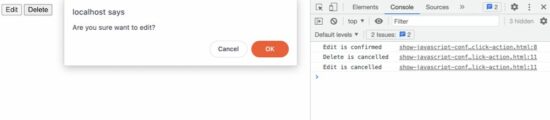
This example connects the on-click event and the JS handler created for showing the confirm box.
This JS code contains the HTML to display two buttons “Edit” and “Delete”. Each has the onClick attribute to call the JavaScript custom handler doAction().
This handler shows JavaScript confirm dialog and monitors the users’ option between yes and no. This program logs the user’s action based on the yes or no option.
<button onClick='doAction("Edit", "Are you sure want to edit?");'>Edit</button>
<button onClick='doAction("Delete", "Delete will permanently remove the record. Are you sure?");'>Delete</button>
<script> function doAction(action, message) { if (confirm(message)) { //If user say 'yes' to confirm console.log(action + ' is confirmed'); } else { //If user say 'no' and cancelled the action console.log(action + ' is cancelled'); }
};
</script>
Example 3: Call confirm dialog inline
This calls the confirm() function inline with the HTML onClick attribute.
Most of the time this inline JS of calling confirm dialog is suitable. For example, if no callback has to be executed based on the users’ yes or no option, this method will be useful.
In this example, it gets user confirmation to submit the form to the server side.
<form onSubmit='return confirm("Are you sure you want to send the data")'>
<input type="text" name="q" />
<input type="submit" name="submit" value="Send" />
</form>
Example 4: Pass confirm message using data attribute
This example contains a JS script to map the HTML button’s click event to show the confirmation dialog box.
It minimizes the effort of defining JS functions and calling them with the element to show the JavaScript confirmation.
It simplifies the number of lines in the code. It adds an on-click event listener for each button element shown in the HTML.
It uses JavaScript forEach to get the target button object for this event mapping. On each on-click event, it calls the confirm() function to show the dialog box.
<button data-confirm-message="Are you sure want to edit?">Edit</button>

<button data-confirm-message="Delete will permanently remove the record. Are you sure?">Delete</button>

<script> document.querySelectorAll('button').forEach(function(element) { element.addEventListener('click', function(e) { if(confirm(e.target.dataset.confirmMessage)) { console.log("confirmed"); } });

});

</script>
More about JavaScript confirm box
The JavaScript confirm box is a kind of dialog box. It requires user action to confirm or cancel a recently triggered action. It is the method of the JavaScript window object.
There are more functions in JavaScript to display the dialog with controls. Examples,
- alert() – Alert box with an Okay option.
- prompt() – Prompt dialog with an input option.
Note:
While displaying the JavaScript dialog box, it stops window propagations outside the dialog.
In general, displaying a dialog window on a web page is not good practice. It will create friction on the end-user side.
We have already seen a custom dialog using jQuery. Let us see how to display the jQuery confirm dialog in the next article. With custom dialog, it has the advantage of replacing the default button controls.
Download
https://www.sickgaming.net/blog/2022/11/...-no-alert/