Create an account


Welcome, Guest
You have to register before you can post on our site.

Username
  

Password


Search Forums

(Advanced Search)

Forum Statistics
» Members: 20,154
» Latest member: tomen8
» Forum threads: 21,823
» Forum posts: 22,698

Full Statistics

Online Users
There are currently 774 online users.
» 0 Member(s) | 768 Guest(s)
Applebot, Baidu, Bing, DuckDuckGo, Google, Yandex

 
  News - State of Decay 2, from Xbox Games Studios’ Undead Labs, headed to Steam
Posted by: xSicKxBot - 11-26-2019, 02:35 PM - Forum: Lounge - No Replies

State of Decay 2, from Xbox Games Studios’ Undead Labs, headed to Steam

State of Decay 2, the multiplayer zombie survival game from Xbox Game Studios subsidiary Undead Labs, is headed to Steam next year.

The game officially debuted for Xbox One and PC back in 2018 but until now had only been up for sale on the latter through Microsoft’s own PC game storefront.

It isn’t the first time an Xbox Game Studios published title has crossed over to Valve’s massive platform, but it’s always notable when one of those first-party titles makes the jump.

The Steam version of State of Decay 2 will also feature cross-play between the Steam, Windows Store, and Xbox One versions as well, meaning the Steam launch stands to open the game to players that may not have had its previous two platforms in their sights.

In a blog post, Undead Labs notes that a Steam launch has long been one of the most requested features for State of Decay 2. The first game notably launched on Steam, and later relaunched as State of Decay: Year One Survival Edition. Microsoft Studios signed on to publish its follow up State of Decay 2 as an Xbox One and Windows exclusive, and it released shortly before Microsoft announced it had acquired Undead Labs midway through 2018.


https://www.sickgaming.net/blog/2019/11/...-to-steam/

Print this item

  News - Madden NFL 20 Black Friday Deals 2019
Posted by: xSicKxBot - 11-26-2019, 02:34 PM - Forum: Lounge - No Replies

Madden NFL 20 Black Friday Deals 2019

Madden NFL 20 is one of the year's biggest games, and you can bet it's going to be on sale for Black Friday 2019 this weekend. In fact, most places have already told us their deals on EA's football game, and you can get it for as low as $27 over at Walmart in the coming days.

Walmart's Black Friday sale kicks off on November 27 and includes many other games, in addition to Madden. Most of their prices edge out Best Buy, GameStop, and Target, though there are a few that are cheaper at other retailers. We'll be sure to keep you up to date on the lowest prices right here on GameSpot.

Madden NFL 20 (PS4, XBO) - $27 at Walmart

Madden NFL 20 | $27 ($60)

EA's latest football game received a score of 8/10 in our Madden NFL 20 review. GameSpot's Eddie Makuch praised its new X-Factor abilities, week-to-week challenges, and on-the-sticks gameplay, the latter of which he says is "the best it's ever been." However, the story elements of the QB1 mode and the minimal changes to Franchise mode left him wanting.

"Madden NFL 20 is an improved version of the annualized professional football series that excels in some areas and leaves something to be desired in others," he wrote. "The new QB1 career mode--which includes a barebones NCAA football experience--overall feels like a half-baked idea that doesn't deliver anything meaningful or interesting. When it comes to the on-the-field action, however, the new X-Factor and Superstar abilities shake up the familiar gameplay formula to give seasoned players and newcomers alike a fresh way to scheme plays and orchestrate strategy on both sides of the ball."

Madden NFL 20 Black Friday deals

PS4

Xbox One


More Black Friday 2019 Deals


https://www.gamespot.com/articles/madden...0-6471573/

Print this item

  AppleInsider - Review: Apple’s iPhone 11 Smart Battery Case caters to shutterbugs
Posted by: xSicKxBot - 11-25-2019, 06:44 PM - Forum: Apples Mac and OS X - No Replies

Review: Apple’s iPhone 11 Smart Battery Case caters to shutterbugs

Apple has dropped its annual update to the Smart Battery Case to support the latest crop of iPhones, but this time it wasn’t just the camera cutout that changed —Apple also integrated a hardware shutter button.

Apple's updated Smart Battery Case

Apple’s updated Smart Battery Case

More battery life for your iPhone


Made from the elastomer as Apple’s silicone case, the Smart Battery Case has a soft, but grippy external texture. The inside is lined with microfiber to coddle your iPhone and prevent scratches and soften inadvertent drops.

Apple's iPhone 11 Smart Battery Case is lined with microfiber and connects via Lightning

Apple’s iPhone 11 Smart Battery Case is lined with microfiber and connects via Lightning

To adorn the case, the top, flexible portion bends backward where the iPhone can be slid into place into the hardened lower portion. At the bottom of the case is a Lightning connector that fits perfectly into the bottom of the iPhone.

This differs from some third-party battery cases such as that from Mophie that connects to your iPhone wirelessly rather than through the Lightning connector.

This is a large differentiator that many don’t realize. When a case such as the Mophie Access is turned on and starts to charge the phone, the phone thinks it is connected to stable, wall power and not a mobile case. That causes more power-intensive tasks to kick in.

With Apple developing the case, phone, and software, it is able to properly optimize all three to get the most battery life possible. When the case is connected, the phone understands that it is a battery case and not wall power so it holds off on power-intensive tasks.


That’s why Apple is able to get a good amount of battery life out of such a compact case. Apple says users should expect up to 50% longer battery life when using the Smart Battery Case with their iPhone 11, iPhone 11 Pro, or iPhone 11 Pro Max. That’s excellent considering the already stellar battery life the iPhone 11 line achieves.

A Lightning port is on the bottom of the Smart Battery Case

A Lightning port is on the bottom of the Smart Battery Case

There have been a few battery cases in the past that connected over Lightning instead of just wirelessly charging the phone, but in doing so they prevent any data from working over the port due to strict MFi restrictions. Apple doesn’t have these hurdles and allows you to use the Lightning port as normal —including utilizing CarPlay or Lightning headphones.

The Apple Smart Battery Case charges also over Qi

The Apple Smart Battery Case charges also over Qi

Of course, the case can also be charged wirelessly on a Qi charging pad or fast-charged with a USB-C to Lightning cable. Battery life can be ascertained any time charging commences, or by heading into the Battery widget of Notification Center. Or, ask Siri.

New functionality


What is most notable this time around, is Apple has also added a new dedicated hardware camera button. This new button will not only launch the camera app whenever pressed but also acts as a shutter button.

The new dedicated camera button on the Smart Battery Case

The new dedicated camera button on the Smart Battery Case

In our testing, it is quite a bit faster than waking the phone and using Haptic Touch (or a swipe) to enable the camera. Precious moments saved could be crucial to catching your precious moment.

The button is well-positioned so that when the phone is held horizontally with the cameras on the top, the shutter button is just below your right index finger —as it would be on a traditional point-and-shoot camera.

Should you buy it?


iPhone 11 Pro Smart Battery Case in black

iPhone 11 Pro Smart Battery Case in black

This year, iPhones have the longest rated battery lives to date. This makes the prospect of a dedicated battery case a tougher sell than in years past.

That’s why Apple needed to go further with the addition of the camera button. To some, it may come off as a non-consequential addition, but for many —likely the same ones who saw the camera on the iPhone 11 line as a worthwhile reason to upgrade —it will be a well-received update.

If you find yourself regularly needing additional battery life to make it through the day or through a weekend, Apple’s own Smart Battery Case is the best available.

Pros

  • Well-optimized battery and software
  • Up to an additional 50% battery life
  • Durable design
  • Dedicated camera button
  • Strong iOS integration
  • Full Lightning port access

Cons

  • Expensive
  • Silicone is the only exterior material option
  • Limited colorways

Rating: 4 out of 5


Where to buy


You can grab the new Apple Smart Battery Case for the iPhone 11, iPhone 11 Pro, and iPhone 11 Pro Max now from B&H Photo in pink sand, black, or white.


https://www.sickgaming.net/blog/2019/11/...utterbugs/

Print this item

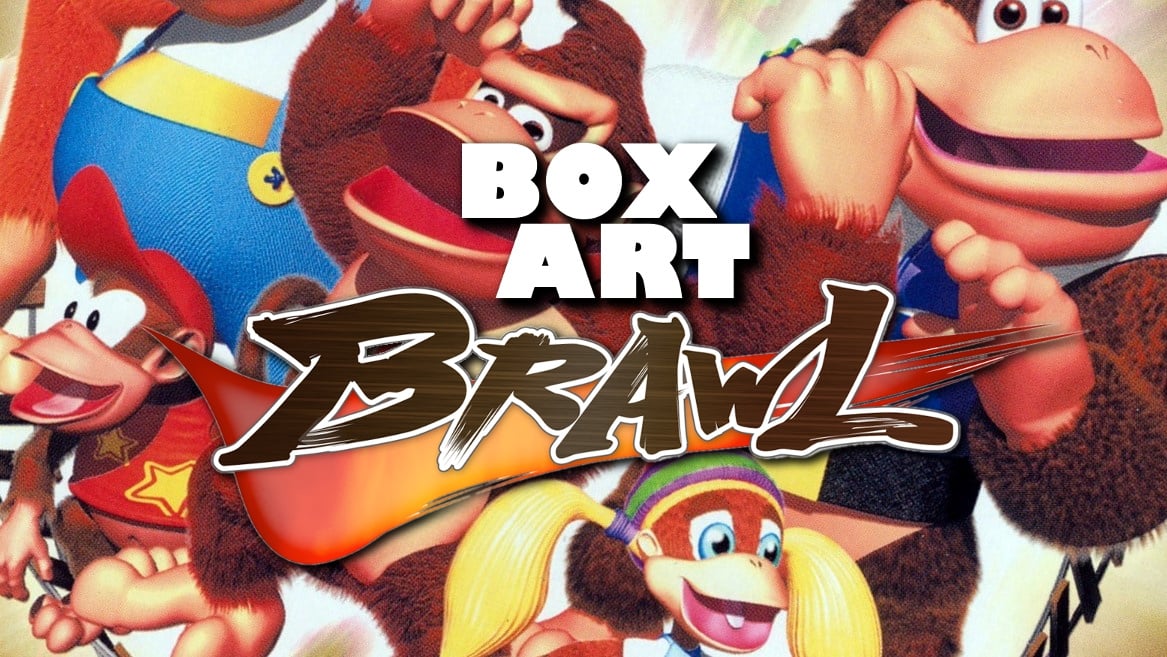
  News - Poll: Box Art Brawl #18 – Donkey Kong 64
Posted by: xSicKxBot - 11-25-2019, 06:44 PM - Forum: Nintendo Discussion - No Replies

Poll: Box Art Brawl #18 – Donkey Kong 64

Main

He-he-here we go! It’s time for Box Art Brawl, our weekly look at which region got the best box art of a particular retro release.

Last week the North American version of Ninja Gaiden on the NES absolutely trounced the competition, with the Japanese variant a distant second and Europe left stumbling in a daze around the city-wide inferno with a paltry 4% of the vote.

Yesterday we took a look back at Donkey Kong 64 – the collectathon to end all collectathons – after it celebrated its 20th birthday on 21st November, and during our research we noticed that the different regional covers would be fine candidates for the brawl. So they’re finally here, performing for you…

Each cover contained the five DK crew members from the game, but which region captured the best side of Donkey, Diddy, Tiny, Lanky and Chunky? Which cover will be the leader of the bunch? Which will kick some tail? Let’s have a banana.

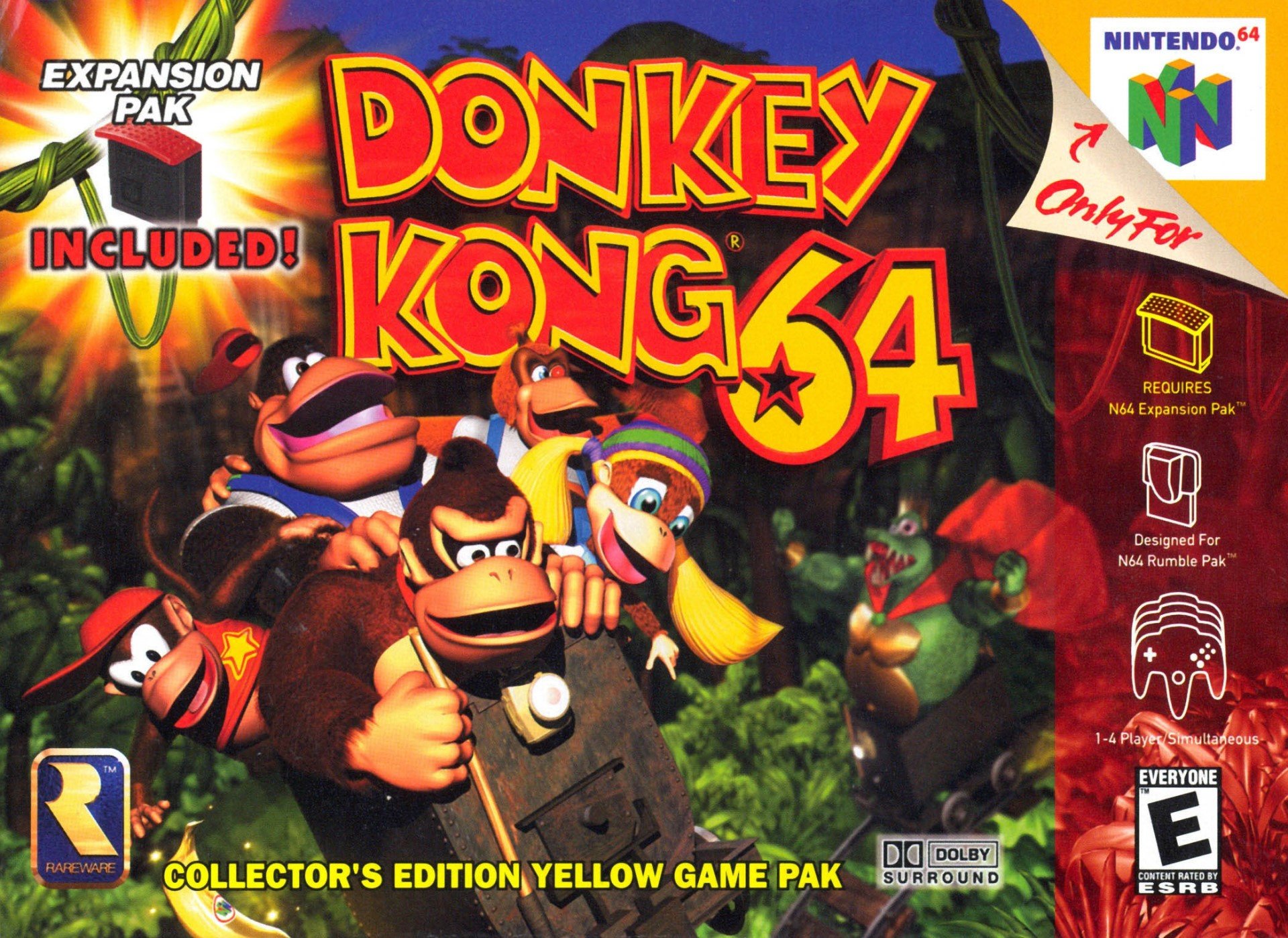
North America


NA

Advertising prominently the (required) Expansion Pak and banana-yellow cartridge contained inside the box, the NA cover features the five Kongs in a minecart being pursed by King K.Rool behind them, and out of focus, to the right. That depth-of-field effect makes the Kongs pop off the cover and the big ol’ logo is as bold and brash as DK himself. The Rareware emblem sits reassuringly in the bottom left corner as a balance to the ESRB rating on the opposite side.

It’s big and colourful, overflowing with energy, and even though it gets a bit busy up top, it does a thoroughly decent job of teeing up the sort of madcap adventure you’ll be getting when you fire up your N64.

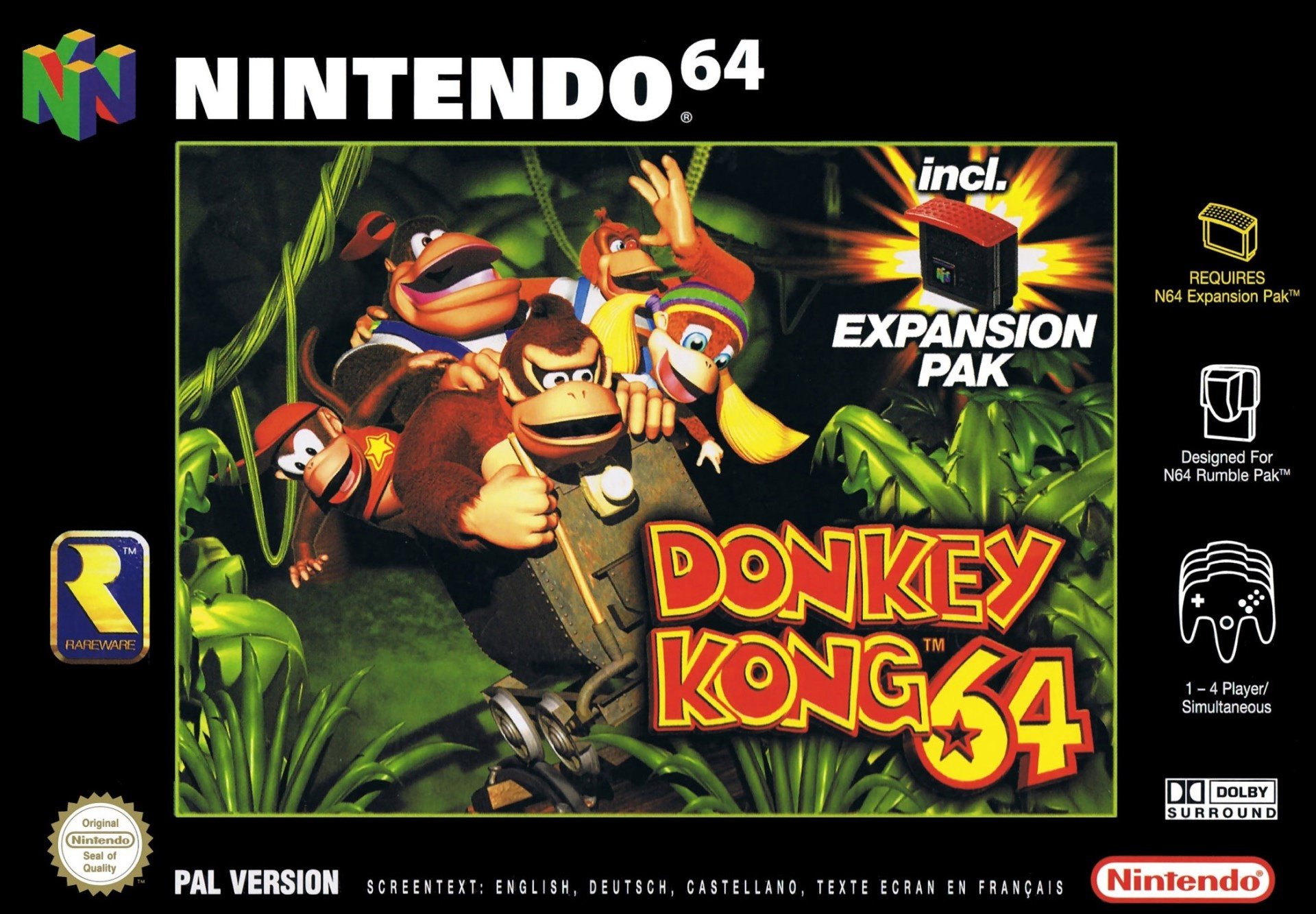
Europe


EU

The EU variant takes the key Kong art and puts it inside the customary European black border, which keeps all the peripheral system information and company logos away from the image. We get a better look at the minecart, now trundling through a dark jungle, and the logo shifts to the bottom right, with the Expansion Pak sitting in the corner above.

Despite reducing the real estate of the main image with that big black border, there’s something about the composition which we think works a little better here. A conscious effort has been to reduce the clutter – just look at the abbreviation of ‘including’ to ‘incl.’. K.Rool gets the boot, but this somehow feels a little classier.

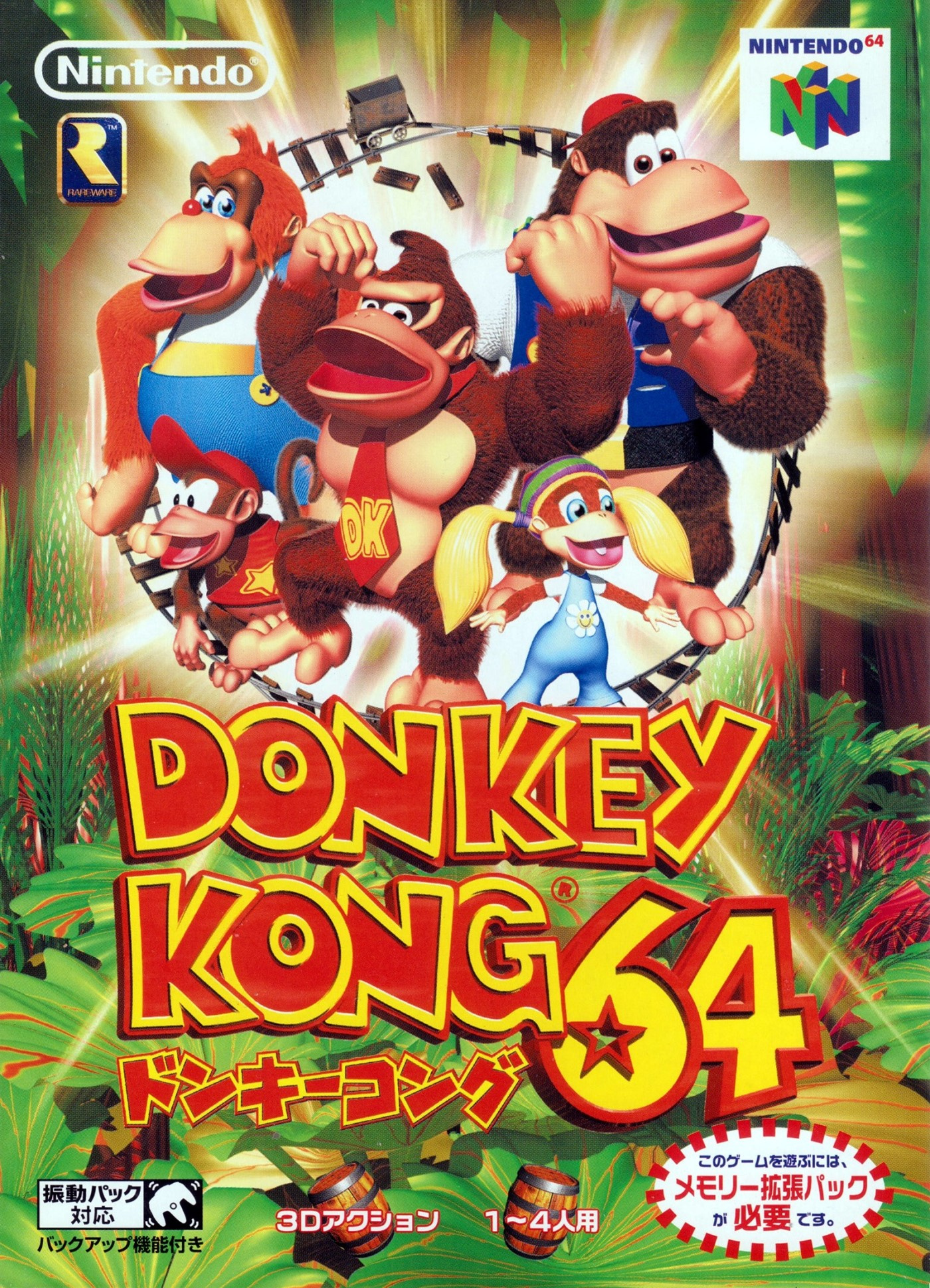
Japan


JP

The Japanese cover keeps the jungle vegetation but puts the Kong family in the top half of the portrait box. Striking their hero poses (well, we’re not sure about Diddy), a tiny minecart track loops around them as an odd sort-of border, presumably to advertise to players that – don’t worry! – there are minecart rides in this one! Barrels, too, as the info splashes at the bottom show.

It’s not bad, but there’s not much tying it together. The other two strike us as more cohesive covers where as this feels more like a poster you’d see on publish transport. It puts us in mind of the Japanese cover for Banjo-Tooie, another Rare game which walked away victorious from the Box Art Brawl. It’s not our favourite, but we ain’t the ones voting…


Three bunches of five apes for your delectation. We could pick our favourite with relative ease, but it’s time to choose your favourite by clicking the appropriate image below and hitting the ‘Vote’ button:

That’s it, show’s over. If you enjoyed this round of savage bloodletting, join us next week when we’ll be back for Round 19 of Box Art Brawl.


https://www.sickgaming.net/blog/2019/11/...y-kong-64/

Print this item

  News - Zavvi Launches Mario Kart Racing Merch Range
Posted by: xSicKxBot - 11-25-2019, 06:44 PM - Forum: Nintendo Discussion - No Replies

Zavvi Launches Mario Kart Racing Merch Range

Mario Kart Racing from Zavvi

UK online store Zavvi has been busy this year launching various officially licensed Nintendo merchandise for Super Mario, Legend of Zelda and more recently Luigi’s Mansion. But now the design boffins have launched a new range dedicated to Mario Kart dubbed Mario Kart Racing.

“The Mario Kart Racing range pulls in placements and graphic elements inspired by popular, skate, BMX and surf brands,” said the company, “The range is made up of designs with bold logo work, clean minimal colour pallets, contrast typography and classic line art graphics. These complementary elements combine within a distinctive fashion range that celebrates the unmistakable Mario Kart character aesthetic. The 25-piece range comprises t-shirts, long sleeves, sweats, hoodies, caps and mugs featuring designs from across the iconic Mario Kart franchise, including cult-favourite characters such as Lakitu, Koopa Troopa and Yoshi.”

The range launches today Sunday 24th November and is available for 7 days only.

Please note that some links on this page are affiliate links, which means if you click them and make a purchase we may receive a small percentage of the sale which helps support the site. Please read our FTC Disclosure for more information.

Head over to Zavvi.com to view the entire 25-piece range.


What do you make of the Mario Kart Racing range? Will you be picking anything up? Let us know in the comments below.


https://www.sickgaming.net/blog/2019/11/...rch-range/

Print this item

  Steam - Daily Deal – Atelier Lulua ~The Scion of Arland~ / ルルアのアトリエ ~アーランドの錬金術士
Posted by: xSicKxBot - 11-25-2019, 08:40 AM - Forum: PC Discussion - No Replies

[b]Daily Deal – Atelier Lulua ~The Scion of Arland~ / ルルアのアトリエ ~アーランドの錬金術士4?/b]

© 2019 Valve Corporation. All rights reserved. All trademarks are property of their respective owners in the US and other countries.

VAT included in all prices where applicable.   Privacy Policy   |   Legal   |   Steam Subscriber Agreement   |   Refunds


https://www.sickgaming.net/blog/2019/11/...%e9%8c%ac/

Print this item

  News - You Can Now Store 3,000 Pocket Monsters In Pokémon GO
Posted by: xSicKxBot - 11-25-2019, 08:40 AM - Forum: Nintendo Discussion - No Replies

You Can Now Store 3,000 Pocket Monsters In Pokémon GO

Pokemon GO

One gripe we’ve had with Pokémon GO since it was released, is that there’s never enough storage space for all of the Pokémon you catch and items you obtain. As more updates have been released, it’s only become more difficult to store it all.

With Niantic adding new Pokémon and items to the popular augmented mobile game on a regular basis, it’s realised trainers might be in need of yet another storage upgrade. That’s why it’s decided to expand Pokémon storage to 3,000 slots, and bag upgrades mean you can now hold up to 2,500 items.


In Pokémon GO, you start out with 300 slots for Pokémon and a bag that is able to hold 350 items. Unless you’re an avid player, you’re unlikely to be in need of the latest storage upgrades. The cost of each upgrade remains the same – 200 PokéCoins to hold 50 more items, and 200 PokéCoins for 50 more slots.

Is this the storage upgrade you’ve been waiting for? Comment below.


https://www.sickgaming.net/blog/2019/11/...okemon-go/

Print this item

  News - Mega Man Joins Forces With Nintendo’s Mobile Game Dragalia Lost
Posted by: xSicKxBot - 11-25-2019, 08:40 AM - Forum: Nintendo Discussion - No Replies

Mega Man Joins Forces With Nintendo’s Mobile Game Dragalia Lost


Capcom’s blue bomber Mega Man has most recently appeared in Nintendo’s all-start fighting series Super Smash Bros. Ultimate, and now he’s teaming up with Cygames’ mobile title, Dragalia Lost.

As publicised last month, a special Mega Man: Chaos Protocol event is taking place in the Nintendo mobile game. Dr. Wily has seized control of the Five Greatwyrms and it’s your job to join forces with Mega Man to save the world of Dragalia Lost.

You can also “maximise your friendship” with Mega Man, allowing you to keep him as an ally. He comes with his old school animations as well, including the Mega Buster, Charge Shot, and trademark slide move. This event runs from 28th November until 15th December.

Below is additional information from the game’s website and above is a promotional trailer:

Mega Man Dragalia Lost

Will you be participating in this event? Post a comment below.


https://www.sickgaming.net/blog/2019/11/...alia-lost/

Print this item

  News - Blog: Handling Unity scene hierarchy and performance
Posted by: xSicKxBot - 11-25-2019, 08:40 AM - Forum: Lounge - No Replies

Blog: Handling Unity scene hierarchy and performance

The following blog post, unless otherwise noted, was written by a member of Gamasutra’s community.
The thoughts and opinions expressed are those of the writer and not Gamasutra or its parent company.


Last week, I wrote a post to show you how your unity scene hierarchy is reducing the performance of your game. That post arose awareness across many of you developers. And so, many of you asked great questions that I’ll answer in today’s entry.

[The original post can be found here]

Yes… I confess.

The examples I often show you in my blog posts are not real-life projects. This is one of the points you have been commenting on.

Ruben, this is an artificial scenario.

Ruben, this doesn’t happen in games.

You see, I understand. It’s easy to doubt the information I provide you when the only cases you see are extreme. I’d even rub some salt in the wound on the Reddit threads if the author wasn’t me (see how I got owned).

But here’s the thing: all the information I give you is based on the pain and gains of real-life projects I worked on. I do my research before I write here too.

Doing research is great. But that takes time. A lot.

So I won’t set up a new game for every weekly post that I publish. What I do instead is to create a small project to make a point…

…A very real point that I experienced in production games.

You’re never going to come across the exact dummy project in your games. But you’re likely to suffer from the issues these points reveal.

And that’s what matters.

So I took some of the feedback you provided for today’s post. I’ll elaborate on some of the problematic hierarchy patterns you’ll commonly see in production games. We will address unity scene hierarchy bottlenecks based on the tools I gave you in the last article:

  • The FAP Hierarchy Tool
  • The DetachGameObject simple performance boostingg component

Quick Navigation (opens in a new tab)

The golden rules for an efficient scene hierarchy

    The Gamedev Guru’s Golden Rules of a Clean Unity Scene Hierarchy

Flattening a unity scene hierarchy: an artificial case-study

    The hierarchy structure

    Profiling the unoptimized scene

    Flattening our scene hierarchy

So what?

The golden rules for an efficient scene hierarchy


In the previous post we established a guideline for diagnosing and optimizing unity scene hierarchies.

Let’s quickly recap The Gamedev Guru’s golden rules for an efficient hierarchy:

These apply especially to hierarchy trees that have dynamic objects. And by dynamic I mean, game objects whose transforms are altered. It can be a position, a rotation, a scale or any of the attributes you find in a RectTransform.

If an entire tree is static, i.e. no periodical transform changes, then don’t worry about that tree.

You see, propagating these transform changes takes time. And it takes more time when you have more game objects in the same tree.

But it’s not the total CPU time that concerns me the most. The issue that I see is that it is pretty hard for Unity to do these transform operations in parallel when they happen to be in the same hierarchy tree.

So changes in complex trees take a higher CPU time for two main reasons:

  • The absolute CPU time required to do the math increases
  • These calculations cannot be spread across different threads

Flattening a unity scene hierarchy: an artificial case-study


I’m a pragmatic and practical professional developer. So let’s see all this theory in action.

The hierarchy structure


What I have here for you is a scene full of props, particle systems and characters. This is how the unity scene hierarchy looks like:

Unity Scene Hierarchy: Original Structure

Unity Scene Hierarchy: Original Structure

That’s it. No magic. 4-5 levels of depth, plus all the bones required for the characters. Nothing too crazy apart from the 300 simple characters, which probably accounts for all the missing pieces that a real game has.

Have a look at World. It’s a single root game object containing way too many children. This fact violates the first golden rule of an efficient unity scene hierarchy.

Is that bad? I don’t know. The way to find out is by measuring its relative cost.

I’m using free assets I found in the asset store. That means, I can’t upload this project to GitHub or I’ll risk ending up in jail. Yeah, thanks for that restrictive license, Unity.

Profiling the unoptimized scene


And so I start the scene. Not much happening, just a slight amount of movement. I cannot say this is the funniest game I ever played.

Sample project "gameplay"

Sample project “gameplay”

Well, I’m not an artist or designer. I’m excused for the looks but not for the performance. Point which brings me to using the profiler now.

I captured a 300-frame profile and here’s what I got:

Unity Scene Hierarchy: Pre-Optimization

Unity Scene Hierarchy: Pre-Optimization

Was that useful?

Nah, don’t even bother to look at the image.

We don’t know whether that’s good or bad, because we don’t have a reference point.

But we can compare… We can compare against an equivalent, flattened hierarchy.

Let’s try that out.

Flattening our scene hierarchy


Analyzing the previous hierarchy, we can notice something of interest.

Most of the introduced game objects are there for organization purposes in this setup. That means, some added hierarchy levels are useful for developers to structure content around them. We incorporate these objects to make development easier.

Game objects such as WorldCityProps don’t serve any other purpose than organizing. Our characters, particles, UI and props do not really depend on those to accomplish their goals.

I see a potential gain here.

But on the other side, we don’t want to break the only organizational tool we have. I don’t want to deal with a flat hierarchy during development. That sucks.

We want to keep things structured on the editor and yet we want our game to be performant on run-time.

Ehmm… Is this possible?

You bet it is. That we can do by making use of the script you downloaded in the first part of the blog seriesDetachGameObject. This script will let you maintain the original hierarchy when you develop your game but will unparent the gameobject of your choice to squeeze all its performance juice on run-time.

So I’ll add right now our DetachGameObject component to the Character prefab, to all particle systems and to the dynamic canvas we have in place. I’ll ask our component to unparent the game object after a delay of 15 seconds so I can take two profiles: one before detaching and another after it.

Below you find the DetachGameObject asset applied to an example particle effect.

DetachGameObject Performance Booster

DetachGameObject Performance Booster

Now that I have set up all DetachGameObject components, there’s only one thing remaining. That’s right, press the play button!

So I run the game and after 15 seconds…

Scene Hierarchy: Flatter Optimized Version

Scene Hierarchy: Flatter Optimized Version

Boom.

All my characters, particles and UI have been detached. Now the hierarchy is much flatter.

So I wonder…

How do both profiles compare? Let’s use the neat profile analyzer to get some fresh numbers.

*drums*

Profile Comparison: Deeper vs. Boosted Flatter CPU Performance

Profile Comparison: Deeper vs. Boosted Flatter CPU Performance

I’ll translate for you what this chart means…

This comparison says that there’re significant differences between the deeper and flatter hierarchies.

The flatter hierarchy improves performance significantly over the deeper one.

Yes, you might not have 300 characters, but you will surely have many over 100 times more complexity in real gameplay elements, scripts, networking and such.

So what?


The conclusion is simple: there’s a performance penalty you’re paying if you don’t have a flat hierarchy. Can you afford it? That’s a question only you can answer. And you better answer that with data and metrics. My metrics in my previous games always reach the same conclusion: I don’t want to pay that expensive bill. I let instead DetachGameObject pay it for me.

That’s my advice to you. Measure your game through the profiler and FAP Hierarchy Tool. Both tools will immensely help you finding scene hierarchy bottlenecks in your Unity game.

Always remember…

Flattening your hierarchy will improve your Unity CPU performance.

What were your scores before and after flattening your hierarchy? Share below.



https://www.sickgaming.net/blog/2019/11/...rformance/

Print this item

  News - Pre-Purchase Now – Transport Fever 2
Posted by: xSicKxBot - 11-25-2019, 08:40 AM - Forum: Lounge - No Replies

Pre-Purchase Now – Transport Fever 2

Transport Fever 2 is Now Available for Pre-Purchase on Steam and is 10% off until launch! Additionally, Steam owners of the original Transport Fever receive a loyalty discount to up their discount to 25% off!

Discover a whole new world by navigating transport routes through land, water and air. May progress and prosperity find their way!


https://www.sickgaming.net/blog/2019/11/...t-fever-2/

Print this item

 
Latest Threads
Insta360 Sale USA – Get F...
Last Post: tomen8
2 hours ago
Insta360 USA Coupon [INRS...
Last Post: tomen8
2 hours ago
Insta360 USA Coupon [INRS...
Last Post: tomen8
2 hours ago
Insta360 X5 Deal – Free S...
Last Post: tomen8
2 hours ago
Insta360 July 2026 Offer ...
Last Post: tomen8
2 hours ago
Save 5% on Insta360 Produ...
Last Post: tomen8
2 hours ago
Insta360 Offer Code [INRS...
Last Post: tomen8
2 hours ago
Insta360 Camera 20% Off C...
Last Post: tomen8
2 hours ago
Insta360 Coupon Code – [I...
Last Post: nivex000
2 hours ago
Exclusive Insta360 Coupon...
Last Post: nivex000
2 hours ago

Forum software by © MyBB Theme © iAndrew 2016