AppOnboard, perhaps most famous for the technology powering the Google App Store “Try Now” functionality have just acquired BuildBox. BuildBox is a nocode or codeless game engine that just released version 3.0 and announced a pricing change. The acquisition will not change the management or structure of the BuildBox team.
I’m extremely excited to announce the next chapter for Buildbox, and explain how we’re going to vastly expand our product, ability, and community going forward, but before I do that I believe it’s most important to discuss what is not changing.
With this acquisition, every single employee is staying with Buildbox, including myself and Nik. Buildbox will run independently — as it always has — while being able to grow much more quickly, and tap into the great resources that AppOnboard provides. Nik and I will still be focused 100% on vision and additions to complete line of our products. We will not be making any changes in product, besides improvements and additions we already have planned.
What we will have access too, that we did not before, is resources to help us hire more developers, content creators and more for Buildbox. You’ll see our development times vastly improve, and content creation for Buildbox speed up drastically.
AppOnboard is amazingly dedicated to not changing our vision, but helping us see it through to its largest potential.
AppOnboard have also released a statement available here. BuildBox also released an email to all developers with the following details (thanks J.P for the heads-up!):
A lot of changes are underfoot and all of them positive! Every employee from Buildbox that you know and love are all still here and will definitely be here for a long time. We’re the same Buildbox team that you know and love; it’s just that we have much more resources now to hire more developers, content creators, etc! So what’s next for us?
a FREE version of Buildbox
much better Android, ad network, and export support
new nodes and smart assets
a new smart asset store
roadmapping expansions for the MasterCollection software
lots and lots of Buildbox 3 Upgrades
… and so much more!
At face value, this development seems like a pure win for existing BuildBox developers.
However, it also contained some wacky and wonderful moments none of us expected, and it gave rise to some stars we never thought would shine at the gaming expo. Let's take a look at some of the people--and animals--that have brightened up our E3.
The Koopa King thought he was the one to tell us about Nintendo's new games at E3 2019, but it turns out there was a mistake, and D Bowser promptly put Mario's longtime enemy in his place. Sorry, Bowser.
Keanu Reeves Is In Cyberpunk 2077
Keanu Reeves had already captured the internet's hearts for being an all-round Good Egg. So when he emerged on-stage at Microsoft's E3 2019 press conference, everyone understandably went wild. The actor, perhaps best known for his roles in the Matrix and John Wick franchises, is in Cyberpunk 2077. He plays a character named Johnny Silverhand, who is described by developer CD Projekt Red as a "legendary rocker boy" who gets his name from the fact that he has a robotic, silver arm. Silverhand is a "key" character in Cyberpunk 2077, so we may see a lot of him.
Reeves not only provided the voice and likeness of Silverhand, but he also performed full-body motion capture. This means Silverhand will look and act like Reeves. That's good news, because as behind-the-scenes John Wick training videos have shown, Reeves is a talented actor who commits to his craft to ensure the best possible result.
Ubisoft Brought An Adorable Dog On Stage
Ubisoft's E3 2019 press conference was as varied as ever, bringing us news on Watch Dogs: Legion, Rainbow Six Quarantine, and more. But by far the most adorable moment was when actor John Bernthal (The Wolf of Wall Street, Daredevil, The Punisher) arrived on stage accompanied by his dog, Bam Bam. Bernthal was there to discuss his role in Ghost Recon Breakpoint, while Bam Bam was merely there to be A Good Boy. Watch the wholesome moment above.
Ikumi Nakamura Is The Internet's New Favorite Game Developer
The grey clouds of Activision's reduced E3 presence and Sony's no-show seemed ready to unleash a shower of disappointment on E3 2019. And then the Bethesda press conference happened. Tango Gameworks creative director Ikumi Nakamura took to the stage, and like a beam of light from the sun, she cut through the miasma to energize and uplift us all. Nakamura arrived on stage to announce Ghostwire: Tokyo, a new game from the studio behind The Evil Within and The Evil Within 2.
Nakamura casually strolled onto the stage with an enthusiastic, "Yayyyyyyy!" This was followed by, "Wow, wow, wow, so many people." Obviously, Nakamura was feeling overwhelmed by the size of the audience, but at the same time, she stayed cool, calm, and collected.
Nakamura's minor case of stage fright belies her experience in game design and development. Though she may not be a familiar name or face to the greater video game fanbase as a whole, she has been involved in the creation of some of the most beloved games of all time, including Okami and Bayonetta, and of course The Evil Within.
Over the course of a few minutes, Nakamura's earnestness and excitement won hearts and minds. She admitted her nervousness, said she'd give speaking English--which she is doing for our benefit--a solid shot, and then delivered a charismatic pitch for her new "spooooooky" game. People are vanishing in Tokyo, and we the player must find out why, unraveling conspiracies and delving into the occult along the way. She promised we'd meet spirits that were [ominous voice] "dangerous" and [playful voice] "peaceful."
Helen, Watch Dogs: Legion's Killer Grandmother
Ubisoft's E3 2019press conference had quite a few unexpected surprises--one of which we've of course been over already--but none seems to have hit as hard as an octogenarian with a mean streak. Helen, one of the showcased playable characters from Watch Dogs: Legion, has captured the hearts of the internet.
That's no small feat, because the pitch behind Legion is that anyone is a playable character. All of London's residents you find wandering around have their own stories, backgrounds, and habits, and you can hack into their lives and learn more about them to recruit them. Many of them have specialized skills like brawling or robotics expertise. Helen, according to the trailer, is a former assassin, and the wrinkles have made her no less deadly.
Posted by: xSicKxBot - 06-14-2019, 02:03 AM - Forum: Lounge
- No Replies
Don’t Miss: How bad crediting hurts the game industry and muddles history
You’d think that game credits would be simple.
It’s just a list of names and roles, after all. How hard can that be to get right?
But credits are rarely simple, because neither is game development. And yet credits are an invaluable, underappreciated aspect of game making.
They’re our best — and often only — record of the human labor that goes into game development, serving not only as a reminder that games are made by people — sometimes lots of them — but also as a tool for developers to advance their careers.
For studios, crediting can be a tool for leverage; amid the recent furor over Rockstar’s bad labor practices, for example, we were reminded that the studio has long maintained a policy of not crediting people who worked on a game unless they were present when it shipped, to encourage the team “to get to the finish line.”
For historians and journalists, meanwhile, they’re a way to begin to peel back the layers. To uncover the stories of the people and companies behind the games.
Despite their importance, however, it’s not unusual for the credits published with games to be inaccurate, incomplete, overly vague, or even (on rare occasions) downright misleading. This is a problem with many causes, but one of the big reasons, Fun Bits CEO Chris Millar told me in an interview earlier this year, is simply that credits in games aren’t standardized.
“While they’re much better than they used to be we’re still not anywhere near the movie industry,” he said, “in terms of giving people credit for all of their work on creative endeavors.”
Indeed, the IGDA published the last version of its crediting guidelines back in 2014 — after multiple high-profile instances of bad crediting in the decade before, including an entire team of 55 people being wiped off the credits for Manhunt 2, and a years-long discussion about the importance of credit standards. But those guidelines are hard to find and with no union agreements in place they’re for publishers to follow (or not) at their own discretion — provided they’re even aware that the guidelines exist.
“[Atari not crediting game makers] was an attempt to dis-empower designers by removing the bargaining power associated with explicit authorship.”
In order to get a proper understanding of how credits can help, hinder, contort, and otherwise affect games history and archiving, and to start to puzzle out how much of a difference credits standardization would actually make, I asked four historians and a few developers about the issue. Their stories reveal a complex relationship between labor, authorship, ownership, and recognition in game development throughout the history of the medium — and no doubt long into the future.
A (flawed) record of authorship
“The fact that credits exist in games reflects human concerns about authorship and ownership with regard to creative production,” notes Laine Nooney, an assistant professor of media industries at NYU Steinhardt who has spent years researching and writing about the history of Sierra On-Line. The role of credits is to provide a factual record of this creative production but, as Nooney argues, they are also political.
“When Atari management made it policy to not list designers’ names on their games, this was an attempt to dis-empower designers by removing the bargaining power associated with explicit authorship,” she explains. It backfired. Warren Robinett hid his name in a secret room in 1978 Atari VCS game Adventure, and five other star programmers soon left in protest of the policy to start Activision — ironically taking power away from Atari as a result.
Warren Robinett’s famous hidden credit room, tucked away in Adventure
Games historian Jimmy Maher, who runs the Digital Antiquarian blog, points to other examples: “Radio Shack was also notorious for refusing to credit the people who made the TRS-80 games they carried in their stores,” he says. “Even at a progressive publisher like Infocom, there was a lot of debate over whether and to what extent the authors of the games should be highlighted, as opposed to the Infocom brand and the so-called ‘matrix’ of genres and difficulty levels.”
Some, Maher explains, thought their names should be on the box. Others “really couldn’t care less, and just wanted to make the Infocom brand successful.”
The historical relationship between credits and branding gets more intriguing as you dig deeper. MicroProse head Wild Bill Stealey — acting on a comment by the late comedian/actor Robin Williams about the games industry lacking recognizable stars — was responsible for Sid Meier’s name becoming a branding tool. The Sid Meier’s prefix soon came to decorate not only the titles of games that the Civilization designer led creatively but also the ones that he barely more than consulted on.
Maher adds that Origin’s Worlds of Ultima: The Savage Empire similarly included Richard Garriott’s name in the credits as an executive producer “despite having absolutely nothing to do with the game that I could discern.” (And meanwhile Warren Spector was left off the credits despite reportedly creating the concept, setting, and plot outline for the game.)
Politics gets in the way
Credits can be as much a reflection of internal politics as they are of actual project and company roles. While this gives historians interesting threads to explore, they must first become aware of which names are omitted or included because of politics.
This can result in history vanishing, as in the case of Arthur Abraham, who developed the prototype scripting language and game logic for Sierra’s King’s Quest and what would become the Adventure Game Interpreter (AGI) engine. “Abraham was fired part way through the development of King’s Quest,” explains Nooney, “and his name was left out of the credits of every King’s Quest port (with the exception of the Apple IIe version), as well as every future Sierra release that used AGI.”
Because of this, it took several interviews and extensive archival research, spread across several years, for Nooney to discern that Abraham was a key figure in AGI’s development. “He died in prison before I could make an attempt to contact him,” she continues. “Had I known at the start that he was foundational to AGI, I might have been able to correspond with him earlier and shed some light on the development of King’s Quest — a game which is shrouded in misinformation about its development.”
Many publishers have (or had) set policies of not crediting developers for their role on a project if they leave before it ships. I learned while conducting interviews for an Assassin’s Creed oral history at Polygon, for instance, that several people who appeared in the credits under the title “additional” were in fact core team members who left before the game’s four-year development concluded. Starcraft‘s original designer Ron Millar was similarly relegated to “special thanks” in the game’s credits when he left to join Activision (which ironically now owns the entire company) while it was in testing.
Sometimes entire studios go uncredited for their work on a game. Games journalist and author of the Untold History of Japanese Game Developers book series John Szczepaniak notes that Namco does not allow anybody in Japan to disclose the names of staff who worked on any of its games. (Szczepaniak, however, has nothing preventing him from sharing those names outside Japan, and as such he has obtained a spreadsheet listing credits for the Pac-Land arcade game.) The original Castlevania was likewise published without credits, he adds. After extensive investigation, the best Szczepaniak and his colleagues can gather is that the main creator was Hitoshi Akamatsu — who they’ve been unable to contact.
Meanwhile, the practice of “white label” outsourcing — whereby companies are contractually-bound to keep quiet about their work on a game — has been around for decades. One Japanese studio, TOSE, reportedly works on 30 to 50 games per year and only receives credit for a handful of those (curiously, this only happens at the request of their clients — they have business reasons to want to stay anonymous).
[embedded content]
A clip of the Castlevania credits
Szczepaniak, who wrote about this world of “ghost developers” like TOSE for The Escapist back in 2006, believes there should be some sort of international regulatory body preventing this from happening. “Every staff member should be credited for their work,” he argues.
Even tiny indie and amateur games can wind up with names omitted entirely. “For small independent games, like fangames or freeware, one of the most difficult things is a total lack of credits,” says Phil Salvador, a librarian and digital archivist who runs a blog about little-known and forgotten games called The Obscuritory.
“Sometimes developers will only go by a pseudonym or a company name, or they’ll intentionally leave their name off. That’s an understandable problem without much of a fix. Not everyone wants to use their real name on all their work or to be associated with a weird game they threw together when they were 14.”
But when they do this — whether we’re talking commercial efforts made by professionals or non-commercial games by amateurs and hobbyists — they also cause a huge headache for historians, who might want to learn more about how/when/why a game was made or to build up a more complete catalog of games released. “Even minimal credits can be helpful for asking around and starting the research process,” notes Salvador. “With the companies often gone and their records presumably lost, anyone listed in a game’s credits is a potentially helpful source.”
Lost in translation
If it seems like a tough challenge to use credits as a jumping-off point to uncovering more of the history behind Western-developed games, spare a thought for the people digging into the Japanese industry. “You cannot even begin to imagine the Herculean task of disentangling Japanese credit listings,” says Szczepaniak. “And once you find a thread and follow it down the rabbit hole, you just bring up more questions than answers.”
“Naoto Ohshima said Sega wouldn’t allow staff to attribute their real name since it meant Sega had a stronger hold over the rights to any work created in-house.”
Like the other historians interviewed for this article (and in my anecdotal experience, nearly everyone else), Szczepaniak uses MobyGames as a key reference guide for checking game and individual developer credits. He says its quick cross-referencing capabilities are invaluable for research, and it’s been making great strides with both listing kanji for Japanese names and disentangling different people with the same name.
But it’s an incredibly complex problem. Any fully-accurate staff crediting system for Japanese games, Szczepaniak argues, needs to have support for native kanji, phonetic hiragana and furigana (phonetic symbols that appear above kanji), and correct romanizations of these symbols, plus a means of differentiating between first and family names (in his book, Szczepaniak chose to put surnames in ALL CAPS) — as Japanese convention puts the surname first whereas Western convention is to put it last, but neither culture is always consistent.
Szczepaniak points to Naoto Ohshima as an example of problems with naming conventions. “There’s actually three people with the same phonetically pronounced name, all in the games industry, who all worked on different series at different companies,” he explains. “The Sega guy [who designed Sonic], another at ASCII who worked on the Wizardry series, and a graphics guy at Konami who worked on Silent Hill. And for a very long time a lot of websites mixed up the Sega and Konami, thinking they were the same person.”
Even Sega-16, one of the leading sources on all things Sega. This then had knock-on consequences. The misattribution spread to Wikipedia and then across the Internet.
“This misattribution is due to lack of consistency with regards to listing kanji for non-English names,” says Szczepaniak. “All three men have the same phonetic name, ‘Naoto Ohshima,’ but the OHSHIMA part uses different kanji for each of them — that is, different Japanese symbols, which have different pictographic meanings, but all sound exactly the same.”
It gets more confusing. “This problem can also be inverted, with different people having exactly the same kanji symbols, but in each case using a different phonetic pronunciation,” says Szczepaniak. Shigeru Miyamoto, for instance, was miscredited as Shigeru Miyahon in early NES games. And Szczepaniak adds that even Japanese people find this pronunciation issue confusing — to the point where many business cards use hiragana to explicitly state the pronunciation of someone’s name, and at least one developer, Masatoshi Mitori of Human Entertainment, asks that the kanji for his surname not be listed because his family name uses archaic symbols that nobody recognizes.
Then you have the lack of gendered pronouns in Japanese conversation, which means interviews that mention a colleague named “Suzuki-san” could be referring to a man or a woman with the surname Suzuki — and if it’s an archived interview then you can’t necessarily just ask for clarification. As if that wasn’t enough complexity, Japanese credits also have sometimes had nicknames in lieu of real names in them.
Szczepaniak explains that this was not always a case of programmers trying to be cool. Sometimes the publisher ordered it. “Sega was especially notorious for this, and Tecmo as well,” he says. “The reason was to ‘prevent headhunting,’ since companies were terrified that skilled programmers would be snatched up by rivals, and also to prevent later copyright claims for work they had done. Naoto Ohshima said Sega wouldn’t allow staff to attribute their real name since it meant Sega had a stronger hold over the rights to any work created in-house.”
The failure of credits
The reality is that credits, even as a snapshot, could never properly encapsulate the messiness of games history — the complicated power dynamics that form within companies and teams and between individuals, as well as the collaborative nature of the medium and the vast formal and informal support structures that lie beneath each company and project.
Roles are often fluid or informal. One person might start out on programming but finish as a writer or composer, or something else. When I was researching my book, The Secret History of Mac Gaming, I learned that the final design of the very first Mac game, Alice aka Through the Looking Glass, owed as much to the informal requests and complaints of Macintosh marketing rep Joanna Hoffman (who was the best player in the office) as to the work of its creator Steve Capps.
Similarly, Salvador gives an example where the de facto director of 1994 game Millennium Auction “was actually the company’s vice president of business development, and they only received special thanks in the credits.”
Millennium Auction in action
Nooney says that informal cross-pollination of roles was common at Sierra, too, whereby people with specific titles pitched in with work on other aspects of a game but weren’t credited for that additional labor due to interpersonal politics.
This can go both ways. People might get a “thanks” credit for non-development labor, or perhaps benefit from a role title that oversells their actual contribution, then try to leverage that to get ahead in their career. Veteran developer Noah Falstein has come across the full spectrum of crediting issues during his 30-plus years in games, and he says he even once received a resumé from someone who said they’d worked on Sinistar — an arcade game project led and co-designed by Falstein.
“I didn’t recognize his name,” says Falstein. “I asked others I knew who had been at the company at the time, and it turned out he had helped load the games onto trucks, so technically it was correct, but had nothing to do with the role he was applying for.”
The truth of the matter is as Maher says, sadly, that because of their inconsistencies and lack of standardization across the breadth of games history, credits must be looked at skeptically. They are a wonderful resource, no matter what, but their failures to properly document the history of labor perhaps reveal a need for something more than just credits as a high-level document record.
“It would certainly be interesting, and helpful for future historians, for companies to credit the entirety of their staff,” says Nooney. “But I think a more provocative way to think about this issue is to recognize the limitations of the ‘authorship model’ as a basis for historical research on games. What else is worth knowing about the game industry beside who worked on a game?”
For Nooney — and indeed for anyone else doing macro-level histories of the different parts of the industry — internal organizational charts are often more valuable than credits because they provide insight into company-wide power relations. More valuable still, she says, is documentation of large corporate or economic events such as mergers, buyouts, layoffs, key hiring decisions that trigger internal re-organization, stock market crashes, and IPOs.
“We tend to miss this critical historical phenomena when we look at the game as our primary source of knowledge about the industry,” she concludes.
In short: Credits matter, and we need to get them right, but if we want to have a good understanding of the history of this medium, and the industries built around it, they’re actually just the tip of the iceberg. We need to do better, across the board, at documenting how we make and sell games.
June 5th : New Preview Alpha Ring 1906 Update (1906.190603-1940)
Starting at 2:00 p.m. PST today, members of the Xbox One Preview Alpha Ring will begin receiving the latest 1906 Xbox One system update (Build: 19H1_RELEASE_XBOX_DEV_1906\18362.4046.190603-1940).
DETAILS:
OS version released: 19H1_RELEASE_XBOX_DEV_1906\18362.4046.190603-1940
Available: 2:00PM PDT 6/5/19
Mandatory Date/Time: 3:00 AM PDT 6/6/19
Fixes:
My Games and Apps
We have fixed the issue the collection not correctly showing the latest Ready To Install (RTI) list for the signed in user when launching My Games and Apps.
System
Fixed Game clip trim right button now keyboard navigable.
Various Narrator fixes.
Various Localization fixes.
Known Issues:
Audio
Headsets are not being assigned to the users profiles and not working correctly.
My Games and Apps
We are tracking an issue in which My Games and apps is blank after deleting a title from collection. A console reboot fixes this temporarily and we are working on a fix.
Profile Color
Sometimes users may encounter the incorrect Profile color when powering on the console.
Posted by: xSicKxBot - 06-14-2019, 02:03 AM - Forum: Minecraft
- No Replies
A New and Exciting Beginning
Deciding to close the Minecraft Forum, along with a handful of other community websites, wasn’t an easy decision for our company, but we could no longer justify the substantial engineering resources it took to run the properties. It was a sad day in our office when we announced the sunsetting of many beloved sites.
Previously, we weren’t able to entertain selling the sites because they were built on a proprietary platform. It would be a monumental task for an external engineering team to maintain or migrate the communities. Knowing this, we announced the site closures, but just as the sun slowly began to set for these properties, a figure appeared . . .
As of this week, we’ve identified a company with the necessary experience to buy and run these sites (including the Minecraft Forum), so that the passionate communities will continue to have homes on these long-standing sites. With this, we have started to transfer the sites to Magic Find. As for the staff on these sites, it will be up to them and Magic Find to decide how they’d like to move forward.
This isn’t the end for the Minecraft Forum. It’s a new and exciting beginning. We wish Magic Find the best as we say goodbye to several of the properties that helped our company grow into what it is today.
This will be the last update from Curse/Fandom. All future communications will be from the new site owner.
Please also see the full list of breaking changes in ASP.NET Core 3.0.
To upgrade an existing ASP.NET Core 3.0 Preview 5 project to Preview 6:
Update Microsoft.AspNetCore.* package references to 3.0.0-preview6.19307.2
In Blazor apps:
Rename @functions to @code
Update Blazor specific attributes and event handlers to use the new directive attribute syntax (see below)
Remove any call to app.UseBlazor<TStartup>() and instead add a call to app.UseClientSideBlazorFiles<TStartup>() before the call to app.UseRouting(). Also add a call to endpoints.MapFallbackToClientSideBlazor<TStartup>("index.html") in the call to app.UseEndpoints().
We’ve added support for the following new Razor language features in this release.
@attribute
The new @attribute directive adds the specified attribute to the generated class.
@attribute [Authorize]
@code
The new @code directive is used in .razor files (not supported in .cshtml files) to specify a code block to add to the generated class as additional members. It’s equivalent to @functions, but now with a better name.
The new @key directive attribute is used in .razor files to specify a value (any object or unique identifier) that the Blazor diffing algorithm can use to preserve elements or components in a list.
@foreach (var flight in Flights) { }
To understand why this feature is needed, consider rendering a list of cards with flight details without this feature:
@foreach (var flight in Flights) { }
If you add a new flight into the middle of the Flights list the existing DetailsCard instances should remain unaffected and one new DetailsCard should be inserted into the rendered output.
To visualize this, if Flights previously contained [F0, F1, F2], then this is the before state:
DetailsCard0, with Flight=F0
DetailsCard1, with Flight=F1
DetailsCard2, with Flight=F2
… and this is the desired after state, given we insert a new item FNew at index 1:
DetailsCard0, with Flight=F0
DetailsCardNew, with Flight=FNew
DetailsCard1, with Flight=F1
DetailsCard2, with Flight=F2
However, the actual after state this:
DetailsCard0, with Flight=F0
DetailsCard1, with Flight=FNew
DetailsCard2, with Flight=F1
DetailsCardNew, with Flight=F2
The system has no way to know that DetailsCard2 or DetailsCard3 should preserve their associations with their older Flight instances, so it just re-associates them with whatever Flight matches their position in the list. As a result, DetailsCard1 and DetailsCard2 rebuild themselves completely using new data, which is wasteful and sometimes even leads to user-visible problems (e.g., input focus is unexpectedly lost).
By adding keys using @key the diffing algorithm can associate the old and new elements or components.
@namespace
Specifies the namespace for the generated class or the namespace prefix when used in an _Imports.razor file. The @namespace directive works today in pages and views (.cshtml) apps, but is now it is also supported with components (.razor).
@namespace MyNamespace
Markup in @functions and local functions
In views and pages (.cshtml files) you can now add markup inside of methods in the @functions block and in local functions.
Blazor uses a variety of attributes for influencing how components get compiled (e.g. ref, bind, event handlers, etc.). These attributes have been added organically to Blazor over time and use different syntaxes. In this Blazor release we’ve standardized on a common syntax for directive attributes. This makes the Razor syntax used by Blazor more consistent and predictable. It also paves the way for future extensibility.
Directive attributes all follow the following syntax where the values in parenthesis are optional:
@directive(-suffix(:name))(="value")
Some valid examples:
<!-- directive -->

...
 <!-- directive with key/value arg-->

...
 <!-- directive with suffix -->


 <!-- directive with suffix and key/value arg-->
All of the Blazor built-in directive attributes have been updated to use this new syntax as described below.
Event handlers
Specifying event handlers in Blazor now uses the new directive attribute syntax instead of the normal HTML syntax. The syntax is similar to the HTML syntax, but now with a leading @ character. This makes C# event handlers distinct from JS event handlers.
<button @onclick="@Clicked">Click me!</button>
When specifying a delegate for C# event handler the @ prefix is currently still required on the attribute value, but we expect to remove this requirement in a future update.
In the future we also expect to use the directive attribute syntax to support additional features for event handlers. For example, stopping event propagation will likely look something like this (not implemented yet, but it gives you an idea of scenarios now enabled by directive attributes):
Authentication & authorization support for Blazor apps
Blazor now has built-in support for handling authentication and authorization. The server-side Blazor template now supports options for enabling all of the standard authentication configurations using ASP.NET Core Identity, Azure AD, and Azure AD B2C. We haven’t updated the Blazor WebAssembly templates to support these options yet, but we plan to do so after .NET Core 3.0 has shipped.
To create a new Blazor app with authentication enabled:
Create a new Blazor (server-side) project and select the link to change the authentication configuration. For example, select “Individual User Accounts” and “Store user accounts in-app” to use Blazor with ASP.NET Core Identity:
Run the app. The app includes links in the top row for registering as a new user and logging in.
Select the Register link to register a new user.
Select “Apply Migrations” to apply the ASP.NET Core Identity migrations to the database.
You should now be logged in.
Select your user name to edit your user profile.
In the Blazor app, authentication and authorization are configured in the Startup class using the standard ASP.NET Core middleware.
The authentication related links in top row of the app are rendered using the new built-in AuthorizeView component, which displays different content depending on the authentication state.
The AuthorizeView component will only display its child content when the user is authorized. Alternatively, the AuthorizeView takes parameters for specifying different templates when the user is Authorized, NotAuthorized, or Authorizing. The current authentication state is passed to these templates through the implicit context parameter. You can also specify specific roles or an authorization policy on the AuthorizeView that the user must satisfy to see the authorized view.
To authorize access to specific pages in a Blazor app, use the normal [Authorize] attribute. You can apply the [Authorize] attribute to a component using the new @attribute directive.
To specify what content to display on a page that requires authorization when the user isn’t authorized or is still in the processing of authorizing, use the NotAuthorizedContent and AuthorizingContent parameters on the Router component. These Router parameters are only support in client-side Blazor for this release, but they will be enabled for server-side Blazor in a future update.
The new AuthenticationStateProvider service make the authentication state available to Blazor apps in a uniform way whether they run on the server or client-side in the browser. In server-side Blazor apps the AuthenticationStateProvider surfaces the user from the HttpContext that established the connection to the server. Client-side Blazor apps can configure a custom AuthenticationStateProvider as appropriate for that application. For example, it might retrieve the current user information by querying an endpoint on the server.
The authentication state is made available to the app as a cascading value (Task<AuthenticationState>) using the CascadingAuthenticationState component. This cascading value is then used by the AuthorizeView and Router components to authorize access to specific parts of the UI.
App.razor
<CascadingAuthenticationState> <Router AppAssembly="typeof(Startup).Assembly"> <NotFoundContent> <p>Sorry, there's nothing at this address.</p> </NotFoundContent> </Router>

</CascadingAuthenticationState>
Static assets in Razor class libraries
Razor class libraries can now include static assets like JavaScript, CSS, and images. These static assets can then be included in ASP.NET Core apps by referencing the Razor class library project or via a package reference.
To include static assets in a Razor class library add a wwwroot folder to the Razor class library and include any required files in that folder.
When a Razor class library with static assets is referenced either as a project reference or as a package, the static assets from the library are made available to the app under the path prefix _content/{LIBRARY NAME}/. The static assets stay in their original folders and any changes to the content of static assets in the Razor class libraries are reflected in the app without rebuilding.
When the app is published, the companion assets from all referenced Razor class libraries are copied into the wwwroot folder of the published app under the same prefix.
To try out using static assets from a Razor class library:
Create a default ASP.NET Core Web App.
dotnet new webapp -o WebApp1
Create a Razor class library and reference it from the web app.
dotnet new razorclasslib -o RazorLib1

dotnet add WebApp1 reference RazorLib1
Add a wwwroot folder to the Razor class library and include a JavaScript file that logs a simple message to the console.
cd RazorLib1

mkdir wwwroot
hello.js
console.log("Hello from RazorLib1!");
Reference the script file from Index.cshtml in the web app.
Run the app and look for the output in the browser console.
Hello from RazorLib1!
Projects now use System.Text.Json by default
New ASP.NET Core projects will now use System.Text.Json for JSON handling by default. In this release we removed Json.NET (Newtonsoft.Json) from the project templates. To enable support for using Json.NET, add the Microsoft.AspNetCore.Mvc.NewtonsoftJson package to your project and add a call to AddNewtonsoftJson() following code in your Startup.ConfigureServices method. For example:
services.AddMvc() .AddNewtonsoftJson();
Certificate and Kerberos authentication
Preview 6 brings Certificate and Kerberos authentication to ASP.NET Core.
Certificate authentication requires you to configure your server to accept certificates, and then add the authentication middleware in Startup.Configure and the certificate authentication service in Startup.ConfigureServices.
public void ConfigureServices(IServiceCollection services)

{ services.AddAuthentication( CertificateAuthenticationDefaults.AuthenticationScheme) .AddCertificate(); // All the other service configuration.

} public void Configure(IApplicationBuilder app, IHostingEnvironment env)

{ app.UseAuthentication(); // All the other app configuration.

}
Options for certificate authentication include the ability to accept self-signed certificates, check for certificate revocation, and check that the proffered certificate has the right usage flags in it. A default user principal is constructed from the certificate properties, with an event that enables you to supplement or replace the principal. All the options, and instructions on how to configure common hosts for certificate authentication can be found in the documentation.
We’ve also extended “Windows Authentication” onto Linux and macOS. Previously this authentication type was limited to IIS and HttpSys, but now Kestrel has the ability to use Negotiate, Kerberos, and NTLM on Windows, Linux, and macOS for Windows domain joined hosts by using the Microsoft.AspNetCore.Authentication.Negotiate nuget package. As with the other authentication services you configure authentication app wide, then configure the service:
public void ConfigureServices(IServiceCollection services)

{ services.AddAuthentication(NegotiateDefaults.AuthenticationScheme) .AddNegotiate();

} public void Configure(IApplicationBuilder app, IHostingEnvironment env)

{ app.UseAuthentication(); // All the other app configuration.

}
Your host must be configured correctly. Windows hosts must have SPNs added to the user account hosting the application. Linux and macOS machines must be joined to the domain, then SPNs must be created for the web process, as well as keytab files generated and configured on the host machine. Full instructions are given in the documentation.
SignalR Auto-reconnect
This preview release, available now via npm install @aspnet/signalr@next and in the .NET Core SignalR Client, includes a new automatic reconnection feature. With this release we’ve added the withAutomaticReconnect() method to the HubConnectionBuilder. By default, the client will try to reconnect immediately and after 2, 10, and 30 seconds. Enlisting in automatic reconnect is opt-in, but simple via this new method.
const connection = new signalR.HubConnectionBuilder() .withUrl("/chatHub") .withAutomaticReconnect() .build();
By passing an array of millisecond-based durations to the method, you can be very granular about how your reconnection attempts occur over time.
Or you can pass in an implementation of a custom reconnect policy that gives you full control.
If the reconnection fails after the 30-second point (or whatever you’ve set as your maximum), the client presumes the connection is offline and stops trying to reconnect. During these reconnection attempts you’ll want to update your application UI to provide cues to the user that the reconnection is being attempted.
Reconnection Event Handlers
To make this easier, we’ve expanded the SignalR client API to include onreconnecting and onreconnected event handlers. The first of these handlers, onreconnecting, gives developers a good opportunity to disable UI or to let users know the app is offline.
connection.onreconnecting((error) => { const status = `Connection lost due to error "${error}". Reconnecting.`; document.getElementById("messageInput").disabled = true; document.getElementById("sendButton").disabled = true; document.getElementById("connectionStatus").innerText = status;

});
Likewise, the onreconnected handler gives developers an opportunity to update the UI once the connection is reestablished.
Learn more about customizing and handling reconnection
Automatic reconnect has been partially documented already in the preview release. Check out the deeper docs on the topic, with more examples and details on usage, at https://aka.ms/signalr/auto-reconnect.
Managed gRPC Client
In prior previews, we relied on the Grpc.Core library for client support. The addition of HTTP/2 support in HttpClient in this preview has allowed us to introduce a fully managed gRPC client.
To begin using the new client, add a package reference to Grpc.Net.Client and then you can create a new client.
var httpClient = new HttpClient() { BaseAddress = new Uri("https://localhost:5001") };

var client = GrpcClient.Create<GreeterClient>(httpClient);
gRPC Client Factory
Building on the opinionated pattern we introduced in HttpClientFactory, we’ve added a gRPC client factory for creating gRPC client instances in your project. There are two flavors of the factory that we’ve added: Grpc.Net.ClientFactory and Grpc.AspNetCore.Server.ClientFactory.
The Grpc.Net.ClientFactory is designed for use in non-ASP.NET app models (such as Worker Services) that still use the Microsoft.Extensions.* primitives without a dependency on ASP.NET Core.
In applications that perform service-to-service communication, we often observe that most servers are also clients that consume other services. In these scenarios, we recommend the use of Grpc.AspNetCore.Server.ClientFactory which features automatic propagation of gRPC deadlines and cancellation tokens.
To use the client factory, add the appropriate package reference to your project (Grpc.AspNetCore.Server.Factory or Grpc.Net.ClientFactory) before adding the following code to ConfigureServices().
services .AddGrpcClient<GreeterClient>(options => { options.BaseAddress = new Uri("https://localhost:5001"); });
gRPC Interceptors
gRPC exposes a mechanism to intercept RPC invocations on both the client and the server. Interceptors can be used in conjunction with existing HTTP middleware. Unlike HTTP middleware, interceptors give you access to actual request/response objects before serialization (on the client) and after deserialization (on the server) and vice versa for the response. All middlewares run before interceptors on the request side and vice versa on the response side.
Client interceptors
When used in conjunction with the client factory, you can add a client interceptor as shown below.
services .AddGrpcClient<GreeterClient>(options => { options.BaseAddress = new Uri("https://localhost:5001"); }) .AddInterceptor<CallbackInterceptor>();
Server interceptors
Server interceptors can be registered in ConfigureServices() as shown below.
services .AddGrpc(options => { // This registers a global interceptor options.Interceptors.Add<MaxStreamingRequestTimeoutInterceptor>(TimeSpan.FromSeconds(30)); }) .AddServiceOptions<GreeterService>(options => { // This registers an interceptor for the Greeter service options.Interceptors.Add<UnaryCachingInterceptor>(); });
For examples on how to author an interceptors, take a look at these examples in the grpc-dotnet repo.
Give feedback
We hope you enjoy the new features in this preview release of ASP.NET Core and Blazor! Please let us know what you think by filing issues on GitHub.
E3 2019: Every New Game And Update From Assassin’s Creed To State Of Decay 2
E32019 is packed with announcements for the coming year and beyond. Many of the biggest games won't be released until late summer or the fall at the earliest, and this year many more were slated for 2020. But if you're watching from home, you can still try some new games yourself before the week is out--and possibly even right now.
In recent years, many publishers have been leaning into the fan spectacle of E3 by preparing at least a few of their surprise announcements to go live during the week, or even during their press conference. From games you hadn't heard about before to ones that are surprisingly closer than you realized, here are all the games, DLC, and big free updates you can play during the games industry's biggest week.
Assassin's Creed Odyssey Creator Mode (Free, Now Available)
An update to the massive open world game Assassin's Creed Odyssey makes it even bigger. A new Creator Mode application is available for PC, letting you create dialogue trees and mission objectives with a tool-set similar to the one the developers at Ubisoft used. Though the tools are only available through a PC app, the actual missions can be accessed on any platform.
Borderlands 2 DLC (Free, Now Available)
Though it had leaked beforehand, the announcement of free DLC for Borderlands 2 was still a treat at the Microsoft conference. Commander Lilith & The Fight for Sanctuary tells one more story in the Borderlands 2 world, setting the stage for Borderlands 3. And as it so happens, it's compatible with The Handsome Collection, which is included this month on both PlayStation Plus and Game Pass.
Cadence of Hyrule ($25, Releasing June 13)
Nintendo is lending its iconic Legend of Zelda characters and music to Crypt of the Necrodancer developer Brace Yourself, for a rhythmic Zelda spin-off called Cadence of Hyrule. It will launch on June 13, the last day of the E3 festivities, so you can unwind with some toe-tapping combat.
Contra Anniversary Collection ($20, Now Available)
The Contra Anniversary Collection was stealth-released during the Nintendo Direct presentation this year. It includes several classic games in the shooter series, including NES and Arcade versions of Contra, Super C, Contra 3: The Alien Wars, Hard Corps, and more.
Collection of Mana ($40, Now Available)
The Seiken Densetsu series is one of the most revered in RPG canon, and this collection of classic games includes one rare gem. The Collection of Mana compilation brings together Seiken for the Game Boy--previously released in America as Final Fantasy Adventure--along with Secret of Mana and the hard-to-find Trials of Mana. Meanwhile, an HD remake of Trials of Mana is on the way next year.
Fallout 76 Free Trial (Free, Now Available)
Fallout 76 released last year to a largely negative reception, but Bethesda isn't giving up on the game. The studio detailed some upcoming additions to the persistent online wasteland, and invited players who may be skeptical to try it for themselves for free this week.
Forza Horizon 4 Lego Speed Champions Expansion ($20, Releasing June 13)
Following in the footsteps of Forza Horizon 3's Hot Wheels expansion pack, the latest in the racing series is getting toy-ified. The Lego Speed Champions expansion for Forza Horizon 4 adds a garage full of Lego cars like the McLaren Senna, Ferrari F40 Competizione, and the 1967 Mini Cooper S Rally. Plus you can compete in Lego challenges and collect hidden bonus cubes.
Game Pass for PC ($10/month, Now Available)
After teasing its plans, Microsoft expanded Game Pass to PC with a large swath of newly included games and a bundle that includes the console and PC services together, along with Xbox Live Gold.If you're curious, you can try out the Ultimate version of the Game Pass subscription service for just $1 for the first month.
The Last Remnant Remastered ($20, Now Available)
The 2008 RPG The Last Remnant makes the jump from PlayStation 3 and Xbox 360 to the portable Nintendo Switch. You can play this remastered version with enhanced graphics and game engine on the go.
Octopath Traveler PC ($60, Now Available)
If you missed out on the classically styled RPG from Square Enix on Nintendo Switch, it has now launched on PC. Octopath Traveler follows the stories of eight separate adventurers, each with their own unique set of skills, in a beautifully rendered style that modernizes the 16-bit RPG aesthetic found in games like Final Fantasy 6.
Rainbow Six Siege: Operation Phantom Sight ($30 Year 4 Pass, Now Available)
A new expansion for Rainbow Six Siege called Operation Phantom Sight, which is available now for Year 4 Pass holders. It adds two new Operators and various updates. Those without a Year 4 Pass will be able to unlock the Operators starting next week, on June 18.
Roller Champions Pre-Alpha (Free, Now Available)
Ubisoft's foray into esports is a stylized take on roller derby. But you don't have to wait to try it out. The company made a pre-alpha version available for PC this week, ending on June 14 so you can hit the rink and try Roller Champions for yourself.
State of Decay 2: Heartland ($10, Now Available)
The Xbox zombie survival management sim (whew) State of Decay 2 got its biggest expansion yet this week, titled Heartland. The trailer featured a pair of survivors both searching for someone--one for her missing father, and another for a legendary operative.
Nintendo Ran With A Zelda II Joke When The Power Went Out At E3 2019
Can you imagine the amount of power consumed inside of the Los Angeles Convention Center around this time of year? It’s probably a lot – considering all of those big screens and video game kiosk showcasing a bunch of brand new titles.
Sure enough, though, there’s been a power outage at this year’s expo. On Wednesday, E3 2019 was sent back to the prehistoric era, when the show floor went into darkness. According to Polygon, every television monitor and internet router temporarily went down for a “few” minutes.
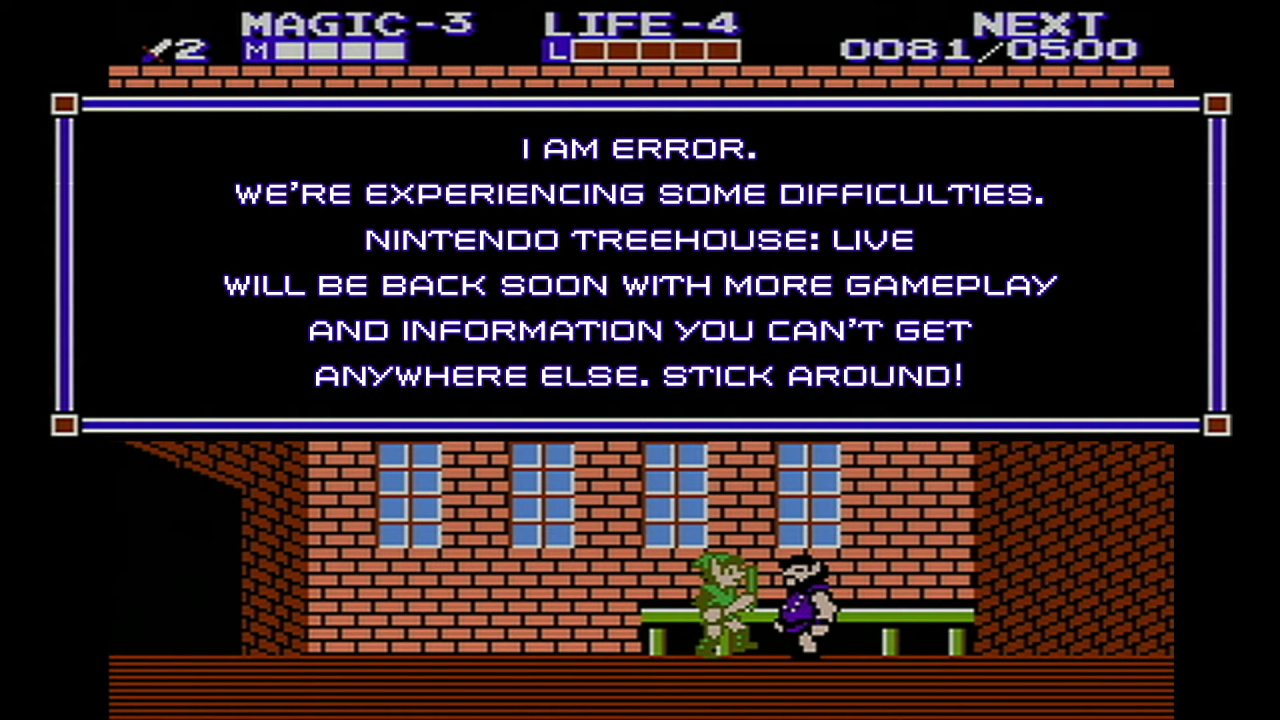
Nintendo, however, was prepared for the inevitable, when the interruption took day two of its Treehouse Live stream offline. During this interruption, the above image was beamed across to the screens of online viewers, showing Error, the villager from Zelda II: The Adventure of Link. If you’re not familiar with the meme, you can read more about it here.
Later on, when the recording of the stream was uploaded to YouTube, viewers apparently discovered Nintendo had cut sections of the video due to the power outage. Update: Turns out the mishap is still in there:
Did you witness this moment yourself? Tell us down in the comments.