Posted by: xSicKxBot - 04-10-2019, 12:31 AM - Forum: Lounge
- No Replies
Ryan Reynolds Is Producing A Wacky-Sounding New TV Game Show
Deadpool actor Ryan Reynolds is getting involved with a new TV show, and it might not be what you expect. Reynolds is producing the new ABC game show "Don't."
As reported by Variety, the original game show is a "comedic physical game show" where families of four take part in mental and physical challenges where they "don't" do something. Examples include "don't forget," "don't slip," or anything else, it seems.
ABC cruelly canceled Two Guys, A Girl & a Pizza Place 18 years ago. ‘DON’T’ is so good, it‘ll fast become the 2nd best show ABC has ever produced. And ABC will worship me. And my sitcom will be back on the air. @TraylorHoward@NathanFillion and @RichardRuccolo, you’re on notice. https://t.co/YwIIjSMEgL
Here's more from Variety's description of the show:
"Each episode will focus on one family as they go through the 'Don't' tests. If they succeed, they'll win a cash prize. But if the family fails a challenge, one of them will be eliminated. When just one contestant is left, the last remaining family member must compete on their own. Whatever money they've earned, the family keeps."
Reynolds has a history with ABC, as he starred on the late '90s sitcom Two Guys and a Girl (which was originally titled Two Guys, A Girl & a Pizza Place). More recently, the Deadpool franchise joins ABC owner Disney after that company bought the Deadpool series from Fox. He also has some experience with game shows, as he showed up on a South Korean game show as part of viral marketing for Deadpool 2.
"All my life, the word 'don't' has tortured me," Reynolds said. "From 'don't curse' to 'don't play ball in the house' to 'don't eat the crab salad you left in the sun for three days.' I cannot wait for my personal trauma to become the next great ABC family show," Reynolds said.
Mortal Kombat 11 Will Have A $100 Premium Edition On Switch
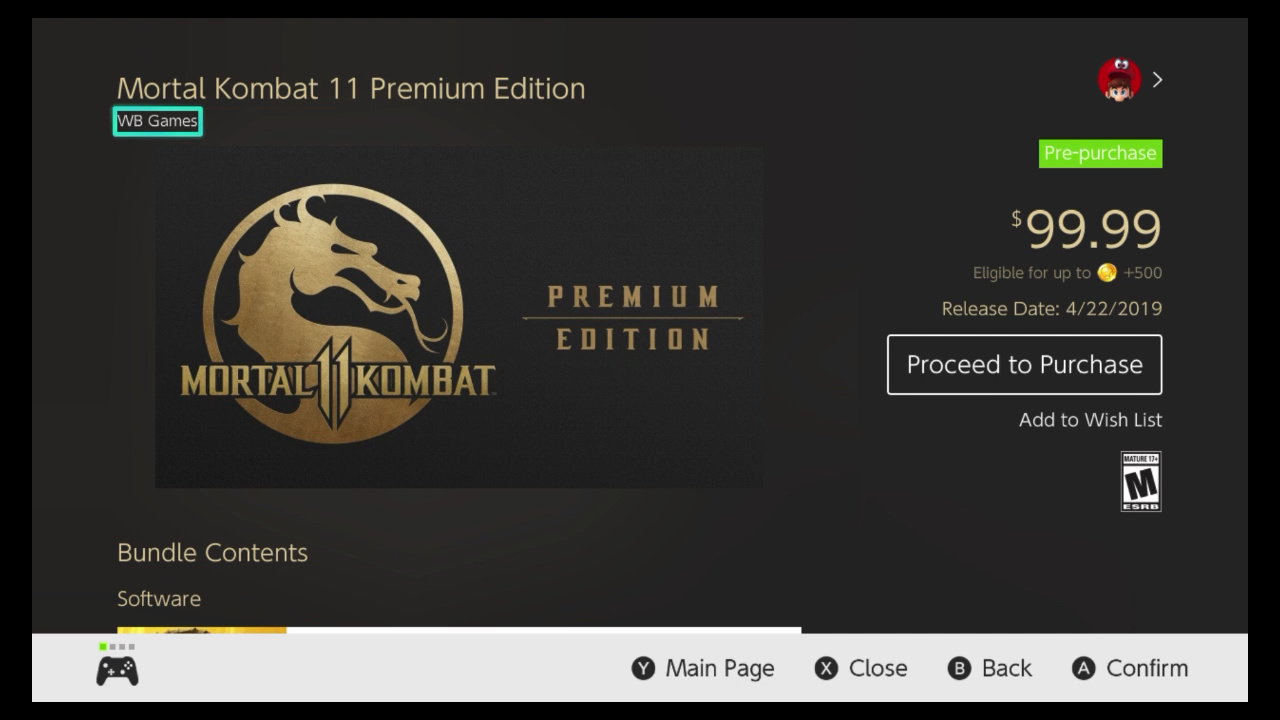
Mortal Kombat 11 has now appeared on the North American Nintendo Switch eShop, revealing its pricing, file size and more.
The main game is available to pre-purchase as we speak for $59.99, with the required amount of space currently set at 22.5GB (Nintendo notes that this is subject to change). It confirms that 1-2 players are supported locally, and online play will support 2-8 players.
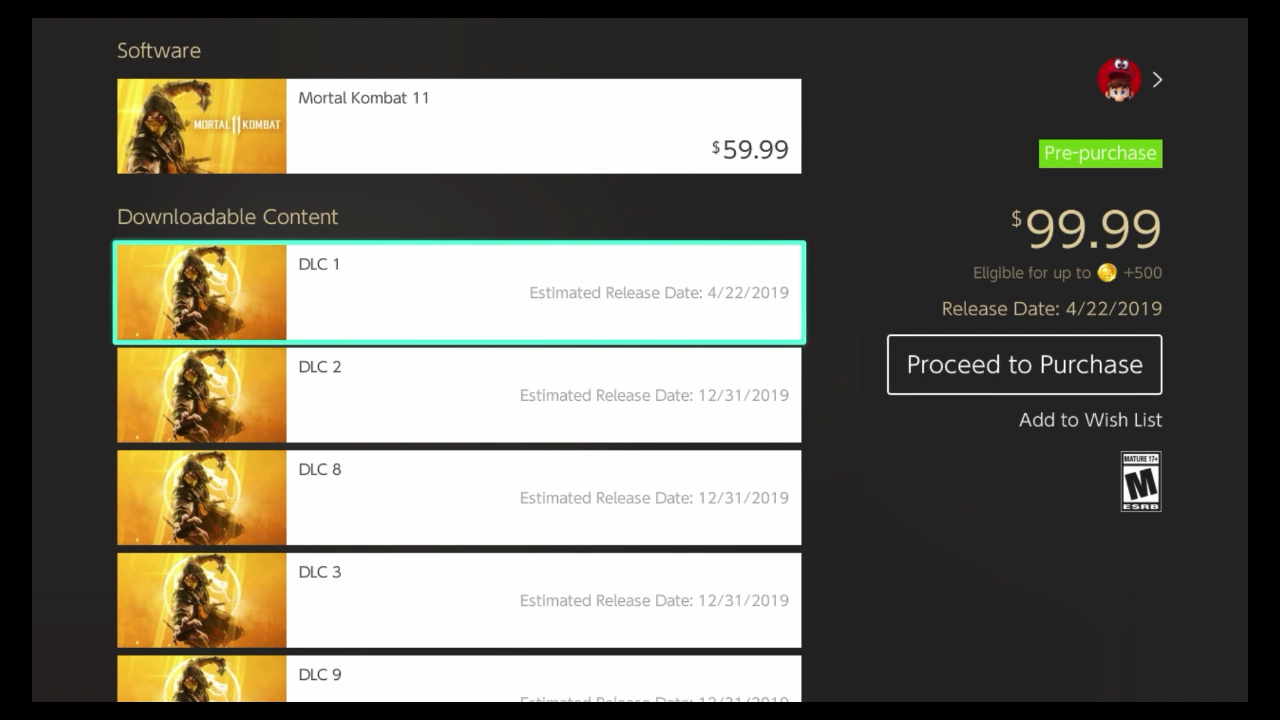
Elsewhere, a Premium Edition is available for a mighty $99.99. The package comes with the base game, plus 13 pieces of DLC (as confirmed earlier today). Interestingly, while no details are given for what these pieces of DLC will contain, ‘DLC 1’ is set to release on the same day as the game, with all other DLC having a generic 31st December 2019 release date at present.
We’ve taken a couple of screenshots for you below.
Are you planning on picking this one up on 22nd April? Will you go for the Premium Edition, or is that far too costly? Tell us below.
Sniper Elite V2 Remastered Pricing And Release Date Revealed For Switch
Rebellion has today confirmed the release date for Sniper Elite V2 Remastered on Switch. It’ll be available both digitally and physically on the same day as all other platforms, 14th May.
The news comes alongside a brand new trailer (which you can see for yourself above). Of course, Switch owners won’t benefit from the 4K and HDR support, but the game is also said to feature “beautifully updated environments, characters, weapons and vehicles, modernised rendering and post-processing effects, enhanced texturing and level geometry, a revamped lighting system” and more.
In addition to these visual upgrades, Sniper Elite V2 Remastered introduces a brand new frame-by-frame photo mode, seven new playable characters from Rebellion’s Zombie Army series, multiplayer for up to 8 players online, and all the additional content ever released for the game.
It’ll become available to pre-purchase on the Switch eShop from 24th April, with pricing set at £29.99 / $34.99 / €34.99; a 10% discount will be available before launch.
Hands on: Pixelmator Photo is king of the iPad photo editing apps
Since Pixelmator Photo is now available for iPad, AppleInsider takes you on a deep dive of the features and performance you can expect from the latest tablet-bound image editor.
Pixelmator Photo on iPad App Store
We’ve spent quite a bit of time using the original Pixelmator on our Mac, as well as the more powerful Pixelmator Pro. On iOS, we’ve utilized the original Pixelmator app but wanted more dedicated to photos —and with Pixelmator Photo, that’s just what we got.
Pixelmator Photo is a fast, capable photo editor that could easily handle anything we threw at it. Compared to other editors we’re fond of —such as Darkroom —Pixelmator Photo didn’t go from the iPhone to the iPad. It was designed from the beginning for Apple’s tablets.
We first saw Pixelmator Photo at Apple’s iPad Pro event last fall and have been eagerly awaiting the release ever since. For the past month or so we’ve been editing our best shots using the beta of Pixelmator Photo and were overwhelmingly impressed with its abilities.
UI and layout
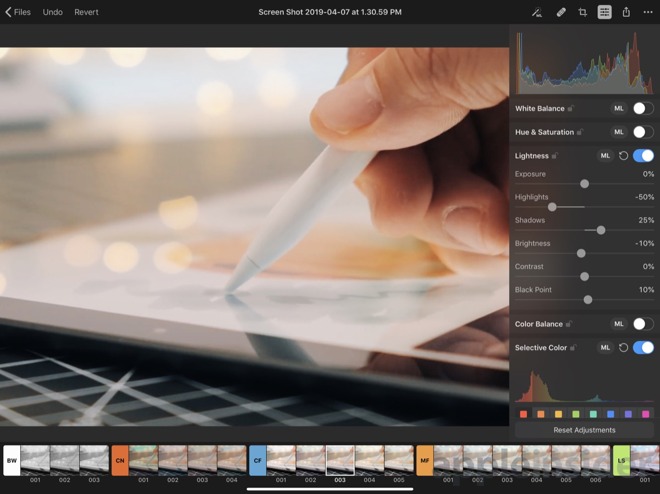
The app itself is very well arranged. Most controls appear on the right side, with occasional sliders and filters available along the bottom. This leaves the bulk of the display dedicated to content.
Pixelmator Photo
From the top left, you can head back to the file selector, undo, or revert. This is important because everything in Pixelmator Photo is non-destructive so no matter how much editing you do, you can always go back to the original.
On the top right, the auto button, repair control, crop function, adjustments, export, and more are placed.
As you open different controls, they elegantly slide over the image without being burdensome. They even make use of popover so multiple elements could be open at the same time such as the adjustments panel and the “more” menu. It all feels very natural and fluid.
Pixelmator Photo iCoud-based file picker
When you launch the app, it will automatically have any recent images ready to go. That doesn’t necessarily mean recent images you’ve opened with Pixelmator, but rather any stored on iCloud Drive. As an example, as we prepared our iMac 5K review, we had screenshots and other images littered across our desktop. Those images were then instantly available the second we opened the Pixelmator Photo app. Saying this is handy is an understatement.
A proper image workflow has been a bit of a rough point for iOS users and Pixelmator has done a great job simplifying this. It is painless to manage images on our Mac, and as long as they are in iCloud, it is just as easy to edit them on our tablet. This has made our iPad Pro our preferred device for image editing. At least the bulk of the time.
Editing imagery
Pixelmator Photo supports over 500 RAW formats which means even our newer Nikon Z 7 was supported.
Pixelmator Photo
One of the biggest, flagship features of Pixelmator Photo is machine learning. Pixelmator has leaned on Core ML to automatically improve photos. In our time with Pixelmator Photo, this has been spot on more often than not. It really does an amazing job adjusting the image. Frequently we’d just hit that and be on our way. If there was a particular look or effect we were trying to achieve however, we went manual.
This even applies to crop, where ML will automatically crop it so the subject is perfectly framed.
As you dig into the manual adjustments, each section can be toggled on/off, adjusted, or automatically set with the Machine Learning button that does its best to make it look as it should. We appreciated the ability to not just automate the entire photo using ML, but each individual adjustment type.
All of the tools were designed for touch, rather than a desktop UI. A few of the most intuitive controls include the Color Balance, Selective Color, and the Curves. Color Balance has a color wheel you can drag the selector in as well as adjustments on either side to tint your image. Curves shows a live histogram as you move the line around and add inflection points.
When adjusting, there are several pre-designed filters along the bottom that were “inspired by pro photography” as well as your own that you create. The list is quite extensive, but it isn’t the most filters we’ve seen in an editing app. They all are pretty solid and of course, you can tweak them once applied to dial in your look.
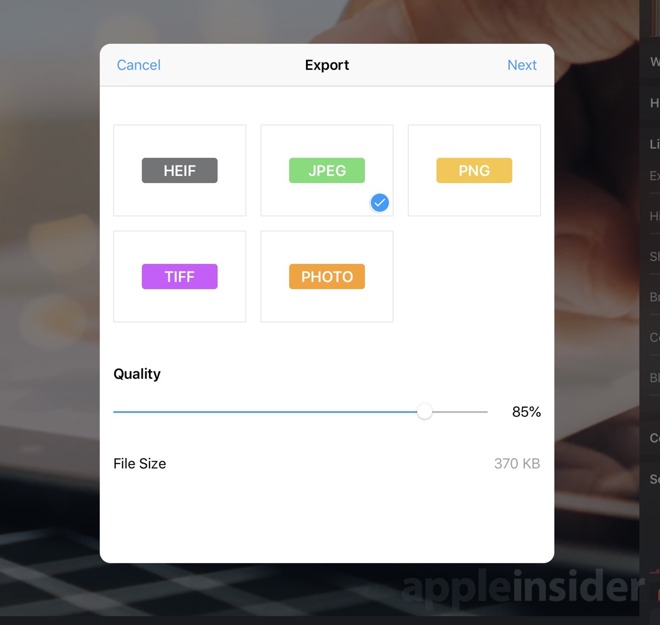
Pixelmator Photo export interface
When you’re finished editing an image, you have three options —modify the original in the Photos app, save the image to photos, or export it via the Share Sheet. Using the first option is unavailable if you didn’t open the original from the Photos app, which was usually the case for us as we opened from iCloud Drive. When using the export option, you first get an export screen that allows you to choose the format (HEIF, JPEG, PNG, TIFF) and the quality. It even gives you a prediction of file size before you proceed. Then the Share Sheet appears with all the common destinations.
Should you buy it?
Yes. That is the easy, simple answer here. We consider the app to be cheap at only $4.99. That is also a one-time purchase, unlike Photoshop that requires the monthly subscription.
We love the layout, the abilities, and the amazing performance for such a low price. Editing on our tablet is much more convenient than always sitting down at our computer. In iOS 12, Apple really improved the camera import flow which makes getting photos from your shooter to your tablet all the easier.
If you want to try out Pixelmator Photo for yourself it is available now on the App Store.
Blender Cloud Free Month Trial And Hands On Preview
The Blender Foundation recently released their new animated short Spring, a completely open film that is used to push development of Blender forward. Along side the Spring release, they are also offering a free month when you sign up for the Blender Cloud service. The Blender Cloud is a subscription service that helps support the development of Blender, while offering you several nice features including:
All of the assets used in their open films
Sample blend file to download and learn from
1,500+ textures and dozens of HDR environment maps
Plugin to access the above resources
Dozens of high quality multi-part tutorials
Tools to share and collaborate with others on Blender Cloud
You can sign up here for €9.90 a month. The first month will be free and you will not be billed until the 2nd month begins enabling you to try Blender Cloud for free. To see inside the Blender Cloud service, check out the video below.
Put the power of an army at your fingertips, conquer all worlds and wage war against friends online. Put the power of a full army ? even dragons ? at your fingertips in Skyworld, the award-winning VR wargame from the creators of Arizona Sunshine.
Lock, Load, & Face the Madness! Get ready for the mind-blowing insanity, as one of four trigger-happy mercenaries, taking out everything that stands in your way. With its addictive action, frantic first person shooter combat, massive arsenal of weaponry, RPG elements and four-player co-op, Borderlands is the breakthrough experience that challenges all the conventions of modern shooters. Borderlands places you in the role of a mercenary on the lawless and desolate planet of Pandora, hell bent on finding a legendary stockpile of powerful alien technology known as The Vault.
Welcome to the Vacation Simulator: a rough approximation of VACATION inspired by real human NOT JOBBING, brought to you by the same robots behind the Job Simulator. Reallocate your bandwidth and get ready to splash, s?more, snowball, and selfie your way to optimal relaxation.
Linux Server Hardening Using Idempotency with Ansible: Part 1
I think it’s safe to say that the need to frequently update the packages on our machines has been firmly drilled into us. To ensure the use of latest features and also keep security bugs to a minimum, skilled engineers and even desktop users are well-versed in the need to update their software.
Hardware, software and SaaS (Software as a Service) vendors have also firmly embedded the word “firewall” into our vocabulary for both domestic and industrial uses to protect our computers. In my experience, however, even within potentially more sensitive commercial environments, few engineers actively tweak the operating system (OS) they’re working on, to any great extent at least, to bolster security.
Standard fare on Linux systems, for example, might mean looking at configuring a larger swap file to cope with your hungry application’s demands. Or, maybe adding a separate volume to your server for extra disk space, specifying a more performant CPU at launch time, installing a few of your favorite DevOps tools, or chucking a couple of certificates onto the filesystem for each new server you build. This isn’t quite the same thing.
Improve your Security Posture
What I am specifically referring to is a mixture of compliance and security, I suppose. In short, there’s a surprisingly large number of areas in which a default OS can improve its security posture. We can agree that tweaking certain aspects of an OS are a little riskier than others. Consider your network stack, for example. Imagine that, completely out of the blue, your server’s networking suddenly does something unexpected and causes you troubleshooting headaches or even some downtime. This might happen because a new application or updated package suddenly expects routing to behave in a less-common way or needs a specific protocol enabled to function correctly.
However, there are many changes that you can make to your servers without suffering any sleepless nights. The version and flavor of an OS helps determine which changes and to what extent you might want to comfortably make. Most importantly though what’s good for the goose is rarely good for the gander. In other words every single server estate has different, both broad and subtle, requirements which makes each use case unique. And, don’t forget that a database server also has very different needs to a web server so you can have a number of differing needs even within one small cluster of servers.
Over the last few years I’ve introduced these hardening and compliance tweaks more than a handful of times across varying server estates in my DevSecOps roles. The OSs have included: Debian, Red Hat Enterprise Linux (RHEL) and their respective derivatives (including what I suspect will be the increasingly popular RHEL derivative, Amazon Linux). There have been times that, admittedly including a multitude of relatively tiny tweaks, the number of changes to a standard server build was into the hundreds. It all depended on the time permitted for the work, the appetite for any risks and the generic or specific nature of the OS tweaks.
In this article, we’ll discuss the theory around something called idempotency which, in hand with an automation tool such as Ansible, can provide the ongoing improvements to your server estate’s security posture. For good measure we’ll also look at a number of Ansible playbook examples and additionally refer to online resources so that you can introduce idempotency to a server estate near you.
Say What?
In simple terms the word “idempotent” just means returning something back to how it was prior to a change. It can also mean that lots of things you wanted to be the same, for consistency, are exactly the same, too.
Picture that in action for a moment on a server estate; we’ll use AWS (Amazon Web Services) as our example. You create a new server image (Amazon Machine Images == AMIs) precisely how you want it with compliance and hardening introduced, custom packages, the removal of unwanted packages, SSH keys, user accounts etc and then spin up twenty servers using that AMI.
You know for certain that all the servers, at least at the time that they are launched, are absolutely identical. Trust me when I say that this is a “good thing” ™. The lack of what’s known as “config drift” means that if one package on a server needs updated for security reasons then all the servers need that package updated too. Or if there’s a typo in a config file that’s breaking an application then it affects all servers equally. There’s less administrative overhead, less security risk and greater levels of predictability in terms of achieving better uptime.
What about config drift from a security perspective? As you’ve guessed it’s definitely not welcome. That’s because engineers making manual changes to a “base OS build” can only lead to heartache and stress. The predictability of how a system is working suffers greatly as a result and servers running unique config become less reliable. These server systems are known as “snowflakes” as they’re unique but far less beautiful than actual snow.
Equally an attacker might have managed to breach one aspect, component or service on a server but not all of its facets. By rewriting our base config again and again we’re able to, with 100% certainty (if it’s set up correctly), predict exactly what a server will look like and therefore how it will perform. Using various tools you can also trigger alarms if changes are detected to request that a pair of human eyes have a look to see if it’s a serious issue and then adjust the base config if needed.
To make our machines idempotent we might overwrite our config changes every 20 or 30 minutes, for example. When it comes to running servers, that in essence, is what is meant by idempotency.
Central Station
My mechanism of choice for repeatedly writing config across a large number of servers is running Ansible playbooks. It’s relatively easy to implement and removes the all-too-painful additional logic required when using shell scripts. Of the popular configuration management tools I’ve seen in action is Puppet, used successfully on a large government estate in an idempotent manner, but I prefer Ansible due to its more logical syntax (to my mind at least) and its readily available documentation.
Before we look at some simple Ansible examples of hardening an OS with idempotency in mind we should explore how to trigger our Ansible playbooks.
This is a larger area for debate than you might first imagine. Say, for example, you have nicely segmented server estate with production servers being carefully locked away from development servers, sitting behind a production-grade firewall. Consider the other servers on the estate, belonging to staging (pre-production) or other development environments, intentionally having different access permissions for security reasons.
If you’re going to run a centralized server that has superuser permissions (which are required to make privileged changes to your core system files) then that server will need to have high-level access permissions potentially across your entire server estate. It must therefore be guarded very closely.
You will also want to test your playbooks against development environments (in plural) to test their efficacy which means you’ll probably need two all-powerful centralised Ansible servers, one for production and one for the multiple development environments.
The actual approach of how to achieve other logistical issues is up for debate and I’ve heard it discussed a few times. Bear in mind that Ansible runs using plain, old SSH keys (a feature that something other configuration management tools have started to copy over time) but ideally you want a mechanism for keeping non-privileged keys on your centralised servers so you’re not logging in as the “root” user across the estate every twenty minutes or thirty minutes.
From a network perspective I like the idea of having firewalling in place to enforce one-way traffic only into the environment that you’re affecting. This protects your centralised host so that a compromised server can’t attack that main Ansible host easily and then as a result gain access to precious SSH keys in order to damage the whole estate.
Speaking of which, are servers actually needed for a task like this? What about using AWS Lambda (https://aws.amazon.com/lambda) to execute your playbooks? A serverless approach stills needs to be secured carefully but unquestionably helps to limit the attack surface and also potentially reduces administrative responsibilities.
I suspect how this all-powerful server is architected and deployed is always going to be contentious and there will never be a one-size-fits-all approach but instead a unique, bespoke solution will be required for every server estate.
How Now, Brown Cow
It’s important to think about how often you run your Ansible and also how to prepare for your first execution of the playbook. Let’s get the frequency of execution out of the way first as it’s the easiest to change in the future.
My preference would be three times an hour or instead every thirty minutes. If we include enough detail in our configuration then our playbooks might prevent an attacker gaining a foothold on a system as the original configuration overwrites any altered config. Twenty minutes seems more appropriate to my mind.
Again, this is an aspect you need to have a think about. You might be dumping small config databases locally onto a filesystem every sixty minutes for example and that scheduled job might add an extra little bit of undesirable load to your server meaning you have to schedule around it.
Next time, we’ll take a look at some specific changes that can be made to various systems.
Chris Binnie’s latest book, Linux Server Security: Hack and Defend, shows you how to make your servers invisible and perform a variety of attacks. You can find out more about DevSecOps, containers and Linux security on his website: https://www.devsecops.cc
Fallout 76 Repair Kits Come Tomorrow, Can Be Earned Or Bought With Real Money
Bethesda has announced that the new repair kits coming to Fallout 76 can be earned in-game or bought with real world money. The kits are designed to repair weapons and armor without needing to waste resources.
"Repair Kits are new utility items that will help you spend more time looting and shooting, and less time toiling away at a workbench fixing your gear," Bethesda wrote in the latest Inside the Vault blog post. "We've received lots of requests for Repair Kits, and we're excited to add them in the weeks following Patch 8." Patch 8 is scheduled for tomorrow, April 9.
Patch 8 adds two types of repair kits: basic and improved. Basic kits are single-use and repairs any one item to 100% condition. You'll be able to unlock them in the in-game Atomic Shop with Atoms--Fallout 76's microtransactions that can be bought with real money or earned by completing challenges. Improved kits are also single-use, but they repair a single item to 150% condition, allowing them to last much longer than they normally would. The improved repair kits can only be earned for completing in-game content, such as defeating the Scorchbeast Queen.
Following Patch 8, more of Fallout 76's Wild Appalachia expansion will release on April 16. A new dungeon, called The Burrows, will be unlocked for you to explore with a squad of other players. Bethesda plans on releasing further details about the The Burrows during next week's Inside the Vault, but promises the dungeon will be a "daunting new subterranean battleground." Next week's Inside the Vault will reveal more details about Fallout 76's upcoming in-game camera and memory book features too, which brings a new quest and challenges on April 16.
Player vending, which allows you to set up your own store to sell items to others, has been delayed. No longer coming in Patch 8, player vending is now scheduled for Patch 9, which is currently expected to release sometime in May.
Wild Appalachia is the first of three large content drops scheduled for Fallout 76 in 2019. Nuclear Winter, coming this summer, brings a new game mode and features to Fallout 76, along with a new prestige system and two challenging raids. This fall, Wastelanders adds a story expansions that includes a new main questline, factions, events, and features.