Langrisser Mobile launches next week, but you can pre-register right now
By Sponsored17 Jan 2019
Old-school strategy JRPG franchise Langrisser will be making its’ mobile debut next week via Langrisser Mobile – a freemium game that hopes to capture the free-to-play turn-based strategy crowd. Anyone looking for another game similar to Fire Emblem: Heroes will be able enjoy the full release version on January 22nd.
This is a sponsored article courtesy of Zlonggame.
Pre-registration is already live on both iTunes and the Google Play store, however, so if you want to sign up early you can do so via your app store of choice.
Langrisser Mobile looks to capture the spirit of the classic tactical JRPG franchise by hitting all of those key nostalgic beats. Over 300 levels from across the series return, on tactical maps that can go as large as a 24×29 grid, and all set on the familiar continent of El Sallia. You’ll also be able to collect and fight with (or against) plenty of familiar faces from across the series, including Elwin, Dieharte and Luna.
Zlong has also brought back the series’ original composer, Noriyuki Iwadare, who’s joined by a star-studded Japanese voice cast that includes Ryotaro Okiayu (Fire Emblem, Bleach, Fate/Apocrypha).
Battles in Langrisser follow a familiar ‘rock ,paper, scissors’ style of gameplay based on the class of your hero, although there are two elements to a unit. The hero has their own special class but there is also an accompanying ‘troop’ that battles first. These will follow a basic class system and come in three tiers. Your heroes can be customised via their own class/progression tree, as well as different troops types and equipment. Similar to Fire Emblem, heroes and equipment all come with a rating.
If you want to try and get up to speed on the game while you wait for release, there’s an official wiki online that’s already been populated with some initial information and stats, which may help in your squad planning.
Langrisser Mobile launches worldwide on iOS and Android on January 22nd, 2019.
Mortal Kombat 11's Character Customization Detailed In New Video
The long-awaited gameplay reveal of Mortal Kombat 11 revealed all sorts of new details about the upcoming fighting game from NetherRealm. As expected, one such aspect is customization options similar to Injustice 2, the studio's other hit fighting series.
In a video, director Ed Boon walks us through some of the customization options using Scorpion. Each character has three pieces of customizable gear, and in Scorpion's case that's his mask, katana, and spear. Each of the options themselves changed his look pretty significantly, but further "Kosmetic" options change his look even more dramatically. Tabs for "Abilities" and "AI Behavior" can also be seen in the customization menu. Boon also mentioned you can set intros and victory celebrations.
After that, the closer look treated us to a scene of Scorpion vs Baraka, cycling through several costume changes for both. The customization looks to be pretty in-depth, even from just a brief look at some of the menus and options.
How to get started with a new HomePod, and get more out of it
Apple’s HomePod starts with a simple setup and it ends with you forgetting you didn’t always have music surrounding you. In between, though, there are details to consider about that first setup and many options for when you move the HomePod to a new room. AppleInsider takes a dive into the use of Apple’s latest speaker.
If you’ve just got a HomePod then you’ll use your iPhone to set it up and we’ll show you what you need to do. Yet after that initial setup, it’s very unclear what you can do if, for instance, you move the HomePod to another room.
It’s not as if HomePods are difficult to carry around, though they are startlingly heavy. It’s also not as if you have to do anything to make a HomePod recognize that it’s been moved and should start adjusting its speakers to the new environment.
Rather, it’s that if you’ve initially identified the HomePod as being in your den and now it’s in your office, good luck figuring out how to change that label. We guarantee that across the nation there are HomePods in kitchens who are labelled Living Room and plenty of people who neither know nor care.
As long as they only use the HomePod to play tracks directly from Apple Music, that’s fine. It’s when you want to send audio from your iOS devices that it begins to be an issue. Even then, though, if you only have the one HomePod, you’ll cope. Yet it’s still a case of having to remember to choose Bedroom in AirPlay even though that HomePod is now in your study.
The problem is that HomePod doesn’t get its own app as the Apple Watch does and it’s also not found under Bluetooth the way AirPods are. Instead, it’s part of the Home app and each HomePod is a separate accessory that can be included in automation.
If you have two HomePods, for instance, you could have one set up as part of your evening routine so that at sunset, the HomePod in your den can start playing jazz. And the one in your kitchen can play some cool country. So long as you remember which one you’re asking to play this music.
However, we do get the ability to say what room of our house the HomePod is in —and we even get the option to give the speaker a name —so let’s use it.
Out of the box
Rip that HomePod out of its packaging and stumble a little as you find out just how densely heavy these little things are. Then, though, make sure your iPhone or iPad has been updated to the latest software.
Apple HomePod packaging
There’s more. Your iOS device probably has all of this already set up but you need it. The device must be signed in to iCloud. If it isn’t, go to Settings, tap on your name at the top of the screen and then on iCloud.
Sign in if necessary and then scroll down to Keychain. That’s got to be switched on too.
Last, make sure that Bluetooth is switched on and also that the iOS device is on your Wi-Fi network.
This all takes far longer to say than to do. In the great majority of cases, your iPhone or iPad will already be setup for this and shortly you’re going to see just how fast Apple makes adding a HomePod.
Surface tension
In theory, you can place your HomePod anywhere you like. In practice, it’s got to be near a mains outlet. You can always add an extension socket but you’re stuck with Apple’s own cable as that’s hard-wired into the HomePod.
Apple also recommends that you leave six inches of space around it and that the HomePod isn’t pressed up against a wall.
HomePod on Wood
We’d add that you should avoid wooden surfaces. This is not as big a deal as it appeared when the HomePods first came out, but it is possible that one will leave a white ring on the wood. It depends on how that wood was oiled but the surface can react with the silicone ring at the bottom of the HomePod.
If you happen to know that your wooden surface has been treated with a silicon type of polish, then you could place the HomePod somewhere else. If that’s the best spot, though, or if you have no earthly way of knowing what’s been done to the wood before, put the HomePod there anyway.
The worst that is likely to happen is that you will get such a ring after a few days but it can be removed by cleaning. Or, actually, you can just take the HomePod away and the ring may well disappear by itself over time.
This is fast
You’ll love this bit. Plug the HomePod into power and wait for it to chime. There’ll also be a white light that pulses on the top of the speaker. When there is, hold your iPhone next to the HomePod.
The initial setup screen you see on iPhone
A popup dialog will appear showing the HomePod and displaying a Set Up button. This is the same as you get on the Apple Watch but the setup procedure that follows is, if anything, even easier.
Where are you?
The very first question you get after pressing Set Up is Where is the HomePod? and there’s a list of answers.
It only helps for identification later but pick the room you’re going to put the speaker
That list includes choices such as Bedroom, Living Room, Entrance and Office. It makes zero difference which you pick as far as how the HomePod will work. Apple doesn’t automatically set the HomePod to be louder if you’ve picked the office and quieter in the bedroom, for instance. It’s solely for identification later.
So tap on one to choose it and then press Continue.
Getting personal
Next, the HomePod setup screen on your iPhone asks for a type of permission called Personal Requests. You’re going to say yes by tapping on Enable Personal Requests but it’s worth being clear about just what this means.
This page of the setup is quite straightforward about how saying yes means anyone can use this HomePod to do various things. What they will actually be using is your iPhone, they’re just talking to it via the HomePod.
So that’s why the setup says that it will allow anyone to read and send messages, and so on.
Allow Personal Requests unless you’ve great reason not to. It’s just so handy.
This is genuinely one of the best things about HomePod because it means you come as close to a Star Trek-style of ambient computing as possible. Just say to the air that you want to place a call to someone and the HomePod will do it.
Yet it’s also the worst part of the HomePod because it is so specifically tied to you and your iPhone. If your partner tries to phone someone through the HomePod, it’s going on your cellular bill. Similarly, anyone can add a calendar event or a reminder but they’re adding it to you.
Add in that the HomePod is tied to your Apple Music account so it has only your playlists. Add in that any music anyone else asks it to play will have an impact on how Apple curates your weekly Favorites list, too.
Then the HomePod becomes this brilliant device for you and merely a great one for the rest of the household.
Still, you are you and this is your HomePod, you might as well get all the value you can out of the money you spent. So tap on Enable Personal Requests.
One more thing to note, incidentally. All of this using the HomePod to add things to your iPhone only works when that phone is on the same Wi-Fi network as your HomePod. If it isn’t, if you’ve switched Wi-Fi off for some reason, Siri on the HomePod will explain to you what’s wrong. Really irritatingly, though, it will sometimes explain it to you twice.
Maybe that’s covered under the next screen, Terms and Conditions, but we nod through that one just as fast you do.
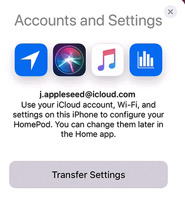
Accounts and Settings
You noticed that this setup required your iPhone to have Bluetooth switched on. Everything you’ve done so far has been over Bluetooth and of course it has. There’s no control on the HomePod to tell it which is the right Wi-Fi network, let alone any keyboard to let you enter a password it.
Tap on Transfer Settings and your HomePod will pick up your Wi-Fi network, password and much more
All of that is handled by this next and final step. Accounts and Settings offers to pass details from your iPhone to your HomePod. Those details include which Wi-Fi network and what password, but also your iCloud account login and others such as your choice of Siri voice.
Tap the Transfer Settings button. You’ll hear a chime on the HomePod and the iPhone setup screen will change to show a picture of that HomePod.
When it’s done, that screen will change to one saying hello to you and the HomePod will speak. “Welcome to HomePod,” your new speaker will say. “You can’t tell, but I’m waving.”
If you can figure out why that’s gently amusing instead of irritating, you’re a better person than we are, but it is. It’s a make-you-smile moment that leads you into some training.
You’re being trained
Siri tells you that you can get the HomePod’s attention by saying “Hey, Siri”, and then it walks you through trying that out through a couple of examples.
The last example has you asking Siri to play some music, and it does. This is the moment when you’re going to realise that yes, you spent your money well. Siri will play some music based on what it believes you like from your previous Apple Music selections but if you want a suggestion, say “Hey, Siri, play Hymn Orchestrated by Midge Ure.”
It’s not such a loud song that it’s going to get the neighbors annoyed, but it will shake your floor. When you’ve jolted your head at how clear and strong the music is, say “Hey, Siri, turn it down”. Or be more specific and say “Hey, Siri, turn the volume to 20 percent.”
That’s it
Your HomePod is setup with all your details and what you won’t have noticed is that it is also setup for the specific room you’ve put it in. It’s setup for the exact position you’ve placed it within that room, too.
HomePod has scoped out the area and adjusted its speaker output to mean that you get its best possible sound regardless of where you are in the room.
Which just raises the first of several questions about what happens when you want to move rooms or make any other substantive changes.
Moving stories
If you want to move your HomePod to another part of your house or even another part of your room, unplug it and move it. When you then plug it back into power, it will automatically do its scanning to work out the best use of its many internal speakers.
You don’t have to do anything else at all. The HomePod will play music just as well in your office as in the living room, regardless of where it thinks it is.
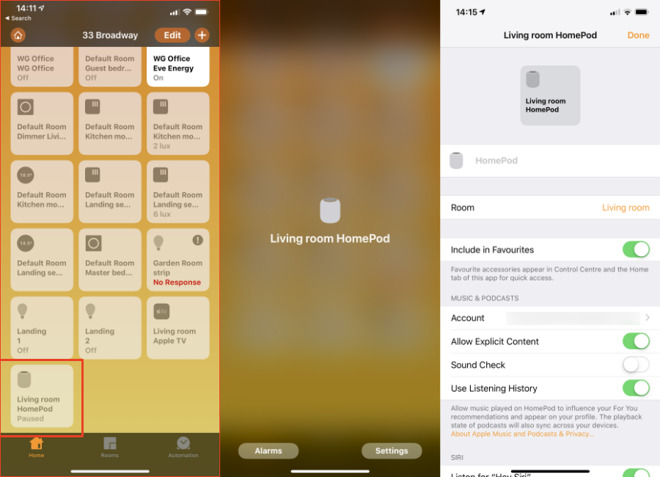
Nonetheless, open the Home app on your iPhone. Under its Home section, there will be a button somewhere with an icon of a HomePod and the name of the room you said it’s in.
Tap and hold on that button. If you just tap it, the HomePod either starts playing or pauses its playback if it’s already working. Tapping and holding gets you a very bare screen with a small image of a HomePod and then two buttons.
Alarms is just like the alarms section of your iPhone’s Clock app and it’s where you can set new ones or see when your existing ones are going to sound.
Then there’s the Settings button and that’s the one to tap.
In the Home app, search for HomePod and then press and hold to get settings
There are a lot of options within this HomePod settings app but you’re going to ignore most of them. They’re ones such as controlling how you can use Siri and what voice that will use. You’ll also find a section where you can specify whether HomePod will play music that has explicit lyrics or not.
This is one setting that was automatically taken from your iPhone so if you cared about explicit lyrics there, the HomePod already cares about them here.
Instead, the sections that you’re going to find useful when you’re moving the HomePod around are all at the top of the screen. First there’s one that just says HomePod. This is grayed-out as if you can’t edit it, but you can.
If you choose to, tap on that gray HomePod word and start typing a name for your HomePod.
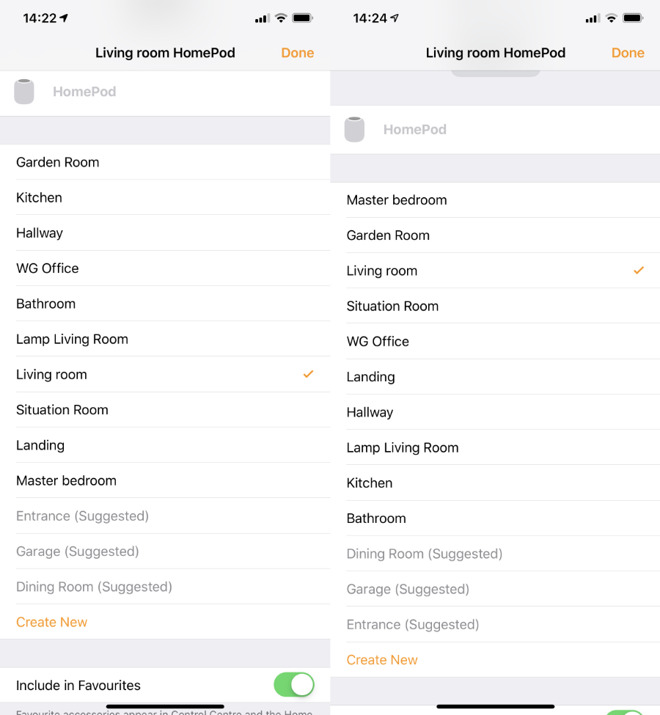
Right beneath it, there’s a section called Room and on that same line there is the name of the room you’ve said your HomePod is in. Tap on that name and you get a list of alternatives.
Among the many things you can adjust there is a setting for what room the HomePod is in
The list is a standard one with items like Living Room, Master Bedroom and so on but it also takes all the ones you’ve ever set up in the Home.
Pick the room you’ve moved the HomePod into or tap on Create New if it’s not already on the list. When you do that, you get the option to give the room a name and also to pick a wallpaper for it.
This is moving away from HomePod-specific issues to how Home and HomeKit works so just briefly, if you assign the device to a room, you can later see it listed with everything else there.
On the main screen of Home, there is also a section called Rooms and this shows you all of the HomeKit devices room by room. It’s not the fastest system. Each room gets its own page and you have to swipe along to reach the right one.
Each room has its name at the top but to help you focus after you’ve got bored swiping, you can choose to have any or all rooms have their own wallpaper. This can mean any image you like but there’s also the option to take a photo. So if you move the HomePod into the den, you could take a photo of the den with it there.
Favorites
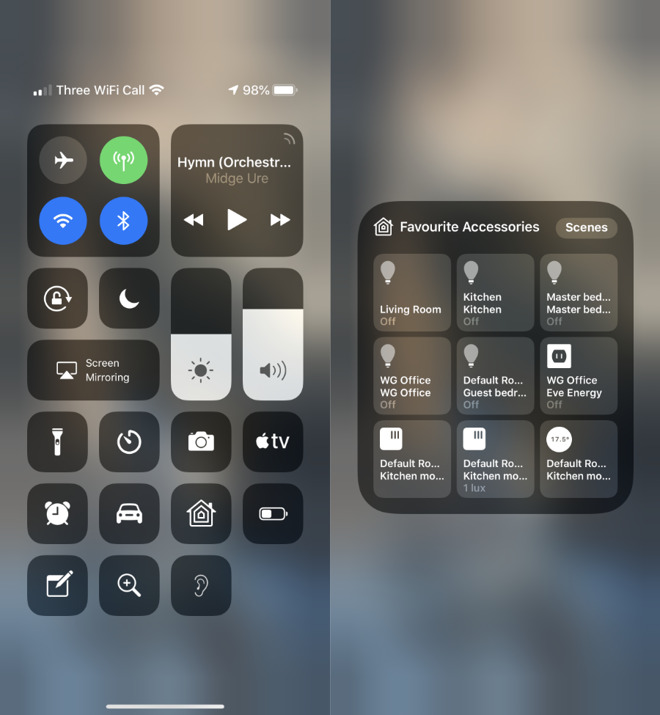
Back in the HomePod’s settings page, there is then a switch called Include in Favorites. In theory, switch this on would put the HomePod into Control Center. Or rather, Control Center can have a Home button and tapping on that gets you a grid of favorite devices that includes the HomePod but also, for instance, lightbulbs.
The trouble is that there’s only room for nine favorites. As the default is for Include in Favorites to be on, you very rapidly fill up all nine slots. And there’s nothing to tell you that you have.
You have to swipe down on your iPhone to get Control Center, tap the Home button and then see whether your HomePod is there. If it isn’t, you have to go back through all the devices in your Home app and switch off this Include in Favorites switch for some of them.
You can add HomePod to a Home button in Control Center
If you want to, that is. It is handy to be able to get Control Center and just tap to switch off the lights in the living room, kitchen and den then to switch on the ones for the landing and the bedroom.
It feels less handy to have a button to play or pause HomePod. Maybe you’ll sometimes leave the room and only remember later that it’s playing. Otherwise, skip adding HomePod to Favorites and instead just get in the habit of calling out “Hey, Siri, stop.”
Advantages
Maybe the Home app isn’t a quick one to use but if you list the HomePod in the right room, you could save time later. Say you’ve got it in your office and you’re heading there in the dark one cold winter morning. Call up the office room and you might be able to tap to switch on the lights, turn on the heating and set the HomePod playing.
It depends on what devices you have but HomePod can both be controlled by HomeKit and it can control it right back.
So it’s worth taking a moment to set all this up. Plus there is one more important part of this Home app’s setup for HomePod and it’s to do with the single best thing you can do to your speaker.
Get another one
Yes, HomePod is expensive. Nonetheless, when you’ve got one, you will soon want two. And then when you get that second HomePod, if you’re setting it up on the same Wi-Fi network as the first, it will know.
You’ll be prompted to set them up as a pair. If you do want them in the same room then you do want them as a pair.
Still, they are expensive and a single HomePod on its own is very good so you might well buy the second one for a different part of your house. In that case you would say no to creating a pair when you’re initially setting up the second one.
Later, though, you will either buy a third HomePod because these things are only as resistible as your bank account says, and you will then want to pair up two of them. Plus, if you haven’t already heard that two HomePods together sound incredible, let us be the first to tell you. Two HomePods together sound incredible.
To pair two up some time after the initial setup, go to the Home app. Press and hold on either of them to bring up settings. So long as the two are on the same Wi-Fi network, the settings page will now have an extra option.
Right underneath the Include in Favorites section there will be a new button called Create Stereo Pair.
The HomePod whose settings you’re adjusting will be one of the pair and you get to select any other HomePod you’ve got as the second. Then you can choose which is to be the left speaker and which the right, or swap them around again as you need.
It takes time
Initially you wonder if the HomePod is going to be worth the money, especially when it costs far more than rivals such as Amazon Echo. Then when you’ve got one, you hear how great it is and you get a kind of new-toy feel for a time.
Later you might add a second HomePod or you might not, but this is how you know that you’ve made a good buy. At some point you are going to be in a room without a HomePod and you’ll announce to the air that you want to play some music.
The following blog post, unless otherwise noted, was written by a member of Gamasutras community. The thoughts and opinions expressed are those of the writer and not Gamasutra or its parent company.
Welcome to my yearly blog post on crowdfunding and games, looking at how well games have performed on Kickstarter (and Fig) for the past year.
As usual, I have shared a lot of graphs here to go through, alongside my own comments in regards to the trends that can be observed.
Kickstarter is still raising more than half a billion dollars a year, but it is to be noted that in 2018, it raised the lowest amount of money since 2014. This is only a -6% change year-on-year, and not a lot lower than in 2015, the best year for Kickstarter, but still a drop.
Much more significant is the total number of projects launched on Kickstarter, a -17% change from 2017, and more than -40% from 2015, the best year. The novelty of Kickstarter has worn off, and the dream chasers are probably less naive about their chances with crowdfunding. Not necessarily a bad thing, as the next graph shows:
While the total number of projects has dropped by 17%, the number of funded projects only saw a -3% change. This could show the projects of a certain quality are not necessarily struggling more than before when trying their hand at crowdfunding.
If we see such a drop in the number of submitted projects, but a certain stability in the total number of projects funded, this would certainly indicate the platform is reaching a certain maturity, finding its place for projects suitable for crowdfunding.
Looking into the money raised per tier, the drop is about even across all of them, with the exception of the projects below $10k, which raised the same amount as in 2017; and with projects in the $100k to $500k range which saw a -10% change, compared to the -6% observed in the other ranges.
Not shown here is the fact that there were more projects funded in the $500k+ range overall, but also that there were significantly fewer projects raising more than the $2m than in 2017 (14 projects raised $2m+ in 2017 against 8 projects in 2018).
At a glance, the technology category saw the most significant drop in its numbers, and by itself carries most of the year-on-year drop in the money raised on the platform. The technology category is not the purpose of this blog post – but a quick look shows fewer funded projects (-26%), and less money raised across all the projects tiers of funding.
While there was a drop across all technology subcategories, the Wearable projects alone saw a -$16m drop year-on-year on Kickstarter.
Looking at the year-on-year variation by currency shows a few interesting trends. Ignoring the over-performance of the Yen that was only available by the end of 2017, the drop in both the amount of money raised and number of funded projects for campaigns ran in USD is interesting, especially as Kickstarter is seen as a very US-centric platform.
The growth for projects in EUR, GBP and CAD is also a strong sign that the notion that you need to run your campaign in USD to succeed is probably misguided.
With $192m raised by successful projects on Kickstarter in 2018, the Games category is going very strong. It now represents more than a third of the money raised that year on the platform, with a steady financial growth.
Alongside the trend observed across the whole of Kickstarter though, there were fewer projects launching.
The number of projects finding their funding is seeing a +10% change from 2017. While the number of projects failing is actually going down. This is a platform-wide trend. In the Games category, we are almost reaching the point where the projects have a 50% success ratio, up from 30% in 2015.
Games Subcategory Overview
Following the trends from the last few years, most of the Games category numbers are driven by the Tabletop Games projects, with Video Games representing about 1/10th of the money raised by them.
Playing Cards are still very popular, with more than 400 projects funded.
Mobile Games are the smallest subcategory for games in money raised and total number of funded projects, behind Puzzles. There were half as many Mobile Games projects funded last year than in 2017 (37 Mobile Games projects funded in 2017 against 14 in 2018).
The very steady and significant growth of the funding gathered by Tabletop Games is not showing any signs of slowing down.
+20% money raised in 2018 is nothing to scoff at, with a total of $165m raised. The tabletop games industry seems to have found its pace with crowdfunding.
The number of projects funded however shows the same scale of growth – with the number of projects failing to get funded staying stable. The ratio of projects getting financed is going up.
It is interesting to notice this goes against the trends for other types of project on Kickstarter, where the number of projects submitted is going down.
In 2018, there were exactly twice the number of projects raising $500k+ on Kickstarter in the Tabletop Games subcategory, from 34 in 2017 (a large number to start with) to 68.
What is also interesting is that the number of funded projects grew in all the different tiers of funding. There are more Tabletop Games projects of all scales succeeding on Kickstarter.
With $15m successfully raised for Video Games on Kickstarter in 2018, this is the lowest the subcategory raised since its explosion in 2012. This is, however, not a massive drop in funding. In the past 3 years, the amount of money raised in this subcategory has stayed in the +/-10% range. Considering how it can be hit driven, with massive projects weighing heavily on the total amount raised during a year, this doesn’t seem to be the sign of a downward trend.
What is a proven trend, is the drop in the total number of projects submitted here again: -15% year-on-year, the third year in a row with a double digit percentage drop.
The total number of projects funded is stable still though, reinforcing the platform-wide trend of fewer low quality projects trying their hands at crowdfunding there.
The tier of funding that saw the most significant drop in 2018 is the “$100k to $500k raised” tier, with the lowest number of project in that range since 2012.
The drop in number of projects in this tier makes for most of the difference in the total amount raised compared to the previous year.
After 2 years with very large projects bringing visibility and success to the platform, 2018 was a slow year for Fig, from a total amount of money raised point of view. Less than $500k was raised across all the projects on the platform, and about half that amount is thanks to the Soundfall campaign, at the end of the year.
With Fig curating the projects launched on the platform, seeing the success ratio in 2018 drop under 50% shows signs that Fig still has to prove it can consistently pick projects that are fit for crowdfunding.
This last graph also shows how Fig is dependent on its revenue-share scheme to raise significant amount of money. The total amount of money raised through the “For Reward” scheme is just under $120,000 for the year 2018.
Kickstarter and Fig numbers side-by-side
In 2016 and 2017, Fig managed to show significant numbers and position itself as a potential contender when it comes to crowdfunding video games. However, with a lack of strong titles to lead the way (and to be fair, there were not a lot of this type of project on Kickstarter in 2018 either), Fig’s model seems to struggle in finding a way to scale and perform consistently.
Looking at the data gathered on the past year, here are my main observations on the current trends for crowdfunding:
No growth for Kickstarter this year, but signs of the platform maturing with a drop in the number of projects submitted on the platform while the number of projects getting funded stays relatively stable.
The Games category is 34% of all the money raised on Kickstarter in 2018, and is the only main category growing.
A majority of that growth comes from the Tabletop Games subcategory, still going very strongly. Hard to say if the ecosystem can sustain this growth another year though. I would expect it to stabilize.
Video Games numbers are unimpressive, but they stay stable. 350+ games a year getting extra support through crowdfunding is a significant number. The drop in the number of projects launching on the platforms also suggests maturity and a better quality of the projects trying their hand at it.
In the weeks to come, I will be attending a number of events where I will talk about crowdfunding and video games:
Come say hi and share your crowdfunding experiences with me!
A note on methodology
We automatically gather projects data from Kickstarter, across all categories. This year, we have brought that tool internally after years of support on that front from Potion of Wit. It doesn’t change anything for us. We might even dedicate some resources to collect some data point that we were ignoring in the past.
A bigger change is on the way we use the data. I am no longer relying on a yearly average for currency exchange rates. If you notice some variation in the amount of money reported year-on-year in our blog posts, this is the reason why.
The Followers data on Kickstarter were collected manually (I am still gathering those – send me your numbers).
For the sake of the time invested, we haven’t created a master document with each categories key graphs like previous years. If you are looking for a specific data point, contact us.
Playtika continues push into casual market with Supertreat acquisition
Israel-based mobile developer Playtika has acquired Austrian casual card game studio Supertreat for an undisclosed fee.
The deal will see Playtika gain the rights to the Solitaire Grand Harvest, which the company’s chief marketing officer Nir Korczak claims is “one of the highest grossing solitaire games” on the market.
This isn’t the first time Playtika has splashed the cash in recent months. Back in December the studio purchased June’s Journey developer Wooga for a reported $100 million, and the developer hopes its spending spree will allow it further expand into the casual games market.
“Solitaire is one of the most evergreen single-player games and a very competitive category, but Supertreat cracked it and succeeded in creating one of the highest grossing solitaire games within just a year of its launch,” commented Korczak.
“We are confident that by leveraging our live-ops, game economy, and performance marketing expertise we will make Solitaire Grand Harvest the number one solitaire game in the market.”
We know you’re busy and might miss out on all the exciting things we’re talking about on Xbox Wire every week. If you’ve got a few minutes, we can help remedy that. We’ve pared down the past week’s news into one easy-to-digest article for all things Xbox! Or, if you’d rather watch than read, you can feast your eyes on our weekly video show above. Be sure to come back every Friday to find out what’s happening This Week on Xbox!
Black Desert Arrives on Xbox One March 4, Pre-order Today In Black Desert we want our players to make new homes in a world that we have created, and we’ve been working hard on ensuring that the world feels like a living, breathing experience that players can truly immerse themselves in. Today, we’re delighted to announce that Black Desert will arrive on Xbox One March 4… Read more
Absolver Now Available on Xbox One and with Xbox Game Pass Since Absolver was first announced in 2016, the Xbox community has asked our small team at Sloclap to bring our melee combat adventure to their favored platform and we’re happy to do finally do so! The gang here are Sloclap are thrilled to be launching Absolver on Xbox One and Xbox Game Pass and share our work and the world… Read more
Embark on a Journey into the Unknown with the Xbox One X Metro Saga Bundle The post-apocalyptic saga that began with Metro 2033 and continued into Metro: Last Light returns to Xbox One this February in Metro Exodus. Debuting today, the story trailer for Metro Exodus teases what’s ahead as you flee the shattered ruins of dead Moscow and embark on an epic, continent-spanning journey to…. Read more
A Look Ahead: Sekiro: Shadows Die Twice With 2018 behind us, we here at Xbox Wire decided that now would be the perfect time to start looking ahead to some of the big games coming out in 2019. There are already a lot of them on the books, many of which will be coming out during the first few months of the year. While there’s already a decent amount of info on these titles… Read more
Looking Back on a Banner Year for Xbox and a Glimpse at What’s Ahead Happy New Year to the Xbox community! We have so much good stuff on deck for 2019 and can’t wait to jump in and share more. But first: Let’s take a quick look in the rear view. Some of the most visionary developers unfurled some of their best and most enduring worlds yet, and players came together from around the world… Read more
Arena Brawler Hyper Jam Coming Soon to Xbox One It’s been a long time coming, but we’re excited to finally announce that our neon-soaked arena brawler Hyper Jam will launch February 12 on Xbox One. The inspiration for Hyper Jam came from many different sources spanning music, film, art and other games, which have all come together to make the game… Read more
Grab Your Gear: It’s Time for the Artistic Adventure Sale We made it through the holidays, but our journey has just begun. From now through January 14 you can save up to 75% on 50 beautiful adventure games in the second annual ID@Xbox Artistic Adventure Sale. Dust off your traveling cloak and get ready to power up, score loot, or explore the skies with some of these favorites… Read more
The Valkyrie Class is Available Now in TERA on Xbox One Calling all combatants! Starting today, TERA’s already intense action combat is ratcheting up a notch with the release of a new playable class: the valkyrie. The secret protectors of the castanic race, valkyries have emerged from seclusion to protect the Valkyon Federation at its time of greatest need… Read more
Xbox Game Pass: Play the Games You Love and Get Microsoft Rewards Points Happy New Year, fellow gamers! We’re excited to kick off 2019 with seven exclusive Xbox Game Pass quests! Members can earn up to 2100 Microsoft Rewards points by playing any game from the Xbox Game Pass catalog. It’s easy to rack up points that you can spend towards your membership or DLC for your favorite games… Read more
King Arthur Brings Mythical Combat to Smite: Battleground of the Gods King Arthur is a symbol of destiny, royalty, and leadership. Although the story has been told differently, a few things always stay true. Destined to be king from a young age, he triumphs over any challenges along the way. Creating an era of peace in the Kingdom of Camelot by uniting a war-torn country, he fights alongside… Read more
Hot New Portable Gaming Notebooks Highlight CES 2019 For gamers who want to see a preview of the best hardware and software advances in PC gaming to watch out for in 2019, the Consumer Electronics Show (CES) in Las Vegas is a great place to kick off the new year. Microsoft’s device partners were on hand this week showing off innovative notebooks, eye-popping visual styling… Read more
3 Tips to Make You a Better Robot in Aftercharge Hey, Xbox fans! My name’s David, I’m one of the co-founder of Chainsawesome Games as well as the game designer / gameplay programmer on pretty much everything we do. The whole team here is psyched to be releasing Aftercharge to the Xbox community today. Building that game from prototype to full release… Read more
Celebrating the Best of the Xbox Community with the New Xbox MVP Site From the world’s most powerful console with Xbox One X, to the most advanced multiplayer network with Xbox Live, Xbox is one of the best places to play today’s hottest games with a fantastic gaming community. The Xbox MVPs play an important role within the Xbox community, and with the launch of the new website… Read more
Rock Band DLC Bundles Now Available on Xbox One Rock Band 4 is a celebration of music and rock and roll culture. The game comes with a top-notch selection of songs you can play, and with the Rivals expansion, you get access to an additional 44 free songs. But for the true music gaming aficionados out there, the real magic of Rock Band comes from the unparalleled DLC catalog… Read more
Next Week on Xbox: New Games for January 15 to 18 Welcome to Next Week on Xbox, where we cover all the new games coming soon to Xbox One! Every week the team at Xbox aims to deliver quality gaming content for you to enjoy on your favorite gaming console. To find out what’s coming soon to Xbox One, read on below and click on each of the game profiles for pre-order details (dates are subject to… Read more
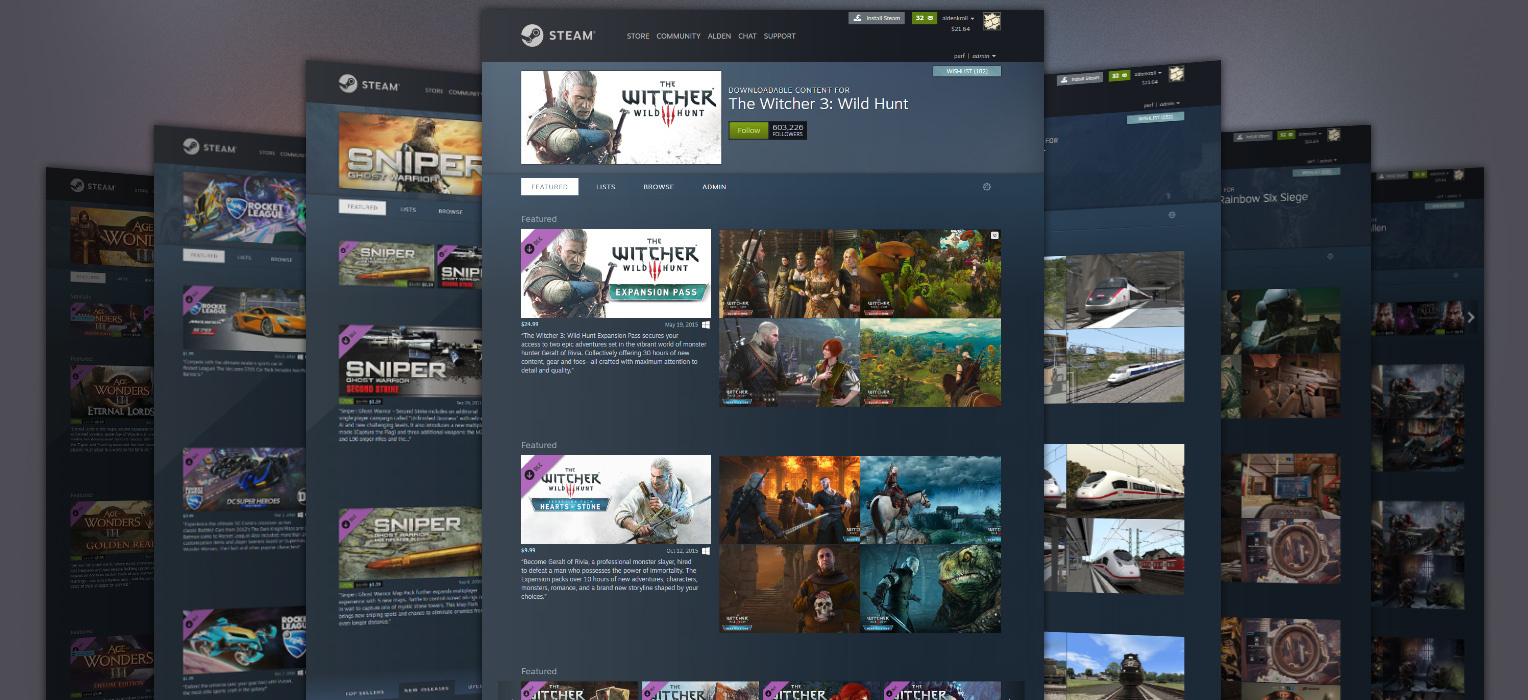
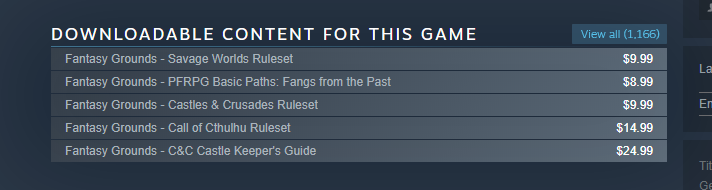
We’ve just rolled out an update that makes it easier to find downloadable content for your favorite games. Any game that offers DLC will now have a sortable, featured page of all of its DLC in one place. Furthermore, (and especially for games that have a tons of DLC) we’re providing ways for developers to customize how these pages by creating lists, adding branding and specifying which titles to feature.
Before we dive into the weekly roundup of information about the game, we’d like to shed some more light on the future of the franchise.
Destiny Franchise Director Luke Smith:
Hey everyone,
I wanted to share three things on behalf of the Destiny team today.
First: Our sincere thanks to the people at Activision who’ve helped bring Destiny to our players, High Moon Studios for their wonderful collaboration on Forsaken, and Vicarious Visions who helped establish a Destiny community on PC, worked with us on Warmind, and who is currently readying their Destiny swan song with content that will appear in the upcoming Season of [Redacted].
Next: In the short-term, we’re continuing to build the content we’ve promised for the Annual Pass. We’ve learned a lot from Black Armory that we will apply to future releases, most notably that we’d like the beginning experiences of content drops to be a better point of convergence for the playerbase. In Black Armory, we set the Power requirement for the first forge too high, and that meant it wasn’t a great chance to jump into some new content. We want to find the line between new content that many players can play, and aspirational content for players to progress toward. We’re exploring improvements to catch-up mechanics for players in upcoming seasons.
Last: Long-term, Bungie is committed to Destiny. We created the universe and we hold its future entirely in our hands. The vast majority of the team is hard at work envisioning future experiences, enemies, and ways to play the Guardian you’ve been building since 2014. We’re going to keep doing that.
We’re thinking about what it means to be truly independent, what it means to self-publish, and crucially, what Destiny‘s future can now look like for our players.
It was a busy Fall, and it is going to be a busy year.
When I look ahead and think about Destiny and where it could go, I see a bright future, with roots in a memorable past. Not everything has been lost in the dark corners of time.
See you soon,
-luke
Up the Damage
Paired with changes to Super abilities in Destiny 2 Update 2.1.4, the team has is also set to deliver some fine-tuning to weapon archetypes in your vault, waiting to be used. Designer Victor Anderson has a rundown of our goals and the changes being made to reach them.
Mr. Anderson: In the 2.1.4 update, we’re making several adjustments to weapons with the following goals in mind:
Buff underutilized weapon archetypes
Adjust hot button weapons in PvP, including Telesto and Wavesplitter
Avoid PvP adjustments that will negatively affect PvE efficacy
In summary, our design philosophy is to keep the sandbox feeling the same, but tune damage separately dependent on activity where it makes sense.
Here’s a sampling of some the changes you’ll see:
Weapon Archetypes
Auto Rifles
Damage increased for rapid-fire, adaptive, and high-impact families. We find that Auto Rifles are a little unforgiving for the ranges they ask you to occupy in a world with special weapons, and as a result, we’re increasing the damage to offset the higher risk.
Scout Rifles
Damage increased for lightweight and rapid-fire families, as well as an increase to all Scout Rifles in PvE. Scout Rifles are always going to be on the lower end of damage due to the safety that their range affords you, but the difference currently between them and other primary weapons is too drastic. As a result, we’re reducing the size of the gap.
Sniper Rifles
Increased the damage on the rapid-fire archetype to be able to kill in two bodyshots. Although snipers are still finding success, we believe that allowing you to clean up a kill easier with a Sniper Rifle will allow the sniper to have that success at more ranges and in more situations.
Exotic Weapons
Legend of Acrius
Increased the damage and bumped out the range slightly. As time moves on, things tend to trend upward in terms of power, and in a post-Forsaken world, Acrius simply didn’t have the output to match other heavy weapon Exotics.
Telesto
PvP damage brought down to match a standard Fusion Rifle charge rate. Optics (zoom) was also increased to match Fusion Rifles with long-range scopes. Telesto has become fairly notorious in the Crucible for its effectiveness, even in some cases getting accidental multikills due to how damaging the explosions were. To combat these, we’ve reduced its (PvP) damage to match its charge rate. This brought up an issue where doing so was significantly hurting the usability of the weapon, so the optics were buffed in return. In general, you should still find it an effective weapon, it just won’t be quite as generous as it was before.
Trace Rifles
Increased the minimum amount of ammo you could receive from special ammo boxes. Trace Rifles had a pretty rough time keeping ammo reserves in the Crucible as it doesn’t have access to scavenger perks. You should have more success using it more often in the Crucible now, and the changes also affect PvE bricks.
Reduced the strength of Wavesplitter in PvP. After the ammo changes noted above, Wavesplitter had its one weakness removed, so we’ve opted to bring it in line with the other Trace Rifles before this patch hit the public.
Weapon tuning is an ongoing process. We’ll be sure to talk to you about it again in the future. Some topics we’re looking at for future potential adjustments include Trace Rifle damage in PvE, Submachine Gun damage adjustments, Shotgun adjustments, and taking a holistic look at the heavy slot options and how much of an impact it has on loadout choices for PvE content. We are always looking at what’s currently in use and what isn’t in use, as having more choices is always better than being locked into a narrow band.
These changes are currently planned to land on January 29.
Stoke the Forge
Sandbox won’t be the only aspect of Destiny 2 receiving Quality of Life changes in the next update. We’ve also spent some time collecting player feedback on the Black Armory experience. What follows are some details for the changes we have planned for weapon forging.
Black Armory
Ballistics Logs will no longer be removed at reset
Stack limit for Ballistics Logs increased to 5 per character
Weapon frames carried across reset now refund into the following
“Gold” frames refunded into 1 Ballistics Log
“Silver” frames refunded into 3 Modulus Reports
Any instance of a Radiant Matrix will be removed on weekly reset
Players should stop experiencing the issue where frames are missing from Ada’s inventory on a week-to-week basis
Players may still only purchase up to 2 “Gold” frames per week
Drop rate for Black Armory Lore increased from 10% to 20%
Now requires successful forge ignition for chance to drop
Quest step that requires players to defeat a high-value target on Nessus no longer requires a player to land the final blow.
Modulus Reports and Ballistics Logs will now go to Postmaster if lost. Cap on Modulus Reports still at 15 per account
Forge emblems will be awarded when completing a forge, no longer requiring a specific bounty to be completed
That’s not even the final form of our next deployment. Check out the Player Support Report below for a list of known issues being addressed in Update 2.1.4.
Clubhouse Renovations
Over the last few weeks, members of the Community, Player Support, and bungie.net teams have been meeting to discuss some ways we can improve the experience on our forums. The first change will be a reorganization of our current forum structure, paired with some under-the-hood improvements to moderation tools.
A large piece of feedback that we’re looking to address is that players didn’t know exactly where to go to join the conversation. As such, we’re condensing Destiny 2-related forums, eliminating subforums that weren’t used frequently, and giving the Destiny Companion its own place of discussion. Second, we wish to create a more welcoming place to discuss Destiny 2. Whether you’re giving critical feedback on your experience or looking to share some sweet lore you’ve just uncovered, we’re looking to maintain a healthier community on our website. We absolutely welcome topics and discussion on what we can do better in Destiny 2, but players must follow the Code of Conduct if they wish to join the conversation.
That said, here’s what you can expect on January 22 when visiting the bungie.net forums:
Destiny 2
Feedback
Gameplay
Rewards
Lore
Destiny 1
Clan Recruitment
Companion
iOS
Android
Web
Help
All current Player Support subforums
OffTopic
Like anything else related to Destiny, we’re eager to hear your feedback on how this experience can be improved.
Reporting for Duty
Week in and week out, members of the Player Support Team dedicate themselves to identifying the issues you’re facing, and working with the development team to investigate. We’ve said it a thousand times before; the only good bug is a dead bug.
This is their report:
Destiny 2 Update 2.1.4 Resolved Issues Preview – Part 1
This week, we’d like to pick up the conversation on some existing known issues in Destiny 2. The following issues are expected to be resolved with the launch of Destiny 2 Update 2.1.4 on January 29.
Lost Radiant Matrix: Players can become blocked from accessing Black Armory activities if the Radiant Matrix is pushed out of their Postmaster inventory.
Ada-1 Missing Weapon Frames: Weapon frames may disappear from Ada-1’s inventory in a given week for some players.
[Editor’s Note: This issue will no longer be present due to the system changes for Ballistics Logs described above.]
Mysterious Box Keys: Forge Keys are sometimes not applied when used for the Mysterious Box but are removed from inventory, blocking progress. Spent keys will be applied retroactively.
“Fastidious Miser” Triumph: The “Fastidious Miser” Triumph may sometimes not unlock when players access all relevant chests in the Dreaming City.
Full Pursuits at Ada-1: Players are able to purchase weapon frames from Ada-1 when their Pursuits inventory is full, receiving nothing while still costing materials.
Nessus Roaming Captains: High-value targets on Nessus do not count for other fireteam members when someone defeats them for the “Siviks’s Delivery Note” Pursuit.
Earning Redrix’s Broadsword: Redrix’s Broadsword is sometimes not granted when completing its quest, requiring players to restart the Destiny 2 application for it to drop.
“Knife Flip” Emote: The “Knife Flip” emote does not loop indefinitely.
Check back next week for Part 2 of our Resolved Issues Preview, where we’ll discuss other known issues that are expected to be resolved in Destiny 2 Update 2.1.4 later this month.
Season of the Forge Vital Information and Known Issues
In addition to the items listed above, Destiny Player Support would like to remind players of the following known issues in Destiny 2.
Black Armory Key Molds: Investigations are ongoing regarding issues causing the Black Armory Key Mold to only be available on the first character it is received on.
“Relic Rumble” Triumph: We are investigating an issue where the “Relic Rumble” Triumph isn’t unlocking for players.
“Submachinist” Medal: We are investigating an issue where the “Submachinist” Medal does not appear in the Crucible.
Izanagi’s Burden Scope: We are investigating reports that the scope on Izanagi’s Burden experiences issues with Well of Radiance, with Inertia Override, and while invading in Gambit.
Lost Sector Discovered
Throughout the week, we’re on the hunt for entertaining Destiny montages and creation. Showcasing skill is one thing, but covering a spider tank in flaming swords made of space magic? Stupendous.
Movie of the week: Well, Well, Well…
Runner up: Minimalist
If you want a chance at the Lens of Fate emblem, make sure to submit your content to the Creations page on bungie.net. Do not throw away your shot!
To close out, we invite you to take a step back to Friday, January 11, 2019.
Guardians had been working together to solve puzzles in the Niobe Labs. A final clue was given to nudge players in the right direction. After three and a half days, the Hubris of Niobe was recognized, and the puzzle was completed.
World First: The Destiny Community
While a fireteam executed the plan, we wanted to highlight that this was achieved by more than just three Guardians. We thank everyone in the community who lent their troubleshooting skills to help crack this code. Many shout outs to /r/RaidSecrets were made, but we also must acknowledge those who engaged with each other via social media. Whether you were on forums, tweeting, texting, or submitting your theories to stream chats: Thank you for taking part in this experience.
Until next time, I’ll be in the Iron Banner. Maybe I’ll dip my toe into Gambit to get the final two wins I need for Dredgen. See you online.
Posted by: xSicKxBot - 01-19-2019, 07:56 AM - Forum: Lounge
- No Replies
Watch The AEW Roster Invade Another Wrestling Company
All Elite Wrestling may not be holding its first show until May, but that isn't stopping the new company from making an impact wherever possible. Wrestling fans in Los Angeles found that out Wednesday night, January 16, when several members of the AEW roster invaded Bar Wrestling during the main event, creating one of the most memorable wrestling moments in quite a while.
During a match that saw AEW signees Scorpio Sky, Frankie Kazarian, and Christopher Daniels--known as So Cal Uncensored--take on the team of Eric Watts and the RockNES Monsters, some very special surprise guests made their way to the ring to help SCU fend off the heels. First out was Bar Wrestling founder Joey Ryan, who has been featured extensively on the Being the Elite YouTube series and appeared at All In. He was soon joined by Elite member Adam "Hangman" Page, as they performed a double YouPorn Plex--a move you have to see to believe--on Watts.
From there, The Elite's Cody and Brandi Rhodes made their arrival to dispatch of the RockNES Monsters, before the Young Bucks joined in for one of their patented Superkick Parties. The entire thing was utterly ridiculous in the best possible way, and based on the video above, the audience couldn't have loved it any more.
Once SCU secured the victory over the fallen villains, the show kept going as Cody officially signed everyone in the crowd to All Elite Wrestling and promptly crowd surfed over the audience. Of course, Brandi quickly fired them all because they simply can't afford to employ that many people.
The only unfortunate part of the entire invasion is that AEW didn't sign Joey Ryan on the spot, even though he seems tailor-made for the promotion. However, as Matt Jackson of the Young Bucks revealed to the audience, Ryan is currently under contract to El Rey's Lucha Underground promotion until 2020. Who knows what could happen once that contract has run its course, though?
While there may not have been any major AEW news to come out of this event, the invasion makes it obvious that it's business as usual for The Elite. While they may have partnered with the owners of the Jacksonville Jaguars to launch AEW, that's not going to stop them from going to smaller shows and having fun. Now if they could just bring the rest of their group--Kenny Omega and "The Villain" Marty Scurll were absent from the invasion--along for the ride. At this point, though, both men are still under contract to other companies.
All Elite Wrestling's first major event, Double or Nothing, will happen on May 25 at the MGM Grand Garden Arena in Las Vegas. Make sure to check out our wishlist of wrestlers we'd like to see sign with AEW and be part of that show.
Originally released under the name SENRAN KAGURA Burst in Europe and serving as a "director's cut"-style take on the inaugural entry in this now storied series, SENRAN KAGURA Burst Re:Newal brings the prior release's classic 2.5D action to modern hardware with a full 3D remake and a fresh retelling of the story that started it all.
This fast-paced brawler will provide updated combat mechanics and character models, as well as all-new special effects for a voluptuous visual feast! The series' popular Dressing Room mode continues to see expansions too, with a wealth of new outfits and options that allow players to customize their favorite girls' looks and styles.
With additional DLC episodes to come that will reveal new story episodes for Yumi and Miyabi detailing their histories prior to meeting Asuka and Homura, SENRAN KAGURA Burst Re:Newal delivers an authentic recreation of the original game while ensuring that series fans will have plenty of new content to look forward to!