Posted by: xSicKxBot - 10-04-2018, 02:47 PM - Forum: Windows
- No Replies
Xbox brings ‘Forza Horizon 4’ to life at Goodwood House
I was dying to get back to the fun stuff, and Xbox obliged. We were heading to the next event in a 60-year-old Land Rover Discovery (the other vehicle on the front of the Forza Horizon 4 box), and I would be behind the wheel. Yes! This was more like it.
It only had four gears but I barely used first: “This vehicle’s got so much torque you should be pulling away in second,” my co-driver, who worked for Goodwood House, said. A plaque on the dashboard said the Land Rover could reach 122mph, but the engine sounded like it was going to explode at 60mph. I had a hard time slowing it down at that speed, as the brakes are as “classic” as the steering, and I nearly hit the car in front a couple of times (sorry to whomever was driving that red Fiat Punto).
We soon headed off-road and took a chalk track that used to be the main route from Chichester to London for horse-drawn carriages. Keeping the Land Rover in a low gear was essential here, as was concentration, as the ride was bumpy, to say the least.
“Take your foot off the clutch and brake and let it go on its own, it won’t stall,” my co-driver said. I was used to driving a modern car with the constant fear that I would stall it. No such problems in the Land Rover – it effortlessly rolled downhill without even thinking about stalling.
Posted by: xSicKxBot - 10-04-2018, 02:47 PM - Forum: Windows
- No Replies
Announcing the first AI for Accessibility grantee: Zyrobotics
By Wendy Chisholm, Principal Accessibility Architect
In May, Microsoft CEO Satya Nadella announced AI for Accessibility to put AI tools in the hands of developers, universities, NGOs and inventors to accelerate the development of accessible and intelligent AI solutions to benefit people with disabilities around the world.
Today, we are announcing the first AI for Accessibility grantee, Zyrobotics. They are developing unique solutions for accessible science, technology, engineering and math (STEM) education, like ReadAble Storiez, that are adaptive to the diverse needs of students. We are thrilled to have them as part of our program and we can’t wait to see the impact they will have!
ReadAble Storiez is a reading fluency program for students with diverse learning needs, which also helps fill in the gaps for students from low-income homes who may not have access to speech-language or occupational therapists. By creating custom speech models with Microsoft Cognitive Services and Azure Machine Learning, they aim to identify when a student needs feedback, much like an occupational therapist would recognize and provide.
Zyrobotics is a team of educators and developers who have a passion for creating technology that will enhance the quality of life for children. Last week, Satya had the opportunity to meet with Zyrobotics CEO Dr. Johnetta MacCalla and CTO Dr. Ayanna Howard in Atlanta, Georgia, and learn more about their work and passion for helping all students become better readers.
As Dr. Howard shared with us, “In our experience, because every child is different, you have to let them look at technology in different ways, more than just visual and auditory. Our focus is to incorporate interaction and personalization. The usage of AI/machine learning algorithms ensures that our apps are accessible and can be adapted to the personal needs of each child. We are excited about how this grant and partnership with Microsoft will help us address significant gaps for engaging each child based on their unique strengths and abilities.”
When can I apply? Now! We are accepting submissions on a rolling basis over the next five years. Grant proposals can be submitted via the online application form. Applicants will receive a follow up email within 30-60 days.
What is Microsoft looking for in applications? We are looking for revolutionary ideas that use AI and align with any of our three areas of focus:
Employment. How can we positively impact the employment rate for people with disabilities through more intelligent technology?
Daily Life. How can we increase access to technology for people with disabilities while also decreasing the cost of such technology?
Communication & Connection. How can AI help improve the speed, accuracy, and convenience of communication for people with disabilities?
We are looking for individuals or teams who are not only passionate about making the world more inclusive, but also firmly rooted in the communities they intend to benefit. We want to see ideas that are developed by or with people with disabilities, not just for us.
What can I receive through the program? First, check that your idea meets the following criteria:
Relevance: AI and/or machine learning are core to the project success;
Impact: Clearly elevates either employment, daily life, or communication & connection for someone with a disability;
Feasible: Is deliverable in a one-year timeframe—this could be phase 1 of the project but there should be tangible deliverables completed each quarter that are wrapped up in one year;
Capable: Your team should have the knowledge and skill to deliver the idea OR you partner with someone who can fill in the gaps;
Sustainable: The project has room to grow beyond the first year of funding;
Showcase-able: We want to talk about whatever you deliver!
The AI for Accessibility program provides monetary grants as well as technology and expertise depending on the potential impact and needs of each project. This can include:
The costs of crowd-sourcing and cleaning data needed to get your project up and running;
Guidance from a Microsoft team of AI, project management, and accessibility experts who can help guide you to scale to a wide audience and deliver the impact you envision.
If you have additional questions about the awards program or the application process, please visit the AI for Accessibility FAQ.
Remember: anyone can apply! From a tinkerer in a basement to an established corporation, from students to professionals. If you are worried you don’t have what it takes, find someone who does and partner with them on an application. So, no excuses. ?
Over the past eighteen months, Microsoft has fostered a growing $115 million AI for Good initiative that puts AI in the hands of inspired individuals developing real-world outcomes that tackle some of society’s most critical challenges. Comprised of AI for Accessibility, AI for Earth and AI for Humanitarian Action, we are hopeful the world will see what a compelling force for good AI can be.
We cannot wait to see what you create by or with people with disabilitiesto empower everyone to achieve more.
If you've been paying attention to pop culture news lately, chances are you've probably seen some casting announcements for one of the new shows headed to the DC Universe streaming service. It's called Doom Patrol, and if you're totally unfamiliar with that particular wing of DC's canon, that probably sounds like a late 1960s Cold War era thriller to you. But--surprise!--it's actually just a bunch of weird superheroes. Let's break it down.
The Doom Patrol first appeared in issue #80 of My Greatest Adventure, an anthology style comic that traditionally collected up a bunch of short adventure stories. The Doom Patrol was part of a strategy to make the leap to the superhero genre; the goal was to make a serialized story that would fit in both the adventure and the superheroic wheelhouse and make the whole transition go a lot smoother. The Doom Patrol was billed as "the world's strangest superheroes" and the creators took that theme to heart. The core idea was a team of heroes who were tortured and made outcasts by their abilities, forced to live their lives as cool, pulpy explorers more in the vein of something like Jonny Quest than Superman.
Now, if you're thinking, "Wait a second, aren't 'outcast and tortured superheroes' X-Men's whole brand?" You're correct! Importantly, the Doom Patrol actually predated the first appearance of the X-Men by several months, and co-creator Arnold Drake is still not totally convinced that the X-Men weren't a subtle Doom Patrol rip-off to begin with. Comparing the two these days is a lot more apples-and-oranges than it would have been back in the '60s. And, of course, judging by just name recognition and media franchise pull, it's pretty obvious which one found more success, but hey, the more you know.
Like most superhero teams, the Doom Patrol's line-up has fluctuated over the years, but for the most part it's maintained a level of B and C list (or lower) obscurity. They started out with an original group of characters who had been created specifically to launch the Doom Patrol's first appearance: Elasti-Girl, whose powers are exactly what you'd expect; Robotman, a human reincarnated as a robot after a terrible car crash; Negative Man, a man who lost his permanent corporeal form in a radioactive accident; and The Chief, a wheelchair using genius who brought the team together. A year or so later, Beast Boy--yes, like the Teen Titans Beast Boy--was introduced and joined the team, rounding out the roster.
Their stories usually involved a healthy amount of in-fighting, soul searching and general ennui, as each person on the team wrestled with personal demons as much as actual villains--all of which were just as weird and esoteric as the heroes themselves. Bad guys like the sentient gorilla Monsieur Mallah and his disembodied brain partner-slash-lover named, aptly, The Brain, and the 100% real, actually published in a real comic book Animal-Vegetable-Mineral Man, plagued the team at every turn.
The Doom Patrol never really got off the ground popularity wise, and thanks to no shortage of DC continuity reboots like Crisis on Infinite Earths, their position in the larger DC multiverse has always been pretty variable. Famously, they were the first team in DC that ended their book with the entire roster (save Beast Boy) being "killed" in the final issue, Doom Patrol #121, which paved the way for a complicated series of retcons and reboots. They spent their most widely appreciated years as a Vertigo book, but then wound up back in the mainline DCU in the early 2000s, and have since jumped over to the Young Animal imprint for the Rebirth era. Technically, thanks to the fancy footwork of creators like Grant Morrison and Gerard Way, the bulk of the Doom Patrol's history is within continuity these days, but they're only ever tangential to bigger teams like the Justice League at the very best--and a total non sequitur at worst.
What does that mean for the upcoming streaming TV show? It's obviously pretty hard to say. By nature, the Doom Patrol deals with things that veer toward the psychedelic and the trippy, meaning we can expect to see a show that deals in a much more light (or at least surreal) tone than, say, the CW shows or even the Titans TV show. However, we do know that the Doom Patrol will in fact be spinning out of Titans in an episode specifically named after them, so we can assume that the two are definitely going to be sharing an onscreen universe. And, as was just announced at New York Comic Con, Matt Bomer (American Horror Story, Magic Mike) will star as Negative Man.
Also, with Beast Boy as part of the Titans main roster, it's extremely likely that those early years of Doom Patrol stories, in which he played a major role, are going to be heavily mined for live action adaptation. We also know that some more recent Doom Patrol characters are going to be making the jump to the small screen, specifically Crazy Jane, who was a late addition to the team. Interestingly, Cyborg is also set to appear in the show, which will be a first, as he's usually associated with the Titans or the Justice League. So when it comes to Doom Patrol, it might just be best to expect the unexpected.
Posted by: xSicKxBot - 10-04-2018, 07:59 AM - Forum: Windows
- No Replies
Chicago to pilot new project to make cities more accessible
Microsoft believes accessibility and inclusion are essential to delivering on our mission to empower everyone, everywhere. Technology can play a powerful role to empower people with disabilities. Across Microsoft, we are working to make technology more accessible – whether that is built-in accessibility features in Windows and Office 365, new tools and resources like Soundscape, Seeing AI and Learning Tools, or collaborating with organizations on initiatives to help make the world more inclusive.
Designed to help city leaders and urban planners better understand the needs of and empower people with disabilities, the new Maturity Model helps cities measure digital inclusion and track progress. Focused on a broad range of functions important to all cities, such as communications, procurement, training, and technology standards, it defines key performance indicators and metrics to support advancing accessibility. Five levels of digital inclusion maturity guide cities in assessing and tracking progress across multiple Smart Cities dimensions, e.g. technology, data, culture, and strategy.
We are honored to collaborate with the City of Chicago and two nonprofits with a history of leadership in inclusive and accessible design that are actively working to help cities advance how they utilize technology to build more inclusive communities. The leadership of Mayor Rahm Emanuel, Commissioner of the Mayor’s Office for People with Disabilities Karen Tamley, and CIO and Commissioner of the Department of Innovation and Technology Danielle DuMerer, will create an important legacy of inclusion in Chicago. The new pilot demonstrates their continued focus of building inclusive practices into their planning and development process, a model that cities around the world will benefit from as we look at ways we can empower the more than 1 billion people with disabilities in the world.
Throughout October, we are celebrating National Disability Employment Awareness Month.
Initiatives like Smart Cities for All and the pilot project in the City of Chicago are great examples of how we can work together to help change the unemployment rate for people with disabilities, which is nearly double that of those without disabilities. Check out the blog, Empowering all people in the workplace, to learn more about our work to make technology more accessible.
We all have the responsibility to come together – across industries, sectors and geographies – to create a more inclusive world. Together we can support cities in using innovative technology to advance opportunities for everyone.
Patent troll Uniloc returned to form on Wednesday after a months-long hiatus from lobbing allegations against Apple, this time challenging the company’s AirDrop file sharing technology with a 2006 Philips patent.
Filed with the U.S. District Court for the Western District of Texas, Uniloc’s latest attempt to extract damages from the tech giant leverages a single patent first filed with the U.S. Patent and Trademark Office in 2000.
Invented by Jonathan Griffiths, U.S. Patent No. 7,136,999 for a “Method and system for electronic device authentication” details techniques of creating a secure environment for transferring data between two devices. In particular, the IP covers methods of providing authentication over a variety of wireless protocols including Bluetooth.
According to the patent’s first claim, an initial authentication procedure is performed over a short-range wireless link. Once authenticated, the two devices are then able to connect when out of range of the first wireless link protocol. As noted in following claims, the devices can exchange initial authentication information — a key or password — via an alternative communications link.
The USPTO issued a grant for the ‘999 patent in 2006.
The IP has changed hands multiple times since its filing in 2000, first from Griffiths to Philips Electronics that same year. It was assigned to patent aggregator IPG Electronics 503 Limited in 2009, then on to Pendragon Wireless in 2012 before landing in Uniloc’s coffers in February 2018. Uniloc Luxembourg subsequently assigned the patent to Uniloc 2017 LLC in July.
Uniloc’s U.S. licensing entity, with the recently formed Uniloc 2017, is leveraging the patent-in-suit against Apple and AirDrop.
Introduced alongside OS X 10.7 Lion in 2011, AirDrop is a first-party ad hoc protocol designed to simplify the process of transferring large files from one device to another.
Initially developed to connect two Macs over Wi-Fi, the service first appeared in the OS X Finder. Running AirDrop allowed two Macs to quickly create an ad hoc connection without need for passwords or complex network configuration. Simple drag-and-drop functionality made the system a more attractive alternative to direct link, cloud storage and similar file transfer solutions in use at the time.
Apple later extended — and modified — AirDrop to accommodate its mobile operating system with iOS 7 in 2013. Unlike legacy AirDrop technology, the revamped version employs a dual-link structure that relied on Bluetooth for discovery and token setup, and Wi-Fi for file transfers. Again, users are presented with an easy-to-use interface in Share Sheets that features automatic device discovery and tap-to-send capabilities.
It is this second iteration of AirDrop that Uniloc is targeting in its latest lawsuit.
The non-practicing entity is alleging infringement of claims 13 and 17 of the ‘999 patent, which relate to establishing a secure link between two devices through exchange of authentication information over two separate communications links. Named in the suit are all devices compatible with Apple’s current implementation of AirDrop, including all iPhones from iPhone 5 to iPhone XS Max, fourth- and fifth-generation iPads, all iPad mini generations, all iPad Air models, iPad Pro, MacBook, MacBook Air, MacBook Pro, iMac, Mac mini, Mac Pro, the fifth-generation iPod and fourth- through sixth-generation iPod touch models.
Uniloc in its suit seeks unspecified damages, reimbursement of legal fees and other relief deemed fit by the court.
The AirDrop case is the latest in a string of Uniloc lawsuits targeting Apple technologies. In the middle of 2017, the non-practicing entity went on a spree, filing suit against the iPhone maker almost once a month.
Uniloc is one of the most active patent trolls in the U.S., leveraging reassigned patents or vaguely worded original IP against a number of tech firms including Activision Blizzard, Aspyr, Electronic Arts, McAfee, Microsoft, Rackspace, Sega, Sony, Symantec and more.
Mobile gaming has really enjoyed a resurgence of compact, clever & pretty puzzle games. That desire for a quick break on the subway or the john has merged with clean and modern hipster design and minimalistic storytelling to create a whole new genre of precious mazes you can play with one hand. Like Monument Valley and Square’s Go series among others, Where Shadows Slumber tries to give you an experience both artistic and thoughtful, wrapped up in bite-sized chunks.
The game has a conceit almost as clever as Monument Valley‘s Escher-like pathways, but more indebted to the early iOS hit Helsing’s Fire. In Where Shadows Slumber, you have to make use of light and shadow to transform the world around you. Your character carries a brilliant yellow-green lamp that throws pitch-black shadows. When cast in darkness, portions of the scene will change. Sometimes this only changes something small, like making a door appear out of thin dark. Other times, shadows will reveal a whole other world. As the shadows sweep across the screen, you’ll see new possibilities blink in and out of view. Your job is to figure out how to walk between these worlds and make it out alive.
The controls are straightforward and familiar to anyone who has played this type of game before. You can use simple single taps move your hero through single-screen mazes (or double-tap for a run) and drag on various parts of the background (light sources, blocks, platforms, or walls) to open new paths.
Like Monument Valley, a lot of the puzzles come down to figuring out what is possible to change in a given scene. You need to figure out what will shift when shadows pass over each section of the map, and then how you can get a light source into position to throw or remove those shadows. There are 35 stages in seven worlds, each a single screen long. No one stage is particularly brutal, and each will probably take less than ten minutes to puzzle through.
On top of the central twist, Where Shadows Slumber tosses all the usual maze-puzzler tools at you: sliding platforms, floor switches, impassable obstacles, and moving NPCs that can help or hinder. These additions can be nice, since it means each level has something new. At the same time, a lot of these are tossed in without much explanation, assuming you are familiar with them from other puzzle games, and then they are tossed out just as unceremoniously. It gives some variety to the puzzles, but it doesn’t give a strong sense of progression. The game never sets any expectations to the puzzle mechanics, so it can’t challenge those expectations in more advanced levels. Instead, the game is more about recognizing what the tools you’re given can do and how they affect the screen they’re on. That’s fun, but it could be more ambitious.
Given the title, one would expect the story to be gloomy, but it is also surprisingly violent; this is not a low-key puzzler you can let the kids fool around with on the iPad. Instead it’s host to a silently-told tale of pursuit and lots of seemingly random murder. The hero seems to live in a world where sad bald humans are under the thumb of cruel and capricious animal-headed monsters, which is certainly a game setting I’ve never experienced before.
Animated cutscenes break up chapters, updating us on the story of Obe and his quest to escape with his magic lantern. The atmosphere is oppressive, twisted and really effective. The music and architecture emphasize the dreariness of the environment. The common people live in run-down wooden villages while the animal overlords inhabit monolithic labyrinths. It’s dark, but also imaginative, and the hero ventures through several distinctly different environments to the conclusion.
If you’re a fan of the Square Enix Go series of puzzle games and you’ve finished Monument Valley already, Where Shadows Slumber is a good pick. The puzzles are clever, but not as varied or mind-melting as the Go series. The game’s central mechanic is cool, but it isn’t quite clever or adaptable enough to push it to instant-classic status like Monument Valley. That said, it would be hard to reach the heights of those games, and as it is, Where Shadows Slumber is an atmospheric and imaginative puzzle game.
Posted by: xSicKxBot - 10-04-2018, 07:45 AM - Forum: Lounge
- No Replies
Nintendo Switch Adding Three More NES Games Next Week
One of the benefits you receive for subscribing to the Nintendo Switch Online service is access to a library of classic NES games, all of which support online play. 20 titles are currently available on the service, with Nintendo promising to add more to the library regularly, and it turns out we won't have to wait too long for the first new batch of titles to arrive.
Nintendo confirmed on Twitter that three more vintage games are coming to Nintendo Switch Online's NES library next week, on October 10: Solomon's Key, Super Dodge Ball, and NES Open Tournament Golf. All three titles will be available in each region.
Solomon's Key is a puzzle game in which players control a wizard who can conjure up and remove blocks, and they must use that ability to collect the key in each room while avoiding enemies. Super Dodge Ball, as its name suggests, is an NES take on the sport, while NES Open is a spiritual precursor to the Mario Golf series.
If you're a subscriber to the Nintendo Switch Online service, you'll be able to download the NES - Nintendo Switch Online app for free from the Eshop or Nintendo's website. More titles will be added to the library each month. In November, Nintendo will introduce Metroid, Mighty Bomb Jack, and TwinBee; in December, Wario's Woods, Ninja Gaiden, and Adventures of Lolo will be added.
As previously mentioned, all NES games on the service support some form of online play, though in traditionally single-player titles like The Legend of Zelda, it's limited to screen sharing and "passing" control of the game back and forth. However, it might not be readily apparent how to set that up, so we've outlined how to play Switch's NES games online.
Posted by: xSicKxBot - 10-04-2018, 01:59 AM - Forum: Windows
- No Replies
Whats new in Windows 10 accessibility in the October 2018 Update
At Microsoft, we believe our technology should reflect the diversity of the people that use our products.
We are excited to share how the Windows 10 October 2018 update delivers on that mission by giving you more accessibility features than ever before to enhance your personal computing experience. These features include Ease of Access updates to make Windows 10 easier to see, Narrator improvements to make Windows 10 easier to use without a screen, and Learning Tools and text suggestions updates to make it easier to read and write.
Ease of Access Updates
You now have more ways to see Windows 10 your way, with the addition of text size customization across the platform. From the “Display” page in Ease of Access settings or by typing “larger text” in the search bar, you can adjust a single global text size slider to make text bigger across Windows, efficiently making just the words bigger without affecting the entire visual layout. You can customize text size in conjunction with DPI scaling, otherwise known as the “Make Everything Bigger” setting. As the name implies, this feature makes everything on the screen larger, which can sometimes reduce productivity for users with low vision by requiring more panning or scrolling. By complementing DPI customization with text size customization, users now have more options to tailor their Windows 10 display.
We realize many users with low vision not only prefer more levers to customize their experience, but they also prefer using multiple tools together. The custom text size works great with Magnifier, which provides new ways for you to optimize your experience. You can choose to keep your mouse centered on the screen, which can be particularly helpful at higher magnification levels, so you do not lose your mouse or focus when trying to navigate. We have also added smaller increments of 5 percent and 10 percent for adjusting zoom level, so you can have even more control of your magnifier experience.
Narrator Improvements
We have continued to make Narrator, our built-in screen reader, easier to learn and use.
We have made narrator easier to learn with two key updates.
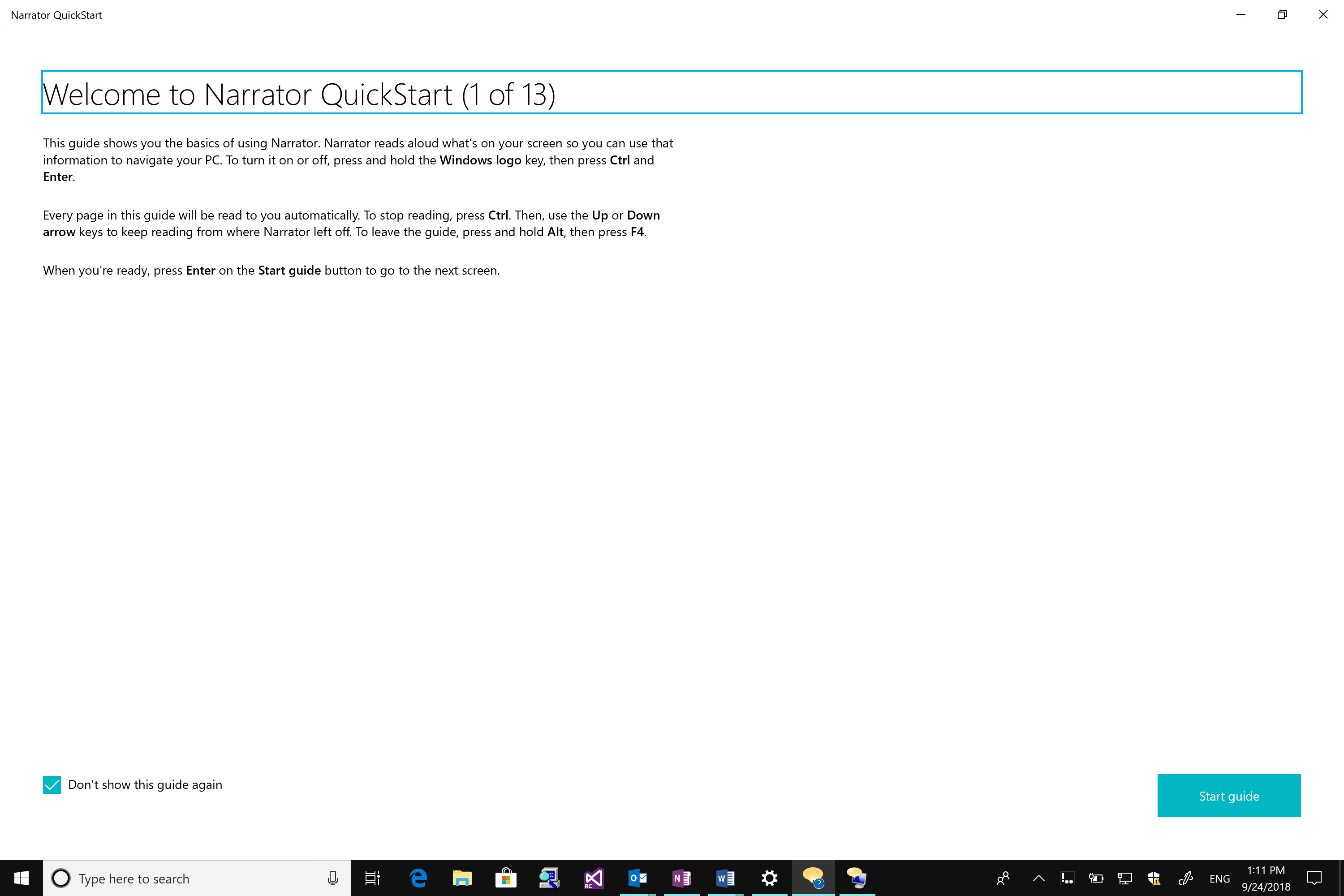
Narrator QuickStart: When Narrator launches, a new QuickStart tutorial experience will be available to teach you Narrator basics such as keyboarding, navigation and editing. At the end of the QuickStart there is a link to the User Guide where you can continue learning about Narrator.
Improved and more familiar keyboard: Narrator now ships with a new keyboard layout designed to be more familiar to screen reader users. Differences in the keyboard layout are designed to improve keyboard ergonomics and usability, e.g. with improved mnemonics. Check out the Narrator user guide for more details on these changes.
We have also made narrator easier to use with improved navigation and efficiency.
Easier navigation: With Narrator Find, you now can search for specific text, which Narrator will then move to if found. Narrator can also now present a list of objects, such as links, headings, or landmarks that you can quickly filter to find what you want. Refer to the Narrator user guide for command mapping.
Increased efficiency: Narrator will now automatically read dialog boxes, such as the Word dialog box that appears when you try to close a document with unsaved changes. We have also made two key improvements to Scan Mode, a narrator feature that simplifies navigation by primarily using just the up and down arrow keys, to enable a more seamless experience:
o Narrator stops on interactive elements like links so you can more easily interact with them, or you can continue reading with just a press of the down arrow.
o You have more options for selecting text while in Scan Mode including commands to copy an entire block of text without holding down the Shift key. Narrator’s selection commands will copy the format of the text being copied such as headings, lists and more. You can also now speak the selected text using a Narrator command. Refer to the Narrator user guide for additional information on Narrator selection commands or use the Show Commands List Narrator command by pressing Caps + F1.
Reading and Writing Improvements
In addition to Ease of Access and Narrator updates, the October 2018 Update also brings more ways to improve reading fluency and comprehension and author text.
Within Microsoft Edge, you now have more flexibility with web browsing and reading with new ways to customize your learning experience with Learning Tools. First rolled out in the Fall Creator’s Update a year ago, we added Learning Tools like read aloud to the web browsing experience. The April 2018 update then came with the addition of grammar tools, enabling you to break words into syllables and highlight parts of speech.
We are making Learning Tools even more powerful with the October 2018 update. With any ePub or webpage in reading view, you can customize the page theme color with Irlen colors that make it easier to decode text. You can also turn on line focus for a webpage in Reading view to help you concentrate. Additionally, you now have more ways to personalize grammar tools: you can customize the highlight color for parts of speech or turn on labels within the text if you find it difficult to disambiguate between colors. Should you run into words you are unfamiliar with, you can quickly look them up in the built-in dictionary that also works offline*.
Writing experiences are also improving. Text suggestions, which suggests the top three word candidates as you type, is now expanding to 50+ languages** since its debut in the April 2018 update.
Thanks and keep the feedback coming
Thank you to the many people who help shape the accessibility of Windows 10 experiences. Through channels like the feedback hub and the Windows Insider Program, we get your feedback that directly informs product development. That includes not only the features in this latest release but also throughout our work this past year in the Fall Creator’s Update and April 2018 Update.
Additionally, if you are a customer with a disability of any kind and need technical assistance, the Disability Answer Desk is there to assist via phone and chat. In the United States, we also have an ASL option for our customers with hearing loss: +1 503-427-1234.
Thanks again and please keep your thoughts coming! Whether you join the Windows Insider Program or activate the feedback hub by just pressing the Windows + F keys, we want to know what is top of mind so that we can continue to evolve the accessibility of Windows 10.
*Offline dictionary supported in English, Spanish, German, Italian, French
Posted by: xSicKxBot - 10-04-2018, 01:44 AM - Forum: Lounge
- No Replies
Red Dead Redemption 2's Release Date And US Pre-Order Guide (PS4/Xbox One)
The internet is awash in anticipation for Red Dead Redemption 2, and it's easy to see why. Rockstar doesn't release new games often, and when it does, the games tend to be landmark events in the gaming world. From everything we've seen so far--including our hands-on time with the game--Red Dead Redemption 2 promises to be one of the biggest games of the year.
It stars Arthur Morgan and the Dutch van der Linde gang--whose members include John Marston, the star of the original game. The game launches for PlayStation 4 and Xbox One on October 26, 2018. Its accompanying online multiplayer mode, Red Dead Online, will launch in beta at some point in November. All owners of the base game will receive free access to it.
A new gameplay trailer showcased more of the single-player component's open-world gameplay. That includes a variety of heists you can take part in and some of the customization options at your disposal.
You don't have to wait until October 26 to secure your copy--you can pre-order Red Dead Redemption 2 right now from a number of retailers, both in-store and online. Here's all the information you need to know to lock in your Red Dead pre-order.
Red Dead Redemption 2 Pre-Order Bonus
Pre-order Red Dead Redemption 2, and you'll get a couple of digital goodies for your trouble.
War Horse: An Ardennes War Horse with greater courage and stamina than the average steed.
The Outlaw Survival Kit: Contains a collection of key supplies, including items to replenish Health, Dead Eye, and more.
Red Dead Redemption 2 Digital Pre-Order Bonus
Anyone who pre-orders a digital version of Red Dead Redemption 2 from the PlayStation Store or Xbox Store will get the bonuses listed above, plus a handful of other digital freebies thrown in for good measure.
Cash Bonus for Red Dead Redemption 2 Story Mode
Treasure Map: Gives you a head start on the hunt for hidden riches. Must pre-order by July 31, 2018 to receive.
Bonus GTA$: Immediate download that contains in-game currency for Grand Theft Auto Online. Here's the breakdown of how much GTA$ you get for each edition: Standard Edition - $500,000 | Special Edition - $1 million | Ultimate Edition - $2 million.
Red Dead Redemption 2 Standard Edition
This edition comes with the relevant pre-order bonuses listed above, plus the core game. Here's where you can pre-order it.
The ultimate edition comes with all the content from the special edition, plus the following.
Bonus Outfits: The Blackrose Bounty Hunter Outfit and The Copperhead Enforcer Outfit.
Black Chestnut Thoroughbred: A racehorse and special saddle, both available in online.
Free Access to the Survivor Camp Theme
Free Access to Additional Weapons: Get access to the Volcanic Pistol, Pump Action Shotgun and Lancaster Varmint Rifle, free of charge from Gunsmiths in online.
Rank Bonuses: As a great start for all Ultimate Edition players, you can rank up faster in online, up to rank 25.
Here's where you can pre-order the ultimate edition.
First off, it's important to note that the Collector's Box does not include the game. So if you're going to pre-order it, make sure you also get yourself a separate copy of the game or you'll be very disappointed come launch day. What the Collector's Box does include is a bunch of physical goodies.
Metal Tithing Box with Lock & Key
Collectable Challenge Coin
Double Sided Puzzle
Six Shooter Bandana
Treasure Map
Pin Set
Playing Cards
Wheeler, Rawson and Co. Catalogue
12 Cigarette Cards
Here's where you can pre-order the collector's box.
The acclaimed dungeon crawler Diablo 3 is coming to Nintendo Switch on November 2. But this isn't the vanilla version that shipped in 2012. This is Diablo 3: Eternal Collection, which means it comes with all of the updates, DLC, and expansions Blizzard has released over the years. It's the full game, and it will be playable on your TV or on the go, thanks to the hybrid nature of the Switch. If you're ready to pre-order Diablo 3: Eternal Collection for Nintendo Switch, we have all the details you need below.
What Comes with Diablo 3 On Switch?
Diablo 3: Eternal Collection on Switch is mostly the same as it is on Xbox One, PS4, and PC. It comes with the core game, as well as the Reaper of Souls and Rise of the Necromancer expansions. That means you get a campaign comprised of five acts, along with seven classes of playable characters: Crusader, Barbarian, Witch Doctor, Demon Hunter, Monk, Wizard, and Necromancer.
One of the quality-of-life features of this version is that Adventure mode is also unlocked from the beginning. That means you don't have to complete the campaign before taking on the endgame activities that are geared toward loot collection and replayability.
The Switch edition also comes with some Nintendo-exclusive Zelda content. You get a Cucco companion pet, a Triforce portrait frame, and cosmetic wings straight out of Majora's Mask. You can also transform your armor to make your character look like Ganondorf.
As for multiplayer, you can play it in a number of configurations. You can play with co-op partners in shared-screen mode on a single Nintendo Switch. You can play locally offline on up to four devices, even using a mixture of TV and handheld play. Or you can play online with friends. The game also supports all controller configurations, including both single and dual Joy-Con setups.
Where to Pre-Order Diablo 3 for Switch
Ready to pull the trigger? Unfortunately, no discounts are available at the moment, but a number of retailers are selling pre-orders for the suggested retail price of $60.