Gameplay in Madden NFL 19 was developed with two primary objectives: 1. Player Control across the field; 2.Immersive NFL Experience from start to finish. To achieve these objectives, EA's goal is to deliver the most significant animation upgrade in Madden history. Madden NFL 19 introduces a package of features known as Real Player Motion ? featuring authentic player movement, more player control and responsiveness, and player signature behaviors that will immerse players into the NFL each and every game. [Electronic Arts]
Remothered: Tormented Fathers is the pure and realistic survival horror videogame. A game by Darril Arts, directed by Chris Darril, developed by Stormind Games. Psychology plays a huge role within the game: heroes and enemies are atypical and the line between good and evil is blurred. The plot is rich of unpredictable twists, but it is touching at the same time. [Microsoft]
Fargo Season 4 Adds Chris Rock, First Plot Details Emerge
It's been over a year since Fargo Season 3 ended. With creator Noah Hawley hard at work on Legion, it wasn't clear exactly when the next installment of the anthology series would come. Finally, though, there's some news--and it's big.
FX announced at the TCA press tour that Season 4 of Fargo will go into production in 2019 and star legendary stand-up comedian Chris Rock. According to a press release, the new season will be set in 1950 Kansas City, as two criminal families--one African American, the other Italian--work together to control organized crime. As part of their alliance, though, they've agreed to trade their eldest sons.
The actor's joining the series marks his first series regular role since being the voice of the narrator on Everybody Hates Chris, a show he also created. In Fargo, he plays "the head of one family, a man who--in order to prosper--has surrendered his oldest boy to his enemy, and who must, in turn, raise his son's enemy as his own," the release says. "It's an uneasy peace, but profitable. And then the head of the Kansas City mafia goes into the hospital for routine surgery and dies. And everything changes."
As usual, it sounds like the next season of Fargo is going to be a wild ride, and it's one that cannot come soon enough. Of course, given that it won't go into production until sometime next year, there's no telling when it will actually be released. Perhaps the third season of Legion, which was ordered by FX in June, will film and be released first.
No other casting details about the new season have been announced.
Video: Watch top designers dissect a single system from their games
Too often when we talk about game design, we talk about how all of a game’s systems work in concert.
At GDC 2015, a group of designers got up in front of their peers to try something different: 15-minute microtalks that each revolved around dissecting a very specific game system in exacting detail.
It was a fascinating session in which game designers Bennett Foddy, Tanya X. Short, and Dan Cassar each took the stage to dive into a system from each of their games (Pole Riders, Shattered Planet, and Caveman: The Quest for Fire, respectively) and explain how it works, as well as how it was designed and tuned.
In addition to this presentation, the GDC Vault and its YouTube channel offers numerous other free videos, audio recordings, and slides from many of the recent Game Developers Conference events, and the service offers even more members-only content for GDC Vault subscribers.
Those who purchased All Access passes to recent events like GDC, GDC Europe, and GDC Next already have full access to GDC Vault, and interested parties can apply for the individual subscription via a GDC Vault subscription page. Group subscriptions are also available: game-related schools and development studios who sign up for GDC Vault Studio Subscriptions can receive access for their entire office or company by contacting staff via the GDC Vault group subscription page. Finally, current subscribers with access issues can contact GDC Vault technical support.
Gamasutra and GDC are sibling organizations under parent UBM Americas
Activision Blizzard exceeds Q2 revenue goals thanks to in-game spending
Today, Activision Blizzard released its second-quarter earnings report for the quarter ending June 30, 2018, showing rising revenue even in a quarter with no major game releases.
Per the report, Activision’s GAAP net revenue for the quarter totaled $1.64 billion, which only slightly rises above its $1.63 billion in revenue from the same quarter last year.
However, as noted by Activision executives on the conference call, that revenue (which exceeded prior projections for the quarter), came in a quarter not dominated by game releases for the company. Activision’s total net bookings (a metric that totals the number of products and services sold) for the quarter clocked in at $1.38 billion (down slightly from $1.42 billion in 2017). Its digital net bookings (effectively in-app transactions) were $1.2 billion, also down from $1.28 billion from 2017’s second quarter.
During this time period, Activision’s only game releases were Crash Bandicoot N. Sane Trilogy and Destiny 2’s Warmind expansion, the latter of which saw a higher attach rate compared to the second expansion released after the first Destiny. Drilling down, three of Activision’s titles, Call of Duty: WWII, Call of Duty: Black Ops 3, and Destiny 2, drove “record Q2 in-game net bookings” for that subsection of the company.
This news also follows this morning’s announcement that Activision Blizzard would be teaming up with Tencent to release a mobile version of Call of Duty in China.
In response to a question during the call, CEO Bobby Kotick commented briefly on Activision’s future with games streaming, saying that the company was speaking with multiple tech firms and examining their cloud infrastructures, but the company doesn’t expect game streaming to be a large part of its business in the near future.
Interestingly, Kotick pivoted off the discussion of game streaming as a means of discussing “accessibility” to Activision Blizzard’s major franchises that it hopes achieve on mobile. Only briefly mentioning games that are “in the pipeline,” Kotick seemed to say that Activision is interested in making it “easier” to engage with its largest franchises by way of mobile devices, rather then gaming consoles or personal computers.
As of this writing, Activision Blizzard shares have dipped slightly in after-hours trading (just .81 percent). Looking ahead, Activision is predicting $1.4 billion in revenue for 2018’s third quarter.
Discover the Truth in The Occupation on Xbox One October 9
The year is 1987, and you’re an investigative journalist living in the wake of a terrorist attack that killed 23 people in England. You’re tasked with investigating an impending government act, as well as the events that led up to the incident. This is the world of The Occupation, coming to the Microsoft Store on Xbox One October 9 from us at Humble Bundle and at retail thanks to a partnership with Sold Out!
The extremely talented developers at White Paper Games, who previously developed Ether One, are the ones working on The Occupation, a first-person, fixed-time, investigative thriller that plays out in real time. You must make decisions based on the evidence you uncover and decide if you’re going to take the most direct route and risk the chance of getting caught, or plan for a more careful approach and let time tick away.
The developers at White Paper Games and we at Humble Bundle can’t wait to bring this investigative thriller to Xbox One on October 9.
Building upon its 2015 release on PlayStation 4 and Xbox One, the Switch edition of this adventure game features a reimagined user interface designed to take full advantage of the console’s functionality, allowing players to use both the Joy-Con and touchscreen in tandem. The Switch version will also include behind-the-scenes movies which reveal the story and the development process behind the game, all of which can be unlocked as play progresses.
With plenty of puzzles and point-and-click style adventuring to sink your teeth into, Broken Sword 5 aims to mix cerebral puzzling and sharp wit with historical authenticity and intrigue, as seen in the game’s synopsis:
Paris in the spring. Shots ring out from a gallery. A robbery – a murder – and the beginning of another epic original Broken Sword adventure. An adventure that will hurl intrepid lawyer George Stobbart and sassy journalist Nico Collard onto the trail of a murderous conspiracywhoseroots lie in mysteries older than the written word. Armed only with logic, integrity and a wry sense of humour – can George and Nico outwit evil forces both ancient and modern and save mankind from disaster?
Broken Sword 5: The Serpent’s Curse will release worldwide for Nintendo Switch on 21st September at a price of £24.99 /€29.99. Both digital and physical versions will be available.
Do you like the look of this one? Have you played it on other platforms? Let us know your thoughts below.
Explore the depths below a remote mountain town in this procedurally-generated Adventure Platformer. Taking inspiration from hack ‘n slash dungeon crawlers and Metroidvania-style platformers, Chasm will immerse you in a fantasy world full of exciting treasure, deadly enemies, and abundant secrets.
This week at Bungie, the celebration has just begun.
We’re watching Guardians return to the Red War with the Solstice of Heroes. You’ve got plentiful objectives to pursue, Moments of Triumph to complete, and new ways to experience campaign missions—and we’re excited to hear your stories. Some of you have already been inspired by some of the changes, which has resulted in some awesome artwork found in the wild:
This is just the beginning of a month-long event; Solstice of Heroes will be available through August 28. That’s ample time to get in and start building up your armor.
Tally Marks
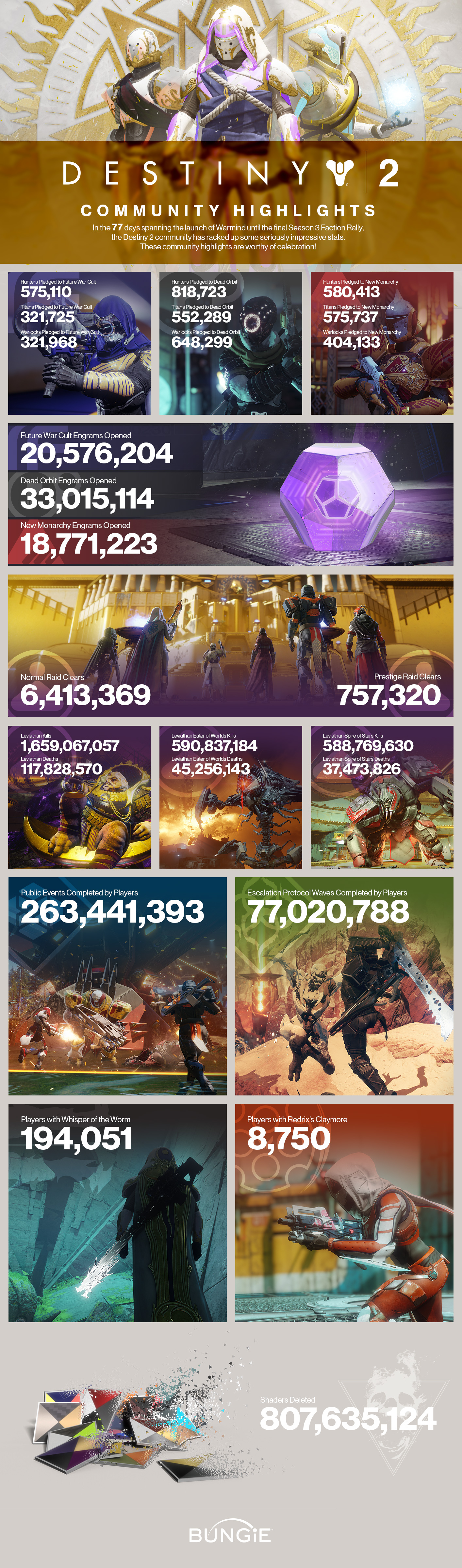
The community stories from Solstice of Heroes aren’t the only thing that we’re watching. Our Analytics team has helped us to bring forward some statistics from Season 3. From the looks of it, Uldren had better start running…
Checking Them Off, One by One
As Year 1 comes to a close, many of you are searching for every available item or piece of gear that can be found in Destiny 2. Some items will still be available in Season 4, such as destination weapons and armor sets. Other Year 1 items will be retired from vendors when Destiny 2: Forsaken releases on September 4, 2018:
Vanguard
Year 1 weapons
Year 1 armor
Seasonal rewards
Crucible
Year 1 weapons
Year 1 armor
Seasonal rewards
Gunsmith
Year 1 weapons
Year 1 mods, which will no longer be obtainable
Year 1 emblems
Ikora (Vanguard Research Packages from Meditations)
Year 1 armor
Year 1 emblems
Trials of the Nine
Year 1 weapons
Year 1 armor
Year 1 shaders
Year 1 ships, Sparrows, and Ghost Shells
Iron Banner
Year 1 weapons
Year 1 armor
Year 1 shaders
Year 1 ships, Sparrows, and Ghost Shells
Cayde’s Stashes
Year 1 emblems
While these Year 1 items will be retired from vendors, their stock with be refreshed with new gear featuring random rolls, ready for all players to earn in Year 2. Some items may return in Year 2, but not exactly as you remember them. Come September 4, a small number of weapons that you know and love will be updated to Year 2 standards, featuring random rolls and the capacity to accept Year 2 weapon modifications.
As a final note, players who have obtained these Year 1 items can infuse them to higher power levels in Year 2. If you’re looking to finish your checklist, make sure to read this week’s Community Focus on DestinySets.com. This fan-made website can be linked with your Bungie.net account to give a full list of items you have yet to acquire—helping you to finish off your Year 1 collection before Forsaken releases.
Destiny 2: Forsaken Combat Stream
We know all this talk about new weapons and new mods has you wondering what combat will be like in the second year of Destiny 2. Rather than try to explain the new sandbox, we’re going to show you.
Tune in and watch as we configure our Guardians to play a specific role in the arena. Catch a glimpse of the new user interface you’ll employ to choose your weapon and modify it. Spectate a battle between developers on a new Crucible map to debut in Season 4.
There will be blood.
Celebration Coordinators
From the moment Solstice of Heroes began, the watchful eye of Destiny Player Support has been trained on the #Help forum, monitoring for any reports of issues during the celebration. Not only is the team ready to provide troubleshooting steps, but they also have some helpful tips for Guardians looking to maximize their orb generation.
This is their report:
Elemental Orb Generation
Solstice of Heroes is now live in Destiny 2. Included with this event are elemental alignments, which allows players to generate and stack elemental orbs to increase their damage output with the matching element for a short time. Additionally, players must collect Arc, Solar, and Void orbs in various activities to complete objectives attached to their Solstice Armor set.
While these orbs are generated randomly by defeating enemies, here are a few tips on how you can make sure you’re generating the orbs of a desired element:
Orbs are generated only by players who have an entire Solstice Armor set equipped (of any quality).
Elemental orb generation does not require Super ability kills or Masterwork weapon kills. Players can potentially generate orbs on any kill, as long as they are wearing their full Solstice Armor set.
Elemental orbs are generated based off of the player’s equipped subclass, as well as their equipped Energy and Power weapons. If, for example, you wanted to generate only Solar orbs, changing your loadout to all-Solar helps you accomplish this. Kinetic weapons can also generate orbs based off of the player’s loadout.
You can generate and receive elemental orbs from local allies. If you’re travelling in a fireteam, coordinating elements can help you more aggressively progress through elemental orb pursuits.
Be aware that the elemental alignments will expire when Solstice of Heroes concludes at the weekly reset on August 28, 2018. From that point on, players will no longer generate elemental orbs and will no longer be able to upgrade their Solstice Armor. For more information, including known and emerging issues, players should visit our Solstice of Heroes Vital Information thread.
Solstice of Heroes: Known Issues
Included in Solstice of Heroes are remastered versions of five missions from the Red War campaign. As players engage in these missions, however, we’re receiving reports from players unable to progress through mission barriers after the “Joining Allies” message appears on screen.
The first and best troubleshooting step that players should attempt is to wipe and respawn. Players who encounter this behavior and are unable to work around it need to return to the Tower to restart the mission anew. To mitigate this issue, fireteam members should ensure they stay within close proximity of one another, especially as they transition between mission areas.
Additionally, we are currently investigating the following issues reported to the #Help forum:
Some players are unable to upgrade their Solstice of Heroes armor after completing all objectives
Objectives requiring specific Crucible Valor ranks are not progressing for some players
Solar weapon kill objectives sometimes does not gain progress
The Solar Super kill objective for the Rekindled Titan Helmet is progressing slower than others
If you are encountering any of these issues, please post a report detailing your experience. If you have a screenshot or video showcasing the issue, please include that in your report.
Moments of Triumph T-Shirt Offer
While Solstice of Heroes is live, players who achieve 250 Triumph points or more in-game may redeem an offer to purchase a Solstice of Heroes Moments of Triumph T-Shirt. To do this, eligible players must visit the Statue of Heroes in the Tower and accept the “Moments of Triumph T-Shirt” item under “Triumph Rewards”.
Players who accomplish this will then be provided a code in the Solstice of Heroes section of their bungie.net profile. Players who redeem this code at checkout with their Bungie Store purchase of a Solstice of Heroes T-Shirt will be able to complete their purchase for $24.99 USD without customization, or $29.99 USD with customization (before tax and shipping).
If you wish to purchase a Solstice of Heroes T-Shirt but do not have a bungie.net profile, join up. Players who encounter issues with their bungie.net profile should visit our Account Creation help article.
Destiny Update 2.0.0 Vital Information
At the conclusion of Solstice of Heroes on August 28, Destiny 2 will be updated to prepare for the launch of Forsaken. In the week between August 28 and September 4, players will see some unusual behavior in-game as we make the transition into Year 2.
Here’s a short list of what players should be prepared for, with more details to come at a later date:
In general, collections and the vault will not be available. Specifically, this includes the collections for emblems, as well as Exotic weapons and armor. If players want to have an emblem or Exotic item in their inventory during this week, they will need to prepare their inventory ahead of time.
Nightfall strike scoring will not be available. We’ll have more information about strikes and how they’re changing in Forsaken in the coming weeks.
This is all in an effort to set the table for the launch of Destiny 2: Forsaken on September 4, 2018. Pardon our dust, and please plan accordingly.
Rolling
During the Solstice of Heroes event, you’ll be challenged to complete many Moments of Triumph to earn awesome rewards. This week, we’re celebrating a few moments where players triumphed over their enemies—moments that were recorded and submitted to the Community Creations page.
Winner: I Can’t Believe What I’m Seeing
Runner Up: Calus vs. Claymore
If you’d like a chance to earn the Lens of Fate emblem, make sure to submit your video to the Creations page on bungie.net and include #MOTW in your title.
And before we move along, let’s celebrate another moment of triumph for the top three fireteams from last week’s Prestige Nightfall:
As we look to the last mile before launch, setting expectations is the name of the game. We’ll be serving up information on everything from character progression to endgame. Have any burning questions about what’s changing in Forsaken? Let us know on the Destiny 2 forum. We can’t answer every question individually, but we’ll look to answer as many as we can in the next few blog entries.
You may have noticed a recurring theme throughout this article. Solstice of Heroes is here, but it’s just the beginning. Some of you have been very busy. We’re already seeing some masterworked armor sets in the wild. People are already bragging about securing access to their trophy garment. Don’t let that scare you, though. We’re just three days into a month-long event. Feel free to show me your favorite emote if we happen to run into each other in the wild. I’ll be grinding out all three sets, with my eyes on the final prize.
How to use Fedora Server to create a router / gateway
Building a router (or gateway) using Fedora Server is an interesting project for users wanting to learn more about Linux system administration and networking. In this article, learn how to configure a Fedora Server minimal install to act as an internet router / gateway.
This guide is based on Fedora 28 and assumes you have already installed Fedora Server (minimal install). Additionally, you require a suitable network card / modem for the incoming internet connection. In this example, the DrayTek VigorNIC 132 NIC was used to create the router.
Why build your own router
There are many benefits for building your own router over buying a standalone box (or using the one supplied by your internet provider):
Easily update and run latest software versions
May be less prone to be part of larger hacking campaign as its not a common consumer device
Run your own VMs or containers on same host/router
Build OpenShift on top of router (future story in this series)
Include your own VPN, Tor, or other tunnel paths along with correct routing
The downside is related to time and knowledge.
You have to manage your own security
You need to have the knowledge to troubleshoot if an issue happens or find it through the web (no support calls)
Costs more in most cases than hardware provided by an internet provider
Basic network topology
The diagram below describes the basic topology used in this setup. The machine running Fedora Server has a PCI Express modem for VDSL. Alternatively, if you use a Raspberry Pi with external modem the configuration is mostly similar.
Initial Setup
First of all, install the packages needed to make the router. Bash auto-complete is included to make things easier when later configuring. Additionally, install packages to allow you to host your own VMs on the same router/hosts via KVM-QEMU.
Next, use nmcli to set the MTU on the WAN(PPPoE) interfaces to align with DSL/ATM MTU and create pppoe interface. This link has a great explanation on how this works. The username and password will be provided by your internet provider.
Add LAN interface(br0) along with preferred LAN IP address and then add your physical LAN interface to the bridge.
nmcli connection add ifname br0 type bridge con-name br0 bridge.stp no ipv4.addresses 10.0.0.1/24 ipv4.method manual nmcli connection add type bridge-slave ifname enp1s0 master br0
Remember to use a subnet that does not overlap with your works VPN subnet. For example my work provides a 10.32.0.0/16 subnet when I VPN into the office so I need to avoid using this in my home network. If you overlap addressing then the route provided by your VPN will likely have lower priority and you will not route through the VPN tunnel.
Now create a file called bridge.xml, containing a bridge definition that virsh will consume to create a bridge in QEMU.
Since many DHCP clients including Windows and Linux don’t take into account the MTU attribute in DHCP, we will need to allow TCP based protocols to set MSS based on PMTU size.
Now we reload the firewall to take permanent changes into account.
nmcli connection reload
Install and Configure DHCP
DHCP configuration depends on your home network setup. Use your own desired domain name and and the subnet was defined during the creation of br0. Be sure to note the MAC address in the config file below can either be capture from the command below once you have DHCP services up and running or you can pull it off the label externally on the device you want to set to static addressing.
Here is a zone file for example and make sure to update the serial number after each edit of the bind service will assume no changes took place.
$ vi /var/named/lajoie.org.db
$TTL 86400 @ IN SOA gw.lajoie.org. root.lajoie.org. ( 2018040801 ;Serial 3600 ;Refresh 1800 ;Retry 604800 ;Expire 86400 ;Minimum TTL ) IN NS gw.lajoie.org. IN A 10.0.0.1 gw IN A 10.0.0.1 ubifi IN A 10.0.0.2
Here is a reverse zone file for example and make sure to update the serial number after each edit of the bind service will assume no changes took place.
$ vi /var/named/0.0.10.db
$TTL 86400 @ IN SOA gw.lajoie.org. root.lajoie.org. ( 2018040801 ;Serial 3600 ;Refresh 1800 ;Retry 604800 ;Expire 86400 ;Minimum TTL ) IN NS gw.lajoie.org. IN PTR lajoie.org. IN A 255.255.255.0 1 IN PTR gw.lajoie.org. 2 IN PTR ubifi.lajoie.org.
Now enable and start your DNS server
systemctl start named systemctl enable named
Secure SSH
Last simple step is to make SSH service listen only on your LAN segment. Run this command to see whats listening at this moment. Remember we did not allow SSH on the external firewall zone but this step is still best practice in my opinion.
ss -lnp4
Now edit the SSH service to only listen on your LAN segment.
vi /etc/ssh/sshd_config
AddressFamily inet ListenAddress 10.0.0.1
Restart your SSH service for changes to take effect.
systemctl restart sshd.service
<!–
Optional WiFi Configuration
In this optional section we have the configuration for Wireless AP and 4G WAN. I used Ubiquiti wireless in my setup as I needed multi AP and seamless handover. For WiFi you probably want WPA2 pre-shared key, RSN security protocol, and CCMP group as shown below. We also set the AP to run as 5GHz band via “802-11-wireless.band a”.