Whether for research or recreation, installing a new GPU can bolster your computer’s performance and enable new functionality across the board. This installation guide uses Fedora 28’s brand-new third-party repositories to install NVIDIA drivers. It walks you through the installation of both software and hardware, and covers everything you need to get your NVIDIA card up and running. This process works for any UEFI-enabled computer, and any modern NVIDIA GPU.
Preparation
This guide relies on the following materials:
A machine that is UEFI capable. If you’re uncertain whether your machine has this firmware, run sudo dmidecode -t 0. If “UEFI is supported” appears anywhere in the output, you are all set to continue. Otherwise, while it’s technically possible to update some computers to support UEFI, the process is often finicky and generally not recommended.
A modern, UEFI-enabled NVIDIA card
A power source that meets the wattage and wiring requirements for your NVIDIA card (see the Hardware & Modifications section for details)
In order to meet the power requirements of the new GPU, the power supply was upgraded to an EVGA – 80 PLUS 600W ATX 12V/EPS 12V. This new PSU was 300W above the minimum recommendation, but simply meeting the minimum recommendation is sufficient in most cases.
And, of course, Fedora 28.
Hardware and modifications
PSU
Open up your desktop case and check the maximum power output printed on your power supply. Next, check the documentation on your NVIDIA GPU and determine the minimum recommended power (in watts). Further, take a look at your GPU and see if it requires additional wiring, such as a 6-pin connector. Most entry-level GPUs only draw power directly from the motherboard, but some require extra juice. You’ll need to upgrade your PSU if:
Your power supply’s max power output is below the GPU’s suggested minimum power. Note: According to some NVIDIA card manufacturers, pre-built systems may require more or less power than recommended, depending on the system’s configuration. Use your discretion to determine your requirements if you’re using a particularly power-efficient or power-hungry setup.
Your power supply does not provide the necessary wiring to power your card.
PSUs are straightforward to replace, but make sure to take note of the wiring layout before detaching your current power supply. Additionally, make sure to select a PSU that fits your desktop case.
CPU
Although installing a high-quality NVIDIA GPU is possible in many old machines, a slow or damaged CPU can “bottleneck” the performance of the GPU. To calculate the impact of the bottlenecking effect for your machine, click here. It’s important to know your CPU’s performance to avoid pairing a high-powered GPU with a CPU that can’t keep up. Upgrading your CPU is a potential consideration.
Motherboard
Before proceeding, ensure your motherboard is compatible with your GPU of choice. Your graphics card should be inserted into the PCI-E x16 slot closest to the heat-sink. Ensure that your setup contains enough space for the GPU. In addition, note that most GPUs today employ PCI-E 3.0 technology. Though these GPUs will run best if mounted on a PCI-E 3.0 x16 slot, performance should not suffer significantly with an older version slot.
Installation
1. First, open up a terminal, and update your package-manager (if you have not done so already), by running:
sudo dnf update
2. Next, reboot with the simple command:
reboot
<!– Authors left out code or an app in this step, so since it's optional…
3. (Optional) If you’d like, check your system’s current GPU performance to compare against:
To verify that your NVIDIA card performs better than your current setup, you may want to record your current GPU’s performance before installation. To do so, scroll down to the “Run GLMark2” section under “Verification.” Record your current GLMark2 score, then proceed to the next steps.
–>
3. After reboot, install the Fedora 28 workstation repositories:
6. After the reboot, verify the addition of the repository via the following command:
sudo dnf repository-packages rpmfusion-nonfree-nvidia-driver info
If several NVIDIA tools and their respective specs are loaded, then proceed to the next step. If not, you may have encountered an error when adding the new repository and you should give it another shot.
7. Login, connect to the internet, and open the software app. Click Add-ons> Hardware Drivers> NVIDIA Linux Graphics Driver> Install.
Then, reboot once again.
8. After reboot, go to ‘Show Applications’ on the side bar, and open up the newly added NVIDIA X Server Settings application. A GUI should open up, and a dialog box will appear with the following message:
Take the application’s advice, but before doing so, ensure you have your NVIDIA GPU on-hand and are ready to install. Please note that running nvidia xconfig as root and powering off without installing your GPU immediately may cause drastic damage. Doing so may prevent your computer from booting, and force you to repair the system through the reboot screen. A fresh install of Fedora may fix these issues, but the effects can be much worse.
If you’re ready to proceed, enter the command:
sudo nvidia-xconfig
If the system prompts you to perform any downloads, accept them and proceed.
9. Once this process is complete, close all applications and shut down the computer. Unplug the power supply to your machine. Then, press the power button once to drain any residual power to protect yourself from electric shock. If your PSU has a power switch, switch it off.
10. Finally, install the graphics card. Remove the old GPU and insert your new NVIDIA graphics card into the proper PCI-E x16 slot, with the fans facing down. If there is no space for the fans to ventilate in this position, place the graphics card face up instead, if possible. When you have successfully installed the new GPU, close your case, plug in the PSU, and turn the computer on. It should successfully boot up.
NOTE: To disable the NVIDIA driver repository used in this installation, or to disable all fedora workstation repositories, consult The Fedora Wiki Page.
Verification
1. If your newly installed NVIDIA graphics card is connected to your monitor and displaying correctly, then your NVIDIA driver has successfully established a connection to the GPU.
If you’d like to view your settings, or verify the driver is working (in the case that you have two GPUs installed on the motherboard), open up the NVIDIA X Server Settings app again. This time, you should not be prompted with an error message, and information on the X configuration file and your NVIDIA GPU should be available (see screenshot below).
Through this app, you may alter your X configuration file should you please, and may monitor the GPU’s performance, clock speed, and thermal information.
2. To ensure the new card is working at capacity, a GPU performance test is needed. GL Mark 2, a benchmarking tool that provides information on buffering, building, lighting, texturing, etc, offers an excellent solution. GL Mark 2 records frame rates for a variety of different graphical tests, and outputs an overall performance score (called the glmark2 score).
Note:glxgears will only test the performance of your screen or monitor, not the graphics card itself. Use GL Mark 2 instead.
To run GLMark2:
Open up a terminal and close all other applications
sudo dnf install glmark2
glmark2
Allow the test to run to completion for best results. Check to see if the frame rates match your expectation for your NVIDA card. If you’d like additional verification, consult the web to determine if a glmark2 benchmark has been previously conducted on your NVIDA card model and published to the web. Compare scores to assess your GPUs performance.
If your framerates and/or glmark2 score are below expected, consider potential causes. CPU-induced bottlenecking? Other issues?
Assuming the diagnostics look good, enjoy using your new GPU.
Run your own global football tournament with FIFA World Cup
By Ian Boudreau04 Jul 2018
There’s hardly a more tactical situation than the pitch during the “beautiful game,” and with the World Cup’s first knockout round on the books, we’re gearing up for some intense matches in Russia heading into the finals. FIFA Mobile has a World Cup expansion out now though, if you prefer to take some direct control over the on-screen action.
Yes, it’s a free-to-play app that’s stuffed with EA’s usual microtransactions, but it’s hard to argue that the mobile incarnation of FIFA isn’t fun. And let’s face it, it’s drop-dead gorgeous to boot. There’s just something extremely satisfying about a perfectly-swiped scoring kick, isn’t there?
[embedded content]
This is FIFA Mobile, so you get a good amount of command over your team’s lineup and player training. There’s a surprising amount of depth in the strategy layer, and it’s not hard to get into even for casual soccer – sorry, I mean, football fans. You will need a fully-qualified team that’s 65+ OVR to participate in the World Cup, however.
Find it on the iOS App Store or Google Play. The World Cup mode will be available until August
There are a few more tutorial chapters in active development. The existing content should already be enough to get you up and running using the Cocos Creator game engine! There will also be at least one video tutorial covering basically everything covered by the text series.
The Best Xbox One Game Deals This Week On The Xbox Store
A new sale on Xbox One and Xbox 360 games is live on the Microsoft Store. You can find the full details here, but we've sorted through the offers and selected the highlights below. Note that some of the deals require you to have an Xbox Live Gold subscription, while others are available to everyone. The sale ends July 9, so don't wait too long to purchase any games that catch your eye.
For starters, there's a big sale on Mega Man games. With the 11th core installment in this long-running franchise coming out later this year, now's a good time to catch up on the these older Blue Bomber games. Mega Man Legacy Collection, which contains the first six games in the series, is on sale for $6. Mega Man Legacy Collection 2 completes the main series, with installments 7-10.
The throwback 3D platformer Yooka-Laylee is on sale for $13 this week. Song of the Deep is Insomniac's take on the Metroidvania genre, and it's on sale for just $4. If you want to know what happens when you combine Metroidvania level design with pinball, you can scoop up Yoku's Island Express for $15.
Sports fans who can peel themselves away from the World Cup long enough to play a game can pick up FIFA 18 for $20. Or, if you'd prefer a vehicular take on soccer, you can grab Rocket League for $10 (it's also free to play this weekend on Xbox One and Steam).
We have more highlights from this week's Xbox One and Xbox 360 sale below. Now get out there and save some money.
OpenAI to level up Dota 2 neural networks with live Twitch demo
Non-profit research company OpenAI has been teaching a group of neural networks how to play Dota 2 in the hopes they’ll be able to compete against a team of pros at The International esports tournament this August.
As reported by Variety, the networks — dubbed the ‘OpenAI Five’ — have already defeated some amateur human teams under restricted conditions, which saw the removal of certain heroes, warding, Roshan, invisibility, and summons.
Now, with The International mere weeks away, OpenAI wants to test the resilience of its AI combatants by pitting them against another batch of human players on July 28.
This time though, the matches will be broadcast on Twitch, giving those interested in our artificially intelligent counterparts a chance to see them take on an few lucky meatbags live on the internet.
The bots have apparently been playing 180 years worth of matches against themselves each and every day to learn the game, through they’ve yet to master certain techniques such as ‘last-hittng’ — a tactic used by players to grind gold during a match.
The Steam Intergalactic Summer Sale continues! For the next three days, take advantage of huge savings throughout our store on over ten thousand games. You can also help unlock free games by playing our Summer Saliens Game.
Today’s Featured Deals include:
ARMA III – 66% off House Flipper – 20% off Black Desert Online – 50% off Call of Duty Franchise – Up to 67% off XCOM Franchise – Up to 80% off Salt and Sanctuary – 50% off Firewatch – 75% off and many more
Along with the sale is the Summer Saliens Game. Team up with other Saliens to fight The Duldrumz on different planets and free the abducted games. Gain XP as you battle, level up, unlock new abilities, and win cosmetic items to deck out your Salien. Plus, get Summer Sale Trading Cards just for playing.
Choose to battle on a planet that piques your interest and you’ll automatically be entered for a chance to win one of its rewards when it’s conquered. The longer your Salien spends on a planet the higher your chances of winning! The groups with the most tiles when a planet is taken will get to plant their flag as conquerors, undoubtedly gaining Saliverse-wide fame in the process.
The Steam Intergalactic Summer Sale will run until 10 AM Pacific, July 5th. Complete information can be found HERE.
New Preview Beta & Delta 1806 System Update – 6/24/18
Starting at 2:00 p.m. PDT today, members of the Xbox One Preview Beta and a subset of the Delta Ring will begin receiving the latest Xbox One system update (1806.180621-1929). We are adding more Delta users with this release as we are targeting the upgrade process and will move the remaining set of Delta users in over the next 24 hours. Read on for more about the fixes and known issues in the latest 1806 system update.
Fixes:
Groups
Fixed a UI bug with groups that resulted in the inbox apps showing a generic pin icon rather than the Application artwork.
My Games and Apps
Fixed an issue with various Games failing due launch or update correctly after a title update and users found that they had to reinstall the title.
Home – Alerts
Fixed an issue in which the clear all button/shortcut on the Alerts page was doing nothing for some users.
Home – Content
Fixed an issue in which the User was unable to navigate the add suggestions content on Home.
Localization
Various localization fixes across the console.
Networking – Wi-Fi
Fixed the network Wi-Fi drivers so that when a user resumes the console from Instant on they no longer experience the following Wi-Fi network issues:
Your Wi-Fi SSID is missing and/or
Your console having no Wi-Fi on resume and /or
Your console was unable to obtain an IP address from your Wi-Fi network.
System Performance
Misc. performance fixes in the platform.
Known Issues:
Groups
You may see issues with Groups if you frequently switch between your non-Preview console and your Preview console. Workaround: Reset your Groups locally on the Preview console through “My games & apps” > Groups, then using the “Reset groups” button at the bottom of the page to resync from the service.
Profile Color
Sometimes users may encounter an incorrect Profile color when powering on the console.
Team17’s Mugsters Will Invade Your Switch On 17th July
Team17 has announced that Mugsters, an upcoming physics-based, action puzzle game, will arrive on Nintendo Switch on 17th July.
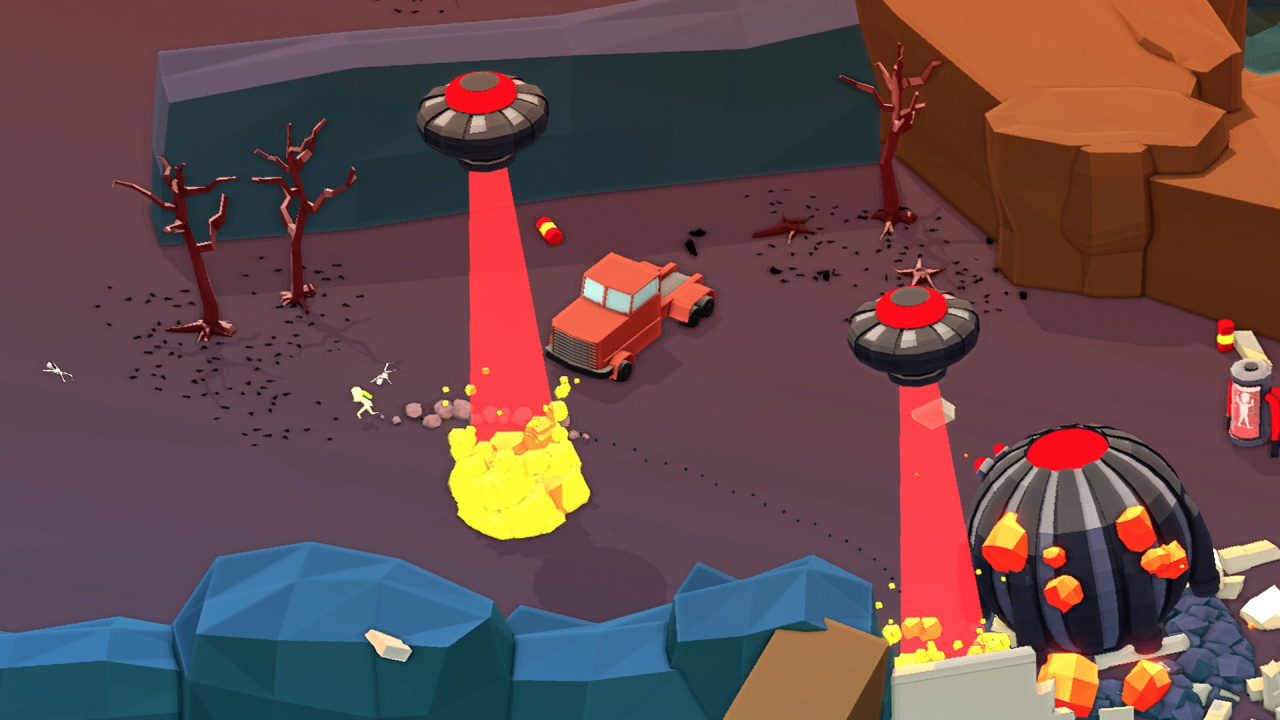
Taking place inside a variety of sandbox-like levels, Mugsters has players experimenting with a whole host of different vehicle types, environmental traps, and usable items such as explosives to clear their way through each level and outsmart their enemies. There are over 30 vehicles to drive around in, each with their own unique feel, including cars, motorbikes, helicopters, planes, and even an ice cream van.
Back in April, when Mugsters was first officially announced, we were lucky enough to go hands-on with the game, and also spent some time chatting to Finnish developer Reinkout to explore the title in a little more detail. If you’re interested, make sure to give those a thorough read.
Mugsters is scheduled to launch for £9.99 / €14.99 / $14.99 when it arrives on the Nintendo Switch eShop in a couple of weeks’ time.
Will you be jumping in the driving seat for this one? Let us know if Mugsters is speeding onto your gaming wishlist with a comment below.
Step into the shoes of sports manager and lead your pro cycling team through a challenge-packed 2018 season. Compete in over 200 races across 500 stages around the world, including famous Tours such as La Vuelta and the iconic Tour de France.
Posted by: xSicKxBot - 07-04-2018, 09:58 AM - Forum: Lounge
- No Replies
Game Release Dates In July 2018: Nintendo Switch, PC, PS4, And Xbox One
It's July, which means we've finally hit the second half of 2018. Summer usually has a reputation for being a rather dry period for exciting games, but this month looks to have some interesting titles to keep you busy during the warm and sunny days. In the month of July, there's a surprising amount of remasters and re-releases looking to find new homes on PC, PS4, Switch, and Xbox One--which includes Sonic Mania Plus and the cleverly named Red Faction: Guerilla Re-Mars-tered Edition. While remasters and ports are common, July certainly has them in healthy abundance.
Along with these remasters, we also have the first-time releases of Octopath Traveler and The Banner Saga 3, which should keep RPG and strategy fans engaged for quite sometime. For a more in-depth look at all the most notable games coming this year, check out our more detailed list of releases here.
Octopath Traveler (Nintendo Switch) -- July 13
Set for release on July 13 for the Switch, Octopath Traveler is Square-Enix's long-awaited return to classic 2D RPG gameplay that fans have been yearning for. With a visual style that recreates those familiar old-school graphics for the HD era, you'll band together a party of heroes, level up, and do battle with bandits and other monsters in a world of myth and mystery.
Sonic Mania Plus (Nintendo Switch, PS4, Xbox One) -- July 17
Coming almost a year after the original release, Sonic Mania Plus plans to offer new and returning players alike the purest form of classic Sonic the Hedgehog gameplay. Coming to the Nintendo Switch, PS4, and Xbox One on July 17, Sega's next big return to traditional Sonic action will include new levels, more secrets, and two additional characters in the form of Mighty the Armadillo, and Ray the Flying Squirrel--both of whom have been long absent since their appearance in the arcade-only release of SegaSonic the Hedgehog.
The Banner Saga 3 (PC, PS4, Switch, Xbox One) -- July 24
Starting out as a Kickstarter success story, The Banner Saga series has grown from crowdfunding hopeful to a game series with a passionate following. With the third installment now approaching its release, the developers behind the punishing RPG aim to give the main story a fitting conclusion, while also offering far more challenging battles and tough decisions to make in order to stay alive in the harsh environment.