| Welcome, Guest |
You have to register before you can post on our site.
|
| Forum Statistics |
» Members: 19,819
» Latest member: Taizy
» Forum threads: 21,473
» Forum posts: 22,294
Full Statistics
|
| Online Users |
There are currently 623 online users.
» 0 Member(s) | 618 Guest(s)
Applebot, Baidu, Bing, Google, Yandex
|
|
|
| News - This Week At Bungie – 6/07/2018 |
|
Posted by: xSicKxBot - 06-08-2018, 12:59 PM - Forum: Lounge
- No Replies
|
 |
This Week At Bungie – 6/07/2018
 This week at Bungie, we revealed Forsaken.
On September 4, we’re kicking off the second year of Destiny 2 with a brand new story. We have some bold plans to take you to new places and change the way you play. If you haven’t seen it yet, check out the ViDoc that revealed Destiny 2: Forsaken.
[embedded content]
We’re committed to reinforcing the hobby for every player of Destiny 2, and we have a lot of changes coming in Year 2 that do just that. The ViDoc was followed by a live conversation on what we have planned for September. Didn’t get to tune in to watch it live? We’ve got an archive for you to watch at your leisure.
[embedded content]
Too long, didn’t watch?
- Forsaken tells a new story with a darker tone in a lawless frontier.
- Tangled Shore is a new destination made of a web of asteroids and mysteries.
- The Dreaming City is our first endgame destination, home to the biggest challenges.
- The Scorn are a new enemy, led by a group of eight barons you will hunt down.
- Our new weapon system gives you more control over how you configure your fighting style.
- We’re adding random rolls and improving the mod system for better weapon customization.
- New Masterwork style system allows you to level weapons up over time.
- Your Guardian discovers new ways to fight with new Supers.
- The Bow joins your arsenal as a new weapon type.
- Gambit is a new activity that combines PvE and PvP in a competitive co-op experience.
- There is a brand new raid located in the Dreaming City.
- The new Collections feature lets you track all the items you can acquire.
- The new Triumphs feature lets you track your achievements and lore.
You’ll learn a lot more about this new story we’re telling at E3. Gambit will be playable at both E3 and GuardianCon.
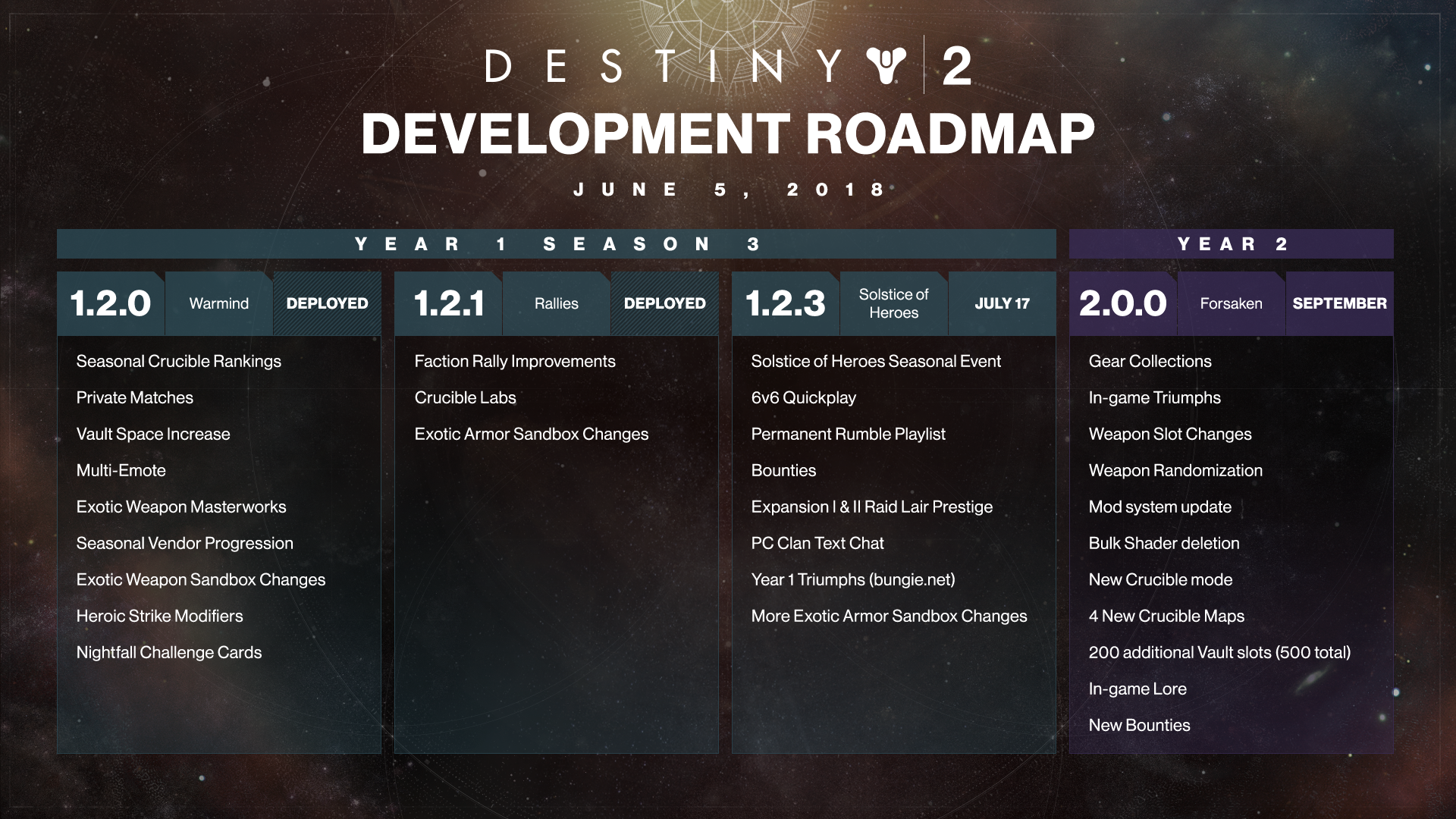
We also updated the Roadmap this week to give you details on what all players of Destiny 2 can enjoy this September. There were also some additions to the summer update, including 6v6 Quickplay and a permanent Rumble playlist. Prestige Raid Lairs are also coming in 1.2.3 and do require ownership of the expansion they were delivered in. Annual Pass
Another topic of the stream was the new Annual Pass. As the evolution of the Expansion Pass that delivered content like Curse of Osiris and Warmind, the Annual Pass is a new plan for how we’ll give hardcore players more ways to fight their enemies, collect new loot, and customize their characters. Here is Game Director Christopher Barrett to tell you more about our goals.
Christopher: Destiny 2 Year 2 begins with Forsaken, and throughout that year we’re going to be focusing our teams on delivering content that gives players reasons to come back to Destiny. This means new activities, endgame challenges, progression systems, and awesome rewards. With the Annual Pass, we want to deliver content more frequently throughout the entirety of Year 2, with three releases in Winter, Spring, and Summer.
In addition to everything new in Forsaken and the Annual Pass, we’re continuing to fully support Seasons and deliver updates to all players of Destiny 2. During each Season, all players can expect new rewards to earn, new Crucible maps and modes, improvements to gameplay features, recurring activities, special events, and more.
This graphic puts everything we have planned for year two on the map:
We’re excited for the second year of Destiny 2. You’ll soon learn more about what to expect in the coming weeks and months leading up to September when Forsaken and the Annual pass officially launch.
Lab Report
Last week, we rolled out Crucible Labs to give you a first glimpse of Crucible content still under development. This was our first experiment in the lab, but definitely won’t be our last. Senior Crucible Designer Andrew Weldon is here to debrief you on our conclusions.
Andrew: Hello everyone!
Thank you to everyone who participated in our debut Crucible Labs playlist last week!
Understandably, many of you are curious about the decision-making process behind developing Showdown and deploying it with Labs. I wanted to take some time to talk briefly about these decisions, what they mean for the first reveal of Labs, and how this first Labs run will help shape our future.
Every mode you’ve ever played in Destiny has been the product of design, iteration, playtesting, more iteration, more playtesting, polish, and final bug fixing. This takes a lot of time and effort across multiple departments within the studio, and as players, you don’t get to see it until it’s finished and in the game or featured in a press event or public beta.
Labs gives us an opportunity to open up some of this development process to the community, so you can be there with us earlier. But rolling out a feature like Labs is not without risk—we’re showing you unfinished work that is below our shipping bar, and we expect there to be issues that need addressing.
It was important for our first Labs to be measured and cautious. Our primary focus for this first round was to make sure that Labs itself worked, and Showdown made for a great simple test case that we already have some familiarity with shipping through Crimson Days and Doubles. Now that we’ve successfully launched Labs, we’ll be able to consider more options over time, ranging from new competitive experiences to more silly and just-for-fun experiments.
In general, expect that any mode that deploys in Labs:
- Has no concrete timeline or schedule
- Must not interfere with must-ship features and updates (i.e., the Summer Update and Forsaken—Labs modes are in addition to features you’re already scheduled to receive!)
- Can be iterated on in a semi-public setting
- Can succeed and be polished for a full release in a playlist or rotator
- Can fail and never be seen again
The broad feedback to Showdown in this setting has shown us there is a lot of room for improvement, and that’s OK! Some of your favorite modes in Destiny have had terrible playtests where we’re left wondering if we can even save them. Some modes that showed promise never came together the way we hoped and had to be left behind. This is a normal part of the development process that we’re inviting you to join, and we welcome your feedback and criticism as we make decisions not only in this mode, but in the future as well.
You may very well see Showdown again in the future with changes based on feedback from this week, and we have some additional Labs experiences in the pipe in our Summer update. Over time, we’ll continue to get into the zone and lock down the best process and path to deploying new experiences for you. We’re glad to have you along for the ride!
The Night Is Dark
Destiny Player Support keep the trains running on time. We don’t have a lot of trains, but they do keep you up to date on game-impacting issues and when fixes are on the way.
This is their report.
Nightfall Unique Rewards
This week, Destiny Hotfix 1.2.1.1 was released. Issues preventing Nightfall Unique Rewards from dropping have been resolved. We are currently planning to reschedule the Tree of Probabilities Strike to be featured as the Nightfall for the week of June 19, 2018. Stay tuned to @Bungie for future updates. Faction Rallies
With the release of Update 1.2.0, Faction Rallies now feature the Renown system. After pledging to a faction, players may earn Renown by completing a public event or patrol, or by defeating high-value targets on destinations. Players may earn additional Renown if they are wearing a full armor set for the faction they’ve pledged to. There are ways in which players can lose stacks of renown:
- Being defeated by an enemy
- Fast traveling
- Going to Orbit
- Logging out of the game
For more information regarding Renown and the changes to Faction Rallies, players may visit the Faction Rallies Guide on help.bungie.net. The following issues have been identified, and are currently under investigation:
- Some Faction Rallies ornaments cannot progress when completing the Lost Sector on Mercury.
- Ornaments requiring players to defeat Hive with melee abilities sometimes don’t progress.
-
- This most commonly occurs on the Arcstrider Subclass “Way of the Wind.”
If you encounter issues impacting Renown or Faction Rallies ornament progress, please report to the #Help forum on bungie.net.
Extra Butter
Let’s get to the movies shall we? Every week, we pick our favorites from the Creations page and show them off to the world. Here are this week’s winners.
Movie of the Week: Ra Ra Rasputin
[embedded content]
It’s been a fun week. We love getting to finally reveal the exciting things we’ve been working on. And we are not done yet. E3 is next week and we will have our away team ready to give you some more details about Forsaken. After that, we have all summer to fill in the blanks as we know you have a lot of questions.
Get out there and support the faction of your choice. We’ll let you know who came up on top after the reset on Tuesday .<3 Cozmo
|

|
|
| PC - Total War: WARHAMMER II - The Queen & the Crone |
|
Posted by: xSicKxBot - 06-08-2018, 07:34 AM - Forum: New Game Releases
- No Replies
|
|
Total War: WARHAMMER II - The Queen & the Crone
The Queen & the Crone is the first Lords Pack for Total War: WARHAMMER II. Bolstering the forces of the High Elves and the Dark Elves, it introduces famous rival characters and new iconic units from the world of Warhammer Fantasy Battles to your campaigns and battles. The content in this pack is available in both the Eye of the Vortex and Mortal Empires campaigns. Publisher: Sega Release Date: May 31, 2018
|
|
|
|
| Vote for Your Favorite Linux SBC and Be Entered to Win a Free Board |
|
Posted by: xSicKxBot - 06-08-2018, 07:34 AM - Forum: Linux, FreeBSD, and Unix types
- No Replies
|
|
Vote for Your Favorite Linux SBC and Be Entered to Win a Free Board

Vote for your favorite open-spec, Linux- or Android-ready single board computers priced under $200.
It’s time again for LinuxGizmos’ annual reader survey of single board computers. They’ve identified 116 SBCs that fit their requirements — up from 98 boards in the June 2017 survey. Make your picks from the new list of under $200, hacker-friendly SBCs that run Linux or Android, and you could win one of 15 prizes.
Take the survey!
15 hacker SBC prizes
In the brief survey, you can select up to three boards and answer a few questions about buying criteria and intended applications. By completing the survey, you will earn a chance to be among 15 randomly selected winners who will receive free boards donated by Aaeon UP, Qualcomm and Gumstix.
The prizes this time around include five Qualcomm DragonBoard 410c development boards and five Chatterbox Raspberry Pi Expansion boards from Gumstix (Rasp Pi not included). There are also five different Aaeon UP board models including an UP, an UP Squared, and an UP Core, as well as the new UP Core Plus and AI Core module with a Myriad 2 VPU. See more details at LinuxGizmos.
More Raspberry Pi?
Last year’s results saw an overwhelming taste for Pi, with the Raspberry Pi 3 in the top spot, the Raspberry Pi Zero W in second, and the Cortex-A53 based Raspberry Pi 2 in third. Vote now for your favorites and stay tuned for the results.
|
|
|
|
| Microsoft - How Microsoft uses machine learning to fight social engineering attacks |
|
Posted by: xSicKxBot - 06-08-2018, 07:34 AM - Forum: Windows
- No Replies
|
|
How Microsoft uses machine learning to fight social engineering attacks
 Machine learning is a key driver in the constant evolution of security technologies at Microsoft. Machine learning allows Microsoft 365 to scale next-gen protection capabilities and enhance cloud-based, real-time blocking of new and unknown threats. Just in the last few months, machine learning has helped us to protect hundreds of thousands of customers against ransomware, banking Trojan, and coin miner malware outbreaks.
But how does machine learning stack up against social engineering attacks?
Social engineering gives cybercriminals a way to get into systems and slip through defenses. Security investments, including the integration of advanced threat protection services in Windows, Office 365, and Enterprise Mobility + Security into Microsoft 365, have significantly raised the cost of attacks. The hardening of Windows 10 and Windows 10 in S mode, the advancement of browser security in Microsoft Edge, and the integrated stack of endpoint protection platform (EPP) and endpoint detection and response (EDR) capabilities in Windows Defender Advanced Threat Protection (Windows Defender ATP) further raise the bar in security. Attackers intent on overcoming these defenses to compromise devices are increasingly reliant on social engineering, banking on the susceptibility of users to open the gate to their devices.
Modern social engineering attacks use non-portable executable (PE) files like malicious scripts and macro-laced documents, typically in combination with social engineering lures. Every month, Windows Defender AV detects non-PE threats on over 10 million machines. These threats may be delivered as email attachments, through drive-by web downloads, removable drives, browser exploits, etc. The most common non-PE threat file types are JavaScript and VBScript.
Figure 1. Ten most prevalent non-PE threat file types encountered by Windows Defender AV
Non-PE threats are typically used as intermediary downloaders designed to deliver more dangerous executable malware payloads. Due to their flexibility, non-PE files are also used in various stages of the attack chain, including lateral movement and establishing fileless persistence. Machine learning allows us to scale protection against these threats in real-time, often protecting the first victim (patient zero).
Catching social engineering campaigns big and small
In mid-May, a small-scale, targeted spam campaign started distributing spear phishing emails that spoofed a landscaping business in Calgary, Canada. The attack was observed targeting less than 100 machines, mostly located in Canada. The spear phishing emails asked target victims to review an attached PDF document.
When opened, the PDF document presents itself as a “secure document” that requires action – a very common social engineering technique used in enterprise phishing attacks. To view the supposed “secure document”, the target victim is instructed to click a link within the PDF, which opens a malicious website with a sign-in screen that asks for enterprise credentials.
Phished credentials can then be used for further attacks, including CEO fraud, additional spam campaigns, or remote access to the network for data theft or ransomware. Our machine learning blocked the PDF file as malware (Trojan:Script/Cloxer.A!cl) from the get-go, helping prevent the attack from succeeding. 
Figure 2. Phishing email campaign with PDF attachment
Beyond targeted credential phishing attacks, we commonly see large-scale malware campaigns that use emails with archive attachments containing malicious VBScript or JavaScript files. These emails typically masquerade as an outstanding invoice, package delivery, or parking ticket, and instruct targets of the attack to refer to the attachment for more details. If the target opens the archive and runs the script, the malware typically downloads and runs further threats like ransomware or coin miners.
 Figure 3. Typical social engineering email campaign with an archive attachment containing a malicious script Figure 3. Typical social engineering email campaign with an archive attachment containing a malicious script
Malware campaigns like these, whether limited and targeted or large-scale and random, occur frequently. Attackers go to great lengths to avoid detection by heavily obfuscating code and modifying their attack code for each spam wave. Traditional methods of manually writing signatures identifying patterns in malware cannot effectively stop these attacks. The power of machine learning is that it is scalable and can be powerful enough to detect noisy, massive campaigns, but also specific enough to detect targeted attacks with very few signals. This flexibility means that we can stop a wide range of modern attacks automatically at the onset.
Machine learning models zero in on non-executable file types
To fight social engineering attacks, we build and train specialized machine learning models that are designed for specific file types.
Building high-quality specialized models requires good features for describing each file. For each file type, the full contents of hundreds of thousands of files are analyzed using large-scale distributed computing. Using machine learning, the best features that describe the content of each file type are selected. These features are deployed to the Windows Defender AV client to assist in describing the content of each file to machine learning models.
In addition to these ML-learned features, the models leverage expert researcher-created features and other useful file metadata to describe content. Because these ML models are trained for specific file types, they can zone in on the metadata of these file types.
 Figure 4. Specialized file type-specific client ML models are paired with heavier cloud ML models to classify and protect against malicious script files in real-time Figure 4. Specialized file type-specific client ML models are paired with heavier cloud ML models to classify and protect against malicious script files in real-time
When the Windows Defender AV client encounters an unknown file, lightweight local ML models search for suspicious characteristics in the file’s features. Metadata for suspicious files are sent to the cloud protection service, where an array of bigger ML classifiers evaluate the file in real-time.
In both the client and the cloud, specialized file-type ML classifiers add to generic ML models to create multiple layers of classifiers that detect a wide range of malicious behavior. In the backend, deep-learning neural network models identify malicious scripts based on their full file content and behavior during detonation in a controlled sandbox. If a file is determined malicious, it is not allowed to run, preventing infection at the onset.
File type-specific ML classifiers are part of metadata-based ML models in the Windows Defender AV cloud protection service, which can make a verdict on suspicious files within a fraction of a second.

Figure 5. Layered machine learning models in Windows Defender ATP
File type-specific ML classifiers are also leveraged by ensemble models that learn and combine results from the whole array of cloud classifiers. This produces a comprehensive cloud-based machine learning stack that can protect against script-based attacks, including zero-day malware and highly targeted attacks. For example, the targeted phishing attack in mid-May was caught by a specialized PDF client-side machine learning model, as well as several cloud-based machine learning models, protecting customers in real-time.
Microsoft 365 threat protection powered by artificial intelligence and data sharing
Social engineering attacks that use non-portable executable (PE) threats are pervasive in today’s threat landscape; the impact of combating these threats through machine learning is far-reaching.
Windows Defender AV combines local machine learning models, behavior-based detection algorithms, generics, and heuristics with a detonation system and powerful ML models in the cloud to provide real-time protection against polymorphic malware. Expert input from researchers, advanced technologies like Antimalware Scan Interface (AMSI), and rich intelligence from the Microsoft Intelligent Security Graph continue to enhance next-generation endpoint protection platform (EPP) capabilities in Windows Defender Advanced Threat Protection.
In addition to antivirus, components of Windows Defender ATP’s interconnected security technologies defend against the multiple elements of social engineering attacks. Windows Defender SmartScreen in Microsoft Edge (also now available as a Google Chrome extension) blocks access to malicious URLs, such as those found in social engineering emails and documents. Network protection blocks malicious network communications, including those made by malicious scripts to download payloads. Attack surface reduction rules in Windows Defender Exploit Guard block Office-, script-, and email-based threats used in social engineering attacks. On the other hand, Windows Defender Application Control can block the installation of untrusted applications, including malware payloads of intermediary downloaders. These security solutions protect Windows 10 and Windows 10 in S mode from social engineering attacks.
Further, Windows Defender ATP endpoint detection and response (EDR) uses the power of machine learning and AMSI to unearth script-based attacks that “live off the land”. Windows Defender ATP allows security operations teams to detect and mitigate breaches and cyberattacks using advanced analytics and a rich detection library. With the April 2018 Update, automated investigation and advance hunting capabilities further enhance Windows Defender ATP. Sign up for a free trial.
Machine learning also powers Office 365 Advanced Threat Protection to detect non-PE attachments in social engineering spam campaigns that distribute malware or steal user credentials. This enhances the Office 365 ATP comprehensive and multi-layered solution to protect mailboxes, files, online storage, and applications against threats.
These and other technologies power Microsoft 365 threat protection to defend the modern workplace. In Windows 10 April 2018 Update, we enhanced signal sharing across advanced threat protection services in Windows, Office 365, and Enterprise Mobility + Security through the Microsoft Intelligent Security Graph. This integration enables these technologies to automatically update protection and detection and orchestrate remediation across Microsoft 365.
Gregory Ellison and Geoff McDonald
Windows Defender Research

Talk to us
Questions, concerns, or insights on this story? Join discussions at the Microsoft community and Windows Defender Security Intelligence.
Follow us on Twitter @WDSecurity and Facebook Windows Defender Security Intelligence.
|
|
|
|
| Intel and AMD Reveal New Processor Designs |
|
Posted by: xSicKxBot - 06-07-2018, 08:40 PM - Forum: Linux, FreeBSD, and Unix types
- No Replies
|
|
Intel and AMD Reveal New Processor Designs

With this week’s Computex show in Taipei and other recent events, processors are front and center in the tech news cycle. Intel made several announcements ranging from new Core processors to a cutting-edge technology for extending battery life. AMD, meanwhile, unveiled a second-gen, 32-core Threadripper CPU for high-end gaming and revealed some new Ryzen chips including some embedded friendly models.
Here’s a quick tour of major announcements from Intel and AMD, focusing on those processors of greatest interest to embedded Linux developers.
Intel’s latest 8th Gen CPUs
In April, Intel announced that mass production of its 10nm fabricated Cannon Lake generation of Core processors would be delayed until 2019, which led to more grumbling about Moore’s Law finally running its course. Yet, there were plenty of consolation prizes in Intel’s Computex showcase. Intel revealed two power-efficient, 14nm 8th Gen Core product families, as well as its first 5GHz designs.
The Whiskey Lake U-series and Amber Lake Y-series Core chips will arrive in more than 70 different laptop and 2-in-1 models starting this fall. The chips will bring “double digit performance gains” compared to 7th Gen Kaby Lake Core CPUs, said Intel. The new product families are more power efficient than the Coffee Lake chips that are now starting to arrive in products.
Both Whiskey Lake and Amber Lake will provide Intel’s higher performance gigabit WiFi ((Intel 9560 AC), which is also appearing on the new Gemini Lake Pentium Silver and Celeron SoCs, the follow-ups to the Apollo Lake generation. Gigabit WiFi is essentially Intel’s spin on 802.11ac with 2×2 MU-MIMO and 160MHz channels.
Intel’s Whiskey Lake is a continuation of the 7th and 8th Gen Skylake U-series processors, which have been popular on embedded equipment. Intel had few details, but Whiskey Lake will presumably offer the same, relatively low 15W TDPs. It’s also likely that like the Coffee Lake U-series chips it will be available in quad-core models as well as the dual-core only Kaby Lake and Skylake U-Series chips.
The Amber Lake Y-series chips will primarily target 2-in-1s. Like the dual-core Kaby Lake Y-Series chips, Amber Lake will offer 4.5W TDPs, reports PC World.
To celebrate Intel’s upcoming 50th anniversary, as well as the 40th anniversary of the first 8086 processor, Intel will launch a limited edition, 8th Gen Core i7-8086K CPU with a clock rate of 4GHz. The limited edition, 64-bit offering will be its first chip with 5GHz, single-core turbo boost speed, and the first 6-core, 12-thread processor with integrated graphics. Intel will be giving away 8,086 of the overclockable Core i7-8086K chips starting on June 7.
Intel also revealed plans to launch a new high-end Core X series with high core and thread counts by the end of the year. AnandTech predicts that this will use the Xeon-like Cascade Lake architecture. Later this year, it will announce new Core S-series models, which AnandTech projects will be octa-core Coffee Lake chips.
Intel also said that the first of its speedy Optane SSDs — an M.2 form-factor product called the 905P — is finally available. Due later this year is an Intel XMM 800 series modem that supports Sprint’s 5G cellular technology. Intel says 5G-enabled PCs will arrive in 2019.
Intel promises all day laptop battery life
In other news, Intel says it will soon launch an Intel Low Power Display Technology that will provide all-day battery life on laptops. Co-developers Sharp and Innolux are using the technology for a late-2018 launch of a 1W display panel that can cut LCD power consumption in half.
AMD keeps on ripping
At Computex, AMD unveiled a second generation Threadripper CPU with 32 cores and 64 threads. The high-end gaming processor will launch in the third quarter to go head to head with Intel’s unnamed 28-core monster. According to Engadget, the new Threadripper adopts the same 12nm Zen+ architecture used by its Ryzen chips.
AMD also said it was sampling a 7nm Vega Instinct GPU designed for graphics cards with 32GB of expensive HBM2 memory rather than GDDR5X or GDDR6. The Vega Instinct will offer 35 percent greater performance and twice the power efficiency of the current 14nm Vega GPUs. New rendering capabilities will help it compete with Nvidia’s CUDA enabled GPUs in ray tracing, says WCCFTech.
Some new Ryzen 2000-series processors recently showed up on an ASRock CPU chart that have the lowest power efficiency of the mainstream Ryzen chips. As detailed on AnandTech, the 2.8GHz, octa-core, 16-thread Ryzen 7 2700E and 3.4GHz/3.9GHz, hexa-core, 12-thread Ryzen 5 2600E each have 45W TDPs. This is higher than the 12-54W TDPs of its Ryzen Embedded V1000 SoCs, but lower than the 65W and up mainstream Ryzen chips. The new Ryzen-E models are aimed at SFF (small form factor) and fanless systems.
Join us at Open Source Summit + Embedded Linux Conference Europe in Edinburgh, UK on October 22-24, 2018, for 100+ sessions on Linux, Cloud, Containers, AI, Community, and more.
|
|
|
|
| Microsoft - Simplifying IT with the latest updates from Windows Autopilot |
|
Posted by: xSicKxBot - 06-07-2018, 08:10 PM - Forum: Windows
- No Replies
|
|
Simplifying IT with the latest updates from Windows Autopilot

With Windows Autopilot, our goal is to simplify deployment of new Windows 10 devices by eliminating the cost and complexity associated with creating, maintaining, and loading custom images. Windows Autopilot will revolutionize how new devices get deployed in your organization—now you can deliver new off-the-shelf Windows 10 devices directly to your users. With a few simple clicks, the device transforms itself into a fully business-ready state, dramatically reducing the time it takes for your users to get up and running with new devices.
Not only does Windows Autopilot significantly reduce the cost of deploying Windows 10 devices but also delivers an experience that’s magical for users and zero-touch for IT.
I’m excited to share that we are extending that zero-touch experience even further with several new capabilities available in preview with the Windows Insider Program today.
- Self-Deploying mode—Currently, the Windows Autopilot experience requires the user to select basic settings like Region, Language, and Keyboard, and also enter their credentials, in the Windows 10 out-of-the-box experience. With a new Windows Autopilot capability called “Self-Deploying mode,” we’re extending the zero-touch experience from IT to the user deploying the device. Power on* is all it takes to deploy a new Windows 10 device into a fully business-ready state—managed, secured, and ready for usage—no need for any user interaction. You can configure the device to self-deploy into a locked down kiosk, a digital signage, or a shared productivity device—all it takes is power on.*
- Windows Autopilot reset—This feature extends the zero-touch experience from deployment of new Windows 10 devices to reset scenarios where a device is being repurposed for a new user. We’re making it possible to completely reset and redeploy an Intune-managed Windows 10 device into a fully business-ready state without having to physically access the device. All you need to do is click a button in Intune!
Windows Insiders can test these features with the latest Windows 10 build and Microsoft Intune now.
I cannot wait to see the feedback from the Insider community! To see how this works, and several exciting updates to Windows Autopilot, check out this quick video:
Source video.
You can head over to the Windows IT Pro blog right now for further details.
One final note: A big part of what we build is based on feedback from our customers. With this in mind, we also added several new Windows Autopilot capabilities into the Windows 10 April 2018 Update (version 1803) based on feedback, and these capabilities are also available today:
- Enrollment Status page—We received tons of feedback from Windows Autopilot customers who want the ability to hold the device in the out-of-box setup experience until the configured policies and apps have been provisioned to the device. This enables IT admins to be assured the device is configured into a fully business-ready state prior to users getting to the desktop. This is made possible with a capability called “Enrollment Status” and is available today with Windows 10 April 2018 Update (version 1803) and Microsoft Intune.
- Device vendor supply chain integration—We enabled Windows 10 OEMs and hardware vendors to integrate Windows Autopilot into their supply chain and fulfillment systems so that devices are registered in Windows Autopilot to your organization the moment your purchase is fulfilled. This makes the registration of Windows Autopilot devices completely hands-free and zero-touch for you as well as your device vendor/OEM. Contact your device reseller to find out if they are supporting Windows Autopilot.
- Automatic Windows Autopilot profile assignment—We integrated Azure Active Directory (AD) dynamic groups with Windows Autopilot and Microsoft Intune to deliver a zero-touch experience for Windows Autopilot profile assignments on all Windows Autopilot devices.
I said this in my prior post and I’ll say it again—Windows Autopilot is an absolute game changer. I urge you to spend some time learning more about it.
To learn more about how to use Windows Autopilot and Co-Management together, check out this quick video.
*Requires network connection and TPM2.0.
|
|
|
|
| AppleInsider - Amazon’s Fire TV Cube aimed squarely at Apple TV 4K |
|
Posted by: xSicKxBot - 06-07-2018, 08:10 PM - Forum: Apples Mac and OS X
- No Replies
|
|
Amazon’s Fire TV Cube aimed squarely at Apple TV 4K

By Roger Fingas
Thursday, June 07, 2018, 09:21 am PT (12:21 pm ET)
Amazon on Thursday revealed the Fire TV Cube, its latest media streamer, poised to intensify competition with the Apple TV 4K.
The Cube effectively merges the existing Fire TV with an Echo speaker. Users can not only issue typical Alexa voice commands, but control video playback as well as compatible receivers, soundbars, and cable and satellite boxes. Some devices and services support voice-based search and/or channel-changing.
Some example commands range from “Alexa, turn on the TV” or “turn up the volume” to things like “play ‘This is Us’,” “open Netflix,” or “tune to CNN.” A physical remote is included as well.
People with Alexa-compatible security cameras can use the Cube to view live feeds.
On a technical level the Cube is little different from the Fire TV apart from its speaker and microphones, though storage is doubled to 16 gigabytes, and an Ethernet adapter is bundled rather than sold separately.
There are some limitations. Sleep timers won’t work until “later this year,” Amazon says, and there’s no timeline for when Bluetooth sync, multi-room music, and Alexa calling and messaging will be added.
On paper the product is largely on par with the Apple TV 4K, and offers some advantages, primarily the ability to talk to it without a remote or holding down a button. Like the Fire TV though, it continues to support only HDR10 for high dynamic range, whereas the Apple TV 4K offers that and Dolby Vision.
Both the Fire TV and Fire TV Cube offer Dolby Atmos surround sound. Apple has promised Atmos support for months, but will only implement it with this fall’s tvOS 12.
The Cube ships June 21, and can be pre-ordered for $119.99 by the general public, or $89.99 by Prime members.
|
|
|
|
| Exploring Azure App Service – Web Apps and SQL Azure |
|
Posted by: xSicKxBot - 06-07-2018, 08:10 PM - Forum: C#, Visual Basic, & .Net Frameworks
- No Replies
|
|
Exploring Azure App Service – Web Apps and SQL Azure
 There is a good chance that your web app uses a database. In my previous post introducing Azure App Service, I showed some of the benefits of hosting apps in Azure App Service, and how easy it is to get a basic site running in a few clicks. In this post I’ll show how to set up a SQL Azure database along with an App Service Web App from Visual Studio, and apply Entity Framework automatically as part of publish.
Let’s get going
To get started, you’ll first need:
- Visual Studio 2017 with the ASP.NET and web development workload installed (download now)
- An Azure account:
- Any ASP.NET or ASP.NET Core app that uses a SQL Database. For the purposes of this post, I’ll create a new ASP.NET Core app with Individual Authentication:
- On the “New ASP.NET Core Web Application” dialog, click the “Change Authentication” button.
- Then select the “Individual User Accounts” radio button and click “OK”.
- Click OK.
I can now run my project locally (F5) and create user accounts which will be stored in a SQL Server Express Local DB on my machine.
Publishing to App Service with a Database
Let’s publish our application to Azure. To do this, I’ll right click my project in Solution Explorer and choose “Publish”

This brings up the Visual Studio publish target dialog, which will default to the Azure App Service pane with the “Create new” radio button selected. To continue click “Publish”.
This brings up the “Create App Service” dialog (see the “Key App Service Concepts” section of my previous post for an explanation of the fields). To create a SQL Database for our app to use, click the “Create a SQL Database” link in the top right section of the dialog.

This will bring up the “Configure SQL Database” dialog.
- Note: If you are using a Visual Studio Enterprise subscription, many regions will not let you create a SQL Azure database so I recommend choosing “East US” or “West US 2” depending on where you are located (we are adding logic in in the Visual Studio 2017 15.8 update to remove those regions if that’s the case, but for now you’ll need to choose an appropriate region). To do this, click the “New…” button next to your “Hosting Plan Dropdown” and pick the appropriate region (“East US” or “West US 2”).
- Since I don’t have an existing SQL Server, the first thing I need to do is create a server to host the database, so I’ll click the “New…” button next to the “SQL Server” dropdown,
- Choose a location for the database.
- Provide an administrator user name and password for the server
- Click “OK”

- Make sure the connection string name field matches the name of the connection string your application uses to access the database (if using a new project, it is “DefaultConnection” which will be prepopulated for you).

- Click OK
- Then click the “Create” button on the “Create App Service” dialog
It should take ~2-3 minutes to create all of the resources in Azure, then your application will publish and a browser will open to your home page.
Configuring EF Migrations
At this point there is a database for your app to use in the cloud, but EF migrations have not been applied, so any functionality that relies on the database (e.g. Registering for a user account) will result in an error.
To apply EF migrations to the database:
- Click the “Configure…” button on the publish summary page

- Navigate to the “Settings” tab
- When it finishes discovering data contexts, expand the “Entity Framework Migrations” section, and check the “Apply this migration on publish” for all of the contexts it finds

- Click “Save”
- Click Publish again, in the output window you should see “Generating Entity framework SQL Scripts” and then “Generating Entity framework SQL Scripts completed successfully”

That’s it, your web app and SQL Azure database are both configured and running in the cloud.
Conclusion
Hopefully, this post showed you how easy it is to try App Service and SQL Azure. We believe that for most people, App Service is the easiest place to get started with cloud development, even if you need to move to other services in the future for further capabilities (compare hosting options). As always, let us know if you run into any issues, or have any questions below or via Twitter.
|
|
|
|
| Mobile - Asmodee Digital will be taking their boardgames to Switch |
|
Posted by: xSicKxBot - 06-07-2018, 08:10 PM - Forum: New Game Releases
- No Replies
|
|
Asmodee Digital will be taking their boardgames to Switch
 By Joe Robinson 07 Jun 2018
Granted, we’re not really ones for Nintendo Switch coverage here at Pocket Tactics, but I think you’d agree that Asmodee Digital are a company worth keeping an eye on.
Not content with owning or publishing as many digital boardgames as it can get its hands on, the company is now setting its sights on new frontiers. Starting with Carcassonne in the winter, Asmodee will be bringing their digital catalogue to Nintendo Switch.
“Carcassonne is the first Asmodee Digital title of many to follow on Nintendo’s platforms,” says Pierre Ortolan CEO of Asmodee Digital. “This partnership is based on Nintendo’s need for new user experiences, and Asmodee Digital’s continued goal of bringing great board game IPs to new platforms.”
Now, granted, I’m sure we’d rather see Asmodee Digital’s 2017 remake of Carcassonne come to iOS instead (we suspect TheCodingMonkeys have that store locked down with their version), but at the very least those of us with iPad and iPhones who also happen to own a Switch can now get in on the action.
No word yet on which titles may be following Carcassonne – in-development titles like Scythe or Terraforming Mars are likely to be out before the medieval tile-placement game makes its move, so last-minute Switch versions seem unlikely.
|
|
|
|
| Community-Created Apps Help Ease Kubernetes Administration |
|
Posted by: xSicKxBot - 06-07-2018, 01:50 PM - Forum: Linux, FreeBSD, and Unix types
- No Replies
|
|
Community-Created Apps Help Ease Kubernetes Administration

It didn’t take long at all for Kubernetes to become a star in the open source arena, emerging as the standard way to containerize applications at scale. Kubernetes is ushering in “operations transformation” and helping organizations make the transition to cloud-native computing, said Craig McLuckie, co-founder and CEO of Heptio and a co-founder of Kubernetes at Google, in a recent free webinar.
However, Kubernetes, which was created at Google and donated to the Cloud Native Computing Foundation, is known to be complex and can create many maintenance and deployment challenges. To address that, new classes of community-created complementary and helper applications are helping to tame Kubernetes.
At the Helm
The Helm project is a case in point. The Cloud Native Computing Foundation recently voted to accept Helm as an incubation-level hosted project. Helm is a package manager that provides an easy way to find, share, and use software built for Kubernetes. It removes complexity from configuration and deployment, and enables greater developer productivity.
“Helm addresses a common user need of deploying applications to Kubernetes by making their configurations reusable,” said Brian Grant, Principal Engineer at Google, and Kubernetes SIG Architecture co-chair and Steering Committee member. “Both the Helm and Kubernetes projects have grown substantially. As Kubernetes shifts its focus to its own core in order to better manage this growth, CNCF is a great home for Helm to continue making it easier for developers and operators to streamline Kubernetes deployments.”
According to a recent Kubernetes Application Survey, 64 percent of the application developers, application operators, and ecosystem tool developers who answered the survey reported using Helm to manage apps on Kubernetes.
Ease of management
But Helm is hardly the only open tool helping to ease the burden of managing Kubernetes. Microsoft has open sourced Draft, a tool that streamlines application development and deployment into any Kubernetes cluster. “Using two simple commands, developers can now begin hacking on container-based applications without requiring Docker or even installing Kubernetes themselves,” notes Gabe Monroy, PM Lead for Containers at Microsoft. “You can customize Draft to streamline the development of any application or service that can run on Kubernetes.” See this process in action here.
Are you aware that your iOS or Android smartphone can play a role in demystifying and operating Kubernetes? Cabin lets Kubernetes administrators leverage a dashboard from their phones. It drives many of the processes and features that you’ll find in the complete Kubernetes dashboard, ranging from reading pod logs to working with web-based apps that Kubernetes hosts, to accessing Helm charts.
Red Hat, too, has been helping users streamline their Kubernetes implementations. Through its acquisition of San Francisco-based startup Codenvy, Red Hat is giving developers options for building out cloud-based integrated development environments, including working with Kubernetes and containers. Codenvy is built on the open source project Eclipse Che, which offers a cloud-based Integrated Developer Environment (IDE) and development environment. The OpenShift.io cloud-based container development service from Red Hat already integrates Codenvy’s Eclipse Che implementation.
Dashboards are proven as good tools for simplifying administration of many kinds of processes, and although Kubernetes has a basic dashboard, efficient community-created dashboards are emerging. Kube-ops-view is a popular one. It gives you optics across multiple Kubernetes clusters, with graphical representations across the board that allow you to monitor memory and CPU usage, and more.
Writing and maintaining application definitions is one of the more complex aspects of running Kubernetes, and Kedge is a popular open tool that offers a simplified approach. With Kedge, you can supply a Kubernetes definition in simple form and Kedge expands into a full and correct application definition. It basically lets you work with shortcuts.
The move toward containers shifts many types of dependencies pertaining to applications, and it shifts how applications are created. Kubernetes has proven to be an essential orchestration tool as these changes take place, and it is good to see open tools that can help streamline Kubernetes itself and make developing applications easier.
To learn more about Kubernetes, check out the sample course materialsfor Kubernetes Fundamentals (LFS258), an online, self-paced course developed by The Linux Foundation Training that gives a high-level overview of what Kubernetes is and the challenges it solves. Download a free sample chapter now.
|
|
|
|
|
|
|