Quarkus is revolutionizing the way that we develop Java applications for the cloud-native era, and in this presentation, Edson Yanaga explains why it also sparks joy.
Watch this live coding session to get familiar with Quarkus and learn how your old and new favorite APIs will start in a matter of milliseconds and consume tiny amounts of memory. Hot reload capabilities for development will bring you instant joy.
Build portable cloud native Java microservices that start instantly and use fewer resources to reduce compute costs.
Graal Cloud Native (GCN) is a curated set of open source Micronaut® framework modules designed from the ground up to be compiled ahead-of-time with GraalVM Native Image resulting in native executables ideal for microservices.
Login / Register Visit the store page of Beholder 2 https://www.gog.com/game/beholder_2 Click Add to cart Click Check out now Verify that the price is 0 Click Pay for your order now Thats it, the game will be added to your account
Set in a dystopian future, Full Void is a 2D Cinematic Puzzle Platformer telling the story of a young teenager alone in a hostile world controlled by a rogue AI. Fight your way through puzzles and obstacles to uncover the story that surrounds this broken, run down society, where only children are still free. But for how long?
A pure hand drawn pixel art adventure that will keep you on your toes from the very beginning but still suitable for the whole family.
Full Void is a spiritual successor to classic cinematic puzzle platformers such as Prince of Persia, Another World (Out of This World) and Flashback, with a modern twist, innovative visual and gameplay mechanics.
We are excited to announce a new release of Red Hat Dependency Analytics, a solution that enables developers to create better applications by evaluating and adding high-quality open source components, directly from their IDE.
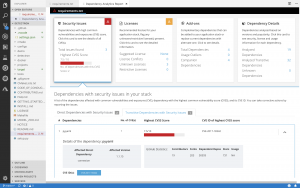
Red Hat Dependency Analytics helps your development team avoid security and licensing issues when building your applications. It plugs into the developer’s IDE, automatically analyzes your software composition, and provides recommendations to address security holes and licensing problems that your team may be missing.
Without further ado, let’s jump into the new capabilities offered in this release. This release includes a new version of the IDE plugin and the server-side analysis service hosted by Red Hat.
Support for Python applications
Along with Java (maven) and JavaScript (npm), Dependency Analytics now offers its full set of capabilities for Python (PyPI) applications. From your IDE, you can perform the vulnerability and license analysis of the “requirements.txt” file of your Python application, incorporate the recommended fixes, and generate the stack analysis report for more details.
Software composition analysis based on current vulnerability data
An estimated 15,000 open source packages get updated every day. On average, three new vulnerabilities get posted every day across JavaScript (npm) and Python (PyPi) packages. With this new release, the server-side analysis service hosted by Red Hat automatically processes the daily updates to open source packages that it is tracking. The hosted service also automatically ingests new vulnerability data posted to National Vulnerability Database (NVD) for JavaScript and Python packages. This allows the IDE plugin and API calls to provide source code analysis based on current vulnerability and release data.
Analyze transitive dependencies
In addition to the direct dependencies included in your application, Dependency Analytics now leverages the package managers to discover and add the dependencies of those dependencies, called “transitive” dependencies, to the dependency graph of your application. Analysis of your application is performed across the whole graph model and recommendations for fixes are provided across the entire set of dependencies.
Recommendations about complementary open source libraries
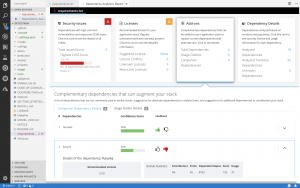
With this release, Dependency Analytics looks to recommend high-quality open source libraries that are complementary to the dependencies included in your application. The machine learning technology of the hosted service collects and analyzes various statistics on GitHub to curate a list of high-quality open source libraries that can be added to the current set of dependencies to augment your application. You can provide your feedback about the add-on libraries by clicking on the “thumbs-up” or “thumbs-down” icons shown for each recommendation. Your feedback is automatically processed to improve the quality of the recommendations.
IDE plugin support
The Dependency Analytics IDE plugin is now available for VS Code, Eclipse Che, and any JetBrains IDE, including IntelliJ and PyCharm.
We will continuously release new updates to our Dependency Analytics solution so you can minimize the delays in delivery of your applications due to last-minute security and licensing related issues.
Stay tuned for further updates; we look forward to your feedback about Dependency Analytics.
[Tut] [Fixed] Access Denied – OpenAI Error Reference Number 1020
4/5 – (1 vote)
OpenAI’s Error Reference Number 1020 is a common issue faced by some users when trying to access services like ChatGPT. This error message indicates that access has been denied, which can be quite frustrating for those looking to utilize the capabilities of OpenAI products.
There are several possible reasons behind this error, including site restrictions, security measures, or issues with cookies and extensions.
To address Error Reference Number 1020 and regain access to OpenAI services, I consider possible causes such as site data and permissions, and disabling problematic extensions or clearing cookies.
Quick fix: Do you use a VPN service? Turn it off, and try without it because the VPN may be the reason for you not being able to access the OpenAI site.
Understanding OpenAI Error Reference Number 1020
Error Reference Number 1020 can affect users while interacting with OpenAI services like ChatGPT, causing access issues and hindering smooth usage. This section will provide insights into Error Code 1020 and ChatGPT Error Code 1020, helping users identify and troubleshoot them effectively. Let’s dive into these two sub-sections.
Error Code 1020
Error Code 1020 occurs when a user’s request cannot reach OpenAI’s servers or establish a secure connection.
This can be due to various reasons, such as network problems, proxy configurations, SSL certificate issues, or firewall rules . It can be caused by Cloudfare as reported in the forum:
Quick Fix Cloudfare Reason: The 1020 error messages are produced by Cloudflare, possibly due to reasons such as using TOR, accessing OpenAI from a blocked domain or country, or using a proxy server or VPN. OpenAI’s current exponential growth may have led to more restrictive Cloudflare settings, potentially causing false flags. Resolving the issue may require further research or even contacting https://help.openai.com/.
To resolve this error, users should check their network settings and ensure they align with OpenAI’s requirements.
ChatGPT Error Code 1020
ChatGPT Error Code 1020, specifically, is an “Access Denied” error that prevents the user from using the ChatGPT service. This error can be caused by using proxies like TOR, misconfigured browser settings, or installed Chrome extensions that conflict with the service .
To combat this issue, users can clear their browser site data and permissions, ensure they’re not using proxies or TOR, and remove conflicting extensions on Chrome.
Causes of Error 1020
In this section, we will discuss the common causes of Error 1020 with OpenAI ChatGPT.
IP Address Restrictions
One of the primary reasons for encountering Error 1020 is being restricted by the IP address. OpenAI might have blocked certain IP addresses due to security concerns or misuse of their services. Furthermore, Cloudflare might be flagging and blocking access from suspicious IPs, causing the error message .
VPN and Proxy Usage
If you’re using a VPN or a proxy server, it might cause Error 1020. Many websites, including OpenAI, sometimes restrict access for VPN users to ensure security and combat potential service abuse . Disabling the VPN or proxy might resolve the issue.
DNS Server Configuration
Another potential cause of Error 1020 could be an improperly configured DNS server. Incorrect DNS settings might lead to connectivity issues and trigger the error. Ensuring that your DNS configurations are accurate and up-to-date is essential for seamless access to ChatGPT .
Error 1020 might also be caused by issues with cookies and browsing data stored by your web browser . Clearing ChatGPT-related cookies and browsing data can often resolve the error. To do this, access your browser settings, search for “OpenAI,” and delete any stored cookies or data associated with it.
TLDR; Error 1020 with OpenAI ChatGPT can be due to IP address restrictions, VPN and proxy usage, DNS server configurations, or cookie and browsing data issues. Identifying and resolving the specific problem can help you regain access to ChatGPT services .
Browser Compatibility
When encountering OpenAI error reference number 1020, checking browser compatibility is a crucial step. The following subsections briefly discuss compatibility adjustments for Google Chrome, Mozilla Firefox, Microsoft Edge, and Apple Safari.
Google Chrome
For optimized access to OpenAI services, make sure your Chrome browser is up-to-date and clear any stored ChatGPT cookies. Disable or remove unwanted extensions which may cause compatibility issues with ChatGPT.
Mozilla Firefox
Firefox users should update their browser to the latest version to reduce compatibility issues. Remove any suspicious or unnecessary add-ons, and clear cache and cookies related to OpenAI.
Microsoft Edge
Ensure that the latest version of Microsoft Edge is installed, and clear browsing data, such as cookies, for OpenAI. Remove potentially problematic extensions to avoid compatibility conflicts.
Apple Safari
For Safari users, it’s essential to keep the browser up-to-date. Clear any stored cookies related to OpenAI services, and disable or remove any extensions that may create compatibility problems.
Troubleshooting Steps
In this section, we will explore various troubleshooting methods to resolve the OpenAI Error Reference Number 1020. Follow the steps mentioned below for each sub-section.
Managing Browsing Data
Clear your browsing data, including cookies and cache, as they might be causing the issue. In most browsers, press Ctrl+Shift+Del to access the clearing options. Be sure to select the appropriate time range and click on the “Clear data” button. After completing this process, refresh the page and check if the error has been resolved.
Adjusting Browser Extensions and Permissions
Browser extensions and add-ons might interfere with your access to the ChatGPT service. To eliminate this possibility, disable your browser extensions one by one and try reloading the page. If the error persists, check your browser’s site data and permissions for OpenAI, and update them as necessary by navigating to the settings menu. Learn more from this resource on how to fix ChatGPT Error Code 1020.
Configuring DNS Settings
Sometimes, DNS settings can cause connectivity issues. To resolve this, change your DNS server settings to a reliable alternative, such as Google’s public DNS addresses (8.8.8.8 and 8.8.4.4), by accessing the “Properties” of your internet connection in the Control Panel. Input the new DNS addresses and save the changes. Reboot your device and check if the error is still present.
Resetting Network Connections
Lastly, consider resetting your router and Wi-Fi network. Unplug your router from power for at least 30 seconds before plugging it back in. Afterward, reconnect your devices to the Wi-Fi network and try accessing the site again. If the issue persists, you may need to look into other network-related settings or reach out to OpenAI support for further assistance.
Access Denied Scenarios
Daily Limit Usage
If you encounter the Error 1020 with OpenAI’s ChatGPT, it might be due to the daily limit usage. Each user has a certain quota to stay within, preventing system overloads and maintaining smooth functionality. When the daily limit is exceeded, access to the service is temporarily halted until the next day.
To avoid this issue, monitor your usage and stay within the allocated limits. Upgrading to a higher tier plan could also provide more resources and increase your daily limit, allowing you to avoid the Error 1020 caused by usage restrictions.
Another factor contributing to Error 1020 could be restricted permissions. These occur when a user doesn’t have the necessary access rights or their location is blocked for security purposes. Various factors, such as using a VPN or being flagged by Cloudflare, can lead to restricted access. To resolve this problem, you can try:
Disabling any active VPN or proxy services.
Removing suspicious Chrome extensions that might cause conflicts with ChatGPT.
Remember, keeping your system and browser settings up-to-date and avoiding actions that may trigger security measures can help prevent Error 1020 and maintain seamless access to OpenAI’s ChatGPT.
Connection Considerations
Internet Connection Stability
A stable and fast internet connection is crucial for smooth interaction with ChatGPT. If you are experiencing error code 1020, it might be due to an unstable connection . Make sure to check and test your connection, and if needed, switch to a wired connection to improve stability.
Checking Wi-Fi Network
If you are connected to a Wi-Fi network , poor signal or a congested network could be causing issues with ChatGPT. Verify if you have a strong Wi-Fi signal and if possible, move closer to the router, or consider reducing the number of devices connected to your network to improve performance. Additionally, check your proxy configuration to ensure compatibility with OpenAI services.
Remember, a well-functioning internet connection is essential for seamless access to ChatGPT. Always be mindful of your connectivity when using the service.
For every $10 spent on Steam Store you will earn one Summer In The City Trading Card.
Tips: Use SteamDB extension to Auto-discover queue to get card quickly. Check https://steamdb.info/sales/ for good deals. Craft your other badges you have to get one event trading card
If you are on our discord server, and If you have Flash Giveaways role you will be mentioned everyday in ?freebies-talk channel about new free sticker & card.




 Quick fix: Do you use a VPN service? Turn it off, and try without it because the VPN may be the reason for you not being able to access the OpenAI site.
 . It can be caused by Cloudfare as reported in the
 Quick Fix Cloudfare Reason: The 1020 error messages are produced by Cloudflare, possibly due to reasons such as using TOR, accessing OpenAI from a blocked domain or country, or using a proxy server or VPN. OpenAI’s current exponential growth may have led to more restrictive Cloudflare settings, potentially causing false flags. Resolving the issue may require further research or even contacting
  .
. .
. . Disabling the VPN or proxy might resolve the issue.
 . Clearing ChatGPT-related cookies and browsing data can often resolve the error. To do this, access your browser settings, search for “OpenAI,” and delete any stored cookies or data associated with it.
 .
.


 . Make sure to check and test your connection, and if needed, switch to a wired connection to improve stability.
 , poor signal or a congested network could be causing issues with ChatGPT. Verify if you have a strong Wi-Fi signal and if possible, move closer to the router, or consider reducing the number of devices connected to your network to improve performance. Additionally, check


