Easy Way to Update a Python Package with Pip Upgrade
5/5 – (1 vote)
If you’ve ever found yourself in a situation where you need to update or upgrade a package using Python’s pip, but just can’t figure out how, don’t worry! You’re not alone.
The Correct Command to Upgrade a Package
To upgrade a package with Python’s pip, you can use the install command along with the --upgrade or -U flag. Open a command prompt or terminal and run the following command: pip install my_package -U.
pip install --upgrade my_package
or
pip install -U my_package
Replace my_package with the name of the package or module you want to upgrade. This command will automatically check for the latest version of the package and upgrade it if a newer version is available. If the package is already at its latest version, the command will do nothing.
Ensure you have the appropriate permissions (e.g., administrator or sudo access) if you’re upgrading a package installed globally on your system.
Using Sudo and –user Flag
When upgrading a package installed globally on your system, ensure you have the appropriate permissions, such as an administrator or sudo access. However, using sudo is considered unsafe, so avoid it if possible.
If you don’t have admin access, consider using the --user flag to install the package only for the current user:
pip install <package_name> --upgrade --user
Updating Pip Itself
Though the original question focused on updating specific packages, some users might want to update pip. To do that, use the following command:
For Python 3.4+:
sudo pip3 install pip --upgrade
For Python 2.7:
sudo pip install pip --upgrade
Extra Tip: Updating All Packages
If you’re looking to update all your installed packages at once, you can use the following one-liner:
for i in $(pip list -o | awk 'NR > 2 {print $1}'); do sudo pip install -U $i; done
This will update all outdated packages, but remember that it will require root access.
And there you have it! You now know how to update or upgrade a package using Python’s pip. Happy coding!
Make sure to check out the free Finxter cheat sheet collection (with OpenAI and basic Python cheat sheets):
Posted by: xSicKxBot - 03-18-2023, 09:28 AM - Forum: Python
- No Replies
How I Designed an AI Blog Writing Tool with Streamlit
5/5 – (1 vote)
Barely four months since OpenAI unleashed ChatGPT, a human-behavior-mimicking chatbot that took the community by storm, they recently announced its successor, GPT-4. This development will continue to disrupt the global market and, unfortunately, take the jobs of millions of people.
While it’s a welcome development for ChatGPT users looking to explore the capabilities of AI in their respective fields of human endeavor, the bad news is that ChatGPT-4 is not for free. However, we are yet to see if it could be freely available following Microsoft’s announcement that its recently introduced Bing AI is operating on GPT-4.
Hence, if you are unwilling to commit to a $20 monthly subscription, or you feel ChatGPT-3 is working flawlessly for you, you may be better off with ChatGPT-3. What is more, ChatGPT-4 is no different than its previous GPT model if it’s about taking information from your question and giving you an answer it deems perfect.
The only difference is that it is more accurate and creative, plus the special graphic features that will turn your text into pictures and videos.
The Purpose of This Tutorial
You will benefit from this tutorial if you have not yet learned how to implement the ChatGPT model using Streamlit.
As a Python developer, you have undoubtedly learned to implement ChatGPT in your Python script and have it running in your terminal. So this tutorial will be nothing new to you except for a few things.
Overall, the purpose of this tutorial is threefold:
To improve your Python skills.
To demonstrate how to implement the ChatGPT model using Streamlit.
To show you how to use the model to write unique blog articles.
Writing a blog article involves a series of steps. First, you have to brainstorm topic ideas based on a selected niche and choose the one you prefer. Then, you outline the sections. In each section, you generate content corresponding to the sections and the topic.
We will try using ChatGPT to automate these tasks. Note that this article is created with ChatGPT-3 in mind. Of course, the principle can be applied to the GPT-4 model.
I usually start with a main() function that will run as soon as we open the app. But in this tutorial, something came before the function.
import openai

import streamlit as st API_KEY = st.sidebar.text_input('Enter your API key')

openai.api_key = API_KEY
We made provision for our users to use their API key given that we now have a new model with a paid plan.
Not everyone will let others use their paid plan for free. If you have no problem with that, then you are free to include your key in the script. Now comes the main() function.
def main(): st.sidebar.header('AI Blog Writing Tool') st.sidebar.info('An AI tool that can generate blog content') st.sidebar.info('Start with the first option\n before you proceed to the next.') op = st.sidebar.selectbox('Steps', ['topics', 'section', 'content']) if op == 'topics': topics() elif op == 'section': section() else: content()
Everything is self-explanatory. Each step you select will take you to the function that will be executed.
So, let’s imagine we are writing a blog article with Python programming being the selected niche. We narrow down the niche to data science.
Let’s see if the model can generate blog topics for us. To do so we selected the topic option, triggering a callback function.
def topics(): st.header('AI Blog Writing Tool') st.info('To generate blog topic, please follow the pattern given below:') prompt = st.text_area('Write your words', height=50, value='Generate blog topic on data science with Python') if st.button('Send'): st.text(BlogTopics(prompt))
The prompt is the question we will feed to the model. It will be sent to the BlogTopics() function. What we feed to the model will help it know what to give as an answer. In the st.text_area() I gave a sample you can use based on your selected niche.
Notice the model that was used. In one Django application, I used the text-davinci-003 model. But in this one, we are using the davinci-instruct-beta-v3 model. It’s proven to be an ideal one for generating unique blog content.
The max_tokens is the number of characters we want the model to generate. Blog topics shouldn’t be more than that. For a detailed explanation of the arguments, check this article.
Let’s now run the app on Streamlit to see the results.
Wow! Can you see 9 blog topic ideas the ChatGPT model has generated for us? That’s interesting. So, let’s select number 2, How to use Pandas for data analysis. This is now our topic.
The next step is sections. When selected, it calls the callback function.
def section(): st.header('AI Blog Writing Tool') st.info('To generate blog section, please follow the pattern given below:') prompt = st.text_area('Write your words', height=50, value='Write blog sections\n\nBlog topic: ') if st.button('Send'): st.text(BlogSections(prompt))
Notice what I suggested in the st.text_area() function. You can follow the same pattern. As usual, another function gets executed when the button is pressed.
This is similar to the BlogTopics() function. So let’s run it and see the results.
Please note that the results might be different from yours. At times, you may have to run it several times to get what you want. I did that and got ‘Introduction’ as the first section.
Based on the sections, you select one and feed it to the model. Here is the function called when the last step of the main() function is selected.
def content(): st.header('AI Blog Writing Tool') st.info('To generate blog content, please follow the pattern given below:') prompt = st.text_area('Write your words', height=50, value="Expand the blog section in a professional tone \n\nBlog Topic:\n\nSection:") if st.button('Send'): st.text(BlogContent(prompt))
And here is the BlogContent() function. The only difference is the max_tokens.
Can you see a 400 max_tokens of text have been generated based on the introductory section? The key lies in the prompt you feed to the model. Do the same to all your sections and before long, you will have a unique blog article professionally written by ChatGPT.
Don’t forget to copy each of the text generated.
Conclusion
We have taken advantage of advancements in technology, the latest being the invention of ChatGPT, an AI model that mimics human behavior, to write a unique blog article.
You now have at your disposal an AI writing tool you can use for all your blog articles. Check my GitHub page for the full code. The app is already running on Streamlit Cloud. Make sure you check it out. Enjoy your day.
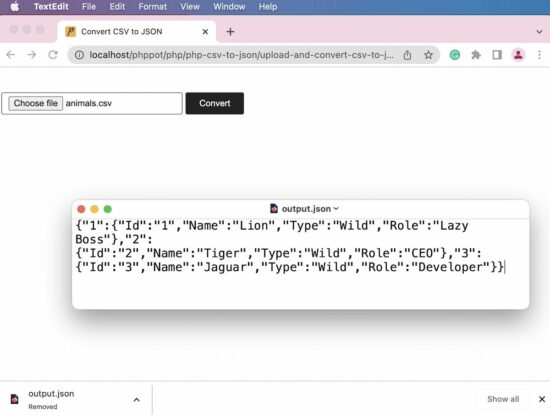
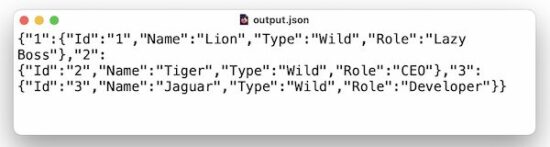
JSON format is a widely used format while working with API development. Most of the existing API responses are in JSON format.
Converting CSV content into a JSON format is simple in PHP. In this article, we will see different methods of achieving this conversion.
Quick example
<?php $csvFileContent= file_get_contents("animals.csv");

// Converts the CSV file content into line array $csvLineArray = explode("\n", $csvFileContent);

// Forms row results in an array format

$result = array_map("str_getcsv", $csvLineArray);

$jsonObject = json_encode($result);

print_r($jsonObject);

?>
The above quick example in PHP converts the CSV file content into JSON with few lines of code.
First, it reads the .csv file content using the PHP file_get_contents() function.
It explodes the CSV row by the new line (\n) escape sequence.
Then, it iterates the line array and reads the line data of the CSV row.
Finally, the resultant CSV row array is converted to JSON using the json_encode() function.
In step 3, the iteration happens with a single line of code. This line maps the array to call PHP str_getcsv to parse and convert the CSV lines into an array.
1 Billion Coders – Prompting Is The New Programming
5/5 – (1 vote)
Introduction
Prompting and GPT-4 Main argument: Prompting is programming for the masses
The recent release of GPT-4 has taken the tech world by storm, providing powerful AI-driven solutions that transform how we work and interact with technology.
One such groundbreaking innovation is “Prompting”, a term that refers to AI-assisted code completion and generation. As more people become familiar with this concept, it’s becoming increasingly evident that Prompting is not just a novel feature, but a game-changing revolution in programming.
In this article, we will explore the idea that Prompting is, in fact, programming for the masses.
By examining the evolution of programming technologies over the years and the impact of Prompting on the programming landscape, we will demonstrate how this new paradigm democratizes programming and opens up new opportunities for people from all walks of life.
So, without further ado, let’s dive into the world of Prompting and discover how it reshapes the future of programming.
Evolution of Programming Technologies
Evolution of programming technologies, from punch cards to AI-assisted prompting Each abstraction layer 10x’d the number of programmers and broadened the spectrum of activities considered programming
To fully understand the significance of Prompting and its role as programming for the masses, it’s essential to take a step back and examine the evolution of programming technologies over the years.
I’ll give you a completely personal view on the history of programming language evolution going from manipulating “0”s and “1”s towards natural language programming:
Since the early days of computing, several key milestones have been in developing programming languages and tools.
Each new abstraction layer has made programming more accessible, enabling more people to participate in the field and broadening the range of activities that can be considered programming.
Here’s my rough estimate of the number of programmers in each “age”:
Skill
Approximate Number of People
Punch Cards
10,000
Assembly
100,000
C Programming
1,000,000
C++ or Java
10,000,000
Python
100,000,000
Automatically Generate Code
200,000,000
Prompting (GPT-based coding)
2,000,000,000
The journey began in the 1940s and 1960s with punch cards, which allowed programmers to encode instructions for early computers. Assembler languages soon followed, providing mnemonic codes that represented machine instructions, making programming more human-readable.
The 1970s and 1980s saw the introduction of low-level C, which allowed for greater abstraction and more flexibility in programming. Higher-level languages like C++ and Java emerged in the 1980s and 2000s, further simplifying the programming process and opening up new possibilities for software development.
With its intuitive and beginner-friendly syntax, Python came into the picture in the 2000s and 2010s, making programming even more accessible to a wider audience.
The introduction of smart IDEs and code generation tools in the 2010s and 2020s further streamlined the programming process, allowing developers to work more efficiently and effectively.
With the advent of Prompting in the 2020s, we’re witnessing the next major leap in the evolution of programming technologies. By leveraging AI-driven code completion and generation, Prompting is breaking down barriers and enabling even non-programmers to participate in creating and customizing software applications.
This new layer of abstraction is set to change the programming landscape profoundly, expanding the reach of programming like never before.
The total addressable market (TAM) of programming is not in the millions, tens of millions, or even hundreds of millions. Prompting has paved the road for the billions!
Comparing Prompting to Googling
Prompting vs Googling as essential skills in the tech world Prompting goes beyond just being a skill to learn, but a paradigm shift in programming
As Prompting gains traction, many in the tech industry are drawing parallels between it and Googling, the now-ubiquitous skill of searching for information online.
Indeed, both skills have become increasingly important in our digital age, and learning to use them effectively can greatly enhance one’s ability to solve problems, access knowledge, and innovate. However, likening Prompting to Googling does not fully capture the transformative power of this new technology.
While Googling is an essential skill that enables users to find answers to questions and access a wealth of information at their fingertips, Prompting represents a more profound shift in the programming world.
Rather than merely being another skill to learn, Prompting is a paradigm shift that transforms how we approach programming. It effectively democratizes the process, allowing individuals with little or no programming experience to create, modify, and deploy software applications.
Everybody with an idea can now spin up an app easily and effectively. More importantly, everybody can create an app unique to their needs.
In essence, Prompting does for programming what Googling does for information retrieval. It simplifies and streamlines the process, making it more accessible and intuitive for a broader audience. This, in turn, fosters innovation and creativity, as more people can engage in programming and contribute their ideas to the world of technology.
By breaking down barriers and empowering individuals from all walks of life, Prompting is redefining the nature of programming and expanding its reach to encompass a greater range of activities and participants.
The Impact of Prompting on the Programming Landscape
Democratization of programming and the expansion of the total addressable market (TAM) for programmers Prompting lowers the barrier to entry for programming, allowing more people to participate and innovate
As Prompting continues to revolutionize the way we approach programming, its impact on the programming landscape is becoming increasingly evident.
One of the most significant changes brought about by Prompting is the democratization of programming, which has led to an expansion of the total addressable market (TAM) for programmers. With the introduction of this new layer of abstraction, a wider range of individuals can now participate in programming, regardless of their background or prior experience.
Prompting lowers the barrier to entry for programming by simplifying complex tasks and providing AI-driven code completion and generation.
For example, the following gives me a Python script to calculate the ROI of investing in broad index funds:
This enables even non-programmers to create software applications with relative ease, allowing them to bring their ideas to life without being limited by a lack of technical expertise. As a result, we can expect to see a surge of new innovations, as more people gain the ability to contribute their unique perspectives and skills to the world of technology.
But this is not all – instead of writing a Python program that does it, you can simply ask ChatGPT to do it!
Prompt: Give me a table of investment results when investing $10,000 for 40 years at a 9% annual ROI!
So not only has traditional programming become easier and more accessible, it is often not needed because ChatGPT can do the actual work.
The rise of Prompting also has implications for education and workforce development. As programming becomes more accessible to the masses, the demand for coding education will likely increase, with more people seeking to learn programming skills to stay competitive in the job market.
This could lead to a shift in the way programming is taught, with a greater emphasis on using AI-driven tools like Prompting, alongside traditional programming languages and techniques.
Furthermore, the growing prevalence of Prompting may also change the way companies hire and develop talent. With programming becoming more accessible, companies may place less emphasis on formal coding education and experience, instead focusing on an individual’s ability to leverage AI-assisted tools like Prompting to solve problems and innovate.
This could lead to a more diverse and inclusive tech industry, as individuals from various backgrounds can contribute their talents and ideas.
The Future of Prompting and its Implications
Future developments and improvements in Prompting technology Potential impact on education, job markets, and the tech industry
As Prompting technology continues to evolve and improve, we can expect its impact on the programming landscape to become even more profound.
Future developments in AI-driven code completion and generation tools may lead to even greater levels of abstraction, further simplifying the programming process and enabling more people to engage with technology in new and exciting ways.
One potential growth area is integrating Prompting tools with other technologies, such as
augmented and virtual reality,
IoT devices,
spreadsheets,
games, and
voice assistants.
This could give rise to new forms of interaction and collaboration, enabling people to create and modify software applications in more intuitive and immersive ways.
With Microsoft’s ChatGPT Bing integration, we already see how massive billion-dollar industries such as search engines now have “ChatGPT at the heart”.
Another possibility is the development of more advanced and specialized Prompting tools tailored to specific industries or use cases.
This could lead to greater customization and personalization in software development, as individuals can leverage AI-driven tools to create bespoke applications that cater to their unique needs and preferences.
You can now start a massive business from your garage, leveraging infinite artificial intelligence to create insane value.
As Prompting becomes increasingly prevalent, it may also drive changes in how programming languages and frameworks are designed. Language creators may focus on developing more AI-friendly languages, allowing seamless integration with Prompting tools and enabling developers to work more efficiently and effectively.
Ultimately, the rise of Prompting holds the potential to reshape the entire tech industry, from education and workforce development to how we design and interact with technology. By democratizing programming and making it accessible to a wider audience, Prompting is ushering in a new era of innovation and creativity, empowering individuals from all walks of life to contribute their ideas and talents to the world of technology.
Getting Started with Prompting
7 Effective Prompting Tricks for ChatGPT Explore Prompting and leverage it to enhance their coding skills and productivity
As the programming world continues to evolve, individuals interested in technology must keep up with the latest advancements and learn how to harness the power of AI-driven tools like Prompting.
To help you get started, we’d like to introduce a comprehensive blog tutorial that can guide you through the process:
For your convenience, I summarized the article using simple prompting:
By learning to leverage the power of AI-assisted code completion and generation, you’ll be well on your way to enhancing your coding skills and boosting your productivity.
I encourage you to explore the world of Prompting and experiment with how it can help you create, modify, and deploy software applications. As you familiarize yourself with this cutting-edge technology, you’ll be well-equipped to stay ahead of the curve and make your mark in the rapidly evolving programming landscape.
Conclusion
As you’ve explored throughout this article, Prompting represents a fundamental paradigm shift in the programming landscape, ushering in a new era of programming for the masses.
By leveraging AI-driven code completion and generation tools, Prompting is democratizing programming, making it more accessible and intuitive for a wider range of individuals.
You’ve learned how the evolution of programming technologies has paved the way for this paradigm shift, with each new layer of abstraction increasing the number of programmers and broadening the scope of what can be considered programming. The rise of Prompting is set to further expand the reach of programming, empowering more people to engage with technology and contribute their unique ideas and talents.
As you embark on your journey into the world of Prompting, remember that this technology holds the potential to reshape not only the way you work but also the entire tech industry. By embracing the change and learning to harness the power of AI-driven tools like Prompting, you’ll be well-positioned to thrive in this new era of programming for the masses.
Action! So, go forth, explore the potential of Prompting, and become part of the next revolution in programming. The future is bright, and the possibilities are endless!
Definitely download the prompting cheat sheet I created here:
Do you want to connect a remote server from the phpMyAdmin installed on a local or test server? This article gives the steps needed to achieve it.
There are many database clients, most of which support connecting a database server. But, working with phpMyAdmin to connect to a remote database server is heavenly easier than with other clients.
Configure remote server details in the phpMyAdmin application config file
A configuration file config.inc.php is there for the phpMyAdmin application. Open that file and add the below settings into it.
This setting is to add the remote database details, host, username, and password. The database port is optional if it is the default.
Before setting the database details, it increments the existing config array index. We can add as many configurations as following the current batch of settings.
$i++;
$cfg['Servers'][$i]['host'] = 'DATABASE_HOST:PORT';//set the database hostname.
$cfg['Servers'][$i]['user'] = 'DATABASE_USER';// set the remote database user
$cfg['Servers'][$i]['password'] = 'DATABASE_PASSWORD';// database password
$cfg['Servers'][$i]['auth_type'] = 'config';
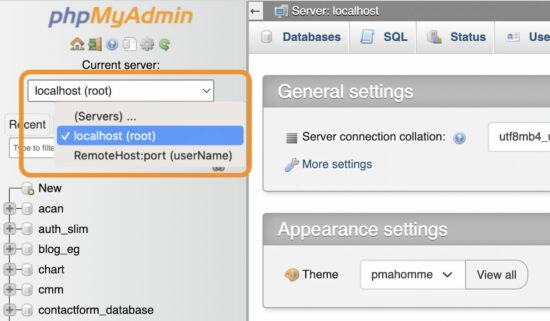
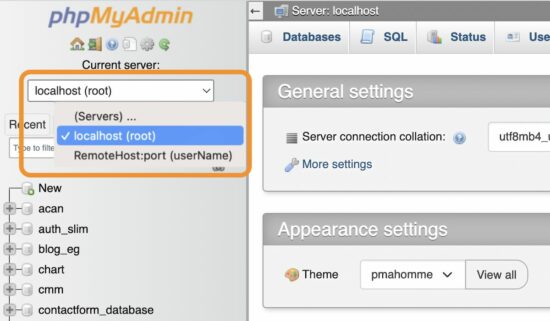
After adding these details, the phpMyAdmin application lists the configured database hostnames.
The list is a dropdown of selectable database hosts that appears above the left navigation menu.
The below figure shows the dropdown options of the current localhost and the RemoteHost server.
It allows navigation between these two database servers to manage their assets.
Note: The RemoteHost:port is a test configuration data. Replace it with the remote database IP and port to be connected.
These guidelines assume that you have the PHP and MySQL environment with the phpMyAdmin application installed.
If you newly create the environment or install the phpMyAdmin, ensure the required privileges and security measures. We have seen steps to install phpMyAdmin on a windows machine via the WAMP package installer.
Security measures needed for the machine connecting the remote database
(1) Use a Linux environment
Before connecting the remote database via phpMyAdmin, we must be confident about the security.
Linux-based machines are safe for proceeding with the remote connection.
If you are using a Windows machine, there are settings to enable WSL to let it be secure while working with the remote database servers.
(2) Let login configuration empty
When setup the remote database server configuration, let the username and password empty.
Set only the remote database server IP address to show in the phpMyAdmin web interface.
Choosing the remote server to connect will redirect to the phpMyAdmin login panel to enter the details.
Directly access the remote phpMyAdmin web application URL
If you know the URL of the phpMyAdmin web application installed on the remote server, we can visit and land on its login page.
The login page prompts the MySQL database host, username, and password. Entering and submitting these details allows access to the remote database.
Thus, we have seen the possible ways of connecting the remote database server using the phpMyAdmin application.
SURVIVAL IS JUST THE BEGINNING...Resident Evil 4 is a remake of the 2005 original Resident Evil 4. Reimagined for 2023 to bring state-of-the-art survival horror. Resident Evil 4 preserves the essence of the original game, while introducing modernized gameplay, a reimagined storyline, and vividly detailed graphics to make this the latest survival horror game where life and death, terror and catharsis intersect.
STORY:
6 years have passed since the biological disaster in Raccoon City. Leon S. Kennedy, one of the survivors of the incident,
has been recruited as an agent reporting directly to the president of the United States. With the experience of multiple missions on his back, Leon is sent to rescue the president's kidnapped daughter. He tracks her to a secluded European village, where there is something terribly wrong with the villagers. And the curtain rises on this story of daring rescue and grueling horror.
ChatGPT is a powerful AI conversation model that can assist you in generating various types of text content. But to get the best results, you need to give clear and specific prompts.
Here are 7 prompting strategies that can help you get the most out of ChatGPT:
Trick #1 – Define ChatGPT’s Role
ChatGPT can play different roles, such as a tour guide, philosopher, or translator. To get the desired result, give ChatGPT a prompt that specifies the role it needs to play.
Example:
"I want you to act as a tour guide. I’ll write you my location, and you’ll suggest a place for me to visit near my location."
I also created a fun way to role-play a mastermind group with your personal heroes. You can check it out in this article — I promise it’ll be worth your time:
Trick #2 -Define Target Group and Communication Channel
To avoid tedious rewriting, give ChatGPT as much information as possible about the target group and the communication channel. Tell the AI how to address the reader and for which channel the text is intended.
Example:
"I need a script for a TikTok about the opportunities and risks of ChatGPT. Use short sentences. Address the audience directly. Use gender-neutral language."
Trick #3 -Chained Prompting
Break up complex tasks into several intermediate steps, hoping the AI will generate a more concrete, customized, and better result.
Example:
"Write an article about ChatGPT. First give me the outline, which consists of a headline, a teaser, and several subheadings.... (possibly wait for generated output) ...Now write five key messages for each subheading. Add five keywords to the key messages for each subheading."
I think this is one of the best hacks of prompt engineering. Trial. Error. Iteration. You’ll often get your desired output quickly and efficiently and get better at it in no time!
Trick #4 -Create Content Variations
Prepare the same content for different channels such as LinkedIn, Twitter, or Facebook. The text should be adapted to the tone and formatting of the target channel.
Example:
"Formulate the generated text as a LinkedIn post. Keep in mind that the maximum length is 3000 characters. Structure the main points of the text into a bulleted list. Start with an exciting teaser sentence and end with a call to action for more engagement."
Trick #5 -Format Output
ChatGPT replies in plain text by default, but it can handle formatting in the Markdown markup language, such as headings, bold or italic text, ordered or unordered lists, and even tables.
Example:
"I need a blog post about ChatGPT. Write a headline, a teaser, a subtitle, and a paragraph. Format everything in Markdown."
Trick #6 -Generate Prompt Instructions
Instruct ChatGPT to take on a specific role and ask itself the questions it needs to answer in the next prompts.
Example:
"You are a robot for creating prompts. You need to gather information about the user’s goals, examples of preferred output, and any other relevant contextual information. The prompt should contain all the necessary information provided to you. Ask the user more questions until you are sure you can create an optimal prompt."
Trick #7 -Extract Structured From Unstructured Data
Extract structured data from unstructured data by specifying a desired output format (e.g., CSV) with one example output. This can help you in data preprocessing.
Example:
Extract house pricing data from the following text. Text: """
A 100 square meter house I recently visited in Florida costs $1 million dollars. I was surprised as my own 90 square meter house in Florida costs only $100 thousands USD. Compare this to the house of my friend ($500000 USD for 110 square meter). """ Desired output format: """
House 1 | $1,000,000 | 100 sqm """
Conclusion
ChatGPT is a versatile, mind-blowing tool that can assist you in generating various types of text content. However, you need to give clear and specific prompts to get the best results.
These 7 prompting strategies can help you get the most out of ChatGPT and produce high-quality content.


 The Correct Command to Upgrade a Package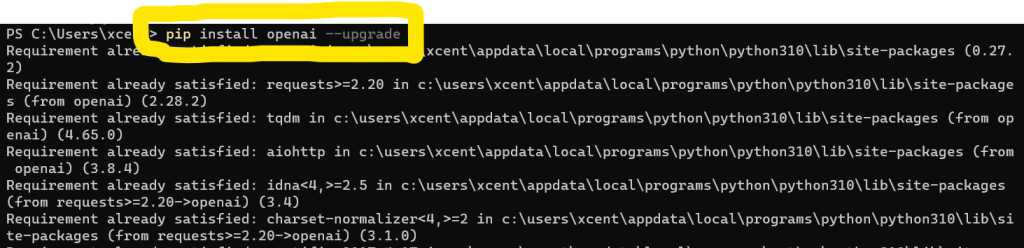
 Using Sudo and –user Flag
 Updating Pip Itself
 Extra Tip: Updating All Packages
 And there you have it! You now know how to update or upgrade a package using Python’s pip. Happy coding!




 Recommended:




 Main argument: Prompting is programming for the masses

 Evolution of programming technologies, from punch cards to AI-assisted prompting
 Prompting vs Googling as essential skills in the tech world
 Prompting goes beyond just being a skill to learn, but a paradigm shift in programming
 Democratization of programming and the expansion of the total addressable market (TAM) for programmers
 Prompting lowers the barrier to entry for programming, allowing more people to participate and innovate


 Future developments and improvements in Prompting technology
 Potential impact on education, job markets, and the tech industry

 Explore Prompting and leverage it to enhance their coding skills and productivity