The Love Ball Joins The Pokemon Poke Ball Replica Line Today
We're a little over a month away from Valentine's Day, but The Pokemon Company is feeling the love a little early, as it announces the Love Ball from Pokemon Gold and Silver will be the latest in the replica Poke Ball line made in partnership with The Wand Company.
The Love Ball replica, like the other Poke Balls in the line, is a die-cast metal model which measures around three inches in diameter, and it can be displayed either in a display case or separately using an included display ring. The model also has motion-sensing capabilities, which will light up the front of the ball whenever it is touched or the motion sensing is activated.
Gallery
This is the 11th different Poke Ball design to be featured in the product line, with other available models including the Great Ball, Ultra Ball, Dusk Ball, Quick Ball, and the classic Poke Ball design. Three more models will be released throughout 2023, including the Dive Ball, Net Ball, and Luxury Ball.
Vengeful Guardian: Moonrider is a side-scrolling action platformer that channels the golden age of classic 16-bit action games in a full-throttle quest for revenge. REVENGE OF THE MOONRIDER. In the oppressed world of Vengeful Guardian: Moonrider, humanity finds an unlikely hero. After building an army of super soldiers as weapons of war, the authoritarians unwittingly seal their own fates by bringing online the ninja warrior known as Moonrider. Conceived as a tool to preserve the totalitarian state, the Moonrider instead rejects its intended purpose and wages a relentless battle for vengeance against its creators and fellow super soldiers.
GEAR UP AND PREPARE TO BATTLE YOUR CREATORS
The design of Vengeful Guardian: Moonrider puts the best classic action-game elements in the laser-precise sights of its starring ninja, ensuring snappy, responsive combat that’s supremely challenging.
Powerful modifier chips are hidden and guarded throughout the adventure, allowing you to customize the Moonrider’s fighting style while gaining killer advantages and abilities.
Posted by: xSicKxBot - 01-11-2023, 01:00 AM - Forum: Lounge
- No Replies
Ari Aster's Beau Is Afraid's First Trailer Is A Surrealist Nightmare
Ari Aster made a name for himself with back-to-back instant horror classics Hereditary and Midsommar, and now his long-awaited follow-up has arrived. Originally titled Disappointment Blvd, Beau Is Afraid is a decades-spanning surrealist horror film set in an alternate present.
The film stars Joaquin Phoenix as the titular character, who is a pleasant but anxious man. When his overbearing mother dies, Beau makes a journey home that involves some wild supernatural threats and maybe divine intervention.
Initially scheduled for release at the end of 2022, Beau Is Afraid is ready to leave its mark on horror fans, with a release date of April 21, 2023.
Lucy is afraid of the forest, just like any other child: every night, the echoing roars rob her of her sleep. Not even her dreams are a safe place where she could play.
People disappearing is nothing uncommon in the village, but this time, Lucy is old enough to investigate on her own. Or so she thinks.
Children of Silentown is a point & click adventure game telling a mysterious and endearing story. Explore the town and its dangerous surroundings, meet its quirky inhabitants, solve puzzles and master minigames.
Accompany Lucy on her adventure to get to the bottom of what is haunting the strange Silentown... if you dare.
“Machine Learning is about finding patterns in the data” explains Joel Lucas, a data scientist at TailTarget. Joel specializes in Deep Learning, a sub category of Machine Learning that includes defining and modeling data to get the right answers. He shows a demo where the program was trained to writ...
Posted by: xSicKxBot - 01-09-2023, 07:54 AM - Forum: Python
- No Replies
Block Websites Using Python in Windows
Rate this post
Recently I came up with an idea to block certain websites because I didn’t want my little brother to surf certain sites while he was using my laptop. Being a smart kid, he knew ways of uninstalling chrome extensions that I used to block websites. That is when I came up with the idea of creating my own website blocker script. He wouldn’t have any clue what actually happened in the backend.
Project Description
Thus, in this project, we are going to create a website blocker with the help of Python. Our script will bring up a window where we can enter the name of the websites that we want to block and then we can use the block button in the window to block those websites. We will also create another script that will unblock the websites that we previously blocked. The unblock script will be a simple command line script that will help you unblock the previously blocked websites.
Note that we will be working with the hosts file of our system to block and unblock the websites. Simply put, the hosts file is a system file which has the capability to override DNS and redirect URLs or IP addresses to different locations. In our case, we will simply redirect the websites to be blocked to our local ip address, i.e. ‘127.0.0.1’ .
So, without further ado let us dive into our fun project.
Step 1: Import the Necessary Libraries
All we need is the Tkinter Module to create our GUI blocker application. You can install Tkinter using the pip installer on your terminal:
Tk() allows you to create an empty GUI window where you can add labels and buttons,
The geometry() function will allow you to specify a width and height of the window.
resizable(0,0) allows you to set a fixed size for the window.
The title() function allows you to set the title of the window.
The Label() widget allows you to display more lines of text which can only be seen but cannot be modified by the user.
Let’s explore the different parameters that I used in the Label widget.
root – This is the name which use to refer our window.
text – Used to specify the text that we want to display on the label.
font – This determines the type of font our label text will appear in.
pack – Used to organize the widget in a block.
Text() is used to create a widget for multi-line text areas. Let’s understand some of the parameters used within Text() –
wrap = WORD allows you to break a line after the occurrence of the last word.
padx allows you to specify the padding around the text. This means, it allows you to put an extra bit of space on right and left ends of the text widget.
pady allows you to specify the padding on top and bottom side of the text widget.
Step 3: Define the Host Address and IP Address
Since we want to block the websites on our system, hence you need to add them to the system host file. To do so, you will need to specify the host address and the IP address.
Now, we need to create the function that will allow us to block a certain website. Therefore, as soon as you feed in the website name and click on the block button on the application, the website will be blocked immediately. If the website is already present within the host file then the application window will display a message that the website is already blocked.
Code:
def Blocker(): website_lists = Websites.get(1.0, END) Website = list(website_lists.split(",")) with open(host_path, 'r+') as host_file: file_content = host_file.read() for website in Website: if website in file_content: Label(root, text='Already Blocked', font='arial 12 bold').place(x=200, y=200) pass else: host_file.write(ip_address + " " + website + '\n') Label(root, text=" Blocked ", font='arial 12 bold').place(x=230, y=200)
Explanation:
website_lists will store all the websites entered to be blocked by the user. Note that the get function used will allow you to fetch the websites entered within the text widget of the application.
Open up the system host file in the read and write mode (r+).
We then check the contents of the host file and if a website is already present within the file then we ask the widget to display a message -” Already Blocked!”. Otherwise, we simply go ahead and the website to the host file and then display the message – “Blocked”.
That’s it. All that remains to be done is to create a block button for our application.
Step 5: Creating the Block Button
We need a button that triggers the Blocker function as soon as it s pressed. Thus, our next step is to create the block button and attach the Blocker function to this button.
Button() function allows you to create a button on the application.
The command parameter is used to call the Blocker function as soon as the button is clicked by the user.
The activebackground parameter is used to set a background color for the button when it is clicked.
Note that we have already discussed all the other parameters used within the Button function previously in step 2.
The place function allows you to align or place the button at a particular position in the application.
root.mainloop() is the Tkinter method that tells Python to run the Tkinter event loop. The mainloop method listens to events like button clicks or keypresses, and halts any code that comes after it from executing until you close the window where you called the method.
Putting It All Together
Woohoo!!! We have successfully created our “Website Blocker” application. Finally, when you put everything together, this is how the complete script looks like –
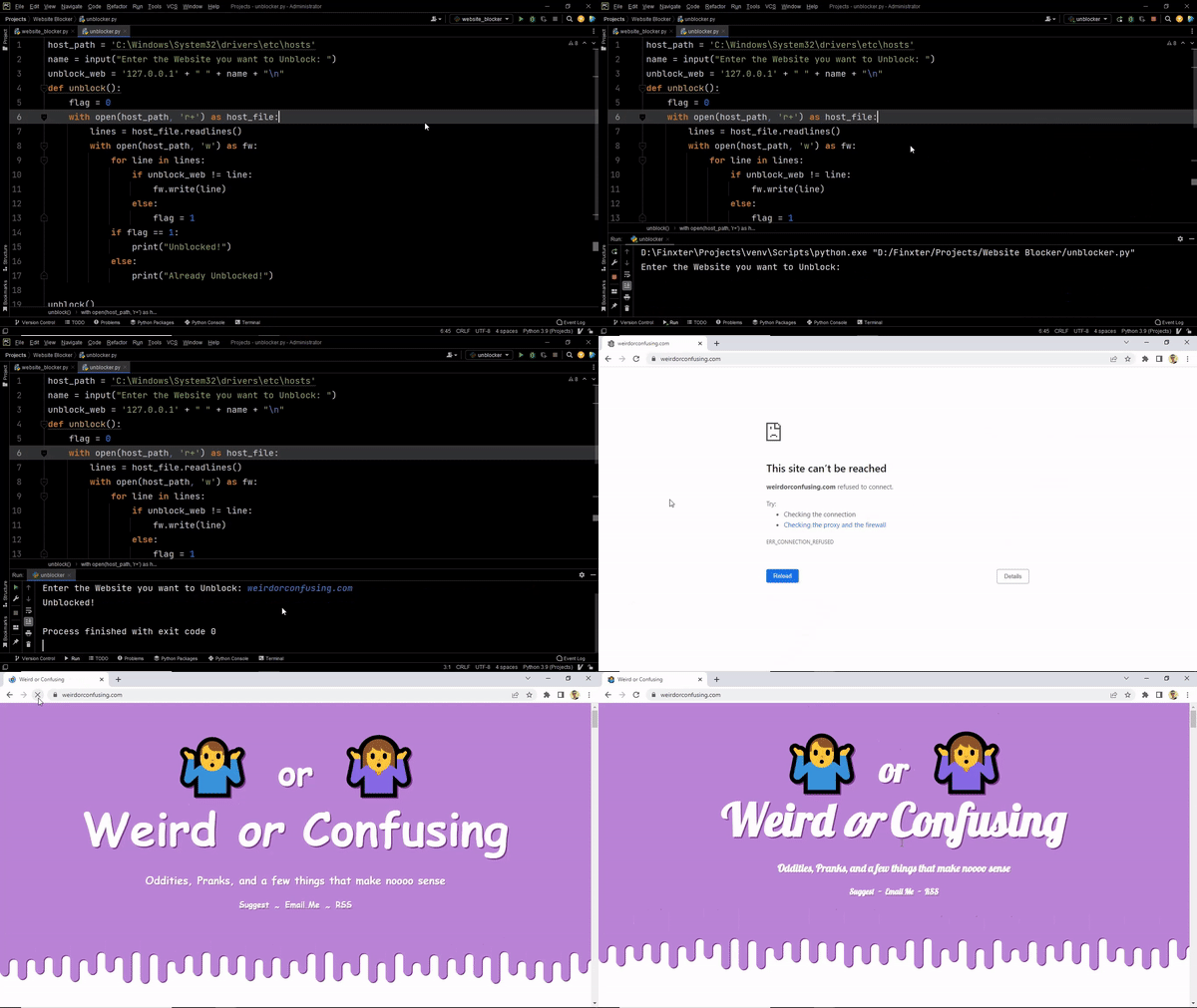
Once you have successfully blocked the required websites, what if you want to unblock them later on? That’s exactly what the next script will do.
The idea is to replicate the above process, the only difference in this case is we will remove the webiste name from the hosts file now.
Code:
host_path = 'C:\Windows\System32\drivers\etc\hosts'

name = input("Enter the Website you want to Unblock: ")

unblock_web = '127.0.0.1' + " " + name + "\n"

def unblock(): flag = 0 with open(host_path, 'r+') as host_file: lines = host_file.readlines() with open(host_path, 'w') as fw: for line in lines: if unblock_web != line: fw.write(line) else: flag = 1 if flag == 1: print("Unblocked!") else: print("Already Unblocked!") unblock()
Output:
Conclusion
There we go! We have our complete application. This can be extremely handy if you wish to block or unblock websites from your system. I hope this project added some value and helped you in your coding quest. Stay tuned and subscribe for more interesting projects and tutorials.
Posted by: xSicKxBot - 01-09-2023, 07:54 AM - Forum: Lounge
- No Replies
Stranger Things Star Noah Schnapp Comes Out As Gay On TikTok
Noah Schnapp, the young actor who plays the closeted gay teenager Will Byers on Netflix's Stranger Things, has come out in real life as gay. Posting to TikTok on Thursday, the 18-year-old Schnapp wrote that friends and family were supportive.
"When I finally told my friends and family I was gay after being scared in the closet for 18 years and all they said was 'we know'," Schnapp said.
The star added a lip-synch video over the quote "you know what it never was? That serious. It was never that serious. Quite frankly, will never be that serious" with the text "I guess I'm more similar to Will than I thought."