Follow OpenJDK on Twitter Download Oracle OpenJDK Download Oracle JDK Oracle is proud to announce the general availability of Java 14 representing the fifth feature release as part of the six-month cadence. This level of predictability, for over two years now, allows developers to more easily manage...
Posted by: xSicKxBot - 12-09-2022, 06:12 AM - Forum: Python
- No Replies
Creating an Advent Calendar App in Python with AI Image Creation
5/5 – (2 votes)
Example: AI-Generated Image
This blog describes a fun mini Python project using AI image creation for creating artwork for an advent calendar implemented using PyGame.
Context
It’s December 1st, and my daughter has just opened the first door on her physical advent calendar, counting down the days of the festival of general consumerism that some people call Christmas. Out pops a small chocolate with a festive robin embossed onto it.
I don’t really recall when the chocolate treat became ubiquitous. Back in my childhood days, advent calendar doors just opened to reveal an image.
Example: AI-Generated Image
This article describes a mini project to generate a virtual old-school Advent calendar using royalty-free bespoke images generated from Python using a third-party AI service through an API.
All code and some AI-generated image samples are available on GitHub.
Painting the Images
There are now many AI engines for creating images from a text description. This project uses deepai. Creating an image with the deepai API is pretty simple. They provide code samples for several languages on their site.
I further selected the engine for producing art in the impressionism style but you can choose from a range of other styles at https://api.deepai.org.
Note that the AI artist style forms parts of the end-point URL.
An API key is used to control access to the API service. The quickstart api-key below is only good for about 10 free requests. You can pay $5 for a new API key and 100 more request calls if you so wish.
def aipaint(description): r = requests.post( "https://api.deepai.org/api/impressionism-painting-generator", data={ 'text': description, }, headers={'api-key': 'quickstart-QUdJIGlzIGNvbWluZy4uLi4K'} ) ret = r.json() return ret
The aipaint()function will return a JSON object, including an element called output_urlfrom which the image can be viewed.
The following is an example AI painting created, in the impressionist style, for the description "Christmas presents under tree":
Be warned when you read this – the above URL will no longer exist. The created image is only hosted by deepai for a few hours, so our advent calendar code will need to download to a local folder.
The original hope was to create images on the fly as an advent door is opened, but as there is a cost for each API request and up to 30 seconds is required for each image to be generated by the AI engine and downloaded, an alternative approach was adopted in writing a prepaint.py script to create and download 25 images.
prepaint.py
import urllib.request

import config

import requests

import urllib.request

from os.path import exists def aipaint(description): r = requests.post( "https://api.deepai.org/api/impressionism-painting-generator", data={ 'text': description, }, headers={'api-key': 'quickstart-QUdJIGlzIGNvbWluZy4uLi4K'} ) ret = r.json() return ret count=1 while count<=25: # pop off the first image description description=config.descriptions.pop(0) # push it back on at end (this ensures we cycle through descriptions and never run out ) # obviously best if there are 25 descriptions though config.descriptions.append(description) filename='./images/image'+ (f"{count:02d}") +".jpg" if(exists(filename)): print(filename + " already exists") else: print("Painting: "+description) try: painting=aipaint(description) if(len(painting)<2): if(painting['status']): print("You've probably run out of deepai (free) credits.") print("Status returned "+painting['status']) else: print("Storing as "+filename) urllib.request.urlretrieve(painting['output_url'], filename) print("Paint now dried on "+filename) except Exception as ex: print("Paint "+filename+" failed") print(ex) count+=1 print("Paintings complete and paint has dried!")

print("Now run main.py to access the Advent calendar")
config.descriptions is a list of Christmas image descriptions.
Ideally, there should be 25 descriptions, but we treat the array as a circular queue so that every time we pop an item off the front, we push back at the end of the queue.
This just ensures we can generate 25 images even without 25 descriptions. My experimentation suggests you will not get the same image back from two requests with the same image description anyway!
Images are cached in an images folder with 25 filenames image01.jpg through image25.jpg
The script first checks whether an image already exists – if yes we just loop through to the next image.
With the code in GitHub I’ve included 25 images. If you want to generate your own just delete some or all from the images folder and edit the descriptions in config.py.
If you don’t yet want to purchase deepai credits – I recommend you just delete a few to experiment.
Sample output from the prepaint.py script
The Advent app
I chose to use the PyGame library to produce the virtual Advent app.
Runningmain.py launches a window with a grid of 25 doors.
Red doors indicate available doors to open based on the current date of the month. When a red labeled door is opened, a festive image is displayed along with a short promotion text that can be customized in config.py
A click on the image re-displays the grid of calendar doors.
A click on the lower portion of the screen opens a browser with the configured URL.
The PyGame script itself is fairly straightforward. Just one interesting snippet to highlight: To arrange the doors in a ‘random’ order. An array of the numbers 1 to 25 is created (constants HEIGHT and WIDTH are both defined as 5 in config.py).
This array is shuffled using random.shuffle. By pre-setting the random seed to a set figure (here 1 was chosen), the same random shuffle is produced every time the main.py is run.
HEIGHT = 5
WIDTH = 5 descriptions=["Christmas presents under tree", "Santas Elf", "Santa in sleigh flying over a town delivering gifts on christmas eve", "candy cane on an christmas tree", "a festive robin redbreast", "a snowman with carrot nose and presents", "fairy on top of a christmas tree", "children playing with christmas presents", "christmas lunch", "christmas carol singers", "christmas bells in a christmas tree", "rudolph the red nosed reindeer", "Santa in sleigh", "two snowmen with presents", "snowy village scene", "christmas decoration", "christmas bells", "christmas snowflake", "christmas pudding with custard", "christmas feast with turkey", "father christmas laughing", "christmas baby in a manger", "christmas mulled wine", "children enjoying playing with a new toy train", ] gifts=[('8 python cheat sheets','https://blog.finxter.com/python-cheat-sheets/'),
('the finxter academy','https://academy.finxter.com/'),
('the finxter app','https://app.finxter.com/learn/computer/science/'),
('the finxster freelancer course','https://finxter.gumroad.com/l/python-freelancer/'),
('The Ultimate Guide to Start Learning Python','https://blog.finxter.com/start-learning-python/'),
('Coffee Break Numpy book','https://www.amazon.com/gp/product/B07WHB8FWC/ref=as_li_tl?ie=UTF8&tag=finxter-20&camp=1789&creative=9325&linkCode=as2&creativeASIN=B07WHB8FWC&linkId=447a5019492081d1b2892d9470bb29fc'),
('Leaving the Rat Race with Python book','https://www.amazon.com/Leaving-Rat-Race-Python-Developing-ebook/dp/B08G1XLDNB/ref=sr_1_5?qid=1670149592&refinements=p_27%3AChristian+Mayer&s=digital-text&sr=1-5&text=Christian+Mayer'),
('Coffee break Python book','https://www.amazon.com/Coffee-Break-Python-Kickstart-Understanding-ebook/dp/B07GSTJPFD/ref=sr_1_4?qid=1670149592&refinements=p_27%3AChristian+Mayer&s=digital-text&sr=1-4&text=Christian+Mayer'),
('Coffee Break Python Slicing','https://www.amazon.com/Coffee-Break-Python-Slicing-Workouts-ebook/dp/B07KSHLLG5/ref=sr_1_8?qid=1670149592&refinements=p_27%3AChristian+Mayer&s=digital-text&sr=1-8&text=Christian+Mayer'),
('Coffee Break Pandas','https://www.amazon.com/Coffee-Break-Pandas-Puzzles-Superpower-ebook/dp/B08NG8QHW7/ref=sr_1_9?qid=1670149592&refinements=p_27%3AChristian+Mayer&s=digital-text&sr=1-9&text=Christian+Mayer'),
('',''),
main.py:
import pygame
import sys
import time
import random
import datetime
import webbrowser
import config HEIGHT = config.HEIGHT
WIDTH = config.WIDTH
LINEHEIGHT = 30
CLICKABLEHEIGHT = 150
FONT = 'verdana' # Colors
BLACK = (0, 0, 0)
GRAY = (200, 200, 200)
WHITE = (255, 255, 255)
RED = (200, 0, 0) # use a seeded random shuffle on numbers 1 to 25 # specify seed to always generate the same random sequence of door labels for our 5x5 grid
doormap=list(range(1,HEIGHT*WIDTH+1))
random.seed(1) random.shuffle(doormap) #get current time
d = datetime.datetime.now()
#get the day of month
datemax=int(d.strftime("%d")) #lambda function to convert eg 1 to 1st, 2 to 2nd
ordinal = lambda n: "%d%s" % (n,"tsnrhtdd"[(n//10%10!=1)*(n%10<4)*n%10::4]) # Create game
pygame.init()
size = width, height = 500, 500
screen = pygame.display.set_mode(size)
pygame.display.set_caption('Finxter Advent Calendar') #font_name = 'calibr'#pygame.font.get_default_font()
bigfont = pygame.font.SysFont(FONT, 20)
hugefont = pygame.font.SysFont(FONT, 40) # Compute board size
BOARD_PADDING = 10
board_width = width - (BOARD_PADDING * 2)
board_height = height - (BOARD_PADDING * 2)
cell_size = int(min(board_width / WIDTH, board_height / HEIGHT))
halfcell_size=cell_size/2+10
board_origin = (BOARD_PADDING, BOARD_PADDING) # utility function to add text to screen
def addText(text, position, color): giftText = bigfont.render(text, True, color) giftRect = giftText.get_rect() giftRect.center = position screen.blit(giftText, giftRect) # start from the main grid when dooropen>0 it indicate the door/image to display
dooropen=0 while True: # Check if game quit for event in pygame.event.get(): if event.type == pygame.QUIT: sys.exit() screen.fill(BLACK) if dooropen: # paint the correct image onto the screen filename='images/image'+ (f"{dooropen:02d}") +".jpg" image = pygame.image.load(filename) rect = image.get_rect() screen.blit(image, rect) # going to create a semi transparent clickable area which can link to a URL # the URL 'gifts' are stored in the imported config giftlabel,gifturl = config.gifts[dooropen%len(config.gifts)] s = pygame.Surface((width,CLICKABLEHEIGHT)) s.set_alpha(200) s.fill(GRAY) screen.blit(s, (0,height-CLICKABLEHEIGHT)) clickable = pygame.Rect(0,height-CLICKABLEHEIGHT,width,CLICKABLEHEIGHT) # add text to the clickable area if(dooropen==25): addText("It's Christmas!", ((width / 2), 4*cell_size+LINEHEIGHT), RED) else: addText("On the "+ ordinal(25-dooropen) +" night before xmas", ((width / 2), 4*cell_size), WHITE) addText("Finxter brought unto me:", ((width / 2), 4*cell_size+LINEHEIGHT), WHITE) addText(giftlabel, ((width / 2), 4*cell_size+(2*LINEHEIGHT)), RED) # open URL in browser if clickable area clicked # otherwise close the door by setting dooropen to 0 click, _, _ = pygame.mouse.get_pressed() if click == 1: mouse = pygame.mouse.get_pos() if clickable.collidepoint(mouse) : time.sleep(0.2) webbrowser.open(gifturl, new=dooropen, autoraise=True) else: dooropen = 0 time.sleep(0.2) pygame.display.flip() continue # Draw board cells = [] for i in range(HEIGHT): row = [] for j in range(WIDTH): # Draw rectangle for cell rect = pygame.Rect( board_origin[0] + j * cell_size, board_origin[1] + i * cell_size, cell_size, cell_size ) pygame.draw.rect(screen, GRAY, rect) pygame.draw.rect(screen, WHITE, rect, 3) doornumber=doormap[(j*HEIGHT)+i] label = hugefont.render(str(doornumber), True, RED if doornumber<=datemax else WHITE) labelRect = label.get_rect() labelRect.center = (j * cell_size+halfcell_size, i * cell_size+halfcell_size) screen.blit(label, labelRect) row.append(rect) cells.append(row) left, _, right = pygame.mouse.get_pressed() if left: mouse = pygame.mouse.get_pos() for i in range(HEIGHT): for j in range(WIDTH): if cells[i][j].collidepoint(mouse) and dooropen==0: dooropen=doormap[(j*HEIGHT)+i] # did they attempt to open a door ahead of current date # dont allow that! if dooropen>datemax: dooropen=0 time.sleep(0.2) pygame.display.flip()
prepaint.py:
import urllib.request

import config

import requests

from os.path import exists def aipaint(description): r = requests.post( "https://api.deepai.org/api/impressionism-painting-generator", data={ 'text': description, }, headers={'api-key': 'quickstart-QUdJIGlzIGNvbWluZy4uLi4K'} ) ret = r.json() return ret count=1 while count<=25: # pop off the first image description description=config.descriptions.pop(0) # push it back on at end (this ensures we cycle through descriptions and never run out ) # obviously best is there are 25 descriptions though config.descriptions.append(description) filename='./images/image'+ (f"{count:02d}") +".jpg" if(exists(filename)): print(filename+" already exists") else: print("Painting: "+description) try: painting=aipaint(description) if(len(painting)<2): if(painting['status']): print("You've probably run out of deepai (free) credits.") print("Status returned "+painting['status']) else: print("Storing as "+filename) urllib.request.urlretrieve(painting['output_url'], filename) print("Paint now dried on "+filename) except Exception as ex: print("Paint "+filename+" failed") print(ex) count+=1 print("Paintings complete and paint has dried!")

print("Now run main.py to access the Advent calendar")
That's right - we're doing this again. The baa has been raised, and Pilgor is joined by other goats too. You can invite up to three friends in local or online co-op, create carnage as a team, or compete in mini-games and then not be friends anymore.
Get ready for another round of udder mayhem. Lick, headbutt, and ruin your way through a brand new open world in the biggest waste of your time since Goat Simulator! We won't tell you how to play (except in the tutorial), but merely provide the means to be the goats of your dreams.
JDK 14 is live! Download it from the Java SE Downloads page. See the JDK 14 Release Notes for detailed information about this release. The following are some of the important additions and updates in Java SE 14 and JDK 14: Switch Expressions is now a permanent feature. See JEP 361: Switch Expression...
How to Convert an Octal Escape Sequence in Python – And Vice Versa?
5/5 – (1 vote)
This tutorial will show you how to convert an
octal escape sequence to a Python string, and a
Python string to an octal escape sequence.
But let’s quickly recap what an octal escape sequence is in the first place!
This is you and your friend celebrating after having solved this problem!
What Is An Octal Escape Sequence?
An Octal Escape Sequence is a backslash followed by 1-3 octal digits (0-7) such as \150 which encodes the ASCII character 'h'. Each octal escape sequence encodes one character (except invalid octal sequence \000). You can chain together multiple octal escape sequences to obtain a word.
Problem Formulation
Question: How to convert an octal escape sequence to a string and vice versa in Python?
You don’t need to “convert” an octal escape sequence to a Unicode string if you already have it represented by a bytes object. Python automatically resolves the encoding.
See here:
>>> b'\101\102\103'

b'ABC'

>>> b'101\040\102\040\103'

b'101 B C'

>>> b'\101\040\102\040\103'

b'A B C'

>>> b'\141\142\143'

b'abc'

>>> b'\150\145\154\154\157'

b'hello'

>>> b'\150\145\154\154\157\040\167\157\162\154\144'

b'hello world'
Python Octal to String Explicit Conversion
The bytes.decode('unicode-escape') function converts a given bytes object represented by an (octal) escape sequence to a Python string. For example, br'\101'.decode('unicode-escape') yields the Unicode (string) character 'A'.
def octal_to_string(x): ''' Converts an octal escape sequence to a string''' return x.decode('unicode-escape')
Example: Convert the octal representations presented above:
octals = [br'\101\102\103', br'\101\040\102\040\103', br'\141\142\143', br'\150\145\154\154\157', br'\150\145\154\154\157\040\167\157\162\154\144'] for octal in octals: print(octal_to_string(octal))
The result uses octal representation such as '0o123'. You can do string manipulation, such as slicing and string concatenation, to bring it into the final version '\123', for instance.
Here’s the function that converts string to octal escape sequence format:
The ord() function takes a character (=string of length one) as an input and returns the Unicode number of this character. For example, ord('a') returns the Unicode number 97. The inverse function of ord() is the chr() function, so chr(ord('a')) returns the original character 'a'.
The oct() function takes one integer argument and returns an octal string with prefix "0o".
Let’s check how our strings can be converted to the octal escape sequence representation using this function:
strings = ['ABC', 'A B C', 'abc', 'hello', 'hello world'] for s in strings: print(string_to_octal(s))
If you want to train your Python one-liner skills instead, check out my book!
Python One-Liners Book: Master the Single Line First!
Python programmers will improve their computer science skills with these useful one-liners.
Python One-Linerswill teach you how to read and write “one-liners”: concise statements of useful functionality packed into a single line of code. You’ll learn how to systematically unpack and understand any line of Python code, and write eloquent, powerfully compressed Python like an expert.
The book’s five chapters cover (1) tips and tricks, (2) regular expressions, (3) machine learning, (4) core data science topics, and (5) useful algorithms.
Detailed explanations of one-liners introduce key computer science concepts and boost your coding and analytical skills. You’ll learn about advanced Python features such as list comprehension, slicing, lambda functions, regular expressions, map and reduce functions, and slice assignments.
You’ll also learn how to:
Leverage data structures to solve real-world problems, like using Boolean indexing to find cities with above-average pollution
Use NumPy basics such as array, shape, axis, type, broadcasting, advanced indexing, slicing, sorting, searching, aggregating, and statistics
Calculate basic statistics of multidimensional data arrays and the K-Means algorithms for unsupervised learning
Create more advanced regular expressions using grouping and named groups, negative lookaheads, escaped characters, whitespaces, character sets (and negative characters sets), and greedy/nongreedy operators
Understand a wide range of computer science topics, including anagrams, palindromes, supersets, permutations, factorials, prime numbers, Fibonacci numbers, obfuscation, searching, and algorithmic sorting
By the end of the book, you’ll know how to write Python at its most refined, and create concise, beautiful pieces of “Python art” in merely a single line.
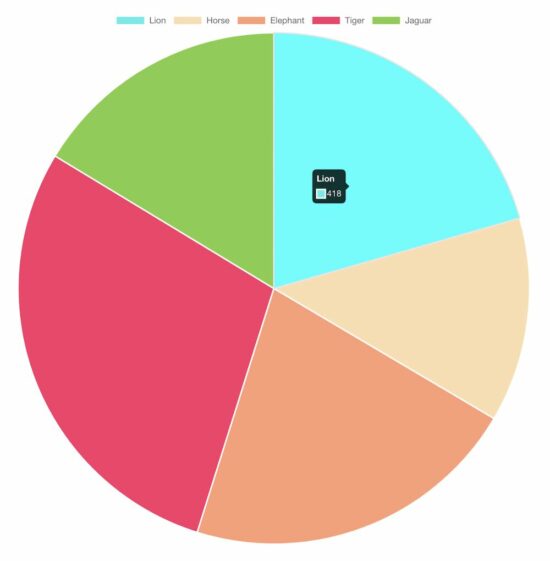
In this tutorial, we are going to learn how to create a pie chart using JavaScript libraries. We have used Chart.js library for the generating the pie charts. As an alternate option, I have also presented a 3d pie chart example using Google charts library.
Let us see the following examples of creating a pie chart using JavaScript.
Quick example – Simple pie chart example via ChartJS.
3D pie chart with Google Charts library.
Responsive ChartJS pie chart.
Quick example – Simple pie chart example via ChartJS
There is no option for a 3D pie chart using chart JS. For those users who have landed here looking for a 3D pie chart, you may try Google Charts.
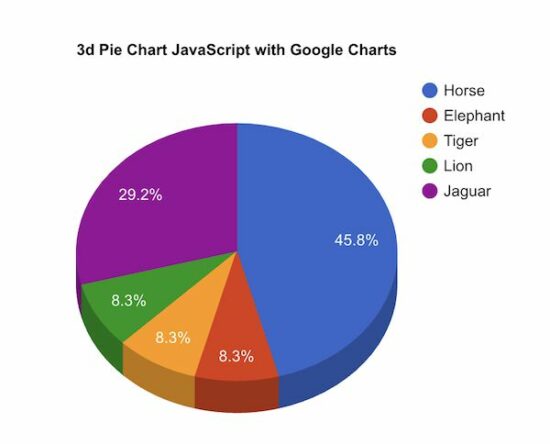
This example uses Google Charts to create a 3D pie chart for a webpage. In a previous code, we use Google Charts to render a bar chart to show students’ attendance statistics.
The Google Charts JavaScript code prepares the array of animal distribution data. This array is for sending it to the chart data table which helps to draw the pie chart.
The Google Charts library accepts the is3D with a boolean true to output a 3D pie chart.
It creates a chart visualization object with the reference with respect to the UI element target. Then, it calls the Google Charts library function to draw and render the chart.
<!DOCTYPE html>

<html>

<head>

<title>3d Pie Chart JavaScript with Google Charts</title>

<link rel='stylesheet' href='style.css' type='text/css' /> <script type="text/javascript" src="https://www.gstatic.com/charts/loader.js"></script>

<script type="text/javascript"> google.charts.load("current", { packages : [ "corechart" ] }); google.charts.setOnLoadCallback(drawChart); function drawChart() { var data = google.visualization.arrayToDataTable([ [ 'Animal', 'Distribution' ], [ 'Horse', 11 ], [ 'Elephant', 2 ], [ 'Tiger', 2 ], [ 'Lion', 2 ], [ 'Jaguar', 7 ] ]); var options = { title : '3d Pie Chart JavaScript with Google Charts', is3D : true, }; var chart = new google.visualization.PieChart(document .getElementById('3d-pie-chart')); chart.draw(data, options); }

</script>

</head>

<body> <div class="phppot-container"> <h1>3d Pie Chart JavaScript with Google Charts</h1> <div id="3d-pie-chart" style="width: 700px; height: 500px;"></div> </div>

</body>

</html>
Responsive pie chart using Chart JS
The Chart JS library provides JavaScript options to make the output pie chart responsive.
This example script uses those options to render a responsive pie chart in a browser.
The JavaScript code to render a responsive pie chart is the same as we have seen in the quick example above.
The difference is nothing but to set responsive: true in the ChartJS options properties.
[www.indiegala.com] Add to your collection & get a selection of games made with heart and mind brought to you by Whale Rock Games for the passionate gamers: Synthwave Burnout, NeuraGun, Inquisitor's Heart and Soul, Cybernetic Fault, Cyberpunk SFX, Euphoria: Supreme Mechanics.
[www.indiegala.com] For a limited time, any purchase made on IndieGala, be it store deals or bundles, will be rewarding you instantly and handsomely, directly into your IndieGala account, ready to be used!
This game is free to keep if claimed by December 15, 2022 5:00 PM or in 7 days
Next weeks freebies: Mystery Game (15 days of charismas giveaways, a giveaway a day)
We are welcoming everyone to join our discord[discord.gg]. We are more active there on finding giveaways, small or large, and there are daily raffles you can participate.
Call Of Duty Has A Long, Strange History On Nintendo Consoles
Microsoft's recent announcement that it intends to put Call Of Duty games onto Nintendo consoles for the next 10 years came as a surprise to many. After all, the best-selling shooter franchise has not yet appeared on the Nintendo Switch, despite that console holding onto a huge portion of market share for years now.
Microsoft has entered into a 10-year commitment to bring Call of Duty to @Nintendo following the merger of Microsoft and Activision Blizzard King. Microsoft is committed to helping bring more games to more people – however they choose to play. @ATVI_AB
However, the truth is that despite Nintendo's reputation as a more "kid-friendly" publisher, several COD games have appeared on its consoles in the past. In fact, it's only in the past decade or so that the Tokyo gaming giant has completely divested itself of the famed series, and we can't help but wonder if that'll change soon.
Early Call Of Duty fans may remember the days of console-exclusive spin-offs like Finest Hour and Big Red One in the mid-2000's, which came out for the GameCube, PS2, and Xbox. In fact, the first COD game was PC-exclusive, which limited its appeal. That would change in subsequent years, of course.



 Question: How to convert an octal escape sequence to a string and vice versa in Python?
 Background: