| Welcome, Guest |
You have to register before you can post on our site.
|
| Online Users |
There are currently 1005 online users.
» 0 Member(s) | 999 Guest(s)
Applebot, Baidu, Bing, DuckDuckGo, Google, Yandex
|
|
|
| News - Rainbow Six Siege Shines In The Solar Raid Update With A New Operator And Map |
|
Posted by: xSicKxBot - 12-07-2022, 06:41 AM - Forum: Lounge
- No Replies
|
 |
Rainbow Six Siege Shines In The Solar Raid Update With A New Operator And Map
The Operation Solar Raid update for Rainbow Six Siege is out today and brings a new operator, a new map, cross-play/cross-progression, a revamped battle pass, and a new system for Ranked. The new player character is Operator Solis from Colombia. She's a defender who wields the SPEC-IO sensor, which can pick up and highlight essential intel. She uses the gadget to identify Attacker devices. Her gloves can interact with gadget overlays and she can activate cluster scans. She has medium health, medium speed, and wields the P90 or the ITA 12L for her primary as well as the SMG-11 as her secondary. The new map is called Nighthaven Labs. It will not be bannable for the duration of the Operation Solar Raid season to ensure that players get the chance to familiarize themselves with the map. Set in an extension of the Nighthaven headquarters, the map features multiple access points, via many breakable walls and a runout hatch. Continue Reading at GameSpot
https://www.gamespot.com/articles/rainbo...01-10abi2f
|

|
|
| PC - Somerville |
|
Posted by: xSicKxBot - 12-07-2022, 06:41 AM - Forum: New Game Releases
- No Replies
|
|
Somerville
Jumpship’s debut title immersse players in a hand-crafted narrative set across a vivid and rural landscape. Set in the wake of a catastrophe and grounded in the intimate repercussions of large-scale conflict, players navigate through perilous terrain as they unravel the mysteries of Earth’s visitors. Publisher: Xbox Game Studios Release Date: Nov 15, 2022
https://www.metacritic.com/game/pc/somerville
|
|
|
|
| [Oracle Blog] JDK 13.0.2, 11.0.6, 8u241, and 7u251 Have Been Released! |
|
Posted by: xSicKxBot - 12-06-2022, 10:04 AM - Forum: Java Language, JVM, and the JRE
- No Replies
|
|
JDK 13.0.2, 11.0.6, 8u241, and 7u251 Have Been Released!
The JDK 13.0.2, 11.0.6, 8u241, and 7u251 update releases are now available. You can download the latest JDK releases from the Java SE Downloads page. OpenJDK 13.0.2 is available on http://jdk.java.net/13/. New Features, Changes, and Notable Bug Fixes For information about the new features, changes, ...
https://blogs.oracle.com/java/post/jdk-1...n-released
|
|
|
|
| [Tut] Python | Split String Multiple Whitespaces |
|
Posted by: xSicKxBot - 12-06-2022, 10:04 AM - Forum: Python
- No Replies
|
|
Python | Split String Multiple Whitespaces
 Summary: The most efficient way to split a string using multiple whitespaces is to use the Summary: The most efficient way to split a string using multiple whitespaces is to use the split function like so given_string.split(). An alternate approach is to use different functions of the regex package to split the string at multiple whitespaces.
Minimal Example:
import re text = "mouse\nsnake\teagle human"

# Method 1

print(text.split()) # Method 2

res = re.split("\s+", text)

print(res) # Method 3

res = re.sub(r'\s+', ',', text).split(',')

print(res) # Method 4

print(re.findall(r'\S+', text)) # ['mouse', 'snake', 'eagle', 'human']
Problem Formulation
 Problem: Given a string. How will you split the string using multiple whitespaces? Problem: Given a string. How will you split the string using multiple whitespaces?
Example
# Input

text = "abc\nlmn\tpqr xyz\rmno"

# Output

['abc', 'lmn', 'pqr', 'xyz', 'mno']
There are numerous ways of solving the given problem. So, without further ado, let us dive into the solutions.
Method 1: Using Regex
The best way to deal with multiple delimiters is to use the flexibility of the regular expressions library. There are different functions available in the regex library that you can use to split the given string. Let’s go through each one by one.
1.1 Using re.split
The re.split(pattern, string) method matches all occurrences of the pattern in the string and divides the string along the matches resulting in a list of strings between the matches. For example, re.split('a', 'bbabbbab') results in the list of strings ['bb', 'bbb', 'b'].
 Recommended Read: Python Regex Split. Recommended Read: Python Regex Split.
Approach: To split the string using multiple whitespace characters use re.split("\s+", text) where \s is the matching pattern and it represents a special sequence that returns a match whenever it finds any whitespace character and splits the string.
Code:
import re

text = "abc\nlmn\tpqr xyz\rmno"

res = re.split("\s+", text)

print(res) # ['abc', 'lmn', 'pqr', 'xyz', 'mno']
1.2 Using re.findall
The re.findall(pattern, string) method scans the string from left to right, searching for all non-overlapping matches of the pattern. It returns a list of strings in the matching order when scanning the string from left to right.
Recommended Read: Python re.findall() – Everything You Need to Know
Code:
import re text = "abc\nlmn\tpqr xyz\rmno"

print(re.findall(r'\S+', text))
Explanation: In the expression, i.e., re.findall(r"\S'+", text), all occurrences of characters except whitespaces are found and stored in a list. Here, \S+ returns a match whenever the string contains one or more occurrences of normal characters (characters from a to Z, digits from 0-9, etc. However, not the whitespaces are considered).
1.3 Using re.sub
The regex function re.sub(P, R, S) replaces all occurrences of the pattern P with the replacement R in string S. It returns a new string. For example, if you call re.sub('a', 'b', 'aabb'), the result will be the new string 'bbbb' with all characters 'a' replaced by 'b'.
Aprroach: Use the re.sub method to replace all occurrences of whitespace characters in the given string with a comma. Thus, the string will now have commas instead of whitespace characters and you can simply split it using a normal string split method by passing comma as the delimiter.
Code:
import re

text = "abc\nlmn\tpqr xyz\rmno"

res = re.sub(r'\s+', ',', text).split(',')

print(res) # ['abc', 'lmn', 'pqr', 'xyz', 'mno']
Do you want to master the regex superpower? Check out my new book The Smartest Way to Learn Regular Expressions in Python with the innovative 3-step approach for active learning: (1) study a book chapter, (2) solve a code puzzle, and (3) watch an educational chapter video.
Method 2: Using split()
By default the split function splits a given string at whitespaces. Meaning, if you do not pass any delimiter to the split function then the string will be split at whitespaces. You can use this default property of the split function and successfully split the given string at multiple whitespaces just by using the split() function.
Code:
text = "abc\nlmn\tpqr xyz\rmno"

print(text.split())

# ['abc', 'lmn', 'pqr', 'xyz', 'mno']
Recommended Digest: Python String split()
Conclusion
We have successfully solved the given problem using different approaches. Simply using split could do the job for you. However, feel free to explore and try out the other options mentioned above. I hope this article helped you in your Python coding journey. Please subscribe and stay tuned for more interesting articles.
Happy Pythoning! 
Google engineers are regular expression masters. The Google search engine is a massive text-processing engine that extracts value from trillions of webpages.
Facebook engineers are regular expression masters. Social networks like Facebook, WhatsApp, and Instagram connect humans via text messages.
Amazon engineers are regular expression masters. Ecommerce giants ship products based on textual product descriptions. Regular expressions rule the game when text processing meets computer science.
If you want to become a regular expression master too, check out the most comprehensive Python regex course on the planet:
https://www.sickgaming.net/blog/2022/12/...itespaces/
|
|
|
|
| [Tut] phpMyAdmin – How to Import a Database? |
|
Posted by: xSicKxBot - 12-06-2022, 10:03 AM - Forum: PHP Development
- No Replies
|
|
phpMyAdmin – How to Import a Database?
 by Vincy. Last modified on December 5th, 2022. In this tutorial, we are going to learn how to import MySQL database using phpMyAdmin. There are two ways to do the import via this PHP application.
- Go to the “Import” tab in the phpMyAdmin and upload a file(SQL, CSV …) source that contains the database dumb.
- Choose a database and drag and drop the import file to the phpMyAdmin interface.
How to import?
Open the phpMyAdmin application and create a connection by logging in with the host, user and password. Then, follow the below steps to import a database.
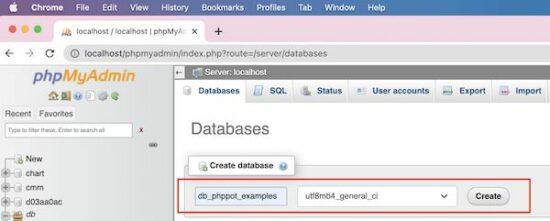
1) Choose the “Database” link and create a new or select an existing database. In a previous tutorial, we have seen the possible options of creating a database using phpMyAdmin.
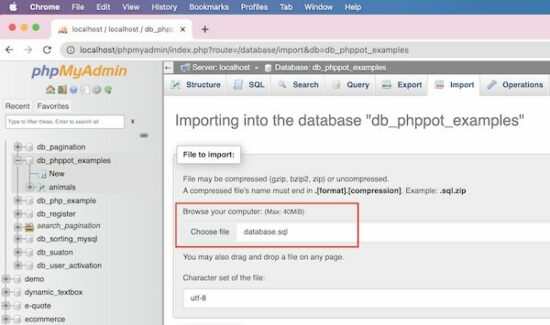
2) Choose the file in .sql (or other phpMyAdmin-supported) format.
3) [optional] Choose char-set, SQL compatibility modes and other options like,
- Foreign key checks.
- Partial import.
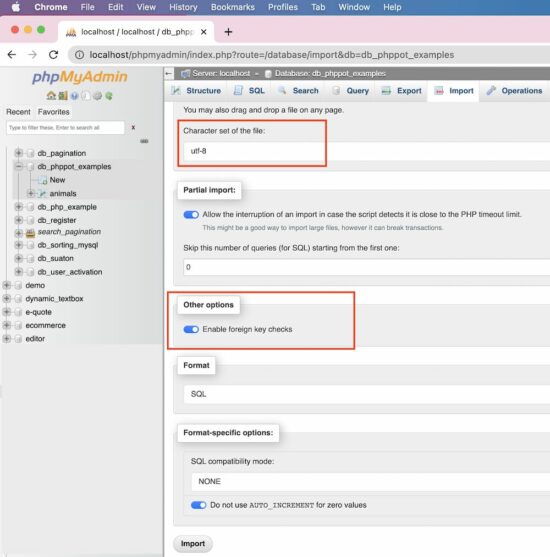
Click “Go” to complete the import.
Import CSV
If you have the SQL dumb in a form of a CSV file, the phpMyAdmin allows that format to import.
Change the format to the CSV from the default format. The SQL is the default format that the phpMyAdmin populates under the “Format” section.
It is suitable to import a database containing a single table. If the import file contains multiple tables then the import will merge all into one.
It creates auto-generated columns like COL1, COL2… and stores the other comma-separated values as data.
Note the following CSV format to import a database table.
"id","question","answer" "1"," What are the widely used array functions in PHP?","Answer1" "2","How to redirect using PHP?","Answer2" "3"," Differentiate PHP size() and count():","Answer3" "4","What is PHP?","Answer4" "5","What is php.ini?","Answer5"
Import large SQL file
Note the maximum file size allowed to upload via the phpMyAdmin application. It is near the “Choose File” option on the Import page.
If the import file is too large, then it interrupts to skip the number of queries during the import.
It is better to process import via Terminal if the import file exceeds the allowed limit. It will prevent the data inconsistency that may occur because of the partial import.
Note the below Terminal command to process importing larger SQL files.
#path-to-mysql#mysql -u root -p #database_name# < #path-of-the-sql-file#
Replace the following variable in the above command
- #path-to-mysql# – Path where the MySQL is. Example: /Applications/XAMPP/bin/mysql
- #database_name# – The target database where the import is going to happen.
- #path-of-the-sql-file# – The path of the source SQL to import. Example: /Users/vincy/Desktop/db_phppot_example.sql
The command line execution is also used to connect the remote server. It is in case of facing restrictions to access a remote MySQL server via phpMyAdmin.
Features of the phpMyAdmin Import
The phpMyAdmin “Import” functionality provides several features.
- It allows the import of files in the following formats. The default format is SQL.
- CSV
- ESRI shape file
- MediaWiki table
- OpenDocument spreadsheet
- SQL
- XML
- It allows choosing character sets and SQL compatibility modes.
- It allows partial imports by allowing interruptions during the import of larger files.
Things to remember
When you import a database or table certain things to remember.
Database resource “Already exists” error
This error will occur if the importing file contains statements of existing resources.
Example:
If the importing file has the query to create an existing table, then phpMyAdmin will show this error.
So, it is important to clean up the existing state before importing a database to avoid this problem.
Access denied error
If the users have no permission to import or create databases/tables, then it will return this error.
If the user can import and can’t create tables, the file must contain allowed queries only.
Note: If you are importing via remote access, give the right credentials to connect. Make sure about the user access privileges to import or related operations.
Popular Articles
↑ Back to Top
https://www.sickgaming.net/blog/2022/12/...-database/
|
|
|
|
| (Indie Deal) FREE Dope Game, Cyber Monday Deals ending soon |
|
Posted by: xSicKxBot - 12-06-2022, 10:03 AM - Forum: Deals or Specials
- No Replies
|
|
FREE Dope Game, Cyber Monday Deals ending soon
Dope Game FREEbie  [freebies.indiegala.com] [freebies.indiegala.com]
Extra 10% cashback as a BONUS in this period only!
- Frontier Developments Black Friday Sale, up to 82% OFF[www.indiegala.com]
- Humble Games Black Friday Sale, up to 80% OFF[www.indiegala.com]
- All in! Games Black Friday Sale, UP TO 92% OFF[www.indiegala.com]
- Destructive Creations Black Friday Sale, UP TO 75% OFF[www.indiegala.com]
- Bungie Black Friday Sale, UP TO 72% OFF[www.indiegala.com]
- Skybound Game Black Friday Sale, UP TO 88% OFF[www.indiegala.com]
- NIS America Black Friday Sale, UP TO 80% OFF[www.indiegala.com]
- Gearbox Publishing Black Friday Sale, up to 91% OFF[www.indiegala.com]
- CI Games Black Friday Sale, UP TO 85% OFF[www.indiegala.com]
- Koei Tecmo Black Friday Sale, up to 50% OFF[www.indiegala.com]
- CAPCOM Black Friday Sale, up to 86% OFF[www.indiegala.com]
- Konami Black Friday Sale, UP TO 92% OFF[www.indiegala.com]
- 505 Games Black Friday Sale, UP TO 90% OFF[www.indiegala.com]
- Playstation PC LLC Black Friday Sale, UP TO 82% OFF[www.indiegala.com]
- Motion Twin Black Friday Sale, UP TO 52% OFF[www.indiegala.com]
 [www.indiegala.com] [www.indiegala.com]
https://www.youtube.com/watch?v=ok82a-aJhjo
https://store.steampowered.com/app/1874190/Vorax/
https://steamcommunity.com/groups/indieg...9751879319
|
|
|
|
| PC - Floodland |
|
Posted by: xSicKxBot - 12-06-2022, 10:03 AM - Forum: New Game Releases
- No Replies
|
|
Floodland
A society survival game set in a world destroyed by climate change. Explore, scavenge and build a city to unite the clans. Conflicting cultures and limited resources mean you need to make tough choices; have you got what it takes to lead your people into a new era of humanity? Publisher: Ravenscourt Release Date: Nov 15, 2022
https://www.metacritic.com/game/pc/floodland
|
|
|
|
| [Tut] Python | Split String by Number |
|
Posted by: xSicKxBot - 12-05-2022, 01:21 PM - Forum: Python
- No Replies
|
|
Python | Split String by Number
 Summary: To split a string by a number, use the regex Summary: To split a string by a number, use the regex split method using the “\d” pattern.
Minimal Example
my_string = "#@1abc3$!*5xyz" # Method 1

import re res = re.split('\d+', my_string)

print(res) # Method 2

import re res = re.findall('\D+', my_string)

print(res) # Method 3

from itertools import groupby li = [''.join(g) for _, g in groupby(my_string, str.isdigit)]

res = [x for x in li if x.isdigit() == False]

print(res) # Method 4

res = []

for i in my_string: if i.isdigit() == True: my_string = my_string.replace(i, ",")

print(my_string.split(",")) # Outputs:

# ['#@', 'abc', '$!*', 'xyz']
Problem Formulation
Problem: Given a string containing different characters. How will you split the string whenever a number appears?
Method 1: re.split()
The re.split(pattern, string) method matches all occurrences of the pattern in the string and divides the string along the matches resulting in a list of strings between the matches. For example, re.split('a', 'bbabbbab') results in the list of strings ['bb', 'bbb', 'b'].
Code:
import re

my_string = "#@1abc3$!*5xyz"

res = re.split('\d+', my_string)

print(res) # ['#@', 'abc', '$!*', 'xyz']
Explanation: The \d special character matches any digit between 0 and 9. By using the maximal number of digits as a delimiter, you split along the digit-word boundary.
Method 2: re.findall()
The re.findall(pattern, string) method scans string from left to right, searching for all non-overlapping matches of the pattern. It returns a list of strings in the matching order when scanning the string from left to right.
Code:
import re

my_string = "#@1abc3$!*5xyz"

res = re.findall('\D+', my_string)

print(res) # ['#@', 'abc', '$!*', 'xyz']
Explanation: The \D special character matches all characters except any digit between 0 and 9. Thus, you are essentially finding all character groups that appear before the occurrence of a digit.
Do you want to master the regex superpower? Check out my new book The Smartest Way to Learn Regular Expressions in Python with the innovative 3-step approach for active learning: (1) study a book chapter, (2) solve a code puzzle, and (3) watch an educational chapter video.
Method 3: itertools.groupby()
Code:
from itertools import groupby

my_string = "#@1abc3$!*5xyz"

li = [''.join(g) for _, g in groupby(my_string, str.isdigit)]

res = [x for x in li if x.isdigit() == False]

print(res) # ['#@', 'abc', '$!*', 'xyz']
Explanation:
- The
itertools.groupby(iterable, key=None) function creates an iterator that returns tuples (key, group-iterator) grouped by each value of key. We use the str.isdigit() function as key function.
- The
str.isdigit() function returns True if the string consists only of numeric characters. Thus, you will have a list created by using numbers as separators. Note that this list will also contain the numbers as items within it.
- In order to eliminate the numbers, use another list comprehension that checks if an element in the list returned previously is a digit or not with the help of the
isdigit method. If it is a digit, the item will be discarded. Otherwise it will be stored in the list.
Method 4: Replace Using a for Loop
Approach: Use a for loop to iterate through the characters of the given string. Check if a character is a digit or not. As soon as a digit is found, replace that character/digit with a delimiter string ( we have used a comma here) with the help of the replace() method. This basically means that you are placing a particular character in the string whenever a number appears. Once all the digits are replaced by the separator string, split the string by passing the separator string as a delimiter to the split method.
Code:
my_string = "#@1abc3$!*5xyz"

res = []

for i in my_string: if i.isdigit(): my_string = my_string.replace(i, ",")

print(my_string.split(",")) # ['#@', 'abc', '$!*', 'xyz']
Conclusion
Phew! We have successfully solved the given problem and managed to do so using four different ways. I hope you found this article helpful and it answered your queries. Please subscribe and stay tuned for more solutions and tutorials.
Happy coding! 
 Related Read: How to Split a String Between Numbers and Letters? Related Read: How to Split a String Between Numbers and Letters?
https://www.sickgaming.net/blog/2022/12/...by-number/
|
|
|
|
|
|
|


