| Welcome, Guest |
You have to register before you can post on our site.
|
| Online Users |
There are currently 773 online users.
» 0 Member(s) | 768 Guest(s)
Applebot, Baidu, Bing, Google, Yandex
|
|
|
| News - The Callisto Protocol: Where To Find All Weapons |
|
Posted by: xSicKxBot - 12-03-2022, 02:28 AM - Forum: Lounge
- No Replies
|
 |
The Callisto Protocol: Where To Find All Weapons
The Callisto Protocol is a survival horror game, so you'll be scrounging for ammo and supplies throughout the campaign. What you might not expect, though, is that a few of its weapons are actually completely missable if you aren't thorough in your exploration. This means that you could end the game with only two guns and a melee weapon--but that shouldn't be a problem, since we've got the locations of all story and optional weapons below. Stun BatonThe Stun Baton is automatically obtained during the Outbreak chapter and will be your melee weapon throughout the remainder of the game. You'll snag this after a room with two giant fans and a bunch of enemies. Just crawl through the nearby shaft and you'll get the weapon during a short cutscene. Hand CannonThe Hand Cannon is automatically obtained during the Outbreak chapter and is the first ranged weapon you'll have access to. Late in the mission, you'll enter a room where Elias will toss you part of a pistol. Take this over to the Reforge nearby and purchase the Hand Cannon to move the story forward. Continue Reading at GameSpot
https://www.gamespot.com/articles/the-ca...01-10abi2f
|

|
|
| [Tut] Python | Split String Hyphen |
|
Posted by: xSicKxBot - 12-02-2022, 08:43 AM - Forum: Python
- No Replies
|
|
Python | Split String Hyphen
 Summary: Use Summary: Use "given string".split('-') to split the given string by hyphen and store each word as an individual item in a list. Some other ways to split using hyphen include using a list comprehension and the regex library.
Minimal Example
text = "Violet-Indigo-Blue-Green-Yellow-Orange-Red"

# Method 1

print(text.split("-"))

# Method 2

import re

print(re.split('-', text))

# Method 3

print(list(filter(None, text.split('-'))))

# Method 4

print([x for x in re.findall(r'[^-]*|(?!-).*$', text) if x != '']) # OUTPUT: ['Violet', 'Indigo', 'Blue', 'Green', 'Yellow', 'Orange', 'Red']
Problem Formulation
 Problem: Given a string, how will you split the string into a list of words using the hyphen as a delimiter? Problem: Given a string, how will you split the string into a list of words using the hyphen as a delimiter?
Example
Let’s understand the problem with the help of an example.
# Input:

text = "Violet-Indigo-Blue-Green-Yellow-Orange-Red"

# Output:

['Violet', 'Indigo', 'Blue', 'Green', 'Yellow', 'Orange', 'Red']
Now without any further ado, let’s dive into the numerous ways of solving this problem.
Method 1: Using split()
Python’s built-in split() function splits the string at a given separator and returns a split list of substrings. Here’s how the split() function works: 'finxterx42'.split('x') will split the string with the character ‘x’ as the delimiter and return the following list as an output: ['fin', 'ter', '42'].
Approach: To split a string by hyphen, you can simply pass the underscore as a separator to the split('-') function.
Code:
text = "Violet-Indigo-Blue-Green-Yellow-Orange-Red"

print(text.split("-")) # ['Violet', 'Indigo', 'Blue', 'Green', 'Yellow', 'Orange', 'Red']
 Related Read: Python String split() Related Read: Python String split()
Method 2: Using re.split()
Another way of separating a string by using the underscore as a separator is to use the re.split() method from the regex library. The re.split(pattern, string) method matches all occurrences of the pattern in the string and divides the string along the matches resulting in a list of strings between the matches. For example, re.split('a', 'bbabbbab') results in the list of strings ['bb', 'bbb', 'b'].
Approach: You can use the re.split() method as re.split('-', text) where '-' returns a match whenever the string contains a hyphen. Whenever any hyphen is encountered, the text gets separated and the split substring gets stored as an element within the resultant list.
Code:
import re

text = "Violet-Indigo-Blue-Green-Yellow-Orange-Red"

print(re.split('-', text)) # ['Violet', 'Indigo', 'Blue', 'Green', 'Yellow', 'Orange', 'Red']
Related Read: Python Regex Split
Method 3: Using filter()
Note: This approach is efficient when the resultant list contains empty strings along with substrings.
Python’s built-in filter() function filters out the elements that pass a filtering condition. It takes two arguments: function and iterable. The function assigns a Boolean value to each element in the iterable to check whether the element will pass the filter or not. It returns an iterator with the elements that passes the filtering condition.
Approach: Use the filter() method to split the string by hyphen. The function takes None as the first argument and the list of split strings as the second argument. The filter() function then iterates through the list and removes any empty elements. As the filter() method returns an object, we need to use the list() to convert the object into a list.
Code:
text = "Violet-Indigo-Blue-Green-Yellow-Orange-Red" print(list(filter(None, text.split('-')))) # ['Violet', 'Indigo', 'Blue', 'Green', 'Yellow', 'Orange', 'Red']
Related Read: Python filter()
Method 4: Using re.findall()
The re.findall(pattern, string) method scans the string from left to right, searching for all non-overlapping matches of the pattern. It returns a list of strings in the matching order- when scanning the string from left to right.
Approach: You can use the re.findall() method from the regex module to split the string by hyphen. Use ‘[^-]|(?!-).$‘ as the pattern that can be fed into the findall function to solve the problem. It simply, means a set all characters that are joined by a hyphen will be grouped together.
Code:
import re

text = "Violet-Indigo-Blue-Green-Yellow-Orange-Red" print([x for x in re.findall(r'[^_]*', text) if x != '']) # ['Python', 'Pycharm', 'Java', 'Eclipse', 'Golang', 'VisualStudio']
Related Read: Python re.findall() – Everything You Need to Know
Python | Split String by Dot
Now that we have gone through numerous ways of solving the given problem, here’s a similar programming challenge for you to solve.
Challenge: You are given a string that contains dots in it. How will you split the string using a dot as a delimiter? Consider the code below and try to split the string by dot.
# Input:

text = "stars.moon.sun.sky" # Expected Output:

['stars', 'moon', 'sun', 'sky']
Try to solve the problem yourself before looking into the given solutions.
Solution: Here are the different methods to split a string by using the dot as a delimiter/separator:
text = "a*b*c"

# Method 1

print(text.split("*")) # Method 2

print(list(filter(None, text.split('*')))) # Method 3

import re

print([x for x in re.findall(r'[^/*]*|(?!/*).*$', text) if x != '']) # Method 4

print(re.split('[/*]', text))
Conclusion
Hurrah! We have successfully solved the given problem using as many as four different ways. We then went on to solve a similar coding challenge. I hope this article helped you. Please subscribe and stay tuned for more interesting articles!
Happy coding! 
Do you want to master the regex superpower? Check out my new book The Smartest Way to Learn Regular Expressions in Python with the innovative 3-step approach for active learning: (1) study a book chapter, (2) solve a code puzzle, and (3) watch an educational chapter video.
https://www.sickgaming.net/blog/2022/12/...ng-hyphen/
|
|
|
|
| [Tut] Chart JS Line Chart Example |
|
Posted by: xSicKxBot - 12-02-2022, 08:42 AM - Forum: PHP Development
- No Replies
|
|
Chart JS Line Chart Example
 by Vincy. Last modified on December 1st, 2022. It is one of the free and best JS libraries for charts. It supports rendering more types of chart in client side.
In this tutorial, we will see examples of rendering different types of line charts using the Chart.js library.
Quick example
The Chart JS library requires 3 things to be added to the webpage HTML to render the graph.
- Step 1: Include the Chart JS library file to the target HTML page.
- Step 2: Create a HTML canvas element to render the line chart.
- Step 3: Initiate the Chart JS library function with the data and other required options.
<canvas id="line-chart"></canvas>

<script src="https://cdn.jsdelivr.net/npm/chart.js@4.0.1/dist/chart.umd.min.js"></script>

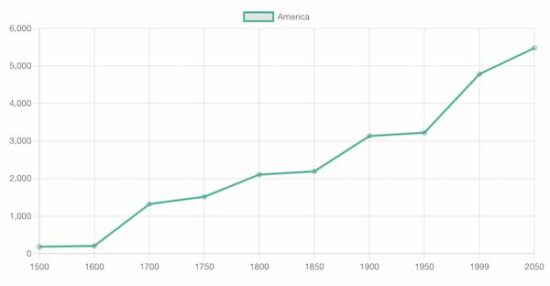
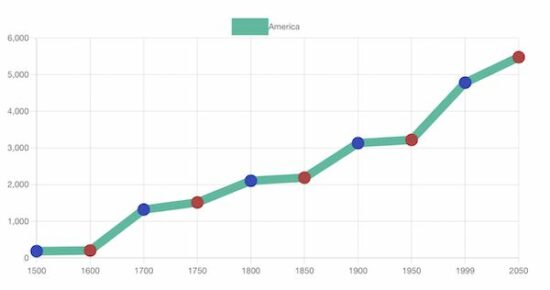
<script> new Chart(document.getElementById("line-chart"), { type : 'line', data : { labels : [ 1500, 1600, 1700, 1750, 1800, 1850, 1900, 1950, 1999, 2050 ], datasets : [ { data : [ 186, 205, 1321, 1516, 2107, 2191, 3133, 3221, 4783, 5478 ], label : "America", borderColor : "#3cba9f", fill : false }] }, options : { title : { display : true, text : 'Chart JS Line Chart Example' } } });

</script>
The above script refers to the target canvas element on initiating the library class.
It pinpoints the graph readings with data properties. In addition, it specifies the line label, and border color. This quick example will output the following line chart to the browser.
Output:
View Demo
A line chart is the best way to display analytics in a form of a catchy line graph. It also helps to compare one or more analytical lines.
In previous tutorials, we used different libraries to render different types of charts on a web page. See the below links if you want to refer.
More examples of line charts using Chart JS
The Chart JS supports creating a variety of line charts to plot the different perspectives of the data points.
- It supports drawing multiple lines of data points in a line chart which shows comparisons of data.
- It supports creating a linear line chart by applying formulas with x, and y coordinates.
- Rending sin waves in a Chart JS line chart with JS Math functions.
In the below sections, we will see examples of creating the following type of line charts using the Chart JS library.
- Multiple lines in a line chart.
- Gridlines – Line chart
Chart JS Multiple Lines Example
It outputs a Chart JS graph with two line charts. The script sets the dataset array for the two lines to be displayed on the graph.
The dataset is configured with the following display properties apart from the data points of the line chart.
- label – to show with a tooltip on hovering a data point.
- borderColor – Line border color.
- fill – to enable or disable highlighting the chart area.
In this multi-line chart, the fill property is set to false, since the two chart areas overlap each other.
<!DOCTYPE html>

<html>

<head>

<title>Chart JS Multiple Lines Example</title>

<link rel='stylesheet' href='style.css' type='text/css' />

</head>

<body> <div class="phppot-container"> <h1>Chart JS Multiple Lines Example</h1> <div> <canvas id="line-chart"></canvas> </div> </div> <script src="https://cdn.jsdelivr.net/npm/chart.js@4.0.1/dist/chart.umd.min.js"></script> <script> new Chart(document.getElementById("line-chart"), { type : 'line', data : { labels : [ 1500, 1600, 1700, 1750, 1800, 1850, 1900, 1950, 1999, 2050 ], datasets : [ { data : [ 186, 205, 1321, 1516, 2107, 2191, 3133, 3221, 4783, 5478 ], label : "America", borderColor : "#3cba9f", fill : false }, { data : [ 1282, 1350, 2411, 2502, 2635, 2809, 3947, 4402, 3700, 5267 ], label : "Europe", borderColor : "#e43202", fill : false } ] }, options : { title : { display : true, text : 'Chart JS Multiple Lines Example' } } }); </script>

</body>

</html>
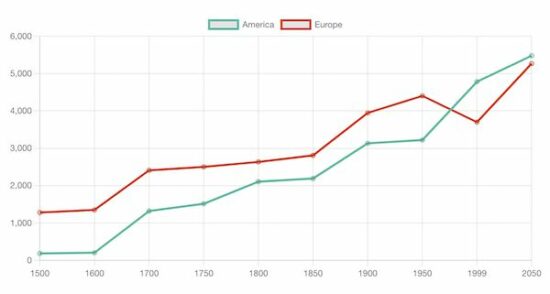
Chart JS Gridlines – Line Chart Example
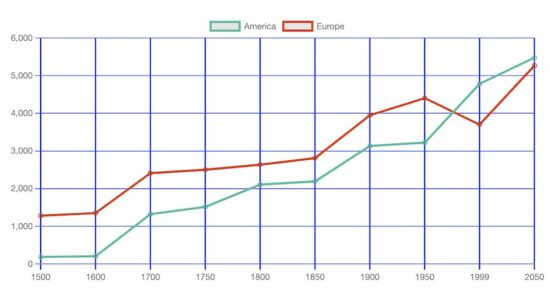
This JS script configures the same settings like as the above multi-line chart example. In addition, it configures the Chart JS scale properties to draw the grid in the x and y-axis.
The following display properties are used to show the grid in both axis of the. Chart JS graph.
- display – a boolean value to enable or disable grid display on the chart.
- color – the grid line border-color.
- lineWidth – the stroke size of the grid line.
<!DOCTYPE html>

<html>

<head>

<title>Chart JS Gridlines - Line Chart Example</title>

<link rel='stylesheet' href='style.css' type='text/css' />

</head>

<body> <div class="phppot-container"> <h1>Chart JS Gridlines - Line Chart Example</h1> <div> <canvas id="line-chart"></canvas> </div> </div> <script src="https://cdn.jsdelivr.net/npm/chart.js@4.0.1/dist/chart.umd.min.js"></script> <script> new Chart( document.getElementById("line-chart"), { type : 'line', data : { labels : [ 1500, 1600, 1700, 1750, 1800, 1850, 1900, 1950, 1999, 2050 ], datasets : [ { data : [ 186, 205, 1321, 1516, 2107, 2191, 3133, 3221, 4783, 5478 ], label : "America", borderColor : "#3cba9f", fill : false }, { data : [ 1282, 1350, 2411, 2502, 2635, 2809, 3947, 4402, 3700, 5267 ], label : "Europe", borderColor : "#e43202", fill : false } ] }, options : { title : { display : true, text : 'Chart JS Gridlines - Line Chart Example' }, scales : { x : { grid : { display : true, color: "#0046ff", lineWidth: 2 } }, y : { grid : { display : true, color: "#0046ff" } } } } }); </script>

</body>

</html>
More details about the basics of the Chart JS library
Knowing more about this very good JS library will be useful to use this graph confidently in production.
Without specifying dataset options or display properties, the default options will be applied. The following list shows the level of Chart.js options that will be resolved about the context. Read more about option resolution documentation provided by the Chart JS library.
Dataset and element properties with respect to the data and options
- data.datasets[index] – options for this dataset only.
- options.datasets.line – options for all line datasets.
- options.elements.line – options for all line elements.
- options.elements.point – options for all point elements.
- options – options for the whole chart.
Display properties
- backgroundColor
- borderColor
- borderWidth
- fill
- hoverBorderColor
- label
- pointStyle
- xAxisID
- yAxisID
Custom options
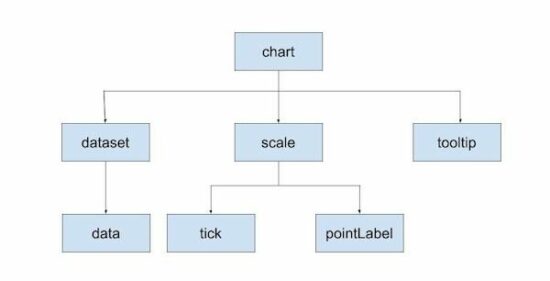
The Chart JS accepts a custom callback to be called on rendering each data point.
The callback function accepts the context reference to get the UI scope. The context hierarchy is shown in the below diagram.
Indexable options
Indexable options are used to define properties for the chart.js data item at a particular index.
It has a mapping array to link a property at a particular index to the data point of the chart at the same index.
If the array options property array length is less than the data array, then the property will be looped over.
The below code contains the options of setting line chart point color. It has only three pointBackgroundColor in the array. It will loop over to the data array of 10 elements.
datasets : [{ data : [ 186, 205, 1321, 1516, 2107, 2191, 3133, 3221, 4783, 5478 ], label : "America", borderColor : "#3cba9f", pointBackgroundColor: [ '#354abb', '#bb3c43' ], pointBorderColor: [ '#354abb', '#bb3c43' ], fill: false, borderWidth: 12

}]
Other chart types supported by the Chart.js library
The Chart JS library also supports creating other types of charts listed below. Let us see the example of creating a few of the below charts in the future.
- Area chart
- Bar chart
- Bubble chart
- Doughnut chart
- Line chart
- Mixed chart
- Polar Area chart
- Radar chart
- Scatter chart
View DemoDownload
↑ Back to Top
https://www.sickgaming.net/blog/2022/12/...t-example/
|
|
|
|
| (Indie Deal) Ancient Light Bundle & tons of BF giveaways/sales ending |
|
Posted by: xSicKxBot - 12-02-2022, 08:42 AM - Forum: Deals or Specials
- No Replies
|
|
Ancient Light Bundle & tons of BF giveaways/sales ending
Ancient Light Bundle | 6 Steam Games | 92% OFF  [www.indiegala.com] [www.indiegala.com]
A new opportunity to discover a shiny new video game to brighten your day has arrived. Shining a light on: 7Days Origins, I hope she's ok, Saints and Sinners, IncrediMarble, Firelight Fantasy: Phoenix Crew & Ur Game: The Game of Ancient Gods.
Giveaways & Sales ending soon  [www.indiegala.com] [www.indiegala.com]
- Bethesda Softworks Black Friday Sale, up to 87% OFF[www.indiegala.com]
- 2K Black Friday Sale, up to 96% OFF[www.indiegala.com]
- Private Division Black Friday Sale, up to 77% OFF[www.indiegala.com]
- Paradox Interactive Black Friday Sale, up to 85% OFF[www.indiegala.com]
- Star Wars Black Friday Sale, all titles 75% OFF[www.indiegala.com]
- Annapurna Black Friday Sale, up to 80% OFF[www.indiegala.com]
- Arc System Works Black Friday Sale, up to 91% OFF[www.indiegala.com]
- Team17 Black Friday Sale, up to 90% OFF[www.indiegala.com]
- Offworld Industries Black Friday Sale, up to 80% OFF[www.indiegala.com]
- Iceberg Interactive Black Friday Sale, up to 90% OFF[www.indiegala.com]
- Rogueside Black Friday Sale, up to 71% OFF[www.indiegala.com]
- Freedom Games Black Friday Sale, up to 67% OFF[www.indiegala.com]
- Astragon Entertainment Black Friday Sale, up to 85% OFF[www.indiegala.com]
- Slitherine Black Friday Sale, up to 76% OFF[www.indiegala.com]
- Handy Games Black Friday Sale, up to 71% OFF[www.indiegala.com]
- Hello Games Black Friday Sale, up to 84% OFF[www.indiegala.com]
- Milestone Black Friday Sale, up to 92% OFF[www.indiegala.com]
https://www.youtube.com/watch?v=S0GLYb55hL4
https://steamcommunity.com/groups/indieg...3387450722
|
|
|
|
| News - Battlefield 2042 Will Receive Its Final Specialist In 2023 |
|
Posted by: xSicKxBot - 12-02-2022, 08:42 AM - Forum: Lounge
- No Replies
|
|
Battlefield 2042 Will Receive Its Final Specialist In 2023
Battlefield 2042's fourth multiplayer season will add its 14th and final Specialist, developer DICE has announced, as the game pivots to a class-based system. In a blog post announcing what new content players can expect in the coming months, DICE revealed that a new Specialist--coming as part of Season 4 in early 2023--will be the last new playable character coming to the game's roster. "With the return of Classes and our roster of 14 in total, we are happy with the amount of Specialists and variety of gameplay that they will allow you to experience," DICE stated. "So our focus will be continuing to listen to your feedback in order to expand the sandbox in other ways by bringing design and balance changes for your class-based combat, along with continuing to expand on skins and cosmetics to give you more ways to stand out on the battlefield." Continue Reading at GameSpot
https://www.gamespot.com/articles/battle...01-10abi2f
|
|
|
|
| [Tut] Python | Split String by Underscore |
|
Posted by: xSicKxBot - 12-01-2022, 02:22 PM - Forum: Python
- No Replies
|
|
Python | Split String by Underscore
Summary: Use "given string".split() to split the given string by underscore and store each word as an individual item in a list.
Minimal Example
text = "Welcome_to_the_world_of_Python"

# Method 1

print(text.split("_")) # Method 2

import re

print(re.split('_', text)) # Method 3

print(list(filter(None, text.split('_')))) # Method 4

print([x for x in re.findall(r'[^_]*|(?!_).*$', text) if x != '']) # OUTPUT: ['Welcome', 'to', 'the', 'world', 'of', 'Python']
Problem Formulation
Problem: Given a string, how will you split the string into a list of words using the underscore as a delimiter?
Example
Let’s understand the problem with the help of an example.
# Input:

text = "Python_Pycharm_Java_Eclipse_Golang_VisualStudio"

# Output:

['Python', 'Pycharm', 'Java', 'Eclipse', 'Golang', 'VisualStudio']
Now without any further ado, let’s dive into the numerous ways of solving this problem.
Method 1: Using split()
Python’s built-in split() function splits the string at a given separator and returns a split list of substrings. Here’s how the split() function works: 'finxterx42'.split('x') will split the string with the character ‘x’ as the delimiter and return the following list as an output: ['fin', 'ter', '42'].
Approach: To split a string by underscore, you need to use the underscore as the delimiter. You can simply pass the underscore as a separator to the split('_') function.
Code:
text = "Python_Pycharm_Java_Eclipse_Golang_VisualStudio"

print(text.split("_")) # ['Python', 'Pycharm', 'Java', 'Eclipse', 'Golang', 'VisualStudio']
Related Read: Python String split()
Method 2: Using re.split()
Another way of separating a string by using the underscore as a separator is to use the re.split() method from the regex library. The re.split(pattern, string) method matches all occurrences of the pattern in the string and divides the string along the matches resulting in a list of strings between the matches. For example, re.split('a', 'bbabbbab') results in the list of strings ['bb', 'bbb', 'b'].
Approach: You can simply use the re.split() method as re.split('_', text) where '_' returns a match whenever the string contains an underscore. Whenever any underscore is encountered, the text gets separated at that point.
Code:
import re

text = "Python_Pycharm_Java_Eclipse_Golang_VisualStudio"

print(re.split('_', text)) # ['Python', 'Pycharm', 'Java', 'Eclipse', 'Golang', 'VisualStudio']
Related Read: Python Regex Split
Method 3: Using filter()
Python’s built-in filter() function filters out the elements that pass a filtering condition. It takes two arguments: function and iterable. The function assigns a Boolean value to each element in the iterable to check whether the element will pass the filter or not. It returns an iterator with the elements that passes the filtering condition.
Approach: You can use the filter() method to split the string by underscore. The function takes None as the first argument and the list of split strings as the second argument. The filter() function iterates through the list and removes any empty elements. As the filter() method returns an object, we need to use the list() to convert the object into a list.
Code:
text = "Python_Pycharm_Java_Eclipse_Golang_VisualStudio"

print(list(filter(None, text.split('_')))) # ['Python', 'Pycharm', 'Java', 'Eclipse', 'Golang', 'VisualStudio']
Related Read: Python filter()
Method 4: Using re.findall()
The re.findall(pattern, string) method scans the string from left to right, searching for all non-overlapping matches of the pattern. It returns a list of strings in the matching order- when scanning the string from left to right.
Approach: You can use the re.findall() method from the regex module to split the string by underscore. You can use ‘[^_]‘ as the pattern that can be fed into the findall function to solve the problem. It simply, means a set all characters that start with an underscore will be grouped together.
Code:
import re

text = "Python_Pycharm_Java_Eclipse_Golang_VisualStudio"

print([x for x in re.findall(r'[^_]*', text) if x != '']) # ['Python', 'Pycharm', 'Java', 'Eclipse', 'Golang', 'VisualStudio']
Related Read: Python re.findall() – Everything You Need to Know
Python | Split String by Dot
Now that we have gone through numerous ways of solving the given problem, here’s a similar programming challenge for you to solve.
Challenge: You are given a string that contains dots in it. How will you split the string using a dot as a delimiter? Consider the code below and try to split the string by dot.
# Input:

text = "stars.moon.sun.sky" # Expected Output:

['stars', 'moon', 'sun', 'sky']
Try to solve the problem yourself before looking into the given solutions.
Solution: Here are the different methods to split a string by using the dot as a delimiter/separator:
text = "stars.moon.sun.sky"

# Method 1

print(text.split(".")) # Method 2

print(list(filter(None, text.split('.')))) # Method 3

import re

print([x for x in re.findall(r'[^.]*|(?!.).*$', text) if x != '']) # Method 4

print(re.split('\\.', text))
Conclusion
Hurrah! We have successfully solved the given problem using as many as four different ways. I hope you enjoyed this article and it helps you in your Python coding journey. Please subscribe and stay tuned for more interesting articles!
Do you want to master the regex superpower? Check out my new book The Smartest Way to Learn Regular Expressions in Python with the innovative 3-step approach for active learning: (1) study a book chapter, (2) solve a code puzzle, and (3) watch an educational chapter video.
https://www.sickgaming.net/blog/2022/12/...nderscore/
|
|
|
|
|
|
|

