Summary: You can split a string using an empty separator using – (i) list constructor (ii) map+lambda (iii) regex (iv) list comprehension
Minimal Example:
text = '12345' # Using list()

print(list(text)) # Using map+lambda

print(list(map(lambda c: c, text))) # Using list comprehension

print([x for x in text]) # Using regex

import re

# Approach 1

print([x for x in re.split('', text) if x != ''])

# Approach 2

print(re.findall('.', text))
Problem Formulation
Problem: How to split a string using an empty string as a separator?
Example: Consider the following snippet –
a = 'abcd'

print(a.split(''))
Output:
Traceback (most recent call last): File "C:\Users\SHUBHAM SAYON\PycharmProjects\Finxter\Blogs\Finxter.py", line 2, in <module> a.split('')

ValueError: empty separator
Expected Output:
['a', 'b', 'c', 'd']
So, this essentially means that when you try to split a string by using an empty string as the separator, you will get a ValueError. Thus, your task is to find out how to eliminate this error and split the string in a way such that each character of the string is separately stored as an item in a list.
Now that we have a clear picture of the problem let us dive into the solutions to solve the problem.
Approach: Use the list() constructor and pass the given string as an argument within it as the input, which will split the string into separate characters.
Note: list() creates a new list object that contains items obtained by iterating over the input iterable. Since a string is an iterable formed by combining a group of characters, hence, iterating over it using the list constructor yields a single character at each iteration which represents individual items in the newly formed list.
Approach: Use the map() to execute a certain lambda function on the given string. All you need to do is to create a lambda function that simply returns the character passed to it as the input to the map object. That’s it! However, the map method will return a map object, so you must convert it to a list using the list() function.
The re.findall(pattern, string) method scans string from left to right, searching for all non-overlapping matches of the pattern. It returns a list of strings in the matching order when scanning the string from left to right.
Approach: Use the regular expression re.findall('.',a) that finds all characters in the given string ‘a‘ and stires them in a list as individual items.
Code:
import re

a = 'abcd'

print(re.findall('.',a)) # ['a', 'b', 'c', 'd']
Alternatively, you can also use the split method of the regex library in a list comprehension which returns each character of the string and eliminates empty strings.
Code:
import re

a = 'abcd'

print([x for x in re.split('',a) if x!='']) # ['a', 'b', 'c', 'd']
Do you want to master the regex superpower? Check out my new book The Smartest Way to Learn Regular Expressions in Python with the innovative 3-step approach for active learning: (1) study a book chapter, (2) solve a code puzzle, and (3) watch an educational chapter video.
Conclusion
Hurrah! We have successfully solved the given problem using as many as four (five, to be honest) different ways. I hope this article helped you and answered your queries. Please subscribe and stay tuned for more interesting articles and solutions in the future.
Happy coding!
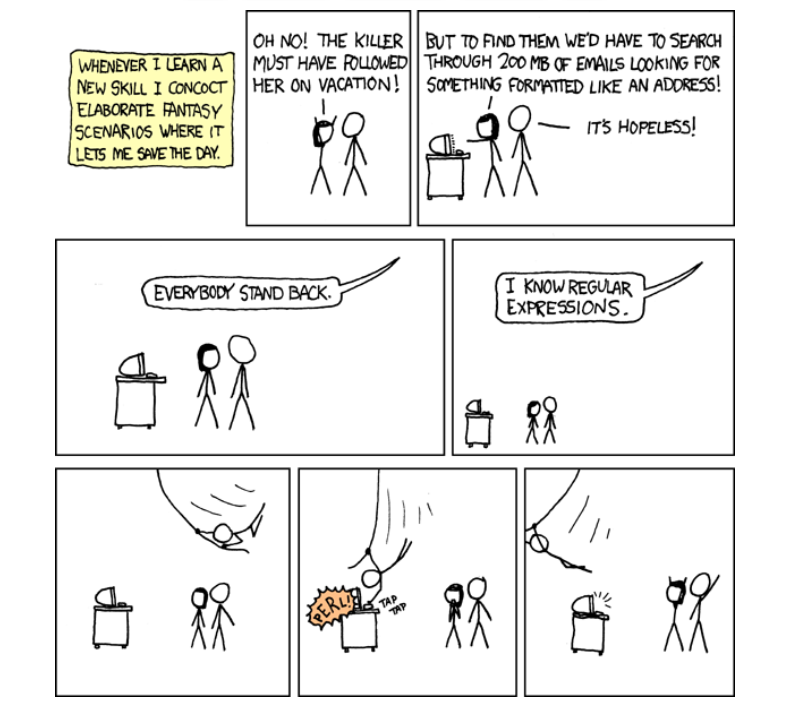
Regex Humor
Wait, forgot to escape a space. Wheeeeee[taptaptap]eeeeee. (source)
[www.indiegala.com] For all the Gala Ghouls listening, a spooky Halloween surprise reached the airwaves, one that will scare you with an intense frequency & a creepy modulation: Chased by Darkness, SOMNI, Deca, Krampus is Home, Boogeyman & FM.
Game Deals & more ending soon
[www.indiegala.com] Frightening Freebies, Deadly Deals & Gruesome Giveaways are coming! Every store checkout will bring a sweet treat: a FREE Key for you to keep.
PS5 Stand With Charging Station And Cooling System Is Half Off Right Now
Do you need an all-purpose PS5 stand that not only comes with cooling, but also a charging station for DualSense controllers? Then the NexiGo PS5 stand on sale at $32 (original price $60) is a great option.
The stand comes with a place for the PS5 console and fans that can "enhance PS5's built-in cooling system." You can adjust the fan speed as well, and there are three settings--low, medium, and high. Next to the PS5 placeholder are two charging docks for DualSense controllers with light indicators that show if the controller is fully charged or not.
Sort, stack, and organize household objects into just the right spot in A Little to the Left, a tidy puzzle game with a mischievous cat who likes to shake things up! Which way should the clock hands point? How to arrange the eggs? Who put so many stickers on this fruit?!? Come enjoy a calming world with an observational puzzle game with surprises around every corner. With charming illustrations and surprising scenarios, A Little to the Left is satisfying and curious with 75+ delightful puzzles to discover.
Keep your eye out for a mischievous cat who has an inclination for chaos!
It is going to be a big year for us at Oracle Code One and Oracle OpenWorld this year. The co-located developer and user conferences take place September 16-19 in San Francisco. If you haven't registered, you can still do so here. Registering for either Code One or Oracle OpenWorld gets you access t...
Posted by: xSicKxBot - 11-27-2022, 02:50 AM - Forum: Python
- No Replies
TensorFlow ModuleNotFoundError: No Module Named ‘utils’
5/5 – (1 vote)
Problem Formulation
Say, you try to import label_map_util from the utils module when running TensorFlow’s object_detection API. You get the following error message:
>>> from utils import label_map_util

Traceback (most recent call last): File "<pyshell#3>", line 1, in <module> from utils import label_map_util

ModuleNotFoundError: No module named 'utils'
Question: How to fix the ModuleNotFoundError: No module named 'utils'?
Solution Idea 1: Fix the Import Statement
The most common source of the error is that you use the expression from utils import <something> but Python doesn’t find the utils module. You can fix this by replacing the import statement with the corrected from object_detection.utils import <something>.
For example, do not use these import statements:
from utils import label_map_util
from utils import visualization_utils as vis_util
Instead, use these import statements:
from object_detection.utils import label_map_util
from object_detection.utils import visualization_utils as vis_util
Everything remains the same except the bolded text.
This, of course, assumes that Python can resolve the object_detection API. You can follow the installation recommendations here, or if you already have TensorFlow installed, check out the Object Detection API installation tips here.
Solution Idea 2: Modify System Path
Another idea to solve this issue is to append the path of the TensorFlow Object Detection API folder to the system paths so your script can find it easily.
To do this, import the sys library and run sys.path.append(my_path) on the path to the object_detection folder that may reside in /home/.../tensorflow/models/research/object_detection, depending on your environment.
I don’t recommend using this approach but I still want to share it with you for comprehensibility. Try copying the utils folder from models/research/object_detection in the same directory as the Python file requiring utils.
Solution Idea 4: Import Module from Another Folder (Utils)
This is a better variant of the previous approach: use our in-depth guide to figure out a way to import the utils module correctly, even though it may reside on another path. This should usually do the trick.
Resources: You can find more about this issue here, here, and here. Among other sources, these were also the ones that inspired the solutions provided in this tutorial.
Thanks for reading this—feel free to learn more about the benefits of a TensorFlow developer (we need to keep you motivated so you persist through the painful debugging process you’re currently in).
We are welcoming everyone to join our discord[discord.gg]. We are more active there on finding giveaways, small or large, and there are daily raffles you can participate.
Posted by: xSicKxBot - 11-27-2022, 02:50 AM - Forum: Lounge
- No Replies
Get Pokemon-Themed Switch Hori Controller At A Nice Discount
If you're a Pokemon fan looking to deck out your Nintendo Switch, the Hori Split Pad Pro Pokemon Arceus Edition is $50 instead of $60 right now at Amazon.
Worlds collide in Sonic the Hedgehog's newest adventure. Accelerate to new heights and experience the thrill of high velocity open-zone freedom. Battle powerful enemies as you speed through the Starfall Islands - landscapes brimming with dense forests, overflowing waterfalls, sizzling deserts and more.


 Problem: How to split a string using an empty string as a separator?
 Related Read:


 Question: How to fix the


