This giveaway is on gog.com gog is a platform for games that is dedicated to drm-free games (those are games that do not require login or registration to play the game)
How to grab Immortal Redneck - Go to the home page of https://gog.com - Login and Register - Go to the home page again - Wait for 10 seconds then start searching for Dex - on the home page look for "Now on sale" (above it there should be a banner) - on the banner there is a button "Yes, and claim the game" click it - Thats it
We are welcoming everyone to join our discord[discord.gg]. We are more active there on finding giveaways, small or large, and there are daily raffles you can participate.
Make your mark on Formula 1 in the officially licensed F1 Manager 2022. Be the boss of your chosen constructor and pick from a roster of 2022 drivers and staff.
Challenge: How to convert a Parquet file 'my_file.parquet' to a CSV file 'my_file.csv' in Python?
In case you don’t know what a Parquet file is, here’s the definition:
Info: Apache Parquet is an open-source, column-oriented data file format designed for efficient data storage and retrieval using data compression and encoding schemes to handle complex data in bulk. Parquet is available in multiple languages including Java, C++, and Python.
The most simple way to convert a Parquet to a CSV file in Python is to import the Pandas library, call the pandas.read_parquet() function passing the 'my_file.parquet' filename argument to load the file content into a DataFrame, and convert the DataFrame to a CSV using the DataFrame to_csv() method.
import pandas as pd

df = pd.read_parquet('my_file.parquet')

df.to_csv('my_file.csv')
Here’s a minimal example:
import pandas as pd
df = pd.read_parquet('my_file.parquet')
df.to_csv('my_file.csv')
For this to work, you may have to install pandas and pyarrow. But if I were you, I’d just try it because chances are you’ve already installed them or don’t explicitly need to install the PyArrow library.
Amazon Prime Members Can Stream 6 Games For Free This Month
The Prime Gaming Channel's September game-streaming lineup is live now. Amazon Prime subscribers can stream six games at no additional cost this month. This month’s lineup includes platformers new and old, a few racing games, and a massive action RPG for Prime members to check out on its cloud streaming service. You can stream these games on PC, Mac, iOS, Android, Amazon Fire devices, and even some Samsung TVs.
Amazon Luna Prime Gaming Channel games for September 2022
Available until September 30
Earthworm Jim
EVERSPACE
Hot Wheels Unleashed
Riptide GP: Renegade
Yooka-Laylee & The Impossible Lair
Ys IX: Monstrum Nox
Amazon Luna and the Prime Gaming channel are included with Amazon Prime memberships. You can sign up for a 30-day free trial of Amazon Prime and enjoy all these games, plus all the other perks the service includes.
We are welcoming everyone to join our discord[discord.gg]. We are more active there on finding giveaways, small or large, and there are daily raffles you can participate.
Spend your teenage years on an alien planet in this narrative RPG with card-based battles. Explore, grow up, and fall in love. The choices you make and skills you master over ten years will determine the course of your life and the survival of your colony.
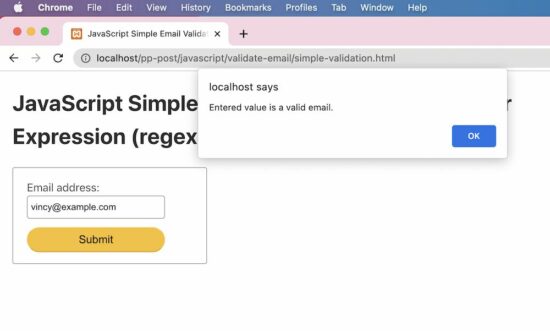
This tutorial helps to learn how to validate email using regular expression (regex) in JavaScript. It has more than one example of how to do email validation.
The below quick example uses a regex pattern with a JavaScript match() function to validate email. Before finding the match, it converts the input email to lowercase.
This simple email validation script does a basic check with the input email string.
It validates the input email if it has the expected format regardless of the length and the data type.
I have added this example just to understand how to do pattern-based validation with regex in JavaScript.
I prefer to use the quick example and the strict validation example follows.
simple-validation.html
<!DOCTYPE html>
<html lang="en">
<head>
<meta charset="utf-8">
<title>JavaScript Simple Email Validation using Regular Expression (regex)</title>
<link rel='stylesheet' href='style.css' type='text/css' />
<link rel='stylesheet' href='form.css' type='text/css' />
</head>
<body> <div class="phppot-container"> <h1>JavaScript Simple Email Validation using Regular Expression (regex)</h1> <div class="tile-container"> <form name="form"> <div class="row"> <label for="email">Email address: </label> <input id="email" name="email" /> </div> <div class="row"> <input type="submit" name="submit" value="Submit" onclick="validateEmail(document.form.email)" /> </div> </form> </div> </div> <script> function matchEmailRegex(emailStr) { var emailRegex = /\S+@\S+\.\S+/; return emailStr.match(emailRegex); }; // validates in the form anystring@anystring.anystring // no more fancy validations function validateEmail(emailField) { var emailStr = emailField.value; if (matchEmailRegex(emailStr)) { alert("Entered value is a valid email."); } else { alert("Entered value is not an email."); } return false; } </script>
</body>
</html>
Test results
Input: vincy
Output: Entered value is not an email. Input: vincy@example.c
Output: Entered value is a valid email.
How to do strict email validation in JavaScript
This example uses an almost similar regex pattern that is used in the quick example. But, it handles the return value of the JavaScript match to output the validation message.
It gives a code to directly include in an application validation script to validate a form email input.
The alert() can be replaced with any form of letting the end user know about the validation status.
strict-validation.html
<!DOCTYPE html>
<html lang="en">
<head>
<meta charset="utf-8">
<title>JavaScript Validate Email using Regular Expression (regex)</title>
<link rel='stylesheet' href='style.css' type='text/css' />
<link rel='stylesheet' href='form.css' type='text/css' />
</head>
<body> <div class="phppot-container"> <h1>JavaScript Validate Email using Regular Expression (regex)</h1> <div class="tile-container"> <form name="form"> <div class="row"> <label for="email">Email address: </label> <input id="email" name="email" /> </div> <div class="row"> <input type="submit" name="submit" value="Submit" onclick="validateEmail(document.form.email)" /> </div> </form> </div> </div> <script> function matchEmailRegex(emailStr) { var emailRegex = /^(([^<>()[\]\\.,;:\s@\"]+(\.[^<>()[\]\\.,;:\s@\"]+)*)|(\".+\"))@((\[[0-9]{1,3}\.[0-9]{1,3}\.[0-9]{1,3}\.[0-9]{1,3}\])|(([a-zA-Z\-0-9]+\.)+[a-zA-Z]{2,}))$/; return emailStr.match(emailRegex); }; function validateEmail(emailField) { var emailStr = emailField.value; if (matchEmailRegex(emailStr)) { alert("Entered value is a valid email."); } else { alert("Entered value is not an email."); } return false; } </script>
</body>
</html>
Test results
Unlike the simple example, it strictly validates the email prefix with the allowed special characters.
It also checks the domain name format to validate the email. The following results show the test cases and respective outputs of the JavaScript email validation.
Input: vincy
Output: Entered value is not an email. Input: vincy@example.c
Output: Entered value is not an email. Input: vincy@example.com
Output: Entered value is a valid email.
We are welcoming everyone to join our discord[discord.gg]. We are more active there on finding giveaways, small or large, and there are daily raffles you can participate.



 Challenge: How to convert a Parquet file
  Info:
Info: 
 Related Tutorial: