The games is free to keep until Thursday, September 8, 2022 5:00 PM.
Next week's freebies: Hundred Days - Winemaking Simulator Realm Royale Reforged Epic Launch Bundle
We are welcoming everyone to join our discord[discord.gg]. We are more active there on finding giveaways, small or large, and there are daily raffles you can participate.
In SD Gundam Battle Alliance, Mobile Suits and characters from across Mobile Suit Gundam history take center stage in this all-new action RPG.
A Battle Alliance to Correct a False World
The story takes place in G: Universe, a world where Gundam canon twists and turns in ways no one can predict. To correct this world's distorted history, the player leads a 3-unit squadron consisting of Mobile Suits and pilots from across Gundam history - a true Battle Alliance.What Awaits Beyond False History...
Combo action with stunning visuals and dynamic animation
Indulge in a wide array of Mobile Suit weaponry to crush many foes with! Control Mobile Suits portrayed with realistic weathering that showcases them as weapons of war as they tear across the battlefield with dynamic animations.
Strange phenomena known as Breaks are twisting legendary moments from Gundam history, and you're in charge to fix them.
Experience Gundam history's most famous scenes as you develop new Mobile Suits to add to your arsenal. Gather Capital and expansion parts to transform your favorite machine into the ultimate MS.
Tackle missions with friends in multiplayer!
Launch into battle with 2 partners to back you up. In multiplayer, you can play through the game with up to 2 other players in a 3-person team. Enjoy this new SD Gundam action RPG solo, or with friends.
More than five years after it first hit consoles and PC, Little Nightmares is coming to mobile. Developer Tarsier Studios made the announcement as a part of GameSpot's first-ever Swipe Showcase, revealing an Android and iOS version of the horror adventure game is coming later this year.
Set in a grim and mysterious world, Little Nightmares follows a young girl named Six as she navigates a ship filled with unusual horrors. All the while, Six must contend with a ravenous hunger that is taking over her body, leading to some pretty gruesome situations. The game features a dark, almost Coraline-like art style--though its content is decidedly more disturbing than that of the children's story. Little Nightmares explores horror through the eyes of a child and emphasizes the powerlessness they have through "hide-and-seek" style gameplay rather than allowing the players to engage in combat.
In GameSpot's review of Little Nightmares, we praised the game for its "haunting narrative," "tense cat-and-mouse style chases," and "enthralling visual and audio design." However, the game's short length did lead to some criticism.
The above code reads in the crimedescr column from the crimes.csv file downloaded earlier. This saves to the DataFrame df.
Next, the crimedescr column is then accessed, and the mode() method is appended. This method returns a value or set of values that appear most often along a selected axis. The results save to max_crime.
These results are output to the terminal.
0 10851(A)VC TAKE VEH W/O OWNER
Name: crimedescr, dtype: object
So, out of 7,854 rows of crimes committed on a given day for San Diego, the above offense was committed the highest number of times.
The above code only provides us with the name of the most common crime; what if we need the crime name and the respective count?
Now, you are equipped to return to your boss and tell them that 7,000 offenses of 10851 (A) VC TAKE VEH W/O OWNER occurred on a given day in San Diego.
Method 2: Use value_counts()
This example uses the value_counts() function to determine the top 5 most common crimes committed in San Diego on a given day.
The above code reads in the crimedescr and ucr_ncic_code columns from the crimes.csv file downloaded earlier. This saves to the DataFrame df.
Then, the crimedescr column is accessed, and the value_counts() function is appended. This function returns a series containing the counts of unique values.
However, since slicing is also appended ([:5]), only the top five (5) common crimes are retrieved and then converted to a List. The results save to top5_names.
['10851(A)VC TAKE VEH W/O OWNER', 'TOWED/STORED VEH-14602.6', '459 PC BURGLARY VEHICLE', 'TOWED/STORED VEHICLE', '459 PC BURGLARY RESIDENCE']
The above code only provides us with the names of the top 5 most common crimes; what if we need the names and their respective counts?
The above code reads in the crimedescr and ucr_ncic_code columns from the crimes.csv file downloaded earlier. This saves to the DataFrame df.
Then, the crimedescr column is accessed, and the value_counts() function is appended. This function returns a series containing the count of unique values.
Next, idxmax() is appended. This method returns the index of the first occurrence of the maximum index(es) over a selected axis.
The results save to max_crime and are output to the terminal.
10851(A)VC TAKE VEH W/O OWNER
Method 4: Use value_counts() and keys()
This example uses value_counts() and keys() to determine the top 5 most common crimes committed in unique grid areas of San Diego on a given day.
The above code reads in the crimedescr, grid, and the ucr_ncic_code columns from the crimes.csv file downloaded earlier. This saves to the DataFrame df.
Let’s break the highlighted line down.
If df['grid'].value_counts() was output to the terminal, the following would display (snippet). However, we have added a heading row to make it more understandable, and only five (5) rows are displayed.
Grid #
Grid Total
742
115
969
105
958
100
564
80
1084
71
Next, the code keys()[:5] is appended. The final output displays as follows.
The above code reads in the crimedescr and the ucr_ncic_code columns from the crimes.csv file downloaded earlier. This saves to the DataFrame df.
Next, the groupby() function is called and passed the first argument: df.groupby(['ucr_ncic_code','crimedescr']).size(). If this was output to the terminal at this point, the following would display (snippet).
As you can see, the other arguments need to be added to turn this into something usable. Sorting the data in descending order and adding a count column will provide the results we are looking for.
If the original Method 5 code example was output to the terminal, the following would display.
ucr_ncic_code
crimedescr
count
0
2404
10851(A)VC TAKE VEH W/O OWNER
653
1
7000
TOWED/STORED VEH-14602.6
463
2
2299
459 PC BURGLARY VEHICLE
462
3
7000
TOWED/STORED VEHICLE
434
4
2204
459 PC BURGLARY RESIDENCE
356
Summary
This article has provided five (5) ways to find the most common element in a Panda Column. These examples should provide you with enough information to select the one that best meets your coding requirements.
Good Luck & Happy Coding!
Programming Humor – Python
“I wrote 20 short programs in Python yesterday. It was wonderful. Perl, I’m leaving you.” — xkcd
Wake up babe, NBA 2K23 ratings are here. Visual Concepts' latest dissertation on dropping dimes arrives this week, Friday September 9th, and as a part of their own #2KDay Countdown with brand spotlights, 2K Beats, and J. Cole's Dreamer Edition, they have offered a first look at the official 2K23 overalls--highlighting rising stars, top rookies, and which new shooters are going to swoosh.
Crypto is back with a license to probe. The alien invader returns, groovier than ever.
Experience the swinging '60s in all its chemical-induced glory and take revenge on the KGB for blowing up your mothership. You'll have to form alliances with members of the very species you came to enslave.
Posted by: xSicKxBot - 09-06-2022, 02:00 AM - Forum: Python
- No Replies
Python TypeError: NoneType is Not Subscriptable (Fix This Stupid Bug)
5/5 – (1 vote)
Do you encounter the following error message?
TypeError: NoneType is not subscriptable
You’re not alone! This short tutorial will show you why this error occurs, how to fix it, and how to never make the same mistake again.
So, let’s get started!
Summary
Python raises the TypeError: NoneType is not subscriptable if you try to index x[i] or slice x[i:j] a None value. The None type is not indexable, i.e., it doesn’t define the __getitem__() method. You can fix it by removing the indexing or slicing call, or defining the __getitem__ method.
Example
The following minimal example that leads to the error:
x = None

print(x[0])

# TypeError: 'NoneType' object is not subscriptable
You set the variable to the value None. The value None is not a container object, it doesn’t contain other objects. So, the code really doesn’t make any sense—which result do you expect from the indexing operation?
Exercise: Before I show you how to fix it, try to resolve the error yourself in the following interactive shell:
If you struggle with indexing in Python, have a look at the following articles on the Finxter blog—especially the third!
You overwrite the __getitem__ method that takes one (index) argument i (in addition to the obligatory self argument) and returns the i-th value of the “container”.
In our case, we just return a string "Value 0" for the element variable[0] and "Value 10" for the element variable[10].
I hope you’d be able to fix the bug in your code! Before you go, check out our free Python cheat sheets that’ll teach you the basics in Python in minimal time:
This tutorial uses JavaScript’s GeoLocation API to get users’ location. This API call returns location coordinates and other geolocation details.
The following quick example has a function getLatLong() that uses the GeoLocation API. It calls the navigator.geplocation.getCurrentPosition(). This function needs to define the success and error callback function.
On success, it will return the geolocation coordinates array. The error callback includes the error code returned by the API. Both callbacks write the response in the browser console.
User’s location is a privacy sensitive information. We need to be aware of it before working on location access. Since it is sensitive, by default browser and the underlying operating system will not give access to the user’s location information.
Important! The user has to,
Explicitly enable location services at operating system level.
Give permission for the browser to get location information.
function getLatLong() { // using the JavaScript GeoLocation API // to get the current position of the user // if checks for support of geolocation API if (navigator.geolocation) { navigator.geolocation.getCurrentPosition( function(currentPosition) { console.log(currentPosition)}, function(error) { console.log("Error: " + error.code)} ); } else { locationElement.innerHTML = "JavaScript Geolocation API is not supported by this browser."; }

}
JavaScript GeoLocation API’s getCurrentPosition() function
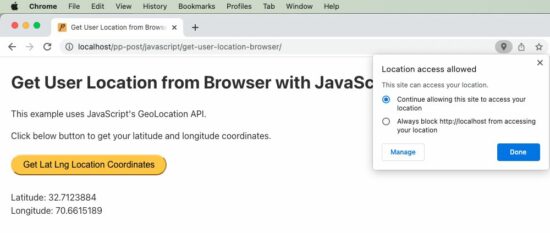
The below code is an extension of the quick example with Geo Location API. It has a UI that has control to call the JavaScript function to get the current position of the user.
The HTML code has the target to print the location coordinates returned by the API.
The JavaScript fetch callback parameter includes all the geolocation details. The callback function reads the latitude and longitude and shows them on the HTML target via JavaScript.
<!DOCTYPE html>
<html>
<head>
<title>Get User Location from Browser with JavaScript</title>
<link rel='stylesheet' href='style.css' type='text/css' />
<link rel='stylesheet' href='form.css' type='text/css' />
</head>
<body> <div class="phppot-container"> <h1>Get User Location from Browser with JavaScript</h1> <p>This example uses JavaScript's GeoLocation API.</p> <p>Click below button to get your latitude and longitude coordinates.</p> <div class="row"> <button onclick="getLatLong()">Get Lat Lng Location Coordinates</button> </div> <div class="row"> <p id="location"></p> </div> </div> <script> var locationElement = document.getElementById("location"); function getLatLong() { // using the JavaScript GeoLocation API // to get current position of the user // if checks for support of geolocation API if (navigator.geolocation) { navigator.geolocation.getCurrentPosition( displayLatLong, displayError); } else { locationElement.innerHTML = "JavaScript Geolocation API is not supported by this browser."; } } /** * displays the latitude and longitude from the current position * coordinates returned by the geolocation api. */ function displayLatLong(currentPosition) { locationElement.innerHTML = "Latitude: " + currentPosition.coords.latitude + "<br>Longitude: " + currentPosition.coords.longitude; } /** * displays error based on the error code received from the * JavaScript geolocation API */ function displayError(error) { switch (error.code) { case error.PERMISSION_DENIED: locationElement.innerHTML = "Permission denied by user to get location." break; case error.POSITION_UNAVAILABLE: locationElement.innerHTML = "Location position unavailable." break; case error.TIMEOUT: locationElement.innerHTML = "User location request timed out." break; case error.UNKNOWN_ERROR: locationElement.innerHTML = "Unknown error in getting location." break; } } </script>
</body>
</html>
In the above example script, we have a function for handing errors. It is important to include the function when getting user location via browser. Because, by default, the user’s permission settings will be disabled.
So most of the times, when this script is invoked, we will get errors. So we should have this handler declared and passed as a callback to the getCurrentPosition function. On error, JavaScript will call this error handler.
Geolocation API’s Output
Following is the output format returned by the JavaScript geolocation API. We will be predominantly using latitude and longitude from the result. ‘speed’ may be used when getting dynamic location of the user. We will be seeing about that also at the end of this tutorial.
We can get the user’s location by passing the latitude and longitude like below. There are many different service providers available and below is an example using Google APIs.
Get dynamic user location from browser using watchPosition()
Here is an interesting part of the tutorial. How will get you a user’s dynamic location, that is when he is on the move.
We should use an another function of GeoLocation API to get dynamic location coordinates on the move. The function watchPosition() is used to do this via JavaScript.
To test this script, run it in a mobile browser while moving in a vehicle to get user’s dynamic location.
I have presented the code part that is of relevance below. You can get the complete script from the project zip, it’s free to download below.
var locationElement = document.getElementById("location"); function getLatLong() { // note the usage of watchPosition, this is the difference // this returns the dynamic user position from browser if (navigator.geolocation) { navigator.geolocation.watchPosition(displayLatLong, displayError); } else { locationElement.innerHTML = "JavaScript Geolocation API is not supported by this browser."; } }
Final day, to check out the encore weekend freebies
[freebies.indiegala.com] "Encore, encore" we've been hearing and we listened. We've brought back for this weekend a few of your favorites. Keep an eye on for more.
The story takes place in the mid-21st century, a near future not too far from the present.
Submissive to the "Demon" with super powers, a survivor living under society, the Devil Summoner. He secretly guards society without anyone knowing.
Produced with high technology, the "Aion" that surpassed the human brain one day found a sign of the world's demise.
Aion's Ringo and Figg came to the human world to stop the world from perishing. Their purpose is to protect the key figures who can reverse the fate of their demise, but the key figures have all been killed.
Ringo then implemented the special ability "Soul Hack" possessed by Aion to revive them. They were given a "second chance", and the demon summoners joined Ringo and Figg to stop the world's demise.
As a result, will they be able to reverse their fate...?



 Question: How would you determine the most common




 Related Articles: