Become the new owner of a hunting lodge nestled among gorgeous habitats and rich animal populations. Explore vast open world environments across the USA and Europe. Hunt with a premium selection of firearms and equipment. Enjoy the perfect hunt on your own or with a friend in multiplayer coop.
This authentic hunting experience lets you explore and hunt in large open-world environments in the USA and Europe. Discover true to life animals in beautiful natural habitats and handle various detailed and highly realistic weapons.
Face the challenges of ethical hunting, supported by a compelling story, or simply enjoy hunting the rich environments freely.
This article will answer some basic questions on Ethereum Classic. Its main purpose is to give you a quick overview of the project. I’m not affiliated in any way with Ethereum Classic, so I try to be as unbiased as I can.
What is Ethereum Classic?
Ethereum Classic is an open-source proof-of-work blockchain and distributed computing platform that allows the execution of smart contracts and decentralized applications (dApps) on a public Ethereum Virtual Machine (EVM).
What is the Difference Between Ethereum Classic and Ethereum?
Ethereum is a hard fork of Ethereum Classic. These are two different Blockchain projects with different developers, features, philosophies, and dApp ecosystems.
The less popular Ethereum Classic contains the original, unmodified history of the Ethereum Blockchain, whereas the more well-known Ethereum Blockchain emerged as a hard fork that redistributed the “stolen” tokens after the DAO hack in 2016.
Most influential developers and institutions, as well as Ethereum’s founder Vitalik Buterin supported the new Ethereum blockchain and explicitly recommended miners to NOT support the Ethereum Classic Blockchain.
The main differences between the two are as follows:
Ethereum Classic is much smaller than Ethereum in regards to almost all metrics such as market cap, transaction volume, number of validators, total locked value, and number of dApps that run on top of the Blockchain.
Ethereum Classic‘s philosophy is “Code is Law”, i.e., even if there is a smart contract hack, the state of the Blockchain is never reverted. This is in contrast to Ethereum’s philosophy of “rapid change” and regular hard forks if the “Layer 0”, i.e., the people running the Blockchain agree to the changes. You could think of it as “Consensus through PoW” vs “Consensus through People”.
Ethereum Classic has an upper maximum supply of 210,700,000 ETC tokens, whereas Ethereum (ETH) has no max supply.
Ethereum Classic runs a proof of work (PoW) consensus algorithm, whereas Ethereum runs a proof of stake (PoS) consensus algorithm.
The DAO was a decentralized autonomous organization (DAO) launched in 2016 on the Ethereum blockchain. After collecting almost 15% of all ETH through a token sale, The DAO was hacked due to a vulnerability in the smart contract.
Ethereum is the Blockchain that emerged when reversing the state of the chain to before the hack, i.e., rewriting history. Code is Not Law.
Ethereum Classic is the Blockchain that emerged from just leaving the hack unchanged, i.e., not rewriting history. Code is Law.
A great video on the DAO hack in 2016 is given here:
Are There Any dApps on Ethereum Classic?
The Ethereum Classic Blockchain is Turing Complete, i.e., you can run arbitrary smart contract code on it. Thus, Ethereum Classic supports decentralized apps (dApps) that issue their own tokens and NFTs.
While there are many dApps on Ethereum Classic, the dApp ecosystem is by orders of magnitude smaller than the Ethereum dApp ecosystem due to the lack of broad developer support.
Statistics: For example, DappRadar lists 3425 Ethereum dApps but not a single dApp for Ethereum Classic. On the Ethereum Classic web page itself, there are only 34 dApps listed. Now, that’s two orders of magnitude fewer dApps for Ethereum Classic when compared to Ethereum!
Figure: That’s about it regarding dApps on Ethereum Classic at the point of this writing.
How to Create a dApp for Ethereum Classic?
Programming Smart Contracts on Ethereum Classic is identical to how it is done on ETH, as ETC maintains compatibility with the Ethereum EVM. Any contract written for Ethereum can be deployed to ETC.
To create a dapp for Ethereum Classic you must program one in a smart contract programming language. Then, you must compile that dapp and install it on the blockchain from a funded account.
So, you can create a decentralized application on Ethereum Classic using Solidity or any other programming language that is able to be compiled against the EVM.
Does Ethereum Classic Have a Future?
Ethereum Classic has much less developer activity than many other Blockchain projects such as Ethereum or Solana. Given the strong developer network effects of bigger Blockchains, i.e., developers are more likely to go to the “meaningful” Blockchain projects which make them even more meaningful, many people are led to believe that Ethereum Classic doesn’t have a rosy future.
I agree with the network effects argument. However, when diving into the project, I discovered some interesting arguments that speak for Ethereum Classic:
Proof of work smart contract blockchain
Open system
Permissionless
Bitcoin philosophy
Hedge against ETH failure
Let’s dive into each of them one by one.
Proof of work smart contract blockchain
First, Ethereum Classic will be the largest proof of work smart contract Blockchain after the “Merge”, i.e., Ethereum’s move to a proof of stake consensus algorithm. This gives Ethereum Classic a unique and robust positioning in the market for decades to come.
Open system design
Second, Ethereum Classic is an open system, whereas Ethereum is a closed system (like all PoS Blockchains). This may make Ethereum Classic more robust against corruption and capturing of the Blockchain. For example, you could argue that Ethereum is already captured by the current token holders. Ethereum Classic is an open PoW system, so the current majority of computing power doesn’t control Ethereum Classic forever. One could always add more mining devices from outside the system.
Permissionless
Third, Ethereum Classic is permissionless, whereas Ethereum is permissioned. You cannot contribute to the consensus algorithm of the Ethereum network without buying a stake from an insider, i.e., asking them for permission. If the majority of token holders are not willing to sell ETH to you, you can never start a “revolution”, i.e., taking over control from the centralized controlling entity or entities. Once a PoS chain is captured by centralized entities, it is very hard to take it over to decentralize it again. However, this is possible in a PoW system.
Bitcoin philosophy
Fourth, Ethereum Classic’s design philosophy is much closer to Bitcoin’s. Code is Law. Few changes. Decentralization over scalability. Maximum token supply and sound money properties. Proof of work security. Thus, even though the project is much smaller than Ethereum and Ethereum Classic has been subject to 51% attacks in the past, it has proven to be extremely robust organism, like Bitcoin, and many people subscribing to the Bitcoin philosophy may also subscribe to the ETC philosophy.
Hedge against ETH failure
Fifth, Ethereum Classic will be used as a “hedge” against the failure of Ethereum in the decades to come. While I believe in the philosophy of Ethereum, it is not at all guaranteed that they will make it against the powerful centralization forces (and I don’t like the fact that it’s a closed, i.e., fragile, system). To hedge against those potentially low-probability failure cases of Ethereum, one could buy some Ethereum Classic tokens (no financial advise).
Solidity is the programming language of the future.
It gives you the rare and sought-after superpower to program against the “Internet Computer”, i.e., against decentralized Blockchains such as Ethereum, Binance Smart Chain, Ethereum Classic, Tron, and Avalanche – to mention just a few Blockchain infrastructures that support Solidity.
In particular, Solidity allows you to create smart contracts, i.e., pieces of code that automatically execute on specific conditions in a completely decentralized environment. For example, smart contracts empower you to create your own decentralized autonomous organizations (DAOs) that run on Blockchains without being subject to centralized control.
NFTs, DeFi, DAOs, and Blockchain-based games are all based on smart contracts.
This course is a simple, low-friction introduction to creating your first smart contract using the Remix IDE on the Ethereum testnet – without fluff, significant upfront costs to purchase ETH, or unnecessary complexity.
In JavaScript, there are many options to removing duplicates. We shall see them one by one with examples below.
This example provides all those options from easy to complex solutions to achieve this. You can save this into your application’s common client-side assets to use in your projects.
1) Remove duplicates using JavaScript Set
This quick example uses the JavaScript Set class. This class constructs a unique elements array.
If you pass an input array with duplicate elements, the Set removes the duplicate and returns an array of unique elements.
Quick example
// best and simple solution

// when creating a JavaScript Set, it implicitly removes duplicates

const arrayElements = ['a', 'b', 'c', 'a', 'b', 'd'];

console.log(arrayElements);

let uniqueElements = [...new Set(arrayElements)];

// result array after remove is [ 'a', 'b', 'c', 'd' ]

console.log(uniqueElements);
Output
[ 'a', 'b', 'c', 'd' ]
2) Fastest method to remove duplicates from an array
This is the fastest method to remove duplicates from an array.
The removeDuplicates() custom function runs a loop on the input array.
It defines an array seen[] to mark that the element is found already.
It checks if it is already set in the seen[] array during the iteration. If not, it will be added to the resultant unique array.
<html>

<body> <h1>Remove Duplicates from Array JavaScript - fastest method</h1> <script> function removeDuplicates(arrayElements) { var seen = {}; var resultArray = []; var length = arrayElements.length; var j = 0; for (var i = 0; i < length; i++) { var element = arrayElements[i]; if (seen[element] !== 1) { seen[element] = 1; resultArray[j++] = element; } } return resultArray; } const arrayElements = ['a', 'b', 'c', 'a', 'b', 'd']; console.log(arrayElements); uniqueElements = removeDuplicates(arrayElements); // result array after remove is [ 'a', 'b', 'c', 'd' ] console.log(uniqueElements); </script>

</body>

</html>
3) Remove duplicates from an array using filter()
The JavaScript filter is used with an arrow function to narrow down the array output. It filters the array of elements based on their uniqueness.
The filter condition uses JavaScript indexOf() method to compare. The indexOf() always returns the first index of the element. It is regardless of its multiple occurrences in an array.
This filter condition compares the first index with the current index of the original array. If the condition is matched then the arrow function returns the element to the output array. Refer this for filtering an array in PHP of elements to get rid of duplicates.
<html>

<body> <h1>Remove Duplicates from Array JavaScript using filter()</h1> <script> const arrayElements = ['a', 'b', 'c', 'a', 'b', 'd']; console.log(arrayElements); let uniqueElements = arrayElements.filter((element, index) => { return arrayElements.indexOf(element) === index; }); // result array after remove is [ 'a', 'b', 'c', 'd' ] console.log(uniqueElements); </script>

</body>

</html>
4) Remove Duplicates from Array using JavaScript Hashtables
In this method, the JavaScript hashtable mapping is created based on the data type of the input array element. It defines a JavaScript primitive data type object mapping array.
It applies the filter to do the following steps.
It gets the array element’s data type.
If the element is the type one among the primitive array defined, then it applies the filter condition.
Condition checks if the hashtable has an entry as same as the current element’s property. If a match is found, then it returns the current element.
If the array element is not a primitive data type, then the filter will be based on the JavaScript objects’ linear search.
<html>

<body> <h1>Remove Duplicates from Array JavaScript using Hashtables</h1> <script> // uses hash lookups for JavaScrip primitives and linear search for objects function removeDuplicates(arrayElements) { var primitives = { "boolean": {}, "number": {}, "string": {} }, objects = []; return arrayElements .filter(function(element) { var type = typeof element; if (type in primitives) return primitives[type] .hasOwnProperty(element) ? false : (primitives[type][element] = true); else return objects.indexOf(element) >= 0 ? false : objects.push(element); }); } const arrayElements = ['a', 'b', 'c', 'a', 'b', 'd']; console.log(arrayElements); uniqueElements = removeDuplicates(arrayElements); // result array after remove is [ 'a', 'b', 'c', 'd' ] console.log(uniqueElements); </script>

</body>

</html>
5) Remove Duplicates from Array using includes() and push()
This method uses JavaScript forEach() to iterate the input array. It defines an empty array to store the unique elements uniqueElements[].
In each iteration, it checks if the uniqueElements[]array already has the element. It uses JavaScript includes() to do this check.
Once the includes() function returns false, then it will push the current element in to the uniqueElements[].
<html>

<body> <h1>Remove Duplicates from Array JavaScript using includes() and push()</h1> <script> const arrayElements = ['a', 'b', 'c', 'a', 'b', 'd']; console.log(arrayElements); let uniqueElements = []; arrayElements.forEach((element) => { if (!uniqueElements.includes(element)) { uniqueElements.push(element); } }); // result array after remove is [ 'a', 'b', 'c', 'd' ] console.log(uniqueElements); </script>

</body>

</html>
6) Remove Duplicates from Array using reduce()
Like the JavaScript filter() function, the reduce() function also applies conditions to narrow down the input array.
This function has the current element and the previous result returned by the callback of the reduce().
Each callback action pushes the unique element into an array. This array is used in the next callback to apply includes() and push() to remove the duplicates.
<html>

<body> <h1>Remove Duplicates from Array JavaScript using reduce()</h1> <script> const arrayElements = ['a', 'b', 'c', 'a', 'b', 'd']; console.log(arrayElements); let uniqueElements = arrayElements.reduce(function(pass, current) { if (!pass.includes(current)) pass.push(current); return pass; }, []); // result array after remove is [ 'a', 'b', 'c', 'd' ] console.log(uniqueElements); </script>

</body>

</html>
7) Remove Duplicates from Array using JavaScript Sort
It sorts the input array and removes the duplicates by successive elements comparison.
After sorting, the filter functions condition checks if the current and the previous element are not the same. Then, filters the unique array out of duplicates.
<html>

<body> <h1>Remove Duplicates from Array JavaScript using Sort</h1> <script> // sort the JavaScript array, and then // remove each element that's equal to the preceding one function removeDuplicates(arrayElements) { return arrayElements.sort().filter( function(element, index, ary) { return !index || element != ary[index - 1]; }); } const arrayElements = ['a', 'b', 'c', 'a', 'b', 'd']; console.log(arrayElements); uniqueElements = removeDuplicates(arrayElements); // result array after remove is [ 'a', 'b', 'c', 'd' ] console.log(uniqueElements); </script>

</body>

</html>
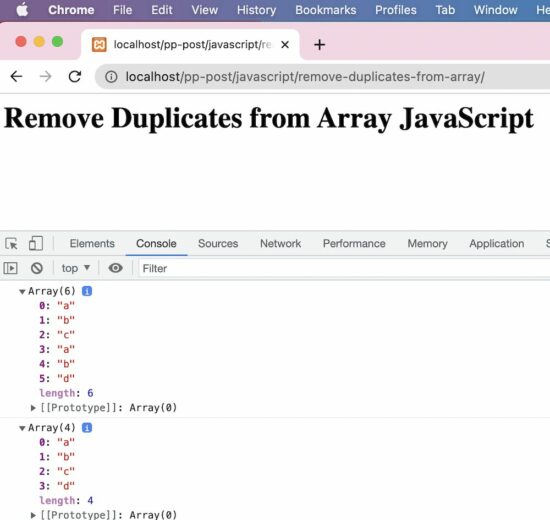
Output:
Array(6) 0: "a" 1: "b" 2: "c" 3: "a" 4: "b" 5: "d" length: 6
Array(4) 0: "a" 1: "b" 2: "c" 3: "d" length: 4
This is your chance! Try out Vorax during our worldwide exclusive ALPHA period for a LIMITED time only, survive and face the horrors of the island. Get a taste of our upcoming hardcore survival horror game & let us know about your experience. Download it from here.[freebies.indiegala.com] https://store.steampowered.com/app/1874190/Vorax/ You can wishlist Vorax on Steam to stay updated about important info, but you may join us on Discord, Facebook, Twitter & Youtube.
Destiny 2 Ketchcrash Guide: How To Complete The Season Of Plunder Activity
Destiny 2's Season of Plunder has brought with it a new seasonal activity, one that leans heavily into the pirate adventure theme that you'll be engaging in for the next three months. Ketchcrash is naval warfare but with a Destiny twist, as you'll be exploring the Reef on your very own Eliksni spaceship.
Like other seasonal activities, Ketchcrash is an excellent way to farm for gear and earn the new swashbuckler-themed loot that has been introduced to the game. It's not complex to dive into and it's a fun diversion for a fireteam of six Guardians to hone their new Arc 3.0 skills in. The activity also rewards you with Map Fragments, which can be used to make Treasure Maps and earn even better loot in Expeditions.
Calling all officers! I've got a Fashion Crime in Progress and I'm mobilizing all Fashion Police Squad members. Grab your Belt of Justice and your Tailormade Sewing Machine, we've got some Fashion Justice to dispense!
Fashion Police Squad is a humorous Retro FPS where you fight against fashion crime using attire enhancing weaponry. Clean the streets of socks in sandals as Sergeant Des, and experience a single-player story full of fabulous characters, dazzling encounters, and fierce runway shows!
How to Apply a Function to Each Cell in a Pandas DataFrame?
5/5 – (1 vote)
Problem Formulation
Given the following DataFrame df:
import pandas as pd df = pd.DataFrame([{'A':1, 'B':2, 'C':2, 'D':4}, {'A':4, 'B':8, 'C':3, 'D':1}, {'A':2, 'B':7, 'C':1, 'D':2}, {'A':3, 'B':5, 'C':1, 'D':2}]) print(df) ''' A B C D

0 1 2 2 4

1 4 8 3 1

2 2 7 1 2

3 3 5 1 2 '''
Challenge: How to apply a function f to each cell in the DataFrame?
For example, you may want to apply a function that replaces all odd values with the value 'odd'.
import pandas as pd df = pd.DataFrame([{'A':1, 'B':2, 'C':2, 'D':4}, {'A':4, 'B':8, 'C':3, 'D':1}, {'A':2, 'B':7, 'C':1, 'D':2}, {'A':3, 'B':5, 'C':1, 'D':2}]) def f(cell): if cell%2 == 1: return 'odd' return cell # ... <Apply Function f to each cell> ... print(df) ''' A B C D

0 odd 2 2 4

1 4 8 odd odd

2 2 odd odd 2

3 odd odd odd 2 '''
Solution: DataFrame applymap()
The Pandas DataFrame df.applymap() method returns a new DataFrame where the function f is applied to each cell of the original DataFrame df. You can pass any function object as a single argument into the df.applymap() function, either defined as a lambda expression or a normal function.
Example 1: Replace Odd Values in DataFrame
Here’s an example where each cell of the DataFrame is checked against whether it is an odd value. If so, it is replaced with the string 'odd':
def f(cell): if cell%2 == 1: return 'odd' return cell df_new = df.applymap(f) print(df_new) ''' A B C D

0 odd 2 2 4

1 4 8 odd odd

2 2 odd odd 2

3 odd odd odd 2 '''
Example 2: Create Two DataFrames with Even and Odd Values Replaced
A slightly advanced example uses two lambda functions to create two new DataFrames where one has all odd and the other has all even values replaced:
import pandas as pd df = pd.DataFrame([{'A':1, 'B':2, 'C':2, 'D':4}, {'A':4, 'B':8, 'C':3, 'D':1}, {'A':2, 'B':7, 'C':1, 'D':2}, {'A':3, 'B':5, 'C':1, 'D':2}]) df_even = df.applymap(lambda x: 'odd' if x%2 else x)

df_odd = df.applymap(lambda x: x if x%2 else 'even') print(df_even) ''' A B C D

0 odd 2 2 4

1 4 8 odd odd

2 2 odd odd 2

3 odd odd odd 2 ''' print(df_odd) ''' A B C D

0 1 even even even

1 even even 3 1

2 even 7 1 even

3 3 5 1 even '''
We used the concept of a ternary operator to concisely define the replacement function using the keyword lambda to create a function object “on the fly”.
Email validation in PHP can be done in different ways. In general, a website will have client-side validation.
I prefer both client and server-side validation. It is applicable not only for emails but also to all inputs received from the end users. It will make the website more robust.
Validating email or other user inputs is a basic precautionary step before processing.
In this article, we will see how to validate email on the server-side. PHP provides various alternates to validate email with its built-in constants and functions. Some of them are listed below.
Ways to validate email in PHP
Using FILTER_VALIDATE_EMAIL.
Using pattern matching with regular expression.
By validating the domain name from the email address.
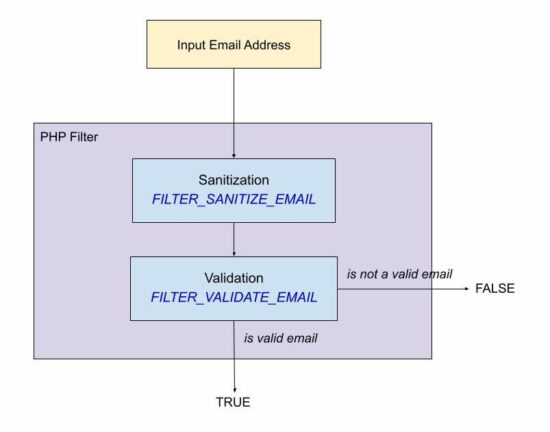
The following quick example uses PHP filter FILTER_VALIDATE_EMAIL. It is the best method of validating email in PHP.
Quick example
<?php

$email = 'test@example.com';

isValidEmail($email); // using FILTER_VALIDATE_EMAIL - this is the best option to use in PHP

function isValidEmail($email)

{ return filter_var($email, FILTER_VALIDATE_EMAIL) !== false;

}

?>
Let us see other methods to validate email using PHP script.
Using FILTER_SANITIZE_EMAIL for input sanitization
The FILTER_SANITIZE_EMAIL is used to clean the email data submitted by the user.
In this example, the $email is hard coded with an example email address. You can supply email input from the form data posted to PHP using GET or POST methods.
It adds a prior step to sanitize the email data before validating its format. For validating the format of the sanitized email data, it uses FILTER_VALIDATE_EMAIL.
filter-sanitize-email.php
<?php

// this script explains the difference between FILTER_SANITIZE_EMAIL and FILTER_VALIDATE_EMAIL // validation is to test if an email is in valid email format and FILTER_VALIDATE_EMAIL should be used.

// sanitization is to clean an user input before using it in the program and FILTER_SANITIZE_EMAIL should be used.

$email = "test@example.com";

$cleanEmail = filter_var($email, FILTER_SANITIZE_EMAIL); // after sanitization use the email and check for valid email or not

if (filter_var($cleanEmail, FILTER_VALIDATE_EMAIL)) { // the email is valid and use it

}

?>
Using pattern matching with regular expression
If you are expecting a regex pattern to validate the email format, this example code will help.
This code has a regex pattern in a variable and is used to validate email with PHP preg_match().
In PHP, the preg_match() is for pattern matching with a given subject that is an email address here.
This code has the validateWithRegex() function to process the PHP email validation. It applies converts the input email string to lower case and trims before applying preg_match().
Then, it returns a boolean true if the match is found for the email regex pattern.
email-regex.php
<?php

validateWithRegex($email); // Using regular expression (regex). If for some reason you want to validate email via a regex use this

// function. The best way to validate is via FILTER_VALIDATE_EMAIL only.

function validateWithRegex($email)

{ $email = trim(strtolower($email)); // the regex I have used is from PHP version 8.1.7 which is used in php_filter_validate_email // reference: https://github.com/php/php-src/blob/PHP-...ers.c#L682 $emailRegex = '/^(?!(?:(?:\\x22?\\x5C[\\x00-\\x7E]\\x22?)|(?:\\x22?[^\\x5C\\x22]\\x22?)){255,})(?!(?:(?:\\x22?\\x5C[\\x00-\\x7E]\\x22?)|(?:\\x22?[^\\x5C\\x22]\\x22?)){65,}@)(?:(?:[\\x21\\x23-\\x27\\x2A\\x2B\\x2D\\x2F-\\x39\\x3D\\x3F\\x5E-\\x7E\\pL\\pN]+)|(?:\\x22(?:[\\x01-\\x08\\x0B\\x0C\\x0E-\\x1F\\x21\\x23-\\x5B\\x5D-\\x7F\\pL\\pN]|(?:\\x5C[\\x00-\\x7F]))*\\x22))(?:\\.(?:(?:[\\x21\\x23-\\x27\\x2A\\x2B\\x2D\\x2F-\\x39\\x3D\\x3F\\x5E-\\x7E\\pL\\pN]+)|(?:\\x22(?:[\\x01-\\x08\\x0B\\x0C\\x0E-\\x1F\\x21\\x23-\\x5B\\x5D-\\x7F\\pL\\pN]|(?:\\x5C[\\x00-\\x7F]))*\\x22)))*@(?:(?:(?!.*[^.]{64,})(?:(?:(?:xn--)?[a-z0-9]+(?:-+[a-z0-9]+)*\\.){1,126}){1,}(?:(?:[a-z][a-z0-9]*)|(?:(?:xn--)[a-z0-9]+))(?:-+[a-z0-9]+)*)|(?:\\[(?:(?:IPv6:(?:(?:[a-f0-9]{1,4}(?::[a-f0-9]{1,4}){7})|(?:(?!(?:.*[a-f0-9][:\\]]){7,})(?:[a-f0-9]{1,4}(?::[a-f0-9]{1,4}){0,5})?::(?:[a-f0-9]{1,4}(?::[a-f0-9]{1,4}){0,5})?)))|(?:(?:IPv6:(?:(?:[a-f0-9]{1,4}(?::[a-f0-9]{1,4}){5}:)|(?:(?!(?:.*[a-f0-9]:){5,})(?:[a-f0-9]{1,4}(?::[a-f0-9]{1,4}){0,3})?::(?:[a-f0-9]{1,4}(?::[a-f0-9]{1,4}){0,3}:)?)))?(?:(?:25[0-5])|(?:2[0-4][0-9])|(?:1[0-9]{2})|(?:[1-9]?[0-9]))(?:\\.(?:(?:25[0-5])|(?:2[0-4][0-9])|(?:1[0-9]{2})|(?:[1-9]?[0-9]))){3}))\\]))$/iDu'; if (preg_match($emailRegex, $email) === 1) { return true; } else { return false; }

}

?>
By validating the domain name from the email string
This method is a very simple one for validating email. It validates email by ensuring its host DNS validness.
It uses the PHP checkdnsrr() function to validate DNS by a hostname or the site IP address.
This function returns a boolean true if the host has any DNS records found. And thereby, the email in that host can be considered in a valid format.
It follows the below list of steps.
It extracts the domain name from the email.
It extracts the username prefixed before the @ symbol.
It ensures that the username and domain name are not empty.
It checks if the DNS details are not empty about the host extracted from the input email.
domain-validate-email.php
<?php // simplest custom email validation using email's domain validation

function validateEmail($email)

{ $isEmailValid = FALSE; if (! empty($email)) { $domain = ltrim(stristr($email, '@'), '@') . '.'; $user = stristr($email, '@', TRUE); // validate email's domain using DNS if (! empty($user) && ! empty($domain) && checkdnsrr($domain)) { $isEmailValid = TRUE; } } return $isEmailValid;

}

?>
Leisure Suit Larry 6 - Shape Up Or Slip Out FREEbie
[freebies.indiegala.com] If you haven't grabbed it yet, this weekend is your last chance to claim it! Shape Up or Slip Out! is the fifth game in Al Lowe's Leisure Suit Larry series and again a classique point&click adventure.
Summer Scratchy Sale is ending soon
[www.indiegala.com] This BONUS opportunity is available for everyone and sadly it will be ending after this weekend, so make sure you stock up on your favorite deals before the Scratch Card opportunity containing a BONUS secret Steam game for every store purchase ends.



 Statistics: For example,

 So, you can create a decentralized application on Ethereum Classic using




 Challenge: How to apply a function
  Recommended Tutorial: