This is your chance! Try out Vorax during our worldwide exclusive ALPHA period for a LIMITED time only, survive and face the horrors of the island. Get a taste of our upcoming hardcore survival horror game & let us know about your experience. Download it from here.[freebies.indiegala.com] https://store.steampowered.com/app/1874190/Vorax/ You can wishlist Vorax on Steam to stay updated about important info, but you may join us on Discord, Facebook, Twitter & Youtube.
Destiny 2 Ketchcrash Guide: How To Complete The Season Of Plunder Activity
Destiny 2's Season of Plunder has brought with it a new seasonal activity, one that leans heavily into the pirate adventure theme that you'll be engaging in for the next three months. Ketchcrash is naval warfare but with a Destiny twist, as you'll be exploring the Reef on your very own Eliksni spaceship.
Like other seasonal activities, Ketchcrash is an excellent way to farm for gear and earn the new swashbuckler-themed loot that has been introduced to the game. It's not complex to dive into and it's a fun diversion for a fireteam of six Guardians to hone their new Arc 3.0 skills in. The activity also rewards you with Map Fragments, which can be used to make Treasure Maps and earn even better loot in Expeditions.
Calling all officers! I've got a Fashion Crime in Progress and I'm mobilizing all Fashion Police Squad members. Grab your Belt of Justice and your Tailormade Sewing Machine, we've got some Fashion Justice to dispense!
Fashion Police Squad is a humorous Retro FPS where you fight against fashion crime using attire enhancing weaponry. Clean the streets of socks in sandals as Sergeant Des, and experience a single-player story full of fabulous characters, dazzling encounters, and fierce runway shows!
How to Apply a Function to Each Cell in a Pandas DataFrame?
5/5 – (1 vote)
Problem Formulation
Given the following DataFrame df:
import pandas as pd df = pd.DataFrame([{'A':1, 'B':2, 'C':2, 'D':4}, {'A':4, 'B':8, 'C':3, 'D':1}, {'A':2, 'B':7, 'C':1, 'D':2}, {'A':3, 'B':5, 'C':1, 'D':2}]) print(df) ''' A B C D

0 1 2 2 4

1 4 8 3 1

2 2 7 1 2

3 3 5 1 2 '''
Challenge: How to apply a function f to each cell in the DataFrame?
For example, you may want to apply a function that replaces all odd values with the value 'odd'.
import pandas as pd df = pd.DataFrame([{'A':1, 'B':2, 'C':2, 'D':4}, {'A':4, 'B':8, 'C':3, 'D':1}, {'A':2, 'B':7, 'C':1, 'D':2}, {'A':3, 'B':5, 'C':1, 'D':2}]) def f(cell): if cell%2 == 1: return 'odd' return cell # ... <Apply Function f to each cell> ... print(df) ''' A B C D

0 odd 2 2 4

1 4 8 odd odd

2 2 odd odd 2

3 odd odd odd 2 '''
Solution: DataFrame applymap()
The Pandas DataFrame df.applymap() method returns a new DataFrame where the function f is applied to each cell of the original DataFrame df. You can pass any function object as a single argument into the df.applymap() function, either defined as a lambda expression or a normal function.
Example 1: Replace Odd Values in DataFrame
Here’s an example where each cell of the DataFrame is checked against whether it is an odd value. If so, it is replaced with the string 'odd':
def f(cell): if cell%2 == 1: return 'odd' return cell df_new = df.applymap(f) print(df_new) ''' A B C D

0 odd 2 2 4

1 4 8 odd odd

2 2 odd odd 2

3 odd odd odd 2 '''
Example 2: Create Two DataFrames with Even and Odd Values Replaced
A slightly advanced example uses two lambda functions to create two new DataFrames where one has all odd and the other has all even values replaced:
import pandas as pd df = pd.DataFrame([{'A':1, 'B':2, 'C':2, 'D':4}, {'A':4, 'B':8, 'C':3, 'D':1}, {'A':2, 'B':7, 'C':1, 'D':2}, {'A':3, 'B':5, 'C':1, 'D':2}]) df_even = df.applymap(lambda x: 'odd' if x%2 else x)

df_odd = df.applymap(lambda x: x if x%2 else 'even') print(df_even) ''' A B C D

0 odd 2 2 4

1 4 8 odd odd

2 2 odd odd 2

3 odd odd odd 2 ''' print(df_odd) ''' A B C D

0 1 even even even

1 even even 3 1

2 even 7 1 even

3 3 5 1 even '''
We used the concept of a ternary operator to concisely define the replacement function using the keyword lambda to create a function object “on the fly”.
Email validation in PHP can be done in different ways. In general, a website will have client-side validation.
I prefer both client and server-side validation. It is applicable not only for emails but also to all inputs received from the end users. It will make the website more robust.
Validating email or other user inputs is a basic precautionary step before processing.
In this article, we will see how to validate email on the server-side. PHP provides various alternates to validate email with its built-in constants and functions. Some of them are listed below.
Ways to validate email in PHP
Using FILTER_VALIDATE_EMAIL.
Using pattern matching with regular expression.
By validating the domain name from the email address.
The following quick example uses PHP filter FILTER_VALIDATE_EMAIL. It is the best method of validating email in PHP.
Quick example
<?php

$email = 'test@example.com';

isValidEmail($email); // using FILTER_VALIDATE_EMAIL - this is the best option to use in PHP

function isValidEmail($email)

{ return filter_var($email, FILTER_VALIDATE_EMAIL) !== false;

}

?>
Let us see other methods to validate email using PHP script.
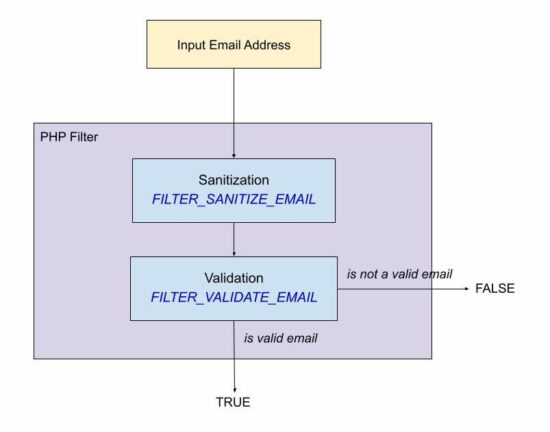
Using FILTER_SANITIZE_EMAIL for input sanitization
The FILTER_SANITIZE_EMAIL is used to clean the email data submitted by the user.
In this example, the $email is hard coded with an example email address. You can supply email input from the form data posted to PHP using GET or POST methods.
It adds a prior step to sanitize the email data before validating its format. For validating the format of the sanitized email data, it uses FILTER_VALIDATE_EMAIL.
filter-sanitize-email.php
<?php

// this script explains the difference between FILTER_SANITIZE_EMAIL and FILTER_VALIDATE_EMAIL // validation is to test if an email is in valid email format and FILTER_VALIDATE_EMAIL should be used.

// sanitization is to clean an user input before using it in the program and FILTER_SANITIZE_EMAIL should be used.

$email = "test@example.com";

$cleanEmail = filter_var($email, FILTER_SANITIZE_EMAIL); // after sanitization use the email and check for valid email or not

if (filter_var($cleanEmail, FILTER_VALIDATE_EMAIL)) { // the email is valid and use it

}

?>
Using pattern matching with regular expression
If you are expecting a regex pattern to validate the email format, this example code will help.
This code has a regex pattern in a variable and is used to validate email with PHP preg_match().
In PHP, the preg_match() is for pattern matching with a given subject that is an email address here.
This code has the validateWithRegex() function to process the PHP email validation. It applies converts the input email string to lower case and trims before applying preg_match().
Then, it returns a boolean true if the match is found for the email regex pattern.
email-regex.php
<?php

validateWithRegex($email); // Using regular expression (regex). If for some reason you want to validate email via a regex use this

// function. The best way to validate is via FILTER_VALIDATE_EMAIL only.

function validateWithRegex($email)

{ $email = trim(strtolower($email)); // the regex I have used is from PHP version 8.1.7 which is used in php_filter_validate_email // reference: https://github.com/php/php-src/blob/PHP-...ers.c#L682 $emailRegex = '/^(?!(?:(?:\\x22?\\x5C[\\x00-\\x7E]\\x22?)|(?:\\x22?[^\\x5C\\x22]\\x22?)){255,})(?!(?:(?:\\x22?\\x5C[\\x00-\\x7E]\\x22?)|(?:\\x22?[^\\x5C\\x22]\\x22?)){65,}@)(?:(?:[\\x21\\x23-\\x27\\x2A\\x2B\\x2D\\x2F-\\x39\\x3D\\x3F\\x5E-\\x7E\\pL\\pN]+)|(?:\\x22(?:[\\x01-\\x08\\x0B\\x0C\\x0E-\\x1F\\x21\\x23-\\x5B\\x5D-\\x7F\\pL\\pN]|(?:\\x5C[\\x00-\\x7F]))*\\x22))(?:\\.(?:(?:[\\x21\\x23-\\x27\\x2A\\x2B\\x2D\\x2F-\\x39\\x3D\\x3F\\x5E-\\x7E\\pL\\pN]+)|(?:\\x22(?:[\\x01-\\x08\\x0B\\x0C\\x0E-\\x1F\\x21\\x23-\\x5B\\x5D-\\x7F\\pL\\pN]|(?:\\x5C[\\x00-\\x7F]))*\\x22)))*@(?:(?:(?!.*[^.]{64,})(?:(?:(?:xn--)?[a-z0-9]+(?:-+[a-z0-9]+)*\\.){1,126}){1,}(?:(?:[a-z][a-z0-9]*)|(?:(?:xn--)[a-z0-9]+))(?:-+[a-z0-9]+)*)|(?:\\[(?:(?:IPv6:(?:(?:[a-f0-9]{1,4}(?::[a-f0-9]{1,4}){7})|(?:(?!(?:.*[a-f0-9][:\\]]){7,})(?:[a-f0-9]{1,4}(?::[a-f0-9]{1,4}){0,5})?::(?:[a-f0-9]{1,4}(?::[a-f0-9]{1,4}){0,5})?)))|(?:(?:IPv6:(?:(?:[a-f0-9]{1,4}(?::[a-f0-9]{1,4}){5}:)|(?:(?!(?:.*[a-f0-9]:){5,})(?:[a-f0-9]{1,4}(?::[a-f0-9]{1,4}){0,3})?::(?:[a-f0-9]{1,4}(?::[a-f0-9]{1,4}){0,3}:)?)))?(?:(?:25[0-5])|(?:2[0-4][0-9])|(?:1[0-9]{2})|(?:[1-9]?[0-9]))(?:\\.(?:(?:25[0-5])|(?:2[0-4][0-9])|(?:1[0-9]{2})|(?:[1-9]?[0-9]))){3}))\\]))$/iDu'; if (preg_match($emailRegex, $email) === 1) { return true; } else { return false; }

}

?>
By validating the domain name from the email string
This method is a very simple one for validating email. It validates email by ensuring its host DNS validness.
It uses the PHP checkdnsrr() function to validate DNS by a hostname or the site IP address.
This function returns a boolean true if the host has any DNS records found. And thereby, the email in that host can be considered in a valid format.
It follows the below list of steps.
It extracts the domain name from the email.
It extracts the username prefixed before the @ symbol.
It ensures that the username and domain name are not empty.
It checks if the DNS details are not empty about the host extracted from the input email.
domain-validate-email.php
<?php // simplest custom email validation using email's domain validation

function validateEmail($email)

{ $isEmailValid = FALSE; if (! empty($email)) { $domain = ltrim(stristr($email, '@'), '@') . '.'; $user = stristr($email, '@', TRUE); // validate email's domain using DNS if (! empty($user) && ! empty($domain) && checkdnsrr($domain)) { $isEmailValid = TRUE; } } return $isEmailValid;

}

?>
Leisure Suit Larry 6 - Shape Up Or Slip Out FREEbie
[freebies.indiegala.com] If you haven't grabbed it yet, this weekend is your last chance to claim it! Shape Up or Slip Out! is the fifth game in Al Lowe's Leisure Suit Larry series and again a classique point&click adventure.
Summer Scratchy Sale is ending soon
[www.indiegala.com] This BONUS opportunity is available for everyone and sadly it will be ending after this weekend, so make sure you stock up on your favorite deals before the Scratch Card opportunity containing a BONUS secret Steam game for every store purchase ends.
Developed by my Insomniac Games teammates in collaboration with Marvel, Marvel's Spider-Man Remastered introduces you to an experienced Peter Parker who's fighting big crime and iconic villains in Marvel's New York. At the same time, he's struggling to balance his chaotic personal life and career while the fate of Marvel's New York rests upon his shoulders.
Marvel's Spider-Man Remastered on PC will include the full main story and its continued narrative in Marvel's Spider-Man: The City That Never Sleeps DLC, which features three accompanying story chapters in Peter Parker's journey along with additional missions and challenges for players to discover.
Above declares a List of Rivers Clothing Employees. If we were searching for an Employee, such as Darcy, using this List, no results would return as Darcy and DarCY are not the same. Let’s fix this issue.
Info: A lambda function is a one-liner that, in this case, converts each List element in staff to lower case. Then, converts to a map() object and back to a List. The output saves to staff_lower and is output to the terminal.
['andy', 'maci', 'steve', 'darcy', 'harvey']
If a comparison was made now, it would find the correct Employee.
if ('Darcy'.lower() == staff_lower[3]): print('Match Found!')
Match Found!
Method 2: Use upper() and List Comprehension
This method uses upper() and a list comprehension to convert a List of Strings to upper case and search for an Employee.
brands = ['ChaNnel', 'CLINique', 'DIOR', 'Lancome', 'MurAD']

brands_upper = [x.upper() for x in brands]

print(brands_upper)
Above declares a List of the Top five (5) Beauty Brands in the world. If we were searching for a Company, such as Channel, using this List, no results would return as Channel and ChaNnel are not the same. Let’s fix this issue.
AList Comprehension is called and converts each element in brands to upper case. The results are saved to brands_upper and output to the terminal.
If a comparison was made now, it would find the correct Brand.
my_fav = 'Murad'

if (my_fav.upper() == brands_upper[4]): print(f'{my_fav} Found!')
Murad Found!
Method 3: Use title()
This method uses title() to convert each word in a String to upper case. Great use of this is to convert a Full Name to title case. This ensures both the First, Middle and Last Names are as expected.
full_name = 'jessica a. barker'.title()

print(full_name)
Above accepts a string, appends the title() method to the string, saves it to full_name and outputs to the terminal.
phrase = 'Nichts ist unmöglich für den Unwilligen!'

cfold = phrase.casefold()

print(cfold)
Above creates a quote in German and saves it to phrase. This ensures all characters are correctly converted to lower case, thus making a caseless match.
nichts ist unmöglich für den unwilligen!
What does this say?
Method 5: Use lower() and Dictionary Comprehension
employees = {'Sandy': 'Coder', 'Kevin': 'Network Specialist', 'Amy': 'Designer'}

result = {k: v.lower() for k, v in employees.items()}

print(result)
Above creates a Dictionary containing Rivers Employees Names and associated Job Title. This saves to employees.
Next, Dictionary Comprehension is used to loop through the values in the key:valueDictionary pairs and convert the values to lower case. The output saves to result and is output to the terminal.
In this Bonus section, a CSV file you are working with contains a column of Full Names. You want to ensure all data entered in this column is in title() case. This can be accomplished by running the following code.
Above imports the Pandas library. For installation instructions, click here.
Next, the finxter_users.csv file (contents shown above) is read and saved to the DataFrame users.
The highlighted line directly accesses all values in the users['Full_Name'] column and converts each entry to title() case. This saves back to users['Full_Name'] and is output to the terminal.
FID
Full_Name
0
30022145
Sally Jenkins
1
30022192
Joyce Hamilton
2
30022331
Allan Thompson
3
30022345
Harry Stiller
4
30022157
Ben Hawkins
Note: Don’t forget to save the DataFrame to keep the changes.
Summary
These six (6) methods of ignoring cases in Strings should give you enough information to select the best one for your coding requirements.
Programmer Humor
Question: Why do programmers always mix up Halloween and Christmas? Answer: Because Oct 31 equals Dec 25.
(If you didn’t get this, read our articles on the oct() and int() Python built-in functions!)
This giveaway is for GOG, its a platform for distributing games, similar to steam and others
- Go to the giveaway page - Login or make an account if you do not have one - Go to the GOG Homepage - https://www.gog.com/ - Scroll a bit down until you see the banner for the game STASIS - Its and above "Highest discount ever" - Wait for the button to appear on the right - Click on the "Yes, and claim the game" button - That's it
We are welcoming everyone to join our discord[discord.gg]. We are more active there on finding giveaways, small or large, and there are daily raffles you can participate.
[www.indiegala.com] Something refreshing, something unusual, something unexpected. This indie game bundle has it all and more: All Walls Must Fall, Firelight Fantasy: Resistance, Niflhel's Fables: The Book of Gypsies, Adventures at the North Pole, Freddy Spaghetti & its sequel.
The GameCreators 2 Bundle | 98% OFF over $300-worth of content
[www.indiegala.com] Become a gamedev on your own & create your dream video game with the help of GameGuru, AppGameKit & a vast selection of steam game assets, software and dlcs. From Modern to Retro, from constructions to military/medical assets, a giant array of options & tools are available for you to choose from.





 Challenge: How to apply a function
  Recommended Tutorial:



 Info: A


 Note: Don’t forget to save the DataFrame to keep the changes.
 Question: Why do programmers always mix up Halloween and Christmas?
 Answer: Because Oct 31 equals Dec 25.


