Create an account


Welcome, Guest
You have to register before you can post on our site.

Username
  

Password


Search Forums

(Advanced Search)

Forum Statistics
» Members: 20,146
» Latest member: zane070214
» Forum threads: 22,065
» Forum posts: 22,936

Full Statistics

Online Users
There are currently 776 online users.
» 0 Member(s) | 770 Guest(s)
Applebot, Baidu, Bing, DuckDuckGo, Google, Yandex

 
  News - MapleStory M Gets New Black Heaven Story And Boss
Posted by: xSicKxBot - 07-11-2022, 03:42 AM - Forum: Lounge - No Replies

MapleStory M Gets New Black Heaven Story And Boss

The mobile MMORPG spin-off based on the original MapleStory, MapleStory M, is getting a July update that includes new story content, a new endgame boss, and a new fifth job skill. The update is now live after July 6's maintenance period.

The new story update is titled Black Heaven and is split into six acts, 45 episodes. Players over character level 140 can enter Black Heaven through the Dungeons menu. Black Heaven's story revolves around evil villain Gelimar and undertaking various missions to stop him. Clearing episodes will reward players with EXP, and for initial clears, special rewards.

Character level 200 is required for the new endgame boss, Lotus, who will become available once one of the players' characters clears all of the Black Heaven episodes.

Continue Reading at GameSpot

https://www.gamespot.com/articles/maples...01-10abi2f

Print this item

  (Indie Deal) FREE ConflictCraft & FLASH Deals: Bungie, CK3, Sold Out
Posted by: xSicKxBot - 07-11-2022, 03:42 AM - Forum: Deals or Specials - No Replies

FREE ConflictCraft & FLASH Deals: Bungie, CK3, Sold Out

ConflictCraft FREEbie
[freebies.indiegala.com]
Your goals are to control all points on the map and destroy enemy bases while keeping a close eye on your resource management and defense of friendly units.

Crusader Kings III, Bungie & Sold Out Flash Sales
[www.indiegala.com]
[www.indiegala.com]
[www.indiegala.com]
Solo Deal: [www.indiegala.com]Virtual Fighting Championship (VFC)
https://www.youtube.com/watch?v=l8cAt9XxDDE
Stay Inside, Stay Safe and Enjoy Good Games.
Check out IndieGala on Twitter, YouTube & Facebook[www.facebook.com]


https://steamcommunity.com/groups/indieg...1684424258

Print this item

  PC - Monster Hunter Rise: Sunbreak
Posted by: xSicKxBot - 07-11-2022, 03:42 AM - Forum: New Game Releases - No Replies

Monster Hunter Rise: Sunbreak


Monster Hunter Rise: Sunbreak is an expansion to the original Monster Hunter Rise. Featuring improved gameplay and nimble-feeling additions to combat mechanics, unique new monsters and hunting locales, and a new difficulty level in the form of Master Rank quests. As the hunter who saved Kamura from calamity, you must now journey to the far-off reaches of Elgado, an outpost near a Kingdom beset by a sinister new nemesis—the elder dragon Malzeno! Kamura Village is finally at peace, having fought off an onslaught of monsters attacks known as the Rampage. That hard-earned peace is disrupted by the unexpected appearance of the wolf-like monster Lunagaron in the Shrine Ruins. In the Shrine Ruins, the hunter meets Fiorayne, a knight of the Royal Order. Fiorayne asks for the hunter's help in investigating why monsters from the Kingdom are becoming violently aggressive and invading other territories, including Kamura. United in mission, they set off for the far-off outpost of Elgado.

Publisher: Capcom

Release Date: Jun 30, 2022


https://www.metacritic.com/game/pc/monst...e-sunbreak

Print this item

  [Tut] How to Install psycopg2 in Python?
Posted by: xSicKxBot - 07-09-2022, 09:02 AM - Forum: Python - No Replies

How to Install psycopg2 in Python?

5/5 – (1 vote)
pip install psycopg2

The Python psycopg2 library is among the top 100 Python libraries, with more than 15,749,750 downloads. This article will show you everything you need to get this installed in your Python environment.

How to Install psycopg2 on Windows?


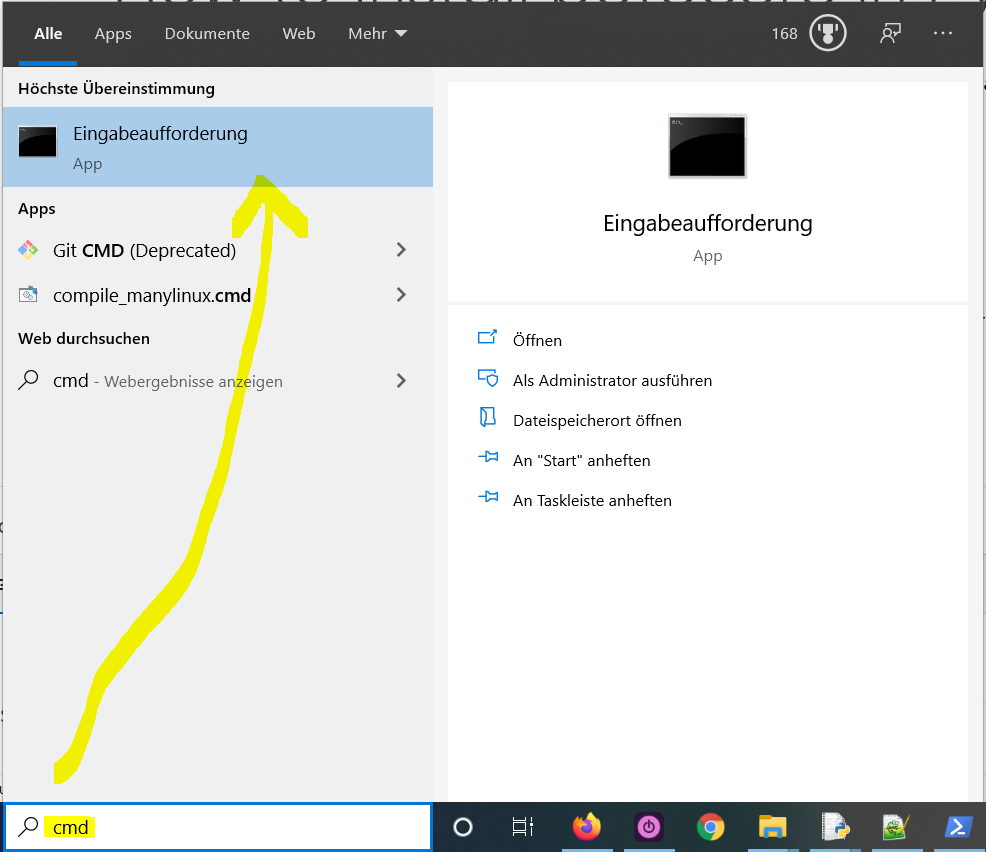
  1. Type "cmd" in the search bar and hit Enter to open the command line.
  2. Type “pip install psycopg2” (without quotes) in the command line and hit Enter again. This installs psycopg2 for your default Python installation.
  3. The previous command may not work if you have both Python versions 2 and 3 on your computer. In this case, try "pip3 install psycopg2" or “python -m pip install psycopg2“.
  4. Wait for the installation to terminate successfully. It is now installed on your Windows machine.

Here’s how to open the command line on a (German) Windows machine:

Open CMD in Windows

First, try the following command to install psycopg2 on your system:

pip install psycopg2

Second, if this leads to an error message, try this command to install psycopg2 on your system:

pip3 install psycopg2

Third, if both do not work, use the following long-form command:

python -m pip install psycopg2

The difference between pip and pip3 is that pip3 is an updated version of pip for Python version 3. Depending on what’s first in the PATH variable, pip will refer to your Python 2 or Python 3 installation—and you cannot know which without checking the environment variables. To resolve this uncertainty, you can use pip3, which will always refer to your default Python 3 installation.

How to Install psycopg2 on Linux?


You can install psycopg2 on Linux in four steps:

  1. Open your Linux terminal or shell
  2. Type “pip install psycopg2” (without quotes), hit Enter.
  3. If it doesn’t work, try "pip3 install psycopg2" or “python -m pip install psycopg2“.
  4. Wait for the installation to terminate successfully.

The package is now installed on your Linux operating system.

How to Install psycopg2 on macOS?


Similarly, you can install psycopg2 on macOS in four steps:

  1. Open your macOS terminal.
  2. Type “pip install psycopg2” without quotes and hit Enter.
  3. If it doesn’t work, try "pip3 install psycopg2" or “python -m pip install psycopg2“.
  4. Wait for the installation to terminate successfully.

The package is now installed on your macOS.

How to Install psycopg2 in PyCharm?


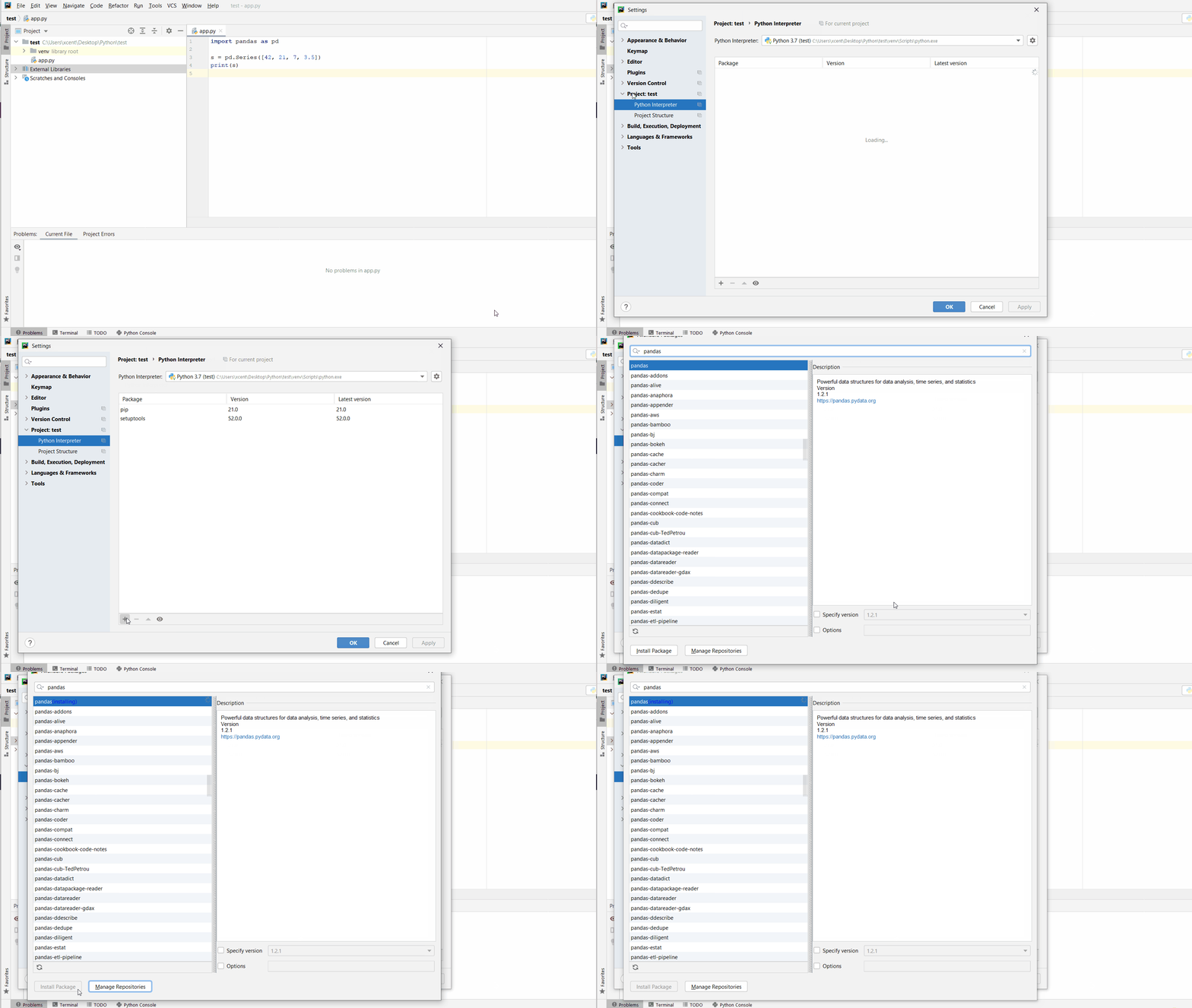
Given a PyCharm project. How to install the psycopg2 library in your project within a virtual environment or globally? Here’s a solution that always works:

  • Open File > Settings > Project from the PyCharm menu.
  • Select your current project.
  • Click the Python Interpreter tab within your project tab.
  • Click the small + symbol to add a new library to the project.
  • Now type in the library to be installed, in your example "psycopg2" without quotes, and click Install Package.
  • Wait for the installation to terminate and close all pop-ups.

Here’s the general package installation process as a short animated video—it works analogously for psycopg2 if you type in “psycopg2” in the search field instead:


Make sure to select only “psycopg2” because there may be other packages that are not required but also contain the same term (false positives):

How to Install psycopg2 in a Jupyter Notebook?


To install any package in a Jupyter notebook, you can prefix the !pip install my_package statement with the exclamation mark "!". This works for the psycopg2 library too:

!pip install my_package

This automatically installs the psycopg2 library when the cell is first executed.

How to Resolve ModuleNotFoundError: No module named ‘psycopg2’?


Say you try to import the psycopg2 package into your Python script without installing it first:

import psycopg2
# ... ModuleNotFoundError: No module named 'psycopg2'

Because you haven’t installed the package, Python raises a ModuleNotFoundError: No module named 'psycopg2'.

To fix the error, install the psycopg2 library using “pip install psycopg2” or “pip3 install psycopg2” in your operating system’s shell or terminal first.

See above for the different ways to install psycopg2 in your environment.

Improve Your Python Skills


If you want to keep improving your Python skills and learn about new and exciting technologies such as Blockchain development, machine learning, and data science, check out the Finxter free email academy with cheat sheets, regular tutorials, and programming puzzles.

Join us, it’s fun! ?


https://www.sickgaming.net/blog/2022/07/...in-python/

Print this item

  (Indie Deal) Secret Desires Bundle, Quantum & SNK Deals
Posted by: xSicKxBot - 07-09-2022, 09:02 AM - Forum: Deals or Specials - No Replies

Secret Desires Bundle, Quantum & SNK Deals

Secret Desires Bundle | 10 Steam Games | 90% OFF
[www.indiegala.com]
Certain desires are meant to be private...that's why we brought you exactly what you were looking for to fulfill those certain needs. Don't worry, we'll keep it a secret...

https://www.youtube.com/watch?v=4Yb9eu0w5Mk
Weekend Deals
[www.indiegala.com]
[www.indiegala.com]
https://www.youtube.com/watch?v=-UDoaPCTVr4
Stay Inside, Stay Safe and Enjoy Good Games.
Check out IndieGala on Twitter, YouTube & Facebook[www.facebook.com]


https://steamcommunity.com/groups/indieg...2638566631

Print this item

  [Tut] Layout of a Solidity Source File
Posted by: xSicKxBot - 07-08-2022, 12:14 PM - Forum: Python - No Replies

Layout of a Solidity Source File

5/5 – (1 vote)

In this article, I am going to explain the fundamentals of a Solidity source file structure. In a way, a rookie (like me and you) can understand the basics of Ethereum programming.

First things first – the Solidity file that stores your code will have a .sol extension.

Take action.

  1. In your favorite browser go to https://remix.ethereum.org/
  2. Using Create New File create a new finxter.sol file

Well done. Your file – empty so far – is ready for more actions!

In this article, we’ll add (i) license identifier, (ii) pragma, (iii) another file via import, and (iv) add some comments.

The actual smart contract code is out of scope here but check out other Finxter tutorials – there is plenty of that.

License Identifier


I know you are eager to get to the meat, but before you jump there, bear with me.  The so-called SPDX license identifier is the first element you need to jot down.

What the heck is that? SPDX, or the Software Package Data Exchange, is an international, open standard for communicating software information including licenses or copyrights.

Being a standard means that many companies and organizations have agreed to do some things in a certain way. And Solidity has also adopted that standard.

Why bother, you ask?

Well, your code will be transparent in a blockchain and that transparency triggers copyright issues. The SPDX identifier hence allows you to specify what you allow others to do with your code. And vice versa, you learn what you can do with other people’s code too.

An example comment line with an identifier would be:

// SPDX-License-Identifier: MIT

What this means is:

?‍⚖️ Permission is hereby granted, free of charge, to any person obtaining a copy of this software and associated documentation files (the “Software”), to deal in the Software without restriction, [etc etc…]

SPDX license list has over 450 various license identifiers!

But don’t worry too much now, we are here to learn Solidity, not the legal twists. So for now, take my word and use MIT as your default one. Or if you do not want to specify a license or if the source code is not open-source, please use the special value UNLICENSED.

? Caution here folks – UNLICENSE (without ‘d’ at the end) is a completely different license! Open door type of one. It offers free and unencumbered software released into the public domain.

By the way, a good rule of thumb is to use the OSI-approved ones when browsing https://spdx.org/licenses/. “Only” about 120+ options for consideration.

Does that identifier do anything technically to your code? No, it won’t break how it works. After all, it is a comment.

But from Solidity >=0.6.8 (so 0.6.8 and any higher), that comment must be part of your code. Otherwise expect a Warning in your compiler.


The compiler checks the existence but does not know if your identifier is the right one (if it exists in the SPDX list). Starting in Solidity 0.8.8 it checks for multiple SPDX license identifiers next to each other and validates them. It still allows you to play with it though ?

In 0.8.7 you could easily get away with some crazy identifier.

// SPDX-License-Identifier: cheating_on_you pragma solidity 0.8.7;

From 0.8.8 onwards it actually starts to pay attention and throws errors. Note the red error icon on the left in line 1.


Same happens when you add multiple licenses inappropriately.


This one below goes unnoticed though – compiler says OK.

// SPDX-License-Identifier: cheatingonyou pragma solidity 0.8.15;

Since SPDX info is a comment, it is recognized by the compiler anywhere in the file at the file level, but for clarity put it at the very top of the file.

Lastly, the identifier will become part of your metadata once it’s compiled. And that is machine-readable so others will find it easy to query.

Take action.

1. Add the license-related comment to your code (finxter.sol)

// SPDX-License-Identifier: MIT

Pragmas


The second important keyword is pragma. It comes in several shapes and forms – as a version pragma, ABI Coder pragma or experimental pragma.

⭐ Note: A pragma directive is always local to a source file. So you must add it to all your files if you want to enable it in your whole project.

Remember also that if you import another file, the pragma from that file does not automatically apply to the importing file.

1. Version pragma defines for which versions of Solidity the code is written.

In the example:

pragma solidity >= 0.8.7;

we can expect that no compiler on version 0.8.7 or higher will throw any pragma errors.

Other examples – for illustration and education – how to define pragma versions:

pragma solidity 0.6.8; //single instance
pragma solidity >= 0.6.8; //0.6.8 and any above
pragma solidity ^0.6.8; //0.6.8 and any above but less than 0.7.0
pragma solidity 0.6.8 ^0.7.5; // single instance AND any above 0.7.5 but less than 0.8 -> this AND condition cannot be met here
pragma solidity 0.8.1 || ^0.8.10; // one instance OR any from 0.8.10 but less than 0.9.0

For practical reasons, the version pragma is the only type you should really care about when you start your Solidity journey.

2. ABI Coder pragma

As per Solidity documentation, you have two options to choose from:

pragma abicoder v1;
pragma abicoder v2;

However as of Solidity 0.8.0 the ABIEncoder is activated by default so for a rookie like you and me, there’s nothing to worry about anymore.

With version 0.8.0+ you can already enjoy the benefits of working more effectively with arrays and structs. These are just some of data types but explaining this goes way beyond this tutorial.

And no need to call this pragma additionally, as you had to do in the past, e.g.:

// SPDX-License-Identifier: GPL-3.0
pragma solidity ^0.4.16;
pragma experimental ABIEncoderV2;

3. Experimental pragma

Getting here is a risky business so better do not try it yourself at home ?

Solidity might be offering features that are – as labeled – experimental.

So if you have some technical appetite and skills and want to play, showcase to your potential clients or whatever the purpose, go ahead. But if again, you are still early in the game, just park for now.

Take Action.

1. Add a version pragma directive to your code

pragma solidity ^0.8.15;

Importing other Source Files


You can import files in Solidity. That sounds obvious but let’s say this upfront.

Importing other files is important since you can break down your code into multiple files, which makes it more modular, easier to manage and control, and – best of all – re-usable.

The simplest way to import is using this line of code:

import "filename";

In our quick Remix exercise, imagine we have another file called “helloWorld.sol” located in the same directory. In order to import it to our finxter.sol file, one would use:

import "./helloWorld.sol";

Note: Pythonic  import "helloWorld.sol" would not work here.


For education purposes and in very simple implementations, this is the shortest way to import. Its disadvantage is that it pollutes the namespace by importing all global symbols from the imported file into the current global system.

That approach carries also a risk of importing symbols that are imported into the file we are importing. That file can contain symbols imported for yet another file and so on. Such subsequent importing may lead to confusion about where the symbols come from and where actually they are defined.

Solidity recommends using a variant, which may look more complex at first. But it only adds one new global symbol to the namespace, here symbolName, whose members are symbols from the imported file.

Makes sense?

import * as symbolName from "filename";

The best approach however would be to import relevant symbols explicitly.

So for instance, if the imported file “helloWorld.sol” would have a contract named “sayHello”, one could use only that. Rule of thumb here: import only the things you will use.

import {something} from "filename";

Take action:

1. Add a new file named “helloWorld.sol” that contains this code

// SPDX-License-Identifier: MIT pragma solidity ^0.8.0; contract sayHello { // empty contract
}

2. In the “finxter.sol” file, add import

import {sayHello} from "./helloWorld.sol";

Comments


Commenting the code is possible in the two following ways:

1. Regular comments

1.1 Single-line comment, e.g.

// this is a single-line regular comment

1.2 Multi-line comment, e.g.

/*
This
comment
spans
many
lines
*/

2. NatSpec comments

NatSpec stands for Ethereum Natural Language Specification. It is a special form of comments to provide rich documentation for functions, return variables, and more.

The recommendation is that Solidity contracts are fully annotated using NatSpec for all public interfaces (everything in the ABI).

Use NatSpecs comments directly above function declarations or statements.e.g.

2.1 Single-line

/// single-line NatSpec comment

2.2 Multi-line

/**
multi-line
NatSpec
comment
*/

CODE example

// SPDX-License-Identifier: GPL-3.0
pragma solidity >=0.4.16 <0.9.0; /// @author The Solidity Team
/// @title A simple storage example
contract SimpleStorage { uint storedData; /// Store `x`. /// @param x the new value to store /// @dev stores the number in the state variable `storedData` function set(uint x) public { storedData = x; } /** Return the stored value. @dev retrieves the value of the state variable `storedData` @return the stored value */ function get() public view returns (uint) { return storedData; }
}

Take action:

1. Add a regular multi-line comment to your finxter.sol file

/*
This
tutorial
comes
from
finxter.com
*/

Reference: This article is based on some contents from the documentation. Check out this awesome resource too!


Learn Solidity Course


Solidity is the programming language of the future.

It gives you the rare and sought-after superpower to program against the “Internet Computer”, i.e., against decentralized Blockchains such as Ethereum, Binance Smart Chain, Ethereum Classic, Tron, and Avalanche – to mention just a few Blockchain infrastructures that support Solidity.

In particular, Solidity allows you to create smart contracts, i.e., pieces of code that automatically execute on specific conditions in a completely decentralized environment. For example, smart contracts empower you to create your own decentralized autonomous organizations (DAOs) that run on Blockchains without being subject to centralized control.

NFTs, DeFi, DAOs, and Blockchain-based games are all based on smart contracts.

This course is a simple, low-friction introduction to creating your first smart contract using the Remix IDE on the Ethereum testnet – without fluff, significant upfront costs to purchase ETH, or unnecessary complexity.



https://www.sickgaming.net/blog/2022/07/...urce-file/

Print this item

  (Indie Deal) FREE Larry 3, JoJo Opportunity, Big Sales Ending today
Posted by: xSicKxBot - 07-08-2022, 12:14 PM - Forum: Deals or Specials - No Replies

FREE Larry 3, JoJo Opportunity, Big Sales Ending today

Leisure Suit Larry 3 freebie returns
[freebies.indiegala.com]
Passionate Patti in Pursuit of the Pulsating Pectorals! is the third game in Al Lowe's Leisure Suit Larry series.

https://www.youtube.com/watch?v=CsAx6uYdpRc
Top Seller Deals ending soon
[www.indiegala.com]
[www.indiegala.com]

https://www.youtube.com/watch?v=2EZuAXzkK98
Stay Inside, Stay Safe and Enjoy Good Games.
Check out IndieGala on Twitter, YouTube & Facebook[www.facebook.com]


https://steamcommunity.com/groups/indieg...1995947658

Print this item

  PC - Outriders Worldslayer
Posted by: xSicKxBot - 07-08-2022, 12:14 PM - Forum: New Game Releases - No Replies

Outriders Worldslayer


OUTRIDERS is a story driven RPG-Shooter that will put the player in the shoes of an Outrider, the last hope of the human race trapped on Enoch, a dangerous and untamed planet. The campaign can be played entirely in single player, or in co-op with up to three players. Outriders Worldslayer is a new expansion that takes place directly after the events of the main campaign. In it, you and up to 2 other players must travel to the far reaches of Enoch to battle a new threat known as Ereshkigal, a dark overlord, and the main villain of the expansion.

Publisher: Square Enix

Release Date: Jun 30, 2022


https://www.metacritic.com/game/pc/outri...orldslayer

Print this item

  [Tut] How to Create an Empty List in Python?
Posted by: xSicKxBot - 07-07-2022, 02:50 PM - Forum: Python - No Replies

How to Create an Empty List in Python?

5/5 – (1 vote)

To create an empty list in Python, you can use two ways. First, the empty square bracket notation [] creates a new list object without any element in it. Second, the list() initializer method without an argument creates an empty list object too.

Both approaches are shown in the following code:

# Way 1 to create an empty list:
my_list = [] # Way 2 to create an empty list:
my_list = list()

Next, you’ll learn many more related Python concepts you need to know that concern creation of lists. Keep reading to keep improving your skills and answer any subsequent question you may have!

Python list() — Quick Guide


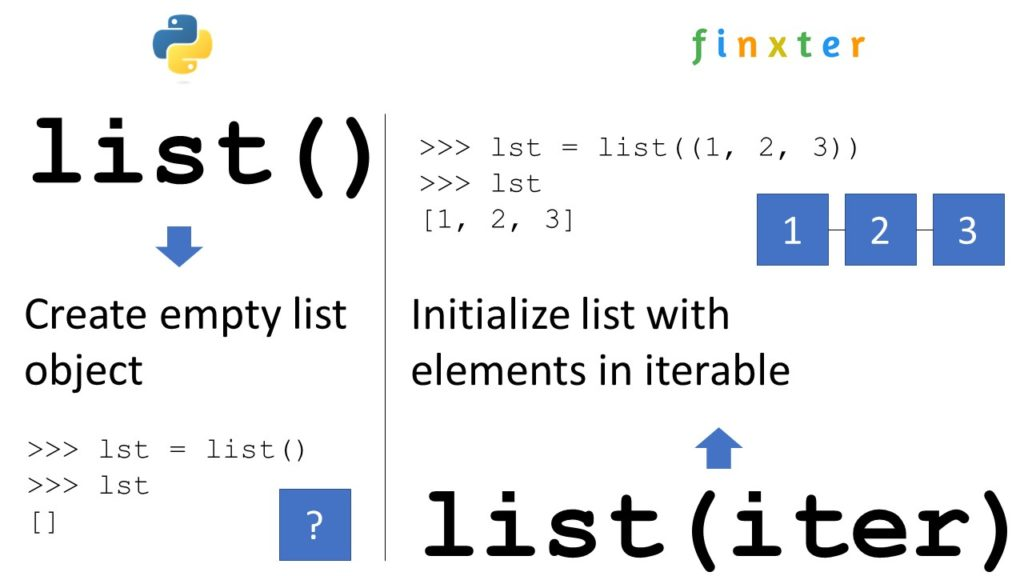
Python’s built-in list() function creates and returns a new list object. When used without an argument, it returns an empty list. When used with the optional iterable argument, it initializes the new list with the elements in the iterable.

You can create an empty list by skipping the argument:

>>> list()
[]

If you pass an iterable—such as another list, a tuple, a set, or a dictionary—you obtain a new list object with list elements obtained from the iterable:

>>> list([1, 2, 3])
[1, 2, 3]


? Read More: Read our full tutorial on the Finxter blog to learn everything you need to know.

Python Create Empty List of Size


To create a list of n placeholder elements, multiply the list of a single placeholder element with n.

For example, use [None] * 5 to create a list [None, None, None, None, None] with five elements None.

You can then overwrite some elements with index assignments.

In the example, lst[2] = 42 would result in the changed list [None, None, 42, None, None].

# Create a list with n placeholder elements
n = 5
lst = [None] * n # Print the "placeholder" list:
print(lst)
# [None, None, None, None, None] # Overwrite the placeholder elements
lst[0] = 'Alice'
lst[1] = 0
lst[2] = 42
lst[3] = 12
lst[4] = 'hello'
print(lst)
# ['Alice', 0, 42, 12, 'hello']


? Read More: Read our full tutorial on the Finxter blog to learn everything you need to know.

Python Create Empty List of Lists


You can create an empty list of lists do not use [[]] * n because this creates a nested list that contains the same empty list object n times which can cause problems because if you update one, all inner lists change!

To create an empty list of lists with n empty inner lists, use the list comprehension statement [[] for _ in range(n)] that creates a fresh empty list object n times.

n = 5
my_list = [[] for _ in range(n)]
print(my_list)
# [[], [], [], [], []]

List comprehension is a powerful Python feature and I’ve written a full blog tutorial on it—feel free to watch my general explainer video and read the associated blog article!


? Read More: Read our full tutorial on the Finxter blog to learn everything you need to know.

Python Create Empty List and Append in Loop


Follow these three easy steps to create an empty list and append values to it in a for loop:

  1. my_list = [] creates the empty list and assigns it to the name my_list.
  2. for i in range(10): initializes the for loop to be repeated 10 times using loop variable i that takes on all values between 0, 1, …, 9.
  3. my_list.append(i) is the loop body that appends the integer value of the loop variable i to the list.

Here’s the code example:

my_list = []
for i in range(10): my_list.append(i) print(my_list)
# [0, 1, 2, 3, 4, 5, 6, 7, 8, 9]

However, a better Python one-liner alternative is using list comprehension for this:

my_list = [i for i in range(10)]

Python Create List of Empty Strings


To create a list of n empty strings, you can use the expression [''] * n because it places the same empty string literal '' into the list n times. This doesn’t cause any problems due to the fact that all list elements refer to the same empty string object because strings are immutable and cannot be modified anyways.

>>> [''] * 5
['', '', '', '', '']
>>> [''] * 20
['', '', '', '', '', '', '', '', '', '', '', '', '', '', '', '', '', '', '', '']

Python Create Empty List of Dictionaries


To create a list of n dictionaries, each dict being empty, use the list comprehension statement [dict() for _ in range(n)] with the underscore _ as a throw-away “loop variable” and the dict() built-in dictionary creation function.

my_list = [dict() for _ in range(10)]
print(my_list)
# [{}, {}, {}, {}, {}, {}, {}, {}, {}, {}]

Note that if you update one of the dictionaries, all other dictionaries are unaffected by this because we really created n independent dictionary objects.

# update first dictionary:
my_list[0]['foo'] = 'bar' print(my_list)
# [{'foo': 'bar'}, {}, {}, {}, {}, {}, {}, {}, {}, {}]

Python Create Empty List of Class Objects


To create an empty list of class objects, you can use list comprehension statement my_list = [MyClass() for _ in range(n)] that repeats n times the creation of an empty class object MyClass and adding it to the list. You can then later change the contents of the n different MyClass objects.

class MyClass(object): pass my_list = [MyClass() for _ in range(5)] print(my_list)
# [<__main__.MyClass object at 0x000001EA45779F40>, <__main__.MyClass object at 0x000001EA47533D00>, <__main__.MyClass object at 0x000001EA475334C0>, <__main__.MyClass object at 0x000001EA4758E070>, <__main__.MyClass object at 0x000001EA4758E4F0>]

Python Create Empty List of Type


Python is a dynamic language so there is no concept of a “list of type X”. Instead of creating a list of a fixed type, simply create an empty list using [] or list() and assign it to a variable such as my_list. Using the variable, you can then fill into the existing list any data type you want!

Here we create an empty list and fill in an integer, a list, and a string—all into the same list!

my_list = []
# Alternative: my_list = list() # Add integer to list:
my_list.append(42) # Add list to list:
my_list.append([1, 2, 3]) # Add string to list:
my_list.append('hello world') # Print all contents of list:
print(my_list)
# [42, [1, 2, 3], 'hello world']

Python Create Empty List of Integers


To initialize a list with certain integers such as zeroes 0, you can either use the concise list multiplication operation [0] * n or you use list comprehension [0 for _ in range(n)].

>>> [0] * 5
[0, 0, 0, 0, 0]
>>> [0] * 10
[0, 0, 0, 0, 0, 0, 0, 0, 0, 0]
>>> [42] * 5
[42, 42, 42, 42, 42]
>>> [42 for _ in range(5)]
[42, 42, 42, 42, 42]

Python Create Empty List of Tuples


To create an empty list and later add one tuple at-a-time to it, first initialize the empty list using the [] square bracket operator and then use the list.append(t) to append one tuple t at a time.

Here we add three tuples to the initially empty list:

# create empty list:
my_list = [] # append tuples
my_list.append((1, 2))
my_list.append(('alice', 'bob', 'carl'))
my_list.append(tuple()) print(my_list)
# [(1, 2), ('alice', 'bob', 'carl'), ()]


https://www.sickgaming.net/blog/2022/07/...in-python/

Print this item

  (Indie Deal) Wunder Gate Bundle & Quantic Dream Sale
Posted by: xSicKxBot - 07-07-2022, 02:50 PM - Forum: Deals or Specials - No Replies

Wunder Gate Bundle & Quantic Dream Sale

Wunder Gate Bundle | 6 Steam Games | 93% OFF
[www.indiegala.com]
The Wunder Gate Bundle is LIVE! Uncertainty turns into serendipity with this wonderful indie selection: SHUT IN, Wunderling DX, Gate to Site 8, Zom Tom, Firelight Fantasy: Vengeance, 3D PUZZLE - Farm House.

https://www.youtube.com/watch?v=b-HyCq7Efjk
Quantic Dream Sale, all titles 60% OFF
[www.indiegala.com]
Happy Hour: Dream Beats Bundle
[indiegala.com]
What better way to relax than listening to some tunes with your friends? The Dream Beats Bundle is about to end, but not before bringing you the chance to grab a few extra copies for your pals during the Happy Hour.


https://steamcommunity.com/groups/indieg...1681050704

Print this item

 
Latest Threads
(Free Game Key) Epic Game...
Last Post: xSicKxBot
1 hour ago
News - Paralives’ Success...
Last Post: xSicKxBot
1 hour ago
Apollo Neuro Coupon Code ...
Last Post: jax9090nnn
2 hours ago
Apollo Neuro Promo Code [...
Last Post: jax9090nnn
2 hours ago
Apollo Neuro Coupon Code ...
Last Post: jax9090nnn
2 hours ago
Apollo Neuro Discount Cod...
Last Post: jax9090nnn
2 hours ago
Apollo Neuro Coupon Code ...
Last Post: jax9090nnn
2 hours ago
Apollo Neuro Promo Code $...
Last Post: jax9090nnn
2 hours ago
Apollo Neuro Coupon Code ...
Last Post: jax9090nnn
2 hours ago
Apollo Neuro Promo Code [...
Last Post: jax9090nnn
2 hours ago

Forum software by © MyBB Theme © iAndrew 2016