The game is free to keep until April 22nd 2022 - 21:30 UTC.
- Click on "Go To Giveaway" - Scroll down a bit until you see the banner for the game POSTAL 2. - Its under the "Flash deals" and above "Discover unique indie games"
We are welcoming everyone to join our discord[discord.gg]. We are more active there on finding giveaways, small or large, and there are daily raffles you can participate.
From legendary game creator Hideo Kojima comes a genre-defying experience, now expanded and remastered for the PS5 console in this definitive Director's Cut.
Can you reunite the shattered world, one step at a time?
My Hero Academia's All Might Adorns NZXT's Newest PC Case
NZXT has announced a new CRFT 10 H510i PC case that is themed around My Hero Academia, the popular superhero shonen manga and anime. The case depicts Toshinori Yagi, aka All Might, in both his empowered and true forms.
The case is available right now, with only a limited quantity available. It costs $250 USD.
As detailed in a press release, the CRFT 10 H510i All Might features a "Plus Ultra" puck is attached to the outside for you to hang your headphones from, and an All Might charm decorates the outside of the case. All Might in his empowered form adorns the outside of the case, while his true form is on the inside, allowing you to hide away the superhero's secret.
Problem Statement: How to get a key by its value in a dictionary in Python
Example:
# Given dictionary

employee = {"Sam": 1010, "Bob": 2020, "Rob": 3030} # Some Way to extract the Key 'Bob' using its value 2020
We have a clear idea about the problem now. So without further delay, let us dive into the solutions to our question.
Solution 1:Using dict.items()
Approach: One way to solve our problem and extract the key from a dictionary by its value is to use the dict.items(). The idea here is to create a function that takes the provided value as an input and compares it to all the values present in the dictionary. When we get the matching value, we simply return the key assigned to the value.
Solution:
# Given dictionary

employee = {"Sam": 1010, "Bob": 2020, "Rob": 3030} # Function that fetches key from value

def get_key(v): for key, value in employee.items(): # return the key which matches the given value if v == value: return key return "The provided key is not present in the dictionary" # Passing the keys to the function

print("Employee ID - 2020 \nName - ", get_key(2020))
Output:
Employee ID - 2020 Name - Bob
Note: dict.items() is a dictionary method in Python that returns a view object. The returned view object contains a list of tuples that comprises the key-value pairs in the dictionary. Any changes made to the dictionary will also be reflected in the view object.
Example: The following example demonstrates how the dict.items() method works.
Approach: Another workaround to solve our problem is to extract the keys and values of the dictionary separately in two different lists with the help of the keys() and values() methods. Then find the index/position of the given value from the list that stores the values with the help of the index() method. Once the index is found, you can easily locate the key corresponding to this index from the list that stores all the keys.
Solution: Please follow the comments within the code to get an insight of the solution.
# Given dictionary

employee = {"Sam": 1010, "Bob": 2020, "Rob": 3030}

# store all the keys in a list

key = list(employee.keys())

# store all the values in another list

val = list(employee.values())

# find the index of the given value (2020 in this case)

loc = val.index(2020)

# Use the index to locate the key

print(key[loc])
Output:
Bob
Note:
keys() is a dictionary method that returns a view object that contains the keys of the dictionary in a list.
values() is a dictionary method that returns a view object consisting of the values in the dictionary within a list.
The index() method is used to return the index of the specified item in a list. The method returns only the first occurrence of the matching item.
Example:
employee = {"Sam": 1010, "Bob": 2020, "Rob": 3030}

li = ['Lion', 'Dog', 'Cat', 'Mouse', 'Dog']

key = list(employee.keys())

val = list(employee.values())

loc = li.index('Dog')

print(f"Keys: {key}")

print(f"Values: {val}")

print(f"Index: {loc}")
Approach: The given problem can be resolved using a single line of code. The idea is to use a dictionary comprehension that reverses the keys and values. This means the keys in the original dictionary become the values in the newly created dictionary while the values in the original dictionary become the keys in the newly created dictionary. Once you have interchanged the keys and values, you can simply extract the key by its value.va
Solution:
employee = {"Sam": 1010, "Bob": 2020, "Rob": 3030}

res = dict((val, key) for key, val in employee.items())

print("Original Dictionary: ", employee)

print("Modified Dictionary: ", res)

# using res dictionary to find out the required key from employee dictionary

print(res[2020])
Output:
Original Dictionary: {'Sam': 1010, 'Bob': 2020, 'Rob': 3030}

Modified Dictionary: {1010: 'Sam', 2020: 'Bob', 3030: 'Rob'}

Bob
Explanation:
employee dictionary has Name and Employee ID as Key-Value pairs.
res dictionary interchanges the keys and values of the employee dictionary. Therefore, res now has Employee ID and Name as Key-Value pairs.
Since we need to extract the name corresponding to an Employee ID. We can simply get that from the res dictionary with the help of the key which in this case is the Employee ID.
Solution 4: Using zip()
Considering that the values in the given dictionary are unique, you can solve the problem with a single line of code. The idea is to use the keys() and values() dictionary methods to extract the keys and values from the dictionary and then tie them together with the help of the zip() method to produce a dictionary.
We can also opt to use the Pandas DataFrame to get the key by its value. In this approach, first, we will convert the given dictionary into a data frame. Further, we can name the column with the keys as “key” and the columns with the values as “value“. To get the key by the given value, we have to return the value from the ‘key‘ column from the row where the value of the ‘value‘ column is the required value.
Example:
# Importing the pandas module

import pandas as pd # Given dictionary

employee = {"Sam": 1010, "Bob": 2020, "Rob": 3030}

# list to store the keys from the dictionary

key = list(employee.keys())

# list to store the values from the dictionary

val = list(employee.values())

# Converting the dictionary into a dataframe

df = pd.DataFrame({'key': key, 'value': val})

print("The data frame:")

print(df)

# Given Value

v = 2020

print("The given value is", v)

# Searching for the key by the given value

k = (df.key[df.value == v].unique()[0])

print("The key associated with the given value is:", k)
Output:
The data frame: key value

0 Sam 1010

1 Bob 2020

2 Rob 3030

The given value is 2020

The key associated with the given value is: Bob
Note:df.key[df.value == v].unique()[0]) –> We have to use the unique method in this line to avoid the index from getting printed. While using the panda’s data frame, the output is not in the string format, but it is a pandas series object type. Hence, we need to convert it using the unique or sum() method. Without the unique method, the output will also consider the index of the data frame column.
Conclusion
That’s all about how to get a key by the value in the dictionary. I hope you found it helpful. Please stay tuned and subscribefor more interesting tutorials. Happy Learning!
[www.indiegala.com] Get a powerful game selection, that both in concept and in practice is ready for you to play, including: Dead Event, Suits: Absolute Power, Devious Dungeon 2, Concept Destruction, Mekabolt, Random Heroes: Gold Edition.
Elden Ring's Easy-To-Miss Tutorial Is Now Much More Obvious
Elden Ring's previously easy-to-miss tutorial, the appropriately titled Cave of Knowledge, is now basically impossible to miss.
The change comes as part of Elden Ring patch 1.04, which in addition to balancing a number of weapons, spells, and addressing various bugs, has also added a mandatory prompt towards the beginning of the game to make sure players know about its optional tutorial.
As confirmed by Eurogamer, shortly after dying to (or defeating) the game's first enemy and reawakening in a cave, a prompt appears that reads "Jump into the hole ahead, and you will find the Cave of Knowledge. There, you can learn more about game controls and basic actions, as well as other tips that may be helpful during your adventures in the Lands Between."
kai is a first-person psychological horror game drawing inspiration from Japanese folklore. Live the horror by the hand of its defining yokais and submerge into the superstitions of the past driven by a unique story and exploration. Ikai embodies the spirit of the classical psychological horror genre with a defenceless main character incapable of attacking the evil creatures. However, it explores a new sense of horror by making the player face the threats directly neither fleeing nor attacking. Every mechanic of the game is meant to raise this relatable feeling of helplessness and create a tense atmosphere. The slow, precise and natural movements as a way of interaction resemble real life's to foster immersion in the uncanny world of Ikai .
JDK 12.0.1, 11.0.3, 8u211, 8u212, and 7u221 Have Been Released!
The JDK 12.0.1, 11.0.3, 8u211, 8u212, and 7u221 update releases are now available. You can download the latest JDK releases from the Java SE Downloads page. An item of interest in this CPU release that you should be aware of is that JDK 8u211 also includes JDK 8u211 for ARM. Information about this p...
Posted by: xSicKxBot - 04-19-2022, 12:07 AM - Forum: Python
- No Replies
‘Pip’ Is Not Recognized As An Internal Or External Command [FIXED]
Table of Contents
Many factors could lead to the error: ‘pip’ is not recognized as an internal or external command. Two of the most common ones are Python’s or pip’s incorrect installation and lacking path in the system environment variables.
This tutorial deeply explains the concept of environment variables, system paths, and pip’s way of storing packages to enable you to track the source of the error comfortably.
It then takes you through a step-by-step way to solve the error. Apart from Windows, you will see how to solve related errors in Linux. What is more? Read on to find out.
❒What Are Environment Variables?
Understanding environment variables is one the most crucial steps to solving pip’s errors.
A computing environment is a platform consisting of the operating system and the processor. On the other hand, a variable is a place for storing a value. The variable can be binary, text, number, filename, or any other data type. It gets its name during creation and can be displayed, updated, and deleted.
The combination of a computing environment and variable is an environment variable, a dynamic value affecting the behavior of a computer process. A computer process is an instance of a program.
# Determine the value of a variable

echo %VARIABLE% # in Windows

echo $VARIABLE # in Linux # display

%VARIABLE% # in Windows

env # command for printing all environment variables OR

printenv # show a single environment variable in Linux.
Features Of Environment Variables
They can be created, read, edited, and deleted.
Each process has its set of environment variables. A newly created process inherits its parent’s same runtime environment.
Environment variables occur in scripts and the command line.
Shell scripts and batch files use environment variables to communicate data and processes to child processes or temporarily store data.
A running process can access the environment variables for configuration reasons.
A collection of environment variables behave like an associative array, with keys and values in strings.
Environment variables may differ depending on the operating system.
Windows stores the default environment variable values in the registry and sets them in the AUTOEXEC.BAT file.
Examples Of Environment Variables
Here are the typical environment variables that interact with pip.
PATH
The path variable lists the directory where your system searches executables. It enables you to view the location of a directory without typing the full path.
In Windows, the path variables are stored in C:\Windows or C:\Windows\System32. In Linux, they originate from the user’s bin or sbin file.
HOME
It shows the default path to the user’s home directory. For instance, HOME//APPDATA stores app settings in Windows. In Linux, the settings are found in HOME/{.App Name}.
In Windows, the misplaced APPDATA lands in the USERPROFILE environment variable, which should instead be used for dialogs to allow a user to choose between folders. LOCALAPPDATA stores local app settings.
TEMP
It stores temporary processes.
Now that you understand how environment variables play a massive in package working, you should find out specific ways to solve pip’s errors.
❒Solution 1: Ensure Pip Is Installed Correctly And Up-to-date
Windows
Pip packages are stored in Python’s installation directory. For instance, installing Python in C:\Python\ stores the default library in C:\Python\Lib\, while the third-party packages reside in C:\Python\Lib\site-packages.
If you install a specific Python version as a stand-alone, pip packages reside in APPDATA.
C:\Users\<username>\AppData\Roaming\Python\Python<version-subversion>\site-packages\ # the version can be 310 for Python 3.10 or 38 for Python 3.8
If you install a pip package that does not use a specific location, it lands in Scripts.
C:\Python310\Scripts\
Pip gets installed by default when you install most Python 3 versions. You can confirm the installation by checking the pip’s version or help command.
pip -V

# OR

pip help
You should get pip’s version version, installation folder, and Python version running it.
pip 22.0.4 from C:\Users\<username>\AppData\Local\Programs\Python\Python310\lib\site-packages\pip (python 3.10)
Otherwise, you could get an error,
'pip' is not recognized as an internal or external command
OR
Python is not recognized as an internal or external command, operable program or batch file.
if you try running python.
python
If you run the above commands without seeing Python, pip, or the installed package, you should download Python.
Install pip as a stand-alone package if pip is still unavailable after installing Python. Download get-pip, and run the following command on the command prompt.
python get-pip.py
Lastly, you can upgrade the pip version and check if the error persists.
python -m pip install --upgrade pip
If the problem is still not solved, try adding Python to the system path variable, as explained in solution 2 of this tutorial.
Linux
The usr is one of the most crucial folders in Linux. It stores information like user binaries, libraries, documentation, and header files. It is where packages that pip manages get installed.
Say we want to install Python 3.10 on Ubuntu 20.04. We can do that by downloading Python from the source or using the deadsnakes custom PPA as follows.
# Update the system, ensuring the required packages are installed.

sudo apt update && sudo apt upgrade -y # Install the required dependency needed to add the custom PPAs.

sudo apt install software-properties-common -y # Add the deadsnakes PPA to the list of APT package manager sources.

sudo add-apt-repository ppa:deadsnakes/ppa # Download Python 3.10

sudo apt install python3.10 # Confirm successful installation

python3.10 --version
The next step is to locate pip.
# pip

pip --version

# OR

pip -V

pip list -v # pip3

pip3 -V

pip list -v
Either way, you may get the following errors.
# pip

Command 'pip' not found, but can be installed with:

sudo apt install python3-pip # pip3

Command 'pip3' not found, but can be installed with:

sudo apt install python3-pip
You get a similar error when you try installing a package.
# pip

pip install django

Command 'pip' not found, but can be installed with:

sudo apt install python3-pip # pip3

pip3 install django

Command 'pip3' not found, but can be installed with:

sudo apt install python3-pip
Let’s install pip.
sudo apt install python3-pip
❒Solution 2: Add The Path Of Pip Installation To The PATH System Variable
You can use the terminal or the GUI.
setx PATH "%PATH%;C:\Python<version-subversion>\Scripts" # For example

setx PATH "%PATH%;C:\Python310\Scripts" # for Python 3.10
To use the GUI,
copy to the full path of the system variable: C:\<username>\steve\AppData\Local\Programs\Python\Python310\Scripts
Type Edit the Environment Variables on the search bar.
On the pop-up window, click on the Advanced tab followed by Environment Variables.
4. You are presented with two boxes. Highlight path on the first box followed by the Edit button below the box.
5. Click on New, paste the script path you had copied earlier, followed by OK on the bottommost part of the screen.
Conclusion
You have learned the leading causes of the error, “‘pip’ is not recognized as an internal or external command,” while installing packages and two typical ways to correct it.
You can check whether your installation was successful and whether the pip is updated and lies in the correct path. Otherwise, you can take the most appropriate step, as explained in this tutorial.
Here is Cazny a project management tool for freelancers and am happy to share it with you. It is a feature-packed, hosted, and ready-to-use software. It enables you to better project management and saves your precious time.
It is an exclusive tool for freelancers to manage the full lifecycle of a project. The proposal, contract, client CRM, project, task, timesheet, invoices, and payment are the broad areas catered to.
Among all the good things Cazny has, one thing that I wish to highlight is the UI/UX design. All it will take is just 5 minutes to start using it to the fullest of its capability.
A spreadsheet will not help you to scale your business. You start as a freelancer, progress to creating a tiny team, then you graduate to become a freelance agency. You need an all-in-one tool and that is Cazny.
You definitely need a good tool to embark and succeed on this journey. Cazny will be a trustable subordinate for you. It will not be an overhead definitely.
It is brought to you with ritually followed design principles. Best-in-class security, ease of use, and analytical information are core features of Cazny.
Why Cazny?
If you answer “Yes” to any of the below questions, then Cazny is an option for you. If you say “Yes”, multiple times, then it is high time you start using Cazny.
Are you expecting to manage projects, clients, invoices, and payments in a single place?
Are you looking for a real-time connector that relates your freelancer’s projects, clients, invoices, and payments?
Do you expect to hire a flawless assistant to manage your running projects and tasks?
Do you have all your business data spread over assorted spreadsheets?
Do you frequently smash your head to get basic stats about the currently running projects?
Do you still use the age-old practice of unorganized email threads to manage projects?
Do you depend on anybody to know the open tasks of your projects?
Does it take an hour to get your income for the financial year?
Are you looking for a graphical presentation of your payment statistics?
Are you using multiple online software for client records, project-task management, invoicing, etc?
All the above questions have one magic answer, that is, Cazny. Go deeper into this article to see what is Cazny and how it is going to play a major role in your business.
How did it evolve?
When there is a boom in the number of running projects, management itself becomes a big project. My freelancing business is getting better by every day. As a freelancer, I struggled to deal with management work in parallel with the development and delivery.
We built software to help manage my day-to-day administrative activities. It got me out of this management struggle and saved me precious billable hours. It not only has relieved but also helped to scale up my freelance business.
Before Cazny I used to accept only a couple of projects in parallel. Now I have a team and do 10+ projects in parallel. See, what my clients are saying about my work. It became possible with the help of Cazny.
What is inside Cazny?
I have written more than 100 ‘what is inside’ tables of content for different products and projects. But here it will be a huge list if I add bullets for everything inside Cazny.
Let me present you a shrunk version of the list with key functionality.
Key features
One unified software for all the needs of a freelancer for management
Cazny allows you to signup for free with unlimited access to all features.
Members can subscribe at any moment within the trial period.
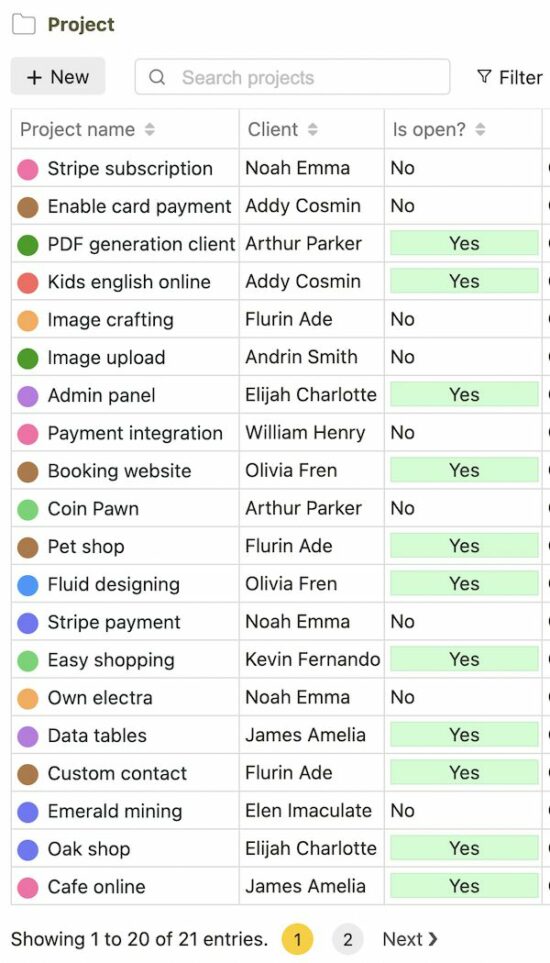
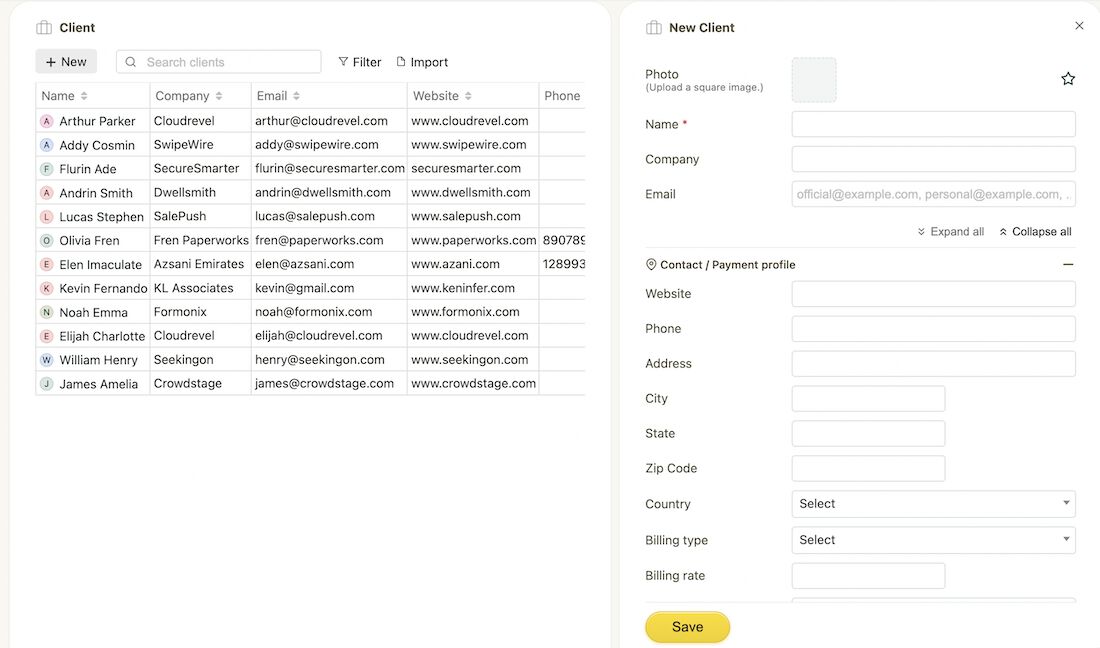
Project management with client CRM and tasks
This section describes the heart of this project management tool.
The complete tool goes around with these three core entities client, project, and task. The other entities of the project management tool are dependent on these primary assets.
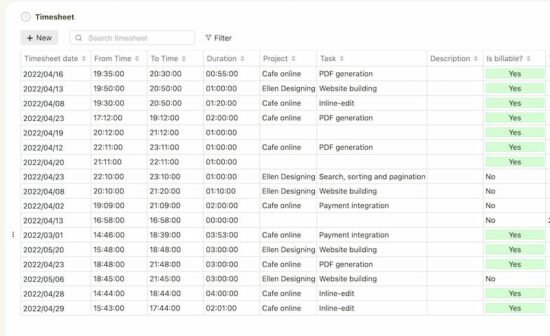
Project scheduling with timesheet
Timesheet log is a critical component of a freelancer’s earnings. In my earlier days of being a freelancer, I lost income because of unorganized timesheet records.
All we need is a good tool and basic discipline. Cazny’s timesheet module is intuitive and easy to record task activities.
Invoice for payments
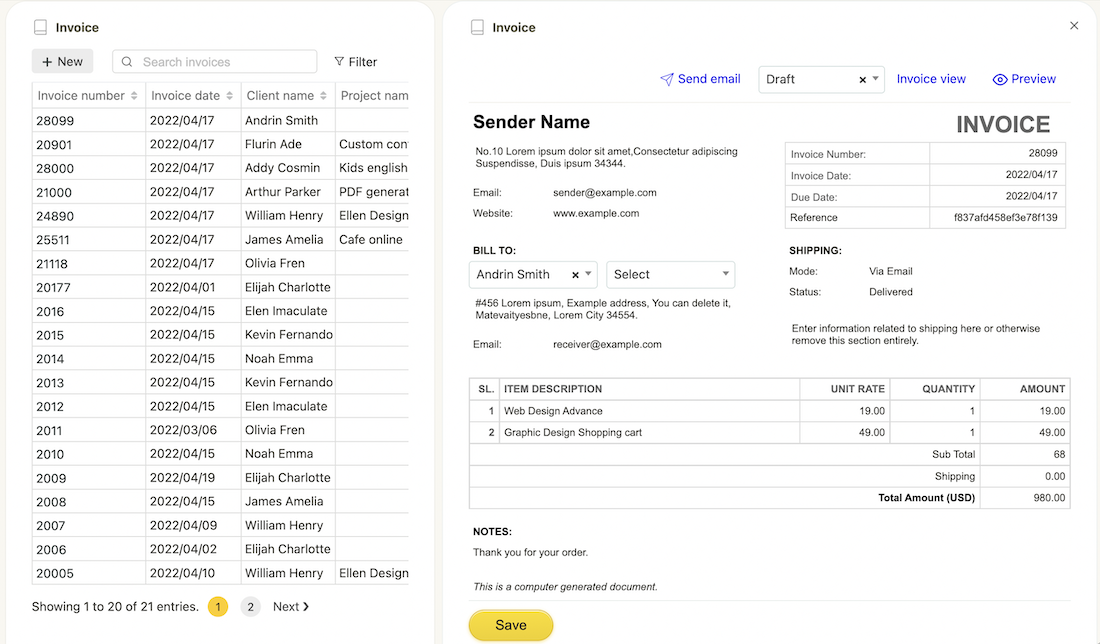
As a freelancer, you can survive without a management tool for all the features but one. A professional invoice is a key to building your brand as a freelancer and continuing business with a client.
Cazny has an intuitive, WYSIWYG editor for generating invoices. It populates and drops down the dependent client/project data to generate data.
It is highly customizable to suit your business. It has more options that are too user-friendly in the context of invoice generation. Example,
Preview invoice.
Generate and download PDF.
Share invoice to a client with just a click of a button.
Email invoice from within the tool.
Sales automation and payment tracking
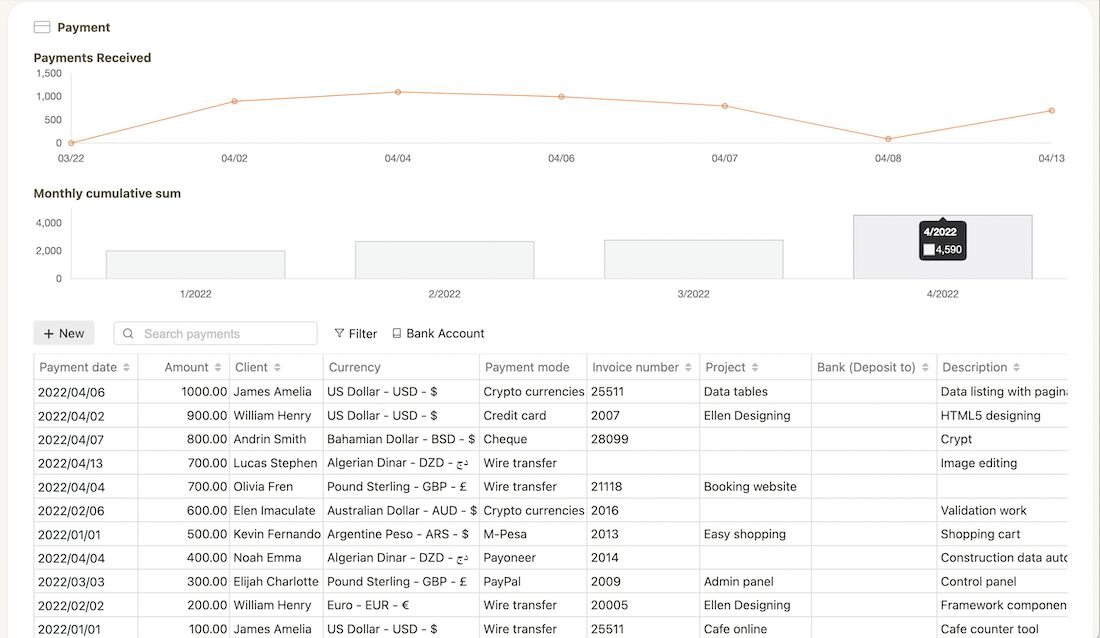
Payments tracking at their best with Cazny both by data tables and graphs. Comparatively, the payment graph view helps freelancers to have a quick bird’s eye view of the income.
This is one of my long-time issues of searching for payment data manually on emails to calculate the income at the stage. Combined with filter, data table and charts, income analysis is just a breeze with Cazny.
More features of Cazny
All functionality uses rich features to provide a good user experience.
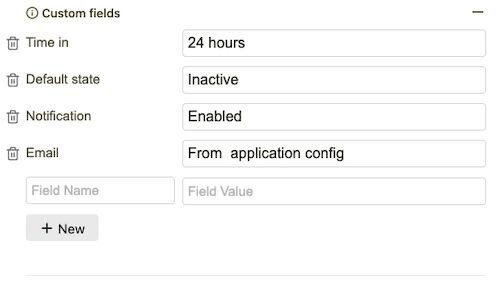
Custom fields
For each freelancer, the client, project, and task have unique columns. This project management tool is designed with minimal and most wanted fields.
If you need additional fields, this feature helps you to add more. It contains add, edit, and remove options on each entity.
Multi-language implementation
The multi-language implementation is made across the site. It is configurable by every member to suit your preference. For public pages, the language can be specified by choosing the option in the header dropdown.
The member can choose their language on the account settings page. Based on this selection, the application framework loads the content. Now you can manage your projects in your own native language.
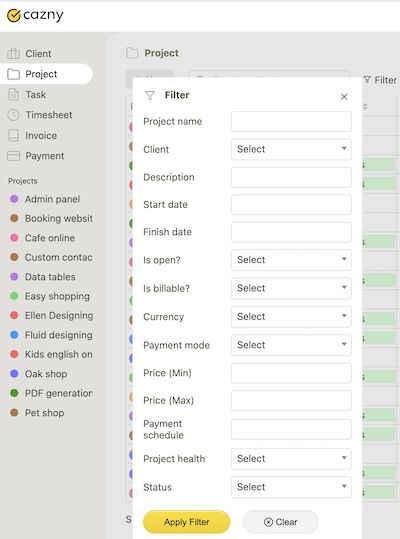
Common search and criteria based filter
Cazny provides an efficient search feature. It has two types of filters to search among the project management tool.
A simple keyword-based common search filter.
A Field-specific criteria-based filter form.
Search is very quick and seamless.
Connecting entities for relevancy
It is all about loading relevant data based on the parent entity. This is to load,
Clients by member
Projects by clients
Tasks by projects
Timesheet by tasks
Invoice to clients
Payments by project, invoices
Data security
It assures for security and protection of member-submitted data. It follows global norms and state-of-the-art tech to protect your data. Architected and developed be members with good experience. Also, a third-party security audit is conducted to ascertain the quality of the software.
Conclusion
As a seasoned freelancer with an agency, we built Cazny for our internal purposes. This has helped us to scale up our business by freeing up our valuable time from administrative activities.
We are launching the tool to you in the belief that it will save your precious time and allow you to focus more on billable hours. Please leave your feedback in the comments section.