Coding in JavaScript is one of the critical skills required in building websites. Though mastering JavaScript is a journey to the center of the earth, continuous learning will help you make it.
We have seen some of the JavaScript functions like find(), forEach() earlier. Now, let’s learn about the function includes() in JavaScript.
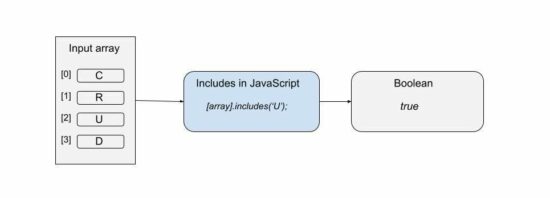
It checks if an array or string includes a given value.
In an array context, it checks the given value is one among the array elements. In the string prototype, the includes() in JavaScript checks if the given value is the substring.
Syntax, parameters and return value
includes(searchElement, [fromIndex]);
It has two parameters, searchElement and fromIndex. The fromIndex is optional and its default value is 0 to start with.
The fromIndex accepts signed numbers. With a negative value, it applies this formula to compute the position to start.
fromIndex = arrayLength + signedFromIndex
It returns boolean true if any match is found or false otherwise.
Note:
JavaScript includes() searches array or string with case sensitivity.
It can also be called as a generic method.
It works in most modern browsers.
The negative value is not applicable for the includes() in the String prototype.
The Array.prototype.includes() will not search for a sub-array.
Where to use JavaScript includes
The includes in JavaScript can be used for many scenarios. Some of them are listed below.
To form a conditional code block based on the presence of the search element in an array or string.
To highlight the keyword in the search result, if the includes in JavaScript returns true.
To make the select, checkbox, radio options selected if the options found in the haystack.
This article includes 4 examples to see how to use JavaScript includes(). Those are,
To search array if a specified element exists or not.
To use includes with a positive or negative fromIndex parameter.
To use String.prototype.includes.
To invoke includes() as a generic method.
Search array element using Includes in JavaScript
This example contains an array of 4 strings. It defines a custom functioncheckOption() to form a condition using includes().
This function receives a string and applies array.includes() on it. It returns Boolean true if the passed element is found on the array.
It prepares the output string based on the boolean value returned. It writes the log on the console to see the result of the program.
how-to-use-includes-in-javascript-array.php
<script> var optionArray = [ 'Create', 'Read', 'Update', 'Delete' ]; checkOption('Read'); checkOption('Filter'); function checkOption(keyword) { var isIncludes = optionArray.includes(keyword); if(!isIncludes) { console.log(keyword + ": not exists"); } else { console.log(keyword + ": exists"); } }

</script>
Includes function with optional from-index parameter
It uses the optional fromIndex parameter while calling the includes() in JavaScript.
It supplies either positive or negative values in the second parameter. On getting a negative index, it computes the position from where it should start the search.
As passed -1 the computed position is 5, since arrayLength+negativeIndex = 6+(-1) = 5.
From the 5th position, it searches for ‘Pagination’ and returns true. When it searches for ‘Filter’ then it will return false.
It’s for using String.prototype.includes() in Javascript. It assigns a long string to a variable and searches the passed keyword on it.
It also receives fromIndex position. A negative index will create no change. This program uses the fromIndex default value 0 and searches the string end to end.
check-string-includes-substring.php
<script>

var inputString = "How much wood would a woodchuck chuck if a woodchuck could chuck wood?";

var result = inputString.includes("woodchuck");

console.log(result);

</script>
Invoke includes in JavaScript on array-like objects
JavaScript allows calling the includes() function as a generic method. In the above examples, the includes() is called with respect to this value representing an array or string context.
This example calls the includes in JavaScript on a functions’ argument list instead of an array.
There are more functions in JavaScript as like as the includes(). The below list shows some of those functions.
find() – applies condition on an array and returns the first element satisfying the condition.
findIndex() – as like as find() but returns index instead of the value.
indexOf() – returns index by element value.
lastIndexOf() – returns last index of an input element. It makes difference if the there are multiple occurances of the passed element.
Conclusion
We have seen about the includes in JavaScript end to end. The above article contains the basic idea about this function. It covers a beginner’s level introductory section and the usage mechanisms.
The examples will make it clear how to use includes in JavaScript. I hope the scenarios to use and the list of related functions gives relevancy to get the idea.
[freebies.indiegala.com] The astronomical Spring begins on the day of the equinox, while Easter is nearly a month away, so why not celebrate early with a small Bonus?
Razer Gold Promotional Raffle
[gold.razer.com] Want to score some Razer Gear? Interested in some great game deals? Why not do both?! Use Razer Gold, enter the raffle and you could win big.
(NOTE: This Razer Gold Promotion is available only in the US region.)
Akupara, Europa Universalis IV, Annapurna Flash Sales
Posted by: xSicKxBot - 03-29-2022, 11:37 AM - Forum: Lounge
- No Replies
Asus Is Reducing Its Graphics Card Prices Across The Board
While new, high-end graphics cards have been hard to get for some time, that's been changing recently. Supply has slowly been increasing, and as high school economics teaches us, the more of a product there is, the less it costs for consumers. PC hardware manufacturer Asus is already shifting its pricing according to that rule reports PC Gamer, meaning RTX 30 Series cards may finally be affordable.
In a series of statements to PC Gamer, Asus confirmed that it "is reducing MSRP aggressively." Specifically, the company has "been dropping pricing across all SKUs" of graphics cards, meaning prices won't just be dropping for Nvidia cards. Anyone who wants to get an Asus AMD card should also find lower prices, although it's not clear when Asus' reduced MSRPs will actually have an effect on what consumers see on store shelves. Currently, an Asus KO Nvidia' GeForce RTX 3070 V2 OC is $900 on Amazon, which is inflated far past the price of an AIB model for the card. Nvidia lists Founders Edition RTX 3070 graphics cards at a $500 MSRP.
While there isn't a clear change in pricing just yet, Asus' confirmation that it is lowering the MSRPs for its graphics cards is a great sign. We could soon see other AIB graphics cards manufacturers–Zotac, EVGA, MSI, Gigabyte, etc.--reduce their prices too.
The game is free to keep until Mar 31th 2022 - 15:00 UTC.
Next week's freebie: City of Brass Total War: WARHAMMER
We are welcoming everyone to join our discord[discord.gg]. We are more active there on finding giveaways, small or large, and there are daily raffles you can participate.
Experience acclaimed developer PlatinumGames' signature combat in BABYLON’S FALL with up to 3 other players or take on the Tower of Babel alone, in this new cooperative action RPG. After the Babylonians perished, only their great tower “The Ziggurat” remained. Now a new Empire has come to pillage its ruins and uncover its fabled treasures. Join forces with other Sentinels, unwilling subjects forcibly implanted with Gideon Coffin, relics that grant the few survivors unrivalled powers. Ascend to greatness as you climb the looming Tower of Babel and uncover its fabled treasures. Only by mastering the powers of your Gideon Coffin, will you unlock your true potential and become strong enough to survive the summit and uncover the secrets that await. Pre-order BABYLON'S FALL to obtain a unique customization for your character, The Empress' Insignia. Show off to other Sentinels that you were one of the first to obtain a Gideon Coffin and become a Sentinel.
Posted by: xSicKxBot - 03-28-2022, 07:29 AM - Forum: Python
- No Replies
Is There A List Of Line Styles In Matplotlib?
You want to plot a series of data with unique styles. You need to pick various line styles from a list but not sure how to get started. This tutorial will help you out.
Yes, there is a list of line styles in matplotlib. To get the list, import the lines from the matplotlib library.
from matplotlib import lines
Next, get the keys from the lineStyle attribute.
lines.lineStyles.keys()
You can then print the styles and choose your preferred style per plot.
Assume we want to plot the annual earnings of company X’s employees (designers, developers, and accountants) aged between 20 and 29. We store the ages in a list as follows.
ages = [20, 21, 22, 23, 24, 25, 26, 27, 28, 29]
Next, we create lists for each group of employees’ salaries.
Now that we have some data to practice various line styles in matplotlib, let’s go ahead and manipulate the data.
Practical Ways To Use Line Styles In Matplotlib
➥Get the required functions
Install the matplotlib library using pip.
pip install matplotlib

# OR

pip3 install matplotlib
After installing Matplotlib, create a file and import the library’s functions into it. I have created one called employees.py and imported lines and pyplot as follows.
from matplotlib import lines, pyplot as plt
We will get the line styles from lines and plot the lines with pyplot. It is a convention to shorten pyplot as plt. In simple words it is an alias.
➥Plot the data
Plotting a bunch of data on a curve requires specifying the values for the x-axis and y-axis.
The plt.show() function instructs Python to reveal the graphical information cached in the memory. As soon as you run the file on the terminal, you get three solid lines of different colors.
python employees.py
Now let us label the lines and add a title to the plots for easier identification. Insert the code before the plt.show() line.
plt.xlabel("Ages")

plt.ylabel("Annual salary in USD")

plt.title("Salaries of X employees for 20-29 ages")
Output:
However, we cannot tell what the green, blue, and coral lines represent. So, let’s mark the lines using labels and a legend.
➤legend represents the area that describes specific elements of the graph. In this case, we will use the legend() method to describe the labels assigned previously.
plt.legend()

plt.show()
Output:
Full code: Here’s the full code that helps to represent our data in the form of different lines.
Looks better, right? Yes, but we can improve the visuals by changing the line styles.
Change The Line Styles
We assigned different labels to distinguish different data but is there a way to change the style of the line? Yes! The first step is to grab the lines with the help of the lines module. You can import lines from matplotlib as we have done above or get them from Matplotlib line style docs.
Let’s print the styles from the imported lines. After commenting out the plt.show() method, run the print line below the import statement.
print(lines.lineStyles)
We get a dictionary which represents the type of styles in which the lines can be represented as follows:
You can get a list of styles in matplotlib using the lines attribute. After storing the target styles, you can change the lines’ appearance using pyplot‘s built-in linestyle attribute. Additionally, as illustrated in this tutorial, you can differentiate lines using markers, width, and colors.
Exec Summary Starting with Java 11, Oracle will provide JDK releases under the open source GNU General Public License v2, with the Classpath Exception (GPLv2+CPE), and under a commercial license for those using the Oracle JDK as part of an Oracle product or service, or who do not wish to use open so...
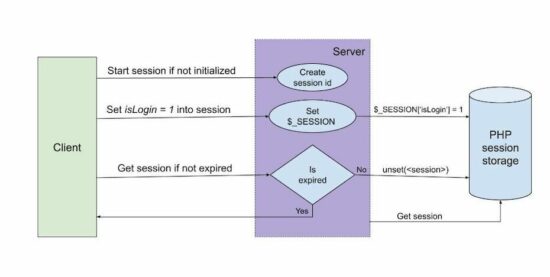
PHP session is one of the methods for keeping data persistency on the server side.
PHP sessions have a deadline time limit for keeping data persistent. PHP configuration file includes directives to have this specification.
We can also create custom code to change the default PHP session deadline.
This article contains sections that describe the PHP sessions, their time-limit configurations. It provides examples for setting session limits and tracking existence.
The below example gives a quick solution to set PHP session time. It contains only two steps to set and track the session expiration status.
Quick example
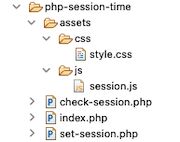
1. Create a file set-session.php and set value and lifetime.
We have already seen PHP sessions and cookies in a previous article. PHP sessions are for managing application data, state persistent during the working flow.
There are a lot of uses of sessions in an application. The below list shows some of the states or data managed by the use of sessions.
We have seen how to create a login script using the PHP session. In that, the session lifetime tracking can be used to log out after few minutes of inactivity.
PHP session lifetime settings
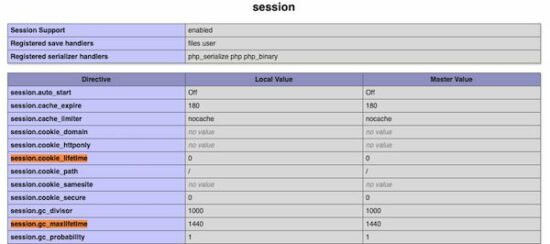
This section describes the configuration directives used to set PHP session time. The below table shows two PHP.ini settings related to the session.
PHP directive
Description
session.gc_maxlifetime
It sets the max lifetime after which the session will be elapsed and collected as garbage.
session.cookie_lifetime
It sets the time limit for the session cookie in seconds. Default is 0 which means to be persistent until the client quits. Note: PHP session_set_cookie_params() sets all the session cookie parameters in runtime.
Example: Working with PHP session time – Set expiration and limit lifetime
This PHP session time handling example is the enhanced version of the above quick example.
It creates three session variables to set color, shape and size. It sets the lifetime for each PHP session variable while setting values.
The PHP code checks if the session exists. Once the time is reached, it unset that particular session variable and destroys it.
Landing page to set session
The landing page of this example shows a control to set the PHP session time. Once started, the session expiration status is checked at a periodic interval. This page includes the AJAX script to raise the call to PHP to check the session.
If the PHP session time is over, then this page will display a notice to the user. After all the sessions are expired, then the page will clear the notification and ask to reset the session.
This script sets an interval to call the AJAX script to check the PHP session time. After getting the response, this AJAX success block shows the expired PHP sessions.
It checks the PHP session time every 5 seconds via AJAX. This script uses JavaScript setInterval() to invoke the checkSession() method.
Force Energy Bundle, Metal Gear, HITMAN, Handy Sales
Force Energy Bundle | 6 Steam Games | 94% OFF
[www.indiegala.com] Get energized, accelerate and move forward through the day with force, enthusiasm and a powerful indie selection of 6 video games on Steam.
The game is free to keep until Mar 24th 2022 - 15:00 UTC.
Next week's freebie: DEMON'S TILT
We are welcoming everyone to join our discord[discord.gg]. We are more active there on finding giveaways, small or large, and there are daily raffles you can participate.





 Change The Line Styles
 Tidbits